radio AUDI ALLROAD 2000 User Guide
[x] Cancel search | Manufacturer: AUDI, Model Year: 2000, Model line: ALLROAD, Model: AUDI ALLROAD 2000Pages: 306, PDF Size: 9.95 MB
Page 174 of 306
-------------�-------CONTROLS AND
EQUIPMEN T
Audi Homelink ® Uni versal Transm itter*
-� ....... ..
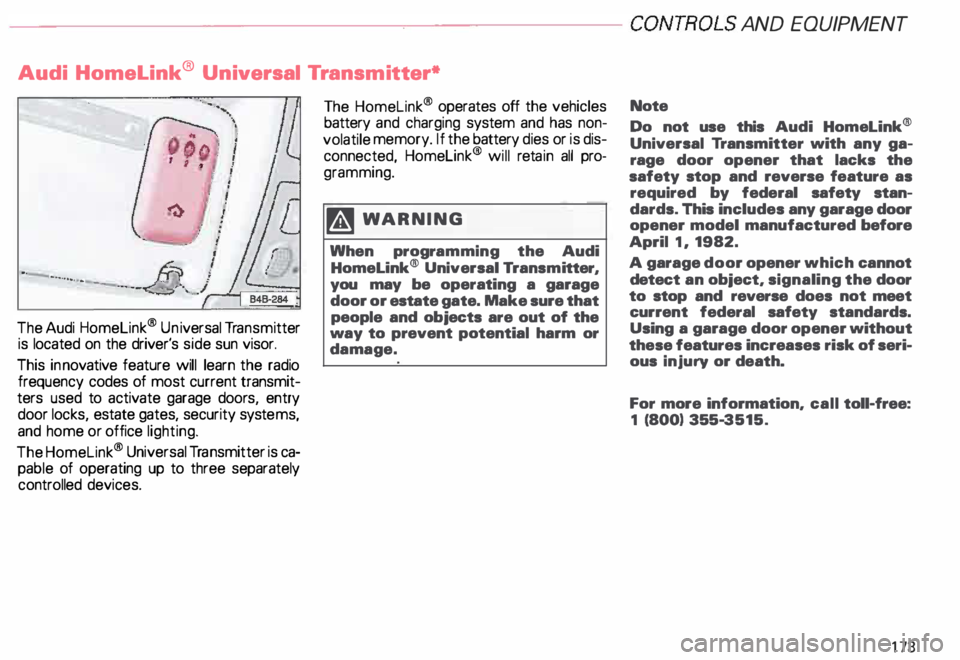
The Audi Homelink ® Un iversal Transm itter
is located on the driver's side sun visor.
This innovative feature will learn the radio
frequency codes of most current transmit
ters used to activate garage doors, entry
door locks, estate gates, security systems,
and home or office lighting.
The Homelink ® Universal Transmitter is ca
pable of operating up to three separately
controlled devices. The
Homelink ® operates off the vehicles
battery and charging system and has non
volatile memory. If the battery dies or is dis
connected, Homelink® will retain all pro
gramming.
�W ARNING
When programming the Audi
Homelink® Universal Transm itter,
you may be operating a garage
door or estate gate. Make sure that
people and objects are out of the
way to prevent potential harm or
damage. Note
Do not
use this Audi Homelink®
Universal Transmitter with any ga
rage door opener that lacks the
safety stop and reverse feature as
required by federal safety stan
dards. This includes any garage door
opener model manufactured before
April 1, 1982.
A garage door opener which cannot
detect an object, signaling the door
to stop and reverse does not meet
current federal safety standards.
Using a garage door opener without
these features increases risk of seri
ous injury or death.
For more information, call toll-free:
1 (800) 355-3515.
173
Page 186 of 306

--------------------CONTROLS AND
EQUIPMENT
Steering wheel with Audio controls*
To help make certain that you are not diS
tracted from paying proper attention to the
traffic conditions when you are using the ra
dio, switches have been provided on the
st eering wheel for basic audio functions for
factory installed radios. The radio, cassette
player, or CD player, can, of course, also be
operated without restriction on the unit it
self.
A detailed description of the radio is pro
vided in a separate Sound System manual.
The following functions can be operated by
pressing the buttons on the steering wheel:
C -I ncrease volume
A -S eek I Advance -
Radio
Radio: seek forward
- Cassette player: fast forward
- CD: CD track forward
B - Seek I Rewind
- Radio: seek in reverse direction
- Cassette player: fast rewind
- CD: CO-track back -
Cassette player
-C D
Depending on which unit is currently oper
ating.
D -R educe volume
Radio
- Cassette player
- CD
Depending on which unit is currently oper
ating. E
-Stat ion buttons (Preset) I
back •
You can recall up to twelve stations one af-
ter another in the reverse direction.
If no sta tions are assigned to the presets or
if they are not being received, you may only
hear static.
F - Station buttons (Preset) I for�
ward
Yo u can recall up to twelve stations one af
ter another in the forward direction.
If no stations are assigned to the presets or
if they are not being received, you may only
hear static.
185
Page 187 of 306

CONT
ROLS AND
EQUIPMENT--------------------
Steering wheel with radio and
telephone equipment in the steering wheel*
If your radio or mobile telephone are factory
ins talled, switches for the radio and tele
phone functions are provided in the steering
wheel to help you give your fullest attention
to your driving responsibilities while operat
ing the radio or telephone system. Of
course, all the operating features of your ra
dio, cassette/CO player, or telephone can
still be accessed on this equipment itself.
Detailed description of the radio and Audi
telephone are provided in separate operat
ing manuals.
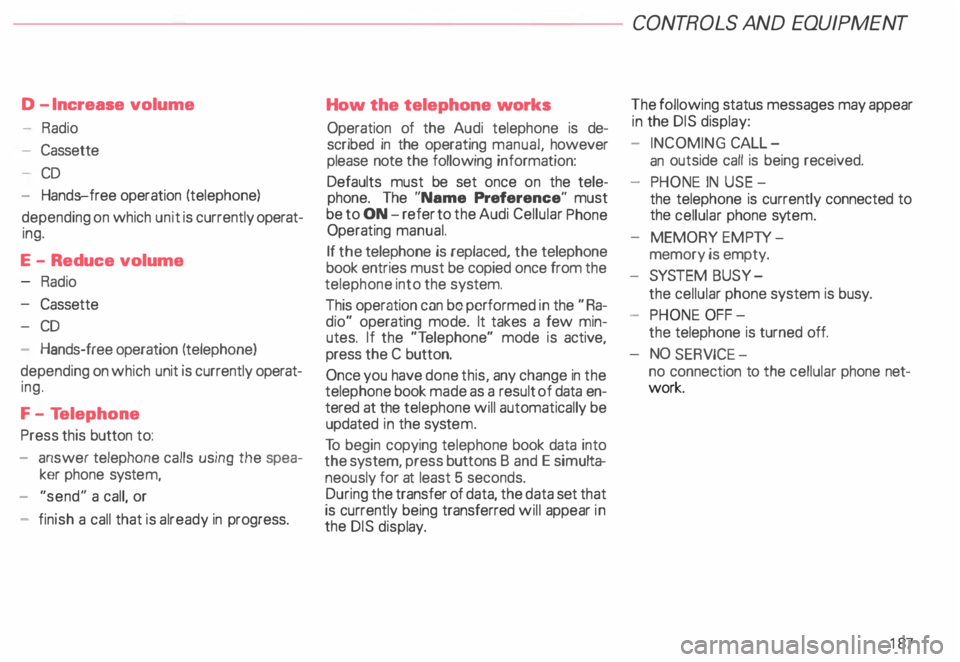
18 6 The following
functions can be operated by
pressing the button:
A -S eek I Advance
- Radio: seek in forward direction
- Cassette: fast forward
- CD: CD track forward
Autodial numbers (telephone memory):
scroll down (names in alphabetical order
Z --+ A). Holding this button down will
cause the display to scroll quickly
through the autodial numbers. B
-Seek I Rewind
- Radio: seek in reverse direction
- Cassette: fast rewind
- CD: CD track back
- Autodial numbers (telephone memory):
scroll down (names in alphab etical order
A --+ Z}. Holding this button down will
cause the display to scroll quickly
through the autodial numbers.
C -Radio I telephone button
Pressing this button allows you to switch
between the radio function (R) and the tele
phone function m.
Depending on which mode is selected, the
Driver Information System (DIS) will either
display the radio data or the telephone data.
The telephone data will suppress the radio
data in the DIS display whenever the tele
phone is in use.
Page 188 of 306
D
-Increase volume
- Radio
- Cassette
- CD
- Hands-free operation (telephone)
depending on which unit is currently operat
ing.
E -Reduce volume
Radio
- Cassette
- CD
- Hands-free operation (telephone)
depending on which unit is currently operat
ing.
F - Te lephone
Press this button to:
- answer telephone calls using the spea
ker phone system,
- "send" a call, or
- finish a call that is already in progress. How
the telephone works
Operation of the Audi telephone is de
scribed in the operating manual, however
please note the following information:
Defaults must be set once on the tele
phone. The "Name Preference" must
be to ON -refer to the Audi Cellular Phone
Operating manual.
If the telephone is replaced, the telephone
book entries must be copied once from the
telephone into the system.
This operation can be performed in the "Ra
dio" operating mode. It takes a few min
utes. If the "T elephone" mode is active,
press the C button.
Once you have done this, any change in the
telephone book made as a result of data en
tered at the telephone will automatically be
updated in the syste m.
To begin copying telephone book data into
the system, press buttons B and E simul ta
neously for at least 5 seconds.
During the transfer of data, the data set that
is currently being transferred will appear in
the DIS disp lay. CONT
ROLS AND EQUIPMENT
The following status messages may appear
in the DIS display:
- INCOMING CALL-
an outside call is being received.
- PHONE IN USE -
the telephone is currently connected to
the cellular phone sytem.
- MEMORY EMPTY-
memory is empty.
- SYSTEM BUSY-
the cellular phone system is busy.
- PHONE OFF-
the telephone is turned off.
NO SERV ICE-
no connection to the cellular phone net
work.
187
Page 189 of 306
CONT
ROLS AND
EQUIPMENT-------------------------------------------
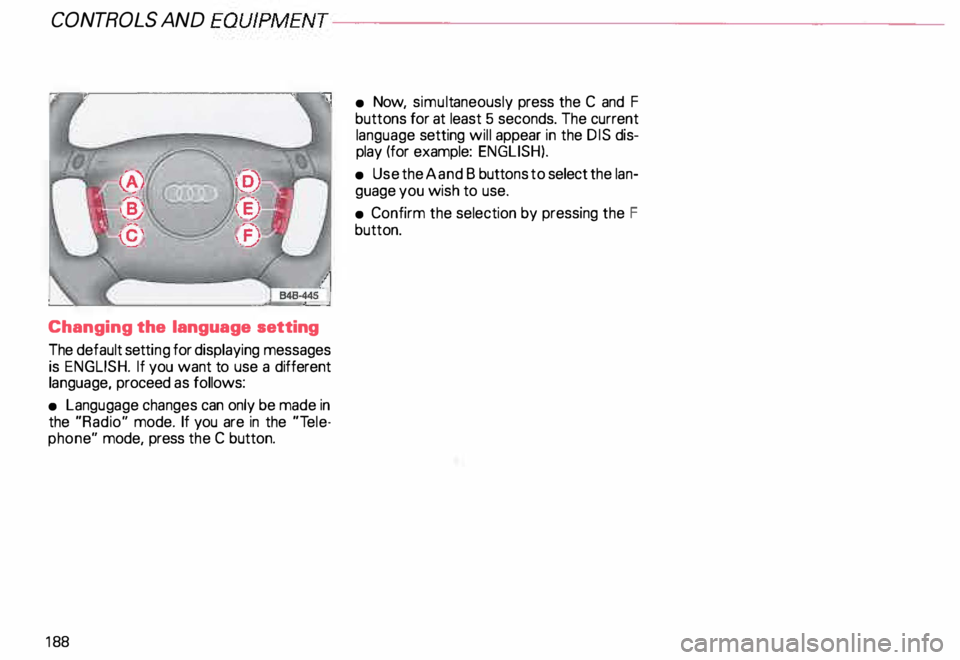
Changing the language setting
The default setting for displaying messages
is ENGLISH. If you want to use a different
language, proceed as follows:
• Langugage changes can only be made in
the "Radio" mode. If you are in the "Tele
phone" mode, press the C button.
18 8 •
Now, simult aneously press the C and F
buttons for at least 5 seconds. The current
language setting will appear in the DIS dis
play (for example: ENGLISH).
• Use the A and B butt ons to select the lan
guage you wish to use.
• Confirm the selection by pressing the F
button.
Page 190 of 306
---------------------CONTROLS AND
EQUIPMENT
Mobile telephones and CB radios
Mobile telephones or CB radios
should not be used in the vehicle un
less a separate outside antenna is
installed.
If you use a mobile telephone or CB radio in
side the vehicle without an outside antenna,
the high frequency energy (resonance ef
fect) emitted inside the vehicle can cause
malfunctions in the vehicle's electronic sys-
tem.
Moreover the unit achieves maximum
pick-up only if an outside antenna is
installed. �W
ARNING
Using a mobile telephone or CB
radio inside the vehicle without
having a separate outside antenna
could be dangerous to your health
due to the high frequency energy
emitted!
In addition, an outside antenna can increase
the reception range of your equipment. Note
Always heed the instructions of mo
bile telephones and CB radios.
�W ARNING
Always keep your attention on the
road and traffi c!
189
Page 214 of 306
Washing
The best protection against environmental
influences is frequent washing and waxing.
How often this is required depends on how
much the vehicle is used, where it is parked
(garage, in the open under trees, etc.), the
seasonal and weather conditions as well as
env ironmental influences. The longer bird
droppings, insects, tree resin, road and in
dustrial grime, tar, soot, road salt and other
materials remain on the vehicle paint, the
more lasting their destructive effect will be.
High temperatures, as from strong sunlight,
intensify the corrosive effect.
Under certain circumstances, weekly
washing may be necessary. Under other
conditions. a monthly washing and waxing
may be adequate.
After the winter, the underside of the ve
hicle should be thoroughly washed. Automatic
car wash
The vehicle paint is so durable that the ve
hicle can normally be washed without prob
lems in an automatic car wash. However,
the effect on the paint depends to a large
extent on the design of the facil ity, the filter
ing of the wash water, the type of wash and
care material, etc. If the paint has a dull ap
pearance after going through the car wash
or is scratched, bring this to the atte ntion of
the operator immediately. If necessary use
a different car wash.
Notes
• Before going through a car wash, be sure
to take the usual precautions such as clos
ing the windows and sunroof*.
• You don't have to remove the factory
installed radio antenna. However, if your ve
hicle is equipped with the Navigation Sys
tem*, then you must remove the antenna.
• If you have installed additional accesso
ries on the vehicle -such as spoilers, roof
rack, etc. -it is best to ask the car wash op
erator if these should be remov ed. VE
HICLE CARE
Washing the vehicle by hand
� In the intsi'Sst of the environ
� msnt, the vehicle should only be
washed in special wash bays.
First soften the dirt with plenty of water and
rinse off as well as possible.
Then clean the vehicle with a soft sponge,
glove or brush starting on the roof and work
ing down using only slight pressure. Special
car wash soap should only be used for very
persistent dirt.
Rinse the sponge or glove thoroughly and
oft en.
Clean wheels .and sill panels last, using a dif
ferent sponge if pos sible.
After washing the vehicle, rinse thoroughly
with water and wipe it off.
213
Page 248 of 306
f4 WARNING
continued
• Never charge a frozen battery. It
may explode because of gas
trapped in the ice. Allow a frozen
battery to thaw out first.
• Do not reuse batteries which
have fr ozen. The baUery housing
may have cracked and weakened
when the battery froze.
Always heed all WA RNINGS
on page 232.
• Battery acid that may spill during
charging should be washed off with
a solution of warm water and baking
soda to neutralize the acid.
• Never use a fast charger as a boo
ster to start the engine. This will se
riously damage sensitive electronic
components, such as control units,
relays, radio, etc., as well as the bat
tery charger. Slow
battery charging
�W ARNING
Heed all WA RNINGS and follow in
structions that come with your
battery charger.
• Before charging the battery, switch off
the ignition and all electrical consumers.
• Make sure the area is well ventilated
when you charge the battery.
• It is not necessary to remove the battery
from the engine compartment, and it is also
not necessary to disconn ect the cables.
• Make sure the electrolyte level in each
cell is between the .. min" and "max ..
marks. If the fluid level is below the "min"
mark, let your authorized Audi Dealer cor
rect the condition. VE
HICLE CARE
• Conne ct charger cables.
Charger cables must be connected
POSITIVE (+ ) to POSITIVE (+ ) and
NEGATIVE (-) to NEGATIVE (-).
�W ARNING
To reduce the danger of explosion,
never connect or disconnect char
ger cables while the charger is op
erating.
• Switch on charger.
• Charging rate not over 6 amps.
Normal ly, a battery should be charged at no
more than 1 0 percent of its rated capacity.
For example, a charging current of 4.5 amps
would be used on a battery rated at 45 Ah.
Rated capacity of the battery in your vehicle
is listed on the battery housing.
• After charging, first turn off the charger
and then disconnect charger cables. g Always heed all WARNINGS
� on page 232.
247
Page 249 of 306
VEHICLE CA
RE----------------------------------------------------
When disconnecting and
connecting the battery ...
When you disconnect the vehicle battery
please note the following:
- some data stored in the driver informa-
tion system are erased,
- the clock goes out,
- the factory installed radio locks up,
- the Engine management system,
- the one-touch-u p and one-touch-down
functions of the power windows no lon
ger work,
- all stored seat positions in the memory*
are erased.
Af teryou reconnect the battery, you must
reset the clock. � page 118.
You also have to reset the Engine manage
ment system -see "Starter Switch "
�pa ge 113.
You also have to reset the one-touch-up and
one-touch�down feature on power win
dows -see "Power windows "
�p age 71.
248 You
have also reset the seat memory* -see
"Seats"
� page 81.
The radio must be re-coded with the correct
radio code - see your radio Operating In
structions.
Replacement battery
A replacement battery must have the same
specifications and dimensions as the origi
nal equipment battery. Specifications are
listed on the battery housing.
When installing the battery, make sure the
ignition and all electrical consumers are
switched off.
r.Gb. Because of the problem of �proper di
sposal of a battery, we
recommend that you have your au
thorized Audi Dealer change the
battery for you. Batteries contain
sulfuric acid and lead and must al
ways be disp osed of properly ob
serving all environmental regula
tions. Air
cleaner
A dir ty air cleaner element not only reduces
the engine output and increases fuel con
sumption considerably but can also cause
premature engine wear.
Normally, it is not necessary to service the
air cleaner more often than recommended
in the Maintenance booklet. If the vehicle is
driven on very dusty roads, the air cleaner
must be serviced more frequently, even dai
ly.
If your air cleaner element must be
changed mora frequently, we rec
ommend that you have the air clean
er serviced by your authorized Audi
Dealer or a qualified workshop.
The air cleaner element must never
be cleaned or soaked with gasoline,
cleaning solvents or oil.
g Always heed all WARN INGS
t!!3 on page 232.
Page 277 of 306
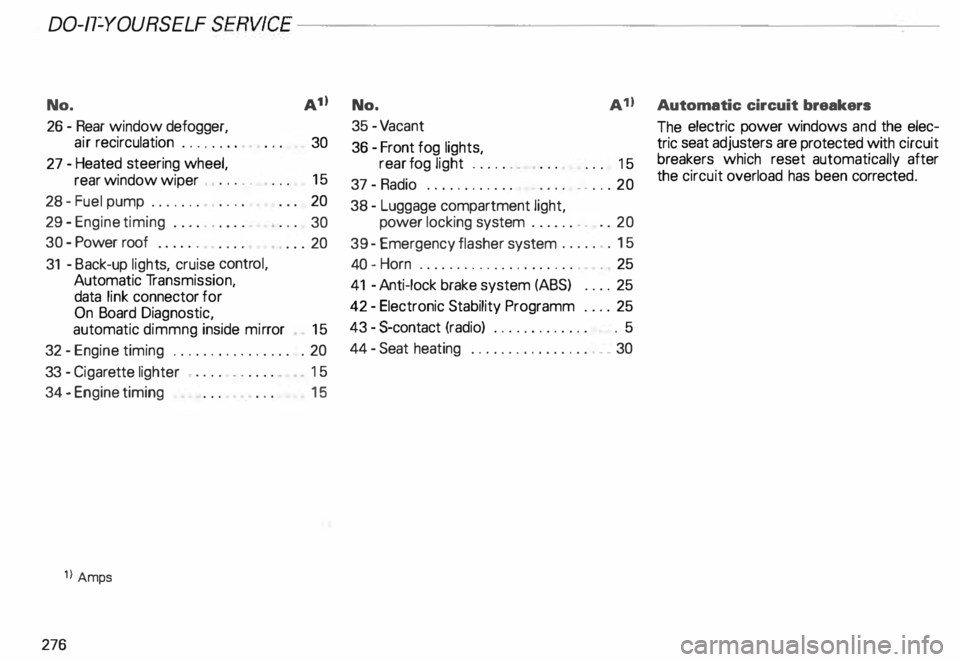
DO-IT-YOURSELF
SERVICE----------------------
No.
A11 No.
A 11 Automatic
circuit breakers
26 -Rear window defogger,
air recirculation . . . . . . . .
30
27 -Heated steering wheel,
rear window wiper , . . . . . 15
28 -Fuel pump . . . . . . . , . . . . 20
29 - Engine timing . . . . . . . . . .
30
30 -Power roof . . . . . .
. ... 20
31 -Back-up lights, cruise control,
Automatic Transmission,
data link connector for
On Board Diagnostic,
automatic dimmng inside mirror
15
32 -Engine timing . . . . . . . . . . . . . . . . . 20
33 -Ciga rette lighter 15
34 - Engine timing
1l Amps
276 15 35
-Va cant
36 -Front fog lights,
rear fog light ...... .
37 -Radio ........... .
38 - Luggage compartment light, . . .
15
. . ... 20
power locking system . . . . . . . . . . 20
39 -Emergency flasher system ....... 15
40 -Horn . . . . . . . . . . . . . . . . . . . . . . . 25
41 -Anti-lock brake system (ABS) .. .. 25
42 -Electronic Stability Programm .... 25
43 -$-contact (radio) . . . . . . . . . . . . . . 5
44 -Seat heating . ... ... . ... ... ..... 30 The
electric power windows and the elec
tric seat adjusters are protected with circuit
breakers which reset automatically after
the circuit overload has been correcte d.