page 57 AUDI ALLROAD 2000 Service Manual
[x] Cancel search | Manufacturer: AUDI, Model Year: 2000, Model line: ALLROAD, Model: AUDI ALLROAD 2000Pages: 306, PDF Size: 9.95 MB
Page 80 of 306
Before
adjusting your seat there are some
important considerations to keep in mind.
• To prevent interference with the seat ad
justment, never store anything under the
seats.
• The front seats should be adjusted be
fore fastening the safety belts.
• The position of the driver's seat you find
most comforta ble can be stored in the me
IT]Ory. See page 81 for details.
�W ARNING
Because the seats can be electri
cally adjusted with the ignition
key removed, never leave children
unattended in the vehicle. Unsu
pervised use of the electric seat
adjustments may cause serious in
iury. Seat
adjustment
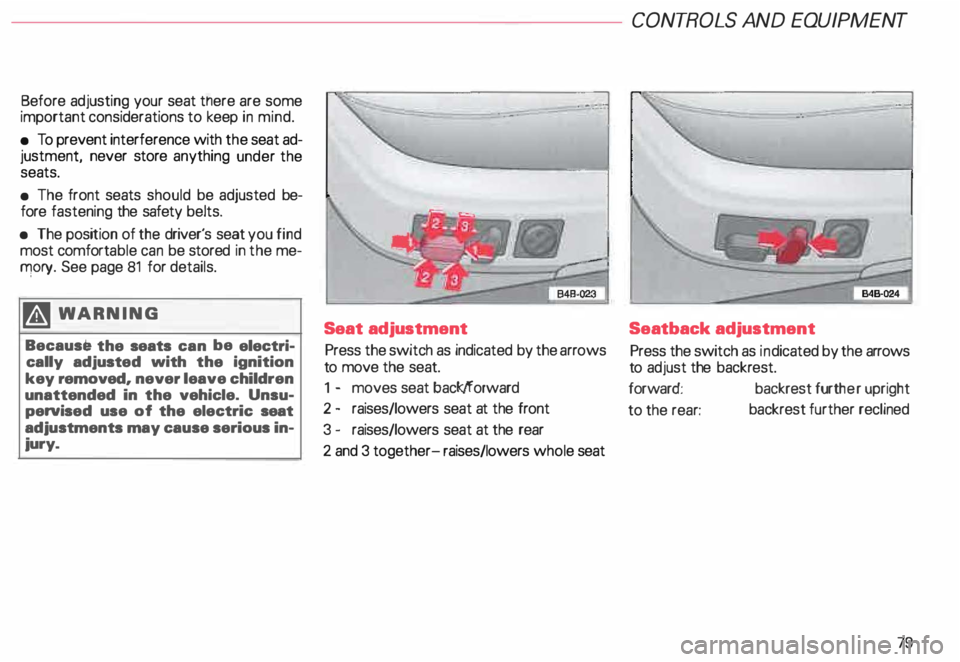
Press the switch as indicated by the arrows
to move the seat.
1 - moves seat back/forward
2 - raises/lowers seat at the front
3 - raises/lowers seat at the rear
2 and 3 together- raises/lowers whole seat CONT
ROLS AND EQUIPMENT
Seatback adjustment
Press the switch as indicated by the arrows
to adjust the backrest.
forward: backrest further upright
to the rear: backrest
further reclined
79
Page 82 of 306
Memor
y for front seats*
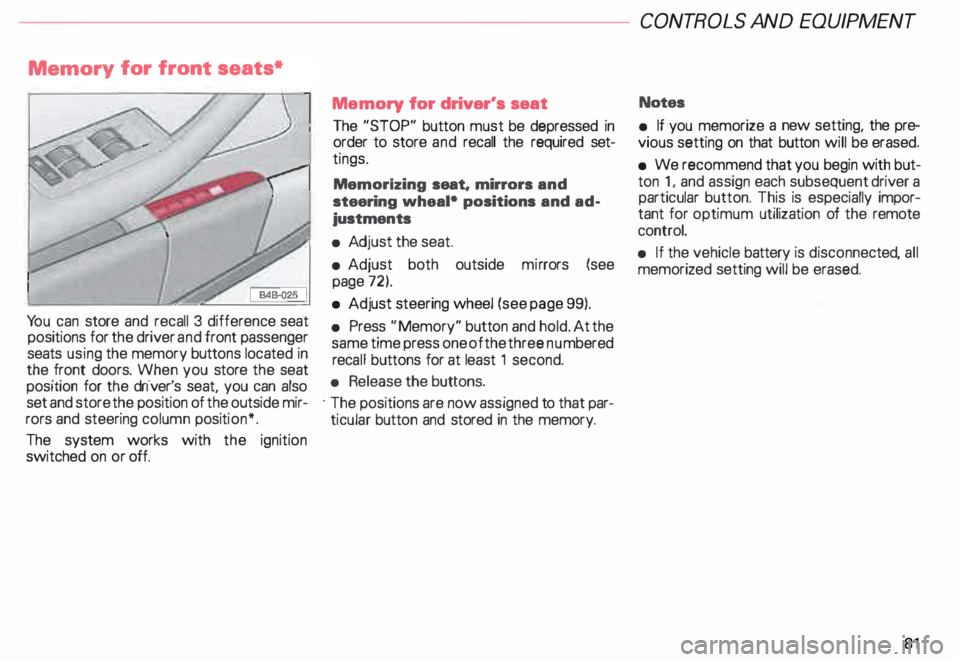
Yo u can store and recall 3 difference seat
positions for the driver and front passenger
seats using the memory buttons located in
the front doors. When you store the seat
position for the driver's seat, you can also
set and store the position of the outside mir
rors and steering column position*.
The system works with the ignition
switched on or off. Memory
for driver's seat
The "STOP" button must be depressed in
order to store and recall the required set
tings.
Memorizing seat. mirrors and
steering wheal• positions and ad
justments
• Adj ust the seat.
• Adjust both outside mirrors (see
page 72).
• Adjust steering wheel (see page 99).
• Press "Memory" button and hold. At the
same time press one of the three numbered
reca ll buttons for at least 1 second.
• Release the buttons.
· The positions are now assigned to that par
ticular button and stored in the memory. CONT
ROLS AND EQUIPMEN T
Notes
• If you memorize a new setting, the pre
vious setting on that button will be erased.
• We recommend that you begin with but
ton 1, and assign each subsequent driver a
particular button. This is especially impor
tant for optimum utilization of the remote
control.
• If the vehicle battery is disconne cted, all
memorized setting will be erased.
81
Page 85 of 306
CONTROLS AND EQ
UIPMEN T---------------------
Retrieving using the
memory buttons
• With the passenger's door open, de
press and release the desired memory but
ton. The seat will automatically adjust to the
stored position.
• If the door has been closed, you must
then depress and hold the memory button
until the seat has reached its stored posi
tion.
Note
You can not reca ll the stored seat adjust
ment for the front passenger's seat using
the remote control in the master key.
84 Emergency
Off
In an emergency, you can interrupt
any retrieval procedure by
• pressing the '"STOP'" button (see il
lustration on page 81 and 83). or
• tapping one of the memory buttons.
Pushing the"ON/OFF"button to the OFF
position only switches off the Memory. The
stored settings will not be erased.
It's a good idea to turn the Memory off if the
vehicle is going to be used temporarily by a
driver whose driving position will not be
memorized.
The advantage is that the personal settings
that have already been memorized will re
main intact and will not change each time
the vehicle is unlocked using the remote
control. Note
The memory function is switched off when
the STOP button is pressed. The word
''OFF" lights up if the headlights are
switched on. However, the programmed
seat, outside mirrors and steering wheel
positions remain stored in the memory.
Page 86 of 306
---------------------CONTROLS AND
EQUIPMENT
Center armrest
�WARNING
When folded down, the armrest
can restrict the driver's move
ment. When driving in conditions
that may call for quick maneuvers,
fold up the armrest. This will allow
you to react more quickly to avoid
an accident.
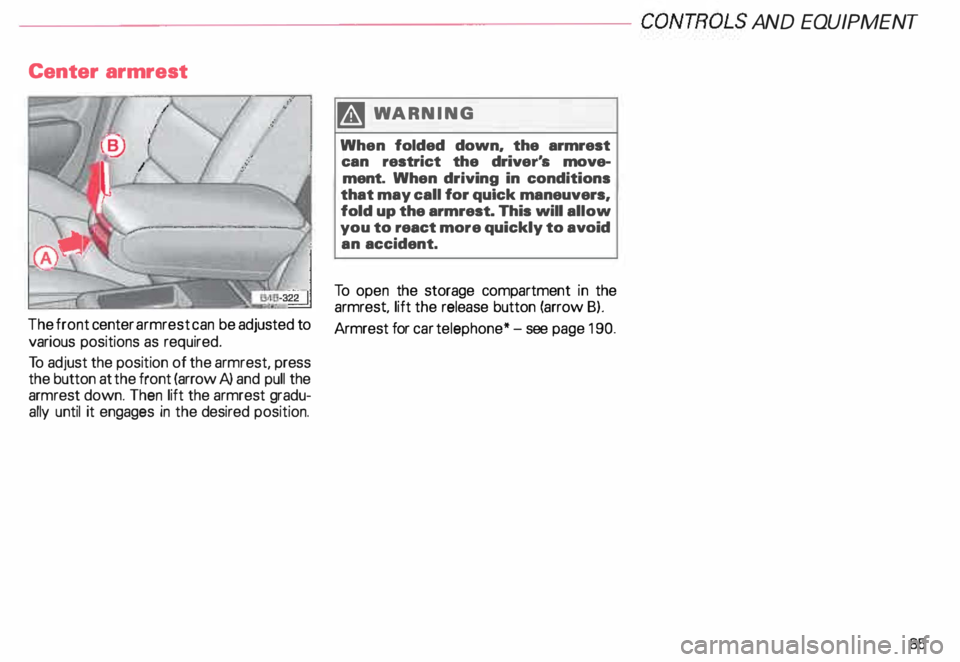
To open the storage compartment in the
armrest lift the release button (arrow B).
The front center armrest can be adjusted to
Armrest for car telephone* -see page 190.
various positions as required.
To adjust the position of the armrest, press
the button at the front (arrow A) and pull the
armrest down. Then lift the armrest gradu
ally until it engages in the desired position.
85
Page 92 of 306
--------------------CONTROLS AND
EQUIPMENT
Partition net
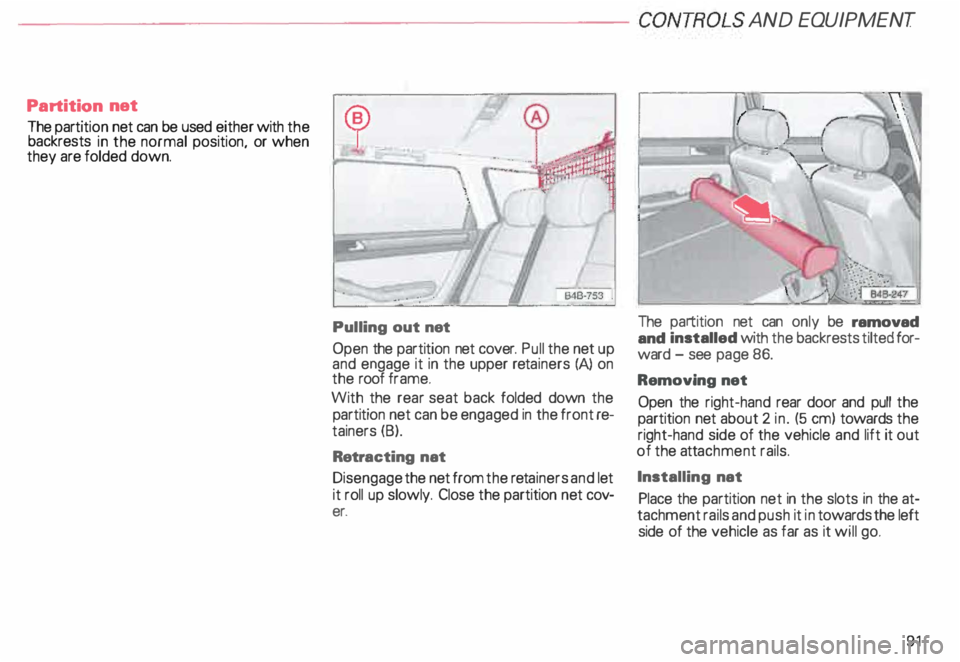
The partit ion net can be used either with the
backrests in the normal position, or when
they are folded down.
Pulling out net
Open the partition net cover. Pull the net up
and engage it in the upper retainers (A) on
the roof frame.
With the rear seat back folded down the
partition net can be engaged in the front re
tainers (B).
Retra cting nat
Disengage the netfromthe retainers and let
it roll up slowly. Close the partition net cov
er. The
partition net can only be ramovad
and installed with the backrests tilted for
ward -see page 86.
Removing net
Open the right-hand rear door and pull the
partition net about 2 in. (5 em) towards the
right-hand side of the vehicle and lift it out
of the attachment rails.
Installing nat
Place the partition net in the slots in the at
tachment rails and push it in towards the left
side of the vehicle as far as it will go.
91
Page 93 of 306
CONTROLS AND
EQUIPMEN T---------------------
Rear facing child seat bench*
Two children starting at 3 years of age can
sit on the rear facing child seat bench. The
child must not be taller than 50 in. (1.3 m)
and must not weigh more th an 78 lbs
(36 kg). .
Children must always wear safety
belts f
Activating the child safety lock -see
page 65.
�W ARNING
• Do not place any other child
seats or child carriers on rear fac
ing child seat bench.
• For safety reason, never remove
the head restraints on the child
seat bench.
• The seatback for the rear seat
bench must always be in its up
right position and locked securely
in place. You shouldn't be able to
see the red marking on the release
latches -sea page 87.
92 Installing
1 setting up the child seat
bench
Yo u must remove the luggage compart
ment cover, the net and the round cover
caps in the cargo area floor cover before
installing the child seat bench. The cover
caps, which are normally inserted in the
mounting for the child seat bench on the
cargo floor cover, con be stowed on the bot
tom side of the remova ble cargo area floor
cover.
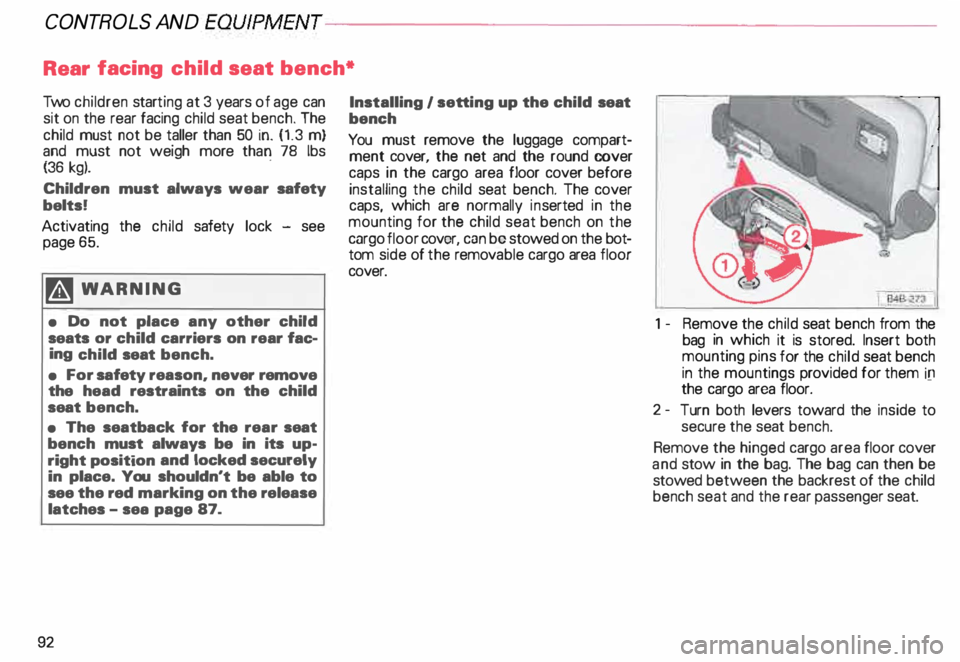
1 -Remove the child seat bench from the
bag in which it is stored. Insert both
mounting pins for the child seat bench
in the mountings provided for them ill
the cargo area floor.
2- Turn both levers toward the inside to
secure the seat bench.
Remove the hinged cargo area floor cover
and stow in the bag. The bag can then be
stowed between the backrest of the child
bench seat and the rear passenger seat.
Page 94 of 306
-------------------CONTROLS AND
EQUIPMENT
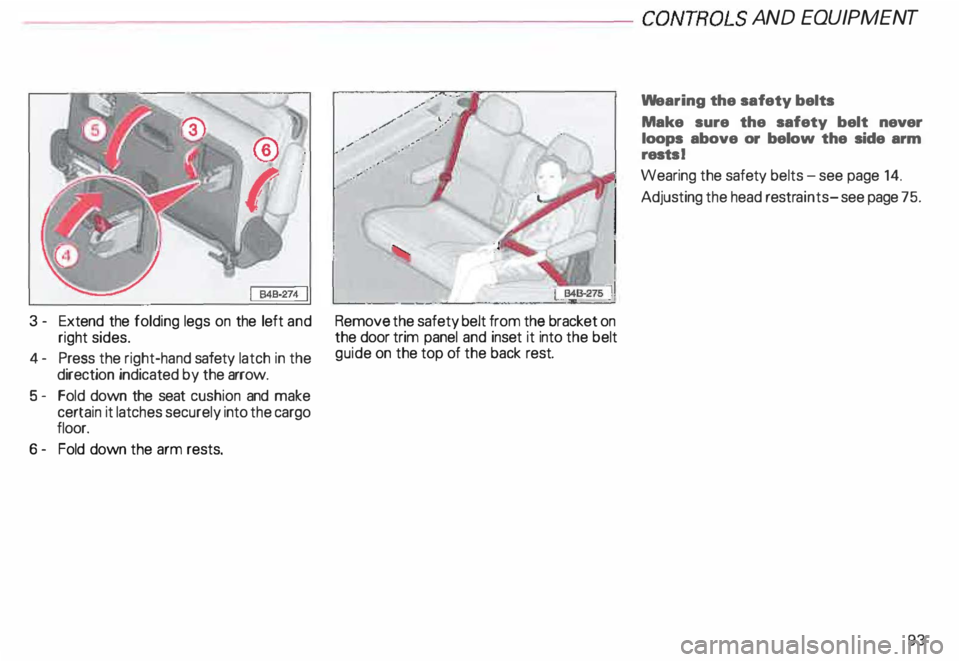
3 - Extend the folding legs on the left and
right sides.
4- Press the right-hand safety latch in the
direction indicated by the arrow.
5- Fold down the seat cushion and make
certain it latches securely into the cargo
floor.
6 - Fold down the arm rests. Remove
the safety belt from the bracket on
the door trim panel and inset it into the belt
guide on the top of the back rest. We
aring the safety belts
Make sure the safety belt never
loops above or below the side arm
rests I
Wearing the safety belts-see page 14.
Adjusting the head restraints- see page 75.
93
Page 96 of 306
------------------------------------------CONTROLSAND EOWPMEN T
12- Lift up on the seat bench, pivot it off to
the left side of the vehicle, and push it
down into the mounting provided for
this purpose in the cargo floor. Then ro
tate the two levers (9) to secure the
seat bench.
Hook the tensioning belt in the left-hand tie
down near the loading edge, rotate and pull
the free end until the belt is taut - refer to
the center illustration on the previous page.
Roll-up the sun shade on the rear window.
B4B-279 j
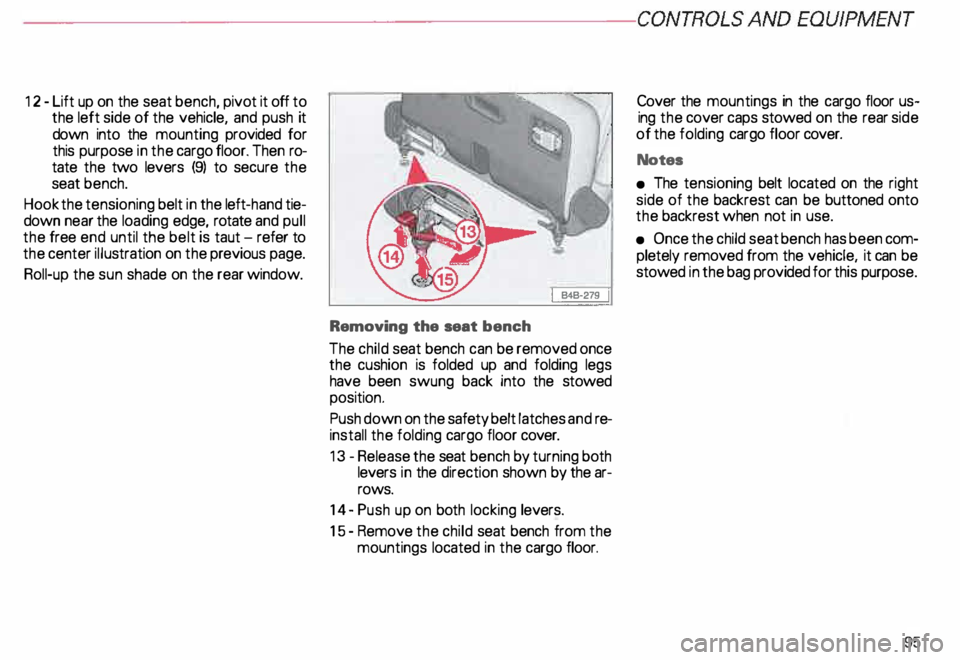
Removing the seat bench
The child seat bench can be removed once
the cushion is folded up and folding legs
have been swung back into the stowed
position.
Push down on the safety belt latches andre
install the folding cargo floor cover.
13 -Release the seat bench by turning both
levers in the direction shown by the ar
rows.
14- Push up on both locking levers.
15- Remove the child seat bench from the
mountings located in the cargo floor. Cover
the mountings in the cargo floor us
ing the cover caps stowed on the rear side
of the folding cargo floor cover.
Notes
• The tensioning belt located on the right
side of the backrest can be buttoned onto
the backrest when not in use.
• Once the child seat bench has been com
pletely removed from the vehicle, it can be
stowed in the bag provided for this purpose.
95
Page 102 of 306
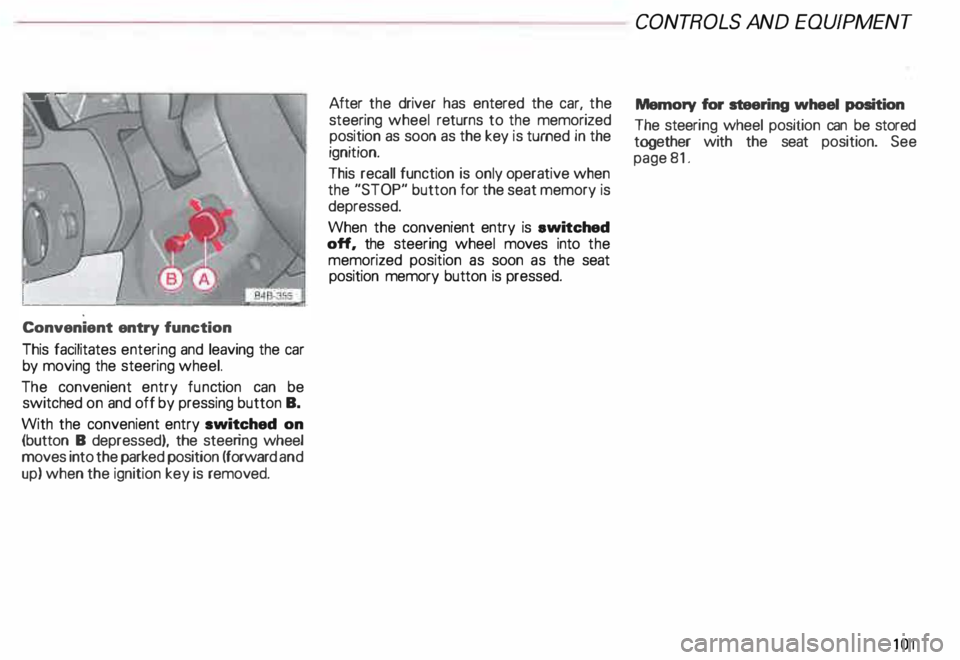
Convenient
entry function
This facilitates entering and leaving the car
by moving the steering wheel.
The convenient entry function can be
switched on and off by pressing button B.
With the convenient entry switched on
(button B depressed), the steering wheel
moves into the parked position (forward and
up) when the ignition key is removed. After
the driver has entered the car, the
steering wheel returns to the memorized
position as soon as the key is turned in the
ignition.
This recall function is only operative when
the "STOP" button for the seat memory is
depressed.
When the convenient entry is ewitched
off, the steering wheel moves into the
memorized position as soon as the seat
position memory button is pressed. CONT
ROLS AND EQUIPMEN T
Memory for steering wheel position
The steeri ng wheel position can be stored
together with the seat position. See
page 81.
101
Page 108 of 306
In selector
lever positions "P" (Park) a no
"N" (Neutral), the instruction "WHEN
STA TIONARY APPLY FOOTBRAKE WHILE
SELECTING GEAR" appears in the instru
ment cluster as a reminder for the driver.
Also, the symbol in the shift console will
light up.
A time delay element prevents the selector
lever from locking when it is moved through
the "N"' (Neutral) position (for example,
going from "R" to "D"). The locking ele
ment only locks the selector lever if it is left
in the "N" (Neutral) position for more than
about one second without the brake pedal
being depressed.
In the N (Neutral) position, the selector le
ver will not lock when the vehicle is driving
faster than 3 mph (5 km/h). Display
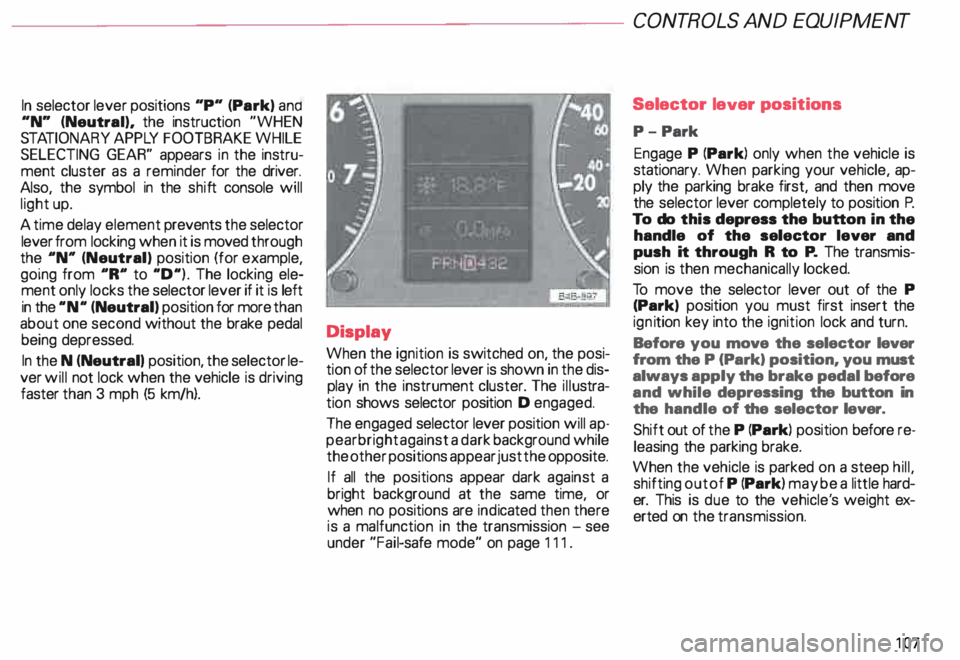
When the ignition is switched on, the posi
tion of the selector lever is shown in the dis
play in the instrument cluster. The illustra
tion shows selector position D engaged.
The engaged selector lever position will ap
pear bright against a dark background while
the other positions appear just the opposite.
If all the positions appear dark against a
bright background at the same time, or
when no positions are indicated then there
is a malfunction in the transmission -see
under "Fail-safe mode" on page 111. CONT
ROLS AND EQUIPMENT
Selector lever positions
P- Park
Engage P (Park) only when the vehicle is
stationary. When parking your vehicle, ap
ply the parking brake first, and then move
the selector lever completely to position P.
To do this depress the button in the
handle of the selector lever and
push it through R to P. The transmis
sion is then mechanically locked.
To move the selector lever out of the P
(Park) position you must first insert the
ign ition key into the ignition lock and turn.
Before you move the selector lever
from the P (Park) position, you must
always apply the brake pedal before
and while depressing the button in
the handle of the selector lever.
Shift out of the P (Park) position before re
leasing the parking brake.
When the vehicle is parked on a steep hill,
shifting out of P (Park) may be a little hard
er. This is due to the vehicle' s weight ex
erted on the transmission.
107