Mmi AUDI E-TRON 2019 Owners Manual
[x] Cancel search | Manufacturer: AUDI, Model Year: 2019, Model line: E-TRON, Model: AUDI E-TRON 2019Pages: 310, PDF Size: 81.91 MB
Page 244 of 310
Checking and Filling
Fill the washer fluid for the windshield washer
system and the headlight washer system* when
the ignition is switched off.
@) Note
— The concentration of anti-freezing agent
must be adjusted to the vehicle operating
conditions and the climate. A concentration
that is too high can lead to vehicle damage.
— Never add radiator anti-freeze or other addi-
tives to the washer fluid.
— Do not use a glass cleaner that contains
paint solvents, because this could damage
the paint.
Service interval display
The service interval display detects when your ve-
hicle is due for service.
The service interval display works in two stages:
— Inspection reminder: after driving a certain
distance, a message appears in the instrument
cluster display each time the ignition is switch-
ed on or off. The remaining distance or time is
displayed briefly.
— Inspection due: if your vehicle has reached an
inspection interval, the message Inspection
due! appears briefly after the ignition is switch-
ed on and off.
Checking service intervals
You can check the remaining distance or time un-
til the next service.
Applies to: MMI: Select on the home screen: VE-
HICLE > Settings & Service > Service intervals.
Resetting the indicator
An authorized Audi dealer or authorized Audi
Service Facility will reset the service interval dis-
play after performing service.
@) Note
Adhering to the service intervals is critical to
maintaining the service life and value of your
vehicle. Even if the mileage on the vehicle is
low, do not exceed the time for the next serv-
ice.
242
Page 256 of 310
Wheels
Checking and correcting tire
pressure
>Check the tire pressure at least
once per month and also check it
before every long drive.
> Always check the tire pressure
when the tires are cold. Do not
reduce the pressure if it increas-
es when the tires are warm.
> Check the label > fig. 165 for
the correct tire pressure based
on vehicle load.
>Correct the tire pressure if nec-
esSary.
>Store the new tire pressure in
the MMI > page 262.
> Check the pressure in the spare
tire*. Always maintain the maxi-
mum temperature that is speci-
fied for the tire.
the risk of an accident. Read
and follow the important safe-
ty precautions in > page 255.
—The tire must flex more if the
tire pressure is too low or if
the vehicle speed or load are
too high. This heats the tire up
too much. This increases the
risk of an accident because it
can cause the tire to burst and
result in loss of vehicle con-
trol.
—Incorrect tire pressure increas-
es tire wear and has a negative
effect on driving and braking
behavior, which increases the
risk of an accident.
Z\, WARNING
Always adapt the tire pressure
to your driving style and the ve-
hicle load.
—Overloading can lead to loss of
vehicle control and increase
@ Note
Replace lost valve caps to re-
duce the risk of damage to the
tire valves.
(*) For the sake of the envi-
ronment
Tire pressure that is too low in-
creases energy use.
Ncw ee] c
Please note that the information
contained in the following table
was correct at the time of print-
ing, and the information is sub-
254
ject to change. If there are any
differences, you should always
follow the tire pressure sticker
> page 253, fig. 164.
Page 264 of 310
Wheels
maneuvers. Stop as soon as possible and
check the tires and their pressure.
— The driver is responsible for maintaining the
correct tire pressure. You must check the
tire pressure regularly.
— Under certain conditions (such as a sporty
driving style, winter conditions, or unpaved
roads), the tire pressure monitoring system
indicator may be delayed.
@) Tips
— The tire pressure monitoring system can al-
so stop working when there is an ESC mal-
function.
— Using snow chains may result in a system
malfunction.
— The tire pressure monitoring system in your
Audi was calibrated with “Audi Original
Tires” > page 250. Using these tires is rec-
ommended.
Storing tire pressures
If the tire pressure changes or a tire is replaced,
it must be confirmed in the MMI.
> Before storing the tire pressures, make sure the
tire pressures in all four tires meet the speci-
fied values and are adapted to the load
=> page 253.
> Switch the ignition on.
> Applies to: MMI: Select on the home screen:
VEHICLE > Settings & Service > Tire pressure
monitoring > Store tire pressure > Yes, store
now.
@) Tips
Do not store the tire pressures if snow chains
are installed.
262
Page 269 of 310
4KE012721BB
Care and cleaning
— The Audi e-tron charging system must only
be cleaned when the control unit is com-
pletely disconnected from the power supply
and from the vehicle.
@) Note
— Headlights and tail lights
— Never clean headlights or tail lights with a
dry cloth or sponge.
— Do not use any cleaning products that con-
tain alcohol, because they could cause
cracks to form.
— Wheels
— Never use any paint polish or other abra-
sive materials.
— Damage to the protective layer on the
rims, such as stone chips or scratches,
must be repaired immediately.
— Camera lenses
— Never use warm or hot water to remove
snow or ice from the camera lens. This
could cause the lens to crack.
— Never use abrasive cleaning materials or
alcohol to clean the camera lens. This
could cause scratches and cracks.
— Laser scanner
— Never use abrasive cleaning materials to
clean the laser scanner. This could cause
scratches and cracks.
— Door windows
— Remove snow and ice on windows and ex-
terior mirrors with a plastic scraper. To re-
duce the risk of scratches, move the scra-
per only in one direction and not back and
forth.
— Never remove snow or ice from door win-
dows and mirrors using warm or hot water
because this could cause cracks to form.
—To reduce the risk of damage to the rear
window defogger, do not apply any stick-
ers on the heating wires on the inside of
the window.
— Decorative parts and trim
— Never use chrome care or cleaning prod-
ucts.
— Paint
—To reduce the risk of scratches, the vehi cle
must be free of dirt and dust before pol-
ishing or waxing.
—To prevent paint damage, do not polish
wax the vehicle in direct sunlight.
or
— To reduce the risk of paint damage, do not
polish away rust spots.
— Remove cosmetics and sunscreen immedi-
ately because they could damage the
paint.
— Decorative decals
—To reduce the risk of damage, do not use
any rough powder or abrasive cleaning
products.
— To reduce the risk of damage, do not pol-
ish decorative decals that have a matte
printed finish.
— Due to the risk of damage, do not use a
or
n
ice scraper to remove snow and ice on win-
dows with decorative decals on them.
— Displays and instrument cluster
— Make sure that the display and instrument
cluster are switched off and have cooled
down before cleaning. To switch off the
upper and lower display, select on the
MMI home screen: SETTINGS > Display &
brightness > MMI > Screen cleaning.
— Displays, the instrument cluster, and the
trim surrounding it must not be cleaned
with dry cleaning methods because they
could become scratched.
— Make sure no fluids enter the spaces be-
tween the instrument cluster and the
trim, because that could cause damage
— Controls
— Make sure that no fluids enter the con-
trols, because this could cause damage
— Safety belts
— Do not remove the safety belts to clean
them.
— Never clean safety belts or their compo:
nents with chemicals or with corrosive flu-
ids or solvents and never allow sharp ob-
jects to come into contact with the safety
belts. This could cause damage to the belt
webbing.
267
>
Page 276 of 310

Emergency assistance
Removing and installing a wheel
@ Rg tT
“% © oO
B8K-1477
Fig. 176 Wheel: alignment pin in the top hole
Removing a wheel
>» Remove the top wheel bolt completely using
the hex socket in the screwdriver handle from
the vehicle tool kit > fig. 175 and place it ona
clean surface.
> Then install the alignment pin from the vehicle
tool kit in the empty wheel bolt hole by hand
> fig. 176.
> Remove the rest of the wheel bolts.
>» Remove the wheel >(). The alignment pin re-
mains in the hole while doing this.
Installing a wheel
Read the directions on > page 274 when instal-
ling unidirectional tires.
> Slide the wheel on over the alignment pin >@.
> Install the wheel bolts and tighten them gently
using the hex socket.
» Remove the alignment pin and tighten the re-
maining wheel bolt.
> Carefully lower the vehicle using the vehicle
jack*.
> Tighten the wheel bolts in a diagonal pattern
using the wheel wrench.
274
The wheel bolts must be clean and loosen and
tighten easily. Check the contact surfaces for the
wheel and hub. Contaminants on these surfaces
must be removed before installing the wheel.
ZA\ WARNING
— Read and follow the important information
and notes under > page 250.
— Never use the hex socket in the screwdriver
handle to tighten the wheel bolts. Using the
hex socket will not achieve the required
tightening torque, which increases the risk
of an accident.
©) Note
When removing or installing the wheel, the
rim
could hit the brake rotor and damage the
rotor. Work carefully and have a second per-
son help you.
Unidirectional tires
A unidirectional tire profile is identified by arrows
on the tire sidewall that point in the running di-
rection. You must always maintain the specified
running direction. This is necessary to ensure the
tire's optimal performance in regard to adhesion,
running noise, and friction, and to reduce the risk
of
hydroplaning.
To benefit fully from the advantages of the uni-
directional tire design, you should replace faulty
tires as soon as possible and restore the correct
running direction on all of the tires.
> Reinstall the caps on the wheel bolts if necessa-
ry.
> Store the vehicle tool kit in its designated
place.
> If the removed wheel does not fit in the spare
wheel well, store it securely in the luggage
compartment > page 77.
> Check the tire pressure on the installed wheel
as soon as possible.
> Correct the tire pressure and store it in the MMI
=> page 262.
Page 282 of 310
Fuses and bulbs
— Some of the equipment listed in the follow-
ing tables applies only to certain model ver-
sions or certain optional equipment.
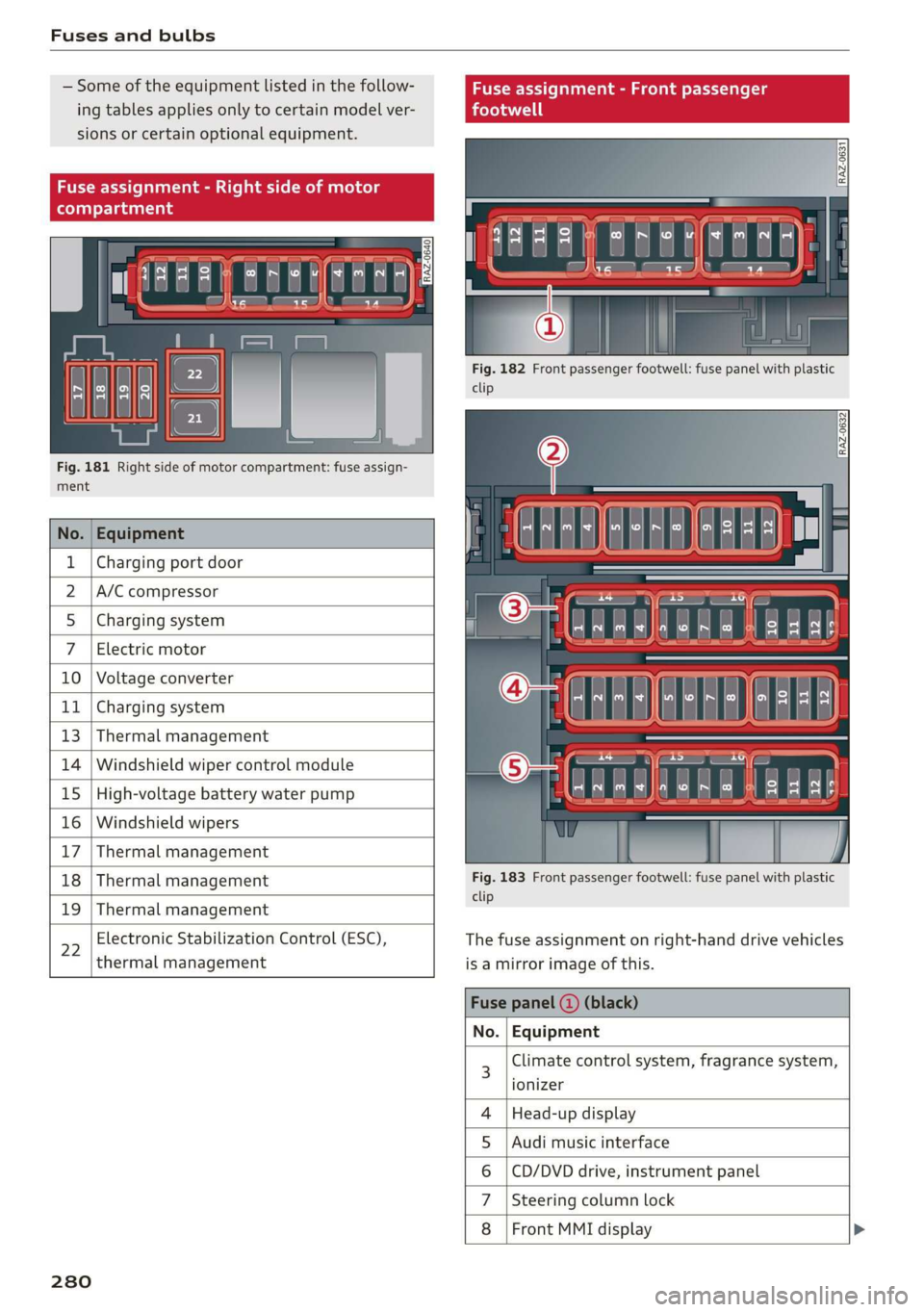
Fig. 181 Right side of motor compartment: fuse assign-
ment
No. Equipment
Charging port door
A/C compressor
Charging system
Electric motor
10 Voltage converter
11 Charging system
13 Thermal management
14 Windshield wiper control module
15 High-voltage battery water pump
16 Windshield wipers
17 Thermal management
18 Thermal management
19 Thermal management
22
Electronic Stabilization Control (ESC),
thermal management
280
Fig. 182 Front passenger footwell: fuse panel with plastic
clip
Fig. 183 Front passenger footwell: fuse panel with plastic
clip
The fuse assignment on right-hand drive vehicles
is a mirror image of this.
Climate control system, fragrance system,
ionizer
Head-up display
Audi music interface
CD/DVD drive, instrument panel
Steering column lock
Front MMI display >
OlN|
A)
uy
sA
Page 283 of 310
4KE012721BB
Fuses and bulbs
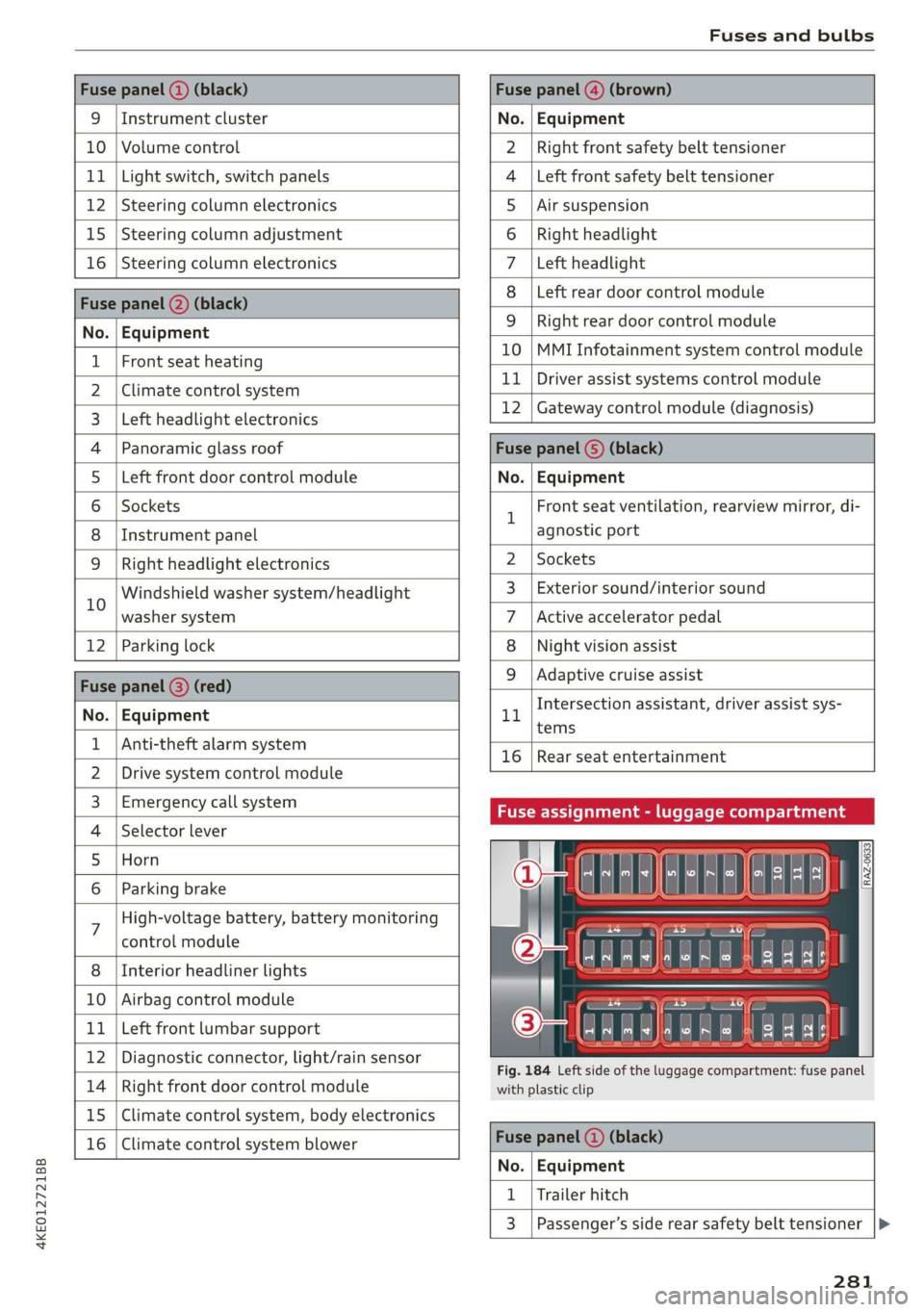
Fuse panel (2) (black) Fuse panel @) (brown)
9 |Instrument cluster No. | Equipment
10 | Volume control Right front safety belt tensioner
11 | Light switch, switch panels Left front safety belt tensioner
12 | Steering column electronics Air suspension
15 | Steering column adjustment Right headlight
16 | Steering column electronics Left headlight
Fuse panel (2) (black)
No. | Equipment
Left rear door control module
WOlOIN|
A)
Mm]
ALN
Right rear door control module
10 |MMI Infotainment system control module
1 |Front seat heating - -
2 |ehmmareconeral system 11 | Driver assist systems eantte) iene
Z | betvheadlightdlecironias 12 | Gateway control module (diagnosis)
4 |Panoramic glass roof Fuse panel 6) (black)
5 |Left front door control module No. | Equipment
6 | Sockets 1 Front seat ventilation, rearview mirror, di-
8 | Instrument panel agnostic port
9 | Right headlight electronics 2 | Sockets
iG Windshield washer system/headlight 3_| Exterior sound/interior sound
washer system 7 |Active accelerator pedal
12 | Parking lock 8 | Night vision assist
Fuse panel @ (red) 9 |Adaptive cruise assist
7 Intersection assistant, driver assist sys-
No. | Equipment 11
tems
1 {Anti-theft alarm system -
16 | Rear seat entertainment
2 |Drive system control module
3, | Emergency:callsystem Fuse assignment - luggage compartment
4 | Selector lever
5 |Horn 8
le
6 |Parking brake a
7 High-voltage battery, battery monitoring
control module
8 | Interior headliner lights
10 | Airbag control module
11 | Left front lumbar support
12 | Diagnostic connector, light/rain sensor
14 | Right front door control module
15 | Climate control system, body electronics
16 | Climate control system blower
7
ed ey
aE EEE
Fig. 184 Left side of the luggage compartment: fuse panel
with plastic clip
Fuse panel (4) (black)
No. | Equipment
1 | Trailer hitch
3 | Passenger’s side rear safety belt tensioner
281
Page 286 of 310
Data privacy
— How various systems in your vehicle were oper-
ating;
— Whether or not the driver and passenger safety
belts were buckled/fastened;
— How far (if at all) the driver was depressing the
accelerator and/or brake pedal; and,
— How fast the vehicle was traveling.
These data can help provide a better understand-
ing of the circumstances in which crashes and in-
juries occur. NOTE: EDR data are recorded by your
vehicle only if a non-trivial crash situation occurs;
no data are recorded by the EDR under normal
driving conditions and no personal data (e.g.
name, gender, age, and crash location) are re-
corded. However, other parties, such as law en-
forcement, could combine the EDR data with the
type of personally identifying data routinely ac-
quired during a crash investigation.
To read data recorded by an EDR, special equip-
ment is required, and access to the vehicle or the
EDR is needed. In addition to the vehicle manu-
facturer, other parties, such as law enforcement,
that have the special equipment, can read the in-
formation if they have access to the vehicle or the
EDR.
Assist system monitor
This vehicle is equipped with an Assist System
Monitor (ASM). The ASM collects data that is not
stored by the EDR in the event of an accident. The
main task of the ASM is to make it possible to un-
derstand the role and the behavior of the assist
systems in these accident situations. In addition
to the data that the EDR stores, the ASM records
data related to the assist systems starting sever-
al seconds before the accident or near-accident.
The data collected by ASM depends on the equip-
ment and may include the following information:
status information of the assist systems (for ex-
ample, if they are switched on or off, system
events, etc.), control interventions (for example,
by ESC, ABS, Audi pre sense’, etc.), and assist
systems settings (such as speed settings).
Special devices and access to the vehicle or to the
ASM are necessary in order to read the data from
the ASM memory. In addition to the vehicle man-
ufacturer, third parties such as law enforcement
284
authorities can also read and analyze the stored
data if they have access to the vehicle or to the
ASM.
Data usage
Audi can read out the information stored in the
data memories or similar data, or give this infor-
mation to third parties, especially in the follow-
ing situations:
— If the vehicle owner or lessee agrees
— If there is an official request from the police
— Ifa court or authorities request it
If legally permitted, Audi can also use the data
for analysis of vehicle operation and safety per-
formance or provide this data to third parties for
research purposes.
Transmitted information
aN Cla ata ae fy
>
Applies to: MMI: Select on the home screen:
SETTINGS > (Data management) > Privacy.
Requirement: the ignition must be switched on.
Location, vehicle, and personal data are transmit-
ted when using Audi connect services.
Allowing sending of data
When this function is switched on, the data mod-
ule for using all Audi connect services is active.
When this function is switched off, the data con-
nection will be limited or deactivated depending
on vehicle equipment. The majority of Audi con-
nect
services will not be available.
The following interfaces are not affected by this
setting: Bluetooth, Bluetooth Low Energy (BLE),
Wi-Fi connection, Audi smartphone interface
(ASI), Near Field Communication (NFC), charging
communication (e-tron), Electronic Toll Collect
(ETC), if equipped.
@) Note
You are responsible for all precautions taken
for data protection, anti-virus protection, and >
Page 287 of 310
4KE012721BB
Data privacy
protection against loss of data on mobile de-
vices that are used to access the Internet
through the Wi-Fi hotspot.
G) Tips
— If the transmission of data is limited, data
will still be transmitted to verify subscrip-
tions.
— If the transmission of data is limited, it will
have the following effects on the exchange
of data for Audi connect services and emer-
gency calls, if equipped:
— The emergency call function will remain
available without restrictions and will con-
tinue to transmit data.
— If an online roadside assistance call is ini-
tiated, no data will be transmitted, but a
call will be made.
— If an Audi connect key is already assigned
to a user, data will still be transmitted to
maintain data security.
—If the Geofencing Alert, Speed Alert,
and/or Valet Alert services have been acti-
vated by the key user, then they will re-
main available without restrictions and
continue to transmit data.
— Stored destinations (favorites, last desti-
nations) are only stored in the vehicle. If
you allow transmission of data again,
these destinations will be synchronized via
the myAudi account. To prevent synchroni-
zation of destinations, delete the destina-
tions before you allow data to be trans-
mitted again.
Applies to: vehicles with Audi connect Infotainment
AUDI AG collects, uses, stores and shares your
personal information, such as contact data, vehi-
cle data, usage data, driving data and precise ge-
olocation, in order to provide you with the prod-
ucts and services you have purchased or request-
ed, and for a number of other purposes, for ex-
ample, to track quality issues, to performance
and safety, to meet our internal compliance or le-
gal requirements and to market to customers
and potential customers. For a more complete
list of the data we collect, how we use it and with
whom we share it, please visit your Audi nation-
al/sales region website at www.audi.com.
The collection, use and sharing may vary depend-
ing on your model and model year, your subscrip-
tion status, or the service offering. For example,
collection, use and sharing may vary between Au-
di connect services, if you have designated a key
user, or if you are driving a model equipped with
persistent data logging. Please review the com-
plete Privacy Statement to understand our data
handling practices with respect to a particular
service.
You can find additional information about our da-
ta privacy practices in your MMI.
>» Applies to: MMI: On the home screen, select:
SETTINGS > General > Legal notes > About Au-
di connect.
Information about our privacy practices in con-
junction with the mobile Audi connect applica-
tion can be found in the Application’s Privacy
Statement.
For additional information about the privacy
practices relating to Audi connect, myAudi, or
other websites, applications or online services as
well as your obligations with respect to using
these services, and for additional information re-
garding Audi connect terms and conditions,
please visit your Audi national/sales region web-
site at www.audi.com.
285
Page 289 of 310
4KE012721BB
Accessories and technical changes
Technical Modifications
Interference with electronic components, their
software, the wiring, and data transfer may cause
malfunctions. Because of the way electronic com-
ponents are interconnected, such malfunctions
can also impair systems that are not directly in-
volved. This means that you risk both a substan-
tial reduction in the operational safety of your ve-
hicle and increased wear of vehicle components.
Some convenience functions, such as the conven-
ience turn signal function, individual door open-
ing function, and displays, can be reprogrammed
using special workshop equipment. If functions
are reprogrammed, the information and descrip-
tions about these functions in this Owner's Man-
ual may no longer apply to the changed func-
tions. Audi recommends that an authorized Audi
dealer or authorized Audi Service Facility perform
and verify any reprogramming procedures.
Z\ WARNING
Maintenance procedures, repairs, or technical
modifications that are performed incorrectly
increase the risk of an accident and can lead
to serious injuries.
Z\ WARNING
The engine/motor compartment in any motor
vehicle is a potentially dangerous area and can
cause serious personal injury.
— Always use extreme caution when doing any
work in the motor compartment. Always fol-
low commonly accepted safety practices and
use common sense. Never risk personal in-
jury.
— Never perform any work in the motor com-
partment unless you know exactly how to
carry out the job and have the correct tech-
nical information and the correct tools.
— If you are uncertain about what to do, have
the work performed by an authorized Audi
dealer, an authorized Audi Service Facility,
or another qualified workshop. Serious per-
sonal injury may result from improperly per-
formed work.
CG) Note
— Maintenance procedures, repairs or techni-
cal modifications that are performed incor-
rectly can cause damage to the vehicle, such
as corrosion.
— If emergency repairs must be performed,
take your vehicle to an authorized Audi deal-
er or authorized Audi Service Facility as soon
as possible.
— Audi is not liable for damage to the vehicle
resulting from failure to comply with these
guidelines.
(@) For the sake of the environment
— Regular maintenance can help protect the
environment.
— Technical modifications to the vehicle may
have a negative affect on energy use.
@) For the sake of the environment
Undeployed airbag modules and pretension-
ers are classified as Perchlorate Material —
special handling may apply, See www.dtsc.ca.
gov/hazardouswaste/perchlorate. When the
vehicle or parts of the restraint system includ-
ing airbag modules and safety belts with pre-
tensioners are scrapped, all applicable laws
and regulations must be observed. Your au-
thorized Audi dealer is familiar with these re-
quirements and we recommend that you have
your dealer perform this service for you.
G) Tips
Because of your vehicle's aluminum body de-
sign, all service and repair procedures affect-
ing the body should be performed by an au-
thorized Audi dealer or authorized Audi Serv-
ice Facility, who will perform the work accord-
ing to Audi factory specifications. Only Audi
Genuine Parts are used when Audi experts
perform repair or service procedures. Failure
to use Audi Genuine Parts or Audi Genuine Ac-
cessories or performing repairs incorrectly
may result in severe vehicle damage, such as
corrosion.
287