USB AUDI E-TRON 2019 User Guide
[x] Cancel search | Manufacturer: AUDI, Model Year: 2019, Model line: E-TRON, Model: AUDI E-TRON 2019Pages: 310, PDF Size: 81.91 MB
Page 223 of 310
4KE012721BB
Media
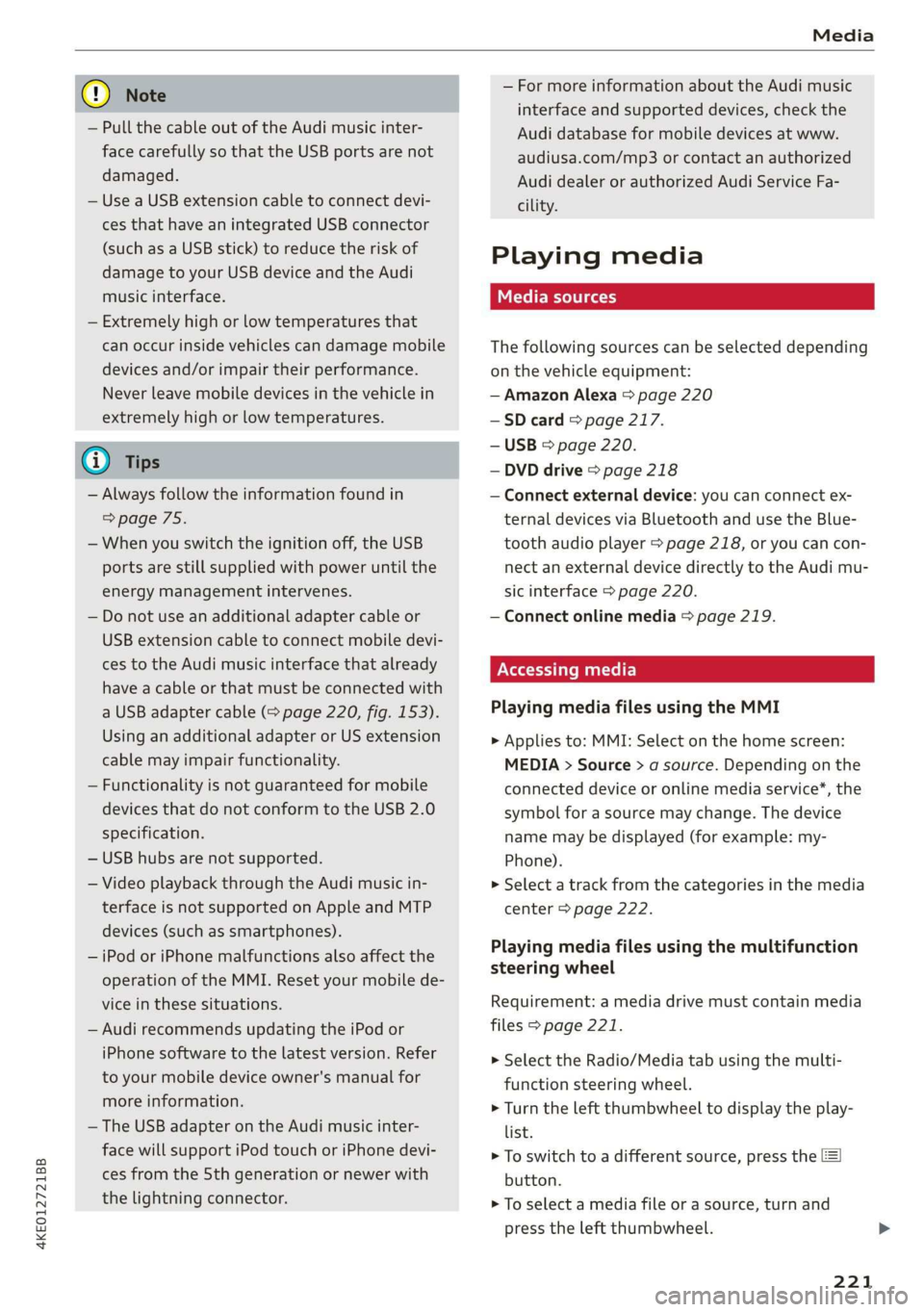
@) Note
— Pull the cable out of the Audi music inter-
face carefully so that the USB ports are not
damaged.
— Use a USB extension cable to connect devi-
ces that have an integrated USB connector
(such as a USB stick) to reduce the risk of
damage to your USB device and the Audi
music interface.
— Extremely high or low temperatures that
can occur inside vehicles can damage mobile
devices and/or impair their performance.
Never leave mobile devices in the vehicle in
extremely high or low temperatures.
@ Tips
— Always follow the information found in
=> page 75.
— When you switch the ignition off, the USB
ports are still supplied with power until the
energy management intervenes.
— Do not use an additional adapter cable or
USB extension cable to connect mobile devi-
ces to the Audi music interface that already
have a cable or that must be connected with
a USB adapter cable (> page 220, fig. 153).
Using an additional adapter or US extension
cable may impair functionality.
— Functionality is not guaranteed for mobile
devices that do not conform to the USB 2.0
specification.
— USB hubs are not supported.
— Video playback through the Audi music in-
terface is not supported on Apple and MTP
devices (such as smartphones).
— iPod or iPhone malfunctions also affect the
operation of the MMI. Reset your mobile de-
vice in these situations.
— Audi recommends updating the iPod or
iPhone software to the latest version. Refer
to your mobile device owner's manual for
more information.
— The USB adapter on the Audi music inter-
face will support iPod touch or iPhone devi-
ces from the 5th generation or newer with
the lightning connector.
— For more information about the Audi music
interface and supported devices, check the
Audi database for mobile devices at www.
audiusa.com/mp3 or contact an authorized
Audi dealer or authorized Audi Service Fa-
cility.
Playing media
The following sources can be selected depending
on the vehicle equipment:
— Amazon Alexa > page 220
—SD card > page 217.
— USB © page 220.
— DVD drive > page 218
— Connect external device: you can connect ex-
ternal devices via Bluetooth and use the Blue-
tooth audio player > page 218, or you can con-
nect an external device directly to the Audi mu-
sic interface > page 220.
— Connect online media > page 219.
Accessing media
Playing media files using the MMI
> Applies to: MMI: Select on the home screen:
MEDIA > Source > a source. Depending on the
connected device or online media service”, the
symbol for a source may change. The device
name may be displayed (for example: my-
Phone).
> Select a track from the categories in the media
center > page 222.
Playing media files using the multifunction
steering wheel
Requirement: a media drive must contain media
files > page 221.
> Select the Radio/Media tab using the multi-
function steering wheel.
> Turn the left thumbwheel to display the play-
list.
> To switch to a different source, press the [=|
button.
> To select a media file or a source, turn and
press the left thumbwheel.
221
Page 224 of 310
Media
> To switch between radio and media, select the
button > Switch to radio/Switch to media.
@ Tips
— For safety reasons, the video image is only
displayed when the vehicle is stationary. On-
ly the sound from the video plays while driv-
ing.
— Applies to: multifunction steering wheel:
Depending on the selected function, opera-
tion through the MMI may be required.
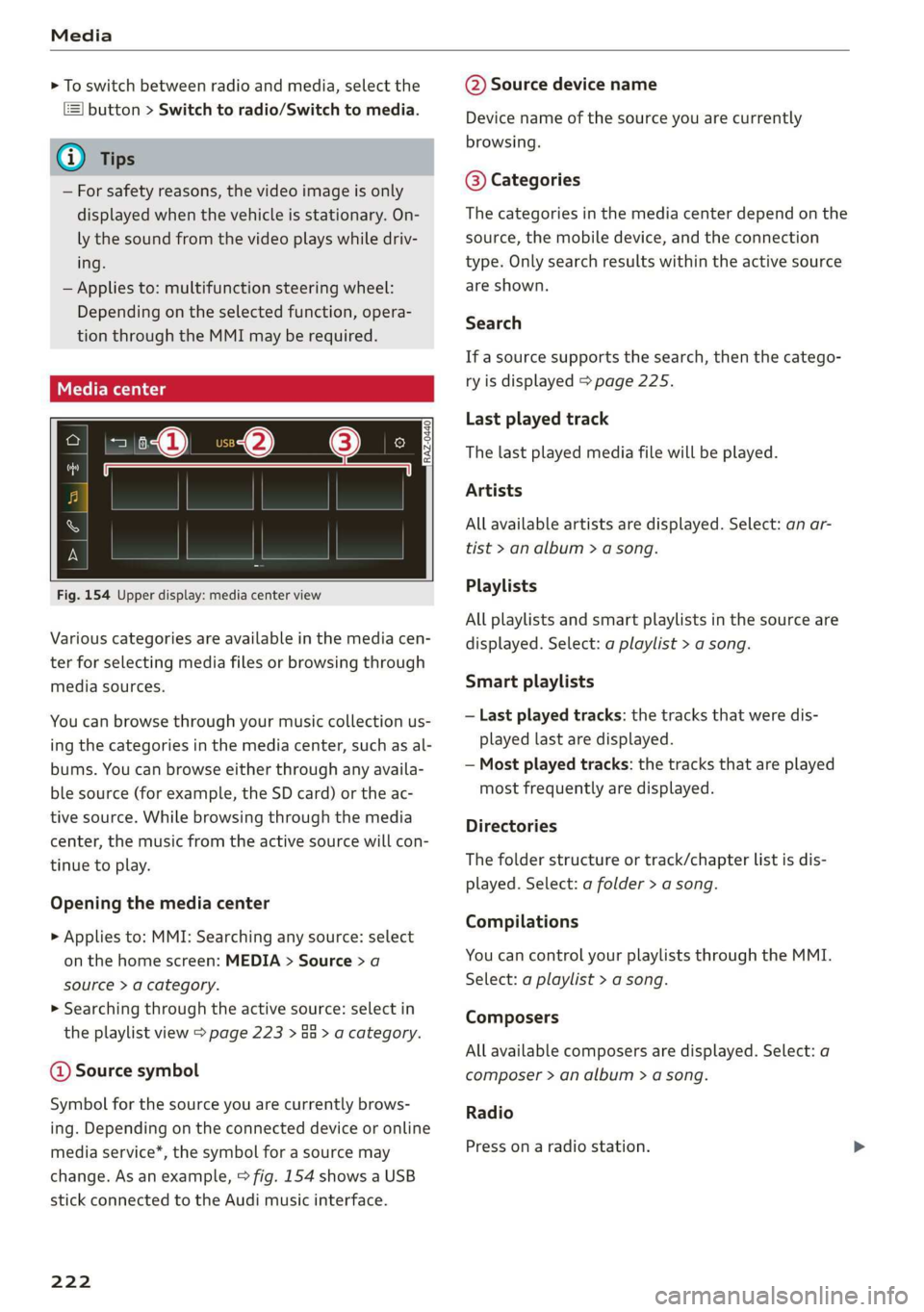
3 g 5
Ig BS
Fig. 154 Upper display: media center view
Various categories are available in the media cen-
ter for selecting media files or browsing through
media sources.
You can browse through your music collection us-
ing
the categories in the media center, such as al-
bums. You can browse either through any availa-
ble source (for example, the SD card) or the ac-
tive source. While browsing through the media
center, the music from the active source will con-
tinue to play.
Opening the media center
> Applies to: MMI: Searching any source: select
on the home screen: MEDIA > Source > a
source > a category.
> Searching through the active source: select in
the playlist view > page 223 > an > a category.
@ Source symbol
Symbol for the source you are currently brows-
ing. Depending on the connected device or online
media service*, the symbol for a source may
change. As an example, > fig. 154 shows a USB
stick connected to the Audi music interface.
222
@ Source device name
Device name of the source you are currently
browsing.
@® Categories
The categories in the media center depend on the
source, the mobile device, and the connection
type. Only search results within the active source
are shown.
Search
If a source supports the search, then the catego-
ry is displayed > page 225.
Last played track
The last played media file will be played.
Artists
All available artists are displayed. Select: an ar-
tist
> an album > a song.
Playlists
All playlists and smart playlists in the source are
displayed. Select: a playlist > a song.
Smart playlists
— Last played tracks: the tracks that were dis-
played last are displayed.
— Most played tracks: the tracks that are played
most frequently are displayed.
Directories
The folder structure or track/chapter list is dis-
played. Select: a folder > a song.
Compilations
You can control your playlists through the MMI.
Select: a playlist > a song.
Composers
All available composers are displayed. Select: a
composer > an album > a song.
Radio
Press ona radio station.
Page 229 of 310
4KE012721BB
Media
— PIN entry for parental control will be locked PIN can only be reset by an authorized Audi
for approximately one minute if you enter dealer.
the incorrect PIN three times in a row. The
Supported media and file formats
CONTA
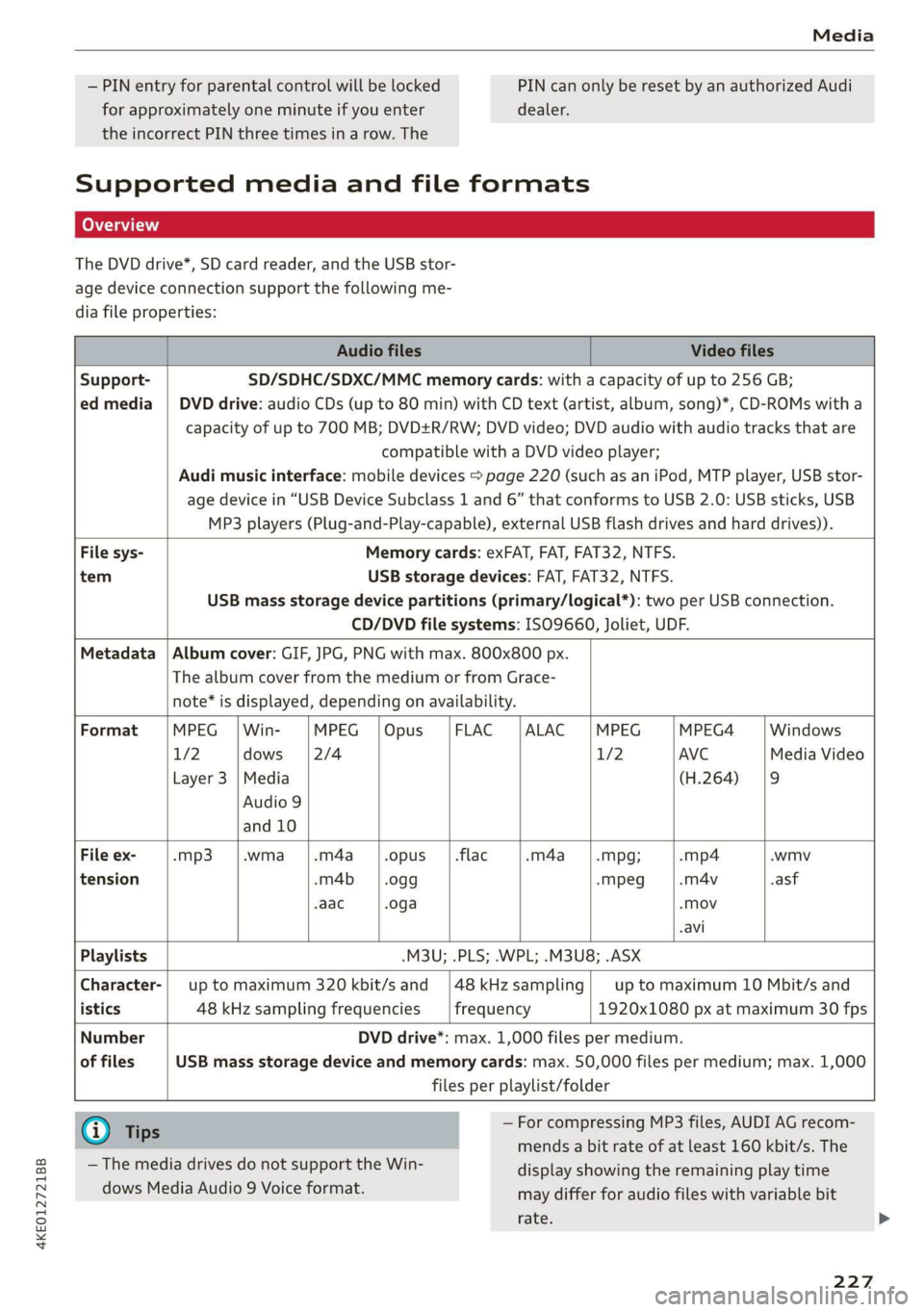
The DVD drive*, SD card reader, and the USB stor-
age device connection support the following me-
dia file properties:
Audio files Video files
Support- SD/SDHC/SDXC/MMC memory cards: with a capacity of up to 256 GB;
ed media | DVD drive: audio CDs (up to 80 min) with CD text (artist, album, song)*, CD-ROMs with a
capacity of up to 700 MB; DVD+R/RW; DVD video; DVD audio with audio tracks that are
compatible with a DVD video player;
Audi music interface: mobile devices > page 220 (such as an iPod, MTP player, USB stor-
age device in “USB Device Subclass 1 and 6” that conforms to USB 2.0: USB sticks, USB
MP3 players (Plug-and-Play-capable), external USB flash drives and hard drives)).
File sys- Memory cards: exFAT, FAT, FAT32, NTFS.
tem USB storage devices: FAT, FAT32, NTFS.
USB mass storage device partitions (primary/logical*): two per USB connection.
CD/DVD file systems: ISO9660, Joliet, UDF.
Metadata | Album cover: GIF, JPG, PNG with max. 800x800 px.
The album cover from the medium or from Grace-
note* is displayed, depending on availability.
Format MPEG | Win- MPEG |Opus |FLAC |ALAC |MPEG MPEG4 Windows
1/2 dows [2/4 1/2 AVC Media Video
Layer 3 |Media (H.264) |9
Audio 9
and 10
File ex- -mp3 |.wma |.m4a_|.opus __|.flac -m4a_——|.mpg; -mp4 .wmv
tension -m4b | .ogg -Mpeg -m4v asf
-aac .oga -Mov
-avi
Playlists .M3U; .PLS; .WPL; .M3U8; .ASX
Character-| up to maximum 320 kbit/s and |48kHzsampling| up to maximum 10 Mbit/s and
istics 48 kHz sampling frequencies frequency 1920x1080 px at maximum 30 fps
Number DVD drive*: max. 1,000 files per medium.
of files USB mass storage device and memory cards: max. 50,000 files per medium; max. 1,000
files per playlist/folder
@) Tips — For compressing MP3 files, AUDI AG recom-
mends a bit rate of at least 160 kbit/s. The
display showing the remaining play time
may differ for audio files with variable bit
rate.
— The media drives do not support the Win-
dows Media Audio 9 Voice format.
227
Page 230 of 310
Media
— Special characters (such as those in ID3 tag
information) may display differently or may
not always display, depending on the sys-
tem language.
— Some MTP player functions are not support-
ed, such as rating music tracks and video
playback.
— The manufacturer of the storage device can
provide information about its “USB Device
Subclass”.
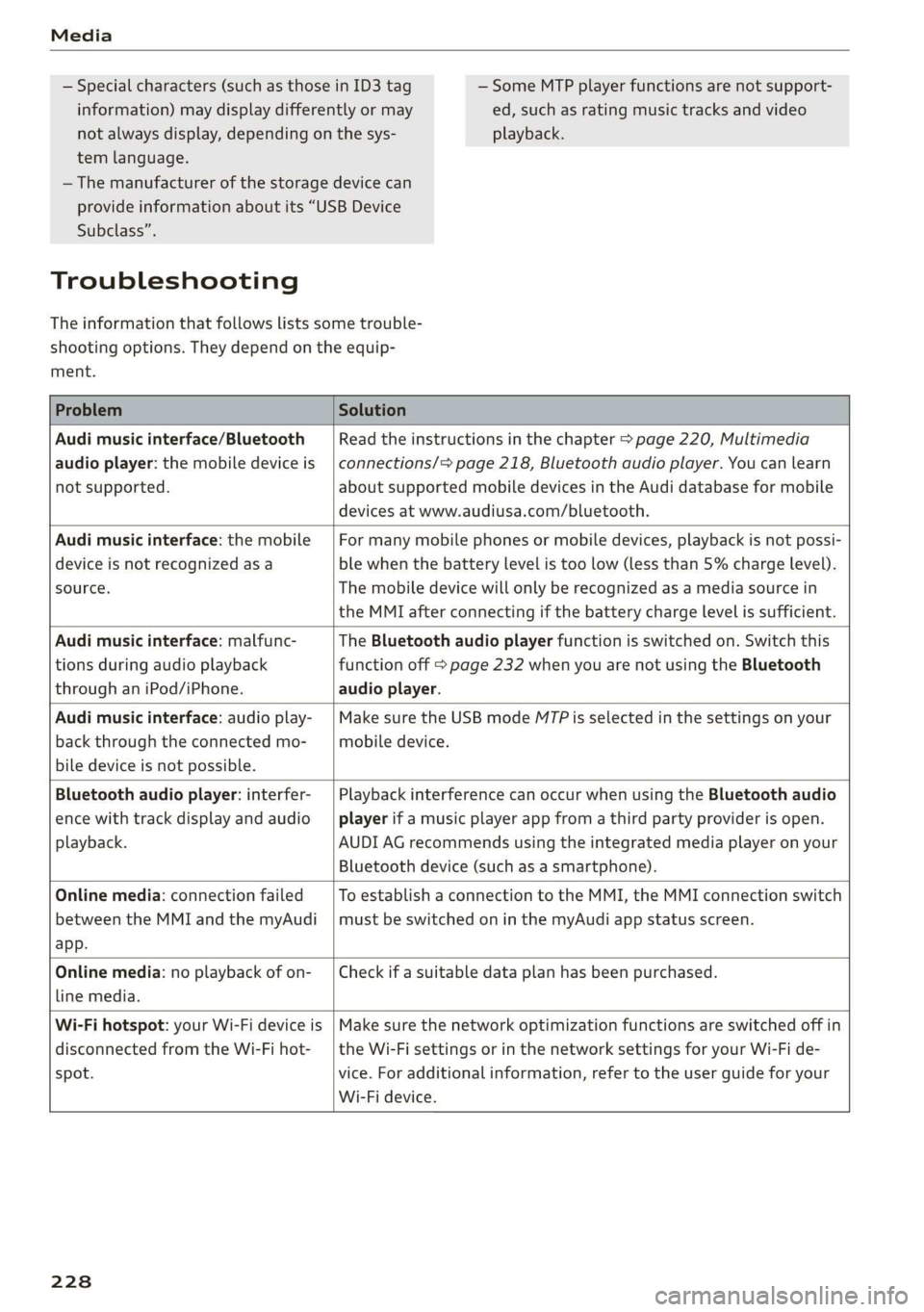
Troubleshooting
The information that follows lists some trouble-
shooting options. They depend on the equip-
ment.
Problem Solution
Audi music interface/Bluetooth
audio player: the mobile device is
not supported.
Read the instructions in the chapter > page 220, Multimedia
connections/> page 218, Bluetooth audio player. You can learn
about supported mobile devices in the Audi database for mobile
devices at www.audiusa.com/bluetooth.
Audi music interface: the mobile
device is not recognized as a
source.
For many mobile phones or mobile devices, playback is not possi-
ble when the battery level is too low (less than 5% charge level).
The mobile device will only be recognized as a media source in
the MMI after connecting if the battery charge level is sufficient.
Audi music interface: malfunc-
tions during audio playback
through an iPod/iPhone.
The Bluetooth audio player function is switched on. Switch this
function off > page 232 when you are not using the Bluetooth
audio player.
Audi music interface: audio play-
back through the connected mo-
bile device is not possible.
Make sure the USB mode M7P is selected in the settings on your
mobile device.
Bluetooth audio player: interfer-
ence with track display and audio
playback.
Playback interference can occur when using the Bluetooth audio
player if a music player app from a third party provider is open.
AUDI AG recommends using the integrated media player on your
Bluetooth device (such as a smartphone).
Online media: connection failed
between the MMI and the myAudi
app.
To establish a connection to the MMI, the MMI connection switch
must be switched on in the myAudi app status screen.
Online media: no playback of on-
line media.
Check if a suitable data plan has been purchased.
Wi-Fi hotspot: your Wi-Fi device is
disconnected from the Wi-Fi hot-
spot.
Make sure the network optimization functions are switched off in
the Wi-Fi settings or in the network settings for your Wi-Fi de-
vice. For additional information, refer to the user guide for your
Wi-Fi device.
228
Page 231 of 310
4KE012721BB
Audi smartphone interface
Audi smartphone
interface
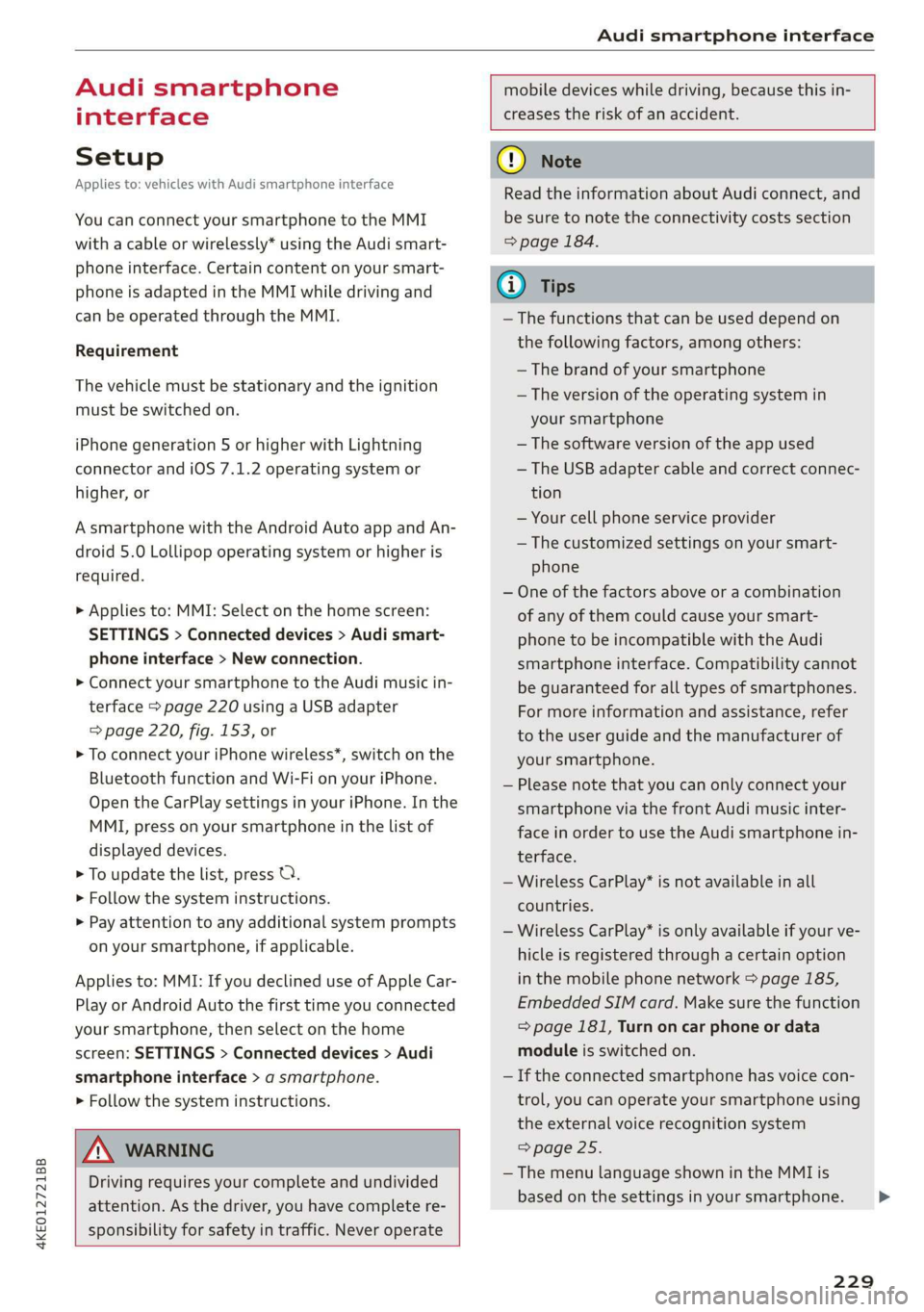
Setup
Applies to: vehicles with Audi smartphone interface
You can connect your smartphone to the MMI
with a cable or wirelessly* using the Audi smart-
phone interface. Certain content on your smart-
phone is adapted in the MMI while driving and
can be operated through the MMI.
Requirement
The vehicle must be stationary and the ignition
must be switched on.
iPhone generation 5 or higher with Lightning
connector and iOS 7.1.2 operating system or
higher, or
A smartphone with the Android Auto app and An-
droid 5.0 Lollipop operating system or higher is
required.
> Applies to: MMI: Select on the home screen:
SETTINGS > Connected devices > Audi smart-
phone interface > New connection.
> Connect your smartphone to the Audi music in-
terface > page 220 using a USB adapter
=> page 220, fig. 153, or
> To connect your iPhone wireless*, switch on the
Bluetooth function and Wi-Fi on your iPhone.
Open the CarPlay settings in your iPhone. In the
MMI, press on your smartphone in the list of
displayed devices.
> To update the list, press O.
> Follow the system instructions.
>» Pay attention to any additional system prompts
on your smartphone, if applicable.
Applies to: MMI: If you declined use of Apple Car-
Play or Android Auto the first time you connected
your smartphone, then select on the home
screen: SETTINGS > Connected devices > Audi
smartphone interface > a smartphone.
> Follow the system instructions.
mobile devices while driving, because this in-
creases the risk of an accident.
ZA\ WARNING
Driving requires your complete and undivided
attention. As the driver, you have complete re-
sponsibility for safety in traffic. Never operate
() Note
Read the information about Audi connect, and
be sure to note the connectivity costs section
=> page 184.
G) Tips
— The functions that can be used depend on
the following factors, among others:
—The brand of your smartphone
—The version of the operating system in
your smartphone
— The software version of the app used
— The USB adapter cable and correct connec-
tion
— Your cell phone service provider
— The customized settings on your smart-
phone
— One of the factors above or a combination
of any of them could cause your smart-
phone to be incompatible with the Audi
smartphone interface. Compatibility cannot
be guaranteed for all types of smartphones.
For more information and assistance, refer
to the user guide and the manufacturer of
your smartphone.
— Please note that you can only connect your
smartphone via the front Audi music inter-
face in order to use the Audi smartphone in-
terface.
— Wireless CarPlay* is not available in all
countries.
— Wireless CarPlay* is only available if your ve-
hicle is registered through a certain option
in the mobile phone network > page 185,
Embedded SIM card. Make sure the function
= page 181, Turn on car phone or data
module is switched on.
— If the connected smartphone has voice con-
trol, you can operate your smartphone using
the external voice recognition system
=> page 25.
— The menu language shown in the MMI is
based on the settings in your smartphone.
229
>
Page 232 of 310
Audi smartphone interface
— Some MMI functions are not available when — AUDI AG merely provides access to third
there is an active Audi smartphone interface party services through the MMI and does
connection. not assume any responsibility for the con-
— You cannot connect any mobile devices via tent of these services.
Bluetooth when an Apple CarPlay connec-
tion is active.
— Usage of the Audi smartphone interface de-
pends on the availability of services through
third party providers.
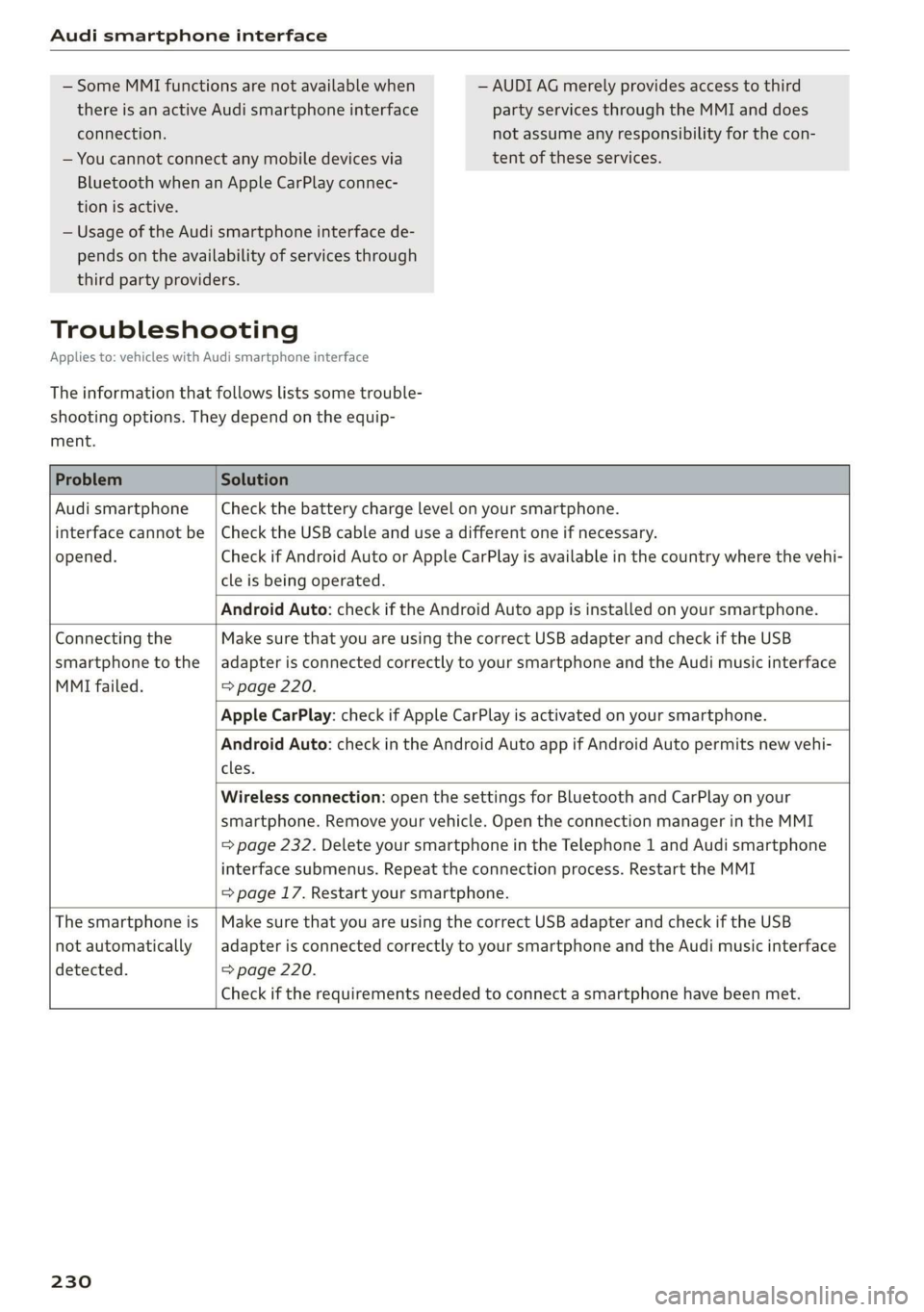
Troubleshooting
Applies to: vehicles with Audi smartphone interface
The information that follows lists some trouble-
shooting options. They depend on the equip-
ment.
Problem Solution
Audi smartphone
interface cannot be
opened.
Check the battery charge level on your smartphone.
Check the USB cable and use a different one if necessary.
Check if Android Auto or Apple CarPlay is available in the country where the vehi-
cle is being operated.
Android Auto: check if the Android Auto app is installed on your smartphone.
Connecting the
smartphone to the
MMI failed.
Make sure that you are using the correct USB adapter and check if the USB
adapter is connected correctly to your smartphone and the Audi music interface
=> page 220.
Apple CarPlay: check if Apple CarPlay is activated on your smartphone.
Android Auto: check in the Android Auto app if Android Auto permits new vehi-
cles.
Wireless connection: open the settings for Bluetooth and CarPlay on your
smartphone. Remove your vehicle. Open the connection manager in the MMI
=> page 232. Delete your smartphone in the Telephone 1 and Audi smartphone
interface submenus. Repeat the connection process. Restart the MMI
=> page 17. Restart your smartphone.
The smartphone is
not automatically
detected.
Make sure that you are using the correct USB adapter and check if the USB
adapter is connected correctly to your smartphone and the Audi music interface
=> page 220.
Check if the requirements needed to connect a smartphone have been met.
230
Page 301 of 310
4KE012721BB
Index
Mechanically unlocking
Opening and closing.................0.
Opening and closing with foot motion..... 37
Power opening and closing.............. 36
Lumbar'support waco: 2s ees ev wees ee eerwe as 56
M
Maintenance « sige a + cewe «2 cee ge ewe a es 286
Maintenance intervals « nw. 6 i gic ae cere a 242
Manually releasing the charging connector. 111
Manually releasing the charging unit cover. 111
Map
Changing the scale...........00.e eee 198
Display cosee + a ssowsoe = semais 2 4 onaesms x aerate & 200
Operating ........ 0... ce eee eee eee 199
Setting the destination................ 198
Map preview.............-.0 2000-0 eee 197
Map update................ 020. e ee eee 204
QNUIME seers « « seers & e eee 5 2 eS & HEE FS 205
SD card/USB connection............... 205
Massage TUNCtiON. « ssa ss esi se owe ¥ 6 orem 56
Front... 2... eee eee eee eee 57
Matrix LED headlights.................-. 45
Mechanical:-key’. « « esscos ss caune oo aware © v cere 33
Medicis: 2 = acess: a © vonses a @ mewn 2 © cose 217,221.
Drives... ee 217
Supported formats...............0005 227
Media
center................ eee eee ee 222
Memory card
SD card reader (MMI) « « ewes sc ees an es 217
Supported types and formats........... 227
Mennory functioniie: « 2 sews x ¢ amen 5 meee eo: 63
Menu language
refer to Setting the language........... 231
Messagesi. « eciis + wean a 6 mans w 6 aaa oo we 178
Mirror cOMpaSS « wes + ¢ esas so sees eo eee vs 53
Mirrors
Adjusting exterior mirrors............0-. 48
Dimming................0 00002 e eee 49
Nanlity MUFROT sxc 2 = mown 2 seers « o eeoes gee 50
MMI
refer to Multi Media Interface........... 17
Mobile device
refer to Telephone...........-.0eee ee 169
Mobile phone network
Connection settings.................. 182
Motor compartment
Opening and closing the hood.......... 236
OVERVIEW eeu 3 2 soupy < @ emiees ¢ esate Go ee 237
Safety precautions: . sicsc. sven 2s wen ae 235
Storage compartment..............-... 76
Mountain passes... 0... ... eee eee eee 96
Mountaininoads:. « « secs « « erence» 2 sestane » 6 soene 96
Multifunction steering wheel
Buttons... ..... cee ee ee 12,26
Operating: < = ssn < : seen es sonnet dome s ee 12
Programming buttons.................. 26
Voice recognition system............... 24
Multi Media Interface................085 17
Menus and symbols.............00+-00- 18
Operating’s « « wss6 s secu = s sees & & wens 2 15,18
Switching the displays on or off.......... 17
Mutting (Mute) secs se ences oe ences oo cena oo eee 26
MYAUGI s « scimvs «6 eens 2s ents 2 & eee 2 weceale 27
myAudi navigation................. 193, 197
N
NarrOW APES s « eewn ss weue swoon as wee ae 146
Natural
leather care and cleaning......... 266
Navigation ....... 66... cee cece eee eee 193
Better rout@scs << sews eo es do eg e cae 206
Calli gprs so meena « i soieasen © o onewowe mraten wo 197
Changing the scale................0-. 197
also:referto Map: « wim + x wows 2 neee se ne 199
Navigation database
Version'information . . . ico ce caren so ens 233
Navigation (instrument cluster).......... 201
NHTSAc: = swiss « = seu = ¢ sous 4 x teats & Sees g 288
Night vision aSsist'; « sean 5 «wean ss ween avi 13)
Cleaning the camera...............00. 264
Notification:center’s ¢ sas 3 ¢ caw 2s gauss wars 19
O
OdOMCters cacy « & cees 5 o exw 5 ¢ eee 7 e ews 13
RESCUING fests 6 & srecine 6 o aiorsus 6 @ nureons wo eaNUEDK 13
Office address
refer to Business address.............. 202
Offroad
refer to Offroad driving...............+- 96
Offroad driving...............e eee e eee 96
OFF (climate control system) .............. 82
299
Page 306 of 310
Index
Trailer load iiss: 2 x soos x anc a avcniins ww ances 292
Trailer mode
Trailer mode (navigation) .............. 208
Trailer towing........... 20.0 ee eee ee eee 120
Airsuspension......... 000 eee eee eee ee 120
Trailetload © 5 seme ¢s gage s nome s 2 ene xs 120
Trailer VieW coes s « qwee ¢ » ewe se oes s ree 163
TUPMQSSISE sacex os maces ¢ Haim 4 § Sate Fo eae 152
Turn signals ..... 00.0... cee cece eee 45
U
Unable to pass. 1... .. cee eee eee ee 146
Uniform tire quality grading............. 260
Unlocking and locking................-0. 29
By remote control... ....... cee cece eee 34
Using the lock cylinder................. 32
With the central locking switch.......... 3,
With the convenience key............... 34
Update (software) .............0.0.0 00 232
Updating stations (radio)................ 210
USB
Adapter... ... 0. cece eee eee eee 171
Connecting a mobile device............ 170
USB: Charging) POnt: « sma < s ceue 3 a ee 2 ae 75
USB stick
refer to Audi music interface........... 220
V
Vanity Mirror ss = = seme < © eeu = o wows + o eee ¢ 50
Vehicle
Care/cleaning sisi = wen es sever oo ween a a 263
Dimensions ..............002-00e eee 291
Identification data................... 291
QUEOTSERVIEE cscorce 2 a smmces w 2 saausite vx dasa ¥ 268
Raising « « vceieie s 6 sevies 9 4 serece o © een so wee 273
Starting. ........... 0.2... eee eee eee 86
TRANS POPE scsisy + eases ss meres = ees oe 99,104
Ve@hicl@-Car@iws « «cows s eee ss Hae ss pares 263
Vehicle identification number............ 291
Vehicle jack. .... 2... 2. eee eee eee 269
Lifting POINTES: « » ea se qawes sg nas + pee 273
Tire change mode...............-.005 271
Vehicle: keys: « «cscs v a saves ¥ a sevens ¥ teaver 29, 33
VeRicleisound hc x « inanens a x caamens 6 o comune + & aoweesa 91
Vehicle tool Kits: » sass x 2 equ « 2 anwwa 9 2 goes 269
304
Ventilationse:. «6 csiswos os aouxeas vo comin vo soteane w 81
MIEWIDUttOM Mics «i sina 2 namin a © anton 0 2 waKWe 12
Voicetnallin: « x casos x 2 mae x 2 sawe ¥ x eee 8 176
Voice recognition system. ss ccie sc ieee ces 24
Extermall secs ox asus 2 v aecvoue as asnsme x simesie 25
Operating.............. 0... eee eee eee 24
WwW
Wall mount clip............ 2... e eee eee 119
Warning lights
refer to Indicator lights.................. 7
Washing matte finish paint.............. 263
Weights ........ 2.0.0 c eee eee eee 292
Wihee Bolts. sseres 2 = smenene 2 a1 aime 2 a anno © 9 257
Changing atire......... cece eee eee 271
Wheels ....... 0.0... cece eee eee eee 243
ClOGNING «x = 2 wees = e ease = weeR oe rewE ees 265
Glossary of tire and loading terminology... 246
Loose wheel warning...............00 258
R@BISCIAG < scm « = yams s ¢ eames ¢ 2 meee x soe 271
Tire pressure monitoring system........ 261
Tires and vehicle load limits............ 255
Wheeliwremehic. . «wcrc oo sori ao asenone 2 ate 269
Wi-Fi
Hotspot settings ...............000005 189
Onlifie Media's s » awex s mews s eee x s eee 219
Using: ahotspotis scans x. coo so comune + 2 ee 185
Wild animal recognition................ 131
Window and mirror heating............... 85
Windows
Child safety lock « sis +o wea ¢ eae + wean a 39
Cleaning and removing ice............. 265
Convenience opening and closing......... 40
Defrosting:s + « sis + 6 semen ae oeses a een oo 83
Opening and closing...............20.. 39
Power windowS............000 eee cece 39
Windshield
Cl@ANING ss = = aewg Seen gc oewR ae deme FUE 50
also refer to Windshield................ 50
Windshield washer system..........- 50, 241
Reservoir capacity.................004 291
Windshield wipers...............000000- 50
Winter operation
Auxiliary climate control................ 84
Gar Washes: = esas x 2 meme x 2 ime SoH TEE 263
Cooling:systemi: « = esses «2 sews oo meee ooo 237