roof AUDI E-TRON 2019 User Guide
[x] Cancel search | Manufacturer: AUDI, Model Year: 2019, Model line: E-TRON, Model: AUDI E-TRON 2019Pages: 310, PDF Size: 81.91 MB
Page 212 of 310
![AUDI E-TRON 2019 User Guide Radio
Radio
Opening the radio
Cet Sted
7 a P Leh
M
a aan HD2
Wt | The Rock Band
@ 102.9 FM-HDC HD3
Se ea
Ce Cite 0}
RAZ-0324 Coleen y-\>) (0119)
(ole) Me ar aT]
Pea
The Rock Band - Nu](/img/6/57624/w960_57624-211.png "AUDI E-TRON 2019 User Guide Radio
Radio
Opening the radio
Cet Sted
7 a P Leh
M
a aan HD2
Wt | The Rock Band
@ 102.9 FM-HDC HD3
Se ea
Ce Cite 0}
RAZ-0324 Coleen y-\>) (0119)
(ole) Me ar aT]
Pea
The Rock Band - Nu")
Radio
Radio
Opening the radio
Cet Sted
7 a P Leh
M
a aan HD2
Wt | The Rock Band
@ 102.9 FM-HDC HD3
Se ea
Ce Cite 0}
RAZ-0324 Coleen y-\>) (0119)
(ole) Me ar aT]
Pea
The Rock Band - Numero uno
(ole IT
Cece
(ley a Os
Fig. 150 Upper display: SiriusXM channel list
The radio supports the FM, AM and SiriusXM*
(satellite radio) bands. Using the HD Radio receiv-
er also allows you to receive radio stations on the
FM and AM bands in digital format.
Depending on the station list, the following in-
formation may be displayed:
@ Station list
Shows the station that is currently playing.
The station list updates automatically.
@ Stations
Depending on availability, the station name
as well as program information, for example,
may be displayed.
@ HD Radio technology
FM/AM stations that can be received by digi-
tal radio are marked with the HD Radio tech-
nology symbol 4).
If reception quality declines, the radio auto-
matically switches to the analog FM/AM sta-
tion depending on availability.
@ Additional stations
Digital HD Radio stations* may contain multi-
ple additional stations*. If you lose recep-
210
tion, the additional stations* are muted since
they can no longer be received.
© Radio ID
Your radio ID and contact data for your satel-
lite radio provider are displayed.
© Channel number
@ Smart Favorite
See 9 page 213.
Adjusting the radio using the MMI
> Applies to: MMI: To set a station, select on the
home screen: RADIO > Source > select a sta-
tion list > select a station.
> Applies to: MMI: To set a frequency band, select
on the home screen: RADIO > Source a fre-
quency band.
> To select a frequency, follow the instructions
under > page 212, Free text search.
Adjusting the radio using the multifunction
steering wheel
Requirement: radio mode must be on.
» Select the Radio/Media tab using the multi-
function steering wheel.
> To switch between radio and media, select the
button > Switch to radio/Switch to media.
> Turn the left thumbwheel to display the station
list.
> To switch to a different source, press the
button.
> To select a station or a source, turn and press
the left thumbwheel.
(i) Tips
— Contact the SiriusXM* provider if you would
like to receive satellite programming.
— Buildings, tunnels, bridges, open areas, oth-
er vehicles or objects on the vehicle roof can
affect reception.
— Satellite radio is not available in Alaska and
Hawaii.
— Applies to: multifunction steering wheel:
Depending on the selected function, opera-
tion through the MMI may be required.
Page 250 of 310
Wheels
Production options weight
means the combined weight of
those installed regular production
options weighing over 5 lbs.
(2.3 kg) in excess of those stand-
ard items which they replace, not
previously considered in curb
weight or accessory weight, in-
cluding heavy duty brakes, ride
levelers, roof rack, heavy duty
battery, and special trim.
Radial ply tire
means a pneumatic tire in which
the ply cords that extend to the
beads are laid at substantially
90 degrees to the centerline of
the tread.
Recommended inflation
pressure
see > page 246.
Reinforced tire
means a tire designed to operate
at higher loads and at higher in-
flation pressures than the corre-
sponding standard tire. Rein-
forced tires may be identified as
“XL”, “xl”, “EXTRA LOAD”, or “RF”
on the sidewall.
248
Rim
means a metal support for a tire
ora tire and tube assembly upon
which the tire beads are seated.
Rim diameter
means nominal diameter of the
bead seat. If you change your
wheel size, you will have to pur-
chase new tires to match the new
rim diameter.
Rim size designation
means rim diameter and width.
Rim width
means nominal distance between
rim flanges.
Sidewall
means that portion of a tire be-
tween the tread and bead.
Speed rating (letter code)
means the speed at which a tire is
designed to be driven for extend-
ed periods of time. The ratings
range from 93 mph (150 km/h)
to 186 mph (298 km/h) > table
on page 244. You may not find
this information on all tires be-
cause it is not required by law.
The speed rating letter code,
where applicable, is molded on
the tire sidewall and indicates the >
Page 265 of 310
4KE012721BB
Care and cleaning
Care and cleaning
General information
Regular, proper care helps to maintain your vehi-
cle's value. It can also be a requirement when
submitting warranty claims for corrosion damage
and paint defects on the body.
The required cleaning and care products can be
obtained from an authorized Audi dealer or au-
thorized Service Facility. Read and follow the in-
structions for use on the packaging.
ZA WARNING
— Using cleaning and care products incorrectly
can be dangerous to your health.
— Always store cleaning and care products out
of reach of children to reduce the risk of poi-
soning.
@ For the sake of the environment
— Purchase environmentally-friendly cleaning
products if possible.
— Do not dispose of cleaning and care prod-
ucts with household trash.
Car washes
The longer that deposits such as insects, bird
droppings, tree sap or road salt remain on the ve-
hicle, the more the surface can be damaged. High
temperatures such as those caused by sunlight
increase the damaging effect.
Before washing, rinse off heavy deposits with
plenty of water.
Stubborn deposits such as bird droppings or tree
sap are best removed with plenty of water anda
microfiber cloth.
Also, wash the underside of your vehicle once
road salt stops being used for the season.
Pressure washers
When washing your vehicle with a pressure wash-
er, always follow the operating instructions pro-
vided with the pressure washer. This is especially
important in regard to the pressure and spraying
distance. Do not aim the spray directly at the
seals on the side windows, doors, hood, luggage
compartment lid, or sunroof*, or at tires, rubber
hoses, insulating material, sensors*, camera
lenses*, or the laser scanner*. Keep a distance of
at least 16 in (40 cm).
Do not direct the washer stream toward the wall
mount clip*.
Do not remove snow and ice with a pressure
washer.
Never use cone nozzles or high pressure nozzles.
The water temperature must not be above 140 °F
(60 °C).
Automatic car wash
Spray off the vehicle before washing.
Make sure that the windows and roof* are closed
and the windshield wipers are off. Follow instruc-
tions from the car wash operator, especially if
there are accessories attached to your vehicle.
If possible, use car washes that do not have
brushes.
Washing by hand
Clean the vehicle starting from the top and work-
ing downward using a soft sponge or cleaning
brush. Use solvent-free cleaning products.
Washing vehicles with matte finish paint by
hand
To reduce the risk of damaging the paint when
washing, first remove dust and large particles
from your vehicle. Insects, grease spots, and fin-
gerprints are best removed with a special cleaner
for matte finish paint.
Apply the product using a microfiber cloth. To re-
duce the risk of damaging the paint surface, do
not use too much pressure.
Rinse the vehicle thoroughly with water. Then
clean using a neutral shampoo and a soft micro-
fiber cloth.
Rinse the vehicle thoroughly again and let it air
dry. Remove any water residue using a chamois.
263
>
Page 283 of 310
4KE012721BB
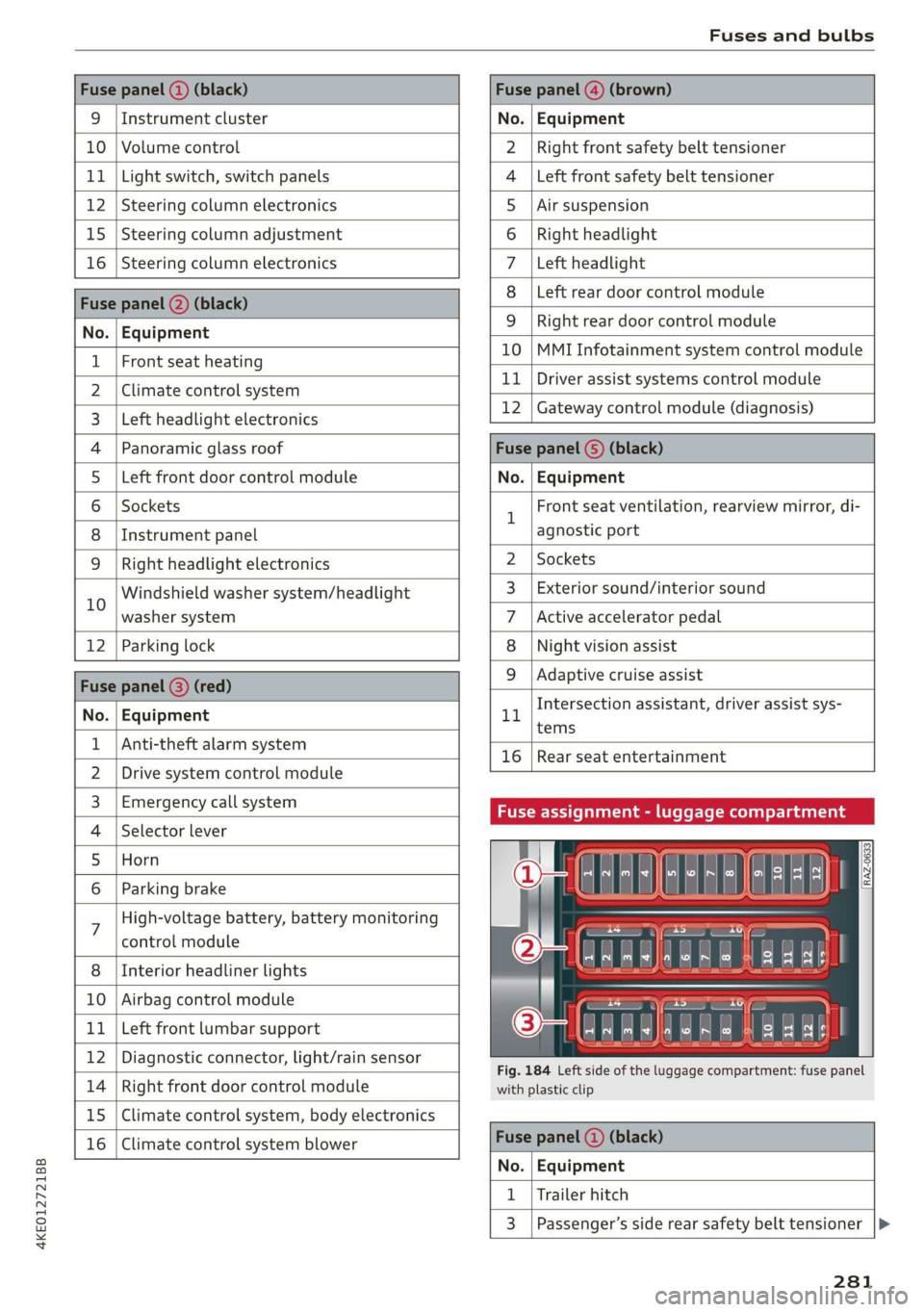
Fuses and bulbs
Fuse panel (2) (black) Fuse panel @) (brown)
9 |Instrument cluster No. | Equipment
10 | Volume control Right front safety belt tensioner
11 | Light switch, switch panels Left front safety belt tensioner
12 | Steering column electronics Air suspension
15 | Steering column adjustment Right headlight
16 | Steering column electronics Left headlight
Fuse panel (2) (black)
No. | Equipment
Left rear door control module
WOlOIN|
A)
Mm]
ALN
Right rear door control module
10 |MMI Infotainment system control module
1 |Front seat heating - -
2 |ehmmareconeral system 11 | Driver assist systems eantte) iene
Z | betvheadlightdlecironias 12 | Gateway control module (diagnosis)
4 |Panoramic glass roof Fuse panel 6) (black)
5 |Left front door control module No. | Equipment
6 | Sockets 1 Front seat ventilation, rearview mirror, di-
8 | Instrument panel agnostic port
9 | Right headlight electronics 2 | Sockets
iG Windshield washer system/headlight 3_| Exterior sound/interior sound
washer system 7 |Active accelerator pedal
12 | Parking lock 8 | Night vision assist
Fuse panel @ (red) 9 |Adaptive cruise assist
7 Intersection assistant, driver assist sys-
No. | Equipment 11
tems
1 {Anti-theft alarm system -
16 | Rear seat entertainment
2 |Drive system control module
3, | Emergency:callsystem Fuse assignment - luggage compartment
4 | Selector lever
5 |Horn 8
le
6 |Parking brake a
7 High-voltage battery, battery monitoring
control module
8 | Interior headliner lights
10 | Airbag control module
11 | Left front lumbar support
12 | Diagnostic connector, light/rain sensor
14 | Right front door control module
15 | Climate control system, body electronics
16 | Climate control system blower
7
ed ey
aE EEE
Fig. 184 Left side of the luggage compartment: fuse panel
with plastic clip
Fuse panel (4) (black)
No. | Equipment
1 | Trailer hitch
3 | Passenger’s side rear safety belt tensioner
281
Page 284 of 310
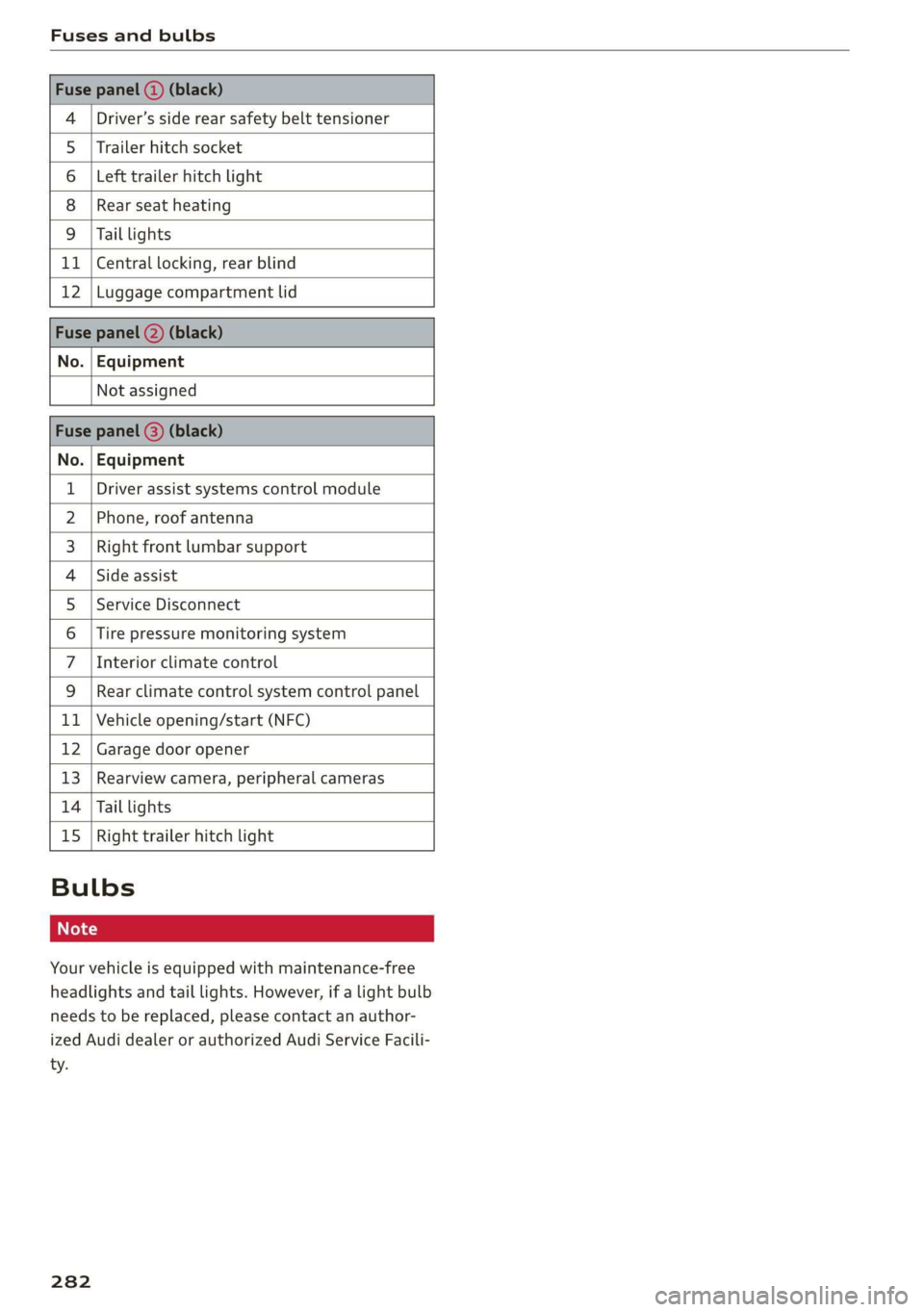
Fuses and bulbs
Driver’s side rear safety belt tensioner
4
5 |Trailer hitch socket
6 |Left trailer hitch light
8
9
Rear seat heating
Tail lights
11 | Central locking, rear blind
12 |Luggage compartment lid
No. | Equipment
Not assigned
2), og . | Equipment
Driver assist systems control module
Phone, roof antenna
Right front lumbar support
Side assist
Service Disconnect
Tire pressure monitoring system
Interior climate control
WOIN
A|M|)A)/WIN]
PR
Rear climate control system control panel
Vehicle opening/start (NFC)
Hb BR
bh N Garage door opener
pa Ww Rearview camera, peripheral cameras
Tail lights
Right trailer hitch light
be KR
Hb uw
Bulbs
Your vehicle is equipped with maintenance-free
headlights and tail lights. However, if a light bulb
needs to be replaced, please contact an author-
ized Audi dealer or authorized Audi Service Facili-
ty.
282
Page 288 of 310
Accessories and technical changes
Accessories and
technical changes
Warranty
Your vehicle is covered by various warranties:
— New Vehicle Limited Warranty
— Limited Warranty Against Corrosion Perforation
— Applies to: USA models: Kansas Safety Belt
Limited Warranty
You can find detailed information in your Warran-
ty & Maintenance Booklet.
Audi Literature Shop
Service information is made available as soon as
possible after a model is introduced and can be
ordered in the Audi Literature Shop: http://
literature.audiusa.com
Driving in other
countries
Government regulations in the United States and
Canada require motor vehicles to comply with
emissions regulations and safety standards.
Therefore, vehicles that were produced for the
U.S. and Canadian markets are different from ve-
hicles produced for other countries.
If you plan to use your vehicle outside of the
United States or Canada, it is possible that:
— Proper maintenance and repair work may not
be possible because special service equipment,
tools, or measuring devices needed for your ve-
hicle may not be available.
— Replacement parts may not always be availa-
ble.
— Navigation systems for vehicles built for the
U.S.A. and Canada will not necessarily work in
Europe, and may not work in other countries.
@) Note
Audi is not liable for damage to the vehicle re-
sulting from these country-specific differen-
ces.
286
Maintenance, repairs,
and technical modifi-
cations
Note the safety precautions > page 235, General
information and > page 273, Raising the vehicle.
General information
Due to the increasing complexity of technology in
these vehicles, as well as the safety and environ-
mental standards that apply, you can only per-
form a very limited amount of repairs and modifi-
cations to the vehicle yourself.
Proof of maintenance work may be required to
submit a claim within the warranty period.
We recommend that you have your vehicle serv-
iced by an authorized Audi dealer or authorized
Audi Service Facility and that Audi Genuine Parts
and Audi Genuine Accessories are used. This
helps to ensure that your vehicle's functionality,
performance, and safety are not impaired.
Maintenance and repairs
Your vehicle was designed to help keep mainte-
nance requirements to a minimum. Some regular
maintenance is required to help ensure that your
vehicle runs in a safe, economical, and reliable
manner. Please refer to your Warranty & Mainte-
nance Booklet for more detailed information
about vehicle maintenance.
When operating the vehicle under more extreme
operating conditions, for example when outside
temperatures are very low or in very dusty envi-
ronments, certain maintenance should be per-
formed between the specified intervals.
Usually maintenance and repair work requires
special tools, measuring devices, and other
equipment that is available to trained vehicle
technicians in order to help ensure that your vehi-
cle and all of its systems operate correctly, relia-
bly, and safely. Performing work on the vehicle
incorrectly can impair the operation and reliabili-
ty of your vehicle and may void one or more of
your vehicle's warranties.
Page 294 of 310
Technical data
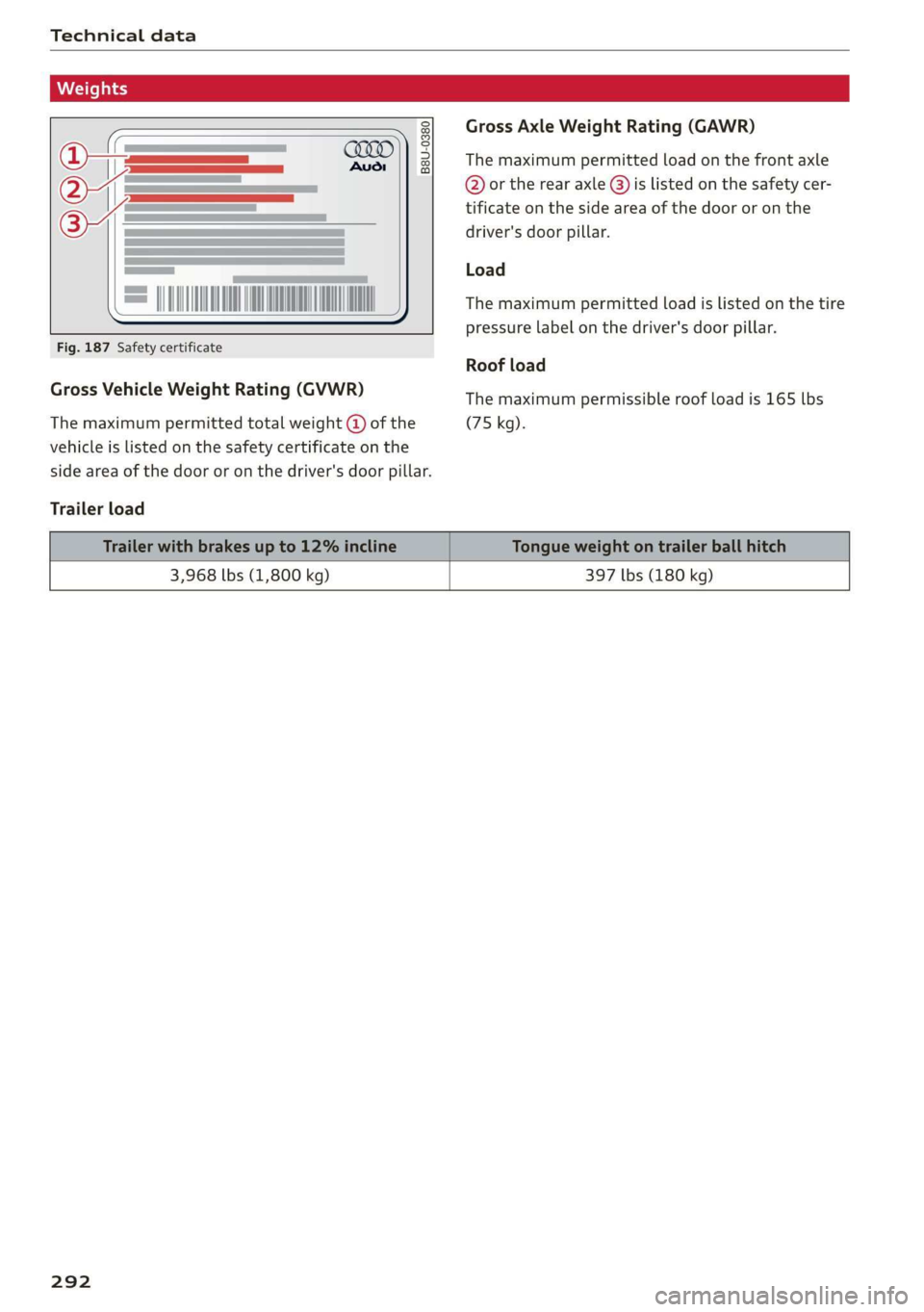
Gross Axle Weight Rating (GAWR)
B8U-0380 The maximum permitted load on the front axle
@ or the rear axle @) is listed on the safety cer-
tificate on the side area of the door or on the
driver's door pillar.
Load
The maximum permitted load is listed on the tire
pressure label on the driver's door pillar.
Fig. 187 Safety certificate
Roof load
Gross Vehicle Weight Rating (GVWR) The maximum permissible roof load is 165 lbs
The maximum permitted total weight @ of the (75 kg).
vehicle is listed on the safety certificate on the
side area of the door or on the driver's door pillar.
Trailer load
3,968 lbs (1,800 kg) 397 lbs (180 kg)
292
Page 296 of 310
Index
Blinds
refer to Sunshade (roof) ............00-5 40
Block
route................ 00 cece eee 202
BLOWER. « sees su comers a enmeane wa nents a = swine = 82
Bluetooth
Audio player........... 0.00 e eee eee 218
Connecting a mobile device............ 170
Deleting
ardevice wii s 2 isnsins ov sucrose « sence 233
Device overVieW...... 6c eee ee eee eee 232
Disconnecting a device................ 233
Displaying profiles.................... 233
Searching fora device...............-. 233
Selecting adevice.............2eeeeee 233
Specifying a favorite.................. 233
BOOStTUNCTION owas x cee 2 sneer 2 eo ces ¢ 89
Brake fluid
Checking the brake fluid level........... 239
Brak Sicnes 2 x sree: vo cmv ow orien ow soe © o ooEKS 92
Brakerassist. scsmrs « acess» oi soz 4 0 omens « 102
Brake fluid. .................0..0000. 239
Emergency braking function............. 95
New brake pads..............---00000- 92
Break-in security feature................. 32
Breaking in
New brake pads............0.20200000- 92
NGW TIRES: « « noms 2 s saros & 9 cate gs eam a 250
Browser
refer to Mediacenter................4. 222
Bulb replacement.............--22+-05- 282
Business: address). «i ijei as jana a scan a va 202
Cc
California Proposition 65 Warning........ 235
Batteryspecific... =. eccs s sive s ween as: 241
GALLLISt « wea ¢ 2 aeee xs meee oe eee s Bee ee 174
Capacities
Fuebtanike, « secs 2 a oasan oo ssamon o wana oo ove 291
Washer fluid reservoir................- 291
Cangowmatc © « conse ws aussins 6 0 secs a a amass We ae 80
Cargoinets: « s soma 2s memew + wauim a 3 mam 6 @ oarae 80
Car key « s eeu oy ews y oeE 6 2 ween 6 Ewes 33
Car phone
Serialinumber(IMED) « wsscsce ao soteane ao sanaia 181
Switching on... ....... eee eee eee 181
Using the car phone function........... 169
Car WASH: = sass 5 x eee 5 feats sb eG EE 263
294
Cell phone
refer to Telephone...........-0e eee eae 169
Cell phone compartment
refer to Audi phone box............... 171
Central
locking ...... 0. cece eee eee eee 29
AUTO LOCK: » geese + sunems 2 seene & 3 donee & = Be 29
Convenience key « sscsu © cvenesie © erase wo vnscem 34
Convenience opening and closing......... 40
Luggage compartment lid............... 36
Mechanically unlocking and locking....... 32
Messages... 1.6... ce eee cece eee eee 31
Remote control keys: ss esas ss eves os ees 34
SettN's 6 e wanes a a saws «wo ones vo meen + 8 o8TH 30
Vehicle key... 6... ccc ee eee eee eee 34
Central locking switch.............000005 31
Centificat onto» a sess + x aneans ao somes o 6 mmm 289
Changing lightibulbs'. « ccs ss sew s 6 sesso 282
Charging
refer to Power sourceS............00 000s 75
Charging clip
refer to Wall mount clip............... 119
Charging display................---0000- 109
Charging the battery (mobile devices). 171, 220
Charging times. « sass. se savin s 2 wees © 2 sree 106
Child safety lock
Climate control system controls in the rear. 39
POWER WINK OWS inc ¢ & cme 5 ores 5 v eee 39
Rear doorsten « swe so mim 2 women n= ame wD 39
Child
safety seats........ 0... ce eee ee eee 69
Securing to the top tether anchor........ 72
Securing with a safety belt.............. 72
Securing with LATCH. ss sses ss eee se eee 71
Gl@aNiNG ¢ sere « s ewes 5 o eee se eee ce ees 263
Cleaning Alcantara.............-..0000. 266
Cleaning artificial leather............... 266
Cleaning carbon components........ 265, 266
Cleaning controls..............00 eee eee 266
Cleaning decorative parts/trim........... 265
Cleaning plastic parts.................. 265
Cleaning textiles: s ws + wees v ween oe eee 266
Climate control system ..............004. 81
Climate control system controls in the rear
Child safetylotk.o icvc os soci © sean © wows 39
Closing
Automatic luggage compartment lid...... 36
Convenience closing................045 40
Page 297 of 310
4KE012721BB
Index
HOO « cnsvecs 2 v citvace ow eneaene oo somes ve soto ¥ 236
Luggage compartment lid............... 36
Luggage compartment lid with foot motion . 37
Panoramic glass roofs. «esc se eevee eae 40
Sunshade (roof)... 2.2.0.6. eee eee 40
WINdOWS : soce = ¢ xews 2 y cee xs eee 5 oes 39
Closing aid (power closing doors).......... 29
Cockpit dimming...............002-000 48
Cockpit (overview) ....... 0.000 c cece ee eee 6
Collapsible spare tire
Inflating....... 2... eee eee eee ee eee 275
Collapsible tire
refer to Collapsible spare tire........... 2715
GOlGr MUMBEN: ¢ sees 5 xy ream sy eee 5 e eR « 291
Comfort auxiliary climate control.......... 85
Coming home/Leaving home
refer to Entry/exit lighting.............. 46
Compartments: < s ceau ze ee@s so eRe eb eS 76
Compass inthe mirror................00- 53
Compliance ........ 6.0... cece eee eee ee 289
Configuration wizard.................00. 17
CONME Cie. va nce & mene a moms @ a ee @ sue 184
Data plans... .... 2. ee eee eee eee 189
Data Privatyiee = « news ¢ x eng s eae a 5 eee 285
Emmengeneyseall ssc «a ssi 6 svensewe + syacene 191,
Infotainment...............-.-0 eee eee 185
Infotainment services............00005 185
Online roadside assistance............. 192
Vehicle control services................ 186
Connected devices
Device overvieW.... 0... cece e ee ee eee 232
Connections
referto Media............--.+++- 217,221
Consumer information.................- 286
Consumption
Reducing « svar es senw e waen @ o wee ey wee 91
Consumption (energy) ...............0005 14
Contacts
Add destinations ssw: « x cima © 2 aves @ 2 sone 203
Importing and exporting.............. 181
Memory capacity............000e eae 181
Opening (business card)............... 175
Updatinginthe MMI.................. 181
Convenience key............00 020 e sees 29
Convenience closing. ..........0eeee eee 40
also refer to Vehicle key..............-- 33
Convenience opening and closing
Windows or panoramic glass roof........ 40
Cooling mode..... 0.2... eee eee eee 82
Cooling system
Coolant... ... eee ee eee 237
Coolant l6VEl sence 2 5 seen s cage 2 eevee ga 238
Cornering
light: =» sees ¢ 2 eese 2» ewan ss es 44
Cross traffic assist (intersection assistant)... 157
Cruise control system
refer to Speed control systems.......... 134
Cup Holdets es « « sven ¢ ¢ een se eee x e sees 75
Current consumption.................... 14
D
Data plans... 0... eee eee eee 189
Data Privacy....... 0... cece eee eee 285
Date... eee 14
Daytime running lights.................. 44
Declaration of compliance............... 289
DEF (instrument cluster) ..............004 11
Demo mode
refer to Presentation mode............. 207
Destination on the map..............0.. 198
Detailsts os sscmve o vam 2 2 amore ao ansome oy ave 197
Determining correct load limit........... 256
Digital: cOMpaSs sew: : 2 sees c= reas ve een se 53
Dimensions ...........-..0 0c e eee eee ee 291
Dimming the exterior mirrors............. 49
Dimming the rearview mirror............. 49
Directory
Settings........... 002.2 eee eee eee 181
also refer to ContactS..............00. 175
Display
Gleanings « « exes = > eavane « esecnie ow ears owe 266
Disposalicne is « scsswa se suns « @ mnenes oe mae ow 286
DiStaNCC rss « ¢ eames = o sage s ¥ eeupe & 2 Hee x 14
DIStanGe WARNING, ames 3 « says se gems «eR 147
Doors
Childisatety lock eric. ss cio so ween a ewes « 39
Door contact switch................200. 47
Mechanically unlocking and locking....... 32
Power closing/closing aid............... 29
Driver information system................ 12
Drives
refer toMed idles « «wees sv eww 6 owen 217,221
295
Page 298 of 310
Index
Drive select
refer to Audi drive select.............0.. 98
Drive system. .... 20.2... 90
Audi drive select . cans 4 cicag at eaan ea ies 98
Emergency Off wv 2 x acne ov wews ye eeu 9 86
Switching on and off...............2005 86
Driving: OwntHills: cess» everene sania ee enero a 96
Driving programs « & sews 6 «eee os ees 88, 146
Driving through water...............004. 96
Driving time’: « s cose ¢ « eewy s nares Heme a sg 14
Driving tips
Driving through water...............00. 96
Efficient driving...............0000000. 91
Offrodd GriVinig < ees. yess as emus a wean ae 96
Uphill and downhill.................00. 96
Drivinig:up Hills: ¢ seus se oss ye ree yo ees 96
Dust filter
refer to Pollutant filter................. 84
DVD drive (media drives)................ 218
E
E-mail
MessageiOptionstn:. + « sss « « snemeue © « steceas + 179.
SettingS ... 0.6... cece eee eee 179
EDL
refer to Electronic Differential Lock...... 101
EDR
Event Data Recorder...............0.. 283
Efficiency assist =. « < sce: ss epee ye ees eee 135
Electrical system ..........-- 0s eee eee ee 239
Electricity
PEFer TO ENC cr » o san & 2 ees ¢ epee os 104
Electric motor
COOLANE wwe co aveana wa cana a 6 acenate © a anavar a 237
Electric ranges i « sca so were 6 ewe aw maa 204
Electromechanical parking brake.......... 93
Electronic Differential Lock.............. 102
Electronic immobilizer.............0.002. 33
Electronic Stabilization Control........... 101
Embedded SIM card................0055 185
Emergency assist.................0000- 158
Emergency assistance .......... 000s sees 269
Emergency braking function.............. 95
Emergency calliss so sisi se oesin so een 176,191
Emergency flasherst: « + ass 2 news ¢ wana ess 46
296
Emergency Mode «sce s veve ee ences ee eevee 90
Emergency operation
Doors... 2... ee eee 32
Luggage compartment lid............... 38
Panoramic glass roof...............2.4. 41
Energy
Current COMSUMPTION:. « 6 siesess s 6 eewcee & 6 soem 14
Reducing consumption................. 91
Energy recovery... 22.0.0 cece eee eee eee 90
Engine braking effect
refer to Recuperation................4. 90
Engine start system. ..............0.000. 87
Entry/exit lighting................--000- 46
ENMtry ASSISTANCE. « « senciw » 6 ssorane 0 canner 4 0 esos 58
also refer to Exit assistance............. 58
eSIM
refer to Embedded SIM card............ 185
Evasive steering assist.................- 152
Event Data Recorder (EDR).............. 283
Exit assistance... 0... eee eee eee 58
Exit warning.................0.00.00005 156
Exterior lighting.................022-00. 44
Exterior MIPPO0S ciwie so ccicee oo cere 6 weve oo 48
Folding settings ..............0000 0000s 30
External voice operation................. 25
F
Factory default settings
Multi Media Interface...............4. 232
Fast forwarding and rewinding (media file). 221
Fast forwarding (media files) ............ 221
FaStnOute’s a seca oo mee «2 mmm 9 6 em © eee 194
Favorites
Bluetooth.............. 000.0 e ee eee 233
NaVIGStOl sss « wes & > wee o x seme ¢ 5 ee 196
Telephone wssics so caves oo ssasens oo arenes 9 ¥ eee 174
Federal Communications Commission (FCC) . 289
File formats (media drives) .............. 227
FOG (WIRdOWS) zx x + sax © s coun ¢ 5 eee x 2 oe 83
Folding the rear seats.............-..00- 79
Footwell temperature............0..000. 84
For the sake of the environment
LOOKS ccs = = some 5 ¢ ene a eee x ee ee 235
Forward gear
FEPErtO Gears « easu ¢ s awe ¢ ¢ wees se wEEN 88