charging AUDI E-TRON 2019 Owner's Manual
[x] Cancel search | Manufacturer: AUDI, Model Year: 2019, Model line: E-TRON, Model: AUDI E-TRON 2019Pages: 310, PDF Size: 81.91 MB
Page 115 of 310
4KE012721BB
High-voltage system
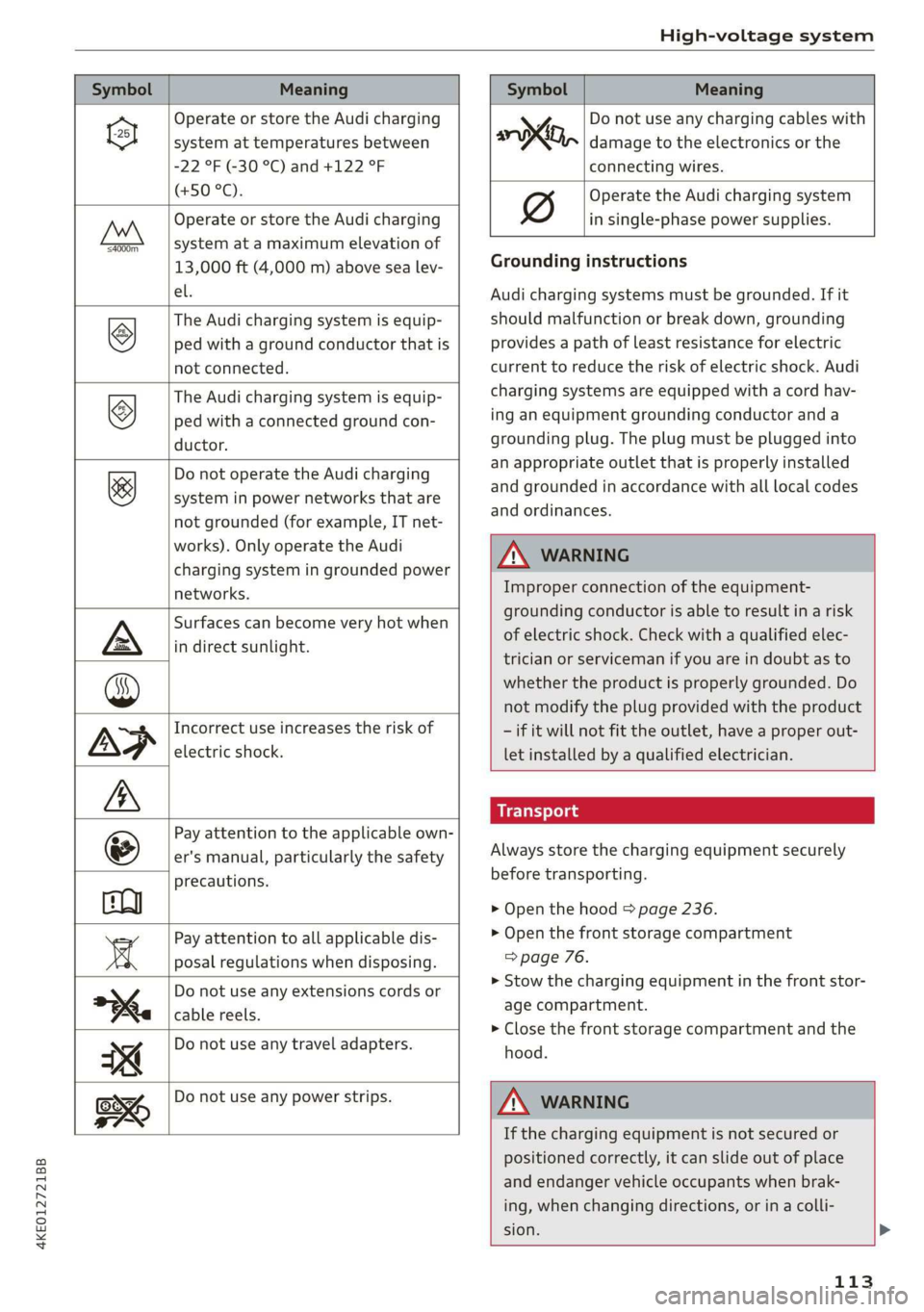
Symbol Meaning Meaning
Operate or store the Audi charging
system at temperatures between
-22 °F (-30 °C) and +122 °F
(+50 °C).
Operate or store the Audi charging
system at a maximum elevation of
4000m_
13,000 ft (4,000 m) above sea lev-
el.
The Audi charging system is equip-
ped with a ground conductor that is
not connected.
©
The Audi charging system is equip-
ped with a connected ground con-
ductor.
&
Do not operate the Audi charging
system in power networks that are
not grounded (for example, IT net-
works). Only operate the Audi
charging system in grounded power
networks.
Surfaces can become very hot when
in direct sunlight.
Incorrect use increases the risk of
electric shock.
Pay attention to the applicable own-
er's manual, particularly the safety
precautions.
Pay attention to all applicable dis-
posal regulations when disposing.
Do not use any extensions cords or
cable reels.
Do not use any travel adapters.
y Do not use any charging cables with
oo, damage to the electronics or the
connecting wires.
Operate the Audi charging system
in single-phase power supplies.
Grounding instructions
Audi charging systems must be grounded. If it
should malfunction or break down, grounding
provides a path of least resistance for electric
current to reduce the risk of electric shock. Audi
charging systems are equipped with a cord hav-
ing an equipment grounding conductor and a
grounding plug. The plug must be plugged into
an appropriate outlet that is properly installed
and grounded in accordance with all local codes
and ordinances.
Z\ WARNING
Improper connection of the equipment-
grounding conductor is able to result in a risk
of electric shock. Check with a qualified elec-
trician or serviceman if you are in doubt as to
whether the product is properly grounded. Do
not modify the plug provided with the product
- if it will not fit the outlet, have a proper out-
let installed by a qualified electrician.
Always store the charging equipment securely
before transporting.
> Open the hood > page 236.
> Open the front storage compartment
=> page 76.
>» Stow the charging equipment in the front stor-
age compartment.
> Close the front storage compartment and the
hood.
Do not use any power strips.
Z\ WARNING
If the charging equipment is not secured or
positioned correctly, it can slide out of place
and endanger vehicle occupants when brak-
ing, when changing directions, or in a colli-
sion. >
113
Page 116 of 310
High-voltage system
— Only transport the charging equipment in
the front storage compartment and never
unsecured or in the passenger compart-
ment.
C@) Note
Always lift or carry the Audi charging system
as one unit and never by the cables.
Audi e-tron compact charging system
Applies to: vehicles with Audi e-tron compact charging system
o~ |
[RAZ-0605|
Fig. 92 Audi e-tron compact charging system: components
(example)
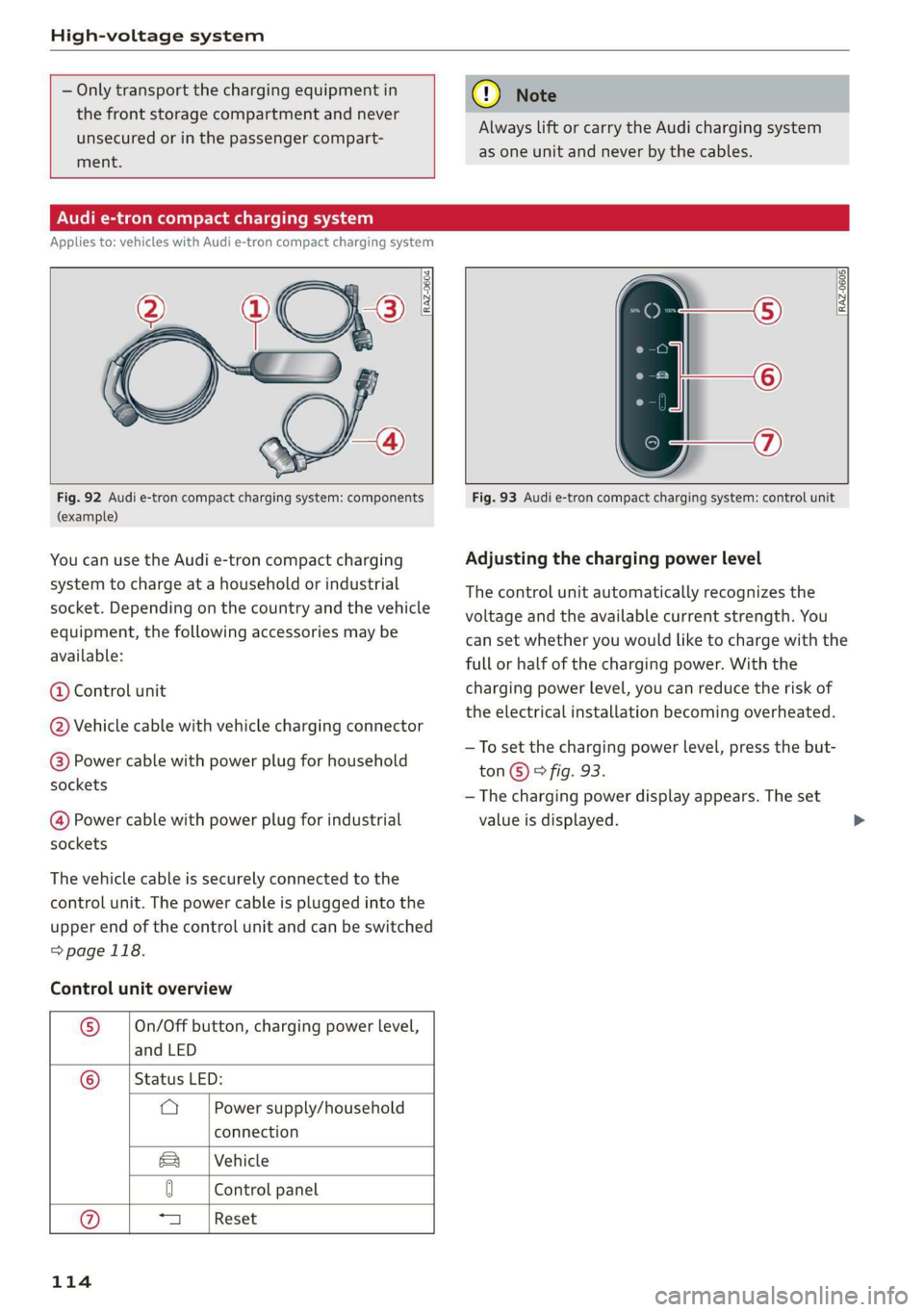
You can use the Audi e-tron compact charging
system to charge at a household or industrial
socket. Depending on the country and the vehicle
equipment, the following accessories may be
available:
@ Control unit
@ Vehicle cable with vehicle charging connector
@® Power cable with power plug for household
sockets
@ Power cable with power plug for industrial
sockets
The vehicle cable is securely connected to the
control unit. The power cable is plugged into the
upper end of the control unit and can be switched
=>page 118.
Control unit overview
® On/Off button, charging power level,
and LED
© _ |Status LED:
a Power supply/household
connection
Vehicle
Sa
0 Control panel
a Reset
114
Fig. 93 Audi e-tron compact charging system: control unit
Adjusting the charging power level
The control unit automatically recognizes the
voltage and the available current strength. You
can set whether you would like to charge with the
full or half of the charging power. With the
charging power level, you can reduce the risk of
the electrical installation becoming overheated.
—To set the charging power level, press the but-
ton©) & fig. 93.
— The charging power display appears. The set
value is displayed.
Page 117 of 310
4KE012721BB
High-voltage system
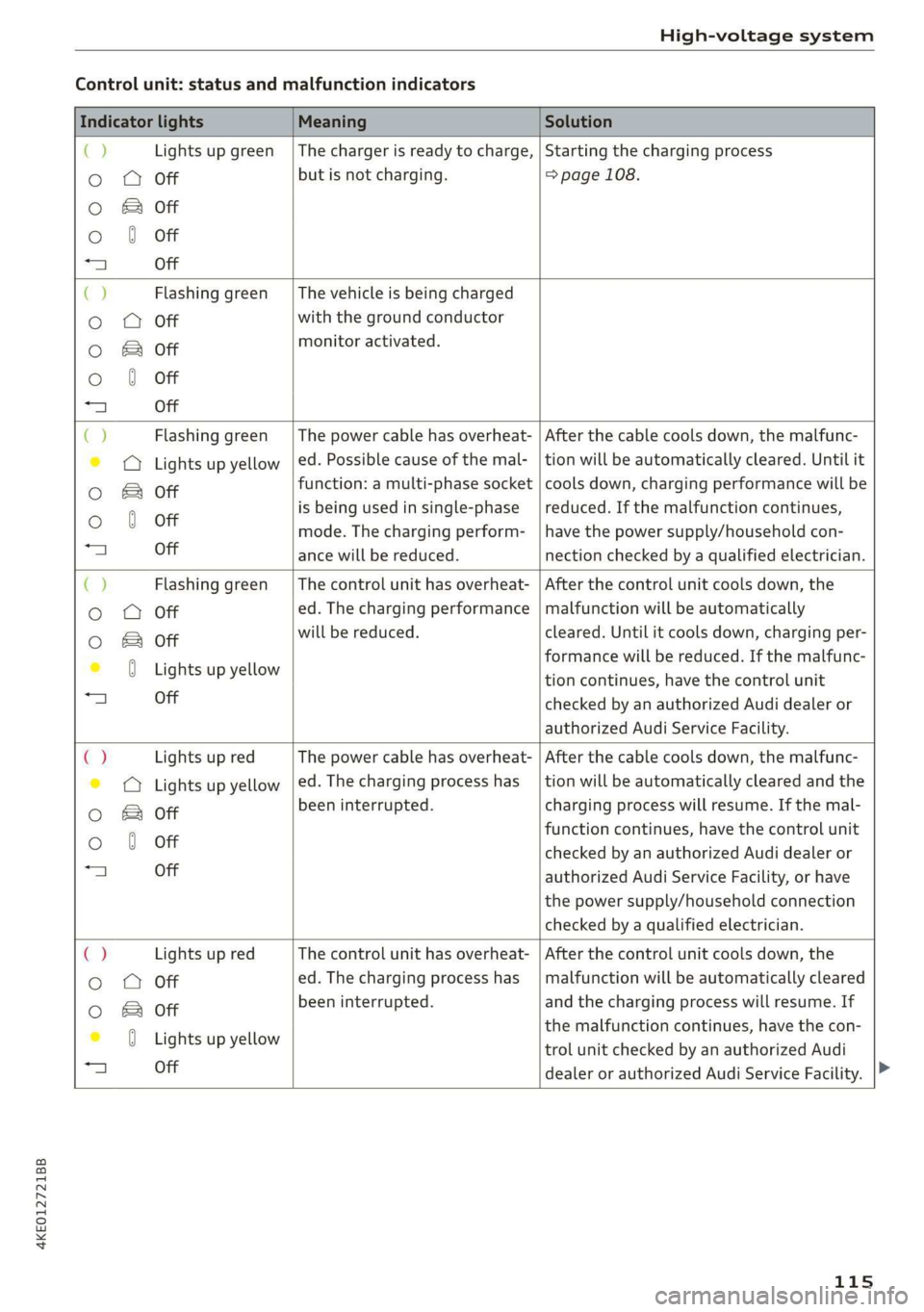
Control unit: status and malfunction indicators
Indicator lights Meaning Solution
() Lights up green |The charger is ready to charge, | Starting the charging process
o OQ Off but is not charging. => page 108.
O & Off
o 0 Off
=) Off
CJ Flashing green _| The vehicle is being charged
o Q Off with the ground conductor
oO B of monitor activated.
o 0 Off
a) Off
() Flashing green _| The power cable has overheat- | After the cable cools down, the malfunc-
© © Lights up yellow | ed. Possible cause of the mal- | tion will be automatically cleared. Until it
Oo & off function: a multi-phase socket | cools down, charging performance will be
Oo 0 Off is being used in single-phase | reduced. If the malfunction continues,
mode. The charging perform- | have the power supply/household con-
“4 Off ance will be reduced. nection checked by a qualified electrician.
() Flashing green | The control unit has overheat- | After the control unit cools down, the
o O Off ed. The charging performance | malfunction will be automatically
oO B of will be reduced. cleared. Until it cools down, charging per-
© 0 Lights up yellow formance will be reduced. If the malfunc-
tion continues, have the control unit
“a Off checked by an authorized Audi dealer or
authorized Audi Service Facility.
() Lights up red The power cable has overheat- | After the cable cools down, the malfunc-
© © Lights up yellow |ed. The charging process has __| tion will be automatically cleared and the
oO B of been interrupted. charging process will resume. If the mal-
function continues, have the control unit
o 0 off checked by an authorized Audi dealer or
“a Off authorized Audi Service Facility, or have
the power supply/household connection
checked by a qualified electrician.
C2 Lights up red The control unit has overheat- | After the control unit cools down, the
Oo O Off ed. The charging process has__| malfunction will be automatically cleared
oO B off been interrupted. and the charging process will resume. If
iG Ligteewp yelbaw the malfunction continues, have the con-
trol unit checked by an authorized Audi
1 Off
dealer or authorized Audi Service Facility.
115
Page 118 of 310
High-voltage system
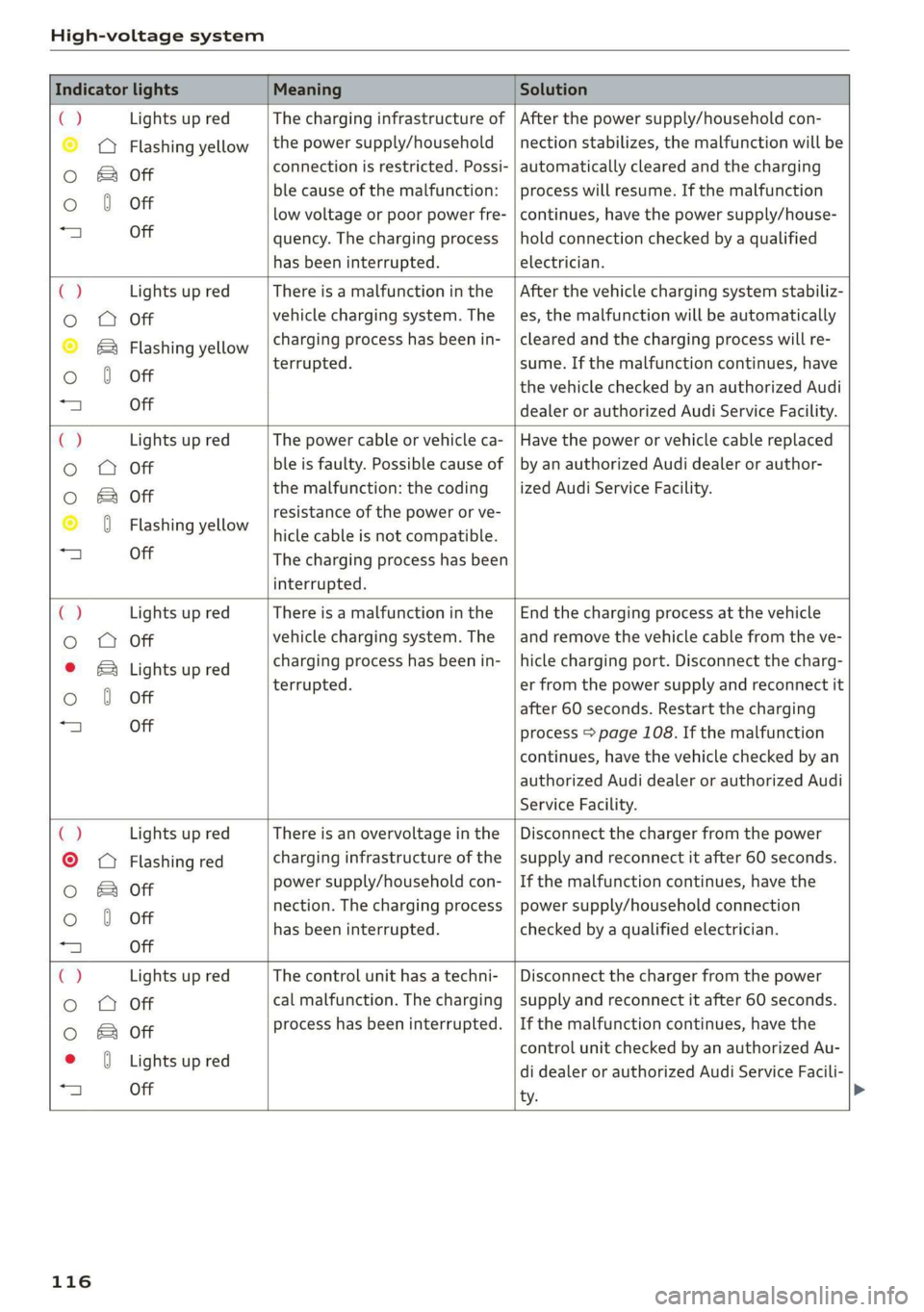
Indicator lights Meaning Solution
ia Lights up red The charging infrastructure of | After the power supply/household con-
© © Flashing yellow |the power supply/household | nection stabilizes, the malfunction will be
Oo B of connection is restricted. Possi- | automatically cleared and the charging
o 8 of ble cause of the malfunction: | process will resume. If the malfunction
low voltage or poor power fre- | continues, have the power supply/house-
“4 Off quency. The charging process | hold connection checked by a qualified
has been interrupted. electrician.
4 Lights up red There is a malfunction inthe | After the vehicle charging system stabiliz-
o O Off vehicle charging system. The | es, the malfunction will be automatically
© B® Flashing yellow charging process has been in- | cleared and the charging process will re-
oO 6 Off terrupted. sume. If the malfunction continues, have
the vehicle checked by an authorized Audi
“A Off dealer or authorized Audi Service Facility.
C2 Lights up red The power cable or vehicle ca- | Have the power or vehicle cable replaced
o OQ Off ble is faulty. Possible cause of | by an authorized Audi dealer or author-
oO B otf the malfunction: the coding _| ized Audi Service Facility.
© 0 Flashing yellow resistance of the power or ve-
hicle cable is not compatible.
a) Off The charging process has been
interrupted.
€) Lights up red There is a malfunction in the | End the charging process at the vehicle
o OQ Off vehicle charging system. The | and remove the vehicle cable from the ve-
© B Lights up red charging process has been in- | hicle charging port. Disconnect the charg-
Oo 0 Off terrupted. er from the power supply and reconnect it
after 60 seconds. Restart the charging
“a Off process > page 108. If the malfunction
continues, have the vehicle checked by an
authorized Audi dealer or authorized Audi
Service Facility.
() Lights up red There is an overvoltage inthe | Disconnect the charger from the power
©
© Flashing red charging infrastructure of the | supply and reconnect it after 60 seconds.
Oo B of power supply/household con- | If the malfunction continues, have the
Oo 0 Off nection. The charging process | power supply/household connection
has been interrupted. checked by a qualified electrician.
=| Off
Ca Lights up red The control unit has atechni- | Disconnect the charger from the power
Oo QO Off cal malfunction. The charging | supply and reconnect it after 60 seconds.
0 & of process has been interrupted. | If the malfunction continues, have the
* 0 vightsupred control unit checked by an authorized Au-
25 see di dealer or authorized Audi Service Facili-
ty.
116
Page 119 of 310
4KE012721BB
High-voltage system
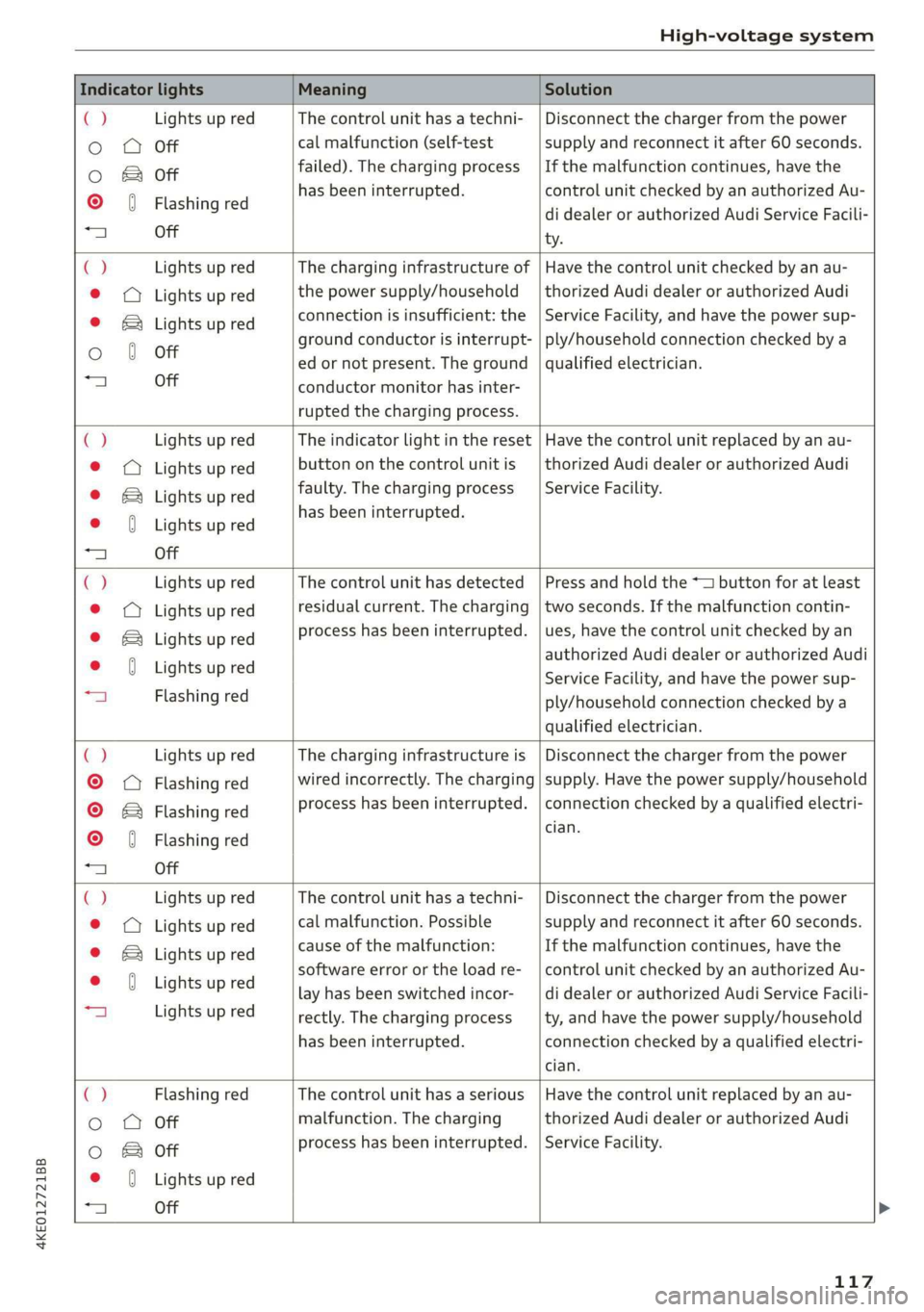
Indicator lights Meaning Solution
() Lights up red The control unit has atechni- | Disconnect the charger from the power
o Q Off cal malfunction (self-test supply and reconnect it after 60 seconds.
oO B of failed). The charging process _ | If the malfunction continues, have the
© 0) Flashing red has been interrupted. control unit checked by an authorized Au-
di dealer or authorized Audi Service Facili-
a Off ty.
C) Lights up red The charging infrastructure of | Have the control unit checked by an au-
@ © Lights up red the power supply/household | thorized Audi dealer or authorized Audi
© ®& Lights up red connection is insufficient: the | Service Facility, and have the power sup-
ground conductor is interrupt- | ply/household connection checked by a
Oo 0 Off ed or not present. The ground | qualified electrician.
“al Off conductor monitor has inter-
rupted the charging process.
() Lights up red The indicator light in the reset | Have the control unit replaced by an au-
@ © Lights up red button on the control unit is | thorized Audi dealer or authorized Audi
© B Lights up red faulty. The charging process _| Service Facility.
. has been interrupted.
e@ J Lights up red
1 Off
() Lights up red The control unit has detected | Press and hold the *— button for at least
© © Lights up red residual current. The charging |two seconds. If the malfunction contin-
© & Lights up red process has been interrupted. | ues, have the control unit checked by an
© 0 Lights up red authorized Audi dealer or authorized Audi
Service Facility, and have the power sup-
“a Flashing red ply/household connection checked by a
qualified electrician.
c) Lights up red The charging infrastructure is | Disconnect the charger from the power
©
Q Flashing red wired incorrectly. The charging | supply. Have the power supply/household
© & Flashing red process has been interrupted. | connection checked by a qualified electri-
© ( Flashing red Sil
“a Off
() Lights up red The control unit has atechni- | Disconnect the charger from the power
@ © Lights up red cal malfunction. Possible supply and reconnect it after 60 seconds.
© B Lights up red cause of the malfunction: If the malfunction continues, have the
MD Lightsup red software error or the load re-__| control unit checked by an authorized Au-
lay has been switched incor- | di dealer or authorized Audi Service Facili-
| Lights up red rectly. The charging process __| ty, and have the power supply/household
has been interrupted. connection checked by a qualified electri-
cian.
() Flashing red The control unit has a serious | Have the control unit replaced by an au-
Oo QO Off malfunction. The charging thorized Audi dealer or authorized Audi
oO B of process has been interrupted. | Service Facility.
e (Lights up red
+ Off
117
Page 120 of 310
High-voltage system
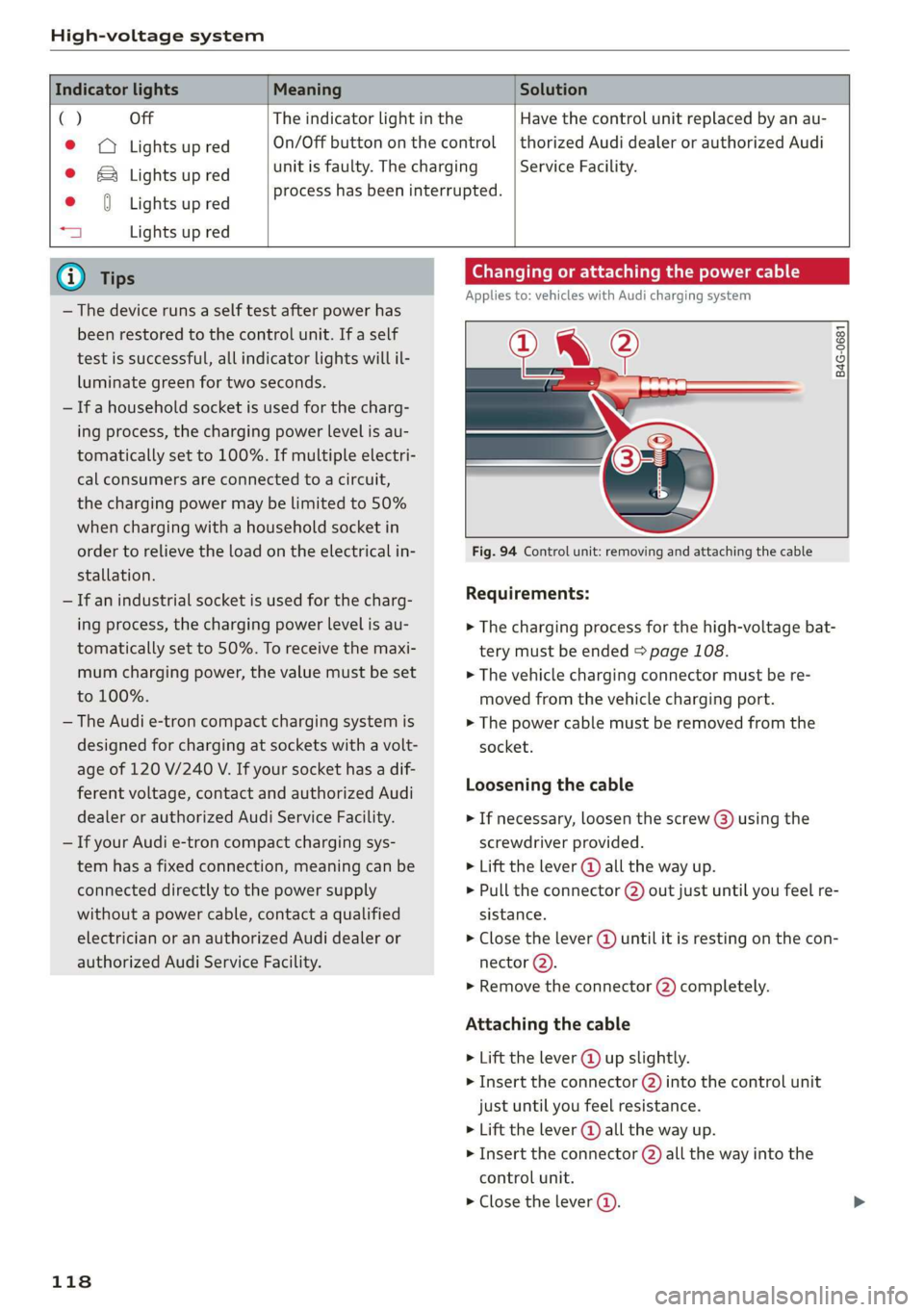
Indicator lights Meaning Solution
() Off The indicator light in the
© © Lights up red On/Off button on the control
© & Lights up red unit is faulty. The charging
. process has been interrupted.
e {Lights up red
aj Lights up red
Have the control unit replaced by an au-
thorized Audi dealer or authorized Audi
Service Facility.
@ Tips
— The device runs a self test after power has
been restored to the control unit. If a self
test is successful, all indicator lights will il-
luminate green for two seconds.
— If a household socket is used for the charg-
ing process, the charging power level is au-
tomatically set to 100%. If multiple electri-
cal consumers are connected to a circuit,
the charging power may be limited to 50%
when charging with a household socket in
order to relieve the load on the electrical in-
stallation.
— If an industrial socket is used for the charg-
ing process, the charging power level is au-
tomatically set to 50%. To receive the maxi-
mum charging power, the value must be set
to 100%.
— The Audi e-tron compact charging system is
designed for charging at sockets with a volt-
age of 120 V/240 V. If your socket has a dif-
ferent voltage, contact and authorized Audi
dealer or authorized Audi Service Facility.
— If your Audi e-tron compact charging sys-
tem has a fixed connection, meaning can be
connected directly to the power supply
without a power cable, contact a qualified
electrician or an authorized Audi dealer or
authorized Audi Service Facility.
118
Changing or attaching the power cable
Applies to: vehicles with Audi charging system
NL ?
B4G-0681
Fig. 94 Control unit: removing and attaching the cable
Requirements:
> The charging process for the high-voltage bat-
tery must be ended > page 108.
> The vehicle charging connector must be re-
moved from the vehicle charging port.
> The power cable must be removed from the
socket.
Loosening the cable
> If necessary, loosen the screw (3) using the
screwdriver provided.
> Lift the lever @ all the way up.
> Pull the connector @) out just until you feel re-
sistance.
> Close the lever @) until it is resting on the con-
nector (2).
» Remove the connector (2) completely.
Attaching the cable
> Lift the lever @ up slightly.
> Insert the connector (2) into the control unit
just until you feel resistance.
> Lift the lever @ all the way up.
> Insert the connector (2) all the way into the
control unit.
> Close the lever @).
Page 121 of 310
4KE012721BB
High-voltage system
> Tighten the screw (3) using the screwdriver pro-
vided.
ZA\ WARNING
— Note the warnings for charging > A in
Charging on page 109.
— Before switching the power cable, always
unplug the power cable from the socket.
— Only change cables in a dry environment.
— The Audi charging system may only be used
as a complete unit consisting of the power
cables, the control unit, and the vehicle ca-
ble. We recommend using only cables ap-
proved by Audi.
i) Tips
The power cable with the power connector for
industrial sockets and the Audi charging sys-
tem control unit are designed to work togeth-
er. Changing the power cable to another con-
nector type may reduce the available charging
power of the entire system.
Wall mount clip
Applies to: vehicles with wall mount clip
RAZ-0638
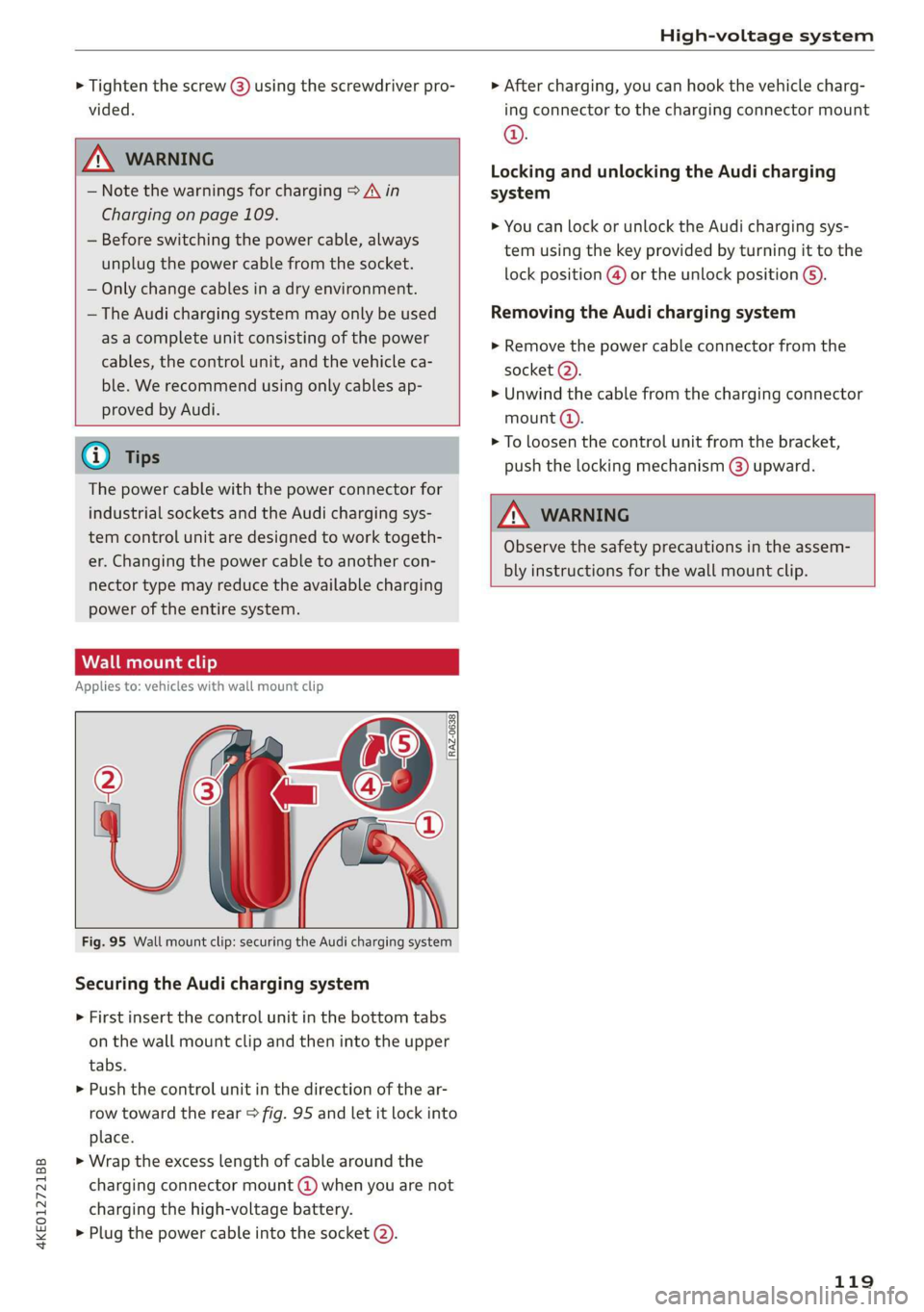
Fig. 95 Wall mount clip: securing the Audi charging system
Securing the Audi charging system
> First insert the control unit in the bottom tabs
on the wall mount clip and then into the upper
tabs.
> Push the control unit in the direction of the ar-
row toward the rear > fig. 95 and let it lock into
place.
> Wrap the excess length of cable around the
charging connector mount @) when you are not
charging the high-voltage battery.
> Plug the power cable into the socket (2).
> After charging, you can hook the vehicle charg-
ing connector to the charging connector mount
©.
Locking and unlocking the Audi charging
system
> You can lock or unlock the Audi charging sys-
tem using the key provided by turning it to the
lock position @) or the unlock position 6).
Removing the Audi charging system
> Remove the power cable connector from the
socket (2).
» Unwind the cable from the charging connector
mount @).
> To loosen the control unit from the bracket,
push the locking mechanism (@) upward.
ZA\ WARNING
Observe the safety precautions in the assem-
bly instructions for the wall mount clip.
119
Page 138 of 310
Driver assistance
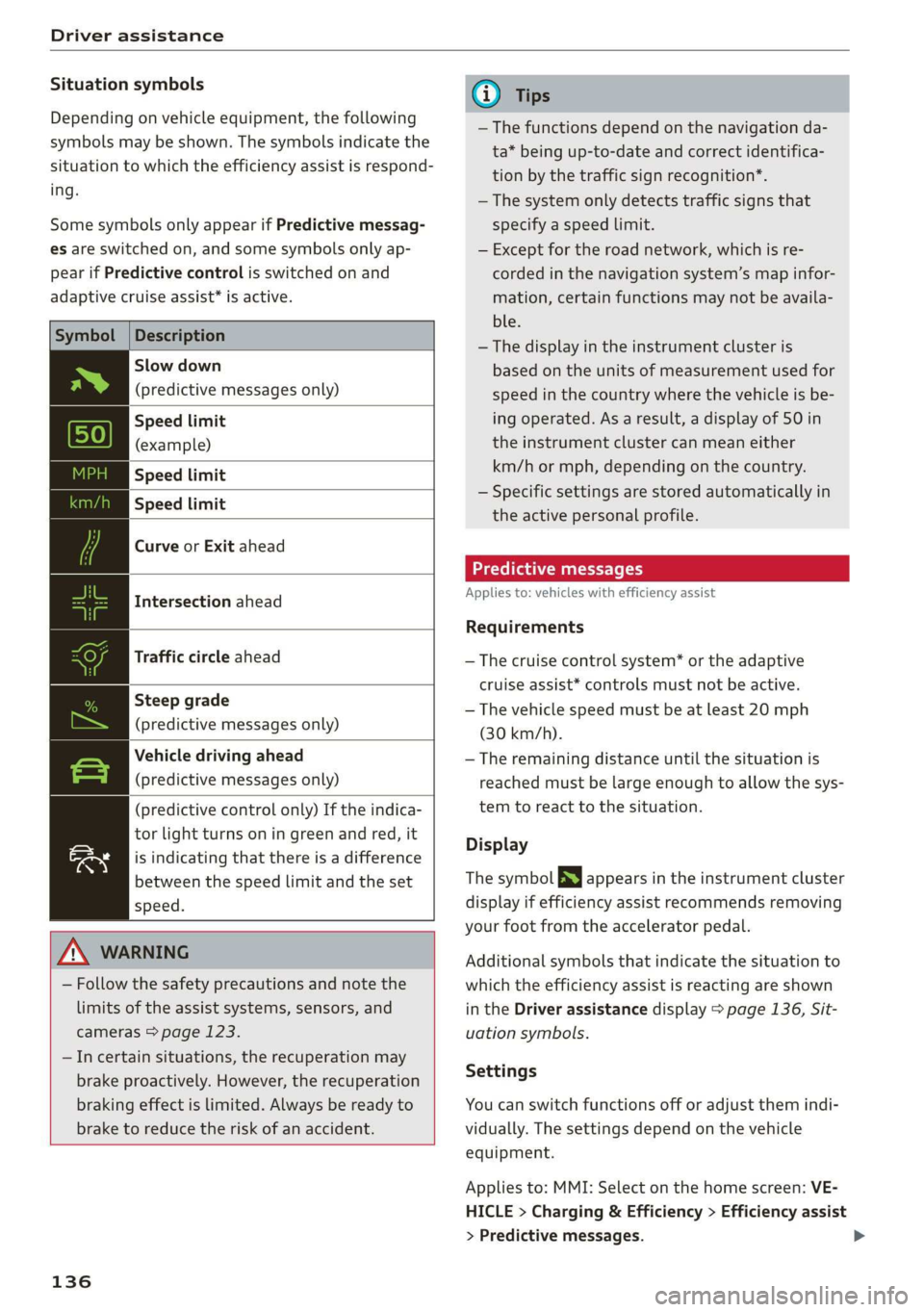
Situation symbols
Depending on vehicle equipment, the following
symbols may be shown. The symbols indicate the
situation to which the efficiency assist is respond-
ing.
Some symbols only appear if Predictive messag-
es are switched on, and some symbols only ap-
pear if Predictive control is switched on and
adaptive cruise assist* is active.
Description
Slow down
(predictive messages only)
Speed limit
(example)
Speed limit
Speed limit
Curve or Exit ahead
Intersection ahead
Traffic circle ahead
Steep grade
(predictive messages only)
Vehicle driving ahead
(predictive messages only)
(predictive control only) If the indica-
tor light turns on in green and red, it
is indicating that there is a difference
between the speed limit and the set
speed.
ZA\ WARNING
— Follow the safety precautions and note the
limits of the assist systems, sensors, and
cameras > page 123.
—Incertain situations, the recuperation may
brake proactively. However, the recuperation
braking effect is limited. Always be ready to
brake to reduce the risk of an accident.
136
G) Tips
— The functions depend on the navigation da-
ta* being up-to-date and correct identifica-
tion by the traffic sign recognition*.
— The system only detects traffic signs that
specify a speed limit.
— Except for the road network, which is re-
corded in the navigation system’s map infor-
mation, certain functions may not be availa-
ble.
— The display in the instrument cluster is
based on the units of measurement used for
speed in the country where the vehicle is be-
ing operated. As a result, a display of 50 in
the instrument cluster can mean either
km/h or mph, depending on the country.
— Specific settings are stored automatically in
the active personal profile.
Predictive messages
Applies to: vehicles with efficiency assist
Requirements
— The cruise control system* or the adaptive
cruise assist* controls must not be active.
— The vehicle speed must be at least 20 mph
(30 km/h).
— The remaining distance until the situation is
reached must be large enough to allow the sys-
tem to react to the situation.
Display
The symbol SS appears in the instrument cluster
display if efficiency assist recommends removing
your foot from the accelerator pedal.
Additional symbols that indicate the situation to
which the efficiency assist is reacting are shown
in the Driver assistance display > page 136, Sit-
uation symbols.
Settings
You can switch functions off or adjust them indi-
vidually. The settings depend on the vehicle
equipment.
Applies to: MMI: Select on the home screen: VE-
HICLE > Charging & Efficiency > Efficiency assist
> Predictive messages.
Page 174 of 310
Telephone
— Audi phone box with holder: open the Audi
phone box holder @). Position the mobile de-
vice so that the back of it is facing the @ symbol
@ between the Audi phone box and the holder.
Depending on the vehicle equipment, you may
then be able to use the following functions:
— Connect to the exterior vehicle antenna?)
— Wirelessly* charge the mobile device. Require-
ment: the ignition must be switched on. The
charging function must be switched on in the
MMI. You must have a Qi-capable2) mobile de-
vice.
You can also charge a mobile device using the
USB adapter: connect your mobile device to the
Audi music interface using a USB adapter cable
@ > page 220. You can charge your mobile de-
vice using specific USB adapters > page 220.
Reminder signal
When the device reminder signal is switched on,
you will be notified that your mobile device is still
in the Audi phone box when you leave the vehicle.
Requirement:
—A Qi-capable?) mobile device must be in the Au-
di phone box, or
— Your mobile device must be connected to the
Audi music interface by a USB adapter, and the
Audi smartphone interface must be active, or
— Your iPhone® must be connected to the MMI
via Bluetooth® > page 170 and must be charg-
ing through the Audi music interface using a
USB adapter.
Applies to: MMI: Select on the home screen: SET-
TINGS > General > Mobile device reminder sig-
nal.
The following settings are available:
— Signal tone
— Spoken cue”: this setting is switched on at the
factory.
— Off
Not available in every market. These are additional car
phone functions only in conjunction with Audi connect In-
fotainment*.
2) The Qi standard makes it possible to charge your mobile
device wirelessly.
172
— Show pop-ups*: when this function is switched
on, the charge status of your mobile device is
displayed. You will also be reminded not to for-
get your mobile device when leaving the vehi-
cle.
— Wireless charging*: when this function is
switched on, you can charge your Qi-capable
mobile device wirelessly in the Audi phone box.
ZA WARNING
— Loose objects can be thrown around the ve-
hicle interior during sudden driving or brak-
ing maneuvers, which increases the risk of
an accident. Store objects securely while
driving.
— The mobile device may become hot during
wireless charging. Pay attention to the tem-
perature of your mobile device and be care-
ful when removing it from the Audi phone
box.
— An alternating magnetic field is used for
wireless charging. Maintain a minimum dis-
tance of approximately 2.4 in (6 cm) to the
Audi phone box charging plate. The thresh-
olds for prolonged exposure at this distance
comply with ICNIRP1998. Therefore, inter-
actions such as irritation of sensory organs,
malfunctions of active implants (such as
pacemakers, infusion pumps, or neurosti-
mulators) or effects on passive implants
(such as prosthetic limbs) is highly unlikely.
If you have an implant, consult a medical
specialist if you have any questions. You can
also switch the function for wireless charg-
ing in the front* Audi phone box on and off
separately. You can continue to charge your
mobile device using a cable connection.
Page 175 of 310
4KE012721BB
Telephone
@) Note
Applicable to U.S.A.
Operation of the Audi phone box is subject to
the following requirements of the Federal
Communications Commission:
— This is a CONSUMER device.
— BEFORE USE, you MUST REGISTER THIS DE-
VICE with your wireless provider and have
your provider’s consent. Most wireless pro-
viders consent to the use of signal boosters.
Some providers may not consent to the use
of this device on their network. If you are
unsure, contact your service provider.
— You MUST operate this device with approved
antennas and cables as specified by the
manufacturer. Antennas MUST be installed
at least 20 cm (8 inches) from any person.
— You MUST cease operating this device im-
mediately if requested by the FCC or a li-
censed wireless service provider.
— WARNING: E911 location information may
not be provided or may be inaccurate for
calls served by using this device.
@) Note
Applicable to Canada
In Canada, operation of a Zone Enhancer,
such as an Audi Phone Box, is subject to the
following requirements of the Innovation,
Science and Economic Development Canada
(ISED):
— This is a CONSUMER device.
— BEFORE USE, you MUST meet all require-
ments set out in CPC-2-1-05.
— You MUST operate this device with approved
antennas and cables as specified by the
manufacturer. Antennas MUST NOT be in-
stalled within 20 cm of any person.
— You MUST cease operating this device im-
mediately if requested by ISED or a licensed
wireless service provider.
— WARNING: £911 location information may
not be provided or may be inaccurate for
calls served by using this device.
@) Tips
— The Audi phone box is not available in all
countries. For additional information, con-
tact an authorized Audi dealership.
— Only one mobile device at a time can be
charged wirelessly in the Audi phone box.
— Strong transmission quality cannot be guar-
anteed if more than one mobile device is in
the box.
— To reduce the risk of malfunctions, make
sure the mobile device is positioned correct-
ly in the Audi phone box.
— Make sure there are no objects between the
Audi phone box and the mobile device.
— Placing the mobile device in a bag or protec-
tive sleeve inside the Audi phone box can in-
terfere with the connection to the exterior
antenna.
— Metallic objects in the Audi phone box block
the wireless charging of your mobile device
and calls made using the exterior antenna.
—The maximum charging output is 5 watts.
— The charging time and temperature will vary
depending on the mobile device being used.
— You can purchase a USB adapter from an au-
thorized Audi dealer or authorized Audi
Service Facility, or at specialty stores.
— Audi recommends using Audi Genuine Ac-
cessories. Audi has verified their reliability,
safety, and suitability.
Using the telephone
Accessing the telephone functions
Applies to: vehicles with telephone
e
min
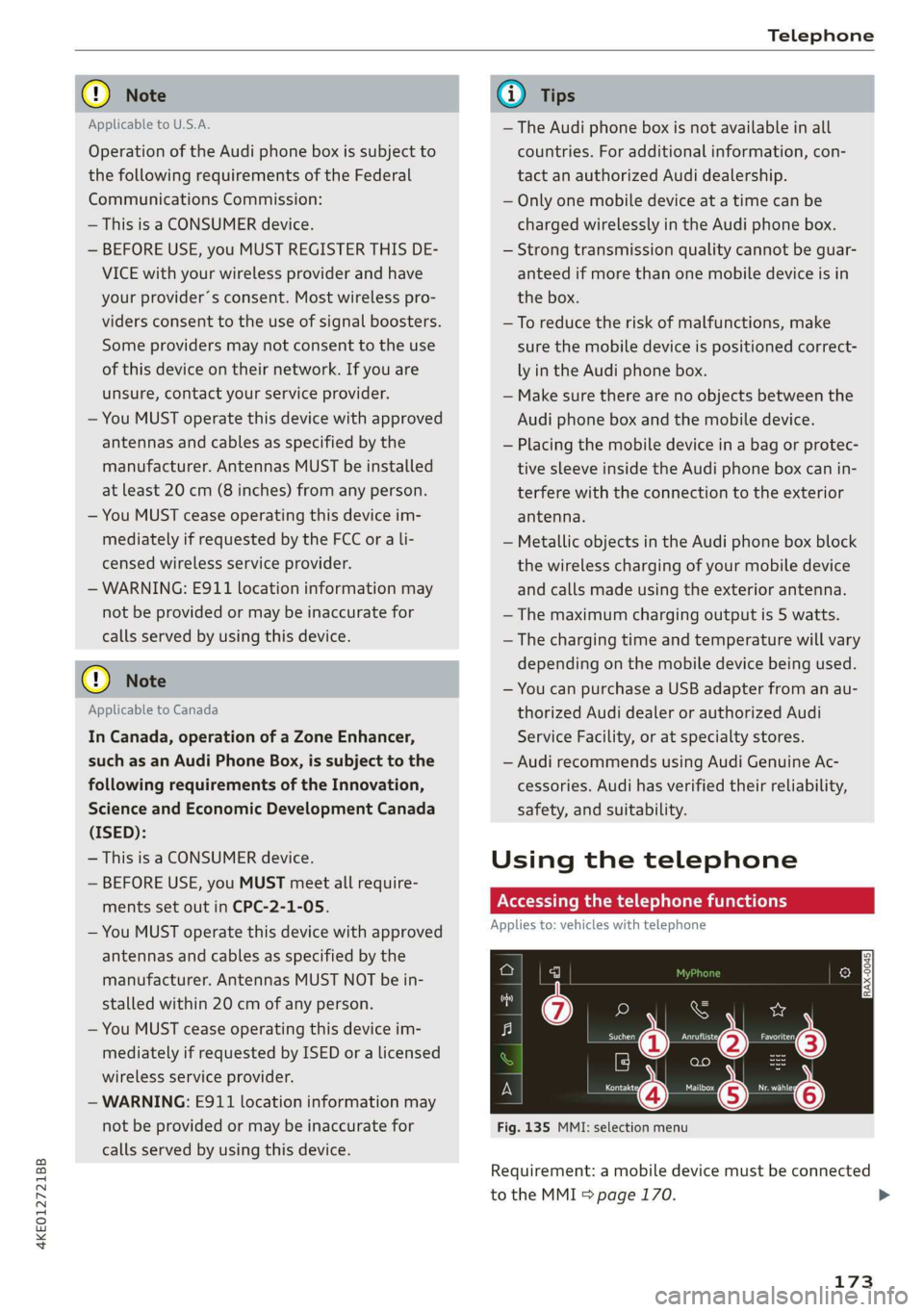
Fig. 135 MMI: selection menu
Requirement: a mobile device must be connected
to the MMI 5 page 170.
173
>