infotainment AUDI E-TRON 2019 Owner's Manual
[x] Cancel search | Manufacturer: AUDI, Model Year: 2019, Model line: E-TRON, Model: AUDI E-TRON 2019Pages: 310, PDF Size: 81.91 MB
Page 221 of 310
4KE012721BB
Media
— The supported media functions (such as
shuffle, list view, categories, search, op-
tions) depend on the Bluetooth device being
used.
— Note the volume setting on your Bluetooth
device. AUDI AG recommends setting your
mobile device to the maximum volume
when using it as a Bluetooth audio player.
— For more information on supported devices,
visit www.audiusa.com/bluetooth or con-
tact an authorized Audi dealer or authorized
Audi Service Facility.
Online media
Applies to: vehicles with Audi connect Infotainment and on-
line media
You can play and operate various online media
services, such as music streaming services, using
the MMI.
Requirement: a supported online media service
must be available in the country where the vehi-
cle is being operated.
Connecting online media:
> Connect the MMI to the Internet > page 184.
> Switch on the Wi-Fi hotspot in the MMI
> page 189.
> Applies to: MMI: Select on the home screen:
MEDIA > Source > Connect online media.
> Switch the Wi-Fi function on in your mobile de-
vice and connect it to the MMI Wi-Fi hotspot
=> page 185.
> Install and start the myAudi app on your mo-
bile device.
> Log in to your myAudi account in the myAudi
app and select your vehicle.
Your mobile device must be connected to the
MMI and must be highlighted. When you press
the highlighted device, it will be disconnected.
Starting online media:
> Applies to: MMI: Select on the home screen:
MEDIA > Source. All online media services sup-
ported in your country will be displayed.
> Press on the desired online media service and
follow the system instructions.
ZA WARNING
— It is only safe to use tablets, laptops, mobile
devices and other similar devices when the
vehicle is stationary because, like all loose
objects, they could be thrown around the in-
side of the vehicle in a crash and cause seri-
ous injuries. Store these types of devices se-
curely while driving.
— Do not use any wireless devices on the front
seats within range of the airbags while driv-
ing. Also read and follow the warnings in
=> page 64, Airbag system.
() Note
— Read the information about Audi connect,
and be sure to note the connectivity costs
section >@ in General information on
page 184.
— There generally are additional costs when
using an online media service account, espe-
cially when it is used internationally.
@ Tips
— Depending on the Internet connection and
network traffic, the connection may discon-
nected when online media sources are play-
ing.
— Online media usage depends on the service
availability of the third party provider.
— Audi AG simply makes the access to online
media services possible through the MMI
and does not take any responsibility for the
contents of the online media services.
— Always read the chapter > page 184.
— Depending on the mobile device being used,
there may be interruptions during media
playback and when using the myAudi app.
To avoid interruptions when using a mobile
device, do not lock the screen on your mo-
bile device and keep the myAudi app in the
foreground.
219
Page 225 of 310
4KE012721BB
Media
Audio books
You can control your audio books on the MMI.
Press on an audio book.
Podcasts
You can control your podcasts through the MMI.
Select: a podcast > a podcast episode.
Genres
All available genres are displayed. Select: a genre
> an artist > an album > a song.
Videos
All available video files are displayed. Press ona
video.
Tracks
All available tracks are displayed. Press ona
track.
Albums
All available albums are displayed. Select: an al-
bum > a track.
@) Note
Applies to: vehicles with Audi connect Infotainment
— Cloud services and category radio always re-
quire an Internet connection.
elem irad (lary
— Read the information about Audi connect,
and be sure to note the connectivity costs
section >@ in General information on
page 184.
G@) Tips
— Only the categories supported by the medi-
um are available.
— For safety reasons, the video image is only
displayed when the vehicle is stationary. On-
ly the sound from the video plays while driv-
ing.
—When synchronizing a portable device with
Cloud services, playlists may display incor-
rectly
in the MMI. Use the media center in
the device.
(i) Tips
Applies to: iPod/iPhone
Also read the information on the Audi music
interface and the supported devices
=> page 220.
Romy
0:32 | -2:48
RAX-0098
tae)
Hymn
Brad:
ait)
rae
rs
Fig. 155 Upper display: left side: playback view, right side: playlist
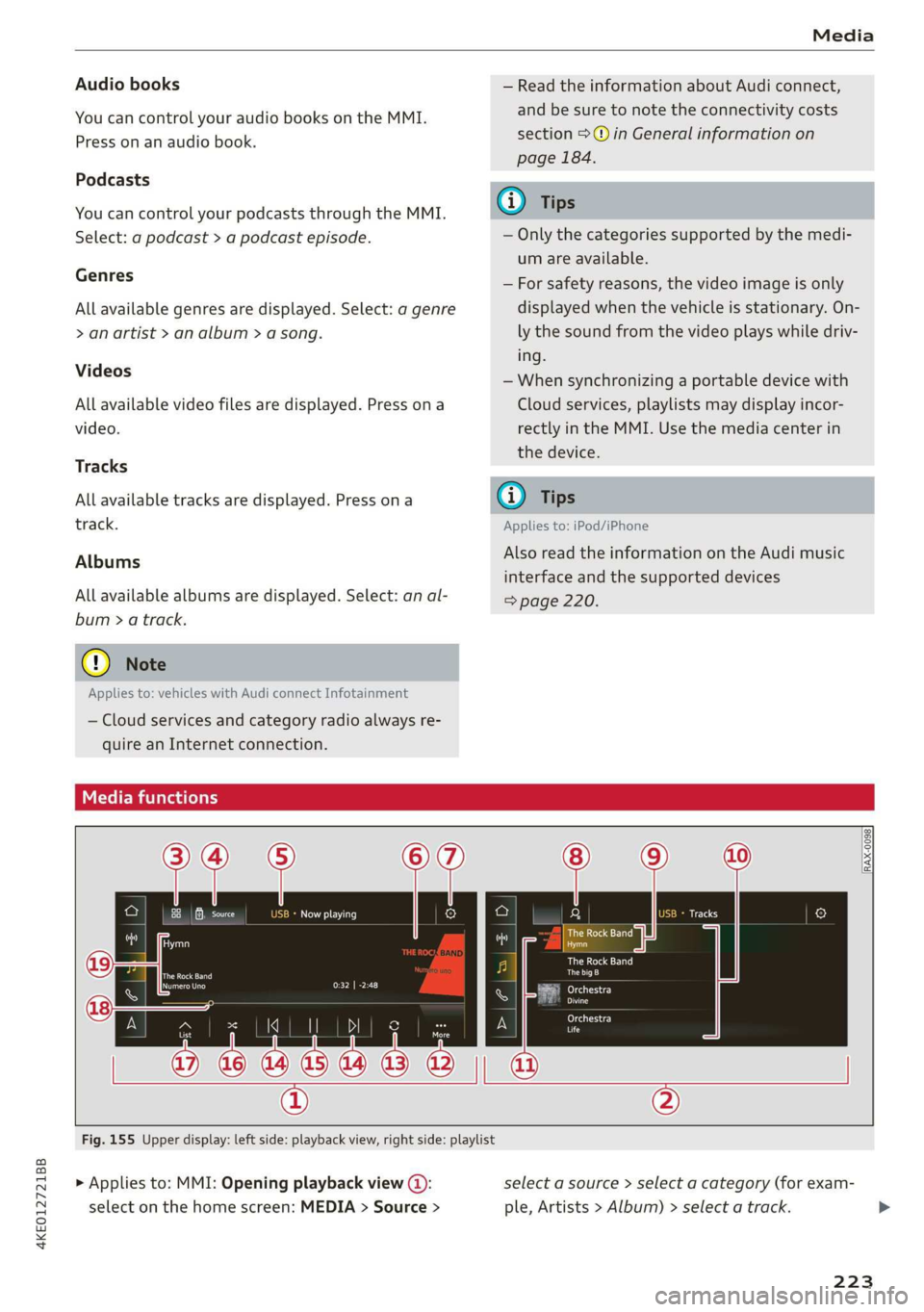
> Applies to: MMI: Opening playback view (@):
select on the home screen: MEDIA > Source >
select a source > select a category (for exam-
ple, Artists > Album) > select a track.
223
Page 283 of 310
4KE012721BB
Fuses and bulbs
Fuse panel (2) (black) Fuse panel @) (brown)
9 |Instrument cluster No. | Equipment
10 | Volume control Right front safety belt tensioner
11 | Light switch, switch panels Left front safety belt tensioner
12 | Steering column electronics Air suspension
15 | Steering column adjustment Right headlight
16 | Steering column electronics Left headlight
Fuse panel (2) (black)
No. | Equipment
Left rear door control module
WOlOIN|
A)
Mm]
ALN
Right rear door control module
10 |MMI Infotainment system control module
1 |Front seat heating - -
2 |ehmmareconeral system 11 | Driver assist systems eantte) iene
Z | betvheadlightdlecironias 12 | Gateway control module (diagnosis)
4 |Panoramic glass roof Fuse panel 6) (black)
5 |Left front door control module No. | Equipment
6 | Sockets 1 Front seat ventilation, rearview mirror, di-
8 | Instrument panel agnostic port
9 | Right headlight electronics 2 | Sockets
iG Windshield washer system/headlight 3_| Exterior sound/interior sound
washer system 7 |Active accelerator pedal
12 | Parking lock 8 | Night vision assist
Fuse panel @ (red) 9 |Adaptive cruise assist
7 Intersection assistant, driver assist sys-
No. | Equipment 11
tems
1 {Anti-theft alarm system -
16 | Rear seat entertainment
2 |Drive system control module
3, | Emergency:callsystem Fuse assignment - luggage compartment
4 | Selector lever
5 |Horn 8
le
6 |Parking brake a
7 High-voltage battery, battery monitoring
control module
8 | Interior headliner lights
10 | Airbag control module
11 | Left front lumbar support
12 | Diagnostic connector, light/rain sensor
14 | Right front door control module
15 | Climate control system, body electronics
16 | Climate control system blower
7
ed ey
aE EEE
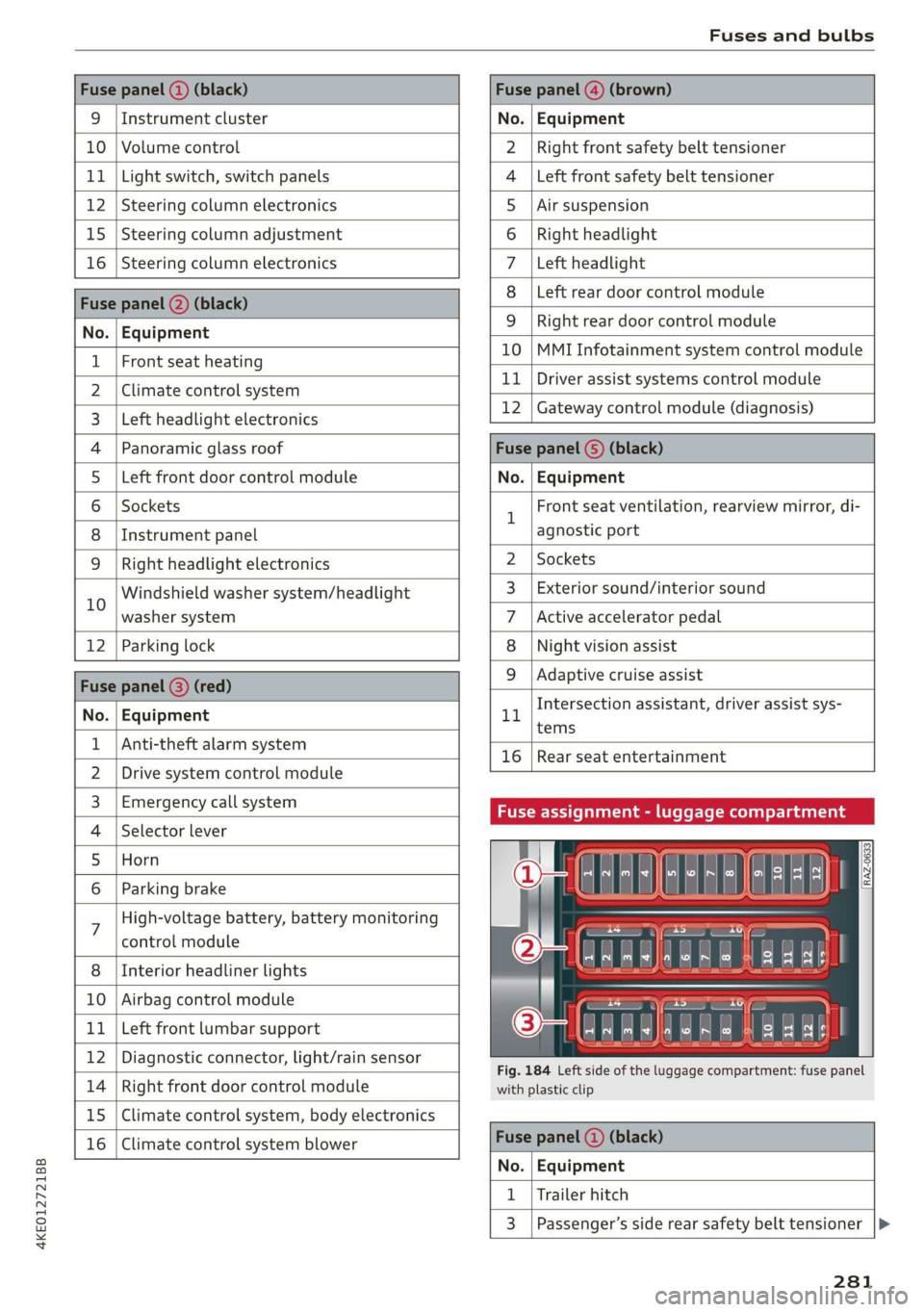
Fig. 184 Left side of the luggage compartment: fuse panel
with plastic clip
Fuse panel (4) (black)
No. | Equipment
1 | Trailer hitch
3 | Passenger’s side rear safety belt tensioner
281
Page 287 of 310
4KE012721BB
Data privacy
protection against loss of data on mobile de-
vices that are used to access the Internet
through the Wi-Fi hotspot.
G) Tips
— If the transmission of data is limited, data
will still be transmitted to verify subscrip-
tions.
— If the transmission of data is limited, it will
have the following effects on the exchange
of data for Audi connect services and emer-
gency calls, if equipped:
— The emergency call function will remain
available without restrictions and will con-
tinue to transmit data.
— If an online roadside assistance call is ini-
tiated, no data will be transmitted, but a
call will be made.
— If an Audi connect key is already assigned
to a user, data will still be transmitted to
maintain data security.
—If the Geofencing Alert, Speed Alert,
and/or Valet Alert services have been acti-
vated by the key user, then they will re-
main available without restrictions and
continue to transmit data.
— Stored destinations (favorites, last desti-
nations) are only stored in the vehicle. If
you allow transmission of data again,
these destinations will be synchronized via
the myAudi account. To prevent synchroni-
zation of destinations, delete the destina-
tions before you allow data to be trans-
mitted again.
Applies to: vehicles with Audi connect Infotainment
AUDI AG collects, uses, stores and shares your
personal information, such as contact data, vehi-
cle data, usage data, driving data and precise ge-
olocation, in order to provide you with the prod-
ucts and services you have purchased or request-
ed, and for a number of other purposes, for ex-
ample, to track quality issues, to performance
and safety, to meet our internal compliance or le-
gal requirements and to market to customers
and potential customers. For a more complete
list of the data we collect, how we use it and with
whom we share it, please visit your Audi nation-
al/sales region website at www.audi.com.
The collection, use and sharing may vary depend-
ing on your model and model year, your subscrip-
tion status, or the service offering. For example,
collection, use and sharing may vary between Au-
di connect services, if you have designated a key
user, or if you are driving a model equipped with
persistent data logging. Please review the com-
plete Privacy Statement to understand our data
handling practices with respect to a particular
service.
You can find additional information about our da-
ta privacy practices in your MMI.
>» Applies to: MMI: On the home screen, select:
SETTINGS > General > Legal notes > About Au-
di connect.
Information about our privacy practices in con-
junction with the mobile Audi connect applica-
tion can be found in the Application’s Privacy
Statement.
For additional information about the privacy
practices relating to Audi connect, myAudi, or
other websites, applications or online services as
well as your obligations with respect to using
these services, and for additional information re-
garding Audi connect terms and conditions,
please visit your Audi national/sales region web-
site at www.audi.com.
285
Page 297 of 310
4KE012721BB
Index
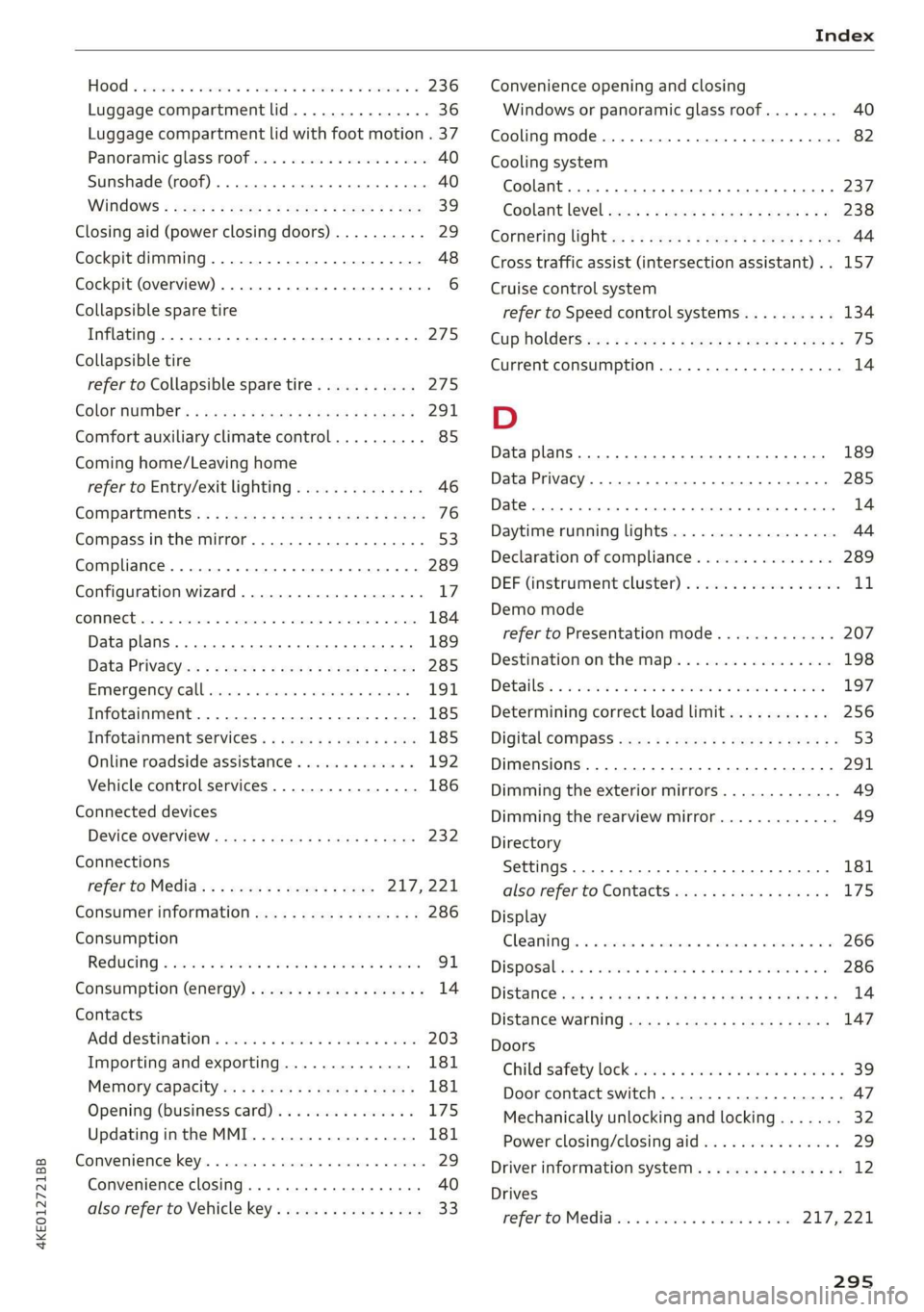
HOO « cnsvecs 2 v citvace ow eneaene oo somes ve soto ¥ 236
Luggage compartment lid............... 36
Luggage compartment lid with foot motion . 37
Panoramic glass roofs. «esc se eevee eae 40
Sunshade (roof)... 2.2.0.6. eee eee 40
WINdOWS : soce = ¢ xews 2 y cee xs eee 5 oes 39
Closing aid (power closing doors).......... 29
Cockpit dimming...............002-000 48
Cockpit (overview) ....... 0.000 c cece ee eee 6
Collapsible spare tire
Inflating....... 2... eee eee eee ee eee 275
Collapsible tire
refer to Collapsible spare tire........... 2715
GOlGr MUMBEN: ¢ sees 5 xy ream sy eee 5 e eR « 291
Comfort auxiliary climate control.......... 85
Coming home/Leaving home
refer to Entry/exit lighting.............. 46
Compartments: < s ceau ze ee@s so eRe eb eS 76
Compass inthe mirror................00- 53
Compliance ........ 6.0... cece eee eee ee 289
Configuration wizard.................00. 17
CONME Cie. va nce & mene a moms @ a ee @ sue 184
Data plans... .... 2. ee eee eee eee 189
Data Privatyiee = « news ¢ x eng s eae a 5 eee 285
Emmengeneyseall ssc «a ssi 6 svensewe + syacene 191,
Infotainment...............-.-0 eee eee 185
Infotainment services............00005 185
Online roadside assistance............. 192
Vehicle control services................ 186
Connected devices
Device overvieW.... 0... cece e ee ee eee 232
Connections
referto Media............--.+++- 217,221
Consumer information.................- 286
Consumption
Reducing « svar es senw e waen @ o wee ey wee 91
Consumption (energy) ...............0005 14
Contacts
Add destinations ssw: « x cima © 2 aves @ 2 sone 203
Importing and exporting.............. 181
Memory capacity............000e eae 181
Opening (business card)............... 175
Updatinginthe MMI.................. 181
Convenience key............00 020 e sees 29
Convenience closing. ..........0eeee eee 40
also refer to Vehicle key..............-- 33
Convenience opening and closing
Windows or panoramic glass roof........ 40
Cooling mode..... 0.2... eee eee eee 82
Cooling system
Coolant... ... eee ee eee 237
Coolant l6VEl sence 2 5 seen s cage 2 eevee ga 238
Cornering
light: =» sees ¢ 2 eese 2» ewan ss es 44
Cross traffic assist (intersection assistant)... 157
Cruise control system
refer to Speed control systems.......... 134
Cup Holdets es « « sven ¢ ¢ een se eee x e sees 75
Current consumption.................... 14
D
Data plans... 0... eee eee eee 189
Data Privacy....... 0... cece eee eee 285
Date... eee 14
Daytime running lights.................. 44
Declaration of compliance............... 289
DEF (instrument cluster) ..............004 11
Demo mode
refer to Presentation mode............. 207
Destination on the map..............0.. 198
Detailsts os sscmve o vam 2 2 amore ao ansome oy ave 197
Determining correct load limit........... 256
Digital: cOMpaSs sew: : 2 sees c= reas ve een se 53
Dimensions ...........-..0 0c e eee eee ee 291
Dimming the exterior mirrors............. 49
Dimming the rearview mirror............. 49
Directory
Settings........... 002.2 eee eee eee 181
also refer to ContactS..............00. 175
Display
Gleanings « « exes = > eavane « esecnie ow ears owe 266
Disposalicne is « scsswa se suns « @ mnenes oe mae ow 286
DiStaNCC rss « ¢ eames = o sage s ¥ eeupe & 2 Hee x 14
DIStanGe WARNING, ames 3 « says se gems «eR 147
Doors
Childisatety lock eric. ss cio so ween a ewes « 39
Door contact switch................200. 47
Mechanically unlocking and locking....... 32
Power closing/closing aid............... 29
Driver information system................ 12
Drives
refer toMed idles « «wees sv eww 6 owen 217,221
295