instrument cluster AUDI E-TRON 2019 Owner's Manual
[x] Cancel search | Manufacturer: AUDI, Model Year: 2019, Model line: E-TRON, Model: AUDI E-TRON 2019Pages: 310, PDF Size: 81.91 MB
Page 133 of 310
4KE012721BB
Driving information
Applies to: vehicles with traffic light information
Switching traffic light information on and
off
The system can be switched on and off in the
MMI & page 126.
Accessing traffic light information
> Select in the instrument cluster: vehicle func-
tions tab > Traffic signs.
G) Tips
If another tab or another function is selected
in the instrument cluster, the traffic light in-
formation will appear in the Audi virtual cock-
pit* status bar or in the analog instrument
cluster.
Werle
Applies to: vehicles with traffic light information
Malfunction! See owner's manual
The system could not be configured, for example
due to a network malfunction. Restart the sys-
tem.
Function currently unavailable. See owner's
manual
There is a temporary system malfunction. Check
if one or more of the following situations applies
and correct the issue if necessary:
— Traffic light information is switched off
— Data transmission is deactivated
— Vehicle does not have traffic sign recognition
— There is no valid license
— Traffic light information is not available in that
area
Night vision assist
Applies to: vehicles with night vision assist
Night vision assist helps you when it is dark by
using an infrared camera to monitor the area in
front of your vehicle, within the limits of the sys-
tem. It can display objects up to a distance of ap-
proximately 1000 feet (300 m).
Pedestrian and wild animals are detected by
measuring the temperature difference between
the object and the background. Pedestrians and
wild animals will not be detected if the tempera-
ture difference is too small. The pedestrian and
wild animal marking feature is deactivated at
temperatures above approximately 77 °F (25 °C)
and when it is light outside.
The thermal image detected by the camera is dis-
played in the instrument cluster. Warm areas
generally appear lighter and cold areas appear
darker.
The camera for the night vision assist @)
=> page 125, fig. 98 is located in the vehicle's ra-
diator grille. Make sure the night vision camera is
not covered by stickers, deposits, or any other ob-
structions because this can impair the night vi-
sion assist function. Follow the information
about cleaning > page 263.
ZA\ WARNING
— Follow the safety precautions and note the
limits of the assist systems, sensors, and
cameras > page 123.
— Night vision assist can only detect pedes-
trians and wild animals located within the
range of the infrared camera.
— Night vision assist cannot detect pedes-
trians or wild animals and mark them if:
— They are not in an upright position, for ex-
ample if they are sitting or lying down
and/or
— The silhouette in the display appears in-
complete or interrupted, for example be-
cause the pedestrian is partially behind a
vehicle or an animal is partially covered by
tall grass.
— Never attempt to swerve around animals if
doing so would endanger you or other road
users.
(i) Tips
— Even though the system evaluates the
shape and heat given off by all detected
131
Page 134 of 310
Driving information
objects, there are limits to the system.
There may be false warnings.
— For technical reasons, the image pauses in
split second intervals.
Wiser mea ile Kel ai
Applies to: vehicles with night vision assist
The system can be switched on and off in the
MMI > page 126.
> The AUTO light function must be selected for
the night vision assist to automatically activate
when it is dark.
> Switch on the low beams manually to activate
night
vision assist immediately. To do so,
press @) on the light switch module and select
Ww
When activated, the {1 tab appears in the instru-
ment cluster.
> Select in the instrument cluster: tab %
@ Tips
When the night vision assist tab is selected in
the instrument cluster and the low beams are
switched off, the thermal image display dis-
appears only after you have exited the tab.
Marking and warning
Applies to: vehicles with night vision assist
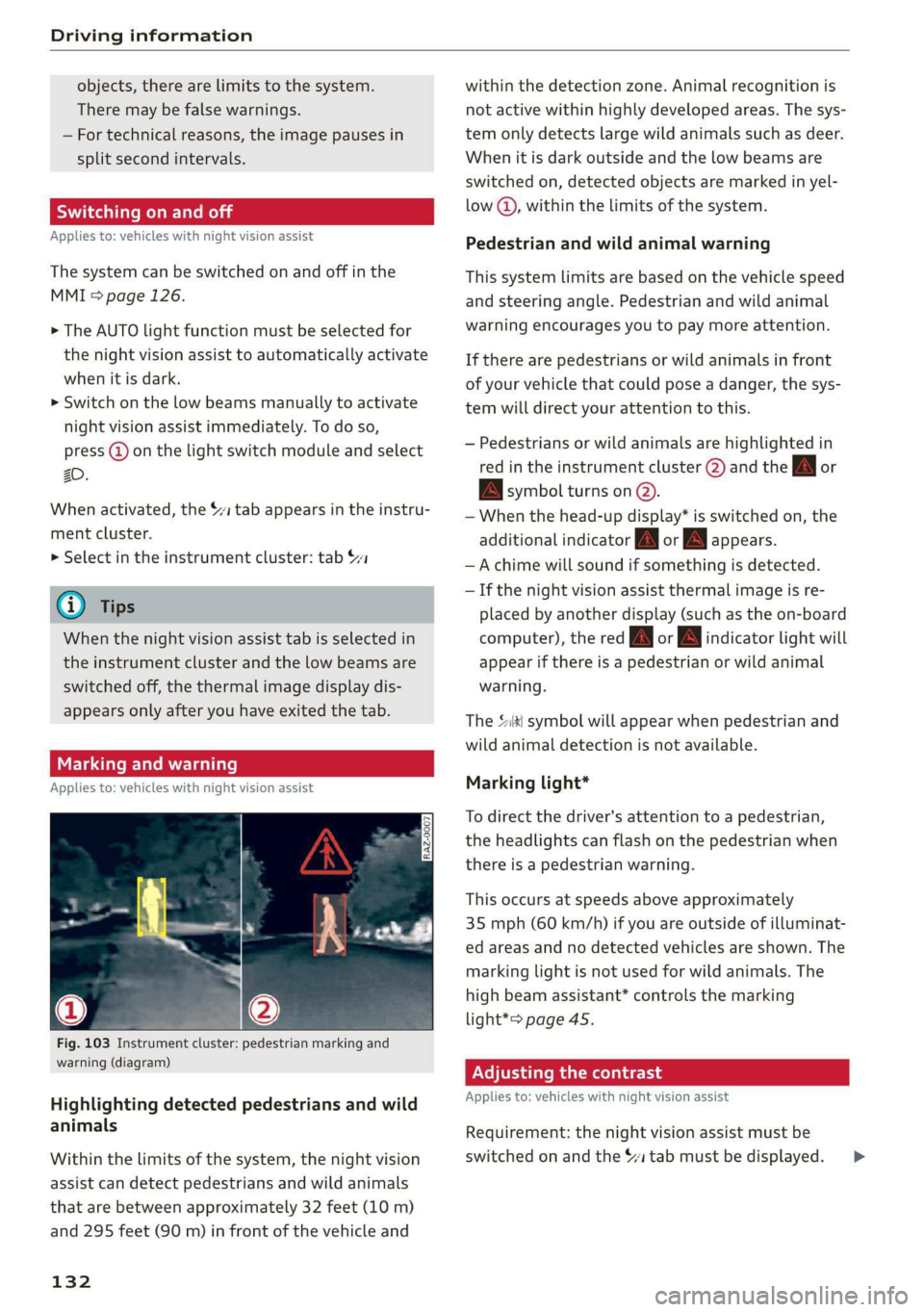
Fig. 103 Instrument cluster: pedestrian marking and
warning (diagram)
Highlighting detected pedestrians and wild
animals
Within the limits of the system, the night vision
assist can detect pedestrians and wild animals
that are between approximately 32 feet (10 m)
and 295 feet (90 m) in front of the vehicle and
132
within the detection zone. Animal recognition is
not active within highly developed areas. The sys-
tem only detects large wild animals such as deer.
When it is dark outside and the low beams are
switched on, detected objects are marked in yel-
low @), within the limits of the system.
Pedestrian and wild animal warning
This system limits are based on the vehicle speed
and steering angle. Pedestrian and wild animal
warning encourages you to pay more attention.
If there are pedestrians or wild animals in front
of your vehicle that could pose a danger, the sys-
tem will direct your attention to this.
— Pedestrians or wild animals are highlighted in
red in the instrument cluster (2) and the J or
BAN symbol turns on @.
— When the head-up display* is switched on, the
additional indicator [AM or EM appears.
—Achime will sound if something is detected.
— If the night vision assist thermal image is re-
placed by another display (such as the on-board
computer), the red A or wA indicator light will
appear if there is a pedestrian or wild animal
warning.
The Ski symbol will appear when pedestrian and
wild animal detection is not available.
Marking light*
To direct the driver's attention to a pedestrian,
the headlights can flash on the pedestrian when
there is a pedestrian warning.
This occurs at speeds above approximately
35 mph (60 km/h) if you are outside of illuminat-
ed areas and no detected vehicles are shown. The
marking light is not used for wild animals. The
high beam assistant* controls the marking
light*> page 45.
Adjusting the contrast
Applies to: vehicles with night vision assist
Requirement: the night vision assist must be
switched on and the $1 tab must be displayed. >
Page 136 of 310
Driver assistance
Driver assistance
Cruise control system
Applies to: vehicles with cruise control system
The cruise control system assists the driver in
maintaining a constant speed above approxi-
mately 15 mph (20 km/h). The system maintains
the desired speed by braking and accelerating.
ZA WARNING
— Always pay attention to the traffic around
your vehicle when the cruise control system
is in operation. As the driver, you are always
responsible for controlling your vehicle
speed and the distance between your vehicle
and
other vehicles.
— For safety reasons, cruise control should not
be used in the city, in stop-and-go traffic, on
winding roads, and when road conditions are
poor (such as ice, fog, gravel, heavy rain,
and conditions that could lead to hydroplan-
ing), because this increases the risk of an ac-
cident.
— Switch the cruise control off temporarily
when driving in turning lanes, highway exits,
or in construction zones.
—To reduce the risk of an accident, you should
only resume the stored speed if it is suitable
for the current traffic conditions.
C) Note
Before driving downhill a long distance ona
steep hill, decrease your speed and use the
braking effect of recuperation > page 90. This
reduces the load on the brakes.
@) Tips
The brake lights turn on when the brakes are
applied automatically.
134
Switching the system on
Applies to: vehicles with cruise control system
BFV-0220
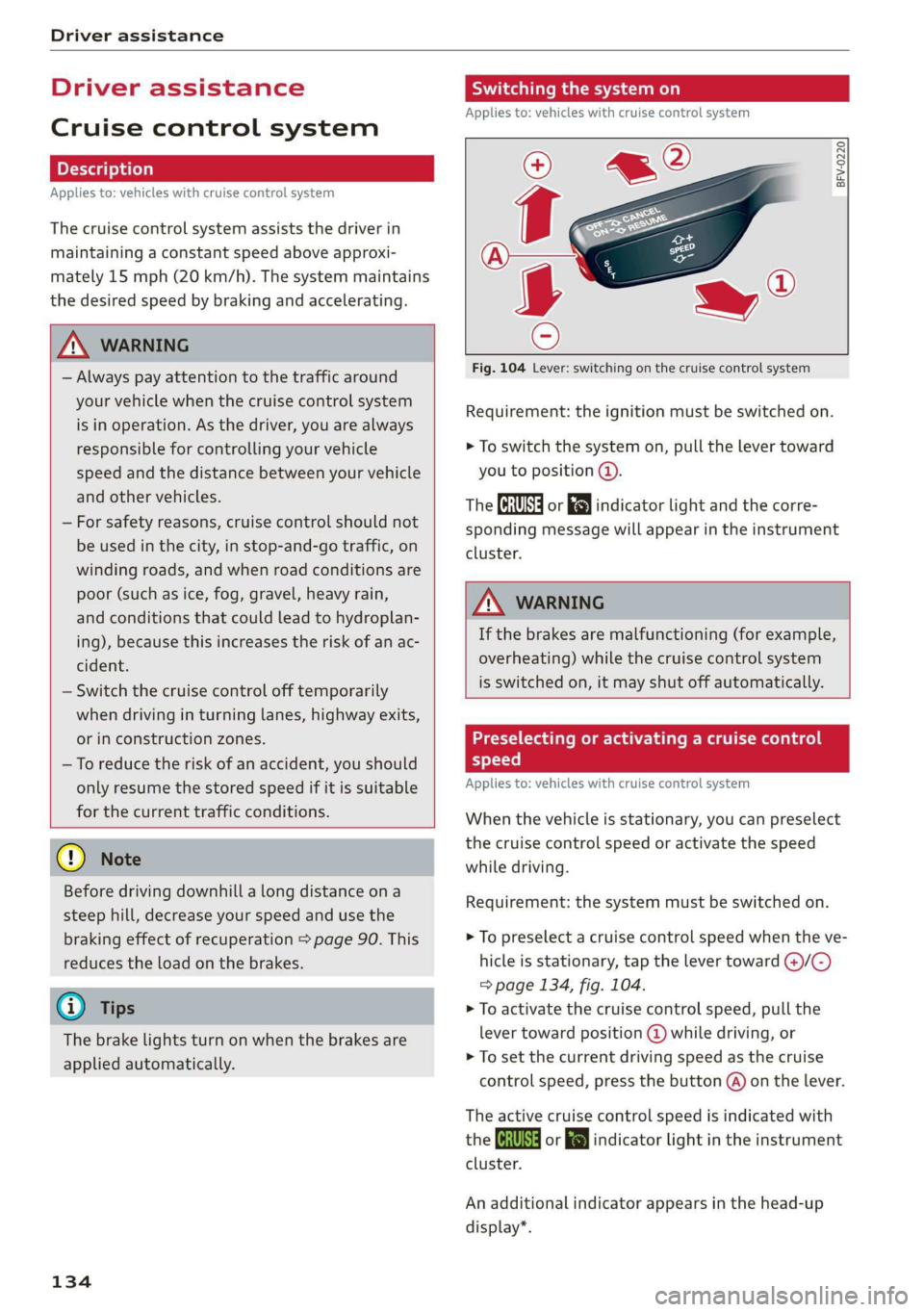
Fig. 104 Lever: switching on the cruise control system
Requirement: the ignition must be switched on.
> To switch the system on, pull the lever toward
you to position @.
The Ga or 8) indicator light and the corre-
sponding message will appear in the instrument
cluster.
A WARNING
If the brakes are malfunctioning (for example,
overheating) while the cruise control system
is switched on, it may shut off automatically.
Preselecting or activating a cruise control
speed
Applies to: vehicles with cruise control system
When the vehicle is stationary, you can preselect
the cruise control speed or activate the speed
while driving.
Requirement: the system must be switched on.
> To preselect a cruise control speed when the ve-
hicle is stationary, tap the lever toward @)/C)
=> page 134, fig. 104.
> To activate the cruise control speed, pull the
lever
toward position @ while driving, or
> To set the current driving speed as the cruise
control speed, press the button @) on the lever.
The active cruise control speed is indicated with
the Gs or kl indicator light in the instrument
cluster.
An additional indicator appears in the head-up
display*.
Page 138 of 310
Driver assistance
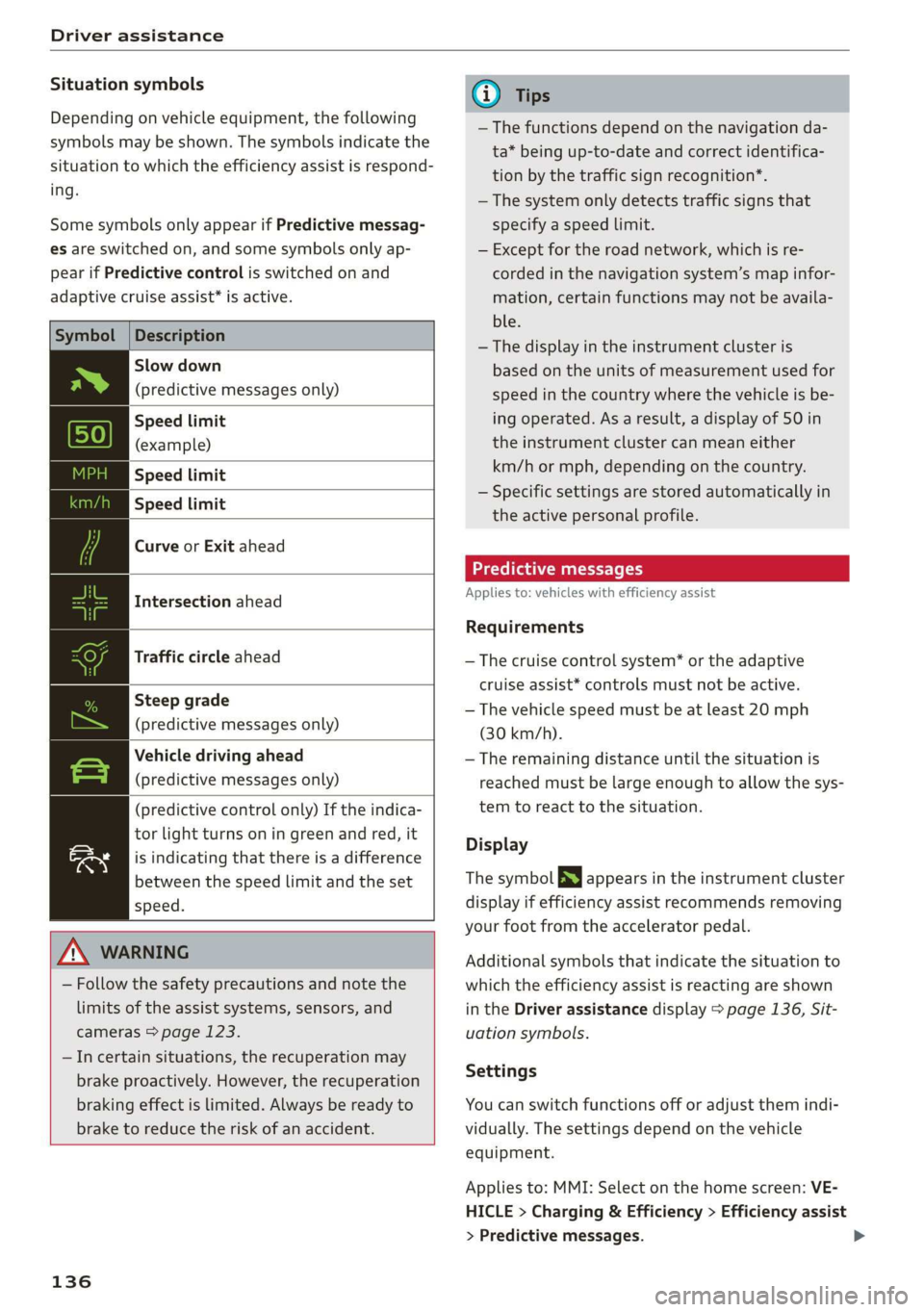
Situation symbols
Depending on vehicle equipment, the following
symbols may be shown. The symbols indicate the
situation to which the efficiency assist is respond-
ing.
Some symbols only appear if Predictive messag-
es are switched on, and some symbols only ap-
pear if Predictive control is switched on and
adaptive cruise assist* is active.
Description
Slow down
(predictive messages only)
Speed limit
(example)
Speed limit
Speed limit
Curve or Exit ahead
Intersection ahead
Traffic circle ahead
Steep grade
(predictive messages only)
Vehicle driving ahead
(predictive messages only)
(predictive control only) If the indica-
tor light turns on in green and red, it
is indicating that there is a difference
between the speed limit and the set
speed.
ZA\ WARNING
— Follow the safety precautions and note the
limits of the assist systems, sensors, and
cameras > page 123.
—Incertain situations, the recuperation may
brake proactively. However, the recuperation
braking effect is limited. Always be ready to
brake to reduce the risk of an accident.
136
G) Tips
— The functions depend on the navigation da-
ta* being up-to-date and correct identifica-
tion by the traffic sign recognition*.
— The system only detects traffic signs that
specify a speed limit.
— Except for the road network, which is re-
corded in the navigation system’s map infor-
mation, certain functions may not be availa-
ble.
— The display in the instrument cluster is
based on the units of measurement used for
speed in the country where the vehicle is be-
ing operated. As a result, a display of 50 in
the instrument cluster can mean either
km/h or mph, depending on the country.
— Specific settings are stored automatically in
the active personal profile.
Predictive messages
Applies to: vehicles with efficiency assist
Requirements
— The cruise control system* or the adaptive
cruise assist* controls must not be active.
— The vehicle speed must be at least 20 mph
(30 km/h).
— The remaining distance until the situation is
reached must be large enough to allow the sys-
tem to react to the situation.
Display
The symbol SS appears in the instrument cluster
display if efficiency assist recommends removing
your foot from the accelerator pedal.
Additional symbols that indicate the situation to
which the efficiency assist is reacting are shown
in the Driver assistance display > page 136, Sit-
uation symbols.
Settings
You can switch functions off or adjust them indi-
vidually. The settings depend on the vehicle
equipment.
Applies to: MMI: Select on the home screen: VE-
HICLE > Charging & Efficiency > Efficiency assist
> Predictive messages.
Page 139 of 310
4KE012721BB
Driver assistance
ZA\ WARNING
— Follow the safety precautions and note the
limits of the assist systems, sensors, and
cameras > page 123.
— Pay attention to traffic and the area around
your vehicle when efficiency assist is switch-
ed on. The driver is always responsible for
assessing the traffic situation.
@) Tips
— The traffic signs on the road always take pri-
ority over the display. The driver is always
responsible for adhering to the regulations
applicable in the country where the vehicle
is being operated.
— When a route is planned using the naviga-
tion system*, then system displays messag-
es based on an assumed route. Without
route guidance, the system displays mes-
sages based on an assumed route.
— The wording of the message may vary de-
pending on the selected Audi drive select*
mode and the selected gear. No messages
are displayed when in the "S" driving pro-
gram.
— Additional messages are displayed when in
the efficiency* Audi drive select mode or in
Range mode.
— Specific settings are stored automatically in
the active personal profile.
Predictive control
Applies to: vehicles with adaptive cruise assist and efficiency
assist
53 | 9) | |
fac
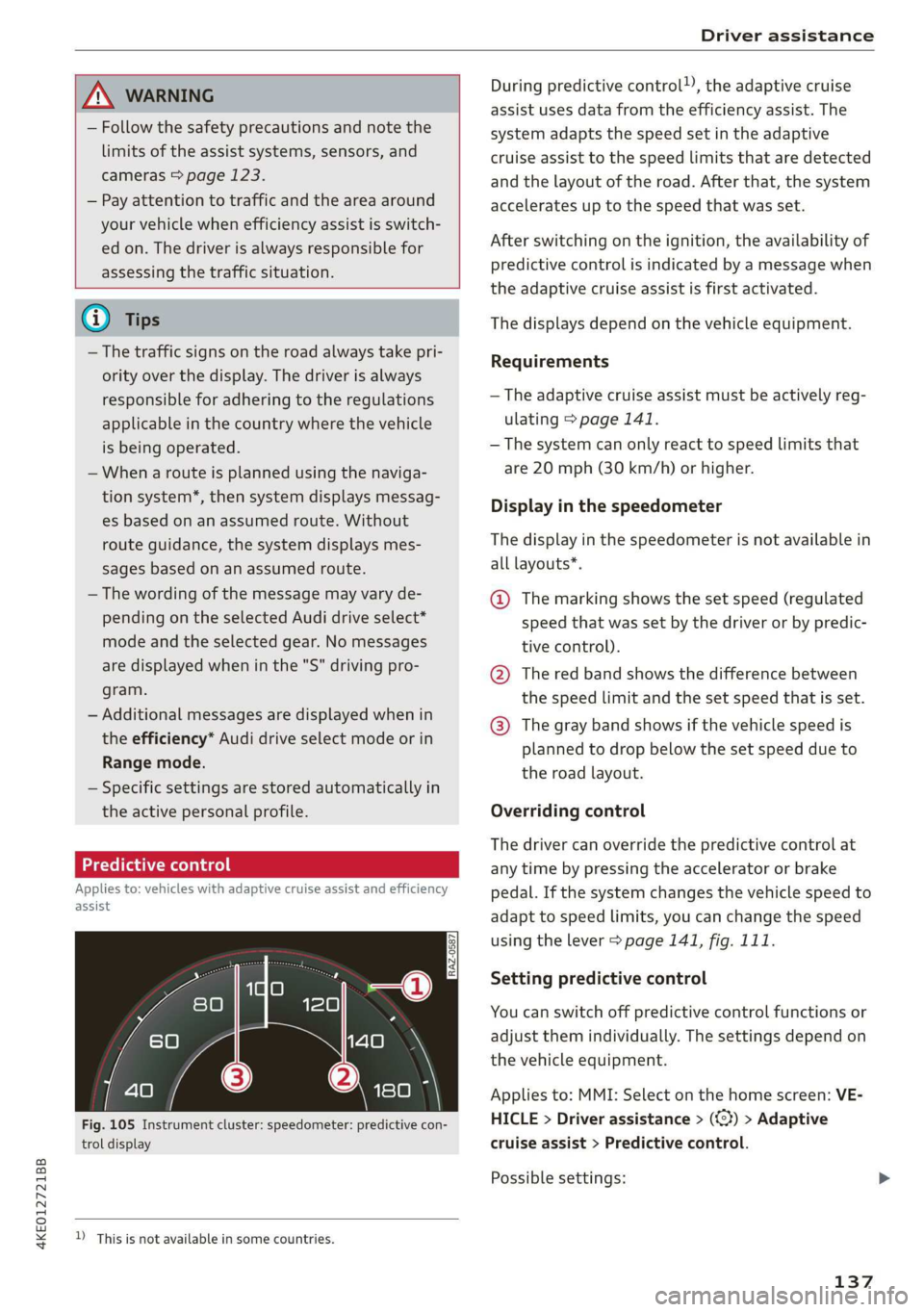
Fig. 105 Instrument cluster: speedometer: predictive con-
trol display
D_ This is not available in some countries.
During predictive control), the adaptive cruise
assist uses data from the efficiency assist. The
system adapts the speed set in the adaptive
cruise assist to the speed limits that are detected
and the layout of the road. After that, the system
accelerates up to the speed that was set.
After switching on the ignition, the availability of
predictive control is indicated by a message when
the adaptive cruise assist is first activated.
The displays depend on the vehicle equipment.
Requirements
— The adaptive cruise assist must be actively reg-
ulating > page 141.
— The system can only react to speed limits that
are 20 mph (30 km/h) or higher.
Display in the speedometer
The display in the speedometer is not available in
all layouts*.
@ The marking shows the set speed (regulated
speed that was set by the driver or by predic-
tive control).
@ The red band shows the difference between
the speed limit and the set speed that is set.
@® The gray band shows if the vehicle speed is
planned to drop below the set speed due to
the road layout.
Overriding control
The driver can override the predictive control at
any time by pressing the accelerator or brake
pedal. If the system changes the vehicle speed to
adapt to speed limits, you can change the speed
using the lever > page 141, fig. 111.
Setting predictive control
You can switch off predictive control functions or
adjust them individually. The settings depend on
the vehicle equipment.
Applies to: MMI: Select on the home screen: VE-
HICLE > Driver assistance > (<2) > Adaptive
cruise assist > Predictive control.
Possible settings:
137
Page 142 of 310
Driver assistance
system expects that you can easily drive around
the stationary vehicle by turning the steering
wheel.
— The adaptive cruise assist may not react to sta-
tionary obstacles, such as the end of a traffic
jam, especially at high speeds.
— The adaptive cruise assist has a limited ability
to detect vehicles that are a short distance
ahead, off to the side of your vehicle, or moving
into your lane.
— Objects that are difficult to detect, such as mo-
torcycles, vehicles with high ground clearance,
or vehicles with an overhanging load, may be
detected late or not detected at all.
— The adaptive cruise assist does not respond to
people, animals, or objects that are crossing or
approaching from the opposite direction.
Z\ WARNING
Follow the safety precautions and note the
limits of the assist systems, sensors, and
cameras > page 123.
Display overview
Applies to: vehicles with adaptive cruise assist
eI S|
3 | kel Ny =|
fac
Fig. 109 Instrument cluster: driver assistance display
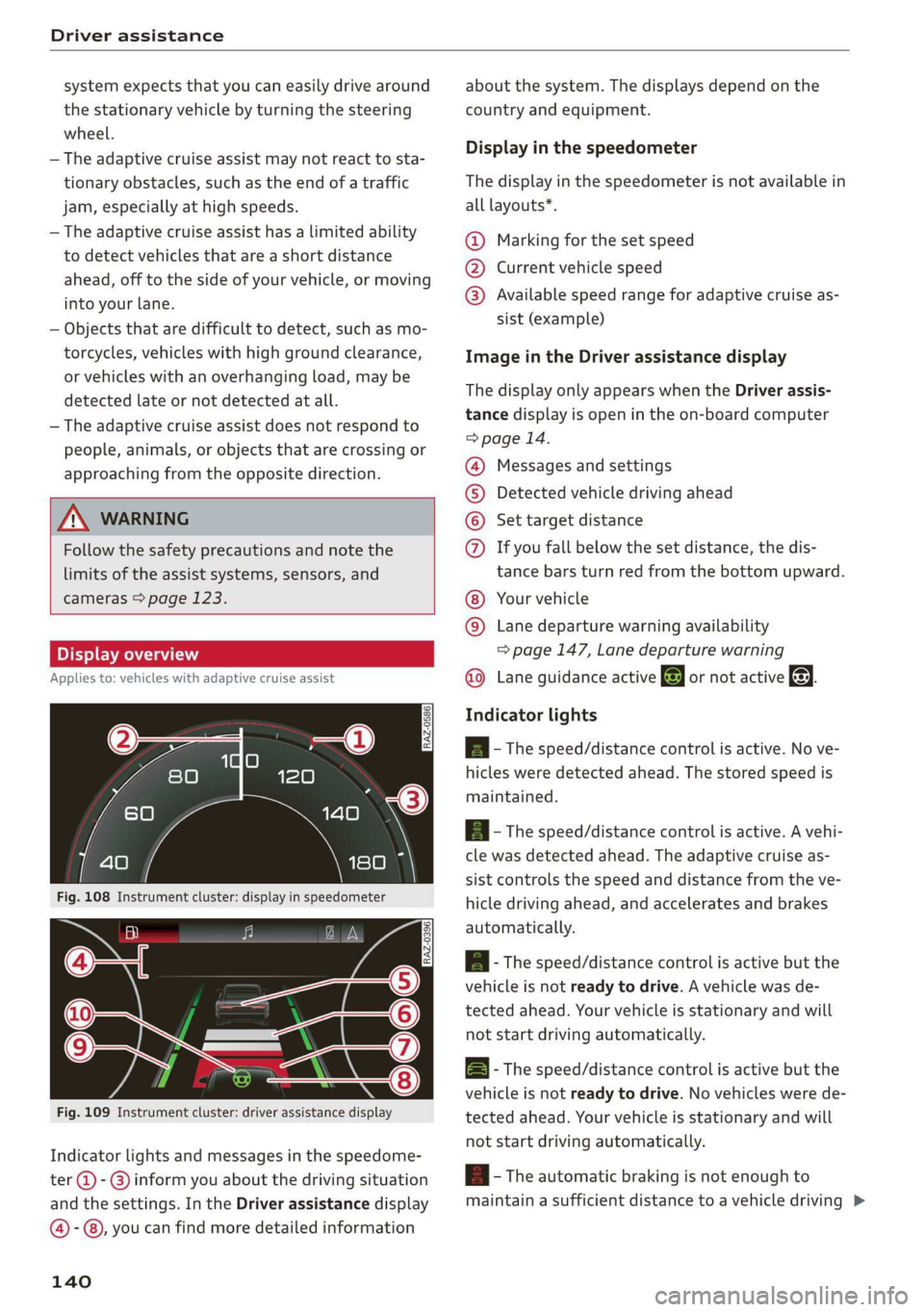
Indicator lights and messages in the speedome-
ter @ -@ inform you about the driving situation
and the settings. In the Driver assistance display
@-©®, you can find more detailed information
140
about the system. The displays depend on the
country and equipment.
Display in the speedometer
The display in the speedometer is not available in
all layouts*.
@ Marking for the set speed
@ Current vehicle speed
@® Available speed range for adaptive cruise as-
sist (example)
Image in the Driver assistance display
The display only appears when the Driver assis-
tance display is open in the on-board computer
> page 14.
Messages and settings
Detected vehicle driving ahead
Set target distance
COO® If you fall below the set distance, the dis-
tance bars turn red from the bottom upward.
Your vehicle
©® Lane departure warning availability
=> page 147, Lane departure warning
Lane guidance active @ or not active &. ©
Indicator lights
A - The speed/distance control is active. No ve-
hicles were detected ahead. The stored speed is
maintained.
a - The speed/distance control is active. A vehi-
cle was detected ahead. The adaptive cruise as-
sist controls the speed and distance from the ve-
hicle driving ahead, and accelerates and brakes
automatically.
ial - The speed/distance control is active but the
vehicle is not ready to drive. A vehicle was de-
tected ahead. Your vehicle is stationary and will
not start driving automatically.
B - The speed/distance control is active but the
vehicle is not ready to drive. No vehicles were de
tected ahead. Your vehicle is stationary and will
not start driving automatically.
B- The automatic braking is not enough to
maintain a sufficient distance to a vehicle driving
Page 147 of 310
4KE012721BB
Driver assistance
Driving in stop-and-go traffic
Applies to: vehicles with adaptive cruise assist
> Press the brake pedal to slow your vehicle
down.
S 3 S z
ee
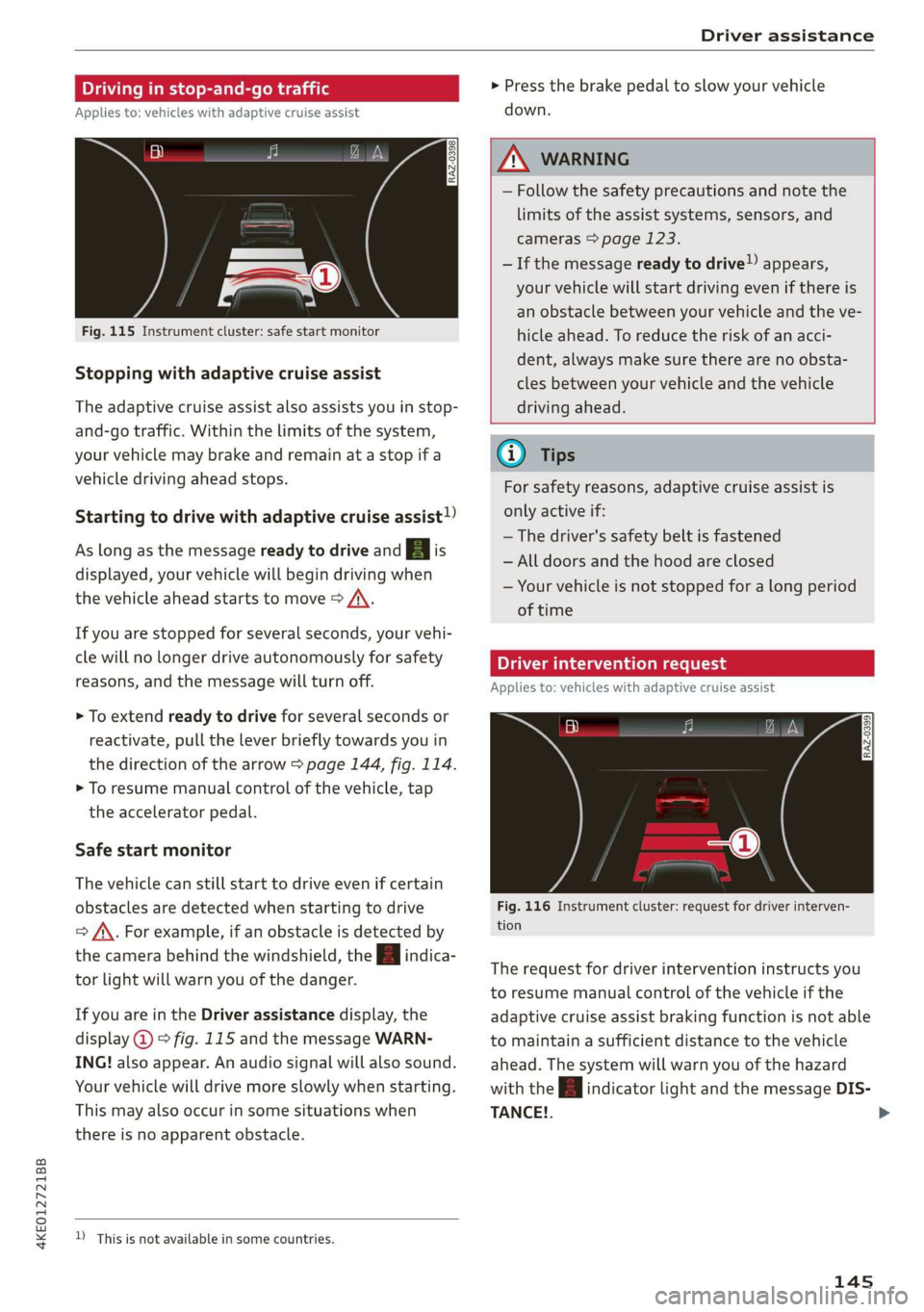
Fig. 115 Instrument cluster: safe start monitor
Stopping with adaptive cruise assist
The adaptive cruise assist also assists you in stop-
and-go traffic. Within the limits of the system,
your vehicle may brake and remain at a stop if a
vehicle driving ahead stops.
Starting to drive with adaptive cruise assist!)
As long as the message ready to drive and aA is
displayed, your vehicle will begin driving when
the vehicle ahead starts to move > /\.
If you are stopped for several seconds, your vehi-
cle will no longer drive autonomously for safety
reasons, and the message will turn off.
> To extend ready to drive for several seconds or
reactivate, pull the lever briefly towards you in
the direction of the arrow > page 144, fig. 114.
> To resume manual control of the vehicle, tap
the accelerator pedal.
Safe start monitor
The vehicle can still start to drive even if certain
obstacles are detected when starting to drive
=> /\. For example, if an obstacle is detected by
the camera behind the windshield, the a indica-
tor light will warn you of the danger.
If you are in the Driver assistance display, the
display @ © fig. 115 and the message WARN-
ING! also appear. An audio signal will also sound.
Your vehicle will drive more slowly when starting.
This may also occur in some situations when
there is no apparent obstacle.
D_ This is not available in some countries.
Z\ WARNING
— Follow the safety precautions and note the
limits of the assist systems, sensors, and
cameras > page 123.
— If the message ready to drive!) appears,
your vehicle will start driving even if there is
an obstacle between your vehicle and the ve-
hicle ahead. To reduce the risk of an acci-
dent, always make sure there are no obsta-
cles between your vehicle and the vehicle
driving ahead.
G) Tips
For safety reasons, adaptive cruise assist is
only active if:
— The driver's safety belt is fastened
— All doors and the hood are closed
— Your vehicle is not stopped for a long period
of time
Tamia e cme [sid
Applies to: vehicles with adaptive cruise assist
Fig. 116 Instrument cluster: request for driver interven-
tion
The request for driver intervention instructs you
to resume manual control of the vehicle if the
adaptive cruise assist braking function is not able
to maintain a sufficient distance to the vehicle
ahead. The system will warn you of the hazard
with the A indicator light and the message DIS-
TANCE!.
145
>
Page 149 of 310
4KE012721BB
Driver assistance
are too poor or a sensor is covered. You can You may be able to adjust the warning threshold
switch on the adaptive cruise assist, but certain for the distance warning individually depending
functions such as assistance in narrow areas will on vehicle equipment.
not be available. Under certain circumstances, — Applies to: MMI: Select on the home screen:
some objects may be detected late or may not be VEHICLE > Driver assistance > (<3) > Distance
detected at all. Be especially careful. However, warning.
cleaning the area in front of the sensors
page 124, fig. 97 may correct the malfunction. | Messages
iffy or Big is displayed when there is a malfunc-
@ Tips tion, the distance warning functions may be un-
Always keep your hands on the steering available or may be limited.
wheel. The driver is always responsible for ad-
hering to the regulations applicable in the
country where the vehicle is being operated.
A message that indicates the cause and possible
solution may appear with some displays. The
weather conditions may be too poor or a sensor
may be covered. Clean the area in front of the
Distance warning sensors > page 124, fig. 97 and try to turn on
See aeie anleee
Applies to: vehicles with distance warning If the malfunction remains, drive to an author-
ized Audi dealer or authorized Audi Service Facili-
ty immediately to have the malfunction correct-
ed.
ZX WARNING
Follow the safety precautions and note the
limits of the assist systems, sensors, and
cameras > page 123.
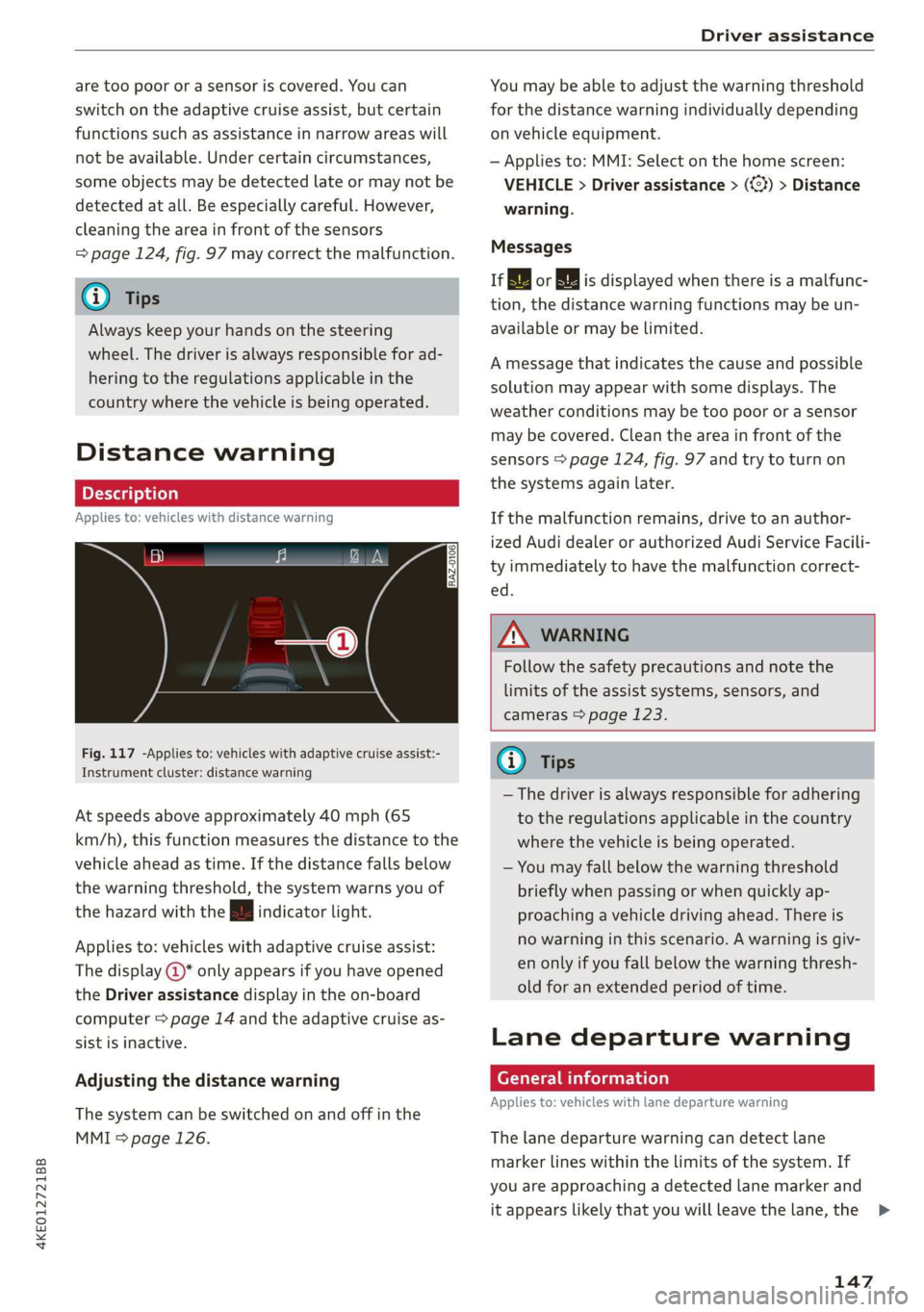
Fig. 117 -Applies to: vehicles with adaptive cruise assist:- a
; F Tips Instrument cluster: distance warning
— The driver is always responsible for adhering
At speeds above approximately 40 mph (65 to the regulations applicable in the country
km/h), this function measures the distance to the where the vehicle is being operated.
vehicle ahead as time. If the distance falls below — You may fall below the warning threshold
the warning threshold, the system warns you of briefly when passing or when quickly ap-
the hazard with the i indicator light. proaching a vehicle driving ahead. There is
no warning in this scenario. A warning is giv-
en only if you fall below the warning thresh-
old for an extended period of time.
Applies to: vehicles with adaptive cruise assist:
The display @* only appears if you have opened
the Driver assistance display in the on-board
computer > page 14 and the adaptive cruise as- .
sist is inactive. Lane departure warning
Alusting theislanerwarning
. . Applies to: vehicles with lane departure warning
The system can be switched on and off in the
MMI & page 126. The lane departure warning can detect lane
marker lines within the limits of the system. If
you are approaching a detected lane marker and
it appears likely that you will leave the lane, the >
147
Page 150 of 310
Driver assistance
system can warn you with corrective steering and
a steering wheel vibration, if necessary.
The system functions in the speed range of ap-
proximately 40 mph - 155 mph (65 km/h -
250 km/h).
Applies to: vehicles with lane departure warning
and without side assist: Even if the system is
ready, it will not warn you if you activate a turn
signal before crossing the lane marker line. In
this case, it assumes that you are changing lanes
intentionally.
Applies to: vehicles with lane departure warning
in combination with side assist: If the turn signal
is activated, the lane departure warning is ready,
and a lane change has been classified as critical
by the lane departure warning due to vehicles
traveling beside you or due to approaching vehi-
cles, then a noticeable corrective steering move-
ment will occur briefly before exiting the lane.
This will attempt to keep your vehicle in the lane.
Z\ WARNING
Follow the safety precautions and note the
limits of the assist systems, sensors, and
cameras > page 123.
Applies to: vehicles with lane departure warning
B8V-0692
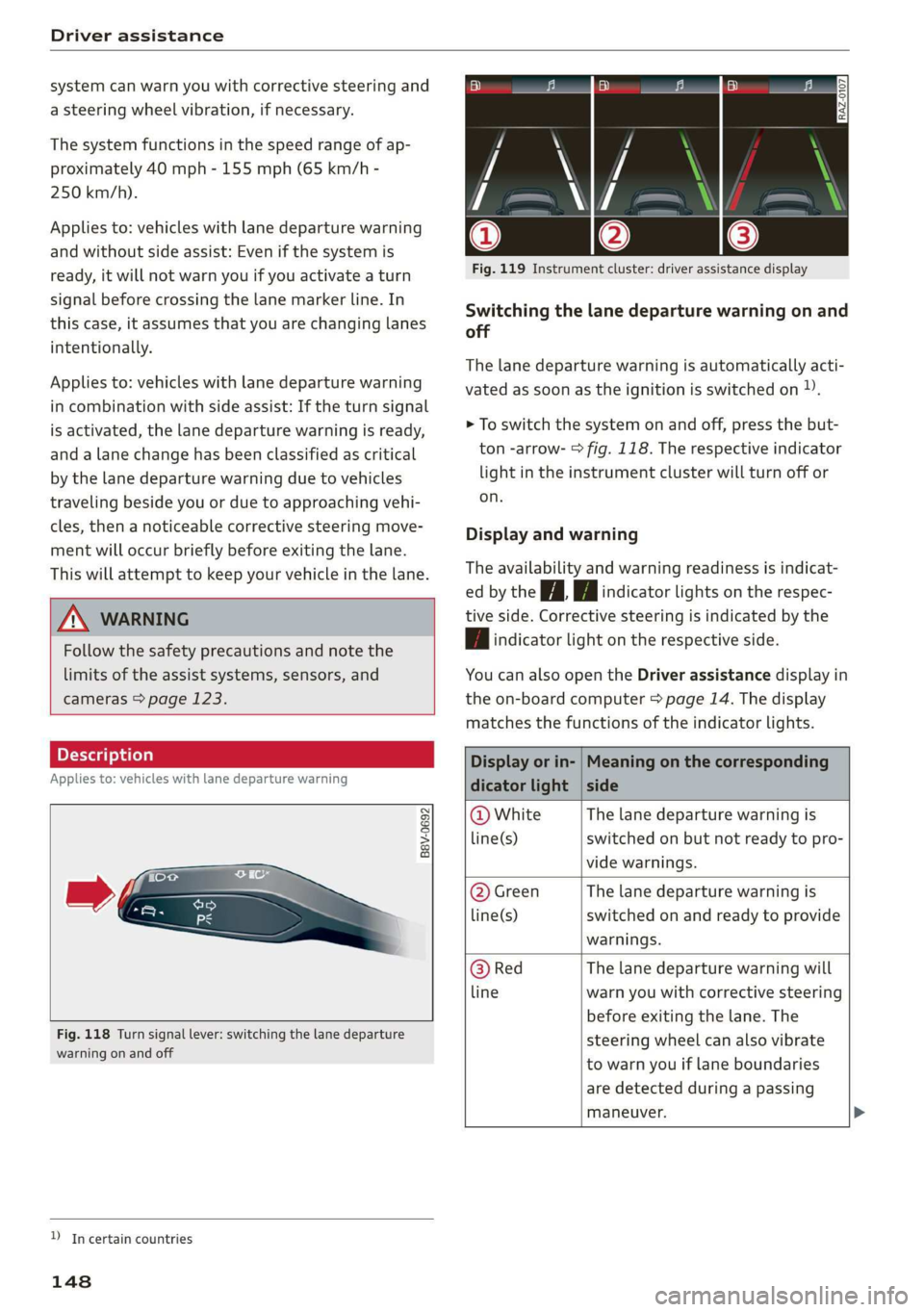
Fig. 118 Turn signal lever: switching the lane departure
warning on and off
YD In certain countries
148
a ©| BY ie le
Fig. 119 Instrument cluster: driver assistance display
Switching the lane departure warning on and
off
The lane departure warning is automatically acti-
vated as soon as the ignition is switched on »).
> To switch the system on and off, press the but-
ton -arrow- > fig. 118. The respective indicator
light in the instrument cluster will turn off or
on.
Display and warning
The availability and warning readiness is indicat-
ed by the it Hi indicator lights on the respec-
tive side. Corrective steering is indicated by the
| | indicator light on the respective side.
You can also open the Driver assistance display in
the on-board computer > page 14. The display
matches the functions of the indicator lights.
Display or in- | Meaning on the corresponding
dicator light | side
@ White The lane departure warning is
line(s) switched on but not ready to pro-
vide warnings.
@ Green The lane departure warning is
line(s) switched on and ready to provide
warnings.
@ Red The lane departure warning will
line warn you with corrective steering
before exiting the lane. The
steering wheel can also vibrate
to warn you if lane boundaries
are detected during a passing
maneuver.
Page 153 of 310
4KE012721BB
Driver assistance
ZA\ WARNING
Follow the safety precautions and note the
limits of the assist systems, sensors, and
cameras > page 123.
Audi pre sense front
Applies to: vehicles with Audi pre sense front
The Audi pre sense front uses the data from the
camera and calculates the probability of a rear-
end collision. Within the limits of the system, an
impending frontal impact with vehicles, pedes-
trians), or cyclists!) may be detected in both ur-
ban and rural speed ranges.
Audi pre sense front is active at speeds of approx-
imately 6 mph (10 km/h) and higher. It can react
to pedestrians” or cyclists) at speeds up to ap-
proximately 50 mph (85 km/h), and can react to
vehicles at speeds up to approximately 155 mph
(250 km/h).
Early warning/acute warning
The system can recognize various dangerous sit-
uations. The early warning occurs if:
—Avehicle driving ahead brakes suddenly
— Your own vehicle approaches a vehicle in front
of you that is traveling at a significantly slower
speed or that is stationary
—A pedestrian or cyclist!) is standing in the lane
or is moving into the lane
The message Audi pre sense [and a warning
tone will warn you about the danger.
The brakes may also be applied as an acute warn-
ing when there is an impending collision. You will
also be warned by an indicator in the instrument
cluster display. When this warning occurs, it may
only be possible to avoid a collision by swerving
or braking strongly.
Automatic deceleration
If you do not react to the acute warning, Audi pre
sense front can brake the vehicle to a full stop
within the limits of the system ). This reduces
the vehicle speed in the event of a collision.
D_ This is not available in some countries.
Automatic braking force increase
If Audi pre sense determines that you are not
braking strongly enough when a collision is immi-
nent, it can increase the braking force based on
the
situation.
Take-over
If the message Go Please take over! appears, the
vehicle has been braked to a stop by Audi pre
sense and you must resume control of the vehi-
cle.
Z\ WARNING
— Follow the safety precautions and note the
limits of the assist systems, sensors, and
cameras > page 123.
— Audi pre sense front cannot overcome natu-
ral physical laws. It is a system designed to
assist and it cannot prevent a collision in ev-
ery circumstance. The driver must always in-
tervene. The driver is always responsible for
braking at the correct time. Do not let the
increased safety provided tempt you into
taking risks. This could increase your risk of
a collision.
— Audi pre sense front does not react to cer-
tain objects, such as animals, crossing or on-
coming vehicles, bars, railings, or railcars.
— Audi pre sense front may be limited or un-
available when driving in curves.
—In trailer mode, the braking behavior of the
trailer can be different than usual during au-
tomatic braking.
G@) Tips
Keep in mind that Audi pre sense front can ap-
ply the brakes unexpectedly. Always secure
any cargo or objects that you are transporting
to reduce the risk of damage or injury.
Audi pre sense rear
Applies to: vehicles with Audi pre sense rear
Within the limits of the system, Audi pre sense
rear uses data from radar sensors in the rear area >
151