ad blue AUDI E-TRON 2020 Owner's Manual
[x] Cancel search | Manufacturer: AUDI, Model Year: 2020, Model line: E-TRON, Model: AUDI E-TRON 2020Pages: 316, PDF Size: 85.96 MB
Page 237 of 316

4KE012721BE
Audi smartphone interface
— You cannot connect any mobile devices via
Bluetooth when an Audi smartphone inter-
face connection is active.
— Usage of the Audi smartphone interface de-
pends on the availability of services through
third party providers.
Troubleshooting
Applies to: vehicles with Audi smartphone interface
The information that follows lists some trouble-
shooting options. They depend on the equip-
ment.
— AUDI AG merely provides access to third
party services through the MMI and does
not assume any responsibility for the con-
tent of these services.
Problem Solution
Audi smartphone
opened.
cle is being operated.
Check the battery charge level on your smartphone.
interface cannot be | Check the USB cable and use a different one if necessary.
Check if Android Auto or Apple CarPlay is available in the country where the vehi-
Android Auto: check if the Android Auto app is installed on your smartphone.
Connecting the
MMI failed. =>page 225.
Make sure that you are using the correct USB adapter and check if the USB
smartphone to the | adapter is connected correctly to your smartphone and the Audi music interface
Apple CarPlay: check if Apple CarPlay is activated on your iPhone.
vehicles.
Android Auto: check in the Android Auto app if Android Auto permits new
start your iPhone.
Wireless connection: open the settings for Bluetooth and CarPlay on your
iPhone. Remove your vehicle. Open the connection manager in the MMI
=> page 237. Delete your iPhone in the Telephone 1 and Audi smartphone inter-
face submenus. Repeat the connection process. Restart the MMI > page 17. Re-
The smartphone is
not automatically
detected. >page 225.
Make sure that you are using the correct USB adapter and check if the USB
adapter is connected correctly to your smartphone and the Audi music interface
Check if the requirements needed to connect a smartphone have been met.
235
Page 239 of 316

4KE012721BE
Additional settings
Bluetooth
> Applies to: MMI: Select on the home screen:
SETTINGS > Connection settings > Bluetooth.
Bluetooth
You can select a setting for visibility of the MMI
to other Bluetooth devices. To connect a new
Bluetooth device, the Visible setting must be se-
lected. If Invisible is selected, a Bluetooth con-
nection will only be possible with paired devices.
If Off is selected, no Bluetooth device can be con-
nected.
Bluetooth audio player
When this function is switched on, the profile
will load automatically when your Bluetooth au-
dio player is within range.
Bluetooth name
The MMI’s Bluetooth name is displayed and can
be changed.
Toy aaU eM oer ha)
> Applies to: MMI: Select on the home screen:
SETTINGS > System maintenance > Software
update.
> If necessary, insert a storage medium with the
update data into the corresponding drive
=> page 232.
> Press Search for updates.
> Press on the desired update.
> Press Next.
> Follow the system instructions.
ZA\ WARNING
— Perform the installation only when the vehi-
cle is stationary. Otherwise, this increases
the risk of an accident
— If the installation fails, contact an author-
ized Audi dealer or authorized Audi Service
Facility immediately to have the malfunction
corrected.
©) Note
The connection costs for the software update
are included in the Audi connect pricing.
@) Tips
The length of the process depends on the size
of the update.
Tale arclinee adie}
> Applies to: MMI: Select on the home screen:
SETTINGS > System maintenance > Restore
factory settings.
>» Select the desired functions individually, or
> Select the option Select all.
> Press Apply. The settings will be reset. The key
user will remain stored.
> To also delete the key user, press Remove key
user.
> To completely delete a smartphone that is
paired with the Audi smartphone interface, re-
set Audi smartphone interface and Bluetooth.
G) Tips
— Make sure that not only the settings were
deleted but also the stored data, if necessa-
ry.
— The system may restart when the settings
are reset. This may take a few minutes.
Connected devices
(eee eels (is
Requirement: the vehicle must be stationary and
the ignition must be switched on.
> Applies to: MMI: Select on the home screen:
SETTINGS > Connected devices.
Possible menu items:
— Telephone 1
— Telephone 2
— Audio player
— Wi-Fi hotspot
— Headset
myAudi app
This function is available if the myAudi app is in-
stalled on your mobile device and started, and if
the mobile device is connected with the vehicle’s
Wi-Fi hotspot.
237
>
Page 240 of 316
Additional settings
Audi smartphone interface
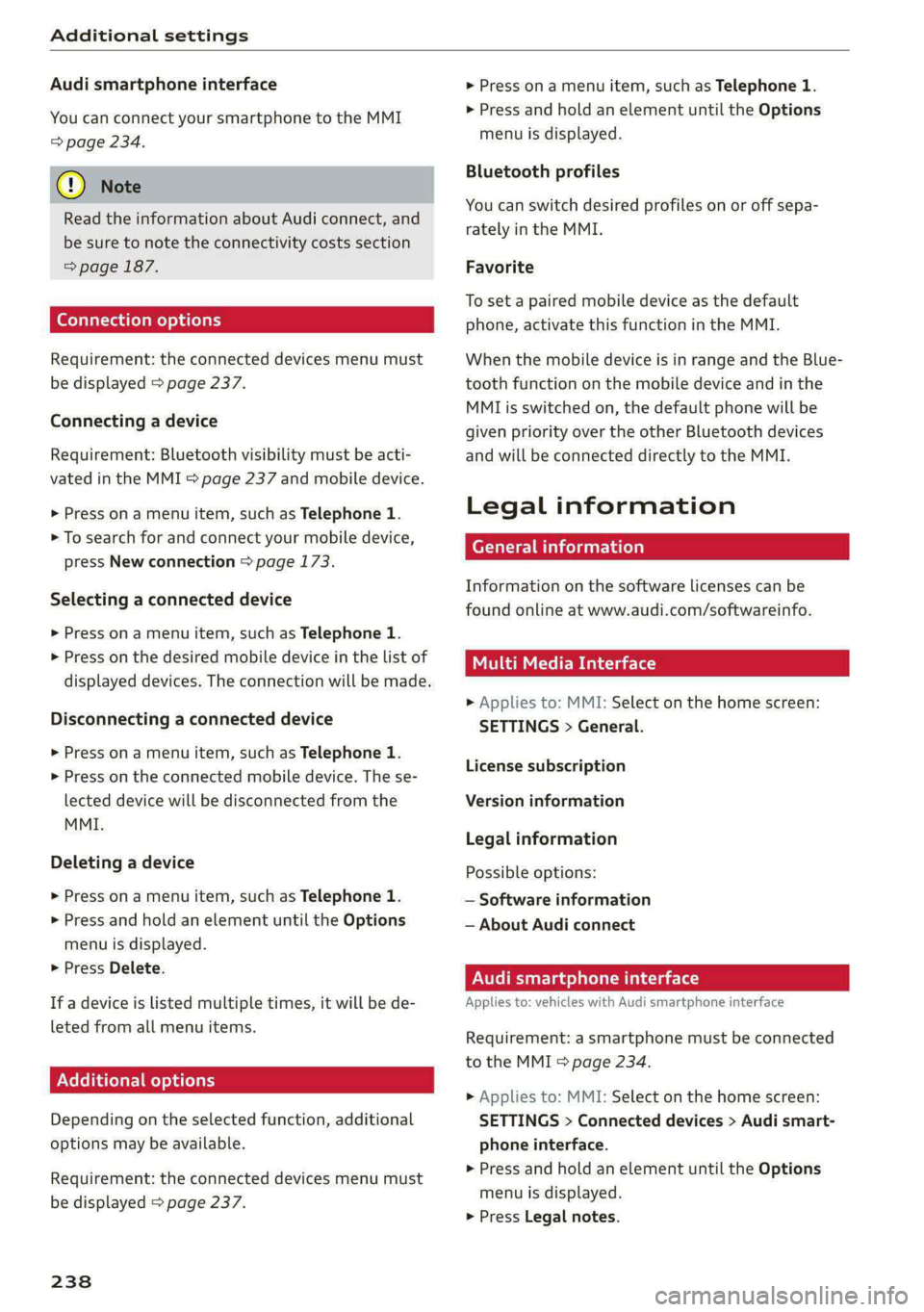
You can connect your smartphone to the MMI
=> page 234.
@) Note
Read the information about Audi connect, and
be sure to note the connectivity costs section
=> page 187.
Connection options
Requirement: the connected devices menu must
be displayed > page 237.
Connecting a device
Requirement: Bluetooth visibility must be acti-
vated in the MMI & page 237 and mobile device.
> Press ona menu item, such as Telephone 1.
> To search for and connect your mobile device,
press New connection > page 173.
Selecting a connected device
> Press on a menu item, such as Telephone 1.
> Press on the desired mobile device in the list of
displayed devices. The connection will be made.
Disconnecting a connected device
> Press ona menu item, such as Telephone 1.
> Press on the connected mobile device. The se-
lected device will be disconnected from the
MMI.
Deleting a device
> Press ona menu item, such as Telephone 1.
> Press and hold an element until the Options
menu is displayed.
> Press Delete.
If a device is listed multiple times, it will be de-
leted
from all menu items.
PXe felt Cola] Mey Leela
Depending on the selected function, additional
options
may be available.
Requirement: the connected devices menu must
be displayed > page 237.
238
> Press on a menu item, such as Telephone 1.
> Press and hold an element until the Options
menu is displayed.
Bluetooth profiles
You can switch desired profiles on or off sepa-
rately in the MMI.
Favorite
To set a paired mobile device as the default
phone, activate this function in the MMI.
When the mobile device is in range and the Blue-
tooth function on the mobile device and in the
MMI is switched on, the default phone will be
given priority over the other Bluetooth devices
and will be connected directly to the MMI.
Legal information
General information
Information on the software licenses can be
found online at www.audi.com/softwareinfo.
Multi Media Interface
» Applies to: MMI: Select on the home screen:
SETTINGS > General.
License subscription
Version information
Legal information
Possible options:
— Software information
— About Audi connect
ONT eae lat aed M Ul Tal e)
Applies to: vehicles with Audi smartphone interface
Requirement: a smartphone must be connected
to the MMI > page 234.
» Applies to: MMI: Select on the home screen:
SETTINGS > Connected devices > Audi smart-
phone interface.
> Press and hold an element until the Options
menu is displayed.
> Press Legal notes.
Page 286 of 316
Fuses and bulbs
Fuses and bulbs
Fuses
oer mie
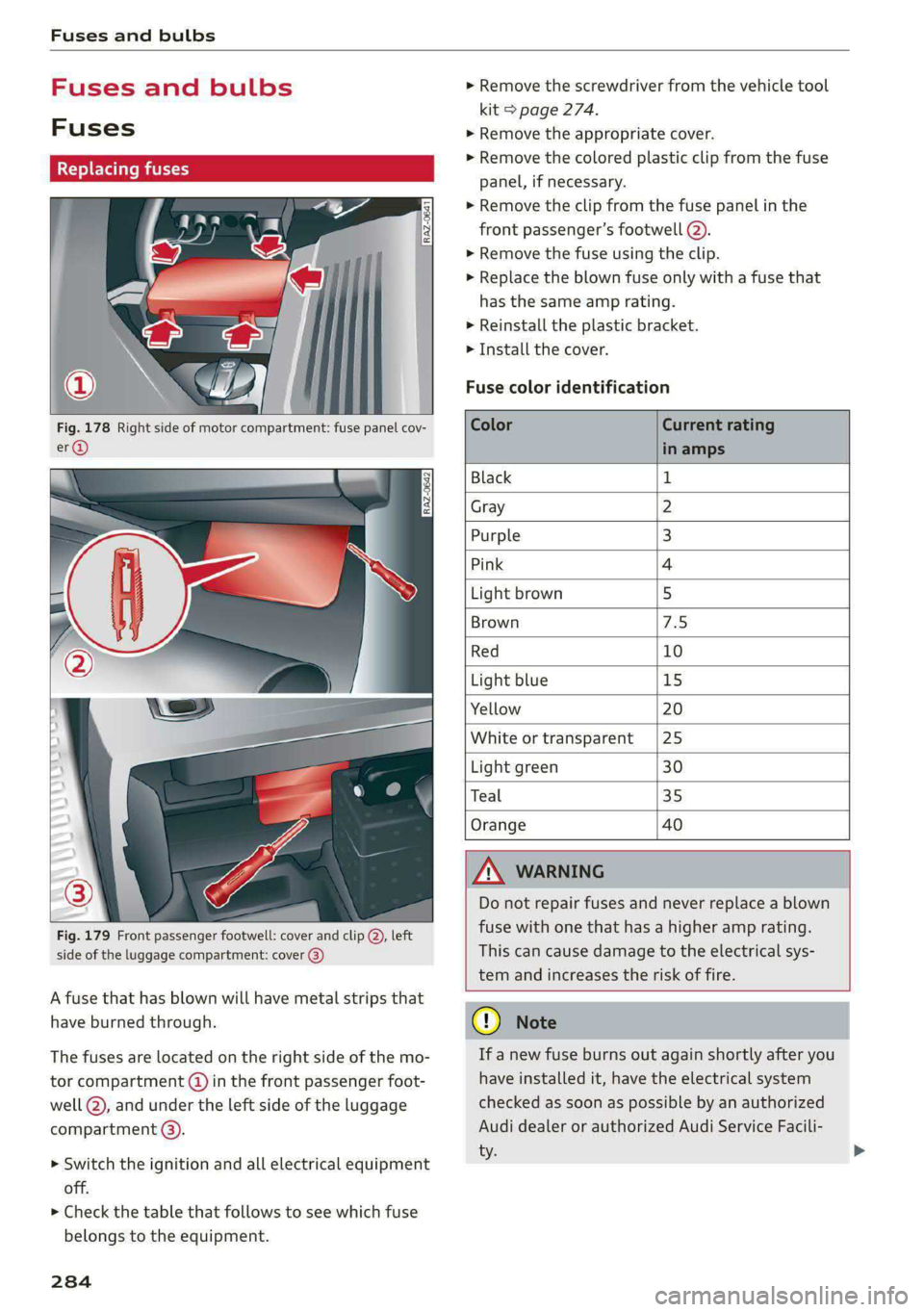
Fig. 178 Right side of motor compartment: fuse panel cov-
Fig. 179 Front passenger footwell: cover and clip @, left
side of the luggage compartment: cover 3)
A fuse that has blown will have metal strips that
have burned through.
The fuses are located on the right side of the mo-
tor compartment (@) in the front passenger foot-
well (2), and under the left side of the luggage
compartment @).
> Switch the ignition and all electrical equipment
off.
> Check the table that follows to see which fuse
belongs to the equipment.
284
» Remove the screwdriver from the vehicle tool
kit > page 274.
>» Remove the appropriate cover.
> Remove the colored plastic clip from the fuse
panel, if necessary.
> Remove the clip from the fuse panel in the
front passenger’s footwell @).
> Remove the fuse using the clip.
> Replace the blown fuse only with a fuse that
has the same amp rating.
> Reinstall the plastic bracket.
> Install the cover.
Fuse color identification
Color Current rating
in amps
Black 1
Gray 2
Purple 3
Pink 4
Light brown 5
Brown 7.5
Red 10
Light blue 15
Yellow 20
White or transparent [25
Light green 30
Teal 35
Orange 40
ZA WARNING
Do not repair fuses and never replace a blown
fuse with one that has a higher amp rating.
This can cause damage to the electrical sys-
tem and increases the risk of fire.
@) Note
If a new fuse burns out again shortly after you
have installed it, have the electrical system
checked as soon as possible by an authorized
Audi dealer or authorized Audi Service Facili-
ty.
Page 292 of 316

Data privacy
> To display additional information about the pri-
vacy settings and the associated symbols in the
status bar, press @ in the MMI.
Requirement: the ignition must be switched on.
Setting the maximum privacy settings
When the Activate privacy mode function is
switched on, the data connection is deactivated
or sending of data is restricted, but all safety-re-
lated, legal, or contractually required Audi con-
nect services remain activated. The majority of
the Audi connect services are deactivated.
When the function is switched off, the data con-
nection will be available in order to use Audi con-
nect services.
Adjusting individual privacy settings
In the MMI, you can adjust individually which da-
ta should be transmitted from the vehicle. If you
switch on a data category, the data will be trans-
mitted.
@) Note
You are responsible for all precautions taken
for data protection, anti-virus protection, and
protection against loss of data on mobile de-
vices that are used to access the Internet
through the Wi-Fi hotspot.
@ Tips
— The following interfaces are not affected by
changes to the privacy settings: Bluetooth,
Bluetooth Low Energy (BLE), Wi-Fi, Audi
smartphone interface (ASI), Near Field
Communication (NFC), charging communi-
cation (high-voltage system), Electronic Toll
Collect (ETC), On-Board Diagnostic System
(OBD) if equipped.
— If the maximum privacy settings are switch-
ed on, your vehicle may not receive security
updates and certificates for establishing an
encrypted connection, depending on vehicle
equipment. In order to receive security up-
dates and certificates, switch the maximum
privacy settings off for at least ten minutes
every six months. Make sure that your vehi-
cle is connected to the Internet. A symbol in
290
the MMI status bar indicates if the required
data connection is available > page 19.
— If the transmission of data is limited, it will
have the following effects on the exchange
of data for Audi connect services and emer-
gency calls, if equipped:
—The emergency call function will remain
available without restrictions and will con-
tinue to transmit data.
— If an online roadside assistance call is ini-
tiated, no data will be transmitted, but a
call will be made.
— If the Geofencing Alert, Speed Alert,
and/or Valet Alert services have been acti-
vated by the key user, then they will re-
main available without restrictions and
continue to transmit data.
— Stored destinations (favorites, last desti-
nations) are only stored in the vehicle. If
you allow transmission of data again,
these destinations will be synchronized via
the myAudi account. To prevent synchroni-
zation of destinations, delete the destina-
tions before you allow data to be trans-
mitted again.
Applies to: vehicles with Audi connect Infotainment
AUDI AG collects, uses, stores and shares your
personal information, such as contact data, vehi-
cle data, usage data, driving data and precise ge-
olocation, in order to provide you with the prod-
ucts and services you have purchased or request-
ed, and for a number of other purposes, for ex-
ample, to track quality issues, to performance
and safety, to meet our internal compliance or le-
gal requirements and to market to customers
and potential customers. For a more complete
list of the data we collect, how we use it and with
whom we share it, please visit your Audi nation-
al/sales region website at www.audi.com.
The collection, use and sharing may vary depend-
ing on your model and model year, your subscrip-
tion status, or the service offering. For example,
collection, use and sharing may vary between
Audi connect services, if you have designated a
key user, or if you are driving a model equipped >
Page 302 of 316

Index
Vehicle battery (12 Volt)............... 245
Winter operation (12 Volt vehicle battery) . 245
Battery (vehicle)
refer to High-voltage battery........... 107
Blinds
refer to Panoramic glass roof............ 41
BIOCK fOUtE soe 2 » nome © x eee x x tee e + SeeE 206
BIOWER's + sas < @ acne 2 5 SRR 7 8 ER TS HOR FS 83
Bluetooth
Audio player « saws s = sews so sees ss eee ae 223
Connecting acell phone............... 173
Deleting adevice................0000- 238
DEVICE OVERVIEW’: cues & = sqeays + 2 ease & 2 eee 237
Disconnecting a device................ 238
Displaying profiles.................00. 238
Searching foradevice................. 238
Selecting adevice « wii se sna ae www ses 238
Specifying a favorite................0. 238
Boost fUmCtion wisn: 0 « sownine a » examen © 0 ageiore ¥ 0 6 91
Brake fluid
Checking the brake fluid level........... 243
Brakes... 2... eee eee eee 94
Brake fluid: « « seas s ¢ wows se eews oo eee 243
Emergency braking function............. 97
Le (0) 98
New brake pads..............2.-0 ee eee 95
Break-in security feature. ............0 eee 32
Breaking in
New brake pads..........--..----e eee 95
INCWAINESY: 2 owners « s wows ov ised @ ener oo 255
Browser
refer to Mediacenter...............04. 227
Bulb:ireplacementiin:. + ¢ csicoa vo ecneana so eosuene oo 287
Business. addressis ¢ vss so mean a 3 man x oo 206
Cc
California Proposition 65 Warning........ 240
Battery specific........... cee eee eee ee 245
CAlLlist,. sacsnis x 2 ommnes + cree & o mean = ema 177
CaMENASiics: 2 eee sv omenE © oso © 8 eNO a 128
Locations ......... ee eee eee eee eee 129
Capacities
Washer fluid reservoir................. 298
Cargo floor. .... 0... eee eee eee eee 80
Cargo mat...... 0... eee eee 80
CArQOMets, « 6 wses oo ieee © casino even & amon 79
300
Car KO Yicniie 2 wesevae 2 weaves oo ease © aseuee © ¥ emeee 33
Car phone
Serial number (IMEI) .................. 184
SWItCHING Off sazc s aes co eee se Gees BS 183
Carwash... . cece eee eee eee eee 268
Cell phone
refer to Telephone...........-..-++-5- 173
Cell phone compartment
refer to Audi phone box............... 175
Central
lockingiss « 22s x + eyes +e eee se ee 29
INUEOHLOGK Ss « cccries « arexsuowe « iranawe a 8 ese te & omaus 29
Convenience key.........--.00 eee eee 34
Convenience opening and closing......... 40
Luggage compartment lid............... 36
Mechanically unlocking and locking....... 32
MBSSAGES « sexs ¢ » meme 5 eae v ¥ eS < Be 31
Remote control: keysis & 6 ssues se smn 6 6 aero 34
Setting... 20... cece eee eee 30
Vehicle key seas = = seme = ¢ wees to eee ty ee 34
Central locking switch...............200. 31
Certification......................000. 295
Changing light bulbs................... 287
Charging
refer to Power sourceS.........--..00-0- 75
Charging clip
refer to Wall mount clip.............0 122
Charging display cewe s x ems 5 s mes xo ca F 113
Charging the battery (mobile devices). 175, 225
Charging time.................00. 000 109
Child safety lock
Climate control system controls inthe rear. 39
POWEP WIND OWSimcica & 2 since wo coausis vo dasa os 39
Rear doors... ..... eee cee eee 39
Child safety seats..... 0.0.0... ee eee eee 69
Securing to the top tether anchor........ 73
Securing with a safety belt.............. 72
Securing with LATCH). « «cess 6 scwcene @ 0 vesvene 71
CleANIING « sesuass x & smeres wo scucens & seawers ¥ w were 268
Cleaning Alcantara......... cece eee eee 271
Cleaning artificial leather............0.. 271,
Cleaning carbon components........ 270; 271
Cleaning controls...................0-. 271
Cleaning decorative parts/trim........... 270
Cleaning plastic parts.................. 270
Cleaning textiles.................0000. 271
Climate control system .............0 00 82
Page 304 of 316
Index
Driver information system................ 12
Drives
refer to Media................-.. 222,226
Drive select
refer to Audi drive select............... 101
Drive systeM... 0... eee eee ee 92
Audi drive'select » ss « s swe 4 2 seen ss 101
Emergency Off esses. «2 eases 4s ewan «wasn 6 6 88
Switching on and off...............000- 88
Driving down hills......... 0.00... c eee eee 98
Driving programs « « scvers ev vases « # essen 91,151
Driving through water................05. 99.
DEiVING UME: ¢ = sewn « » mews 2 y ew ¢ ewer as g 14
Driving tips
Driving through water..............0005 99
Efficient driving................000000- 94
Offroad GHiVING « wsme wormx 2 sewn xe tow ee 99
Uphill and downhill.................0.. 98
Driving:up hills:. « 5 sie 2s wns os men oo ewe 98
DVD drive (media drives)................ 223
E
E-mail
Messageroptionste:s « « sees « sascees ¥ 0 seems 182
SettingS .. 0.6... cece eee eee eee 182
EDL
refer to Electronic Differential Lock...... 104
EDR
refer to Event Data Recorder (EDR)...... 288
Efficiency assist «: « sees s x ees se een ewe 140
Electrical system. .........-.. eee eee ee 244
Electric drive systeM..........0 2.00 e eee 92
Electricity
refer to Energy ess xs sews se ees se eee 107
Electric motor
COOLANE sso x 2 sews 5 e ears & & eee 2 2 RES + 242
Electric range’: s : samy « & eases « © eave 4s eee 208
Electromechanical parking brake.......... 96
Electronic Differential Lock.............. 104
Electronic immobilizer...............00-. 34
Electronic Stabilization Control........... 104
Embedded SIM card.........0.ceeeeeuee 188
Emergencyassist ccc ss scam vena eo woven 162
Emergency assistance woccs sc ceuwa see a es 274
Emergency braking function.............. 97
302
Emergency'calliiss © a saver v samen ¥ seve 179, 194
Emergency flashers..........0.eeceeeeee 47
Emergency mode « vas s i sews ss eeun sv eeu s 92
Emergency operation
DOOMS 2 « sess so wane oceans vee wo ote 32
Luggage compartment lid............... 38
Panoramic glass roof.................-. 41
Energy
Current consumption................... 14
Reducing consumption................. 94
ENergy TECOVENY cers xo essere wo eessine wo ctv & oa 92
Engine braking effect
refer to Recuperation.................. 92
Engine’StartisyStei over. « cose o 6 evenenn occa 89
Entry/exit UIGhting:in. . «sce sv nasi sw mane ve 47
Entry
assistance: « «sess % wens 6 o savers & were 58
also refer to Exit assistance............. 58
ESCOPROAM cecisecs 5 «: sacra 5 x answers « o amaesnn aw oi 105
eSIM
refer to Embedded SIM card............ 188
Event Data Recorder (EDR).............. 288
Exiteassistanee «case so sauce ao nine ow mm os 58
EXIGE Wari Giccses « 5 sscses « & assem oo seamen oo ewes 160
Exterior lighting: « «eves + 2 omen oe see 2 2 ws 45
Exterior MUIfOrS saws ss cews so caw s waa ss 49
Foldingisettings snc = semis a 2 suansne 0 s wasn 6 30
External voice operation................. 25
FE
Factory default settings
Multi Media Interface................. 237
FaStrOute’s cuse x «ance ao uminece ow anaes + een 198
Favorites
Bluetooth.............. 0.02. 238
NaViGatiOniscs « weees + wees o x some ¢ 5 nee 200
TELEPHONE sesso: x x amewes ov sawn o 2 omens @ oom 178
Federal Communications Commission (FCC) . 295
File formats (media drives) .............. 232
FOG WINKOWS), see = wacx © s eeu 4 s em « go 84
Folding the rearseats.............-..0-- 79
Footwell temperature............00.000. 85
For the sake of the environment
L@AKS icc: & : sayse 5 2 ewe 2 2 See x ee ge 241
Forward gear
FEFEPTO' GEA sx = « name = ¥ carne « ¥ nase x 2 eae 90