lane assist AUDI E-TRON 2020 Owner's Manual
[x] Cancel search | Manufacturer: AUDI, Model Year: 2020, Model line: E-TRON, Model: AUDI E-TRON 2020Pages: 316, PDF Size: 85.96 MB
Page 160 of 316

Driver assistance
— An indicator in the instrument cluster will
inform you when there is an intervention.
Adjusting Audi pre sense
Applies to: vehicles with Audi pre sense
The system can be switched on and off in the
MMI > page 130.
You can adjust the Audi pre sense functions to
your preferences. The settings depend on the ve-
hicle equipment.
> Applies to: MMI: Select on the home screen:
VEHICLE > Driver assistance >(<})> Audi pre
sense.
Possible settings:
— Turn assist
— Swerve assist
Prewarning”) - The prewarning can be switched
off or the Audi pre sense warning time can be set
(Early/Medium/Late).
Set the warning time for the early warning to
Early at first. If you feel that the prewarnings ap-
pear too early, then set the warning time to Me-
dium. The Late warning time should only be set
in special circumstances.
i) Tips
— Switch Audi pre sense off when you are not
using public streets, when loading the vehi-
cle onto a vehicle carrier, train, ship, or oth-
er type of transportation, or when towing
the vehicle. This can help to prevent an un-
desired intervention from the Audi pre
sense system.
— If the system is switched off, it switches on
again automatically once the ignition is
switched on again).
Messages
Applies to: vehicles with Audi pre sense
re or fa] is displayed when there is a malfunc-
tion, the Audi pre sense functions may be un-
available or may be limited.
D_Incertain countries
158
A message that indicates the cause and possible
solution
may appear with some displays. The
weather conditions may be too poor or a sensor
may be covered. Clean the area in front of the
sensors > page 129 and try to turn on the sys-
tems again later.
If the malfunction remains, drive to an author-
ized Audi dealer or authorized Audi Service Facili-
ty immediately to have the malfunction correct-
ed.
Side assist
Description
Applies to: vehicles with side assist
al 3
eI I Ba |
Fig. 119 Driving situations and exterior mirror display
General information
Side assist monitors the blind spot and traffic in
the adjacent lanes behind the vehicle. Within sys-
tem limits, side assist can detect traffic that is
approaching from behind and provide a warning
when you are changing lanes and turning. The
system uses the data from the radar sensors at
the rear corners of the vehicle.
Page 161 of 316
4KE012721BE
Driver assistance
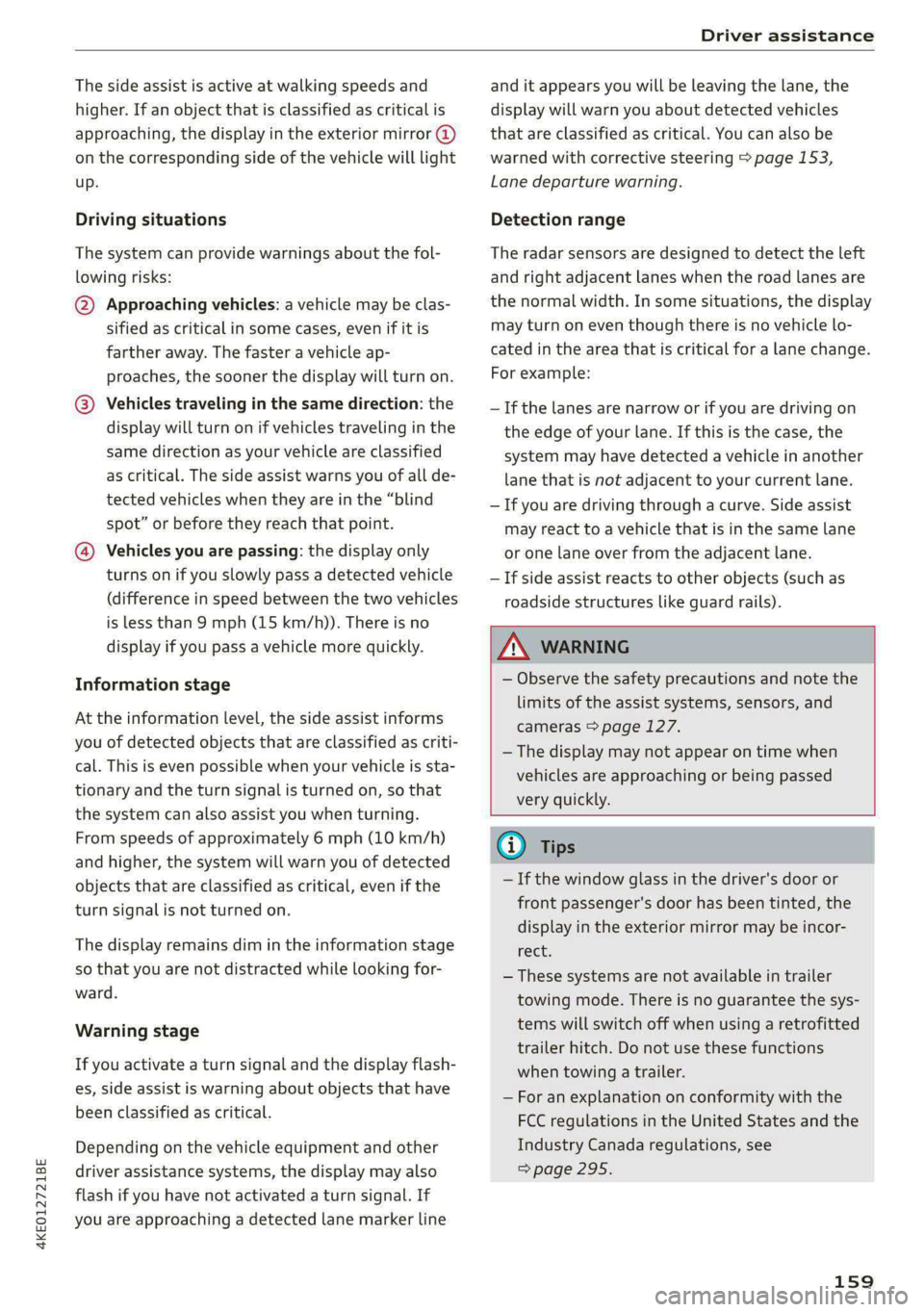
The side assist is active at walking speeds and
higher. If an object that is classified as critical is
approaching, the display in the exterior mirror @
on the corresponding side of the vehicle will light
up.
Driving situations
The system can provide warnings about the fol-
lowing risks:
@ Approaching vehicles: a vehicle may be clas-
sified as critical in some cases, even if it is
farther away. The faster a vehicle ap-
proaches, the sooner the display will turn on.
@®) Vehicles traveling in the same direction: the
display will turn on if vehicles traveling in the
same direction as your vehicle are classified
as critical. The side assist warns you of all de-
tected vehicles when they are in the “blind
spot” or before they reach that point.
@) Vehicles you are passing: the display only
turns on if you slowly pass a detected vehicle
(difference in speed between the two vehicles
is less than 9 mph (15 km/h)). There is no
display if you pass a vehicle more quickly.
Information stage
At the information level, the side assist informs
you of detected objects that are classified as criti-
cal. This is even possible when your vehicle is sta-
tionary and the turn signal is turned on, so that
the system can also assist you when turning.
From speeds of approximately 6 mph (10 km/h)
and higher, the system will warn you of detected
objects that are classified as critical, even if the
turn signal is not turned on.
The display remains dim in the information stage
so that you are not distracted while looking for-
ward.
Warning stage
If you activate a turn signal and the display flash-
es, side assist is warning about objects that have
been classified as critical.
Depending on the vehicle equipment and other
driver assistance systems, the display may also
flash if you have not activated a turn signal. If
you are approaching a detected lane marker line
and it appears you will be leaving the lane, the
display will warn you about detected vehicles
that are classified as critical. You can also be
warned with corrective steering > page 153,
Lane departure warning.
Detection range
The radar sensors are designed to detect the left
and right adjacent lanes when the road lanes are
the normal width. In some situations, the display
may turn on even though there is no vehicle lo-
cated in the area that is critical for a lane change.
For example:
— If the lanes are narrow or if you are driving on
the edge of your lane. If this is the case, the
system may have detected a vehicle in another
lane that is not adjacent to your current lane.
— If you are driving through a curve. Side assist
may react to a vehicle that is in the same lane
or one lane over from the adjacent lane.
—If side assist reacts to other objects (such as
roadside structures like guard rails).
ZA\ WARNING
— Observe the safety precautions and note the
limits of the assist systems, sensors, and
cameras > page 127.
— The display may not appear on time when
vehicles are approaching or being passed
very quickly.
(i) Tips
— If the window glass in the driver's door or
front passenger's door has been tinted, the
display in the exterior mirror may be incor-
recs
— These systems are not available in trailer
towing mode. There is no guarantee the sys-
tems will switch off when using a retrofitted
trailer hitch. Do not use these functions
when towing a trailer.
— For an explanation on conformity with the
FCC regulations in the United States and the
Industry Canada regulations, see
=> page 295.
159
Page 164 of 316

Driver assistance
Displays, warnings, and braking
— Display: the red arrow (@ can indicate the direc-
tion from which the cross traffic is approaching.
The indicator in the upper display only appears
when the parking aid is activated. For vehicles
with peripheral cameras only in the Front and
Front corner camera views. The display only ap-
pears in the instrument cluster > fig. 123 when
the Driver assistance display is open in the on-
board computer > page 14.
— Warnings: the message Cross traffic! Bo can
warn you of critical cross traffic when driving
forward. There may also be an audible signal.
— Automatic brake activation: if you do not react
to a warning, a brief braking by the system can
warn you of a potential collision with an ap-
proaching object when driving forward at
speeds up to approximately 6 mph (10 km/h).
Switching the intersection assistant on and
off
— The system can be switched on and off in the
MMI & page 130.
Messages
If or > is displayed when there is a mal-
function, the intersection assistant functions
may be unavailable or may be limited.
A message that indicates the cause and possible
solution may appear with some displays. The
weather conditions may be too poor or a sensor
may be covered. Clean the area in front of the
sensors © page 129 and try to turn on the sys-
tems again later.
If the malfunction remains, drive to an author-
ized Audi dealer or authorized Audi Service Facili-
ty immediately to have the malfunction correct-
ed.
Z\ WARNING
— Observe the safety precautions and note the
limits of the assist systems, sensors, and
cameras > page 127.
— The intersection assistant will not provide
alerts about people and cannot warn you
about every type of approaching objects,
such as cyclists. Always monitor the traffic
162
as well as the vehicle's surroundings with di-
rect eye contact.
— The system may not react if vehicles are ap-
proaching very fast.
G) Tips
For an explanation on conformity with the
FCC regulations in the United States and the
Industry Canada regulations, see > page 295.
Emergency assist
Applies to: vehicles with emergency assist
General information
Within the limits of the system, emergency assist
can detect inactivity from the driver. In these in-
stances, the system will warn the driver, assume
control of the vehicle if necessary, and bring the
vehicle automatically to a stop in the lane.
Regardless of the speed, the emergency assist is
automatically available when the adaptive cruise
assist* is activated. When the adaptive cruise as-
sist* is deactivated, the system is only available
at speeds above approximately 40 mph
(65 km/h).
Emergency assist functions
Measures may be initiated in stages. The vehicle
can be controlled with the limits of the system.
The measures depend on the dangerous situation
and the vehicle equipment:
— Visual and audio warnings
— Vehicle control
— Reduction of vehicle speed in stages
— Lowers the volume of the Infotainment system
— Tugs on the safety belt
— Activates the brakes
— The emergency flashers will activate either
while the vehicle is still in motion or once it is
stationary (depending on your vehicle's produc-
tion date).
— Audi pre sense preemptive safety measures are
triggered > page 155
— The brakes are applied until the vehicle is sta-
tionary
Page 207 of 316
4KE012721BE
Navigation
Moving the map quickly
> Swipe your finger across the map in the desired
direction and lift your finger off the map.
Zooming in on the map
> Place two fingers on the map and pull your fin-
gers apart. Or: double tap on the map with one
finger.
Zooming out on the map
> Place two fingers on the map and pull your fin-
gers together. Or: double tap on the map with
two fingers.
Rotating the map
> Rotate the map using two fingers.
Tilting the map
> Drag upward or downward with two fingers.
G) Tips
Certain gestures may not be available on all
touch displays or in every menu.
Navigation view with te guidance
started
Applies to: vehicles with navigation system and Audi virtual
cockpit
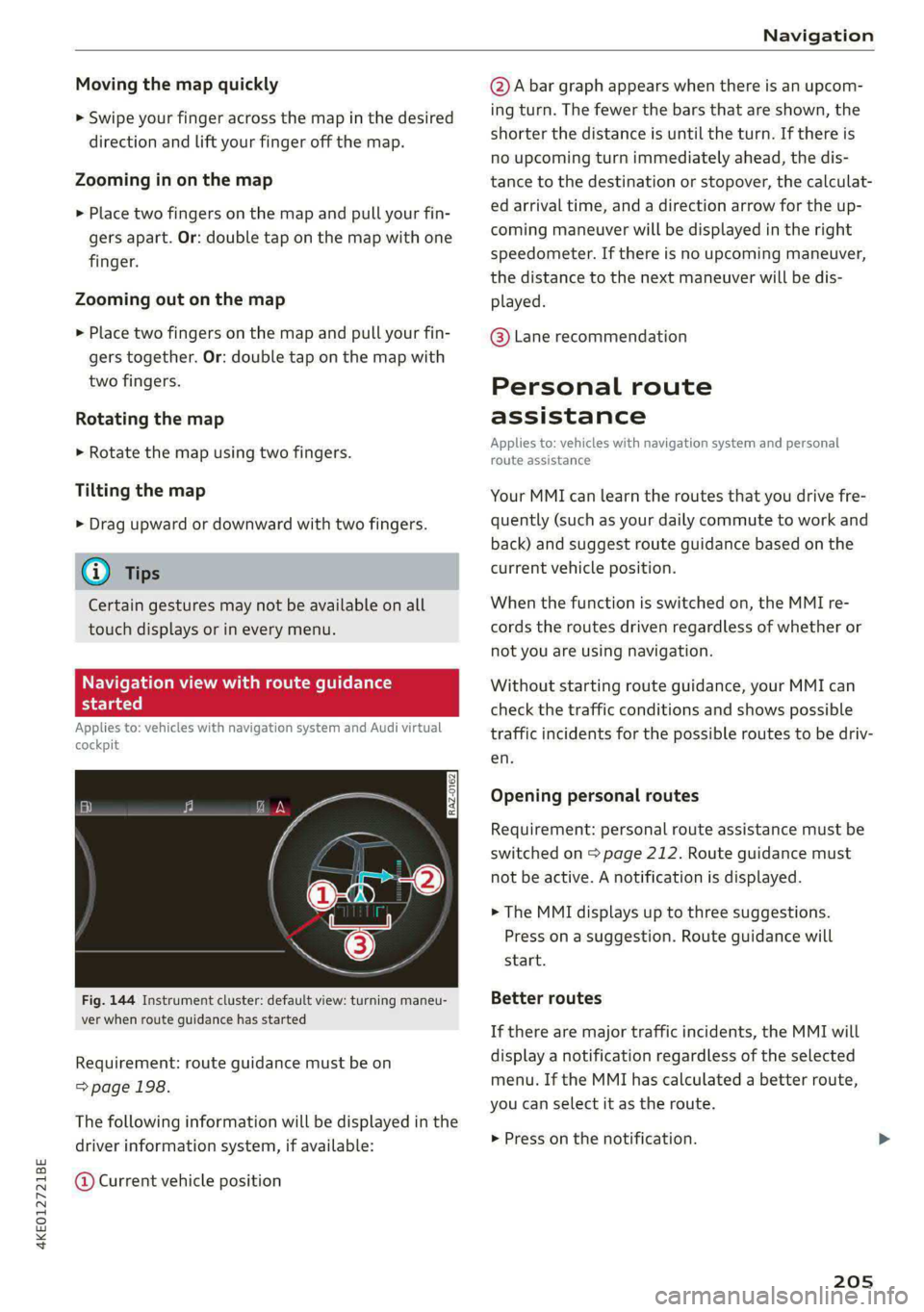
Fig. 144 Instrument cluster: default view: turning maneu-
ver when route guidance has started
Requirement: route guidance must be on
=> page 198.
The following information will be displayed in the
driver information system, if available:
@ Current vehicle position
@A bar graph appears when there is an upcom-
ing turn. The fewer the bars that are shown, the
shorter the distance is until the turn. If there is
no upcoming turn immediately ahead, the dis-
tance to the destination or stopover, the calculat-
ed arrival time, and a direction arrow for the up-
coming maneuver will be displayed in the right
speedometer. If there is no upcoming maneuver,
the distance to the next maneuver will be dis-
played.
@® Lane recommendation
Personal route
assistance
Applies to: vehicles with navigation system and personal
route assistance
Your MMI can learn the routes that you drive fre-
quently (such as your daily commute to work and
back) and suggest route guidance based on the
current vehicle position.
When the function is switched on, the MMI re-
cords the routes driven regardless of whether or
not you are using navigation.
Without starting route guidance, your MMI can
check the traffic conditions and shows possible
traffic incidents for the possible routes to be driv-
en.
Opening personal routes
Requirement: personal route assistance must be
switched on > page 212. Route guidance must
not be active. A notification is displayed.
> The MMI displays up to three suggestions.
Press on a suggestion. Route guidance will
start.
Better routes
If there are major traffic incidents, the MMI will
display a notification regardless of the selected
menu. If the MMI has calculated a better route,
you can select it as the route.
> Press on the notification.
205
Page 214 of 316
Navigation
— Traffic obstructions
— Traffic information
Map colors
— Automatic: the map display adapts to the light-
ing conditions (for example, by changing from
day to night when driving through a tunnel).
— Day or Night
Map orientation
— 2D map or 2D north: the current vehicle posi-
tion is displayed. The map is oriented in the di-
rection of travel or to the north.
— 3D map: the current vehicle position is shown
on a three-dimensional map and is oriented in
the direction of travel.
— Overview: the entire route from the vehicle po-
sition to the destination or the next stopover is
displayed on the map. The map is oriented to
the north.
Automatic zoom
— On: the map scale is adapted automatically de-
pending on the type of road being traveled (ex-
pressway, highway, other roads) so that you al-
ways have an optimal overview of the road
ahead. When route guidance is active, the scale
is adjusted automatically for a better detailed
view when there are upcoming maneuvers.
— Intersection: when route guidance is active, the
scale is adjusted automatically for a better de-
tailed view when there are upcoming maneu-
vers.
— Off
MMI map contents/Map content: you can switch
the display of additional information (such as
POIs) on the map in the upper display on or off.
Note the following for the 3D city model > ©.
Voice guidance
Voice guidance: you can adjust the navigation
prompts. With the Traffic setting, the MMI will
only give prompts if there are traffic incidents on
your route.
Voice guidance during phone call
Entertainment fader during navigation: the au-
dio playback volume is temporarily lowered when
navigation prompts are active.
212
Route criteria
You can adjust which route criteria should be al-
lowed or avoided for the route calculation.
HOV/carpool lanes
Highways
Toll roads
Ferries
e-tron route planner
This function can be switched on and off.
Route information
When this function is switched on and route
guidance is active, route information ©)
=> page 203, fig. 142 is displayed. The next ma-
neuver will be displayed at the bottom. POIs and
traffic information will also be displayed. Press
route
information to display a preview of the next
maneuver on the map. You can switch the follow-
ing information on or off in route information.
— POIs along the route
— Traffic information
Personal route assistance
Personal route assistance is switched off at the
factory.
Your trips are recorded and destinations are sug-
gested by the MMI when this function is switched
on > page 205.
Trailer mode
Trailer mode is switched off at the factory.
When the function is switched on, the maximum
permitted speed for vehicles with trailers is in-
cluded during route guidance and the calculated
arrival time is adjusted accordingly. When the
function is switched on, the symbol @)
=> page 203, fig. 142 is displayed on the map.
Presentation mode
In presentation mode, the system simulates driv-
ing along the planned route without the vehicle
actually moving. You can use Specify starting
point when you would like to calculate a route
starting
from a location other than the current >
Page 301 of 316

4KE012721BE
Index
A
A/C cooling mode..........-. eee eee eee ee
Accelerator pedal.............--0000 000
also refer to Accelerator pedal...........
AccessorieS ...... 0.0000 c ee eee eee 75,
Active lane assist
refer to Lane departure warning.........
refer to Lane guidance................
Adaptive cruise assist................00.
Cleaning sensors... ... 0... cee eee eee
Predictive control....................
Adaptive cruise control
refer to Adaptive cruise assist..........
Adaptive dampers « wea sv saws ss meme : 2 oe
Adjusting the air distribution.............
Adjusting the brightness.................
Adjusting the sound..............-..00-
Adjusting the temperature...............
Adjusting the vents ............0eceee eee
Adjusting the volume...............00005
Adjusting the volume (announcements) .. . .
Adjusting the welcome sound............
Airbag SySteM « » seme s eeu s = oem et Sa Eee
Air suspension..............0..00.000.
Alarm system
refer to Anti-theft alarm system..........
Alignment pin (changing the wheel).......
All-weather lights .............. eee eee ee
Allseason tires. ..... 00. .2.000200200005
All wheel drive
FOfEF TO QUAL eis << scces cs wees ce eee
Amazon Alexa integration
Media playback.............--.0-+-05
QPeration « anes «6 cases © o cusses » x ceotane ¥ # ee¥ve
AMI
refer to Audi music interface...........
Android Auto
refer to Audi smartphone interface......
Anti-freeze
Windshield washer system.............
Anti-lock braking system .............00.
Anti-Slip Regulation.................04.
Anti-theft alarm system ..........--..00--
Anti-theft wheel bolts..................
Apple CarPlay
refer to Audi smartphone interface...... 234
Aspect ratio (video) ..........-...-. 228, 230
ASR
refer to Anti-Slip Regulation............ 104
Audi adaptive light..................005. 45
Audi connect
referto CONNECt. . .c..s cc ives esas ae ss 187
Audi connect Remote & Control
refer to Vehicle control services......... 189
Audidrive'selecticn, « + sau oz scum « x newe yoo 101
Audi e-tron compact charging system..... 117
Adjusting the charging power level...... 118
Changing or attaching the power cable... 122
S@CUTING . 6... eee eee eee eee 122
Status and malfunction indicators....... 118
Audi musicinterface...........000 0c ee 225
AUGIG TINGS css = ¢ cans & ¢ eee 5s eee £ eee 226
Audi phone box. ..........00-.00 eevee 175
Audi presens@... 2.0... 0. c cece eee eee 154
M@SSAQES vcers « 5 ery § 2 eae Fe ERGY Fd eee 158
Audi pre sense front..............eeeee 155
Audi side assist
refer to Side assist............--.-+--5 158
Audi smartphone interface.............. 234
Legalinformation ¢ cscs os wae ae ewes «2 238
Audi virtual cockpit
refer to Instrument cluster.............. 11
AUTO
Automatic headlights................0- 4S
Climate control system..............0-5 83
Auto Lock (central locking) ............... 29
Automatic climate control system
refer to Climate control system.......... 82
Automatic luggage compartment lid.... 37,38
Automatic wipe/wash system............. 51
Auxiliary climate control................. 85
Average consumption.............00000. 14
Average speed .... 2.0... . cee eee eee eee 14
B
Bag hooks ......... 00 eee eee eee eee 76
Battery
Charge level display.................0.. 11
Charging (12 Volt vehicle battery)....... 246
High-voltage battery.................. 107
Page 304 of 316
Index
Driver information system................ 12
Drives
refer to Media................-.. 222,226
Drive select
refer to Audi drive select............... 101
Drive systeM... 0... eee eee ee 92
Audi drive'select » ss « s swe 4 2 seen ss 101
Emergency Off esses. «2 eases 4s ewan «wasn 6 6 88
Switching on and off...............000- 88
Driving down hills......... 0.00... c eee eee 98
Driving programs « « scvers ev vases « # essen 91,151
Driving through water................05. 99.
DEiVING UME: ¢ = sewn « » mews 2 y ew ¢ ewer as g 14
Driving tips
Driving through water..............0005 99
Efficient driving................000000- 94
Offroad GHiVING « wsme wormx 2 sewn xe tow ee 99
Uphill and downhill.................0.. 98
Driving:up hills:. « 5 sie 2s wns os men oo ewe 98
DVD drive (media drives)................ 223
E
E-mail
Messageroptionste:s « « sees « sascees ¥ 0 seems 182
SettingS .. 0.6... cece eee eee eee 182
EDL
refer to Electronic Differential Lock...... 104
EDR
refer to Event Data Recorder (EDR)...... 288
Efficiency assist «: « sees s x ees se een ewe 140
Electrical system. .........-.. eee eee ee 244
Electric drive systeM..........0 2.00 e eee 92
Electricity
refer to Energy ess xs sews se ees se eee 107
Electric motor
COOLANE sso x 2 sews 5 e ears & & eee 2 2 RES + 242
Electric range’: s : samy « & eases « © eave 4s eee 208
Electromechanical parking brake.......... 96
Electronic Differential Lock.............. 104
Electronic immobilizer...............00-. 34
Electronic Stabilization Control........... 104
Embedded SIM card.........0.ceeeeeuee 188
Emergencyassist ccc ss scam vena eo woven 162
Emergency assistance woccs sc ceuwa see a es 274
Emergency braking function.............. 97
302
Emergency'calliiss © a saver v samen ¥ seve 179, 194
Emergency flashers..........0.eeceeeeee 47
Emergency mode « vas s i sews ss eeun sv eeu s 92
Emergency operation
DOOMS 2 « sess so wane oceans vee wo ote 32
Luggage compartment lid............... 38
Panoramic glass roof.................-. 41
Energy
Current consumption................... 14
Reducing consumption................. 94
ENergy TECOVENY cers xo essere wo eessine wo ctv & oa 92
Engine braking effect
refer to Recuperation.................. 92
Engine’StartisyStei over. « cose o 6 evenenn occa 89
Entry/exit UIGhting:in. . «sce sv nasi sw mane ve 47
Entry
assistance: « «sess % wens 6 o savers & were 58
also refer to Exit assistance............. 58
ESCOPROAM cecisecs 5 «: sacra 5 x answers « o amaesnn aw oi 105
eSIM
refer to Embedded SIM card............ 188
Event Data Recorder (EDR).............. 288
Exiteassistanee «case so sauce ao nine ow mm os 58
EXIGE Wari Giccses « 5 sscses « & assem oo seamen oo ewes 160
Exterior lighting: « «eves + 2 omen oe see 2 2 ws 45
Exterior MUIfOrS saws ss cews so caw s waa ss 49
Foldingisettings snc = semis a 2 suansne 0 s wasn 6 30
External voice operation................. 25
FE
Factory default settings
Multi Media Interface................. 237
FaStrOute’s cuse x «ance ao uminece ow anaes + een 198
Favorites
Bluetooth.............. 0.02. 238
NaViGatiOniscs « weees + wees o x some ¢ 5 nee 200
TELEPHONE sesso: x x amewes ov sawn o 2 omens @ oom 178
Federal Communications Commission (FCC) . 295
File formats (media drives) .............. 232
FOG WINKOWS), see = wacx © s eeu 4 s em « go 84
Folding the rearseats.............-..0-- 79
Footwell temperature............00.000. 85
For the sake of the environment
L@AKS icc: & : sayse 5 2 ewe 2 2 See x ee ge 241
Forward gear
FEFEPTO' GEA sx = « name = ¥ carne « ¥ nase x 2 eae 90
Page 306 of 316

Index
I
Idle
refer tO'Gears « s waws so wows 9 i oes a ce ee 90
Ignition
Switching on and off..................- 88
Imbalance (wheels) ...........5....0005 257
Immobilizer
refer to Electronic immobilizer........... 33
Indicator lights 2 wen 2s wees a news ov wee ove 7
Inspection interval............--.2+--5- 246
Instrument cluster.............2--000005 11
‘Adjusting the layout ees «sccm ew were « v oe 12
Cleaning... . 6... cece eee eee eee 270
FailUfes : seme : coe & ¢ GaGH s 2 Bem sD eee 11
Motorcodes: « s ses + eosnw + wenn ae meee a x 239
On-board computer..............2..04. 14
Operating: ; secs zs Hees so ene oo Hees so 12
Personal-profile « wscccc ao amen we eve =o mona 11
Service interval display................ 246
Software information................. 239
SWitchitig tabS's « wawy s ¢ sevas « ¢ soem « 2 eae 12
Switching the view...............-.000- 12
Vehicle functions ......... 0.0 eee eee eee 14
Version information..............0005 239
Instrument illumination................- 49
Integrated assistance. ......... 0. cee eee 17
Integrated Toll Module................. 137
Intelligent search
NaViGatiGniies + s esau x x ween 2 mewn vs Ree x 198
Interference-Causing Equipment Standard
QIGES)|s swceine oo weemces w o seavwms 2 a mvewe & a owe oo 296
Interior lighting
Intermittent mode (windshield wipers) ..... 51
International travel...............00005 192
Internet
refer to connect s = » 28: s2e5 ss een ey 187
Internet radio
refer to Online radio...............04. 218
Intersection assistant...............04. 161
TONIZEMs = wae & ¢ sete & eee be ee be ee 84
iPhone
refer to Audi music interface........... 225
304
J
Jump starting....................0000. 281
K
Key. eee eee eee 29, 33
Convenience opening and closing......... 40
Key replacement... . 00... ccs eee ee eee 33
Mechanical key............. 0000002000 33
NOt reCOGnizéd « = scias ¢ = seus ts same oe eas 89
PANIG KO Yi 2 x cscwcse 2 2 aecmtus o 0 cocoa @ 2 amances we 33
Replacing the battery.................. 35
Unlocking and locking............-...-- 34
Vehicle code « seins s x sens & 2 sees ¥ 5 wae 2 es 33
K@Y USED ic «© ees so eee ss Howe go ews ee Ges 28
Kick-COWiis: < 2 axan x x ere o 2 meme £ eee 2 oe 91
L
Lane assist
refer to Lane departure warning......... 153
refer to Lane guidance................ 153
Lane departure warning................. 153
Cleaning the camera area.............. 269
Lane guidance................--00 00 ee 146
LASERSEANME ex. 5 cscs + 4 essen « 9 aesten « oramen 128
Cleaning....... 6... cece eee eee eee 270
LATCH (securing child safety seats)......... 71
Launch Control.............0 0.00 e eee eee 91
Leather care and cleaning............... 271
Legal information
License subscriptions..............00. 238
Software information..............005 238
Software licemsesies: «sien ss mani ie x aware 2 238
Version information...............05- 238
License plate bracket...............0000. 294
Lifting points (vehicle jack).............. 278
Light/rain sensor
Headlights ....... 0... 0. cece eee ee eee 45
Intermittent mode (windshield wipers).... 51
Lighting
EXteriGr's « gsc « + awom s x ewe 4 2 rere so 45
TINGCHIONs scence » © caameue 5 © oneswue © 0 nae Bw Re © 48
LIQHtS:s & coccens v + cosnene ve accom we mene ow am © 45
Lights on the charging port
refer to Charging display............... 113