Car seat AUDI Q2 2021 Owner´s Manual
[x] Cancel search | Manufacturer: AUDI, Model Year: 2021, Model line: Q2, Model: AUDI Q2 2021Pages: 364, PDF Size: 87.77 MB
Page 61 of 364
Seats and storage
• To lower the head restraint, press the side but
ton and slide the head restraint downwards.
A WARNING
Please observe the safety warnings
^>page
266, Correct adjustment of head re
straints.
r,
IN
:
B
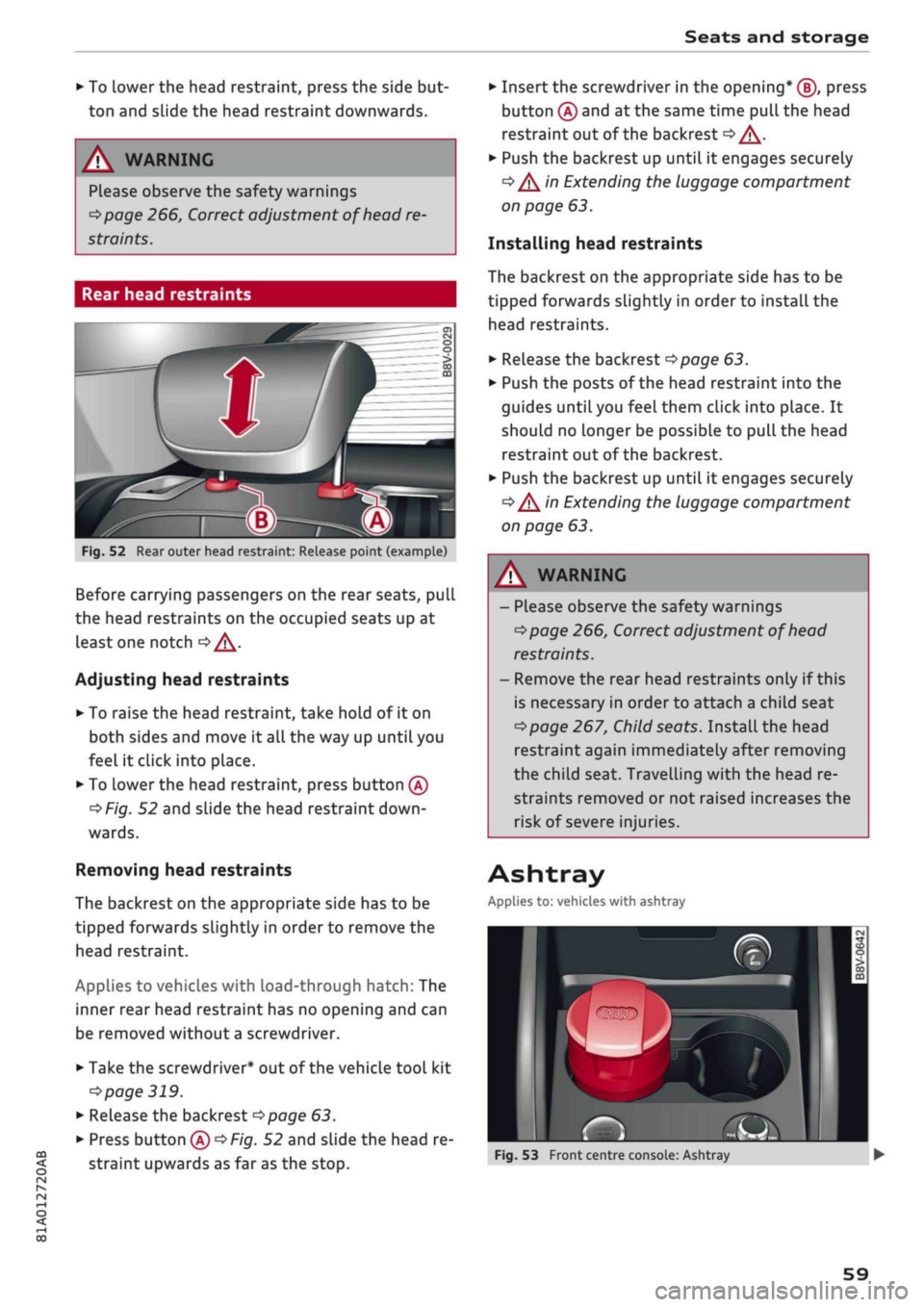
Fig.
52 Rear outer head restraint: Release point (example)
Before carrying passengers on the rear seats, pull
the head restraints on the occupied seats up at
least one notch
oA.
Adjusting head restraints
• To raise the head restraint, take hold of it on
both sides and move it all the way up until you
feel it click into place.
• To Lower the head restraint, press button
(A)
^>Fig.
52 and slide the head restraint
down
wards.
Removing head restraints
The backrest on the appropriate side has to be
tipped forwards slightly in order to remove the
head restraint.
Applies to vehicles with load-through hatch: The
inner rear head restraint has no opening and can
be removed without a screwdriver.
• Take the screwdriver* out of the vehicle tool kit
•=>
page 319.
• Release the backrest
opoge
63.
• Press button
(A)
^>Fig.
52 and slide the head re
straint upwards as far as the stop.
• Insert the screwdriver in the opening* (J), press
button
(A)
and at the same time pull the head
restraint out of the backrest
<=> /\.
• Push the backrest up until it engages securely
•=> /\
in Extending the luggage compartment
on page 63.
Installing head restraints
The backrest on the appropriate side has to be
tipped forwards slightly in order to install the
head restraints.
• Release the backrest
^>page
63.
• Push the posts of the head restraint into the
guides until you feel them click into place. It
should no Longer be possible to pull the head
restraint out of the backrest.
• Push the backrest up until it engages securely
•=> /\
in Extending the luggage compartment
on page 63.
A WARNING
- Please observe the safety warnings
^page
266, Correct adjustment of head
restraints.
- Remove the rear head restraints only if this
is necessary in order to attach a child seat
^>page
267, Child seats. InstaLl the head
restraint again immediately after removing
the child seat. Travelling with the head re
straints removed or not raised increases the
risk of severe injuries.
Ashtray
Applies to: vehicles with ashtray
~
-
a»
rS
Fig.
53 Front centre console: Ashtray
59
Page 63 of 364
Seats and storage
CO
rN
•-i
00
children unsupervised in the vehicle with the
key.
© CAUTION
- To avoid damage, please take care when de
taching connectors from the electrical pow
er sources.
-To avoid damage to the vehicle's electrical
system,
never connect equipment that
gen
erates electrical current, such as a solar
panel or battery charger, to the power sour
ces in order to charge the vehicle's battery.
- Always use the correct type of plugs to
avoid damaging the power sources.
©
USB charging sockets marked "CHARGE ON
LY" cannot transfer data and are intended for
charging only.
Storage
Cup holders
/
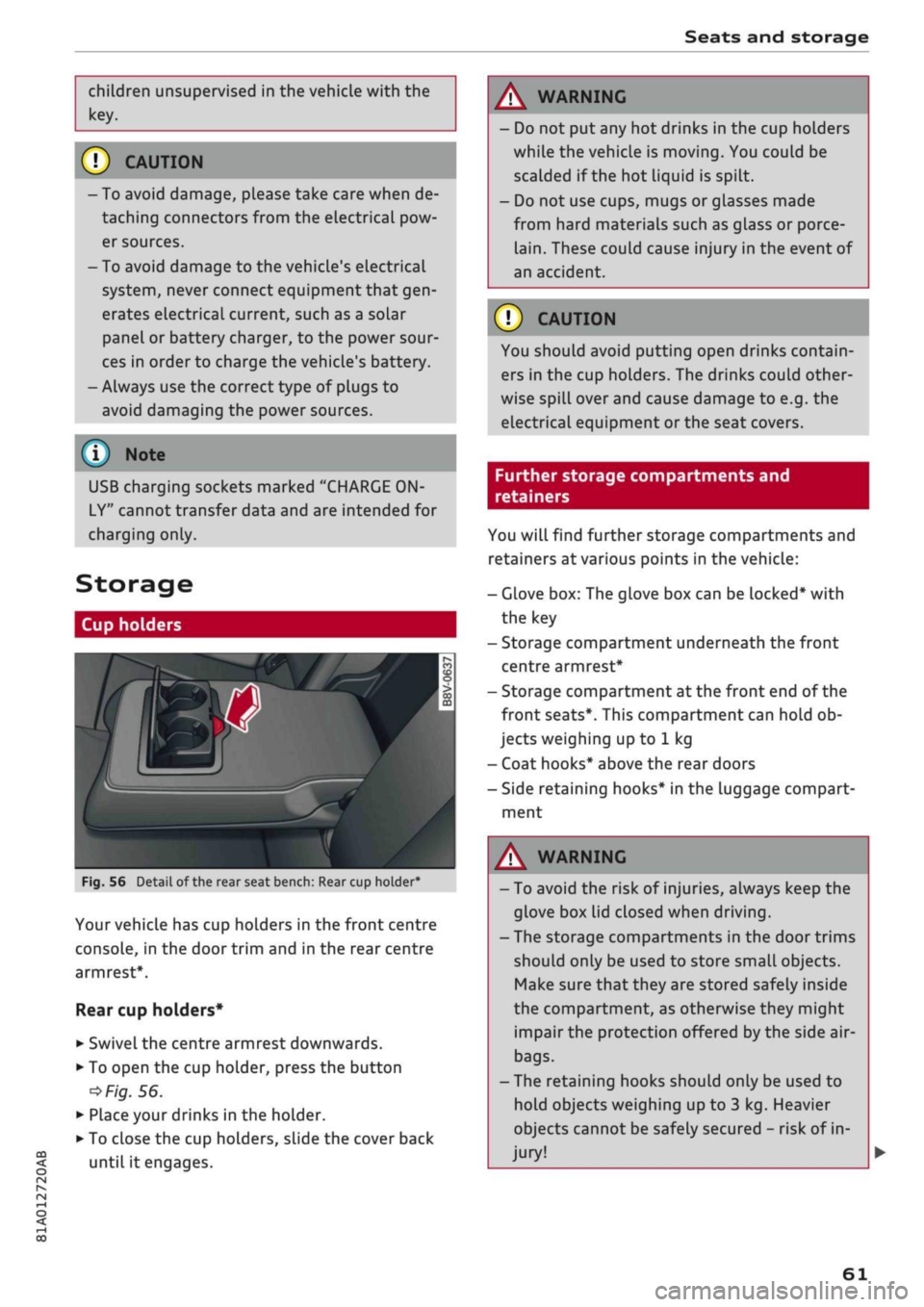
Fig.
56
BfT
^^—- j
^^ m /
Detail of the rear seat bench: Rear cup holder*
r^
n
co
3
>
CO
m
A
Your vehicle has cup holders in the front centre
console, in the door trim and in the rear centre
armrest*.
Rear cup holders*
• Swivel the centre armrest downwards.
• To open the cup holder, press the button
•=>
Fig.
56.
• Place your drinks in the holder.
• To close the cup holders, sLide the cover back
until it engages.
A WARNING
- Do not put any hot drinks in the cup holders
while the vehicle is moving. You could be
scalded if the hot liquid is spilt.
- Do not use cups, mugs or glasses made
from hard materials such as glass or porce
lain.
These could cause injury in the event of
an accident.
© CAUTION
You should avoid putting open drinks contain
ers in the cup holders. The drinks could other
wise spill over and cause damage to e.g. the
electrical equipment or the seat covers.
Further storage compartments and
retainers
You will find further storage compartments and
retainers at various points in the vehicle:
- Glove box: The glove box can be Locked* with
the key
- Storage compartment underneath the front
centre armrest*
- Storage compartment at the front end of the
front seats*. This compartment can hold ob
jects weighing up to 1 kg
- Coat hooks* above the rear doors
- Side retaining hooks* in the luggage compart
ment
A WARNING
- To avoid the risk of injuries, always keep the
glove box Lid closed when driving.
- The storage compartments in the door trims
should only be used to store small objects.
Make sure that they are stored safely inside
the compartment, as otherwise they might
impair the protection offered by the side air-
bags.
- The retaining hooks should only be used to
hold objects weighing up to 3 kg. Heavier
objects cannot be safely secured - risk of in
jury!
61
Page 66 of 364
Seats and storage
© CAUTIOI
- If
you
need to adjust the front seats when
either of the rear backrests is folded for
wards, please take care to avoid damaging
the rear head restraints. If necessary, re
move the appropriate head restraints be
fore you slide back the front seats.
- Lower the rear head restraints before you
fold down the backrest
•=>
A in Rear head
restraints on page 59 - risk of damage!
- When returning the backrest to an upright
position,
make sure that the seat belts for
the outer rear seats are not caught up and
damaged in the catches for the backrest.
Load-through hatch
Applies to: vehicles with load-through hatch
ft
•
/ Bsa-1
j^^V^il
n^B
iV^yM
•
in
H o
• CD •
O
• >
CO
CD
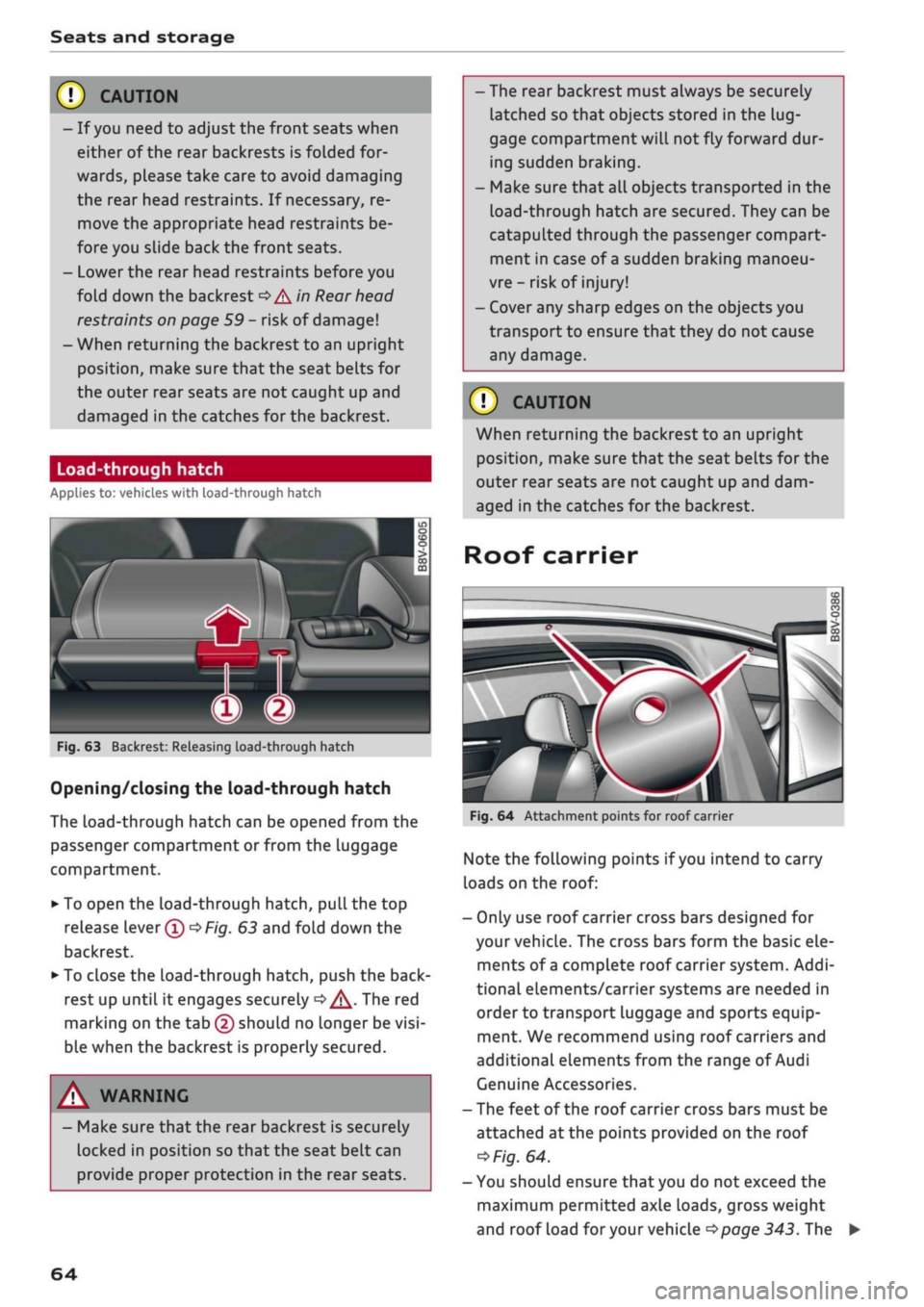
Fig.
63 Backrest: Releasing load-through hatch
Opening/closing the load-through hatch
The
Load-through
hatch can be opened from the
passenger compartment or from the luggage
compartment.
• To open the load-through hatch, pull the top
release lever®
OF/g.
63 and fold down the
backrest.
• To close the load-through hatch, push the
back
rest up until it engages securely
d>^.
The red
marking on the tab (2) should no longer be
visi
ble when the backrest is properly secured.
A WARNING
- Make sure that the rear backrest is securely
locked in position so that the seat belt can
provide proper protection in the rear seats.
- The rear backrest must always be securely
latched so that objects stored in the
lug
gage compartment
wilL
not fly forward dur
ing sudden braking.
- Make sure that all objects transported in the
Load-through
hatch are secured. They can be
catapulted through the passenger compart
ment in case of
a
sudden braking manoeu
vre - risk of injury!
- Cover any sharp edges on the objects you
transport to ensure that they do not cause
any damage.
© CAUTION
When returning the backrest to an upright
position,
make sure that the seat belts for the
outer rear seats are not caught up and dam
aged in the catches for the backrest.
Roof carrier
Fig.
64 Attachment points for roof carrier
Note the folLowing points if
you
intend to carry
loads on the roof:
- Only use roof carrier cross bars designed for
your vehicle. The cross bars form the basic ele
ments of
a
complete roof carrier system. Addi
tional elements/carrier systems are needed in
order to transport luggage and sports equip
ment. We recommend using roof carriers and
additional elements from the range of Audi
Genuine Accessories.
- The feet of the roof carrier cross bars must be
attached at the points provided on the roof
*>Fig.
64.
- You should ensure that you do not exceed the
maximum permitted axle loads, gross weight
and roof load
for
your vehicle
•=>page
343. The
64
Page 67 of 364
Seats and storage
CO
rN
rN
•-i
00
roof load limit applies to the combined weight
of the roof carrier, the additional elements and
the Load itself. Please do not exceed the maxi
mum carrying load of the carrier system you are
using.
A WARNIN
- Note the fitting instructions provided by the
manufacturer of the roof carrier system. If
you do not secure the roof carrier system
and roof load correctly, they can become
separated from the vehicle and cause an ac
cident.
- The use of
a
roof carrier system affects the
vehicle's handling by shifting the centre of
gravity and increasing susceptibility to cross
winds - risk of accident! Take extra care
when driving and adjust your speed accord
ingly.
CAUTION
- Any damage to the vehicle caused by the
use of other types of roof rack or incorrect
installation will not be covered by the facto
ry warranty. The roof carrier system must
therefore be installed exactly according to
the instructions provided.
- Please take care that the boot lid and panor
ama sun roof* do not come into contact
with the roof load when opened.
(•)
For
the sake of the environment
The increased air resistance means that the
vehicle uses more
fuel.
For this reason you
should always take off the roof carrier when it
is not in use.
65
Page 68 of 364
Heating and cooling
Heating and cooling
Heating system/air
conditioner
Description
One of the following systems may be fitted, de
pending on the equipment in your vehicle:
- Heating and ventilation system or
- Manual air conditioner* or
- Automatic air conditioner* (deluxe version)
The heating and ventilation system* heats and
ventilates the vehicle interior. The air condition
er* additionally cools and dehumidifies the air in
side the vehicle. It operates most effectively with
the windows and the panorama sun roof* closed.
If the vehicle has been standing in the sun, it may
cool down faster if
you
open the windows briefly
to let the hot air escape.
Pollution filter
The pollution filter removes impurities, such as
dust and pollen, from the air.
Key-coded settings
Various settings are stored and assigned to the
remote control key in use.
Default settings
Default settings for certain functions can be se
lected on the infotainment system.
SeLect the following on the infotainment system:
|MENU|
button
>
Car
>
left control button
>
A/C.
Supplementary heater*
Applies to: vehicles with diesel engine
The vehicle interior warms up more quickly with
the supplementary heater. The system automati
cally switches the supplementary heater on
tem
porarily as required, depending on the setting on
the vehicle heating system.
The supplementary heater function can be
switched on or off as required. SeLect the follow
ing on the infotainment system:
|MENU|
button >
Car
>
left control button
>
A/C
>
Auto supple
mentary heater.
® For the sake of the environment
I
- Switch off the cooling mode on the air
con
ditioner* by pressing the A/C button if you
wish to save
fuel.
This will also reduce emis
sions.
The LED in the button will go out
when the air conditioner is switched off.
- On vehicles with efficiency program*, you
can see how your fuel consumption is being
affected by auxiliary equipment and have
tips for improved fuel economy displayed
•=>
page 21.
- Applies to vehicles with diesel engine: The
automatic supplementary heater function
can be switched off on the infotainment sys
tem
cépage
66, Supplementary
heater*.
©
- Keep the air intake slots in front of the
windscreen clear of snow, ice and Leaves to
ensure unimpaired heating and cooling, and
to prevent the windows misting over.
- Condensation can drip off the air cooling
system*
and form a pool underneath the ve
hicle.
This is normal and does not indicate a
leak.
- If
you
notice, for instance, that the seat* or
rear window heating is not working, it may
have been temporarily switched off by the
power management function. These sys
tems will be available again as soon as
suffi
cient electrical power is available.
l
) Note
The air conditioner contains fluorinated
greenhouse gases. Further information is pro
vided on a sticker in the engine compart
ment1^.
1'
May vary in different countries
66
Page 72 of 364
Heating and cooling
%
Blower
You can adjust the blower speed manually using
the control
%.
You should leave the blower on at
a low setting to prevent the windows from mist
ing up and to ensure that the vehicle interior is
constantly ventilated. Press the AUTO button for
automatic control of the blower speed.
%£/
%8/
'J Air distribution and air outlets
The buttons can be used to adjust the air distri
bution.
Press the AUTO button for automatic air
distribution.
The round air outlets in the dashboard can be ad
justed
^>page
71.
To prevent the front side windows from misting
up in wet weather, it's a good idea to open the
side air outlets and point them to the side.
Foot-Level
air outlets are provided underneath
the front seats to heat the rear cabin.
1
Defroster
The windscreen and side windows are defrosted
or demisted as quickly as possible. The air output
is increased to maximum and most of the air
comes out of the outlets below the windscreen.
The air recirculation mode is deactivated. The
temperature should be set to 22 °C or higher.
The temperature is regulated automatically. At
setting
$&
the A/C cooling mode is automatically
activated depending on the ambient tempera
ture.
The defroster is switched off when the AUTO but
ton is pressed.
<^>
Air recirculation mode
The air recirculation mode can be switched on
manually or automatically*.
- To switch the manual air recirculation mode
on/off, press the
button.
-The automatic* air recirculation function must
be activated on the infotainment system. Se
lect the following on the infotainment system:
|MENU|
button > Car > left control button > A/C
> Auto recirculation. The air quality sensor,
which is designed for the detection of diesel
and petrol exhaust fumes, automatically
switches the air recirculation mode on or off
depending on the
level
of pollution in the out
side air.
In air recirculation mode, the air from the interi
or of the vehicle is filtered and recirculated. This
setting prevents fumes etc. from entering the in
terior. We recommend switching on the air recir
culation mode when driving through a tunnel or
in traffic queues
•=>
A-
The air recirculation mode is switched off when
the
<^>
or AUTO or
M.
button is pressed.
If the engine is
cold,
the air conditioner will auto
matically switch to air recirculation mode when
the vehicle is reversing.
$tr
Rear window heating
If the rear window heating is activated with the
ignition switched on, the battery management
determines whether or not the battery charge
level is sufficient for the rear window heating to
be switched on. Otherwise the rear window heat
ing operates when the engine is running, and
switches off automatically after about
10 - 20 minutes, depending on the outside
tem
perature.
To switch on the rear window heating perma
nently, press and hold the
S
button for at least
2 seconds. This setting will be stored for approxi
mately 15 minutes after the ignition is switched
off.
^
Seat heating*
When you press the
«r
button, the seat heating is
switched on at level 3 (the highest level). The
LEDs indicate the temperature level. To reduce
the temperature, press the button again. To
switch off the seat heating, press the button re
peatedly until all the LEDs have gone out.
The seat heating automatically switches from
level 3 to level 2 after about 10 minutes.
A WARNING
For reasons of safety you should not leave
the air recirculation switched on for too
long.
This mode prevents fresh air from en
tering the vehicle, so the windows can mist
70
Page 75 of 364

Driving
instance when you can see that the next traffic
lights are red. This takes advantage of the engine
braking effect, reducing wear on the brakes and
tyres.
Emissions and fuel consumption will drop
to zero due to the overrun fuel cut-off.
Change gear early to save fuel
An effective way of saving fuel is to change up
quickly through the gears. Running the engine at
high rpm in the lower gears uses an unnecessary
amount of
fuel.
Applies to: vehicles with manual gearbox
Shift up to second gear as soon as possible. If
possible, we recommend shifting up to the next
gear at approx. 2,000 rpm.
Applies to: vehicles with automatic gearbox
Press the accelerator slowly and avoid using the
"kick-down"
feature.
Avoid driving at high speed
Avoid travelling at top speed. Fuel consumption,
exhaust emissions and noise Levels all increase
very rapidly at higher speeds. Driving at moder
ate speeds will help to save
fuel.
Do not let the engine idle for longer than
necessary
Engine idling periods are automatically reduced
on vehicles with start/stop system*. On vehicles
without a start/stop system, it is worthwhile
switching off the engine at level crossings, for in
stance, or at traffic lights with a long red phase.
The fuel saved after about 5 seconds can be
greater than the amount of fuel needed to re
start a warm engine (the exact fuel saving de
pends on the engine version).
The engine takes a very long time to warm up
when it is running at idling speed. Mechanical
wear and pollutant emissions are also especially
high during this initial warm-up phase. It is
therefore best to drive off immediately after
starting the engine. Avoid running the engine at
high speed.
o
Regular servicing
Regular servicing can establish a basis for good
iS
fuel economy before you start driving. A
well-
serviced engine gives you the benefit of im
proved fuel efficiency as well as maximum relia
bility and an enhanced resale value. A poorly
maintained engine can consume up to ten per
cent more fuel than necessary.
Avoid short trips
The engine and emission control system need to
reach their proper working temperature in order
to minimise fuel consumption and emissions.
A cold engine uses disproportionately more
fuel.
The engine only reaches its working temperature
after about four kilometres, when fuel consump
tion will return to a normal level.
Check tyre pressures
Always make sure the tyres are inflated to the
correct pressures
•=>page
306 to save
fuel.
If the
tyre pressures
are
just 0.5
bar
too Low, this can
increase the fuel consumption by as much as 5
%. Due to the greater rolling resistance, under-
inflation also increases tyre wear and impairs
handling.
Do not use winter tyres all through the year; they
will increase fuel consumption by up to 10 %.
Avoid carrying unnecessary loads
Every kilo of extra weight will increase the fuel
consumption, so it is worth checking the Luggage
compartment occasionally to make sure that no
unnecessary loads are being transported.
The roof carrier increases the air resistance of the
vehicle and should be removed when not in use.
This will save about 12 % of fuel at speeds of be
tween 60 and 75
mph.
Save electrical energy
The engine drives the alternator to generate elec
tricity. This means that fuel consumption rises
when more power is required for electrical equip
ment. Switch off electrical equipment when it is
not needed. Electrical equipment which uses a
lot of electricity includes the blower (at a high
setting), the rear window heating and the seat
heating*.
73
Page 112 of 364
Driver assist systems
key in use. If you change to a different type
of trailer, you may need to change the maxi
mum trailer speed setting.
- Information is also provided in the head-up
display*.
- Please note
that
the navigation system (SD
card)*
is immediately no longer available if
the SD card is removed from the SD card
reader.
Driver messages
Applies to: vehicles with camera-based traffic sign
recogni
tion
EJ
Traffic sign recognition: currently unavaila
ble.
No camera view
This message will appear if the camera view is
obstructed
^>page
108. The system will switch
it
self off.
EJ
Traffic sign recognition: currently restricted
This message appears, for instance, in the event
of a navigation system fault. The Limited func
tionality may cause fewer speed limits to be dis
played (which increases the possibility of an er
ror).
Traffic sign based speed warning: currently
unavailable. See owner's manual
No warning will be given if the selected warning
threshold is exceeded.
Traffic sign recognition: system fault
The function of the system is impaired; the sys
tem will be deactivated. Drive to a qualified
workshop soon.
No traffic sign recognised
No relevant navigation data are available, and no
speed limit has been detected.
Traffic sign recognition: outside operational
area
Function unavailable in this country
The vehicLe is being driven in a country outside
the system's operational area.
Rest recommendation
General notes
Applies to: vehicles with rest recommendation
Under certain conditions, the system can detect
that the driver needs to take a break.
At the beginning of a trip, the system monitors
the driver's general steering style. Using this as a
reference, the system continuously compares the
current steering input at speeds of between 60
km/h and 200 km/h. If the evaluation of the
steering input implies a lapse in the driver's
con
centration,
the system will then recommend a
break
^>page
111,
Instrument cluster display.
The rest recommendation function is designed
for journeys on motorways and major roads.
System limitations
The rest recommendation function may misinter
pret the steering input in certain driving situa
tions,
such as the following:
- On twisty roads.
- On rough roads.
- In poor weather.
- During performance driving.
- When the driver's attention is distracted.
Resetting the system
The system is automatically reset if
you...
- switch off the ignition.
- release the driver's seat belt and open the driv
er's door.
- drive slower than 60 km/h for a while. If you
subsequently increase your speed again, the
system will reevaluate the driving style.
/\
WARNING
- Never drive when you are
tired.
As a driver
you are always responsible for ensuring that
you
are
fit to drive.
- On
Long
journeys, make sure to take
quate breaks at regular intervals.
ade-
- The system cannot always tell if
you
need a
break.
110
Page 117 of 364
Driver assist systems
CO
<
O
rN rN
t-H
o <
•
To increase or reduce the speed quickly, hold
the lever towards
©/©
until the
LED ©
opage
113, Fig. 105 reaches the de
sired cruising speed.
You can preselect the speed, even when the
adaptive cruise control is inactive, by moving the
lever in the appropriate direction ©/©. To
acti
vate the preselected speed, pull the lever to
posi
tion ©
^>page
113, Fig. 104.
Following any changes, the new stored speed will
be displayed briefly in the status line
opage
113, Fig. 105 ©. The indicator lamp
E53
KOI
is also lit when the adaptive cruise control is
active,
and the indicator Lamp
B3 iS Lit
when the
adaptive cruise control is inactive. The indicator
lamp El
will Light up instead in the Audi virtual
cockpit*.
Driving in congested traffic
Applies to: vehicles with Audi adaptive cruise control and au
tomatic gearbox
The adaptive cruise control assists you when driv
ing in congested traffic. If
a
vehicLe which has
been detected in front stops, the adaptive cruise
control applies the brakes (within the limits im
posed by the system) and holds the vehicle at a
standstill.
•
To set the vehicle in motion again with the
adaptive cruise control, tap the accelerator
with
your foot, or
•
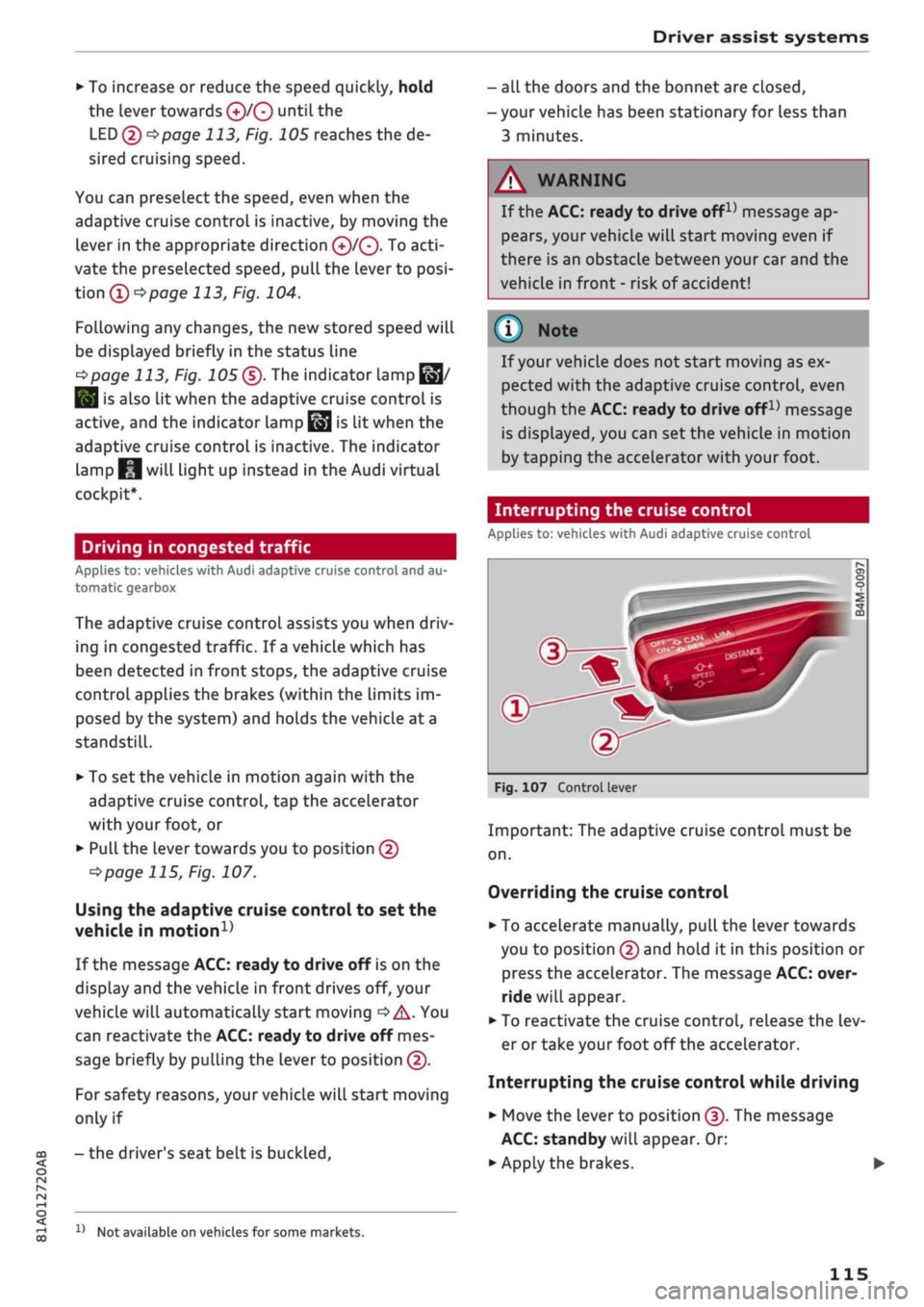
Pull the lever towards you to position ©
•=>
page 115, Fig. 107.
Using the adaptive cruise control to set the
vehicle in
motion1'
If the message ACC: ready to drive off is on the
display and the vehicle in front drives off, your
vehicle will automatically start moving
•=>
A. You
can reactivate the ACC: ready to drive off mes
sage briefly by pulling the lever to position ©.
For safety reasons, your vehicle will start moving
only if
- the driver's seat belt is
buckled.
x)
Not available on vehicles for some markets.
- all the doors and the bonnet are closed,
- your vehicle has been stationary for Less than
3 minutes.
A
WARNING
If the ACC: ready to drive
offx)
message ap
pears,
your vehicle will start moving even if
there is an obstacle between your car and the
vehicle in front - risk of accident!
© Note
If your vehicle does not start moving as ex
pected with the adaptive cruise control, even
though the ACC: ready to drive
off1)
message
is displayed, you can set the vehicle in motion
by tapping the accelerator with your foot.
Interrupting the cruise control
Applies to: vehicles with Audi adaptive cruise control
Fig.
107 Control lever
Important: The adaptive cruise control must be
on.
Overriding the cruise control
•
To accelerate manually, pull the lever towards
you to position © and hold it in this position or
press the accelerator. The message ACC: over
ride will appear.
• To reactivate the cruise control, release the Lev
er or take your foot off the accelerator.
Interrupting the cruise control while driving
•
Move the lever to position ©. The message
ACC:
standby will appear. Or:
• Apply the brakes.
115
Page 122 of 364
Driver assist systems
This message appears if the radar sensor vision is
impaired,
e.g. by leaves, snow, heavy road spray
or dirt. Clean the sensor
<^>page
112, Fig. 101.
Distance warning: currently unavailable. See
owner's manual
This driver message will appear if the system
fails temporarily. If the fault occurs repeatedly,
drive to a qualified workshop and have the fauLt
rectified.
Fasten seat belt
The system is not fully available when the driver's
seat belt is unfastened.
Stationary object ahead
This message appears if
you
try to switch on the
system when a stationary object is located imme
diately in front of your car.
Door open
The system is not available when the vehicle is
stationary and the driver's door is open.
Audi pre sense
Introduction
Applies to: vehicles with Audi pre sense
The pre sense functions can take action to pro
tect the vehicle occupants and other road users in
certain hazardous conditions within the system
limits.
- Because the different on-board systems are
networked,
pre sense basic can detect critical
situations and take preventive action to protect
the occupants.
- The pre sense front uses the data of the radar
sensor to calculate the probability of an
acci
dent
opage
112. It can detect an impending
collision with vehicles or
pedestrians1^
(subject
to general system limitations). In this case, the
system warns the driver visually, acoustically
and,
if necessary, with a short, sharp brake ap
plication.
If necessary, it can initiate a partial or
fuLl
brake application in order to reduce the im
pact speed or, in certain circumstances, to
avoid a collision. In conjunction with pre sense
basic, the reversible tensioners on the front
seat belts are also applied if necessary. Pre
sense front is active even when the adaptive
cruise control* is switched off.
Please observe the general safety warnings
•=>
A in General notes on page 112.
© Note
- Certain pre sense functions are deactivated
when reversing.
- The functions of the pre sense system may
also be unavailable if
a
fault develops in the
ESC
system or airbag control unit.
- Please note that, if the front passenger's
airbag has been deactivated, the reversible
belt tensioner on the passenger's side will
be deactivated as
well.
- Switch off pre sense on private roads and
while the vehicle is being loaded onto a car
transporter, train or ferry, etc. This prevents
the pre sense system from taking action in
an inappropriate situation.
Audi pre sense basic
Description
Applies to: vehicles with Audi pre sense basic
The pre sense basic functions are activated at
speeds above approximately 30 km/h.
The system can activate the following functions
in certain situations:
- Seat belt tensioning (e.g. during hard braking):
The seat belts on the front seats have reversi
ble tensioners. Provided an accident does not
occur, the belts are loosened again slightly and
kept ready for activation.
- Initiation of the closure process for the
win
dows and panorama sun roof* (e.g. if the
vehi
cLe understeers or oversteers).
Audi drive select*: the activation threshold
dif
fers according to the mode selected.
x)
Not available on vehicles for some markets.
120