ECO mode AUDI Q2 2021 Owner´s Manual
[x] Cancel search | Manufacturer: AUDI, Model Year: 2021, Model line: Q2, Model: AUDI Q2 2021Pages: 364, PDF Size: 87.77 MB
Page 74 of 364
Driving
Driving
General notes
Running in
A new vehicle should be run in over
a
distance of
1,500 km. For the first 1,000 km the engine
speed should not exceed 2/3 of the maximum
permissible engine speed - do not use full throt
tle and do not tow a trailer or caravan. From
1,000 to 1,500 km you can gradually increase
the engine rpm and road speed.
During its first few hours of running, the internal
friction in the engine is greater than later on
when all the moving parts have bedded down.
How the vehicle is driven for the first 1,500 km
also influences the engine quality. After this
peri
od you should continue driving at moderate en
gine speeds, in particular when the engine is
cold.
This helps to reduce wear and tear on the
engine and increases the potential mileage which
can be covered by the engine.
You should also avoid driving with the engine
speed too low. Change down to a lower gear
when the engine no longer runs "smoothly". Ex
cessively high engine speeds are prevented by an
automatic rev limiter.
A WARNING
After driving through water, mud, sludge,
etc., the braking effect can be delayed slightly
due to moisture on the discs and brake pads.
Applying the brakes carefully several times
will remove the moisture and restore the full
braking effect.
© CAUTION
- Parts of the vehicle (e.g. engine, gearbox,
running gear or electrical components) can
be badly damaged when driving through
water.
- Always switch off the start/stop system*
^>page
79 before driving through water.
© ' Note
- It is advisable to check the depth at the
deepest point before approaching the wa
ter.
- Do NOT stop the vehicle, drive in reverse or
switch off the engine before you are out of
the water.
- Bear in mind that waves created by oncom
ing traffic could exceed the permissible
wading depth of your vehicle.
- Avoid driving through salt water (corrosion).
Avoiding damage to the car
© CAUTION
Take care not to damage
Low-mounted
parts
of the car (such as the spoiler or exhaust sys
tem) on steep ramps, uneven road surfaces or
roadside kerbs, etc. This applies especially to
vehicles with low ground clearance and to all
vehicles when fully laden.
Driving through water on roads
Please note the following in order to prevent
damage to the vehicle when driving through wa
ter (e.g. on flooded roads):
- The water level must not be higher than the ve
hicle's underbody.
- Do not drive faster than walking pace.
How to improve economy and minimise
pollution
Fuel economy, environmental impact and wear
on the engine, brakes and tyres depend largely
on the way you drive the vehicle. By adopting an
economical driving style and anticipating the
traffic situation ahead, you can reduce fuel
con
sumption by 10
-15
%. The following section
gives you some tips on Lessening the impact on
the environment and reducing your operating
costs at the same time.
Anticipate well in advance
A car uses most fuel when accelerating. If
you
an
ticipate hazards and speed changes well in ad
vance,
you will need to brake less and thus accel
erate Less. Wherever possible, Let the car slow
down gradually with a gear engaged, for •
72
Page 75 of 364

Driving
instance when you can see that the next traffic
lights are red. This takes advantage of the engine
braking effect, reducing wear on the brakes and
tyres.
Emissions and fuel consumption will drop
to zero due to the overrun fuel cut-off.
Change gear early to save fuel
An effective way of saving fuel is to change up
quickly through the gears. Running the engine at
high rpm in the lower gears uses an unnecessary
amount of
fuel.
Applies to: vehicles with manual gearbox
Shift up to second gear as soon as possible. If
possible, we recommend shifting up to the next
gear at approx. 2,000 rpm.
Applies to: vehicles with automatic gearbox
Press the accelerator slowly and avoid using the
"kick-down"
feature.
Avoid driving at high speed
Avoid travelling at top speed. Fuel consumption,
exhaust emissions and noise Levels all increase
very rapidly at higher speeds. Driving at moder
ate speeds will help to save
fuel.
Do not let the engine idle for longer than
necessary
Engine idling periods are automatically reduced
on vehicles with start/stop system*. On vehicles
without a start/stop system, it is worthwhile
switching off the engine at level crossings, for in
stance, or at traffic lights with a long red phase.
The fuel saved after about 5 seconds can be
greater than the amount of fuel needed to re
start a warm engine (the exact fuel saving de
pends on the engine version).
The engine takes a very long time to warm up
when it is running at idling speed. Mechanical
wear and pollutant emissions are also especially
high during this initial warm-up phase. It is
therefore best to drive off immediately after
starting the engine. Avoid running the engine at
high speed.
o
Regular servicing
Regular servicing can establish a basis for good
iS
fuel economy before you start driving. A
well-
serviced engine gives you the benefit of im
proved fuel efficiency as well as maximum relia
bility and an enhanced resale value. A poorly
maintained engine can consume up to ten per
cent more fuel than necessary.
Avoid short trips
The engine and emission control system need to
reach their proper working temperature in order
to minimise fuel consumption and emissions.
A cold engine uses disproportionately more
fuel.
The engine only reaches its working temperature
after about four kilometres, when fuel consump
tion will return to a normal level.
Check tyre pressures
Always make sure the tyres are inflated to the
correct pressures
•=>page
306 to save
fuel.
If the
tyre pressures
are
just 0.5
bar
too Low, this can
increase the fuel consumption by as much as 5
%. Due to the greater rolling resistance, under-
inflation also increases tyre wear and impairs
handling.
Do not use winter tyres all through the year; they
will increase fuel consumption by up to 10 %.
Avoid carrying unnecessary loads
Every kilo of extra weight will increase the fuel
consumption, so it is worth checking the Luggage
compartment occasionally to make sure that no
unnecessary loads are being transported.
The roof carrier increases the air resistance of the
vehicle and should be removed when not in use.
This will save about 12 % of fuel at speeds of be
tween 60 and 75
mph.
Save electrical energy
The engine drives the alternator to generate elec
tricity. This means that fuel consumption rises
when more power is required for electrical equip
ment. Switch off electrical equipment when it is
not needed. Electrical equipment which uses a
lot of electricity includes the blower (at a high
setting), the rear window heating and the seat
heating*.
73
Page 81 of 364

Driving
CO
<
O
rN
IV
rN
t-H
o <
Starting the engine after
a malfunction
Applies
to: vehicles with convenience key
If the remote control key battery is exhausted or
if radio interference
or
a system malfunction oc
curs, extra steps may be necessary in order to
start the engine.
Fig.
71 Steering column/remote control key: Starting the
engine
after a malfunction
If the message
D
Key not recognised. See
own
er's manual or
|3
Remote control key: hold
back of key against marked area. See owner's
manual is displayed, you can still start the en
gine manually.
•
Manual gearbox: Press the clutch
pedal
• Automatic gearbox: Press the brake pedal.
•
Hold the remote control key against the symbol
fJ)
^>Fig.
71, as shown in the illustration.
• Press the ISTART ENGINE
STOPl
button
^ A in
Starting the engine on page 76. The engine
shouLd start.
•
Drive to a qualified workshop soon and have the
fault rectified.
Note
You can call up the driver message again by
pressing the ISTART ENGINE STOP| button.
Start/stop system
Description
Applies
to: vehicles with start/stop system
The start/stop system can help to save fuel and
reduce
CO2
emissions.
1)
May vary in different countries
In start/stop mode, the engine is switched off
automatically when the vehicle stops, e.g. at
traffic lights. The ignition remains on during this
stop phase. The engine is automatically started
on demand.
The start/stop system is automatically activated
each
time
you switch on the ignition.
Basic conditions for start/stop mode
- The driver's door must be closed.
- The driver's seat belt must be buckled.
- The bonnet must be closed.
- The vehicle must have been moving at over 3
km/h since the Last stop.
CAUTION
Always switch off the start/stop system
^>page
81 before driving through water.
©
The engine is switched
off1)
shortly before the
vehicle comes to a stop. However, the brake
servo and power steering remain fully opera
tional.
Stopping/starting the engine
Applies
to: vehicles with start/stop system
START
(M
STOP
S
Fig.
72 Instrument cluster: Engine switched off (stop
phase)
Applies
to: vehicles with manual gearbox
•
When the vehicle stops, put the gear Lever in
neutral and
take your
foot
off
the clutch pedal.
The engine will switch off. An indicator lamp
I
will light up in the instrument cluster •
79
Page 87 of 364
Driving
Check that the brakes work properly (especially
after driving through water).
WARNING
- You should exercise particular care when
driving on difficult road surfaces, and try to
anticipate hazards in advance. Excessive
speed or careless manoeuvres can result in
personal injury or damage to the vehicle.
- Always adjust your speed to suit the terrain
or road surface and weather or traffic condi
tions.
Drive extra slowly when visibility is
limited by uneven terrain.
- Please note that there can be an increased
tendency for the wheeLs to spin in ESC off-
road mode, causing the vehicLe to lose grip,
in particular on slippery or wet roads -
dan
ger of skidding!
-The car's stability is restricted in ESC off-
road mode.
CO
<
O
rN
iv
rN
•-i
00
•} For
the sake of the environment
Take care not to damage the environment and
respect natural surroundings.
Note
Only drive where access by motor vehicles is
permitted and keep to the marked tracks and
routes.
Driving tips
When driving on rough tracks always drive slowly
and be aware of possible hazards.
Please observe the following precautions if you
drive the vehicle on unsurfaced tracks or off-
road:
•
When driving off-road you are advised to avoid
tracks or terrain which are not suited to the de
sign of the car and your own driving skills and
experience. Do
not
take risks.
•
Drive slowly and be ready for possible hazards.
•
Be aware of the maximum ground clearance of
your vehicle. The figure in actual conditions
may be different, depending on the type of sur
face,
the surrounding terrain and the load be
ing carried. With certain types of suspension,
such as sports suspension, the ground clear
ance is reduced. It is the responsibility of the
driver to decide whether or not the vehicLe is
capable of safely negotiating a particular situa
tion.
•
Activate the ESC off-road mode if required
^>page
146.
Unsurfaced tracks
On unfamiliar roads and off-road terrain, drive
slowly and be prepared for unexpected obstacles,
such as pot-holes, rocks or tree stumps, etc.
To prevent ground contact and possible damage
to the underside, do not drive the bottom of your
vehicle directly over raised obstacles. Instead,
drive the wheels on one side of the car up and
across the top of the obstacle.
When driving over sand or soft mud, maintain a
moderate speed and avoid stopping if possible.
Driving through water on roads
Please observe the important safety warnings on
^>page
72.
Automatic gearbox
Introduction
Applies to: vehicles with automatic gearbox
The automatic gearbox is controlled electronical
ly. The gearbox changes up and down automati
cally.
When you drive at moderate speeds the gearbox
will select the most economical shift pro
gramme. It will then change up early and delay
the downshifts to give better fuel economy.
If you drive at higher speeds with heavy accelera
tion,
if you open the throttle quickly, or if you use
the kick-down or the car's maximum speed, the
gearbox will automatically select the more "spor
ty" shift programmes when the selector lever is
in position S.
If desired, you can also select the gears manually
(tiptronic mode)
^page
90, Manual gear se
lection (tiptronic mode). •
85
Page 89 of 364
Driving
R - Reverse gear
Reverse gear should only be engaged when the
vehicle is stationary and the engine is idling
^A-
To move the selector lever to position R, release
the selector Lever lock and at the same time
press the brake pedal.
N - Neutral
In this position, the gearbox is in neutral.
D/S - Drive/Sport (standard position for
driving forwards)
In selector Lever position D/S, the gearbox can be
operated in either the standard drive mode (D) or
in sport mode (S). To select sport mode (S), brief
ly pull the selector lever back. The gearbox will
switch back to drive mode (D) if
you
pull the se
lector lever again. The selected driving mode is
shown in the instrument cluster display.
In the standard drive mode (D), the gearbox au
tomatically selects the best gear ratio. This de
pends on the engine
load,
the road speed and the
driving style.
In Sport mode S, the gearbox makes full use of
the engine power. When accelerating the gear
shifts may be noticeable.
Press the brake pedal when moving the selector
lever from N to D/S if the vehicle is stationary or
at speeds below 2 km/h
o A-
E - Efficiency*
In efficiency mode
^>page
131, Audi drive se
lect,
the gearbox selects the next gear at lower
engine speeds. Earlier upshifts give improved
fuel economy because the full power reserves of
the engine are not used.
In this mode, an
E
is shown on the instrument
cluster display instead of
a D
^>Fig.
75.
CO
< o rN
iv
rN
t-H
o < 00
A,
WARNING
- The car can roll away even if the ignition is
switched off.
- Never move the selector lever to
R
or P
when driving, as this could cause an
acci
dent.
- In all selector lever positions (except P) the
vehicle must always be held with the foot
brake when the engine is running. This is be
cause an automatic gearbox still transmits
power even at idling speed, and the vehicle
tends to "creep" - risk of accident!
- The accelerator pedal must on no account
be pressed inadvertently when a gear is en
gaged with the vehicle stationary. The
vehi
cle could otherwise start moving immedi
ately (in some cases even if the parking
brake is engaged) and possibly cause an ac
cident.
- Do not press the accelerator while selecting
a gear with the vehicle stationary and the
engine running, as this could cause an
acci
dent.
- The driver should never get out of the
vehi
cle when the engine is running and a gear is
engaged.
If
you
have to Leave your vehicle
while the engine is running, you must apply
the parking brake and engage the parking
lock P.
- To avoid accidents, apply the parking brake
and
put
the selector lever in position
P
be
fore opening the bonnet and working on the
vehicLe with the engine running. Please ob
serve the important safety warnings
^>page
295, Working on components in
the engine compartment.
© Note
- Audi drive select: You can select the sport
program for gear changes by activating the
dynamic mode
^>page
131. The instru
ment cluster display will show
S
instead of
D.
- If the lever is moved accidentally to
N
when
driving,
take
your
foot off the accelerator
and
let
the engine speed drop to idling be
fore selecting
D
or
S
again.
- It is not possible to move the selector lever
out of position
P
if the electrical power sup
ply fails. In this case, the selector lever can
be released manually. Left-hand drive
vehicles
^page
93, right-hand drive
vehicles
<^>page
94.
87
Page 91 of 364

Driving
A WARNING
- The driver should never get out of the
vehi
cle when the engine is running and a gear is
engaged.
If you have to leave your vehicle
while the engine is running, you must apply
the parking brake and engage the parking
lock P.
-If the engine is running and a gear is engag
ed (D/S or R) or the vehicle is in "tiptronic"
mode,
you will need to hold the car with the
footbrake. Otherwise, the car will "creep"
forwards as the power transmission is not
fully interrupted even when the engine is
idling.
- The accelerator pedal must on no account
be pressed inadvertently when the vehicle is
stationary. The vehicle could otherwise start
moving immediately (in some cases even if
the parking brake is engaged) and possibly
cause an accident.
- Do not press the accelerator while selecting
a gear with the vehicle stationary and the
engine running, as this could cause an
acci
dent.
- Never move the selector lever to R or P
when driving at normal speeds, as this could
cause an accident.
- Before you drive down a steep gradient, re
duce the speed and use "tiptronic" to select
a low gear.
- Never allow the brake to drag when driving
downhill and do not use the brake pedal too
often
or
for long periods. Constant braking
will cause the brakes to overheat and will
considerably reduce the effectiveness of the
brakes. It will increase the braking distance
and could cause the brake system to
fail.
- To avoid rolling back on gradients always
hold the vehicLe with the footbrake or park
ing brake if you have to stop.
- Never attempt to hold the vehicle with the
clutch when stopping on a gradient. The
clutch is disengaged automatically if it is
overloaded and becomes too hot - accident
risk! If the clutch is overloaded, the indica
tor lamp
0
will light up and a message will
appear
^>page
92.
© CAUTION
- When you have stopped on a gradient, do
not try to stop the vehicle rolling back by ac
celerating when a gear is engaged. This
could cause the automatic gearbox to over
heat and become damaged. Apply the park
ing brake or press the brake pedal in order
to prevent the vehicle from rolling back.
- If you allow the car to roll with the selector
lever in position N with the engine switched
off, the automatic gearbox will be damaged
as it will not be lubricated
^page
328,
Tow-starting / towing
away.
- In certain driving and traffic conditions, for
instance in stop-and-go traffic, if you have
to pull away frequently or if the vehicle
creeps forwards over a long distance, the
gearbox can overheat and become dam
aged.
If the indicator Lamp
[5J
or the warn
ing
lampH
Lights up, stop the vehicle at
the first opportunity and let the gearbox
cool down
^>page
92.
© Note
For safety reasons the parking brake will only
release automatically if the driver's door is
closed.
Downhill speed control
Applies to: vehicles with automatic gearbox
The downhill speed control function helps the
driver when driving down steep gradients.
Downhill speed control is activated on a downhill
gradient when the selector lever is in D/S and the
driver presses the brake pedal. The gearbox auto
matically selects a suitable gear for the gradient.
The downhill speed control function attempts to
maintain the speed at which the vehicLe was trav
elling when the foot brake was applied (subject
to the laws of physics and technical limitations of
the power train). It may be necessary to adjust
the speed again using the foot brake. The down
hill speed control can change down to 3rd gear
but no further, so it may be necessary to change
to tiptronic mode on very steep gradients. In this
case,
change down manually to 2nd or 1st gear in •
CO
89
Page 92 of 364
Driving
tiptronic mode to use the engine braking effect
and reduce the load on the brakes.
Downhill speed control is deactivated as soon as
the road Levels out again or you press the acceler
ator pedal.
On vehicles with cruise control system*
<^>page
104, downhill speed control is activated
when you set
a
cruising speed.
A WARNING
The downhill speed control function cannot
defy the Laws of physics and may therefore
not be able to maintain a constant speed in
certain circumstances. Always be prepared to
use the brakes!
Manual gear selection (tiptronic mode)
Applies to: vehicles with automatic gearbox
The
tiptronic feature allows the driver to also
change gear manually.
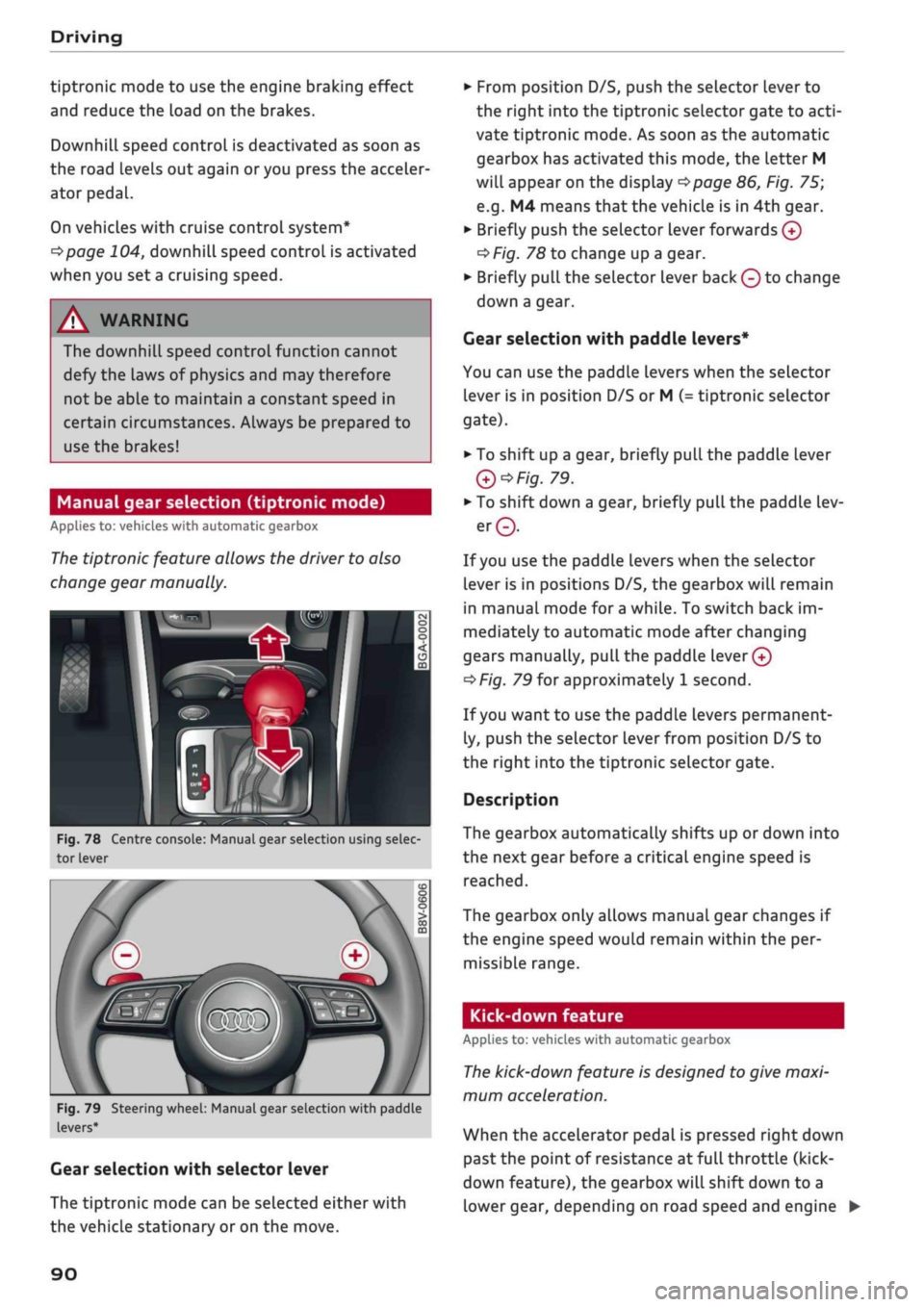
Fig.
78 Centre console: Manual gear selection using selec
tor lever
Fig.
79 Steering wheel: Manual gear selection with paddle
levers*
Gear selection with selector lever
The tiptronic mode can be selected either with
the vehicLe stationary or on the move.
•
From position D/S, push the selector lever to
the right into the tiptronic selector gate to
acti
vate tiptronic mode. As soon as the automatic
gearbox has activated this mode, the letter M
will appear on the display
opage
86, Fig. 75;
e.g.
M4 means
that
the vehicle is in 4th gear.
•
Briefly push the selector lever forwards
0
oF/'g.
78 to change up a gear.
•
Briefly pull the selector lever back
Q
to change
down a gear.
Gear selection with paddle levers*
You can use the paddle levers when the selector
lever is in position D/S or M
(-
tiptronic selector
gate).
• To shift up a gear, briefly pull the paddle lever
Q*Fig.
79.
•
To shift down a gear, briefly pull the paddle lev
er©.
If
you
use the paddle levers when the selector
lever is in positions D/S, the gearbox will remain
in manual mode for
a
while. To switch back im
mediately to automatic mode after changing
gears manually,
pull
the paddle
lever 0
^>Fig.
79 for approximately 1 second.
If
you
want to use the paddle levers permanent
ly, push the selector lever from position D/S to
the right into the tiptronic selector gate.
Description
The gearbox automatically shifts up or down into
the next gear before a critical engine speed is
reached.
The gearbox only allows manual gear changes if
the engine speed would remain within the per
missible range.
Kick-down feature
Applies to: vehicles with automatic gearbox
The
kick-down feature is designed to give maxi
mum acceleration.
When the accelerator pedal is pressed right down
past the point of resistance at full throttle (kick-
down feature), the gearbox
wilL
shift down to a
lower gear, depending on road speed and engine •
90
Page 94 of 364
Driving
•
Briefly pull the selector lever back from
posi
tion D/S to select position S, or move the selec
tor lever to the right into the tiptronic gate, or
select dynamic mode in drive select*
^>page
131.
•
Press the brake pedal firmly with your
left
foot
and hold it down for at Least one second.
•
At the same time, press the accelerator all the
way down with your right foot until the engine
revs are high and steady.
• Take your
left
foot
off
the brake.
A WARNING
- Always adapt your driving style to the traffic
conditions.
- Only use the launch control programme
when road and traffic conditions permit,
and make
sure
your manner of driving and
accelerating the vehicle does not inconven
ience or endanger other road users.
- Please note that the driven wheels may
start to spin when the off-road mode is
switched on, causing the vehicle to Lose
grip,
in particular on slippery or wet roads -
danger of skidding!
- When acceleration has been completed, you
should deactivate the off-road mode again
by briefly pressing the
|flQFF|
button.
© Note
- The gearbox may be hot after you have used
the launch control programme. In this case,
the programme may not be available for
several minutes. The programme will be
available again after
a
cool-down period.
-Accelerating with the launch control pro
gramme places a heavy load on all parts of
the vehicLe. This can result in increased wear
and tear.
Gearbox malfunction
Applies to: vehicles with automatic gearbox
| Gearbox malfunction! Please stop the vehi
cle and select P
There is a malfunction in the gearbox. Park the
vehicle safely and do not drive on. Obtain profes
sional assistance.
| Gearbox overheating! Please stop the vehi
cle.
The gearbox is overheating and could be dam
aged.
Stop the vehicle and let the gearbox cool
down with the engine idling and the selector lev
er in position P. If the warning lamp and the
message disappear, drive to a qualified workshop
soon and have the fault rectified. Do not drive on
if the warning lamp stays on and the message
does not disappear. Obtain professional assis
tance.
E3
Gearbox malfunction: you can continue driv
ing
Drive to a qualified workshop soon and have the
fault rectified.
S3
Gearbox malfunction: no reverse gear (you
can continue driving)
A gearbox malfunction has occurred. The gearbox
will switch to the back-up programme. The pro
gramme will only move into certain gears or may
not be able to shift gears at all. The engine may
stall.
You can no longer engage reverse gear.
Drive to a qualified workshop without delay and
have the fault rectified.
jftj
Gearbox malfunction: you can continue driv
ing in D until engine off
Park your vehicle well away from moving traffic.
Obtain professional assistance.
ty
Gearbox overheating: please adapt driving
style
You can continue driving at moderate speed. You
can resume normal driving if the indicator lamp
goes out.
LQ]
Gearbox: please press brake pedal and select
gear again
If
a
gearbox malfunction has occurred due to
overheating, this message will appear once the
gearbox has cooled down again.
92
Page 124 of 364
Driver assist systems
provided tempt you into taking any risks when
driving - this can cause accidents.
- Please note that pre sense front can give
warnings or apply the brakes unexpectedly.
Always secure your luggage to prevent dam
age and possible injury.
- Due to inherent system limitations, false ac
tivation of the system is possible.
- Please note that the sensor is not always
able to detect all objects which may repre
sent a potential hazard - risk of accident!
- Pre sense front does not react to the follow
ing:
oncoming traffic in the same lane, sta
tionary or stopped persons, pedestrians
crossing the road at an angle, groups of
people, animals, or objects that are hard to
recognise •=>
A in General notes on
page 112.
A WARNING
The pre sense front functions may be restric
ted or unavailable in situations such as the
following:
- If objects such as crash barriers or other
vehicles are reflecting additional light.
- At tunnel entrances.
- In heavy fog,
rain,
road spray or snow.
- If the radar sensor is dirty, frosted, dam
aged or covered.
- When driving through a corner.
-Applies to: front-wheel drive vehicles: If the
ESC system has been partially or fully deac
tivated.
© CAUTION
Impacts or damage to the bumper, wheel
arches or underbody can cause misalignment
of the sensor. This can impair the function of
the pre sense front system. Have the systems
checked by a
quaLified
workshop.
© Note
-The automatic brake application with in
creasing brake force can be cancelled by ap
plying the brakes yourself or by pressing the
accelerator firmly or by taking evasive ac
tion.
- Applies to: front-wheel drive vehicles: Cer
tain pre sense front functions are deactiva
ted when the ESC
offroad
mode is switched
on and when reversing.
- Applies to: front-wheel drive vehicles: The
pre sense is deactivated if you restrict or
switch off the ESC
^>page
146.
Settings on the infotainment system
Applies to: vehicles with Audi pre sense front/Audi adaptive
cruise control
•
Select the following on the infotainment sys
tem:
|MENU|
button > Car > left control button
> Driver assist > Audi pre sense.
System - The pre sense functions can be switched
on/off.
Advance
warning15
- You can switch the advance
warning off or set the warning time for pre sense
front (early/medium/late).
Start by setting the advance warning to early. If
you then find that the system warns you earlier
than desired, you can set the advance warning to
medium.
The advance warning should be set to
late only in exceptional cases, such as during very
dynamic driving.
If a system or the advance warning function is
switched off, it will be automatically activated
again the next time you switch on the
ignition15.
Driver messages
Applies to: vehicles with Audi pre sense
Audi pre sense: fault. Please contact work
shop
This message appears if the functions of the pre
sense system are impaired. An impairment can
occur, for example, if a sensor fails. If the mes
sage remains displayed permanently, drive to a
qualified workshop soon and have the fault
recti
fied.
•
x)
Not available on vehicles for some markets.
122
Page 134 of 364

Driver assist systems
which mode you select. In the performance-
oriented dynamic mode, the automatic gearbox
changes gear at higher engine speeds.
By contrast, in efficiency* mode, the automatic
gearbox* selects the next gear at lower engine
speeds and the coasting mode is activated
^>page
91. This helps to reduce fuel consump
tion.
Suspension control (Audi magnetic
ride)*
The suspension control uses sensors to collect in
formation on steering movements, braking and
acceleration input by the driver, road surface
quality, road speed and vehicle Loading. With
Audi drive select you can choose between dynam
ic and comfort-oriented suspension set-ups (dy
namic and comfort modes), or opt for
a
more
balanced set-up (auto mode).
Steering
The degree of power assistance can be varied.
Various modes are possible
^>page
133. The
light, indirect steering response in comfort mode
is particularly suitable on long motorway trips,
for instance. The steering has a tighter, more di
rect feel in dynamic mode.
The steering response is even more agile on
vehicles with progressive steering*.
Audi adaptive light*
The adaptive light system adjusts the light distri
bution according to the mode selected.
Air conditioner*
The air conditioner runs in a particularly econom
ical mode when the efficiency* setting is selec
ted.
When this function is selected, eco* is shown
in the display of the automatic air conditioner.
Cruise control system*
The acceleration response is particularly econom
ical in efficiency* mode.
Audi adaptive cruise control*
The acceleration mode can be varied from com
fort to sport by changing the setting in drive se
lect. The setting also determines whether the re
sponse of the adaptive cruise control to the driv
ing style of the driver in front is more balanced or
spontaneous. The efficiency* mode chooses a set
up for maximum economy.
© Note
- On some models the vehicle's maximum
speed can only be obtained in the auto and
dynamic modes.
- Applies to vehicles with manual gearbox: An
E appears in the gear-change indicator when
efficiency* mode is activated.
- Applies to vehicles with automatic gearbox:
Selector lever position
S
is automatically se
lected when dynamic mode is activated.
E
is
selected in efficiency* mode.
- Applies to vehicles with automatic gearbox:
If
you
select efficiency* mode when the se
lector Lever is in position D,
E
will automati
cally appear in the instrument cluster dis
play.
- Applies to vehicles with manual gearbox: If
you press the accelerator right down past
the point of resistance in efficiency* mode,
the engine power is automatically control
led to give your vehicle maximum accelera
tion.
- Please note that the efficiency* mode is not
available in towing mode.
Selecting the driving mode
Applies to: vehicles with Audi drive select
You
can choose between efficiency*, comfort, au
to,
dynamic and individual*.
Fig.
123 Centre console: Button for drive select
•
Press the
ism
button
^>Fig.
123 repeatedly until
the desired mode appears on the instrument
cluster/infotainment display. Or: •
132