air condition AUDI Q2 2021 Owner´s Manual
[x] Cancel search | Manufacturer: AUDI, Model Year: 2021, Model line: Q2, Model: AUDI Q2 2021Pages: 364, PDF Size: 87.77 MB
Page 110 of 364
Driver assist systems
Camera-based traffic
sign recognition
Description
Applies to: vehicles with camera-based traffic sign recogni
tion
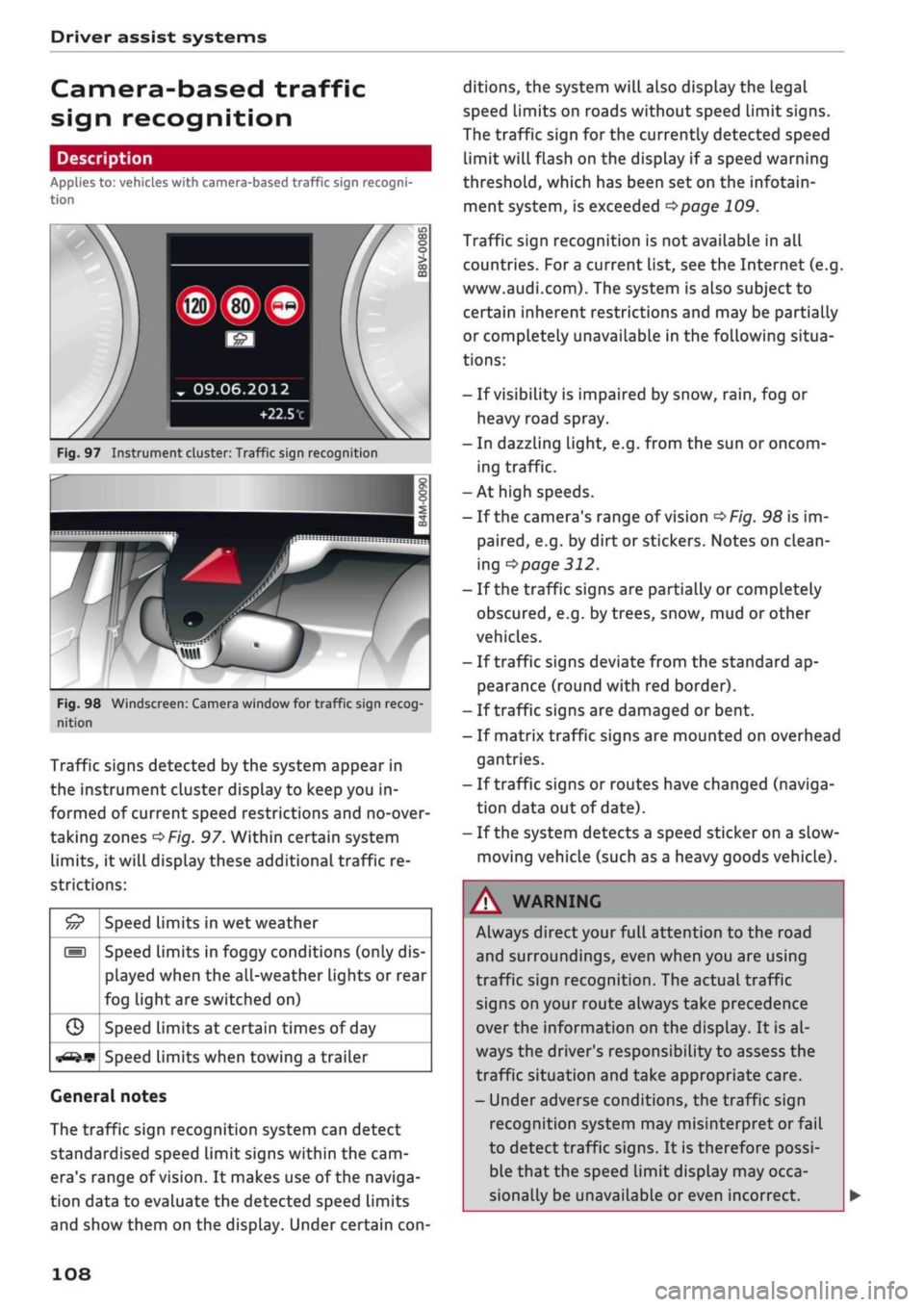
Fig.
97 Instrument cluster: Traffic sign recognition
Fig.
98 Windscreen: Camera window for traffic sign recog
nition
Traffic signs detected by the system appear in
the instrument cluster display to keep you in
formed of current speed restrictions and no-over
taking zones
^>Fig.
97. Within certain system
limits,
it will display these additional traffic re
strictions:
£5
///
s
G
^-if?
Speed limits in wet weather
Speed limits in foggy conditions (only dis
played when the all-weather lights or rear
fog light are switched on)
Speed limits at certain times of day
Speed limits when towing a trailer
General notes
The traffic sign recognition system can detect
standardised speed Limit signs within the cam
era's range of
vision.
It makes use of the naviga
tion data to evaluate the detected speed limits
and show them on the display. Under certain
con
ditions, the system will also display the legal
speed limits on roads without speed Limit signs.
The traffic sign for the currently detected speed
limit will flash on the display if
a
speed warning
threshold,
which has been set on the infotain
ment system, is exceeded
^page
109.
Traffic sign recognition is not available in all
countries. For
a
current list, see the Internet (e.g.
www.audi.com). The system is also subject to
certain inherent restrictions and may be partially
or completely unavailable in the following situa
tions:
- If visibility is impaired by snow,
rain,
fog or
heavy road spray.
- In dazzling light, e.g. from the sun or oncom
ing traffic.
-At high speeds.
- If the camera's range of vision
^>Fig.
98 is im
paired,
e.g. by dirt or stickers. Notes on clean
ing
•=>
page 312.
- If the traffic signs are partially or completely
obscured,
e.g. by trees, snow, mud or other
vehicles.
- If traffic signs deviate from the standard ap
pearance (round with red border).
- If traffic signs are damaged or bent.
- If matrix traffic signs are mounted on overhead
gantries.
- If traffic signs or routes have changed (naviga
tion data out of date).
- If the system detects a speed sticker on a slow-
moving vehicle (such as a heavy goods vehicle).
WARNING
Always direct your full attention to the road
and surroundings, even when you are using
traffic sign recognition. The actual traffic
signs on your route always take precedence
over
the information on the display. It is al
ways the driver's responsibility to assess the
traffic situation and take appropriate care.
- Under adverse conditions, the traffic sign
recognition system may misinterpret or fail
to detect traffic signs. It is therefore possi
ble that the speed limit display may occa
sionally be unavailable or even incorrect.
108
Page 112 of 364
Driver assist systems
key in use. If you change to a different type
of trailer, you may need to change the maxi
mum trailer speed setting.
- Information is also provided in the head-up
display*.
- Please note
that
the navigation system (SD
card)*
is immediately no longer available if
the SD card is removed from the SD card
reader.
Driver messages
Applies to: vehicles with camera-based traffic sign
recogni
tion
EJ
Traffic sign recognition: currently unavaila
ble.
No camera view
This message will appear if the camera view is
obstructed
^>page
108. The system will switch
it
self off.
EJ
Traffic sign recognition: currently restricted
This message appears, for instance, in the event
of a navigation system fault. The Limited func
tionality may cause fewer speed limits to be dis
played (which increases the possibility of an er
ror).
Traffic sign based speed warning: currently
unavailable. See owner's manual
No warning will be given if the selected warning
threshold is exceeded.
Traffic sign recognition: system fault
The function of the system is impaired; the sys
tem will be deactivated. Drive to a qualified
workshop soon.
No traffic sign recognised
No relevant navigation data are available, and no
speed limit has been detected.
Traffic sign recognition: outside operational
area
Function unavailable in this country
The vehicLe is being driven in a country outside
the system's operational area.
Rest recommendation
General notes
Applies to: vehicles with rest recommendation
Under certain conditions, the system can detect
that the driver needs to take a break.
At the beginning of a trip, the system monitors
the driver's general steering style. Using this as a
reference, the system continuously compares the
current steering input at speeds of between 60
km/h and 200 km/h. If the evaluation of the
steering input implies a lapse in the driver's
con
centration,
the system will then recommend a
break
^>page
111,
Instrument cluster display.
The rest recommendation function is designed
for journeys on motorways and major roads.
System limitations
The rest recommendation function may misinter
pret the steering input in certain driving situa
tions,
such as the following:
- On twisty roads.
- On rough roads.
- In poor weather.
- During performance driving.
- When the driver's attention is distracted.
Resetting the system
The system is automatically reset if
you...
- switch off the ignition.
- release the driver's seat belt and open the driv
er's door.
- drive slower than 60 km/h for a while. If you
subsequently increase your speed again, the
system will reevaluate the driving style.
/\
WARNING
- Never drive when you are
tired.
As a driver
you are always responsible for ensuring that
you
are
fit to drive.
- On
Long
journeys, make sure to take
quate breaks at regular intervals.
ade-
- The system cannot always tell if
you
need a
break.
110
Page 114 of 364
Driver assist systems
General notes
Applies to: vehicles with Audi adaptive cruise control/Audi pre
sense front
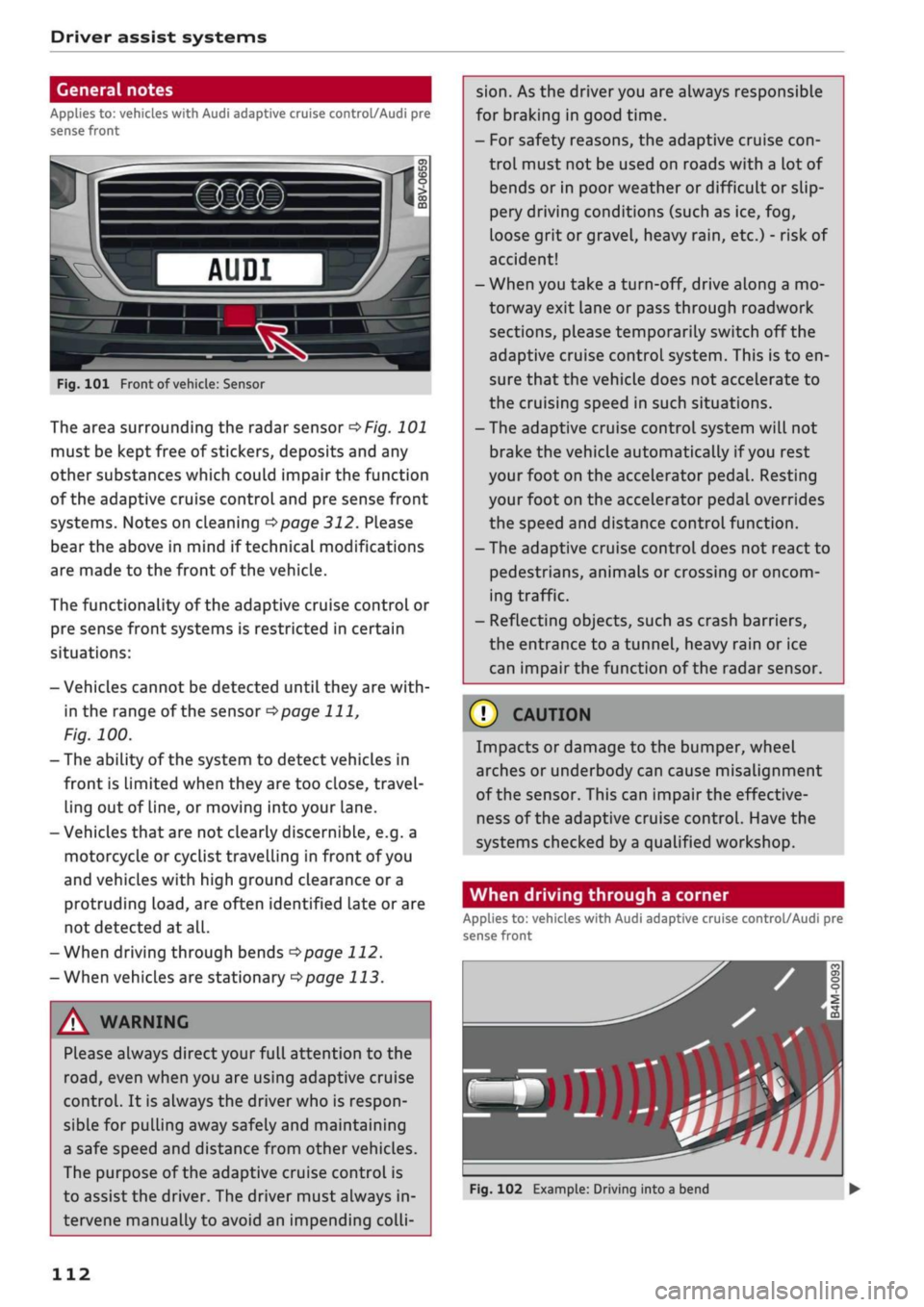
Fig.
101 Front of
vehicle:
Sensor
The area surrounding the radar sensor
of/g.
101
must be kept free of stickers, deposits and any
other substances which could impair the function
of the adaptive cruise control and pre sense front
systems. Notes on cleaning
^>page
312. Please
bear the above in mind if technical modifications
are made to the front of the vehicle.
The functionality of the adaptive cruise control or
pre sense front systems is restricted in certain
situations:
- Vehicles cannot be detected until they are
with
in the range of the sensor
^>page
111,
Fig.
100.
- The ability of the system to detect vehicles in
front is Limited when they are too close, travel
ling out of line, or moving into your lane.
- Vehicles that are not clearly discernible, e.g. a
motorcycle or cyclist travelling in front of you
and vehicles with high ground clearance or a
protruding
load,
are often identified late or are
not detected at all.
-When driving through bends
opage
112.
-When vehicles are stationary
^page
113.
A WARNING
Please always direct your full attention to the
road,
even when you are using adaptive cruise
control.
It is always the driver who is respon
sible for pulling away safely and maintaining
a safe speed and distance from other vehicles.
The purpose of the adaptive cruise control is
to assist the driver. The driver must always in
tervene manually to avoid an impending
colli
sion.
As the driver you are always responsible
for braking in good time.
- For safety reasons, the adaptive cruise
con
trol must not be used on roads with a lot of
bends or in poor weather or difficult or slip
pery driving conditions (such as ice, fog,
loose grit or gravel, heavy
rain,
etc.) - risk of
accident!
- When you take a turn-off, drive along a mo
torway exit lane or pass through roadwork
sections, please temporarily switch off the
adaptive cruise control system. This is to en
sure that the vehicle does not accelerate to
the cruising speed in such situations.
- The adaptive cruise control system will not
brake the vehicle automatically if
you
rest
your foot on the accelerator pedal. Resting
your foot on the accelerator pedal overrides
the speed and distance control function.
- The adaptive cruise control does not react to
pedestrians, animals or crossing or oncom
ing traffic.
- Reflecting objects, such as crash barriers,
the entrance to a tunnel, heavy rain or ice
can impair the function of the radar sensor.
© CAUTION
Impacts or damage to the bumper, wheel
arches or underbody can cause misalignment
of the sensor. This can impair the effective
ness of the adaptive cruise control. Have the
systems checked by a qualified workshop.
When driving through a corner
Applies to: vehicles with Audi adaptive cruise control/Audi pre
sense front
»)
Fig.
102 Example: Driving into a bend
112
Page 122 of 364
Driver assist systems
This message appears if the radar sensor vision is
impaired,
e.g. by leaves, snow, heavy road spray
or dirt. Clean the sensor
<^>page
112, Fig. 101.
Distance warning: currently unavailable. See
owner's manual
This driver message will appear if the system
fails temporarily. If the fault occurs repeatedly,
drive to a qualified workshop and have the fauLt
rectified.
Fasten seat belt
The system is not fully available when the driver's
seat belt is unfastened.
Stationary object ahead
This message appears if
you
try to switch on the
system when a stationary object is located imme
diately in front of your car.
Door open
The system is not available when the vehicle is
stationary and the driver's door is open.
Audi pre sense
Introduction
Applies to: vehicles with Audi pre sense
The pre sense functions can take action to pro
tect the vehicle occupants and other road users in
certain hazardous conditions within the system
limits.
- Because the different on-board systems are
networked,
pre sense basic can detect critical
situations and take preventive action to protect
the occupants.
- The pre sense front uses the data of the radar
sensor to calculate the probability of an
acci
dent
opage
112. It can detect an impending
collision with vehicles or
pedestrians1^
(subject
to general system limitations). In this case, the
system warns the driver visually, acoustically
and,
if necessary, with a short, sharp brake ap
plication.
If necessary, it can initiate a partial or
fuLl
brake application in order to reduce the im
pact speed or, in certain circumstances, to
avoid a collision. In conjunction with pre sense
basic, the reversible tensioners on the front
seat belts are also applied if necessary. Pre
sense front is active even when the adaptive
cruise control* is switched off.
Please observe the general safety warnings
•=>
A in General notes on page 112.
© Note
- Certain pre sense functions are deactivated
when reversing.
- The functions of the pre sense system may
also be unavailable if
a
fault develops in the
ESC
system or airbag control unit.
- Please note that, if the front passenger's
airbag has been deactivated, the reversible
belt tensioner on the passenger's side will
be deactivated as
well.
- Switch off pre sense on private roads and
while the vehicle is being loaded onto a car
transporter, train or ferry, etc. This prevents
the pre sense system from taking action in
an inappropriate situation.
Audi pre sense basic
Description
Applies to: vehicles with Audi pre sense basic
The pre sense basic functions are activated at
speeds above approximately 30 km/h.
The system can activate the following functions
in certain situations:
- Seat belt tensioning (e.g. during hard braking):
The seat belts on the front seats have reversi
ble tensioners. Provided an accident does not
occur, the belts are loosened again slightly and
kept ready for activation.
- Initiation of the closure process for the
win
dows and panorama sun roof* (e.g. if the
vehi
cLe understeers or oversteers).
Audi drive select*: the activation threshold
dif
fers according to the mode selected.
x)
Not available on vehicles for some markets.
120
Page 125 of 364

Driver assist systems
H
Audi pre sense: currently restricted. Sensor
view restricted due to surroundings.
This message appears if the radar sensor vision is
impaired,
e.g. by leaves, snow, heavy road spray
or dirt. If necessary, clean the sensor
*$
page 112, Fig. 101.
[^
Audi pre sense: currently restricted
This message appears in certain situations, e.g.
when the ESC is partially or fully deactivated.
Q
Audi pre sense: currently restricted. See
owner's manual
Applies to: vehicles with Audi side assist
If
you
operate the turn signals while the active
lane assist and side assist are active, the steering
will be corrected just before you cross the lane
demarcation if the side assist detects vehicles ap
proaching quickly or travelling at about the same
speed as your own vehicle and judges the situa
tion to be critical. This intervention is intended to
keep the vehicle in the Lane.
Applies to: vehicles without Audi side assist
The system does not warn you if
you
operate the
turn signal before crossing a Lane marking. In
this case, it assumes that you intend to change
lanes.
Applies to: vehicles with traffic jam assist
The traffic jam assist can be activated at speeds
below approximately 65 km/h if the correspond
ing conditions have been met
^page
117.
•
123
This driver message appears if one or more sub
systems, such as the
ESC,
fails temporarily. If the
message is displayed several times, drive to a
qualified workshop and have the fault rectified.
[g]
Audi pre sense: emergency braking system
off
This message appears if the functions of the pre
sense system are deactivated via the infotain
ment system or if the system is not available.
Audi active Lane assist
Description
Applies to: vehicles with Audi active lane assist
The active lane assist (lane departure warning
feature) uses a camera in the windscreen to de
tect lane markings (subject to general system
limitations). If
you
approach one of the detected
lane markings, the system corrects the steering
to warn you that the vehicle might be about to
cross one of the markings. You can override this
steering input at any time. The steering wheel vi
brates slightly if
you
cross a lane marking. The vi
bration warning must be activated beforehand on
the infotainment system. The active lane assist is
functional when it detects a demarcation line on
at least one side of the lane in which you are driv
ing.
As the system is designed for driving on motor
ways and other major roads, it is only active
§
above a speed of about 65 km/h (may vary in dif-
£
ferent export markets).
r\i
.-H
00
A WARNING
- The system initiates a corrective steering in
put to warn the driver that the vehicle is
about to leave the lane. As the driver you
are always responsible for staying in your
own lane.
- The system can assist you to keep the
vehi
cle in the lane, however it is not capable of
driving on its own. Never take your hands
off the steering wheel.
- In certain situations, e.g. during heavy brak
ing,
the system may not correct the steer
ing.
- In certain circumstances, not all of the lane
markings may be detected by the camera. A
corrective steering input can only be
initi
ated if the system detects a lane marking on
the side in question.
- Variations in the road surface or objects on
the road may be misinterpreted as lane
markings. In this case, the steering may be
corrected unexpectedly or not at all.
- The camera's view might be obstructed, for
example by vehicles travelling in front,
rain,
snow, a lot of water on the
road,
adverse
light
or
dirt on the windscreen. If this hap
pens,
the active lane assist may not detect
Page 130 of 364
Driver assist systems
General notes
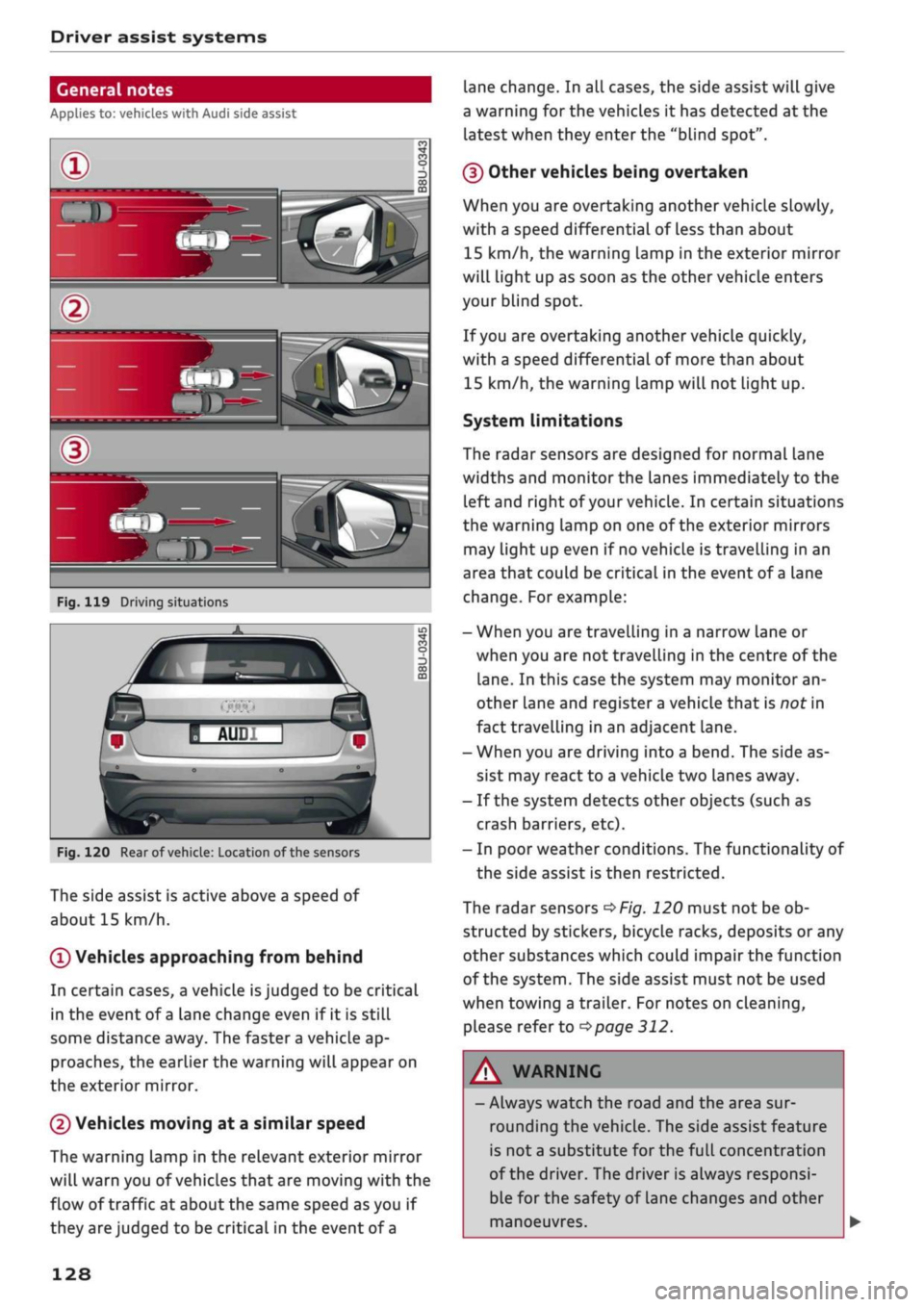
Applies to: vehicles with Audi side assist
•IB
in—
Fig.
119 Driving situations
Fig.
120 Rear of
vehicle:
Location of the sensors
The side assist is active above a speed of
about 15 km/h.
0
Vehicles approaching from behind
In certain cases, a vehicle
is
judged to be critical
in the event of
a
lane change even if it is still
some distance away. The faster a vehicle ap
proaches, the earlier the warning will appear on
the exterior mirror.
(2) Vehicles moving at a similar speed
The warning lamp in the relevant exterior mirror
will warn you of vehicles that are moving with the
flow of traffic at about the same speed as you if
they are judged to be critical in the event of
a
lane change. In all cases, the side assist will give
a warning for the vehicles it has detected at the
latest when they enter the "blind spot".
(§)
Other vehicles being overtaken
When you are overtaking another vehicle slowly,
with a speed differential of Less than about
15 km/h, the warning lamp in the exterior mirror
will light up as soon as the other vehicle enters
your blind spot.
If
you
are overtaking another vehicle quickly,
with a speed differential of more than about
15 km/h, the warning lamp will not light up.
System limitations
The radar sensors are designed for normal lane
widths and monitor the lanes immediately to the
left and right of your vehicle. In certain situations
the warning lamp on one of the exterior mirrors
may light up even if no vehicle is travelling in an
area that could be critical in the event of
a
lane
change. For example:
- When you are travelling in a narrow Lane or
when you are not travelling in the centre of the
lane.
In this case the system may monitor an
other lane and register a vehicle that is nor in
fact travelling in an adjacent lane.
- When you are driving into a bend. The side as
sist may react to a vehicle two lanes away.
- If the system detects other objects (such as
crash barriers, etc).
- In poor weather conditions. The functionality of
the side assist is then restricted.
The radar sensors
^>Fig.
120 must not be ob
structed by stickers, bicycle racks, deposits or any
other substances which could impair the function
of the system. The side assist must not be used
when towing a trailer. For notes on cleaning,
please refer to
^>page
312.
WARNING
- Always watch the road and the area sur
rounding the vehicle. The side assist feature
is not
a
substitute for the full concentration
of the driver. The driver is always responsi
ble for the safety of Lane changes and other
manoeuvres.
128
Page 131 of 364

Driver assist systems
CO
rN
r>
rN
•-i
00
- In certain situations, the system may not
function properly, or the functionality of the
system may be restricted. For example:
- If other vehicles are approaching very
quickly, or if
you
are overtaking other
vehicles quickly. The warning lamp may
not light up
intime.
- In poor weather conditions, such as heavy
rain,
snow or road spray.
- If
you
are travelling in very wide lanes, in
tight bends or over crests. The system
may not detect vehicles in the adjacent
lane because they are outside the area
covered by the sensors.
© CAUTION
Impacts or damage to the bumper, wheel
arches or underbody can cause misalignment
of the sensors. This can impair the functional
ity of the system. Have the systems checked
by
a
qualified workshop.
The warning lamps on the exterior mirrors
may not be properly visible if tinted foil is af
fixed to the side windows on the driver's or
passenger's side.
Switching on/off
Applies to: vehicles with Audi side assist
The
system can be switched on and off
on
the in
fotainment system.
The warning Lamps in the exterior mirrors light
up briefly each time the ignition is switched on to
indicate that the system is activated.
•
Select the following on the infotainment sys
tem:
|MENU|
button > Car
>
left control button
> Driver assist
>
Audi side assist. SeLect off to
switch off the system.
Adjusting brightness of warning lamp
Applies to: vehicles with Audi side assist
The
brightness of the warning lamp can be ad
justed on the infotainment system.
•
Select the following on the infotainment sys
tem:
|MENU|
button > Car
>
left controL button
> Driver assist
>
Audi side assist.
The brightness of the warning lamp in both the
information and warning modes is regulated au
tomatically according to the ambient Light Level.
If
you
are in very dark
or
very Light surroundings
when you adjust the brightness of the warning
lamp,
the automatic brightness control may al
ready have reached the lowest or the brightest
setting.
In such a case it is possible
that
you
won't notice a difference while you are adjusting
the brightness or that you will only notice it once
the light surroundings have changed.
Please adjust the brightness of the warning lamp
for the information mode so that it does not dis
tract you while you are looking at the road in
front. When you change the brightness, the
warning lamp on the exterior mirror will light up
briefly with the intensity set for the information
mode.
The intensity of the lamp in the warning
mode is Linked to the intensity in the information
mode and is adjusted automatically.
© Note
- The side assist is not active while the set
tings are being adjusted.
- Your personal settings are stored automati
cally and assigned to the remote control key
which is being used.
129
Page 134 of 364

Driver assist systems
which mode you select. In the performance-
oriented dynamic mode, the automatic gearbox
changes gear at higher engine speeds.
By contrast, in efficiency* mode, the automatic
gearbox* selects the next gear at lower engine
speeds and the coasting mode is activated
^>page
91. This helps to reduce fuel consump
tion.
Suspension control (Audi magnetic
ride)*
The suspension control uses sensors to collect in
formation on steering movements, braking and
acceleration input by the driver, road surface
quality, road speed and vehicle Loading. With
Audi drive select you can choose between dynam
ic and comfort-oriented suspension set-ups (dy
namic and comfort modes), or opt for
a
more
balanced set-up (auto mode).
Steering
The degree of power assistance can be varied.
Various modes are possible
^>page
133. The
light, indirect steering response in comfort mode
is particularly suitable on long motorway trips,
for instance. The steering has a tighter, more di
rect feel in dynamic mode.
The steering response is even more agile on
vehicles with progressive steering*.
Audi adaptive light*
The adaptive light system adjusts the light distri
bution according to the mode selected.
Air conditioner*
The air conditioner runs in a particularly econom
ical mode when the efficiency* setting is selec
ted.
When this function is selected, eco* is shown
in the display of the automatic air conditioner.
Cruise control system*
The acceleration response is particularly econom
ical in efficiency* mode.
Audi adaptive cruise control*
The acceleration mode can be varied from com
fort to sport by changing the setting in drive se
lect. The setting also determines whether the re
sponse of the adaptive cruise control to the driv
ing style of the driver in front is more balanced or
spontaneous. The efficiency* mode chooses a set
up for maximum economy.
© Note
- On some models the vehicle's maximum
speed can only be obtained in the auto and
dynamic modes.
- Applies to vehicles with manual gearbox: An
E appears in the gear-change indicator when
efficiency* mode is activated.
- Applies to vehicles with automatic gearbox:
Selector lever position
S
is automatically se
lected when dynamic mode is activated.
E
is
selected in efficiency* mode.
- Applies to vehicles with automatic gearbox:
If
you
select efficiency* mode when the se
lector Lever is in position D,
E
will automati
cally appear in the instrument cluster dis
play.
- Applies to vehicles with manual gearbox: If
you press the accelerator right down past
the point of resistance in efficiency* mode,
the engine power is automatically control
led to give your vehicle maximum accelera
tion.
- Please note that the efficiency* mode is not
available in towing mode.
Selecting the driving mode
Applies to: vehicles with Audi drive select
You
can choose between efficiency*, comfort, au
to,
dynamic and individual*.
Fig.
123 Centre console: Button for drive select
•
Press the
ism
button
^>Fig.
123 repeatedly until
the desired mode appears on the instrument
cluster/infotainment display. Or: •
132
Page 136 of 364
Parking aids
Parking aids
General notes
Applies to: vehicles with rear parking aid/parking system
plus/reversing camera/park assist
Various systems are available to help you when
parking or manoeuvring in tight spaces, depend
ing on the equipment fitted on your vehicLe.
The rear parking aid gives an acoustic warning if
there are any obstacles behind the car
cépage
135.
When you are parking, the parking system plus
warns you acoustically and optically about obsta
cles detected in front of and behind the vehicLe
^page
135.
The reversing camera uses the infotainment sys
tem display to show a picture of the area behind
the vehicle captured by the camera. This picture
helps you to park the vehicle parallel or perpen
dicular to the roadside. In addition, you are assis
ted by the functions of the parking system plus
^>page
137.
The park assist helps you to find suitable parking
spaces, to manoeuvre the vehicLe into spaces par
allel or perpendicular to the roadside and to drive
out of spaces parallel to the kerb
^>page
139. It
also includes the functions of the parking system
plus
^page
135 and additionally monitors the
area at the side of the vehicle
(f) ^page
135,
Fig. 124.
A
WARNING
- Always watch the road and the area sur
rounding the vehicLe. The electronic systems
cannot replace the full concentration of the
driver. The driver is always responsible for
safety during parking and all other manoeu
vres.
- Please note that certain surfaces, such as
clothing fabrics, cannot be detected or dis
played by the system - risk of accident!
- The sensors and cameras have bLind spots in
which neither people nor objects are regis
tered.
It is particularly important to ensure
that there are no small children or animals
near the vehicLe - risk of accident!
- Always keep a close watch on the area
around the vehicLe and make full use of the
rear-view mirrors.
- Impacts or damage to the radiator grille,
bumper, wheel arches or underbody can
cause misalignment of the sensors. This can
impair the effectiveness of the parking aids.
Have the systems checked by a qualified
workshop.
(T)
CAUTION
- The system may not always be able to de
tect objects such as the following:
- Chains, trailer draw bars, posts or fences
- Objects above the sensors, such as wall
protrusions, etc.
- Objects with certain surfaces or struc
tures,
such as wire fences or powder snow
- As your car moves closer to low obstacles,
they may disappear from the sensors' field
of vision. Please note
that
you will no longer
be warned about these obstacles.
- Remember to maintain sufficient clearance
from the kerb to avoid damaging the wheel
rims.
(T)
Note
- In certain situations, a warning may be giv
en by the system even if there is no obstacle
within range of the sensors. This can be
caused by the following, for instance:
- Certain road surfaces or long grass
- External ultrasound sources, e.g. from
street cleaning vehicles
- Heavy rain or snow or dense exhaust
fumes
-To familiarise yourself with the system, we
recommend
that
you practise parking in a
quiet location or a car park. The weather
and light conditions should be good.
- You can change the display and adjust the
volume and pitch of the beeps
^>page
143.
- Please refer to the notes on the use of a
towing bracket
^page
144.
- There is a slight delay in the picture dis
played on the infotainment display. •
134
Page 147 of 364
Intelligent technology
CO
< o rN
iv
rN
t-H
o < 00
Intelligent technology
Electronic stabilisation
control (ESC)
Description
The electronic stabilisation control (ESC) increa
ses the car's stability. It reduces the tendency to
skid and improves the stability and roadholding
of the vehicle. The ESC detects critical handling
situations, such as understeer, oversteer and
wheelspin
on the driven wheels. It stabilises the
vehicle by braking individual wheels or by reduc
ing the engine torque. The indicator
lamp^
in
the instrument cluster starts flashing as soon as
the ESC intervenes.
The following systems are integrated in the ESC:
Anti-lock brake system (ABS)
ABS prevents the wheels from locking up under
braking until the vehicle has reached a virtual
standstill.
You can continue to steer the vehicle
even when the brakes are on
full.
Keep your foot
on the brake pedal and do not pump the brakes.
You will feel the brake pedal puLsate while the
anti-lock brake system is working.
Brake assist system
The brake assist system can shorten the braking
distance. The braking force is automatically boos
ted if
you
press the brake pedal quickly in an
emergency. You must keep pressing the brake
pedal until the danger has passed. On
vehides
with adaptive cruise control*, the response of the
brake assist system will be more sensitive if you
are too close to the vehicLe in front.
Traction control system (ASR)
In the event of
wheelspin,
the traction control
system reduces the engine torque to match the
amount of grip available. This helps the car to
start moving, accelerate or climb a gradient.
Electronic differential lock (EDL)
When the EDL detects wheelspin, it brakes the
spinning wheel and directs the power to the
oth
er driven wheel (or wheels on quattro* versions).
This function is not available at high speeds.
To prevent the disc brake of the braked wheel
from overheating, the EDL cuts out automatically
if subjected to excessive loads. The vehicLe can
still be driven. The EDL will switch on again auto
matically when the brake has cooled down.
Steering recommendation
The ESC helps to stabilise the vehicle by changing
the steering wheel torque.
Trailer stabilisation system
Applies to: vehicles with trailer stabilisation system
Trailers have a tendency to sway. If the
ESC
de
tects that the trailer is swaying and this is affect
ing the towing vehicLe, it will automatically brake
the vehicle in order to stabilise the trailer
^>page
97.
Selective wheel torque control
Selective wheel torque control intervenes when
cornering by braking the wheel(s) on the inside of
the bend individually as required. This enables
precision cornering.
Multicollision brake assist system
The "multicollision brake assist system" can help
to reduce the risk of skidding and further
colli
sions during an accident. If the airbag control
unit detects that
a
collision has taken place up
wards of
a
certain speed, the vehicle is braked by
the
ESC.
The vehicle will not be braked automatically if:
- the driver presses the accelerator,
- or the
ESC,
the brake system or the vehicle's
electrical system are not fully functional.
WARNING
- The grip provided by the ESC and the inte
grated systems is still subject to the physi
cal limits of adhesion. Always bear this in
mind,
especially on wet or sLippery roads. If
you notice the systems cutting in, you
should reduce your speed immediately to
suit the road and traffic conditions. Do not
let
the extra safety provided tempt you into
taking any risks when driving - this can
cause accidents.
145