air condition AUDI Q2 2021 Owner´s Manual
[x] Cancel search | Manufacturer: AUDI, Model Year: 2021, Model line: Q2, Model: AUDI Q2 2021Pages: 364, PDF Size: 87.77 MB
Page 150 of 364
Intelligent technology
/K
WARNING
- When applying
the
brakes
to
clean
off
de
posits
on the
pads and discs, select
a
clear,
dry
road.
Be sure
not to
inconvenience
or
en
danger other road users;
do not
risk an
acci
dent.
- Never
let the car
coast with
the
engine
switched
off
(this can cause accidents).
(T)
CAUTION
- Never
let the
brakes "drag"
by
leaving your
foot on
the
pedal when you
do not
really
in
tend
to
brake. This overheats
the
brakes,
re
sulting
in
longer stopping distances
and
greater wear.
- Before driving down
a
long,
steep gradient,
it
is
advisable
to
reduce speed
and
select
a
lower gear.
In
this way you will make use
of
the engine braking effect and relieve
the
load
on the
brakes.
If
you
still have
to use
the brakes,
it is
better
to
brake firmly
at in
tervals than
to
apply
the
brakes continuous-
Ly
-
If
the brake servo
is out of
action,
you must
apply considerably more pressure
to the
brake pedal than you normally would.
-
If
you
wish
to
equip
the
car with accessories
such as a front spoiler
or
wheel covers,
it is
important that
the
flow
of air to the
front
wheels
is not
obstructed, otherwise
the
brakes can overheat.
Electro-mechanical
power steering
Electro-mechanical power steering assists
the
driver when steering.
The degree
of
power assistance
is
adapted elec
tronically,
depending
on the
speed.
Warning/indicator lamps
and
driver
messages
| Do not drive vehicle: steering defective
If the warning lamp lights
up
permanently
and
the message appears, there
may be
a power
steering failure.
Stop
the
vehicle
in a
safe place
as
soon
as
possi
ble.
Do
NOT drive on. Obtain professional assis
tance.
S
Steering malfunction: you can continue driv
ing
If the indicator Lamp Lights up,
the
steering
re
sponse
may be
heavier
or
lighter than usual.
In
addition,
it is
possible that
the
steering wheel
will
be off
centre when driving
in a
straight line.
Drive slowly
to
a qualified workshop and have
the
fault rectified.
Note
You
can
drive
on if
the warnina/indicator
g/
Lamp
||
or y
|
lights
up
only briefly
Four-wheel drive
(quattro)
Applies to: vehicles with four-wheel drive
On
quattro models
the
engine power is distrib
uted
to all
four wheels.
General notes
On four-wheel drive vehicles,
the
engine power
is
distributed
to all
four wheels. The distribution
of
power
is
controlled automatically according
to
your driving style and
the
road conditions. Also
refer
to
^>page
145,
Electronic stabilisation con
trol
(ESC).
The four-wheel drive
is
specially designed
to
complement
the
superior engine power
of
your
Audi.
This combination gives
the car
exceptional
handling
and
performance capabilities
-
both
on
normal roads and
in
more difficult conditions,
such
as
snow and
ice.
Even
so (or
perhaps espe
cially
for
this reason),
it is
important
to
observe
certain safety points
<=> A-
Winter tyres
Thanks
to its
four-wheel drive, your
car
will have
plenty
of
traction
in
winter conditions, even with
•
148
Page 152 of 364
Intelligent technology
Dynamic power management
While the vehicle is moving, this function distrib
utes the available power to the various electrical
components and systems according to their re
quirements. It ensures that on-board systems do
not consume more electrical power than is being
generated,
and thus maintains the maximum
possible vehicle battery power level.
® Note
- The power management system is not able
to overcome the given physical limits.
Please remember that the power and life of
the vehicle battery are limited.
- If the indicator lamp
|3 ^page
31 appears,
the starting ability may be impaired.
Starting ability has first priority.
Short trips, city traffic and low temperatures all
place a heavy load on the vehicLe battery. In
these conditions a large amount of power is
con
sumed,
but only
a
small amount is supplied. The
situation is also critical if electrical equipment is
in use when the engine is not running. In this
case power is consumed when none is being
gen
erated.
In these situations you will be aware that the
power management system is intervening to
con
trol the distribution of electrical power.
When the vehicle is parked for long periods
If
you
do not drive your vehicle for a period of
several days or weeks, the power management
will gradually shut off the on-board systems one
by one, or reduce the amount of current they are
using.
This limits the amount of power consumed
and helps to ensure reliable starting even after a
long period. Certain convenience features, such
as remote controL unlocking, may not be availa
ble.
These functions will be restored when you
switch on the ignition and start the engine.
150
With the engine switched off
If
you
listen to the radio or use the other info
tainment functions when the engine is not
run
ning,
this will discharge the vehicle battery.
The infotainment display will show a warning
message before the battery power drops to a Lev
el where the starting ability is impaired. This
message warns you that the system you are using
will soon be switched off automatically. You
should therefore start the engine if
you
wish to
continue using the system.
When the engine is running
Although the alternator generates electrical
power, the vehicle battery can still become dis
charged while the vehicle is being driven. This can
occur when a lot of power is being consumed but
only
a
small amount supplied, especially if the
vehicle battery is not fully charged initially.
To restore the necessary energy balance, the sys
tem
will
then temporarily shut off the electrical
components that are using a lot of power, or re
duce the current they are consuming. Heating
systems in particular use a Large amount of elec
trical power. If
you
notice, for instance, that the
seat heating* or the rear window heater is not
working,
they may have been temporarily switch
ed off or regulated to a lower heat output. These
systems will be available again as soon as
suffi
cient electrical power is available.
You may also notice that the engine runs at a
slightly faster idling speed. This is quite normal,
and no cause for concern. The increased idling
speed allows the alternator to meet the greater
power requirement and charge the vehicLe bat
tery at the same time.
Information saved in the
control units
The vehicle is fitted in the factory with electronic
control units that, among other things, control
the engine and the gearbox. The controL units al
so monitor the exhaust system and the airbags.
The control units continually analyse data rele
vant to the vehicLe while you are driving. In the •
Page 174 of 364

Telephone
- Do not carry a mobile phone in your breast
pocket directly over the pacemaker when
the phone is switched on.
-If you suspect interference, switch the
mobile phone off immediately.
- The speech dialogue system*
^>page
164
must not be used in cases of emergency,
since the voice changes in stressful situa
tions.
This could result in a failed or delayed
telephone connection. Always dial emergen
cy numbers manually!
- Switch off your mobile phones in all areas
where there may be a risk of explosion. Re
member that these areas may not always be
adequately marked. Such places are filling
stations, fuel and chemical storage facilities
or transport vehicles and other places where
fumes, chemicals (e.g. from leaking
pro
pane or fuel vapours in vehicles or build
ings) or large quantities of dust particles
(e.g.
from flour, wood or metal) could accu
mulate in the air. This warning also applies
to all other places where you would normal
ly switch off your engine.
- Today's driving conditions require the full
attention of drivers. Please always note the
information in the chapter
^>page
152,
Notes on traffic safety.
Telephone
Introduction
Applies to: vehicles with telephone
You have different options for making calls in
your vehicle via the MMI; this depends on your
vehicle's equipment and the features of your mo
bile phone.
Handsfree operation
After connecting your mobile phone to the MMI
system via Bluetooth, you can operate the hands-
free system and the telephone functions conven
iently via the MMI. Your phone calls will be made
via the antenna of your mobile phone.
With the Audi phone box*, you can use the
vehi
cle's external aerial to make calls. The use of the
external aerial reduces radiation in the vehicle
and also ensures better reception quality
^>page
177.
Car
phone#1)
As part of Audi connect (infotainment)*, the Audi
phone box* includes a car telephone function
which can be used via a separate mini SIM card in
the SIM card reader* or an
rSAP-enabled
mobile
phone.
With the car telephone function, you can
use the vehicle's external aerial to make calls.
The use of the external aerial reduces radiation in
the vehicle and also ensures better reception
quality
^>page
177.
Once a connection has been established success
fully, you can also change the profiles at a later
time.
Refer to
^>page
257, Connection manag
er.
/\
WARNING
-According to health organisations, mobile
phones may interfere with the function of
pacemakers. A minimum distance of 20 cm
should be kept between the mobile phone
aerial and the pacemaker.
Not available in all markets. On vehicles with Audi connect
(infotainment)* and Audi phone
box*
Please always observe the information
^>®in
Wi-Fi hotspot on page 202.
(T)
Note
-The maximum range of the Bluetooth
con
nection is limited to the interior of the
vehi
cle.
The connection can be susceptible to in
terference from other electronic devices.
- For information regarding which Bluetooth
connections and functions your mobile
phone supports, contact your mobile net
work service provider or consult the mobile
device database
at
www.audi.com/blue-
tooth.
•
172
Page 245 of 364
Media
CO
< o rN
IV
rN
•-H
•H
00
Applies to: vehicles with Audi music interface
- Audi music interface: See
^>page
241.
Applies to: vehicles with AUX input/USB charging socket
- AUX input/USB charging socket: See
•=>
page 242.
© CAUTION
Please handle the USB adapters with care.
Make sure the cable does not become pinched
or trapped.
Audi music interface
Applies to: vehicles with Audi music interface
You
can connect your mobile devices via the Audi
music interface in order to charge the battery
and operate the devices via the MMI.
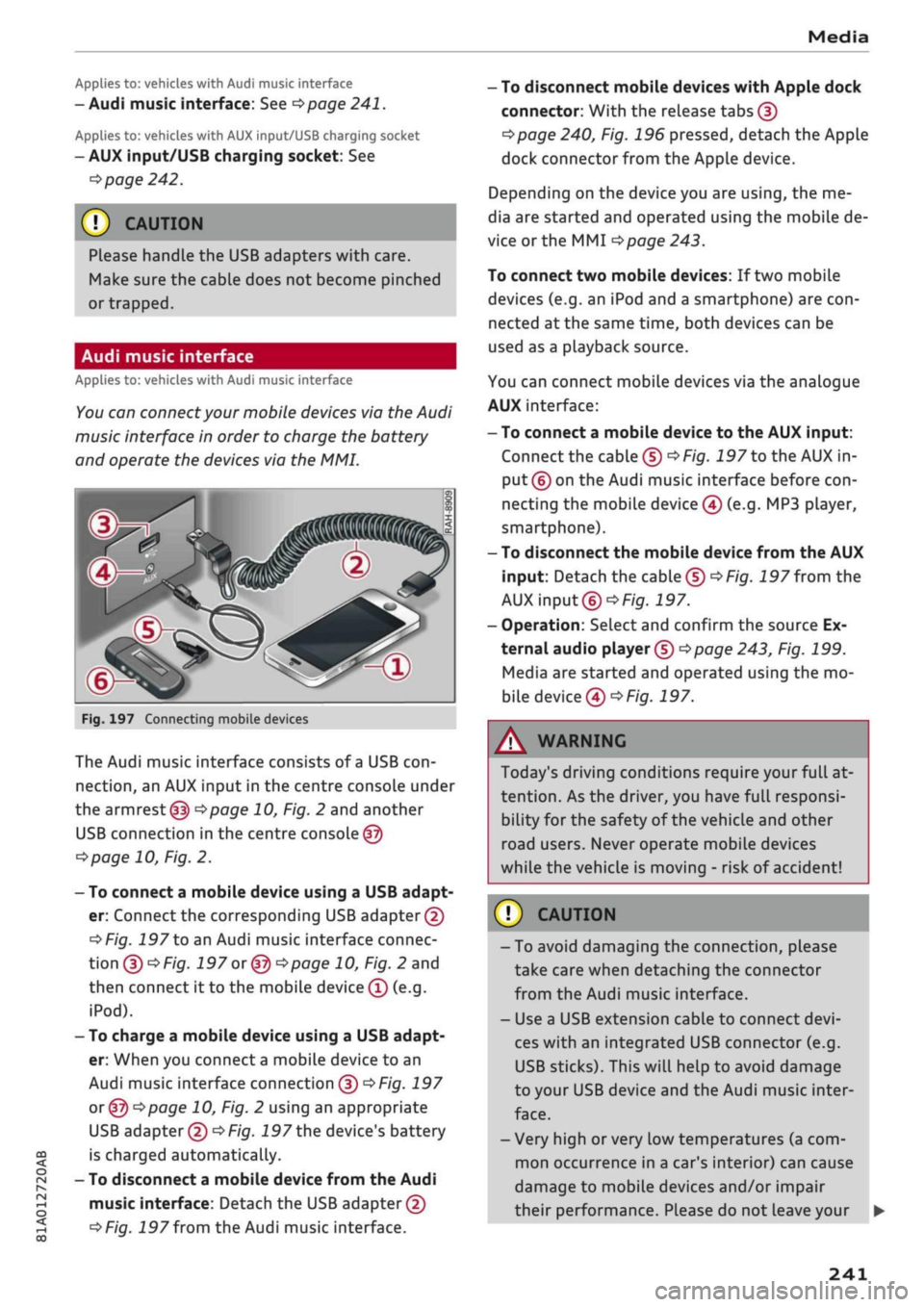
Fig.
197 Connecting mobile devices
The Audi music interface consists of
a
USB
con
nection,
an AUX input in the centre console under
the
armrest (f|) ^>page
10, Fig. 2 and another
USB connection in the centre console
©
<=>page
10, Fig. 2.
- To connect a mobile device using a USB adapt
er: Connect the corresponding USB adapter©
^>Fig.
197 to an Audi music interface connec
tion
©^F/'g.
197 or @ •=>page
10, Fig. 2 and
then connect it to the mobile device ® (e.g.
iPod).
- To charge a mobile device using a USB adapt
er: When you connect
a
mobile device to an
Audi music interface connection @
^>Fig.
197
or ©o
page 10, Fig. 2 using an appropriate
USB adapter ©
•=>
Fig.
197 the device's battery
is charged automatically.
- To disconnect a mobile device from the Audi
music interface: Detach the USB adapter©
^>Fig.
197
from
the Audi music interface.
-
To
disconnect mobile devices with Apple dock
connector: With the release tabs ©
^>page
240, Fig. 196 pressed, detach the Apple
dock connector from the Apple device.
Depending on the device you are using, the me
dia are started and operated using the mobile de
vice or the MMI
^page
243.
To connect two mobile devices: If two mobile
devices (e.g. an iPod and a smartphone) are
con
nected at the same time, both devices can be
used as a pLayback source.
You can connect mobile devices via the analogue
AUX interface:
-
To
connect a mobile device to the AUX input:
Connect the cable ©
^Fig.
197 to the AUX in
put © on the Audi music interface before
con
necting the mobile device
©
(e.g. MP3 player,
smartphone).
- To disconnect the mobile device from the AUX
input: Detach the cable©
^Fig.
197
from
the
AUX input©
^Fig.
197.
- Operation: Select and confirm the source Ex
ternal audio player ©
Opage
243, Fig. 199.
Media are started and operated using the mo
bile device©
^F/'g.
197.
A WARNING
Today's driving conditions require your full at
tention.
As the driver, you have full responsi
bility for the safety of the vehicle and other
road users. Never operate mobile devices
while the vehicle is moving - risk of accident!
©
!)
CAUTION
-To avoid damaging the connection, please
take care when detaching the connector
from the Audi music interface.
- Use a USB extension cable to connect
devi
ces with an integrated USB connector (e.g.
USB sticks). This will heLp to avoid damage
to your USB device and the Audi music inter
face.
- Very high or very Low temperatures (a com
mon occurrence in a car's interior) can cause
damage to mobile devices and/or impair
their performance. Please do not leave your •
241
Page 247 of 364
Media
CO
<
o
rN
IV
rN
i—i
o
<
•H
00
- To charge a mobile device using
a
USB adapt
er: Connect your mobile device®
^>Fig.
198
to
the charging socket® using
the
appropriate
USB adapter©.
- To disconnect
the
USB adapter from
the
charging socket: Detach
the
USB adapter©
^Fig.
198
from
the
USB charging socket.
- To disconnect mobile devices with Apple dock
connector: With
the
release tabs
©
^>page
240,
Fig.
196
pressed, detach
the
Apple
dock connector from
the
Apple device.
A WARNING
Today's driving conditions require your full
at
tention.
As
the
driver, you have full responsi
bility
for
the
safety
of
the vehicle
and
other
road users. Never use mobile devices while
the vehicle
is
moving
-
risk
of
accident!
!
)
CAUTION
-To avoid damaging
the
connection
on the
Audi music interface, please take care when
unplugging
the
connector from
the
AUX
in
put
or the
USB charging socket.
- Very high
or
very
low
temperatures
(a
com
mon occurrence
in a
car's interior)
can
cause
damage
to
mobile devices and/or impair
their performance. Please
do not
leave your
mobile devices
in the
vehicle when
the
tem
perature
is
very high
or
very
low.
© Note
- When you switch
off
the ignition,
the
USB
ports will continue
to be
supplied with pow
er as Long as
the
energy management sys
tem does
not
intervene.
- USB charging sockets marked
ICHARGEONLYI
cannot transfer data
and
are intended
for
charging only.
-
Do not
use
any
additional USB extension
ca
bles
or
adapters when connecting mobile
devices which must
be
connected
to the USB
charging
socket
©^F/g.
198
via
a USB
adapter
(^>page
240);
this could cause per
formance issues.
- The AUX adapter cable
is
available from
Audi dealers
or
specialist retailers.
- USB hubs
are not
supported.
- Please refer
to the
operating instructions
of
your mobile device
for
important informa
tion
on its
operation.
-
It
cannot
be
guaranteed that
all
mobile
de
vices will function without
any
problems.
- Using
a
mobile device with
the
engine
switched
off
will drain
the
vehicle's battery.
- Audi recommends setting
the
volume
of
a
mobile device connected
to the
AUX input
to
about
70 % of
maximum.
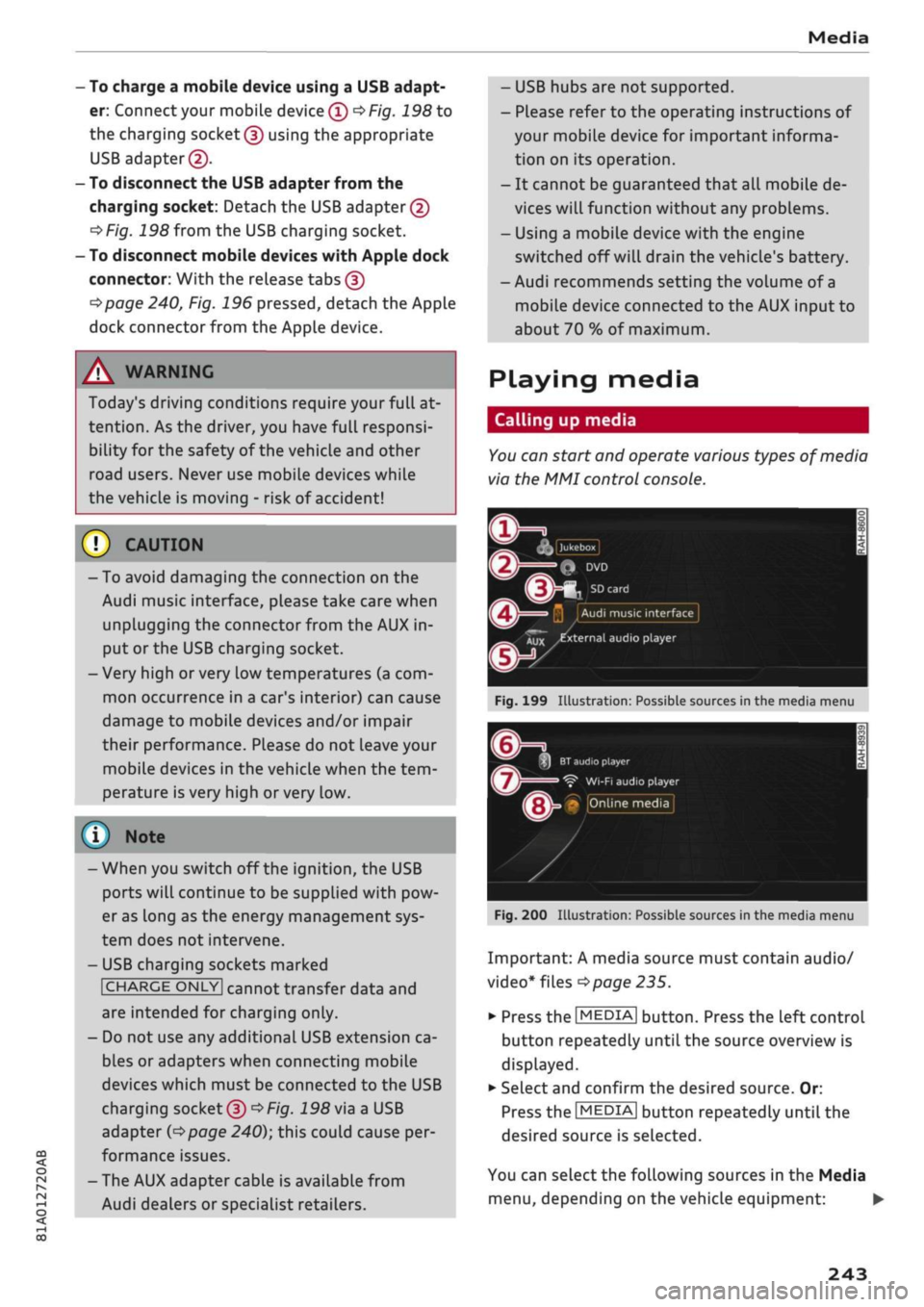
Playing media
Calling
up
media
You
can start
and
operate various types
of
media
via
the MMI
control console.
| Jukebox
I
Q
DVD
Audi
music interface
Xux
^external
audio player
Fig.
199
Illustration:
Possible sources
in the
media menu
3H
BT
audio
playe
Ç"
WI-FI
audio player
• Online media
Fig.
200
Illustration:
Possible sources
in the
media menu
Important:
A
media source must contain audio/
video*
files
^>page
235.
*•
Press
the
I
MEDIA|
button. Press
the
left control
button repeatedly until
the
source overview
is
displayed.
•
Select and confirm
the
desired source.
Or:
Press
the|MEDIA|
button repeatedly until
the
desired source
is
selected.
You
can
select
the
following sources
in the
Media
menu,
depending
on the
vehicle equipment:
•
243
Page 267 of 364
Safe driving
Safe driving
General notes
Safety is the first priority
The safety features in your vehicle are harmon
ised to provide you and your passengers with the
best possible protection in accident situations.
However, they can only be effective if you and
your passengers sit in the correct position and
adjust and use the safety equipment properly.
For these reasons, this chapter explains why
these safety features are so important, how they
can protect you, what you need to remember
when using them, and
how
you and your passen
gers can gain the most benefit from them. There
are also a number of important safety warnings
which you and your passengers should always ob
serve in order to minimise the risk of injury.
WARNING
- The information in this chapter is important
for the driver of the vehicle and all passen
gers.
The other chapters in this manual
(and,
where applicable, in the other litera
ture supplied with the vehicle) contain fur
ther important notes which you should read
and observe for your own safety and that of
your passengers.
- Ensure that the complete vehicle wallet is
always in the vehicle. This is especially im
portant when you lend or sell the vehicle to
others.
CO
<
O
rN
iv
rN
i—i
o < 00
Before every trip
The driver is responsible for the safety of the
passengers and the safe operation of the vehicle
at all times.
For
your own safety and the safety of your pas
sengers, always note the following points before
every trip:
•
Make sure that all lights and turn signals are
working properly.
•
Check the tyre pressures.
•
Make sure that all windows are clean and give
good visibility to the outside.
•
Secure all luggage and other items carefully
•=>
page 272.
• Make sure that no objects can interfere with
the pedals.
•
Adjust the front seat, head restraint and mir
rors correctly.
• Applies to: adjustable head restraints: Make
sure that the front passenger's head restraint is
adjusted to the correct position.
• Applies to: adjustable head restraints: Make
sure that the head restraints for the rear pas
sengers are in the fully raised position.
•
Make sure that children are protected with suit
able safety seats and properly worn seat belts
•=>
page 267.
•
Sit in the correct position in your seat. Make
sure
that
your passengers are sitting in the cor
rect positions
^>page
58.
•
Fasten your seat belt correctly. Make sure that
your passengers do the same
^page
275.
What factors can impair your safety?
Safety on the road is directly related to
how
you
drive, and can also be affected by the passengers
in the vehicle.
• The driver is responsible for the safety of the
vehicle and all its occupants. If your ability to
drive is impaired in any way, you endanger
yourself and other road users
,=>^.
Therefore:
• Do not let yourself be distracted by passengers
or by using a mobile phone, etc.
•
Never drive when your driving ability is im
paired (by medication, alcohol, drugs, etc.).
• Obey all traffic regulations and speed limits
and always maintain a safe distance to the
vehi
cle in front.
•
Always adjust your speed to suit the
road,
traf
fic and weather conditions.
•
Take frequent breaks on long trips. Do not drive
for more than two hours without a stop.
•
If possible, avoid driving when you are tired or
stressed.
•
263
Page 280 of 364
Seat belts
- Do not wear the belt over hard or fragile ob
jects (such as glasses or pens, etc.) because
this can cause injuries.
- Loose, bulky clothing (such as an overcoat
over
a
jacket) impairs the proper fit and
function of the belts.
- The belts must be kept clean, otherwise the
retractors may not work properly
•=>
tab. Cleaning the interior on page 314.
- The slot in the seat belt buckle must not be
blocked with paper or other objects, as this
can prevent the latch plate from engaging
properly.
-The latch plate of the belt must always be
engaged in the correct buckle for that seat,
otherwise the belt will not be fully effective.
- Check the condition of the seat beLts at
reg
ular intervals. If
you
notice that the belt
webbing,
fittings, retractor mechanism or
buckle of any of the belts is damaged, the
belt must be replaced by a qualified work
shop.
- The seat belts must not be removed or
modified in any way. Do not attempt to re
pair
a
damaged belt yourself.
- Seat belts which have been worn in an
acci
dent and stretched must be replaced by a
qualified workshop. The belt anchorages
should also be checked.
Forces acting in a
collision
The physical principles involved in a frontal
impact
Very
large forces are generated during a
colli
sion; these forces have to be absorbed.
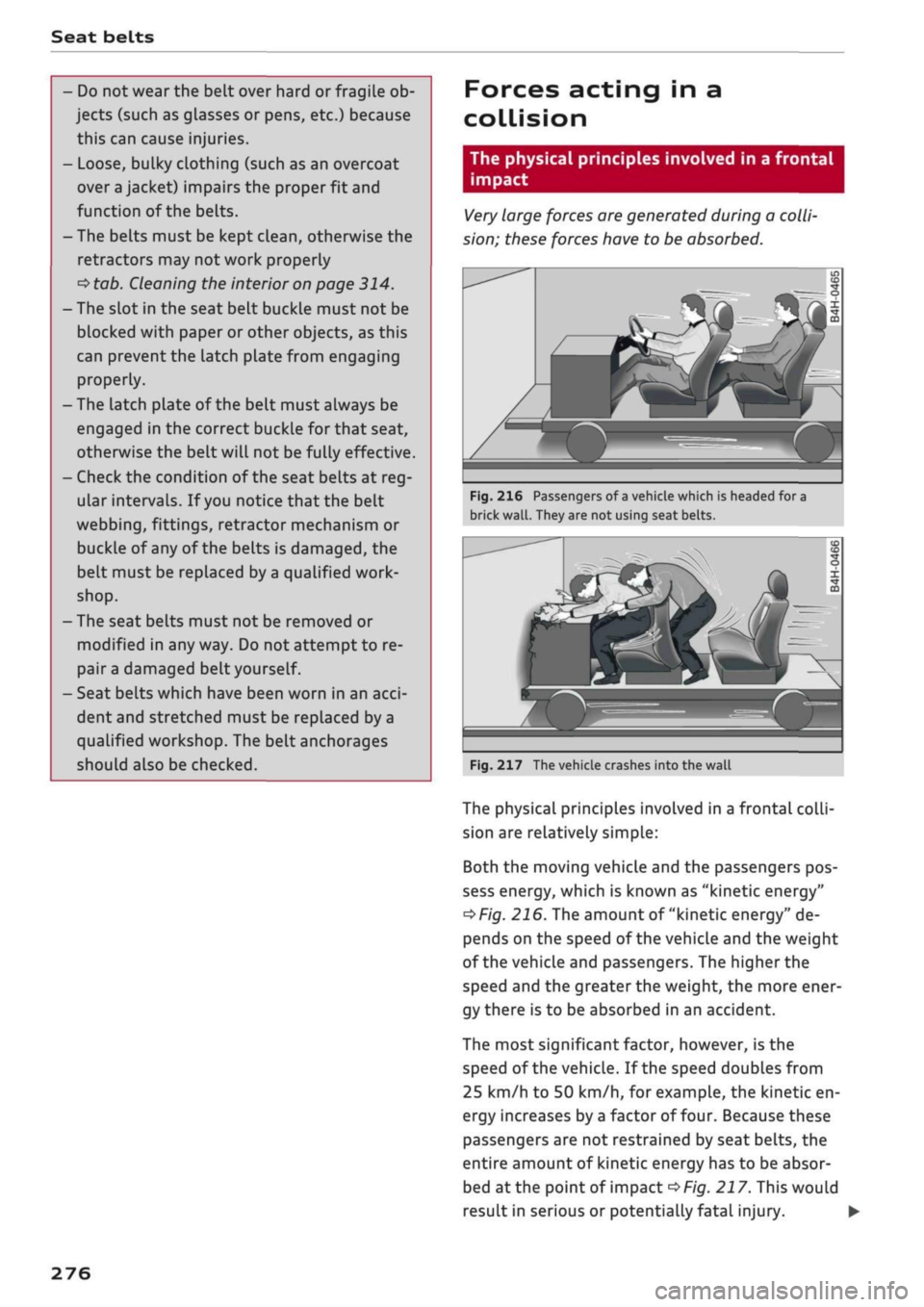
Fig.
216 Passengers of
a
vehicle which is headed for a
brick
wall.
They are not using seat belts.
Fig.
217 The vehicle crashes into the wall
The physical principles involved in a frontal
colli
sion are relatively simple:
Both the moving vehicle and the passengers pos
sess energy, which is known as "kinetic energy"
^>Fig.
216. The amount of "kinetic energy" de
pends on the speed of the vehicle and the weight
of the vehicle and passengers. The higher the
speed and the greater the weight, the more ener
gy there is to be absorbed in an accident.
The most significant factor, however,
is
the
speed of the vehicle. If the speed doubles from
25 km/h to 50 km/h, for example, the kinetic en
ergy increases by
a
factor of four. Because these
passengers are not restrained by seat belts, the
entire amount of kinetic energy has to be absor
bed
at
the point of impact
^>Fig.
217. This would
result in serious or potentially fatal injury.
276
Page 287 of 364
Airbag system
Description of front airbags How the
front
airbags work
CO
â
rN
IV
rN
•-i
§
•H
00
The
airbag system is not a substitute for the seat
belts.
When fully inflated, the airbags reduce the risk
of head or chest
injury.
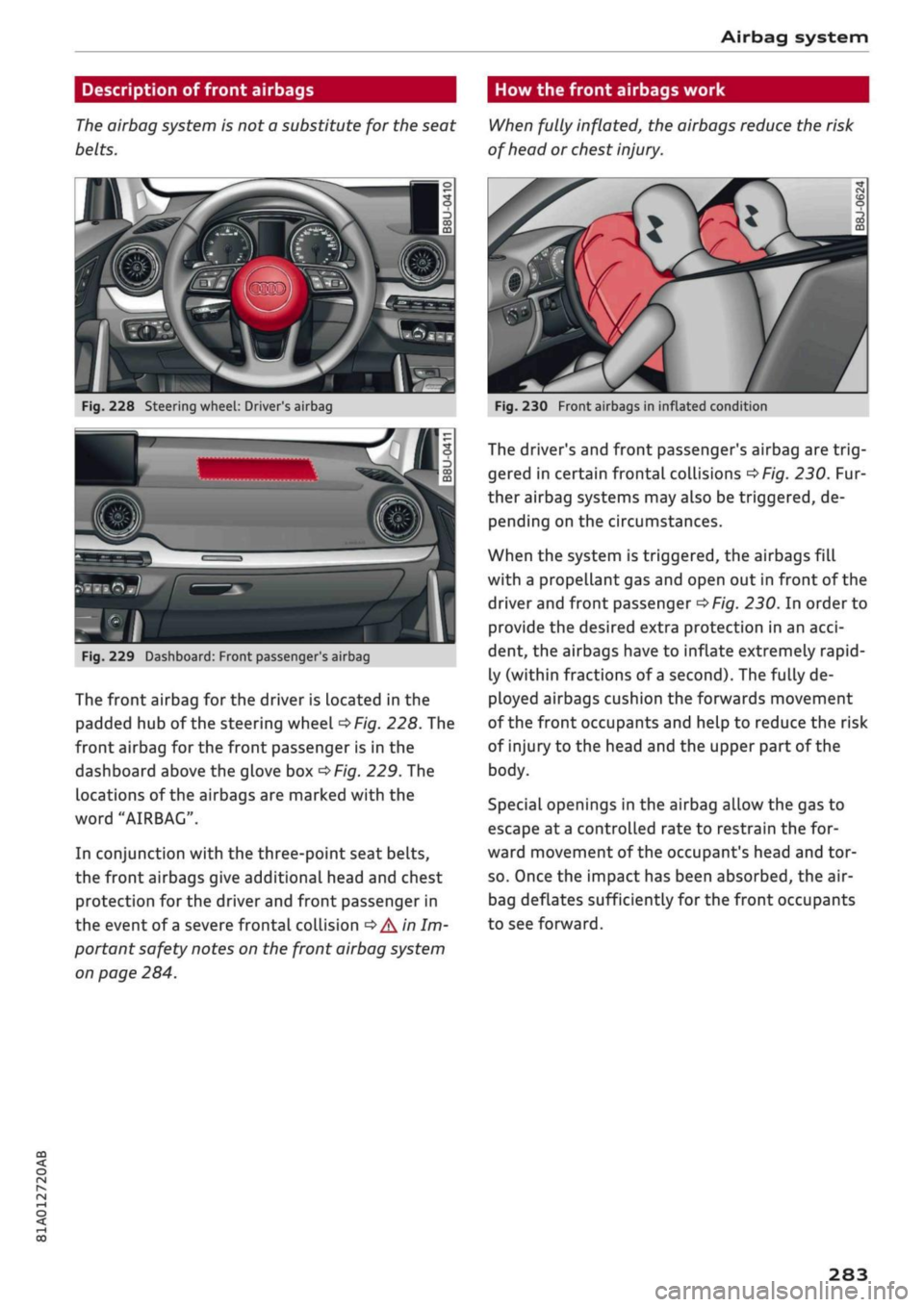
Fig.
228 Steering wheel: Driver's airbag
SiMlP
Fig.
229 Dashboard: Front passenger
s
airbag
The front airbag for the driver is Located in the
padded hub of the steering wheel
^Fig.
228. The
front airbag for the front passenger is in the
dashboard above the glove box
^Fig.
229. The
locations of the airbags are marked with the
word "AIRBAG".
In conjunction with the three-point seat belts,
the front airbags give additional head and chest
protection for the driver and front passenger in
the event of
a
severe frontal collision
•=>
A'n
Im
portant safety notes on the front airbag system
on page 284.
Fig.
230 Front airbags in inflated condition
The driver's and front passenger's airbag are
trig
gered in certain frontal collisions
^>Fig.
230. Fur
ther airbag systems may also be triggered, de
pending on the circumstances.
When the system is triggered, the airbags fill
with a propellant gas and open out in front of the
driver and front passenger
^>Fig.
230. In order to
provide the desired extra protection in an
acci
dent, the airbags have to inflate extremely rapid
ly (within fractions of
a
second). The fully de
ployed airbags cushion the forwards movement
of the front occupants and help to reduce the risk
of injury to the head and the upper part of the
body.
Special openings in the airbag allow the gas to
escape at
a
controlled rate to restrain the for
ward movement of the occupant's head and tor
so.
Once the impact has been absorbed, the air-
bag deflates sufficiently for the front occupants
to see forward.
283
Page 289 of 364

Airbag system
CO
< o rN
iv
rN
•-i
•H
00
Side airbags
Description of side airbags
The
airbag system is not a substitute for the seat
belts.
Fig.
232 Side airbags: Location in driver's seat (example)
The side airbags are located in the backrest
pad
ding of the front seats.
In conjunction with the three-point seat belts,
the side airbags give the occupants additional
protection for the whole upper part of the body
(i.e.
the chest, stomach and pelvis) in the event
of
a
severe side collision
•=> A
in Important safety
notes on the side airbag system on page 285.
In a side collision the side airbags reduce the risk
of injury to the areas of the body facing the im
pact.
How the side airbags work
When fully inflated, the side airbags reduce the
risk of injuries to the upper part of the
body.
Fig.
233 Side airbags in inflated condition
In certain types of side collision, the side airbag
(front) is triggered on the impact side of the
vehi
cle
^Fig.
233. Further airbag systems may also
be triggered, depending on the circumstances.
When the system is triggered, the airbag is filled
with propellant gas.
In order to provide the desired extra protection in
an accident, the airbags have to inflate extremely
rapidly (within fractions of
a
second).
The fully deployed airbags cushion the impact for
the occupants and help to reduce the risk of in
jury to the upper part of the body on the side fac
ing the door.
Important safety notes on the side airbag
system
There
are a number of safety points concerning
the airbag system which you should remember.
This will help to reduce the risk of injury in an ac
cident.
WARNING
-If
you
do
not
wear
a
seat belt, if
you
Lean
forward,
or are not seated correctly while
the vehicle is in motion, you are at greater
risk of injury should the side airbags be
trig
gered in an accident. This applies particular
ly to children if they are not properly protec
ted by
a
child restraint system.
- If children are not seated correctly, they are
at greater risk of injury should the airbag
system be triggered in an accident. This is
particularly the case if the child is travelling
on the front passenger's seat and the airbag
system is triggered in an accident. This
could result in serious or potentially fatal in
jury
^>page
267, Child seats.
- It is important not to attach any accessories
(such as cup holders) to the doors. This
would impair the protection offered by the
front side airbags.
- The sensors for the airbags are located in
the front doors. You must therefore not
make any modifications to the doors or door
trim (e.g. retrofitting loudspeakers),
as
this
could impair the function of the side air-
bags.
Any damage to the front doors could
285
Page 290 of 364
Airbag system
lead to faults in the system. Repairs or any
other work on the front doors must there
fore always be carried out by
a
qualified
workshop.
- The built-in coat hooks* should only be used
for lightweight clothing. Do not leave any
heavy or sharp-edged objects in the pockets.
- Do not apply excessive force to the sides of
the backrests (such as hard knocks or kicks),
as this could damage parts of the system.
The side airbags could then fail to operate
when required.
- If
you
intend to fit protective covers over
the seats, these must be of the specific type
approved for use on Audi seats with side air-
bags.
Conventional seat covers would ob
struct the side airbag when it inflates out of
the backrest, and seriously reduce the air-
bag's effectiveness.
- Any damage to the original seat upholstery
or around the seams of the side airbag units
must be repaired immediately by a qualified
workshop.
- Any work involving the side airbag system or
removal and installation of the airbag com
ponents for other repairs (such as repairs to
the seats) must always be performed by a
qualified workshop. Otherwise the airbag
system may fail to work properly.
© Note
All the other airbags in the car will remain
functional if the front passenger's airbag has
been deactivated.
Head-protection airbags
Description of head-protection airbags
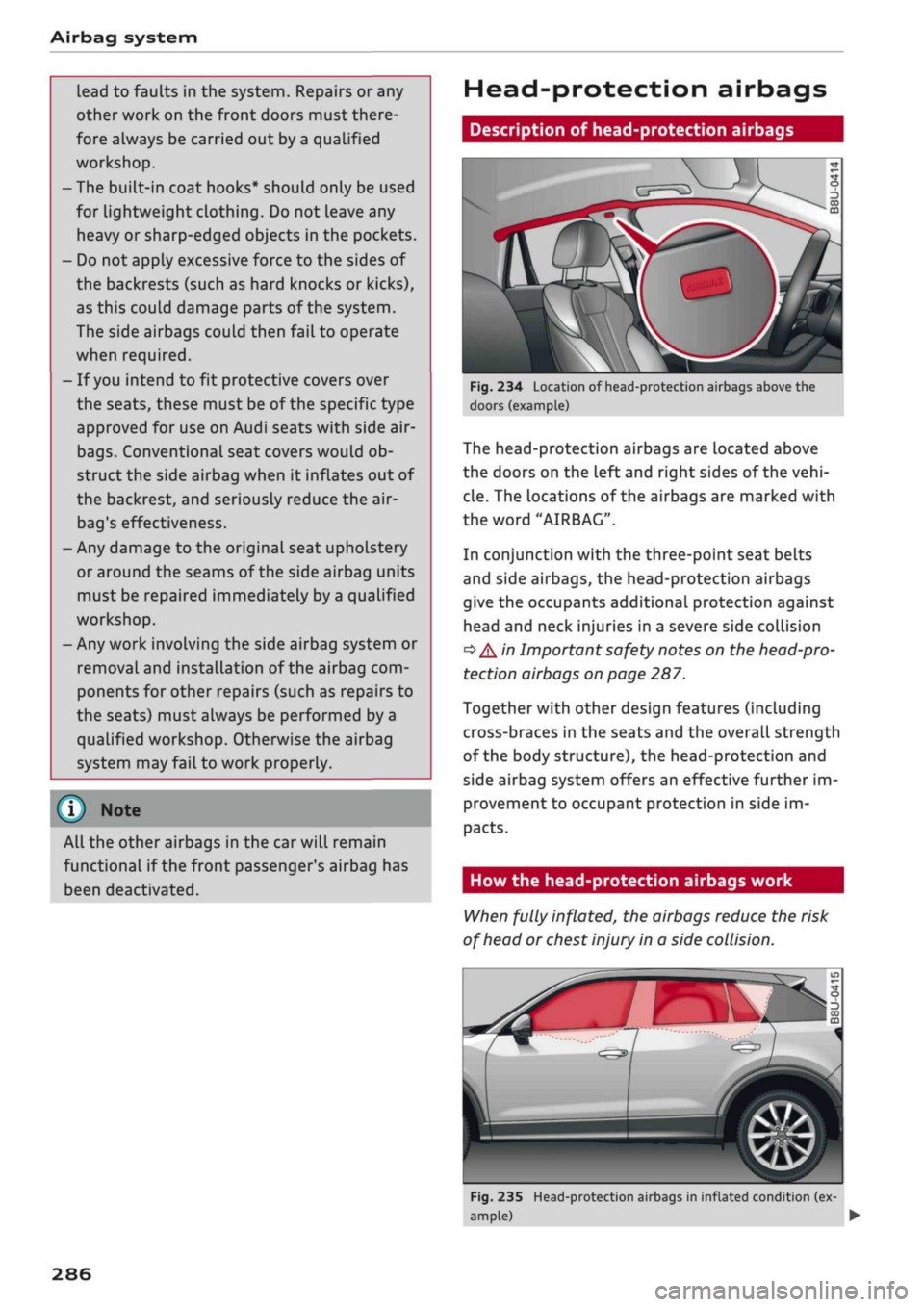
Fig.
234 Location of head-protection airbags above the
doors (example)
The head-protection airbags are located above
the doors on the left and right sides of the
vehi
cle.
The locations of the airbags are marked with
the word "AIRBAG".
In conjunction with the three-point seat belts
and side airbags, the head-protection airbags
give the occupants additional protection against
head and neck injuries in a severe side collision
•=>
A in Important safety notes on the head-pro
tection airbags on page 287.
Together with other design features (including
cross-braces in the seats and the overall strength
of the body structure), the head-protection and
side airbag system offers an effective further im
provement to occupant protection in side im
pacts.
How the head-protection airbags work
When fully inflated, the airbags reduce the risk
of head or chest injury in a side collision.
jfW
Fig.
235 Head-protection airbags in inflated condition (ex
ample) •
286