infotainment AUDI Q2 2021 Owner´s Manual
[x] Cancel search | Manufacturer: AUDI, Model Year: 2021, Model line: Q2, Model: AUDI Q2 2021Pages: 364, PDF Size: 87.77 MB
Page 41 of 364
Doors and windows
® For the sake of the environment
CO
<
O
rN
iv
rN
i—i
o < 00
Used batteries must be disposed of appropri
ately and must not be discarded with ordinary
household waste.
Note
The new battery must be of the same type as
the original one in the remote control key.
Re-synchronising the remote control key
If the remote control key fails to lock/unlock the
vehicle, it will be necessary to re-synchronise the
system.
•
Press
thed]
button on the remote control.
•
Unlock the driver's door within 30 seconds by
turning the key in the lock
^>page
41.
*•
Press
button [a] or
[â].
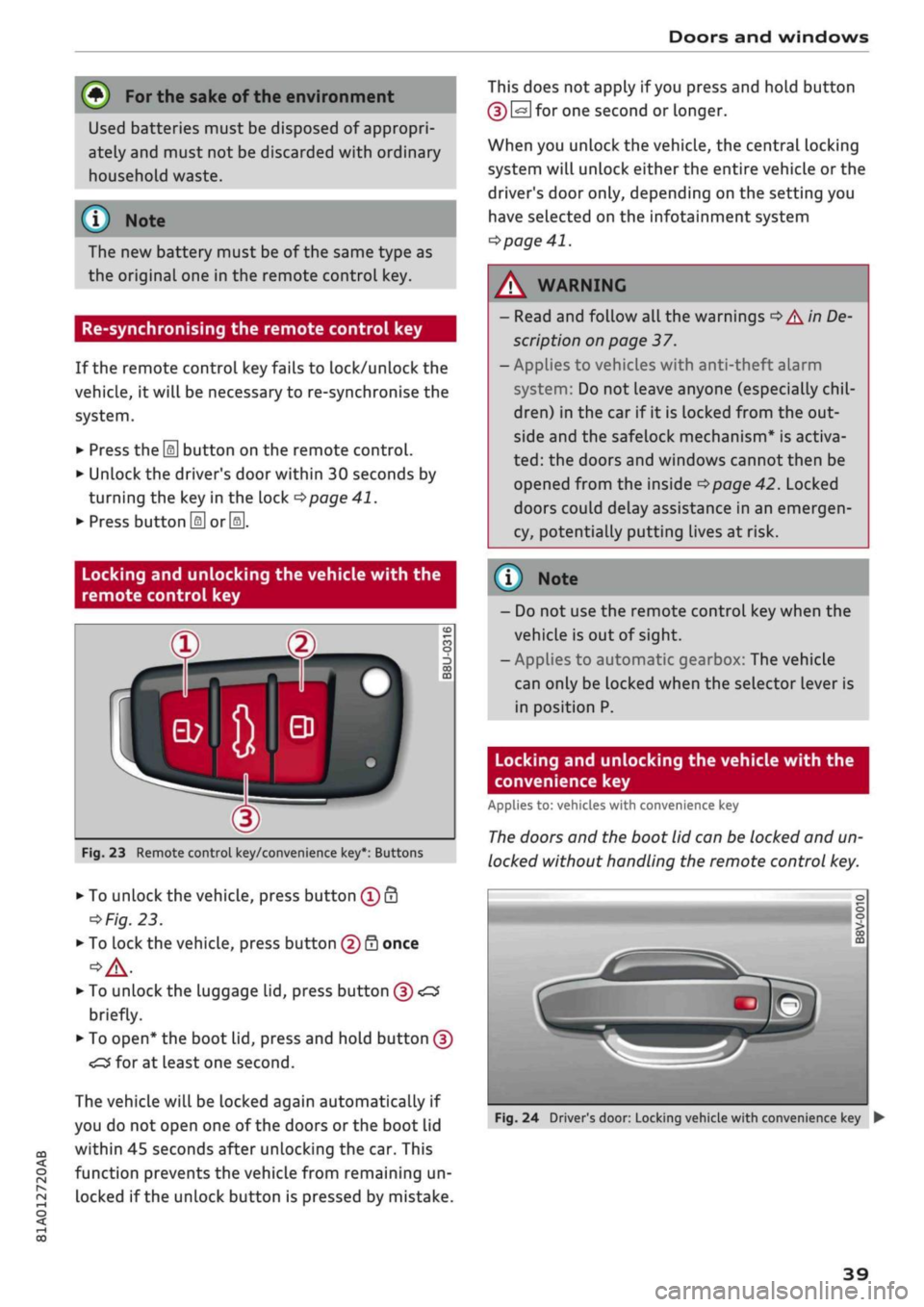
Locking and unlocking the vehicle with the
remote control key
Fig.
23 Remote control key/convenience key*: Buttons
•
To unlock the vehicle, press button
® â
o
Fig.
23.
•
To lock the vehicle, press button
(f)
0 once
•
To unlock the luggage lid, press button (5)
•£$
briefly.
•
To open* the boot lid, press and hold button (J)
The vehicle will be locked again automatically if
you do not open one of the doors or the boot lid
within 45 seconds after unlocking the car. This
function prevents the vehicle from remaining un
locked if the unlock button is pressed by mistake.
This does not apply if
you
press and hold button
(D
@
for one second or longer.
When you unlock the vehicle, the central locking
system will unlock either the entire vehicle or the
driver's door only, depending on the setting you
have selected on the infotainment system
•=>
page 41.
WARNING
- Read and follow
all
the warnings
•=>
A'n
De-
scription
on page 37.
- Applies to vehicles with anti-theft alarm
system:
Do not leave anyone (especially
chil
dren) in the car if it is locked from the out
side and the safelock mechanism* is activa
ted:
the doors and windows cannot then be
opened from the inside
<=>page
42. Locked
doors could delay assistance in an emergen
cy, potentially putting lives at risk.
(T)
Note
- Do not use the remote
vehicle is out of sight.
- Applies to automatic g
control key
earbox: The
when the
vehicle
can only be locked when the selector lever is
in position P.
Locking and unlocking the vehicle with the
convenience key
Applies to: vehicles with convenience key
The
doors and the boot lid can be locked and un
locked without handling the remote control key.
Fig.
24 Driver's door: Locking vehicle with convenience key •
39
Page 42 of 364
Doors and windows
Unlocking the vehicle
•
Take hold of the driver's/front passenger's door
handle. The
door
will be unlocked automatical-
iy-
•
To open the door, pull the door handle.
Locking the vehicle
• Automatic gearbox: Move the selector lever to
position P; otherwise it will not be possible to
lock the vehicle.
•
To lock the vehicle, close the door and touch
the sensor on the door handle once
^>Fig.
24,
•=>
A.-
Do
not
take hold of the door handle
while doing so.
The vehicle can be locked/unlocked from the
front doors only. The remote control key should
be within a range of about 1.5 metres from the
door handle. It does not matter where you carry
the key, for instance whether it is in your jacket
pocket or in a handbag or briefcase.
The Locking function may be affected if
you
grasp
the door handle while the vehicle is being locked.
Once the doors have been locked, they cannot be
opened again immediately. This will enable you
to check that the driver's door is properly closed.
The system will unlock either all the doors or only
one of the doors, depending on the settings you
have chosen on the infotainment system
•=>
page 41.
A\
WARNING
- Read and follow all the warnings
<=>
A
in
De
scription on page 37.
- Applies to vehicles with anti-theft alarm
system:
Do not leave anyone (especially
chil
dren) in the car if it is locked from the out
side and the safelock mechanism* is activa
ted:
the doors and windows cannot then be
opened from the inside
opage
42. Locked
doors could delay assistance in an emergen
cy, potentially putting lives at risk.
® Note
•
To save electrical power, the proximity
sen
sors are switched off after
a
few days. You
will then need to pull the door handle once
to unlock the vehicle, and a second time to
open it.
•
To prevent the vehicle battery from becom
ing discharged and thus maintain the
vehi
cle's starting ability for as long as possible,
the power management system will gradu
ally switch off convenience functions that
are not required. In this case you may not
be able to unlock the vehicle with this
con
venience function.
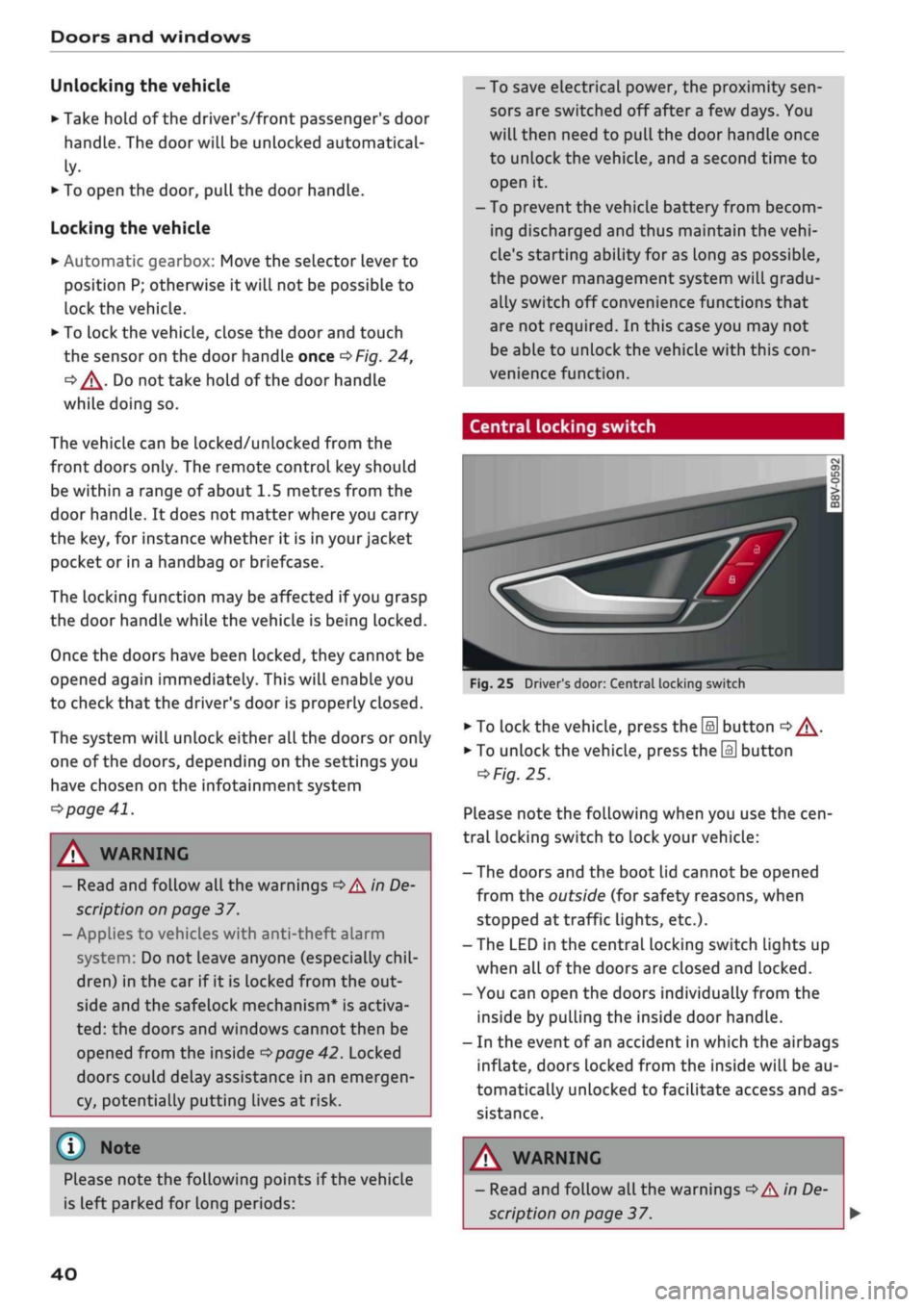
Central locking switch
Fig.
25 Driver's door: Central locking switch
•
To lock the vehicle, press the [a] button
o A-
•
To unlock the vehicle, press the
M
button
=>
Fig.
25.
Please note the following when you use the
cen
tral locking switch to lock your vehicle:
- The doors and the boot lid cannot be opened
from the outside (for safety reasons, when
stopped at traffic lights, etc.).
- The LED in the central locking switch Lights up
when all of the doors are closed and locked.
- You can open the doors individually from the
inside by pulling the inside door handLe.
- In the event of an accident in which the airbags
inflate,
doors Locked from the inside will be au
tomatically unlocked to facilitate access and as
sistance.
Please note the following points if the vehicle
is left parked for long periods:
A WARNING
- Read and follow all the warnings
•=>
A in De
scription on page 37.
40
Page 43 of 364

Doors and windows
CO
s
rN
rN
t-H
o <
- The central locking switch is still operative
when the ignition is switched off and will
automatically lock the entire vehicle when
the [H
button is pressed.
-The central locking switch inside the vehicle
is not operative if
you
lock the vehicle from
the outside.
© Not
The doors and the boot lid are Locked auto
matically when the vehicle reaches a speed of
about 15 km/h (Auto Lock)
^>page
37. You
can unlock the vehicle again via the
â
button
in the central locking switch.
Adjusting the settings for the central
locking
system
You
can use the infotainment system to select
which functions are controlled via the central
locking system.
•
Select the following on the infotainment sys
tem:
|MENU|
button > Car
>
left control button
> Vehicle settings > Central locking.
Doors to unlock - You can select whether all
doors or only the driver's door are unlocked by
the central locking system. The boot lid will also
be unlocked if
you
select all. If
you
select driver's
door on vehicles with convenience key*, only one
door will be unlocked (whichever door you grip by
the handle).
When the driver's door setting is activated, you
can still unlock all the doors and the boot lid by
pressing the
M
button on the remote control key
twice.
Long press to open windows - The convenience
open/close function can be activated/deactivated
•=>
page 47.
Lock when
driving^
- If
you
activate this func
tion,
the whole vehicle is Locked automatically
when you are driving.
Fold mirrors* - If
you
activate this function, the
exterior mirrors are folded in automatically when
the vehicle is Locked.
Locking and unlocking the doors manually
Fig.
26 Driver's door lock
*m
@
Fig.
27 End face of (open) door: Locking manually
If the central locking system should fail to work,
the doors must be locked/unlocked separately.
Locking and unlocking the driver's door
• To unlock the driver's door, turn the key to the
unlock position
(T)
^>Fig.
26
<>(J).
•
To lock the driver's door, move the selector lev
er to position
P
(automatic gearbox) and turn
the key to the Lock position (2) once
•=>
A.-
Applies to vehicles with anti-theft alarm system:
Switch on the ignition or press the
\M
button on
the remote control key after opening the driver's
door. Otherwise the alarm will be triggered.
The system will unlock either all the doors or only
one of the doors, depending on the settings you
have chosen on the infotainment system
•=>
page 41. •
1J
This function is not available on all export versions.
41
Page 53 of 364
Lights and vision
CO
<
O
rN rN
•-i
00
• Press the lever forwards (3)
^>page
50,
Fig. 38
to activate the main beam assist. The indicator
lamp
^/fi8
will light up in the instrument
cluster display and the main beams will be
switched on/off automatically. An indicator
lampBS
lights up when the main beams are
switched on.
Switching the main beams on/off manually
If the main beams are not switched on or if the
headlights are not dipped as expected, you can
control the dip function manually:
• To switch on the main beams manually, push
the lever forwards
(3).
The indicator Lamp
g
will
Light
up. To dip the headlights again, pull
the lever towards you 0.
• To dip the headlights manually, pull the lever
towards you
@.
The main beam assist will be
deactivated.
Flashing the headlights
• Pull the lever towards you
@
to flash the
head
lights when the main beam assist is activated
and the main beams are dipped. The main
beam assist will remain activated.
Driver messages in the instrument cluster
display
13
Main beam assist: system fault!
1H
Main beam assist: fault. See owner's manual
Drive to a qualified workshop soon and have the
fault rectified. You can still switch the main
beam headlights on and off manually.
13
Main beam assist: currently unavailable. No
camera view
HI
Main beam assist: currently unavailable.
Camera view restricted due to surroundings.
See owner's manual
The camera vision is impaired, e.g. by stickers or
dirt. Please clean the windscreen.
The sensor is located in the mounting for the in
terior mirror. Do not affix any stickers on this sec
tion of the windscreen.
A WARNING
The main beam assist is only intended to as
sist the driver. The driver must always ensure
that the headlights are used when required,
and may have to switch them on or off
man
ually, e.g. when the Light conditions or visibili
ty are poor. In the following situations
man
ual intervention may be necessary:
- Hazardous weather conditions such as fog,
heavy rain and snow or water splashes
- Roads on which oncoming traffic is partially
concealed (e.g. on motorways)
- Indiscernible road users (e.g. cyclists with
poor lighting)
- Tight corners, steep hill crests or valleys
- Poorly lit towns
- Highly reflective objects, such as road signs
-Windscreen misted up, dirty, frosted or cov
ered by stickers in front of the sensor
Adjusting the settings for the exterior
lighting
You
can change the settings for these functions
on the infotainment system.
• Select the following on the infotainment sys
tem:
IMENUI
button > Car
>
left control button
> Vehicle settings > Exterior lighting.
Automatic headlights*
The following settings are available in the Auto
matic headlights menu:
Activation time* - You can determine how soon
the lights are switched on by using the settings
early*, medium* or late* to adjust the sensitivity
of the light sensor.
Main beam assist* - You can switch the main
beam assist* on/off.
Entry/exit
lights*
You can switch the entry/exit lights* on and off.
They illuminate the area around the vehicle after
dark when you unlock the vehicle or when the ig
nition has been switched off and the driver's door
opened.
•
51
Page 55 of 364
Lights and vision
CO
<
O
rN
iv
rN
i—i
o
< 00
Background lighting
Applies
to: vehicles with background lighting
The
background lighting can be adjusted via the
infotainment system.
• Select the following on the infotainment sys
tem:
|MENU| button > Car
>
left control button
> Vehicle settings > Background lighting.
It may be possible to adjust the brightness of the
individual zones, depending on the equipment
fitted in your vehicle:
• Press the right control button and select one of
the zones displayed.
The background lighting will be switched on
when you switch on the headlights with the
igni
tion on.
Instrument lighting
The
background lighting of the instruments and
displays (including the head-up display*) can be
adjusted as required.
Fig.
42 Instrument lighting
• Briefly press the knob to release it.
• Turn the knob towards "-" or "+" to reduce or in
crease the brightness of the lighting.
• Briefly press the knob again to engage it.
Depending on the vehicle equipment, the in
strument lighting (for dials and needLes) may
be switched on when the ignition is on and
the vehicle's lights are off. The illumination of
the dials and needles is automatically reduced
as it becomes dark outside and is eventually
switched off altogether. This function is in
tended to remind the driver to switch on the
dipped headlights in good time.
dear
vision
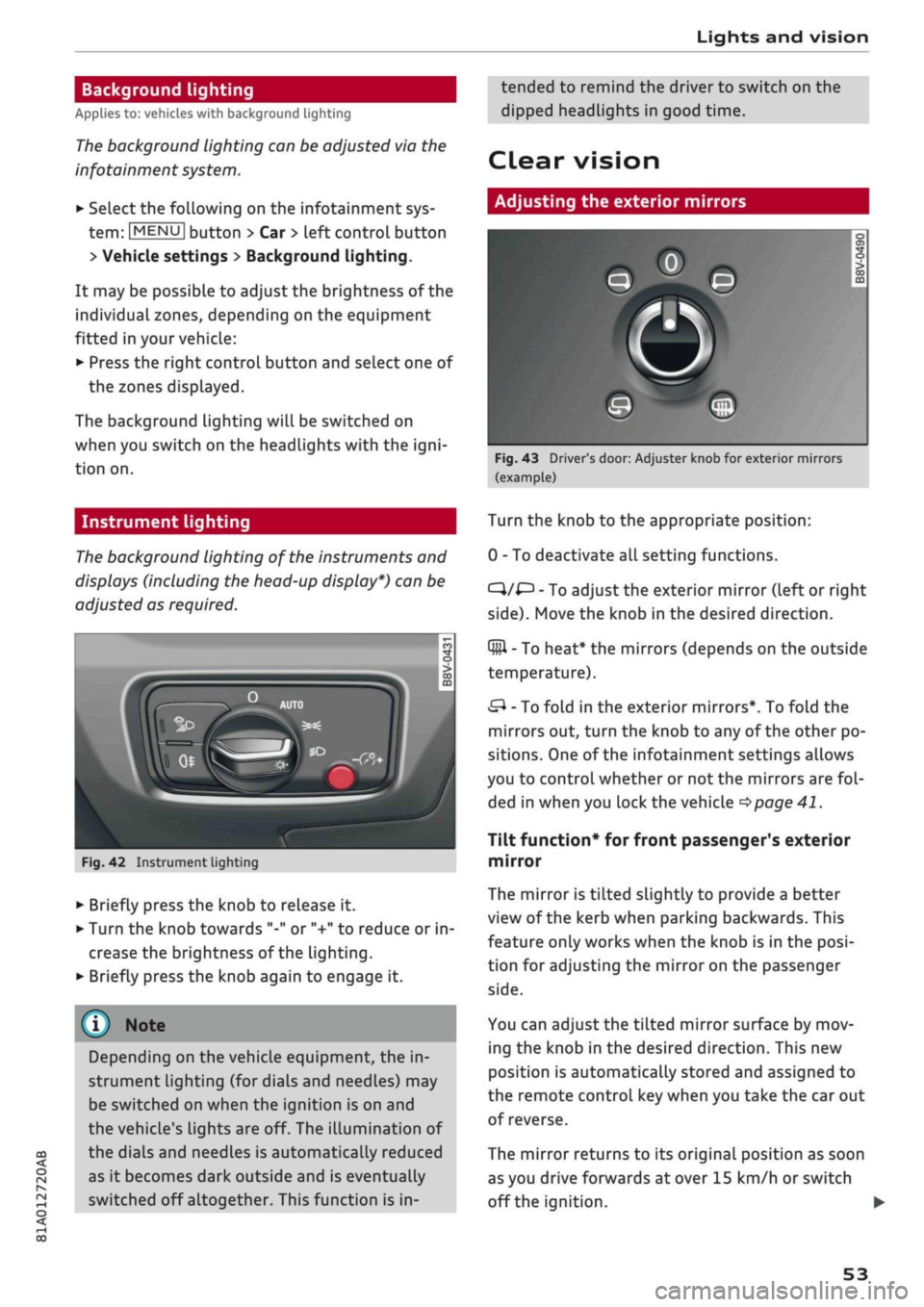
Adjusting the exterior mirrors
Fig.
43 Driver's door: Adjuster knob for exterior mirrors
(example)
Turn the knob to the appropriate position:
0 - To deactivate all setting functions.
C}/^
- To adjust the exterior mirror (left or right
side).
Move the knob in the desired direction.
Q#l
- To heat* the mirrors (depends on the outside
temperature).
&
- To fold in the exterior mirrors*. To fold the
mirrors out, turn the knob to any of the other po
sitions. One of the infotainment settings allows
you to control whether or not the mirrors are
fol
ded in when you lock the vehicle
•=>page
41.
Tilt function* for front passenger's exterior
mirror
The mirror is tiLted slightly to provide a better
view of the kerb when parking backwards. This
feature only works when the knob is in the
posi
tion for adjusting the mirror on the passenger
side.
You can adjust the tilted mirror surface by mov
ing the knob in the desired direction. This new
position is automatically stored and assigned to
the remote control key when you take the car out
of reverse.
The mirror returns to its original position as soon
as you drive forwards at over 15 km/h or switch
off the ignition. •
53
Page 57 of 364

Lights and vision
CO
<
o
rN
iv
rN
t-H
o
< 00
The light* for the make-up mirror comes on auto
matically when you slide open the mirror cover
©•
Windscreen wipers
Switching on the windscreen wipers
V
WJIO
*
Fig. 45
Windscreen
wiper
lever
m®
v
"trj-i
s
to
o > 03 m
Fig.
46 Control lever for rear wiper
Move the windscreen wiper lever to the appropri
ate position:
@-Wipers
off
(Î) - Intermittent wipe. Move switch
®
to the Left
or to the right to increase or reduce the wiper de
lay interval. If your vehicle is equipped with a rain
sensor*, the windscreen wipers will be activated
automatically in the rain as long as the vehicle
has been moving faster than approx. 4 km/h at
Least once. The higher the sensitivity level for the
rain sensor (i.e. the further switch
(Â)
is moved to
the right), the sooner the windscreen wipers re
act to moisture on the windscreen. You can deac
tivate the rain sensor mode on the infotainment
system (this will activate the intermittent wipe
mode). To do so, select: |MENU| button > Car >
left control button > Driver assist
>
Rain sensor.
@-
Slow wipe
(|)-
Fast
wipe
(?) - Single wipe. If
you
hold the lever in this
posi
tion,
the wipers will switch from slow continuous
wiping to fast continuous wiping after
a
while.
(D - Wash/wipe. The screen is given an extra wipe
a few seconds later to remove any dribbles of wa
ter (if the vehicle is moving and the temperature
is above approx. 4
°C).
You can deactivate this
function by moving the lever to position
(s)
again
within 10 seconds after the extra wipe. The ex
tra-wipe function is activated again the next time
you switch on the ignition.
Headlight washers*. The headlight washer sys
tem*
only operates when the dipped headlights
are switched on. The headlights are also auto
matically washed intermittently when you move
the lever to position
(s).
(?) - Rear wipe. The rear window is wiped approxi
mately every 6 seconds.
If the windscreen wipers are on and in operation,
the rear window wiper will also be switched on
automatically when you engage reverse gear.
©-
Rear wash/wipe. The number of wiper cycles
depends on how long you hold the Lever in
posi
tion©.
A WARNING
- The rain sensor* is only intended to assist
the driver. The driver is still obliged to
man
ually operate the windscreen wipers as re
quired depending on visibility.
- Do not use water-repellent coatings on the
windscreen. In bad visibility conditions such
as light
rain,
low sun or when driving at
night these coatings can cause increased
dazzle, which is a serious safety hazard.
Such coatings can aLso cause the wiper
blades to judder.
- Poor visibility can cause accidents. Always
ensure that the wiper blades are in good
condition
^>page
56, Changing the
wind
screen wiper blades.
55
Page 68 of 364
Heating and cooling
Heating and cooling
Heating system/air
conditioner
Description
One of the following systems may be fitted, de
pending on the equipment in your vehicle:
- Heating and ventilation system or
- Manual air conditioner* or
- Automatic air conditioner* (deluxe version)
The heating and ventilation system* heats and
ventilates the vehicle interior. The air condition
er* additionally cools and dehumidifies the air in
side the vehicle. It operates most effectively with
the windows and the panorama sun roof* closed.
If the vehicle has been standing in the sun, it may
cool down faster if
you
open the windows briefly
to let the hot air escape.
Pollution filter
The pollution filter removes impurities, such as
dust and pollen, from the air.
Key-coded settings
Various settings are stored and assigned to the
remote control key in use.
Default settings
Default settings for certain functions can be se
lected on the infotainment system.
SeLect the following on the infotainment system:
|MENU|
button
>
Car
>
left control button
>
A/C.
Supplementary heater*
Applies to: vehicles with diesel engine
The vehicle interior warms up more quickly with
the supplementary heater. The system automati
cally switches the supplementary heater on
tem
porarily as required, depending on the setting on
the vehicle heating system.
The supplementary heater function can be
switched on or off as required. SeLect the follow
ing on the infotainment system:
|MENU|
button >
Car
>
left control button
>
A/C
>
Auto supple
mentary heater.
® For the sake of the environment
I
- Switch off the cooling mode on the air
con
ditioner* by pressing the A/C button if you
wish to save
fuel.
This will also reduce emis
sions.
The LED in the button will go out
when the air conditioner is switched off.
- On vehicles with efficiency program*, you
can see how your fuel consumption is being
affected by auxiliary equipment and have
tips for improved fuel economy displayed
•=>
page 21.
- Applies to vehicles with diesel engine: The
automatic supplementary heater function
can be switched off on the infotainment sys
tem
cépage
66, Supplementary
heater*.
©
- Keep the air intake slots in front of the
windscreen clear of snow, ice and Leaves to
ensure unimpaired heating and cooling, and
to prevent the windows misting over.
- Condensation can drip off the air cooling
system*
and form a pool underneath the ve
hicle.
This is normal and does not indicate a
leak.
- If
you
notice, for instance, that the seat* or
rear window heating is not working, it may
have been temporarily switched off by the
power management function. These sys
tems will be available again as soon as
suffi
cient electrical power is available.
l
) Note
The air conditioner contains fluorinated
greenhouse gases. Further information is pro
vided on a sticker in the engine compart
ment1^.
1'
May vary in different countries
66
Page 72 of 364
Heating and cooling
%
Blower
You can adjust the blower speed manually using
the control
%.
You should leave the blower on at
a low setting to prevent the windows from mist
ing up and to ensure that the vehicle interior is
constantly ventilated. Press the AUTO button for
automatic control of the blower speed.
%£/
%8/
'J Air distribution and air outlets
The buttons can be used to adjust the air distri
bution.
Press the AUTO button for automatic air
distribution.
The round air outlets in the dashboard can be ad
justed
^>page
71.
To prevent the front side windows from misting
up in wet weather, it's a good idea to open the
side air outlets and point them to the side.
Foot-Level
air outlets are provided underneath
the front seats to heat the rear cabin.
1
Defroster
The windscreen and side windows are defrosted
or demisted as quickly as possible. The air output
is increased to maximum and most of the air
comes out of the outlets below the windscreen.
The air recirculation mode is deactivated. The
temperature should be set to 22 °C or higher.
The temperature is regulated automatically. At
setting
$&
the A/C cooling mode is automatically
activated depending on the ambient tempera
ture.
The defroster is switched off when the AUTO but
ton is pressed.
<^>
Air recirculation mode
The air recirculation mode can be switched on
manually or automatically*.
- To switch the manual air recirculation mode
on/off, press the
button.
-The automatic* air recirculation function must
be activated on the infotainment system. Se
lect the following on the infotainment system:
|MENU|
button > Car > left control button > A/C
> Auto recirculation. The air quality sensor,
which is designed for the detection of diesel
and petrol exhaust fumes, automatically
switches the air recirculation mode on or off
depending on the
level
of pollution in the out
side air.
In air recirculation mode, the air from the interi
or of the vehicle is filtered and recirculated. This
setting prevents fumes etc. from entering the in
terior. We recommend switching on the air recir
culation mode when driving through a tunnel or
in traffic queues
•=>
A-
The air recirculation mode is switched off when
the
<^>
or AUTO or
M.
button is pressed.
If the engine is
cold,
the air conditioner will auto
matically switch to air recirculation mode when
the vehicle is reversing.
$tr
Rear window heating
If the rear window heating is activated with the
ignition switched on, the battery management
determines whether or not the battery charge
level is sufficient for the rear window heating to
be switched on. Otherwise the rear window heat
ing operates when the engine is running, and
switches off automatically after about
10 - 20 minutes, depending on the outside
tem
perature.
To switch on the rear window heating perma
nently, press and hold the
S
button for at least
2 seconds. This setting will be stored for approxi
mately 15 minutes after the ignition is switched
off.
^
Seat heating*
When you press the
«r
button, the seat heating is
switched on at level 3 (the highest level). The
LEDs indicate the temperature level. To reduce
the temperature, press the button again. To
switch off the seat heating, press the button re
peatedly until all the LEDs have gone out.
The seat heating automatically switches from
level 3 to level 2 after about 10 minutes.
A WARNING
For reasons of safety you should not leave
the air recirculation switched on for too
long.
This mode prevents fresh air from en
tering the vehicle, so the windows can mist
70
Page 106 of 364

Driver assist systems
Driver assist systems Cruise
control,
system
Speed warning function
Applies to: vehicles with speed warning function
The speed warning function can
help
you keep
below a pre-set maximum speed. It can be set,
changed and deleted on the infotainment sys
tem.
The speed warning function will warn you if the
vehicle exceeds the pre-set maximum speed. The
system gives an audible warning signal if the set
speed is exceeded by a small amount. At the
same time, a warning lamp [5] and a message
will appear on the instrument cluster display.
The indicator Lamp [5] and the message will dis
appear when the road speed drops below the set
value.
You are recommended to store this speed limit
warning if you wish to be reminded of a particu
lar speed limit. This could be when driving in
countries with general speed limits, or if you
need to keep below a particular speed when
win
ter tyres are fitted, etc.
Setting speed limit warning
•
Select the following on the infotainment sys
tem:
IMENUI
button > Car > left control button
> Driver assist > Speed warning > manual.
© Note
- Please bear in mind that, even with the
speed warning function, it is still important
to keep a check on the car's speed with the
speedometer and to observe the statutory
speed limits.
- On vehicles for some markets, the speed
warning function warns you when you reach
a speed of 120 km/h. This speed limit warn
ing is preset at the factory.
Switching on
Applies to: vehicles with cruise control system
The cruise control system allows you to drive at a
constant speed of 20 km/h or
higher.
Fig.
94 Control lever for cruise control system
• Pull
the lever to position
®
<^>Fig.
94 to switch
on the system.
•
Drive at the speed you wish to set the system
to.
• Press the button marked ® to store the speed.
The indicator lamp
[3]
in the instrument cluster
will light up. Information is also provided in the
head-up display*.
The instrument cluster display will briefly
indi
cate the stored or
pre-selected
speed.
A constant speed is maintained by adjusting the
engine power or braking the vehicle accordingly.
WARNING
- Always direct your full attention to the
road,
even when you are using the cruise control
system.
It is always the driver who is re
sponsible for determining the speed and for
keeping a safe distance to the other vehicles
on the
road.
- For safety reasons, the cruise control sys
tem must not be used in city traffic, stop-
and-go traffic, on roads with a lot of bends
or in difficult or slippery driving conditions
(such as ice, fog, Loose grit or gravel, heavy
rain,
etc.) - risk of accident!
- When you take a turn-off, drive along a mo
torway exit lane or pass through roadwork
104
Page 111 of 364
Driver assist systems
CO
<
O
rN rN
t-H
o <
- The traffic sign detection system does not
adjust the speed of your vehicle to the speed
limits.
The speed limit displayed in the instrument
cluster is given in the units applicable in a
particular country.
Controls
Applies to: vehicles with camera-based traffic sign recogni
tion
-22.0-C
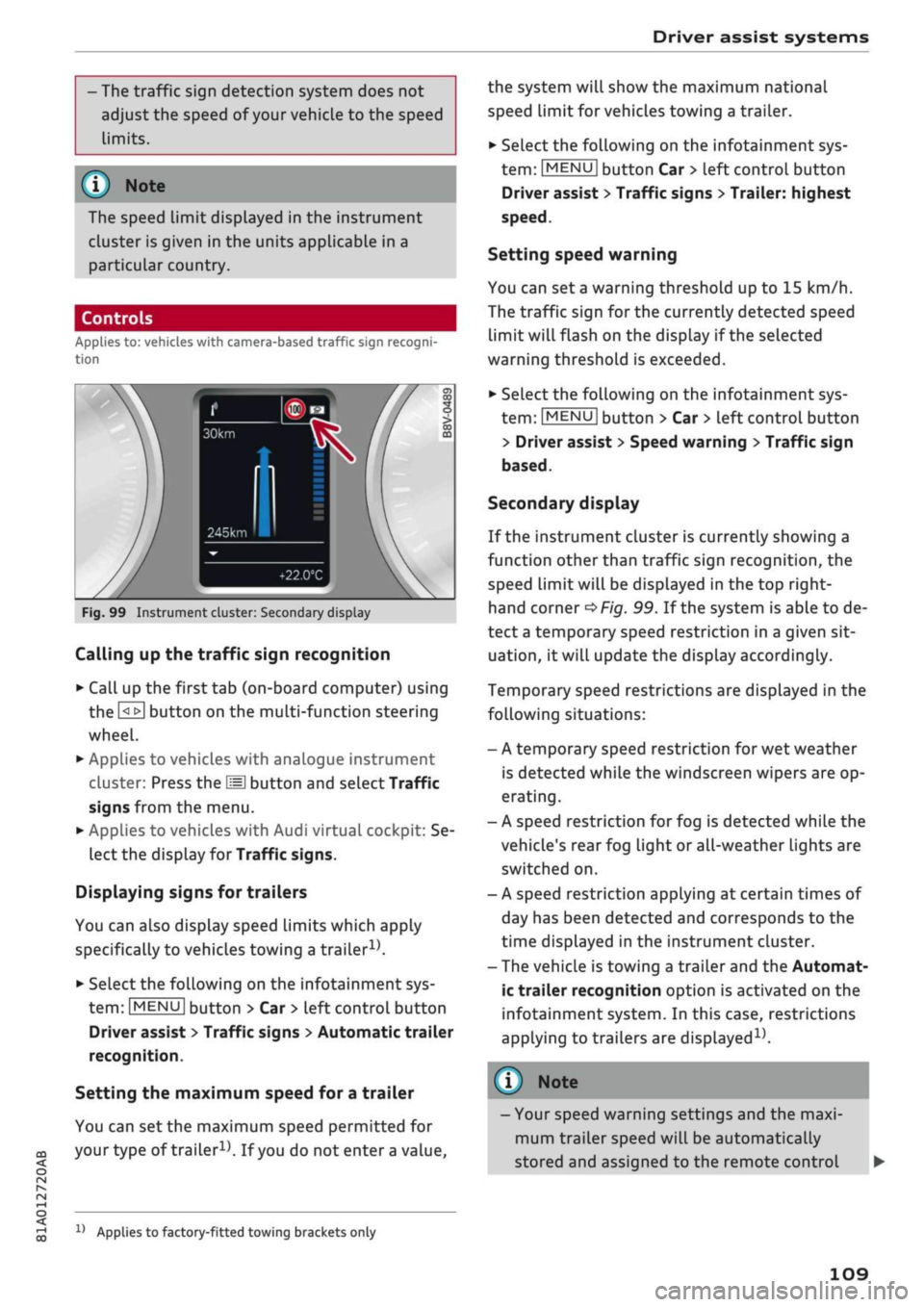
Fig.
99 Instrument cluster: Secondary display
Calling up the traffic sign recognition
•
Call up the first tab (on-board computer) using
the
GL>]
button on the multi-function steering
wheel.
•
Applies to vehicles with analogue instrument
cluster: Press the
LU]
button and select Traffic
signs from the menu.
•
Applies to vehicles with Audi virtual cockpit: Se
lect the display for Traffic signs.
Displaying signs for trailers
You can also display speed limits which apply
specifically to vehicles towing a trailer1).
•
Select the following on the infotainment sys
tem:
|MENU|
button > Car
>
left control button
Driver assist
>
Traffic signs
>
Automatic trailer
recognition.
Setting the maximum speed for a trailer
You can set the maximum speed permitted for
your
type of
trailer15.
If
you
do not enter
a
value,
x)
Applies to factory-fitted towing brackets only
the system will show the maximum national
speed limit for vehicles towing a trailer.
•
Select the following on the infotainment sys
tem:
|MENU|
button Car
>
left control button
Driver assist
>
Traffic signs
>
Trailer: highest
speed.
Setting speed warning
You can set a warning threshold up to
15
km/h.
The traffic sign for the currently detected speed
limit will flash on the display if the selected
warning threshold is exceeded.
•
Select the following on the infotainment sys
tem:
IMENU|
button > Car
>
left control button
> Driver assist
>
Speed warning
>
Traffic sign
based.
Secondary display
If the instrument cluster is currently showing a
function other than traffic sign recognition, the
speed limit will be displayed in the top right-
hand corner
^Fig.
99. If the system is able to de
tect
a
temporary speed restriction in a given sit
uation,
it will update the display accordingly.
Temporary speed restrictions are displayed in the
following situations:
- A temporary speed restriction for wet weather
is detected while the windscreen wipers are op
erating.
- A speed restriction for fog is detected while the
vehicle's rear fog light or all-weather lights are
switched on.
- A speed restriction applying at certain times of
day has been detected and corresponds to the
time displayed in the instrument cluster.
- The vehicle is towing a trailer and the Automat
ic trailer recognition option is activated on the
infotainment system. In this case, restrictions
applying to trailers are
displayed15.
© Note
- Your speed warning settings and the maxi
mum trailer speed will be automatically
stored and assigned to the remote control
109