trailer AUDI Q2 2021 Owner´s Manual
[x] Cancel search | Manufacturer: AUDI, Model Year: 2021, Model line: Q2, Model: AUDI Q2 2021Pages: 364, PDF Size: 87.77 MB
Page 99 of 364
Towing a trailer
Tyre pressure
Check the tyre pressures on your car, and adjust
for "full
load"
conditions (refer to the sticker list
ing the tyre pressures)
^>page
307. It may also
be necessary to adjust the tyre pressures on the
trailer according to the recommendations of the
trailer manufacturer.
Exterior mirrors
Check whether you can see enough of the road
behind the trailer with the standard mirrors. If
this is not the case you should have additional
mirrors fitted. Both exterior mirrors should be
mounted on hinged extension brackets. Adjust
the mirrors to give sufficient vision to the rear.
Headlights
Before starting
a
journey, check the headlight
beam settings with the trailer hitched up. Adjust
the headlight settings if necessary.
On vehicles with halogen headlights, the
head
light range control must be adjusted, see
tapage
49.
The headlight range control will be adjusted au
tomatically if your vehicle is equipped with LED
headlights*.
Power supply
To ensure that the engine can be started again
after the ignition is switched off, the power
man
agement system
^>page
149 controls the distri
bution of electrical power and gradually switches
off unnecessary electrical equipment. The trailer
is supplied with power during this period. The
power supply to the trailer is interrupted while
the engine is being started.
Removable ball joint coupling
Vehicles with a factory-fitted towing bracket are
equipped with a removable
ball
joint coupling.
This is stored in the spare wheel well or in a sepa
rate bag on the floor of the luggage compart
ment, together with the necessary fitting instruc
tions.
We recommend having the car serviced be
tween the normal inspection intervals if it
used frequently for towing a trailer.
Trailer stabilisation system
Applies to: vehicles with towing bracket
Trailer stabilisation helps to reduce the risk of
the vehicle skidding when towing a
trailer.
When is the trailer stabilisation
system1'
activated?
Trailer stabilisation is active when the following
requirements are met:
- The ESC must be switched on
^>page
146 and
fully functional (no ESC malfunction).
- The trailer connector must be properly secured
in the vehicle socket.
- The vehicle speed must be higher than approx.
60 km/h.
How trailer stabilisation works
In many cases, the driver can stabilise a swaying
trailer by manually braking the vehicle.
However, if the ESC detects that the trailer is
swaying and this is affecting the towing vehicle,
it will automatically brake the vehicle in order to
stabilise the trailer. The indicator
Lamp Hi
will
flash in the instrument cluster. If possible, do
not turn the steering wheel at this stage.
In order to warn traffic behind you, the brake
lights will come on during this automatic braking
operation.
A trailer may sway quite considerably without the
trailer stabilisation system intervening.
If the system for activating the trailer brake
lights is defective, this will be indicated in the in
strument cluster display
opage
35,
:&
Bulb
monitor.
•
CO
rN
rN
t-H
o <
x)
Not available on vehicles for some markets.
97
Page 100 of 364
Towing a trailer
Requirements for correct functioning of the
trailer stabilisation system
If these conditions are not met in
full,
the trailer
stabilisation system will only intervene to a
limi
ted extent or not at all
>=>
A-
- The electrical connection between the towing
vehicle and the trailer must be functioning cor
rectly.
- The load on the trailer must be properly se
cured.
- The tyre pressures on both the vehicLe and the
trailer must be adapted to the load that is be
ing carried.
- Where possible, operate the trailer with the
maximum permitted draw bar weight.
- The trailer overrun brake must be set correctly.
This is important to ensure that the trailer can
be braked correctly, to avoid the vehicle and
trailer "jack-knifing" and to prevent excess
braking of the trailer.
- At low outside temperatures, both the towing
vehicle and the trailer should be fitted with
winter tyres.
A WARNING
It is essential that you adjust your speed to
suit the weather, road and traffic conditions.
Do not let the trailer stabilisation system
tempt you into taking any risks when driving -
this can cause accidents.
- The ESC and trailer stabilisation system
can
not defy the Laws of physics. This should be
kept in mind, particularly on slippery and
wet roads and when towing a trailer with a
light Load.
- The trailer stabilisation system is function
al,
regardless of whether the trailer has a
mechanical overrun brake or not.
- The trailer stabilisation system is not always
able to detect swaying of trailers with a
light load and will therefore not intervene.
- A trailer can still "jack-knife" on slippery
roads with little grip, even if the towing ve
hicle is equipped with the trailer stabilisa
tion system.
-Trailers with a high centre of gravity may
even tip over before they start to sway
side
ways.
-If
you
are not towing a trailer,
but
the
trail
er socket is being used (e.g. for an illumina
ted bicycle rack), the trailer stabilisation
system may be activated in extreme driving
conditions.
- Please note the additional information and
warnings
^>page
98, Driving tips.
Driving tips
Driving with a trailer always requires extra care.
Weight distribution
Try to avoid towing a loaded trailer with an unla
den vehicle. If this cannot be avoided, drive extra
slowly to allow for the unbalanced weight distri
bution.
Speed
Normally, you must not exceed 80 km/h when
towing a trailer or caravan. However, if the
trail
er/caravan is equipped with a trailer stabilisation
system,
you can drive at max. 100 km/h. Please
observe any other regulations applicable in the
country in which you are travelling.
The stability of the car and trailer is reduced with
increasing speed. For this reason it is advisable
not to drive at the maximum permissible top
speed in unfavourable
road,
weather or wind
con
ditions. This applies especially on a downhill gra
dient.
You should always reduce speed immediately if
the trailer shows the slightest sign of swaying.
Never try to stop the swaying by accelerating fur
ther.
Always brake in good time. If the trailer has an
overrun brake, apply the brakes gently at first
and then firmly. This will prevent the jerking that
can be caused by the trailer wheels locking.
Change down in good time before going down a
steep hill so
that
you can use the engine braking
effect to slow down the vehicLe.
Swaying and pitching can be reduced by attach
ing an extra stabiliser to the trailer. It should •
98
Page 101 of 364

Towing
a
trailer
CO
< o rN
iv
rN
t-H
o < 00
have friction linings at the sides to prevent exces
sive wear. Degrease and clean the ball joint be
fore using a stabiLiser. The stabiliser can be pur
chased and installed
at
a qualified workshop.
Electronic stabilisation control
The
ESC
-
in particular in conjunction with the
trailer stabilisation system
o^page
97 - makes
it
easier to stabilise a trailer
if it
starts to skid
or
sway. You should therefore keep the
ESC
switch
ed on
at
all times.
Overheating
In hot weather, keep an eye on the coolant
tem
perature gauge
^page
13. When climbing long
hills with the engine running fast in low gear, the
coolant temperature can increase. Reduce speed
immediately
if
the needle moves to the right end
of the scale. For information on the warning
lamp
||
refer to
opage
30.
Rear carrier systems
When using rear carrier systems (e.g. bicycle
racks) on the towing bracket,
it
is important not
to exceed the maximum load.
The total weight
of
the rear carrier system and
its
load must not exceed
75
kg for this vehicle. How
ever,
it
is also important to observe the maxi
mum permissible load for the rear carrier sys
tem.
The greater the distance from the towing brack
et, the smaller the maximum permissible Load
on
the rear carrier system. For this reason, you
should secure heavy objects as near as possible
to the towing bracket.
Note the instructions provided by the manufac
turer of the rear carrier system.
Please make sure that the rear carrier system
is
approved for use on your vehicle.
l
Note
A WARNING
The use of an unsuitable rear carrier system
could cause severe damage
to
the towing
bracket. The towing bracket could then break
and cause an accident.
Degrease and clean the ball joint before using
a rear carrier system.
Removable towing
bracket
Introduction
Applies to: vehicles with removable towing bracket
Special care is required when fitting and remov
ing the towing bracket.
Fig.
84 Luggage compartment:
Ball
joint for towing brack
et (stowage example)
The removable ball joint attachment for the tow
ing bracket is stored under the floor panel or in a
separate bag on the floor of the luggage com
partment.
The ball joint can be fitted and removed by hand.
WARNING
Never use tools of any kind when fitting and
removing the ball joint. This could damage
the mechanism which locks the
ball
joint
in
place and impair its safety
-
risk of accident!
© Note
- Do not attempt to modify or repair the ball
joint or other towing bracket components.
- Should you have any difficulties when using
the towing bracket, or suspect that
it
is not
fitted properly, contact
a
qualified work
shop.
- Before setting off, always check that the
ball
joint is secured properly
Opage
101.
99
Page 102 of 364
Towing a trailer
- Never disengage the ball joint with the cara
van / trailer still hitched or with a bicycle
rack or similar accessory still attached.
- It is advisable to remove the ball joint when
you are not towing a trailer. Check whether
the plug is properly inserted in the mount
ing fixture and that the bumper cover is fit
ted.
-The
ball
joint must be removed if
you
intend
to clean the car with a steam cleaning at
tachment. Check whether the plug is prop
erly inserted in the mounting fixture and
that the bumper cover is fitted.
- For installation and removal of the ball joint
we recommend using the gloves provided
for
this purpose.
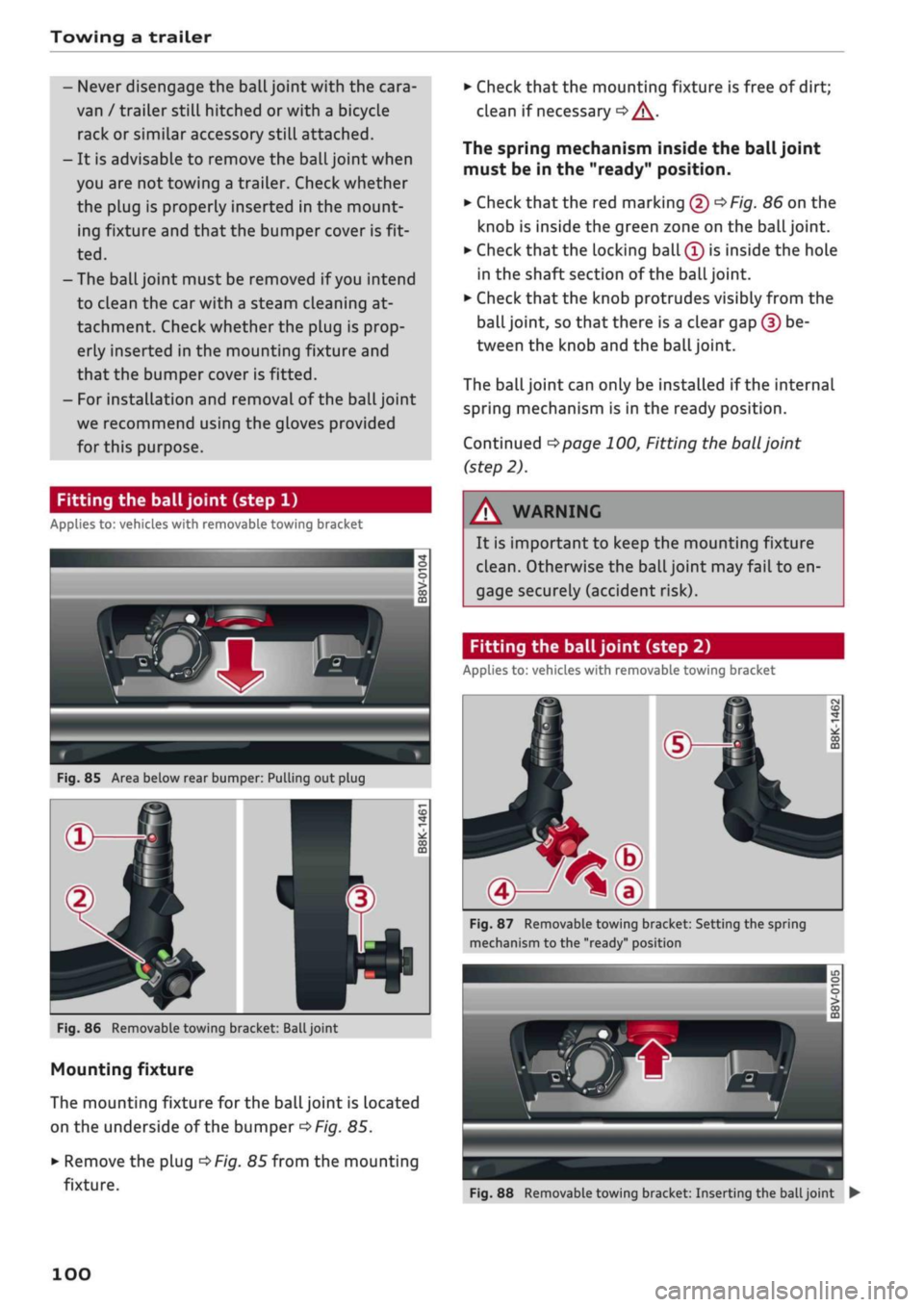
Fitting the ball joint (step 1)
Applies to: vehicles with removable towing bracket
Fig.
85 Area below rear bumper: Pulling out plug
Fig.
86 Removable towing bracket:
Ball
joint
Mounting fixture
The mounting fixture for the ball joint is located
on the underside of the bumper
^>Fig.
85.
•
Remove the plug
^>Fig.
85 from the mounting
fixture.
•
Check that the mounting fixture is free of dirt;
clean if necessary
•=> /\.
The spring mechanism inside the ball joint
must be in the "ready" position.
•
Check
that
the red marking (5)
^>Fig.
86 on the
knob is inside the green zone on the
ball
joint.
•
Check that the locking ball
(Î)
is inside the hole
in the shaft section of the
ball
joint.
•
Check that the knob protrudes visibly from the
ball joint, so that there is a clear gap (?) be
tween the knob and the
ball
joint.
The
ball
joint can only be installed if the internal
spring mechanism is in the ready position.
Continued
^>page
100, Fitting the
ball
joint
(step 2).
WARNING
It is important to keep the mounting fixture
clean.
Otherwise the ball joint may fail to en
gage securely (accident risk).
Fitting the ball joint (step 2)
Applies to: vehicles with removable towing bracket
Fig.
87 Removable towing bracket: Setting the spring
mechanism to the "ready" position
Fig.
88 Removable towing bracket: Inserting the
ball
joint •
100
Page 103 of 364
Towing a trailer
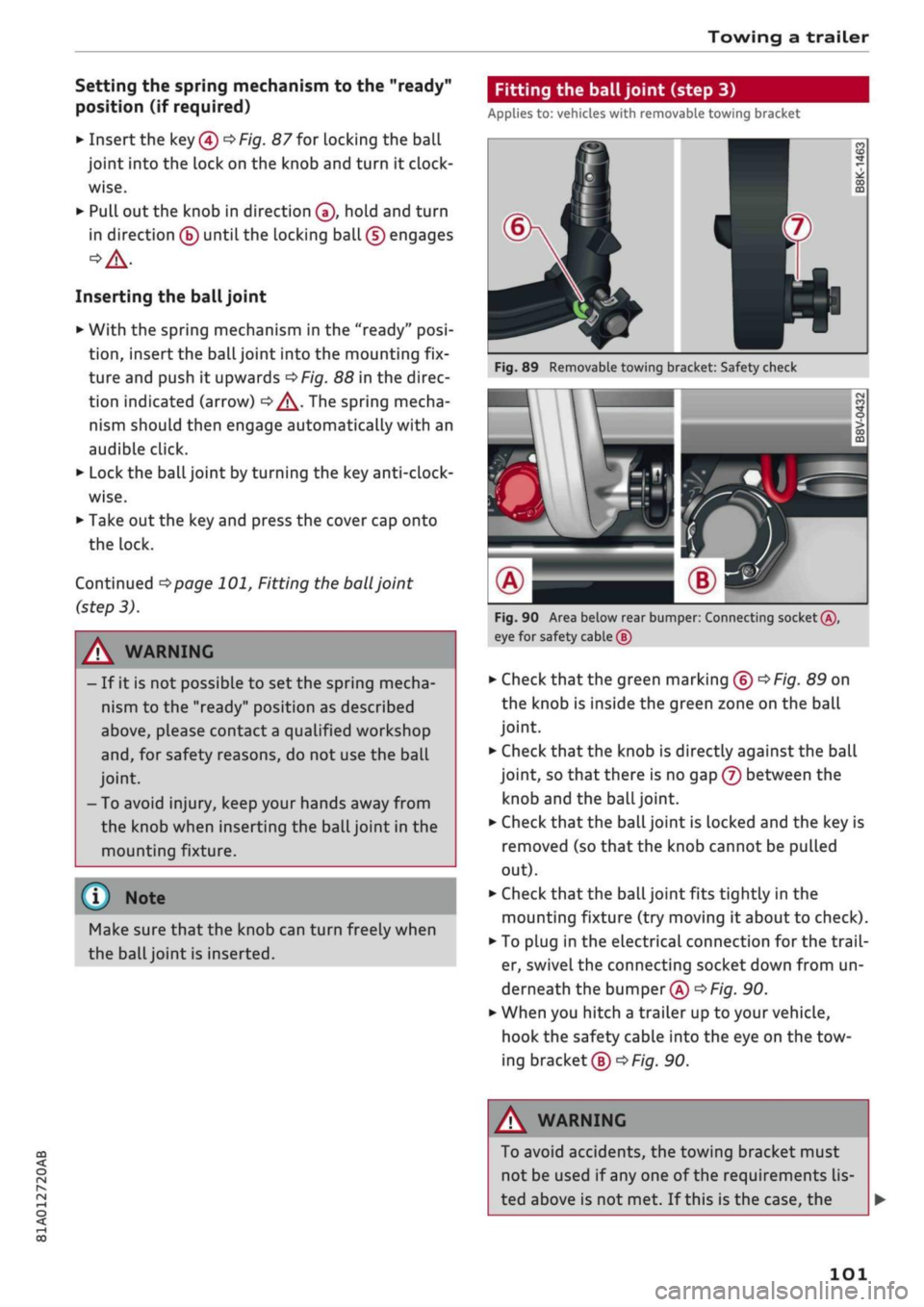
Setting the spring mechanism to the "ready"
position (if required)
•
Insert the key®
^>Fig.
87 for locking the ball
joint into the lock on the knob and turn it
clock
wise.
•
Pull out the knob in direction ®, hold and turn
in direction ® until the locking ball (5) engages
Inserting the ball joint
•
With the spring mechanism in the "ready"
posi
tion,
insert the ball joint into the mounting fix
ture and push it upwards
<=$Fig.
88 in the direc
tion indicated (arrow)
•=> ^.
The spring mecha
nism should then engage automatically with an
audible click.
•
Lock the ball joint by turning the key
anti-clock
wise.
•
Take out the key and press the cover cap onto
the lock.
Continued
^>page
101, Fitting the
ball
joint
(step 3).
Fitting the ball joint (step 3)
Applies to: vehicles with removable towing bracket
A WARNING
- If it is not possible to set the spring mecha
nism to the "ready" position as described
above,
please contact
a
qualified workshop
and,
for safety reasons, do not use the ball
joint.
- To avoid injury, keep your hands away from
the knob when inserting the ball joint in the
mounting fixture.
Make sure that the knob can turn freely when
the
ball
joint is inserted.
Fig.
89 Removable towing bracket: Safety check
M \
AH^H
eg
n
•>*
0
CO
J
m
Fig.
90 Area below rear bumper: Connecting socket®,
eye for safety cable (5)
•
Check
that
the green marking ®
^>Fig.
89 on
the knob is inside the green zone on the ball
joint.
•
Check that the knob is directly against the ball
joint, so that there is no gap (7) between the
knob and the
ball
joint.
•
Check that the ball joint is locked and the key is
removed (so that the knob cannot be pulled
out).
•
Check that the ball joint fits tightly in the
mounting fixture (try moving it about to check).
• To plug in the electrical connection for the
trail
er, swivel the connecting socket down from un
derneath the bumper®
^>Fig.
90.
*•
When you hitch a trailer up to your vehicle,
hook the safety cable into the eye on the tow
ing bracket®
^F/g.
90.
CO
rN
rN
1-1
00
A WARNING
To avoid accidents, the towing bracket must
not be used if any one of the requirements
lis
ted above is not met. If this is the case, the
101
Page 104 of 364
Towing a trailer
ball joint must be fitted again properly
^>page
100. Please contact a qualified work
shop in the event of
a
technical fault.
(T) Note
•
The eye ® on the towing bracket is intended
only for securing the safety cable of the
trail
er.
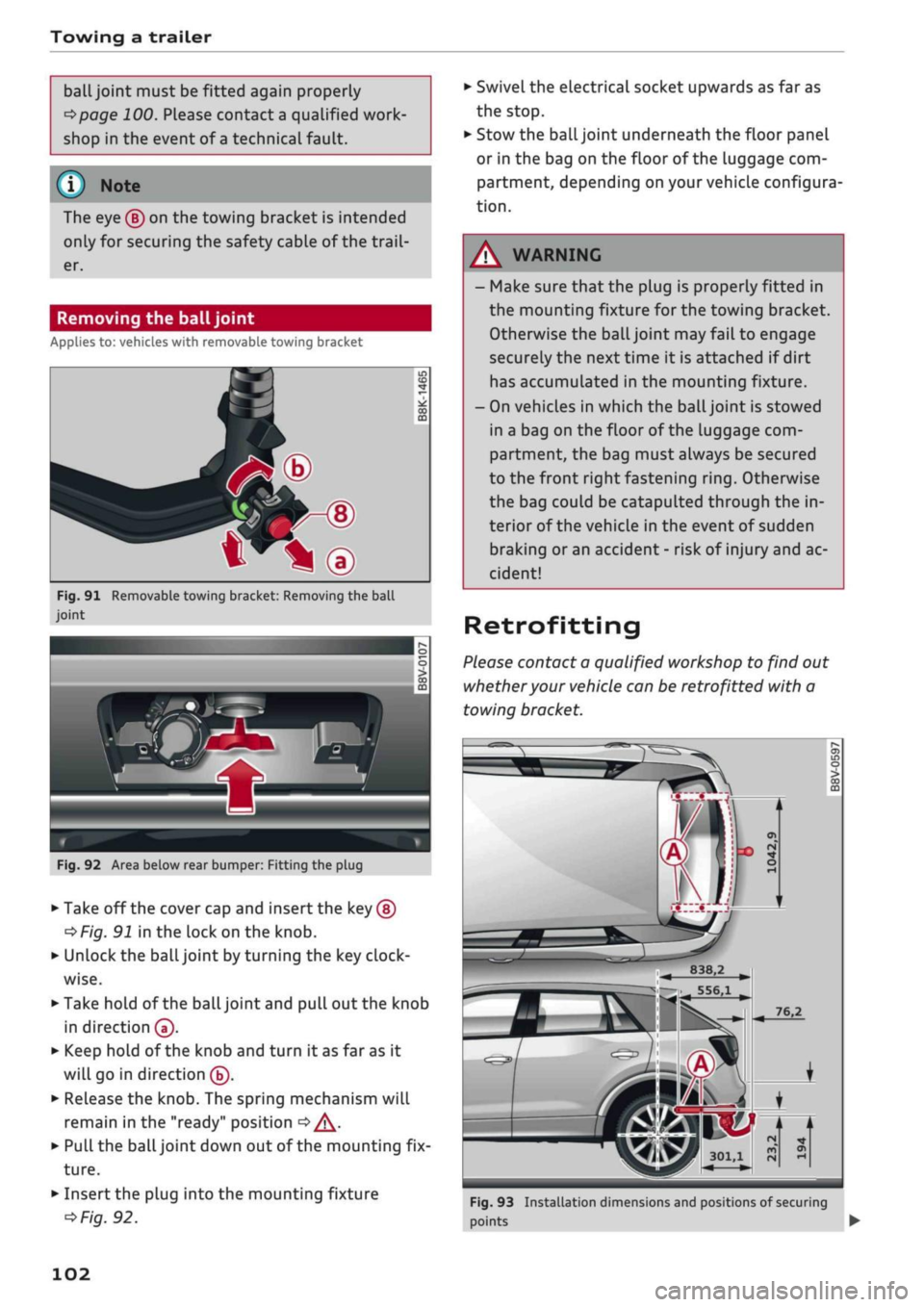
Removing the ball joint
Applies to: vehicles with removable towing bracket
*—d
^•^Pfip-®
—
t*\®
Fig.
91 Removable towing bracket: Removing the ball
joint
IT)
CD
CO
m
Fig.
92 Area below rear bumper: Fitting the plug
•
Take off the cover cap and insert the key ®
^Fig.
91 in the lock on the knob.
•
Unlock the ball joint by turning the key
clock
wise.
•
Take hold of the ball joint and pull out the knob
in direction®.
•
Keep hold of the knob and turn it as far as it
will go in direction ®.
•
Release the knob. The spring mechanism will
remain in the "ready" position
<=> /\.
•
Pull the ball joint down out of the mounting fix
ture.
•
Insert the plug into the mounting fixture
^>Fig.
92.
•
Swivel the electrical socket upwards as far as
the stop.
•
Stow the ball joint underneath the floor panel
or in the bag on the floor of the Luggage com
partment, depending on your vehicle configura
tion.
- Make sure that the plug is properly fitted in
the mounting fixture for the towing bracket.
Otherwise the ball joint may fail to engage
securely the next time it is attached if dirt
has accumulated in the mounting fixture.
- On vehicles in which the
ball
joint is stowed
in a bag on the floor of the luggage com
partment, the bag must always be secured
to the front right fastening
ring.
Otherwise
the bag could be catapulted through the in
terior of the vehicle in the event of sudden
braking or an accident - risk of injury and ac
cident!
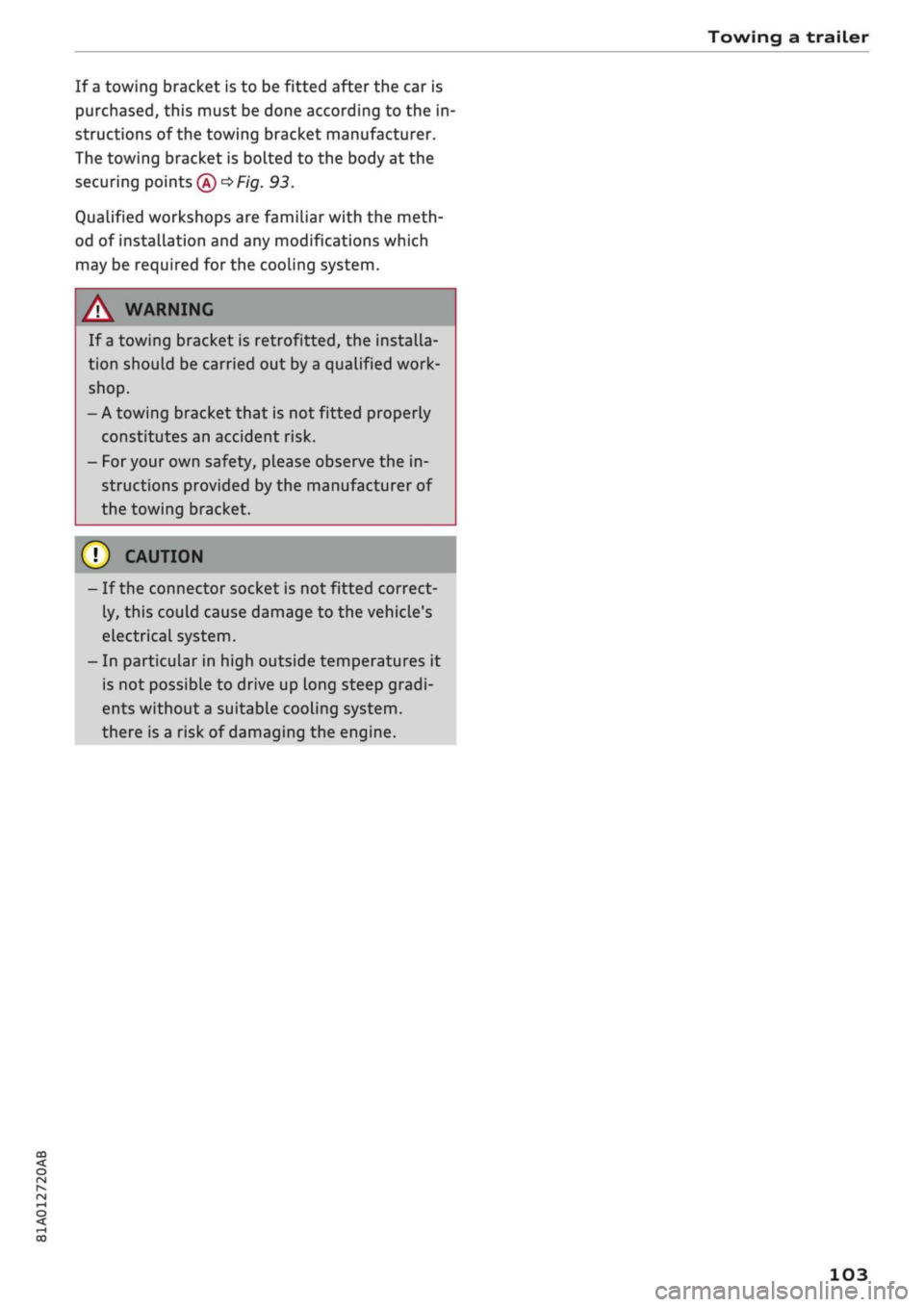
Retrofitting
Please contact a qualified workshop to find out
whether your vehicle can be retrofitted with a
towing bracket.
I
B38.2
556,1
301,1
Fig.
93 Installation dimensions and positions of securing
points •
102
Page 105 of 364
Towing a trailer
CO
rN
rN
•-i
00
If a towing bracket is to be fitted after the car is
purchased,
this must be done according to the in
structions of the towing bracket manufacturer.
The towing bracket is bolted to the body at the
securing points®
^F/'g.
93.
Qualified workshops are familiar with the meth
od of installation and any modifications which
may be required for the cooling system.
/\
WARNING
If a towing bracket is retrofitted, the installa
tion should be carried out by a qualified work
shop.
- A towing bracket that is not fitted properly
constitutes an accident risk.
- For your own safety, please observe the in
structions provided by the manufacturer of
the towing bracket.
©
1
CAUTION
- If the connector socket is not fitted correct
ly, this could cause damage to the vehicle's
electrical system.
- In particular in high outside temperatures it
is not possible to drive up Long steep gradi
ents without a suitable cooling
system,
there is a risk of damaging the engine.
103
Page 110 of 364
Driver assist systems
Camera-based traffic
sign recognition
Description
Applies to: vehicles with camera-based traffic sign recogni
tion
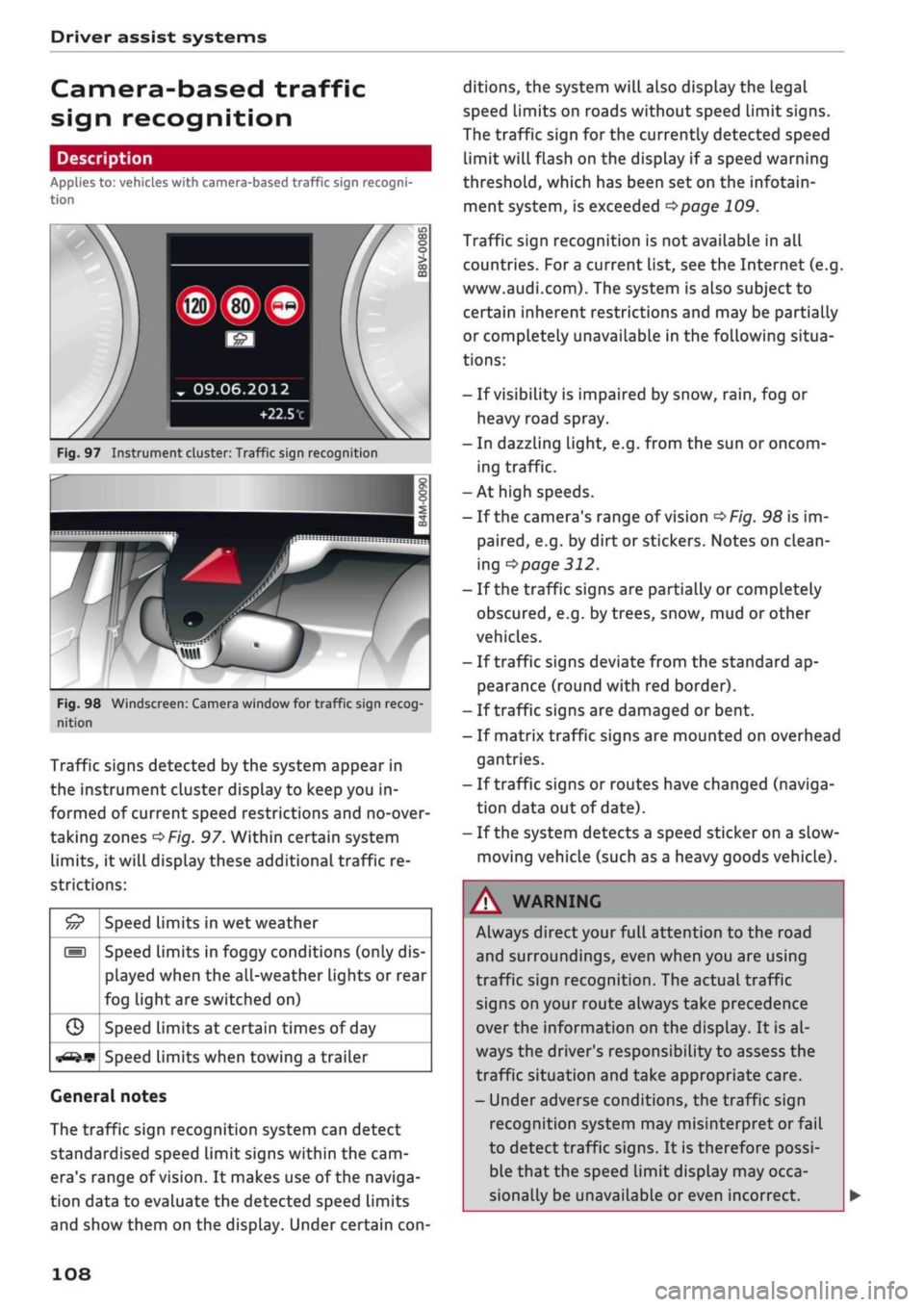
Fig.
97 Instrument cluster: Traffic sign recognition
Fig.
98 Windscreen: Camera window for traffic sign recog
nition
Traffic signs detected by the system appear in
the instrument cluster display to keep you in
formed of current speed restrictions and no-over
taking zones
^>Fig.
97. Within certain system
limits,
it will display these additional traffic re
strictions:
£5
///
s
G
^-if?
Speed limits in wet weather
Speed limits in foggy conditions (only dis
played when the all-weather lights or rear
fog light are switched on)
Speed limits at certain times of day
Speed limits when towing a trailer
General notes
The traffic sign recognition system can detect
standardised speed Limit signs within the cam
era's range of
vision.
It makes use of the naviga
tion data to evaluate the detected speed limits
and show them on the display. Under certain
con
ditions, the system will also display the legal
speed limits on roads without speed Limit signs.
The traffic sign for the currently detected speed
limit will flash on the display if
a
speed warning
threshold,
which has been set on the infotain
ment system, is exceeded
^page
109.
Traffic sign recognition is not available in all
countries. For
a
current list, see the Internet (e.g.
www.audi.com). The system is also subject to
certain inherent restrictions and may be partially
or completely unavailable in the following situa
tions:
- If visibility is impaired by snow,
rain,
fog or
heavy road spray.
- In dazzling light, e.g. from the sun or oncom
ing traffic.
-At high speeds.
- If the camera's range of vision
^>Fig.
98 is im
paired,
e.g. by dirt or stickers. Notes on clean
ing
•=>
page 312.
- If the traffic signs are partially or completely
obscured,
e.g. by trees, snow, mud or other
vehicles.
- If traffic signs deviate from the standard ap
pearance (round with red border).
- If traffic signs are damaged or bent.
- If matrix traffic signs are mounted on overhead
gantries.
- If traffic signs or routes have changed (naviga
tion data out of date).
- If the system detects a speed sticker on a slow-
moving vehicle (such as a heavy goods vehicle).
WARNING
Always direct your full attention to the road
and surroundings, even when you are using
traffic sign recognition. The actual traffic
signs on your route always take precedence
over
the information on the display. It is al
ways the driver's responsibility to assess the
traffic situation and take appropriate care.
- Under adverse conditions, the traffic sign
recognition system may misinterpret or fail
to detect traffic signs. It is therefore possi
ble that the speed limit display may occa
sionally be unavailable or even incorrect.
108
Page 111 of 364
Driver assist systems
CO
<
O
rN rN
t-H
o <
- The traffic sign detection system does not
adjust the speed of your vehicle to the speed
limits.
The speed limit displayed in the instrument
cluster is given in the units applicable in a
particular country.
Controls
Applies to: vehicles with camera-based traffic sign recogni
tion
-22.0-C
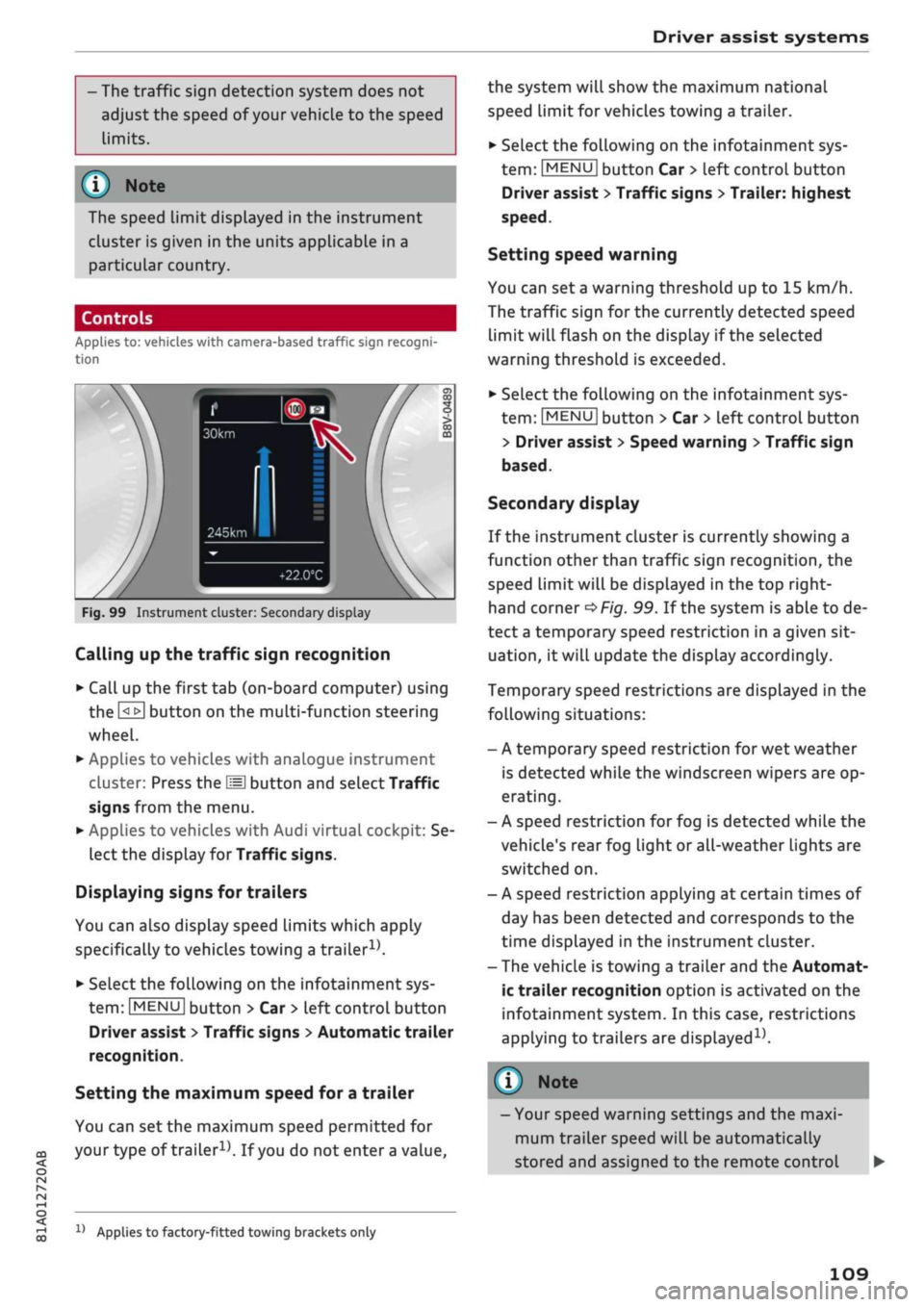
Fig.
99 Instrument cluster: Secondary display
Calling up the traffic sign recognition
•
Call up the first tab (on-board computer) using
the
GL>]
button on the multi-function steering
wheel.
•
Applies to vehicles with analogue instrument
cluster: Press the
LU]
button and select Traffic
signs from the menu.
•
Applies to vehicles with Audi virtual cockpit: Se
lect the display for Traffic signs.
Displaying signs for trailers
You can also display speed limits which apply
specifically to vehicles towing a trailer1).
•
Select the following on the infotainment sys
tem:
|MENU|
button > Car
>
left control button
Driver assist
>
Traffic signs
>
Automatic trailer
recognition.
Setting the maximum speed for a trailer
You can set the maximum speed permitted for
your
type of
trailer15.
If
you
do not enter
a
value,
x)
Applies to factory-fitted towing brackets only
the system will show the maximum national
speed limit for vehicles towing a trailer.
•
Select the following on the infotainment sys
tem:
|MENU|
button Car
>
left control button
Driver assist
>
Traffic signs
>
Trailer: highest
speed.
Setting speed warning
You can set a warning threshold up to
15
km/h.
The traffic sign for the currently detected speed
limit will flash on the display if the selected
warning threshold is exceeded.
•
Select the following on the infotainment sys
tem:
IMENU|
button > Car
>
left control button
> Driver assist
>
Speed warning
>
Traffic sign
based.
Secondary display
If the instrument cluster is currently showing a
function other than traffic sign recognition, the
speed limit will be displayed in the top right-
hand corner
^Fig.
99. If the system is able to de
tect
a
temporary speed restriction in a given sit
uation,
it will update the display accordingly.
Temporary speed restrictions are displayed in the
following situations:
- A temporary speed restriction for wet weather
is detected while the windscreen wipers are op
erating.
- A speed restriction for fog is detected while the
vehicle's rear fog light or all-weather lights are
switched on.
- A speed restriction applying at certain times of
day has been detected and corresponds to the
time displayed in the instrument cluster.
- The vehicle is towing a trailer and the Automat
ic trailer recognition option is activated on the
infotainment system. In this case, restrictions
applying to trailers are
displayed15.
© Note
- Your speed warning settings and the maxi
mum trailer speed will be automatically
stored and assigned to the remote control
109
Page 112 of 364
Driver assist systems
key in use. If you change to a different type
of trailer, you may need to change the maxi
mum trailer speed setting.
- Information is also provided in the head-up
display*.
- Please note
that
the navigation system (SD
card)*
is immediately no longer available if
the SD card is removed from the SD card
reader.
Driver messages
Applies to: vehicles with camera-based traffic sign
recogni
tion
EJ
Traffic sign recognition: currently unavaila
ble.
No camera view
This message will appear if the camera view is
obstructed
^>page
108. The system will switch
it
self off.
EJ
Traffic sign recognition: currently restricted
This message appears, for instance, in the event
of a navigation system fault. The Limited func
tionality may cause fewer speed limits to be dis
played (which increases the possibility of an er
ror).
Traffic sign based speed warning: currently
unavailable. See owner's manual
No warning will be given if the selected warning
threshold is exceeded.
Traffic sign recognition: system fault
The function of the system is impaired; the sys
tem will be deactivated. Drive to a qualified
workshop soon.
No traffic sign recognised
No relevant navigation data are available, and no
speed limit has been detected.
Traffic sign recognition: outside operational
area
Function unavailable in this country
The vehicLe is being driven in a country outside
the system's operational area.
Rest recommendation
General notes
Applies to: vehicles with rest recommendation
Under certain conditions, the system can detect
that the driver needs to take a break.
At the beginning of a trip, the system monitors
the driver's general steering style. Using this as a
reference, the system continuously compares the
current steering input at speeds of between 60
km/h and 200 km/h. If the evaluation of the
steering input implies a lapse in the driver's
con
centration,
the system will then recommend a
break
^>page
111,
Instrument cluster display.
The rest recommendation function is designed
for journeys on motorways and major roads.
System limitations
The rest recommendation function may misinter
pret the steering input in certain driving situa
tions,
such as the following:
- On twisty roads.
- On rough roads.
- In poor weather.
- During performance driving.
- When the driver's attention is distracted.
Resetting the system
The system is automatically reset if
you...
- switch off the ignition.
- release the driver's seat belt and open the driv
er's door.
- drive slower than 60 km/h for a while. If you
subsequently increase your speed again, the
system will reevaluate the driving style.
/\
WARNING
- Never drive when you are
tired.
As a driver
you are always responsible for ensuring that
you
are
fit to drive.
- On
Long
journeys, make sure to take
quate breaks at regular intervals.
ade-
- The system cannot always tell if
you
need a
break.
110