trailer AUDI Q2 2021 Owner´s Manual
[x] Cancel search | Manufacturer: AUDI, Model Year: 2021, Model line: Q2, Model: AUDI Q2 2021Pages: 364, PDF Size: 87.77 MB
Page 314 of 364
Wheels
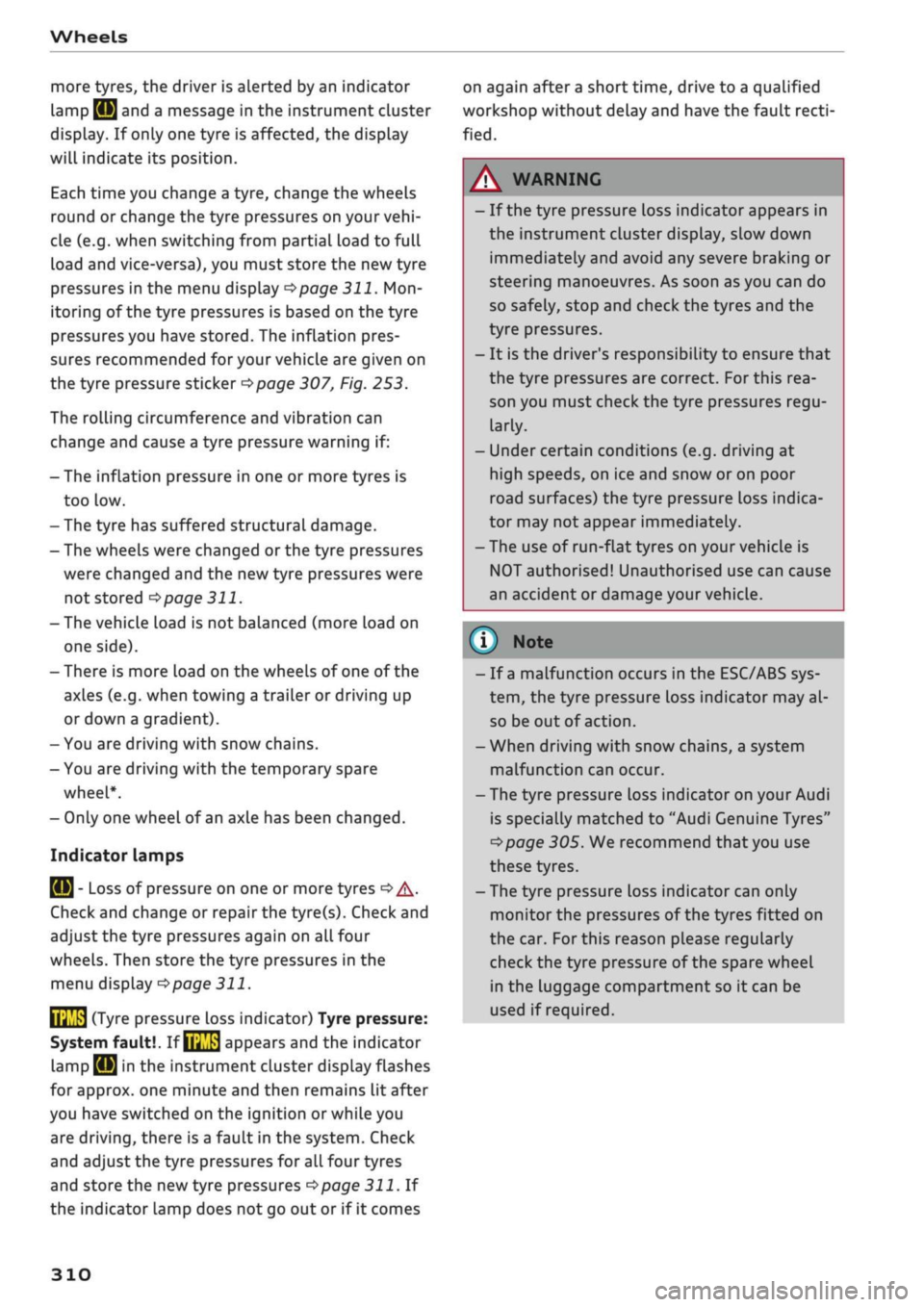
more tyres, the driver is alerted by an indicator
lamp
0H ar|d a
message in the instrument cluster
display. If only one tyre is affected, the display
will indicate its position.
Each time you change a tyre, change the wheels
round or change the tyre pressures on your
vehi
cle (e.g. when switching from partial load to full
load and vice-versa), you must store the new tyre
pressures in the menu display
<=>page
311.
Mon
itoring of the tyre pressures is based on the tyre
pressures you have stored. The inflation pres
sures recommended for your vehicle are given on
the tyre pressure sticker
opage
307, Fig. 253.
The rolling circumference and vibration can
change and cause a tyre pressure warning if:
- The inflation pressure in one or more tyres is
too low.
- The tyre has suffered structural damage.
- The wheels were changed or the tyre pressures
were changed and the new tyre pressures were
not stored
<>page
311.
- The vehicLe load is not balanced (more load on
one side).
- There is more load on the wheels of one of the
axles (e.g. when towing a trailer or driving up
or down a gradient).
- You are driving with snow chains.
- You are driving with the temporary spare
wheel*.
- Only one wheel of an axle has been changed.
Indicator lamps
flfl - Loss of pressure on one or more tyres
o
A-
Check and change or repair the tyre(s). Check and
adjust the tyre pressures again on all four
wheels. Then store the tyre pressures in the
menu dispLay
opage
311.
IIJ'f.1
(Tyre pressure loss indicator) Tyre pressure:
System fault!.
If llil'f>1
appears and the indicator
LampBH in the
instrument cluster dispLay flashes
for approx. one minute and then remains lit after
you have switched on the ignition or while you
are driving, there is a fault in the system. Check
and adjust the tyre pressures for all four tyres
and store the
new
tyre pressures
•=>page
311. If
the indicator lamp does not go out or if it comes
on again after
a
short time, drive to a qualified
workshop without delay and have the fault
recti
fied.
®
No
- If
a
malfunction occurs in the ESC/ABS sys
tem,
the tyre pressure loss indicator may al
so be out of action.
-When driving with snow chains, a system
malfunction can occur.
-The tyre pressure Loss indicator on your Audi
is specially matched to "Audi Genuine Tyres"
^>page
305. We recommend that you use
these tyres.
- The tyre pressure Loss indicator can only
monitor the pressures of the tyres fitted on
the car. For this reason please regularly
check the tyre pressure of the spare wheel
in the luggage compartment so it can be
used if required.
A
WARNING
- If the tyre pressure loss indicator appears in
the instrument cluster display, slow down
immediately and avoid any severe braking or
steering manoeuvres. As soon as you can do
so safely, stop and check the tyres and the
tyre pressures.
- It is the driver's responsibility to ensure that
the tyre pressures are correct. For this rea
son you must check the tyre pressures
regu
larly.
- Under certain conditions (e.g. driving at
high speeds, on ice and snow or on poor
road surfaces) the tyre pressure loss indica
tor may not appear immediately.
- The use of run-flat tyres on your vehicLe is
NOT authorised! Unauthorised use can cause
an accident or damage your vehicle.
310
Page 325 of 364
Mobility
CO
rN
IV
rN
•-i
00
- Do not drive faster than 80 km/h.
- Avoid heavy acceleration, hard braking and
fast cornering.
-Vehicle handling could be impaired.
- If the tyre is too badly damaged, you should
seek professional assistance.
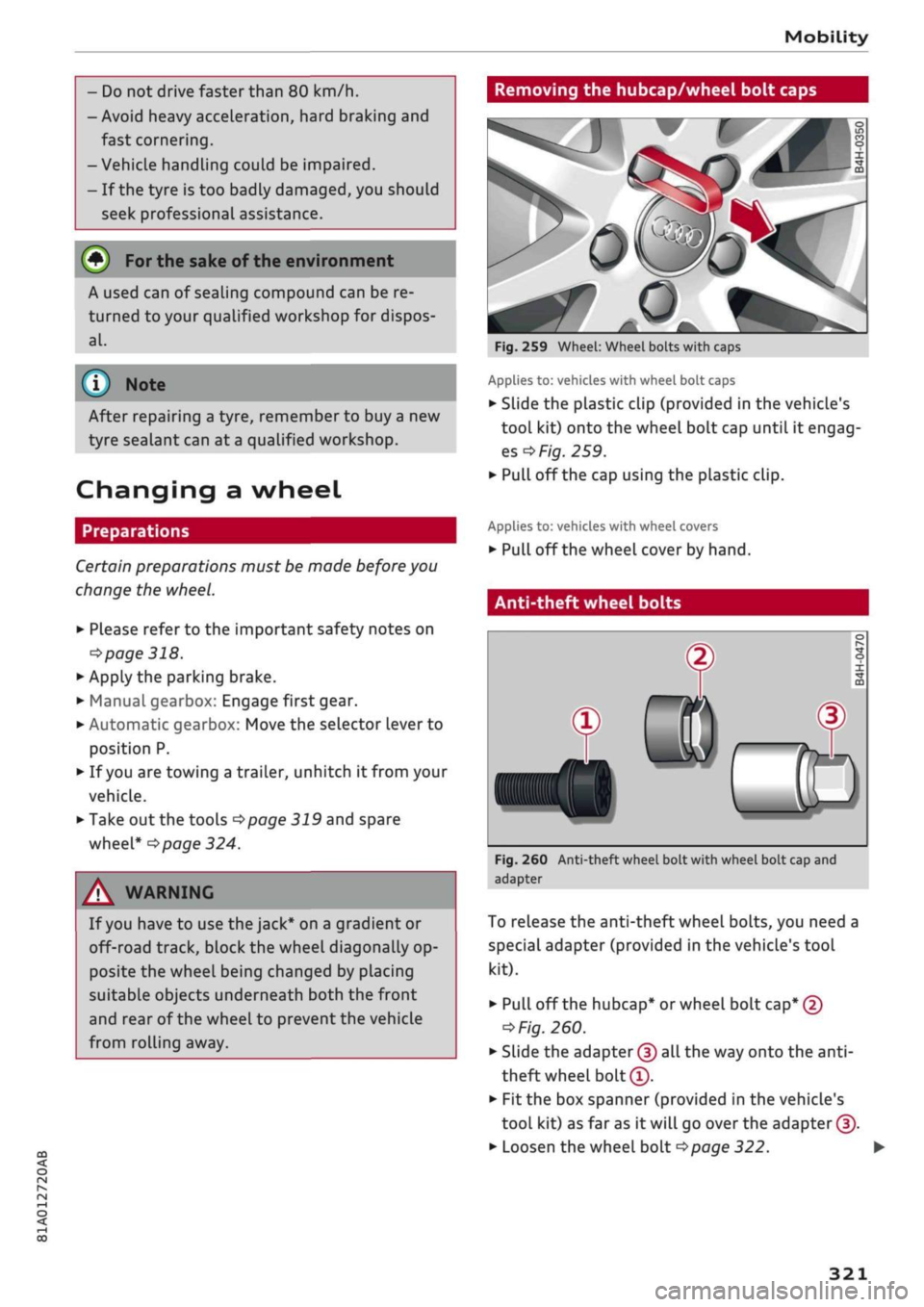
Removing the hubcap/wheel bolt caps
(#) For
the sake of the environment
A used can of sealing compound can be re
turned to your qualified workshop for dispos
al.
Note ©
After repairing a tyre, remember to buy
a
new
tyre sealant can at
a
qualified workshop.
Changing a wheel
Preparations
Certain preparations must be made before you
change the wheel.
• Please refer to the important safety notes on
^page
318.
• Apply the parking brake.
• Manual gearbox: Engage first gear.
• Automatic gearbox: Move the selector Lever to
position P.
• If
you
are towing a trailer, unhitch
it
from your
vehicle.
• Take out the tools
^>page
319 and spare
wheel*
^>page
324.
A WARNING
If
you
have to use the jack* on a gradient or
off-road track, block the wheel diagonally op
posite the wheel being changed by placing
suitable objects underneath both the front
and rear of the wheel to prevent the vehicle
from rolling away.
0
Fig.
259 Wheel: Wheel bolts with caps
Applies to: vehicles with wheel bolt caps
• Slide the plastic clip (provided in the vehicle's
tool kit) onto the wheel bolt cap until it engag
es
^F/'g.
259.
• Pull off the cap using the plastic clip.
Applies to: vehicles with wheel covers
• Pull off the wheel cover by hand.
Anti-theft wheel bolts
T
0)
®
Fig.
260 Anti-theft wheel bolt with wheel bolt cap and
adapter
To release the anti-theft wheel bolts, you need a
special adapter (provided in the vehicle's tool
kit).
• Pull off the hubcap* or wheel bolt
cap*
@
^>
Fig.
260.
• Slide the adapter
©
all the way onto the
anti-
theft wheel bolt®.
• Fit the box spanner (provided in the vehicle's
tool kit) as far as it will go over the adapter ©.
• Loosen the wheel bolt
^>page
322.
321
Page 333 of 364

Mobility
CO
rN
IV
rN
•-i
00
Additional notes on towing by breakdown
truck
If one of the axles has to be raised in order to
tow the vehicLe, please refer to the following ta
ble to determine the appropriate axle
for
your
gearbox/drive combination:
Manual
gearbox
Automatic
gearbox
Front-wheel
drive
Front or rear
axle
Front axle
Four-wheel
drive
Front or rear
axle
Front axle
Applies to vehicles with four-wheel drive: If the
vehicle is to be towed with one of the axles
raised,
the ignition must be switched off; other
wise the drive train can be damaged.
Notes on tow-starting
Applies to vehicles with automatic gearbox: For
technical reasons, your vehicle must not be tow-
started.
Applies to vehicles with manual gearbox: As a
general rule, tow-starting is not recommended.
If the engine will not start, it is best to try start
ing it using the battery of another vehicle
*>page
326 before attempting to tow start. If
this is not possible, you can try to push-start or
tow-start the vehicle
*page
330, Tow-starting.
A WARNING
There is a high risk of accidents when towing/
tow-starting, as the towed vehicle can easily
be driven into the towing vehicle.
UTION
- If it is not possible to tow the vehicle as de
scribed above (e.g. due to a gearbox failure
or if the vehicle has to be towed further
than 50 km), it must be transported on a
special car transporter or trailer.
- Towing a vehicle with the wrong axle raised
can cause serious damage to the gearbox.
- Applies to vehicles with automatic gearbox:
It is not possible to move the selector lever
out of position
P
if the electrical power sup
ply fails. Before the vehicle can be recov
ered/manoeuvred you must manually re
lease the selector lever; left-hand drive
vehicles
*page
93, right-hand drive
vehicles
*page
94.
- Please observe the relevant regulations
when towing or tow-starting.
Towing away
Please observe the important safety warnings on
*
page 328.
Preparations
• Attach the tow-rope or the tow-bar only to the
towing anchorages provided
for
this purpose
opage
330,
*page
331.
• Please ensure that the tow-rope is not twisted
as it could otherwise unscrew the towline an
chorage while the vehicle is being towed.
• The hazard warning lights of both vehicles
must normally be switched on
*page
52. How
ever, observe any regulations to the contrary.
Towing vehicle (front)
• Ensure that the tow-rope is taut before you
drive off.
• Manual gearbox: Engage the clutch very gently
when starting to move and accelerate with par
ticular care.
• Automatic gearbox: Accelerate slowly and
grad
ually.
• Avoid unnecessary braking and manoeuvres.
Vehicle being towed (rear)
• Ensure that the ignition is switched on, the
steering wheel is not locked, and
that
you can
operate the turn signals, horn or windscreen
wipers if necessary
<=>/t\-
• The brake servo only works when the engine is
running.
The power steering only works when
329
Page 347 of 364
Technical data
In cases where technical data are not listed,
the figures were not available at time of pub
lication.
CO
< o rN
iv
rN
t-H
o < 00
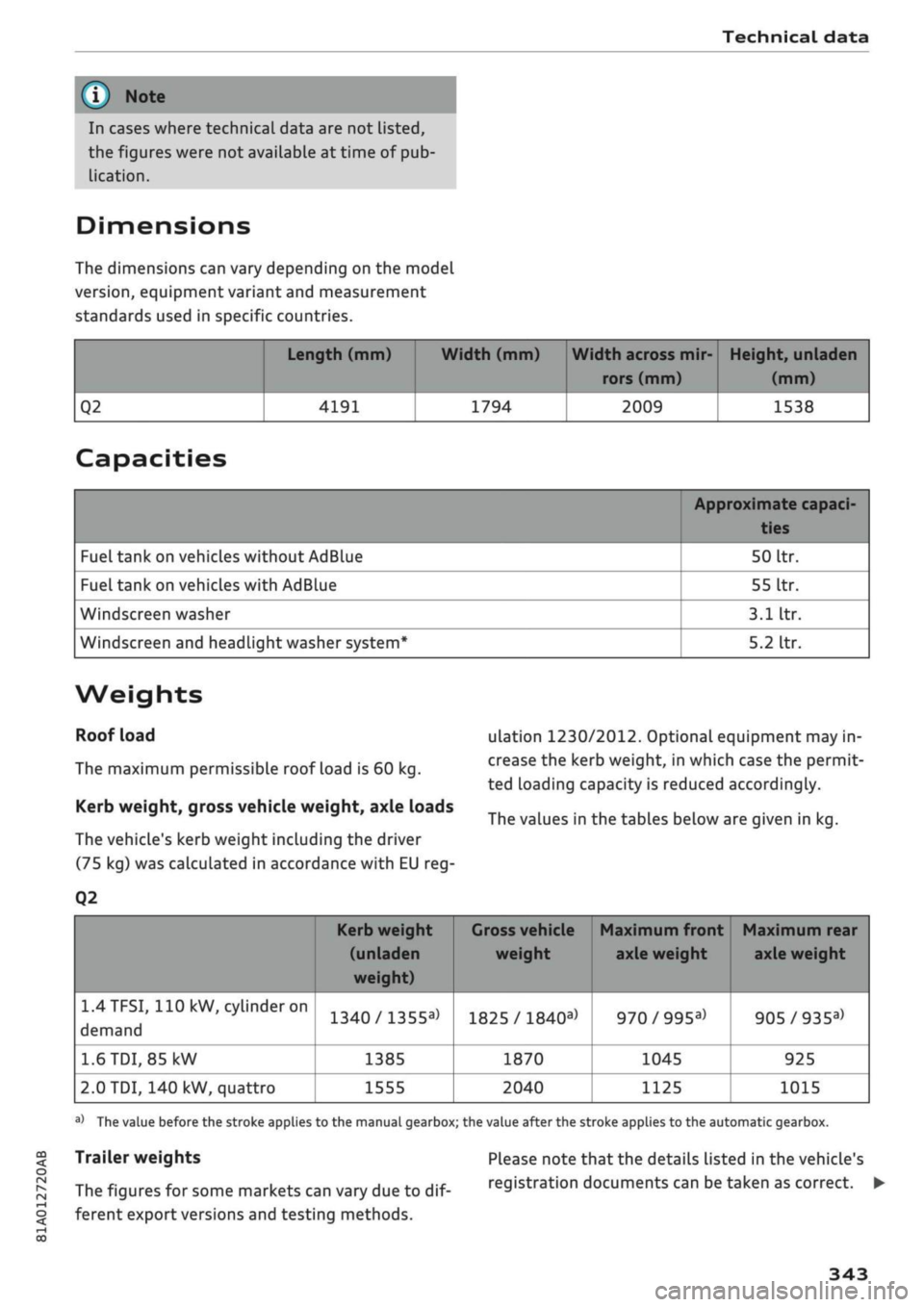
Dimensions
The dimensions can vary depending on the model
version,
equipment variant and measurement
standards used in specific countries.
Q2
Length (mm)
4191
Width (mm)
1794
Width across mir
rors (mm)
2009
Height, unladen
(mm)
1538
Capacities
Fuel tank on vehicles without AdBlue
Fuel tank on vehicles with AdBlue
Windscreen washer
Windscreen and headlight washer system*
Approximate capaci-
50
Itr.
55
Itr.
3.1
Itr.
5.2
Itr.
Weights
Roof load
The maximum permissible roof load is 60 kg.
Kerb weight, gross vehicle weight, axle loads
The vehicle's kerb weight including the driver
(75 kg) was calculated in accordance with EU reg-
Q2
ulation 1230/2012. Optional equipment may in
crease the kerb weight, in which case the permit
ted loading capacity is reduced accordingly.
The values in the tables below are given in kg.
1.4TFSI,
110 kW,
cylinder
on
demand
1.6
TDI,
85 kW
2.0 TDI, 140 kW, quattro
Kerb weight
(unladen
weight)
1340/1355a>
1385
1555
1
Gross vehicle Maximum front Maximum rear
weight axle weight axle weight
1825 /
1840a)
1870
2040
970/995a)
1045
1125
905/935a)
925
1015
a)
The value before the stroke applies to the manual gearbox; the value after the stroke applies to the automatic gearbox.
Trailer weights
The figures for some markets can vary due to
dif
ferent export versions and testing methods.
Please note that the details listed in the vehicle's
registration documents can be taken as correct. •
343
Page 348 of 364
Technical data
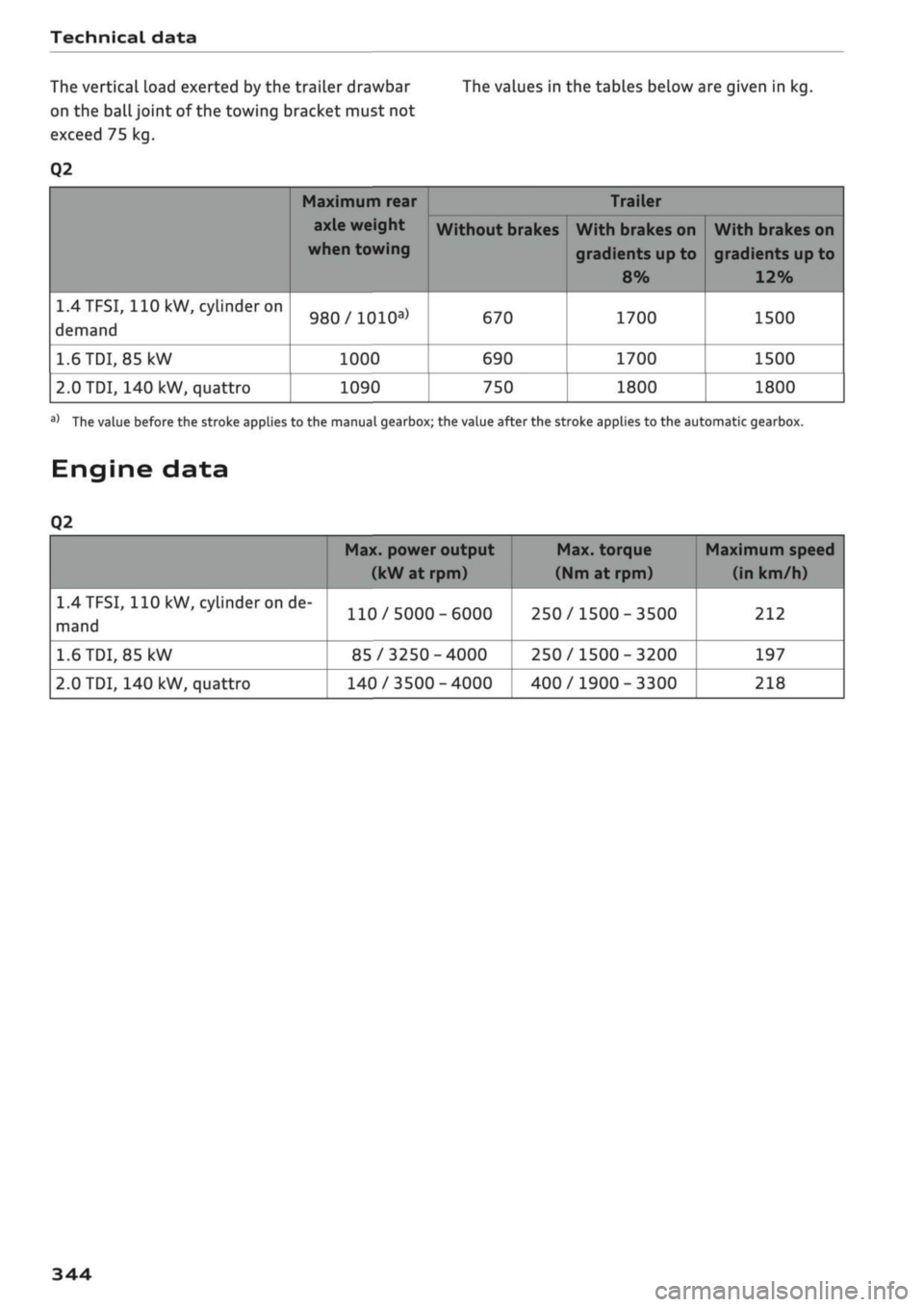
The vertical load exerted by the trailer drawbar The values in the tables below are given in kg.
on the
ball
joint of the towing bracket must not
exceed 75 kg.
Q2
1.4TFSI,
110
kW, cylinder on
demand
1.6
TDI,
85 kW
2.0
TDI, 140 kW, quattro
Maximum rear
axle weight
when towing
980/1010a)
1000
1090
Without brakes
670
690
750
Trailer
With brakes on
gradients up to
8%
1700
1700
1800
With brakes on
gradients
up
to
12%
1500
1500
1800
a)
The value before the stroke applies to the manual gearbox; the value after the stroke applies to the automatic gearbox.
Engine data
Q2
1.4
TFSI,
110 kW, cylinder on de
mand
1.6
TDI,
85
kW
2.0
TDI, 140 kW, quattro
Max. power output
(kW at rpm)
110/5000-6000
85/3250-4000
140/3500-4000
Max. torque
(Nm
at rpm)
250/1500-3500
250/1500-3200
400/1900-3300
Maximum speed
(in km/h)
212
197
218
344
Page 360 of 364

Index
Technical data 342
Telephone 172
Audi phone box 177
Connecting 173
Dialling a number 179
Options during a call 180
Playing music 237
Settings 187
SIM card 176
Telephone mode 188
Temperature display
Coolant 12
Outside temperature 15
Temperature selection
Automatic air conditioner 69
Heating/ventilation system and manual air
conditioner 67
Tethering 195
Text messages 182
Tightening torque (wheel bolts) 324
Time 255
tiptronic (automatic gearbox) 85,90
TMC/TMCpro
see Traffic information 225
Tools 319
Top tether and ISOFIX (securing child seats) 271
Torque
Engine 344
Wheel bolts 324
Touch pad
see MMI touch 155
Tourist guide
see Travel guide 200
Tow-starting 328
Towing 96
Parking aids 144
Trailer weights 96, 343
Towing away 328
Tow-away protection 42
Towline anchorage 330, 331
TPMS
see Tyres 309
Traction control system (ASR) 145
Traffic announcements
see Traffic programme (TP) 229
Traffic avoidance 217
Traffic information 225, 226
Traffic jam assist 117
Traffic programme (TP) 229
Traffic sign recognition 108
Trailer mode (navigation) 217
Trailer stabilisation 97
Travel guide 200
Treble (sound) 260
Trip recorder, resetting 14
Turning light 49
Turn signals 50
Type plate 342
Tyre Mobility System (tyre repair kit) 319
Tyres 305
Changing 321
Directional tread 324
Inflation pressure 307
Low-profile tyres 309
quattro (four-wheel drive) 148
Repair kit 319
Service life 306
Tyre pressure loss indicator 309
Tyre pressure (towing a trailer) 96
Wear indicator 306
U
Unlocking/locking
By remote control 39
Using the central locking switch 40
With key 41
With the convenience key 39
Updating station List (radio) 231
USB charging socket 60, 242
USB stick
see Audi music interface 240, 241
V
Vehicle
Raising 322
Taking out of service 317
Vehicle data
Identification data 342
Version information 259
VIEW button 15
356