trailer AUDI Q2 2021 Owner´s Manual
[x] Cancel search | Manufacturer: AUDI, Model Year: 2021, Model line: Q2, Model: AUDI Q2 2021Pages: 364, PDF Size: 87.77 MB
Page 130 of 364
Driver assist systems
General notes
Applies to: vehicles with Audi side assist
•IB
in—
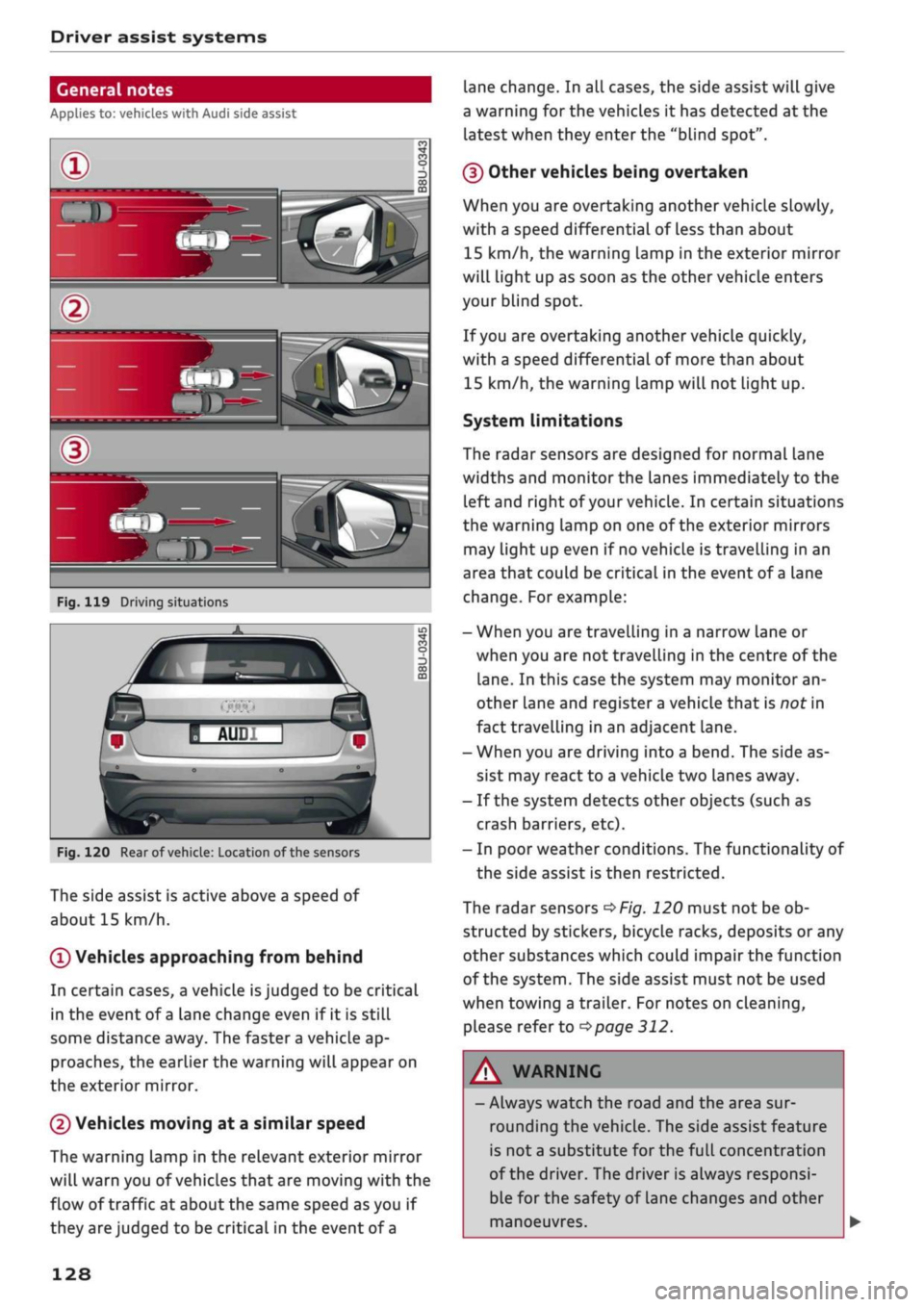
Fig.
119 Driving situations
Fig.
120 Rear of
vehicle:
Location of the sensors
The side assist is active above a speed of
about 15 km/h.
0
Vehicles approaching from behind
In certain cases, a vehicle
is
judged to be critical
in the event of
a
lane change even if it is still
some distance away. The faster a vehicle ap
proaches, the earlier the warning will appear on
the exterior mirror.
(2) Vehicles moving at a similar speed
The warning lamp in the relevant exterior mirror
will warn you of vehicles that are moving with the
flow of traffic at about the same speed as you if
they are judged to be critical in the event of
a
lane change. In all cases, the side assist will give
a warning for the vehicles it has detected at the
latest when they enter the "blind spot".
(§)
Other vehicles being overtaken
When you are overtaking another vehicle slowly,
with a speed differential of Less than about
15 km/h, the warning lamp in the exterior mirror
will light up as soon as the other vehicle enters
your blind spot.
If
you
are overtaking another vehicle quickly,
with a speed differential of more than about
15 km/h, the warning lamp will not light up.
System limitations
The radar sensors are designed for normal lane
widths and monitor the lanes immediately to the
left and right of your vehicle. In certain situations
the warning lamp on one of the exterior mirrors
may light up even if no vehicle is travelling in an
area that could be critical in the event of
a
lane
change. For example:
- When you are travelling in a narrow Lane or
when you are not travelling in the centre of the
lane.
In this case the system may monitor an
other lane and register a vehicle that is nor in
fact travelling in an adjacent lane.
- When you are driving into a bend. The side as
sist may react to a vehicle two lanes away.
- If the system detects other objects (such as
crash barriers, etc).
- In poor weather conditions. The functionality of
the side assist is then restricted.
The radar sensors
^>Fig.
120 must not be ob
structed by stickers, bicycle racks, deposits or any
other substances which could impair the function
of the system. The side assist must not be used
when towing a trailer. For notes on cleaning,
please refer to
^>page
312.
WARNING
- Always watch the road and the area sur
rounding the vehicle. The side assist feature
is not
a
substitute for the full concentration
of the driver. The driver is always responsi
ble for the safety of Lane changes and other
manoeuvres.
128
Page 133 of 364
Driver assist systems
CO
< o rN
r>
rN
t-H
o < 00
-The automatic brake application with in
creasing brake force can be cancelled by ap
plying the brakes yourself or by pressing the
accelerator firmly.
- In certain situations, a warning may be giv
en by the rear cross-traffic assist even if
there is no traffic in the critical zone, for in
stance when parking or manoeuvring the ve
hicle in reverse.
- The rear cross-traffic assist is deactivated
automatically if you deactivate the
ESC.
-The rear cross-traffic assist is switched on/
off via the parking aid
^>page
134.
-The system is not available in towing mode.
Driver messages
Applies to: vehicles with Audi side assist
Should the side assist be deactivated automati
cally, a driver message will appear in the instru
ment cluster display.
O
Audi side assist: system fault!
The system cannot detect vehicles reliably and
will be deactivated. The sensors are out of align
ment or defective. Have the system checked by a
qualified workshop soon.
O
Audi side assist: currently unavailable. No
sensor vision
O
Audi side assist: currently unavailable.
Sen
sor view restricted due to surroundings. See
owner's manual
The radar sensors are blocked. The area in front
of the sensors must not be obstructed by bicycle
racks,
stickers, deposits or any other substances.
If necessary, clean the area in front of the
sen
sors
^>page
128, Fig. 120.
O
Audi side assist: currently unavailable
The side assist is temporarily inoperative and
cannot be switched on (for instance if the battery
is not sufficiently charged).
O
Audi side assist: unavailable in towing mode
2
Audi side assist: unavailable in towing mode
The side assist function will be switched off auto
matically after a short time when the electrical
connector for the trailer socket is plugged in on
vehicles with a factory-fitted towing bracket. If
the towing bracket is not factory-fitted the side
assist function may not be switched off automat
ically. The side assist must not be used when
towing a trailer.
O Rear
parking aid: obstacle detection limited
The rear cross-traffic assist is not available. Ei
ther the ESC is switched off or the radar sensors
may be obstructed by a bicycle rack, stickers,
leaves, snow or similar objects. Switch on the ESC
or, if necessary, clean the area in front of the
sen
sors
<3page
128, Fig. 120. If this message re
mains displayed, drive to a qualified workshop
soon and have the fault rectified.
Audi drive select
Introduction
Applies to: vehicles with Audi drive select
Audi drive select alLows you to use different set
ups on your vehicle. The modes efficiency*, com
fort, auto and dynamic allow the driver, for ex
ample,
to change from a sporty mode to a more
comfortable one via the
&&
button in the centre
console or via the infotainment system. In
addi
tion,
the individual* mode allows you to adapt
the vehicle set-up to
suit
your personal driving
style.
For example, you might choose to combine
a more dynamic engine set-up with a lighter
steering response.
Description
Applies to: vehicles with Audi drive select
The possible vehicle set-up in each mode de
pends on which equipment is installed on your
vehicle. The engine and steering are basic parts
of your vehicle which are always included in the
set-up.
Engine and automatic gearbox*
The response of the engine and automatic
gear
box* to accelerator pedal movements will be
more spontaneous or balanced, depending on
131
Page 136 of 364
Parking aids
Parking aids
General notes
Applies to: vehicles with rear parking aid/parking system
plus/reversing camera/park assist
Various systems are available to help you when
parking or manoeuvring in tight spaces, depend
ing on the equipment fitted on your vehicLe.
The rear parking aid gives an acoustic warning if
there are any obstacles behind the car
cépage
135.
When you are parking, the parking system plus
warns you acoustically and optically about obsta
cles detected in front of and behind the vehicLe
^page
135.
The reversing camera uses the infotainment sys
tem display to show a picture of the area behind
the vehicle captured by the camera. This picture
helps you to park the vehicle parallel or perpen
dicular to the roadside. In addition, you are assis
ted by the functions of the parking system plus
^>page
137.
The park assist helps you to find suitable parking
spaces, to manoeuvre the vehicLe into spaces par
allel or perpendicular to the roadside and to drive
out of spaces parallel to the kerb
^>page
139. It
also includes the functions of the parking system
plus
^page
135 and additionally monitors the
area at the side of the vehicle
(f) ^page
135,
Fig. 124.
A
WARNING
- Always watch the road and the area sur
rounding the vehicLe. The electronic systems
cannot replace the full concentration of the
driver. The driver is always responsible for
safety during parking and all other manoeu
vres.
- Please note that certain surfaces, such as
clothing fabrics, cannot be detected or dis
played by the system - risk of accident!
- The sensors and cameras have bLind spots in
which neither people nor objects are regis
tered.
It is particularly important to ensure
that there are no small children or animals
near the vehicLe - risk of accident!
- Always keep a close watch on the area
around the vehicLe and make full use of the
rear-view mirrors.
- Impacts or damage to the radiator grille,
bumper, wheel arches or underbody can
cause misalignment of the sensors. This can
impair the effectiveness of the parking aids.
Have the systems checked by a qualified
workshop.
(T)
CAUTION
- The system may not always be able to de
tect objects such as the following:
- Chains, trailer draw bars, posts or fences
- Objects above the sensors, such as wall
protrusions, etc.
- Objects with certain surfaces or struc
tures,
such as wire fences or powder snow
- As your car moves closer to low obstacles,
they may disappear from the sensors' field
of vision. Please note
that
you will no longer
be warned about these obstacles.
- Remember to maintain sufficient clearance
from the kerb to avoid damaging the wheel
rims.
(T)
Note
- In certain situations, a warning may be giv
en by the system even if there is no obstacle
within range of the sensors. This can be
caused by the following, for instance:
- Certain road surfaces or long grass
- External ultrasound sources, e.g. from
street cleaning vehicles
- Heavy rain or snow or dense exhaust
fumes
-To familiarise yourself with the system, we
recommend
that
you practise parking in a
quiet location or a car park. The weather
and light conditions should be good.
- You can change the display and adjust the
volume and pitch of the beeps
^>page
143.
- Please refer to the notes on the use of a
towing bracket
^page
144.
- There is a slight delay in the picture dis
played on the infotainment display. •
134
Page 141 of 364
Parking aids
CO
â
rN
IV
rN
•-i
00
Towing mode
Applies to: vehicles with reversing camera and towing bracket
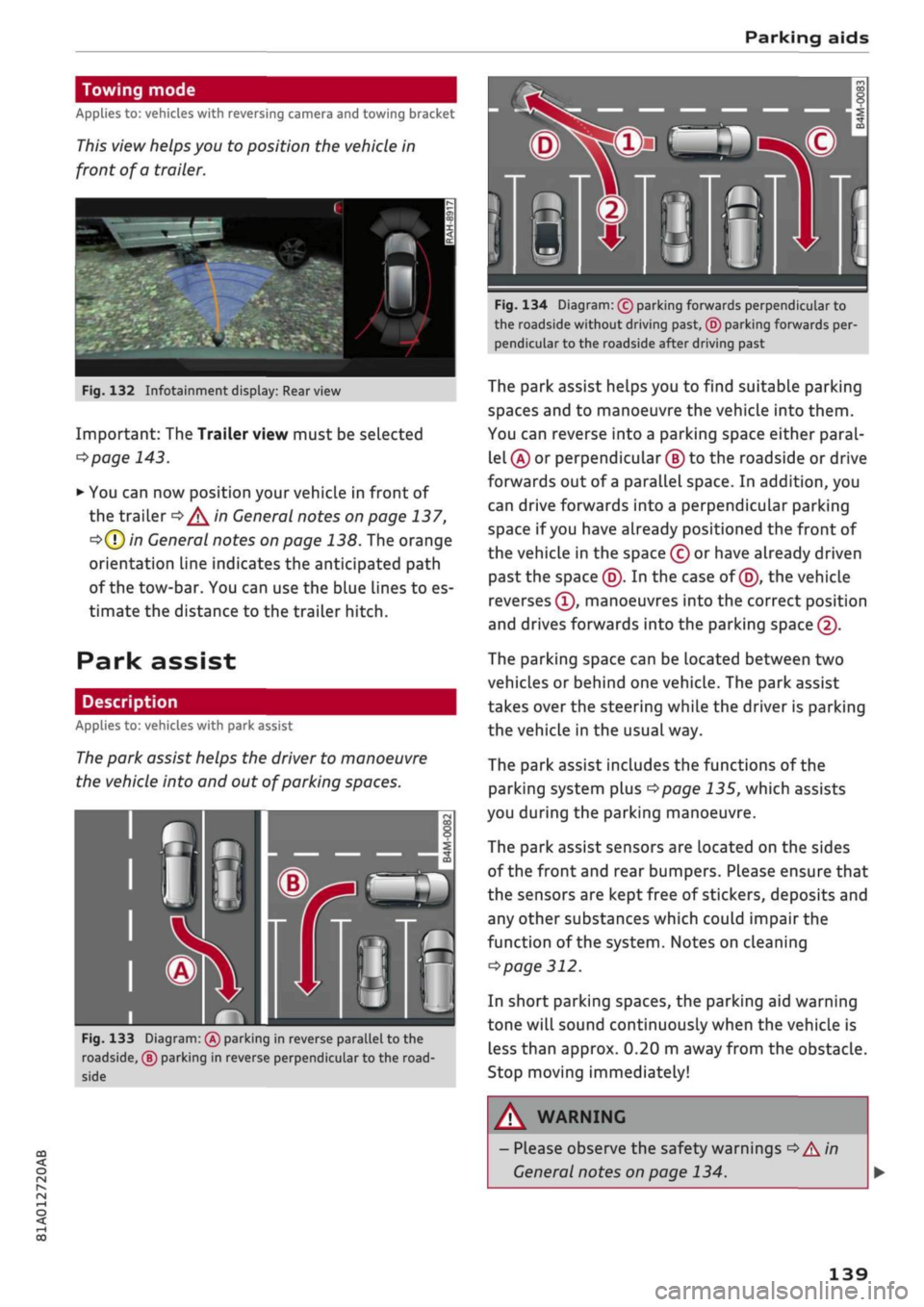
This view helps you to position the vehicle in
front of a
trailer.
Fig.
132 Infotainment display:
Rear
view
Important: The Trailer view must be selected
*$page
143.
*•
You can now position your vehicle in front of
the trailer
=*/^
in General notes on page 137,
•=>(T)
in General notes on page 138. The orange
orientation line indicates the anticipated path
of the tow-bar. You can use the blue Lines to es
timate the distance to the trailer hitch.
Park assist
Description
Applies to: vehicles with park assist
The park assist helps the driver to manoeuvre
the vehicle into and out of parking spaces.
Fig.
133 Diagram:
(Â)
parking in reverse parallel to the
roadside, ® parking in reverse perpendicular to the
road
side
Fig.
134 Diagram: (c) parking forwards perpendicular to
the roadside without driving past, © parking forwards per
pendicular to the roadside after driving past
The park assist helps you to find suitable parking
spaces and to manoeuvre the vehicLe into them.
You can reverse into a parking space either paral
lel
(Â)
or perpendicular
(§)
to the roadside or drive
forwards out of a parallel space. In addition, you
can drive forwards into a perpendicular parking
space if you have already positioned the front of
the vehicle in the space (c) or have already driven
past the space (5). In the case of
(5),
the vehicle
reverses
(T),
manoeuvres into the correct position
and drives forwards into the parking space
@.
The parking space can be located between two
vehicles or behind one vehicle. The park assist
takes over the steering while the driver is parking
the vehicle in the usual way.
The park assist includes the functions of the
parking system plus
^>page
135, which assists
you during the parking manoeuvre.
The park assist sensors are located on the sides
of the front and rear bumpers. Please ensure that
the sensors are kept free of stickers, deposits and
any other substances which could impair the
function of the system. Notes on cleaning
^>
page 312.
In short parking spaces, the parking aid warning
tone will sound continuously when the vehicLe is
less than approx. 0.20 m away from the obstacle.
Stop moving immediately!
WARNING
- Please observe the safety warnings
•=>
A in
General notes on page 134.
139
Page 142 of 364
Parking aids
- Please note that the park assist only
han
dles the steering. As the driver you are al
ways responsible for braking and accelerat
ing.
- It is the driver's responsibility to decide
whether a parking space shown in the dis
play is suitable for the vehicLe.
- The front of the vehicle swings out during
the parking manoeuvre. Please take all nec
essary measures to ensure that other road
users are not endangered.
- The steering wheel turns rapidly on its own
when parking the vehicle and leaving the
space.
Injury may result if
a
person reaches
between the spokes on the steering wheel
when it is turning.
(T)
CAUTION
- Please observe the safety warnings
•=>©
in
General notes on page 134.
- In certain situations, the park assist will
guide the vehicLe onto or across the kerb,
for instance if other vehicles are parked on
the kerb. You should always be ready to
take over the steering wheel in order to pre
vent damage to the tyres and/or wheel
rims.
- Certain conditions in and around the park
ing space can cause unexpected results
when parking.
- Pillars, posts, etc.
- Loose gravel, snow, ice, etc.
© Note
-The electronic stabilisation control (ESC)
must not be switched off during the parking
manoeuvre
^>page
146.
- The park assist cannot be used to park the
vehicle on tight bends.
- The park assist cannot be used to park the
vehicle if
a
trailer is attached and the elec
trical connector for the trailer socket is
plugged in.
Switching on and off
Applies to: vehicles with park assist
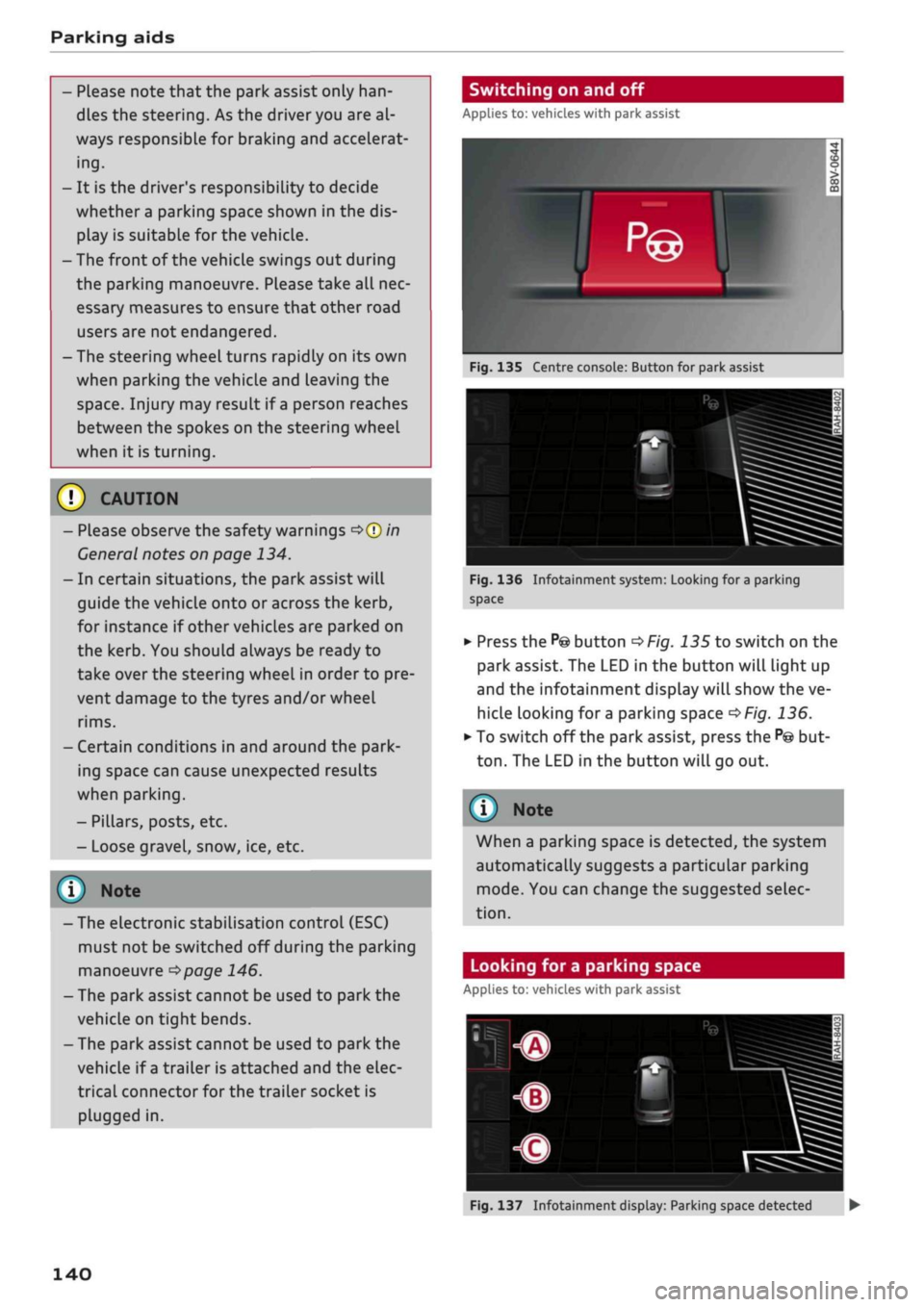
Fig.
135 Centre console: Button for park assist
^^i=^k—
Bp-"1
Fig.
136 Infotainment system: Looking for
a
parking
space
•
Press the
P@
button
^>Fig.
135 to switch on the
park assist. The LED in the button will light up
and the infotainment display will show the ve
hicle looking for
a
parking space
^>Fig.
136.
• To switch off the park assist, press the
P@
but
ton.
The LED in the button will go out.
© Note
When a parking space is detected, the system
automatically suggests a particular parking
mode.
You can change the suggested selec
tion.
Looking for a parking space
Applies to: vehicles with park assist
140
Fig.
137 Infotainment display: Parking space detected •
Page 145 of 364

Parking aids
CO
<
o
rN
iv
rN
t-H
o
< 00
Park assist: currently unavailable. Continue
steering vehicle!
The park assist cannot be used to park the
vehi
cle.
Try repeating the parking manoeuvre or
switching the ignition off and on again.
3 Park assist: ended. Please take over steering
and continue driving
The park assist has finished manoeuvring the ve
hicle out of the parking space. Please take over
the steering.
Park assist: cancelled. Space too small. Con
tinue steering vehicle!
The park assist cannot be used to park the vehicle
in this space. Park the vehicle without using the
park assist or look for a bigger space.
Park assist: cancelled. Obstacle detected.
Please take over steering.
The park assist has interrupted the parking ma
noeuvre to avoid a collision between the vehicle
and an obstacLe.
Park assist: ended
3 Park assist: ended. Please take over steer
ing.
The park assist has finished the parking manoeu
vre.
Park assist: stabilisation control (ESC) input
The parking space indicated has been rejected be
cause the ESC has intervened.
Park assist: currently unavailable. Towing
mode
The park assist cannot be used to park the vehicle
when towing a trailer.
1
Park assist: not stopped long enough
After you select reverse gear, the vehicle has to
remain stationary for
a
moment so that the park
assist can activate the steering. Follow the direc
tions given in the display.
3
Park assist: cancelled. Assist function un
available for leaving parking space. Space too
small
The assist function is unable to automatically
steer the vehicle out of the parking space be
cause the space is too small. Manoeuvre the
vehi
cle out of the parking space without using the
park assist.
Park assist: cancelled. Continue steering ve
hicle!
The park assist has interrupted the parking ma
noeuvre.
Settings for parking aid
Applies
to: vehicles with rear parking aid/parking system
plus/reversing
camera/park assist
You
can change the settings for these functions
on the infotainment system.
•
Select the following on the infotainment sys
tem:
|MENU[
button > Car
>
left control button
> Driver assist
>
Parking aid. Or:
•
Select the right control button* on the infotain
ment system when the parking aid is activated.
End*
- To cancel the parking aid
Activate automatically - To switch automatic ac
tivation on/off
Front volume* - Volume for the front and side*
zones
Rear volume - Volume for the rear zone
In-car
entertainment fader - The volume of the
current audio or video source is reduced when the
parking aid is switched on.
You will hear
a
short test tone each time you
make a new setting.
Trailer view* - To display the trailer view
- Some of the menus can only be called up via
the right control button when the parking
aid is activated.
- The volume and automatic activation set
tings are automatically stored and assigned
to the remote control key in use.
143
Page 146 of 364
Parking aids
Fault warnings
Applies to: vehicles with rear parking aid/parking system
plus/reversing camera/park assist
[3
Rear parking aid: fault. Obstacles cannot be
detected
O
Front parking aid: fault. Obstacles cannot be
detected
O
Parking aid: fault. Obstacles cannot be de
tected
If any of these messages appears, a system
mal
function has occurred. The LED in the
P*A
button
will flash in addition when the system is activa
ted.
The corresponding message will then only
appear when you activate the parking aid
man
ually with the button.
[3
Rear parking aid: obstacle detection limited
The rear cross-traffic assist*
^>page
130, Rear
cross-traffic assist is not available. Either the ESC
is switched off or the radar sensors may be ob
structed by a bicycle rack, stickers, leaves, snow
or similar objects. Switch on the ESC or, if neces
sary, clean the area in front of the sensors
^>page
128, Fig. 120. If this message remains
displayed,
drive to a qualified workshop soon and
have the fault rectified.
Parking system plus* / park assist*
If a sensor or loudspeaker malfunctions, the
f&L
symbol will be shown on the infotainment dis
play in front of or behind the vehicle. If
a
rear
sensor malfunctions, obstacles will only be dis
played in zones
(A)
and
(B)
<^>page
135, Fig. 124.
If a front sensor malfunctions, obstacles will only
be displayed in zones (?) and (5).
Towing bracket
Applies to: vehicles with rear parking aid/parking system
plus/reversing camera/park assist and towing bracket
When the trailer socket is connected, the rear
and side* parking sensors are NOT activated
when you select reverse gear or press the
P*A
but
ton.
This results in the following restrictions:
Rear parking
aid*
There is no distance warning.
Parking system plus* / park assist*
There is no rear or side* distance warning. How
ever, the system will still give a warning when
obstacles are detected while driving forwards.
The proximity graphic will switch over to towing
mode.
Reversing camera*
There is no rear or side* distance warning. How
ever, the system will still give a warning when
obstacles are detected while driving forwards.
The proximity graphic will switch over to towing
mode.
The image of the reversing camera will
then be shown without orientation lines and blue
area markings.
(T) Note
Towing brackets which are not factory-fitted
can restrict or impair the function of the park
ing aid.
144
Page 147 of 364
Intelligent technology
CO
< o rN
iv
rN
t-H
o < 00
Intelligent technology
Electronic stabilisation
control (ESC)
Description
The electronic stabilisation control (ESC) increa
ses the car's stability. It reduces the tendency to
skid and improves the stability and roadholding
of the vehicle. The ESC detects critical handling
situations, such as understeer, oversteer and
wheelspin
on the driven wheels. It stabilises the
vehicle by braking individual wheels or by reduc
ing the engine torque. The indicator
lamp^
in
the instrument cluster starts flashing as soon as
the ESC intervenes.
The following systems are integrated in the ESC:
Anti-lock brake system (ABS)
ABS prevents the wheels from locking up under
braking until the vehicle has reached a virtual
standstill.
You can continue to steer the vehicle
even when the brakes are on
full.
Keep your foot
on the brake pedal and do not pump the brakes.
You will feel the brake pedal puLsate while the
anti-lock brake system is working.
Brake assist system
The brake assist system can shorten the braking
distance. The braking force is automatically boos
ted if
you
press the brake pedal quickly in an
emergency. You must keep pressing the brake
pedal until the danger has passed. On
vehides
with adaptive cruise control*, the response of the
brake assist system will be more sensitive if you
are too close to the vehicLe in front.
Traction control system (ASR)
In the event of
wheelspin,
the traction control
system reduces the engine torque to match the
amount of grip available. This helps the car to
start moving, accelerate or climb a gradient.
Electronic differential lock (EDL)
When the EDL detects wheelspin, it brakes the
spinning wheel and directs the power to the
oth
er driven wheel (or wheels on quattro* versions).
This function is not available at high speeds.
To prevent the disc brake of the braked wheel
from overheating, the EDL cuts out automatically
if subjected to excessive loads. The vehicLe can
still be driven. The EDL will switch on again auto
matically when the brake has cooled down.
Steering recommendation
The ESC helps to stabilise the vehicle by changing
the steering wheel torque.
Trailer stabilisation system
Applies to: vehicles with trailer stabilisation system
Trailers have a tendency to sway. If the
ESC
de
tects that the trailer is swaying and this is affect
ing the towing vehicLe, it will automatically brake
the vehicle in order to stabilise the trailer
^>page
97.
Selective wheel torque control
Selective wheel torque control intervenes when
cornering by braking the wheel(s) on the inside of
the bend individually as required. This enables
precision cornering.
Multicollision brake assist system
The "multicollision brake assist system" can help
to reduce the risk of skidding and further
colli
sions during an accident. If the airbag control
unit detects that
a
collision has taken place up
wards of
a
certain speed, the vehicle is braked by
the
ESC.
The vehicle will not be braked automatically if:
- the driver presses the accelerator,
- or the
ESC,
the brake system or the vehicle's
electrical system are not fully functional.
WARNING
- The grip provided by the ESC and the inte
grated systems is still subject to the physi
cal limits of adhesion. Always bear this in
mind,
especially on wet or sLippery roads. If
you notice the systems cutting in, you
should reduce your speed immediately to
suit the road and traffic conditions. Do not
let
the extra safety provided tempt you into
taking any risks when driving - this can
cause accidents.
145
Page 221 of 364
Navigation
CO
â
rN
rN
t-H
O
<
Other settings
Navigation settings
Applies
to:
vehicles with navigation system
•
Press
the |NAV/MAP|
button repeatedly until
the Enter destination menu
is
displayed
o
page
207,
Fig.
172.
•
Select: right control button
>
Navigation set
tings.
Depending
on the
function seLected,
you can use
the following settings:
Display alternative routes
When this function
is
switched
on
|vj,
up to
three
route suggestions
are
displayed
on the map
^>page
216,
Alternative routes.
Fuel warning
When
the
fuel gauge
is in the
reserve zone,
a
message will appear when this function
is on
[vf.
A list
of
nearby filling stations will
be
displayed
when you confirm this message. When
you
select
one
of
the filling stations,
the
route
to its
loca
tion will
be
calculated based
on the
current
posi
tion
of
your
car.
Trailer mode*
Trailer mode
is
switched
off
when
the
vehicle
leaves
the
factory.
When this function
is
switched
on
|vf,
the MMI
will take
the
speed limit
for
vehicles towing
a
trailer into account and
the
calculated arrival
time will
be
adjusted accordingly. Trailer mode
is
indicated
on the
map's legend menu
by the
sym
bol-*!.
Personal route assist*1)
The personal route assist function
is
switched
off
by default
in the
factory settings.
When this function
is
activated
EÎ,
your trips
are
recorded
and
destinations
are
suggested by
the
MMI system
^>page
214.
Arrival notification*
The arrival notification
is
switched
off
when
the
vehicle leaves
the
factory.
When this function
is
switched
on
@f,
the MMI
will inform
you
when
you are
approaching selec
ted special destinations (e.g. imported myAudi
special destinations). You
can
also have a sound
played using
the
Play notification tone function.
Delete myAudi special destinations*11
Destinations that you import from your myAudi
account
to
your
MMI are
automatically saved.
You
can
delete them individually
or all at
once.
Presentation mode
Use
the
Presentation mode
to
plan
and
"drive"
a
journey effectively without
the
need
to
move
the
vehicle. You
can
choose your start Location
man
ually (Select start location)
if, for
example,
you
would like
to
calculate a route starting from
a
different position than
the
current position
of the
vehicle. Start
the
Presentation mode
to
simulate
a route guidance.
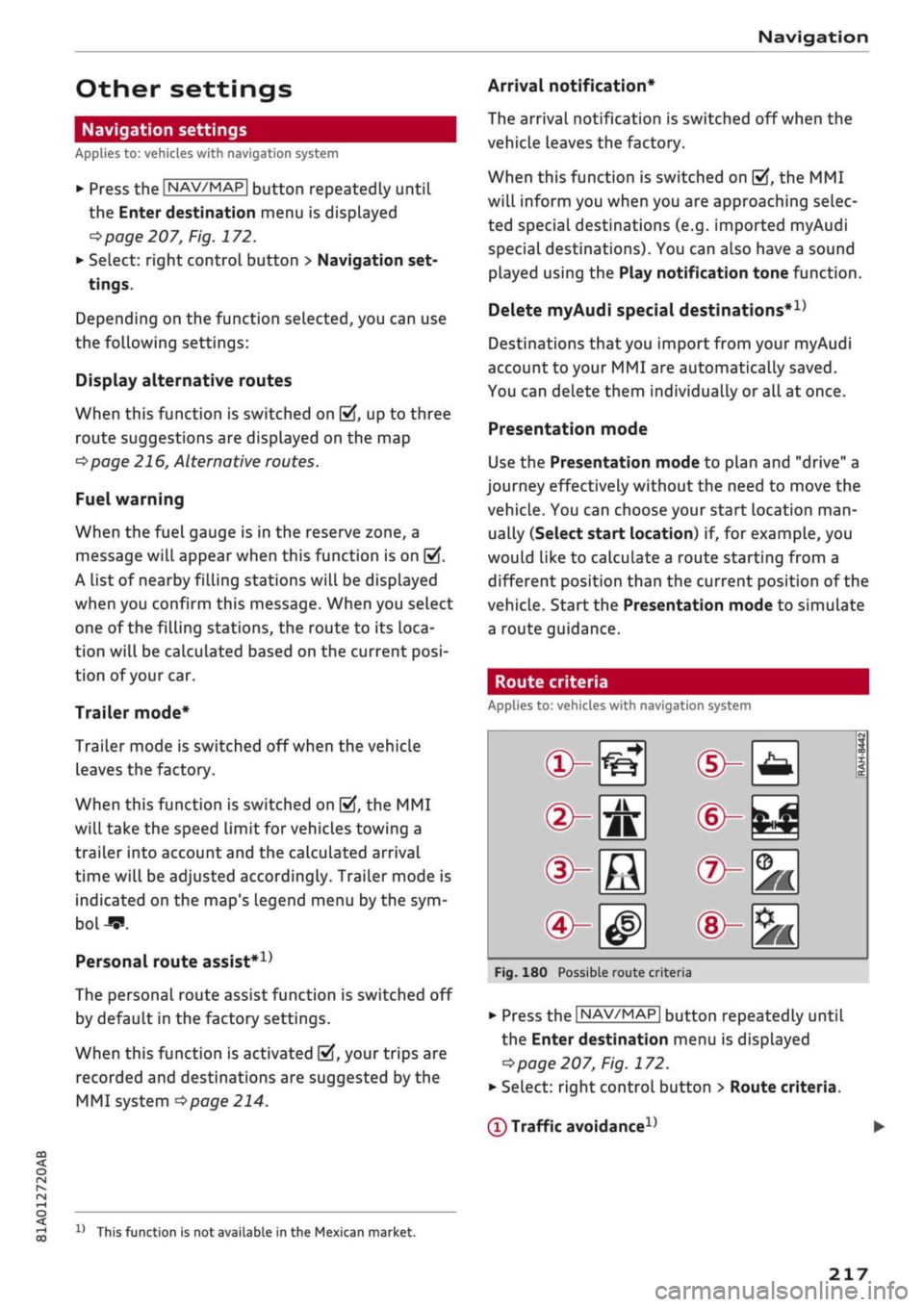
Route criteria
Applies
to:
vehicles with navigation system
®-«?
dHft
d^e
(S^#
Fig.
180
Possible route crite
1 1
1
®-feJ
®-fc
®-3K
ria
•
Press
the |NAV/MAP|
button repeatedly until
the Enter destination menu
is
displayed
=>page
207,
Fig.
172.
•
Select: right control button > Route criteria.
(T)
Traffic avoidance
D
x)
This function
is
not
available
in the
Mexican market.
217
Page 223 of 364
Navigation
CO
< o rN
IV
rN
t-H
o <
00
Map
How to
use
the map
Applies
to: vehicles with navigation system
H
an^fc Hetnuc'ijlo
'
in
1,2 km
Blaubach
in
1,0
km
Autobahn-Flugh
Fig.
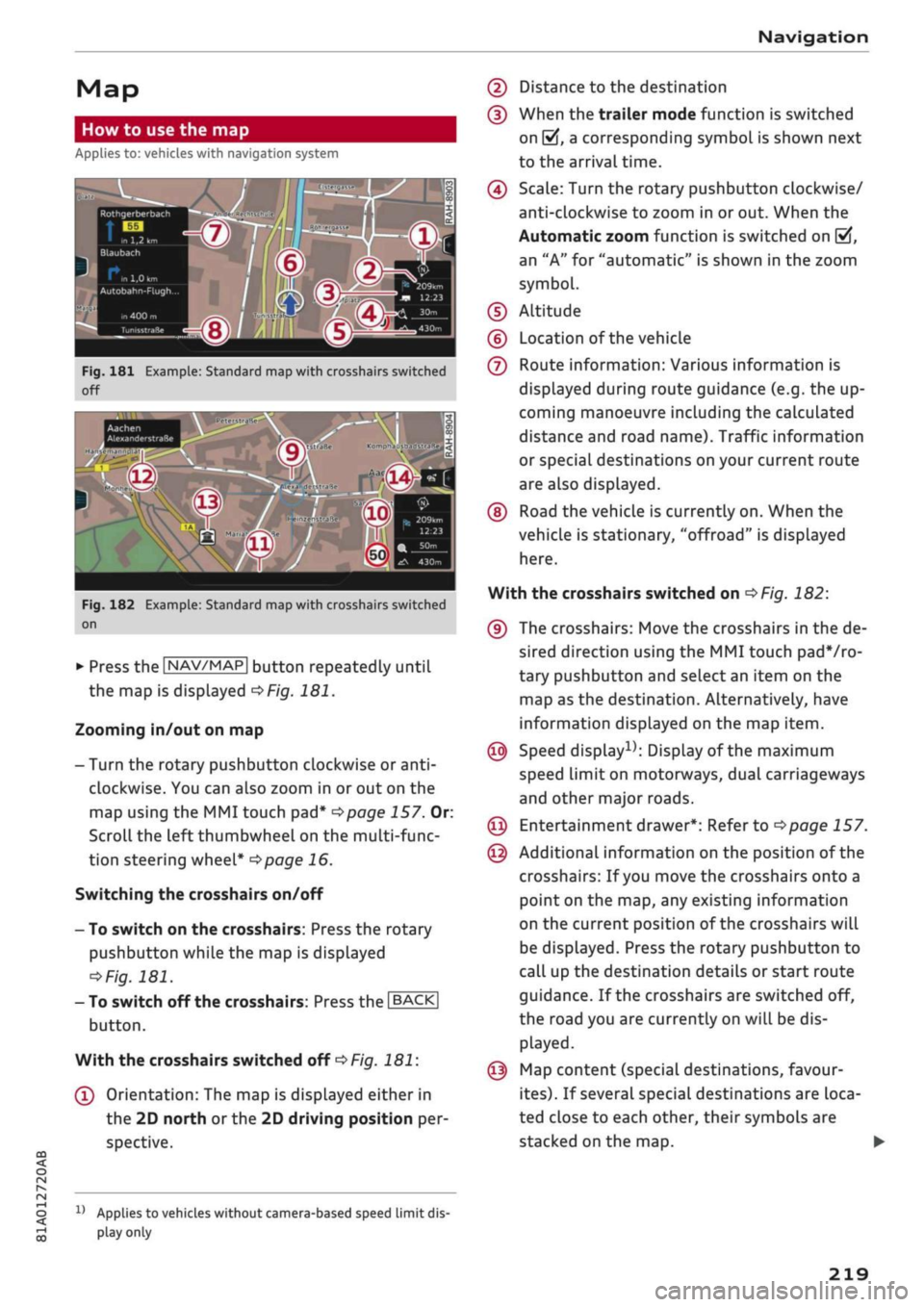
181 Example: Standard map with crosshairs switched
off
Aachen
AlexanderstraBe Komphausbad da n se m an n pi
a
Fig.
182 Example: Standard map with crosshairs switched
on
•
Press the |NAV/MAP| button repeatedly until
the map is displayed
^Fig.
181.
Zooming in/out on map
- Turn the rotary pushbutton clockwise or
anti
clockwise. You can also zoom in or out on the
map using the MMI touch
pad*
^>page
157. Or:
Scroll the left thumbwheel on the multi-func
tion steering wheel*
^>page
16.
Switching the crosshairs on/off
- To switch on the crosshairs: Press the rotary
pushbutton while the map is displayed
^Fig.
181.
- To switch off the crosshairs: Press the |BACK|
button.
With the crosshairs switched off
•=>
Fig.
181:
(l)
Orientation: The map is displayed either in
the 2D north
or
the 2D driving position per
spective.
1J
Applies to vehicles without camera-based speed limit
dis
play
only
(2) Distance to the destination
(D When the trailer mode function is switched
on
[vj,
a corresponding symbol is shown next
to the arrival time.
(4) Scale: Turn the rotary pushbutton clockwise/
anti-clockwise to zoom in or out. When the
Automatic zoom function is switched on
(vf,
an "A" for "automatic" is shown in the zoom
symbol.
(D Altitude
(?) Location of the vehicle
(7) Route information: Various information is
displayed during route guidance (e.g. the up
coming manoeuvre including the calculated
distance and road name). Traffic information
or special destinations on your current route
are also displayed.
(D Road the vehicle is currently on. When the
vehicle is stationary, "offroad" is displayed
here.
With the crosshairs switched on
^>Fig.
182:
(9) The crosshairs: Move the crosshairs in the de
sired direction using the MMI touch padVro-
tary pushbutton and select an item on the
map as the destination. Alternatively, have
information displayed on the map item.
© Speed display1); Display of the maximum
speed limit on motorways, dual carriageways
and other major roads.
© Entertainment drawer*: Refer to
^page
157.
© Additional information on the position of the
crosshairs: If
you
move the crosshairs onto a
point on the map, any existing information
on the current position of the crosshairs will
be displayed. Press the rotary pushbutton to
call up the destination details or start route
guidance. If the crosshairs are switched off,
the road you are currently on will be dis
played.
© Map content (special destinations, favour
ites).
If several special destinations are loca
ted close to each other, their symbols are
stacked on the map.
219