lock AUDI Q2 2021 Owner´s Manual
[x] Cancel search | Manufacturer: AUDI, Model Year: 2021, Model line: Q2, Model: AUDI Q2 2021Pages: 364, PDF Size: 87.77 MB
Page 55 of 364
Lights and vision
CO
<
O
rN
iv
rN
i—i
o
< 00
Background lighting
Applies
to: vehicles with background lighting
The
background lighting can be adjusted via the
infotainment system.
• Select the following on the infotainment sys
tem:
|MENU| button > Car
>
left control button
> Vehicle settings > Background lighting.
It may be possible to adjust the brightness of the
individual zones, depending on the equipment
fitted in your vehicle:
• Press the right control button and select one of
the zones displayed.
The background lighting will be switched on
when you switch on the headlights with the
igni
tion on.
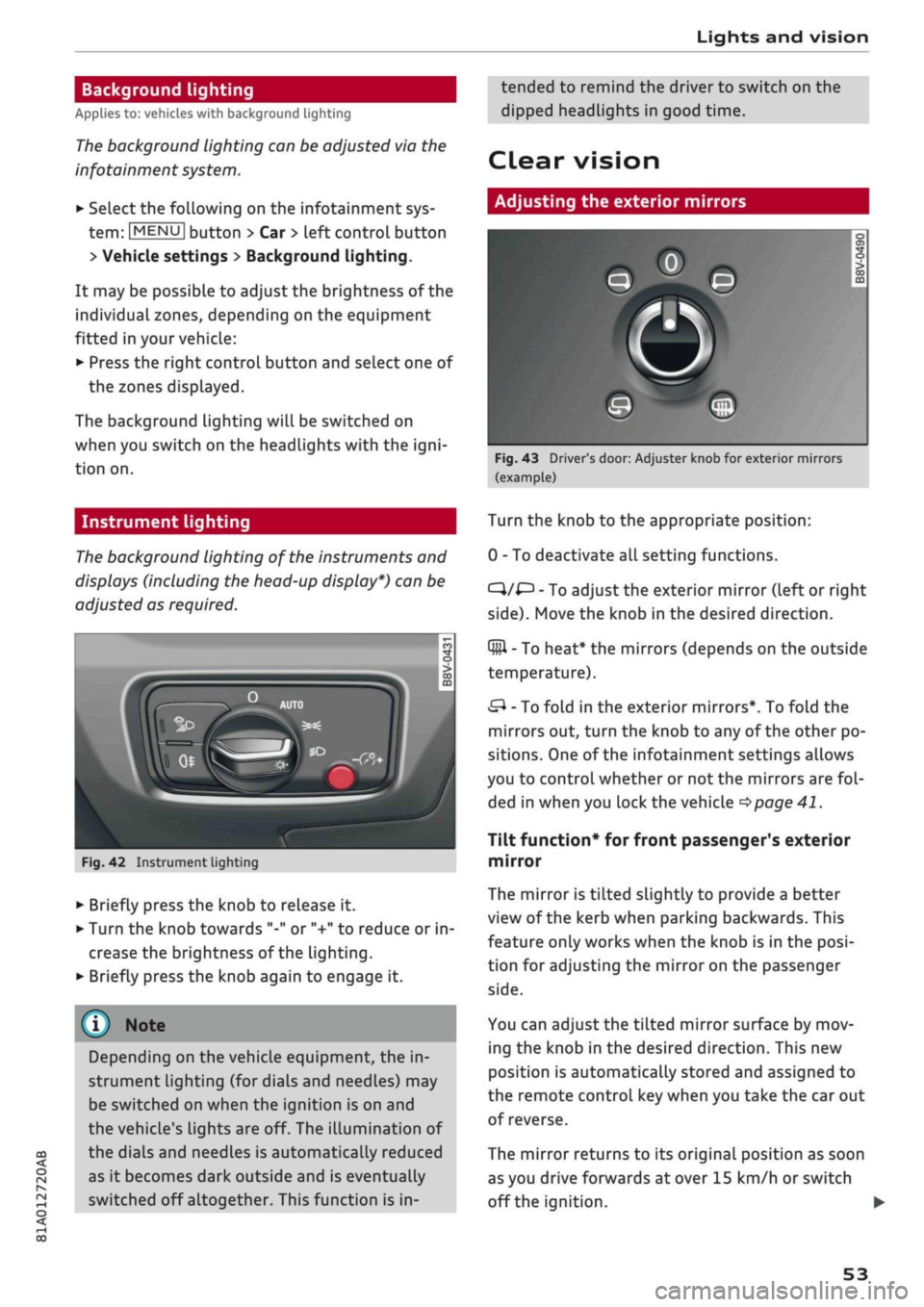
Instrument lighting
The
background lighting of the instruments and
displays (including the head-up display*) can be
adjusted as required.
Fig.
42 Instrument lighting
• Briefly press the knob to release it.
• Turn the knob towards "-" or "+" to reduce or in
crease the brightness of the lighting.
• Briefly press the knob again to engage it.
Depending on the vehicle equipment, the in
strument lighting (for dials and needLes) may
be switched on when the ignition is on and
the vehicle's lights are off. The illumination of
the dials and needles is automatically reduced
as it becomes dark outside and is eventually
switched off altogether. This function is in
tended to remind the driver to switch on the
dipped headlights in good time.
dear
vision
Adjusting the exterior mirrors
Fig.
43 Driver's door: Adjuster knob for exterior mirrors
(example)
Turn the knob to the appropriate position:
0 - To deactivate all setting functions.
C}/^
- To adjust the exterior mirror (left or right
side).
Move the knob in the desired direction.
Q#l
- To heat* the mirrors (depends on the outside
temperature).
&
- To fold in the exterior mirrors*. To fold the
mirrors out, turn the knob to any of the other po
sitions. One of the infotainment settings allows
you to control whether or not the mirrors are
fol
ded in when you lock the vehicle
•=>page
41.
Tilt function* for front passenger's exterior
mirror
The mirror is tiLted slightly to provide a better
view of the kerb when parking backwards. This
feature only works when the knob is in the
posi
tion for adjusting the mirror on the passenger
side.
You can adjust the tilted mirror surface by mov
ing the knob in the desired direction. This new
position is automatically stored and assigned to
the remote control key when you take the car out
of reverse.
The mirror returns to its original position as soon
as you drive forwards at over 15 km/h or switch
off the ignition. •
53
Page 63 of 364
Seats and storage
CO
rN
•-i
00
children unsupervised in the vehicle with the
key.
© CAUTION
- To avoid damage, please take care when de
taching connectors from the electrical pow
er sources.
-To avoid damage to the vehicle's electrical
system,
never connect equipment that
gen
erates electrical current, such as a solar
panel or battery charger, to the power sour
ces in order to charge the vehicle's battery.
- Always use the correct type of plugs to
avoid damaging the power sources.
©
USB charging sockets marked "CHARGE ON
LY" cannot transfer data and are intended for
charging only.
Storage
Cup holders
/
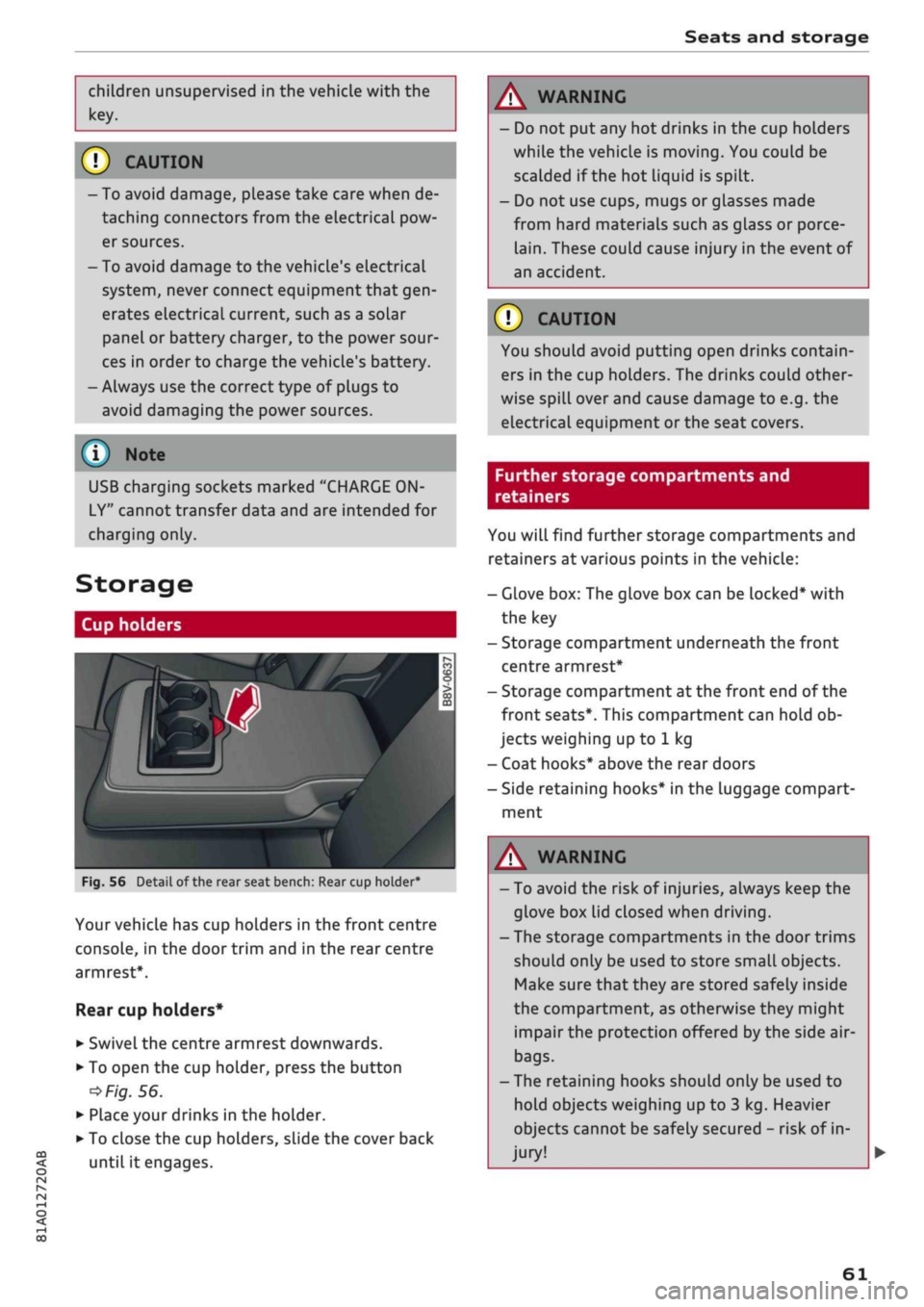
Fig.
56
BfT
^^—- j
^^ m /
Detail of the rear seat bench: Rear cup holder*
r^
n
co
3
>
CO
m
A
Your vehicle has cup holders in the front centre
console, in the door trim and in the rear centre
armrest*.
Rear cup holders*
• Swivel the centre armrest downwards.
• To open the cup holder, press the button
•=>
Fig.
56.
• Place your drinks in the holder.
• To close the cup holders, sLide the cover back
until it engages.
A WARNING
- Do not put any hot drinks in the cup holders
while the vehicle is moving. You could be
scalded if the hot liquid is spilt.
- Do not use cups, mugs or glasses made
from hard materials such as glass or porce
lain.
These could cause injury in the event of
an accident.
© CAUTION
You should avoid putting open drinks contain
ers in the cup holders. The drinks could other
wise spill over and cause damage to e.g. the
electrical equipment or the seat covers.
Further storage compartments and
retainers
You will find further storage compartments and
retainers at various points in the vehicle:
- Glove box: The glove box can be Locked* with
the key
- Storage compartment underneath the front
centre armrest*
- Storage compartment at the front end of the
front seats*. This compartment can hold ob
jects weighing up to 1 kg
- Coat hooks* above the rear doors
- Side retaining hooks* in the luggage compart
ment
A WARNING
- To avoid the risk of injuries, always keep the
glove box Lid closed when driving.
- The storage compartments in the door trims
should only be used to store small objects.
Make sure that they are stored safely inside
the compartment, as otherwise they might
impair the protection offered by the side air-
bags.
- The retaining hooks should only be used to
hold objects weighing up to 3 kg. Heavier
objects cannot be safely secured - risk of in
jury!
61
Page 64 of 364
Seats and storage
A WARNING
Applies to: vehicles with coat hooks
- Make sure
that
any items of clothing hang
ing from the coat hooks do not obstruct
your view to the rear.
- Only use the coat hooks for light items of
clothing and make sure that there are no
heavy or sharp objects in the pockets.
- Do not use clothes hangers to hang up the
clothing,
as this could interfere with the
function of the head-protection airbags.
Luggage compartment
General notes
A
WARNING
Please refer to the important safety notes on
<=>page
272, Stowing luggage safely.
Luggage compartment cover
Applies to: vehicles with luggage compartment cover
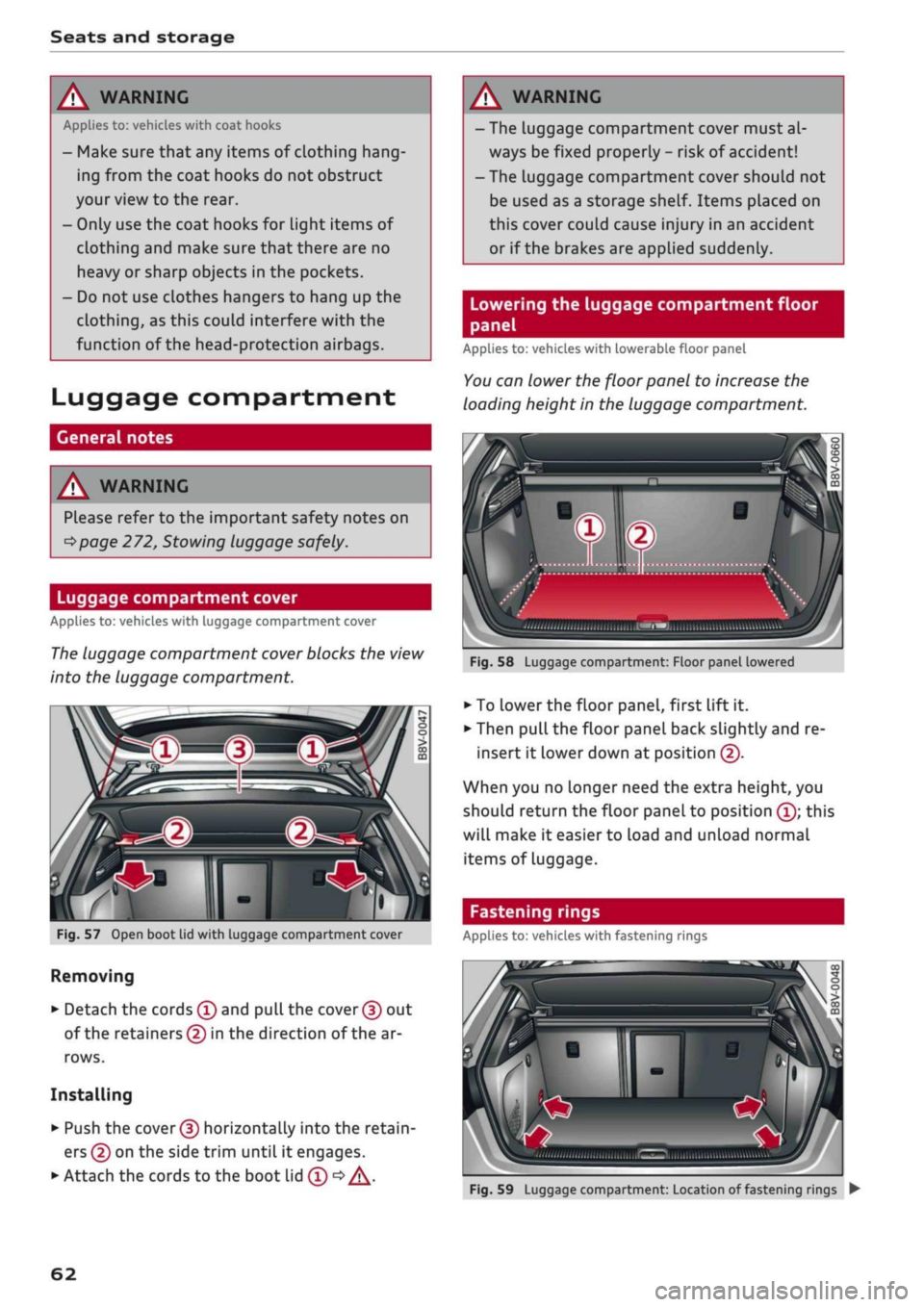
The
luggage compartment cover blocks the view
into the luggage compartment.
c
Fig.
57
Open boot lid with luggage compartment cover
Removing
• Detach the cords
(f)
and
pull
the
cover (f)
out
of the retainers (5) in the direction of the ar
rows.
Installing
• Push the
cover (D
horizontally into the retain
ers
(?)
on the side trim until
it
engages.
• Attach the cords to the boot lid
(T) •=>
A.
A WARNING
- The luggage compartment cover must al
ways be fixed properly
-
risk of accident!
- The luggage compartment cover should not
be used as a storage shelf. Items placed on
this cover couLd cause injury in an accident
or if the brakes are applied suddenly.
Lowering the luggage compartment floor
panel
Applies to: vehicles with lowerable floor panel
You
can lower the floor panel to increase the
loading height in the luggage compartment.
'•iii.nii,,,,
,„„„
„„,,
iilSMBIiimi
ulwu'l
Fig.
58
Luggage compartment: Floor panel lowered
• To
Lower
the floor panel, first lift
it.
• Then pull the floor panel back slightly and re
insert
it
lower down at position
(f).
When you no longer need the extra height, you
should return the floor panel to position
(Î);
this
will make
it
easier to load and unload normal
items of Luggage.
Fastening rings
Applies to: vehicles with fastening rings
Fig.
59
Luggage compartment: Location of fastening rings
•
62
Page 65 of 364
Seats and storage
CO
<
O
rN
rN
•-i
00
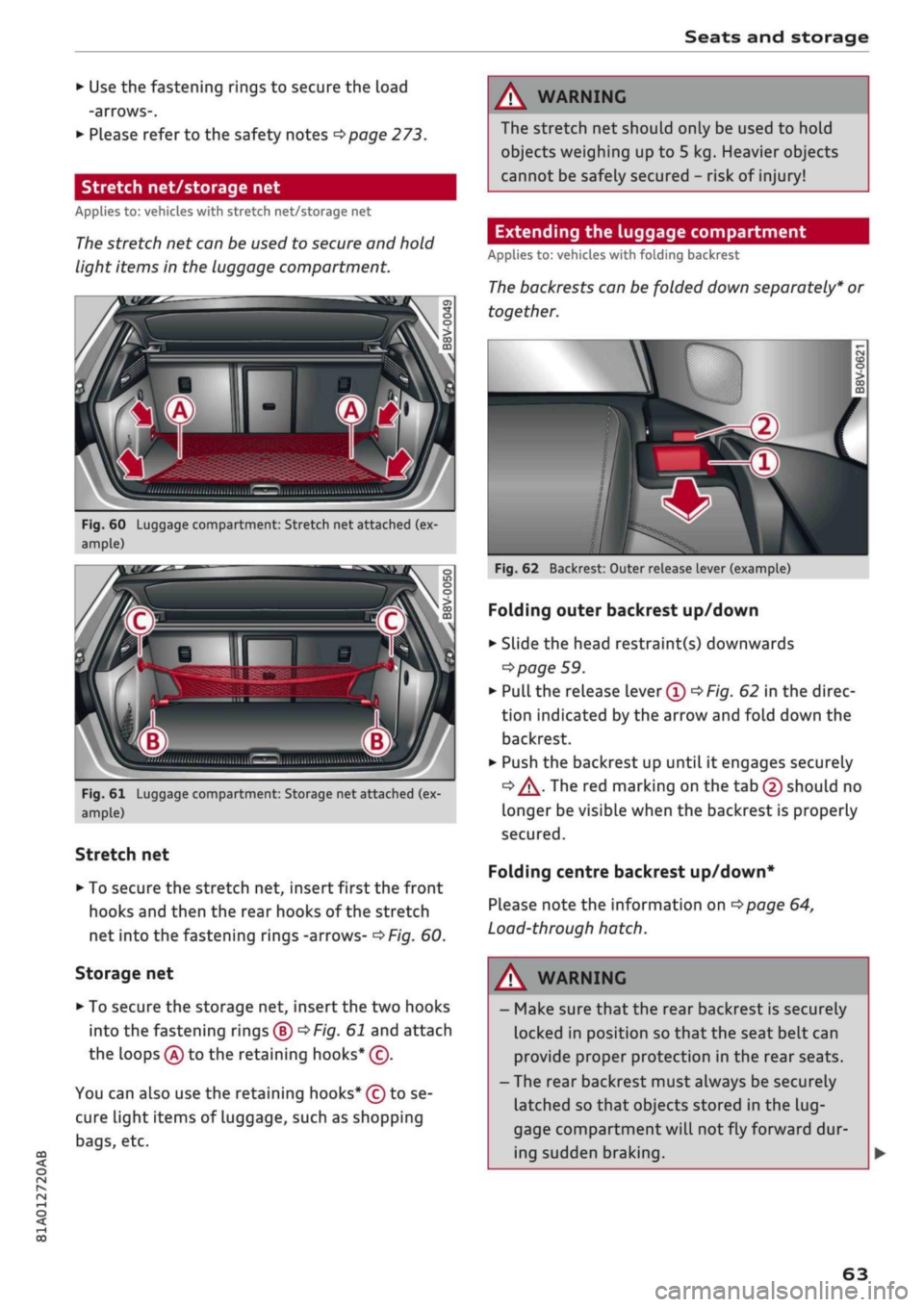
• Use the fastening rings to secure the load
-arrows-.
• Please refer to the safety notes
^page
273.
Stretch net/storage net
Applies to: vehicles with stretch net/storage net
The
stretch net can be used to secure and hold
light items in the luggage compartment.
ri
Fig.
60 Luggage compartment: Stretch net attached (ex
ample)
A
Q
"
Fig.
61 Luggage compartment: Storage net attached (ex
ample)
Stretch net
• To secure the stretch net, insert first the front
hooks and then the rear hooks of the stretch
net into the fastening rings -arrows-
^>Fig.
60.
Storage net
• To secure the storage net, insert the two hooks
into the fastening rings®
^F/g.
61 and attach
the loops
(A)
to the retaining hooks* (c).
You can also use the retaining hooks* (ç) to se
cure light items of luggage, such as shopping
bags,
etc.
A WARNING
The stretch net should only be used to hold
objects weighing up to 5 kg. Heavier objects
cannot be safely secured - risk of injury!
Extending the luggage compartment
Applies to: vehicles with folding backrest
The
backrests can be folded down separately* or
together.
\v
Fig.
62 Backrest: Outer release lever (example)
Folding outer backrest up/down
• Slide the head restraint(s) downwards
=>
page 59.
•
Pull
the release lever®
^Fig.
62 in the direc
tion indicated by the arrow and fold down the
backrest.
• Push the backrest up until it engages securely
<=» A-
The red marking on the tab (2) should no
Longer be visible when the backrest is properly
secured.
Folding centre backrest
up/down*
Please note the information on
^>page
64,
Load-through hatch.
WARNING
- Make sure that the rear backrest is securely
locked in position so that the seat belt can
provide proper protection in the rear seats.
- The rear backrest must always be securely
latched so that objects stored in the
lug
gage compartment will
not
fly forward dur
ing sudden braking.
63
Page 66 of 364
Seats and storage
© CAUTIOI
- If
you
need to adjust the front seats when
either of the rear backrests is folded for
wards, please take care to avoid damaging
the rear head restraints. If necessary, re
move the appropriate head restraints be
fore you slide back the front seats.
- Lower the rear head restraints before you
fold down the backrest
•=>
A in Rear head
restraints on page 59 - risk of damage!
- When returning the backrest to an upright
position,
make sure that the seat belts for
the outer rear seats are not caught up and
damaged in the catches for the backrest.
Load-through hatch
Applies to: vehicles with load-through hatch
ft
•
/ Bsa-1
j^^V^il
n^B
iV^yM
•
in
H o
• CD •
O
• >
CO
CD
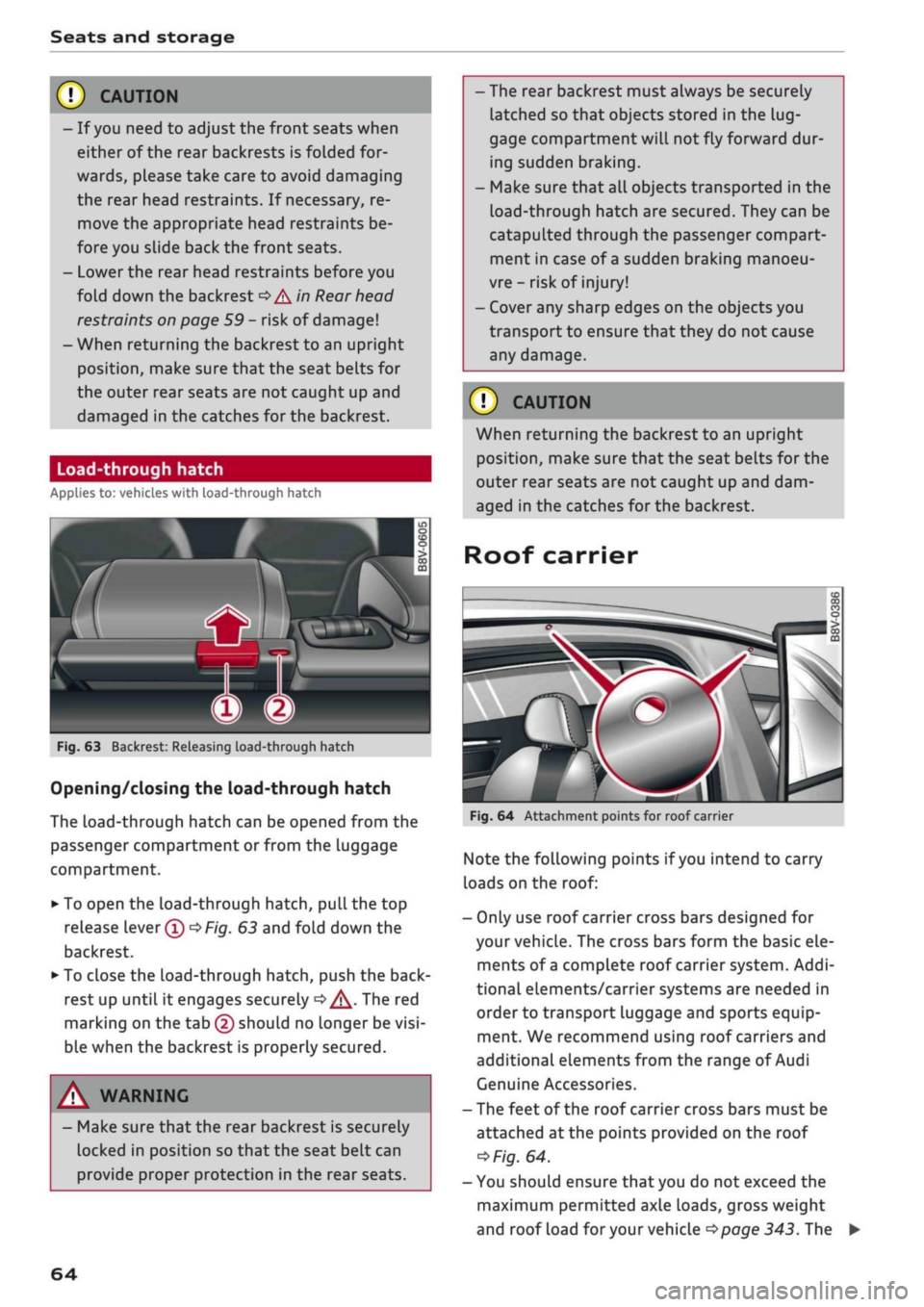
Fig.
63 Backrest: Releasing load-through hatch
Opening/closing the load-through hatch
The
Load-through
hatch can be opened from the
passenger compartment or from the luggage
compartment.
• To open the load-through hatch, pull the top
release lever®
OF/g.
63 and fold down the
backrest.
• To close the load-through hatch, push the
back
rest up until it engages securely
d>^.
The red
marking on the tab (2) should no longer be
visi
ble when the backrest is properly secured.
A WARNING
- Make sure that the rear backrest is securely
locked in position so that the seat belt can
provide proper protection in the rear seats.
- The rear backrest must always be securely
latched so that objects stored in the
lug
gage compartment
wilL
not fly forward dur
ing sudden braking.
- Make sure that all objects transported in the
Load-through
hatch are secured. They can be
catapulted through the passenger compart
ment in case of
a
sudden braking manoeu
vre - risk of injury!
- Cover any sharp edges on the objects you
transport to ensure that they do not cause
any damage.
© CAUTION
When returning the backrest to an upright
position,
make sure that the seat belts for the
outer rear seats are not caught up and dam
aged in the catches for the backrest.
Roof carrier
Fig.
64 Attachment points for roof carrier
Note the folLowing points if
you
intend to carry
loads on the roof:
- Only use roof carrier cross bars designed for
your vehicle. The cross bars form the basic ele
ments of
a
complete roof carrier system. Addi
tional elements/carrier systems are needed in
order to transport luggage and sports equip
ment. We recommend using roof carriers and
additional elements from the range of Audi
Genuine Accessories.
- The feet of the roof carrier cross bars must be
attached at the points provided on the roof
*>Fig.
64.
- You should ensure that you do not exceed the
maximum permitted axle loads, gross weight
and roof load
for
your vehicle
•=>page
343. The
64
Page 76 of 364

Driving
Steering
Adjusting the steering wheel position
The height and reach of the steering wheel can
be adjusted as required to suit the
driver.
Fig.
68 Steering column: Lever for steering column adjust
ment
•
Push the Lever
^>Fig.
68 down
<=> /\.
•
Move the steering wheel to the desired
posi
tion.
•
Then push the lever towards the steering
col
umn until the catch engages.
WARNING
- Never adjust the position of the steering
wheel when the vehicle is moving - this
could cause an accident.
- Press the lever upwards so it is secure and
so that the position of the steering wheel
cannot shift unexpectedly while the vehicle
is moving - risk of accident!
Starting and stopping
the engine (vehicles with
ignition Lock)
Starting the engine
Applies to: vehicles with ignition lock
Insert the key in the ignition lock to switch on
the ignition and start the engine.
Fig.
69 Ignition lock: Ignition key positions
Switching the ignition on/off
•
To switch on the ignition, turn the ignition key
to position ®. Vehicles without start/stop sys
tem*:
The rev counter needle will move to the
READY position.
• To switch off the ignition, turn the ignition key
to position ©. The rev counter needle will
move to the OFF position.
Diesel engines are automatically preheated when
you switch on the ignition.
Starting the engine
•
Manual gearbox: Press the clutch pedal all the
way down and move the gear lever into neutral.
•
Automatic gearbox: Press the brake pedal and
move the selector lever to position P or N.
•
Turn the ignition key briefly to position @. The
ignition key automatically returns to position
®. Do not press the accelerator.
Applies to: vehicles with diesel engine
•
The engine may take a few seconds Longer than
usual to start on cold days. Please keep your
foot on the clutch pedal (manual gearbox) or
brake pedal (automatic gearbox) until the en
gine starts. The indicator Lamp
E g
lights up
while the glow plugs are preheating.
74
Page 77 of 364

Driving
CO
<
O
rN
iv
rN
•-i
00
Electrical components with a high power
con
sumption are switched off temporarily while you
start the engine.
If the engine fails to start immediately, switch
off the starter by turning the ignition key to
posi
tion (5) and try again after about 30 seconds.
Start/stop
system*
Please note the information on
^>page
79,
Start/stop system.
A WARNING
- Never run the engine in confined spaces.
The exhaust gases are toxic - risk of poison
ing!
- Never remove the key from the ignition
while the vehicle is moving. The steering
lock would engage, and you would not be
able to steer the car - risk of accident!
© CAUTION
Avoid high engine speeds, full throttle and ex
treme load conditions until the engine has
reached its normal operating temperature;
otherwise this can damage the engine.
© For the sake of the environmen
Do not warm up the engine by running it with
the car stationary. You should drive off imme
diately whenever possible. This will help avoid
unnecessary exhaust emissions.
© Note
- If it is difficult to turn the ignition key to po
sition ®, move the steering wheel (to take
the load off the steering lock mechanism)
until the key turns freely.
- Any noises which may be heard when the
engine is started are quite normal and no
cause for concern.
Switching off the engine
Applies to: vehicles with ignition lock
Switching off the engine
•
Stop the vehicle.
•
Turn the ignition key to position
@.
The rev
counter needle will move to the OFF position.
Engaging the steering lock
Important: The selector lever must be in position
P (automatic gearbox*).
•
Remove the ignition key while it is in position
(§) ^>page
76, Fig. 70
=> A
•
Turn the steering wheel until you hear the
steering lock engage.
The steering lock acts as a theft deterrent.
A,
WARNING
- Never switch off the engine until the vehicle
is stationary. Otherwise you may not have
the full benefit of the brake servo and pow
er steering. You may need more strength to
steer and brake the vehicle than you nor
mally would. This would mean a greater risk
of accidents and serious injury, because you
cannot steer and brake in the normal
man
ner.
- Never remove the key from the ignition
while the vehicle is moving. The steering
lock could engage suddenly, and you would
not be able to steer the car.
- Always take the key with you when you leave
the vehicle. Otherwise the engine can be
started or power-operated equipment such
as the electric windows can be used. This
could result in serious injury.
- When parking, always move the selector
lever to position
P
to prevent the vehicle
from rolling back accidentally.
© CAUTION
If the engine has been working hard
fora
long
time,
there is a risk of heat building up in the
engine compartment after the engine has
been switched off; this could cause engine
damage. For this reason, you should Leave the
engine idling for about 2 minutes before
switching
it
off.
75
Page 78 of 364
Driving
©
y
Note
After the engine is stopped, the radiator fan
may remain on or turn itself back on for up to
10 minutes, even if the ignition is switched
off. This may occur for the following reasons:
- Residual heat has raised the coolant
tem
perature.
- Direct sunlight has additionally heated up
the engine compartment while the engine is
warm.
- Applies to vehicles with diesel particulate
filter: The emission control system is hot
because of the regeneration process, even
though the engine has
not
yet reached oper
ating temperature.
Starting and stopping
the engine (vehicles with
convenience key)
Starting the engine
Applies to: vehicles with convenience key
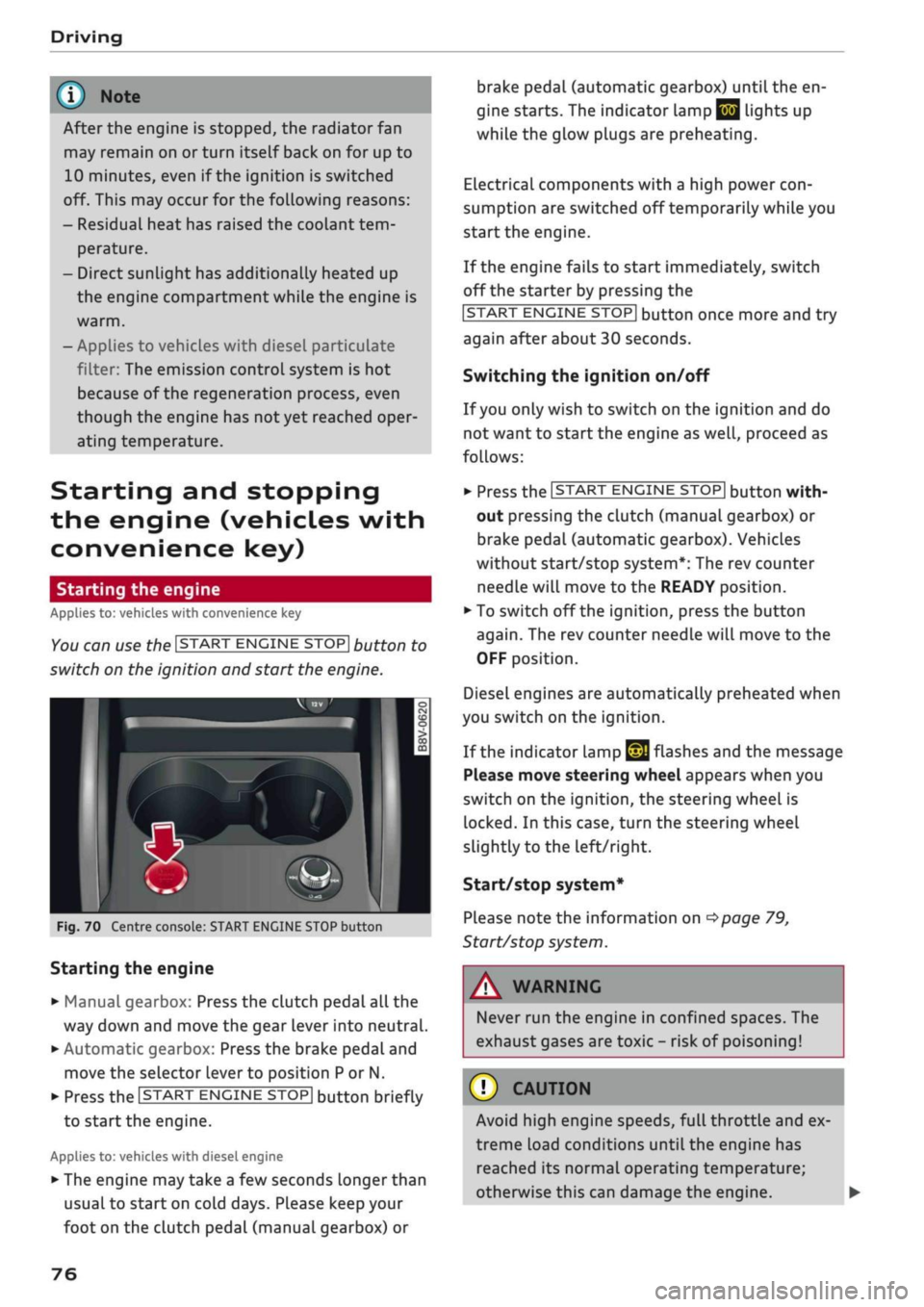
You can use the ISTART ENGINE STOP| button to
switch on the ignition and start the engine.
Fig.
70 Centre console: START ENGINE STOP button
Starting the engine
•
Manual gearbox: Press the clutch pedal all the
way down and move the gear lever into neutral.
•
Automatic gearbox: Press the brake pedal and
move the selector lever to position P or N.
•
Press the ISTART ENGINE
STOP!
button briefly
to start the engine.
Applies to: vehicles with diesel engine
•
The engine may take a few seconds longer than
usual to start on cold days. Please keep your
foot on the clutch pedal (manual gearbox) or
brake pedal (automatic gearbox) until the en
gine starts. The indicator Lamp
E 3
lights up
while the glow plugs are preheating.
Electrical components with a high power
con
sumption are switched off temporarily while you
start the engine.
If the engine fails to start immediately, switch
off the starter by pressing the
ISTART
ENGINE
STOPI
button once more and try
again after about 30 seconds.
Switching the ignition on/off
If you only wish to switch on the ignition and do
not want to start the engine as
well,
proceed as
follows:
•
Press the ISTART ENGINE STOP| button with
out pressing the clutch (manual gearbox) or
brake pedal (automatic gearbox). Vehicles
without start/stop system*: The rev counter
needle will move to the READY position.
•
To switch off the ignition, press the button
again.
The rev counter needle will move to the
OFF position.
Diesel engines are automatically preheated when
you switch on the ignition.
If the indicator lamp
£21
flashes and the message
Please move steering wheel appears when you
switch on the ignition, the steering wheel is
locked.
In this case, turn the steering wheel
slightly
to
the left/right.
Start/stop system*
Please note the information on
<^>page
79,
Start/stop system.
WARNING
Never run the engine in confined spaces. The
exhaust gases are toxic - risk of poisoning!
© CAUTION
Avoid high engine speeds, full throttle and ex
treme load conditions until the engine has
reached its normal operating temperature;
otherwise this can damage the engine. •
76
Page 79 of 364
Driving
CO
<
O
rN
IV
rN
t-H
o <
® For the sake of the environment
Do not warm up the engine by running it with
the car stationary. You should drive off imme
diately whenever possible. This will help avoid
unnecessary exhaust emissions.
© Note
- Any noises which may be heard when the
engine is started are quite normal and no
cause for concern.
- If
you
leave your vehicle with the ignition
switched on, it will be switched off auto
matically after
a
while. Please note that
electrical equipment such as the exterior
lighting will also be switched off.
Switching off the engine
Applies to: vehicles with convenience key
•
Stop the vehicle.
•
Automatic gearbox: Move the selector lever to
position P.
•
Press the ISTART ENGINE STOP| button
tapage
76, Fig. 70.
Steering
lock15
The steering will be locked if
you
switch off the
engine with the ISTART ENGINE STOP| button,
move the selector lever to position P (on vehicles
with automatic gearbox*) and open the driver's
door. The steering lock acts as a theft deterrent.
Emergency Off function
If necessary in an emergency, the engine can be
switched off while the vehicle is still moving at
speeds of 7 km/h and above. To switch off the
engine, press the ISTART ENGINE STOP| button
twice in quick succession or hold it in for longer
than two seconds.
A WARNING
- Never switch off the engine until the vehicle
is stationary. Otherwise you may not have
the full benefit of the brake servo and pow
er steering. You may need more strength to
steer and brake the vehicle than you nor
mally would. This would mean a greater risk
of accidents and serious injury, because you
cannot steer and brake in the normal
man
ner.
- Always take the key with you when you Leave
the vehicle. Otherwise the engine can be
started or power-operated equipment such
as the electric windows can be used. This
could result in serious injury.
- When parking, always move the selector
lever to position
P
to prevent the vehicle
from rolling back accidentally.
If the engine has been working hard for
a
long
time,
there is a risk of heat building up in the
engine compartment after the engine has
been switched off; this could cause engine
damage. For this reason, you should leave the
engine idling for about 2 minutes before
switching it off.
©
Note
After the engine is stopped, the radiator fan
may remain on or turn itself back on for up to
10 minutes, even if the ignition is switched
off. This may occur for the following reasons:
- Residual heat has raised the coolant
tem
perature.
- Direct sunlight has additionally heated up
the engine compartment while the engine is
warm.
- Applies to vehicles with diesel particulate
filter: The emission control system is hot
because of the regeneration process, even
though the engine has
not
yet reached oper
ating temperature.
Driver messages
Engine running. Warning! Switch off ignition
before leaving car
1J
This function is not available on all export versions.
77
Page 80 of 364

Driving
This message appears
and a
buzzer sounds
if
you
open
the
driver's door while
the
engine
is
run
ning.
Pressing start/stop button again will switch
off
engine.
This message appears
if
you press
the
ISTART
ENGINE
STOPI*
button while
the
vehicle
is moving
<^>page
77,
Emergency
Off
function.
Engine start system: fault. Please contact work
shop
A fault
has
occurred when starting
the
engine
au
tomatically (automatic start function). Drive
to a
qualified workshop soon
and
have
the
fault
recti
fied.
To
start
the
engine, turn
the
ignition
key to
position
@
^>page
74 or
press
the
ISTART
ENGINE
STOPl
button and hold the
key/button until
the
engine starts.
D
Key not
recognised. See owner's manual
This message appears
if
there
is no
convenience
key inside
the
vehicle
or if
the system cannot
de
tect
or
identify
the
key. This
can
happen,
for ex
ample,
if
the radio signal from
the key is
obstruc
ted
by a
metal briefcase
or
similar,
or if the key
battery
is
weak. Electronic equipment, such
as
mobile phones,
can
also interfere with
the
radio
signal from
the key.
The engine
can
still
be
started
or
stopped
if
this
happens (please refer
to
^page
79).
C]
Remote control key: hold back
of key
against marked area.
See
owner's manual
If
the
indicator lamp lights
up and the
message
appears,
a
malfunction
has
occurred
^>page
79.
3
Key not in
vehicle?
3
Remote control key:
key not
recognised.
Is
key still
in
vehicle?
If
the
indicator
lampGB
Lights
up and the
mes
sage appears,
the
convenience
key
was removed
from
the
vehicle while
the
engine
was
running.
If
the convenience
key is not in the
vehicle
you
will
not
be
able
to
switch
on the
ignition
or
restart
the engine after
it has
been switched
off. You
will
also
not be
able
to
lock
the
vehicle from
the
out
side.
Please press brake pedal
This message appears
on
vehicles with
an
auto
matic gearbox
if
you
try to
start
the
engine
with
out first pressing
the
brake pedal.
Please press clutch pedal
This message appears
if
you
try to
start
the en
gine without first pressing
the
clutch pedal.
The
engine will only start
if
you press
the
clutch
ped
al.
Please engage
N or P
This message will appear
if
you
try to
start
or
switch
off the
engine when
the
selector lever
is
not
in N or P. The
engine
can
then
not be
started
or switched
off.
Switch
off
ignition before leaving
car.
Battery
is
being discharged
This message appears
and the
buzzer sounds
if
you open
the
driver's door while
the
ignition
is
switched
on.
Switch
off
the ignition
to
prevent
the vehicle battery from being discharged.
Shift
to P,
vehicle can roll away. Doors can only
be locked
in P
For safety reasons, this message will appear
if
the selector Lever
of the
automatic gearbox
is not
in position P when
you
switch
off the
ignition.
Put
the selector lever
in
position
P;
otherwise
the ve
hicle
can
roll away
and
cannot
be
locked.
78