lock AUDI Q2 2021 Owner´s Manual
[x] Cancel search | Manufacturer: AUDI, Model Year: 2021, Model line: Q2, Model: AUDI Q2 2021Pages: 364, PDF Size: 87.77 MB
Page 97 of 364

- The selector lever must not be moved out of
position P if the parking brake is not ap
plied.
If this does not work, use the brake
pedal to hold the vehicle or use wheel
chocks or similar to block one of the front
and rear wheels. If
you
do not apply the
brake,
the vehicle may roll away and cause
an accident.
Page 100 of 364
Towing a trailer
Requirements for correct functioning of the
trailer stabilisation system
If these conditions are not met in
full,
the trailer
stabilisation system will only intervene to a
limi
ted extent or not at all
>=>
A-
- The electrical connection between the towing
vehicle and the trailer must be functioning cor
rectly.
- The load on the trailer must be properly se
cured.
- The tyre pressures on both the vehicLe and the
trailer must be adapted to the load that is be
ing carried.
- Where possible, operate the trailer with the
maximum permitted draw bar weight.
- The trailer overrun brake must be set correctly.
This is important to ensure that the trailer can
be braked correctly, to avoid the vehicle and
trailer "jack-knifing" and to prevent excess
braking of the trailer.
- At low outside temperatures, both the towing
vehicle and the trailer should be fitted with
winter tyres.
A WARNING
It is essential that you adjust your speed to
suit the weather, road and traffic conditions.
Do not let the trailer stabilisation system
tempt you into taking any risks when driving -
this can cause accidents.
- The ESC and trailer stabilisation system
can
not defy the Laws of physics. This should be
kept in mind, particularly on slippery and
wet roads and when towing a trailer with a
light Load.
- The trailer stabilisation system is function
al,
regardless of whether the trailer has a
mechanical overrun brake or not.
- The trailer stabilisation system is not always
able to detect swaying of trailers with a
light load and will therefore not intervene.
- A trailer can still "jack-knife" on slippery
roads with little grip, even if the towing ve
hicle is equipped with the trailer stabilisa
tion system.
-Trailers with a high centre of gravity may
even tip over before they start to sway
side
ways.
-If
you
are not towing a trailer,
but
the
trail
er socket is being used (e.g. for an illumina
ted bicycle rack), the trailer stabilisation
system may be activated in extreme driving
conditions.
- Please note the additional information and
warnings
^>page
98, Driving tips.
Driving tips
Driving with a trailer always requires extra care.
Weight distribution
Try to avoid towing a loaded trailer with an unla
den vehicle. If this cannot be avoided, drive extra
slowly to allow for the unbalanced weight distri
bution.
Speed
Normally, you must not exceed 80 km/h when
towing a trailer or caravan. However, if the
trail
er/caravan is equipped with a trailer stabilisation
system,
you can drive at max. 100 km/h. Please
observe any other regulations applicable in the
country in which you are travelling.
The stability of the car and trailer is reduced with
increasing speed. For this reason it is advisable
not to drive at the maximum permissible top
speed in unfavourable
road,
weather or wind
con
ditions. This applies especially on a downhill gra
dient.
You should always reduce speed immediately if
the trailer shows the slightest sign of swaying.
Never try to stop the swaying by accelerating fur
ther.
Always brake in good time. If the trailer has an
overrun brake, apply the brakes gently at first
and then firmly. This will prevent the jerking that
can be caused by the trailer wheels locking.
Change down in good time before going down a
steep hill so
that
you can use the engine braking
effect to slow down the vehicLe.
Swaying and pitching can be reduced by attach
ing an extra stabiliser to the trailer. It should •
98
Page 101 of 364

Towing
a
trailer
CO
< o rN
iv
rN
t-H
o < 00
have friction linings at the sides to prevent exces
sive wear. Degrease and clean the ball joint be
fore using a stabiLiser. The stabiliser can be pur
chased and installed
at
a qualified workshop.
Electronic stabilisation control
The
ESC
-
in particular in conjunction with the
trailer stabilisation system
o^page
97 - makes
it
easier to stabilise a trailer
if it
starts to skid
or
sway. You should therefore keep the
ESC
switch
ed on
at
all times.
Overheating
In hot weather, keep an eye on the coolant
tem
perature gauge
^page
13. When climbing long
hills with the engine running fast in low gear, the
coolant temperature can increase. Reduce speed
immediately
if
the needle moves to the right end
of the scale. For information on the warning
lamp
||
refer to
opage
30.
Rear carrier systems
When using rear carrier systems (e.g. bicycle
racks) on the towing bracket,
it
is important not
to exceed the maximum load.
The total weight
of
the rear carrier system and
its
load must not exceed
75
kg for this vehicle. How
ever,
it
is also important to observe the maxi
mum permissible load for the rear carrier sys
tem.
The greater the distance from the towing brack
et, the smaller the maximum permissible Load
on
the rear carrier system. For this reason, you
should secure heavy objects as near as possible
to the towing bracket.
Note the instructions provided by the manufac
turer of the rear carrier system.
Please make sure that the rear carrier system
is
approved for use on your vehicle.
l
Note
A WARNING
The use of an unsuitable rear carrier system
could cause severe damage
to
the towing
bracket. The towing bracket could then break
and cause an accident.
Degrease and clean the ball joint before using
a rear carrier system.
Removable towing
bracket
Introduction
Applies to: vehicles with removable towing bracket
Special care is required when fitting and remov
ing the towing bracket.
Fig.
84 Luggage compartment:
Ball
joint for towing brack
et (stowage example)
The removable ball joint attachment for the tow
ing bracket is stored under the floor panel or in a
separate bag on the floor of the luggage com
partment.
The ball joint can be fitted and removed by hand.
WARNING
Never use tools of any kind when fitting and
removing the ball joint. This could damage
the mechanism which locks the
ball
joint
in
place and impair its safety
-
risk of accident!
© Note
- Do not attempt to modify or repair the ball
joint or other towing bracket components.
- Should you have any difficulties when using
the towing bracket, or suspect that
it
is not
fitted properly, contact
a
qualified work
shop.
- Before setting off, always check that the
ball
joint is secured properly
Opage
101.
99
Page 102 of 364
Towing a trailer
- Never disengage the ball joint with the cara
van / trailer still hitched or with a bicycle
rack or similar accessory still attached.
- It is advisable to remove the ball joint when
you are not towing a trailer. Check whether
the plug is properly inserted in the mount
ing fixture and that the bumper cover is fit
ted.
-The
ball
joint must be removed if
you
intend
to clean the car with a steam cleaning at
tachment. Check whether the plug is prop
erly inserted in the mounting fixture and
that the bumper cover is fitted.
- For installation and removal of the ball joint
we recommend using the gloves provided
for
this purpose.
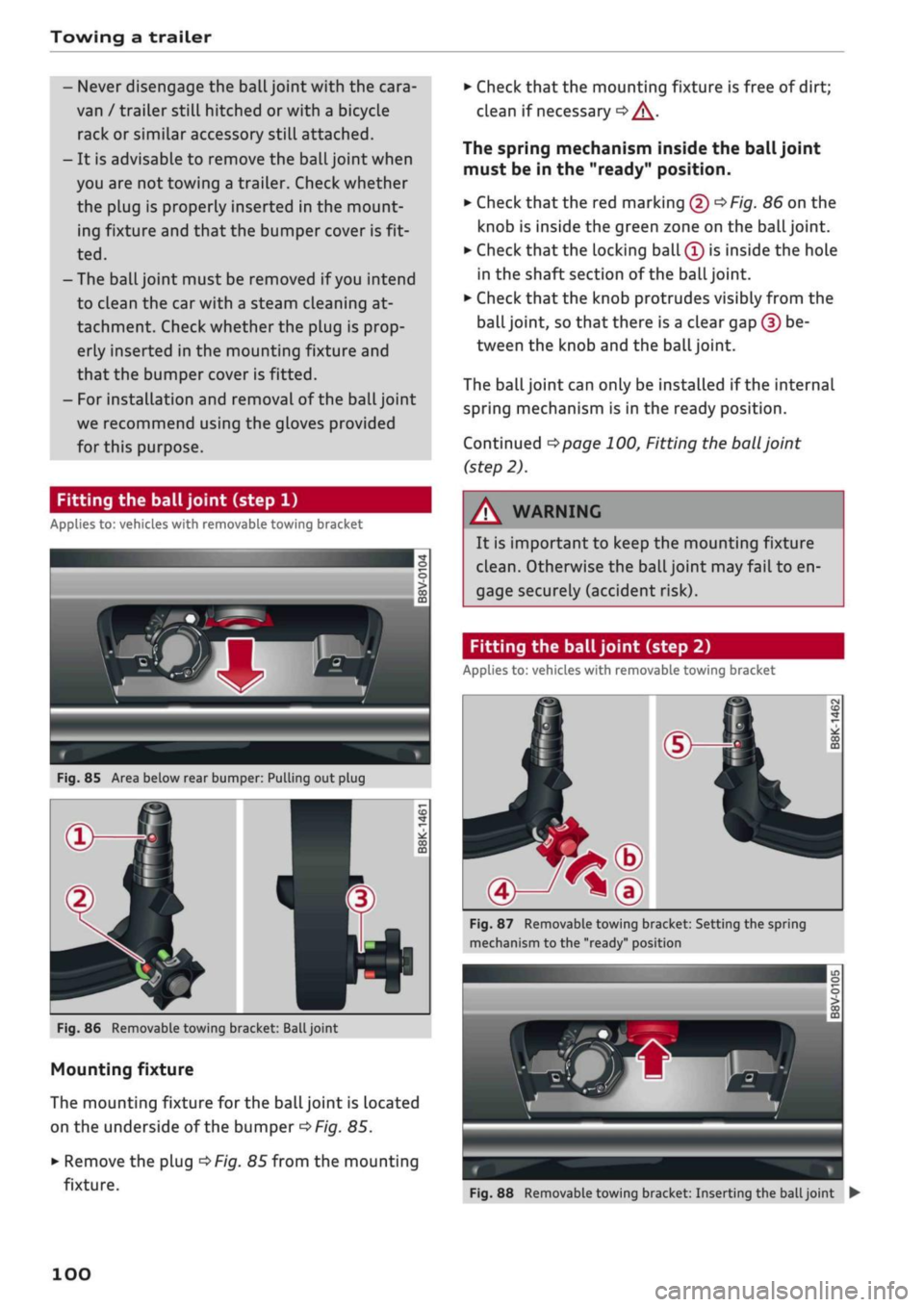
Fitting the ball joint (step 1)
Applies to: vehicles with removable towing bracket
Fig.
85 Area below rear bumper: Pulling out plug
Fig.
86 Removable towing bracket:
Ball
joint
Mounting fixture
The mounting fixture for the ball joint is located
on the underside of the bumper
^>Fig.
85.
•
Remove the plug
^>Fig.
85 from the mounting
fixture.
•
Check that the mounting fixture is free of dirt;
clean if necessary
•=> /\.
The spring mechanism inside the ball joint
must be in the "ready" position.
•
Check
that
the red marking (5)
^>Fig.
86 on the
knob is inside the green zone on the
ball
joint.
•
Check that the locking ball
(Î)
is inside the hole
in the shaft section of the
ball
joint.
•
Check that the knob protrudes visibly from the
ball joint, so that there is a clear gap (?) be
tween the knob and the
ball
joint.
The
ball
joint can only be installed if the internal
spring mechanism is in the ready position.
Continued
^>page
100, Fitting the
ball
joint
(step 2).
WARNING
It is important to keep the mounting fixture
clean.
Otherwise the ball joint may fail to en
gage securely (accident risk).
Fitting the ball joint (step 2)
Applies to: vehicles with removable towing bracket
Fig.
87 Removable towing bracket: Setting the spring
mechanism to the "ready" position
Fig.
88 Removable towing bracket: Inserting the
ball
joint •
100
Page 103 of 364
Towing a trailer
Setting the spring mechanism to the "ready"
position (if required)
•
Insert the key®
^>Fig.
87 for locking the ball
joint into the lock on the knob and turn it
clock
wise.
•
Pull out the knob in direction ®, hold and turn
in direction ® until the locking ball (5) engages
Inserting the ball joint
•
With the spring mechanism in the "ready"
posi
tion,
insert the ball joint into the mounting fix
ture and push it upwards
<=$Fig.
88 in the direc
tion indicated (arrow)
•=> ^.
The spring mecha
nism should then engage automatically with an
audible click.
•
Lock the ball joint by turning the key
anti-clock
wise.
•
Take out the key and press the cover cap onto
the lock.
Continued
^>page
101, Fitting the
ball
joint
(step 3).
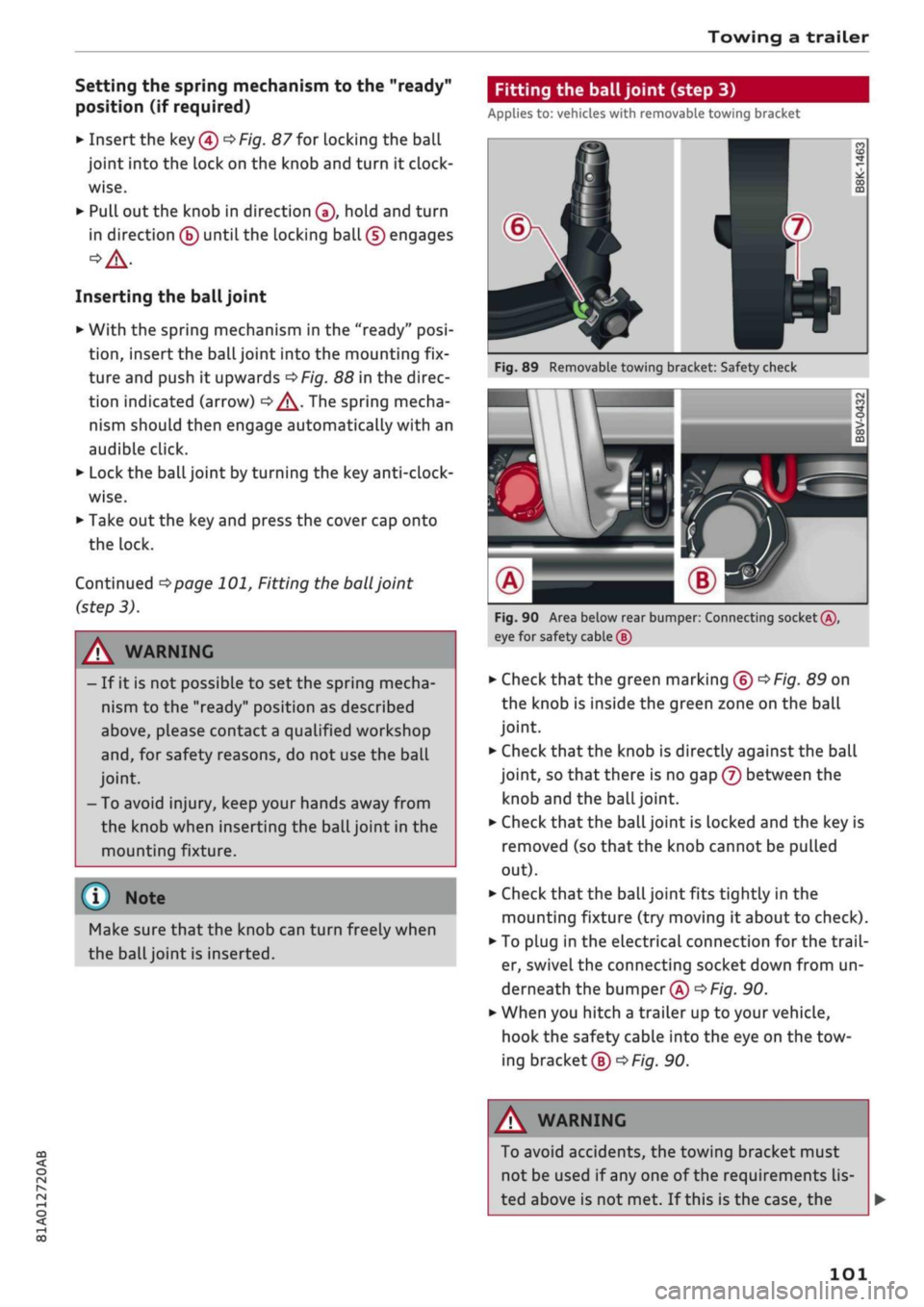
Fitting the ball joint (step 3)
Applies to: vehicles with removable towing bracket
A WARNING
- If it is not possible to set the spring mecha
nism to the "ready" position as described
above,
please contact
a
qualified workshop
and,
for safety reasons, do not use the ball
joint.
- To avoid injury, keep your hands away from
the knob when inserting the ball joint in the
mounting fixture.
Make sure that the knob can turn freely when
the
ball
joint is inserted.
Fig.
89 Removable towing bracket: Safety check
M \
AH^H
eg
n
•>*
0
CO
J
m
Fig.
90 Area below rear bumper: Connecting socket®,
eye for safety cable (5)
•
Check
that
the green marking ®
^>Fig.
89 on
the knob is inside the green zone on the ball
joint.
•
Check that the knob is directly against the ball
joint, so that there is no gap (7) between the
knob and the
ball
joint.
•
Check that the ball joint is locked and the key is
removed (so that the knob cannot be pulled
out).
•
Check that the ball joint fits tightly in the
mounting fixture (try moving it about to check).
• To plug in the electrical connection for the
trail
er, swivel the connecting socket down from un
derneath the bumper®
^>Fig.
90.
*•
When you hitch a trailer up to your vehicle,
hook the safety cable into the eye on the tow
ing bracket®
^F/g.
90.
CO
rN
rN
1-1
00
A WARNING
To avoid accidents, the towing bracket must
not be used if any one of the requirements
lis
ted above is not met. If this is the case, the
101
Page 104 of 364
Towing a trailer
ball joint must be fitted again properly
^>page
100. Please contact a qualified work
shop in the event of
a
technical fault.
(T) Note
•
The eye ® on the towing bracket is intended
only for securing the safety cable of the
trail
er.
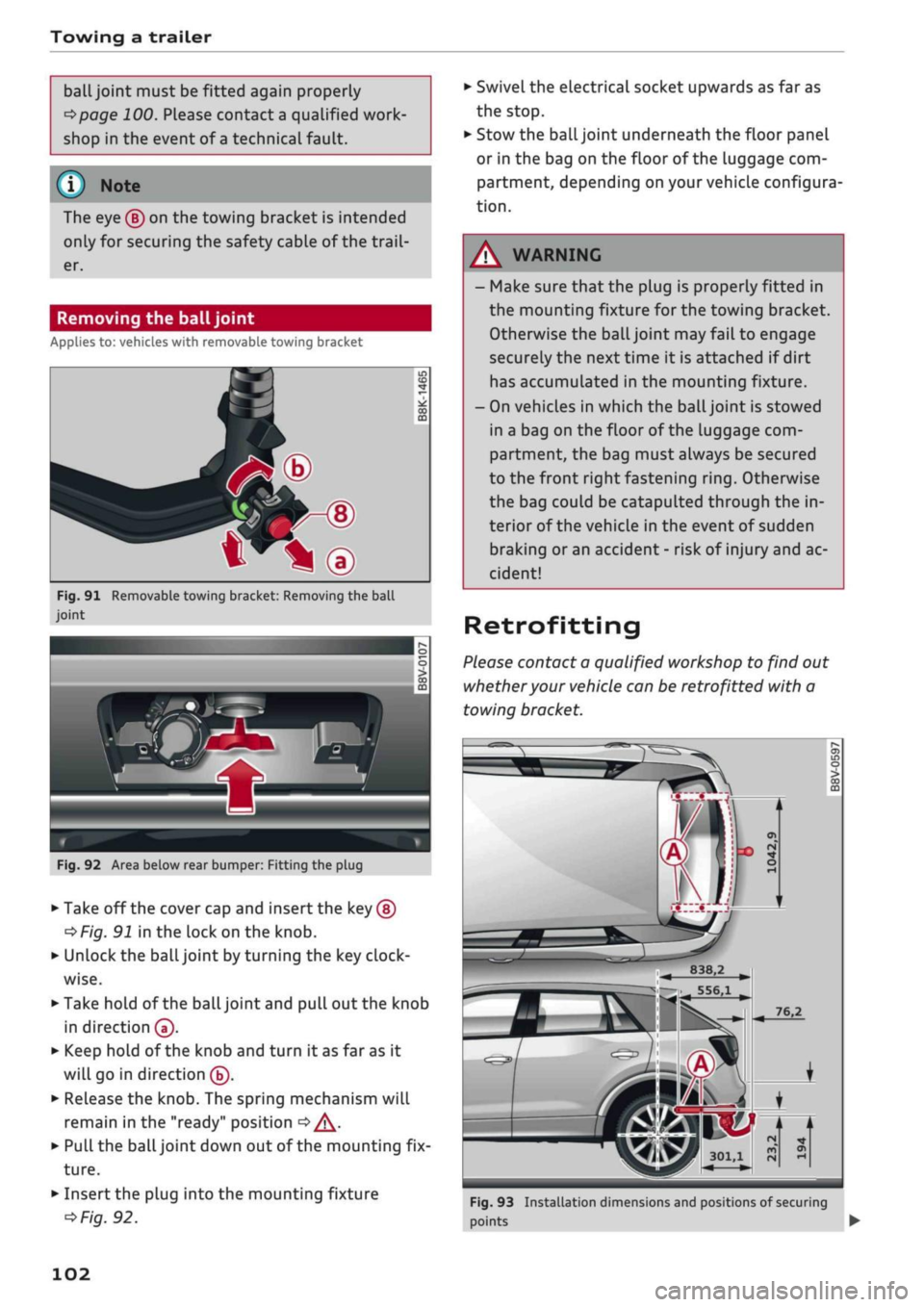
Removing the ball joint
Applies to: vehicles with removable towing bracket
*—d
^•^Pfip-®
—
t*\®
Fig.
91 Removable towing bracket: Removing the ball
joint
IT)
CD
CO
m
Fig.
92 Area below rear bumper: Fitting the plug
•
Take off the cover cap and insert the key ®
^Fig.
91 in the lock on the knob.
•
Unlock the ball joint by turning the key
clock
wise.
•
Take hold of the ball joint and pull out the knob
in direction®.
•
Keep hold of the knob and turn it as far as it
will go in direction ®.
•
Release the knob. The spring mechanism will
remain in the "ready" position
<=> /\.
•
Pull the ball joint down out of the mounting fix
ture.
•
Insert the plug into the mounting fixture
^>Fig.
92.
•
Swivel the electrical socket upwards as far as
the stop.
•
Stow the ball joint underneath the floor panel
or in the bag on the floor of the Luggage com
partment, depending on your vehicle configura
tion.
- Make sure that the plug is properly fitted in
the mounting fixture for the towing bracket.
Otherwise the ball joint may fail to engage
securely the next time it is attached if dirt
has accumulated in the mounting fixture.
- On vehicles in which the
ball
joint is stowed
in a bag on the floor of the luggage com
partment, the bag must always be secured
to the front right fastening
ring.
Otherwise
the bag could be catapulted through the in
terior of the vehicle in the event of sudden
braking or an accident - risk of injury and ac
cident!
Retrofitting
Please contact a qualified workshop to find out
whether your vehicle can be retrofitted with a
towing bracket.
I
B38.2
556,1
301,1
Fig.
93 Installation dimensions and positions of securing
points •
102
Page 133 of 364
Driver assist systems
CO
< o rN
r>
rN
t-H
o < 00
-The automatic brake application with in
creasing brake force can be cancelled by ap
plying the brakes yourself or by pressing the
accelerator firmly.
- In certain situations, a warning may be giv
en by the rear cross-traffic assist even if
there is no traffic in the critical zone, for in
stance when parking or manoeuvring the ve
hicle in reverse.
- The rear cross-traffic assist is deactivated
automatically if you deactivate the
ESC.
-The rear cross-traffic assist is switched on/
off via the parking aid
^>page
134.
-The system is not available in towing mode.
Driver messages
Applies to: vehicles with Audi side assist
Should the side assist be deactivated automati
cally, a driver message will appear in the instru
ment cluster display.
O
Audi side assist: system fault!
The system cannot detect vehicles reliably and
will be deactivated. The sensors are out of align
ment or defective. Have the system checked by a
qualified workshop soon.
O
Audi side assist: currently unavailable. No
sensor vision
O
Audi side assist: currently unavailable.
Sen
sor view restricted due to surroundings. See
owner's manual
The radar sensors are blocked. The area in front
of the sensors must not be obstructed by bicycle
racks,
stickers, deposits or any other substances.
If necessary, clean the area in front of the
sen
sors
^>page
128, Fig. 120.
O
Audi side assist: currently unavailable
The side assist is temporarily inoperative and
cannot be switched on (for instance if the battery
is not sufficiently charged).
O
Audi side assist: unavailable in towing mode
2
Audi side assist: unavailable in towing mode
The side assist function will be switched off auto
matically after a short time when the electrical
connector for the trailer socket is plugged in on
vehicles with a factory-fitted towing bracket. If
the towing bracket is not factory-fitted the side
assist function may not be switched off automat
ically. The side assist must not be used when
towing a trailer.
O Rear
parking aid: obstacle detection limited
The rear cross-traffic assist is not available. Ei
ther the ESC is switched off or the radar sensors
may be obstructed by a bicycle rack, stickers,
leaves, snow or similar objects. Switch on the ESC
or, if necessary, clean the area in front of the
sen
sors
<3page
128, Fig. 120. If this message re
mains displayed, drive to a qualified workshop
soon and have the fault rectified.
Audi drive select
Introduction
Applies to: vehicles with Audi drive select
Audi drive select alLows you to use different set
ups on your vehicle. The modes efficiency*, com
fort, auto and dynamic allow the driver, for ex
ample,
to change from a sporty mode to a more
comfortable one via the
&&
button in the centre
console or via the infotainment system. In
addi
tion,
the individual* mode allows you to adapt
the vehicle set-up to
suit
your personal driving
style.
For example, you might choose to combine
a more dynamic engine set-up with a lighter
steering response.
Description
Applies to: vehicles with Audi drive select
The possible vehicle set-up in each mode de
pends on which equipment is installed on your
vehicle. The engine and steering are basic parts
of your vehicle which are always included in the
set-up.
Engine and automatic gearbox*
The response of the engine and automatic
gear
box* to accelerator pedal movements will be
more spontaneous or balanced, depending on
131
Page 139 of 364
Parking aids
Reversing camera
CO
<
O
rN
iv
rN
t-H
o < 00
Introduction
Applies to: vehicles with reversing camera
Fig.
127 Diagram: Parking perpendicular to the roadside
The reversing camera assists you by displaying
orientation lines when you are parking or ma
noeuvring the vehicle.
General notes
Applies to: vehicles with reversing camera
Fig.
128
®
: Area covered by the reversing camera;
@:
area NOT covered by the reversing camera (example)
Fig.
129 Boot lid: Location of reversing camera (example)
The reversing camera is located above the rear
number plate. Please ensure
that
the lens of the
reversing camera
^>Fig.
129 is
kept
free of de
posits and any other substances which could im
pair the function of the parking aid. Notes on
cleaning
^>page
312.
Q)c$Fig.
128 represents the area covered
by
the
reversing camera. Only this area is shown in the
picture on the infotainment display. Objects out
of range of the camera in area (2) do not appear
in the picture.
WARNING
-Please observe the safety warnings
oA'fi
General notes on page 134.
- For safety reasons, you should not use the
system if the position and installation angle
of the reversing camera have been changed,
e.g.
due to an accident. Have it checked by a
qualified workshop.
- Only use the reversing camera to assist you
if it is supplying you with a good and clear
picture. The quality of the picture can be im
paired by adverse light, dirt on the lens or a
defect.
- Only use the reversing camera when the
boot lid is completely closed. The orienta
tion lines and blue markings are not shown
when the boot lid is open. Please make sure
that there are no objects mounted to the
rear end of the vehicle which could block the
view of the reversing camera.
- The camera lens enlarges and distorts the
field of
vision.
Objects on the screen are
modified and depicted inaccurately.
- In certain situations, people or objects on
the display may appear closer or further
away than they really are:
- Objects which are not touching the
ground,
such as the bumper of
a
parked
vehicle, a tow-bar or the rear end of
a
truck. In this case, do not use the orienta
tion Lines as a guide.
- When you are reversing from a horizontal
surface up a gradient or down a
hill.
-When approaching protruding objects.
- When the vehicle has been loaded with a
greater load on the rear.
137
Page 147 of 364
Intelligent technology
CO
< o rN
iv
rN
t-H
o < 00
Intelligent technology
Electronic stabilisation
control (ESC)
Description
The electronic stabilisation control (ESC) increa
ses the car's stability. It reduces the tendency to
skid and improves the stability and roadholding
of the vehicle. The ESC detects critical handling
situations, such as understeer, oversteer and
wheelspin
on the driven wheels. It stabilises the
vehicle by braking individual wheels or by reduc
ing the engine torque. The indicator
lamp^
in
the instrument cluster starts flashing as soon as
the ESC intervenes.
The following systems are integrated in the ESC:
Anti-lock brake system (ABS)
ABS prevents the wheels from locking up under
braking until the vehicle has reached a virtual
standstill.
You can continue to steer the vehicle
even when the brakes are on
full.
Keep your foot
on the brake pedal and do not pump the brakes.
You will feel the brake pedal puLsate while the
anti-lock brake system is working.
Brake assist system
The brake assist system can shorten the braking
distance. The braking force is automatically boos
ted if
you
press the brake pedal quickly in an
emergency. You must keep pressing the brake
pedal until the danger has passed. On
vehides
with adaptive cruise control*, the response of the
brake assist system will be more sensitive if you
are too close to the vehicLe in front.
Traction control system (ASR)
In the event of
wheelspin,
the traction control
system reduces the engine torque to match the
amount of grip available. This helps the car to
start moving, accelerate or climb a gradient.
Electronic differential lock (EDL)
When the EDL detects wheelspin, it brakes the
spinning wheel and directs the power to the
oth
er driven wheel (or wheels on quattro* versions).
This function is not available at high speeds.
To prevent the disc brake of the braked wheel
from overheating, the EDL cuts out automatically
if subjected to excessive loads. The vehicLe can
still be driven. The EDL will switch on again auto
matically when the brake has cooled down.
Steering recommendation
The ESC helps to stabilise the vehicle by changing
the steering wheel torque.
Trailer stabilisation system
Applies to: vehicles with trailer stabilisation system
Trailers have a tendency to sway. If the
ESC
de
tects that the trailer is swaying and this is affect
ing the towing vehicLe, it will automatically brake
the vehicle in order to stabilise the trailer
^>page
97.
Selective wheel torque control
Selective wheel torque control intervenes when
cornering by braking the wheel(s) on the inside of
the bend individually as required. This enables
precision cornering.
Multicollision brake assist system
The "multicollision brake assist system" can help
to reduce the risk of skidding and further
colli
sions during an accident. If the airbag control
unit detects that
a
collision has taken place up
wards of
a
certain speed, the vehicle is braked by
the
ESC.
The vehicle will not be braked automatically if:
- the driver presses the accelerator,
- or the
ESC,
the brake system or the vehicle's
electrical system are not fully functional.
WARNING
- The grip provided by the ESC and the inte
grated systems is still subject to the physi
cal limits of adhesion. Always bear this in
mind,
especially on wet or sLippery roads. If
you notice the systems cutting in, you
should reduce your speed immediately to
suit the road and traffic conditions. Do not
let
the extra safety provided tempt you into
taking any risks when driving - this can
cause accidents.
145
Page 152 of 364
Intelligent technology
Dynamic power management
While the vehicle is moving, this function distrib
utes the available power to the various electrical
components and systems according to their re
quirements. It ensures that on-board systems do
not consume more electrical power than is being
generated,
and thus maintains the maximum
possible vehicle battery power level.
® Note
- The power management system is not able
to overcome the given physical limits.
Please remember that the power and life of
the vehicle battery are limited.
- If the indicator lamp
|3 ^page
31 appears,
the starting ability may be impaired.
Starting ability has first priority.
Short trips, city traffic and low temperatures all
place a heavy load on the vehicLe battery. In
these conditions a large amount of power is
con
sumed,
but only
a
small amount is supplied. The
situation is also critical if electrical equipment is
in use when the engine is not running. In this
case power is consumed when none is being
gen
erated.
In these situations you will be aware that the
power management system is intervening to
con
trol the distribution of electrical power.
When the vehicle is parked for long periods
If
you
do not drive your vehicle for a period of
several days or weeks, the power management
will gradually shut off the on-board systems one
by one, or reduce the amount of current they are
using.
This limits the amount of power consumed
and helps to ensure reliable starting even after a
long period. Certain convenience features, such
as remote controL unlocking, may not be availa
ble.
These functions will be restored when you
switch on the ignition and start the engine.
150
With the engine switched off
If
you
listen to the radio or use the other info
tainment functions when the engine is not
run
ning,
this will discharge the vehicle battery.
The infotainment display will show a warning
message before the battery power drops to a Lev
el where the starting ability is impaired. This
message warns you that the system you are using
will soon be switched off automatically. You
should therefore start the engine if
you
wish to
continue using the system.
When the engine is running
Although the alternator generates electrical
power, the vehicle battery can still become dis
charged while the vehicle is being driven. This can
occur when a lot of power is being consumed but
only
a
small amount supplied, especially if the
vehicle battery is not fully charged initially.
To restore the necessary energy balance, the sys
tem
will
then temporarily shut off the electrical
components that are using a lot of power, or re
duce the current they are consuming. Heating
systems in particular use a Large amount of elec
trical power. If
you
notice, for instance, that the
seat heating* or the rear window heater is not
working,
they may have been temporarily switch
ed off or regulated to a lower heat output. These
systems will be available again as soon as
suffi
cient electrical power is available.
You may also notice that the engine runs at a
slightly faster idling speed. This is quite normal,
and no cause for concern. The increased idling
speed allows the alternator to meet the greater
power requirement and charge the vehicLe bat
tery at the same time.
Information saved in the
control units
The vehicle is fitted in the factory with electronic
control units that, among other things, control
the engine and the gearbox. The controL units al
so monitor the exhaust system and the airbags.
The control units continually analyse data rele
vant to the vehicLe while you are driving. In the •