automatic gearbox AUDI Q2 2021 Owner´s Manual
[x] Cancel search | Manufacturer: AUDI, Model Year: 2021, Model line: Q2, Model: AUDI Q2 2021Pages: 364, PDF Size: 87.77 MB
Page 135 of 364
Driver assist systems
•
Select the following on the infotainment sys
tem:
|MENU|
button > Car
>
left control button
> Audi drive select.
•
Select and confirm the desired setting.
You can change the mode while the vehicle is sta
tionary or moving. If traffic conditions permit,
take
your
foot off the accelerator briefly after you
change the mode so that the new mode is also
activated for the engine.
efficiency* - trims the vehicle to a fuel-saving
set-up and helps the driver adopt an economical
driving style.
comfort - alters the vehicle set-up for a more
comfortable ride and is suitable for long motor
way trips, for instance.
auto - gives an overall impression of
a
comforta
ble but dynamic ride and is a good choice of set
up for everyday use.
dynamic - gives the vehicLe a tighter set-up and is
ideal for performance driving.
individual* -
^>page
133.
A WARNING
Always keep an eye on the traffic when using
the drive select controls - Risk of accident!
CO
rN
r>
rN
•-i
00
Configuring individual mode
You
can configure your own personal vehicle set-up.
*-
Select: |MENU| button > Car
>
Audi drive select
> individual
>
right control button.
The individual* driving mode will automatically
be activated when you have finished configuring
the settings.
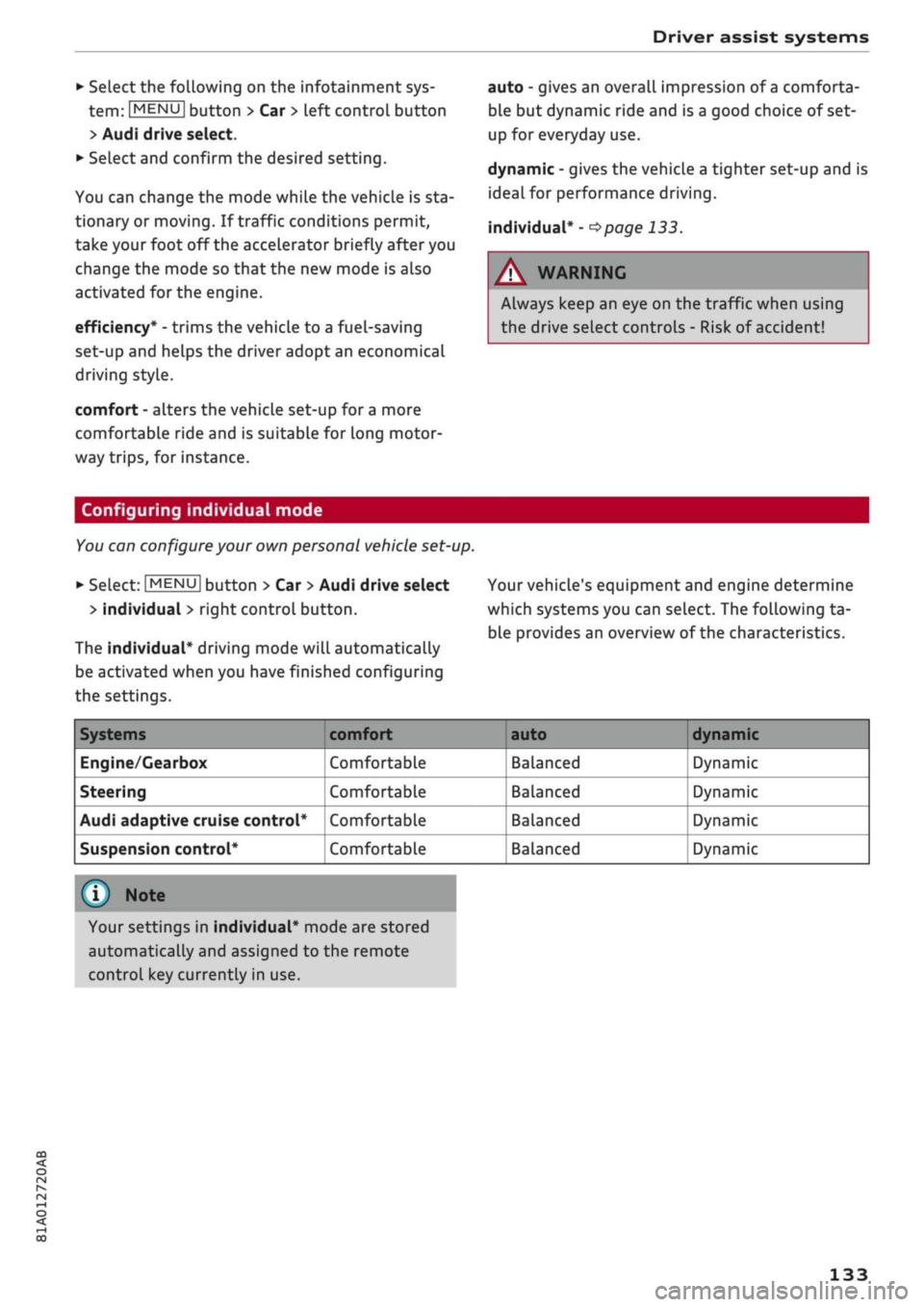
Your vehicle's equipment and engine determine
which systems you can select. The following ta
ble provides an overview of the characteristics.
Systems
Engine/Gearbox
Steering
Audi adaptive cruise control*
Suspension control*
comfort
Comfortable
Comfortable
Comfortable
Comfortable
auto dynamic
Balanced
Balanced
Balanced
Balanced
Dynamic
Dynamic
Dynamic
Dynamic
© Note
Your settings in individual* mode are stored
automatically and assigned to the remote
control key currently in use.
133
Page 138 of 364
Parking aids
comes
closer than before, the tone will sound
again.
If the tone is muted and the obstacLe is
further away than before, no tone will sound.
Please watch the area surrounding the vehicle
when driving off.
©
Zone
(§)*
is detected and analysed as the
vehi
cLe is moving past. When you switch the
igni
tion off and on again or open the door, or af
ter the vehicle has been stationary for
a
while,
the ambient surroundings may have changed.
Zone
0*
is displayed in black on the infotain
ment display for this reason.
Switching on/off
Applies to: vehicles with parking system plus/park assist
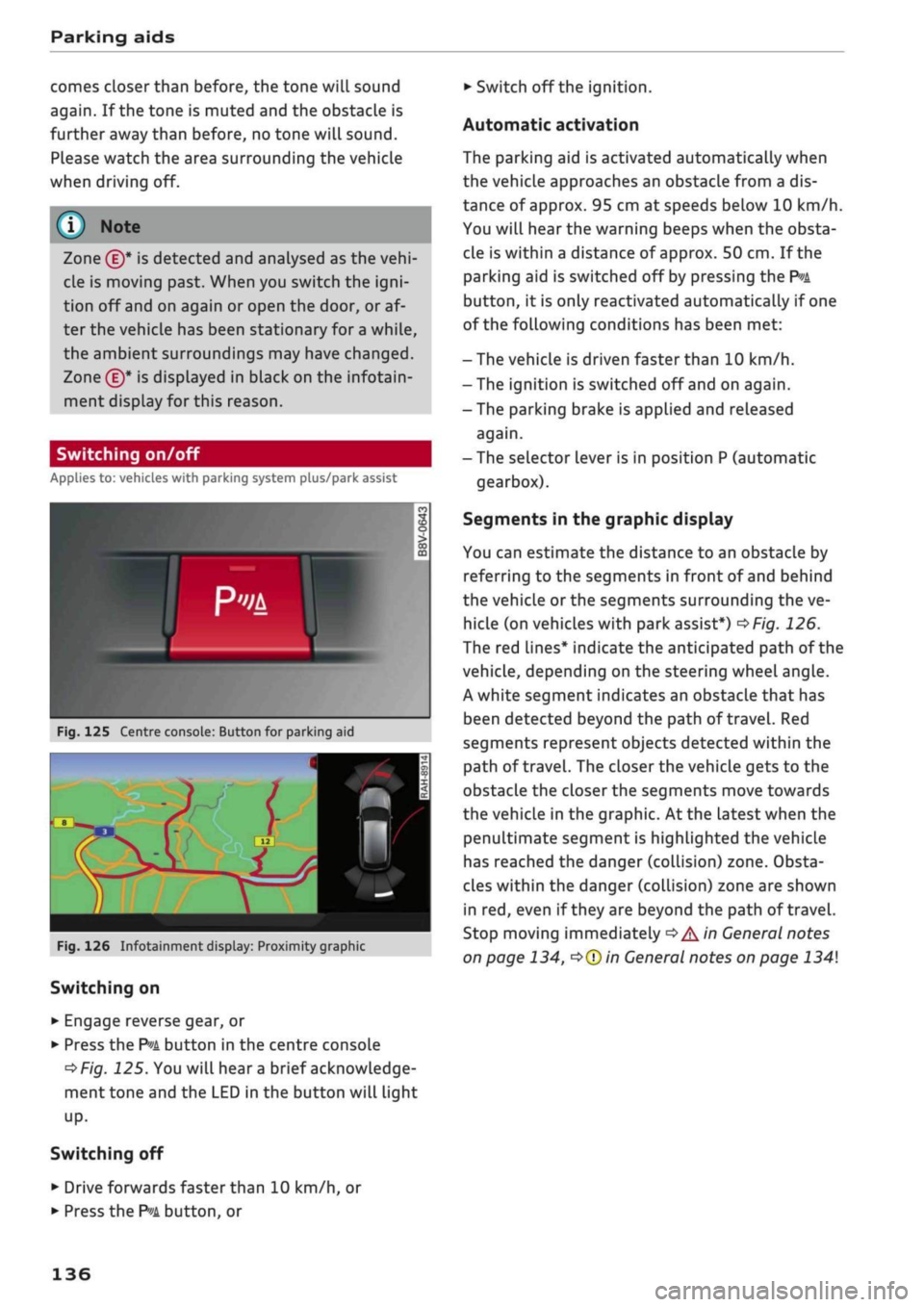
Fig.
125 Centre console: Button for parking aid
^H i m
1 •rif/^^^y^H <
12|
1 )
'.•;"
•BiHiSi
-
Fig.
126 Infotainment display: Proximity graphic
Switching on
•
Engage reverse gear, or
•
Press the
P»i
button in the centre console
^>Fig.
125. You will hear
a
brief acknowledge
ment tone and the LED in the button will light
up-
Switching
off
• Drive forwards faster than 10 km/h, or
*•
Press the
?">k
button, or
•
Switch off the ignition.
Automatic activation
The parking aid is activated automatically when
the vehicLe approaches an obstacLe from a dis
tance of approx. 95 cm at speeds below 10 km/h.
You will hear the warning beeps when the obsta
cle is within a distance of approx. 50 cm. If the
parking aid is switched off by pressing the
P*A
button,
it is only reactivated automatically if one
of the following conditions has been met:
- The vehicle is driven faster than 10 km/h.
- The ignition is switched off and on again.
-The parking brake is applied and released
again.
- The selector lever is in position P (automatic
gearbox).
Segments in the graphic display
You can estimate the distance to an obstacle by
referring to the segments in front of and behind
the vehicLe or the segments surrounding the ve
hicle (on
vehicLes
with park assist*)
^>Fig.
126.
The red lines* indicate the anticipated path of the
vehicle, depending on the steering wheel angle.
A white segment indicates an obstacle that has
been detected beyond the path of
travel.
Red
segments represent objects detected within the
path of
travel.
The closer the vehicle gets to the
obstacLe the closer the segments move towards
the vehicLe in the graphic. At the Latest when the
penultimate segment is highlighted the vehicle
has reached the danger (collision) zone. Obsta
cles within the danger (collision) zone are shown
in red, even if
they
are beyond the path of travel.
Stop moving immediately
•=>
A in General notes
on page 134,
•=>©
in General notes on page 134
136
Page 152 of 364
Intelligent technology
Dynamic power management
While the vehicle is moving, this function distrib
utes the available power to the various electrical
components and systems according to their re
quirements. It ensures that on-board systems do
not consume more electrical power than is being
generated,
and thus maintains the maximum
possible vehicle battery power level.
® Note
- The power management system is not able
to overcome the given physical limits.
Please remember that the power and life of
the vehicle battery are limited.
- If the indicator lamp
|3 ^page
31 appears,
the starting ability may be impaired.
Starting ability has first priority.
Short trips, city traffic and low temperatures all
place a heavy load on the vehicLe battery. In
these conditions a large amount of power is
con
sumed,
but only
a
small amount is supplied. The
situation is also critical if electrical equipment is
in use when the engine is not running. In this
case power is consumed when none is being
gen
erated.
In these situations you will be aware that the
power management system is intervening to
con
trol the distribution of electrical power.
When the vehicle is parked for long periods
If
you
do not drive your vehicle for a period of
several days or weeks, the power management
will gradually shut off the on-board systems one
by one, or reduce the amount of current they are
using.
This limits the amount of power consumed
and helps to ensure reliable starting even after a
long period. Certain convenience features, such
as remote controL unlocking, may not be availa
ble.
These functions will be restored when you
switch on the ignition and start the engine.
150
With the engine switched off
If
you
listen to the radio or use the other info
tainment functions when the engine is not
run
ning,
this will discharge the vehicle battery.
The infotainment display will show a warning
message before the battery power drops to a Lev
el where the starting ability is impaired. This
message warns you that the system you are using
will soon be switched off automatically. You
should therefore start the engine if
you
wish to
continue using the system.
When the engine is running
Although the alternator generates electrical
power, the vehicle battery can still become dis
charged while the vehicle is being driven. This can
occur when a lot of power is being consumed but
only
a
small amount supplied, especially if the
vehicle battery is not fully charged initially.
To restore the necessary energy balance, the sys
tem
will
then temporarily shut off the electrical
components that are using a lot of power, or re
duce the current they are consuming. Heating
systems in particular use a Large amount of elec
trical power. If
you
notice, for instance, that the
seat heating* or the rear window heater is not
working,
they may have been temporarily switch
ed off or regulated to a lower heat output. These
systems will be available again as soon as
suffi
cient electrical power is available.
You may also notice that the engine runs at a
slightly faster idling speed. This is quite normal,
and no cause for concern. The increased idling
speed allows the alternator to meet the greater
power requirement and charge the vehicLe bat
tery at the same time.
Information saved in the
control units
The vehicle is fitted in the factory with electronic
control units that, among other things, control
the engine and the gearbox. The controL units al
so monitor the exhaust system and the airbags.
The control units continually analyse data rele
vant to the vehicLe while you are driving. In the •
Page 300 of 364
Checking and topping up fluids
- Never remove the engine cover panel - risk
of burns!
- If any tests have to be performed with the
engine running, there is an extra safety risk
from the rotating parts, such as the drive
belts,
alternator and radiator
fan,
etc., and
from the high-voltage ignition system.
- Never touch the radiator fan. The electric
additional fan is controlled by temperature
and can start running without warning.
- Applies to vehicles with automatic gearbox:
Never open the throttle inadvertently (for
instance by hand from the engine compart
ment) if
a
gear is engaged while the vehicle
is stationary with the engine running. The
vehicle will otherwise start moving immedi
ately and could cause an accident.
- Observe the following additional warnings if
work on the fuel system or the electrical
system is necessary:
- Do not smoke.
- Never work near naked flames.
- Always keep an approved fire extinguisher
immediately available.
- Any work on the batteries and electrical sys
tem in your vehicle entails a risk of injury
and chemical burns in addition to danger of
accident or fire.
For
this reason, you must
have the work carried out by
a
qualified
workshop.
© CAUTION
When topping up fluids make sure the correct
fluid is put into the correct filler opening. This
can otherwise cause serious malfunctions or
engine damage.
® For the sake of the environment
Inspect the ground underneath your vehicle
regularly so that any Leaks are detected at an
early stage. If
you
find spots of oil or other
fluids,
have your vehicle inspected in the
workshop.
© Note
located on the other side of the engine com
partment.
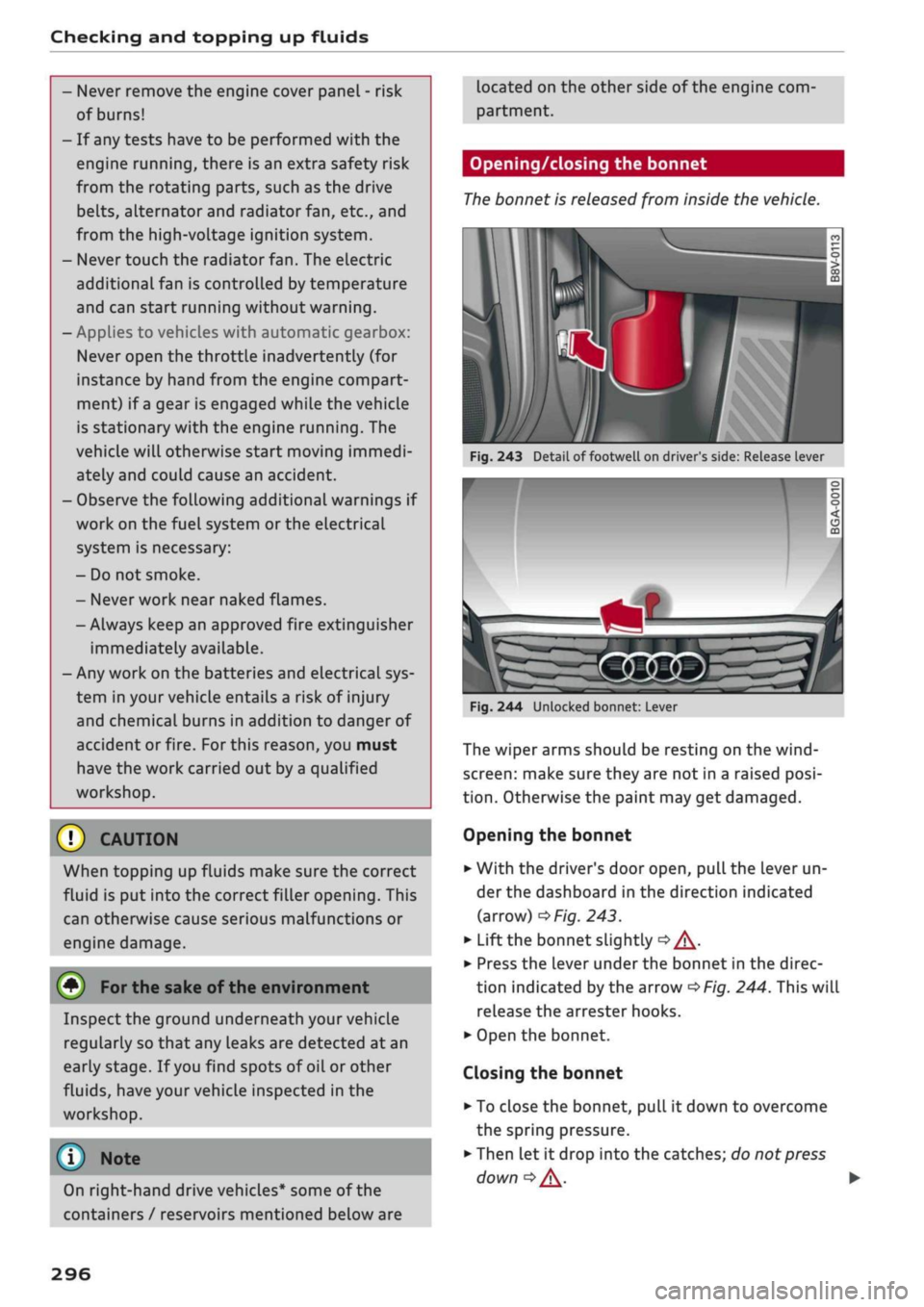
Opening/closing the bonnet
The
bonnet is released from inside the vehicle.
Fig.
243 Detail of footwell on driver's side: Release lever
I
On right-hand drive vehicles* some of the
containers / reservoirs mentioned below are
Fig.
244 Unlocked bonnet: Lever
The wiper arms should be resting on the
wind
screen:
make sure they are not in a raised
posi
tion.
Otherwise the paint may get damaged.
Opening the bonnet
•
With the driver's door open, pull the lever un
der the dashboard in the direction indicated
(arrow)
^>Fig.
243.
*•
Lift the bonnet slightly
•=> A-
•
Press the Lever under the bonnet in the direc
tion indicated by the arrow
^>Fig.
244. This will
release the arrester hooks.
•
Open the bonnet.
Closing the bonnet
• To close the bonnet, pull it down to overcome
the spring pressure.
•
Then let it drop into the catches; do not press
down
|=>^.
•
296
Page 323 of 364
Mobility
Tool kit/tyre repair kit/compressor Using the tyre repair kit
Applies to: vehicles with tool kit/tyre repair kit/compressor Applies to: vehicles with tyre repair kit
CO
rN
IV
rN
•-i
00
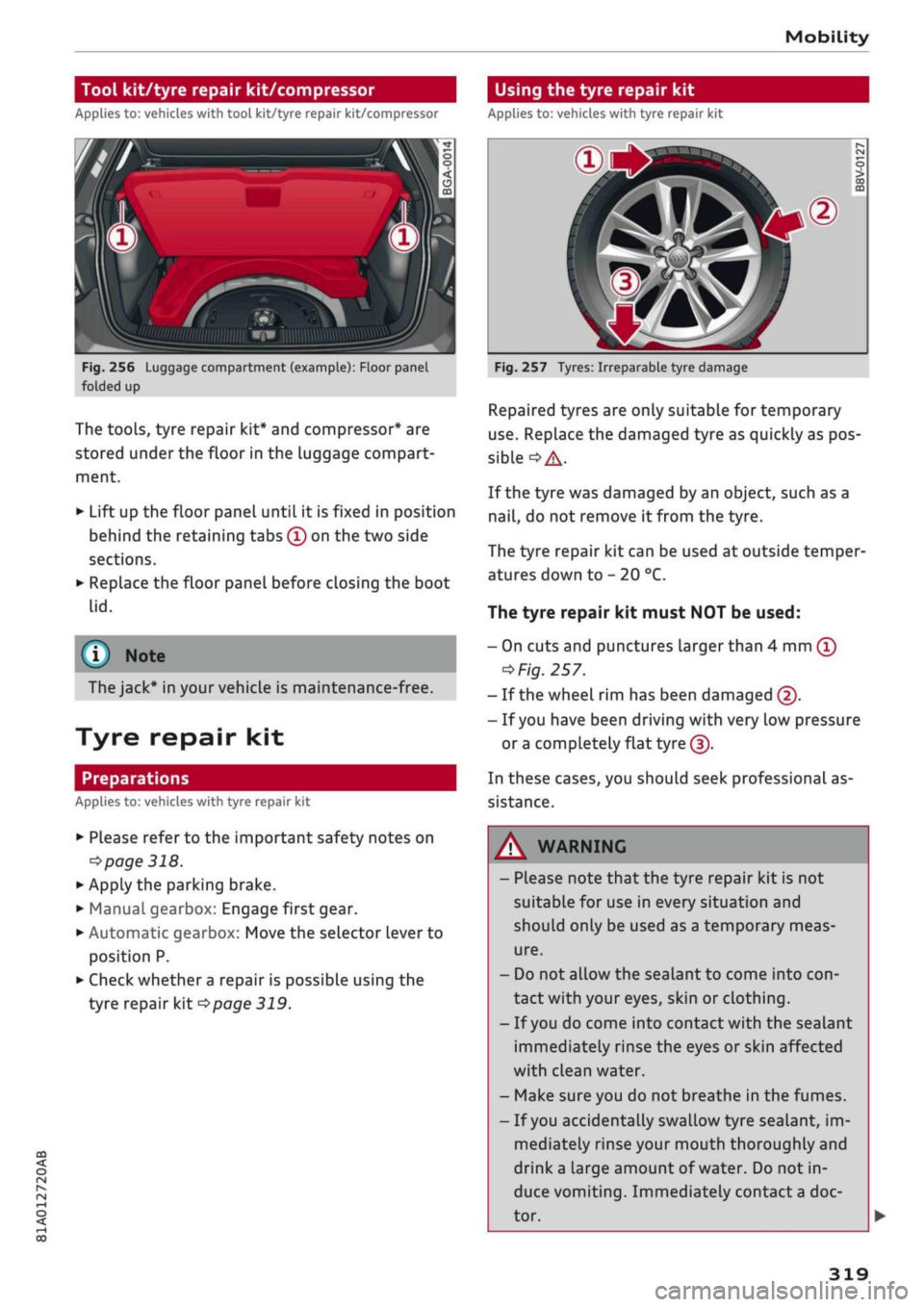
Fig.
256 Luggage compartment (example): Floor panel
folded up
The tools, tyre repair kit* and compressor* are
stored under the floor in the luggage compart
ment.
•
Lift up the floor panel until it is fixed in position
behind the retaining tabs
©
on the two side
sections.
•
Replace the floor panel before closing the boot
lid.
(T)
Note
The jack* in your vehicle is maintenance-free.
Tyre repair kit
Preparations
Applies to: vehicles with tyre repair kit
•
Please refer to the important safety notes on
•=>
page 318.
•
Apply the parking brake.
•
Manual gearbox: Engage first gear.
• Automatic gearbox: Move the selector lever to
position P.
•
Check whether
a
repair is possible using the
tyre repair kit
^page
319.
Fig.
257 Tyres: Irreparable tyre damage
Repaired tyres are only suitable for temporary
use.
Replace the damaged tyre as quickly as pos
sible
°=>A-
If the tyre was damaged by an object, such as a
nail,
do not remove it from the tyre.
The tyre repair kit can be used at outside temper
atures down to - 20 °C.
The tyre repair kit must NOT be used:
- On cuts and punctures larger than 4 mm
©
^Fig.
257.
- If the wheel rim has been damaged ©.
- If
you
have been driving with very low pressure
or a
completely flat
tyre(|).
In these cases, you should seek professional as
sistance.
A
WARNING
- Please note that the tyre repair kit is not
suitable for use in every situation and
should only be used as a temporary meas
ure.
- Do not allow the sealant to come into
con
tact with your eyes, skin or clothing.
- If
you
do come into contact with the sealant
immediately rinse the eyes or skin affected
with clean water.
- Make sure you do not breathe in the fumes.
- If
you
accidentally swallow tyre sealant, im
mediately rinse your mouth thoroughly and
drink
a
large amount of water. Do not in
duce vomiting. Immediately contact
a
doc
tor.
319
Page 325 of 364
Mobility
CO
rN
IV
rN
•-i
00
- Do not drive faster than 80 km/h.
- Avoid heavy acceleration, hard braking and
fast cornering.
-Vehicle handling could be impaired.
- If the tyre is too badly damaged, you should
seek professional assistance.
Removing the hubcap/wheel bolt caps
(#) For
the sake of the environment
A used can of sealing compound can be re
turned to your qualified workshop for dispos
al.
Note ©
After repairing a tyre, remember to buy
a
new
tyre sealant can at
a
qualified workshop.
Changing a wheel
Preparations
Certain preparations must be made before you
change the wheel.
• Please refer to the important safety notes on
^page
318.
• Apply the parking brake.
• Manual gearbox: Engage first gear.
• Automatic gearbox: Move the selector Lever to
position P.
• If
you
are towing a trailer, unhitch
it
from your
vehicle.
• Take out the tools
^>page
319 and spare
wheel*
^>page
324.
A WARNING
If
you
have to use the jack* on a gradient or
off-road track, block the wheel diagonally op
posite the wheel being changed by placing
suitable objects underneath both the front
and rear of the wheel to prevent the vehicle
from rolling away.
0
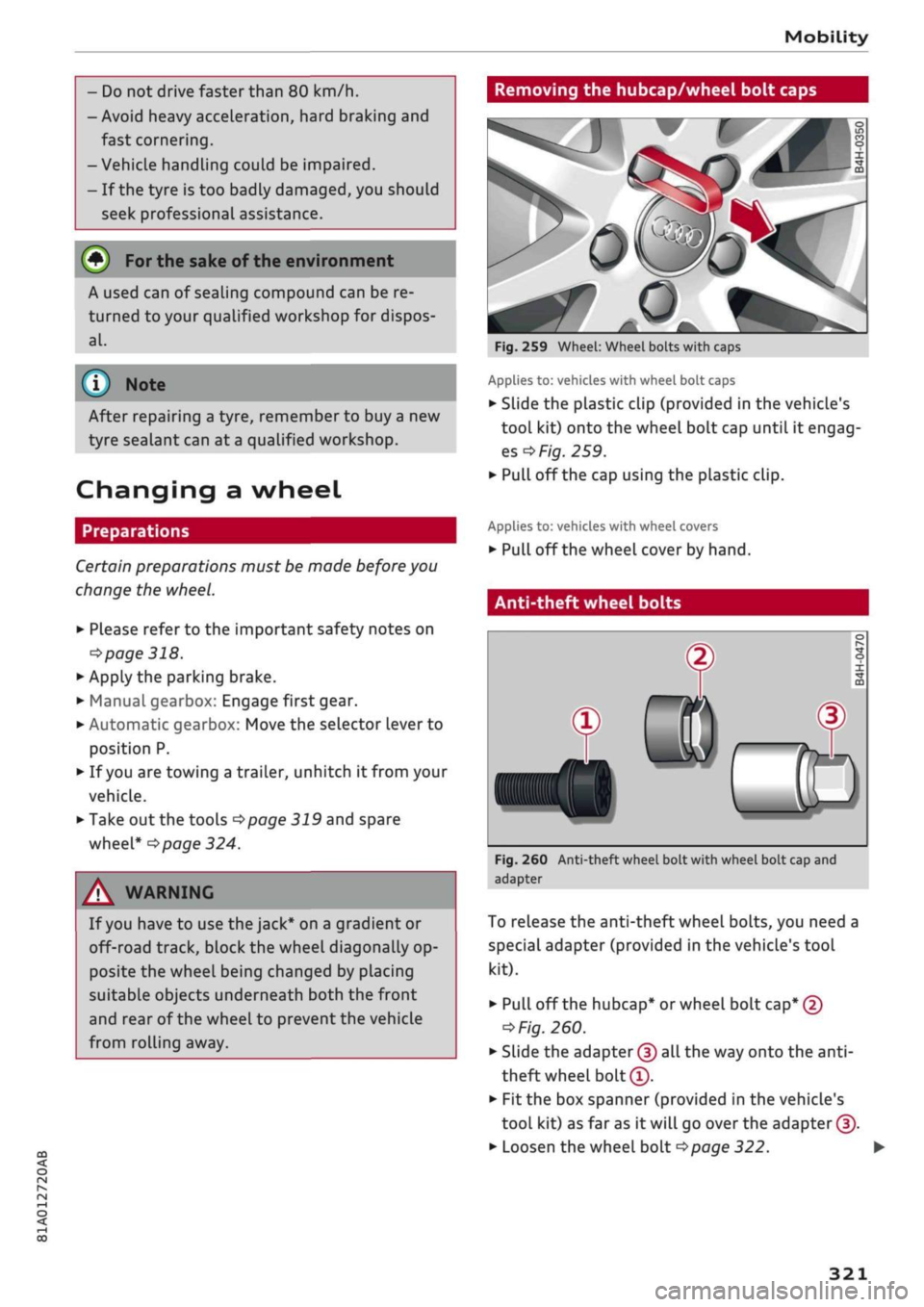
Fig.
259 Wheel: Wheel bolts with caps
Applies to: vehicles with wheel bolt caps
• Slide the plastic clip (provided in the vehicle's
tool kit) onto the wheel bolt cap until it engag
es
^F/'g.
259.
• Pull off the cap using the plastic clip.
Applies to: vehicles with wheel covers
• Pull off the wheel cover by hand.
Anti-theft wheel bolts
T
0)
®
Fig.
260 Anti-theft wheel bolt with wheel bolt cap and
adapter
To release the anti-theft wheel bolts, you need a
special adapter (provided in the vehicle's tool
kit).
• Pull off the hubcap* or wheel bolt
cap*
@
^>
Fig.
260.
• Slide the adapter
©
all the way onto the
anti-
theft wheel bolt®.
• Fit the box spanner (provided in the vehicle's
tool kit) as far as it will go over the adapter ©.
• Loosen the wheel bolt
^>page
322.
321
Page 331 of 364
Mobility
CO
rN
IV
rN
•-i
00
- Keep sparks, flame and lit cigarettes away
from vehicle batteries: the gases given off
can cause an explosion.
- Do not attach the negative cable to parts of
the fuel system or to the brake pipes.
© CAUTION
- The vehicles must not touch each other,
otherwise electricity could flow as soon as
the positive terminals are connected and
the boosting battery could be discharged.
- If the jump leads are not connected correct
ly this can result in serious damage to the
electrical system of the vehicle.
- The discharged vehicle battery must be
properly connected to the vehicle's electri
cal system.
- Please note that the method described
be
low for connecting the leads is intended for
jump-starting your vehicle. If jump-starting
another vehicle, you should not connect the
negative lead (-) to the negative terminal of
the discharged battery, but directly to the
engine block or
a
solid metal part bolted to
the engine block. If the battery of the other
vehicle does not have a gas vent, there is a
risk that
a
mixture of oxygen and hydrogen
gas can accumulate and cause an explosion.
© Note
Switch off the car telephone if necessary. De
tails will be given in the manufacturer's in
structions for the car telephone.
Starting the engine
The two
jump leads must be connected in the
correct
sequence.
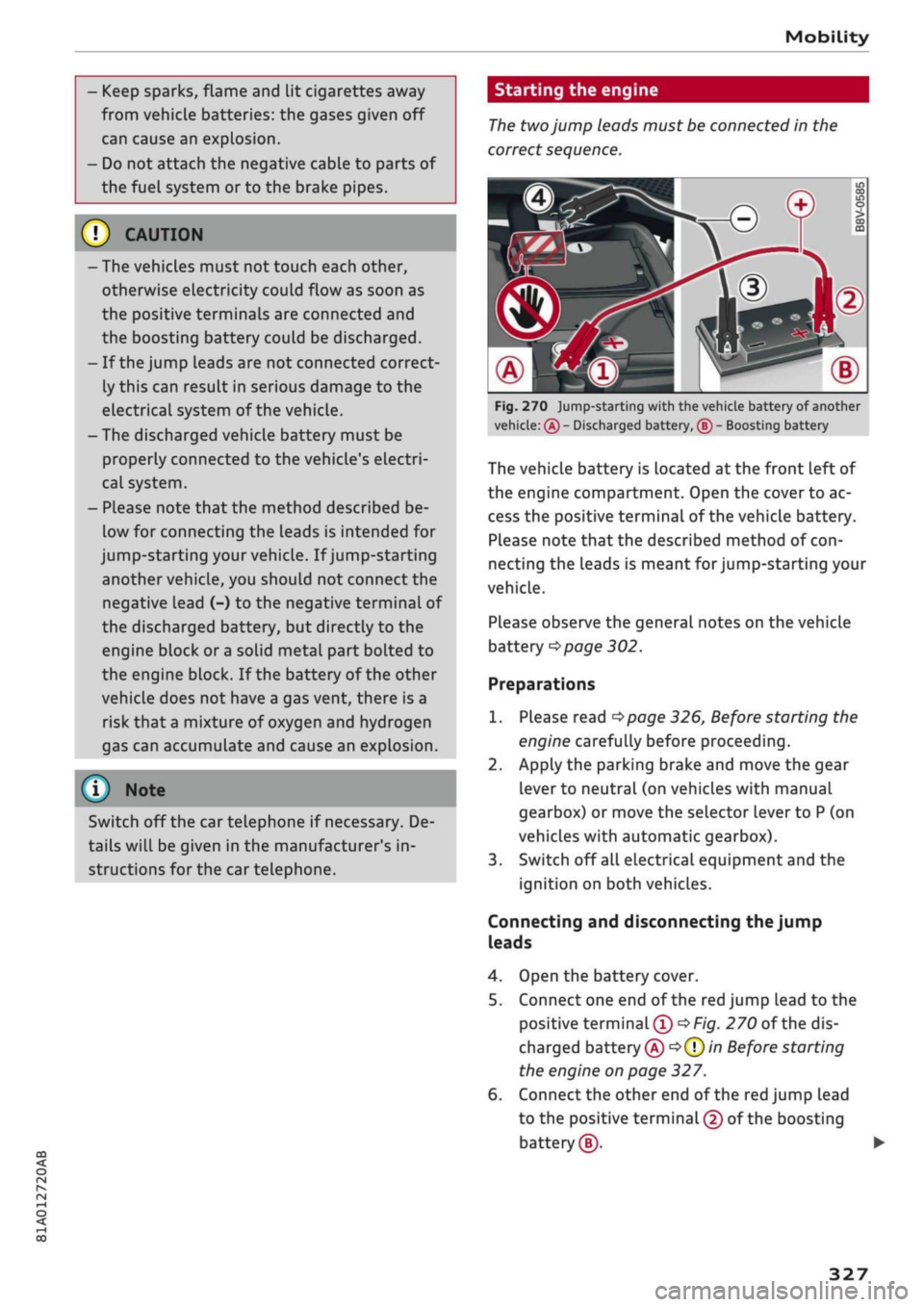
Fig.
270 jump-starting with the vehicle battery of another
vehicle:
®
- Discharged battery, ® - Boosting battery
The vehicle battery is located at the front Left of
the engine compartment. Open the cover to ac
cess the positive terminal of the vehicle battery.
Please note that the described method of
con
necting the leads is meant for jump-starting your
vehicle.
Please observe the general notes on the vehicle
battery
*page
302.
Preparations
1.
Please read
*page
326, Before starting the
engine carefully before proceeding.
2.
Apply the parking brake and move the gear
lever to neutral (on vehicles with manual
gearbox) or move the selector lever to
P
(on
vehicles with automatic gearbox).
3. Switch off all electrical equipment and the
ignition on both vehicles.
Connecting and disconnecting the jump
leads
4.
Open the battery cover.
5. Connect one end of the red jump lead to the
positive
terminal®
*Fig.
270 of the dis
charged battery
© oQ)
in Before starting
the engine on page 327.
6. Connect the other end of the red jump lead
to the positive terminal
©
of the boosting
battery®.
327
Page 333 of 364

Mobility
CO
rN
IV
rN
•-i
00
Additional notes on towing by breakdown
truck
If one of the axles has to be raised in order to
tow the vehicLe, please refer to the following ta
ble to determine the appropriate axle
for
your
gearbox/drive combination:
Manual
gearbox
Automatic
gearbox
Front-wheel
drive
Front or rear
axle
Front axle
Four-wheel
drive
Front or rear
axle
Front axle
Applies to vehicles with four-wheel drive: If the
vehicle is to be towed with one of the axles
raised,
the ignition must be switched off; other
wise the drive train can be damaged.
Notes on tow-starting
Applies to vehicles with automatic gearbox: For
technical reasons, your vehicle must not be tow-
started.
Applies to vehicles with manual gearbox: As a
general rule, tow-starting is not recommended.
If the engine will not start, it is best to try start
ing it using the battery of another vehicle
*>page
326 before attempting to tow start. If
this is not possible, you can try to push-start or
tow-start the vehicle
*page
330, Tow-starting.
A WARNING
There is a high risk of accidents when towing/
tow-starting, as the towed vehicle can easily
be driven into the towing vehicle.
UTION
- If it is not possible to tow the vehicle as de
scribed above (e.g. due to a gearbox failure
or if the vehicle has to be towed further
than 50 km), it must be transported on a
special car transporter or trailer.
- Towing a vehicle with the wrong axle raised
can cause serious damage to the gearbox.
- Applies to vehicles with automatic gearbox:
It is not possible to move the selector lever
out of position
P
if the electrical power sup
ply fails. Before the vehicle can be recov
ered/manoeuvred you must manually re
lease the selector lever; left-hand drive
vehicles
*page
93, right-hand drive
vehicles
*page
94.
- Please observe the relevant regulations
when towing or tow-starting.
Towing away
Please observe the important safety warnings on
*
page 328.
Preparations
• Attach the tow-rope or the tow-bar only to the
towing anchorages provided
for
this purpose
opage
330,
*page
331.
• Please ensure that the tow-rope is not twisted
as it could otherwise unscrew the towline an
chorage while the vehicle is being towed.
• The hazard warning lights of both vehicles
must normally be switched on
*page
52. How
ever, observe any regulations to the contrary.
Towing vehicle (front)
• Ensure that the tow-rope is taut before you
drive off.
• Manual gearbox: Engage the clutch very gently
when starting to move and accelerate with par
ticular care.
• Automatic gearbox: Accelerate slowly and
grad
ually.
• Avoid unnecessary braking and manoeuvres.
Vehicle being towed (rear)
• Ensure that the ignition is switched on, the
steering wheel is not locked, and
that
you can
operate the turn signals, horn or windscreen
wipers if necessary
<=>/t\-
• The brake servo only works when the engine is
running.
The power steering only works when
329
Page 334 of 364

Mobility
the ignition is on and the vehicle is moving1'.
Otherwise you will need to press the brake
ped
al significantly harder and apply more force to
move the steering wheel.
• Please ensure that the steering wheel is un
locked and that it moves freely.
• Release the parking brake
*page
82.
• Applies to vehicles with manual gearbox: Put
the gear lever in neutral.
• Applies to vehicles with automatic gearbox:
Move the selector lever to position N.
• Ensure that the tow-rope remains taut at all
times when towing.
© CAUTION
A WARNING
If the vehicle has no electrical power, do NOT
use a tow-bar or tow-rope to tow the vehicle
© Note
You can use the turn signals to indicate a
change of direction (or lane) even when the
hazard warning lights are on. The hazard
warning lights will be interrupted temporari-
Ly.
Tow-starting
Please observe the important safety warnings on
*page
328.
Important: Your vehicle must be fitted with a
manual gearbox. If your vehicle has a petrol en
gine,
it must not be towed further than 50 me
tres
*(J).
• Attach the tow-rope or the tow-bar only to the
towing anchorages provided
for
this purpose
*page
330,
*
page 331.
• Engage second or third gear before moving off.
• Press the clutch and hold the pedal down.
• Switch on the ignition.
• Once both vehicles are moving, release the
clutch.
• As soon as the engine starts, press the clutch
pedal and put the gear lever in neutral.
When tow-starting the vehicle, do not tow it
further than 50 metres; otherwise the cata
lytic converter could be damaged.
Front towline anchorage
»
Fig.
271 Front bumper (right side): Removing cover cap
Fig.
272 Front bumper (right side): Towline anchorage
screwed in
The screw connection for the towline anchorage
is located behind a cover cap on the right side of
the front bumper.
• Take the towline anchorage out of the vehicle's
tool kit
*
page 319.
• Press the cover cap briefly but firmly inwards
-arrow-, detach it from the bumper and take it
out*Fig.
271.
• Screw the towline anchorage into the screw
connection as far as
it
will go
*Fig.
272 and
tighten it with the box spanner.
• Put the towline anchorage back in the tool kit
after use.
11
Important: The vehicle battery must be adequately charg
ed.
330
Page 337 of 364
Fuses and bulbs
: -•.
-
i:i
m
R2 R3
F22
F-XII
F31
F30
:-:-.'
'.,
FM F43
F49
F!)3
F52
F51
R!,
a
R6
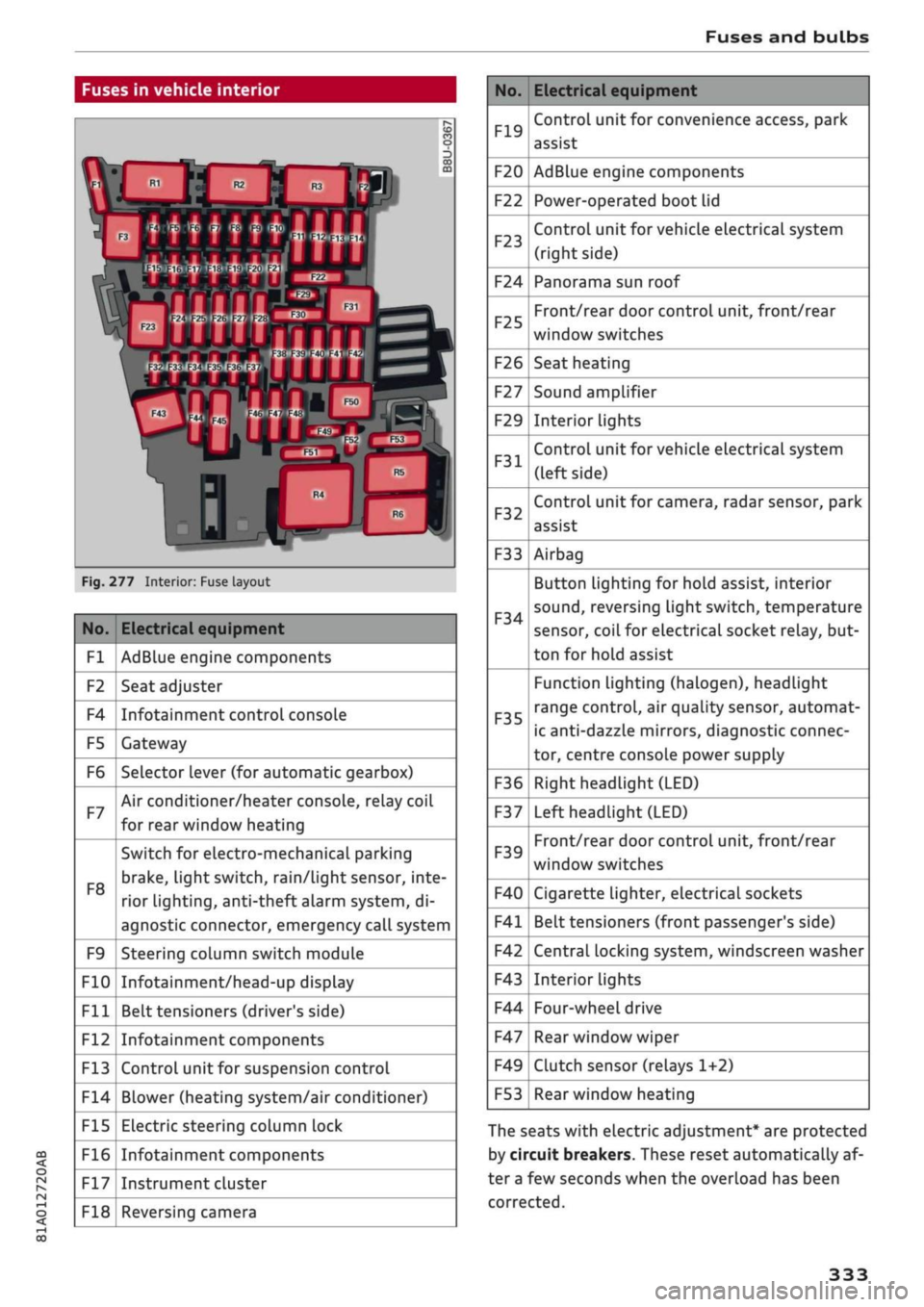
Fig.
277 Interior: Fuse layout
No.
Fl
F2
F4
F5
F6
F7
F8
F9
F10
Fll
F12
F13
F14
F15
F16
F17
F18
Electrical equipment
AdBlue engine components
Seat adjuster
Infotainment control console
Gateway
Selector lever (for automatic gearbox)
Air conditioner/heater console, relay coil
for rear window heating
Switch for electro-mechanical parking
brake,
light switch,
rain/Light
sensor, inte
rior lighting, anti-theft
aLarm
system, di
agnostic connector, emergency call system
Steering column switch module
Infotainment/head-up display
Belt tensioners (driver's side)
Infotainment components
Control unit for suspension control
Blower (heating system/air conditioner)
Electric steering column lock
Infotainment components
Instrument cluster
Reversing camera
No.
F19
F20
F22
F23
F24
F25
F26
F27
F29
F31
F32
F33
F34
F35
F36
F37
F39
F40
F41
F42
F43
F44
F47
F49
F53
Electrical equipment
Control unit for convenience access, park
assist
AdBlue engine components
Power-operated boot lid
Control unit for vehicle electrical system
(right side)
Panorama sun roof
Front/rear door control unit, front/rear
window switches
Seat heating
Sound amplifier
Interior lights
Control unit for vehicle electrical system
(left side)
Control unit for camera, radar sensor, park
assist
Airbag
Button Lighting for hold assist, interior
sound,
reversing light switch, temperature
sensor, coiL for electrical socket reLay, but
ton for hold assist
Function lighting (halogen), headlight
range control, air quality sensor, automat
ic anti-dazzle mirrors, diagnostic connec
tor, centre console power supply
Right headlight (LED)
Left headlight (LED)
Front/rear door control unit, front/rear
window switches
Cigarette lighter, electrical sockets
Belt tensioners (front passenger's side)
Central locking system, windscreen washer
Interior lights
Four-wheel drive
Rear window wiper
Clutch sensor (relays 1+2)
Rear window heating
The seats with electric adjustment* are protected
by circuit breakers. These reset automatically af
ter a few seconds when the overload has been
corrected.
333