steering AUDI Q2 2021 Owner´s Manual
[x] Cancel search | Manufacturer: AUDI, Model Year: 2021, Model line: Q2, Model: AUDI Q2 2021Pages: 364, PDF Size: 87.77 MB
Page 135 of 364
Driver assist systems
•
Select the following on the infotainment sys
tem:
|MENU|
button > Car
>
left control button
> Audi drive select.
•
Select and confirm the desired setting.
You can change the mode while the vehicle is sta
tionary or moving. If traffic conditions permit,
take
your
foot off the accelerator briefly after you
change the mode so that the new mode is also
activated for the engine.
efficiency* - trims the vehicle to a fuel-saving
set-up and helps the driver adopt an economical
driving style.
comfort - alters the vehicle set-up for a more
comfortable ride and is suitable for long motor
way trips, for instance.
auto - gives an overall impression of
a
comforta
ble but dynamic ride and is a good choice of set
up for everyday use.
dynamic - gives the vehicLe a tighter set-up and is
ideal for performance driving.
individual* -
^>page
133.
A WARNING
Always keep an eye on the traffic when using
the drive select controls - Risk of accident!
CO
rN
r>
rN
•-i
00
Configuring individual mode
You
can configure your own personal vehicle set-up.
*-
Select: |MENU| button > Car
>
Audi drive select
> individual
>
right control button.
The individual* driving mode will automatically
be activated when you have finished configuring
the settings.
Your vehicle's equipment and engine determine
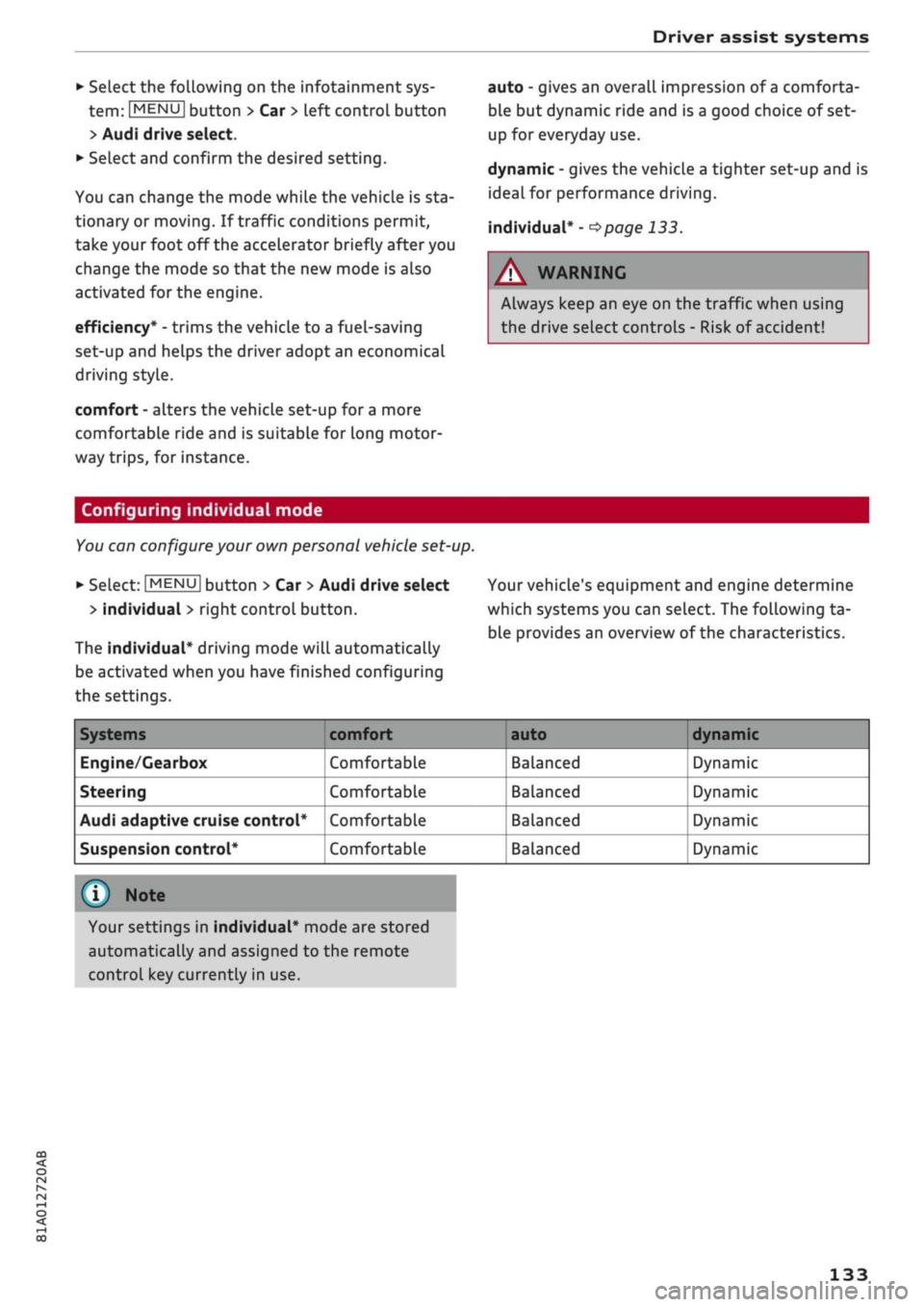
which systems you can select. The following ta
ble provides an overview of the characteristics.
Systems
Engine/Gearbox
Steering
Audi adaptive cruise control*
Suspension control*
comfort
Comfortable
Comfortable
Comfortable
Comfortable
auto dynamic
Balanced
Balanced
Balanced
Balanced
Dynamic
Dynamic
Dynamic
Dynamic
© Note
Your settings in individual* mode are stored
automatically and assigned to the remote
control key currently in use.
133
Page 138 of 364
Parking aids
comes
closer than before, the tone will sound
again.
If the tone is muted and the obstacLe is
further away than before, no tone will sound.
Please watch the area surrounding the vehicle
when driving off.
©
Zone
(§)*
is detected and analysed as the
vehi
cLe is moving past. When you switch the
igni
tion off and on again or open the door, or af
ter the vehicle has been stationary for
a
while,
the ambient surroundings may have changed.
Zone
0*
is displayed in black on the infotain
ment display for this reason.
Switching on/off
Applies to: vehicles with parking system plus/park assist
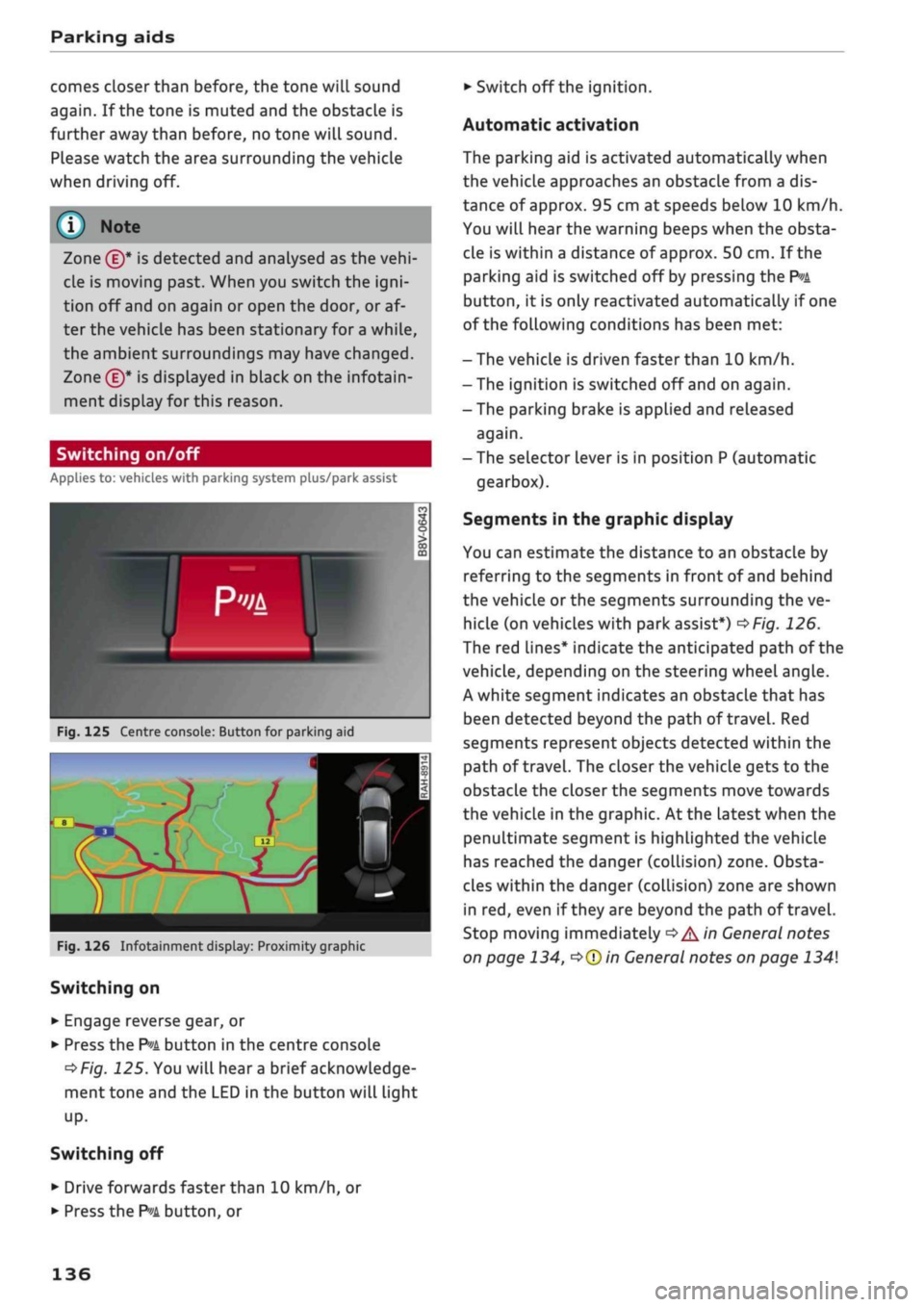
Fig.
125 Centre console: Button for parking aid
^H i m
1 •rif/^^^y^H <
12|
1 )
'.•;"
•BiHiSi
-
Fig.
126 Infotainment display: Proximity graphic
Switching on
•
Engage reverse gear, or
•
Press the
P»i
button in the centre console
^>Fig.
125. You will hear
a
brief acknowledge
ment tone and the LED in the button will light
up-
Switching
off
• Drive forwards faster than 10 km/h, or
*•
Press the
?">k
button, or
•
Switch off the ignition.
Automatic activation
The parking aid is activated automatically when
the vehicLe approaches an obstacLe from a dis
tance of approx. 95 cm at speeds below 10 km/h.
You will hear the warning beeps when the obsta
cle is within a distance of approx. 50 cm. If the
parking aid is switched off by pressing the
P*A
button,
it is only reactivated automatically if one
of the following conditions has been met:
- The vehicle is driven faster than 10 km/h.
- The ignition is switched off and on again.
-The parking brake is applied and released
again.
- The selector lever is in position P (automatic
gearbox).
Segments in the graphic display
You can estimate the distance to an obstacle by
referring to the segments in front of and behind
the vehicLe or the segments surrounding the ve
hicle (on
vehicLes
with park assist*)
^>Fig.
126.
The red lines* indicate the anticipated path of the
vehicle, depending on the steering wheel angle.
A white segment indicates an obstacle that has
been detected beyond the path of
travel.
Red
segments represent objects detected within the
path of
travel.
The closer the vehicle gets to the
obstacLe the closer the segments move towards
the vehicLe in the graphic. At the Latest when the
penultimate segment is highlighted the vehicle
has reached the danger (collision) zone. Obsta
cles within the danger (collision) zone are shown
in red, even if
they
are beyond the path of travel.
Stop moving immediately
•=>
A in General notes
on page 134,
•=>©
in General notes on page 134
136
Page 140 of 364
Parking aids
© CAUTIO
- Please observe the safety warnings
o©
in
General notes on page 134.
-The orange orientation lines on the infotain
ment display show the path of the rear end
of the vehicle if
you
were to reverse using
the current steering angle. Please note that
the front end of the vehicle swings out fur
ther than the rear. Please make sure you
keep a sufficient distance between the
vehi
cle and any obstacles to make sure that the
exterior mirror or edge of the vehicle do not
collide with the obstacles.
Switching on/off
Applies to: vehicles with reversing camera
Switching on
•
Engage reverse gear, or
•
Press the
P*A
button in the centre console
^>page
136, Fig. 125. You will hear
a
brief ac
knowledgement tone and the LED in the button
will Light up.
Switching off
•
Drive forwards faster than 10 km/h, or
•
Press the
P-A
button, or
•
Switch off the ignition.
-The graphic on the right of the display helps
identify the critical area of the vehicle.
- You can change the display and adjust the
volume of the beeps
^page
143.
Parking perpendicular to the roadside
Applies to: vehicles with reversing camera
This view can be used when parking your vehicle
in a garage or parking bay.
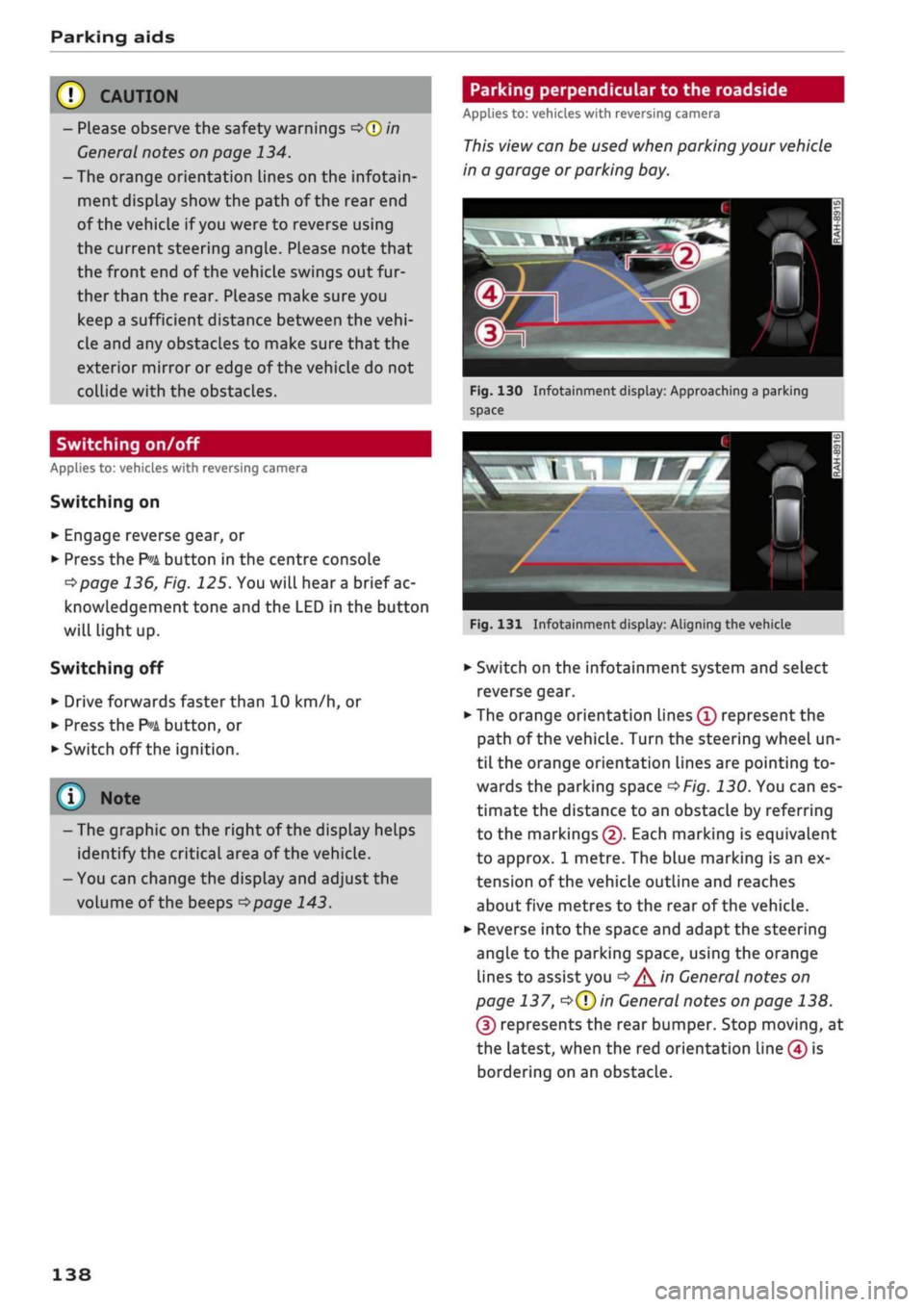
Fig.
130 Infotainment display: Approaching a parking
space
Fig.
131 Infotainment display: Aligning the vehicle
•
Switch on the infotainment system and select
reverse gear.
•
The orange orientation lines
(Ï)
represent the
path of the vehicle. Turn the steering wheel un
til the orange orientation lines are pointing to
wards the parking space
^>Fig.
130. You can es
timate the distance to an obstacLe by referring
to the markings
(2).
Each marking is equivalent
to approx. 1 metre. The blue marking is an ex
tension of the vehicle outline and reaches
about five metres to the rear of the vehicle.
•
Reverse into the space and adapt the steering
angle to the parking space, using the orange
lines to assist you
^>^in
General notes on
page 137,
*=>(T)in
General notes on page 138.
(3) represents the rear bumper. Stop moving, at
the latest, when the red orientation Line (4) is
bordering on an obstacle.
138
Page 141 of 364
Parking aids
CO
â
rN
IV
rN
•-i
00
Towing mode
Applies to: vehicles with reversing camera and towing bracket
This view helps you to position the vehicle in
front of a
trailer.
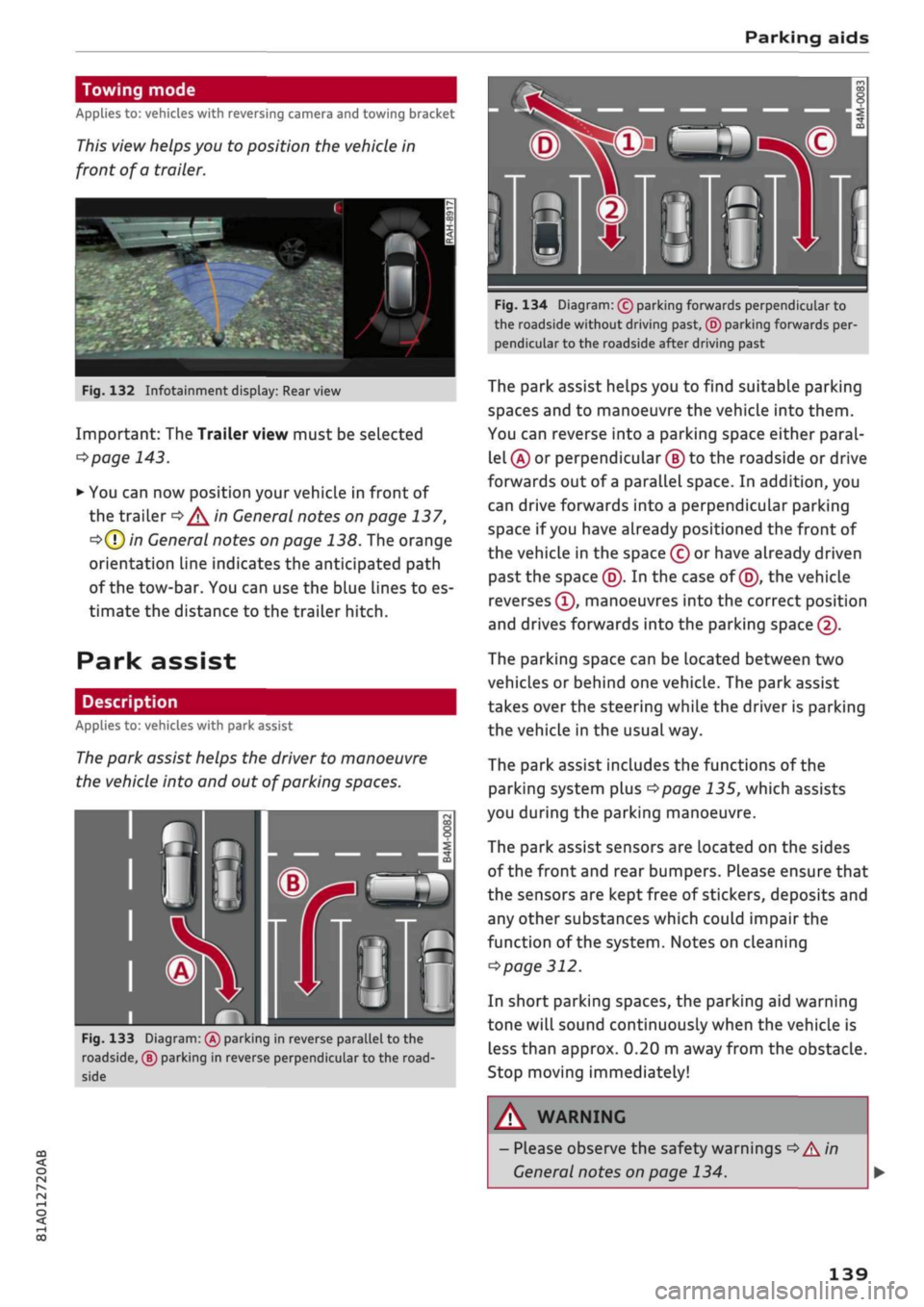
Fig.
132 Infotainment display:
Rear
view
Important: The Trailer view must be selected
*$page
143.
*•
You can now position your vehicle in front of
the trailer
=*/^
in General notes on page 137,
•=>(T)
in General notes on page 138. The orange
orientation line indicates the anticipated path
of the tow-bar. You can use the blue Lines to es
timate the distance to the trailer hitch.
Park assist
Description
Applies to: vehicles with park assist
The park assist helps the driver to manoeuvre
the vehicle into and out of parking spaces.
Fig.
133 Diagram:
(Â)
parking in reverse parallel to the
roadside, ® parking in reverse perpendicular to the
road
side
Fig.
134 Diagram: (c) parking forwards perpendicular to
the roadside without driving past, © parking forwards per
pendicular to the roadside after driving past
The park assist helps you to find suitable parking
spaces and to manoeuvre the vehicLe into them.
You can reverse into a parking space either paral
lel
(Â)
or perpendicular
(§)
to the roadside or drive
forwards out of a parallel space. In addition, you
can drive forwards into a perpendicular parking
space if you have already positioned the front of
the vehicle in the space (c) or have already driven
past the space (5). In the case of
(5),
the vehicle
reverses
(T),
manoeuvres into the correct position
and drives forwards into the parking space
@.
The parking space can be located between two
vehicles or behind one vehicle. The park assist
takes over the steering while the driver is parking
the vehicle in the usual way.
The park assist includes the functions of the
parking system plus
^>page
135, which assists
you during the parking manoeuvre.
The park assist sensors are located on the sides
of the front and rear bumpers. Please ensure that
the sensors are kept free of stickers, deposits and
any other substances which could impair the
function of the system. Notes on cleaning
^>
page 312.
In short parking spaces, the parking aid warning
tone will sound continuously when the vehicLe is
less than approx. 0.20 m away from the obstacle.
Stop moving immediately!
WARNING
- Please observe the safety warnings
•=>
A in
General notes on page 134.
139
Page 142 of 364
Parking aids
- Please note that the park assist only
han
dles the steering. As the driver you are al
ways responsible for braking and accelerat
ing.
- It is the driver's responsibility to decide
whether a parking space shown in the dis
play is suitable for the vehicLe.
- The front of the vehicle swings out during
the parking manoeuvre. Please take all nec
essary measures to ensure that other road
users are not endangered.
- The steering wheel turns rapidly on its own
when parking the vehicle and leaving the
space.
Injury may result if
a
person reaches
between the spokes on the steering wheel
when it is turning.
(T)
CAUTION
- Please observe the safety warnings
•=>©
in
General notes on page 134.
- In certain situations, the park assist will
guide the vehicLe onto or across the kerb,
for instance if other vehicles are parked on
the kerb. You should always be ready to
take over the steering wheel in order to pre
vent damage to the tyres and/or wheel
rims.
- Certain conditions in and around the park
ing space can cause unexpected results
when parking.
- Pillars, posts, etc.
- Loose gravel, snow, ice, etc.
© Note
-The electronic stabilisation control (ESC)
must not be switched off during the parking
manoeuvre
^>page
146.
- The park assist cannot be used to park the
vehicle on tight bends.
- The park assist cannot be used to park the
vehicle if
a
trailer is attached and the elec
trical connector for the trailer socket is
plugged in.
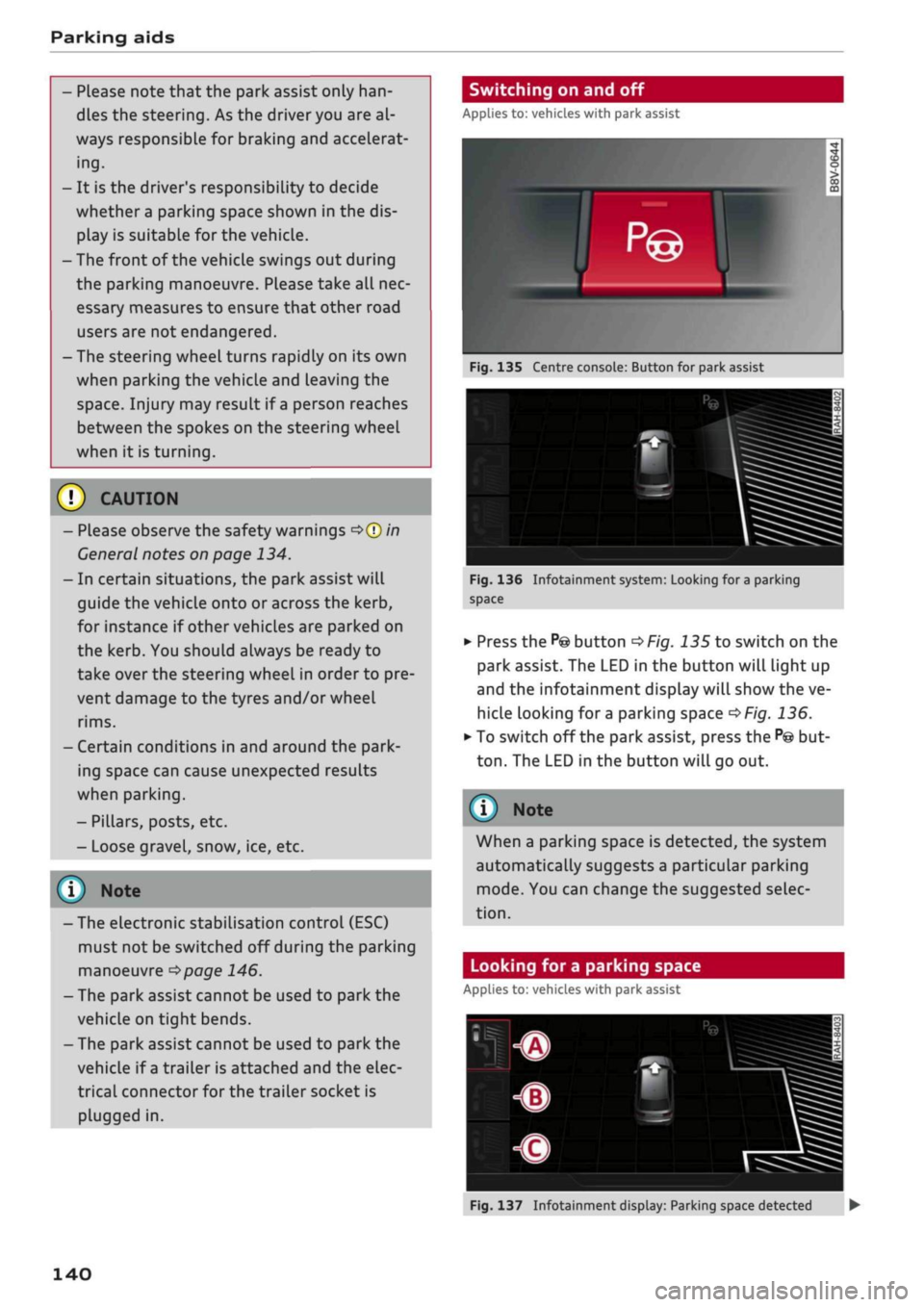
Switching on and off
Applies to: vehicles with park assist
Fig.
135 Centre console: Button for park assist
^^i=^k—
Bp-"1
Fig.
136 Infotainment system: Looking for
a
parking
space
•
Press the
P@
button
^>Fig.
135 to switch on the
park assist. The LED in the button will light up
and the infotainment display will show the ve
hicle looking for
a
parking space
^>Fig.
136.
• To switch off the park assist, press the
P@
but
ton.
The LED in the button will go out.
© Note
When a parking space is detected, the system
automatically suggests a particular parking
mode.
You can change the suggested selec
tion.
Looking for a parking space
Applies to: vehicles with park assist
140
Fig.
137 Infotainment display: Parking space detected •
Page 143 of 364
Parking aids
CO
< o rN
iv
rN
i—i
00
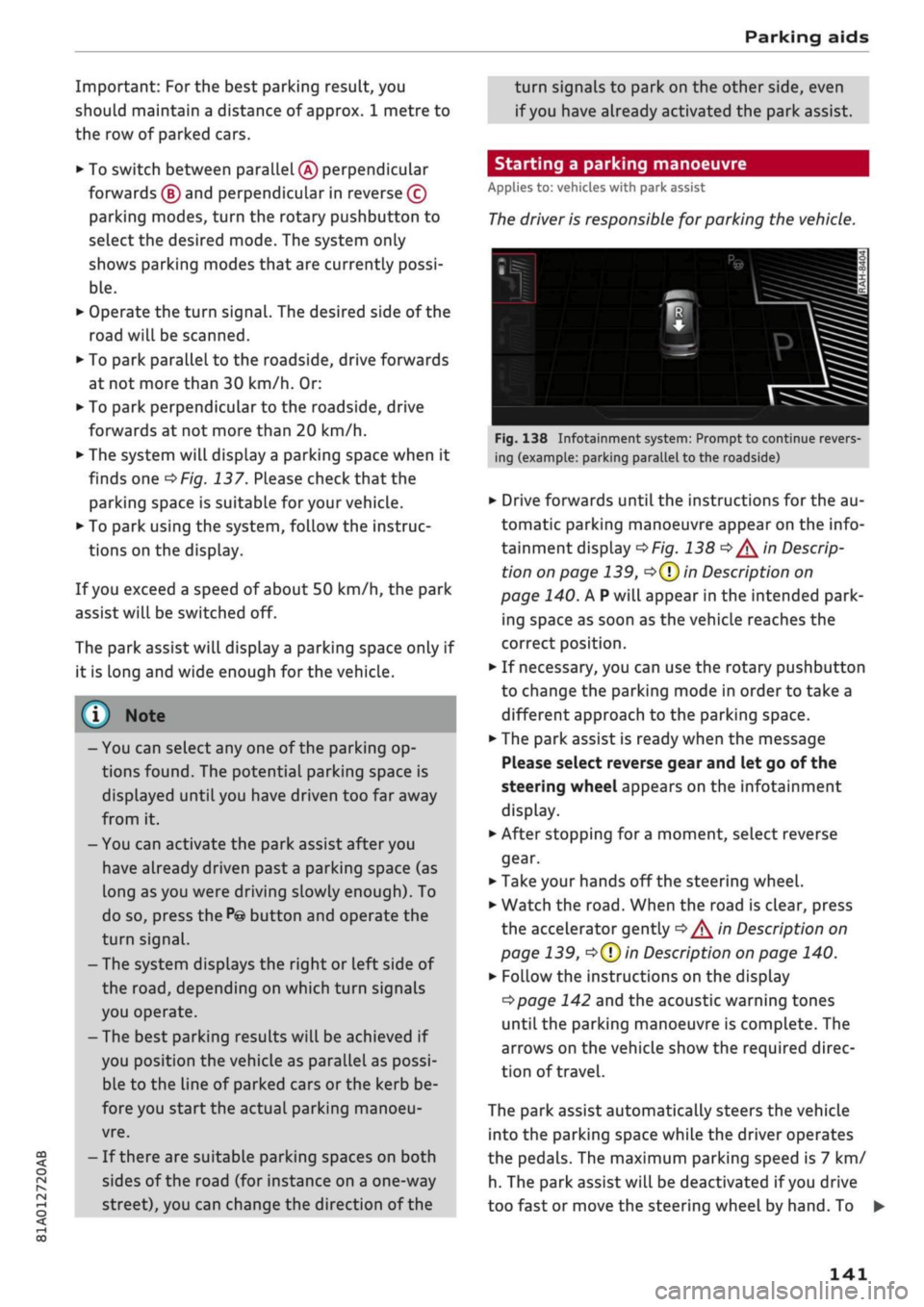
Important: For the best parking result, you
should maintain a distance of approx. 1 metre to
the row of parked cars.
•
To switch between parallel
(Â)
perpendicular
forwards
(B)
and perpendicular in reverse (?)
parking modes, turn the rotary pushbutton to
select the desired mode. The system only
shows parking modes that are currently possi
ble.
•
Operate the turn signal. The desired side of the
road will be scanned.
•
To park parallel to the roadside, drive forwards
at not more than 30 km/h. Or:
•
To park perpendicular to the roadside, drive
forwards at not more than 20 km/h.
•
The system will display
a
parking space when it
finds one
^Fig.
137. Please check that the
parking space is suitable for your vehicle.
•
To park using the system, follow the instruc
tions on the display.
If
you
exceed a speed of about 50 km/h, the park
assist will be switched off.
The park assist will display
a
parking space only if
it is Long and wide enough for the vehicLe.
© Note
-You can select any one of the parking op
tions found. The potential parking space is
displayed until you have driven too far away
from it.
- You can activate the park assist after you
have already driven past a parking space (as
long as you were driving slowly enough). To
do so, press the
P©
button and operate the
turn signal.
- The system displays the right or left side of
the
road,
depending on which turn signals
you operate.
- The best parking results will be achieved if
you position the vehicle as parallel as possi
ble to the line of parked cars or the kerb be
fore you start the actual parking manoeu
vre.
- If there are suitable parking spaces on both
sides of the road (for instance on a one-way
street), you can change the direction of the
turn signals to park on the other side, even
if
you
have already activated the park assist.
Starting a parking manoeuvre
Applies to: vehicles with park assist
The
driver is responsible for parking the vehicle.
Id it nl ila 1 i
L
ml\Jf '- ,H
i^*feâSi^T^,s*'ii^**£^B
'
1
Jr
r
i
fm
-
rf
"
!B—^-ASSL
^
tc^^^T-^T^^Tfr^a^j^
*
If*
Tf dl if
ïï
F ~"i
1VT"
•*-•.'' iiS^S
Fig.
138 Infotainment system: Prompt to continue revers
ing (example: parking parallel to the roadside)
•
Drive forwards until the instructions for the au
tomatic parking manoeuvre appear on the info
tainment display
^>Fig.
138
^/^
in Descrip
tion on page 139,
o(T)
in Description on
page 140. A
P
will appear in the intended park
ing space as soon as the vehicle reaches the
correct position.
•
If necessary, you can use the rotary pushbutton
to change the parking mode in order to take a
different approach to the parking space.
•
The park assist is ready when the message
Please select reverse gear and let go of the
steering wheel appears on the infotainment
display.
•
After stopping for
a
moment, select reverse
gear.
•
Take your hands off the steering wheel.
•
Watch the
road.
When the road is clear, press
the accelerator gently
^/^
in Description on
page 139,
•=>(?)
in Description on page 140.
•
Follow the instructions on the display
^>page
142 and the acoustic warning tones
until the parking manoeuvre is complete. The
arrows on the vehicLe show the required direc
tion of travel.
The park assist automatically steers the vehicle
into the parking space while the driver operates
the pedals. The maximum parking speed is 7 km/
h. The park assist will be deactivated if
you
drive
too fast or move the steering wheel by hand. To •
141
Page 144 of 364

Parking aids
continue the parking manoeuvre, press the
P© button again. The park assist will reappear on
the display.
You can cancel the direction of travel given by
the system before parking by shifting be
tween forwards/reverse gear. The system will
then calculate the further path and steering
directions for the manoeuvre based on the
position of the vehicle.
Driving out of a parking space parallel to
the roadside
Applies to: vehicles with park assist
The
driver is responsible for manoeuvring the ve
hicle out of the parking space.
If the vehicle is parked parallel to the roadside,
the park assist can help you to drive out of the
parking space.
•
Start the engine.
•
Press the
P©
button
^>page
140, Fig. 135.
•
Wait until the following text appears on the in
fotainment display: Specify direction with turn
signal to leave parking space.
*•
Operate the appropriate turn signal. The mes
sage Start automatic unparking procedure will
appear.
*•
Take your hands off the steering wheel.
•
Press the rotary pushbutton to start automatic
unparking.
•
Watch the
road.
When the road is clear, press
the accelerator gently
^ ^
in Description on
page 139,
^>(J)in
Description on page 140.
•
Follow the instructions on the display
^>page
142 and the acoustic warning tones
until you are
dear
to leave the parking space.
•
Drive in the direction specified by the arrows on
the vehicle.
•
The procedure is over when no more manoeu
vring is necessary in order to drive out of the
space.
Take over the steering.
The park assist automatically steers the vehicle
out of the parking space while the driver operates
the pedals. The maximum manoeuvring speed is
5 km/h. The park assist will be deactivated if you
drive too fast or move the steering wheel by
hand.
To continue the parking manoeuvre, switch
the engine off/on. Then press the
P@
button
again.
Alternatively, drive out of the parking
space without using the park assist.
Driver messages
Applies to: vehicles with park assist
Park assist: cancelled. Steering input detec
ted.
Continue steering vehicle!
The steering assistant has been deactivated be
cause the driver has intervened in the steering.
To continue the parking manoeuvre, press the
"©
button again.
Park assist: time limit exceeded
Park assist: cancelled. Time limit exceeded.
Continue steering vehicle!
The parking manoeuvre was not completed
with
in about six minutes after the park assist was ac
tivated.
To continue the parking manoeuvre,
press the P© button again.
Park assist: cancelled. Speed too high. Con
tinue steering vehicle!
You were driving too fast into the parking space.
Do not drive faster than 7 km/h.
i
Park assist: cancelled. Stabilisation control
(ESC) input. Continue steering vehicle!
The ESC has intervened. Take over the steering.
Finish parking without the park assist or drive out
of the parking space.
Park assist: currently unavailable. Stabilisa
tion control (ESC) off
The ESC has been switched off. The ESC must be
switched on before the park assist can be used.
| Park assist: fault. Please contact workshop
i Park assist: fault. Continue steering vehicle!
Please contact workshop
Please contact a qualified workshop. The park as
sist cannot be used to park the vehicLe if
a
system
fault occurs.
|
Park assist: currently unavailable
142
Page 145 of 364

Parking aids
CO
<
o
rN
iv
rN
t-H
o
< 00
Park assist: currently unavailable. Continue
steering vehicle!
The park assist cannot be used to park the
vehi
cle.
Try repeating the parking manoeuvre or
switching the ignition off and on again.
3 Park assist: ended. Please take over steering
and continue driving
The park assist has finished manoeuvring the ve
hicle out of the parking space. Please take over
the steering.
Park assist: cancelled. Space too small. Con
tinue steering vehicle!
The park assist cannot be used to park the vehicle
in this space. Park the vehicle without using the
park assist or look for a bigger space.
Park assist: cancelled. Obstacle detected.
Please take over steering.
The park assist has interrupted the parking ma
noeuvre to avoid a collision between the vehicle
and an obstacLe.
Park assist: ended
3 Park assist: ended. Please take over steer
ing.
The park assist has finished the parking manoeu
vre.
Park assist: stabilisation control (ESC) input
The parking space indicated has been rejected be
cause the ESC has intervened.
Park assist: currently unavailable. Towing
mode
The park assist cannot be used to park the vehicle
when towing a trailer.
1
Park assist: not stopped long enough
After you select reverse gear, the vehicle has to
remain stationary for
a
moment so that the park
assist can activate the steering. Follow the direc
tions given in the display.
3
Park assist: cancelled. Assist function un
available for leaving parking space. Space too
small
The assist function is unable to automatically
steer the vehicle out of the parking space be
cause the space is too small. Manoeuvre the
vehi
cle out of the parking space without using the
park assist.
Park assist: cancelled. Continue steering ve
hicle!
The park assist has interrupted the parking ma
noeuvre.
Settings for parking aid
Applies
to: vehicles with rear parking aid/parking system
plus/reversing
camera/park assist
You
can change the settings for these functions
on the infotainment system.
•
Select the following on the infotainment sys
tem:
|MENU[
button > Car
>
left control button
> Driver assist
>
Parking aid. Or:
•
Select the right control button* on the infotain
ment system when the parking aid is activated.
End*
- To cancel the parking aid
Activate automatically - To switch automatic ac
tivation on/off
Front volume* - Volume for the front and side*
zones
Rear volume - Volume for the rear zone
In-car
entertainment fader - The volume of the
current audio or video source is reduced when the
parking aid is switched on.
You will hear
a
short test tone each time you
make a new setting.
Trailer view* - To display the trailer view
- Some of the menus can only be called up via
the right control button when the parking
aid is activated.
- The volume and automatic activation set
tings are automatically stored and assigned
to the remote control key in use.
143
Page 147 of 364
Intelligent technology
CO
< o rN
iv
rN
t-H
o < 00
Intelligent technology
Electronic stabilisation
control (ESC)
Description
The electronic stabilisation control (ESC) increa
ses the car's stability. It reduces the tendency to
skid and improves the stability and roadholding
of the vehicle. The ESC detects critical handling
situations, such as understeer, oversteer and
wheelspin
on the driven wheels. It stabilises the
vehicle by braking individual wheels or by reduc
ing the engine torque. The indicator
lamp^
in
the instrument cluster starts flashing as soon as
the ESC intervenes.
The following systems are integrated in the ESC:
Anti-lock brake system (ABS)
ABS prevents the wheels from locking up under
braking until the vehicle has reached a virtual
standstill.
You can continue to steer the vehicle
even when the brakes are on
full.
Keep your foot
on the brake pedal and do not pump the brakes.
You will feel the brake pedal puLsate while the
anti-lock brake system is working.
Brake assist system
The brake assist system can shorten the braking
distance. The braking force is automatically boos
ted if
you
press the brake pedal quickly in an
emergency. You must keep pressing the brake
pedal until the danger has passed. On
vehides
with adaptive cruise control*, the response of the
brake assist system will be more sensitive if you
are too close to the vehicLe in front.
Traction control system (ASR)
In the event of
wheelspin,
the traction control
system reduces the engine torque to match the
amount of grip available. This helps the car to
start moving, accelerate or climb a gradient.
Electronic differential lock (EDL)
When the EDL detects wheelspin, it brakes the
spinning wheel and directs the power to the
oth
er driven wheel (or wheels on quattro* versions).
This function is not available at high speeds.
To prevent the disc brake of the braked wheel
from overheating, the EDL cuts out automatically
if subjected to excessive loads. The vehicLe can
still be driven. The EDL will switch on again auto
matically when the brake has cooled down.
Steering recommendation
The ESC helps to stabilise the vehicle by changing
the steering wheel torque.
Trailer stabilisation system
Applies to: vehicles with trailer stabilisation system
Trailers have a tendency to sway. If the
ESC
de
tects that the trailer is swaying and this is affect
ing the towing vehicLe, it will automatically brake
the vehicle in order to stabilise the trailer
^>page
97.
Selective wheel torque control
Selective wheel torque control intervenes when
cornering by braking the wheel(s) on the inside of
the bend individually as required. This enables
precision cornering.
Multicollision brake assist system
The "multicollision brake assist system" can help
to reduce the risk of skidding and further
colli
sions during an accident. If the airbag control
unit detects that
a
collision has taken place up
wards of
a
certain speed, the vehicle is braked by
the
ESC.
The vehicle will not be braked automatically if:
- the driver presses the accelerator,
- or the
ESC,
the brake system or the vehicle's
electrical system are not fully functional.
WARNING
- The grip provided by the ESC and the inte
grated systems is still subject to the physi
cal limits of adhesion. Always bear this in
mind,
especially on wet or sLippery roads. If
you notice the systems cutting in, you
should reduce your speed immediately to
suit the road and traffic conditions. Do not
let
the extra safety provided tempt you into
taking any risks when driving - this can
cause accidents.
145
Page 150 of 364
Intelligent technology
/K
WARNING
- When applying
the
brakes
to
clean
off
de
posits
on the
pads and discs, select
a
clear,
dry
road.
Be sure
not to
inconvenience
or
en
danger other road users;
do not
risk an
acci
dent.
- Never
let the car
coast with
the
engine
switched
off
(this can cause accidents).
(T)
CAUTION
- Never
let the
brakes "drag"
by
leaving your
foot on
the
pedal when you
do not
really
in
tend
to
brake. This overheats
the
brakes,
re
sulting
in
longer stopping distances
and
greater wear.
- Before driving down
a
long,
steep gradient,
it
is
advisable
to
reduce speed
and
select
a
lower gear.
In
this way you will make use
of
the engine braking effect and relieve
the
load
on the
brakes.
If
you
still have
to use
the brakes,
it is
better
to
brake firmly
at in
tervals than
to
apply
the
brakes continuous-
Ly
-
If
the brake servo
is out of
action,
you must
apply considerably more pressure
to the
brake pedal than you normally would.
-
If
you
wish
to
equip
the
car with accessories
such as a front spoiler
or
wheel covers,
it is
important that
the
flow
of air to the
front
wheels
is not
obstructed, otherwise
the
brakes can overheat.
Electro-mechanical
power steering
Electro-mechanical power steering assists
the
driver when steering.
The degree
of
power assistance
is
adapted elec
tronically,
depending
on the
speed.
Warning/indicator lamps
and
driver
messages
| Do not drive vehicle: steering defective
If the warning lamp lights
up
permanently
and
the message appears, there
may be
a power
steering failure.
Stop
the
vehicle
in a
safe place
as
soon
as
possi
ble.
Do
NOT drive on. Obtain professional assis
tance.
S
Steering malfunction: you can continue driv
ing
If the indicator Lamp Lights up,
the
steering
re
sponse
may be
heavier
or
lighter than usual.
In
addition,
it is
possible that
the
steering wheel
will
be off
centre when driving
in a
straight line.
Drive slowly
to
a qualified workshop and have
the
fault rectified.
Note
You
can
drive
on if
the warnina/indicator
g/
Lamp
||
or y
|
lights
up
only briefly
Four-wheel drive
(quattro)
Applies to: vehicles with four-wheel drive
On
quattro models
the
engine power is distrib
uted
to all
four wheels.
General notes
On four-wheel drive vehicles,
the
engine power
is
distributed
to all
four wheels. The distribution
of
power
is
controlled automatically according
to
your driving style and
the
road conditions. Also
refer
to
^>page
145,
Electronic stabilisation con
trol
(ESC).
The four-wheel drive
is
specially designed
to
complement
the
superior engine power
of
your
Audi.
This combination gives
the car
exceptional
handling
and
performance capabilities
-
both
on
normal roads and
in
more difficult conditions,
such
as
snow and
ice.
Even
so (or
perhaps espe
cially
for
this reason),
it is
important
to
observe
certain safety points
<=> A-
Winter tyres
Thanks
to its
four-wheel drive, your
car
will have
plenty
of
traction
in
winter conditions, even with
•
148