steering AUDI Q2 2021 Owner´s Manual
[x] Cancel search | Manufacturer: AUDI, Model Year: 2021, Model line: Q2, Model: AUDI Q2 2021Pages: 364, PDF Size: 87.77 MB
Page 154 of 364
Multi
Media Interface
Multi
Media Interface
Notes on traffic safety
You should only use certain infotainment system
functions, e.g.
entera
navigation destination,
while the vehicle is stationary. Always be pre
pared to stop operating the infotainment system
in the interest of your own safety and that of
oth
er road users.
A WARNING
Only operate the infotainment system when
the traffic conditions allow you to do so safely
and when you can maintain proper control of
your vehicLe - risk of accident!
(T)
Note
Certain functions are not available while the
vehicle is in motion.
Introduction
The Multi Media Interface (MMI) combines
dif
ferent communication, navigation* and
enter
tainment systems in your Audi. You can operate
your MMI system via the MMI control console,
the multi-function steering wheel or the speech
dialogue system*.
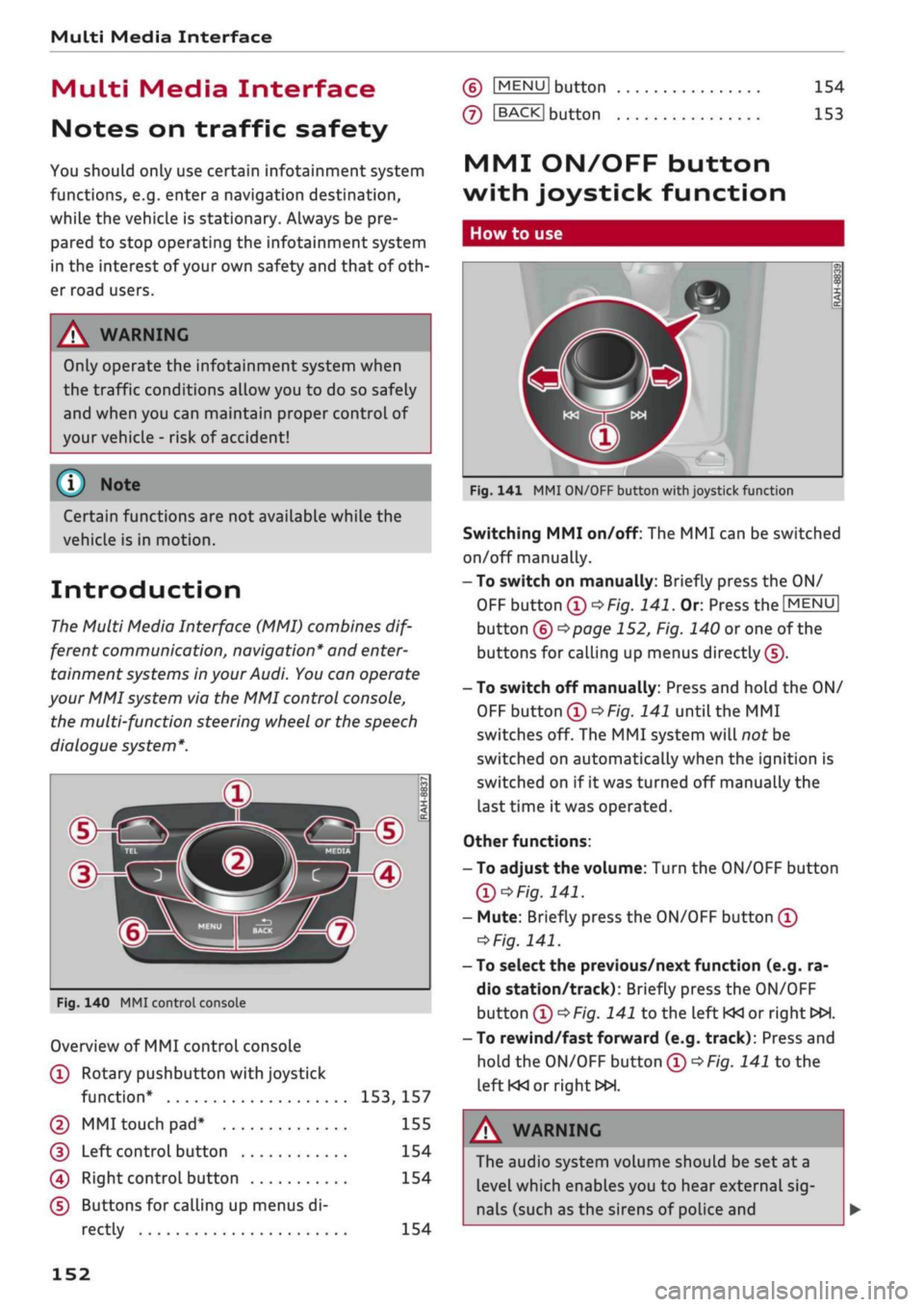
d>^3
ZLMH®
Fig.
140 MMI control console
Overview of MMI control console
(T)
Rotary pushbutton with joystick
function*
153,
157
© MMI touch
pad*
155
(D
Left controL button 154
0
Right control button 154
(D Buttons for calling up menus di
rectly 154
(6)
IMENU1
button
(7)
IBACKI
button
154
153
MMI ON/OFF button
with joystick function
How to use
Fig.
141 MMI ON/OFF button with joystick function
Switching MMI on/off: The MMI can be switched
on/off manually.
-To switch on manually: Briefly press the ON/
OFF
button
(D^F/g.
141.
Or. Press the
[MENU]
button (6)
^>page
152, Fig. 140 or one of the
buttons for calling up menus directly (J).
- To switch off manually: Press and hold the ON/
OFF
button
®^>F/g.
141 until the MMI
switches off. The MMI system will not be
switched on automatically when the ignition is
switched on if it was turned off manually the
last time it was operated.
Other functions:
- To adjust the volume: Turn the ON/OFF button
Ql^Fig.
141.
- Mute: Briefly press the ON/OFF button
(Î)
*Fig.
141.
- To select the previous/next function (e.g. ra
dio station/track): Briefly press the ON/OFF
button
(i)t>Fig.
141 to the left KM or right
WH.
-To rewind/fast forward (e.g. track): Press and
hold the ON/OFF button
(T)^Fig.
141 to the
left KM
or right»!.
A WARNING
The audio system volume should be set at a
level which enables you to hear external
sig
nals (such as the sirens of police and
152
Page 166 of 364
Speech dialogue system
Speech dialogue system
How to use the speech
dialogue system
Applies to: vehicles with speech dialogue system
You
can operate many infotainment functions
conveniently by voice.
Important: The ignition and the MMI system
must be switched on
^>page
152, you must not
be talking on the phone, and the parking aid
must not be active.
•
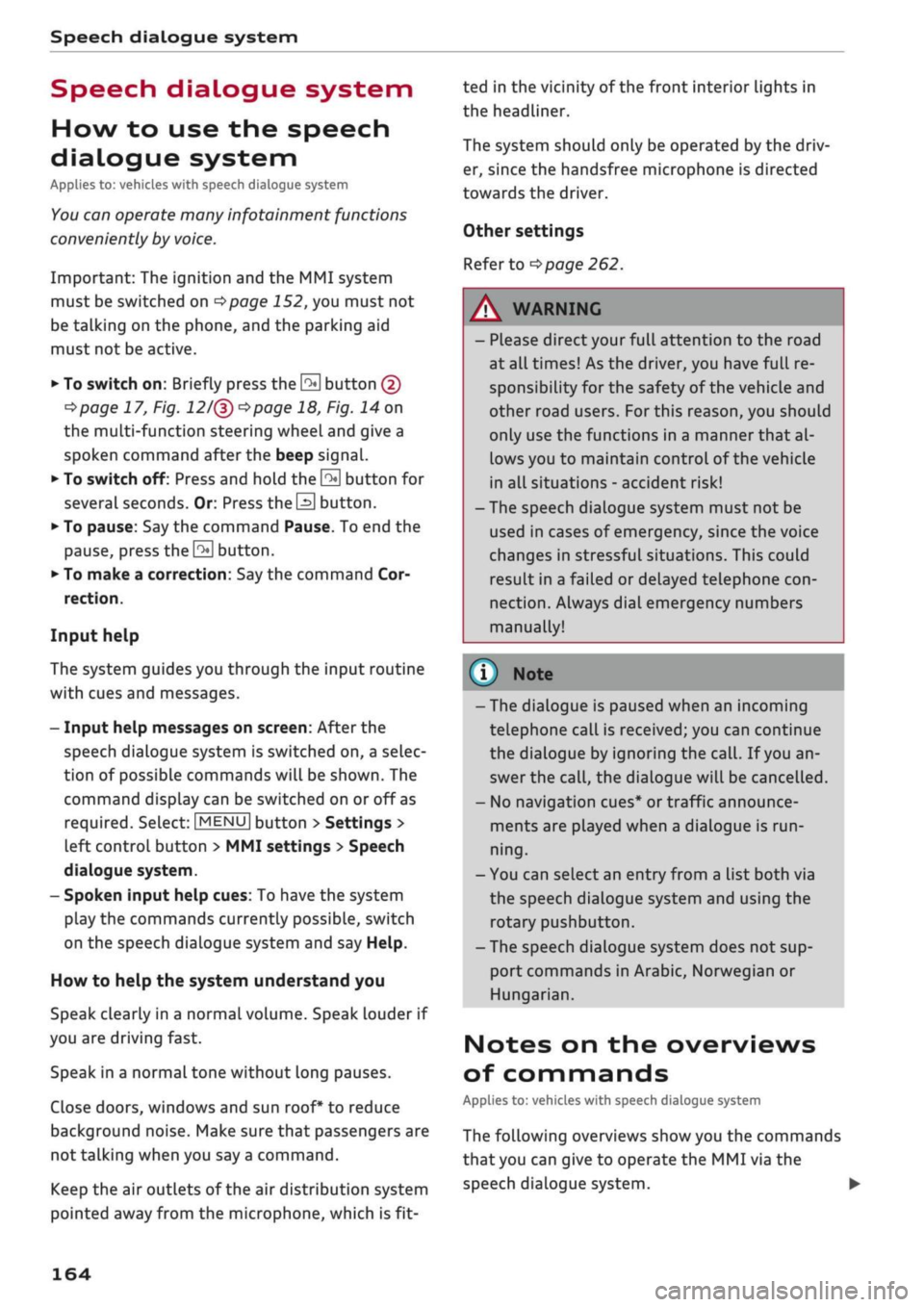
To switch on: Briefly press the
0
button (J)
^>page
17, Fig. 12/(3)
^>page
18, Fig. 14 on
the multi-function steering wheel and give a
spoken command after the beep signal.
*•
To switch off: Press and hold the
0
button for
several seconds. Or: Press the
0
button.
•
To pause: Say the command Pause. To end the
pause,
press the
S
button.
•
To make a correction: Say the command Cor
rection.
Input help
The system guides you through the input routine
with cues and messages.
- Input help messages on screen: After the
speech dialogue system is switched on, a selec
tion of possible commands will be shown. The
command display can be switched on or off as
required.
Select:
|MENU|
button
>
Settings >
left control button > MMI settings
>
Speech
dialogue system.
- Spoken input help
cues:
To have the system
play the commands currently possible, switch
on the speech dialogue system and say Help.
How to help the system understand you
Speak clearly in a normal volume. Speak louder if
you are driving fast.
Speak in a normal tone without long pauses.
Close doors, windows and sun roof* to reduce
background noise. Make sure that passengers are
not talking when you say a command.
Keep the air outlets of the air distribution system
pointed away from the microphone, which is fit
ted in the vicinity of the front interior lights in
the headliner.
The system should only be operated by the driv
er, since the handsfree microphone is directed
towards the driver.
Other settings
Refer to
^>page
262.
© No
-The dialogue is paused when an incoming
telephone call is received; you can continue
the dialogue by ignoring the
call.
If
you
an
swer the
call,
the dialogue will be cancelled.
- No navigation cues* or traffic announce
ments are played when a dialogue is
run
ning.
- You can select an entry from a list both via
the speech dialogue system and using the
rotary pushbutton.
- The speech dialogue system does not sup
port commands in Arabic, Norwegian or
Hungarian.
Notes on the overviews
of commands
Applies to: vehicles with speech dialogue system
The following overviews show you the commands
that you can give to operate the MMI via the
speech dialogue system. •
A WARNING
- Please direct your full attention to the road
at all times! As the driver, you have full re
sponsibility for the safety of the vehicle and
other road users.
For
this reason, you should
only use the functions in a manner that al
lows you to maintain control of the vehicle
in all situations - accident risk!
- The speech dialogue system must not be
used in cases of emergency, since the voice
changes in stressful situations. This could
result in a failed or delayed telephone
con
nection.
Always dial emergency numbers
manually!
164
Page 173 of 364
Speech dialogue system
CO
â
rN
IN
rN
•-i
•H
00
The ignition and the MMI system must be switch
ed on.
You must not be speaking on the phone.
The parking aid and the Audi speech dialogue sys
tem must not be active.
A mobile phone must be connected to the MMI
system via the Handsfree profile
Opage
173.
The mobile phone connected must feature a
speech dialogue function that can be controlled
externally.
•
To switch
on:
Press and hold the
S
button on
the multi-function steering wheel* and give a
spoken command after the external speech dia
logue system has been activated.
•
To continue/restart a dialogue: After
a
dia
logue has been ended, the system remains ac
tive for
a
short period during which you can
start a new external dialogue at any time. If
necessary, press
the S
button and say a new
command.
Or: SeLect and confirm Continue on
the MMI control console.
•
To switch off: Press and hold the
\2*\
button for
several seconds. Or: Select and confirm Cancel
on the MMI control console.
© Note
- No navigation cues* or traffic announce
ments* are played when a dialogue is active.
-Thisfunction
depends on the mobile phone
you are using. For further information re
garding your mobile phone, contact your
mobile network service provider or refer to
the operating instructions
for
your mobile
phone.
- AUDI AG only enables you to access your
mobile phone's speech dialogue system and
accepts no responsibility for the content
and commands of the external speech dia
logue system.
171
Page 223 of 364
Navigation
CO
< o rN
IV
rN
t-H
o <
00
Map
How to
use
the map
Applies
to: vehicles with navigation system
H
an^fc Hetnuc'ijlo
'
in
1,2 km
Blaubach
in
1,0
km
Autobahn-Flugh
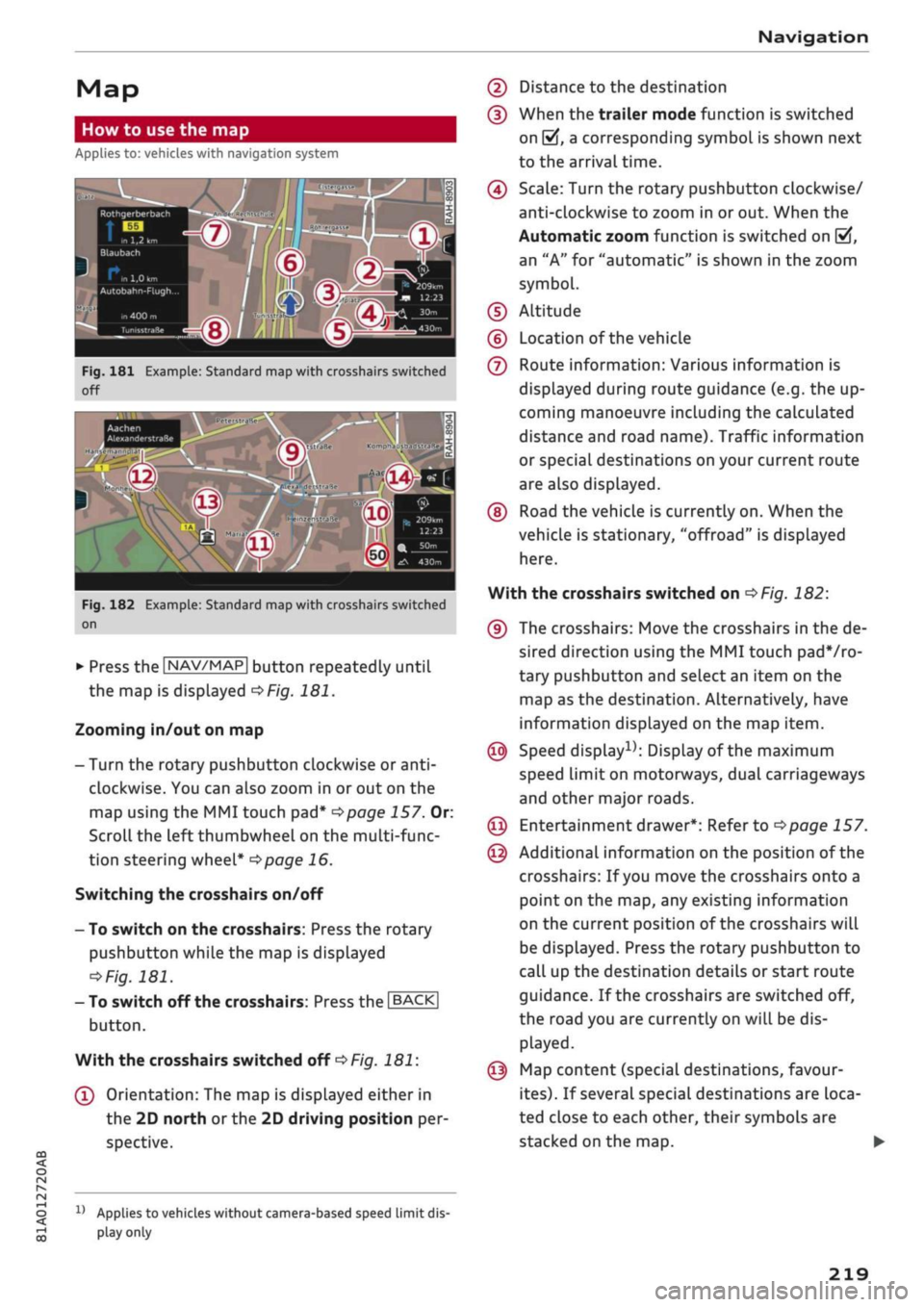
Fig.
181 Example: Standard map with crosshairs switched
off
Aachen
AlexanderstraBe Komphausbad da n se m an n pi
a
Fig.
182 Example: Standard map with crosshairs switched
on
•
Press the |NAV/MAP| button repeatedly until
the map is displayed
^Fig.
181.
Zooming in/out on map
- Turn the rotary pushbutton clockwise or
anti
clockwise. You can also zoom in or out on the
map using the MMI touch
pad*
^>page
157. Or:
Scroll the left thumbwheel on the multi-func
tion steering wheel*
^>page
16.
Switching the crosshairs on/off
- To switch on the crosshairs: Press the rotary
pushbutton while the map is displayed
^Fig.
181.
- To switch off the crosshairs: Press the |BACK|
button.
With the crosshairs switched off
•=>
Fig.
181:
(l)
Orientation: The map is displayed either in
the 2D north
or
the 2D driving position per
spective.
1J
Applies to vehicles without camera-based speed limit
dis
play
only
(2) Distance to the destination
(D When the trailer mode function is switched
on
[vj,
a corresponding symbol is shown next
to the arrival time.
(4) Scale: Turn the rotary pushbutton clockwise/
anti-clockwise to zoom in or out. When the
Automatic zoom function is switched on
(vf,
an "A" for "automatic" is shown in the zoom
symbol.
(D Altitude
(?) Location of the vehicle
(7) Route information: Various information is
displayed during route guidance (e.g. the up
coming manoeuvre including the calculated
distance and road name). Traffic information
or special destinations on your current route
are also displayed.
(D Road the vehicle is currently on. When the
vehicle is stationary, "offroad" is displayed
here.
With the crosshairs switched on
^>Fig.
182:
(9) The crosshairs: Move the crosshairs in the de
sired direction using the MMI touch padVro-
tary pushbutton and select an item on the
map as the destination. Alternatively, have
information displayed on the map item.
© Speed display1); Display of the maximum
speed limit on motorways, dual carriageways
and other major roads.
© Entertainment drawer*: Refer to
^page
157.
© Additional information on the position of the
crosshairs: If
you
move the crosshairs onto a
point on the map, any existing information
on the current position of the crosshairs will
be displayed. Press the rotary pushbutton to
call up the destination details or start route
guidance. If the crosshairs are switched off,
the road you are currently on will be dis
played.
© Map content (special destinations, favour
ites).
If several special destinations are loca
ted close to each other, their symbols are
stacked on the map.
219
Page 269 of 364
Safe driving
CO
<
O
rN
iv
rN
•-i
00
Correct sitting positions
Correct driving position
The
correct driving position is important for safe
driving.
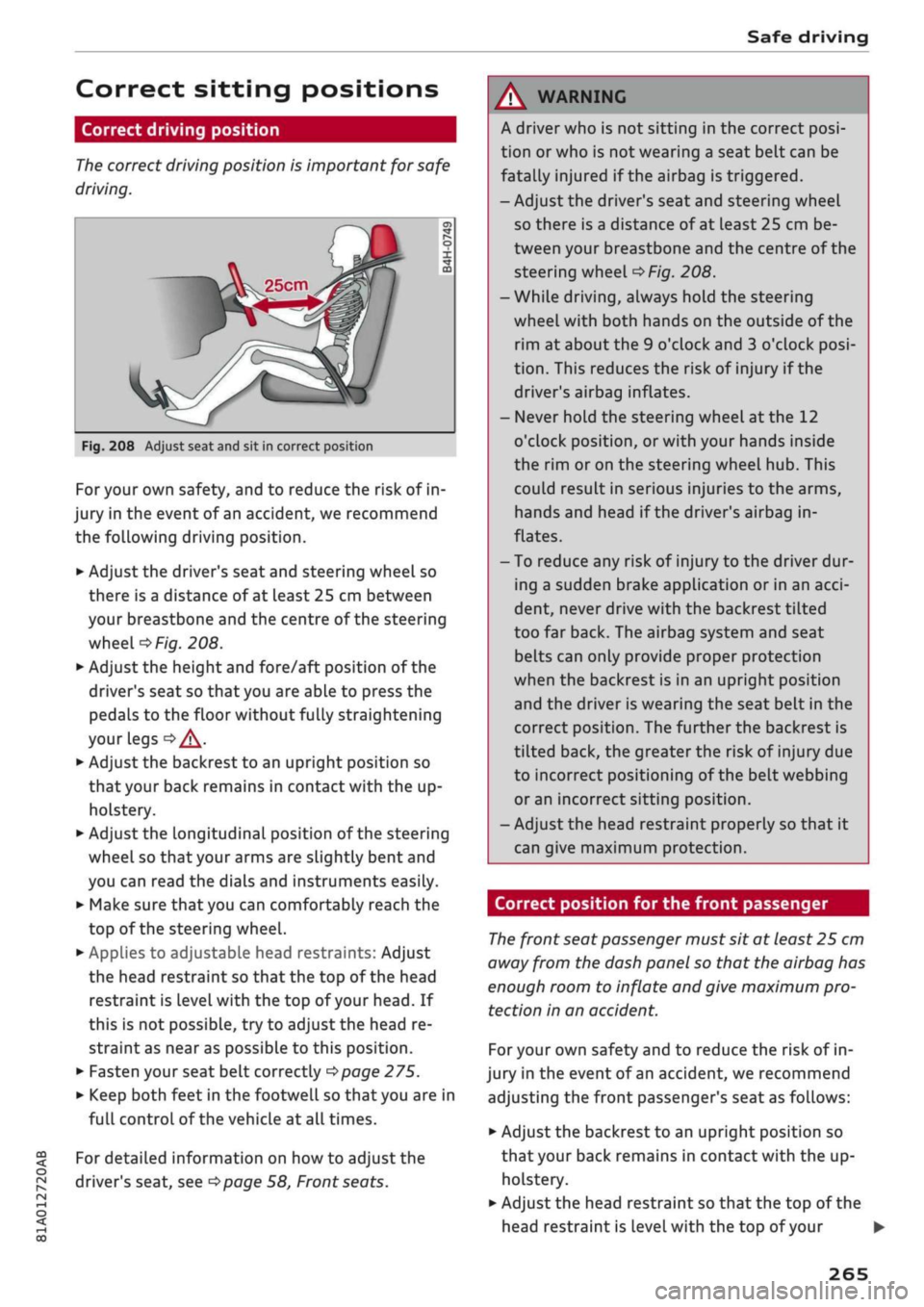
25cm
Fig.
208 Adjust seat and sit in correct position
For your own safety, and to reduce the risk of in
jury in the event of an accident, we recommend
the following driving position.
•
Adjust the driver's seat and steering wheel so
there is a distance of at least 25 cm between
your breastbone and the centre of the steering
wheel
o>F/g.
208.
•
Adjust the height and fore/aft position of the
driver's seat so that you are able to press the
pedals to the floor without fully straightening
your legs
oA.
•
Adjust the backrest to an upright position so
that your back remains in contact with the up
holstery.
*•
Adjust the longitudinal position of the steering
wheel so that your arms are slightly bent and
you can read the dials and instruments easily.
•
Make sure that you can comfortably reach the
top of the steering wheel.
•
AppLies to adjustable head restraints: Adjust
the head restraint so that the top of the head
restraint is
level
with the top of your head. If
this is not possible, try to adjust the head re
straint as near as possible to this position.
•
Fasten your seat belt correctly
^>page
275.
•
Keep both feet in the footwell so that you are in
full controL of the vehicle at all times.
For detailed information on how to adjust the
driver's seat, see
^>page
58, Front seats.
A WARNING
A driver who is not sitting in the correct
posi
tion or who is not wearing a seat belt can be
fatally injured
if
the airbag is triggered.
- Adjust the driver's seat and steering wheel
so there is a distance of at least 25 cm be
tween your breastbone and the centre of the
steering wheel
^>Fig.
208.
-While driving, always hold the steering
wheel with both hands on the outside of the
rim at about the 9 o'clock and 3 o'clock
posi
tion.
This reduces the risk of injury if the
driver's airbag inflates.
- Never hold the steering wheel at the 12
o'clock position, or with your hands inside
the rim or on the steering wheel hub. This
could result in serious injuries to the arms,
hands and head if the driver's airbag in
flates.
- To reduce any risk of injury to the driver dur
ing a sudden brake application or in an
acci
dent, never drive with the backrest tilted
too far back. The airbag system and seat
belts can only provide proper protection
when the backrest is in an upright position
and the driver is wearing the seat belt in the
correct position. The further the backrest is
tilted back, the greater the risk of injury due
to incorrect positioning of the belt webbing
or an incorrect sitting position.
- Adjust the head restraint properly so that it
can give maximum protection.
Correct position for the front passenger
The
front seat passenger must sit at least 25 cm
away from the dash panel so that the airbag has
enough room to inflate and give maximum pro
tection in an accident.
For your own safety and to reduce the risk of in
jury in the event of
an
accident, we recommend
adjusting the front passenger's seat as follows:
•
Adjust the backrest to an upright position so
that your back remains in contact with the up
holstery.
•
Adjust the head restraint so that the top of the
head restraint is level with the top of your
265
Page 281 of 364
Seat belts
CO
< o rN
iv
rN
t-H
o < 00
Even
at
urban speeds
of
30 km/h to 50 km/h, the
forces acting on the occupants in a collision can
reach the equivalent
of
1 ton (1000 kg)
or
more.
At greater speed these forces are even higher.
Again:
if
the speed doubles, the forces increase
by
a
factor of four.
Passengers who do not wear seat belts are not
"attached"
to the vehicle. In a frontal collision
they will continue to move forward at the speed
their car was travelling just before the impact.
What happens to passengers not wearing
seat belts?
Passengers
not wearing seat belts risk fatal inju
ries in the event
of
an
accident.
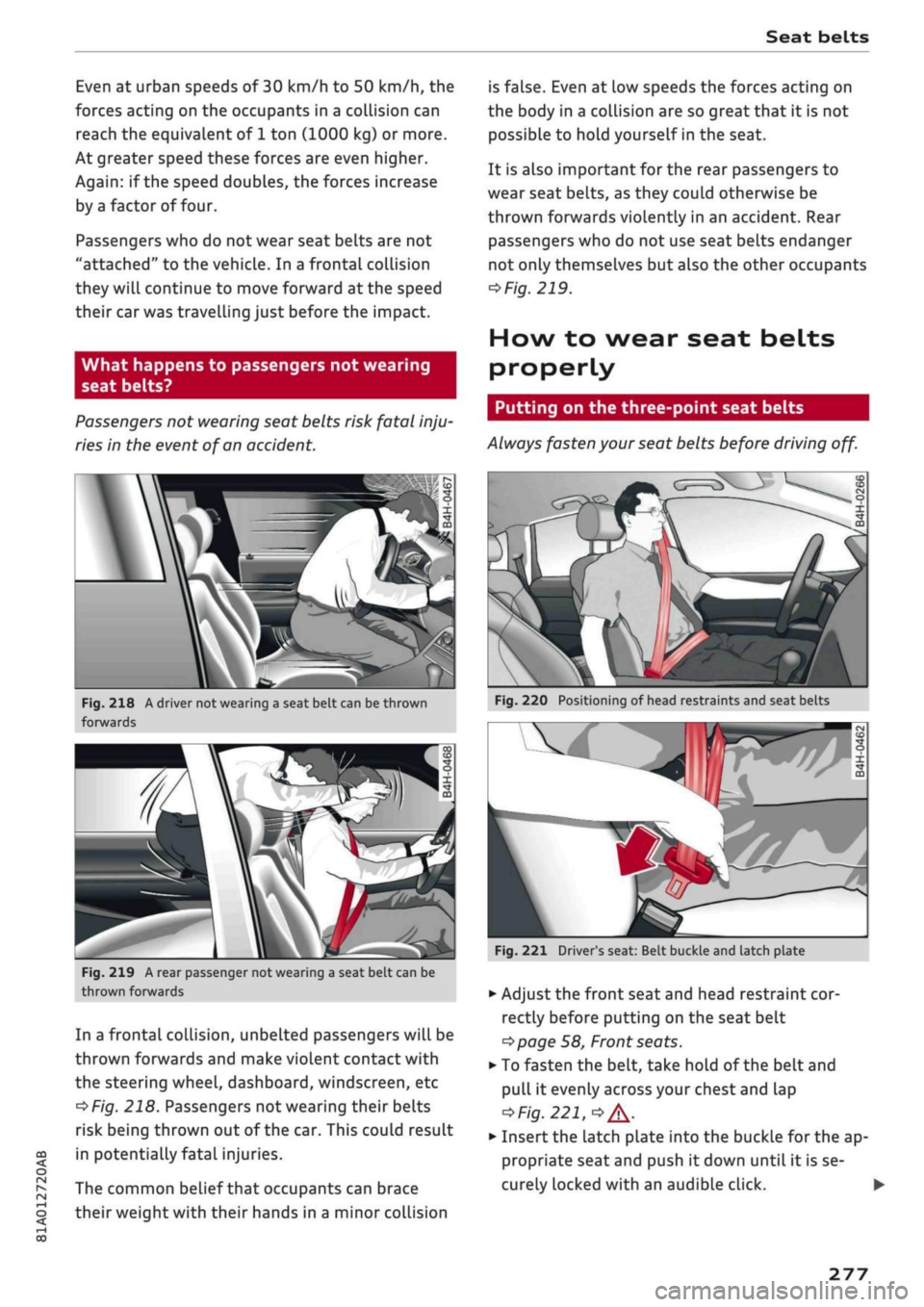
Ï
Fig.
218 A driver not wearing
a
seat belt can be thrown
forwards
Fig.
219
A
rear passenger not wearing
a
seat belt can
be
thrown forwards
In a frontal collision, unbelted passengers will be
thrown forwards and make violent contact with
the steering wheel, dashboard, windscreen, etc
^Fig.
218. Passengers not wearing their belts
risk being thrown out of the car. This could result
in potentially fatal injuries.
The common belief that occupants can brace
their weight with their hands in a minor collision
is false. Even
at
low speeds the forces acting
on
the body in a collision are so great that
it
is not
possible to hold yourself in the seat.
It is also important for the rear passengers
to
wear seat belts, as they could otherwise be
thrown forwards violently in an accident. Rear
passengers who do not use seat belts endanger
not only themselves but also the other occupants
*>
Fig.
219.
How to wear seat belts
properly
Putting on the three-point seat belts
Always fasten your seat belts before driving
off.
Fig.
220 Positioning
of
head restraints and seat belts
Fig.
221 Driver's seat: Belt buckle and latch plate
•
Adjust the front seat and head restraint cor
rectly before putting on the seat belt
^>page
58, Front seats.
• To fasten the belt, take hold of the belt and
pull
it
evenly across your chest and lap
<*FiQ.
221,
•»
A.
•
Insert the Latch pLate into the buckle for the ap
propriate seat and push
it
down until
it
is se
curely locked with an audible click.
277
Page 287 of 364
Airbag system
Description of front airbags How the
front
airbags work
CO
â
rN
IV
rN
•-i
§
•H
00
The
airbag system is not a substitute for the seat
belts.
When fully inflated, the airbags reduce the risk
of head or chest
injury.
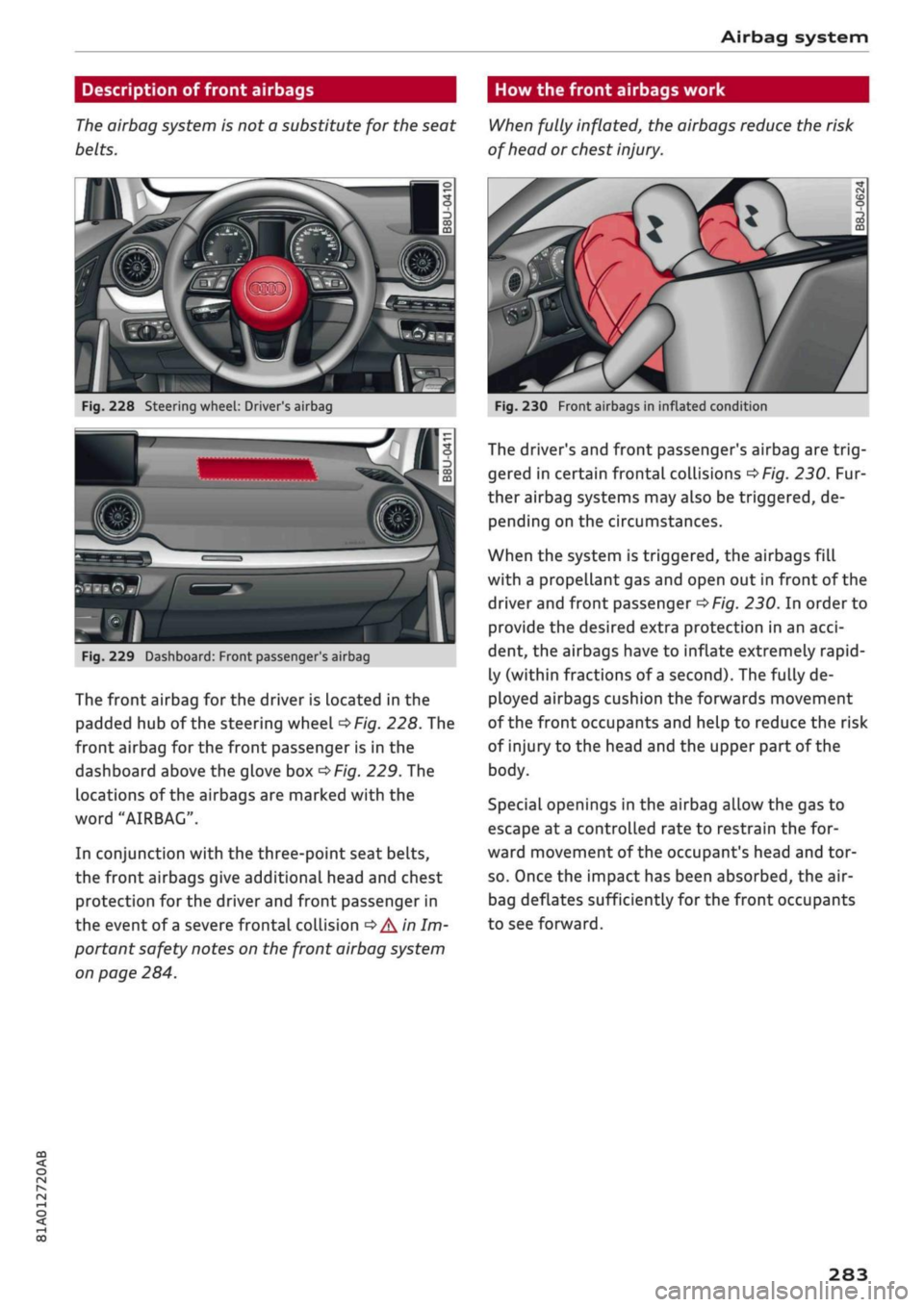
Fig.
228 Steering wheel: Driver's airbag
SiMlP
Fig.
229 Dashboard: Front passenger
s
airbag
The front airbag for the driver is Located in the
padded hub of the steering wheel
^Fig.
228. The
front airbag for the front passenger is in the
dashboard above the glove box
^Fig.
229. The
locations of the airbags are marked with the
word "AIRBAG".
In conjunction with the three-point seat belts,
the front airbags give additional head and chest
protection for the driver and front passenger in
the event of
a
severe frontal collision
•=>
A'n
Im
portant safety notes on the front airbag system
on page 284.
Fig.
230 Front airbags in inflated condition
The driver's and front passenger's airbag are
trig
gered in certain frontal collisions
^>Fig.
230. Fur
ther airbag systems may also be triggered, de
pending on the circumstances.
When the system is triggered, the airbags fill
with a propellant gas and open out in front of the
driver and front passenger
^>Fig.
230. In order to
provide the desired extra protection in an
acci
dent, the airbags have to inflate extremely rapid
ly (within fractions of
a
second). The fully de
ployed airbags cushion the forwards movement
of the front occupants and help to reduce the risk
of injury to the head and the upper part of the
body.
Special openings in the airbag allow the gas to
escape at
a
controlled rate to restrain the for
ward movement of the occupant's head and tor
so.
Once the impact has been absorbed, the air-
bag deflates sufficiently for the front occupants
to see forward.
283
Page 288 of 364

Airbag system
Important safety notes on the front airbag
system
There are a number of safety points concerning
the airbag system which you should remember.
This will help to reduce the risk of injury in an ac
cident.
25cm
Fig.
231 Minimum distance from steering wheel
A WARNING
- It is important for the driver and front pas
senger to maintain a distance of at least
25 cm from the steering wheel or dash
board
oFig.
231. The airbag system will not
be able to give the required protection if you
sit too close to the steering wheel or dash
board.
There is also a risk of injury if the air-
bags are inflated. The front seats and head
restraints must always be positioned cor
rectly for the height of the occupant.
- If you do not wear a seat belt, if you lean
forward or to the side, or are not seated cor
rectly while the vehicle is in motion, you are
at greater risk of injury. Should the airbag
system be triggered in an accident there is
an even greater risk of injury.
- Never let a child travel on the front seat
without an appropriate restraint system. If
the airbag is triggered in an accident, the
child could sustain serious or fatal injuries
^>page
267, Child seats.
- Child seats in which the child faces the rear
of the car are located directly in the path of
the front passenger's airbag if it inflates. In
this case, the child could sustain serious or
fatal injuries if the airbag were to be de
ployed.
- Applies to vehicles on which the front pas
senger's airbag cannot be deactivated: Do
NOT use a rearward-facing child seat on
the front passenger's seat.
- Applies to vehicles with key-operated
switch for deactivating the front passeng
er's airbag: Do NOT use a rearward-facing
child seat on the front passenger's seat
while the front passenger's airbag is ac
tive.
If you have no alternative but to use a
rearward-facing child seat on the front
passenger's seat, the front passenger's
airbag must be deactivated beforehand via
the key-operated switch*
^>page
288.
Make sure that the front passenger's air-
bag is reactivated by means of the key-op
erated switch* as soon as the child seat is
no longer needed on the front passenger's
seat.
- Occupants sitting in the front of the car
must never carry any objects or pets in the
space between them and the airbags, or al
low children or other passengers to travel in
this position.
- Do not cover or stick anything on the steer
ing wheel hub or the soft plastic surface of
the airbag unit on the passenger's side of
the dashboard, and do not obstruct or modi
fy them in any way. These parts should only
be cleaned with a dry cloth (or with a cloth
moistened with plain water). It is also im
portant not to attach any objects such as
cup holders or telephone mountings to the
surfaces covering the airbag units.
- Any work on the airbag system or removal
and installation of the airbag components
for other repairs (such as repairs to the
steering wheel or removal of seats) must be
performed by a qualified workshop.
284
Page 310 of 364
Wheels
DOT ...2216...
means, for example, that the tyre was produced
in the 22nd week of 2016.
Audi Genuine Tyres
Audi Genuine Tyres with the marking "AO" are
specially matched to your Audi. When used prop
erly, these tyres meet the highest standards in
safety and handling. Your specialist retailer will
be glad to provide more information.
Tyre wear / damage
A
WARNING
- Use only tyre/rim combinations and match
ing wheel bolts approved by Audi. Otherwise
damage to the vehicLe and an accident could
result.
- For technical reasons, it is not possible to
use wheels from other vehicles. In certain
cases, it is not even possible to use wheels
from another vehicle of the same model.
- It is very important to ensure that the tyres
you have chosen have adequate clearance.
When selecting replacement tyres, do not
rely entirely on the nominal tyre size
marked on the tyre; with some makes of
tyre the effective tyre size can differ signifi
cantly from the nominal dimensions, even
though the tyres have the same size desig
nation.
Inadequate tyre clearance can result
in damage to the tyres or the vehicle, caus
ing a serious safety risk.
- Avoid running the car on tyres that are more
than 6 years old. If
you
have no alternative,
you should drive slowly and with extra care
at all times.
- The use of run-flat tyres on your vehicle is
NOT authorised! Unauthorised use can cause
an accident or damage your vehicLe.
- If wheel trims are fitted after the car is pur
chased,
ensure that there is an adequate
flow of air for cooling the brakes - risk of ac
cident!
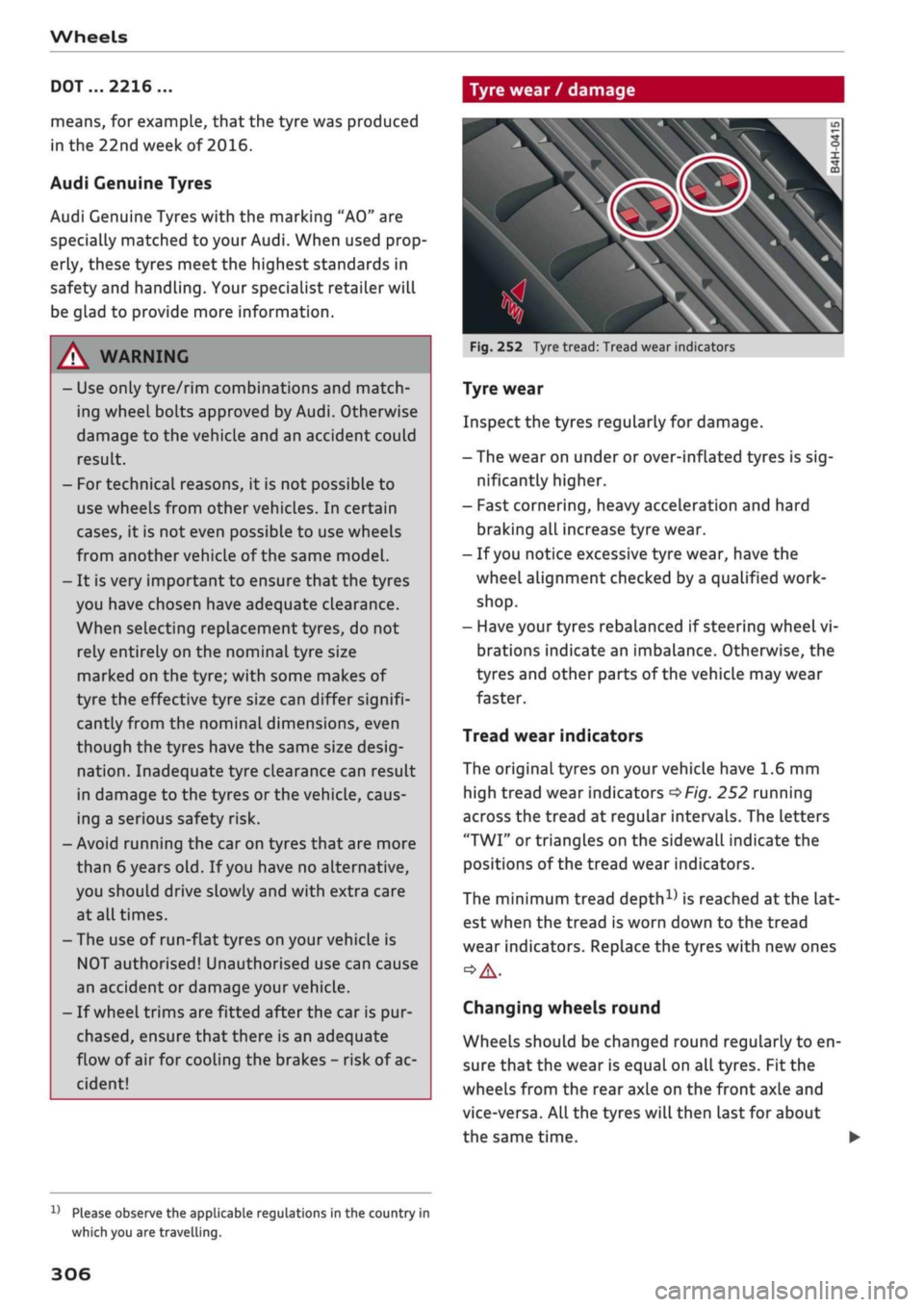
Fig.
252 Tyre tread: Tread wear indicators
Tyre wear
Inspect the tyres regularly for damage.
- The wear on under or over-inflated tyres is
sig
nificantly higher.
- Fast cornering, heavy acceleration and hard
braking all increase tyre wear.
- If
you
notice excessive tyre wear, have the
wheel alignment checked by a qualified work
shop.
- Have your tyres rebalanced if steering wheel vi
brations indicate an imbalance. Otherwise, the
tyres and other parts of the vehicLe may wear
faster.
Tread wear indicators
The original tyres on your vehicle have 1.6 mm
high tread wear indicators
^>Fig.
252 running
across the tread at regular intervals. The letters
"TWI"
or triangles on the sidewall indicate the
positions of the tread wear indicators.
The minimum tread
depth1)
is reached
at
the lat
est when the tread is worn down to the tread
wear indicators. Replace the tyres with new ones
Changing wheels round
Wheels should be changed round regularly to en
sure that the wear is equal on all tyres. Fit the
wheels from the rear axle on the front axle and
vice-versa. All the tyres will then last for about
the same time.
x)
Please observe the applicable regulations in the country in
which you are travelling.
306
Page 314 of 364
Wheels
more tyres, the driver is alerted by an indicator
lamp
0H ar|d a
message in the instrument cluster
display. If only one tyre is affected, the display
will indicate its position.
Each time you change a tyre, change the wheels
round or change the tyre pressures on your
vehi
cle (e.g. when switching from partial load to full
load and vice-versa), you must store the new tyre
pressures in the menu display
<=>page
311.
Mon
itoring of the tyre pressures is based on the tyre
pressures you have stored. The inflation pres
sures recommended for your vehicle are given on
the tyre pressure sticker
opage
307, Fig. 253.
The rolling circumference and vibration can
change and cause a tyre pressure warning if:
- The inflation pressure in one or more tyres is
too low.
- The tyre has suffered structural damage.
- The wheels were changed or the tyre pressures
were changed and the new tyre pressures were
not stored
<>page
311.
- The vehicLe load is not balanced (more load on
one side).
- There is more load on the wheels of one of the
axles (e.g. when towing a trailer or driving up
or down a gradient).
- You are driving with snow chains.
- You are driving with the temporary spare
wheel*.
- Only one wheel of an axle has been changed.
Indicator lamps
flfl - Loss of pressure on one or more tyres
o
A-
Check and change or repair the tyre(s). Check and
adjust the tyre pressures again on all four
wheels. Then store the tyre pressures in the
menu dispLay
opage
311.
IIJ'f.1
(Tyre pressure loss indicator) Tyre pressure:
System fault!.
If llil'f>1
appears and the indicator
LampBH in the
instrument cluster dispLay flashes
for approx. one minute and then remains lit after
you have switched on the ignition or while you
are driving, there is a fault in the system. Check
and adjust the tyre pressures for all four tyres
and store the
new
tyre pressures
•=>page
311. If
the indicator lamp does not go out or if it comes
on again after
a
short time, drive to a qualified
workshop without delay and have the fault
recti
fied.
®
No
- If
a
malfunction occurs in the ESC/ABS sys
tem,
the tyre pressure loss indicator may al
so be out of action.
-When driving with snow chains, a system
malfunction can occur.
-The tyre pressure Loss indicator on your Audi
is specially matched to "Audi Genuine Tyres"
^>page
305. We recommend that you use
these tyres.
- The tyre pressure Loss indicator can only
monitor the pressures of the tyres fitted on
the car. For this reason please regularly
check the tyre pressure of the spare wheel
in the luggage compartment so it can be
used if required.
A
WARNING
- If the tyre pressure loss indicator appears in
the instrument cluster display, slow down
immediately and avoid any severe braking or
steering manoeuvres. As soon as you can do
so safely, stop and check the tyres and the
tyre pressures.
- It is the driver's responsibility to ensure that
the tyre pressures are correct. For this rea
son you must check the tyre pressures
regu
larly.
- Under certain conditions (e.g. driving at
high speeds, on ice and snow or on poor
road surfaces) the tyre pressure loss indica
tor may not appear immediately.
- The use of run-flat tyres on your vehicLe is
NOT authorised! Unauthorised use can cause
an accident or damage your vehicle.
310