Light AUDI Q2 2021 Owner´s Manual
[x] Cancel search | Manufacturer: AUDI, Model Year: 2021, Model line: Q2, Model: AUDI Q2 2021Pages: 364, PDF Size: 87.77 MB
Page 91 of 364

Driving
A WARNING
- The driver should never get out of the
vehi
cle when the engine is running and a gear is
engaged.
If you have to leave your vehicle
while the engine is running, you must apply
the parking brake and engage the parking
lock P.
-If the engine is running and a gear is engag
ed (D/S or R) or the vehicle is in "tiptronic"
mode,
you will need to hold the car with the
footbrake. Otherwise, the car will "creep"
forwards as the power transmission is not
fully interrupted even when the engine is
idling.
- The accelerator pedal must on no account
be pressed inadvertently when the vehicle is
stationary. The vehicle could otherwise start
moving immediately (in some cases even if
the parking brake is engaged) and possibly
cause an accident.
- Do not press the accelerator while selecting
a gear with the vehicle stationary and the
engine running, as this could cause an
acci
dent.
- Never move the selector lever to R or P
when driving at normal speeds, as this could
cause an accident.
- Before you drive down a steep gradient, re
duce the speed and use "tiptronic" to select
a low gear.
- Never allow the brake to drag when driving
downhill and do not use the brake pedal too
often
or
for long periods. Constant braking
will cause the brakes to overheat and will
considerably reduce the effectiveness of the
brakes. It will increase the braking distance
and could cause the brake system to
fail.
- To avoid rolling back on gradients always
hold the vehicLe with the footbrake or park
ing brake if you have to stop.
- Never attempt to hold the vehicle with the
clutch when stopping on a gradient. The
clutch is disengaged automatically if it is
overloaded and becomes too hot - accident
risk! If the clutch is overloaded, the indica
tor lamp
0
will light up and a message will
appear
^>page
92.
© CAUTION
- When you have stopped on a gradient, do
not try to stop the vehicle rolling back by ac
celerating when a gear is engaged. This
could cause the automatic gearbox to over
heat and become damaged. Apply the park
ing brake or press the brake pedal in order
to prevent the vehicle from rolling back.
- If you allow the car to roll with the selector
lever in position N with the engine switched
off, the automatic gearbox will be damaged
as it will not be lubricated
^page
328,
Tow-starting / towing
away.
- In certain driving and traffic conditions, for
instance in stop-and-go traffic, if you have
to pull away frequently or if the vehicle
creeps forwards over a long distance, the
gearbox can overheat and become dam
aged.
If the indicator Lamp
[5J
or the warn
ing
lampH
Lights up, stop the vehicle at
the first opportunity and let the gearbox
cool down
^>page
92.
© Note
For safety reasons the parking brake will only
release automatically if the driver's door is
closed.
Downhill speed control
Applies to: vehicles with automatic gearbox
The downhill speed control function helps the
driver when driving down steep gradients.
Downhill speed control is activated on a downhill
gradient when the selector lever is in D/S and the
driver presses the brake pedal. The gearbox auto
matically selects a suitable gear for the gradient.
The downhill speed control function attempts to
maintain the speed at which the vehicLe was trav
elling when the foot brake was applied (subject
to the laws of physics and technical limitations of
the power train). It may be necessary to adjust
the speed again using the foot brake. The down
hill speed control can change down to 3rd gear
but no further, so it may be necessary to change
to tiptronic mode on very steep gradients. In this
case,
change down manually to 2nd or 1st gear in •
CO
89
Page 93 of 364

Driving
speed.
The upshift to the next higher gear is de
layed until the engine reaches maximum rpm.
WARNING
Please note that if the road surface is slippery
or wet, the kick-down feature could cause the
driven wheels to
spin,
which could result in
skidding.
Coasting mode
Applies to: vehicles with S tronic gearbox and coasting mode
In coasting
mode1)
you can use the vehicle's mo
mentum to freewheel, for instance when ap
proaching a speed restriction in a built-up area.
The engine is disengaged from the gearbox. This
allows you to save fuel by anticipating the traffic
situation ahead.
Requirements for using coasting mode
•
Efficiency mode selected in drive select*
^>page
131.
*•
The selector lever must be in position D.
•
Road speed less than approx. 130 km/h.
•
Road relatively level.
Activating coasting mode
•
Take your foot off the accelerator.
The
message1)
Coasting will then appear in the
"on-board computer" display. The engine ticks
over at idling speed while the vehicLe is coasting.
Stopping coasting mode
•
Press the brake or accelerator pedal or briefly
pull the paddle lever
^page
90, Fig. 79.
A WARNING
- When coasting mode is activated, there is
no engine braking effect and the vehicle
does not slow down as quickly as usual or
may even pick up speed if
you
are driving
down a slope - risk of accident!
- If other people are using your car, you
should draw their attention to the coasting
mode.
© Note
- The gear is no longer displayed when you
are in coasting mode (e.g.
E
instead of E7).
- The coasting mode is deactivated tempora
rily on gradients of
15
% or greater.
- Coasting mode is not available while the
cruise control system* or adaptive cruise
control*
is switched on.
Launch control programme
Applies to: vehicles with S tronic gearbox and launch control
programme
The
launch control programme enables maxi
mum acceleration.
The launch control programme is not available
for all engine/gearbox combinations.
Important: The engine must be warm and the
steering wheel must be pointing straight ahead.
•
Deactivate^
the start/stop system*
^>page
81.
The LED in the
Sj
button will light up.
•
Deactivate25
the hold assist*
^page
84. The
LED in the button will go out.
•
Press the
|aQFF|
button once briefly while the
engine is running
3) 4).
CO
rN
IV
rN
t-H
o < 00
1)
Not available for all countries.
2)
The system does not need to be deactivated on all gearbox
versions.
3'
On vehicles with driver information system, the ESC lamp
lights up permanently and the message Stabilisation
con
trol (ESC): offroad. Warning! Restricted stability appears
temporarily in the instrument cluster to indicate the deac
tivation status.
4)
Vehicles without driver information system: The indicator
lamp flashes slowly.
91
Page 95 of 364
Driving
CO
< o rN
iv
rN
i—i
00
Releasing the selector lever manually (left-
hand drive vehicles)
Applies to: vehicles with automatic gearbox
The
selector lever can be released manually if
the electrical power supply should
fail.
K
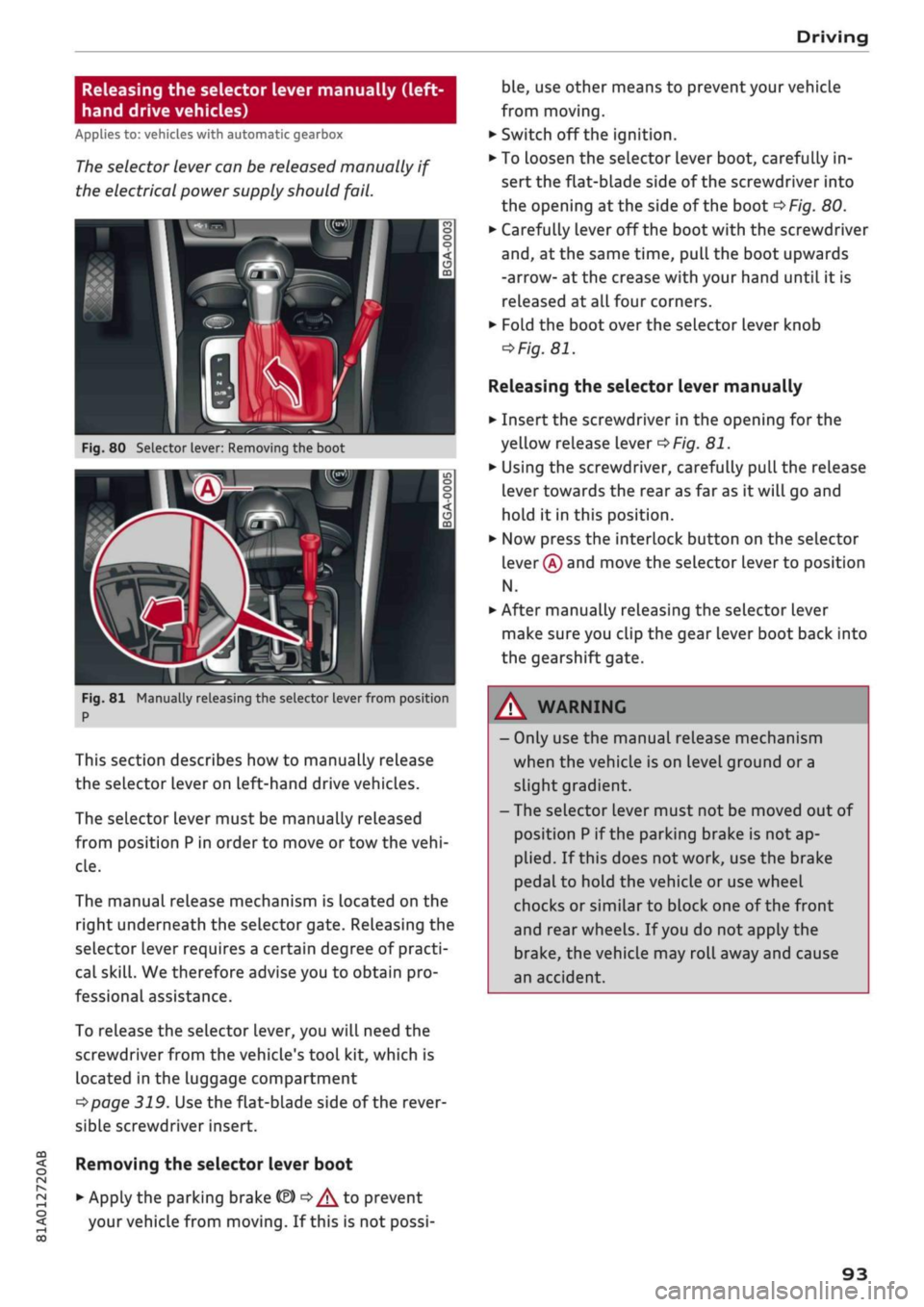
Fig.
80 Selector lever: Removing the boot
Fig.
81 Manually releasing the selector lever from position
P
This section describes how to manually release
the selector Lever on Left-hand drive vehicles.
The selector lever must be manually released
from position
P
in order to move or tow the
vehi
cle.
The manual release mechanism is Located on the
right underneath the selector gate. Releasing the
selector lever requires a certain degree of practi
cal
skill.
We therefore advise you to obtain pro
fessional assistance.
To release the selector lever, you
wilL
need the
screwdriver from the vehicle's tool kit, which is
located in the luggage compartment
^>page
319. Use the flat-blade side of the rever
sible screwdriver insert.
Removing the selector lever boot
• Apply the parking brake
& ^/^
to prevent
your vehicle from moving. If this is not possi
ble,
use other means to prevent your vehicle
from moving.
•
Switch off the ignition.
• To loosen the selector lever boot, carefully in
sert the flat-blade side of the screwdriver into
the opening
at
the side of the boot
^>Fig.
80.
•
Carefully lever off the boot with the screwdriver
and,
at the same time, pull the boot upwards
-arrow- at the crease with your hand until it is
released at all four corners.
•
Fold the boot over the selector lever knob
=>
Fig.
81.
Releasing the selector lever manually
•
Insert the screwdriver in the opening for the
yellow release lever
^>Fig.
81.
•
Using the screwdriver, carefully pull the release
lever towards the rear as far as it will go and
hold it in this position.
•
Now press the interlock button on the selector
lever
®
and move the selector lever to position
N.
•
After manually releasing the selector lever
make sure you clip the gear lever boot back into
the gearshift gate.
A WARNING
- Only use the manual release mechanism
when the vehicle is on level ground or a
slight gradient.
- The selector lever must not be moved out of
position
P
if the parking brake is not ap
plied.
If this does not work, use the brake
pedal to hold the vehicle or use wheel
chocks or similar to block one of the front
and rear wheels. If
you
do not apply the
brake,
the vehicle may roll away and cause
an accident.
93
Page 96 of 364
Driving
Releasing the selector lever manually
(right-hand drive vehicles)
Applies to: vehicles with automatic gearbox
The
selector lever can be released manually if
the electrical power supply should
fail.
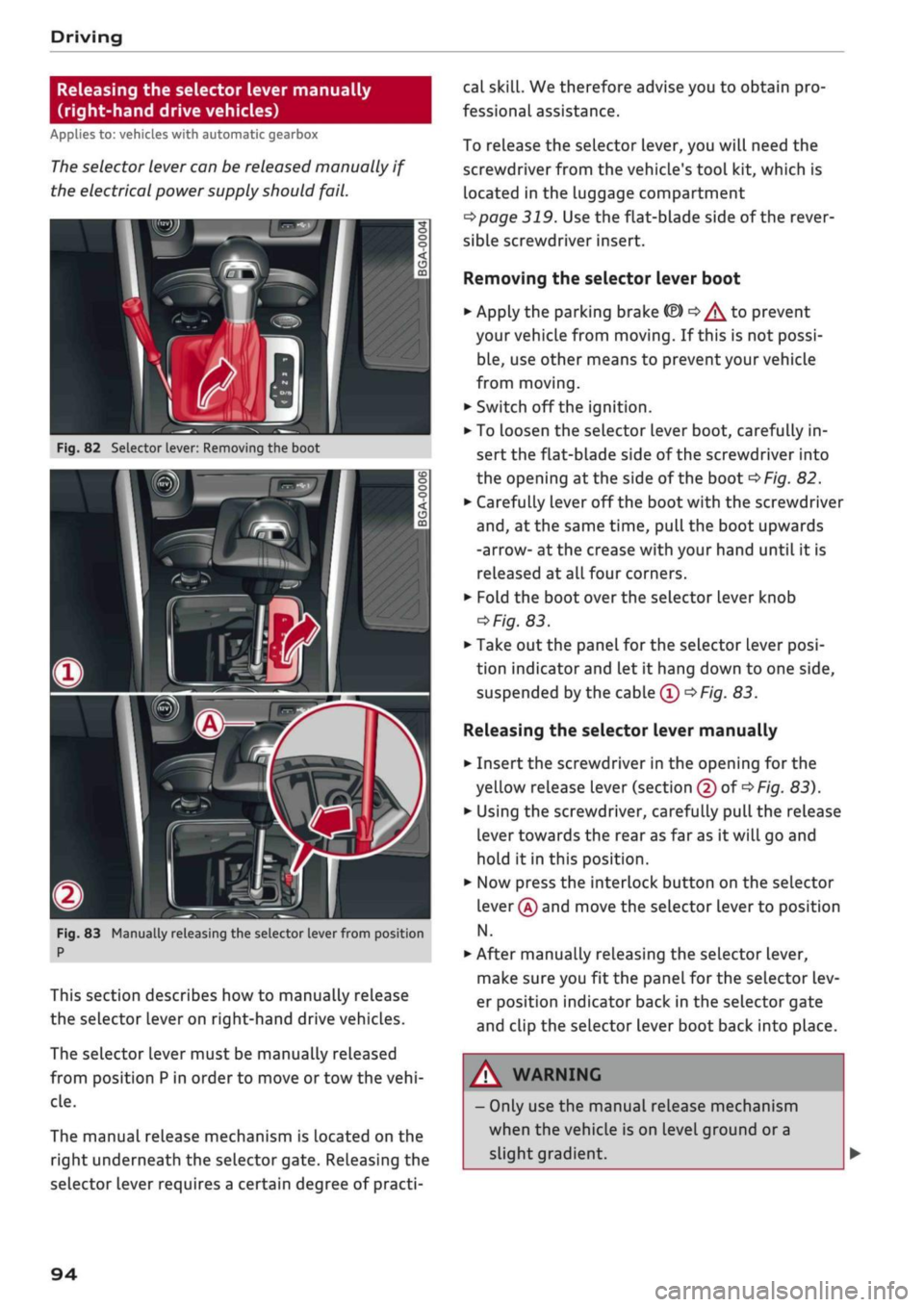
n
Fig.
82 Selector lever: Removing the boot
m
i
Fig.
83 Manually releasing the selector lever from position
P
This section describes how to manually release
the selector lever on right-hand drive vehicles.
The selector lever must be manually released
from position
P
in order to move or tow the
vehi
cle.
The manual release mechanism is located on the
right underneath the selector gate. Releasing the
selector lever requires a certain degree of practi
cal
skill.
We therefore advise you to obtain pro
fessional assistance.
To release the selector lever, you will need the
screwdriver from the vehicle's tool kit, which is
located in the luggage compartment
^>page
319. Use the flat-blade side of the rever
sible screwdriver insert.
Removing the selector lever boot
•
Apply the parking brake fâ)
o^
to prevent
your vehicLe from moving. If this is not possi
ble,
use other means to prevent your vehicle
from moving.
•
Switch off the ignition.
• To Loosen the selector lever boot, carefully in
sert the flat-blade side of the screwdriver into
the opening
at
the side of the boot
^>Fig.
82.
*•
Carefully lever off the
boot
with the screwdriver
and,
at the same time, pull the boot upwards
-arrow- at the crease with your hand until it is
released at
alL
four corners.
•
Fold the boot over the selector lever knob
^Fig.
83.
•
Take out the panel for the selector Lever
posi
tion indicator and Let it hang down to one side,
suspended by the cable
0 •=>
Fig.
83.
Releasing the selector lever manually
•
Insert the screwdriver in the opening for the
yellow release lever (section
@
of
<$
Fig.
83).
•
Using the screwdriver, carefully pull the release
lever towards the rear as far as it will go and
hold it in this position.
•
Now press the interlock button on the selector
lever
@
and move the selector Lever to position
N.
•
After manually releasing the selector lever,
make sure you fit the panel for the selector lev
er position indicator back in the selector gate
and clip the selector lever boot back into place.
A WARNING
- Only use the manual release mechanism
when the vehicle is on level ground or a
slight gradient.
94
Page 98 of 364
Towing a trailer
Towing a trailer
Driving the vehicle with a
trailer or caravan
Technical requirements
The
towing bracket must comply with certain
technical requirements.
Your car is intended mainly for transporting pas
sengers and luggage. However, if suitably equip
ped,
it can also be used to tow a trailer or cara
van.
If the car is supplied with a factory-fitted towing
bracket it will already have the necessary techni
cal modifications and meet the statutory require
ments.
A 13-pin socket is provided to make the electrical
connection between the car and the trailer. If the
trailer you wish to tow has a 7-pin plug, the nec
essary adapter cable can be obtained from a spe
cialist retailer.
If
a
towing bracket is to be fitted after the car is
purchased,
this must be done according to the in
structions of the towing bracket manufacturer
^page
102.
A WARNING
If
a
towing bracket is retrofitted, the installa
tion should be carried out by
a
qualified work
shop.
- In particular in high outside temperatures it
is not possible to drive up long steep gradi
ents without
a
suitable cooling system. The
engine would then overheat.
- Incorrect installation can result in a safety
risk.
Points to check before towing
There are a number of points which need to be
checked before towing a trailer or caravan.
*•
Observe the maximum permitted trailer
weights
^>page
342.
Trailer weights
Never exceed the maximum permitted trailer
weights.
If
you
do not load the trailer up to the maximum
permitted trailer weight, you can then climb cor
respondingly steeper gradients.
The maximum trailer weights listed are only ap
plicable for altitudes up to 1000 m above sea
level.
With increasing altitude the engine power
and therefore the car's climbing ability are im
paired because of the reduced air density, so the
maximum trailer weight has to be reduced ac
cordingly. The weight of the car and trailer must
be reduced by about 10% for every further
1000 m (or part thereof). This figure refers to
the combined weight of the (loaded) vehicle and
(Loaded) trailer.
The figures for the draw bar weight that appear
on the identification plate of the towing bracket
are for certification purposes only. The correct
figures for your specific model, which may be
lower than these figures for the towing bracket,
are given in the registration documents and in
•=>
page 343.
Drive select*
Please note that the
efficiency*
mode is not
available in towing mode.
Exterior lights
Before starting
a
journey, make sure that all the
lights for the trailer are working properly.
Distributing the load
Distribute loads in the trailer so that heavy ob
jects are as near to the axle as possible. Loads
carried in the trailer must be secured to prevent
them slipping. A badly distributed load can also
affect handling. This can activate the trailer sta
bilisation feature and cause the vehicle to reduce
speed.
Where possible, operate the trailer with the max
imum permitted draw bar weight on the ball
joint of the towing bracket, but do not exceed the
specified limit. •
96
Page 99 of 364
Towing a trailer
Tyre pressure
Check the tyre pressures on your car, and adjust
for "full
load"
conditions (refer to the sticker list
ing the tyre pressures)
^>page
307. It may also
be necessary to adjust the tyre pressures on the
trailer according to the recommendations of the
trailer manufacturer.
Exterior mirrors
Check whether you can see enough of the road
behind the trailer with the standard mirrors. If
this is not the case you should have additional
mirrors fitted. Both exterior mirrors should be
mounted on hinged extension brackets. Adjust
the mirrors to give sufficient vision to the rear.
Headlights
Before starting
a
journey, check the headlight
beam settings with the trailer hitched up. Adjust
the headlight settings if necessary.
On vehicles with halogen headlights, the
head
light range control must be adjusted, see
tapage
49.
The headlight range control will be adjusted au
tomatically if your vehicle is equipped with LED
headlights*.
Power supply
To ensure that the engine can be started again
after the ignition is switched off, the power
man
agement system
^>page
149 controls the distri
bution of electrical power and gradually switches
off unnecessary electrical equipment. The trailer
is supplied with power during this period. The
power supply to the trailer is interrupted while
the engine is being started.
Removable ball joint coupling
Vehicles with a factory-fitted towing bracket are
equipped with a removable
ball
joint coupling.
This is stored in the spare wheel well or in a sepa
rate bag on the floor of the luggage compart
ment, together with the necessary fitting instruc
tions.
We recommend having the car serviced be
tween the normal inspection intervals if it
used frequently for towing a trailer.
Trailer stabilisation system
Applies to: vehicles with towing bracket
Trailer stabilisation helps to reduce the risk of
the vehicle skidding when towing a
trailer.
When is the trailer stabilisation
system1'
activated?
Trailer stabilisation is active when the following
requirements are met:
- The ESC must be switched on
^>page
146 and
fully functional (no ESC malfunction).
- The trailer connector must be properly secured
in the vehicle socket.
- The vehicle speed must be higher than approx.
60 km/h.
How trailer stabilisation works
In many cases, the driver can stabilise a swaying
trailer by manually braking the vehicle.
However, if the ESC detects that the trailer is
swaying and this is affecting the towing vehicle,
it will automatically brake the vehicle in order to
stabilise the trailer. The indicator
Lamp Hi
will
flash in the instrument cluster. If possible, do
not turn the steering wheel at this stage.
In order to warn traffic behind you, the brake
lights will come on during this automatic braking
operation.
A trailer may sway quite considerably without the
trailer stabilisation system intervening.
If the system for activating the trailer brake
lights is defective, this will be indicated in the in
strument cluster display
opage
35,
:&
Bulb
monitor.
•
CO
rN
rN
t-H
o <
x)
Not available on vehicles for some markets.
97
Page 100 of 364
Towing a trailer
Requirements for correct functioning of the
trailer stabilisation system
If these conditions are not met in
full,
the trailer
stabilisation system will only intervene to a
limi
ted extent or not at all
>=>
A-
- The electrical connection between the towing
vehicle and the trailer must be functioning cor
rectly.
- The load on the trailer must be properly se
cured.
- The tyre pressures on both the vehicLe and the
trailer must be adapted to the load that is be
ing carried.
- Where possible, operate the trailer with the
maximum permitted draw bar weight.
- The trailer overrun brake must be set correctly.
This is important to ensure that the trailer can
be braked correctly, to avoid the vehicle and
trailer "jack-knifing" and to prevent excess
braking of the trailer.
- At low outside temperatures, both the towing
vehicle and the trailer should be fitted with
winter tyres.
A WARNING
It is essential that you adjust your speed to
suit the weather, road and traffic conditions.
Do not let the trailer stabilisation system
tempt you into taking any risks when driving -
this can cause accidents.
- The ESC and trailer stabilisation system
can
not defy the Laws of physics. This should be
kept in mind, particularly on slippery and
wet roads and when towing a trailer with a
light Load.
- The trailer stabilisation system is function
al,
regardless of whether the trailer has a
mechanical overrun brake or not.
- The trailer stabilisation system is not always
able to detect swaying of trailers with a
light load and will therefore not intervene.
- A trailer can still "jack-knife" on slippery
roads with little grip, even if the towing ve
hicle is equipped with the trailer stabilisa
tion system.
-Trailers with a high centre of gravity may
even tip over before they start to sway
side
ways.
-If
you
are not towing a trailer,
but
the
trail
er socket is being used (e.g. for an illumina
ted bicycle rack), the trailer stabilisation
system may be activated in extreme driving
conditions.
- Please note the additional information and
warnings
^>page
98, Driving tips.
Driving tips
Driving with a trailer always requires extra care.
Weight distribution
Try to avoid towing a loaded trailer with an unla
den vehicle. If this cannot be avoided, drive extra
slowly to allow for the unbalanced weight distri
bution.
Speed
Normally, you must not exceed 80 km/h when
towing a trailer or caravan. However, if the
trail
er/caravan is equipped with a trailer stabilisation
system,
you can drive at max. 100 km/h. Please
observe any other regulations applicable in the
country in which you are travelling.
The stability of the car and trailer is reduced with
increasing speed. For this reason it is advisable
not to drive at the maximum permissible top
speed in unfavourable
road,
weather or wind
con
ditions. This applies especially on a downhill gra
dient.
You should always reduce speed immediately if
the trailer shows the slightest sign of swaying.
Never try to stop the swaying by accelerating fur
ther.
Always brake in good time. If the trailer has an
overrun brake, apply the brakes gently at first
and then firmly. This will prevent the jerking that
can be caused by the trailer wheels locking.
Change down in good time before going down a
steep hill so
that
you can use the engine braking
effect to slow down the vehicLe.
Swaying and pitching can be reduced by attach
ing an extra stabiliser to the trailer. It should •
98
Page 106 of 364

Driver assist systems
Driver assist systems Cruise
control,
system
Speed warning function
Applies to: vehicles with speed warning function
The speed warning function can
help
you keep
below a pre-set maximum speed. It can be set,
changed and deleted on the infotainment sys
tem.
The speed warning function will warn you if the
vehicle exceeds the pre-set maximum speed. The
system gives an audible warning signal if the set
speed is exceeded by a small amount. At the
same time, a warning lamp [5] and a message
will appear on the instrument cluster display.
The indicator Lamp [5] and the message will dis
appear when the road speed drops below the set
value.
You are recommended to store this speed limit
warning if you wish to be reminded of a particu
lar speed limit. This could be when driving in
countries with general speed limits, or if you
need to keep below a particular speed when
win
ter tyres are fitted, etc.
Setting speed limit warning
•
Select the following on the infotainment sys
tem:
IMENUI
button > Car > left control button
> Driver assist > Speed warning > manual.
© Note
- Please bear in mind that, even with the
speed warning function, it is still important
to keep a check on the car's speed with the
speedometer and to observe the statutory
speed limits.
- On vehicles for some markets, the speed
warning function warns you when you reach
a speed of 120 km/h. This speed limit warn
ing is preset at the factory.
Switching on
Applies to: vehicles with cruise control system
The cruise control system allows you to drive at a
constant speed of 20 km/h or
higher.
Fig.
94 Control lever for cruise control system
• Pull
the lever to position
®
<^>Fig.
94 to switch
on the system.
•
Drive at the speed you wish to set the system
to.
• Press the button marked ® to store the speed.
The indicator lamp
[3]
in the instrument cluster
will light up. Information is also provided in the
head-up display*.
The instrument cluster display will briefly
indi
cate the stored or
pre-selected
speed.
A constant speed is maintained by adjusting the
engine power or braking the vehicle accordingly.
WARNING
- Always direct your full attention to the
road,
even when you are using the cruise control
system.
It is always the driver who is re
sponsible for determining the speed and for
keeping a safe distance to the other vehicles
on the
road.
- For safety reasons, the cruise control sys
tem must not be used in city traffic, stop-
and-go traffic, on roads with a lot of bends
or in difficult or slippery driving conditions
(such as ice, fog, Loose grit or gravel, heavy
rain,
etc.) - risk of accident!
- When you take a turn-off, drive along a mo
torway exit lane or pass through roadwork
104
Page 107 of 364
Driver assist systems
CO
< o rN
iv
rN
•-i
00
sections, please temporarily switch off the
cruise control system.
- Make sure you do not unintentionally rest
your foot on the accelerator - this will over
ride the cruise control system which, as a re
sult, will not brake the vehicLe.
-The automatic braking function may be de
activated if
a
system fault occurs in the
brake system (e.g. if the brakes overheat)
while the cruise control system is activated.
All the other cruise control functions remain
activated as long as the indicator lamp
^
is
lit.
Before driving down a
long,
steep gradient, it
is advisable to reduce speed and select a low
er gear. In this way you will make use of the
engine braking effect and relieve the Load on
the brakes.
© Note
- Applies to vehicles with manual gearbox:
The set speed cannot be reached if the cur
rently selected gear is too high or too low or
if the engine would
overrevorfailto
run
smoothly at the target speed. Make sure to
change up or down a gear in good time.
- The brake lights come on when the system
brakes the vehicle.
Setting a new speed
Applies to: vehicles with cruise control system
• Briefly push the Lever towards
©/®
^>page
104, Fig. 94 to increase or reduce the
cruising speed in small steps.
•
To increase or reduce the speed quickly, hold
the lever towards
©/®
until you reach the de
sired cruising speed.
Overriding the set speed
Applies to: vehicles with cruise control system
You can use the accelerator pedal to increase
speed in the normal way, for example to overtake
another vehicle. Once you release the accelera
tor, the system will revert to the speed you stor
ed initially.
However, if the vehicLe exceeds the programmed
speed significantly for
a
long time, the cruise
control system will be deactivated temporarily.
The indicator lamp
El
in the instrument cluster
will go out, but the programmed speed will re
main stored.
Pre-selecting
a speed
Applies to: vehicles with cruise control system
You
can preselect a desired speed while the ve
hicle is stationary.
•
Switch on the ignition.
•
Pull the lever to position
® ^>page
104,
Fig. 94.
• Press the lever up towards © or down towards
0
in order to increase or reduce the cruising
speed setting.
This function allows you to enter the desired
cruise control setting speed ahead of
time,
for
example before joining a motorway.
Once
you are
on the motorway, you can activate the cruise
con
trol system by pulling the lever to position ®.
Switching off
Applies to: vehicles with cruise control system
Switching off temporarily
•
Press the brake pedal, or
•
Push the lever to position @ (click stop not en
gaged)
^>page
104, Fig. 94, or
Switching off completely
*•
Push the lever to position
©
(click stop engag
ed),
or
•
Switch off the ignition.
The speed setting will remain stored after the
system is temporarily deactivated. To resume the
programmed cruising speed, release the brake
pedal and pull the lever to position ®.
The stored speed will be deleted once the
igni
tion is switched off. •
105
Page 108 of 364
Driver assist systems
Automatic deactivation
Cruise control system: currently unavailable.
See owner's manual
The cruise control system has been automatically
deactivated because the system has detected a
fault which could impair its function. Try switch
ing the cruise control system on again later.
A WARNING
Do not resume the programmed cruising
speed if this is too high
for
the traffic condi
tions - this can cause accidents.
Speed Limiter
Description
Applies to: vehicles with speed limiter
®
LIM
•
km/h
|
Fig.
95 Speed limiter:
©
LIM
100
km/h
illustration
BFV-0268
LIM
100
km/h
At speeds above approximately 30 km/h, the
speed limiter helps prevent the driver from ex
ceeding a set cut-off
speed.
The indicator lamp
Q
Lights up as soon as you switch on the speed
limiter. Information is also provided in the head-
up display*.
Speed limiter displays
© - The speed limiter is in passive mode, but a
cut-off speed has
not
yet been set.
®
- The speed limiter is in passive mode, and a
set cut-off speed has been stored.
® - The speed limiter is activated. The indicator
lamp
BH
flashes briefly when the speed limiter is
applied.
A WARNING
- Always direct your full attention to the
road,
even when you are using the speed limiter.
It is always the driver who is responsible for
determining the speed and for keeping a
safe distance to the other vehicles on the
road.
- For safety reasons, the speed limiter must
not be used in adverse weather or difficult
driving conditions (such as ice, fog, loose
grit or gravel, heavy
rain,
etc.) - risk of
acci
dent!
- Only accelerate quickly or use the kick-down
feature when the visibility and weather
con
ditions are suitable, and when the road and
traffic conditions allow you do do so safely.
Before driving down a
long,
steep gradient, it
is advisable to reduce speed and select a low
er gear. In this way you will make use of the
engine braking effect and relieve the Load on
the brakes.
Switching on
Applies to: vehicles with speed limiter
Fig.
96 Control lever for cruise control system (example)
•
Pull the lever to position © to switch the sys
tem on.
•
Applies to vehicles with cruise control system
or Audi adaptive cruise control: To switch to the
speed limiter, press the button
®1)
until the
driver message
QQ
Speed limiter: selected ap
pears in the instrument cluster. •
l)
On some equipment versions, the speed limiter is not
available and button
(B)
has no function.
106