Light AUDI Q2 2021 Owner´s Manual
[x] Cancel search | Manufacturer: AUDI, Model Year: 2021, Model line: Q2, Model: AUDI Q2 2021Pages: 364, PDF Size: 87.77 MB
Page 109 of 364
Driver assist systems
CO
<
O
rN
iv
rN
t-H
o < 00
•
Press button ® to store the cut-off speed while
the car is moving.
The instrument cluster display will indicate the
stored cut-off
speed,
and the indicator lamp
Q
will light up.
Applies to: vehicles with cruise control system or Audi adap
tive cruise control
While the speed Limiter is switched on, you can
switch to the cruise control
^>page
104 or adap
tive cruise control
^>page 111
systems. Press
button
®1)
until the corresponding system is
displayed in the instrument cluster.
The last cut-off speed set for the speed limiter
remains stored and can be applied again when
you switch back into speed limiter mode.
Changing the cut-off speed
Applies to: vehicles with speed limiter
•
Briefly push the Lever towards ©/©
^>page
106, Fig. 96 to increase or reduce the
cut-off speed in small steps.
•
To increase or reduce the cut-off speed in
big
ger steps, hold the lever towards ©/© until
you reach the desired cruising speed.
Overriding the cut-off speed
Applies to: vehicles with speed limiter
To override the speed limiter temporarily, press
the accelerator fully past the point of resistance
(kick-down feature).
Speed limiting is suspended temporarily. The in
dicator lamp
QB
flashes while the system is deac
tivated;
the cut-off speed setting will remain
stored.
The system is reactivated automatically
as soon as your speed drops below the original
stored setting.
Switching off
Applies to: vehicles with speed limiter
Switching off temporarily
•
Push the lever towards © (click stop not en
gaged)
^>page
106, Fig. 96. The instrument
cluster display will indicate the stored cut-off
speed,
and the indicator
lamp^will
light up.
Switching off completely
•
Push the lever to position © (click stop engag
ed),
or
•
Switch off the ignition.
The cut-off speed setting will remain stored after
the system is temporarily deactivated. To resume
the programmed cut-off
speed,
pull
the lever to
position ©. The vehicle speed is limited to the
stored cut-off setting as soon as your current
driving speed drops below the stored cut-off
speed.
The stored cut-off speed will be deleted once the
ignition is switched off.
Automatic deactivation
QQ
Speed limiter: currently unavailable. See
owner's manual
The speed Limiter has been automatically deacti
vated because the system has detected a fault
which could impair its function. Try switching on
the speed limiter again Later.
A WARNING
The speed limiter may be deactivated if a
fault occurs in the brake system (e.g. if the
brakes overheat) while the speed limiter is ac
tivated.
©
Not
If
a
system fault requires the speed limiter to
switch off automatically, for safety reasons it
does not switch off completely until the driver
releases the accelerator pedal once or deacti
vates the system manually.
l)
On some equipment versions, the speed limiter is not
available and button
(S)
has no function.
107
Page 110 of 364
Driver assist systems
Camera-based traffic
sign recognition
Description
Applies to: vehicles with camera-based traffic sign recogni
tion
Fig.
97 Instrument cluster: Traffic sign recognition
Fig.
98 Windscreen: Camera window for traffic sign recog
nition
Traffic signs detected by the system appear in
the instrument cluster display to keep you in
formed of current speed restrictions and no-over
taking zones
^>Fig.
97. Within certain system
limits,
it will display these additional traffic re
strictions:
£5
///
s
G
^-if?
Speed limits in wet weather
Speed limits in foggy conditions (only dis
played when the all-weather lights or rear
fog light are switched on)
Speed limits at certain times of day
Speed limits when towing a trailer
General notes
The traffic sign recognition system can detect
standardised speed Limit signs within the cam
era's range of
vision.
It makes use of the naviga
tion data to evaluate the detected speed limits
and show them on the display. Under certain
con
ditions, the system will also display the legal
speed limits on roads without speed Limit signs.
The traffic sign for the currently detected speed
limit will flash on the display if
a
speed warning
threshold,
which has been set on the infotain
ment system, is exceeded
^page
109.
Traffic sign recognition is not available in all
countries. For
a
current list, see the Internet (e.g.
www.audi.com). The system is also subject to
certain inherent restrictions and may be partially
or completely unavailable in the following situa
tions:
- If visibility is impaired by snow,
rain,
fog or
heavy road spray.
- In dazzling light, e.g. from the sun or oncom
ing traffic.
-At high speeds.
- If the camera's range of vision
^>Fig.
98 is im
paired,
e.g. by dirt or stickers. Notes on clean
ing
•=>
page 312.
- If the traffic signs are partially or completely
obscured,
e.g. by trees, snow, mud or other
vehicles.
- If traffic signs deviate from the standard ap
pearance (round with red border).
- If traffic signs are damaged or bent.
- If matrix traffic signs are mounted on overhead
gantries.
- If traffic signs or routes have changed (naviga
tion data out of date).
- If the system detects a speed sticker on a slow-
moving vehicle (such as a heavy goods vehicle).
WARNING
Always direct your full attention to the road
and surroundings, even when you are using
traffic sign recognition. The actual traffic
signs on your route always take precedence
over
the information on the display. It is al
ways the driver's responsibility to assess the
traffic situation and take appropriate care.
- Under adverse conditions, the traffic sign
recognition system may misinterpret or fail
to detect traffic signs. It is therefore possi
ble that the speed limit display may occa
sionally be unavailable or even incorrect.
108
Page 111 of 364
Driver assist systems
CO
<
O
rN rN
t-H
o <
- The traffic sign detection system does not
adjust the speed of your vehicle to the speed
limits.
The speed limit displayed in the instrument
cluster is given in the units applicable in a
particular country.
Controls
Applies to: vehicles with camera-based traffic sign recogni
tion
-22.0-C
Fig.
99 Instrument cluster: Secondary display
Calling up the traffic sign recognition
•
Call up the first tab (on-board computer) using
the
GL>]
button on the multi-function steering
wheel.
•
Applies to vehicles with analogue instrument
cluster: Press the
LU]
button and select Traffic
signs from the menu.
•
Applies to vehicles with Audi virtual cockpit: Se
lect the display for Traffic signs.
Displaying signs for trailers
You can also display speed limits which apply
specifically to vehicles towing a trailer1).
•
Select the following on the infotainment sys
tem:
|MENU|
button > Car
>
left control button
Driver assist
>
Traffic signs
>
Automatic trailer
recognition.
Setting the maximum speed for a trailer
You can set the maximum speed permitted for
your
type of
trailer15.
If
you
do not enter
a
value,
x)
Applies to factory-fitted towing brackets only
the system will show the maximum national
speed limit for vehicles towing a trailer.
•
Select the following on the infotainment sys
tem:
|MENU|
button Car
>
left control button
Driver assist
>
Traffic signs
>
Trailer: highest
speed.
Setting speed warning
You can set a warning threshold up to
15
km/h.
The traffic sign for the currently detected speed
limit will flash on the display if the selected
warning threshold is exceeded.
•
Select the following on the infotainment sys
tem:
IMENU|
button > Car
>
left control button
> Driver assist
>
Speed warning
>
Traffic sign
based.
Secondary display
If the instrument cluster is currently showing a
function other than traffic sign recognition, the
speed limit will be displayed in the top right-
hand corner
^Fig.
99. If the system is able to de
tect
a
temporary speed restriction in a given sit
uation,
it will update the display accordingly.
Temporary speed restrictions are displayed in the
following situations:
- A temporary speed restriction for wet weather
is detected while the windscreen wipers are op
erating.
- A speed restriction for fog is detected while the
vehicle's rear fog light or all-weather lights are
switched on.
- A speed restriction applying at certain times of
day has been detected and corresponds to the
time displayed in the instrument cluster.
- The vehicle is towing a trailer and the Automat
ic trailer recognition option is activated on the
infotainment system. In this case, restrictions
applying to trailers are
displayed15.
© Note
- Your speed warning settings and the maxi
mum trailer speed will be automatically
stored and assigned to the remote control
109
Page 113 of 364
Driver assist systems
CO
< o rN
iv
rN
•-i
00
- In certain situations, the system may misin
terpret driving manoeuvres and inappropri
ately recommend a break.
- No acute warning is given if the driver falls
into a microsleep.
Instrument cluster display
Applies to: vehicles with rest recommendation
H
Rest recommended
If the warning lamp lights up and the message
appears, the evaluation of the steering input has
resulted in a rest recommendation. This is also
indicated by a warning tone. Take a break as soon
as possible.
The message may be displayed again once if nec
essary.
Switching on/off
Applies to: vehicles with rest recommendation
Select the following on the infotainment system:
|MENU|
button > Car > left control button > Driv
er assist > Rest recommendation.
© Note
If you switch off the system,
it
will remain
switched off the next time you switch on the
ignition.
Audi adaptive cruise
control
Description
Applies to: vehicles with Audi adaptive cruise control
»
Fig.
100 Sensor range
The adaptive cruise control is a combined speed
and distance control system. It assists the driver
by controlling the road speed and the distance to
the vehicle in front within certain limits imposed
by the system. The adaptive cruise control sys
tem can accelerate and brake when it detects a
vehicle in front. This provides maximum comfort
both on long motorway journeys and in conges
ted traffic (automatic gearbox*).
What can the adaptive cruise control do?
The adaptive cruise control uses a radar. The ra
dar is subject to certain system limitations
opage
112.
When there is no traffic in front, the adaptive
cruise control works just like a normal cruise
con
trol system by maintaining a constant speed.
When you draw closer to a vehicLe in front which
is detected by the system, the adaptive cruise
control matches your speed to that vehicle by au
tomatically applying the brakes, and then main
tains a constant distance (which you can adjust in
the settings). As soon as it detects no more
vehicles in front, the adaptive cruise control ac
celerates back up to the cruising speed.
Applies to: vehicles with automatic gearbox
In congested traffic, the adaptive cruise control
can brake down to a standstill and accelerate
again (subject to general system limitations) un
der certain conditions
*$page
115, Driving in
congested traffic. The traffic jam assist (active
lane assist)* can assist the driver in traffic jams
and heavy congestion
<=>page
117.
Which functions can the driver control?
When you switch on the adaptive cruise control,
you can set your current speed as the "cruising
speed"
^>page
113, Switching
on/off.
While you are driving, you can interrupt the
cruise control
opage
115 or change the speed
setting
Opage
114 at any time.
In addition, you can adjust the distance to
vehicles in front and the driving program for the
adaptive cruise control
^>page
116.
Ill
Page 117 of 364
Driver assist systems
CO
<
O
rN rN
t-H
o <
•
To increase or reduce the speed quickly, hold
the lever towards
©/©
until the
LED ©
opage
113, Fig. 105 reaches the de
sired cruising speed.
You can preselect the speed, even when the
adaptive cruise control is inactive, by moving the
lever in the appropriate direction ©/©. To
acti
vate the preselected speed, pull the lever to
posi
tion ©
^>page
113, Fig. 104.
Following any changes, the new stored speed will
be displayed briefly in the status line
opage
113, Fig. 105 ©. The indicator lamp
E53
KOI
is also lit when the adaptive cruise control is
active,
and the indicator Lamp
B3 iS Lit
when the
adaptive cruise control is inactive. The indicator
lamp El
will Light up instead in the Audi virtual
cockpit*.
Driving in congested traffic
Applies to: vehicles with Audi adaptive cruise control and au
tomatic gearbox
The adaptive cruise control assists you when driv
ing in congested traffic. If
a
vehicLe which has
been detected in front stops, the adaptive cruise
control applies the brakes (within the limits im
posed by the system) and holds the vehicle at a
standstill.
•
To set the vehicle in motion again with the
adaptive cruise control, tap the accelerator
with
your foot, or
•
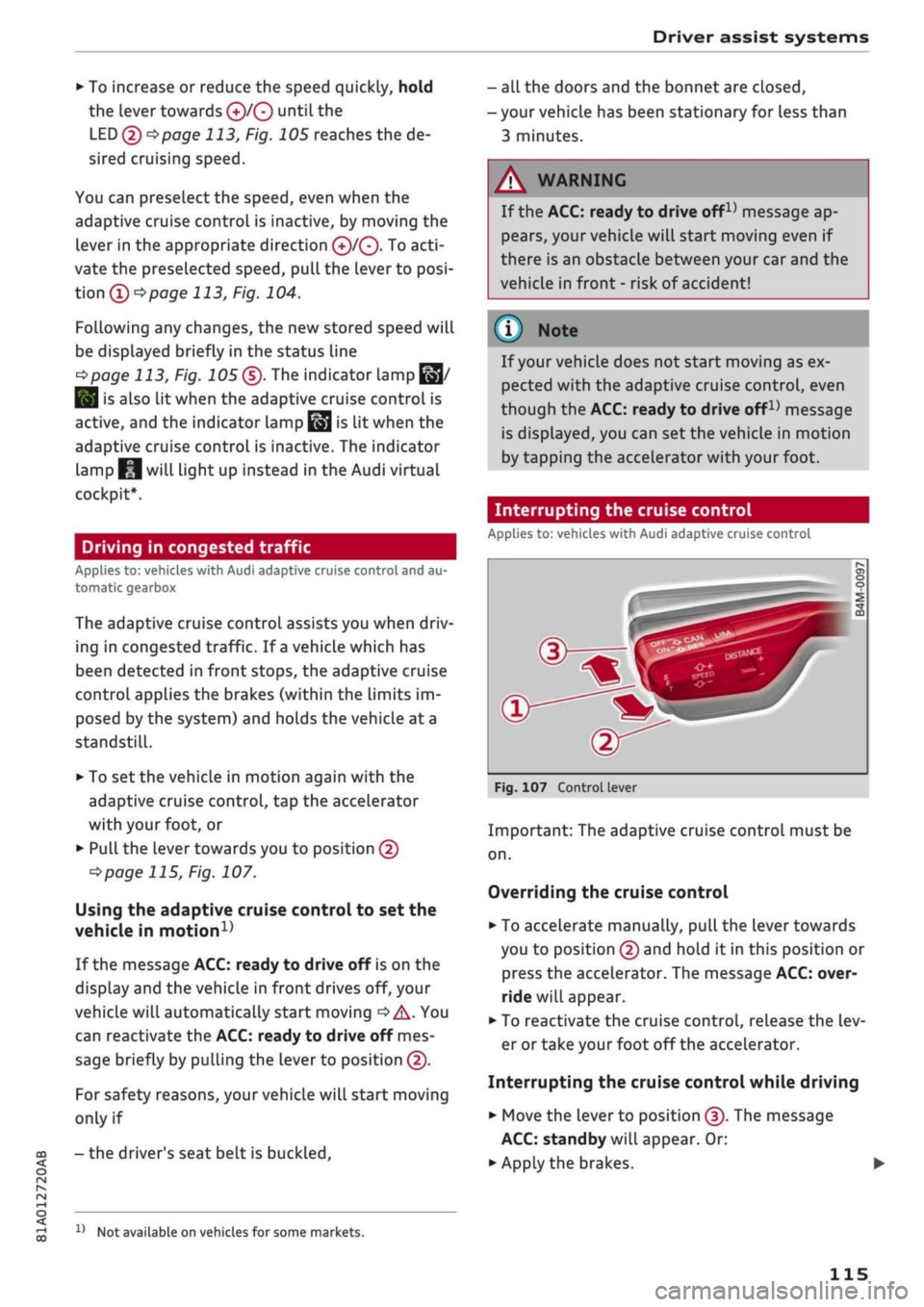
Pull the lever towards you to position ©
•=>
page 115, Fig. 107.
Using the adaptive cruise control to set the
vehicle in
motion1'
If the message ACC: ready to drive off is on the
display and the vehicle in front drives off, your
vehicle will automatically start moving
•=>
A. You
can reactivate the ACC: ready to drive off mes
sage briefly by pulling the lever to position ©.
For safety reasons, your vehicle will start moving
only if
- the driver's seat belt is
buckled.
x)
Not available on vehicles for some markets.
- all the doors and the bonnet are closed,
- your vehicle has been stationary for Less than
3 minutes.
A
WARNING
If the ACC: ready to drive
offx)
message ap
pears,
your vehicle will start moving even if
there is an obstacle between your car and the
vehicle in front - risk of accident!
© Note
If your vehicle does not start moving as ex
pected with the adaptive cruise control, even
though the ACC: ready to drive
off1)
message
is displayed, you can set the vehicle in motion
by tapping the accelerator with your foot.
Interrupting the cruise control
Applies to: vehicles with Audi adaptive cruise control
Fig.
107 Control lever
Important: The adaptive cruise control must be
on.
Overriding the cruise control
•
To accelerate manually, pull the lever towards
you to position © and hold it in this position or
press the accelerator. The message ACC: over
ride will appear.
• To reactivate the cruise control, release the Lev
er or take your foot off the accelerator.
Interrupting the cruise control while driving
•
Move the lever to position ©. The message
ACC:
standby will appear. Or:
• Apply the brakes.
115
Page 121 of 364
Driver assist systems
© Note
The distance may be below the warning
threshold for a short time when overtaking or
approaching a slower vehicle quickly from be
hind.
In this case, no warning will be given. A
warning is only given if the distance is consis
tently below the threshold.
Driver messages
Applies to: vehicles with Audi adaptive cruise control
El
ACC:
not available
The system cannot detect vehicles reliably and
will be deactivated. The sensor is out of align
ment or defective. Drive to a qualified workshop
and have the fault rectified.
EH
ACC:
currently unavailable. No sensor vision
Eo3
ACC:
currently unavailable. Sensor view re
stricted due to surroundings. See owner's
man
ual
These messages appear if the radar sensor vision
is impaired, e.g. by leaves, snow, heavy road
spray or dirt. Clean the sensor
^>page
112,
Fig. 101.
E3
ACC:
currently unavailable. Speed too low
Manual gearbox: This message appears if the cur
rent speed is too low for
ACC
mode. You cannot
store speed settings below 30 km/h. The cruise
control system switches off if the speed falls
be
low 20 km/h.
Esi
ACC:
available from 2nd gear up
Manual gearbox: The adaptive cruise control only
operates in 2nd gear or higher.
B
ACC:
currently unavailable. Gradient too
steep
The maximum possible road gradient for safe op
eration of the adaptive cruise control has been
exceeded.
The adaptive cruise control cannot be
switched on.
ffl
Ea3
ACC:
only
available in D, S or M < o
PI
Automatic gearbox: Move the selector lever to
g
position D/S or M. <
00
Eol
ACC:
clutch pedal pressed
Automatic gearbox: Cruise control mode is deac
tivated if the clutch pedal is pressed for
a
rela
tively long period.
Bf
ACC:
engine speed
Manual gearbox: This message appears if the
driver does not change gear in time when the
adaptive cruise control accelerates or brakes the
vehicle and the engine speed is too high or low as
a result. The adaptive cruise control is switched
off.
EJACC:
parking brake applied
The adaptive cruise control system is deactivated
if the parking brake is applied. The adaptive
cruise control will be available again when the
parking brake is released.
Eo3
ACC:
currently unavailable. Stabilisation
control input
This message appears if the electronic stabilisa
tion control (ESC) intervenes. In this case, the
adaptive cruise control will automatically be
switched off.
Eo3 ACC
off: manual control!
This message appears if the vehicLe rolls back
wards when driving away on a slight gradient,
even though the adaptive cruise control is active.
Press the brake pedal to prevent the vehicle from
rolling back or colliding with an object behind.
EM
ACC:
currently unavailable. Park assist ac
tive
The systems are switched off when the park as
sist* is active. The systems will be available again
when the parking manoeuvre is finished.
Distance warning: fault. Please contact work
shop
The system cannot detect vehicles reliably and
will be deactivated. The radar sensor is out of
alignment or defective. Drive to a qualified work
shop and have the fault rectified.
Distance warning: currently unavailable. Sensor
view restricted due to surroundings •
119
Page 122 of 364
Driver assist systems
This message appears if the radar sensor vision is
impaired,
e.g. by leaves, snow, heavy road spray
or dirt. Clean the sensor
<^>page
112, Fig. 101.
Distance warning: currently unavailable. See
owner's manual
This driver message will appear if the system
fails temporarily. If the fault occurs repeatedly,
drive to a qualified workshop and have the fauLt
rectified.
Fasten seat belt
The system is not fully available when the driver's
seat belt is unfastened.
Stationary object ahead
This message appears if
you
try to switch on the
system when a stationary object is located imme
diately in front of your car.
Door open
The system is not available when the vehicle is
stationary and the driver's door is open.
Audi pre sense
Introduction
Applies to: vehicles with Audi pre sense
The pre sense functions can take action to pro
tect the vehicle occupants and other road users in
certain hazardous conditions within the system
limits.
- Because the different on-board systems are
networked,
pre sense basic can detect critical
situations and take preventive action to protect
the occupants.
- The pre sense front uses the data of the radar
sensor to calculate the probability of an
acci
dent
opage
112. It can detect an impending
collision with vehicles or
pedestrians1^
(subject
to general system limitations). In this case, the
system warns the driver visually, acoustically
and,
if necessary, with a short, sharp brake ap
plication.
If necessary, it can initiate a partial or
fuLl
brake application in order to reduce the im
pact speed or, in certain circumstances, to
avoid a collision. In conjunction with pre sense
basic, the reversible tensioners on the front
seat belts are also applied if necessary. Pre
sense front is active even when the adaptive
cruise control* is switched off.
Please observe the general safety warnings
•=>
A in General notes on page 112.
© Note
- Certain pre sense functions are deactivated
when reversing.
- The functions of the pre sense system may
also be unavailable if
a
fault develops in the
ESC
system or airbag control unit.
- Please note that, if the front passenger's
airbag has been deactivated, the reversible
belt tensioner on the passenger's side will
be deactivated as
well.
- Switch off pre sense on private roads and
while the vehicle is being loaded onto a car
transporter, train or ferry, etc. This prevents
the pre sense system from taking action in
an inappropriate situation.
Audi pre sense basic
Description
Applies to: vehicles with Audi pre sense basic
The pre sense basic functions are activated at
speeds above approximately 30 km/h.
The system can activate the following functions
in certain situations:
- Seat belt tensioning (e.g. during hard braking):
The seat belts on the front seats have reversi
ble tensioners. Provided an accident does not
occur, the belts are loosened again slightly and
kept ready for activation.
- Initiation of the closure process for the
win
dows and panorama sun roof* (e.g. if the
vehi
cLe understeers or oversteers).
Audi drive select*: the activation threshold
dif
fers according to the mode selected.
x)
Not available on vehicles for some markets.
120
Page 124 of 364
Driver assist systems
provided tempt you into taking any risks when
driving - this can cause accidents.
- Please note that pre sense front can give
warnings or apply the brakes unexpectedly.
Always secure your luggage to prevent dam
age and possible injury.
- Due to inherent system limitations, false ac
tivation of the system is possible.
- Please note that the sensor is not always
able to detect all objects which may repre
sent a potential hazard - risk of accident!
- Pre sense front does not react to the follow
ing:
oncoming traffic in the same lane, sta
tionary or stopped persons, pedestrians
crossing the road at an angle, groups of
people, animals, or objects that are hard to
recognise •=>
A in General notes on
page 112.
A WARNING
The pre sense front functions may be restric
ted or unavailable in situations such as the
following:
- If objects such as crash barriers or other
vehicles are reflecting additional light.
- At tunnel entrances.
- In heavy fog,
rain,
road spray or snow.
- If the radar sensor is dirty, frosted, dam
aged or covered.
- When driving through a corner.
-Applies to: front-wheel drive vehicles: If the
ESC system has been partially or fully deac
tivated.
© CAUTION
Impacts or damage to the bumper, wheel
arches or underbody can cause misalignment
of the sensor. This can impair the function of
the pre sense front system. Have the systems
checked by a
quaLified
workshop.
© Note
-The automatic brake application with in
creasing brake force can be cancelled by ap
plying the brakes yourself or by pressing the
accelerator firmly or by taking evasive ac
tion.
- Applies to: front-wheel drive vehicles: Cer
tain pre sense front functions are deactiva
ted when the ESC
offroad
mode is switched
on and when reversing.
- Applies to: front-wheel drive vehicles: The
pre sense is deactivated if you restrict or
switch off the ESC
^>page
146.
Settings on the infotainment system
Applies to: vehicles with Audi pre sense front/Audi adaptive
cruise control
•
Select the following on the infotainment sys
tem:
|MENU|
button > Car > left control button
> Driver assist > Audi pre sense.
System - The pre sense functions can be switched
on/off.
Advance
warning15
- You can switch the advance
warning off or set the warning time for pre sense
front (early/medium/late).
Start by setting the advance warning to early. If
you then find that the system warns you earlier
than desired, you can set the advance warning to
medium.
The advance warning should be set to
late only in exceptional cases, such as during very
dynamic driving.
If a system or the advance warning function is
switched off, it will be automatically activated
again the next time you switch on the
ignition15.
Driver messages
Applies to: vehicles with Audi pre sense
Audi pre sense: fault. Please contact work
shop
This message appears if the functions of the pre
sense system are impaired. An impairment can
occur, for example, if a sensor fails. If the mes
sage remains displayed permanently, drive to a
qualified workshop soon and have the fault
recti
fied.
•
x)
Not available on vehicles for some markets.
122
Page 125 of 364

Driver assist systems
H
Audi pre sense: currently restricted. Sensor
view restricted due to surroundings.
This message appears if the radar sensor vision is
impaired,
e.g. by leaves, snow, heavy road spray
or dirt. If necessary, clean the sensor
*$
page 112, Fig. 101.
[^
Audi pre sense: currently restricted
This message appears in certain situations, e.g.
when the ESC is partially or fully deactivated.
Q
Audi pre sense: currently restricted. See
owner's manual
Applies to: vehicles with Audi side assist
If
you
operate the turn signals while the active
lane assist and side assist are active, the steering
will be corrected just before you cross the lane
demarcation if the side assist detects vehicles ap
proaching quickly or travelling at about the same
speed as your own vehicle and judges the situa
tion to be critical. This intervention is intended to
keep the vehicle in the Lane.
Applies to: vehicles without Audi side assist
The system does not warn you if
you
operate the
turn signal before crossing a Lane marking. In
this case, it assumes that you intend to change
lanes.
Applies to: vehicles with traffic jam assist
The traffic jam assist can be activated at speeds
below approximately 65 km/h if the correspond
ing conditions have been met
^page
117.
•
123
This driver message appears if one or more sub
systems, such as the
ESC,
fails temporarily. If the
message is displayed several times, drive to a
qualified workshop and have the fault rectified.
[g]
Audi pre sense: emergency braking system
off
This message appears if the functions of the pre
sense system are deactivated via the infotain
ment system or if the system is not available.
Audi active Lane assist
Description
Applies to: vehicles with Audi active lane assist
The active lane assist (lane departure warning
feature) uses a camera in the windscreen to de
tect lane markings (subject to general system
limitations). If
you
approach one of the detected
lane markings, the system corrects the steering
to warn you that the vehicle might be about to
cross one of the markings. You can override this
steering input at any time. The steering wheel vi
brates slightly if
you
cross a lane marking. The vi
bration warning must be activated beforehand on
the infotainment system. The active lane assist is
functional when it detects a demarcation line on
at least one side of the lane in which you are driv
ing.
As the system is designed for driving on motor
ways and other major roads, it is only active
§
above a speed of about 65 km/h (may vary in dif-
£
ferent export markets).
r\i
.-H
00
A WARNING
- The system initiates a corrective steering in
put to warn the driver that the vehicle is
about to leave the lane. As the driver you
are always responsible for staying in your
own lane.
- The system can assist you to keep the
vehi
cle in the lane, however it is not capable of
driving on its own. Never take your hands
off the steering wheel.
- In certain situations, e.g. during heavy brak
ing,
the system may not correct the steer
ing.
- In certain circumstances, not all of the lane
markings may be detected by the camera. A
corrective steering input can only be
initi
ated if the system detects a lane marking on
the side in question.
- Variations in the road surface or objects on
the road may be misinterpreted as lane
markings. In this case, the steering may be
corrected unexpectedly or not at all.
- The camera's view might be obstructed, for
example by vehicles travelling in front,
rain,
snow, a lot of water on the
road,
adverse
light
or
dirt on the windscreen. If this hap
pens,
the active lane assist may not detect
Page 126 of 364

Driver assist systems
the lane markings or may respond incorrect-
iy.
- In certain circumstances, for instance if
visi
bility is poor, the setting for the steering in
put may temporarily be switched from "ear
ly"
to "late"
«.
- In certain driving conditions, such as ruts in
the road surface, adverse cambers or side
winds, the assistance provided by the steer
ing correction may be insufficient to keep
the vehicle in the middle of the lane.
- For safety reasons, the active lane assist
must not be used in poor weather or in
diffi
cult or slippery road conditions (such as ice,
fog,
loose grit or gravel, heavy
rain,
snow,
etc.) - risk of accident!
Switching on/off
Applies to: vehicles with Audi active lane assist
Fig.
114 Turn signal lever: Button for active lane assist
--•
In
s^\
l'fV
A
Fig.
115 Wind
sist
SSS1M
screen:
Ca
o
o
o o
5
^Aw ^
mera
window for active lane as-
•
Press the button
^Fig.
114 to switch the sys
tem on/off. The indicator lamp in the instru
ment cluster will light up or go out.
Analogue in
strument clus
ter
Green lines
7
V
-
Yellow lines
•/
V
Audi virtual
cockpit/head-
up display*
Green Line(s)
(left/right)
7
V
Red line
(Left/right)
7 V
Grey Line(s)
(left/right)
7 V
Meaning on
corresponding
side
The active Lane
assist is
switched on
and ready to
warn.
The active lane
assist warns
you before you
cross the Lane
demarcation.
In addition,
the steering
wheel vibrates
slightly.
The active Lane
assist is
switched on
but not ready
to warn.
The system may be switched on but not ready to
warn due to the following reasons:
- There are no Lane markings.
- The system cannot detect the relevant lane
markings (e.g. temporary markings for road
works or markings obscured by snow, dirt, rain
or adverse light).
- The vehicle's speed is below 65 km/h, the
speed at which the lane assist system is activa
ted (the threshold may vary in different export
markets).
- The traffic lane is too narrow or too wide.
- The bend is too tight.
- You have taken your hands off the steering
wheel.
- Make sure that the camera window
^>Fig.
115
is not covered with stickers or
similar objects. Notes on cleaning
^>page
312.
l)
This function is not available on all export versions.
124