engine AUDI Q2 2021 Owner´s Manual
[x] Cancel search | Manufacturer: AUDI, Model Year: 2021, Model line: Q2, Model: AUDI Q2 2021Pages: 364, PDF Size: 87.77 MB
Page 108 of 364
Driver assist systems
Automatic deactivation
Cruise control system: currently unavailable.
See owner's manual
The cruise control system has been automatically
deactivated because the system has detected a
fault which could impair its function. Try switch
ing the cruise control system on again later.
A WARNING
Do not resume the programmed cruising
speed if this is too high
for
the traffic condi
tions - this can cause accidents.
Speed Limiter
Description
Applies to: vehicles with speed limiter
®
LIM
•
km/h
|
Fig.
95 Speed limiter:
©
LIM
100
km/h
illustration
BFV-0268
LIM
100
km/h
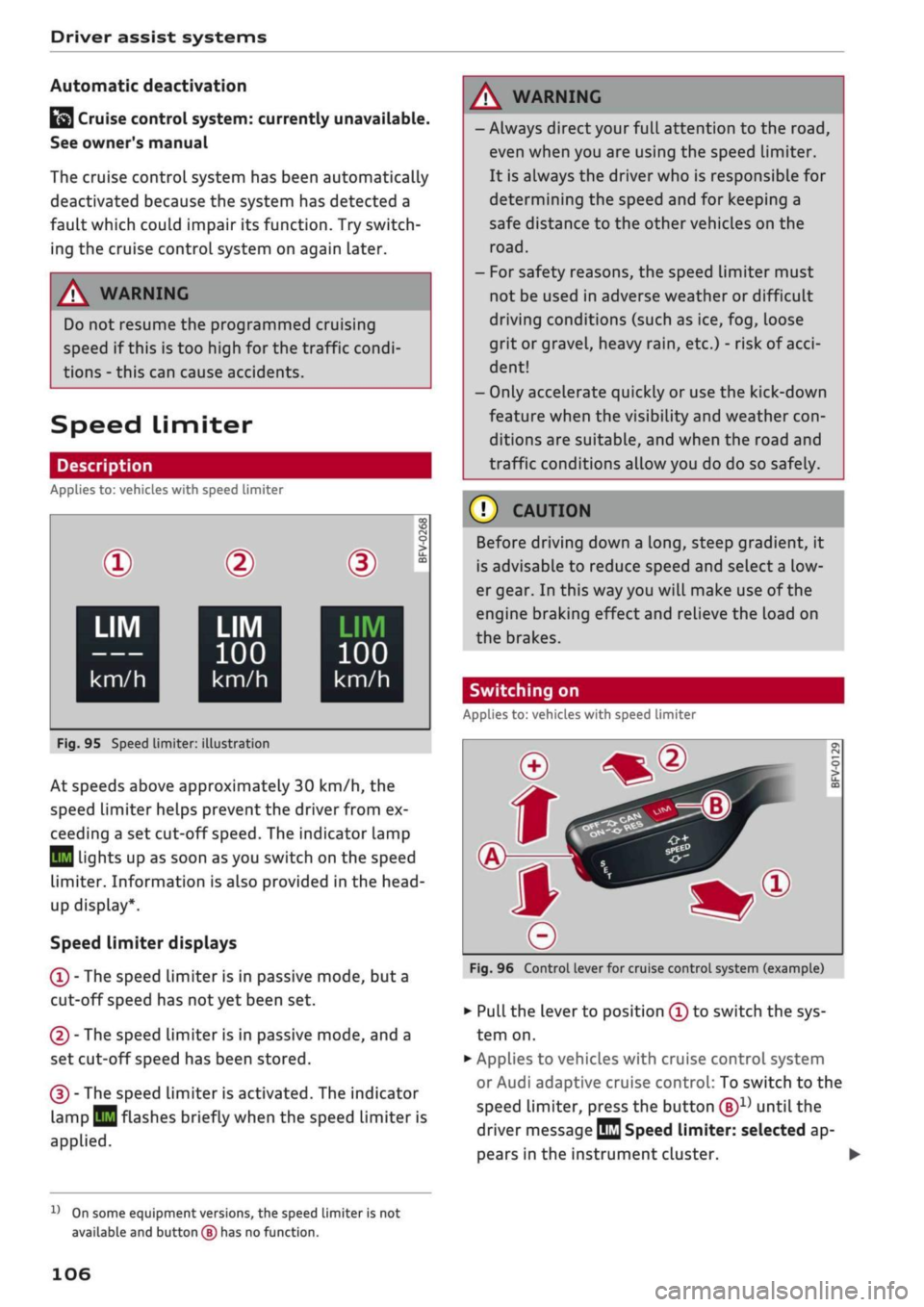
At speeds above approximately 30 km/h, the
speed limiter helps prevent the driver from ex
ceeding a set cut-off
speed.
The indicator lamp
Q
Lights up as soon as you switch on the speed
limiter. Information is also provided in the head-
up display*.
Speed limiter displays
© - The speed limiter is in passive mode, but a
cut-off speed has
not
yet been set.
®
- The speed limiter is in passive mode, and a
set cut-off speed has been stored.
® - The speed limiter is activated. The indicator
lamp
BH
flashes briefly when the speed limiter is
applied.
A WARNING
- Always direct your full attention to the
road,
even when you are using the speed limiter.
It is always the driver who is responsible for
determining the speed and for keeping a
safe distance to the other vehicles on the
road.
- For safety reasons, the speed limiter must
not be used in adverse weather or difficult
driving conditions (such as ice, fog, loose
grit or gravel, heavy
rain,
etc.) - risk of
acci
dent!
- Only accelerate quickly or use the kick-down
feature when the visibility and weather
con
ditions are suitable, and when the road and
traffic conditions allow you do do so safely.
Before driving down a
long,
steep gradient, it
is advisable to reduce speed and select a low
er gear. In this way you will make use of the
engine braking effect and relieve the Load on
the brakes.
Switching on
Applies to: vehicles with speed limiter
Fig.
96 Control lever for cruise control system (example)
•
Pull the lever to position © to switch the sys
tem on.
•
Applies to vehicles with cruise control system
or Audi adaptive cruise control: To switch to the
speed limiter, press the button
®1)
until the
driver message
QQ
Speed limiter: selected ap
pears in the instrument cluster. •
l)
On some equipment versions, the speed limiter is not
available and button
(B)
has no function.
106
Page 115 of 364
Driver assist systems
CO
<
O
rN rN
t-H
o <
When driving into a bend
OF/'g.
102 and driving
out of
a
bend, the system may react to a vehicle
travelling in the next lane and therefore brake
the vehicle. You can prevent this from happening
by accelerating briefly.
Stationary vehicles
Applies to: vehicles with Audi adaptive cruise control
»)
Fig.
103 Example: Vehicle changing lane and vehicle sta
tionary
Adaptive cruise control
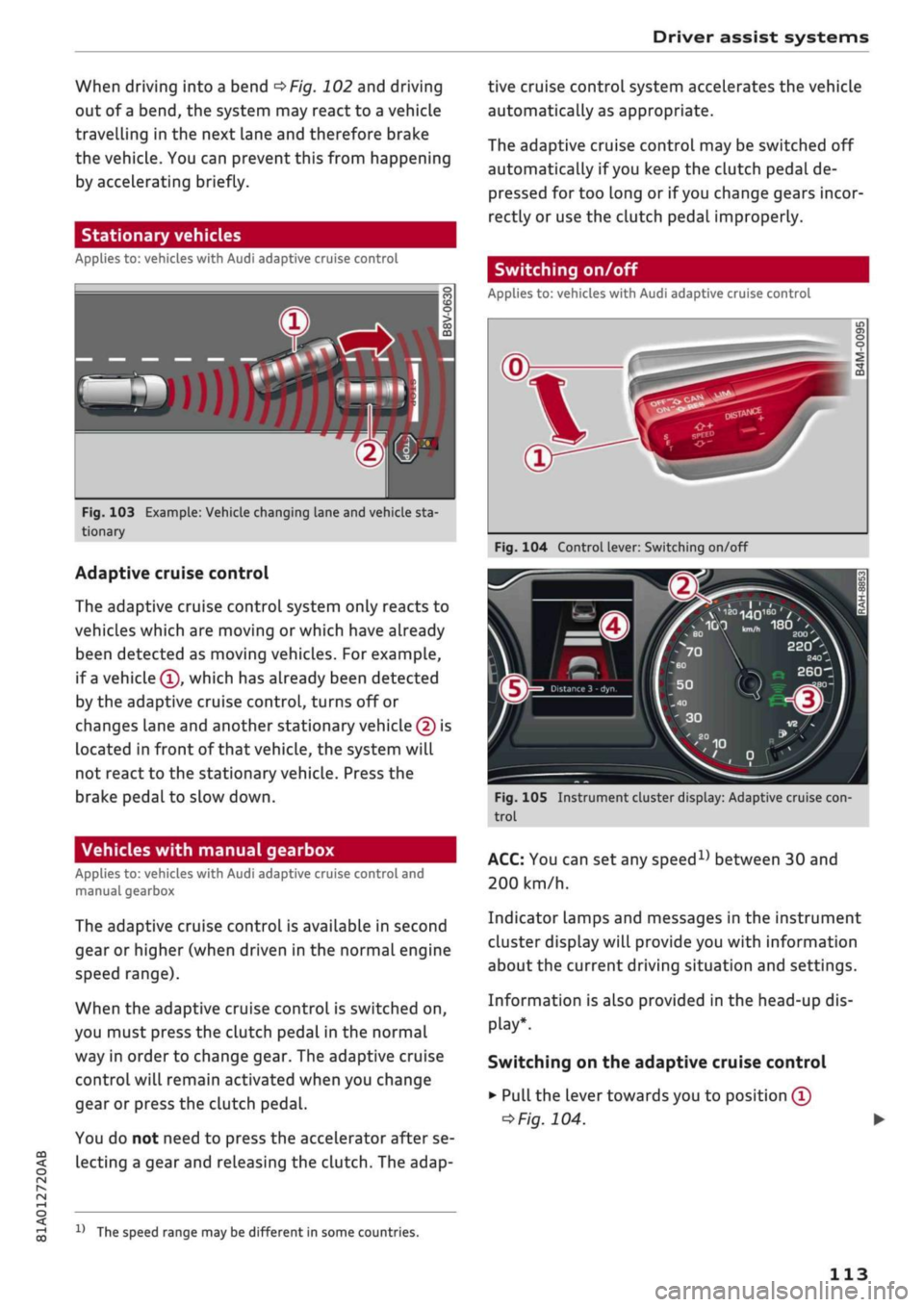
The adaptive cruise control system only reacts to
vehicles which are moving or which have already
been detected as moving vehicles. For example,
if
a
vehicle ©, which has already been detected
by the adaptive cruise control, turns off or
changes lane and another stationary vehicle © is
located in front of that
vehicLe,
the system will
not react to the stationary vehicle. Press the
brake pedal to slow down.
Vehicles with manual gearbox
Applies to: vehicles with Audi adaptive cruise control and
manual gearbox
The adaptive cruise control is available in second
gear or higher (when driven in the normal engine
speed range).
When the adaptive cruise control is switched on,
you must press the clutch pedal in the normal
way in order to change gear. The adaptive cruise
control will remain activated when you change
gear or press the clutch pedal.
You do not need to press the accelerator after se
lecting a gear and releasing the clutch. The adap-
15
The speed range may be different in some countries.
tive cruise control system accelerates the vehicle
automatically as appropriate.
The adaptive cruise control may be switched off
automatically if
you
keep the clutch pedal de
pressed for too long or if
you
change gears incor
rectly or use the clutch pedal improperly.
Switching on/off
Applies to: vehicles with Audi adaptive cruise control
Fig.
104 Control lever: Switching on/off
Distance 3 -
dyr
}
Fig.
105 Instrument cluster display: Adaptive cruise
con
trol
ACC:
You can set any
speed1)
between 30 and
200 km/h.
Indicator Lamps and messages in the instrument
cluster display will provide you with information
about the current driving situation and settings.
Information is also provided in the head-up dis
play*.
Switching on the adaptive cruise control
•
Pull the lever towards you to position ©
*>Fig.
104.
113
Page 121 of 364
Driver assist systems
© Note
The distance may be below the warning
threshold for a short time when overtaking or
approaching a slower vehicle quickly from be
hind.
In this case, no warning will be given. A
warning is only given if the distance is consis
tently below the threshold.
Driver messages
Applies to: vehicles with Audi adaptive cruise control
El
ACC:
not available
The system cannot detect vehicles reliably and
will be deactivated. The sensor is out of align
ment or defective. Drive to a qualified workshop
and have the fault rectified.
EH
ACC:
currently unavailable. No sensor vision
Eo3
ACC:
currently unavailable. Sensor view re
stricted due to surroundings. See owner's
man
ual
These messages appear if the radar sensor vision
is impaired, e.g. by leaves, snow, heavy road
spray or dirt. Clean the sensor
^>page
112,
Fig. 101.
E3
ACC:
currently unavailable. Speed too low
Manual gearbox: This message appears if the cur
rent speed is too low for
ACC
mode. You cannot
store speed settings below 30 km/h. The cruise
control system switches off if the speed falls
be
low 20 km/h.
Esi
ACC:
available from 2nd gear up
Manual gearbox: The adaptive cruise control only
operates in 2nd gear or higher.
B
ACC:
currently unavailable. Gradient too
steep
The maximum possible road gradient for safe op
eration of the adaptive cruise control has been
exceeded.
The adaptive cruise control cannot be
switched on.
ffl
Ea3
ACC:
only
available in D, S or M < o
PI
Automatic gearbox: Move the selector lever to
g
position D/S or M. <
00
Eol
ACC:
clutch pedal pressed
Automatic gearbox: Cruise control mode is deac
tivated if the clutch pedal is pressed for
a
rela
tively long period.
Bf
ACC:
engine speed
Manual gearbox: This message appears if the
driver does not change gear in time when the
adaptive cruise control accelerates or brakes the
vehicle and the engine speed is too high or low as
a result. The adaptive cruise control is switched
off.
EJACC:
parking brake applied
The adaptive cruise control system is deactivated
if the parking brake is applied. The adaptive
cruise control will be available again when the
parking brake is released.
Eo3
ACC:
currently unavailable. Stabilisation
control input
This message appears if the electronic stabilisa
tion control (ESC) intervenes. In this case, the
adaptive cruise control will automatically be
switched off.
Eo3 ACC
off: manual control!
This message appears if the vehicLe rolls back
wards when driving away on a slight gradient,
even though the adaptive cruise control is active.
Press the brake pedal to prevent the vehicle from
rolling back or colliding with an object behind.
EM
ACC:
currently unavailable. Park assist ac
tive
The systems are switched off when the park as
sist* is active. The systems will be available again
when the parking manoeuvre is finished.
Distance warning: fault. Please contact work
shop
The system cannot detect vehicles reliably and
will be deactivated. The radar sensor is out of
alignment or defective. Drive to a qualified work
shop and have the fault rectified.
Distance warning: currently unavailable. Sensor
view restricted due to surroundings •
119
Page 133 of 364
Driver assist systems
CO
< o rN
r>
rN
t-H
o < 00
-The automatic brake application with in
creasing brake force can be cancelled by ap
plying the brakes yourself or by pressing the
accelerator firmly.
- In certain situations, a warning may be giv
en by the rear cross-traffic assist even if
there is no traffic in the critical zone, for in
stance when parking or manoeuvring the ve
hicle in reverse.
- The rear cross-traffic assist is deactivated
automatically if you deactivate the
ESC.
-The rear cross-traffic assist is switched on/
off via the parking aid
^>page
134.
-The system is not available in towing mode.
Driver messages
Applies to: vehicles with Audi side assist
Should the side assist be deactivated automati
cally, a driver message will appear in the instru
ment cluster display.
O
Audi side assist: system fault!
The system cannot detect vehicles reliably and
will be deactivated. The sensors are out of align
ment or defective. Have the system checked by a
qualified workshop soon.
O
Audi side assist: currently unavailable. No
sensor vision
O
Audi side assist: currently unavailable.
Sen
sor view restricted due to surroundings. See
owner's manual
The radar sensors are blocked. The area in front
of the sensors must not be obstructed by bicycle
racks,
stickers, deposits or any other substances.
If necessary, clean the area in front of the
sen
sors
^>page
128, Fig. 120.
O
Audi side assist: currently unavailable
The side assist is temporarily inoperative and
cannot be switched on (for instance if the battery
is not sufficiently charged).
O
Audi side assist: unavailable in towing mode
2
Audi side assist: unavailable in towing mode
The side assist function will be switched off auto
matically after a short time when the electrical
connector for the trailer socket is plugged in on
vehicles with a factory-fitted towing bracket. If
the towing bracket is not factory-fitted the side
assist function may not be switched off automat
ically. The side assist must not be used when
towing a trailer.
O Rear
parking aid: obstacle detection limited
The rear cross-traffic assist is not available. Ei
ther the ESC is switched off or the radar sensors
may be obstructed by a bicycle rack, stickers,
leaves, snow or similar objects. Switch on the ESC
or, if necessary, clean the area in front of the
sen
sors
<3page
128, Fig. 120. If this message re
mains displayed, drive to a qualified workshop
soon and have the fault rectified.
Audi drive select
Introduction
Applies to: vehicles with Audi drive select
Audi drive select alLows you to use different set
ups on your vehicle. The modes efficiency*, com
fort, auto and dynamic allow the driver, for ex
ample,
to change from a sporty mode to a more
comfortable one via the
&&
button in the centre
console or via the infotainment system. In
addi
tion,
the individual* mode allows you to adapt
the vehicle set-up to
suit
your personal driving
style.
For example, you might choose to combine
a more dynamic engine set-up with a lighter
steering response.
Description
Applies to: vehicles with Audi drive select
The possible vehicle set-up in each mode de
pends on which equipment is installed on your
vehicle. The engine and steering are basic parts
of your vehicle which are always included in the
set-up.
Engine and automatic gearbox*
The response of the engine and automatic
gear
box* to accelerator pedal movements will be
more spontaneous or balanced, depending on
131
Page 134 of 364

Driver assist systems
which mode you select. In the performance-
oriented dynamic mode, the automatic gearbox
changes gear at higher engine speeds.
By contrast, in efficiency* mode, the automatic
gearbox* selects the next gear at lower engine
speeds and the coasting mode is activated
^>page
91. This helps to reduce fuel consump
tion.
Suspension control (Audi magnetic
ride)*
The suspension control uses sensors to collect in
formation on steering movements, braking and
acceleration input by the driver, road surface
quality, road speed and vehicle Loading. With
Audi drive select you can choose between dynam
ic and comfort-oriented suspension set-ups (dy
namic and comfort modes), or opt for
a
more
balanced set-up (auto mode).
Steering
The degree of power assistance can be varied.
Various modes are possible
^>page
133. The
light, indirect steering response in comfort mode
is particularly suitable on long motorway trips,
for instance. The steering has a tighter, more di
rect feel in dynamic mode.
The steering response is even more agile on
vehicles with progressive steering*.
Audi adaptive light*
The adaptive light system adjusts the light distri
bution according to the mode selected.
Air conditioner*
The air conditioner runs in a particularly econom
ical mode when the efficiency* setting is selec
ted.
When this function is selected, eco* is shown
in the display of the automatic air conditioner.
Cruise control system*
The acceleration response is particularly econom
ical in efficiency* mode.
Audi adaptive cruise control*
The acceleration mode can be varied from com
fort to sport by changing the setting in drive se
lect. The setting also determines whether the re
sponse of the adaptive cruise control to the driv
ing style of the driver in front is more balanced or
spontaneous. The efficiency* mode chooses a set
up for maximum economy.
© Note
- On some models the vehicle's maximum
speed can only be obtained in the auto and
dynamic modes.
- Applies to vehicles with manual gearbox: An
E appears in the gear-change indicator when
efficiency* mode is activated.
- Applies to vehicles with automatic gearbox:
Selector lever position
S
is automatically se
lected when dynamic mode is activated.
E
is
selected in efficiency* mode.
- Applies to vehicles with automatic gearbox:
If
you
select efficiency* mode when the se
lector Lever is in position D,
E
will automati
cally appear in the instrument cluster dis
play.
- Applies to vehicles with manual gearbox: If
you press the accelerator right down past
the point of resistance in efficiency* mode,
the engine power is automatically control
led to give your vehicle maximum accelera
tion.
- Please note that the efficiency* mode is not
available in towing mode.
Selecting the driving mode
Applies to: vehicles with Audi drive select
You
can choose between efficiency*, comfort, au
to,
dynamic and individual*.
Fig.
123 Centre console: Button for drive select
•
Press the
ism
button
^>Fig.
123 repeatedly until
the desired mode appears on the instrument
cluster/infotainment display. Or: •
132
Page 135 of 364
Driver assist systems
•
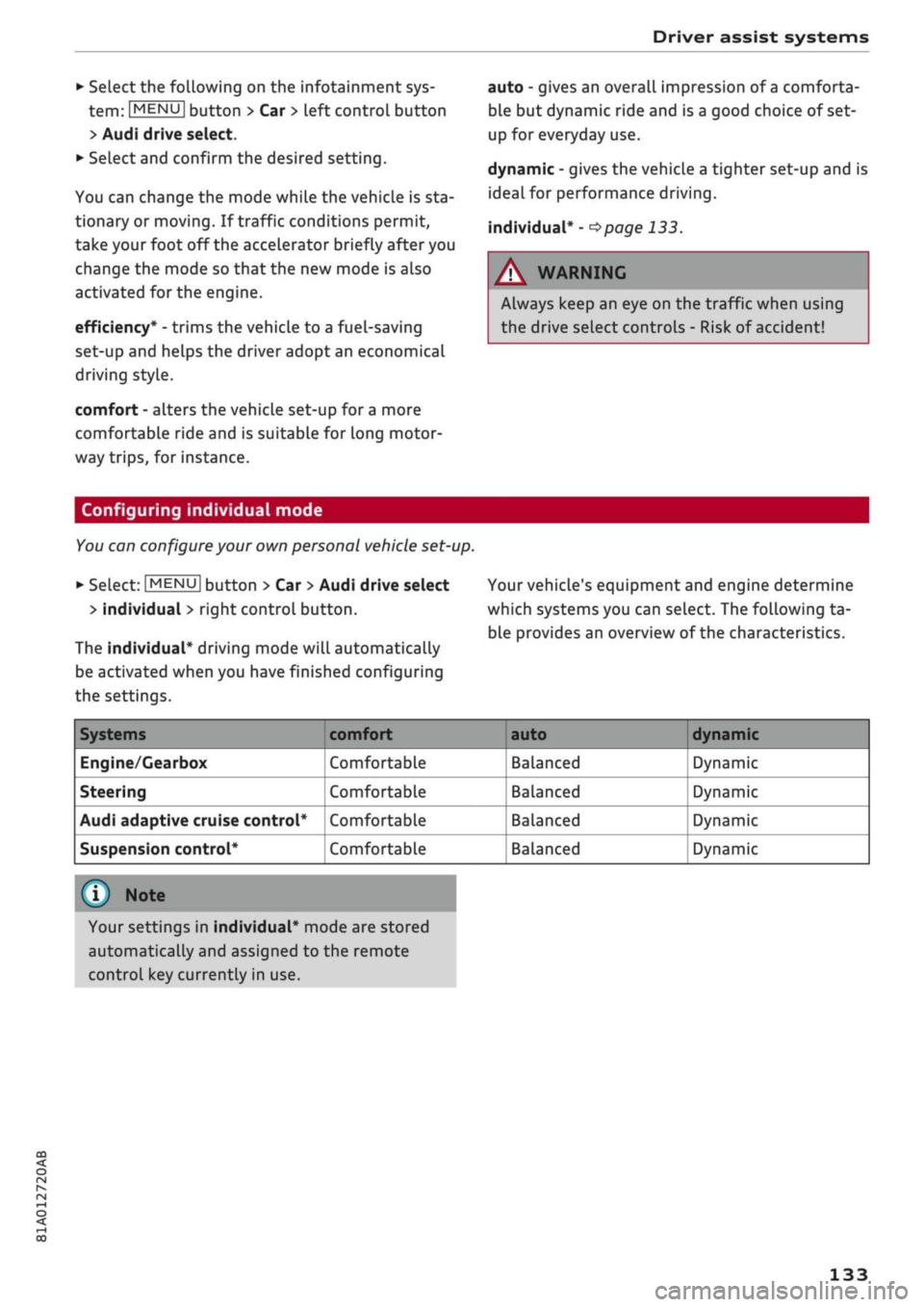
Select the following on the infotainment sys
tem:
|MENU|
button > Car
>
left control button
> Audi drive select.
•
Select and confirm the desired setting.
You can change the mode while the vehicle is sta
tionary or moving. If traffic conditions permit,
take
your
foot off the accelerator briefly after you
change the mode so that the new mode is also
activated for the engine.
efficiency* - trims the vehicle to a fuel-saving
set-up and helps the driver adopt an economical
driving style.
comfort - alters the vehicle set-up for a more
comfortable ride and is suitable for long motor
way trips, for instance.
auto - gives an overall impression of
a
comforta
ble but dynamic ride and is a good choice of set
up for everyday use.
dynamic - gives the vehicLe a tighter set-up and is
ideal for performance driving.
individual* -
^>page
133.
A WARNING
Always keep an eye on the traffic when using
the drive select controls - Risk of accident!
CO
rN
r>
rN
•-i
00
Configuring individual mode
You
can configure your own personal vehicle set-up.
*-
Select: |MENU| button > Car
>
Audi drive select
> individual
>
right control button.
The individual* driving mode will automatically
be activated when you have finished configuring
the settings.
Your vehicle's equipment and engine determine
which systems you can select. The following ta
ble provides an overview of the characteristics.
Systems
Engine/Gearbox
Steering
Audi adaptive cruise control*
Suspension control*
comfort
Comfortable
Comfortable
Comfortable
Comfortable
auto dynamic
Balanced
Balanced
Balanced
Balanced
Dynamic
Dynamic
Dynamic
Dynamic
© Note
Your settings in individual* mode are stored
automatically and assigned to the remote
control key currently in use.
133
Page 144 of 364

Parking aids
continue the parking manoeuvre, press the
P© button again. The park assist will reappear on
the display.
You can cancel the direction of travel given by
the system before parking by shifting be
tween forwards/reverse gear. The system will
then calculate the further path and steering
directions for the manoeuvre based on the
position of the vehicle.
Driving out of a parking space parallel to
the roadside
Applies to: vehicles with park assist
The
driver is responsible for manoeuvring the ve
hicle out of the parking space.
If the vehicle is parked parallel to the roadside,
the park assist can help you to drive out of the
parking space.
•
Start the engine.
•
Press the
P©
button
^>page
140, Fig. 135.
•
Wait until the following text appears on the in
fotainment display: Specify direction with turn
signal to leave parking space.
*•
Operate the appropriate turn signal. The mes
sage Start automatic unparking procedure will
appear.
*•
Take your hands off the steering wheel.
•
Press the rotary pushbutton to start automatic
unparking.
•
Watch the
road.
When the road is clear, press
the accelerator gently
^ ^
in Description on
page 139,
^>(J)in
Description on page 140.
•
Follow the instructions on the display
^>page
142 and the acoustic warning tones
until you are
dear
to leave the parking space.
•
Drive in the direction specified by the arrows on
the vehicle.
•
The procedure is over when no more manoeu
vring is necessary in order to drive out of the
space.
Take over the steering.
The park assist automatically steers the vehicle
out of the parking space while the driver operates
the pedals. The maximum manoeuvring speed is
5 km/h. The park assist will be deactivated if you
drive too fast or move the steering wheel by
hand.
To continue the parking manoeuvre, switch
the engine off/on. Then press the
P@
button
again.
Alternatively, drive out of the parking
space without using the park assist.
Driver messages
Applies to: vehicles with park assist
Park assist: cancelled. Steering input detec
ted.
Continue steering vehicle!
The steering assistant has been deactivated be
cause the driver has intervened in the steering.
To continue the parking manoeuvre, press the
"©
button again.
Park assist: time limit exceeded
Park assist: cancelled. Time limit exceeded.
Continue steering vehicle!
The parking manoeuvre was not completed
with
in about six minutes after the park assist was ac
tivated.
To continue the parking manoeuvre,
press the P© button again.
Park assist: cancelled. Speed too high. Con
tinue steering vehicle!
You were driving too fast into the parking space.
Do not drive faster than 7 km/h.
i
Park assist: cancelled. Stabilisation control
(ESC) input. Continue steering vehicle!
The ESC has intervened. Take over the steering.
Finish parking without the park assist or drive out
of the parking space.
Park assist: currently unavailable. Stabilisa
tion control (ESC) off
The ESC has been switched off. The ESC must be
switched on before the park assist can be used.
| Park assist: fault. Please contact workshop
i Park assist: fault. Continue steering vehicle!
Please contact workshop
Please contact a qualified workshop. The park as
sist cannot be used to park the vehicLe if
a
system
fault occurs.
|
Park assist: currently unavailable
142
Page 147 of 364
Intelligent technology
CO
< o rN
iv
rN
t-H
o < 00
Intelligent technology
Electronic stabilisation
control (ESC)
Description
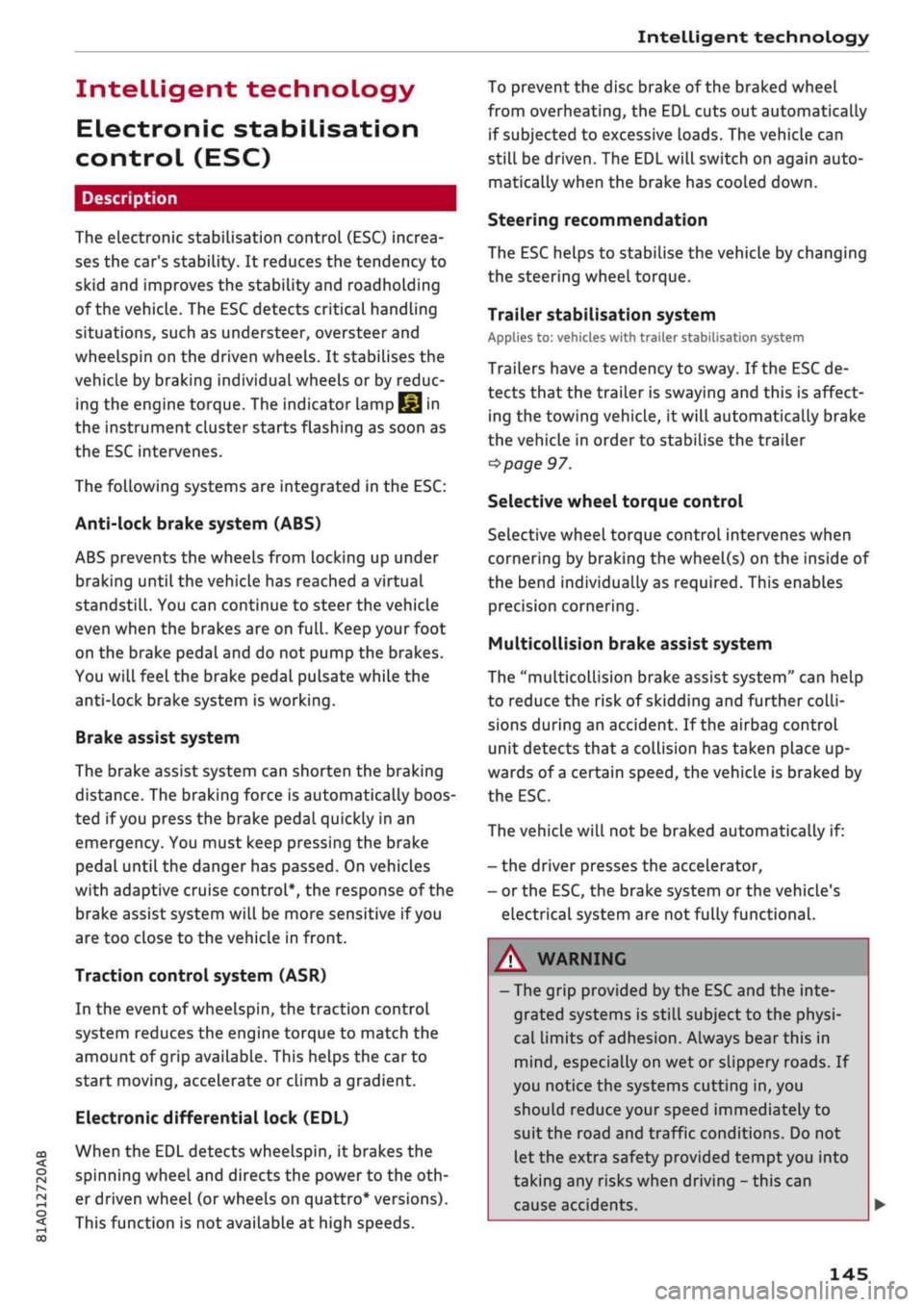
The electronic stabilisation control (ESC) increa
ses the car's stability. It reduces the tendency to
skid and improves the stability and roadholding
of the vehicle. The ESC detects critical handling
situations, such as understeer, oversteer and
wheelspin
on the driven wheels. It stabilises the
vehicle by braking individual wheels or by reduc
ing the engine torque. The indicator
lamp^
in
the instrument cluster starts flashing as soon as
the ESC intervenes.
The following systems are integrated in the ESC:
Anti-lock brake system (ABS)
ABS prevents the wheels from locking up under
braking until the vehicle has reached a virtual
standstill.
You can continue to steer the vehicle
even when the brakes are on
full.
Keep your foot
on the brake pedal and do not pump the brakes.
You will feel the brake pedal puLsate while the
anti-lock brake system is working.
Brake assist system
The brake assist system can shorten the braking
distance. The braking force is automatically boos
ted if
you
press the brake pedal quickly in an
emergency. You must keep pressing the brake
pedal until the danger has passed. On
vehides
with adaptive cruise control*, the response of the
brake assist system will be more sensitive if you
are too close to the vehicLe in front.
Traction control system (ASR)
In the event of
wheelspin,
the traction control
system reduces the engine torque to match the
amount of grip available. This helps the car to
start moving, accelerate or climb a gradient.
Electronic differential lock (EDL)
When the EDL detects wheelspin, it brakes the
spinning wheel and directs the power to the
oth
er driven wheel (or wheels on quattro* versions).
This function is not available at high speeds.
To prevent the disc brake of the braked wheel
from overheating, the EDL cuts out automatically
if subjected to excessive loads. The vehicLe can
still be driven. The EDL will switch on again auto
matically when the brake has cooled down.
Steering recommendation
The ESC helps to stabilise the vehicle by changing
the steering wheel torque.
Trailer stabilisation system
Applies to: vehicles with trailer stabilisation system
Trailers have a tendency to sway. If the
ESC
de
tects that the trailer is swaying and this is affect
ing the towing vehicLe, it will automatically brake
the vehicle in order to stabilise the trailer
^>page
97.
Selective wheel torque control
Selective wheel torque control intervenes when
cornering by braking the wheel(s) on the inside of
the bend individually as required. This enables
precision cornering.
Multicollision brake assist system
The "multicollision brake assist system" can help
to reduce the risk of skidding and further
colli
sions during an accident. If the airbag control
unit detects that
a
collision has taken place up
wards of
a
certain speed, the vehicle is braked by
the
ESC.
The vehicle will not be braked automatically if:
- the driver presses the accelerator,
- or the
ESC,
the brake system or the vehicle's
electrical system are not fully functional.
WARNING
- The grip provided by the ESC and the inte
grated systems is still subject to the physi
cal limits of adhesion. Always bear this in
mind,
especially on wet or sLippery roads. If
you notice the systems cutting in, you
should reduce your speed immediately to
suit the road and traffic conditions. Do not
let
the extra safety provided tempt you into
taking any risks when driving - this can
cause accidents.
145
Page 148 of 364
Intelligent technology
Remember that the accident risk always in
creases
if
you
drive fast, especially
in
cor
ners
or
on a wet
or
slippery
road,
or if
you
follow too close behind the vehicle in front
of
you.
Please bear
in
mind that even
the
ESC
and
the
integrated systems cannot
compensate
for
the increased accident risk.
When accelerating
on
a uniformly slippery
surface
(for
instance
all
four wheels on
ice
or snow), press the accelerator gradually
and carefully. The driven wheels may other
wise start
to
spin
(in
spite
of
the integrated
control systems), which would impair the
car's stability and could lead
to
an accident.
© Note
The ABS and ASR systems can only work
properly
if
a 11
four tyres have a similar de
gree
of
wear. Any differences
in the
rolling
radius
of
the tyres can cause the system
to
reduce engine power when this
is not
de
sired.
The systems can make noises when they in
tervene.
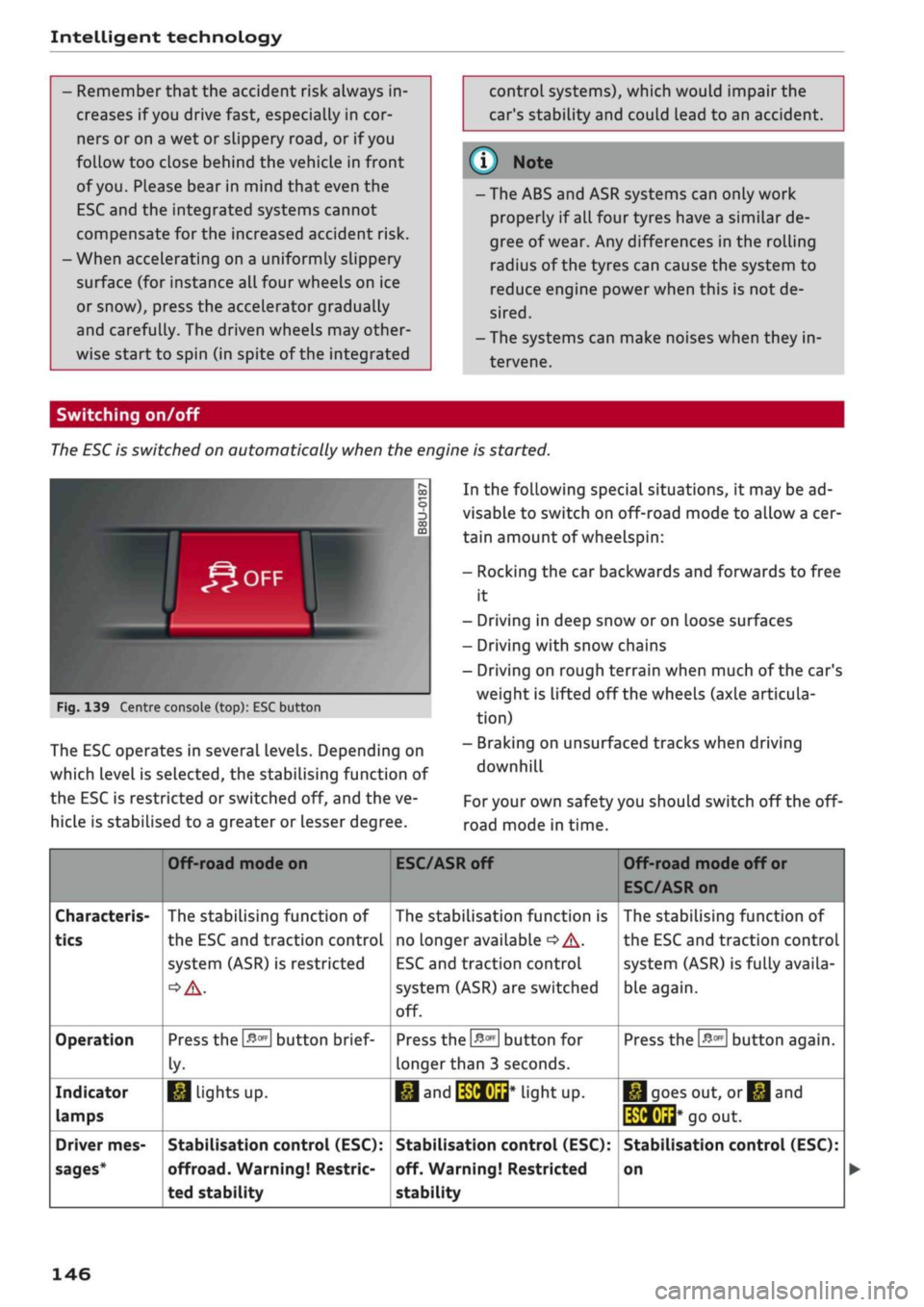
Switching on/off
The ESC
is switched on automatically when
the
engine is started.
^OFF
1
y
CO
5
3
CO
Fig.
139 Centre console (top): ESC button
The ESC operates
in
several levels. Depending
on
which Level
is
selected,
the
stabilising function
of
the ESC
is
restricted
or
switched
off,
and the ve
hicLe
is
stabilised
to
a greater
or
Lesser degree.
In the following special situations,
it
may be ad
visable
to
switch on off-road mode
to
allow a cer
tain amount
of
wheelspin:
- Rocking
the car
backwards and forwards
to
free
it
- Driving
in
deep snow
or
on Loose surfaces
- Driving with snow chains
- Driving
on
rough terrain when much
of
the car's
weight
is
lifted
off
the wheels (axle articula
tion)
- Braking
on
unsurfaced tracks when driving
downhill
For
your own safety you should switch
off
the
off-
road mode
in
time.
Characteris
tics
Operation
Indicator
lamps
Driver mes
sages*
Off-road mode
on
The stabilising function
of
the ESC and traction controL
system (ASR)
is
restricted
Press the
&m
button brief
ly-
1*1
Lights
up.
Stabilisation control (ESC):
offroad.
Warning! Restric
ted stability
ESC/ASR
off
The stabilisation function
is
no Longer available
•=>
A-
ESC
and traction controL
system (ASR) are switched
off.
Press
the
&m
button
for
longer than
3
seconds.
•M and
IWHUrt*
liant UP.
Stabilisation control (ESC):
off. Warning! Restricted
stability
Off-road mode
off
or
ESC/ASR on
The stabilising function
of
the ESC and traction control
system (ASR) is fully availa
ble again.
Press the
#*
button again.
|*|goes
out,
or^and
të&Éid*
go
out.
Stabilisation control (ESC):
on
146
Page 149 of 364
 only if your driving ability and the traf
fic conditions allow yo")
Intelligent technology
/r\
WARNING
You should switch on the off-road mode or
switch off the ESC/traction control system
(ASR) only if your driving ability and the traf
fic conditions allow you to do so safely -
dan
ger of skidding!
- The stabilising function is restricted when
off-road mode is switched on. The driven
wheels may start to
spin,
causing the
vehi
cle to lose grip, in particular on slippery or
wet roads.
- When the ESC/traction control system
(ASR) is switched off, the vehicle will not be
stabilised.
Brakes
New brake pads
New brake pads do not give full braking effect for
the first 400 km, they must first be "bedded in".
However, you can compensate for the slightly re
duced braking effect by applying more pressure
on the brake pedal. Avoid placing a heavy load on
the brakes during the running-in period.
Wear
The rate of wear on the brake pads depends a
great deal on how you drive and the conditions in
which the vehicLe is operated. Negative factors
are,
for instance, city traffic, frequent short trips
or hard driving with abrupt starts and stops.
Noises
Brake noise may develop in certain situations, de
pending on the speed, braking force and ambient
conditions (such as temperature and relative hu
midity).
Effect of moisture and salt
In certain conditions, such as in heavy
rain,
early
morning dew, or after washing the car or driving
through water, the full braking effect can be de
layed by moisture (or in winter by ice) on the
discs and brake pads. The brakes should be
< "dried" by pressing the pedal to restore full brak-
R
ing effect.
When you are driving at higher speeds with the
windscreen wipers on, the brake pads are very
briefly brought into contact with the brake discs.
This automatic process which goes unnoticed by
the driver is carried out at regular intervals and is
intended to improve braking response in wet
con
ditions.
The effectiveness of the brakes can also be
tem
porarily reduced if the car is driven for some dis
tance without using the brakes when there is a
lot of salt on the road in winter. The layer of salt
that accumulates on the discs and pads can be
removed with a few cautious brake applications.
Corrosion
There may be a tendency for dirt to build up on
the brake pads and corrosion to form on the discs
if the car is used infrequently, or if
you
only drive
low mileages without using the brakes very
much.
If the brakes are not used frequently, or if corro
sion has formed on the discs, it is advisable to
clean off the pads and discs by braking firmly a
few times from a moderately high speed
•=> A-
Faults in the brake system
If the brake pedal travel should ever increase
suddenly, this may mean that one of the two
brake circuits has failed. Drive immediately to the
nearest qualified workshop and have the fault
rectified.
On the way to the dealer, be prepared
to use more pressure on the brake pedal and al
low for longer stopping distances.
Low brake fluid level
Malfunctions can occur in the brake system if the
brake fluid level is too low. The brake fluid level
is monitored electronically.
Brake servo
The brake servo amplifies the pressure you apply
to the brake pedal. It only works when the engine
is running. •
147