warning light AUDI Q2 2021 Owner´s Manual
[x] Cancel search | Manufacturer: AUDI, Model Year: 2021, Model line: Q2, Model: AUDI Q2 2021Pages: 364, PDF Size: 87.77 MB
Page 166 of 364
Speech dialogue system
Speech dialogue system
How to use the speech
dialogue system
Applies to: vehicles with speech dialogue system
You
can operate many infotainment functions
conveniently by voice.
Important: The ignition and the MMI system
must be switched on
^>page
152, you must not
be talking on the phone, and the parking aid
must not be active.
•
To switch on: Briefly press the
0
button (J)
^>page
17, Fig. 12/(3)
^>page
18, Fig. 14 on
the multi-function steering wheel and give a
spoken command after the beep signal.
*•
To switch off: Press and hold the
0
button for
several seconds. Or: Press the
0
button.
•
To pause: Say the command Pause. To end the
pause,
press the
S
button.
•
To make a correction: Say the command Cor
rection.
Input help
The system guides you through the input routine
with cues and messages.
- Input help messages on screen: After the
speech dialogue system is switched on, a selec
tion of possible commands will be shown. The
command display can be switched on or off as
required.
Select:
|MENU|
button
>
Settings >
left control button > MMI settings
>
Speech
dialogue system.
- Spoken input help
cues:
To have the system
play the commands currently possible, switch
on the speech dialogue system and say Help.
How to help the system understand you
Speak clearly in a normal volume. Speak louder if
you are driving fast.
Speak in a normal tone without long pauses.
Close doors, windows and sun roof* to reduce
background noise. Make sure that passengers are
not talking when you say a command.
Keep the air outlets of the air distribution system
pointed away from the microphone, which is fit
ted in the vicinity of the front interior lights in
the headliner.
The system should only be operated by the driv
er, since the handsfree microphone is directed
towards the driver.
Other settings
Refer to
^>page
262.
© No
-The dialogue is paused when an incoming
telephone call is received; you can continue
the dialogue by ignoring the
call.
If
you
an
swer the
call,
the dialogue will be cancelled.
- No navigation cues* or traffic announce
ments are played when a dialogue is
run
ning.
- You can select an entry from a list both via
the speech dialogue system and using the
rotary pushbutton.
- The speech dialogue system does not sup
port commands in Arabic, Norwegian or
Hungarian.
Notes on the overviews
of commands
Applies to: vehicles with speech dialogue system
The following overviews show you the commands
that you can give to operate the MMI via the
speech dialogue system. •
A WARNING
- Please direct your full attention to the road
at all times! As the driver, you have full re
sponsibility for the safety of the vehicle and
other road users.
For
this reason, you should
only use the functions in a manner that al
lows you to maintain control of the vehicle
in all situations - accident risk!
- The speech dialogue system must not be
used in cases of emergency, since the voice
changes in stressful situations. This could
result in a failed or delayed telephone
con
nection.
Always dial emergency numbers
manually!
164
Page 203 of 364
Audi connect (infotainment)
CO
< o rN
IN
rN
•-H
00
new version is available at my.audi.com.
You can also have the new navigation data
installed by an Audi deaLer (carries addition
al charges).
- Further information on the myAudi special
destinations and the map update can be
found online at my.audi.com.
Audi connect (infotainment) for telephones
Applies
to: vehicles with Audi connect (infotainment)
© CAUTION
•
Select: |MENU| button
>
Audi connect
>
left
control button
>
Communication.
The following Audi connect infotainment services
are currently available:
- Creating contacts on your
PC
via your myAudi
account and loading the contacts into the di
rectory of your MMI system
^>page
187.
- Dictating text messages or e-mails and having
them read out*
^>page
182, Messages.
Audi connect (infotainment) in the media
menu
Applies
to: vehicles with Wi-Fi audio player and Audi connect
(infotainment)
*•
Select: |MENU| button
>
Audi connect
>
left
control button > Entertainment.
- Wi-Fi audio player: To access the media centre
of your player (e.g. smartphone) connected via
Wi-Fi
<=>
page 238.
- Online media and Internet radio: With assis
tance from the Audi MMI connect app, this
function allows you to access and operate
vari
ous online media services using the MMI.
A WARNING
Mobile devices, tablet and Laptop computers
and devices of
a
similar weight can only be
operated safely when the vehicle is stationary.
Like any Loose object, they can be catapulted
through the vehicle in an accident and cause
serious injuries. Always make sure that such
devices are securely stowed while you are
driving.
Please always observe the information
=>®
in
Wi-Fi hotspot on page 202.
- Also refer to
opage
204, General notes on
Audi connect (infotainment).
- Please contact an Audi dealer for more in
formation on Wi-Fi audio players and for a
list of supported devices.
Further options
Applies
to: vehicles with Audi connect (infotainment)
•
Select: |MENU| button
>
Audi connect
>
right
control button.
The following options are available in the over
view of the Audi connect infotainment services:
Login*
Refer to
^>page
196, Logging into myAudi in the
vehicle.
Connection manager
Refer to
^>page
257.
Licence periods
The validity and the time remaining on your licen
ces is displayed. If the Licence expiry warning
function is switched on
(vj,
a message will be dis
played before the licence expires.
Refresh
The content of the Audi connect infotainment
service selected or the entire Audi connect (info
tainment) list is updated.
Wi-Fi hotspot
Applies
to: vehicles with Wi-Fi hotspot
You
can
use
your MMI system as a Wi-Fi hotspot
for connecting to the Internet on up to eight Wi-
Fi
devices.
Small, light Wi-Fi
devices
that are not
permanently attached to the vehicle must only
be operated from the rear seats while the vehicle
is moving.
Important: The ignition must be switched on.
201
Page 244 of 364
Media
The following options may be available depend
ing on the information displayed (e.g. the sta
tion/track currently playing):
- Sound settings: Refer to
^>page
260.
- Wi-Fi settings: Refer to
Opage
201, Wi-Fi hot-
spot.
- Connection manager: Refer to
<>page
257.
- Additional options may be available depending
on the active online media service or Internet
radio function.
A WARNING
- Mobile devices, tablet and laptop computers
and devices of
a
similar weight can only be
operated safely when the vehicle is station
ary. Like any Loose object, they can be cata
pulted through the vehicle in an accident
and cause serious injuries. Always make sure
that such devices are securely stowed while
you are driving.
- No Wi-Fi devices may be used from the front
seats in the areas around the airbags while
the vehicle is being driven. Please also ob
serve the safety warnings on
^>page
282,
Front airbags.
© CAUTION
- Please always observe the information
•=>©
in Wi-Fi hotspot on page 202.
- In order to use online media, you generally
have
to
set up an account with an online
media service, which may lead
to
additional
costs,
especially if
you
are using the service
abroad.
© Note
- Depending on the Internet connection and
network
load,
playback of the online media
services may be interrupted.
- Whether online media and Internet radio
can be used depends on the availability
of
services provided by third parties.
- AUDI AG only enables you
to
access online
media services via the MMI system and ac
cepts no responsibility for the content of
online media services.
- Please always note the information in the
chapter
^>page
204, General notes on Audi
connect (infotainment).
- Depending on the mobile device you are us
ing,
you may experience interruptions
in
media playback when using the Audi MMI
connect app. To avoid interruptions, keep
the Audi MMI connect app running in the
foreground and do not lock the screen on
your mobile device.
- Audi dealerships will be able
to
provide you
with further information on online media.
Multimedia connections
USB adapters for Audi music interface or
USB charging socket
Depending on the vehicle equipment, you may be
able
to
connect your mobile devices (e.g. smart-
phones, MP3 players)
to
the Audi music interface
or the
USB
charging socket using the special
USB
adapters.
<
Fig.
196 Audi USB adapters
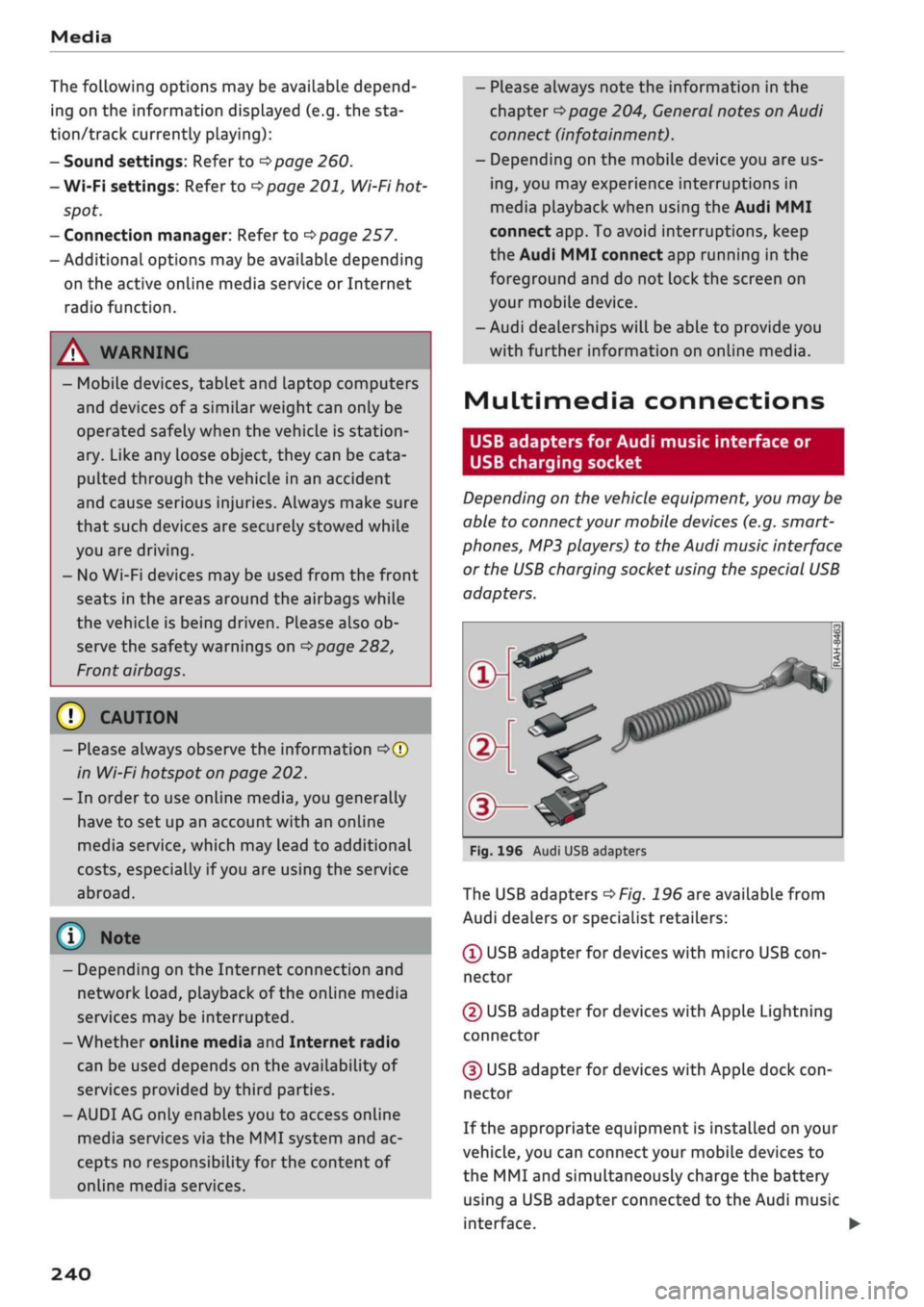
The USB adapters
^>Fig.
196 are available from
Audi dealers or specialist retailers:
® USB adapter for devices with micro USB
con
nector
© USB adapter for devices with Apple Lightning
connector
© USB adapter for devices with Apple dock
con
nector
If the appropriate equipment is installed on your
vehicle, you can connect your mobiLe devices
to
the MMI and simultaneously charge the battery
using a USB adapter connected
to
the Audi music
interface.
•
240
Page 267 of 364
Safe driving
Safe driving
General notes
Safety is the first priority
The safety features in your vehicle are harmon
ised to provide you and your passengers with the
best possible protection in accident situations.
However, they can only be effective if you and
your passengers sit in the correct position and
adjust and use the safety equipment properly.
For these reasons, this chapter explains why
these safety features are so important, how they
can protect you, what you need to remember
when using them, and
how
you and your passen
gers can gain the most benefit from them. There
are also a number of important safety warnings
which you and your passengers should always ob
serve in order to minimise the risk of injury.
WARNING
- The information in this chapter is important
for the driver of the vehicle and all passen
gers.
The other chapters in this manual
(and,
where applicable, in the other litera
ture supplied with the vehicle) contain fur
ther important notes which you should read
and observe for your own safety and that of
your passengers.
- Ensure that the complete vehicle wallet is
always in the vehicle. This is especially im
portant when you lend or sell the vehicle to
others.
CO
<
O
rN
iv
rN
i—i
o < 00
Before every trip
The driver is responsible for the safety of the
passengers and the safe operation of the vehicle
at all times.
For
your own safety and the safety of your pas
sengers, always note the following points before
every trip:
•
Make sure that all lights and turn signals are
working properly.
•
Check the tyre pressures.
•
Make sure that all windows are clean and give
good visibility to the outside.
•
Secure all luggage and other items carefully
•=>
page 272.
• Make sure that no objects can interfere with
the pedals.
•
Adjust the front seat, head restraint and mir
rors correctly.
• Applies to: adjustable head restraints: Make
sure that the front passenger's head restraint is
adjusted to the correct position.
• Applies to: adjustable head restraints: Make
sure that the head restraints for the rear pas
sengers are in the fully raised position.
•
Make sure that children are protected with suit
able safety seats and properly worn seat belts
•=>
page 267.
•
Sit in the correct position in your seat. Make
sure
that
your passengers are sitting in the cor
rect positions
^>page
58.
•
Fasten your seat belt correctly. Make sure that
your passengers do the same
^page
275.
What factors can impair your safety?
Safety on the road is directly related to
how
you
drive, and can also be affected by the passengers
in the vehicle.
• The driver is responsible for the safety of the
vehicle and all its occupants. If your ability to
drive is impaired in any way, you endanger
yourself and other road users
,=>^.
Therefore:
• Do not let yourself be distracted by passengers
or by using a mobile phone, etc.
•
Never drive when your driving ability is im
paired (by medication, alcohol, drugs, etc.).
• Obey all traffic regulations and speed limits
and always maintain a safe distance to the
vehi
cle in front.
•
Always adjust your speed to suit the
road,
traf
fic and weather conditions.
•
Take frequent breaks on long trips. Do not drive
for more than two hours without a stop.
•
If possible, avoid driving when you are tired or
stressed.
•
263
Page 269 of 364
Safe driving
CO
<
O
rN
iv
rN
•-i
00
Correct sitting positions
Correct driving position
The
correct driving position is important for safe
driving.
25cm
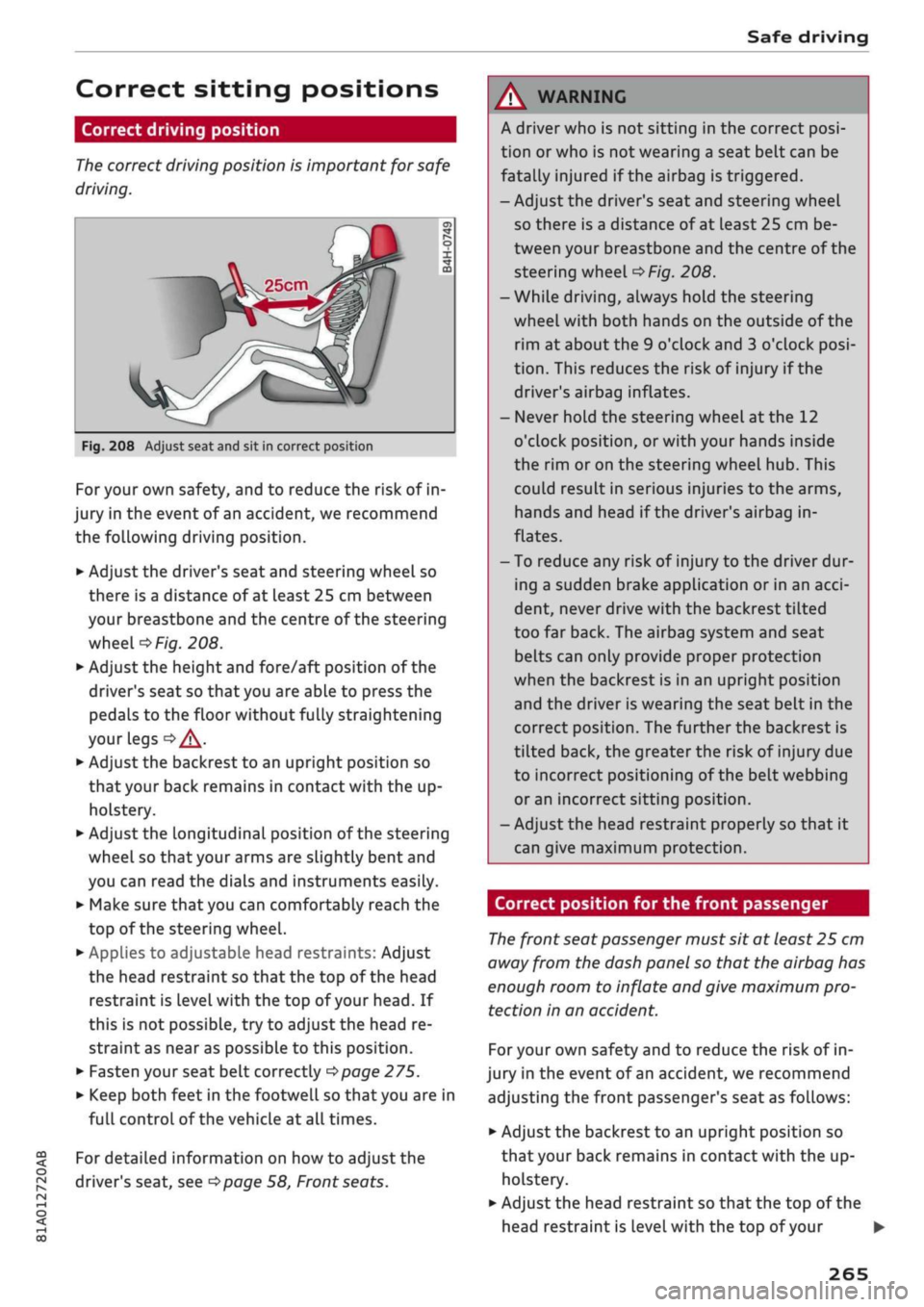
Fig.
208 Adjust seat and sit in correct position
For your own safety, and to reduce the risk of in
jury in the event of an accident, we recommend
the following driving position.
•
Adjust the driver's seat and steering wheel so
there is a distance of at least 25 cm between
your breastbone and the centre of the steering
wheel
o>F/g.
208.
•
Adjust the height and fore/aft position of the
driver's seat so that you are able to press the
pedals to the floor without fully straightening
your legs
oA.
•
Adjust the backrest to an upright position so
that your back remains in contact with the up
holstery.
*•
Adjust the longitudinal position of the steering
wheel so that your arms are slightly bent and
you can read the dials and instruments easily.
•
Make sure that you can comfortably reach the
top of the steering wheel.
•
AppLies to adjustable head restraints: Adjust
the head restraint so that the top of the head
restraint is
level
with the top of your head. If
this is not possible, try to adjust the head re
straint as near as possible to this position.
•
Fasten your seat belt correctly
^>page
275.
•
Keep both feet in the footwell so that you are in
full controL of the vehicle at all times.
For detailed information on how to adjust the
driver's seat, see
^>page
58, Front seats.
A WARNING
A driver who is not sitting in the correct
posi
tion or who is not wearing a seat belt can be
fatally injured
if
the airbag is triggered.
- Adjust the driver's seat and steering wheel
so there is a distance of at least 25 cm be
tween your breastbone and the centre of the
steering wheel
^>Fig.
208.
-While driving, always hold the steering
wheel with both hands on the outside of the
rim at about the 9 o'clock and 3 o'clock
posi
tion.
This reduces the risk of injury if the
driver's airbag inflates.
- Never hold the steering wheel at the 12
o'clock position, or with your hands inside
the rim or on the steering wheel hub. This
could result in serious injuries to the arms,
hands and head if the driver's airbag in
flates.
- To reduce any risk of injury to the driver dur
ing a sudden brake application or in an
acci
dent, never drive with the backrest tilted
too far back. The airbag system and seat
belts can only provide proper protection
when the backrest is in an upright position
and the driver is wearing the seat belt in the
correct position. The further the backrest is
tilted back, the greater the risk of injury due
to incorrect positioning of the belt webbing
or an incorrect sitting position.
- Adjust the head restraint properly so that it
can give maximum protection.
Correct position for the front passenger
The
front seat passenger must sit at least 25 cm
away from the dash panel so that the airbag has
enough room to inflate and give maximum pro
tection in an accident.
For your own safety and to reduce the risk of in
jury in the event of
an
accident, we recommend
adjusting the front passenger's seat as follows:
•
Adjust the backrest to an upright position so
that your back remains in contact with the up
holstery.
•
Adjust the head restraint so that the top of the
head restraint is level with the top of your
265
Page 277 of 364
Safe driving
•
Distribute the load evenly in the luggage com
partment.
•
Place heavy items as far forward as possible in
the luggage compartment and secure them
properly
<^>Fig.
214.
•
Secure the load with the stretch net* or with
non-elastic straps secured to the fastening
rings
^>page
62.
© CAUTION
A WARNING
- Loose items in the luggage compartment
are a safety hazard: they can move suddenly
and impair the handling of the vehicLe as a
result of the change in weight distribution.
- In an accident or a sudden manoeuvre, loose
objects in the passenger compartment can
be flung forward - risk of injury! Always
stow objects safely in the luggage compart
ment and secure them on the fastening
rings.
Use suitable securing straps, particu
larly when transporting heavy objects.
- Transporting heavy objects may affect the
vehicle's handling by shifting the centre of
gravity - this could cause an accident. Take
extra care when driving and adjust your
speed accordingly.
- Never exceed the maximum axle loads or
the maximum gross weight for the vehicLe
^>page
342. Exceeding the permitted axle
loads or gross weight Limit can affect the ve
hicle's handling characteristics, and increase
the risk of accidents, personal injuries or
damage to the vehicle.
- Never leave your vehicLe unattended when
the boot lid is open. Children could climb in
to the boot and close the boot lid from the
inside.
In this case the child would be un
able to get out of the vehicle without help.
This could have fatal consequences.
- Never allow children to play in or around the
vehicle. Always close and lock the boot lid
and all the doors when you leave the
vehi
cle.
- Never let passengers ride in the luggage
compartment. All occupants must be prop
erly restrained by the seat belts at all times
•=>
page
27'5.
Make sure that no hard objects chafe against
the wires of the heating element in the rear
window and damage them.
©
Note
- The tyre pressure must be adjusted accord
ing to the load the vehicle is carrying
<^>page
307.
- Air circulation in the vehicle helps reduce
fogging of the windows. Used air escapes
through ventilation slots in the rear of the
vehicle. Make sure that these ventilation
slots are not obstructed.
- Suitable belts for securing loads to the fas
tening rings* are commercially available.
Fastening rings
Unsecured loads are a hazard to all vehicle occu
pants.
There are fastening rings in the luggage com
partment which can be used to secure luggage
and other objects
^>page
62.
•
Use the fastening rings to secure items safely
in the luggage compartment
<=> A.
During a collision or an accident, even small and
light objects can possess so much energy that
they can cause very severe injuries. The amount
of this "kinetic energy" depends on the speed of
the vehicLe and the weight of the object. The
most significant factor, however, is the speed of
the vehicLe.
For example: an object weighing 4.5 kg is lying
unsecured in the vehicle. During a frontal
colli
sion at a speed of 50 km/h, this object generates
a force corresponding to 20 times its weight.
That means that the effective weight of the ob
ject increases to about 90 kg. You can imagine
the severity of the injuries which might be sus
tained if this "projectile" strikes an occupant as it
flies through the passenger compartment. •
00
273
Page 283 of 364
Seat belts
CO
<
O
rN
iv
rN
•-i
00
A WARNING
During pregnancy, women should especially
make sure to wear the lap portion of the seat
belt as low as possible across the hips so that
there is no pressure on the stomach.
Seat belt height adjustment
Applies to: vehicles with seat belt height adjustment
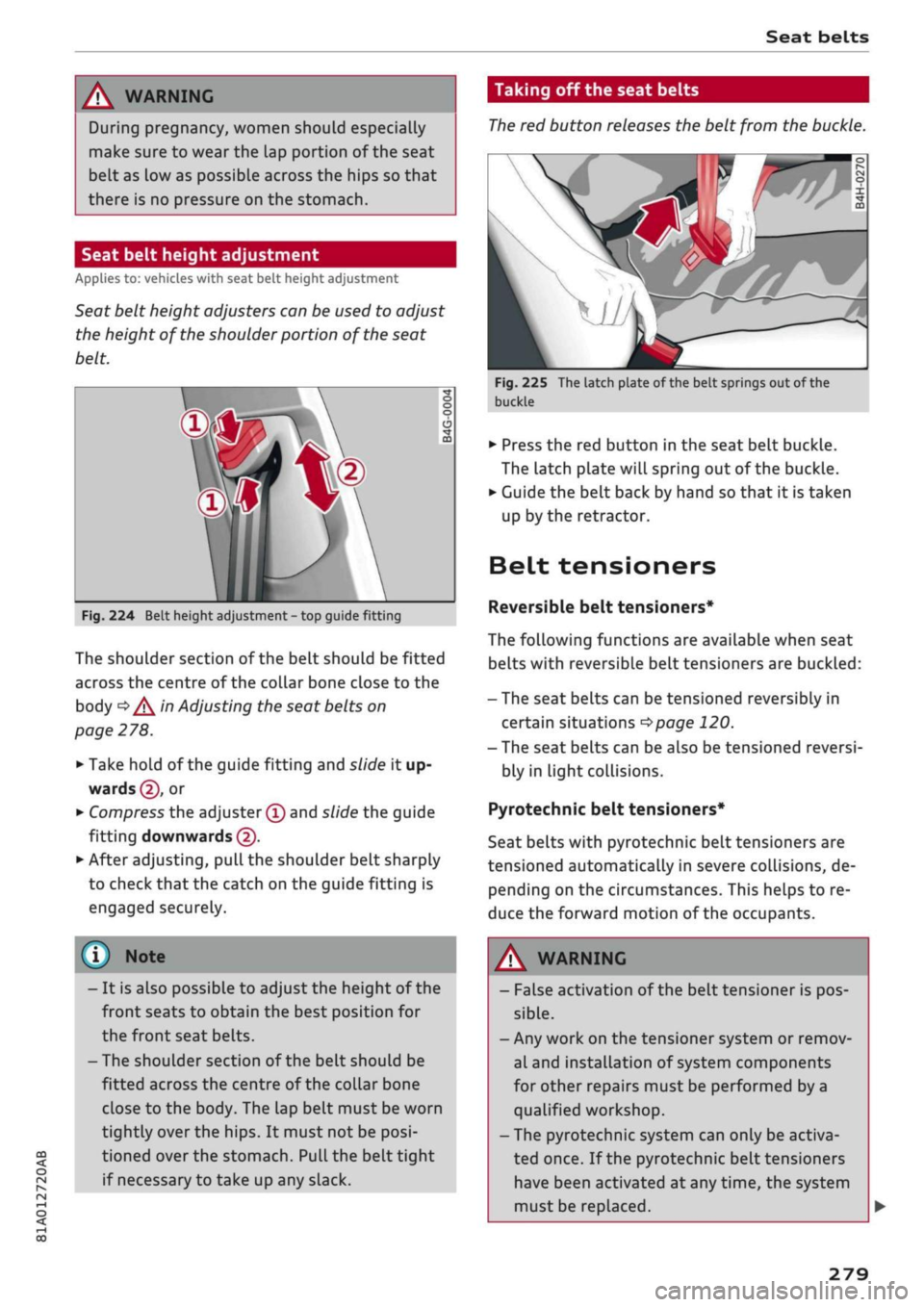
Seat belt height adjusters can be used to adjust
the height of the shoulder portion of the seat
belt.
V:
Fig.
224 Belt height adjustment - top guide fitting
The shoulder section of the belt should be fitted
across the centre of the collar bone close to the
body
^^
in Adjusting the seat belts on
page 278.
*•
Take hold of the guide fitting and slide it up
wards
@,
or
•
Compress the adjuster
(T)
and slide the guide
fitting downwards
@.
•
After adjusting, pull the shoulder belt sharply
to check that the catch on the guide fitting is
engaged securely.
(J)
Nol
- It is also possible to adjust the height of the
front seats to obtain the best position for
the front seat belts.
-The shoulder section of the belt should be
fitted across the centre of the collar bone
close to the body. The lap belt must be worn
tightly over the hips. It must not be
posi
tioned over the stomach. Pull the belt tight
if necessary to take up any slack.
Taking off the seat belts
The
red button releases the belt from the buckle.
Fig.
225 The latch plate of the belt springs out of the
buckle
•
Press the red button in the seat belt buckle.
The latch plate will spring out of the buckle.
•
Guide the belt back by hand so that it is taken
up by the retractor.
Belt tensioners
Reversible
belt tensioners*
The following functions are available when seat
belts with reversible belt tensioners are buckled:
- The seat belts can be tensioned reversibly in
certain situations
^>page
120.
- The seat belts can be also be tensioned reversi
bly in light collisions.
Pyrotechnic belt tensioners*
Seat belts with pyrotechnic belt tensioners are
tensioned automatically in severe collisions, de
pending on the circumstances. This helps to re
duce the forward motion of the occupants.
A,
WARNING
- False activation of the
belttensioner
is pos
sible.
- Any work on the tensioner system or remov
al and installation of system components
for other repairs must be performed by a
qualified workshop.
- The pyrotechnic system can only be activa
ted once. If the pyrotechnic belt tensioners
have been activated at any time, the system
must be replaced.
279
Page 291 of 364

Airbag system
CO
< o rN
iv
rN
•-i
•H
00
The head-protection airbag system is triggered in
certain types of side collision
^>Fig.
235. Further
airbag systems may also be triggered, depending
on the circumstances.
When the system is triggered, the airbag fills
with a propellant gas and covers the entire area
in front of the side windows, including the door
pillars. The head-protection airbag inflates to
soften the impact if an occupant strikes parts of
the interior or objects outside the vehicLe with
their head. By reducing the head impact and re
straining uncontrolled movement of the head,
the airbag also reduces the forces acting on the
neck.
In order to provide the desired extra protection in
an accident, the airbags have to inflate extremely
rapidly (within fractions of
a
second).
Important safety notes on the head-
protection airbags
There
are a number of safety points concerning
the airbag system which you should remember.
This will help to reduce the risk of injury in an ac
cident.
A WARNING
- It is important to ensure that the area
around the openings for the head-protec
tion airbags remains unobstructed at all
times,
so that the airbags can infLate prop
erly if needed.
- The built-in coat hooks should only be used
for lightweight clothing. Do not leave any
heavy or sharp-edged objects in the pockets.
When using the coat hooks, do not hang the
clothes on coat hangers.
- The space between the passengers and the
head-protection airbags must never be oc
cupied by children, other passengers or
pets.
Passengers should never lean out or
put
a
hand
or
arm out of the window while
the vehicle is in motion.
- Do not move the sun visors out to cover the
side windows if there is anything attached
to them (such as pens or
a
garage door
opener). These objects could cause injury if
the head-protection airbag is triggered.
The sensors for the airbags are Located in
the front doors. You must therefore not
make any modifications to the doors or door
trim (e.g. retrofitting loudspeakers),
as
this
could impair the function of the side air-
bags.
Any damage to the front doors could
Lead to faults in the system. Repairs or any
other work on the front doors must there
fore always be carried out by
a
qualified
workshop.
Sun blinds fitted on the rear doors must not
obstruct or impair the airbags in any way.
If unsuitable accessories are installed near
the head-protection airbag, the protection
afforded by the airbag can be seriously im
paired if the system is triggered. When the
head-protection airbag opens, parts of
these accessories could be thrown into the
vehicle and injure passengers
^>page
340.
Any work involving the head-protection air-
bags,
or removal and installation of the air-
bag components for other repairs (such as
repairs to the roof liner), must always be
performed by
a
qualified workshop. Other
wise the airbag system may fail to work
properly.
287
Page 292 of 364
Airbag system
Deactivating the front
passenger's airbag
Applies to: vehicles with key-operated switch for front pas
senger's airbag
If
an
airbag has been deactivated, it should be
reactivated as soon as possible so that it can
continue to give the required protection.
••
-,
CG
^
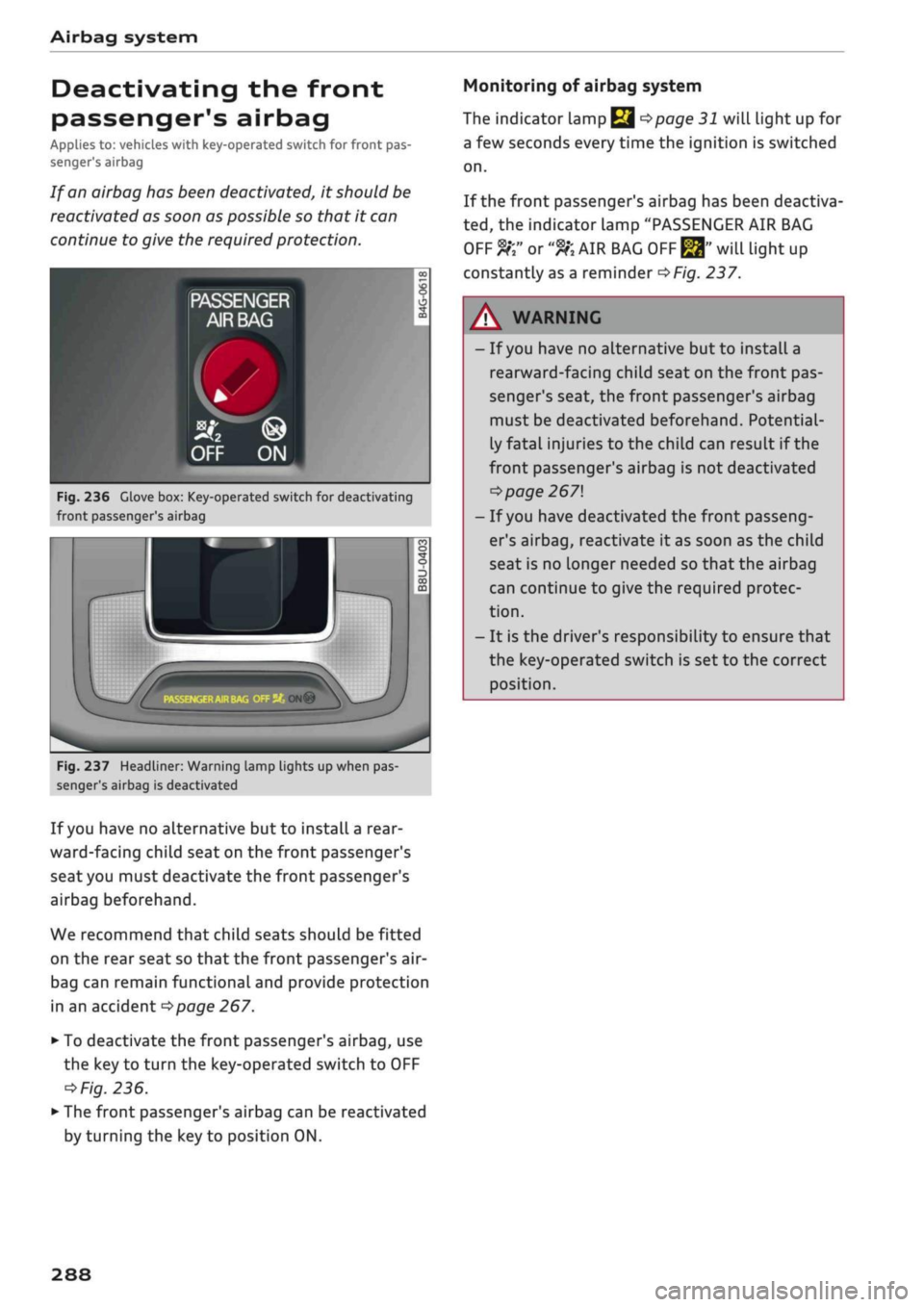
Fig.
236 Glove box: Key-operated switch for deactivating
front passenger's airbag
r
;•••;
:
m
^
hu
ON®
Fig.
237 Headliner: Warning lamp lights up when pas
senger's airbag is deactivated
If
you
have no alternative but to install
a
rear
ward-facing child seat on the front passenger's
seat you must deactivate the front passenger's
airbag beforehand.
We recommend that child seats should be fitted
on the rear seat so that the front passenger's air-
bag can remain functional and provide protection
in an accident
^>page
267.
•
To deactivate the front passenger's airbag, use
the key to turn the key-operated switch to OFF
=*
Fig.
236.
•
The front passenger's airbag can be reactivated
by turning the key to position ON.
Monitoring of airbag system
The indicator Lamp
Q ^>page
31 will light up for
a few seconds every time the ignition is switched
on.
If the front passenger's airbag has been deactiva
ted,
the indicator Lamp "PASSENGER AIR BAG
OFF ft" or
"9K
AIR BAG
OFF ^"
will light up
constantly as a reminder
^>Fig.
237.
A WARNING
- If
you
have no alternative but to install a
rearward-facing child seat on the front pas
senger's seat, the front passenger's airbag
must be deactivated beforehand. Potential
ly fatal injuries to the child can result if the
front passenger's airbag is not deactivated
•=>
page 267
- If
you
have deactivated the front passeng
er's airbag, reactivate it as soon as the child
seat is no longer needed so that the airbag
can continue to give the required protec
tion.
- It is the driver's responsibility to ensure that
the key-operated switch is set to the correct
position.
288
Page 299 of 364

Checking and topping up fluids
CO
rN
IV
rN
•-i
00
Emission controL
systems
Catalytic converter
Applies to: vehicles with petrol engine
The vehicle must only be used with unleaded pet
rol,
otherwise the catalytic converter will be ir
reparably damaged.
Never allow the fuel tank to run completely dry,
as the irregular supply of fuel can cause misfir
ing.
This allows unburnt fuel to enter the exhaust
system,
which can cause overheating and dam
age to the catalytic converter.
Diesel particulate filter
Applies to: vehicles with diesel engine
The diesel particulate filter can filter out almost
all soot particles contained in the exhaust gas. In
normal driving conditions the filter is self-clean
ing.
Should the self-cleaning function of the filter
not be able to operate, e.g. when the vehicle is
continuously used only for short trips, the filter
becomes obstructed with soot and the indicator
lampnf°r
the
diesel particulate filter Lights up
cépage
34.
A WARNING
The exhaust system is very hot when the
vehi
cle is being driven and after the engine has
been switched off.
- Never touch the tailpipes when they are hot
- risk of burns!
- Because of the high temperatures which can
occur in the emission controL system, do not
park the vehicle where the exhaust can
come into contact with flammable materials
under the car (e.g. on grass or at the forest
edge) - risk of fire!
- Do not apply any underseal agents in the
area around the exhaust system - risk of
fire!
Engine compartment
Working on components in the engine
compartment
Extra caution is necessary when working on com
ponents in the engine compartment.
Always be aware of the danger of injury and
scalding as well as the risk of accident or fire
when working in the engine compartment (e.g.
when checking and refilling fluids). Always ob
serve the warnings listed below and follow all
normal safety precautions. The engine compart
ment of any motor vehicle is a potentially haz
ardous area
oA-
A WARNING
- Switch off the engine.
-Switch off the ignition.
-Applythe
parking brake.
- On vehicles with manual gearbox place the
gear lever in neutral, on vehicles with auto
matic gearbox move the selector lever to
position P.
- To avoid the risk of being scalded, never
open the bonnet if
you
see steam or coolant
escaping from the engine compartment.
Wait until no steam or coolant can be seen
before opening the bonnet.
- Wait for the engine to cool down.
- Keep children away from engine compart
ment.
- Never spill fluids on a hot engine. These
flu
ids can cause a fire (e.g. radiator
anti
freeze).
- Take care not to cause short circuits in the
electrical system.
- When working in the engine compartment
be aware that the radiator fan may start
running suddenly, even if the ignition is
switched off - risk of injury!
- Do not unscrew the cap on the expansion
tank when the engine is hot. The cooling
system is under pressure.
- Protect face, hands and arms by covering
the cap with a large, thick rag to protect
against escaping coolant and steam.
295