warning light AUDI Q2 2021 Owner´s Manual
[x] Cancel search | Manufacturer: AUDI, Model Year: 2021, Model line: Q2, Model: AUDI Q2 2021Pages: 364, PDF Size: 87.77 MB
Page 133 of 364
Driver assist systems
CO
< o rN
r>
rN
t-H
o < 00
-The automatic brake application with in
creasing brake force can be cancelled by ap
plying the brakes yourself or by pressing the
accelerator firmly.
- In certain situations, a warning may be giv
en by the rear cross-traffic assist even if
there is no traffic in the critical zone, for in
stance when parking or manoeuvring the ve
hicle in reverse.
- The rear cross-traffic assist is deactivated
automatically if you deactivate the
ESC.
-The rear cross-traffic assist is switched on/
off via the parking aid
^>page
134.
-The system is not available in towing mode.
Driver messages
Applies to: vehicles with Audi side assist
Should the side assist be deactivated automati
cally, a driver message will appear in the instru
ment cluster display.
O
Audi side assist: system fault!
The system cannot detect vehicles reliably and
will be deactivated. The sensors are out of align
ment or defective. Have the system checked by a
qualified workshop soon.
O
Audi side assist: currently unavailable. No
sensor vision
O
Audi side assist: currently unavailable.
Sen
sor view restricted due to surroundings. See
owner's manual
The radar sensors are blocked. The area in front
of the sensors must not be obstructed by bicycle
racks,
stickers, deposits or any other substances.
If necessary, clean the area in front of the
sen
sors
^>page
128, Fig. 120.
O
Audi side assist: currently unavailable
The side assist is temporarily inoperative and
cannot be switched on (for instance if the battery
is not sufficiently charged).
O
Audi side assist: unavailable in towing mode
2
Audi side assist: unavailable in towing mode
The side assist function will be switched off auto
matically after a short time when the electrical
connector for the trailer socket is plugged in on
vehicles with a factory-fitted towing bracket. If
the towing bracket is not factory-fitted the side
assist function may not be switched off automat
ically. The side assist must not be used when
towing a trailer.
O Rear
parking aid: obstacle detection limited
The rear cross-traffic assist is not available. Ei
ther the ESC is switched off or the radar sensors
may be obstructed by a bicycle rack, stickers,
leaves, snow or similar objects. Switch on the ESC
or, if necessary, clean the area in front of the
sen
sors
<3page
128, Fig. 120. If this message re
mains displayed, drive to a qualified workshop
soon and have the fault rectified.
Audi drive select
Introduction
Applies to: vehicles with Audi drive select
Audi drive select alLows you to use different set
ups on your vehicle. The modes efficiency*, com
fort, auto and dynamic allow the driver, for ex
ample,
to change from a sporty mode to a more
comfortable one via the
&&
button in the centre
console or via the infotainment system. In
addi
tion,
the individual* mode allows you to adapt
the vehicle set-up to
suit
your personal driving
style.
For example, you might choose to combine
a more dynamic engine set-up with a lighter
steering response.
Description
Applies to: vehicles with Audi drive select
The possible vehicle set-up in each mode de
pends on which equipment is installed on your
vehicle. The engine and steering are basic parts
of your vehicle which are always included in the
set-up.
Engine and automatic gearbox*
The response of the engine and automatic
gear
box* to accelerator pedal movements will be
more spontaneous or balanced, depending on
131
Page 136 of 364
Parking aids
Parking aids
General notes
Applies to: vehicles with rear parking aid/parking system
plus/reversing camera/park assist
Various systems are available to help you when
parking or manoeuvring in tight spaces, depend
ing on the equipment fitted on your vehicLe.
The rear parking aid gives an acoustic warning if
there are any obstacles behind the car
cépage
135.
When you are parking, the parking system plus
warns you acoustically and optically about obsta
cles detected in front of and behind the vehicLe
^page
135.
The reversing camera uses the infotainment sys
tem display to show a picture of the area behind
the vehicle captured by the camera. This picture
helps you to park the vehicle parallel or perpen
dicular to the roadside. In addition, you are assis
ted by the functions of the parking system plus
^>page
137.
The park assist helps you to find suitable parking
spaces, to manoeuvre the vehicLe into spaces par
allel or perpendicular to the roadside and to drive
out of spaces parallel to the kerb
^>page
139. It
also includes the functions of the parking system
plus
^page
135 and additionally monitors the
area at the side of the vehicle
(f) ^page
135,
Fig. 124.
A
WARNING
- Always watch the road and the area sur
rounding the vehicLe. The electronic systems
cannot replace the full concentration of the
driver. The driver is always responsible for
safety during parking and all other manoeu
vres.
- Please note that certain surfaces, such as
clothing fabrics, cannot be detected or dis
played by the system - risk of accident!
- The sensors and cameras have bLind spots in
which neither people nor objects are regis
tered.
It is particularly important to ensure
that there are no small children or animals
near the vehicLe - risk of accident!
- Always keep a close watch on the area
around the vehicLe and make full use of the
rear-view mirrors.
- Impacts or damage to the radiator grille,
bumper, wheel arches or underbody can
cause misalignment of the sensors. This can
impair the effectiveness of the parking aids.
Have the systems checked by a qualified
workshop.
(T)
CAUTION
- The system may not always be able to de
tect objects such as the following:
- Chains, trailer draw bars, posts or fences
- Objects above the sensors, such as wall
protrusions, etc.
- Objects with certain surfaces or struc
tures,
such as wire fences or powder snow
- As your car moves closer to low obstacles,
they may disappear from the sensors' field
of vision. Please note
that
you will no longer
be warned about these obstacles.
- Remember to maintain sufficient clearance
from the kerb to avoid damaging the wheel
rims.
(T)
Note
- In certain situations, a warning may be giv
en by the system even if there is no obstacle
within range of the sensors. This can be
caused by the following, for instance:
- Certain road surfaces or long grass
- External ultrasound sources, e.g. from
street cleaning vehicles
- Heavy rain or snow or dense exhaust
fumes
-To familiarise yourself with the system, we
recommend
that
you practise parking in a
quiet location or a car park. The weather
and light conditions should be good.
- You can change the display and adjust the
volume and pitch of the beeps
^>page
143.
- Please refer to the notes on the use of a
towing bracket
^page
144.
- There is a slight delay in the picture dis
played on the infotainment display. •
134
Page 138 of 364
Parking aids
comes
closer than before, the tone will sound
again.
If the tone is muted and the obstacLe is
further away than before, no tone will sound.
Please watch the area surrounding the vehicle
when driving off.
©
Zone
(§)*
is detected and analysed as the
vehi
cLe is moving past. When you switch the
igni
tion off and on again or open the door, or af
ter the vehicle has been stationary for
a
while,
the ambient surroundings may have changed.
Zone
0*
is displayed in black on the infotain
ment display for this reason.
Switching on/off
Applies to: vehicles with parking system plus/park assist
Fig.
125 Centre console: Button for parking aid
^H i m
1 •rif/^^^y^H <
12|
1 )
'.•;"
•BiHiSi
-
Fig.
126 Infotainment display: Proximity graphic
Switching on
•
Engage reverse gear, or
•
Press the
P»i
button in the centre console
^>Fig.
125. You will hear
a
brief acknowledge
ment tone and the LED in the button will light
up-
Switching
off
• Drive forwards faster than 10 km/h, or
*•
Press the
?">k
button, or
•
Switch off the ignition.
Automatic activation
The parking aid is activated automatically when
the vehicLe approaches an obstacLe from a dis
tance of approx. 95 cm at speeds below 10 km/h.
You will hear the warning beeps when the obsta
cle is within a distance of approx. 50 cm. If the
parking aid is switched off by pressing the
P*A
button,
it is only reactivated automatically if one
of the following conditions has been met:
- The vehicle is driven faster than 10 km/h.
- The ignition is switched off and on again.
-The parking brake is applied and released
again.
- The selector lever is in position P (automatic
gearbox).
Segments in the graphic display
You can estimate the distance to an obstacle by
referring to the segments in front of and behind
the vehicLe or the segments surrounding the ve
hicle (on
vehicLes
with park assist*)
^>Fig.
126.
The red lines* indicate the anticipated path of the
vehicle, depending on the steering wheel angle.
A white segment indicates an obstacle that has
been detected beyond the path of
travel.
Red
segments represent objects detected within the
path of
travel.
The closer the vehicle gets to the
obstacLe the closer the segments move towards
the vehicLe in the graphic. At the Latest when the
penultimate segment is highlighted the vehicle
has reached the danger (collision) zone. Obsta
cles within the danger (collision) zone are shown
in red, even if
they
are beyond the path of travel.
Stop moving immediately
•=>
A in General notes
on page 134,
•=>©
in General notes on page 134
136
Page 139 of 364
Parking aids
Reversing camera
CO
<
O
rN
iv
rN
t-H
o < 00
Introduction
Applies to: vehicles with reversing camera
Fig.
127 Diagram: Parking perpendicular to the roadside
The reversing camera assists you by displaying
orientation lines when you are parking or ma
noeuvring the vehicle.
General notes
Applies to: vehicles with reversing camera
Fig.
128
®
: Area covered by the reversing camera;
@:
area NOT covered by the reversing camera (example)
Fig.
129 Boot lid: Location of reversing camera (example)
The reversing camera is located above the rear
number plate. Please ensure
that
the lens of the
reversing camera
^>Fig.
129 is
kept
free of de
posits and any other substances which could im
pair the function of the parking aid. Notes on
cleaning
^>page
312.
Q)c$Fig.
128 represents the area covered
by
the
reversing camera. Only this area is shown in the
picture on the infotainment display. Objects out
of range of the camera in area (2) do not appear
in the picture.
WARNING
-Please observe the safety warnings
oA'fi
General notes on page 134.
- For safety reasons, you should not use the
system if the position and installation angle
of the reversing camera have been changed,
e.g.
due to an accident. Have it checked by a
qualified workshop.
- Only use the reversing camera to assist you
if it is supplying you with a good and clear
picture. The quality of the picture can be im
paired by adverse light, dirt on the lens or a
defect.
- Only use the reversing camera when the
boot lid is completely closed. The orienta
tion lines and blue markings are not shown
when the boot lid is open. Please make sure
that there are no objects mounted to the
rear end of the vehicle which could block the
view of the reversing camera.
- The camera lens enlarges and distorts the
field of
vision.
Objects on the screen are
modified and depicted inaccurately.
- In certain situations, people or objects on
the display may appear closer or further
away than they really are:
- Objects which are not touching the
ground,
such as the bumper of
a
parked
vehicle, a tow-bar or the rear end of
a
truck. In this case, do not use the orienta
tion Lines as a guide.
- When you are reversing from a horizontal
surface up a gradient or down a
hill.
-When approaching protruding objects.
- When the vehicle has been loaded with a
greater load on the rear.
137
Page 140 of 364
Parking aids
© CAUTIO
- Please observe the safety warnings
o©
in
General notes on page 134.
-The orange orientation lines on the infotain
ment display show the path of the rear end
of the vehicle if
you
were to reverse using
the current steering angle. Please note that
the front end of the vehicle swings out fur
ther than the rear. Please make sure you
keep a sufficient distance between the
vehi
cle and any obstacles to make sure that the
exterior mirror or edge of the vehicle do not
collide with the obstacles.
Switching on/off
Applies to: vehicles with reversing camera
Switching on
•
Engage reverse gear, or
•
Press the
P*A
button in the centre console
^>page
136, Fig. 125. You will hear
a
brief ac
knowledgement tone and the LED in the button
will Light up.
Switching off
•
Drive forwards faster than 10 km/h, or
•
Press the
P-A
button, or
•
Switch off the ignition.
-The graphic on the right of the display helps
identify the critical area of the vehicle.
- You can change the display and adjust the
volume of the beeps
^page
143.
Parking perpendicular to the roadside
Applies to: vehicles with reversing camera
This view can be used when parking your vehicle
in a garage or parking bay.
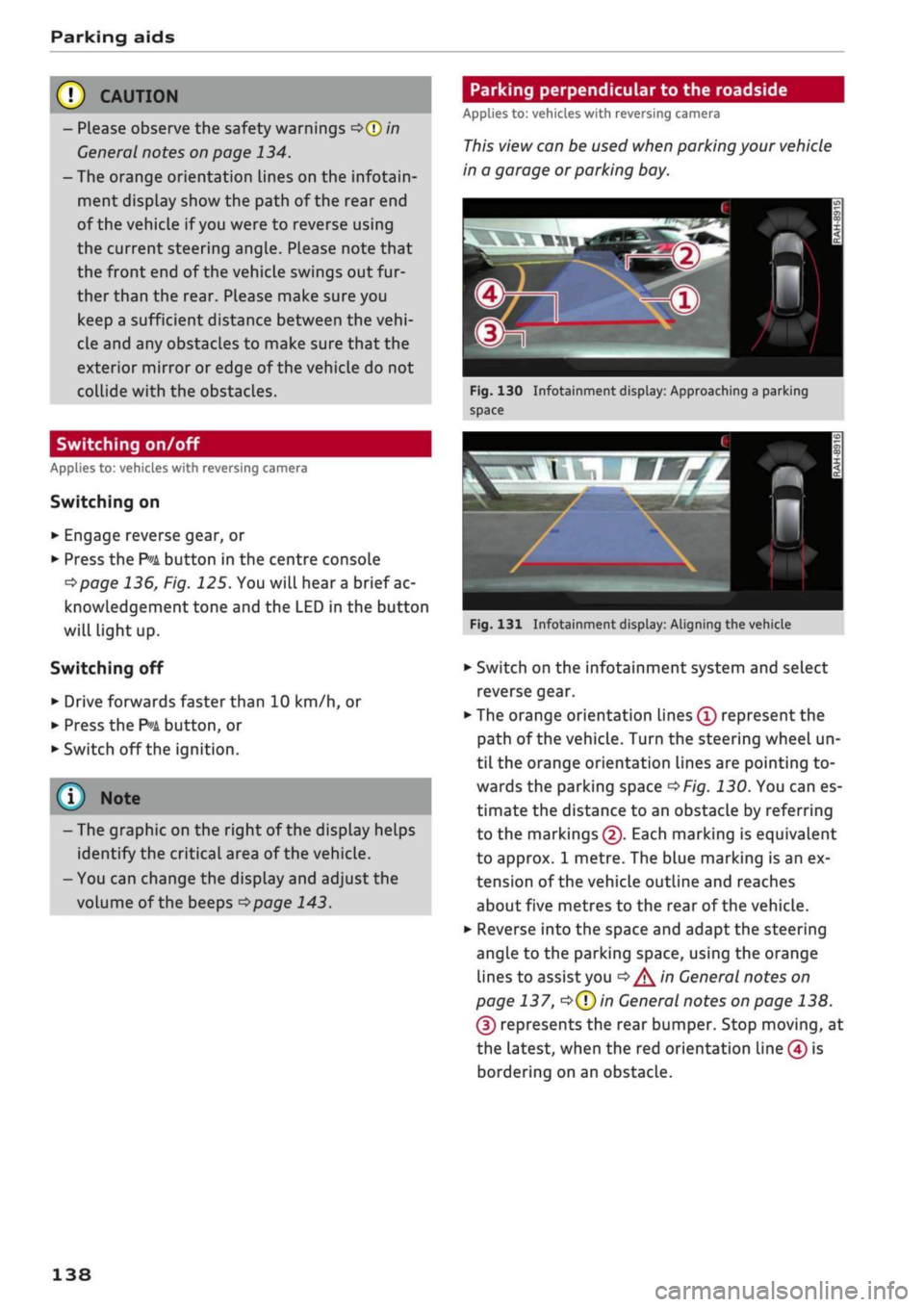
Fig.
130 Infotainment display: Approaching a parking
space
Fig.
131 Infotainment display: Aligning the vehicle
•
Switch on the infotainment system and select
reverse gear.
•
The orange orientation lines
(Ï)
represent the
path of the vehicle. Turn the steering wheel un
til the orange orientation lines are pointing to
wards the parking space
^>Fig.
130. You can es
timate the distance to an obstacLe by referring
to the markings
(2).
Each marking is equivalent
to approx. 1 metre. The blue marking is an ex
tension of the vehicle outline and reaches
about five metres to the rear of the vehicle.
•
Reverse into the space and adapt the steering
angle to the parking space, using the orange
lines to assist you
^>^in
General notes on
page 137,
*=>(T)in
General notes on page 138.
(3) represents the rear bumper. Stop moving, at
the latest, when the red orientation Line (4) is
bordering on an obstacle.
138
Page 142 of 364
Parking aids
- Please note that the park assist only
han
dles the steering. As the driver you are al
ways responsible for braking and accelerat
ing.
- It is the driver's responsibility to decide
whether a parking space shown in the dis
play is suitable for the vehicLe.
- The front of the vehicle swings out during
the parking manoeuvre. Please take all nec
essary measures to ensure that other road
users are not endangered.
- The steering wheel turns rapidly on its own
when parking the vehicle and leaving the
space.
Injury may result if
a
person reaches
between the spokes on the steering wheel
when it is turning.
(T)
CAUTION
- Please observe the safety warnings
•=>©
in
General notes on page 134.
- In certain situations, the park assist will
guide the vehicLe onto or across the kerb,
for instance if other vehicles are parked on
the kerb. You should always be ready to
take over the steering wheel in order to pre
vent damage to the tyres and/or wheel
rims.
- Certain conditions in and around the park
ing space can cause unexpected results
when parking.
- Pillars, posts, etc.
- Loose gravel, snow, ice, etc.
© Note
-The electronic stabilisation control (ESC)
must not be switched off during the parking
manoeuvre
^>page
146.
- The park assist cannot be used to park the
vehicle on tight bends.
- The park assist cannot be used to park the
vehicle if
a
trailer is attached and the elec
trical connector for the trailer socket is
plugged in.
Switching on and off
Applies to: vehicles with park assist
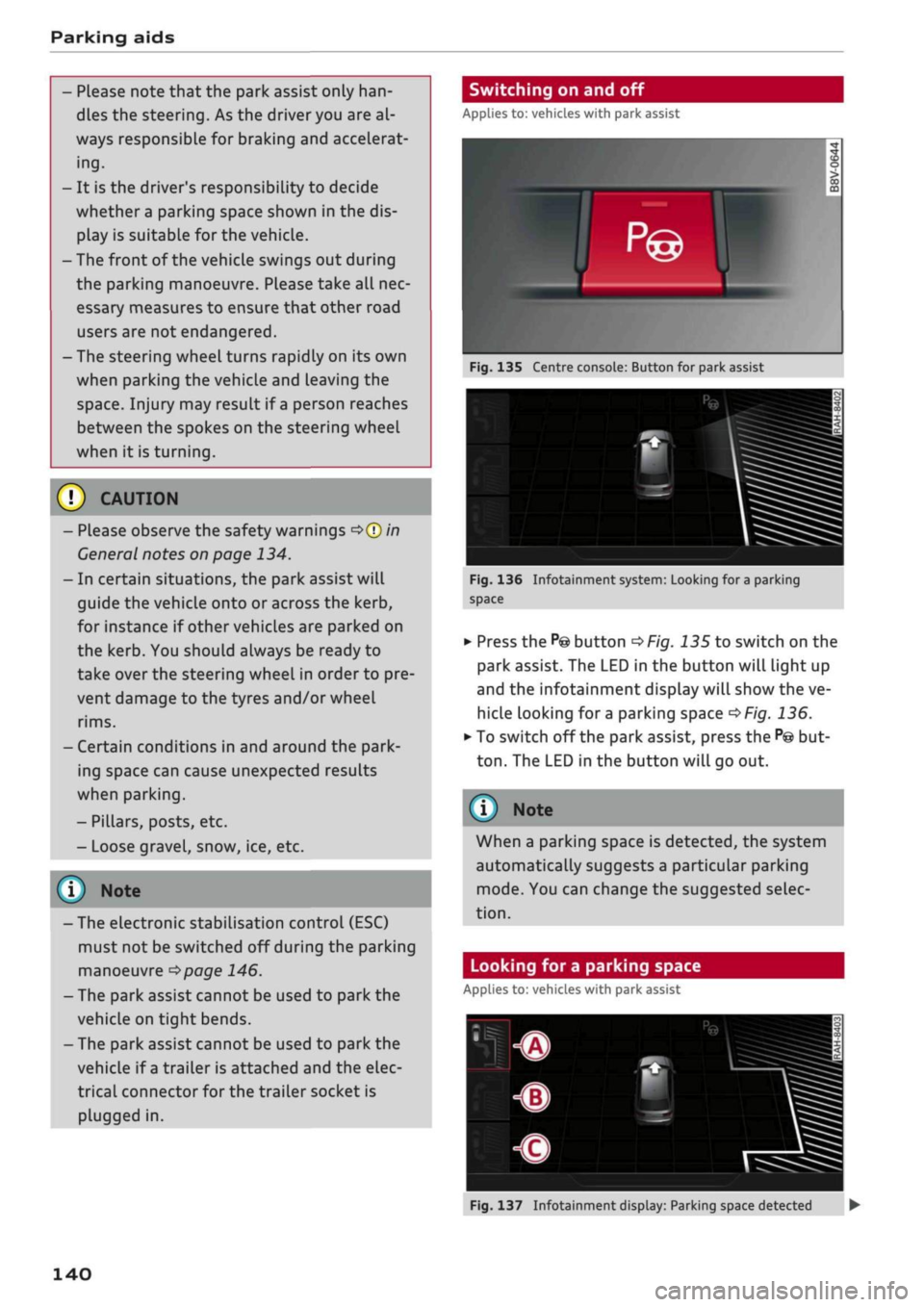
Fig.
135 Centre console: Button for park assist
^^i=^k—
Bp-"1
Fig.
136 Infotainment system: Looking for
a
parking
space
•
Press the
P@
button
^>Fig.
135 to switch on the
park assist. The LED in the button will light up
and the infotainment display will show the ve
hicle looking for
a
parking space
^>Fig.
136.
• To switch off the park assist, press the
P@
but
ton.
The LED in the button will go out.
© Note
When a parking space is detected, the system
automatically suggests a particular parking
mode.
You can change the suggested selec
tion.
Looking for a parking space
Applies to: vehicles with park assist
140
Fig.
137 Infotainment display: Parking space detected •
Page 148 of 364
Intelligent technology
Remember that the accident risk always in
creases
if
you
drive fast, especially
in
cor
ners
or
on a wet
or
slippery
road,
or if
you
follow too close behind the vehicle in front
of
you.
Please bear
in
mind that even
the
ESC
and
the
integrated systems cannot
compensate
for
the increased accident risk.
When accelerating
on
a uniformly slippery
surface
(for
instance
all
four wheels on
ice
or snow), press the accelerator gradually
and carefully. The driven wheels may other
wise start
to
spin
(in
spite
of
the integrated
control systems), which would impair the
car's stability and could lead
to
an accident.
© Note
The ABS and ASR systems can only work
properly
if
a 11
four tyres have a similar de
gree
of
wear. Any differences
in the
rolling
radius
of
the tyres can cause the system
to
reduce engine power when this
is not
de
sired.
The systems can make noises when they in
tervene.
Switching on/off
The ESC
is switched on automatically when
the
engine is started.
^OFF
1
y
CO
5
3
CO
Fig.
139 Centre console (top): ESC button
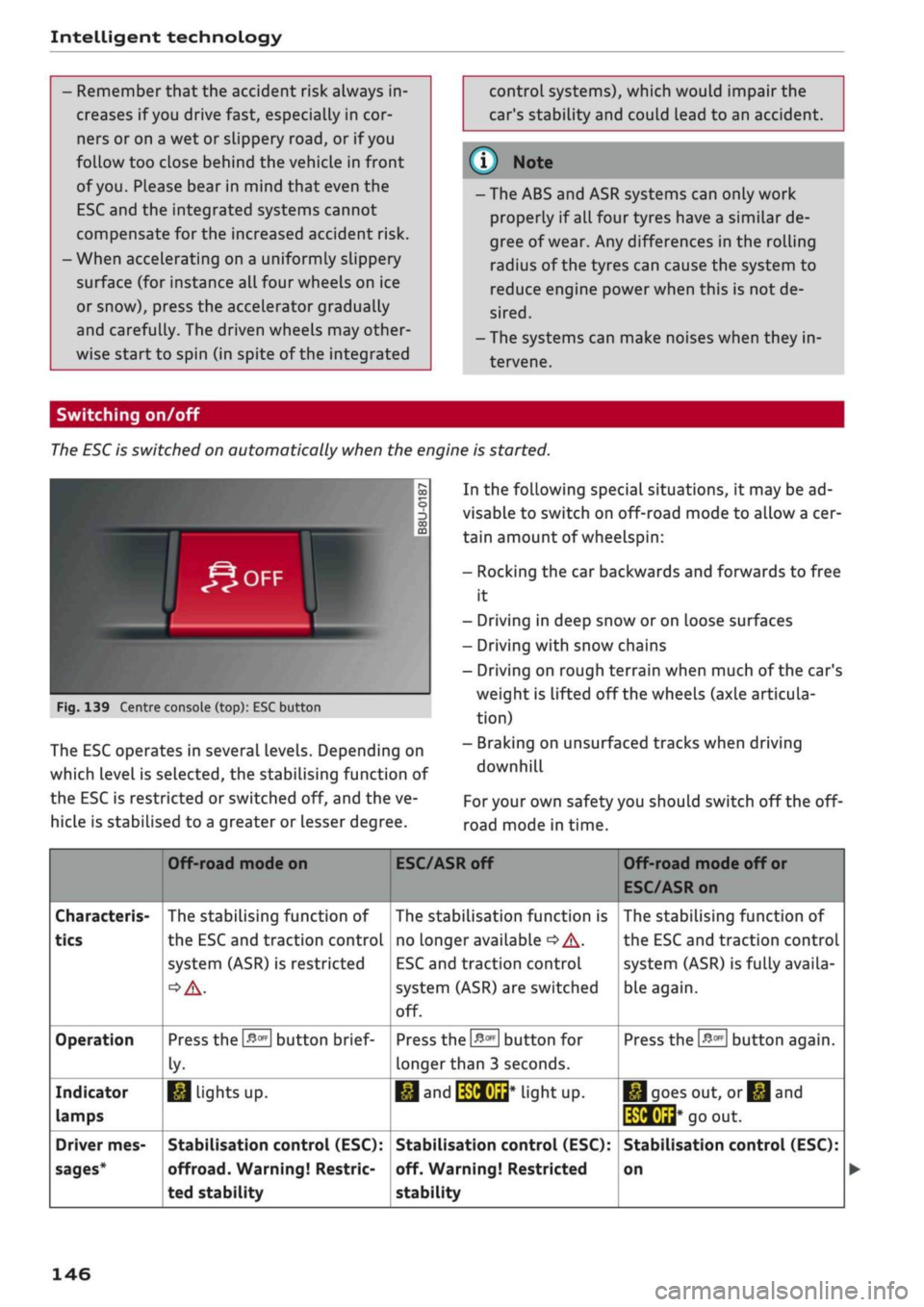
The ESC operates
in
several levels. Depending
on
which Level
is
selected,
the
stabilising function
of
the ESC
is
restricted
or
switched
off,
and the ve
hicLe
is
stabilised
to
a greater
or
Lesser degree.
In the following special situations,
it
may be ad
visable
to
switch on off-road mode
to
allow a cer
tain amount
of
wheelspin:
- Rocking
the car
backwards and forwards
to
free
it
- Driving
in
deep snow
or
on Loose surfaces
- Driving with snow chains
- Driving
on
rough terrain when much
of
the car's
weight
is
lifted
off
the wheels (axle articula
tion)
- Braking
on
unsurfaced tracks when driving
downhill
For
your own safety you should switch
off
the
off-
road mode
in
time.
Characteris
tics
Operation
Indicator
lamps
Driver mes
sages*
Off-road mode
on
The stabilising function
of
the ESC and traction controL
system (ASR)
is
restricted
Press the
&m
button brief
ly-
1*1
Lights
up.
Stabilisation control (ESC):
offroad.
Warning! Restric
ted stability
ESC/ASR
off
The stabilisation function
is
no Longer available
•=>
A-
ESC
and traction controL
system (ASR) are switched
off.
Press
the
&m
button
for
longer than
3
seconds.
•M and
IWHUrt*
liant UP.
Stabilisation control (ESC):
off. Warning! Restricted
stability
Off-road mode
off
or
ESC/ASR on
The stabilising function
of
the ESC and traction control
system (ASR) is fully availa
ble again.
Press the
#*
button again.
|*|goes
out,
or^and
të&Éid*
go
out.
Stabilisation control (ESC):
on
146
Page 149 of 364
 only if your driving ability and the traf
fic conditions allow yo")
Intelligent technology
/r\
WARNING
You should switch on the off-road mode or
switch off the ESC/traction control system
(ASR) only if your driving ability and the traf
fic conditions allow you to do so safely -
dan
ger of skidding!
- The stabilising function is restricted when
off-road mode is switched on. The driven
wheels may start to
spin,
causing the
vehi
cle to lose grip, in particular on slippery or
wet roads.
- When the ESC/traction control system
(ASR) is switched off, the vehicle will not be
stabilised.
Brakes
New brake pads
New brake pads do not give full braking effect for
the first 400 km, they must first be "bedded in".
However, you can compensate for the slightly re
duced braking effect by applying more pressure
on the brake pedal. Avoid placing a heavy load on
the brakes during the running-in period.
Wear
The rate of wear on the brake pads depends a
great deal on how you drive and the conditions in
which the vehicLe is operated. Negative factors
are,
for instance, city traffic, frequent short trips
or hard driving with abrupt starts and stops.
Noises
Brake noise may develop in certain situations, de
pending on the speed, braking force and ambient
conditions (such as temperature and relative hu
midity).
Effect of moisture and salt
In certain conditions, such as in heavy
rain,
early
morning dew, or after washing the car or driving
through water, the full braking effect can be de
layed by moisture (or in winter by ice) on the
discs and brake pads. The brakes should be
< "dried" by pressing the pedal to restore full brak-
R
ing effect.
When you are driving at higher speeds with the
windscreen wipers on, the brake pads are very
briefly brought into contact with the brake discs.
This automatic process which goes unnoticed by
the driver is carried out at regular intervals and is
intended to improve braking response in wet
con
ditions.
The effectiveness of the brakes can also be
tem
porarily reduced if the car is driven for some dis
tance without using the brakes when there is a
lot of salt on the road in winter. The layer of salt
that accumulates on the discs and pads can be
removed with a few cautious brake applications.
Corrosion
There may be a tendency for dirt to build up on
the brake pads and corrosion to form on the discs
if the car is used infrequently, or if
you
only drive
low mileages without using the brakes very
much.
If the brakes are not used frequently, or if corro
sion has formed on the discs, it is advisable to
clean off the pads and discs by braking firmly a
few times from a moderately high speed
•=> A-
Faults in the brake system
If the brake pedal travel should ever increase
suddenly, this may mean that one of the two
brake circuits has failed. Drive immediately to the
nearest qualified workshop and have the fault
rectified.
On the way to the dealer, be prepared
to use more pressure on the brake pedal and al
low for longer stopping distances.
Low brake fluid level
Malfunctions can occur in the brake system if the
brake fluid level is too low. The brake fluid level
is monitored electronically.
Brake servo
The brake servo amplifies the pressure you apply
to the brake pedal. It only works when the engine
is running. •
147
Page 150 of 364
Intelligent technology
/K
WARNING
- When applying
the
brakes
to
clean
off
de
posits
on the
pads and discs, select
a
clear,
dry
road.
Be sure
not to
inconvenience
or
en
danger other road users;
do not
risk an
acci
dent.
- Never
let the car
coast with
the
engine
switched
off
(this can cause accidents).
(T)
CAUTION
- Never
let the
brakes "drag"
by
leaving your
foot on
the
pedal when you
do not
really
in
tend
to
brake. This overheats
the
brakes,
re
sulting
in
longer stopping distances
and
greater wear.
- Before driving down
a
long,
steep gradient,
it
is
advisable
to
reduce speed
and
select
a
lower gear.
In
this way you will make use
of
the engine braking effect and relieve
the
load
on the
brakes.
If
you
still have
to use
the brakes,
it is
better
to
brake firmly
at in
tervals than
to
apply
the
brakes continuous-
Ly
-
If
the brake servo
is out of
action,
you must
apply considerably more pressure
to the
brake pedal than you normally would.
-
If
you
wish
to
equip
the
car with accessories
such as a front spoiler
or
wheel covers,
it is
important that
the
flow
of air to the
front
wheels
is not
obstructed, otherwise
the
brakes can overheat.
Electro-mechanical
power steering
Electro-mechanical power steering assists
the
driver when steering.
The degree
of
power assistance
is
adapted elec
tronically,
depending
on the
speed.
Warning/indicator lamps
and
driver
messages
| Do not drive vehicle: steering defective
If the warning lamp lights
up
permanently
and
the message appears, there
may be
a power
steering failure.
Stop
the
vehicle
in a
safe place
as
soon
as
possi
ble.
Do
NOT drive on. Obtain professional assis
tance.
S
Steering malfunction: you can continue driv
ing
If the indicator Lamp Lights up,
the
steering
re
sponse
may be
heavier
or
lighter than usual.
In
addition,
it is
possible that
the
steering wheel
will
be off
centre when driving
in a
straight line.
Drive slowly
to
a qualified workshop and have
the
fault rectified.
Note
You
can
drive
on if
the warnina/indicator
g/
Lamp
||
or y
|
lights
up
only briefly
Four-wheel drive
(quattro)
Applies to: vehicles with four-wheel drive
On
quattro models
the
engine power is distrib
uted
to all
four wheels.
General notes
On four-wheel drive vehicles,
the
engine power
is
distributed
to all
four wheels. The distribution
of
power
is
controlled automatically according
to
your driving style and
the
road conditions. Also
refer
to
^>page
145,
Electronic stabilisation con
trol
(ESC).
The four-wheel drive
is
specially designed
to
complement
the
superior engine power
of
your
Audi.
This combination gives
the car
exceptional
handling
and
performance capabilities
-
both
on
normal roads and
in
more difficult conditions,
such
as
snow and
ice.
Even
so (or
perhaps espe
cially
for
this reason),
it is
important
to
observe
certain safety points
<=> A-
Winter tyres
Thanks
to its
four-wheel drive, your
car
will have
plenty
of
traction
in
winter conditions, even with
•
148
Page 152 of 364
Intelligent technology
Dynamic power management
While the vehicle is moving, this function distrib
utes the available power to the various electrical
components and systems according to their re
quirements. It ensures that on-board systems do
not consume more electrical power than is being
generated,
and thus maintains the maximum
possible vehicle battery power level.
® Note
- The power management system is not able
to overcome the given physical limits.
Please remember that the power and life of
the vehicle battery are limited.
- If the indicator lamp
|3 ^page
31 appears,
the starting ability may be impaired.
Starting ability has first priority.
Short trips, city traffic and low temperatures all
place a heavy load on the vehicLe battery. In
these conditions a large amount of power is
con
sumed,
but only
a
small amount is supplied. The
situation is also critical if electrical equipment is
in use when the engine is not running. In this
case power is consumed when none is being
gen
erated.
In these situations you will be aware that the
power management system is intervening to
con
trol the distribution of electrical power.
When the vehicle is parked for long periods
If
you
do not drive your vehicle for a period of
several days or weeks, the power management
will gradually shut off the on-board systems one
by one, or reduce the amount of current they are
using.
This limits the amount of power consumed
and helps to ensure reliable starting even after a
long period. Certain convenience features, such
as remote controL unlocking, may not be availa
ble.
These functions will be restored when you
switch on the ignition and start the engine.
150
With the engine switched off
If
you
listen to the radio or use the other info
tainment functions when the engine is not
run
ning,
this will discharge the vehicle battery.
The infotainment display will show a warning
message before the battery power drops to a Lev
el where the starting ability is impaired. This
message warns you that the system you are using
will soon be switched off automatically. You
should therefore start the engine if
you
wish to
continue using the system.
When the engine is running
Although the alternator generates electrical
power, the vehicle battery can still become dis
charged while the vehicle is being driven. This can
occur when a lot of power is being consumed but
only
a
small amount supplied, especially if the
vehicle battery is not fully charged initially.
To restore the necessary energy balance, the sys
tem
will
then temporarily shut off the electrical
components that are using a lot of power, or re
duce the current they are consuming. Heating
systems in particular use a Large amount of elec
trical power. If
you
notice, for instance, that the
seat heating* or the rear window heater is not
working,
they may have been temporarily switch
ed off or regulated to a lower heat output. These
systems will be available again as soon as
suffi
cient electrical power is available.
You may also notice that the engine runs at a
slightly faster idling speed. This is quite normal,
and no cause for concern. The increased idling
speed allows the alternator to meet the greater
power requirement and charge the vehicLe bat
tery at the same time.
Information saved in the
control units
The vehicle is fitted in the factory with electronic
control units that, among other things, control
the engine and the gearbox. The controL units al
so monitor the exhaust system and the airbags.
The control units continually analyse data rele
vant to the vehicLe while you are driving. In the •