wheel AUDI Q2 2021 Owner´s Manual
[x] Cancel search | Manufacturer: AUDI, Model Year: 2021, Model line: Q2, Model: AUDI Q2 2021Pages: 364, PDF Size: 87.77 MB
Page 337 of 364
Fuses and bulbs
: -•.
-
i:i
m
R2 R3
F22
F-XII
F31
F30
:-:-.'
'.,
FM F43
F49
F!)3
F52
F51
R!,
a
R6
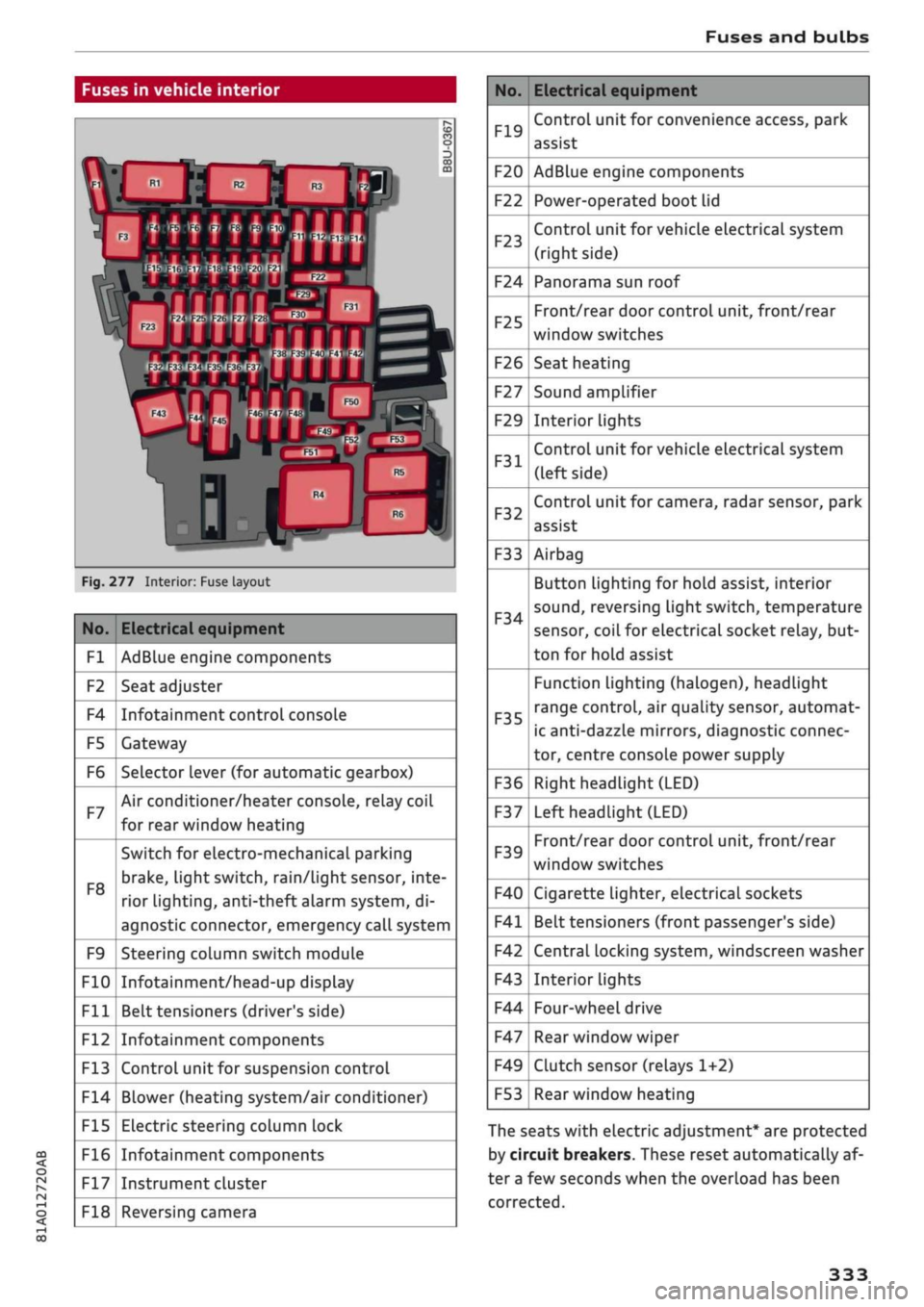
Fig.
277 Interior: Fuse layout
No.
Fl
F2
F4
F5
F6
F7
F8
F9
F10
Fll
F12
F13
F14
F15
F16
F17
F18
Electrical equipment
AdBlue engine components
Seat adjuster
Infotainment control console
Gateway
Selector lever (for automatic gearbox)
Air conditioner/heater console, relay coil
for rear window heating
Switch for electro-mechanical parking
brake,
light switch,
rain/Light
sensor, inte
rior lighting, anti-theft
aLarm
system, di
agnostic connector, emergency call system
Steering column switch module
Infotainment/head-up display
Belt tensioners (driver's side)
Infotainment components
Control unit for suspension control
Blower (heating system/air conditioner)
Electric steering column lock
Infotainment components
Instrument cluster
Reversing camera
No.
F19
F20
F22
F23
F24
F25
F26
F27
F29
F31
F32
F33
F34
F35
F36
F37
F39
F40
F41
F42
F43
F44
F47
F49
F53
Electrical equipment
Control unit for convenience access, park
assist
AdBlue engine components
Power-operated boot lid
Control unit for vehicle electrical system
(right side)
Panorama sun roof
Front/rear door control unit, front/rear
window switches
Seat heating
Sound amplifier
Interior lights
Control unit for vehicle electrical system
(left side)
Control unit for camera, radar sensor, park
assist
Airbag
Button Lighting for hold assist, interior
sound,
reversing light switch, temperature
sensor, coiL for electrical socket reLay, but
ton for hold assist
Function lighting (halogen), headlight
range control, air quality sensor, automat
ic anti-dazzle mirrors, diagnostic connec
tor, centre console power supply
Right headlight (LED)
Left headlight (LED)
Front/rear door control unit, front/rear
window switches
Cigarette lighter, electrical sockets
Belt tensioners (front passenger's side)
Central locking system, windscreen washer
Interior lights
Four-wheel drive
Rear window wiper
Clutch sensor (relays 1+2)
Rear window heating
The seats with electric adjustment* are protected
by circuit breakers. These reset automatically af
ter a few seconds when the overload has been
corrected.
333
Page 341 of 364

Fuses and bulbs
CO
rN
IV
rN
•-i
00
Changing bulb for main beam headlight
Applies to: vehicles with halogen headlights
Removing cover (wheel housing liner)
Applies to: vehicles with halogen headlights
y33pTCk
• **•** --•__
«flj \\
ÛV\-^
^L M
i
in
CO
ro
o
3
CO
m
k
|
Fig.
284 Headlight: Plastic connector for main beam
headlight
Fig.
285 Headlight: Fitting plastic connector for main
beam headlight
Removing
• Pull the plastic connector together with the
bulb out of the headlight housing
*Fig.
284.
• Disconnect the plastic connector from the base
of the bulb
^/K
in General notes on page 334.
Installing
• Push the new bulb into the plastic connector so
that it is securely seated
<=>^
in General notes
on page 334.
• Insert the bulb into the headlight housing.
• Press the plastic connector
*Fig.
285 into the
housing until it engages.
• Check that the bulb is seated correctly by look
ing through the headlight itself.
• Put the cover back on.
• Check whether the new bulb is working.
Fig.
286 Wheel housing liner: Access to daytime running
light and dipped headlight bulbs
Fig.
287 Headlight: Cover for daytime running light and
dipped headlight
• Turn the steering all the way to the right.
• Switch off the ignition and the lights.
• Reach into the opening
©*Fig.
286 and pull
in the direction of the arrow to open the cover
in the wheel housing Liner.
• Move the metal bar downwards -arrow-
*Fig.
287 and remove the plastic cover
*/^
in
General notes on page 334.
• Change the bulb for the daytime running light
©
*
page 338
or
the dipped headlight©
*
page 338.
337
Page 342 of 364

Fuses and bulbs
Changing bulb for daytime running light
Applies to: vehicles with halogen headlights
Changing bulb for dipped headlight
Applies to: vehicles with halogen headlights
Fig.
288 Wheel housing liner: Plastic connector for
day
time running light
Fig.
289 Wheel housing liner: Fitting plastic connector for
daytime running light
Removing
• Pull the plastic connector together with the
bulb out of the headlight housing
*Fig.
288.
• Disconnect the plastic connector from the base
of the bulb
*^
in General notes on page 334.
Installing
• Push the new bulb into the plastic connector so
that it is securely seated
*/^
in General notes
on page 334.
• Insert the bulb into the headlight housing.
• Press the plastic connector
*Fig.
289 into the
housing until it engages.
• Put the covers back on the headlight and the
wheel housing liner.
• Check whether the new bulb is working.
Fig.
290 Wheel housing liner: Plastic connector for dipped
headlight
Fig.
291 Wheel housing liner: Fitting plastic connector for
dipped headlight
Removing
• Pull the plastic connector together with the
bulb out of the headlight housing
*Fig.
290.
• Disconnect the plastic connector from the base
of the bulb
*^
in General notes on page 334.
Installing
• Push the new bulb into the plastic connector so
that it is securely seated
*^in
General notes
on page 334.
• Insert the bulb into the headlight housing.
• Press the plastic connector
*Fig.
291 into the
housing until it engages.
• Check that the bulb is seated correctly by look
ing through the headlight itself.
• Put the covers back on the headlight and the
wheel housing liner.
• Check whether the new bulb is working.
338
Page 346 of 364
Technical data
Technical data
Vehicle identification
data
®-
®-
(D-
®-
®-
XXXXX XX
X
XXXX
XXX
XX
"I
-K-S1
xxxxxxxx
XX
x
XXXXXXXX
XXX
XXX
XX
XXXXXXX
XX
XX XX
XXX
KW
XXX
-MOTORKB./GETB.KB.
VVYV
YYV YYV
ENG.C00E/TBANS.C0DE
AAAA
AAA AAA
'»""
XXXX/XXXX
XXX/XX
M.-AUSSI./OPTIONS
EOA
7D5 4UB 6XM 5SG 5RW
2EH
JOZ
ILB
IAS
IBA
3FC
5MU
7X1
FOA
9G3
OG7
OYH OJF
TL6
3KA 8EH UlA X9B
QZ7
IXW
8Q3
9Q8
8Z4 D2D
7T6
CV7
7KO
4X3
2K2
3L4
4KC
3YO
413
5D2
ISA
7GB
QIA 4GQ
XX.
X
XX
X
XX
X
XXXX
®
&
é é
5
o
CO
00
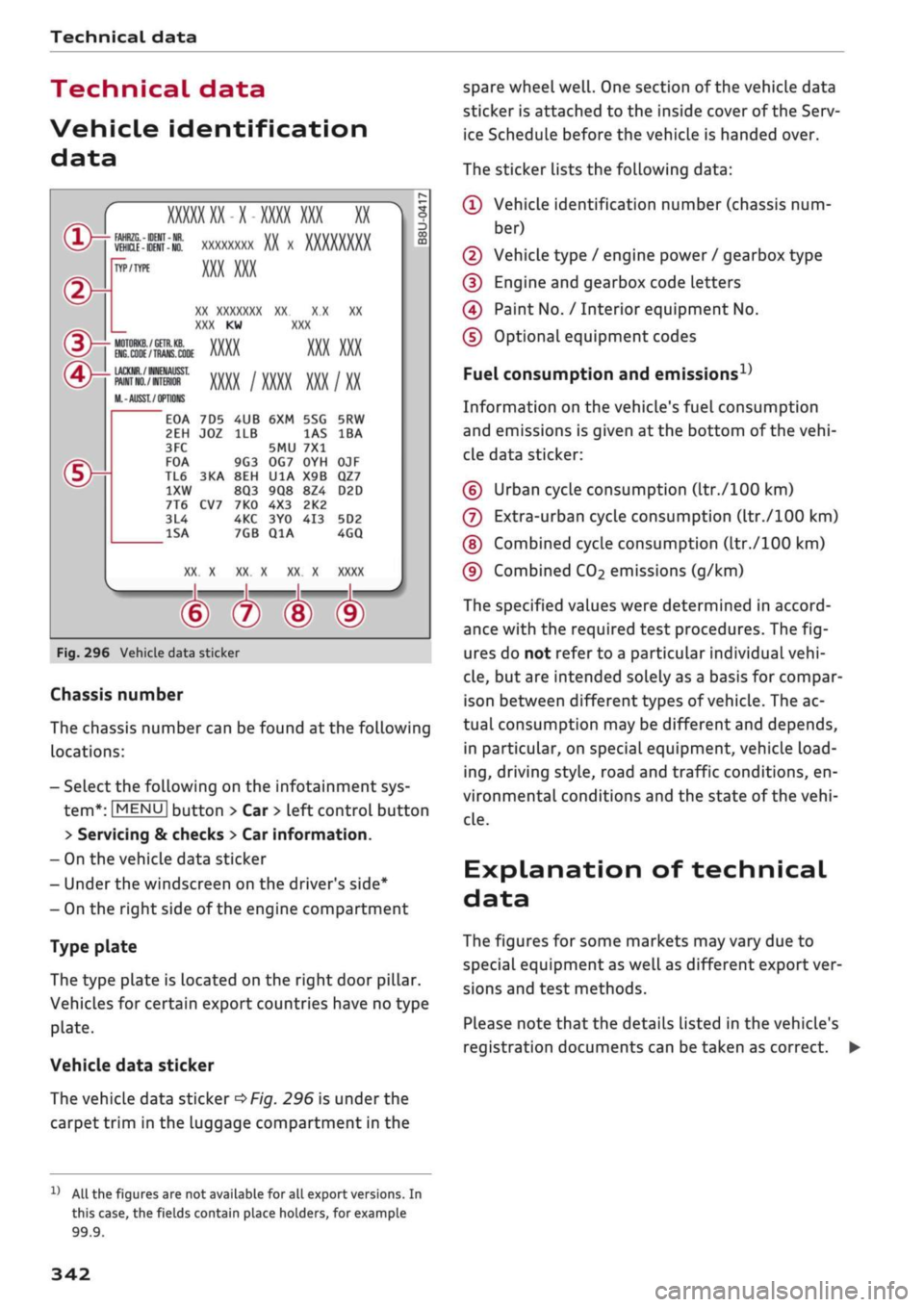
Fig.
296 Vehicle data sticker
Chassis number
The chassis number can be found at the following
locations:
- Select the following on the infotainment sys
tem*:
|MENU|
button > Car
>
left control button
> Servicing & checks > Car information.
- On the vehicle data sticker
- Under the windscreen on the driver's side*
- On the right side of the engine compartment
Type plate
The type plate is located on the right door pillar.
Vehicles for certain export countries have no type
plate.
Vehicle data sticker
The vehicLe data sticker
*Fig.
296 is under the
carpet trim in the luggage compartment in the
spare wheel
well.
One section of the vehicle data
sticker is attached to the inside cover of the Serv
ice Schedule before the vehicle is handed over.
The sticker lists the following data:
© Vehicle identification number (chassis num
ber)
© Vehicle type / engine power / gearbox type
© Engine and gearbox code letters
© Paint No. / Interior equipment No.
© Optional equipment codes
Fuel consumption and
emissions1'
Information on the vehicle's fuel consumption
and emissions is given at the bottom of the
vehi
cle data sticker:
© Urban cycle consumption (ltr./100 km)
© Extra-urban cycle consumption (ltr./100 km)
©
Combined cycle consumption (ltr./100 km)
© Combined
CO2
emissions (g/km)
The specified values were determined in accord
ance with the required test procedures. The
fig
ures do not refer to a particular individual
vehi
cle,
but are intended solely as a basis for compar
ison between different types of
vehicle.
The ac
tual consumption may be different and depends,
in particular, on special equipment, vehicle
load
ing,
driving style, road and traffic conditions, en
vironmental conditions and the state of the
vehi
cLe.
Explanation of technical
data
The figures for some markets may vary due to
special equipment as well as different export ver
sions and test methods.
PLease note that the details Listed in the vehicle's
registration documents can be taken as correct. •
11
All the figures are not available for all export versions. In
this case, the fields contain place holders, for example
99.9.
342
Page 349 of 364
Index
A
A/C (automatic air conditioner) 69
A/C (manual air conditioner) 67
ABS
see Anti-lock brake system (ABS) 145
Accelerator pedal 272
Accessories 60
Active Lane assist
see Audi active lane assist 123
Adaptive cruise control
see Audi adaptive cruise control
Ill
Adaptive light
see Audi adaptive light 49
AdBlue 292
Driver messages 292
Refilling 293
Remaining range 292
Additional phone 175, 257
Advanced key
see Convenience key 76
Airbag
Deactivating front passenger's airbag ... 288
Air conditioner (automatic) 66
Adjusting air outlets 71
AUTO (automatic mode) 69
Controls 69
Default settings 66
Description 66
Drive select 131
Key-coded settings 66
Supplementary heater 66
Synchronisation 69
Air conditioner (manual) 66
Adjusting air outlets 71
Controls 67
Default settings 66
Description 66
Key-coded settings 66
Supplementary heater 66
Air distribution, adjusting
Automatic air conditioner 70
Heating/ventilation system and manual air
conditioner 67
CO
rN
IV
rN
i-H
00
Air outlets, adjusting 71
Automatic air conditioner 70
Heating/ventilation system and manual air
conditioner 67
Air recirculation mode
Automatic air conditioner 70
Heating/ventilation system and manual air
conditioner 68
Alarm system
see Anti-theft alarm system 42
All-season tyres
see All-weather tyres 308
All-weather Lights 49
All-weather tyres 308
Alterations to the vehicle 340
AMI
see Audi music interface 240, 241
Android Auto
see Audi smartphone interface 253
Announcements (traffic programme)
Volume 261
Anti-dazzle interior mirror 54
Anti-freeze
Coolant 299
Windscreen washer system 303
Anti-lock brake system (ABS) 145
Anti-theft alarm system 42
Anti-theft wheel bolts 321
Apple CarPlay
see Audi smartphone interface 253
Armrest (front centre) 58
Ashtray 59
ASR
see Traction control system (ASR) 145
Audi active lane assist 123
Cleaning area around camera 313
Driver messages 125
Audi adaptive cruise control
Ill
Cleaning sensor 313
Distance indicator, distance warning .... 118
Driver messages 119
Traffic
jam assist 117
Audi adaptive light 49, 131
Audi connect (infotainment) 191,203
Data protection 205
Overview of services 197
345
Page 351 of 364

Index
CO
< o rN
iv
rN
t-H
o <
•H
00
Emergency braking function 82
New brake pads 147
Browser
see Media centre 244
Bulb failure
Changing bulbs 334
Bulbs,
changing 334
Buttons
Assigning functions (multi-function steering
wheel) 17
Multi-function steering wheel 15, 18
Operating unit (MMI) 152
C
Cables (USB adapter/AUX adapter) 240
Calling up media 243
Call
list 179
CalL
options 187
Capacities
AdBlue 292
Fuel
tank 343
Washer fluid reservoir 343
Caps for wheel bolts, removing 321
Car care
Washing/cleaning 312
Care
see Cleaning 312
Car phone
172,188
Catalytic converter 295
CD drive 236
Central locking system 37
Cetane number (diesel) 289
Changing settings for additional dispLay .... 19
Charging
see Power sources 60
Charging battery 242
Charging battery (mobile devices) 241
Chassis number 342
Child lock 46
DVD 246
Child seats 267
Fitting 270
Cigarette Lighter 60
Classic view 17
Cleaning 312
Cleaning/de-icing windows 314
Cleaning/treating leather 315
Cleaning Alcantara 315
Cleaning carbon parts 314, 315
Cleaning controls and displays 314
Cleaning fabrics 315
Cleaning leatherette 315
Cleaning plastic parts 314
Closing
Panorama sun roof 48
Windows 46
see also Unlocking/locking 39, 40
Closing/opening
see Unlocking/locking 39, 40
Coasting mode 91
Coat hooks 61
Colour code 342
Coming home/leaving home
see Entry/exit lights 51
Commands (speech dialogue system) 164
Compact temporary spare wheel 324
Compartments 61
Conference calls 180
Connection manager 257
Connections
see Media 234, 243
Consumption (fuel) 19, 20, 342
Contacts 185
From another directory 258
Importing/exporting 187
Memory capacity 189
Storing as a destination
216
Control buttons (MMI operation) 154
Controls and displays (overview) 10
Control units 150
Convenience key
Manual operation 79
Starting/stopping the engine 76
Unlocking/locking 39
Convenience open/close 47
Cooling mode
Automatic air conditioner 69
Manual air conditioner 67
Cooling system
Anti-freeze 299
Checking coolant level 300
347
Page 352 of 364
Index
Codant temperature
gauge 13
Topping up coolant 300
Cornering light 49
Crosshairs 209, 210
Cruise control system 104
Cup holders 61
Current fuel consumption 19,20
D
Data connection 203
Data protection 205
Date 255
Daytime running lights 49
Deactivating front passenger's airbag 288
DEF
see AdBlue 292
Defrosting (windows)
Automatic air conditioner 70
Heating/ventilation system and manual air
conditioner 67
DEF (instrument cluster) 14
Deluxe automatic air conditioner
see Air conditioner (automatic) 66, 69
Demo mode
see Presentation mode 217
Destination from map
Via
MMI touch 210
Via rotary pushbutton 209
Diagnostic connection 150
Dictating
E-mail
183
Text messages 182
Diesel
Diesel particulate filter 295
Fuel 289
Preheating (glow plugs) 74, 76
Diesel engine
Engine oil 297
Diesel Exhaust Fluid (DEF)
see AdBlue 292
Digital rights management 234
Dimensions
Vehicle dimensions 343
Dipped headlights 49
Directional tread (tyres) 324
Directory
see Contacts 185
Display 15
Cleaning 314
Infotainment display 153, 256
Instrument cluster 18
Multi-function steering wheel 15
Variants (MMI) 153
Distance covered 19, 20
Doors
Child lock 46
Courtesy lighting 52
Locking doors manually 41
see also Unlocking/locking 39, 40
Downhill speed control 89
Driver information system 19
Economy tips (analogue instrument cluster) 21
Economy tips (Audi virtual cockpit) 20
Efficiency program 21
Energy consumers (Audi virtual cockpit) .. 20
Gear-change indicator 14
On-board computer (analogue instrument
cluster) 20
On-board computer (Audi virtual cockpit) . 19
Outside temperature display 15
Service interval display 304
Switching between displays 15
View 17
Drives
see Media 234, 243
Drive select
see Audi drive select 131
Driving on right/left 52
Driving through water 72, 85
Driving time 19, 20
Dust filter
see Pollution filter 66
DVD drive (media drives) 235
Dynamic volume control
see System volume 261
E
E-mail
183
E10
see Ethanol (fuel) 289
eco mode (automatic air conditioner) 69
348
Page 354 of 364
Index
Folding down rear seats 63, 64
Four-wheel drive
see quattro (four-wheel drive) 148
Frequency band
see Waveband 228
Front seats 58
FueL 289
Consumption 342
Current fuel consumption 19,20
Ethanol 289
Fuel gauge 12, 14
Saving fuel 131
Tank capacity 343
FueL
economy
Coasting mode 91
Driving style 72
Recuperation 19
Fuel range 19, 20
Fuses 332
G
GALA
see Speed-dependent volume control ... 260
Gearbox malfunction 92
Glove box 61
Ground clearance 85
H
Halogen headlights
Changing bulbs 334
Handbrake
see Electro-mechanical parking brake .... 82
Handsfree 172
Hazard warning lights 52
Head-protection airbag 286
Head-up display 25
Adjusting brightness 53
Headlight range control 49
Headlights 49
Headlight range control 49
Washer system 55
Washing 313
Headlights (changing buLbs) 334
Head restraints
Adjusting 58,
59
Removing/installing 59
Head restraints, adjusting 266
Heated
Exterior mirrors 53
Rear window (automatic air conditioner) .. 70
Rear window (heating/ventilation system
and manual air conditioner) 68
Seats (automatic air conditioner) 70
Seats (heating/ventilation system and
man
ual air conditioner) 68
Washer
jets 55
Heater (supplementary heater for diesel en
gine) 66
Heating/ventilation system 66
Adjusting air outlets 71
Controls 67
Default settings 66
Description 66
Key-coded settings 66
Supplementary heater 66
Hill hold assist 83
Hill starting
see Hill hold assist 83
Hold assist 84
Hold assist (hill hold) 83
Home address 210, 215
Horn 10
Hubcaps, removing 321
I
i-Size
(securing child seats) 270
Ignition
Switching on/off (with button) 76
Switching on/off (with the key) 74
Immobiliser
see Electronic immobiliser 38
Importing/exporting contacts 187
Inflation pressure (tyres) 309
Input level (media) 246
Inspection intervals 304
Instrument cluster 12
Cleaning 314
Driver messages 26
350
Page 356 of 364
Index
Memory list
see Favourites 231
MENU button 152
Menus/symbols 161
Messages 182
Mileage recorder 14
Mirrors 53
Anti-dazzle setting 54
MMI
see Multi Media Interface 152
MMI search
see Search function 160, 245
MMI touch 155
Mobile hotspot
see Personal hotspot 201
Mobile phone
see Telephone 172
Mobile phone tray
see Audi phone box 177
MODE button 18
Modifications 340
Motorway light 49
Mounting pin (for changing wheels) 319
MP3
see
Jukebox 236
Multi-function steering wheel
Operation 15, 18
Speech dialogue system 17
Switching between displays 15
Switching between tabs 15, 18
Multi Media Interface 152
Music
see Media 234, 243
Music collection
see
Jukebox 236
Mute 261
myAudi 196, 212
Importing contacts 187
Logging on in the vehicle 196
PIN 196
Update 224
N
Natural commands (speech dialogue
system) 170
NAV/MAP button 207
Navigation 207
Voice guidance 218
see also Map 219
Navigation (instrument cluster) 24, 25
Network connection (Wi-Fi) 201
Network selection (telephone mode) 188
NOx
catalytic converter
see AdBlue 292
Numbers/characters, entering (using the
speller) 159
O
Occupant protection 120
Octane rating (petrol) 289
Off-road driving 84
Oil
see Engine oil 297, 298
On-board computer (analogue instrument
cluster) 20
On-board computer (Audi virtual cockpit) ... 19
On-board Handbook 260
ON/OFF button (MMI) 152
Online destinations
see Point of interest search 212
Online map update 223
Online media 239
Online services
see Audi connect
(infotainment)
191
Opening 37
Boot lid 43
Doors 39
Fuel tank flap 290
Panorama sun roof 48
Power-operated boot lid 44
Windows 46
Opening/closing
see Unlocking/locking 39, 40
Operation
Multi-function steering wheel 15, 18
Multi Media Interface 153
Speech dialogue system 164
Options menu 16, 154, 158
Outside temperature display 12
Overrun fuel cut-off 72
Overview (controls and displays) 10
352
Page 357 of 364
Index
CO
< o rN
iv
rN
t-H
o <
•H
00
P
Paddle levers (automatic gearbox) 90
Paint damage 314
Paint number 342
Panorama sun roof 48
see also Convenience open/close 47
Park assist 139
Parking aids 134
Cleaning sensors/camera 313
Malfunction 144
Park assist 139
Reversing camera 137
Settings 143
Parking brake
see Electro-mechanical parking brake .... 82
Parking lights 50
Parking (automatic gearbox) 88
Particulate filter (diesel) 295
Passenger's
door,
locking manually 41
Path descriptions in Owner's Manual 154
Pause (audio/video file) 243
Pedals 272
Performance (engine) 344
Personal hotspot 201
Personal route assist 214
Personal Wi-Fi hotspot 195
Petrol 289
Petrol engine
Engine oil 297
Phone book
see Contacts 185
Picture format (video) 246
Playback (media) 243
Playlist 246
Point of interest search 212
see
also
Special
destination 211
Polishing 314
Pollen filter
see Pollution filter 66
Pollution filter 66
Power management 149
Power sources 60
Preheating (glow plugs) 74, 76
Presentation mode 217
Pressures (tyres) 307
Privacy 234
Programme guide
Radio 229
Q
quattro (four-wheel drive) 148
Selective wheel torque control 145
R
Radio 228
Detailed station information 230
Radio text 229
Station list 228
Radio equipment 340
Radio frequency
see Waveband 228
Radio transmitters 340
Rain sensor/light sensor
Automatic headlights 49
Switching rain sensor on/off 55
Random playback 246
Reading lights 52
Rear armrest
see Cup holders 61
Rear carrier systems 99
Rear lights (changing bulbs) 334
Rear of vehicle
Boot lid 43
Washing rear window 55
Rear window heating
Automatic air conditioner 70
Heating/ventilation system and manual air
conditioner 68
Recommended gear 14
Recuperation 19
Reminder signal 255
Remote control keys 38
Repairs 340
Replacement parts 340
Reset
see Restart (MMI) 262
Reset button (trip recorder) 14
Restart (MMI) 262
Rest recommendation 110
Retaining hooks 61, 63