brake light AUDI Q3 2015 User Guide
[x] Cancel search | Manufacturer: AUDI, Model Year: 2015, Model line: Q3, Model: AUDI Q3 2015Pages: 258, PDF Size: 64.9 MB
Page 71 of 258
M N M N
0 ::i co
rl I.O
"' ,....,
"' rl
@ Tips
-After starting a cold engine, there may
be a brief period of increased noise be
cause the oil pressure must first build up
i n the hydraulic valve adjusters . This is
norma l and not a cause for concern .
Switching engine off
Applies to vehicles: with conven ience key
• Bring your veh icle to a complete stop .
• Move the selecto r lever to the P or N posi
t ion.
• Press the
!S TA RT ENGINE S TO PI button
~ pag e 68, fig. 75.
Steering lock
The steering locks when you turn the engine
off us ing the
I START ENGIN E STOP I button
and ope n the dr iver 's door. The locked stee r
i n g helps preven t vehicle theft.
Emergenc y Off functi on
If necessary in an emergency, the engine can
be sw itched off while the vehicle is st ill mov
ing. Press the
I S TAR T ENG IN E ST OPI button
tw ice in quick succession or ho ld it in for lon
ger than two seconds .
_& WARNING
-Never t urn off the engine before the ve
h icle has come to a complete stop . The
full function of the brake booster and the power steering is not guaranteed. You
must use more force to turn or brake if
necessary . Because you cannot steer and
brake as you usually would, this could
lead to crashes and serious injur ies .
- For safety reasons, you should always
park your vehicle with the se lector lever
in P. Otherwise, the ve hicl e co uld inad
vertent ly roll away.
- The rad iator fan can continue to run for
up to 10 min utes even after you have
t urned off the eng ine and removed the
ignition key . The radiator fan can also
turn on again if the engine coolant heats
On th e road 69
up because of intense sunlight or heat
bui ld-up in the engine compartment.
- Always take the key with you whenever
you leave your vehicle. Otherwise, the
engine could be started or electrical
equipment such as the power windows
could be operated . This can lead to seri
ous injury.
(D Note
If the engine has been under heavy load
for an extended period, heat bu ilds up in
the eng ine compartment after the engi ne
i s sw itched off - there is a r isk of damag ing
the engine . A llow the engine to run at idle
for about two minutes before switching it
off .
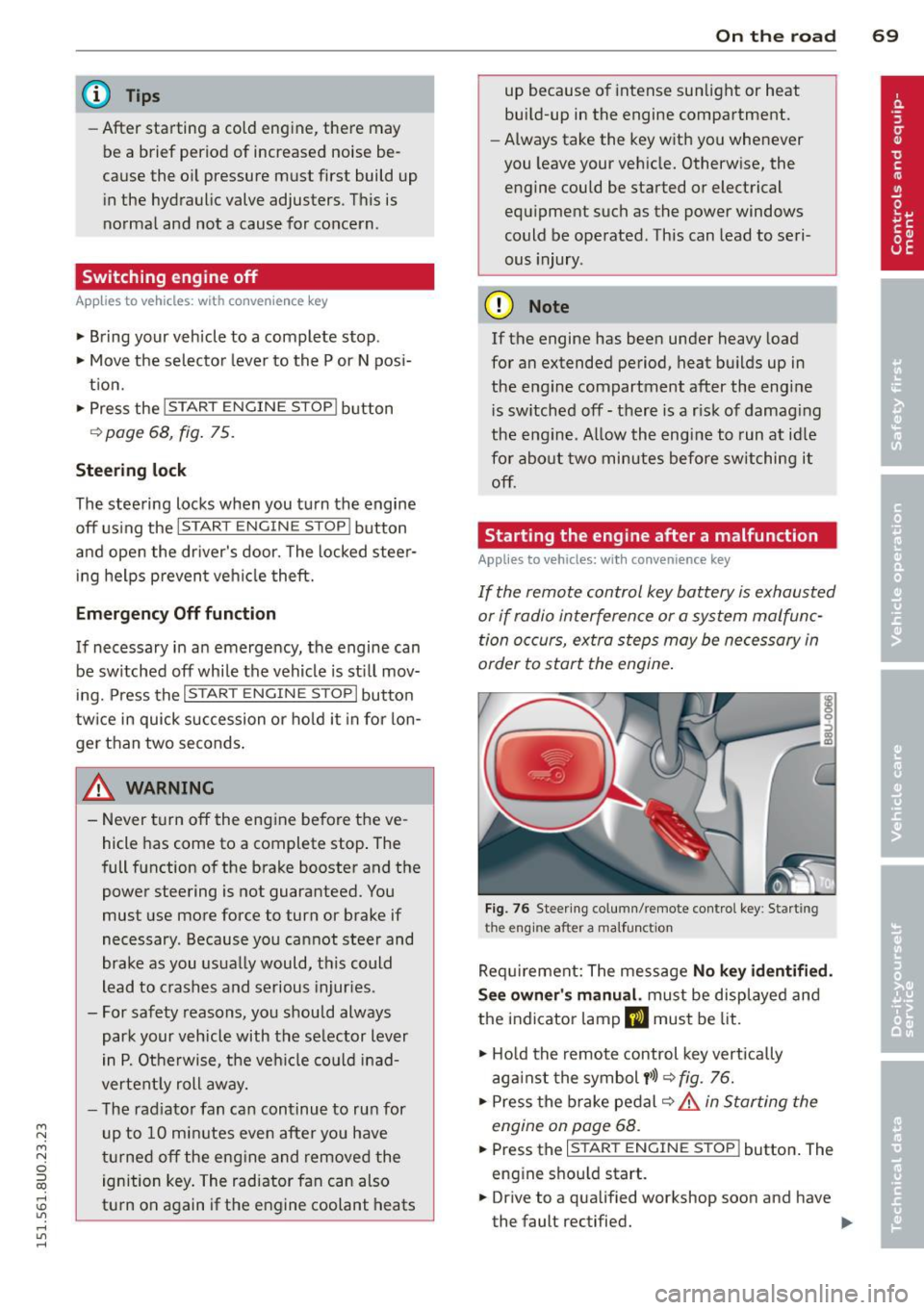
Starting the engine after a malfunction
Applies to vehicles: wit h convenience key
If the remote control key battery is exhausted
or if radio interference or a system malfunc
tion o ccurs, extra steps may be necessary in
order to start the engine .
Fig. 76 Steer ing co lumn/remote contro l key : Start ing
t he en gi ne a fter a m alfu ncti on
Requ irement: The message No k ey identifi ed.
S ee owner' s manu al.
must be displayed and
the indicator lamp
m must be lit .
• Ho ld the remote control key vertically
aga inst the symbol
y >l) ~ fig . 76.
• Press the b rake pedal ~.&.
in Starting the
engin e on page 68 .
• Press the ~ I s =T -A -R =T ~ E= N~ G~IN ~ E-s=T -O ~ P~I button. The
eng ine shou ld start.
• Drive to a qualified workshop soon and h ave
the faul t rectified. .-
Page 72 of 258
70 On the road
@ Tips
You ca n call up the dr iver message aga in
by pressi ng the
!ST ART ENGINE STOPI but
ton.
Driver messages
Turn off ignition. Battery discha rging
T his message appears and a war ning tone
sounds if yo u open the dr iver's door when the
ignit io n is switched on.
Press brakepedal to start engine .
This message appears if you do not press t he
b rake pedal to start the engine in a vehicle
with a n automatic t ransmission .
Please engage N or P .
This message appears if you try to start or
switch off the eng ine when the selector lever
is not i n Nor P. The eng ine can then not be
started or sw itched off.
fll Is key in the vehicle?
If t h e in dicator lamp lights up and the mes
sage appears, the convenience key* was re
moved from the vehicle while the e ngine was
runni ng .
If the convenience key is not in the
ve hicle you will not be able to switch on the
ignit io n or restart the engine after it has been
switched off . You w ill also not be ab le to l ock
the veh icle from the outside .
Shift to P, vehicle can roll away . Doors can
only be locked in P.
F or safety reasons , this messa ge will ap pear
together with a wa rning tone if t he se lector
l eve r is not in position P when you switch off
the ign ition. Put the selector lever in posi
tion P; otherw ise the vehicle can roll away and
cannot be locked .
II No key identified. See owner's manual.
If the indi cator lamp lights up and the mes
sage ap pears, a malfunct ion has occ urred
c:::> poge 69.
Electromechanical
parking brake
Operation
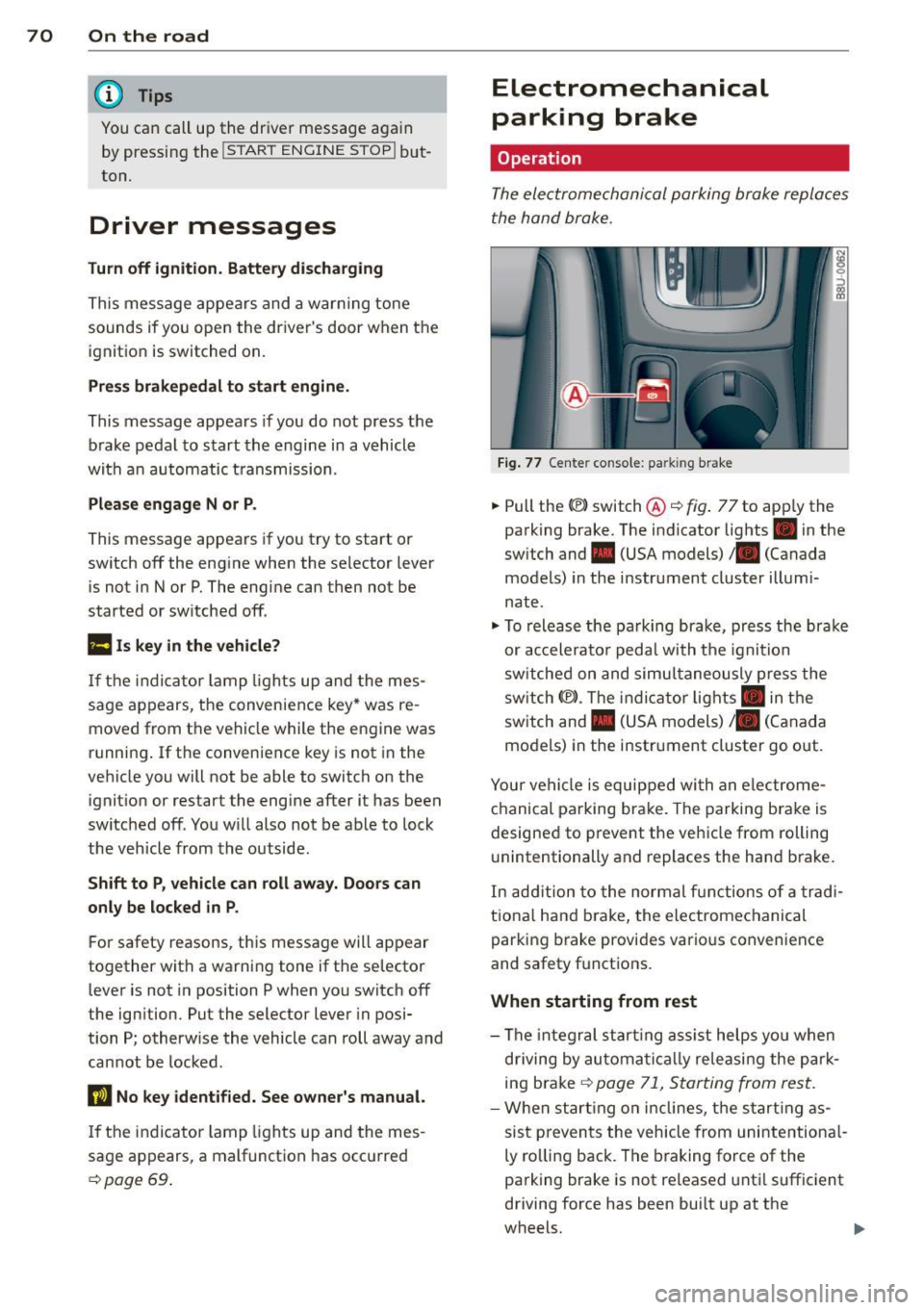
The ele ctrome chani cal parking brake replace s
t he hand broke.
Fi g. 77 Center co nsole: pa rk in g b rake
.,. Pull the(®) switch@ c:::> fig. 77 to app ly the
parking brake. The indicator lights . in the
sw itch and . (USA models)/ . (Canada
models) in the instrument cluster illumi
nate.
.,. To releas e th e pa rking bra ke, pr ess the bra ke
or ac celera to r peda l with t he igni tion
sw itche d on and simu ltaneously p ress the
sw itch (®) . Th e in d ic ator lig hts . in the
sw itch and . (USA models)/ . (Canada
mo dels) in the instr ument cluster go out.
Your ve hicle is equipped wi th a n ele ctro me
ch anical parking brake. The parkin g bra ke is
designe d to prevent the ve hicle from rolling
u nintentionally and replaces the hand b rake.
In ad diti on to the normal fu nctions o f a tra d i
tio na l han d brake, the e lectromechanical
parking brake provi des vario us convenience
and safety f unct ions .
When starting from rest
- The integral s tart ing as sist help s you when
d riving by au toma tically re leasi ng the pa rk
ing brake
c:::> poge 71, S tarting from res t.
- W he n star ting o n incl ines, t he s tar tin g as
sis t p reven ts the vehicle from uni nte ntion al
ly ro lling back . The braking force of the
parking brake is not re leased unt il suffic ient
driving force has been bui lt up at the
wheels .
Page 73 of 258
M N
M N
0 ::i co ,...., \!) ..,.,
,...., ..,., ,....,
Emergency brake function
An emergency brake ensures that the vehicle
can be slowed down even if the
normal brakes
fail c::>
page 72, Emergency broking.
& WARNING
If a drive range is engaged with the vehicle
stat ionary and the engine running, you
must in no instance accelerate care lessly.
Otherw ise the vehicle will start to move
immediately -risk of an accident.
(D Tips
- If the parking brake is applied with the
i gnition switched off, the indicator lights
• in the switch and. (USA models) /
• (Canada models) in the instrument
cluster w ill go out after a certa in period
of time.
- Occasional noises when the park ing
brake is applied and re leased a re norma l
and are not a ca use for concern.
- When the vehicle is parked, the parking
brake goes through a se lf-test cycle at
regular intervals. Any assoc iated noises
are norma l.
Parking
~ Press the brake peda l to stop the vehicle.
~ Pull the switch@c::> page 70, fig . 77 to set
the parking brake.
~ Move the selector lever to P.
~ Turn the engine off c::> _&.
~ When on incl ines or declines, turn the steer
ing wheel so that the vehicle w ill roll i nto
the curb if it begi ns to move.
& WARNING
- When you leave your veh icle - even if on
ly b riefly- a lways remove the ign ition
key . This applies particularly when chil
dren remain in t he vehicle . Otherwise the
children co uld start the engine, release
the parking brake or operate electrical
equipment (e.g. power windows). There is the r isk of an accident .
On th e ro ad 71
-When the veh icle is locked, no one - par
ticularly not children should rema in in
the vehicle. Locked doors make it more
difficult for emergency wo rkers to get in
to the vehicle - putting lives at risk .
Starting from rest
The starting assist function ensures that the
parking broke is released automatically upon starting.
Stopping and applying park ing brak e
~ Pull the sw itch C®l to apply the pa rking
brake.
Starting and automatically releasing the parking brake
~ When you start to drive as usual, the park
ing brake is a utomatically released and your
veh icle begins to move.
When stopping at a traffic signal or stopping in city traff ic on vehicles with an automatic
transmission, the parking brake can be ap
plied. The vehicle does not have to be held
with the footbrake. The parking brake elimi
nates the tende ncy to creep w ith a dr ive range
engaged. As soon as you d rive off as usual,
t he pa rking bra ke is re leased automatically
and the veh icle s tarts to move.
St arting on slopes
When starting on inclines, the starting assist
prevents the vehicle from un intent io nally roll
ing back. The braking force of the parking
brake is no t re leased unt il su ff ic ient d riving
force has been built up a t the wheels.
(D Tips
Fo r safety reasons, the parking bra ke is re
l eased automatically o nly when the d riv
e r's safety belt is eng aged in the buckle.
Page 75 of 258
M N
M N
0 ::i co ,...., \!) ..,.,
,...., ..,., ,....,
vehicle to skid or the rear end to break away -risk ing an accident.
Speed warning system
Overview
T he speed warning system helps you to keep
your driving speed below a set speed limit.
The speed warning system warns if the driver
exceeds a prev iously stored maximum speed .
A warning tone will sound as soon as the vehi
cle speed exceeds the set speed by about
3 mph (3 km/h). At the same time , an indica
tor lamp
(mj (USA models) / ISJ (Canada mod
e ls) will light up in the instrument cluster dis
p lay and the driver message
Spe ed limit
wa rning exceeded.
wi ll appear. The indicator
l amp
1mj / i•j will go out when the speed
drops below the set speed lim it aga in.
Setting a thresho ld is recommended if you
wou ld like to be reminded when you reach a
certain maximum speed . Situations where yo u
may want to do so include driving in a country
with a general speed limit or if the re is a
specified max imum speed for winter tires .
(D Tips
Even though your vehicle is equipped with
a speed warning system, you should st ill
watch the speedometer to make sure you are not driving faster than the speed lim it.
Setting speed limit
You can set , change and delete the threshold
in the MMI.
.,. Se lect :
I CAR I funct ion button > S ystem s or
Car System s control button > Vehicle set
tings > Speed warning .
You can set any thresho ld between 20 mph
(30 km/h) and 150 mph (240 km/h). Settings
can each be adjusted in increments of 6 mph
(10 km/h) .
On the ro ad 73
Cruise control
Description
The cruise cont ro l system makes it poss ible to
drive at a constant speed start ing at 15 mph
(20 km/h).
The speed is kept constant by modifying en
gine powe r or th rough an active brake inte r
vention.
A WARNING
- Always pay attention to the traffic
around you when the cruise control is in
operation. You are always responsible for
your speed and the distance between
your vehicle and other vehicles.
- For reasons of safety, cr uise control
should not be used in the city, in stop
and-go traffic, on winding roads and
when road cond it ions are poor (such as
ice, fog, gravel, heavy rain and hydro
plan ing) -you could have an accident .
- Sw itch the cruise control off temporar ily
when dr iv ing in turning lanes, h ighway
exits or in constr uction zones.
- Please note that unconsc iously "resting"
your foot on the accelerator pedal pre
vents the cruise control from braking .
This is due to the control system be ing
overridden by the dr iver's acceleration .
- If a b rake system malfunction s uc h as
overheating occurs when the cruise con
trol system is swi tched on, the braking
function in the system may be switched off . The other cruise control functions re
main active as long as the indicator light
II (US models) !l'I (Canada mode ls) is
on .
(D Tips
-The cruise control system is ideal for
stretches w ith speed limits. The driver is
responsib le for adhering to the correct
speed.
- The cru ise control remains act ive when
shift ing gears .
Page 76 of 258
7 4 On the road
-The brake lights turn on when the brakes
are activated .
Switching on
0
f
®t
0
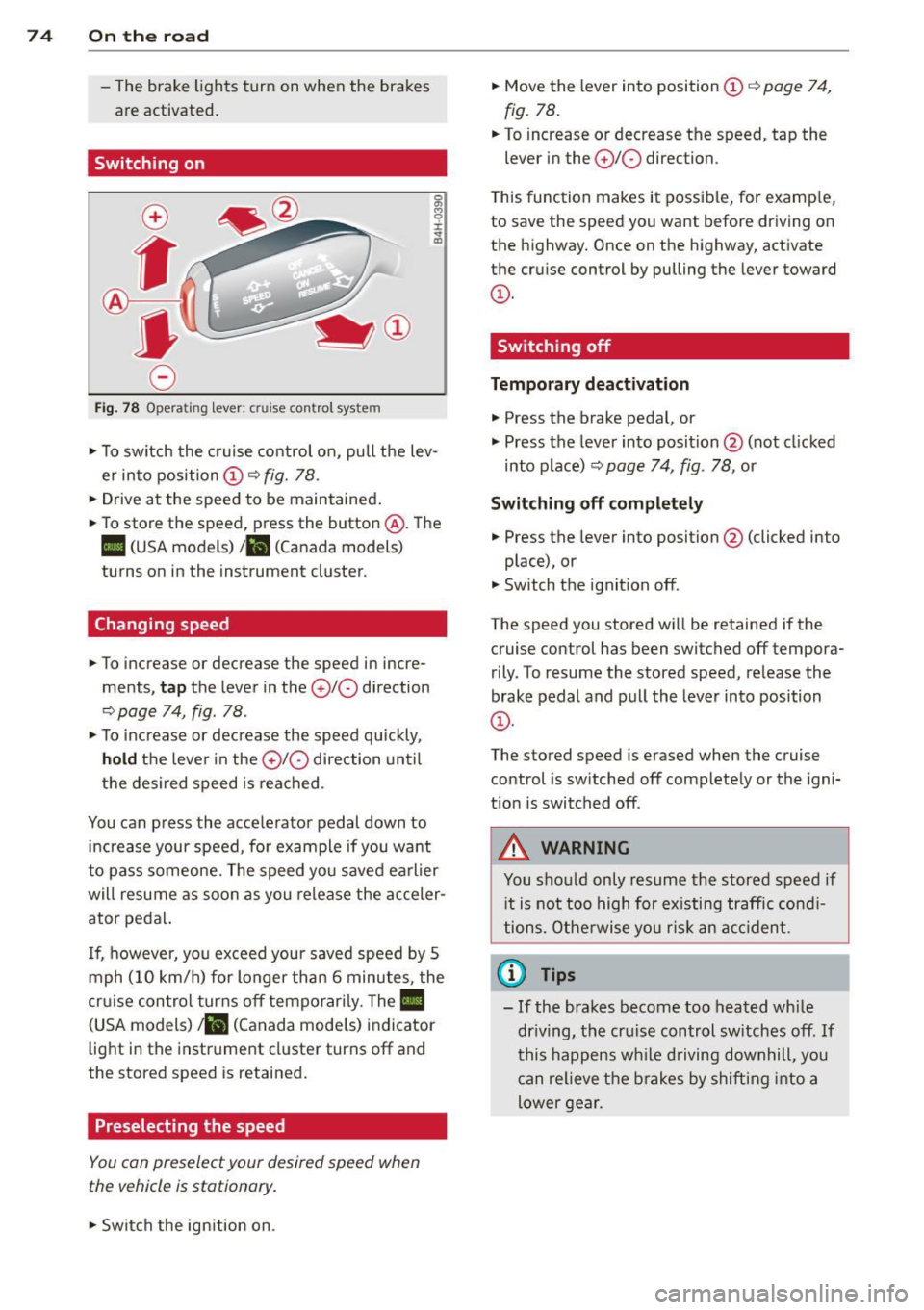
Fig. 78 Opera ting lever: crui se co ntro l system
0 O>
8
i
"' m
.,. To sw itch the cruise control on, pull the lev
er into position
CD c::> fig. 78 .
.,. Drive at the speed to be maintained .
.,. To store the speed, press the button @. The
II (USA models) Iii (Canada models)
turns on in the instrument cluster.
Changing speed
.,. To increase or decrease the speed in incre
ments,
tap the lever in the 010 direction
c::> page 74, fig. 78 .
.,. To increase or decrease the speed quickly,
hold the lever in the 0 10 direction until
the desired speed is reached.
You can press the acce lerator pedal down to
increase your speed, for example if you want
to pass someone. The speed you saved earlier
will resume as soon as you release the acceler
ator pedal.
I f, however, you exceed your saved speed by 5
mph (10 km/h) for longer than 6 minutes, the
cr uise contro l turns off temporarily. The
Ill
(USA models) ill (Canada mode ls) indicator
light in the instrument cluster turns off and
the stored speed is retained.
Preselecting the speed
You con preselect your desired speed when
the vehicle is stationary.
.,. Swi tch the ign ition on. .,.
Move the lever into position
CD c::> page 74,
fig. 78.
.,. To increase or decrease the speed, tap the
lever in the
0 10 direction.
T his function makes it possible, for examp le,
to save the speed you want before driving on
the highway. Once on the highway, activate
the cruise control by pulling the lever toward
CD-
Switching off
Temporary deactivation
.,. Press the brake pedal, or
.,. Press the lever into position @ (not cl icked
into p lace)
c::> page 74, fig. 78, or
Switching off completely
.,. Press the lever into position @(clicked into
place), or
.,. Switch the ignition off.
The speed you stored wi ll be retained if the
cruise control has been switched off tempora
rily . To resume the stored speed, release the
brake pedal and pull the lever into position
CD-
The stored speed is erased when the cruise
control is sw itched off complete ly or the igni
t ion is switched off .
A WARNING
-You should only resume the stored speed if
i t is not too high for existing traffic condi
tions. Otherwise you risk an accident.
(D Tips
-If the brakes become too heated while
dr iving, the cruise control switches off.
If
this happens while driving downhill, you
can relieve the brakes by shifting into a
lower gear.
Page 83 of 258
M N
M N
0 ::i co ,...., \!) 1.1'1 ,...., 1.1'1 ,....,
Automatic
transmission
tiptronic
Introduction
The automatic transmission is controlled elec
tronically. The transmission upshifts or down
shifts automatically depending on which drive
program is selected.
When a
moderate driving style is used, the
transmission selects the most economica l
driving mode. It will then change up early and
delay the downshifts to give better fuel econ
omy.
The transmission switches to a sporty mode
after a kick-down or when the driver uses a
sporty driving style characterized by quick ac
celerator pedal movements, heavy accelera
tion, frequent changes in speed and traveling
at the maximum speed.
If desired, the driver can also select the gears
manually
(tiptronic mode) o page 84.
In the tiptronic transmission, power is trans
ferred by a torque converter .
Selector lever positions
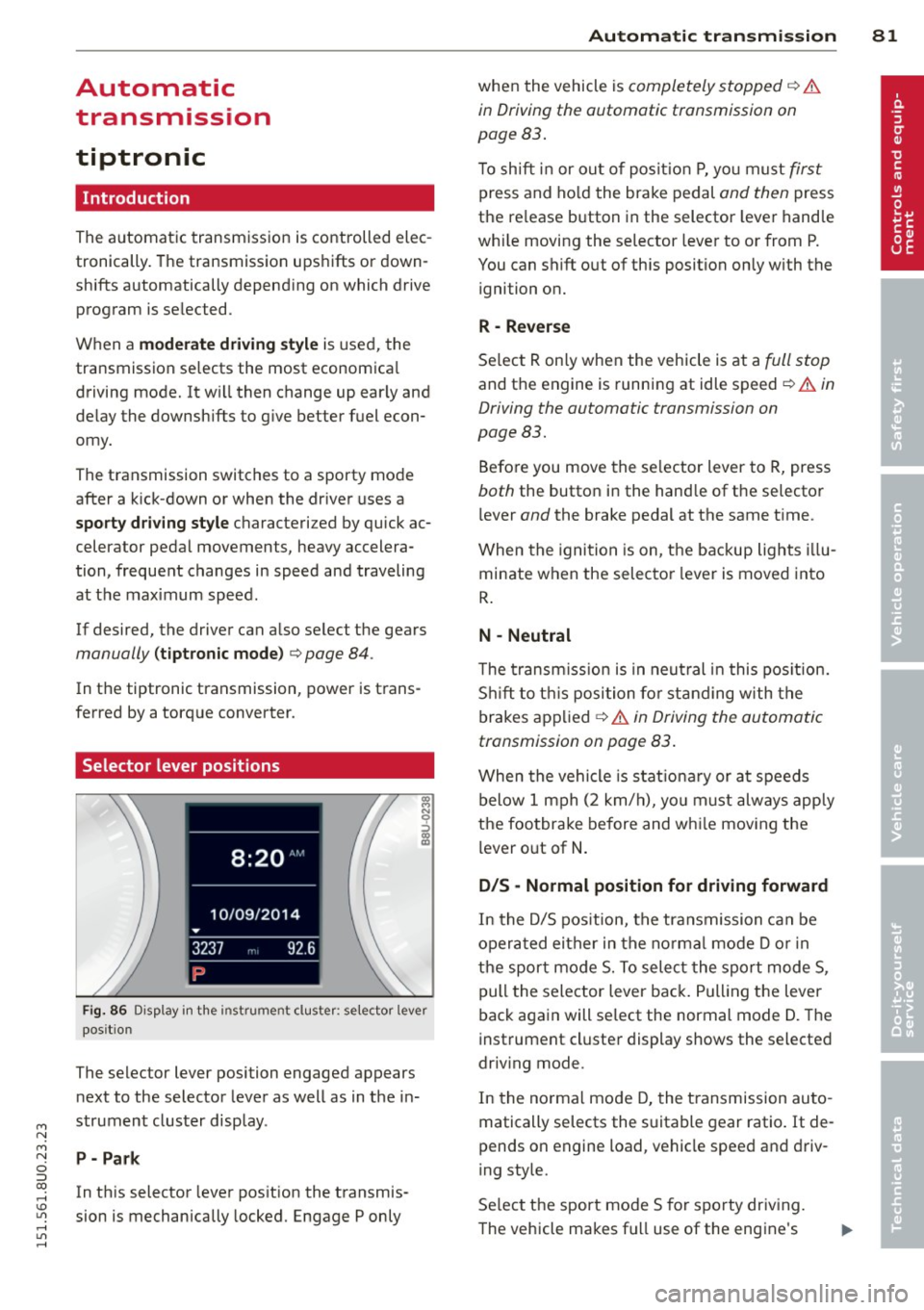
Fig. 86 Disp lay in the instru men t clu ster: se lecto r lever
pos it io n
The selector lever posi tion engaged appears
next to the selector lever as well as in the in
strument cluster display.
P- Park
In this selector lever posit ion the transmis
sion is mechanically locked. Engage P only
Automatic transmission 81
when the vehicle is completely stopped q A
in Driving the automatic transmission on
page 83.
T o shift in or out of position P, yo u must first
press and hold the brake pedal and then press
the re lease button in the selector lever handle
wh ile moving the selector lever to or from P.
You can shift out of th is position only with the
ignition on.
R -Reverse
Select R only when the vehicle is at a full stop
and the engine is running at idle speed¢.&. in
Driving the automatic transmission on
page 83.
Before you move the selector lever to R, press
both the button in the hand le of the selector
l ever
and the brake pedal at the same time .
When the ignition is on, the backup lights illu
minate when the selector lever is moved into
R.
N -Neutral
The transmission is in neutral in this position.
Shift to this position for standing with the
brakes applied
q A in Driving the automatic
transmission on page 83.
When the vehicle is stat ionary or at speeds
below 1 mph (2 km/h), you must always apply
the footbrake before and whi le moving the
lever out of
N.
D/S -Normal position for driving forward
In the D/S position, the transmission can be
operated either in the norma l mode D or in
the sport mode S. To select the sport mode S,
pull the selector lever back. Pulling the lever
back again will select the normal mode D. The
instrument cluster display shows the selected
driv ing mode .
In the normal mode D, the transmission auto
matically selects the suitable gear ratio. It de
pends on engine load, vehicle speed and driv
ing style.
Select the sport mode S for sporty driving.
The vehicle makes fu ll use of the engine's
Page 85 of 258
M N
M N
0 ::i co ,...., \!) 1.1'1 ,...., 1.1'1 ,....,
selector lever position such as D/S and re
lease the button.
~ Wait briefly until the transmission has shift
ed (you will feel a slight movement).
~ Remove your foot from the brake pedal and
accelerate.
St opp ing tem porar ily
~ Keep the vehicle stationary using the brak
ing peda l, for examp le at traffic lights.
~ Do not press the accelerator pedal when do
ing this.
~ To prevent the veh icle from roll ing when you
start driving, set the parking brake when
stopp ing on steep inclines
c::, ,& .
~ The parking brake will re lease automatically
and the vehicle will s tart moving once you
press the accelerator peda l.
Stopping/p ar king
If the selecto r lever is not in the P position
when you ope n the dr iver's door, the vehicle
could ro ll. The message
Shift to P and turn
off i gniti on, o therwi se vehicle ca n roll aw ay
appears.
~ Press and ho ld the brake pedal unt il the ve-
hicle has come to a complete stop.
~ Apply the parking brake c::, page 71, Parking.
~ Se lect the P selector leve r position c::, ,& .
Stopping on an incline
~ Always press the brake peda l to hold the ve
hicle i n place and prevent it from " rolling
back "
c::> &_. Do not try to prevent the vehi
cl e from "roll ing back" when a gea r is en
gaged by increasing the engine speed
c::> (D .
Starting on an incline
~ Activate the parking b rake .
~ With the d riving gea r se lected, press the ac
c e lerator pedal ca refully. The parking brake
will release automat ica lly if yo ur seat belt is
f astened.
Unde r ce rtain circumstances, such as dr iv ing
in the moun tains, it may be useful to swi tch
tempo rari ly to the manua l shift prog ram in o r-
Automa tic tran sm iss ion 83
der to ad just the gears to the driving condi
tions by hand
c::, page 84.
On s lopes, activate the parki ng b rake first and
then move the selec to r l ever to the P posi tion.
T his prevents too much stress from being
placed on the locking mechanism .
A WARNING
-The vehicle can also roll when the engine
is stopped.
- Unintended vehicle movement can cause
serio us injury.
- Never leave your vehicle with the engine
ru nning while in gear. If you must leave
your veh icle when the engine is running,
activate the parking brake and move the
selector lever to P.
- Power is still transm itted to the wheels
when the engine is runn ing at idle. To
prevent the vehicle from "creeping", you
must keep your foot on the brake when
the eng ine is ru nning and the se lector
leve r is in D/S o r R or "t ipt ron ic" mode is
selec ted .
-Do not press the accelerator pedal when
changing the se lector lever posi tion
while the veh icle is stationary and the
engine is running .
- Never sh ift into R or P wh ile driving.
- Before driving down a steep slope, re-
duce your speed and shift into a lowe r
gear wi th "tiptronic".
- Do not ride the bra kes o r press the bra ke
pe dal too often or too long when d riving
down a hi ll. Constant braking causes the
brakes to overheat and substantially re
duces braking performance, increases
brak ing distance or causes complete fa il
ure of the brake system .
- To prevent the vehicle from ro lling back
when stopp ing o n inclines, always ho ld it
in place with the brake pedal or parking
brake .
- Never hold the vehicle on an incline with
a slipping clutch. The clutch opens auto matically when it becomes too hot from
Page 155 of 258
M N
M N
0 ::i co ,...., \!) ..,.,
,...., ..,., ,....,
@ Tips
Your vehicle may be equipped with Audi
connect. Your use of certain Aud i connect
features req uires wireless serv ices that are
provided by a third party wireless telecom
municat ions provider. For details regard
ing how information obtained through
Aud i connect is collected, processed,
transmitted, used, and shared, please see
your contra ct w ith the wire less telecom
municat ions provider and the "About A udi
connect" tab in your vehicle's MMI:
!MENU !
button > Audi connect > About Audi con·
nect .
Electronic Stabilization
Control (ESC)
Description
ESC helps to improve road holding and vehicle
dynamics to help reduce the probability of
skidd ing and loss of veh icle control. It works
only when the eng ine is running. ESC detects
certain difficult driv ing s ituations, including
when the vehicle is beginning to spin (yaw) out of cont ro l and helps you to get the vehicle
back under control by select ively brak ing the
wheels, and/or red ucing engine powe r and
p roviding steering assistance to help hold the
ve hicle on the driver's intended course . The in
dicator light
m in the instrument cluster
blinks when ESC is taking action to help you
control the vehicle.
ESC has limitations.
It is important to remem
ber that ESC cannot overcome the laws of
phys ics. It will not a lways be able to help out
under all conditions you may come up against.
For example, ESC may not always be able to
h elp you master situat ions where there is a
sudden change in the coefficient of fr iction of
the road surface. When there is a sect io n of
d ry road that is s udden ly cove red with water,
slush o r snow, ESC canno t perform the same
way it would on the dry su rface.
If the vehicle
hydroplanes (rides on a c ush ion of wate r in
stead of the road surface), ESC wi ll not be
ab le to he lp you steer the veh icle because con-
Int ellig ent technolog y 153
tact with the pavement has been interrupted
and the vehicle cannot be braked or steered .
D uring fast corner ing, particular ly on wind ing
roads, ESC cannot always deal as effectively
with difficult dr iv ing s ituations than at lower
speeds. When towing a trailer, ESC is not able
to help you regain control as it would if you
were not tow ing a trailer.
Always adjust your speed and driving style to road, traffic and weather conditions . ESC can
not override the vehicle's physical lim its, in
crease the availab le tract ion, or keep a veh icle
o n the road if road departu re is a result of
driver ina ttent io n. Instead , ESC imp roves the
poss ibility of keep ing the vehicle under con
trol and on the road during extreme maneu
vers by using the driver's steering i nputs to
help keep the vehicle go ing in the intended di
rect ion. If you are traveling at a speed that
causes you to run off the road before ESC can
provide any assistance, you may not experi
ence the benefits of ESC.
ESC includes and/or works together with the
anti-lock brake system (ABS), brake ass ist sys
tem, ant i-slip regu lation (ASR), electron ic dif
ferential lock (EDL), electron ic interaxle d iffe r
ential lock*/se lective wheel torque co ntrol*
and hill descent assist. ESC is swit ched on a ll
the time. In ce rtain sit uat io ns when yo u need
less traction, you can sw itch off ASR by press
ing the b utton
[fil ¢ page 155, fig. 13 7. Be
s u re to switch ASR on again when you no lon
ger need less traction .
Anti-lock braking system (ABS )
ABS prevents the whee ls from locki ng up
when b raking. The vehicle can st ill be stee red
even during hard braking . App ly steady pres
su re to the brake peda l. Do not pump the ped
al. A pulsing in the brake pedal indicates that
the system is helping you to brake the vehicle.
Brake a ssis t sy ste m
The brake ass ist system can decrease braking
distance . It increases braking power when the
driver presses the brake peda l quickly in emer
gency s ituations. You must press and hold the
brake pedal unti l the situation is over. .,,.
•
•
Page 156 of 258
154 Intellig ent technolog y
Anti-slip r egulation (ASR )
ASR reduces engine power when the drive
wheels begin to spin and adapts the force to
the road conditions. This makes it easier to
start, accelerate and drive up hills.
Electronic diffe rential lock (EDL )
The ED L brakes wheels that are spinn ing and
transfers the drive power to the o ther d rive
wheel or whee ls if the vehicle is equipped with
all-wheel drive* . This function is available up
to about 60 mph (100 km/h).
I n extreme cases , ED L automat ica lly switches
off to help keep the brake on the braked whee l
from overheating . EDL wi ll switch on again au
tomatically when conditions have returned to normal.
El ectron ic inte ra xle diff ere ntial lock */
se lec tive wheel t orque contr ol*
The electronic interaxle differential lock (front
wheel drive) or the select ive wheel torque
control (all-wheel drive) operates when driv
ing through curves. The front wheel on the in·
side of the curve or both wheels on the inside
of the curve are braked select ively as needed .
This minimizes s lid ing in the front wheels a nd
allows for more p rec ise driving through
curves. The app licab le system may not acti
vate when driving in wet or snowy conditions .
A WARNING
-ESC, ABS, ASR, EDL, the electronic inter
axle differentia l lock* /selective whee l
torque control* and the hill descent as
sist cannot overcome the laws of physics.
Th is is especially important on slippery
o r wet roads . If the systems begin acting to stabilize your vehicle, you should im
mediately change your speed to match
the road and traffic conditions. Do not let the increased safety provided by
these systems tempt you to take r isks .
Doing so will increase the risk of a loss of
veh icle cont ro l, collision and ser ious per
sonal injur ies.
- Always adapt your speed to road, traffic
and weather conditions. The risk of los
ing control of the vehicle increases when
driving too fast , espec ially through
curves and on slippery or wet roads, and
when driving too close to vehicles up
ahead. ESC, ABS, the brake ass ist sys
tem, ASR, EDL and the electronic inter
axle d ifferential lock*/selective wheel
torque control* cannot prevent colli
sions .
- Always accelerate with special care on
even, smooth surfaces such as those that
are wet or covered with ice and snow .
The drive wheels can spin even w ith
these assistance systems t hat cannot al
ways he lp to reduce the risk of loss of ve
hicle control.
(D Tips
- ABS and ASR only wo rk correct ly when
all four wheels are equipped with identi
cal tires. D ifferent tire sizes can lead to a
reduction in engine power.
- You may hear noises when the systems
described are working .
-If the ind icator light DJ or Ell (USA
mode ls)/ lCO)J
page 16.
Page 158 of 258
156 Intellig ent technol ogy
Hill descent assist brakes a ll four wheels auto
matica lly in order to limit speed when driving
e ither forward or reverse on hills with a grade
up to approximately 50%.
When the hi ll descent assist is on, the current
driving speed, when your vehicle entered the incline is maintained . It is only possib le to
switch on the assist when driving slower than
37 mph (60 km/h). The assist works between
approximately 2 and 19 mph (4 and 30 km/ h) . T he driver can increase or decrease the ve
h icle speed w ith in these lim its by depressing
the accelerato r o r brake pedal In addition, ve
h icle steerability is increased d ue to the brak
ing d istribution when driving in reverse .
There must be however sufficient ground ad hes io n. The hill descent assis t can
no t do its
job if the incl ine is icy or if the incline ground
is loose¢ &..
The system does not work at speeds between 19 and 37 mph (30 and 60 km/h) . T he system
i s then in the ready-mode . The diode in the
button will come on. The system automatical
ly switched off when you drive faster than 37
mph (60 km/h). The diode will go out in this
case.
The flashing indicator lamp
-0-in the instru
ment cluster indicates whenever the driving
speed is being actively controlled to a certain
speed up to approximate ly 19 mph (30 km/h) .
The indicator lamp lights up continuously
when the system goes into standby mode.
Hill descent assist is automatically activated
under the fo llow ing cond itions:
- the d iode in the button illuminates,
- vehicle speed is be low approximately
19 mph (30 km/h)
- the in cl in e is 10%.
_&, WARNING
- Always adapt your speed to the weather,
road and traffic conditions . Do not let
the increased safety provided tempt you
into taking risks. -
The hill descent assist system cannot
overcome the laws of physics. Your dr iv
ing style must always be adapted to the
current road and traffic cond itions .
- The hill descent ass ist may not be ab le to
hold your vehicle at a constant speed un
de r all conditions while driv ing on an in
cline (for example if ground under the
veh icle is loose).
Braking
What affects braking efficiency?
New br ake p ad s
During the first 250 miles (400 km), new
brake pads do not possess the ir full brak ing
effect, they have to be "broken in" first ¢&. .
You can compensate for this slightly reduced
braking power by pushing harder on the brake
pedal. Avoid heavy b ra ki ng loads dur ing the
break-in pe riod.
Operating conditions and driving h abits
The brakes on today 's automobiles are still
subjec t to wear, depending largely on operat
i ng condit ions and driving hab its
~ &. -On
vehicles that are either dr iven mos tly in stop
and -go city t ra ffi c or are dr iven hard, the
brake pads should be chec ked by your author
ized Audi dea ler mo re often than specified in
the
Warranty & M aintenan ce booklet. Failure
to have your brake pads inspected can result in reduced brake performance.
On steep slopes, you sho uld use the braking
effect of the eng ine. This way, you prevent un
necessary wear on the brake system. If you
must use your brakes, do not hold the brakes
down cont inuous ly . Pump the brakes at inter
vals .
Oper ating n ois e
Noises may occur when braking depending on
the speed, braking force and outside condi-
tions such as temperature and humidity. .,,.