lock AUDI Q3 2015 User Guide
[x] Cancel search | Manufacturer: AUDI, Model Year: 2015, Model line: Q3, Model: AUDI Q3 2015Pages: 258, PDF Size: 64.9 MB
Page 34 of 258
32 Opening and clo sing
A WARNING
Read and heed all WARNINGS¢.&. in Gen
eral description on page 28.
(D Tips
If your vehicle has been standing for an ex
tended period, please note the following :
- The proximity sensors are deactivated af-
ter a few days to save power. You then
have to pull on the door handle once to
unlock the vehicle and a second time to
open the veh icle .
- To prevent the battery from being dis
charged and to preserve your veh icle's
ability to start for as long as possible,
the ene rgy management system gradu
ally switches off unnecessary conven
i ence funct ions .
It is possible that you
will not be able to unlock your vehicle us
ing these convenience functions.
- For Declarat ion of Compliance to Uni ted
States FCC and Industry Canada regu la
tions ¢
page 240.
Locking and unlocking the vehicle from
inside
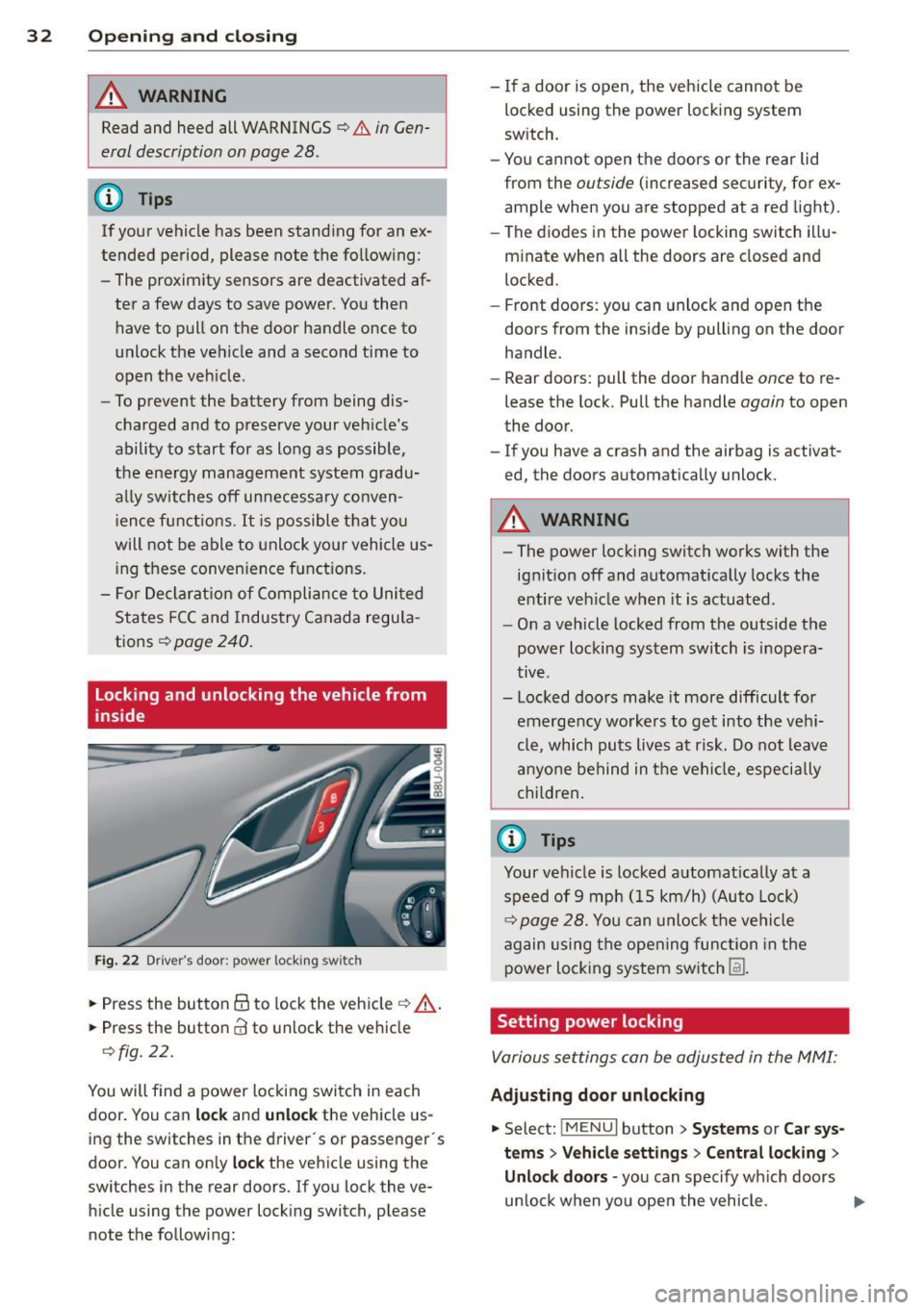
Fig. 22 Drive r's door ; p ow er lo ckin g sw it c h
.. Press the button @to lock the vehicle¢ A
.. Press the button CI! to unlock the vehicle
¢fig. 22.
You will f ind a power locking switch in each
door. You can
lock and unlock the vehicle us
ing the switches in the driver's or passenger 's
doo r. You can only
lock the vehicle using the
switches in the rear doors. If you lock the ve h icle using the power locking switch, please
note the following: -
If a door is open, the vehicle cannot be
locked using the power locking system
sw itch.
- You cannot open the doors or the rear lid
from the
outside ( increased security, for ex
ample when you are stopped at a red light).
- The diodes in the power locking switch illu
minate when all the doors are closed and
locked .
- Front doors: you can unlock and open the
doors from the inside by pulling on the door
handle.
- Rear doors: pull the door handle
once to re
lease the lock. Pull the handle
again to open
the door.
- If you have a crash and the ai rbag is activat
ed, the doors automatically unlock.
A WARNING
-
-The power locking switch works with the
ignition off and automatically locks the
entire veh icle when it is actuated .
- On a vehicle locked from the outside the
power locking system switch is inopera
tive .
- Locked doors make it more difficult for
emergency workers to get into the veh i
cle, which puts lives at risk. Do not leave
anyone behind in the vehicle, especia lly
children,
0) Tips
Your vehicle is locked automat ically at a
speed of 9 mph (15 km/h) (Auto Lock)
¢ page 28. You can unlock the vehicle
again using the opening function in the
power locking system sw itch
[fil .
Setting power locking
Various settings can be adjusted in the MMI:
Adjusting door unlocking
.. Select: iM ENUI button> Systems or Car sys
tems > Vehicle settings> Central locking>
Unlo ck doors -
you can spec ify which doors
un lock when yo u open the vehicle . ...
Page 35 of 258
M N M N
0 ::i co
rl I.O
"' rl
"' rl
Selecting All and pressing the~ button on
the remote control key unlocks the entire ve
hi cle.
Selec ting
Driver and pressing the~ button on
the remote cont ro l key once unlocks on ly the
dr iver's door . In veh icles with a convenience
k ey *, only the door w hose hand le you pull w ill
un lock. If you pre ss the ~ butto n tw ice, the
entire ve hicle w ill unlock.
If you press the~
button, the entire veh icle wi ll always lock.
Tone when locking
.. Se lect: I MENU I button > System s or Car sys
tems
> Vehicle settings > Cent ral locking >
Tone when locking
I f yo u select On , a to ne will sound when you
l ock the vehicle.
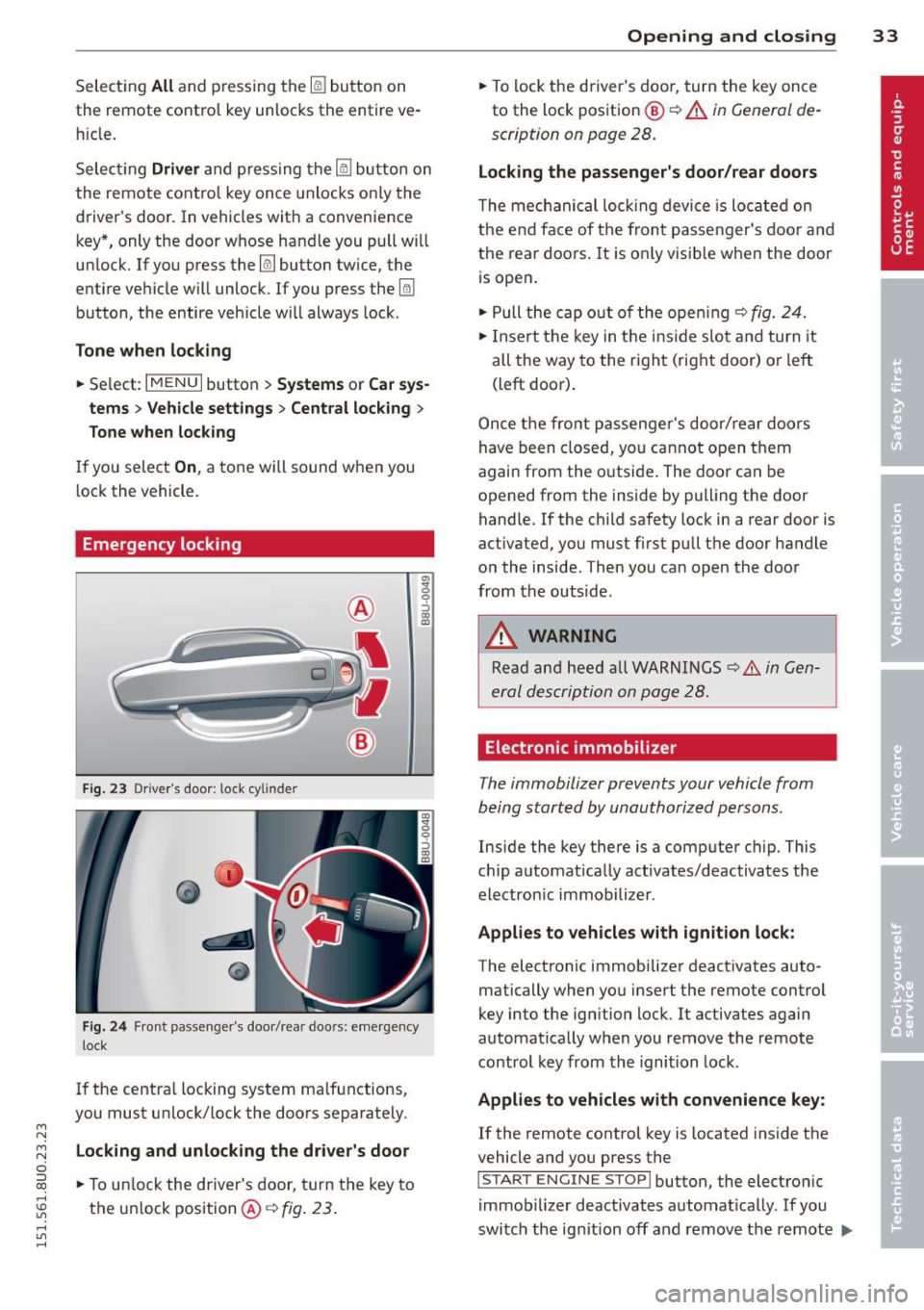
Emergency locking
F ig. 23 Dr iver 's doo r: 1.oc k cyl inde r
Fig . 24 Fron t pa sse nge r's doo r/rea r doo rs: em erge ncy
lock
I f the centra l locking system ma lfunctions,
you must unlock/ lock the doors separately.
Locking and unlock ing the driver's door
.. To u nlock the driver's door, turn the key to
the un lock position @¢
fig. 23 .
Opening and clo sin g 33
.. To lock the driver's door, turn the key once
to the lock pos ition
@ ¢ A in General de
scription on page 28 .
Locking the passenger's door/rear doors
The me chanical loc king device is lo cated on
the e nd face of the fron t passe nger's door a nd
the rear doors . It is o nly visible when the door
is open .
.. Pull the cap o ut of t he ope ning ¢
fig. 24.
.. In sert the key in t he inside slo t and turn it
all the way to the ri ght ( right door) or left
(left door).
Once the fro nt p assenge r's door/ rear d oo rs
have been closed, yo u ca nn ot open t hem
again from the o utsi de. The doo r can be
opened from the ins ide by pulling the door
handle.
If the child safety lock in a rear door is
activated, y ou must first pull t he door handle
o n the inside . T hen you can open the doo r
from the outside .
A WARNING
Read an d heed a ll W ARNI NGS ¢.& in Gen
er al des crip tion on page 28.
Electronic immobilizer
The immobilizer prevents your vehicle from
being start ed by unauthorized persons .
Inside the key there is a comp uter c hip. This
c hi p a utomat ically activates/deactivates the
electron ic immobilizer .
Applies to vehicles with ignition lock:
The electronic immobilize r deact ivates auto
matically when yo u inse rt the remote contro l
key into the ignition lock . It activates again
automat ica lly when you remove the remote
control key from th e i gnition lock.
Applies to vehicles with convenience key:
If the remote control key is located inside the
vehicle and you press the
I S TA RT ENGINE STOPI button, the electro nic
i mmob ilizer deactivates automat ica lly. If you
switch the ig nition off and remove the remote
IJ,,
Page 36 of 258
34 Openin g and clo sing
control key from the vehicle, the electronic
immobilizer activates again automatically.
.&_ WARNING -
Always take the key with you when you leave the vehicle. The key can disarm the
electronic engine immobilizer and permit
an unauthorized person to start the engine
and enable operat ion of the vehicle sys
tems such as power window or power sun
roo f leading to ser ious personal inju ry.
@ Tips
- The vehicle cannot be started if an unau
thorized key is used . The vehicle may not
start if another radio device such as a key
fo r another vehicle o r a transpo nder is
l oca ted on the key r ing.
- Fo r Decla rat ion of Compliance to United
States FCC and Indus try Canada regula
tions¢
page 240.
Rear Lid
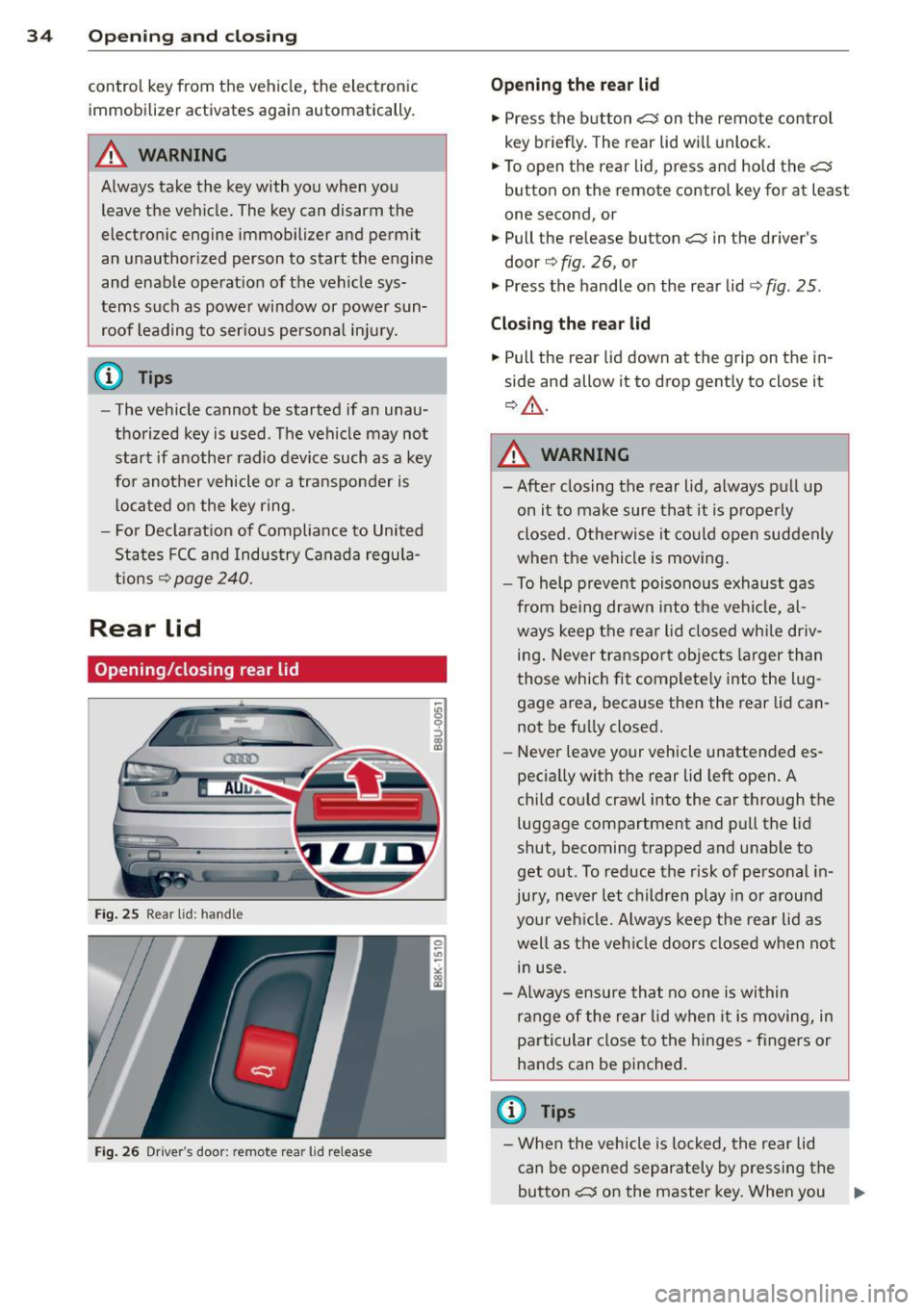
Opening/closing rear lid
Fi g. 25 Rear lid : hand le
Fi g. 2 6 Driver 's door: remote rear lid release
9 ::> CD a,
Opening the rear lid
"' Press the b utton <::::::5 on the remo te control
key briefly. The rear lid wi ll unlock .
"' To open t he rear lid, press and hold the
<::::::5
button on the remote control key for at least
one second, or
"' Pull the release button
c:::5 in the driver's
door¢ fig. 26, or
"' Press the handle on the rear lid¢
fig. 25 .
Clo sing the rear lid
"' Pull the rear lid down at the grip on the in
side and allow it to drop gently to close it
¢ &_ .
.&_ WARNING
=
- Afte r closing the rear lid, always pull up
on it to make sure that it is p roperly
closed. Othe rwise it could ope n suddenly
when the vehicle is moving.
- To help pr eve nt poisono us exhaust gas
from be ing drawn into t he vehicle, al
ways keep the rear lid closed wh ile driv
ing . Never tra nsp o rt objects larger than
those which fit complete ly into the lug
gage area, beca use the n the rear lid can
not be f ully closed.
- Never leave your vehicle unattended es
pecia lly with the rear lid left open. A
chi ld cou ld craw l into the car through the
luggage compartment and pu ll the lid
shut, becoming trapped a nd unable to
get out. To reduce the risk of personal i n
jury, never let children play in or a round
your veh icle. Always keep the rea r lid as
well as the vehi cle doors closed when not
in use.
- A lways ensure that no one is wi thin
range of the re ar lid when it is moving, in
particular close to the hinges - fingers or
hands can be pinched .
a) Tips
-Whe n the vehicle is lo ck ed, the rear lid
can be opened separa tely by p ressing the
butto n
<::::::5 on the master key. When you ..,.
Page 37 of 258
M N M N
0 ::i co
rl I.O
"' rl
"' rl
close the rear lid again, it locks automat
ically.
- In case of an emergency or a fau lty han
dle, the luggage compartment lid can be
opened from the inside
c> page 36.
Power opening/closing rear lid
A pp lies to vehicles: with autom atic rear li d operatio n
The open position can be adjusted.
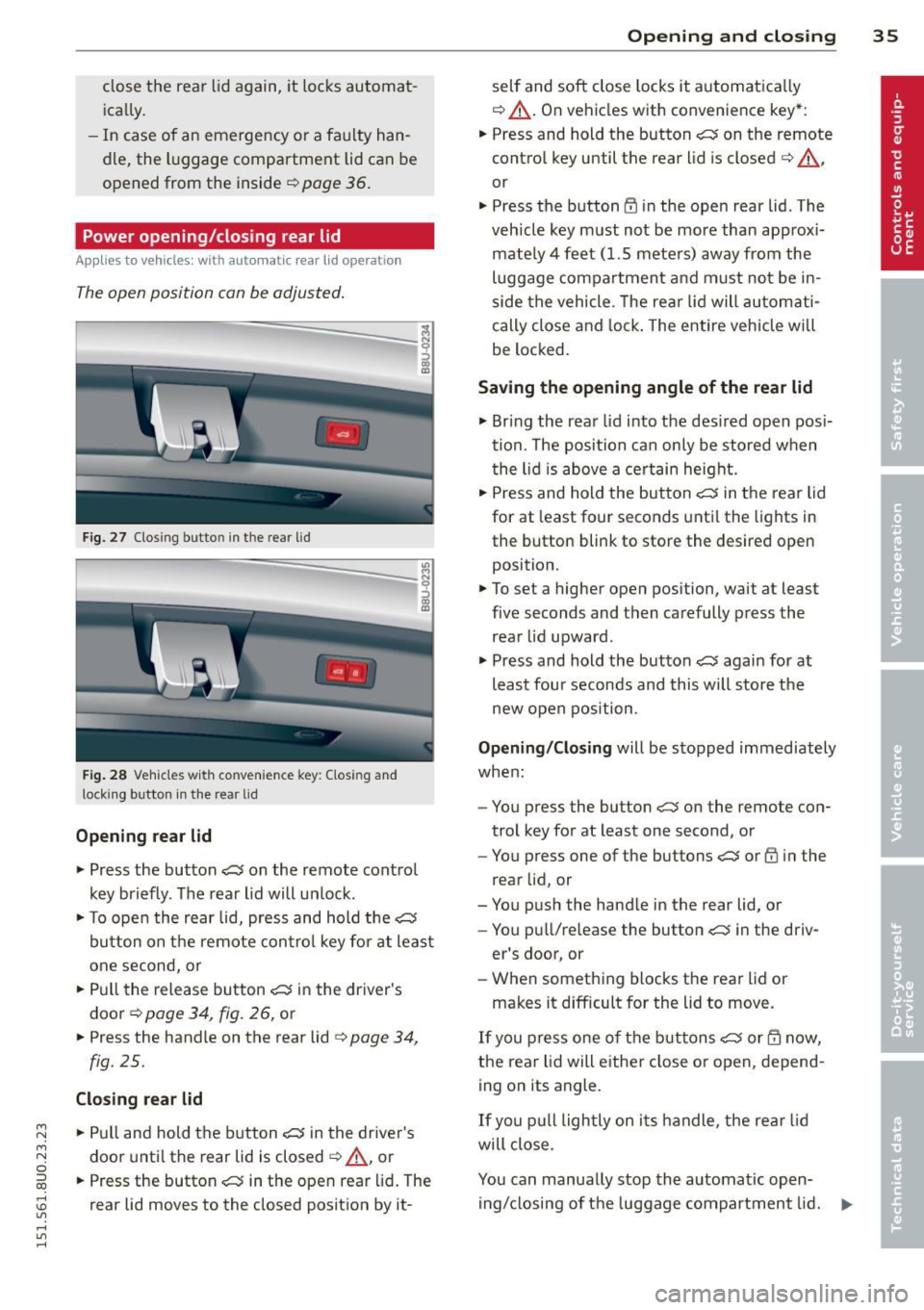
Fig. 27 Closing butto n in the rea r lid
Fig . 28 Ve hicles with co nve nience key: Clos ing and
lock ing button in the rear lid
Opening rear lid
.. Press the button ~ on the remote control
key briefly. The rear lid will un lock .
i
.. To open the rear lid, press and hold the~
button on the remote con trol key for at least
one second, or
.. Pull the release button~ in the driver's
door
c> page 34, fig. 26, or
.. Press the handle on the rear lid
c> page 34,
fig. 25.
Closing rear lid
.. Pull and hold the button~ in the driver's
door until the rear lid is closed
c> A, or
.. Press the button~ in the open rear lid. The
rear lid moves to the closed position by it-
Opening and closing 35
self and soft close locks it automatica lly
c> &_ . On vehicles with convenience key*:
.. Press and hold the button
~ on the remote
control key until the rear lid is closed
c> A ,
or
.. Press the button
CD in the open rear lid . The
veh icle key must not be more than approx i
mate ly 4 feet (1.5 meters) away from the
luggage compartment and must no t be in
side the vehicle. T he rear lid will automati
cally close and lock . The entire vehicle will
be locked.
Saving the opening angle of the rear lid
.. Bring the rear lid into the des ired open posi
tion. The position can only be stored when
the lid is above a certain height .
.. Press and hold the button
~ in the rear lid
for at least four seconds until the lights in
the button blink to store the desired open
position.
.. To set a higher open position, wait at least
five seconds and then carefully press the
rear lid upward .
.. Press and hold the button
~ again for at
least fou r seconds and this will store the
new open position.
Opening/Closing will be stopped immediately
when :
- You press the button
~ on the remote con
trol key for at least one second, or
- You press one of the buttons
~ or CD in the
rear lid, or
- You push the handle in the rear lid, or
- You pu ll/release the button~ in the driv-
er's door, or
- When something blocks the rear lid or
makes it difficult for the lid to move.
If you press one of the buttons~ or m now,
the rear lid will eithe r close or open, depend
ing on its angle.
If you pull lightly on its handle, the rear lid
will close.
You can manually stop the automatic open ing/closing of the luggage compartment lid. ...,
Page 38 of 258
36 Opening and clo sing
The a utomatic closi ng process begins if you
push down on the rear lid.
.&_ WARNING
- Never close the rear lid inatten tively or
without checking first. Although the closing force of the rear lid is limited,
you can st ill ser iously injure yourself or
others .
- Always ensure that no one is w ith in
range of the rear lid when it is mov ing, in
part icu la r close to the h inges and the up
per and lowe r edges -fingers or hands
can be pin ched.
- To help p revent po isonous exha ust gas
from bei ng drawn into the vehicle, al
ways keep the rear lid closed while driv ing. Never transport objects large r than
those which fit completely into the l ug
gage area, because then the rear lid can
not be fully closed.
- Never leave yo ur vehicle u nattended es
pecially with the rear lid left open . A
child could crawl into the car through the
luggage compa rtment and pull the lid
shut, becom ing trapped and unable to
get out . To reduce the risk of persona l in
jury, never let ch ildren play in or around
yo ur vehicle . A lways keep the rear lid as
we ll as the vehicle doo rs closed when not
in use.
- If there i s a luggage ra ck or b icycle ra ck
mounted on the rear l id, it may not be
able to open comple tely or an opened
rear lid may close by itself beca use of the
added weight. So the ope n rear lid must
be s upported or the weight m ust be re
moved from the luggage rack first .
@ Tips
-When the vehicle is locked, the rear lid
can be un locked sepa rately by pressing
the button
c:s on the master key. W hen
t h e rear lid is closed aga in, it locks auto
matically.
- The following applies to veh icles equip
ped with the conven ience key* feature: if
the remote control key is left in the lug- gage compa
rtment, luggage compart
ment wi ll automatically unlock itself af
ter yo u lock the vehicle. T his prevents
you from unintentionally lock ing your
key in the l uggage compartment.
- If the vehicle battery charge drops be
low a certain level, you can still open or
close the rear lid manua lly, however , you
w ill need to app ly more force to close it .
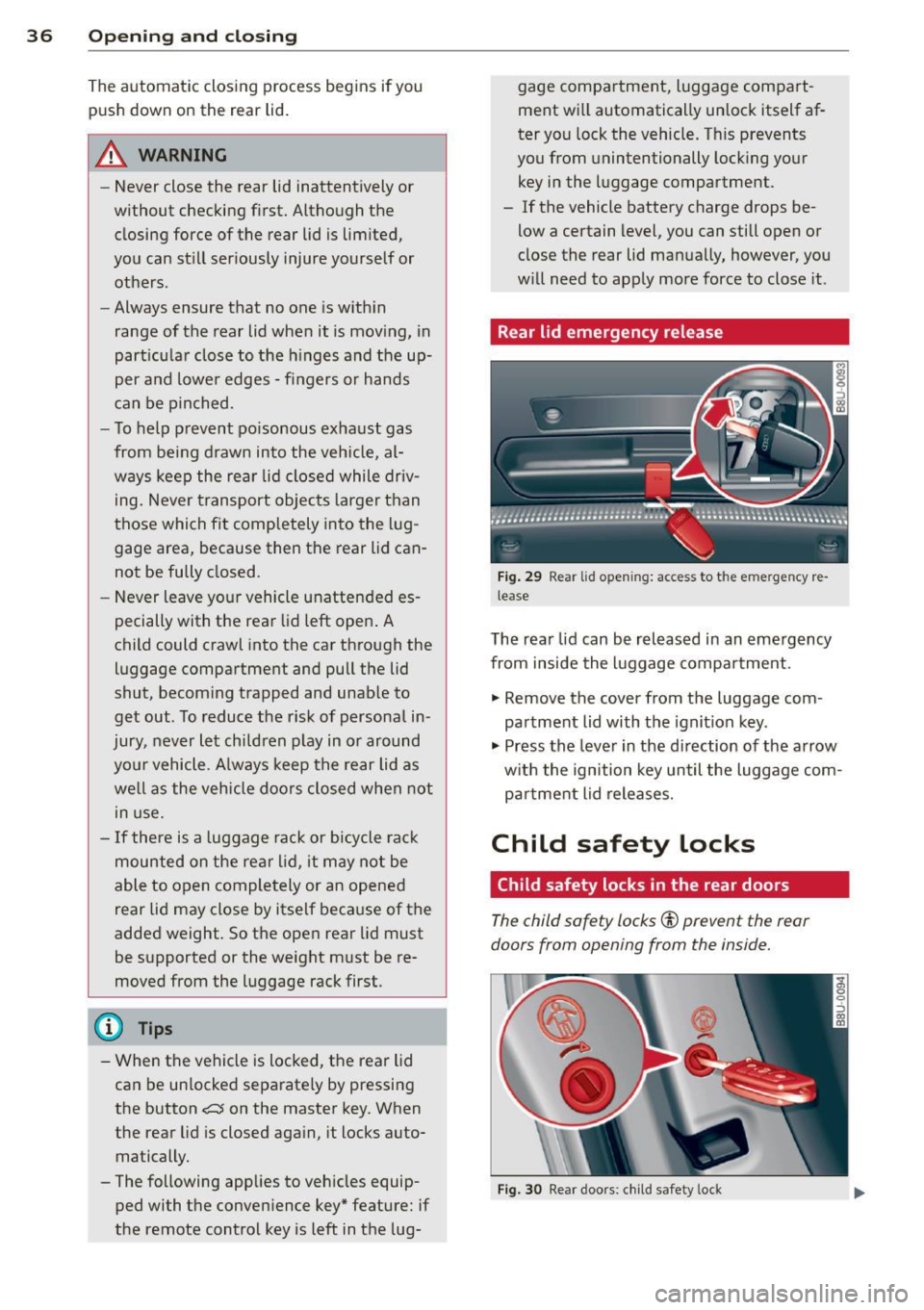
Rear lid emergency release
Fig. 2 9 Rear lid o penin g: a cces s to t he e mergency re
lea se
The rea r lid can be rel eas ed in an emergency
from inside the luggage compa rtment.
., Remove the cover from t he luggage com
pa rtment lid with the ignit ion key .
., Press the leve r in the di rection of the arrow
w ith the ign ition key until the luggage com
pa rtment lid releases.
Child safety Locks
Child safety locks in the rear doors
The child saf ety locks© prevent the rear
doors from opening from the inside.
Fi g. 30 Rear doo rs : chi ld safe ty lo ck
Page 39 of 258
M N M N
0 ::i co
rl I.O
"' rl
"' rl
.. To turn the child safety locks on , turn the ig
nition key in the direction of the arrow .
.. To turn
off , turn the ignition key opposite
the direction of the arrow.
When the child safety locks are activated, the
inside door handles do not work and the doors
can only be opened from the outside.
Power windows
Controls
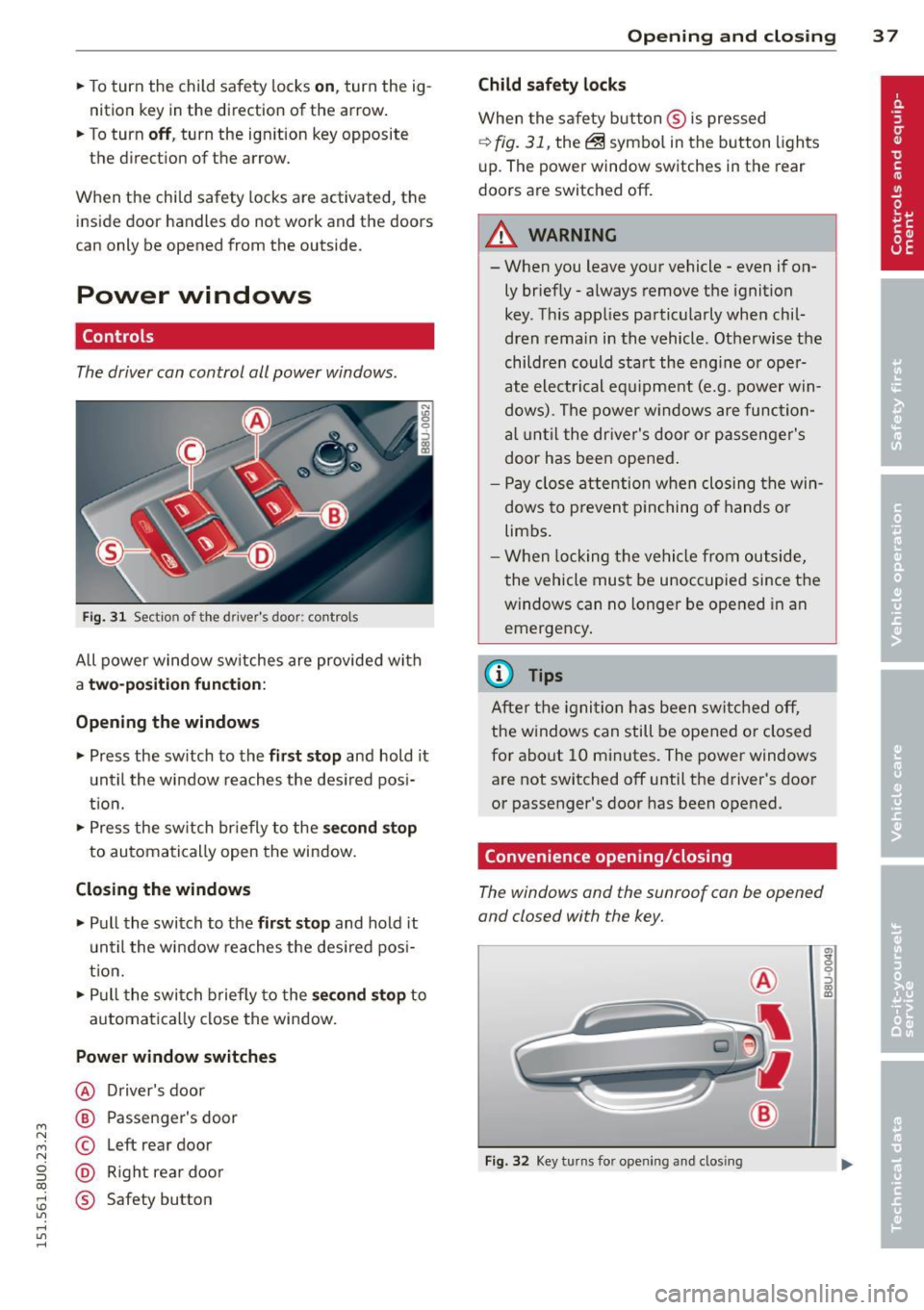
The driver can control all power windows .
Fig. 31 Section of the driver's door: controls
All power window sw itches are provided with
a t w o-posi tion fun cti on:
Opening th e window s
.. Press the sw itch to the fi rs t sto p and hold it
until the window reaches the desired posi
t ion .
.. Press the sw itch br iefly to the
sec ond s top
to automatically open the window.
Closing th e windows
.. Pull the switch to the fir st stop and hold it
un til the window reaches the des ired pos i
tion.
.. Pull the switch briefly to the
se con d stop to
automatically close the window.
Power wind ow switche s
@ Driver's door
@ Passenger's door
© Left rear door
@ Right rea r doo r
® Safety button
Openin g an d clos ing 3 7
Child safety l ock s
When the safety button ® is pressed
¢ fig. 31, the~ symbol in the button lights
u p. The power window switches in the rear
doors are switched off.
&_ WARNING
--When you leave your vehicle -even if on-
ly briefly· always remove the ignition
key . Th is app lies particularly when chil·
dren remain in the vehicle. Otherwise the
children could start the eng ine or oper
ate electrical equ ipment (e.g. power w in
dows). The power windows are function
a l until the dr iver's door or passenger's
door has been opened.
- Pay close attention when closing the win
dows to prevent p inching o f hands o r
limbs.
- When locking the vehicle from outside,
the vehicle must be unoccupied since the
windows can no longer be opened in an
emergency.
(I} Tips
After the igni tion has been switched off,
the w indows can still be opened or closed
for about 10 minutes . The power windows
are not switched off until the driver's door
or passenger's door has been opened.
Convenience opening/closing
The windows and the sunroof can be opened
and closed with the key.
F ig. 32 Key turns for opening and closing
"' z 9 ::::, a, to
Page 40 of 258
38 Opening and closing
Convenience opening feature
.,. Insert the key into the lock of the driver 's
door .
.,. Turn the key to position
c::> fig. 32@ until all
the windows have reached the desired posi
tion and the sunroof is open.
Convenience closing feature
.,. Turn the key in the lock of the driver's doo r
to the lock position @ until the windows
and the power sunroof are closed
c::> A.
For vehicles w ith pano rama sunroof*: When
you open or close the panorama sunroof*, the
power sunshade will also open or close.
~ WARNING
- Never close the windows and the power
sunroof inattentively and without check
ing -there is risk of injury.
- You must always watch when the win
dows are being ra ised so that no one can
be trapped. If you release the key, the
closing action is immed iately canceled .
- Always read and heed WARNING
c::, &. in
General description on page 28 .
Correcting power window malfunctions
After disconnecting the vehicle battery , the
one-touch up and down feature must be acti
vated again.
.,. Pull the power window switch until the win
dow is comp lete ly raised .
.,. Re lease the switch and pull it again for at
least one second.
.,. Press and hold the electric window sw itch
until the window is fully open .
.,. Re lease the switch and then press it again
for at least one second. You shou ld now be
able to close the window in the usual way.
Panorama sunroof
Description
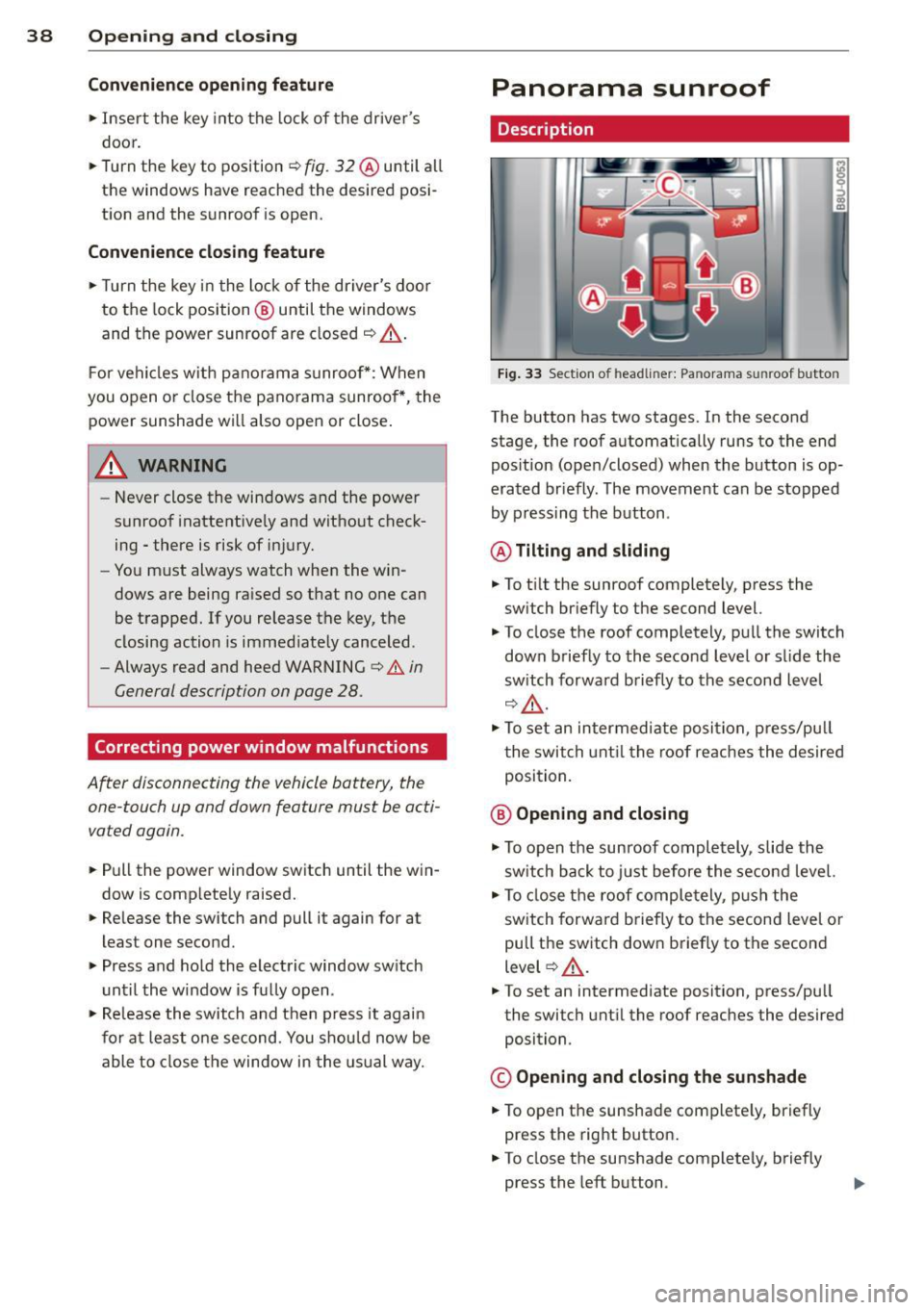
Fig. 33 Section of h eadliner: Pan orama s unroof button
The button has two stages. In the second
stage, the roof automat ically runs to the end
pos ition (open/closed) when the button is op
erated br iefly. The movement can be stopped
by pressing the button .
@ Tilting and sliding
.,. To t ilt the sunroof completely, press the
sw itch briefly to the second level.
.,. To close the roof completely, pull the switch
down briefly to the second level or slide the
switch forward briefly to the second level
c::, A-
.. To set an intermed iate posi tion, press/pu ll
the switch until the roof reaches the desired
position.
@ Opening and closing
.,. To open the sunroof completely, slide the
switch back to just before the second level.
.,. To close the roof completely , push the
switch forward briefly to the second level o r
pull the switch down briefly to the second
level
c::> A .
.,. To set an intermediate position, press/pu ll
the switch until the roof reaches the desired
position .
© Opening and closing the sunshade
.,. To open the sunshade complete ly, briefly
press the right button .
.. To close the sunshade completely, briefly
press the left button .
Page 44 of 258
42 Clear vis ion
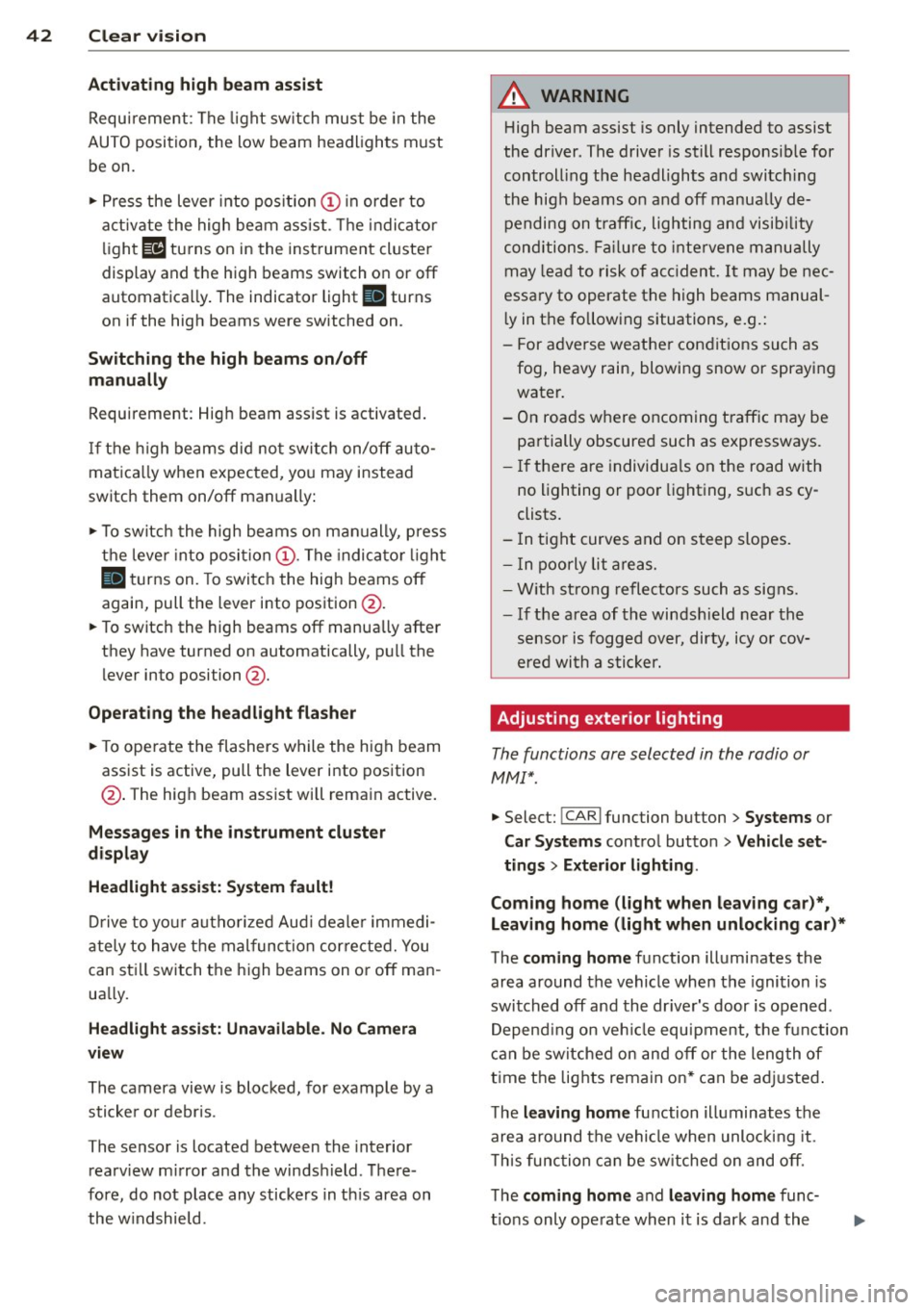
Activating high beam a ssi st
Requirement: The light sw itch must be in the
AUTO position, the low beam headlights must
be on.
• Press the lever into pos it ion (D in order to
activate the high beam assist . T he indicator
li gh t
IIJ turns on in the instrument cluster
display and the high b eams switch on or
off
automatica lly . The indicator light Bl turns
on if the high beams were switched on .
Switching the high beams on /off
m anuall y
Requir ement : Hig h beam assist is activated .
I f the h igh beams did not switch on/off auto
matica lly when expected, yo u may instead
switch them on/off manually:
• To switch the high beams on manually, press
the leve r into position (D. The indica tor light
El tu rns on. To switch the high beams off
again, pull the lever into position @.
• To switch the high beams
off manually after
th ey hav e tu rn ed on automatically, p ull the
lever into posi tion @.
Opera ting th e headlight fla sher
• To ope rate the flashers while the h igh beam
assist is active, pull the lever into position
@ . T he high beam assist will remain active.
Messages in the instrum ent cluster
displ ay
He adlight a ssis t: Sy stem f ault!
Drive to your a utho rized Aud i deale r immedi
ate ly to have the mal function corrected. You
can st ill switch the h igh beams on o r
off man
ua lly.
H eadlight a ssis t: Una vail able . N o C amera
v iew
The camera view is blocked, for examp le by a
sticke r or debris .
The sensor is located between the interior
rearv iew mirror and the winds hield . There
fore , do not place any stickers in th is area on
the w indshield .
A WARNING
High beam assist is only intended to assist
the driver. The drive r is still responsib le for
controll ing the headlights and switc hing
the high beams on and
off manually de
pending on t raff ic, lighting and visib ility
conditions. Fa ilu re to intervene manually
may lea d to risk of acc ident.
It may be nec
essary to operate the high beams manual
l y in the following situations, e.g.:
- For adverse weathe r condit ions such as
fog, heavy rain, blowing snow or spraying water.
- On roads where oncoming traff ic may be
partially obscured such as expressways .
- If there are individua ls on the road with
no lighting or poo r light ing, such as cy
clists.
- In tight curves and on steep slopes.
- In poorly lit are as.
- W ith st rong refle cto rs such as signs.
- If t he area of the winds hield near the
sensor is fogged ov er, dirty, icy o r cov
ered wi th a stic ker.
' Adjusting exterior lighting
The functions are selected in the radio or
MM!* .
• Select: !CARI func tion but ton > S ystems or
Car Syst ems contro l button > Ve hicle set
ting s> Exterior lighting .
Coming home (light when lea ving car )*,
Leav ing home (light when unlocking car) *
The coming home function illuminates the
area around the vehicle when the ignition is
switched
off and the dr ive r's door is open ed .
Depend ing on ve hicle equ ipment, the function
can be switched on and
off or the length of
t ime the lights remain on* can be ad justed .
T he
leaving home function illuminates the
area around the vehicle when unloc king it .
T h is func tion ca n be sw itche d on and
off .
The coming hom e and leaving home func
t ions only operate when it is dar k and the
Page 45 of 258
M N M N
0 ::i co
rl I.O
"' rl
"' rl
light switch is in the AUTO position
¢ page 40, fig. 34.
Daytime running lights
USA models : You can switch the dayt ime run
ni ng lights
on an d off .
Canada models:
The function cannot be
turned off .
It is ac tiva ted automat ica lly each
time the ignition is switc hed o n.
Emergency flashers
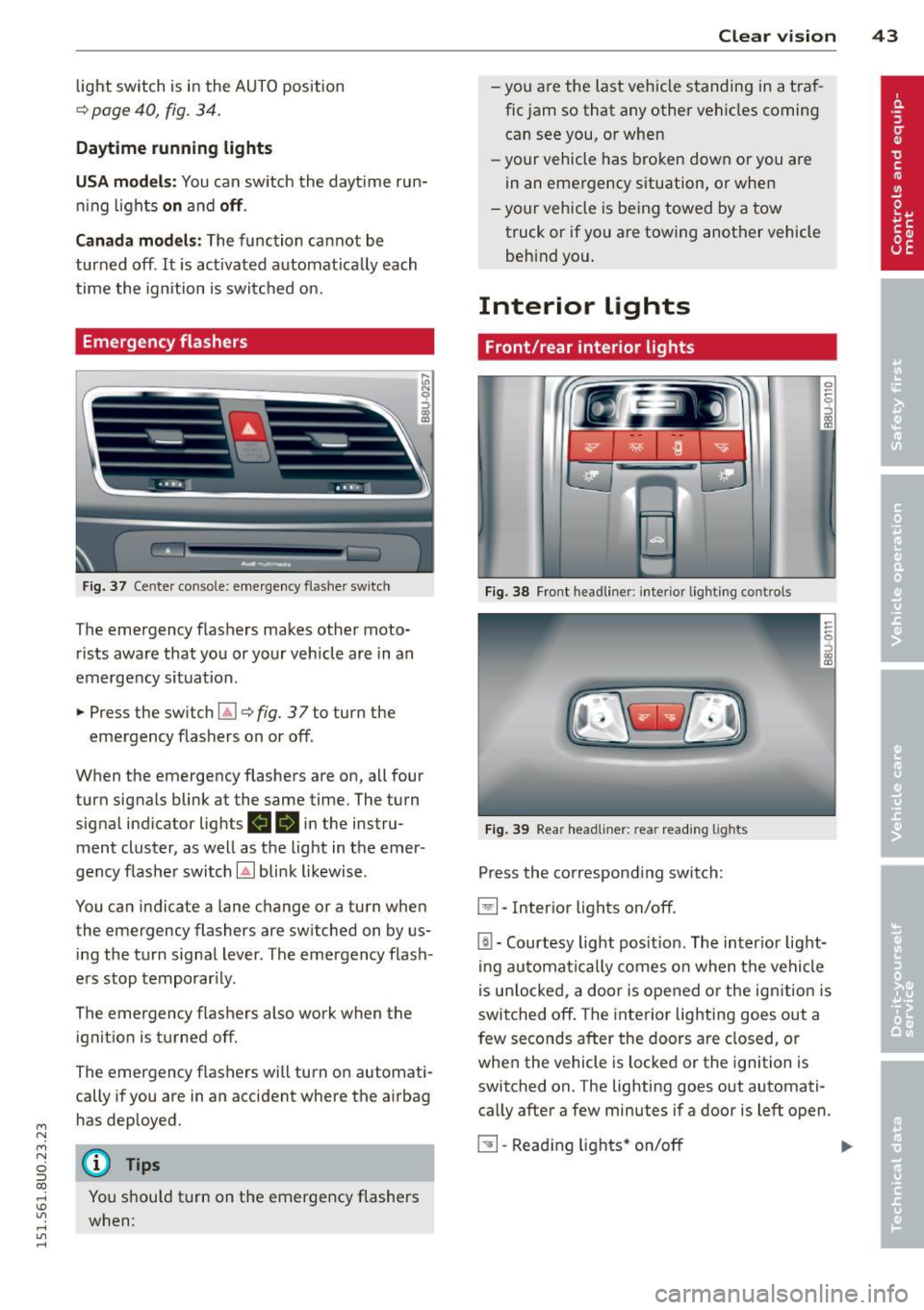
Fig . 3 7 Cente r conso le : emerge ncy flashe r sw itch
The emergency flashers makes other moto
rists aware that you or your vehicle are in an
emergency situation .
.,. Press the sw itch
Gil ¢ fig. 3 7 to turn the
emergency flashers on or off.
When the emergency flashers are on, all four turn signals blink at the same time. The turn
signa l ind icator lig hts
II 18 in the instru
ment cluster, as well as the light in t he emer
gency flashe r switch
[Ai bli nk likewise .
You can indicate a lane change or a turn when
the emergency flashers are switched on by us
ing the tu rn signa l lever . The emergency flash
e rs stop temporar ily.
The emergency f lashers also work when the
ignit io n is turned off.
The emergency flashers will turn o n automati
cally if you are in an accident where the airbag
h as dep loyed.
@ Tips
You shou ld t urn on t he emergency flashers
when:
Clear vi sion 43
- yo u are the la st veh icle standing in a t ra f
fic jam so that any other ve hicles coming
can see you, o r whe n
- yo ur vehicle has bro ken dow n or you are
in an emergency s ituation, o r when
- yo ur vehicle is be ing towed by a tow
truck or if you are towing another vehicle
beh ind you.
Interior Lights
Front/rear interior lights
Fig . 38 Fro nt headl iner: int eri or lig h ting co ntro ls
Fi g. 39 Rear headli ner: rea r read ing lig hts
Press the corresponding switch:
~ -In ter ior lig hts on/off .
[ii-Courtesy light pos it io n. The inter ior lig ht
ing auto mati ca lly comes o n when t he ve hicl e
i s un lo cke d, a door i s ope ned or the ig nitio n is
switched off. The interior lighting goes o ut a
few seconds after the doors a re closed, or
whe n the vehicle is locked or the ignition is
switched on. The lighting goes out automati
ca lly after a few minutes if a door is left open .
~ -Read ing lights * on/o ff ..,.
Page 49 of 258
M N
M N
0 ::i co ,...., \!) 1.1"1 ,...., 1.1"1 ,....,
(D Note
-In the case of frost , check whether the
windsh ield wiper b lades are frozen to
the windshie ld. Switching on the wind
s hi eld wipers can damage the wiper
blades!
- Prior to using a car wash, the windshield
wiper system must be switched
off (lever
i n position @). This helps to prevent un
i ntent ional sw itch ing on and damage to
the windshie ld w iper system .
- The wi ndshield wipe rs are switched
off
whe n the ignition is turned off . Activate
t h e w indshie ld w ipers afte r the ig nit ion
i s sw itche d back on by mov ing the w ind
s hi eld wipe r lever to any pos ition.
- Worn or di rty windshie ld wiper b lades
r es ult in strea king. This can affe ct the
r ain senso r* func tion . C heck your wind
s h ield wiper blades r egularly.
- The w asher fluid nozzles of the wi nd
s hi eld washer system are heated a t low
temperatures w hen the ignit ion is on .
- W hen stopp ing tempor arily, (e.g. a t a
traff ic light) the se t speed of the w ind
s hi eld wipers is automatically red uced by
one speed .
Cleaning windshield wiper blades
Clean the windshield wiper blades whe n they
begin to leave streaks . Use a soft cloth and
g lass cleaner to clean the windsh ield wiper
b lades .
Windshield wiper s
.. Place the windshield wipe r arms in the serv
ice position . Refer to ¢ page
47 .
.,. Lift the w iper arm away from the front win
dow .
Rear window wiper
.. Lift the rear wiper arm away from the glass.
Clear vis ion 4 7
A WARNING
Dirty winds hield wiper b lades can impair
your v iew. This can lead to accidents .
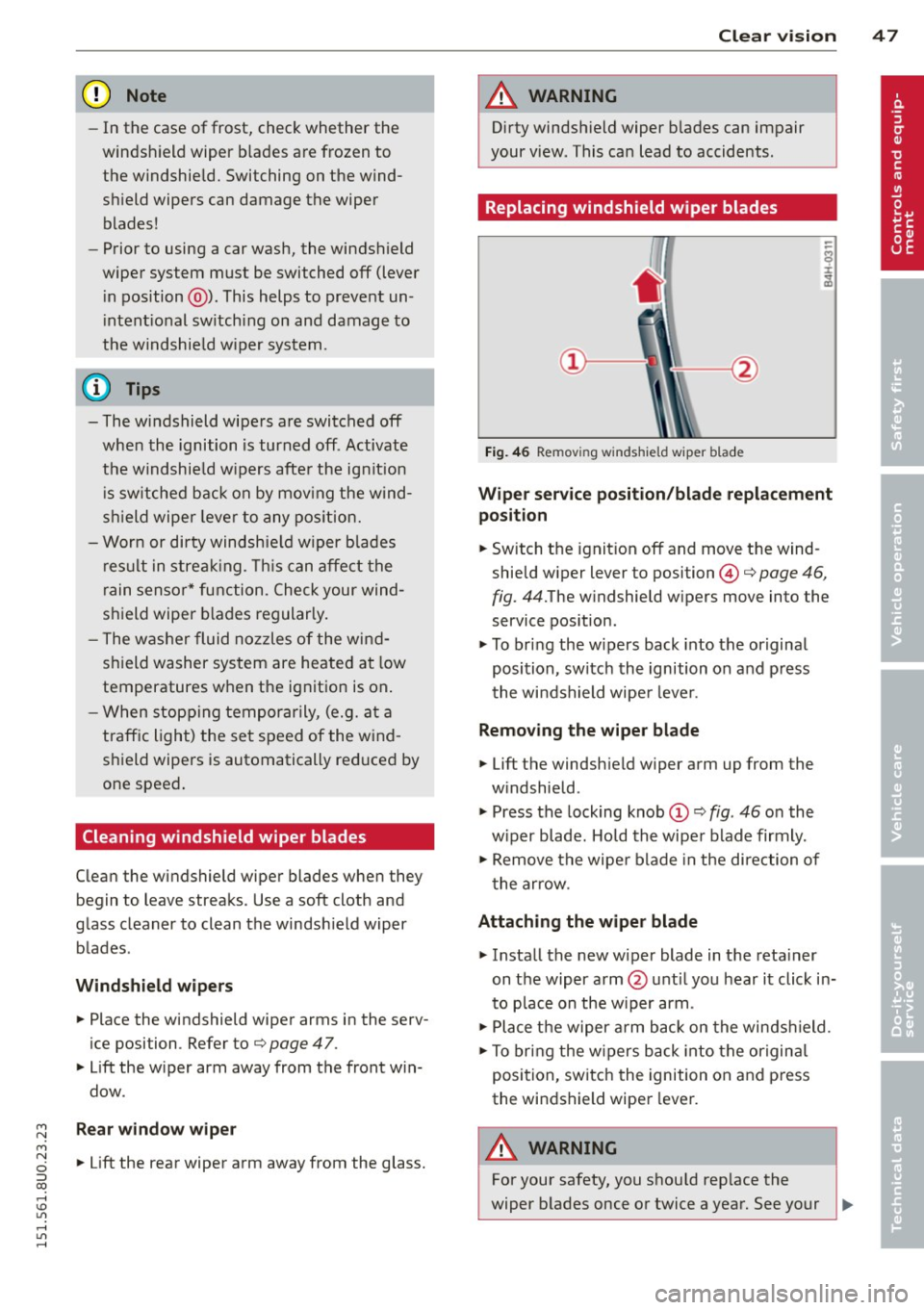
Replacing windshield wiper blades
Fig. 46 Remov ing w indsh ield w iper blade
Wiper service position /blade replacement
position
.. Switch the ignit ion off and move the wind
shield w iper lever to position ©¢ page
46,
fig .
44.The w indshie ld w ipers move into the
service pos ition .
.. To br ing the w ipers back into the original
position, sw itc h th e ignition on and p ress
t he winds hield wipe r leve r.
Removing the wiper blade
.. Lift the windsh ield w iper arm up from the
w indshield .
.. Press the lock ing knob
.,. Remove the wipe r blade in the di rec tion of
t he ar row .
Attaching the wiper blade
.. Insta ll the new wiper blade in the reta iner
on t he wiper arm @until you hear i t click in
to p lace on the w iper arm .
.,. Place t he w iper arm back on the winds hield.
.. To bring the w ipers b ack into the or igin al
position, switch the ignition on and press
the windshield wipe r lever.
A WARNING
-
For your safety, y ou shou ld rep lace the
wiper b lades once or twice a year. See your