warning light AUDI Q3 2015 User Guide
[x] Cancel search | Manufacturer: AUDI, Model Year: 2015, Model line: Q3, Model: AUDI Q3 2015Pages: 258, PDF Size: 64.9 MB
Page 20 of 258
18 Instruments and warning/indicator lights
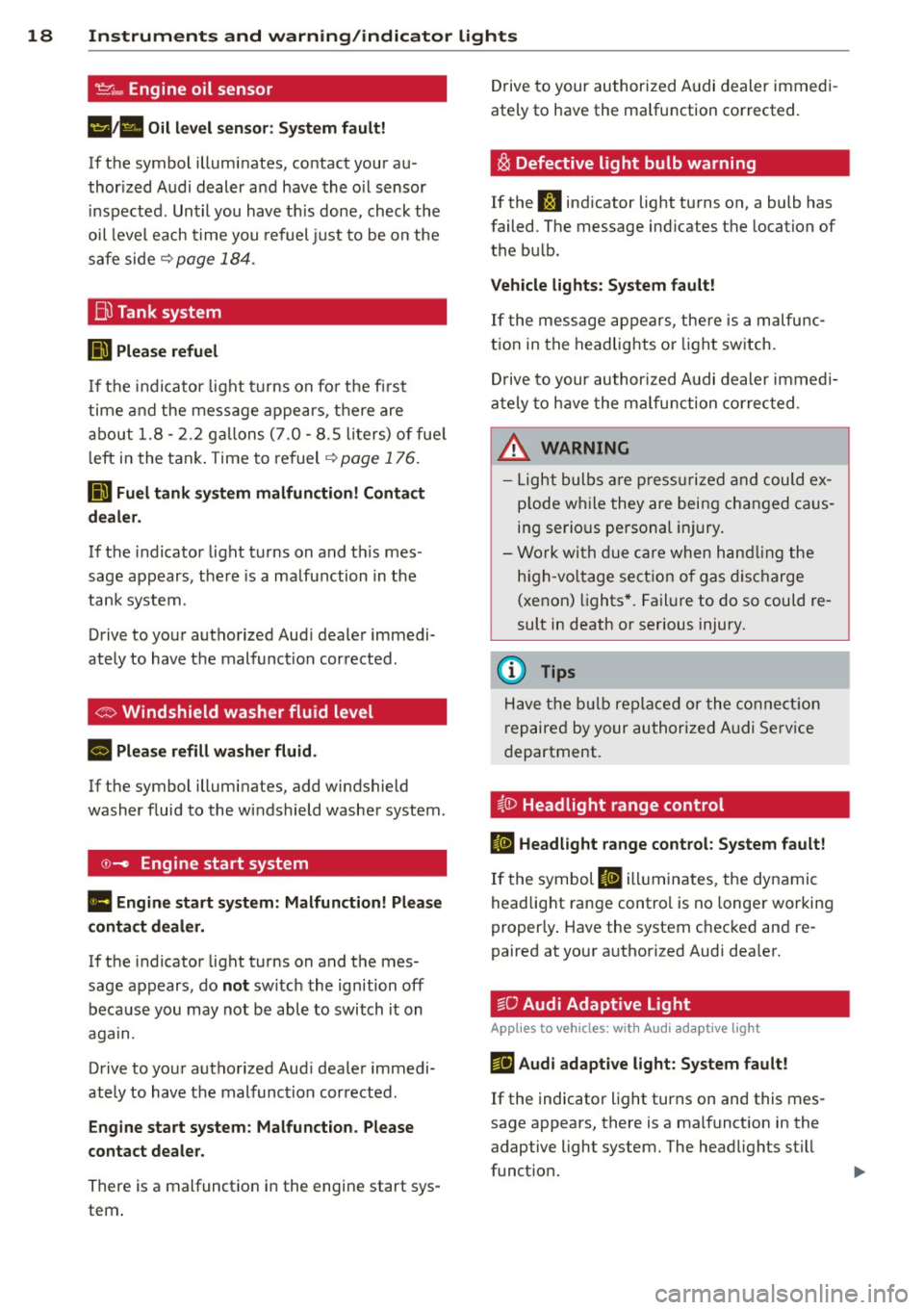
't':r.,. Engine oil sensor
1!11a Oil level sensor: System fault!
If the symbol illuminates, contact your au
thor ized Audi dealer a nd have the oil sensor
inspected. Until you have th is done, check the
oil level each time you refuel just to be on the
safe side~
page 184.
Bil Tank system
DD Please refuel
If the indicator light turns on for the first
time and the message appears, there are
about 1.8- 2.2 gallons (7.0 -8.5 li ters) of fue l
l eft in the tank . Time to refuel
~page 176.
ID'J Fuel tank system malfunction! Contact
dealer.
If the indicator light turns on and th is mes
sage appears, there is a malfunction in the
tank system.
Drive to your authorized Aud i dealer immedi
ately to have the malfunction corrected .
If the symbol illuminates, add windshield
washer fluid to the windshield washer system .
©-Engine start system
Ill Engine start system: Malfunction! Please
contact dealer.
If the indicator light turns on and the mes
sage appears, do
not sw itch the ignition off
because you may not be able to switch it on
again.
Drive to your authorized Aud i dealer immedi
ately to have the malfunction corrected .
Engine start system: Malfunction. Please
contact dealer.
There is a malfunction in the engine start sys
tem . Drive to
your authorized Audi dealer immedi
ately to have the ma lfunction corrected.
i§i Defective light bulb warning
If the J:I indicator light turns on, a bulb has
failed. The message ind icates the location of
the bu lb .
Vehicle lights: System fault!
If the message appears, there is a malfunc
tion in the headlights or lig ht switch.
Drive to your authorized Audi dealer immedi
ately to have the malfunction corrected .
&, WARNING
-Light bulbs are pressurized and could ex
p lode whi le they are being changed caus
ing serio us personal injury.
- Work with due care when handling the
high-vo ltage section of gas discharge
(xenon) lights*. Failure to do so could re
sult in death or serious injury.
{D Tips
Have the bulb replaced or the connect ion
r epaired by your authorized Audi Service
department.
~0 Headlight range control
II Headlight range control: System fault!
If the symbol II illuminates , the dynamic
headlight range control is no longer working
proper ly . Have the system checked and re
paired at your a uthorized Audi dea ler.
§0 Audi Adaptive Light
Appl ies to vehicles : wit h Audi adapt ive light
mfl Audi adaptive light: System fault!
If the indicator light turns on and this mes
sage appears, there is a malfunction in the
adaptive light system. The headlights still
funct ion.
Page 22 of 258
20 Driver in formation d ispl ay
Driver information
display
Overview
The driver information display inside the in
strument cluster provides you, the driver ,
with much useful information.
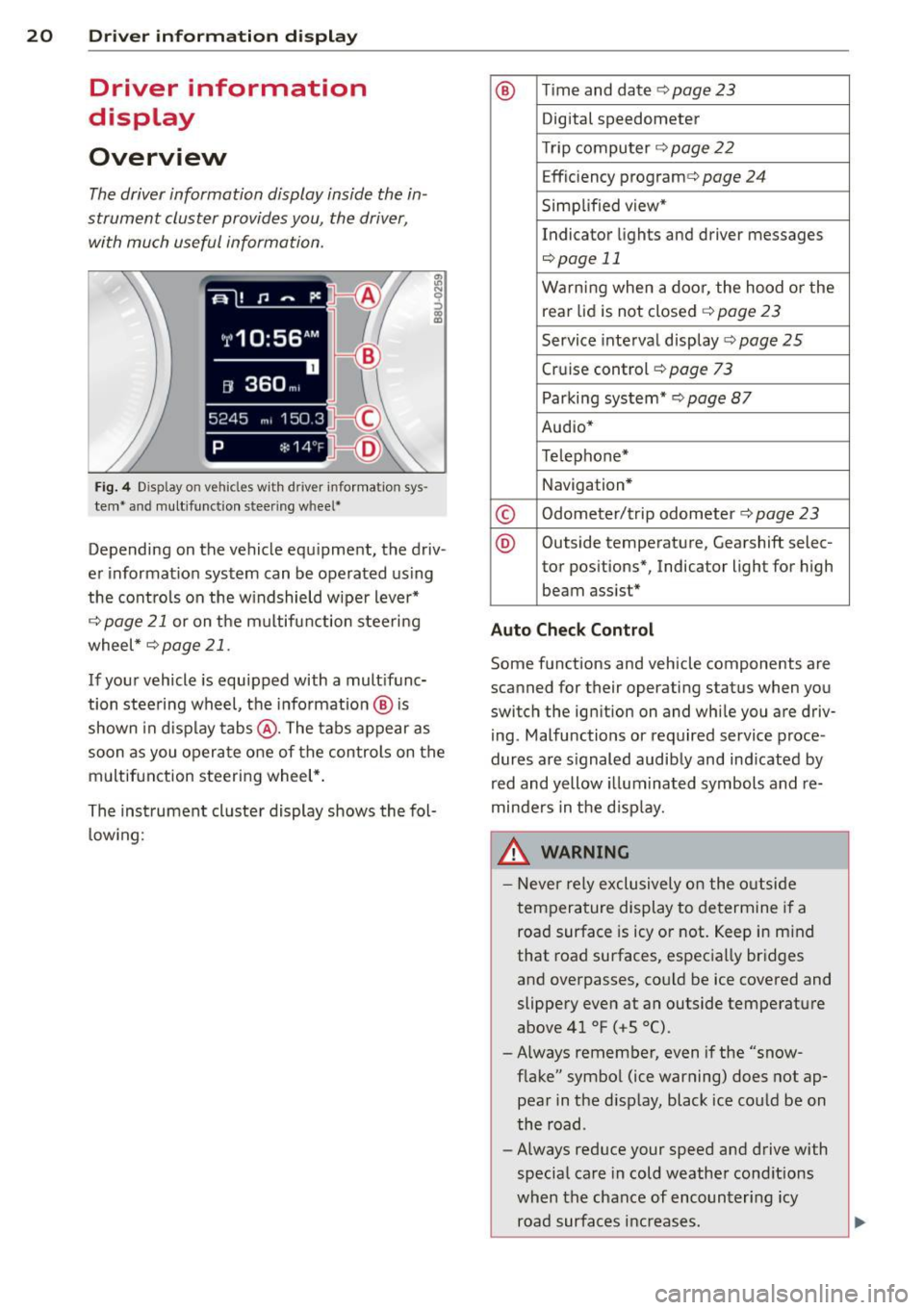
Fi g. 4 Dis play on vehicle s w it h dri ve r in fo rma tion sys
tem * and mult ifunc tion steering w hee l*
:ii N 9 ::> a, a,
Depending on the vehicle equ ipment, the driv
er informat ion system can be operated us ing
the cont rols on the w indshield wipe r lever*
¢
page 21 or on the m ultifunction steering
wheel *¢
page 21 .
If your vehicle is equ ipped with a mult ifunc
tion stee ring wheel, t he informat io n @ is
shown in d isplay tab s@ . The tabs appear as
soon as you opera te one of the controls on the
multif unction steering wheel* .
Th e inst rument cluster display shows the fol
l ow ing:
® T im e and date ¢ page23
Digital speedometer
Tr ip compu ter ¢
page 22
Effic iency program ¢ page 24
Simplified view*
Indicator lights and drive r me ssages
¢page 11
Warning when a door, the hood or the
rea r lid is not closed¢
page 23
Service inte rval display ¢ page 25
Cruise control ¢ page 73
Parking system* ¢page 87
Audio*
Telephone*
Navigation *
© Odometer/trip odometer ¢ page 23
® Outs ide temperature , Gearshift selec-
tor pos itions*, Indicator light for high
beam assist *
Auto Check Control
Some f unctions and vehicle components are
scanned for their operating status when yo u
switch the igni tion on and whi le you a re driv
i ng . Malfunctions or required service proce
dur es are s ignaled audib ly and ind icated by
red and yellow illuminated symbols and re
minders in the d isp lay.
8, WARNING -
- Never rely exclusively o n the o utside
t empera ture display to de termine i f a
road surface is icy or not. Keep in m ind
that road surfaces, espec ia lly bridges
and overpasses, co uld be ice
covered and
slippery
even at an outside tempe rature
above 41 °F ( +S 0
() .
-Always remember, even if the "snow
f lake" symbol (ice warning) does not ap
pear in the d isp lay, black ice cou ld be on
the road .
- Always reduce your speed a nd drive with
specia l care in cold weathe r cond itions
when the chance of encounter ing icy
road surfa ces inc reases .
Page 23 of 258
M N M N
0 ::i co
rl I.O
"' rl
"' rl
@ Tips
If the vehic le is stationary, or if you are
driving at a very low speed, the tempera
ture shown in the d isplay might be slightly
higher than the actual outside tempera
ture. This is caused by the heat being radi
ated from the engine.
Operation
Operation by windshield wiper lever
Applies to vehicles: without multifu nct ion stee ring w heel
~------------------gi
0
x CX) a:,
'------ ®
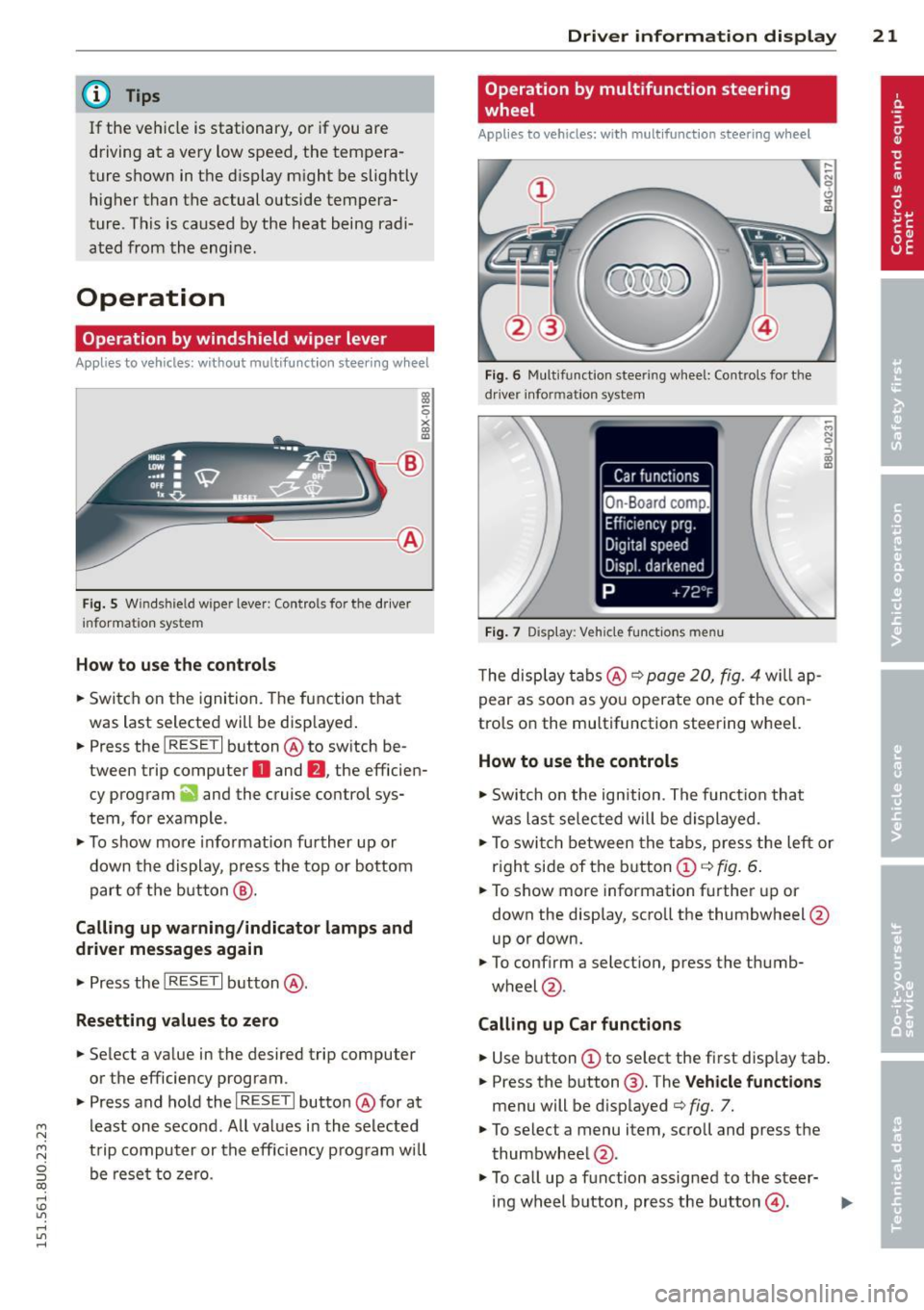
Fig . 5 Wi nds hield w ipe r lever : Contro ls fo r the d river
i nforma tion sy stem
H ow to use the control s
.. Switch on the ignition. The function that
was last selected will be disp layed .
.. Press the
I RESET I button @ to sw itch be
tween trip computer
O and fJ , the efficien
cy program
ii and the cruise control sys
tem, fo r example .
.,. To show more informat ion further up or
down the display , press the top or bottom
part of the button @.
Calling up warning /indicato r lamps and
driver messages again
.,. Press the I RES ET I button @.
Resetting values to zero
.. Select a value in the desired trip computer
or the efficiency program .
.. Press and hold the
I R ESET I butto n @ for at
least one second . All values in the se lected
trip computer or the eff iciency p rogram will
be rese t to zero.
Dri ver inform ation di spl ay 21
Operation by multifunction steering
, wheel
Appl ies to vehicles: with multifunction steering w heel
Fi g. 6 Mul tifu nct io n stee ring wheel: Co ntrols for t he
dr iv er info rmatio n sy stem
Fig . 7 D is play: Veh icle fun ctions men u
The disp lay t abs @ ¢ page 20, fig. 4 will ap
pear as soon as you operate one of the con
trols on the multifunction steering wheel.
How to use the controls
.,. Switch on the ign ition . The funct io n that
was last selec ted will be d isplayed.
M N
.,. To swi tch between the tabs, press the left or
r ight side of the b utton
CD ¢ fig . 6.
.. To show more information further up or
down the display, scroll the thumbwheel @
up or down.
.. To confirm a selection , press the thumb-
wheel @.
Calling up Car function s
.. Use button CD to select the first disp lay tab.
.. Press the button @. T he
V ehicle fun ctions
menu will be d isplayed ¢ fig. 7.
.,. To selec t a menu item, scroll and press the
thumbwheel @.
.,. To ca ll up a function assigned to the steer-
ing wheel button, press the button@.
IJ,-
Page 28 of 258
26 Drive r in form ation d ispl ay
(D Note
-Only reset the oi l change display when
you have completed an o il change .
- If you d isconnect the battery term inals,
no calculatio ns can be made for the serv
ice interval display during this time and
no service rem inder will appear . Remem
ber that observing the proper service in
tervals is vitally important to extending
the life of you r vehicle, particularly the
engine, and maintaining its value. Even if
the mileage dr iven is low, the max imum
period of one year from one serv ice to
the next must not be exceeded.
On-Board Diagnostic
system (OBD)
Malfunction Indicator Lamp (MIL)
The Malfunction Ind icator Lamp (MIL) ¢'4 i n
the instrument cluster is part of the On-Board
Diagnostic (OBD II) system.
The warning/indicator light illuminates when
the ign ition is switched on and goes o ut after
the engine starts and the idle has stabilized.
Th is indicates that the MIL is working proper
l y.
If the light doe s not go out after the eng ine
is started, or illuminates wh ile you are driv
ing, a ma lfunction may exist in the engine sys
tem . If the light illuminates, the catalytic con
verter cou ld be damaged.
Continue driving
w ith reduced pow er (avoid
ing sustained high speeds and/or rapid accel
erations) and have the condition corrected.
Contact your authorized Audi dealer .
If the light ill uminates, the electronic speed
limiter may also be ma lfunctioning . For more
information
¢ page 2 7, Electronic speed
limiter.
An imp roperly clo sed fuel filler c ap m ay als o
c a u se th e M IL l ight to illuminate
¢ page 177.
On-Board Diagnostics
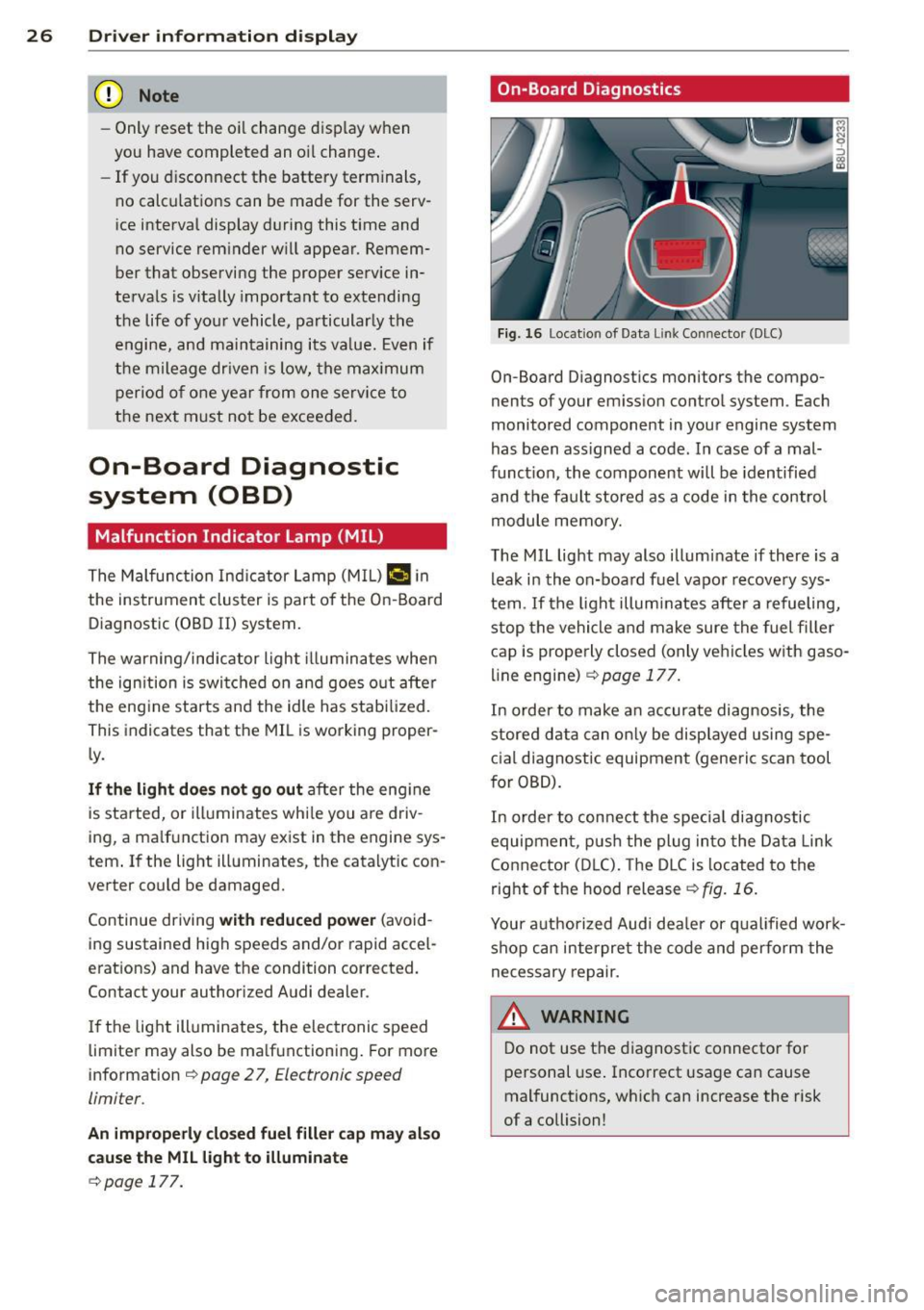
Fig. 16 Locat io n of Data Li nk Conn ector (DLC)
On-Board D iagnostics monitors the compo
nents of your em ission contro l system . Each
monitored component in your engine system
has been ass igned a code . In case of a mal
funct ion, the component will be identified
and the fault stored as a code in the control
module memo ry.
The MIL light may also illuminate if there is a lea k in the on-board fuel vapor recove ry sys
tem . If the ligh t illuminates after a refueling,
stop the vehicle and make sure the fuel fille r
cap is prope rly closed (only vehicles w ith gaso
line engine) ¢
page 177.
In order to make a n accurate diagnosis, the
stored data can on ly be displayed using spe
c ial d iagnostic equipment (generic scan tool
for OBD).
In order to con nect t he special diagnostic
equipment, push the plug in to the Data Link
Connector (D LC). The D LC is located to the
right o f the hood release
<::!;> fig. 16.
Your a uthorized Audi dea le r or qua lified wor k
shop can interpret the code and perform the
necessary repair.
,&_ WARNING ~ -
Do not use t he diagnost ic connecto r fo r
personal use . Incorrect usage can cause
mal functions, wh ich can increase the risk
of a collision!
Page 34 of 258
32 Opening and clo sing
A WARNING
Read and heed all WARNINGS¢.&. in Gen
eral description on page 28.
(D Tips
If your vehicle has been standing for an ex
tended period, please note the following :
- The proximity sensors are deactivated af-
ter a few days to save power. You then
have to pull on the door handle once to
unlock the vehicle and a second time to
open the veh icle .
- To prevent the battery from being dis
charged and to preserve your veh icle's
ability to start for as long as possible,
the ene rgy management system gradu
ally switches off unnecessary conven
i ence funct ions .
It is possible that you
will not be able to unlock your vehicle us
ing these convenience functions.
- For Declarat ion of Compliance to Uni ted
States FCC and Industry Canada regu la
tions ¢
page 240.
Locking and unlocking the vehicle from
inside
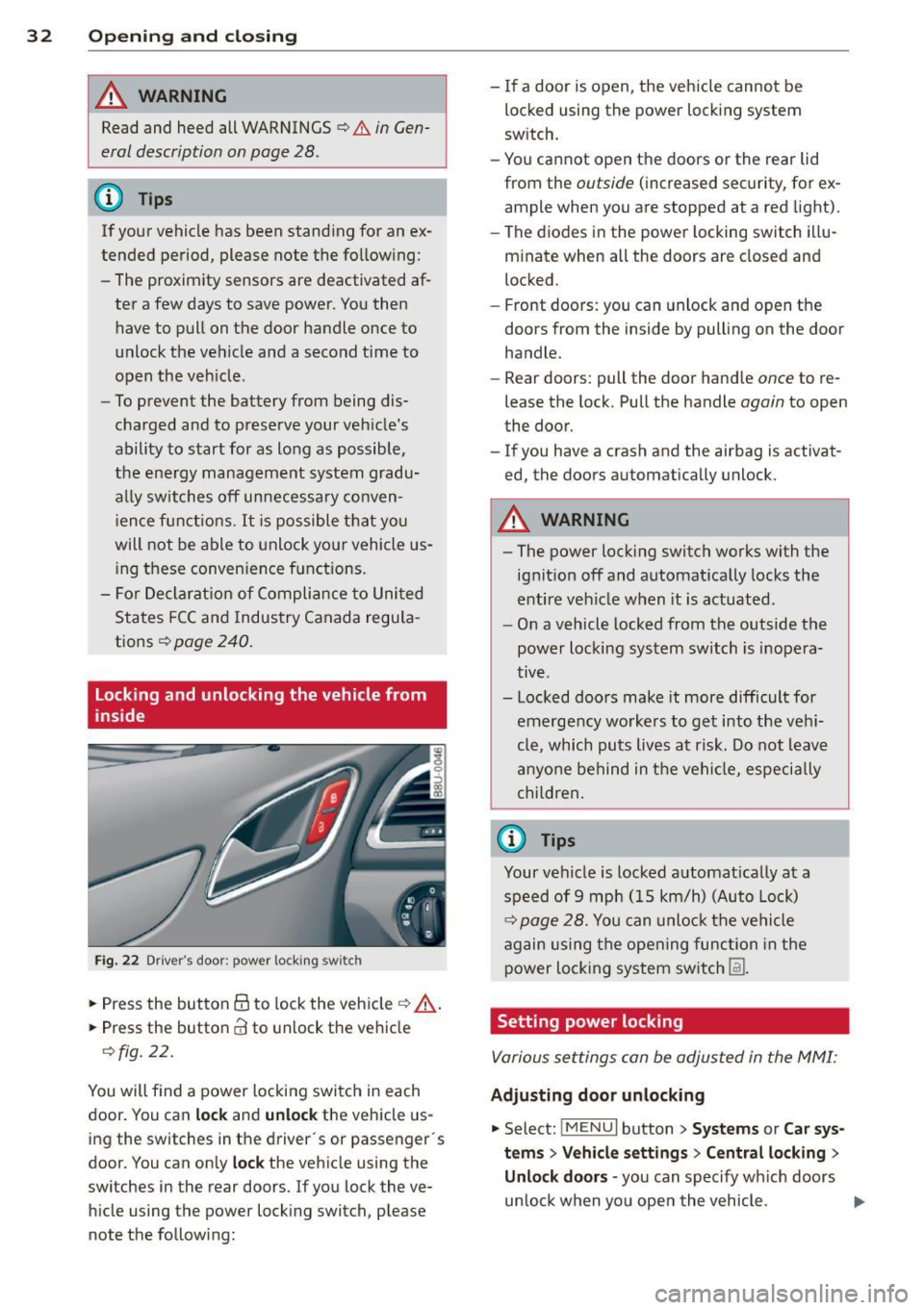
Fig. 22 Drive r's door ; p ow er lo ckin g sw it c h
.. Press the button @to lock the vehicle¢ A
.. Press the button CI! to unlock the vehicle
¢fig. 22.
You will f ind a power locking switch in each
door. You can
lock and unlock the vehicle us
ing the switches in the driver's or passenger 's
doo r. You can only
lock the vehicle using the
switches in the rear doors. If you lock the ve h icle using the power locking switch, please
note the following: -
If a door is open, the vehicle cannot be
locked using the power locking system
sw itch.
- You cannot open the doors or the rear lid
from the
outside ( increased security, for ex
ample when you are stopped at a red light).
- The diodes in the power locking switch illu
minate when all the doors are closed and
locked .
- Front doors: you can unlock and open the
doors from the inside by pulling on the door
handle.
- Rear doors: pull the door handle
once to re
lease the lock. Pull the handle
again to open
the door.
- If you have a crash and the ai rbag is activat
ed, the doors automatically unlock.
A WARNING
-
-The power locking switch works with the
ignition off and automatically locks the
entire veh icle when it is actuated .
- On a vehicle locked from the outside the
power locking system switch is inopera
tive .
- Locked doors make it more difficult for
emergency workers to get into the veh i
cle, which puts lives at risk. Do not leave
anyone behind in the vehicle, especia lly
children,
0) Tips
Your vehicle is locked automat ically at a
speed of 9 mph (15 km/h) (Auto Lock)
¢ page 28. You can unlock the vehicle
again using the opening function in the
power locking system sw itch
[fil .
Setting power locking
Various settings can be adjusted in the MMI:
Adjusting door unlocking
.. Select: iM ENUI button> Systems or Car sys
tems > Vehicle settings> Central locking>
Unlo ck doors -
you can spec ify which doors
un lock when yo u open the vehicle . ...
Page 39 of 258
M N M N
0 ::i co
rl I.O
"' rl
"' rl
.. To turn the child safety locks on , turn the ig
nition key in the direction of the arrow .
.. To turn
off , turn the ignition key opposite
the direction of the arrow.
When the child safety locks are activated, the
inside door handles do not work and the doors
can only be opened from the outside.
Power windows
Controls
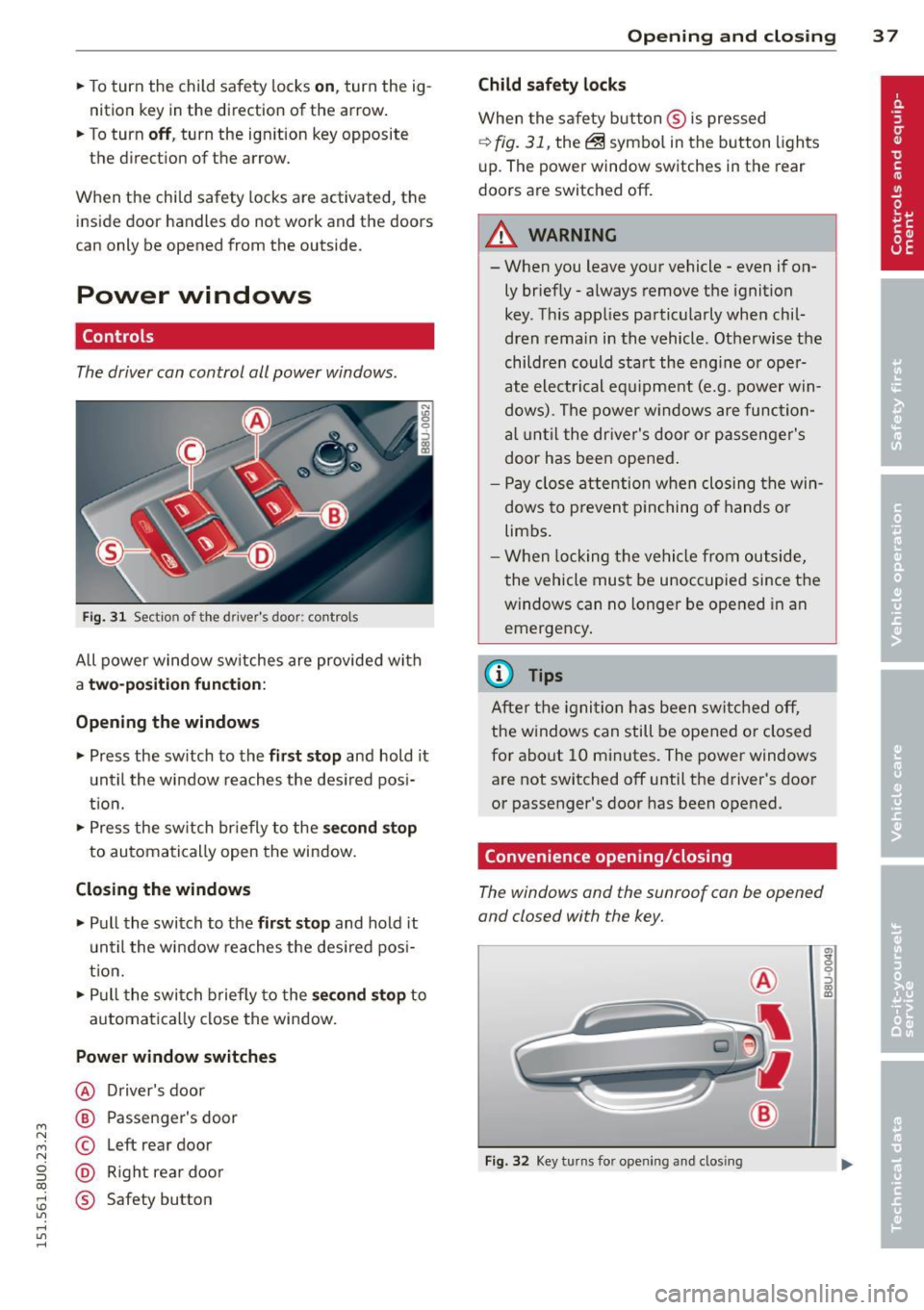
The driver can control all power windows .
Fig. 31 Section of the driver's door: controls
All power window sw itches are provided with
a t w o-posi tion fun cti on:
Opening th e window s
.. Press the sw itch to the fi rs t sto p and hold it
until the window reaches the desired posi
t ion .
.. Press the sw itch br iefly to the
sec ond s top
to automatically open the window.
Closing th e windows
.. Pull the switch to the fir st stop and hold it
un til the window reaches the des ired pos i
tion.
.. Pull the switch briefly to the
se con d stop to
automatically close the window.
Power wind ow switche s
@ Driver's door
@ Passenger's door
© Left rear door
@ Right rea r doo r
® Safety button
Openin g an d clos ing 3 7
Child safety l ock s
When the safety button ® is pressed
¢ fig. 31, the~ symbol in the button lights
u p. The power window switches in the rear
doors are switched off.
&_ WARNING
--When you leave your vehicle -even if on-
ly briefly· always remove the ignition
key . Th is app lies particularly when chil·
dren remain in the vehicle. Otherwise the
children could start the eng ine or oper
ate electrical equ ipment (e.g. power w in
dows). The power windows are function
a l until the dr iver's door or passenger's
door has been opened.
- Pay close attention when closing the win
dows to prevent p inching o f hands o r
limbs.
- When locking the vehicle from outside,
the vehicle must be unoccupied since the
windows can no longer be opened in an
emergency.
(I} Tips
After the igni tion has been switched off,
the w indows can still be opened or closed
for about 10 minutes . The power windows
are not switched off until the driver's door
or passenger's door has been opened.
Convenience opening/closing
The windows and the sunroof can be opened
and closed with the key.
F ig. 32 Key turns for opening and closing
"' z 9 ::::, a, to
Page 42 of 258
40 Clear vision
Clear vision
Lights
Switching the lights on and off
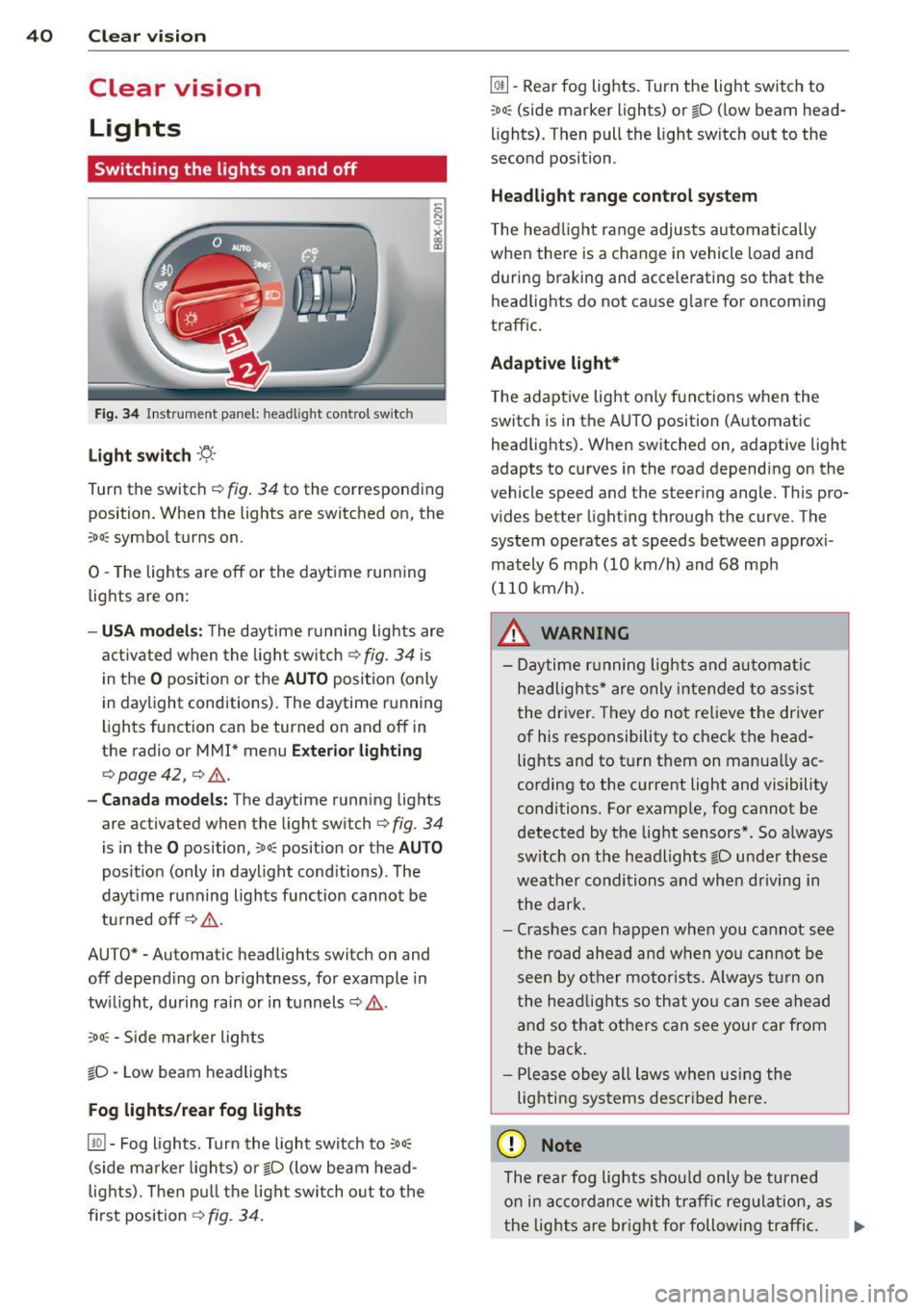
Fig . 34 Instrument panel: headlight control switch
Light switch -'t;. -
Tu rn the switch ¢ fig. 34 to the corresponding
position. When the lights are switched on, the
:oo : symbol turns on.
0 -The lights are off or the daytime running
lights are on:
- USA models: The daytime running lights are
activated when the light switch¢
fig. 34 is
in the
O position or the AUTO position (only
in daylight conditions). The daytime running
lights function can be turned on and off in
the radio or
MMI* menu Exterior lighting
¢ page 42, ¢ ,& .
-Canada models : The daytime running lights
are activated when the light switch¢
fig. 34
is in the O posi tion, co o: position or the AUTO
position (only in daylight conditions). The
dayt ime running lights function cannot be
turned off¢,& .
AUTO* -Automatic headligh ts swi tch on and
off depending on brightness, for example in
twilight, during rain or in tunnels¢,& .
:oo: -Side marker lights
io -Low beam headlights
Fog lights /rear fog lights
[!Q] -Fog lights. Turn the light switch to :oo:
(side marker lights) or io (low beam head
lights). Then pull the light switch out to the
first position ¢
fig. 34.
@I] -Rear fog lights. Turn the light switch to
:oo : (side marker lights) or io (low beam head
lights). Then pull the light switch out to the
second position .
Headlight range control system
The headlight range adjusts automatically
when there is a change in veh icle load and
during braking and accelerating so that the
headlights do not cause glare for oncoming
traffic.
Adaptive light*
The adaptive light only functions when the
switch is in the AUTO position (Automatic
headlights). When switched on, adapt ive light
adapts to curves in the road depending on the
vehicle speed and the steering angle. This pro
vides better lighting through the curve . The
system operates at speeds between approxi
mately 6 mph (10 km/h) and 68 mph
(110 km/h) .
_&. WARNING
- Daytime running lights and automatic
headlights* are only intended to assist
the driver. They do not relieve the driver
of his responsibility to check the head
lights and to turn them on manually ac
cording to the current light and visibility
conditions. For example, fog cannot be
detected by the light sensors*. So always
sw itch on the headlights
io under these
weather conditions and when driving in
the dark.
- Crashes can happen when you cannot see
the road ahead and when you cannot be
seen by other motorists. Always turn on
the headlights so that you can see ahead
and so that others can see your car from
the back.
- Please obey all laws when using the
lighting systems described here.
(D Note
The rear fog lights should only be turned
on in accordance with traffic regulation, as
-
the lights are bright for following traffic. .,._
Page 43 of 258
M N M N
0 ::i co
rl I.O
"' rl
"' rl
(D Tips
-The light sensor* for headlight control is
located in the rear view mirror mount.
You should therefore not apply any stick
ers to the windshield in this area in order
to prevent malfunctions or failures.
- Some exterior lighting functions can be
ad justed
¢ page 42.
- When you switch off the ignition while
the vehicle's lights are turned on, a buz
zer sounds as long as the driver's door is
open .
- In cool or damp weather, the inside of
the headlights, turn signals and tail
lights can fog over due to the tempera
ture difference between the inside and
outside. They will clear shortly after
switching them on. This does not affect
the service life of the lighting.
- In the event of a light sensor malfunc
tion, the driver is notified in the instru
ment cluster display~
page 19 .
Turn signals and high beam lever
The lever operates the turn signals , the high
b eams and th e headlight flash er.
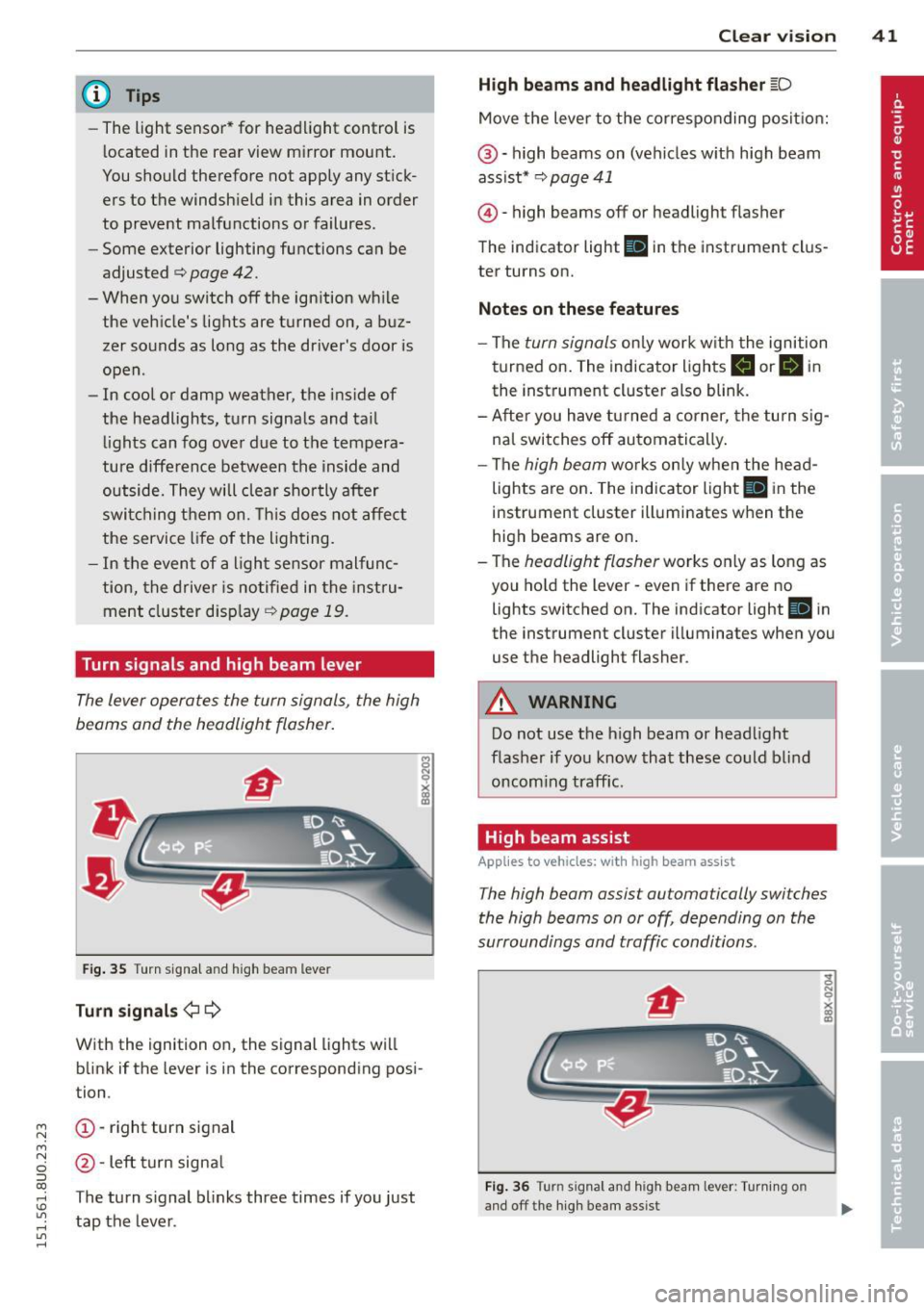
Fig. 35 Turn signal and high beam leve r
Turn signals ¢i ¢
With the ignition on, the signal lights will
blink if the lever is in the corresponding posi
tion .
(D-right turn signal
@-Left turn signal
T he turn signal blinks three times if you just
tap the lever. Clear
vision 41
High beams
and headlight flasher @:D
Move the lever to the corresponding position:
@-high beams on (vehicles with high beam
assist*
¢ page 41
@ -high be am s off or headligh t fla sher
The indicator light
Ill in the instrument clus
ter turns on.
Notes on these features
-The turn signals only work with the ignition
turned on. The indicator lights
II or Ill in
the instrument cluster also blink.
-After you have turned a corner, the turn sig
nal switches off automatically.
- The
high beam works only when the head
lights are on. The indicator light
El in the
instrument cluster illuminates when the
high beams are on.
- The
headlight flasher works only as long as
you hold the lever -even if there are no
lights switched on. The indicato r light
Iii in
the instrument cluster illuminates when you
use the headligh t flasher .
A WARNING
Do not use the high beam or headlight
flasher if you know that these could blind
oncoming traffic.
High beam assist
Applies to veh icles: w ith high beam assist
-
The high beam assist automatically switches
the high beams on or off, depending on the
surroundings and traffic conditions .
Fig. 36 Turn s ignal an d h igh beam lever : Turning o n
and off the high beam assist
Page 44 of 258
42 Clear vis ion
Activating high beam a ssi st
Requirement: The light sw itch must be in the
AUTO position, the low beam headlights must
be on.
• Press the lever into pos it ion (D in order to
activate the high beam assist . T he indicator
li gh t
IIJ turns on in the instrument cluster
display and the high b eams switch on or
off
automatica lly . The indicator light Bl turns
on if the high beams were switched on .
Switching the high beams on /off
m anuall y
Requir ement : Hig h beam assist is activated .
I f the h igh beams did not switch on/off auto
matica lly when expected, yo u may instead
switch them on/off manually:
• To switch the high beams on manually, press
the leve r into position (D. The indica tor light
El tu rns on. To switch the high beams off
again, pull the lever into position @.
• To switch the high beams
off manually after
th ey hav e tu rn ed on automatically, p ull the
lever into posi tion @.
Opera ting th e headlight fla sher
• To ope rate the flashers while the h igh beam
assist is active, pull the lever into position
@ . T he high beam assist will remain active.
Messages in the instrum ent cluster
displ ay
He adlight a ssis t: Sy stem f ault!
Drive to your a utho rized Aud i deale r immedi
ate ly to have the mal function corrected. You
can st ill switch the h igh beams on o r
off man
ua lly.
H eadlight a ssis t: Una vail able . N o C amera
v iew
The camera view is blocked, for examp le by a
sticke r or debris .
The sensor is located between the interior
rearv iew mirror and the winds hield . There
fore , do not place any stickers in th is area on
the w indshield .
A WARNING
High beam assist is only intended to assist
the driver. The drive r is still responsib le for
controll ing the headlights and switc hing
the high beams on and
off manually de
pending on t raff ic, lighting and visib ility
conditions. Fa ilu re to intervene manually
may lea d to risk of acc ident.
It may be nec
essary to operate the high beams manual
l y in the following situations, e.g.:
- For adverse weathe r condit ions such as
fog, heavy rain, blowing snow or spraying water.
- On roads where oncoming traff ic may be
partially obscured such as expressways .
- If there are individua ls on the road with
no lighting or poo r light ing, such as cy
clists.
- In tight curves and on steep slopes.
- In poorly lit are as.
- W ith st rong refle cto rs such as signs.
- If t he area of the winds hield near the
sensor is fogged ov er, dirty, icy o r cov
ered wi th a stic ker.
' Adjusting exterior lighting
The functions are selected in the radio or
MM!* .
• Select: !CARI func tion but ton > S ystems or
Car Syst ems contro l button > Ve hicle set
ting s> Exterior lighting .
Coming home (light when lea ving car )*,
Leav ing home (light when unlocking car) *
The coming home function illuminates the
area around the vehicle when the ignition is
switched
off and the dr ive r's door is open ed .
Depend ing on ve hicle equ ipment, the function
can be switched on and
off or the length of
t ime the lights remain on* can be ad justed .
T he
leaving home function illuminates the
area around the vehicle when unloc king it .
T h is func tion ca n be sw itche d on and
off .
The coming hom e and leaving home func
t ions only operate when it is dar k and the
Page 46 of 258
44 Clear vis ion
Inter ior lighting
There are other in ter ior light ing f unct ions
that are available. Individual functions can be
adj usted i n the MM I. Se lect: ICARlf unction
button >
Systems or Car Sy stems control but
ton>
Vehicle settings > Interior lighting .
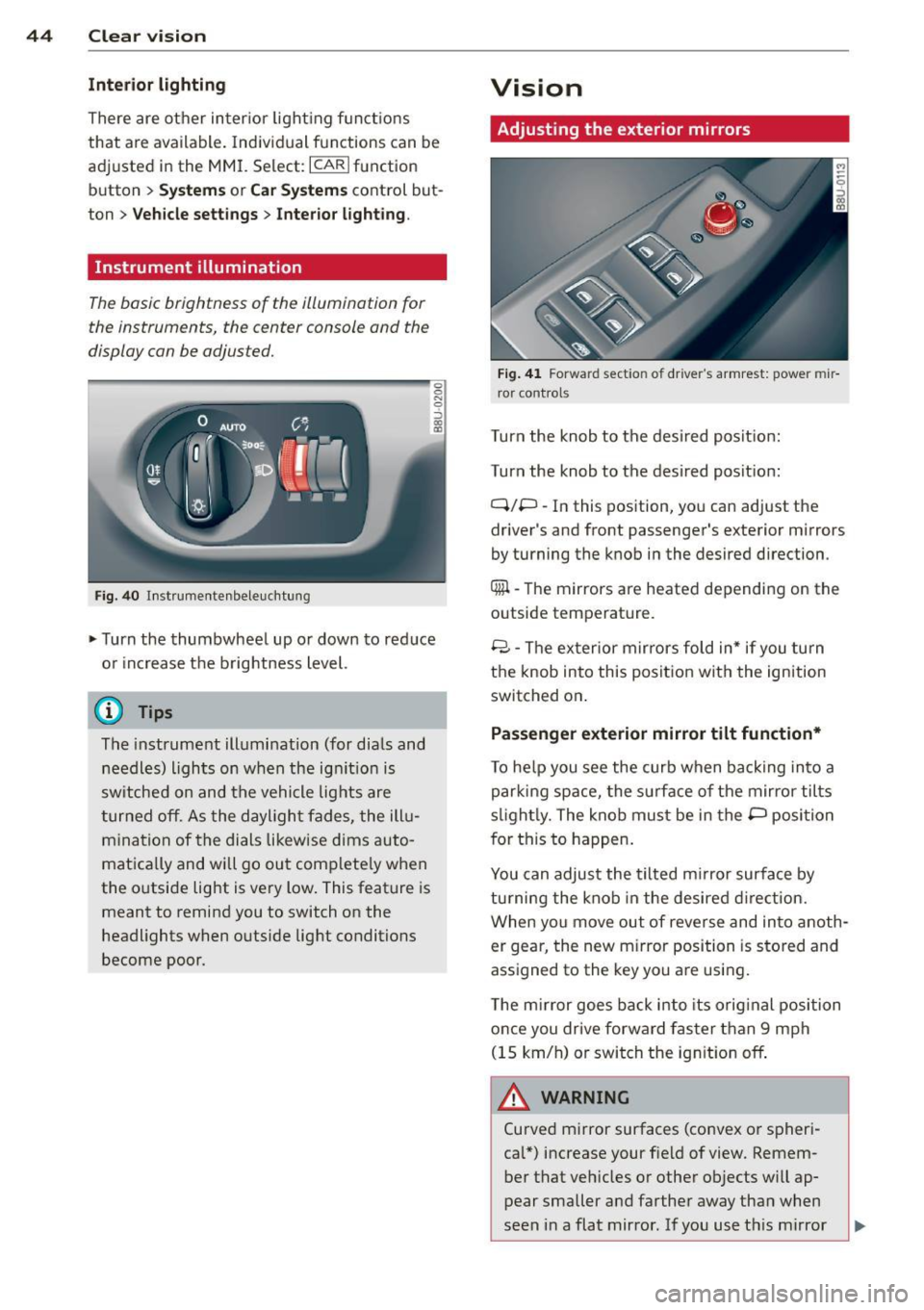
Instrument illumination
The basic brightness of the illum inat ion for
the instruments, the c enter console and the
display can be adjus ted.
F ig . 40 In st rumentenbeleu chtung
.,. Turn the thumbwhee l up or down to red uce
o r i ncrease t he brightness level.
(D Tips
The instrument ill umination (for dia ls and
needles) lights on when the ig nition is
sw itched on and the vehicle lig hts are
t urned off. As the dayligh t fades, the ill u
m ina tion of the dials likew ise dims auto
matically and will go out comp lete ly when
the outside light is very low . This feat ure is
meant to remind you to switch on the
headlights when outside lig ht conditions
become poor.
Vision
Adjusting the exterior mirrors
F ig. 41 Forwar d sect io n of dr ive r's armrest: powe r mir
r or control s
Turn the knob to the desired pos it io n:
Turn the knob to the des ired posit ion:
Q/P -In this position , yo u can adjust the
driver 's and front passenger's exterior mirrors
by turning the k nob i n the desired direction .
Qiil -The mirrors are heated depending on the
outside temperature .
8 -T he ex terior m ir rors fold in* if you turn
t h e knob into this position wit h the ignition
switched on .
Passenger exterior mirror tilt function*
To he lp you see the curb when ba ck ing into a
par king space, the surface of the mirror tilts
s li ght ly. The knob must be in the P posi tion
f or this to happen .
You can adjust the tilted m irror surface by
tu rning the knob in the desired direction.
When you move out of reverse and in to anoth
er gear, the new m irror position is s to red and
ass igned to the key you are using.
T he m irror goes ba ck i nto its orig inal position
once you dr ive forward faster than 9 mph
(15 km/h) o r swi tch the ig nition off .
A WARNING
Curved m irror surfaces (co nvex o r spheri
cal*) increase your f ie ld of view. Remem
ber that veh icles or other ob jects will ap
p ear smaller a nd farther away tha n when
seen in a flat mirror . If you use t his mi rror
-