ECO mode AUDI Q3 2016 User Guide
[x] Cancel search | Manufacturer: AUDI, Model Year: 2016, Model line: Q3, Model: AUDI Q3 2016Pages: 252, PDF Size: 62.81 MB
Page 68 of 252
Warm and cold
IQiil REARI Switching the rear window defogger
on and off
The rear window defogger only operates when
the engine is running and will be automatically
switched off after approximately 10 minutes.
Synchronization
If you press the !AUTOI button longer, yo u can
transfer the driver temperat ure setting to the
front passenger. Synchronization is switched off
as soon as the temperature for the front pas
senger's side is changed.
Air vents
You can open or close the center and rear vents in
the cockpit and the vents in the rear center con
sole using the ridged thumbwheels. The levers
adjust the direction of the airflow from the vents.
Switching the temperature measurement
units
The temperature display can be switched be
tween°( and °F. Press and hold down the
j..., .1
button c:> fig. 76 and turn the knob on the dr iver's
side for 3 seconds -.
A WARNING
-You should not use the recirculation mode
for an extended period since no fresh air is
drawn in. With the air-conditioning switch
ed off, the windows can fog up, which in
creases the risk of an accident.
- Individuals with reduced sensitivity to pain
or temperature could develop burns when
using the seat heating* function. To reduce
the risk of injury, these indiv iduals should
not use seat heating*.
{tD Note
To avoid damaging the seat heating* ele
ments, do not kneel on the seats or place
heavy pressure on one area of the seat.
66
Page 73 of 252
.... N
c:i ::J CX)
.... I.Cl U"I
N I.Cl ......
.. Drive to an authorized A udi dealer or author
ized Audi Service Facility immediately to have
the malfunction corrected.
@ Tips
You can view the message again by pressi ng
the
I START E NGINE STOP! button.
Driver messages
Turn off ignit ion. Battery di scharging
This message appears and a war ning tone sounds
if you open the driver's doo r whe n the ignition is
sw itched on.
Pr ess brake pedal to start engine
This message appears if you do not step on the
brake pedal to start the eng ine on a vehicle with
a n automatic transm ission .
Please engage Nor P.
This message appears when starting or stopping
the eng ine and Nor Pis not engaged. The engine
will not start/stop.
Ill Is key in the vehicle ?
The indicator light turns on and this message ap
pea rs if the conven ience key* was removed from
the veh icle when the eng ine was runn ing. If t he
conven ience key is no longer in the vehicle, you
cannot switch the ignition on or start the engine
once yo u stop it. Yo u also ca nnot lock the vehicle
from the outside.
Shift to P , vehicle can roll away . Doors can only
be locked in P.
This message appea rs fo r safe ty re asons a long
with a warn ing sound if the se lector lever is not
e ng aged in P a fter swi tching the ignition off.
Move the selector lever to the P positio n. Other
wise the vehicle is not protected from rolling and
it cannot be loc ked.
DJ No key identified . See owner's manual.
This message appears if the re is no convenience
key * in side the veh icle or if the system does not
r ecognize the key. The conve nience key may not
be re cognized, for examp le, i f it is cove red by an
D rivi ng
obje ct that disrupts the signa l (such as a br ie f
case), or if the key battery is wea k. E lectronic de
vices such as cell phones can a lso inte rfere with
the signal.
T o still be able to start or stop the engine, re fer
to
¢ page 70.
Electromechanical
parking brake
Operating
The electromechanical parking brake replaces
the hand brake.
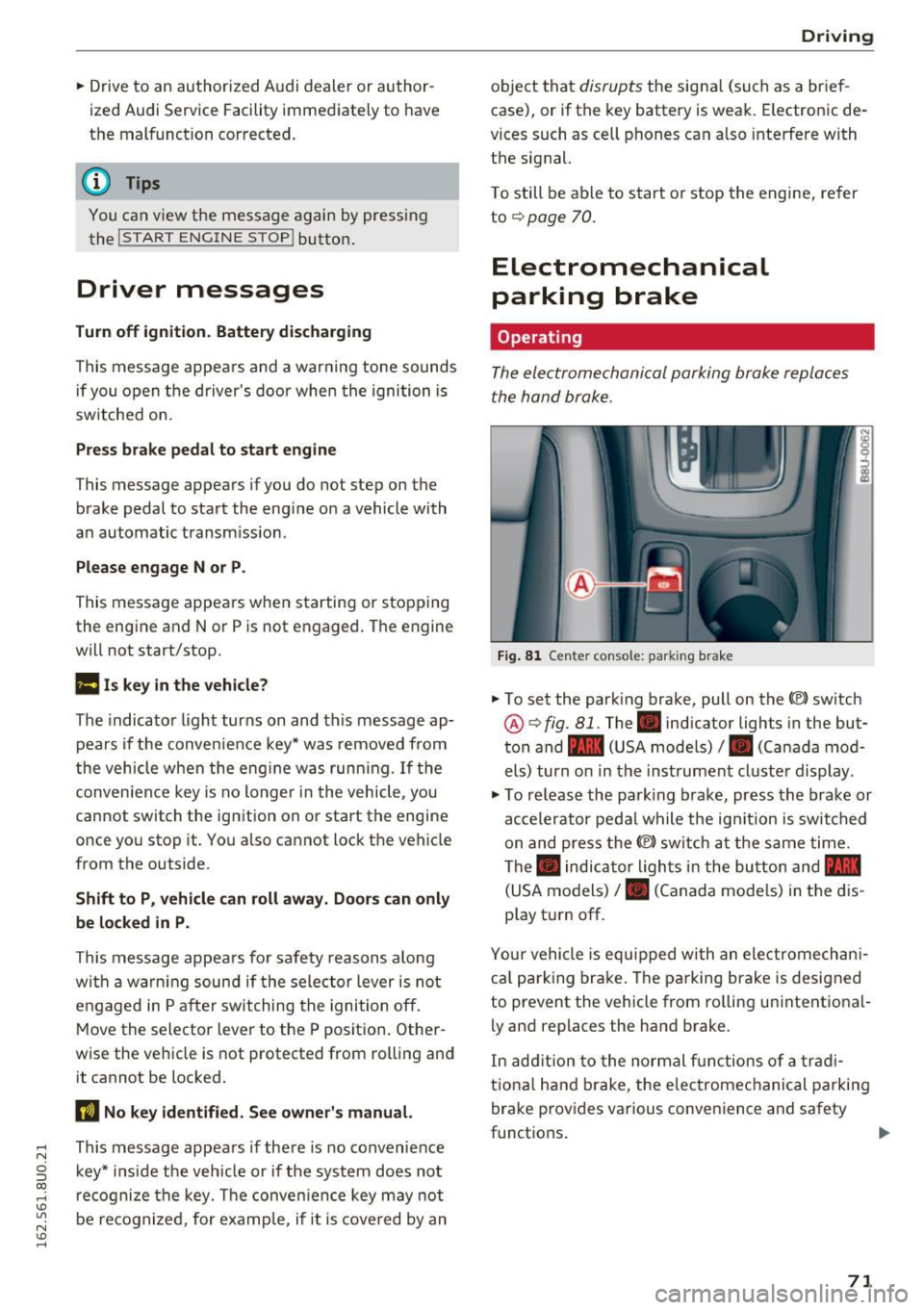
Fi g. 81 Center console: parking brake
.. To set the park ing brake, pull on the(®) switch
@¢ fig. 81. The . indicator lights in the but
ton and - (USA models)/ . (Canada mod
els) turn o n in the ins trument cluste r display.
.,. To re lease the park ing brake, press the brake or
ac celerator pedal w hile the ign it ion is switched
on and press the(®) switch at the s ame time.
The . indicator ligh ts in t he bu tton and -
(USA models)/ . (Canada mode ls) in the dis
play t urn off.
Yo ur vehicle is equipped with an elect romechan i
ca l p a rk ing brake . The pa rking brake is designed
to prevent the vehicle from ro lling un intent ional
ly and replaces the hand brake.
In add ition to the normal f unctions of a tra d i
t iona l h and b rake, t he elec tromec hanical parking
bra ke prov ides various conven ience and safety
functions .
71
Page 76 of 252
Driving
the<®> switch is released, or the accelerator pedal is depressed, emergency braking stops.
A WARNING
Emergency braking should only be used in an
emergency, when the normal brake pedal has
failed or the brake pedal is obstructed. During
emergency braking, your vehicle will brake
similar to heavy braking . ESC and the associ·
ated components (ABS, ASR, EDL) cannot
overcome the laws of physics. In corners and
when road or weather conditions are bad, a
full brake application can cause the vehicle to
skid or the rear end to break away, which in
creases the risk of an accident.
Speed warning system
Introduction
Applies to vehicles: with speed warning system
The speed warning sy stem helps you to stay un
der a specified maximum speed.
The speed warning system warns you if you are
exceeding the maximum speed that you have set .
You will hear a warning tone when your speed ex
ceeds the stored value by approximately 3 mph
(3 km/h) . The indicator light
101 (USA models)/
llll (Canada models) and the Speed limit warn
ing exceeded.
message appear in the instrument
cluster display at the same time . T hP
(Cl / t•j in
dicator light turns off when the speed decreases
below the stored maximum speed.
Setting a threshold is recommended if you would
like to be reminded when you reach a certain
maximum speed. Situations where you may want
to do so include driving in a country with a gener
al speed limit or if there is a specified maximum
speed fo r winter tires.
@ Tips
Regardless of the speed warning system, you
should always monitor your speed using the
speedometer and make sure you are following
the legal speed limit.
74
Setting the threshold
Applies to vehicles: with speed warn ing system
You can set, change and delete the warning
threshold in the Infotainment system .
.. Select: !CAR ! function button> (Car) systems*
control but ton > Driver assist> Speed warning .
You can set any threshold between 20 mph
(30 km/h) and 150 mph (240 km/h). Settings
can each be adjusted in increments of S mph (10 km/h) .
Cruise control system
Switching on
Applies to vehicles: with cruise control system
The cruise control system makes it possible to
drive at a constant speed starting at 20 mph
(30kmlh).
0
f
~
0
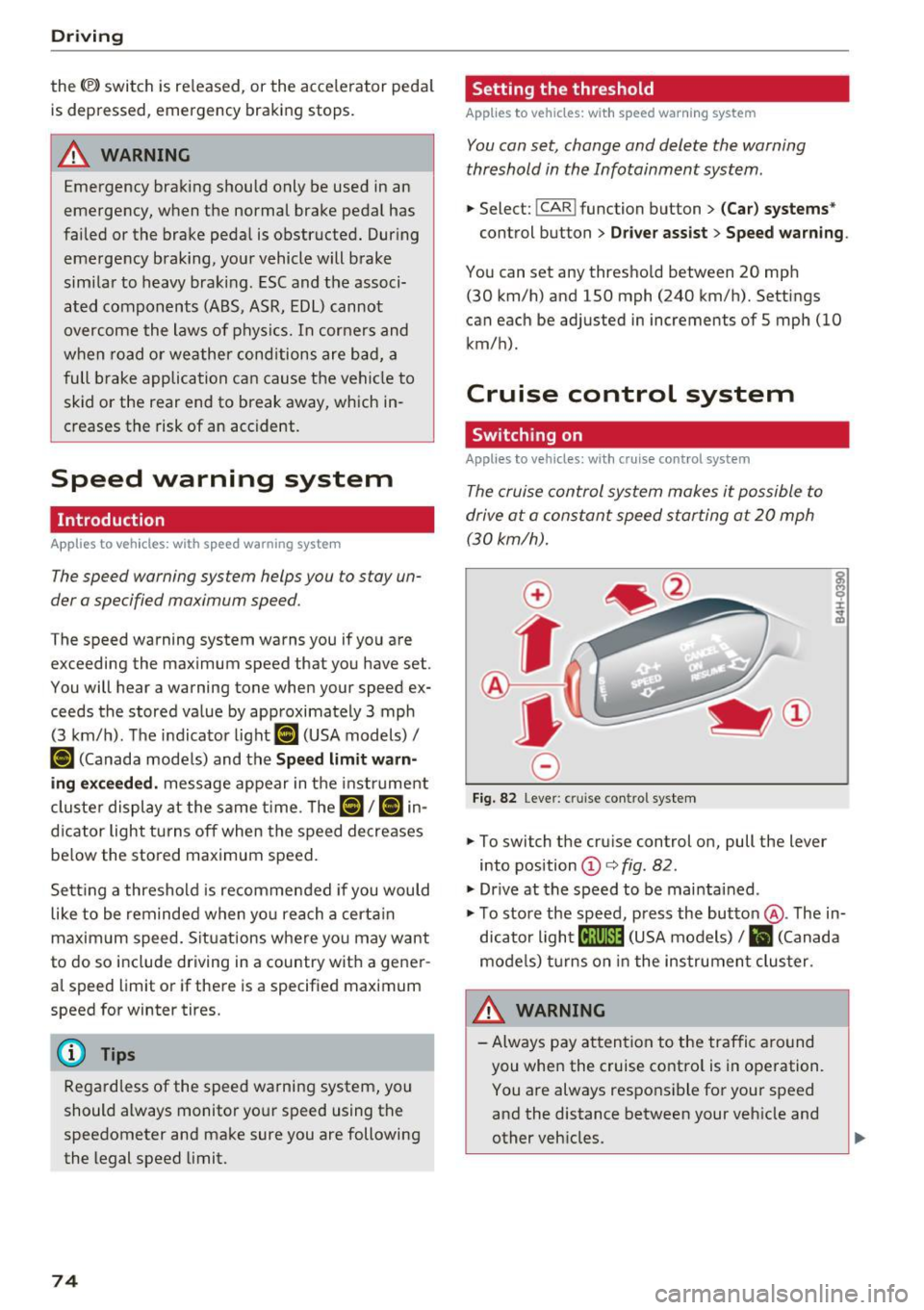
Fig. 82 Lever: cruise con trol system
.. To switch the cruise control on, pull the lever
into position
© c:> fig . 82 .
"'Drive at the speed to be maintained .
"' To store the speed, press the button @. The in
dicator light
[ij;(tj~i~ (USA models) / Bl (Canada
models) turns on in the instrument cluster .
&_ WARNING
-Always pay attention to the traffic around
you when the cruise control is in operation. You are always responsible for your speed
and the distance between your vehicle and
other vehicles .
.
Page 82 of 252
Audi drive select
Audi drive select
Drive settings
Introduction
Applies to vehicles: with Aud i drive select
Drive select makes it possible to experience dif
ferent types of vehicle settings in one vehicle.
The driver can select from three modes:
Comfort,
Auto
and Dynamic using the t:i:.~ button in the
center console or by using the Infotainment sys
tem* to switch between a sporty and a comforta
ble driving mode, for example.
Description
App lies to veh icles: with Aud i drive select
The following systems, among other things , are
influenced by drive select:
Engine and automatic transmission
Depending on the mode, the engine and auto
matic transmission respond more quickly or in a
more balanced manner to accelerator pedal
movements . In the sporty dynamic mode, the
transmission shifts at higher RPMs .
Adaptive dampers*
The adaptive dampers use sensors to record in
formation regarding steering movements, brak
ing and acceleration operations by the driver,
road surface, driving speed, and load. With drive
select you can adjust the adaptive dampers to
sporty (dynamic), comfortable (comfort) or ba l
anced (auto).
Steering
The steering adapts in terms of steering assis
tance . Indirect steering that moves easily as in
comfort mode is especially suited to long dr ives
on a h ighway. In contrast, dynamic mode pro
vides sporty, direct steering.
Cornering light*
The cornering light adapts to driving on curves.
The pivoting action and the lighting are also
adapted to the mode .
80
@ Tips
Selecting the Dynamic mode allows for sporty
gear shifting . The S shift setting is automati
cally engaged.
Selecting the driving mode
Applies to veh icles: with A udi drive se lect
You can select between Comfort, Auto and Dy
namic.
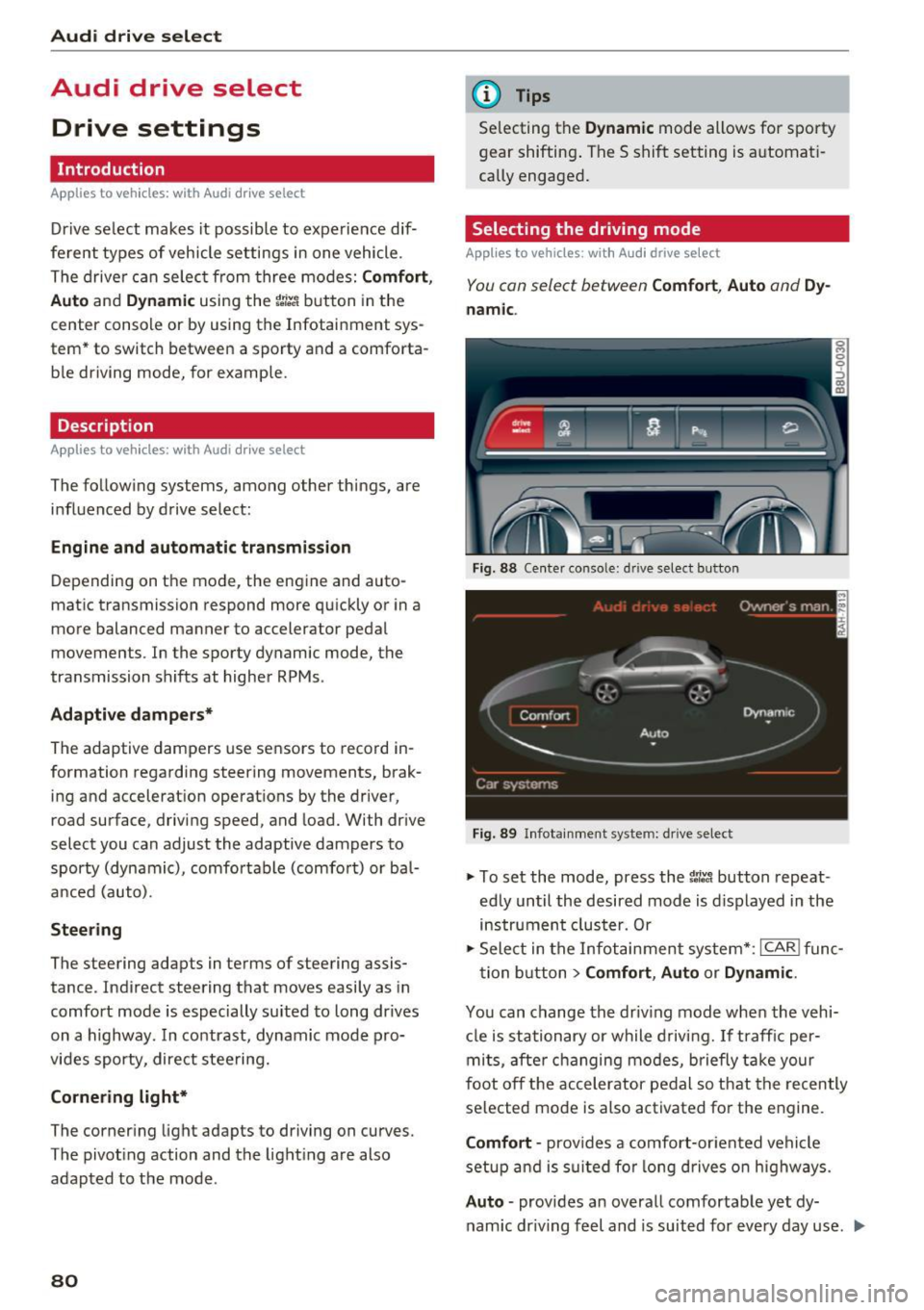
Fig. 88 Center conso le: d rive select button
Fig. 89 Infotainment system: drive select
.,. To set the mode, press the 1:i:Jl button repeat
edly until the desired mode is displayed in the
instrument cluster. Or
.,. Select in the Infotainment system* :
ICAR! func-
tion button
> Comfort, Auto or Dynamic .
You can change the driving mode when the vehi-
cle is stationary or while driving. If traffic per-
mits, after changing modes, briefly take your
foot off the accelerator pedal so that the recently
selected mode is also activated for the engine.
Comfort -provides a comfort-oriented vehicle
setup and is suited for long drives on highways.
Auto -provides an overall comfortable yet dy
namic dr iving feel and is suited for every day use . ..,.
Page 84 of 252
Automatic transmissio n
Automatic transmission
tiptronic
Introduction
The automat ic transmission is controlled e lec
tron ically . The transmission upshifts or down
shifts automatically depending on wh ich dr ive
p rogram is selected.
When a
m oderate dri ving style is used, the
transmission se lects the most e conomical d riving
mode. The t ransm iss ion upshifts a t a lower RPM
and downshifts at a higher RPM to imp rove fuel
efficiency.
The transm ission switches to a spo rty mode afte r
a kick-down or when the drive r uses a
sport y
d riving sty le
charac ter ized by quick accelerator
pedal movements, heavy acce leration, frequent
changes in speed and traveling at the maximum
speed.
If desired, the dr iver can a lso select the gears
manually (tiptronic mod e) ¢ page 85.
In the tiptronic t ransmiss ion, power is trans fer
red by a torque converte r.
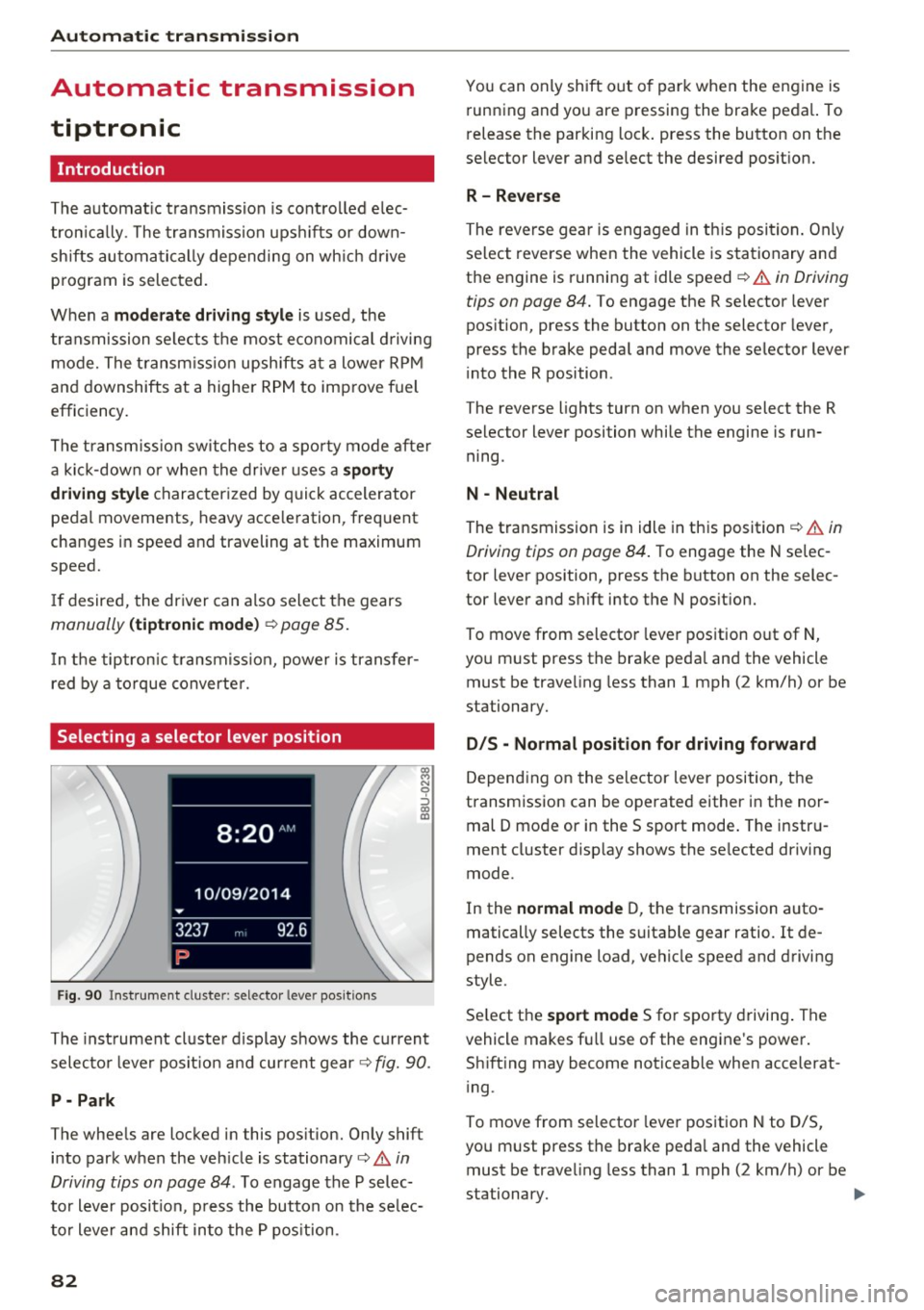
Selecting a selector lever position
F ig . 9 0 Inst rument cluste r: selecto r leve r pos itio ns
~ N 9 :, (X) a:,
The inst rument cl uste r d isplay shows the current
selec to r l ever posit ion a nd current gear¢
fig. 90.
P - Park
The whee ls are locked in this pos ition. On ly shift
into park when the veh icle is stationary¢
A in
Driving tips on page 84 .
To engage the P selec
to r lever position, p ress the button on the se lec
to r lever and shift into the P pos ition.
82
You can only shift out o f park when the engine is
running and you are pressing the brake peda l. To
release the parking lock . press the button on the
selector lever and select the desired pos it ion.
R- Reverse
The reverse gea r is engaged in th is position . Only
se lect reve rse when the vehicle is stationary and
the engine is running at idle speed
¢ .&. in Driving
tips on page 84.
To engage the R selector lever
pos ition, press the button on the selector lever,
press the brake peda l and move the selector lever
i nto the R position .
The reverse lights turn on when you select the R
selector lever position while the engine is run ning.
N -Neutral
The transmission is in idle in this position¢&. in
Driving tips on page 84 .
To engage the N selec
tor lever position, press the button on the selec
tor lever and s hift into the N pos ition.
To move from selector lever position out of N,
you must press the brake peda l and the vehicle
must be traveling less than 1 mph (2 km/h) or be
stationary.
D IS -Normal position for driving forward
Depending on the se lector lever position, the
transmission can be operated either in the nor
mal D mode or in the S sport mode . The instru
ment cluster disp lay shows the se lected driving
mode.
In the
normal mode D, the transmission auto
matically selects the suitable gear ratio. It de
pends on engine load, vehicle speed and driving
style.
Se lect the
sport mode S for sporty driving . The
vehicle makes f ull use of the engine's power.
Sh ift ing may become noticeable when accelerat
i ng .
To move from selector lever position N to D/S,
you m ust press the brake peda l and the vehicle
must be traveling less than 1 mph (2 km/h) or be
stationary.
ll-
Page 86 of 252
Automatic transmissio n
Stopp ing temporarily
.,. Press the b rake peda l to stop the vehicle, fo r
example at a traffic light. Do not press the ac
ce lerator peda l when doing this.
... To prevent the vehicle from rolling when you
start driving, set the parking brake when stop
ping on steep inclines ¢
,&..
.,. The park ing brake w il l release automatically
and the vehicle will start moving once you press
the accelerator pedal.
Stopp ing /park ing
If the selector lever is not in the P posit ion when
you open the driver's door, the vehicle could roll.
The message
S hift to P and turn off ign it ion ,
otherwi se vehicle can roll awa y
appears.
.,. Press and hold the brake pedal
c> ,&. .
.,. Set the parking brake.
.,. To engage the P selector lever posit ion, press
the button on the selector lever and sh ift into
the P position
i:> page 82.
Stopp ing on an incline
.,. Always press the brake peda l to hold the vehi
cle in place and prevent it from "rolling back"
c> ,&. . Do not try to prevent the vehicle from
"ro lling back" when a gear is engaged by in
c reasing the eng ine speed
i:> 0.
Starting on a hill
.,. Set the parking brake.
.,. Se lect the D posit ion .
.,. Press t he accelerator pedal carefully . If you r
safety belt is fastened, the pa rking brake is au
tomat ica lly released a nd your ve hicle beg ins to
move .
Unde r ce rtain c ircumstances, such as driv ing in
the mountains, it may be usef ul to sw itch tempo
rarily to the manua l shift program in o rde r to ad
just the gea rs to the d riving conditions by hand
i:>page 85 .
On inclines, act ivate the park ing brake first and
then move the se lector lever to the P pos it ion
c>page 72. This prevents the lo cking mechanism
from being loaded too heav ily and w ill make i t
easier to move the se lec tor lever out of the P po
sition.
84
A WARNING
- The vehicle can also ro ll when the eng ine is
stopped.
- Unintended vehicle movement can cause se
rious injury.
- Never leave your veh icle with the engine
running while in gear. If you must leave
your veh icle w hen the engine is r unning, ac
tivate t he pa rking brake a nd move the selec
tor lever to P .
- Power is still transmitted to the wheels
when the engine is running at idle . To p re
vent the vehicle from "creeping", yo u m ust
keep your foo t on t he b rake when the en
g in e is ru nning and the selector lever is in D/
Sor R or "tiptronic" mode is se lected .
- Do not press the a cce le ra to r peda l when
changing the se lec to r l ever posi tion while
the vehicle is s ta tionary and the engine is
r u nning .
- Never sh ift into R or P whi le driving.
- Before d riving down a s teep sl ope, redu ce
your spee d and sh ift into a lower gea r w ith
"t i ptronic" .
- Do not ride the brakes or press the bra ke
pedal too of ten o r too long when dr iv ing
down a hi ll. Constant braking ca uses the
brakes to ove rheat and substantially re
duces brak ing performance, increases b rak
ing d istance or causes comp lete failure of
the brake system.
- To prevent the veh icle from rol ling back
when stopp ing on inclines, always hold it in
place with the brake peda l or park ing brake .
- Never hold the vehicle on an incline with a
slipping clutch. The clutch opens automati
cally when it becomes too hot from the
overload. An ind icator lam p. illumina tes
and a dr iver message appears¢
page 86
w hen t he clu tch is overloade d.
- If the e ngine must rema in running, never
have a ny driving posi tion engaged when
checking unde r th e hood. Make s ure these
lec to r l ever has secu rely eng aged an d is
loc ked in P with the parking b rake set
Page 88 of 252
Automatic transmission
Shifting with the shift paddle s*
You can operate the shift padd les in the D, Sor M
selector lever posit ions.
• To sh ift up one gear, tap the
0 shift paddle
¢fig. 93.
• To shift down one gea r, tap the O sh ift paddle.
• If you do not press a shift button within a short
time whi le in the D/S position, the transmission
will return to automatic mode. To keep shifting
using the shift buttons, move the selector lever
to the right out of the D/S position.
The transmission automatically shifts up or down
before critical engine speed is reached.
The transm ission only a llows manual shift ing
when the engine speed is within the permitted
range.
@ Tips
- When you shift into the next lower gear, the
transmission wi ll downshift only when there
is no possibility of over-revving the engine.
- When the kick-down comes on, the trans
mission will shift down to a lower gear, de
pending on vehicle and engine speeds.
- Tiptronic is inoperative when the transmis
sion is in the fai l-safe mode .
Kick-down
Kick-down enables maximum acceleration.
When you press the accelerator peda l down be
yond the resistance point (called kick-down), the
automatic transmission downshifts into a lower
gear, depending on vehicle speed and engine RPM. It shifts up into the next higher gear once
the maximum specified engine RPM is reached.
A WARNING
Please note that the wheels could spin on
slick or slippery roads when kick-down is ac
tive.
Transmission malfunction
• Transmission overheating! Please stop the
vehicle!
86
The transmission is too hot and can become dam
aged. Stop and let the transmission coo l with the
engine running (at idle) in the P se lector lever po
sition. Then the indicator light and the message
turn off, drive to an authorized Audi dealer or au
thorized Audi Service Facility immediately to have
the malfunct ion corrected.
If the indicator light
and the driver message do not turn off, do not
continue driving. See an authorized Audi dea ler
or authorized Audi Service Facility fo r assistance.
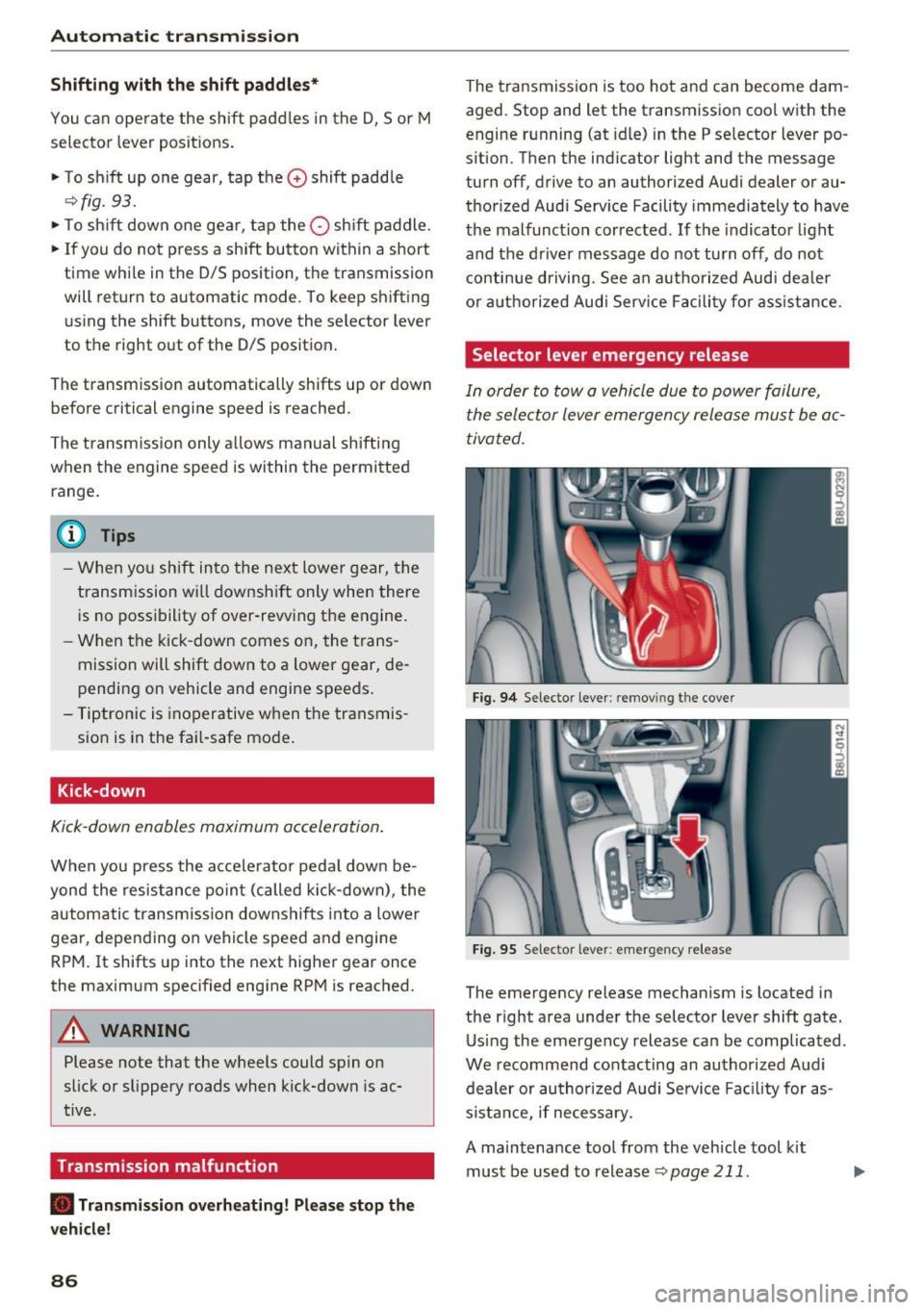
Selector lever emergency release
In order to tow a vehicle due to power failure,
the selector lever emergency release must be ac
tivated .
Fig. 94 Selector lever: remov ing t he cover
Fig. 95 Selector lever: emergency release
The emergency release mechanism is located in
the right area under the selector lever shift gate.
Using the emergency release can be complicated .
We recommend contacting an authorized Audi
dealer or authorized Audi Service Facility for as
s istance, if necessary.
A maintenance tool from the vehicle tool kit
must be used to release
¢ page 211 .
Page 96 of 252
Parking sy stem s
alarm for a few seconds a fter switching on the
parking system or when the parking system is al
ready act ivated .
If the error is not corrected be
fore you switch off the ign it ion, the LED in the
p ,,1A
button will b link the next t ime you sw itch on the
parking system by sh ift ing into reverse.
If a sensor is faulty, the
J;l4 symbol will appear in
front of/behind the vehicle in the Infotainment
d isp lay. If a rear sensor is faulty, only obstacles
that are in areas @and @ are shown
c> page 89,
fig. 96 . If a front sensor is faulty, o nly obstacles
that are in areas © and @are shown .
Drive to an authorized Aud i dea ler or authori zed
Aud i Serv ice Facility immediately to have the
malfunct ion corrected.
Trailer hitch
Applies to vehicles: with parking system plus with rearview
camera
F or vehicles using the trailer socket, t he parking
system rear sensors do not turn on when you
shift into reverse gear or when you press the
p,, 1A
button . This results in the follow ing restrictions .
There is no distance warning fo r the rear. The
front sensors remain activated. The visual display
sw itches to the trailer towing mode. The rearview
camera image will not show the or ientat ion lines
and the blue s urfaces .
(D Tips
Trailer h itches that are not installed at the
factory may cause the pa rking system to mal
function o r they may res trict its funct ion .
94
Page 127 of 252
(D Tips
If the weight-sensing mat in the front passen
ger seat detects an empty seat, the front air
bag on the passenger side will be turned off,
and
P ASS ENGER AIR B AG OFF will stay on.
Repair , care and disposal of the airbags
Parts of the a irbag system are installed at many
d ifferent p laces on your Aud i. Installing, remov
ing, servicing o r repa iring a part in an area of the
vehicle can damage a pa rt of an airbag system
and prevent that system from working properly in a co llision.
There are some importa nt things you have to
know to make sure that the effectiveness of the
system w ill not be impaired and that discarded
components do not cause injury or pollute the
environment.
A WARNING
Improper care, serv icing and repair proce
dures can increase the r isk of personal injury
and death by preventing an airbag from de
ploying when needed or deploying an airbag
unexpectedly :
-
-Never cover, obstruct, or change the steer
ing wheel horn pad or a irbag cover or the in
strument panel or mod ify them in any way .
- Never attach any objects such as cupholders
or telephone mountings to the surfaces cov
er ing the airbag units .
- For cleaning the horn pad or instrument panel, use only a soft, dry cloth or one mois
tened with plain water. Solvents or cleaners
cou ld damage the a irbag cover or change
the stiffness or strength of the mater ial so
that the airbag cannot dep loy and protect
properly.
- Never repair, adjust, or change any parts of
the airbag system.
- All work on the stee ring wheel, instr ument
pane l, front seats or electrical system (in
cluding the installation of audio equipment,
cellu lar telephones and CB radios, etc .)
must be performed by a qualified technician
Airb ag sys tem
who has the training and special equ ipment
necessary.
- For any wo rk on the airbag system, we
strong ly recommend that you see your au
thorized Audi dealer or qualified workshop .
- Never modify the front bumper or parts of
the vehicle body.
- Always make sure that the side a irbag can
inflate without interference:
- Never install seat covers or replacement
upholstery ove r the front seatbacks that
have not been specifica lly approved by
Audi .
- Never use addi tional seat cushions that
cove r the areas where the side airbags in
flate.
- Damage to the orig inal seat cove rs or to
the seam in the area of the s ide airbag
module must a lways be repaired immedi
ate ly by an authorized Aud i dealer.
- The airbag system can be activated only
once . A fter an airbag has inflated, it must
be replaced by an authorized Audi dealer or
qualified technic ian who has the technical
information, training and spec ial equ ipment
necessary.
- The airbag system can be deployed only
once . After an airbag has been deployed, it
must be replaced with new rep lacement
parts des igned and approved especially for
your Aud i model version. Replacement of
comp lete airbag systems or airbag compo
nents must be performed by qualified work
shops only. Ma ke sure that any airbag serv
ice act ion is en tered in your Aud i Wa rranty
& Maintenance booklet under AIRBAG RE
PLACEMENT RECORD.
@ For the sake of the environment
Un deployed airbag modules and p retension-
ers might be classif ied as Perchlorate Materi -
al -special handling may apply, see
www.dtsc .ca.gov/hazardouswaste/perchlo-
rate . When the vehicle or parts of the re-
straint system including airbag modu les safe-
ty belts with pretensioners are scrapped, all
applicable laws and regu lations must be ob
se rved. Your authorized Audi dealer is familiar .,.
125
Page 136 of 252
Child safet y
the control unit of the Advanced Ai rbag System.
When a chi ld restraint is being used on the front
passenger seat with a typical 1 year-old child, the
Advanced Airbag System compares the we ight
measured by the weight sensing mat with the in
formation stored in the electronic control unit.
The electronic cont rol un it also registers the ten
sion on the front passenger safety belt. The ten
sion on the safety belt for the front passenger
seat will be d ifferent fo r an adult who is properly
using the safety belt as compared to the tension
on the belt when it is used to attach a ch ild re
stra int to the seat. The senso r below the la tch fo r
the safety belt for the fro nt sea t passe nger
meas ures the tens io n on the belt. The inp ut from
this sensor is then used with the weight to "de
cide", whether there is a child restraint with a
typical 1 year-old child on the front passenger
seat and whethe r or not the a irbag must be
turned off.
Child restraints and Advanced Airbags
Regardless of the child restra int tha t you use,
make sure that it has been cert ified to meet Safe
ty Standa rds and has been certified by its manu
facturer for u se wi th an a irb ag. Always be sure
t ha t th e chi ld res tra in t i s properly insta lled at
one o f th e rear seating posit ions . If i n excep tion
a l ci rcumstances yo u must use it on the front
passenger seat, carefully read all of the informa
tion on child safety and Advanced Airbags and heed a ll of the app licab le WARNINGS. Make cer
tain that the child restra int is correctly recog
n ized by the we ight-sens ing mat inside the front
passenger seat, that t he fron t passenger a irbag
is tu rned off and tha t the airbag status is a lways
cor rect ly signa led by the
PASSENGER AIR BAG
OFF ligh t.
M any types and models of c hild rest rai nts have
been available ove r th e yea rs, new models are in
t roduced regularly incorporat ing new and im
p roved designs and o lder mode ls are taken o ut o f
p roduction . Chi ld restraints a re not standardized .
Ch ild rest raints of the same type typica lly have
d ifferent weights and s izes and d ifferent 'foot
prints, ' the size and shape of the bottom of the
chi ld restraint that s its on the seat, when they
134 are ins
talled on a vehicle seat . These d ifferences
make it virtua lly impossib le to certify compliance
with the requirements for advanced a irbags w ith
each and every child restra int that has eve r been
sold in the past or will be so ld over the course of
the usefu l life of your vehicle.
Fo r thi s reason, the United States Nationa l H igh
way Traffic Safety Administration has published a li st of specific type, makes and mode ls of ch ild
r estra ints that must be used to certify compli
ance of the Advanced Airbag System in your ve hi
cle w ith the s uppress ion requirements of Federa l
Motor Ve hicl e Safety Standa rd 208. These child
r es trai nts are:
Subpart A - Car bed child restraints
Model Manufactured on or
after
Angel Guard Angel Septe mber 25, 2 007
R ide AA2 403FO F
Subpart B - Rear-facing child restraints
Model Manufactured on or
after
Cent ury SmartFi t 454 3 Decembe r 1, 1999
Cosco Arriva September 25, 2007
22-013PAW and base
22- 999WHO
Evenf lo Discove ry Ad -December 1, 1999
just R ight 212
E venflo First Choi ce Decembe r 1, 1999
2 04
Graco I nfant 8457 December 1, 1999
Graco Snugr ide September 25, 20 07
Peg Perego Primo Viag- September 25, 2007
g io SIP I MUNOOUS
Subpart C -Forward-facing and convertible
child restraints
Model Manufactured on or
after
B rit a x Roun dabo ut September 25, 200 7
E 9 L02xx
Cosco Touriva 02519 December 1, 1999