display AUDI Q3 2016 Owner's Manual
[x] Cancel search | Manufacturer: AUDI, Model Year: 2016, Model line: Q3, Model: AUDI Q3 2016Pages: 252, PDF Size: 62.81 MB
Page 72 of 252
Driving
@ Tips
-Some noise after starting the engine is nor
mal and is no cause for concern.
- If you leave the vehicle with t he ignit ion
switched on, the ignition will switc h off af
ter a certain amount of time . Make sure that
electr ica l equipment suc h as the exterior
lights are switched off.
Stopping the engine
Appl ies to veh icles: w ith conve nien ce key
• Bring the vehicle to a full stop.
• Select the P or N selector lever position .
• Press the
I S TAR T ENGIN E STO PI button
¢ page 69, fig. 79.
Engaging the steering lock
The steering locks when you turn the engine off
using the
I START ENGINE STOP! button a nd
open the driver's door . The locked steering helps
p revent vehicle theft.
Emergency off function
If it is absolutely necessary, the engine can also
be turned off while driving at speeds lower than
6 mph (10 km/h) . To switch the engine off, press
the
I START ENGINE STOPI button twice in a row
briefly o r press and hold for longer than two sec
onds.
_& WARNING
- Never turn off the engine before the veh icle
has come to a comp lete stop . The full func
tion of the brake booster and the power
steering is not guaranteed. You must use more force to turn or brake if necessary. Be
cause you cannot steer and brake as you
usually would, this could lead to crashes
and serious injuries.
- For safety reasons, you should always park
yo ur vehicle with the selecto r lever in P .
Otherwise, the vehicle could inadvertently
roll away .
- The radiator fan can continue to r un for up
to 10 minutes even after you have turned
off the engine and removed the ignit ion key.
70
The radiator fan can also turn on again if the
engine coolant heats up because of intense
sunlight or heat build-up in the engine com
partment .
- Always take the key with you whenever you
leave your vehicle . Otherwise, the engine
could be started or electrical equipment
such as the power windows could be operat
ed. This can lead to serious injury.
(D Note
If the engine has been under heavy load for
an extended period of time, heat builds up in
the eng ine compartment after the engine is
switched off -there is a risk of damaging the
engine. For this reason, let the engine r un at
idle for approxi mately two minutes before
shutting it off.
Starting the engine when there is a
malfunction
App lies to vehicles: wit h co nvenience key
Other circumstances can cause the engine not to
start, such as the battery in the remote control
key has drained , there is interference with the
key or there is a system malfunction .
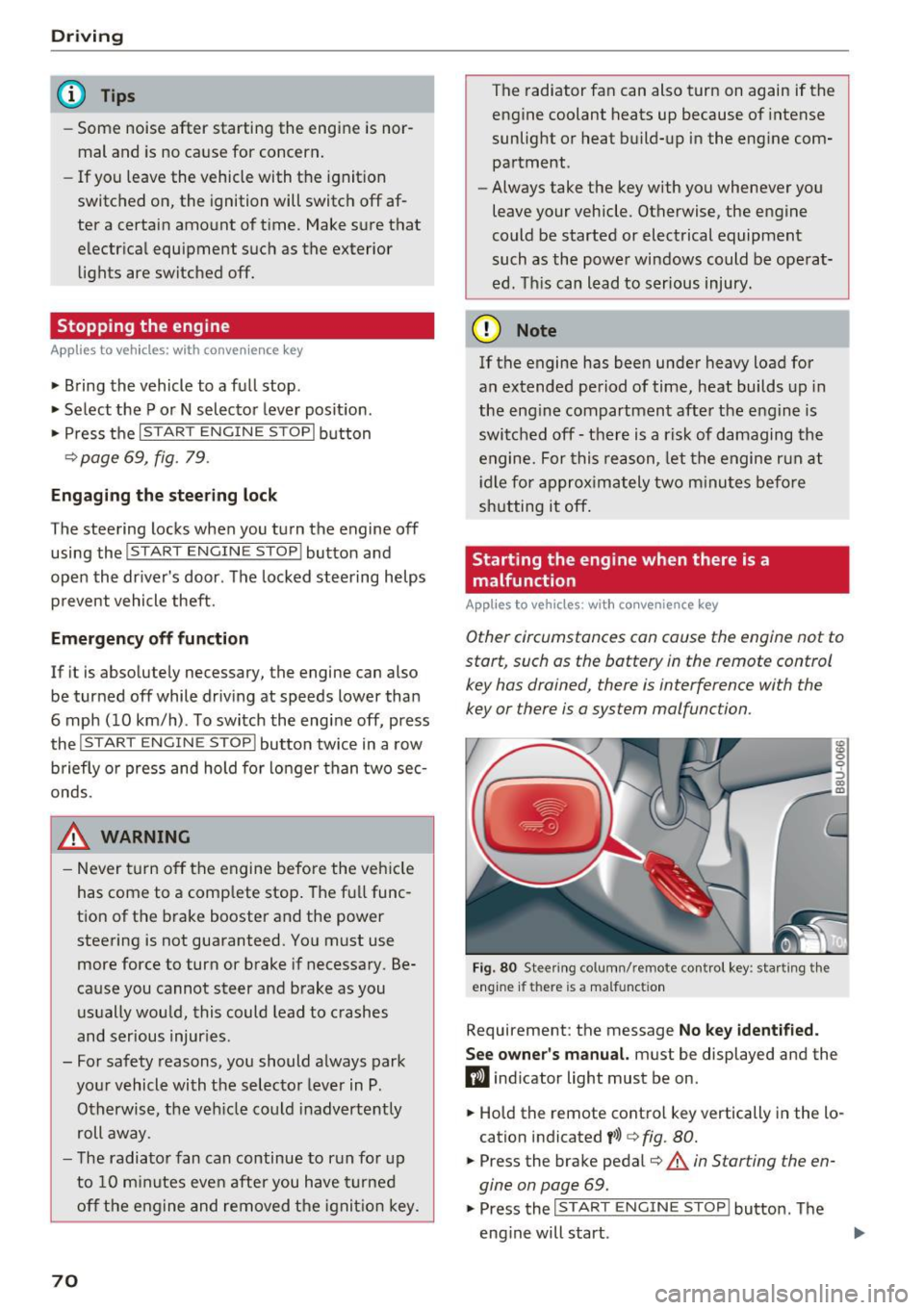
Fig. 80 Stee ring co lumn/ remo te cont rol key : sta rting t he
engine if th ere is a malfunct ion
Requirement: the message No key identified.
See owner's
manual. must be displayed and the
fl ind icator light must be on .
• Hold the remote control key vertically in the lo
cation indicated
t>>) ¢ fig. 80.
• Press the brake pedal¢.&. in Starting the en
gine on page
69.
• Press the ~IS_T_A_R_T_ E_N_ G_ I_ N_ E ~ s=T ~O ~ P~ I button. The
eng ine will start .
Page 73 of 252
.... N
c:i ::J CX)
.... I.Cl U"I
N I.Cl ......
.. Drive to an authorized A udi dealer or author
ized Audi Service Facility immediately to have
the malfunction corrected.
@ Tips
You can view the message again by pressi ng
the
I START E NGINE STOP! button.
Driver messages
Turn off ignit ion. Battery di scharging
This message appears and a war ning tone sounds
if you open the driver's doo r whe n the ignition is
sw itched on.
Pr ess brake pedal to start engine
This message appears if you do not step on the
brake pedal to start the eng ine on a vehicle with
a n automatic transm ission .
Please engage Nor P.
This message appears when starting or stopping
the eng ine and Nor Pis not engaged. The engine
will not start/stop.
Ill Is key in the vehicle ?
The indicator light turns on and this message ap
pea rs if the conven ience key* was removed from
the veh icle when the eng ine was runn ing. If t he
conven ience key is no longer in the vehicle, you
cannot switch the ignition on or start the engine
once yo u stop it. Yo u also ca nnot lock the vehicle
from the outside.
Shift to P , vehicle can roll away . Doors can only
be locked in P.
This message appea rs fo r safe ty re asons a long
with a warn ing sound if the se lector lever is not
e ng aged in P a fter swi tching the ignition off.
Move the selector lever to the P positio n. Other
wise the vehicle is not protected from rolling and
it cannot be loc ked.
DJ No key identified . See owner's manual.
This message appears if the re is no convenience
key * in side the veh icle or if the system does not
r ecognize the key. The conve nience key may not
be re cognized, for examp le, i f it is cove red by an
D rivi ng
obje ct that disrupts the signa l (such as a br ie f
case), or if the key battery is wea k. E lectronic de
vices such as cell phones can a lso inte rfere with
the signal.
T o still be able to start or stop the engine, re fer
to
¢ page 70.
Electromechanical
parking brake
Operating
The electromechanical parking brake replaces
the hand brake.
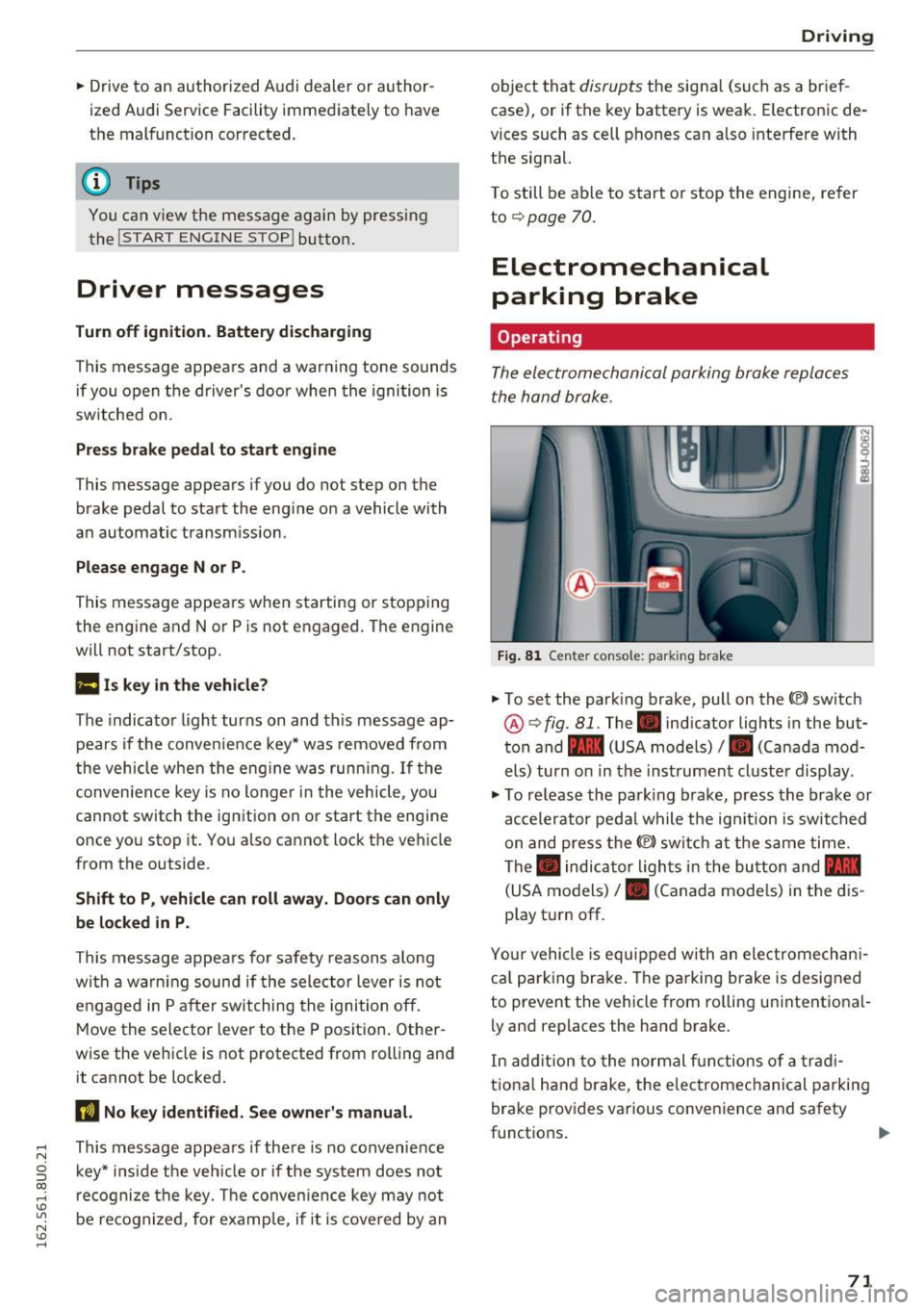
Fi g. 81 Center console: parking brake
.. To set the park ing brake, pull on the(®) switch
@¢ fig. 81. The . indicator lights in the but
ton and - (USA models)/ . (Canada mod
els) turn o n in the ins trument cluste r display.
.,. To re lease the park ing brake, press the brake or
ac celerator pedal w hile the ign it ion is switched
on and press the(®) switch at the s ame time.
The . indicator ligh ts in t he bu tton and -
(USA models)/ . (Canada mode ls) in the dis
play t urn off.
Yo ur vehicle is equipped with an elect romechan i
ca l p a rk ing brake . The pa rking brake is designed
to prevent the vehicle from ro lling un intent ional
ly and replaces the hand brake.
In add ition to the normal f unctions of a tra d i
t iona l h and b rake, t he elec tromec hanical parking
bra ke prov ides various conven ience and safety
functions .
71
Page 76 of 252
Driving
the<®> switch is released, or the accelerator pedal is depressed, emergency braking stops.
A WARNING
Emergency braking should only be used in an
emergency, when the normal brake pedal has
failed or the brake pedal is obstructed. During
emergency braking, your vehicle will brake
similar to heavy braking . ESC and the associ·
ated components (ABS, ASR, EDL) cannot
overcome the laws of physics. In corners and
when road or weather conditions are bad, a
full brake application can cause the vehicle to
skid or the rear end to break away, which in
creases the risk of an accident.
Speed warning system
Introduction
Applies to vehicles: with speed warning system
The speed warning sy stem helps you to stay un
der a specified maximum speed.
The speed warning system warns you if you are
exceeding the maximum speed that you have set .
You will hear a warning tone when your speed ex
ceeds the stored value by approximately 3 mph
(3 km/h) . The indicator light
101 (USA models)/
llll (Canada models) and the Speed limit warn
ing exceeded.
message appear in the instrument
cluster display at the same time . T hP
(Cl / t•j in
dicator light turns off when the speed decreases
below the stored maximum speed.
Setting a threshold is recommended if you would
like to be reminded when you reach a certain
maximum speed. Situations where you may want
to do so include driving in a country with a gener
al speed limit or if there is a specified maximum
speed fo r winter tires.
@ Tips
Regardless of the speed warning system, you
should always monitor your speed using the
speedometer and make sure you are following
the legal speed limit.
74
Setting the threshold
Applies to vehicles: with speed warn ing system
You can set, change and delete the warning
threshold in the Infotainment system .
.. Select: !CAR ! function button> (Car) systems*
control but ton > Driver assist> Speed warning .
You can set any threshold between 20 mph
(30 km/h) and 150 mph (240 km/h). Settings
can each be adjusted in increments of S mph (10 km/h) .
Cruise control system
Switching on
Applies to vehicles: with cruise control system
The cruise control system makes it possible to
drive at a constant speed starting at 20 mph
(30kmlh).
0
f
~
0
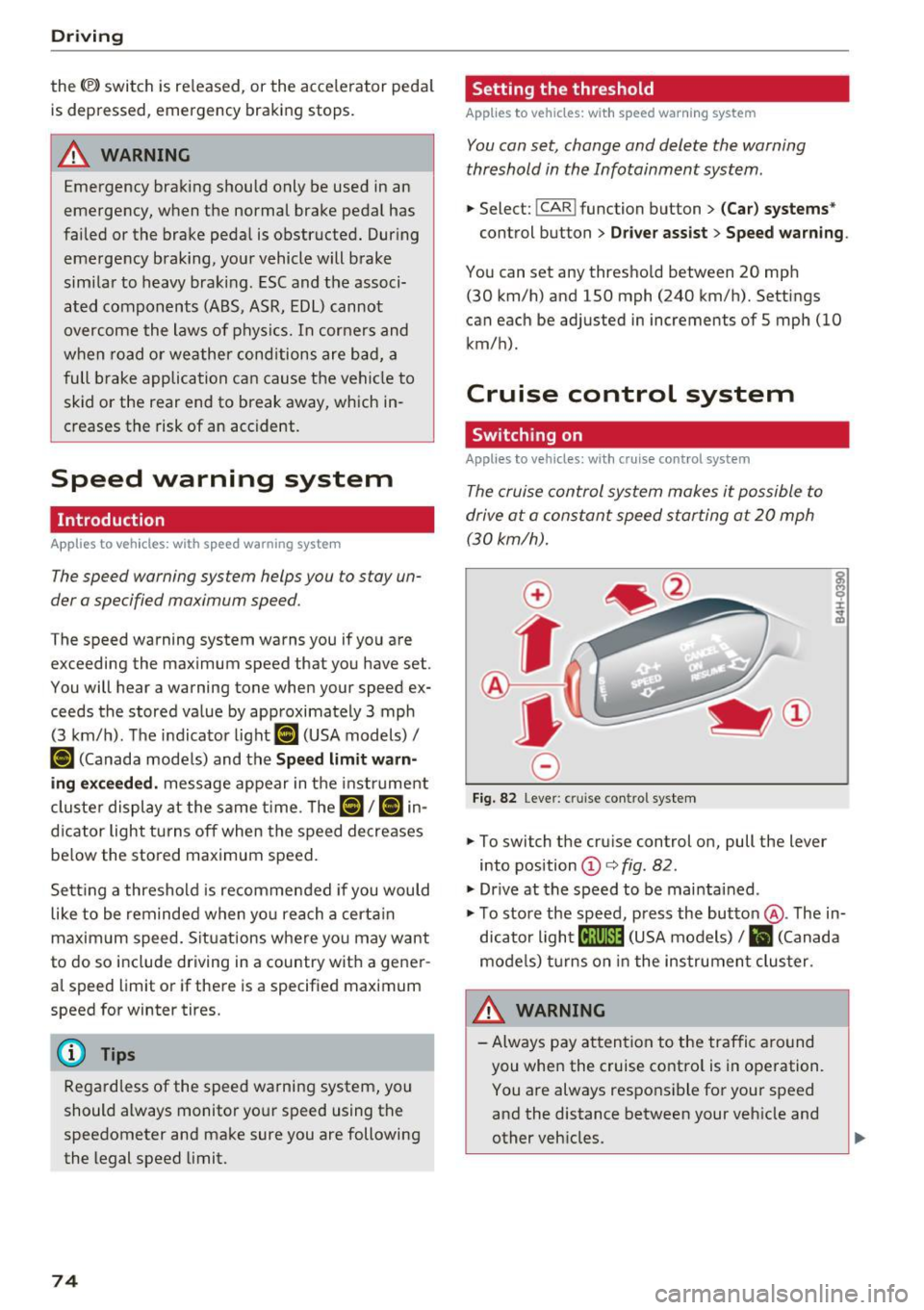
Fig. 82 Lever: cruise con trol system
.. To switch the cruise control on, pull the lever
into position
© c:> fig . 82 .
"'Drive at the speed to be maintained .
"' To store the speed, press the button @. The in
dicator light
[ij;(tj~i~ (USA models) / Bl (Canada
models) turns on in the instrument cluster .
&_ WARNING
-Always pay attention to the traffic around
you when the cruise control is in operation. You are always responsible for your speed
and the distance between your vehicle and
other vehicles .
.
Page 77 of 252
-For reasons of safety, cruise control should
not be used in the city, in stop-and-go traf
fic, on winding roads and when road condi
t ions are poor (such as ice, fog, gravel,
heavy ra in and hydroplaning) -you could
have an acc ident.
- Switch the cruise control off temporar ily
when driving in turning lanes, h ighway exits
o r in construction zones.
(D Tips
-The cruise control system is ideal for
stretches w ith speed limits. The driver is re
spons ible for adhering to the correct speed.
- The cruise control remains active when
sh ifting gears.
Changing speed
A ppl ies to vehicles: with c ruise control system
.. To inc rease o r decrease the speed in incre
ments, push the lever towa rd
0 10 <=> page 74,
fig. 82.
.. To increase or decrease the speed quickly, hold
the lever in the
010 direction until the de
sired speed is displayed .
You can also press the accelerator pedal down to
increase your speed, for example i f you want to
pass someone. The speed you saved earlier will
resume as soon as you re lease the accelerator
pedal.
However, if you exceed your saved speed by 5
mph (10 km/h) for longer than 5 minutes, the
cruise control system turns off temporari ly. The
tij ;(i)~i~ (USA models)/ . (Canada models) ind ica
tor light in the instrument cluster turns off and
the stored speed is retained.
Preselecting the speed
Appl ies to veh icles: with c ruise control system
You can preselect your desired speed when the
vehicle is stationary.
.... "' .. Switch the ignition on. ci ~ .. Pull the lever into position (D <=> page 74,
~ fig. 82. Lil
N v:, ....
Driving
.. To increase or decrease the speed, push the lev-
er toward
0 10 .
.. To store the speed displayed, release the lever.
T his function makes it possible, fo r example, to
save the desired speed before driving on the
highway. Once on the highway, activate the
cruise control by pulling the lever toward @.
Switching off
App lies to vehicles : with cruise co nt ro l sys te m
Temporary deactivation
.. Press the brake pedal, or
.. Press the lever into position @ (not clicked into
place)
<=> page 74, fig. 82 .
Switching off completely
.. Press the lever into position @(clicked into
place), or
.. Switch the ignit ion off .
T he speed you stored will be retained if the cruise
contro l has been switched off temporari ly. To re
sume the stored speed, release the brake pedal
and pull the lever into position@.
Switching the ignition off wi ll erase the stored
speed.
A WARNING
You should only resume the stored speed if it
i s not too high for existing traff ic conditions.
Otherw ise you risk an accident.
75
Page 78 of 252
Audi side assist
Audi side assist
Side assist
Description
Applies to vehicles: with Aud i side ass ist
F ig. 83 Se nsor detec tion ran ge
Fig . 84 Display o n th e exter io r mirr or
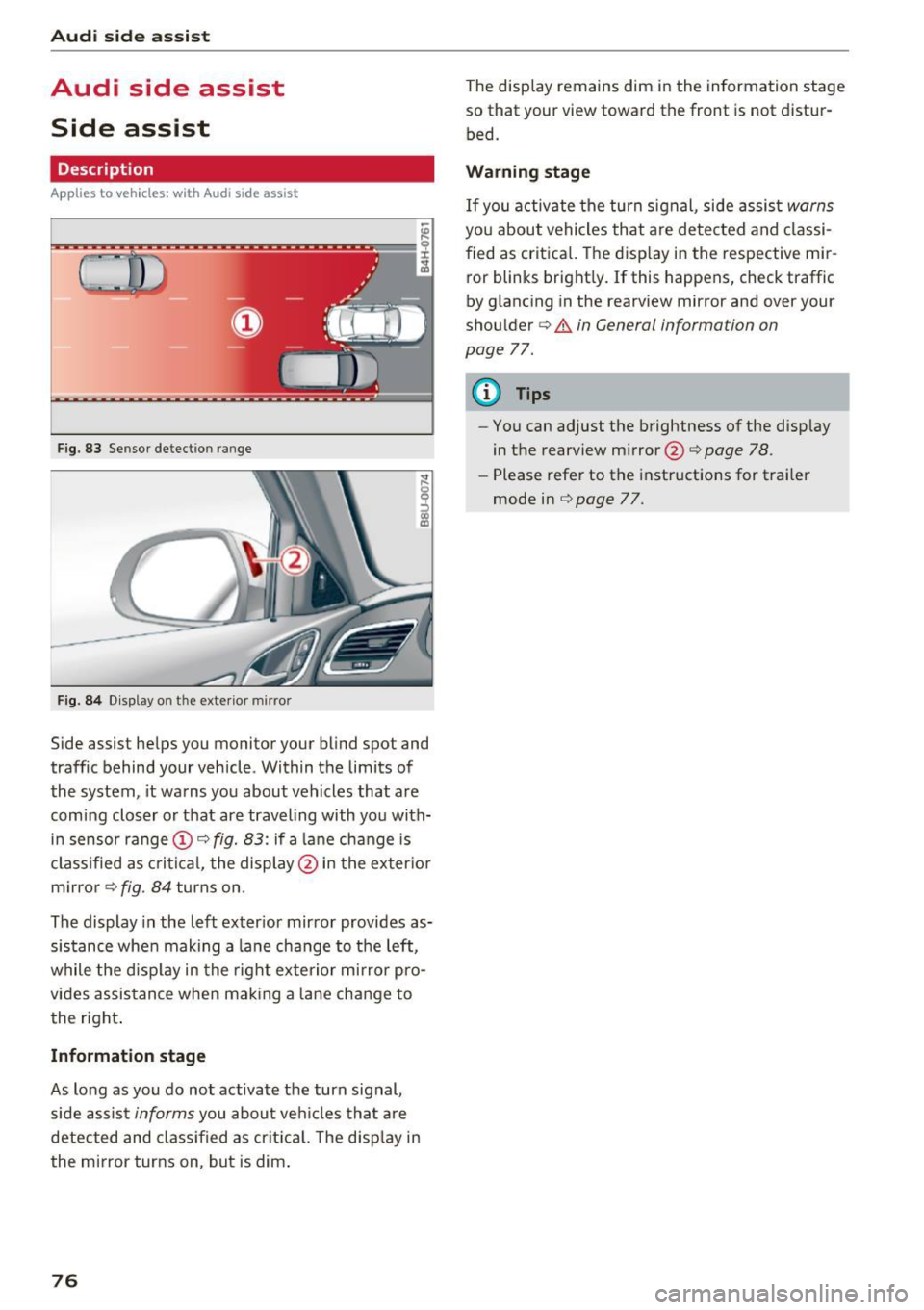
Side assist he lps you monitor your bl ind spot and
traffic behind your vehicle . Within the limits of
the system , it warns you about vehicles that are
comi ng closer o r that are traveling with you with
i n sensor range
(D c:> fig. 83: if a lane change is
classified as cr itic al, the displ ay @ in the exter io r
m irro r
i=>fig . 84 turns on .
The display in the left exter ior mir ror provides as
sis tance whe n making a la ne change to the left,
while the disp lay in the rig ht exte rio r mi rror pro
vides assis tance when mak ing a lane chan ge to
the right .
Information stage
As long as you do no t activate the turn signal,
side assis t
informs you about ve hicles tha t are
detected and class if ied as crit ic al. T he disp lay in
the mirror turns on, but is dim .
76
The display remains dim in the information stage
so that your view toward the fron t is not distur
bed.
Warning stage
If you activate the turn signal, side assis t warns
you about vehicles tha t are detected and classi
fied as crit ica l. T he disp lay in the respective mir
ror blinks bright ly. If this happens, check traffic
by glancing in the rearview mi rror and ove r you r
shou lder c:>
.&. in General information on
page
77.
{!) Tips
- You can adjust the b rightness of the disp lay
in the rearview mirror @c:>
page 78 .
-Please refe r to the instructions for trai ler
mode in c:>
page 77.
Page 79 of 252
.... N
c:i :::J CX)
.... I.Cl U"I
N I.Cl ......
General information
Appl ies to vehicles: with Audi side assist
®
®
©
Fig. 85 Driving si tuat ions
Fig. 86 Rear of the veh icle: pos ition of the sensors
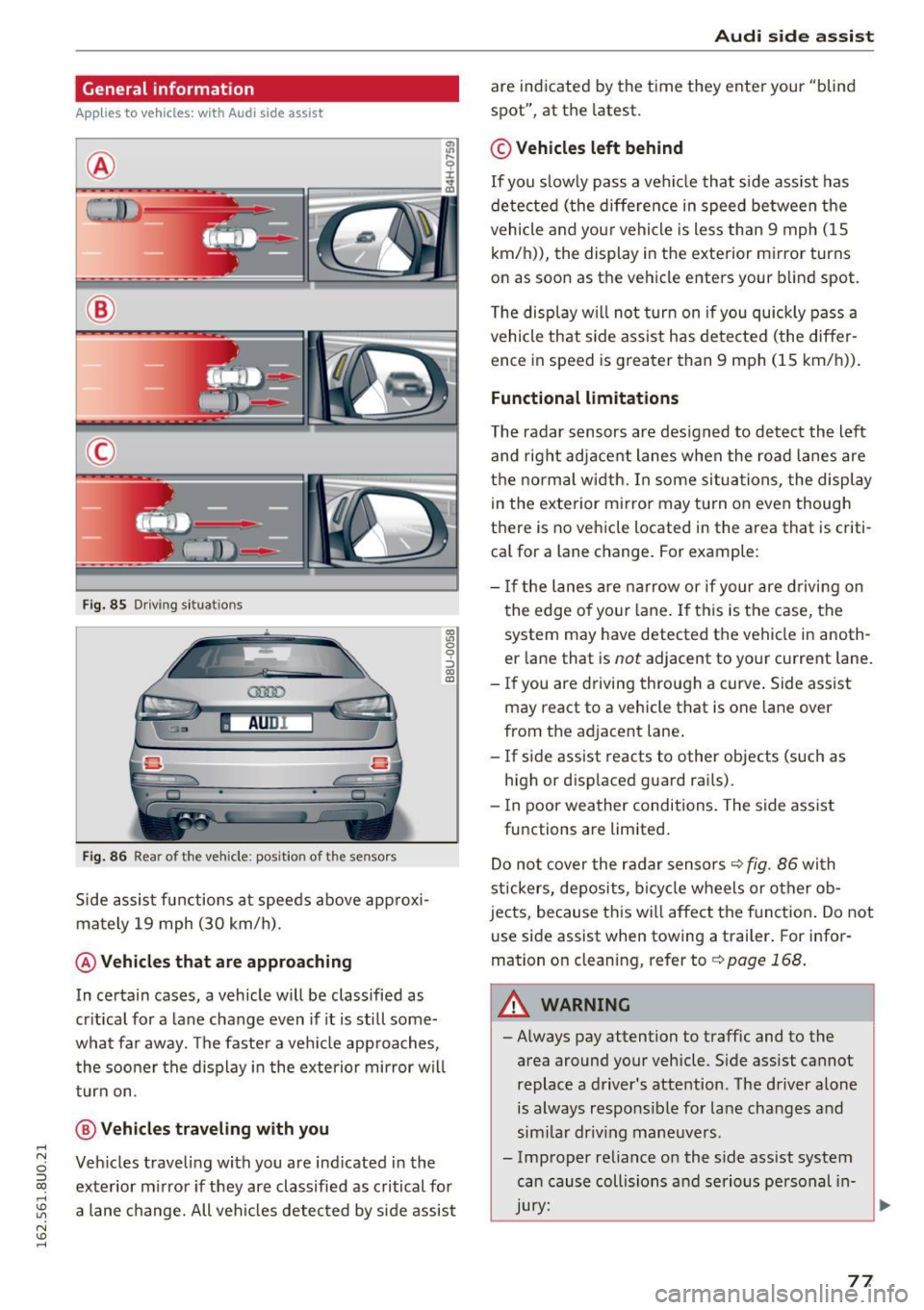
Side assist functions at speeds above approxi
mately
19 mph (30 km/h).
@ Vehicles that are approaching
:'ll 0
0
::':,
"' m
In certain cases, a vehicle will be classified as
critical for a lane change even if it is still some
what far away. The faster a vehicle approaches,
the sooner the display in the exterior mirror will
turn on.
@ Vehicles traveling with you
Vehicles traveling with you are indicated in the
exterior mirror if they are classified as critical for
a lane change. All vehicles detected by side assist
Audi side assist
are indicated by the time they enter your "blind
spot", at the latest.
© Vehicles left behind
If you slowly pass a vehicle that side assist has
detected (the difference in speed between the
vehicle and your vehicle is less than 9 mph (15
km/h)), the display in the exterior mirror turns
on as soon as the vehicle enters your blind spot.
The display will not turn on if you quickly pass a
vehicle that side assist has detected (the differ
ence in speed is greater than 9 mph (15 km/h)).
Functional limitations
The radar sensors are designed to detect the left
and right adjacent lanes when the road lanes are
the normal width. In some situations, the display
in the exterior mirror may turn on even though
there is no vehicle located in the area that is criti
cal for a lane change. For example:
- If the lanes are narrow or if your are driving on
the edge of your lane. If this is the case, the
system may have detected the vehicle in anoth
er lane that is
not adjacent to your current lane.
- If you are driving through a curve. Side assist
may react to a vehicle that is one lane over
from the adjacent lane.
- If side assist reacts to other objects (such as
high or displaced guard rails).
- In poor weather conditions. The side assist
functions are limited.
Do not cover the radar sensors
~ fig. 86 with
stickers, deposits, bicycle wheels or other ob
jects, because this will affect the function. Do not
use side assist when towing a trailer. For infor
mation on cleaning, refer to ¢
page 168.
A WARNING
=
-Always pay attention to traffic and to the
area around your vehicle . Side assist cannot
replace a driver's attention. The driver alone is always responsible for lane changes and
similar driving maneuvers .
- Improper reliance on the side assist system can cause collisions and serious personal in-
-
Jury: ~
77
Page 80 of 252
Audi side assist
-Never rely only on side assist when chang
ing lanes.
- Always check rear view mirrors to make
sure that it is safe to change lanes.
- Side assist cannot detect a ll vehicles under
all conditions- danger of acc ident!
- Please note that side assist indicates there
are approaching vehicles, or vehicles in your blind spot, only after your vehicle has
reached a driving speed of at least 19 mph
(30 km/h).
- In certain situations, the system may not function or its funct ion may be limited. For
example:
- if veh icles are approaching or being left
behind very quickly. The display may not
turn on in time.
- in poor weather conditions such as heavy
rain, snow or heavy mist.
- on very w ide lan es, in tight curves or if
there is a rise in the road su rface. Vehicles
in the adjacent lane may not be detected
because they are outside of the sensor
range.
(D Note
The sensors can be displaced by impacts or
damage to the bumper, wheel housing and
underbody. This can affect the system. Have
your authorized Audi dealer or authorized
Audi Serv ice Facility check their function.
(D} Tips
- If the window glass in the driver 's door or
front passenger's door has been tinted, the
display in the exterior mirror may be misin
terpreted.
- For Declaration of Comp liance to United
States FCC and Industry Canada regu lations
c;, page235.
78
Switching on and off
App lies to vehicles: wit h Audi side assist
Fig. 87 D river's door: s ide assist button
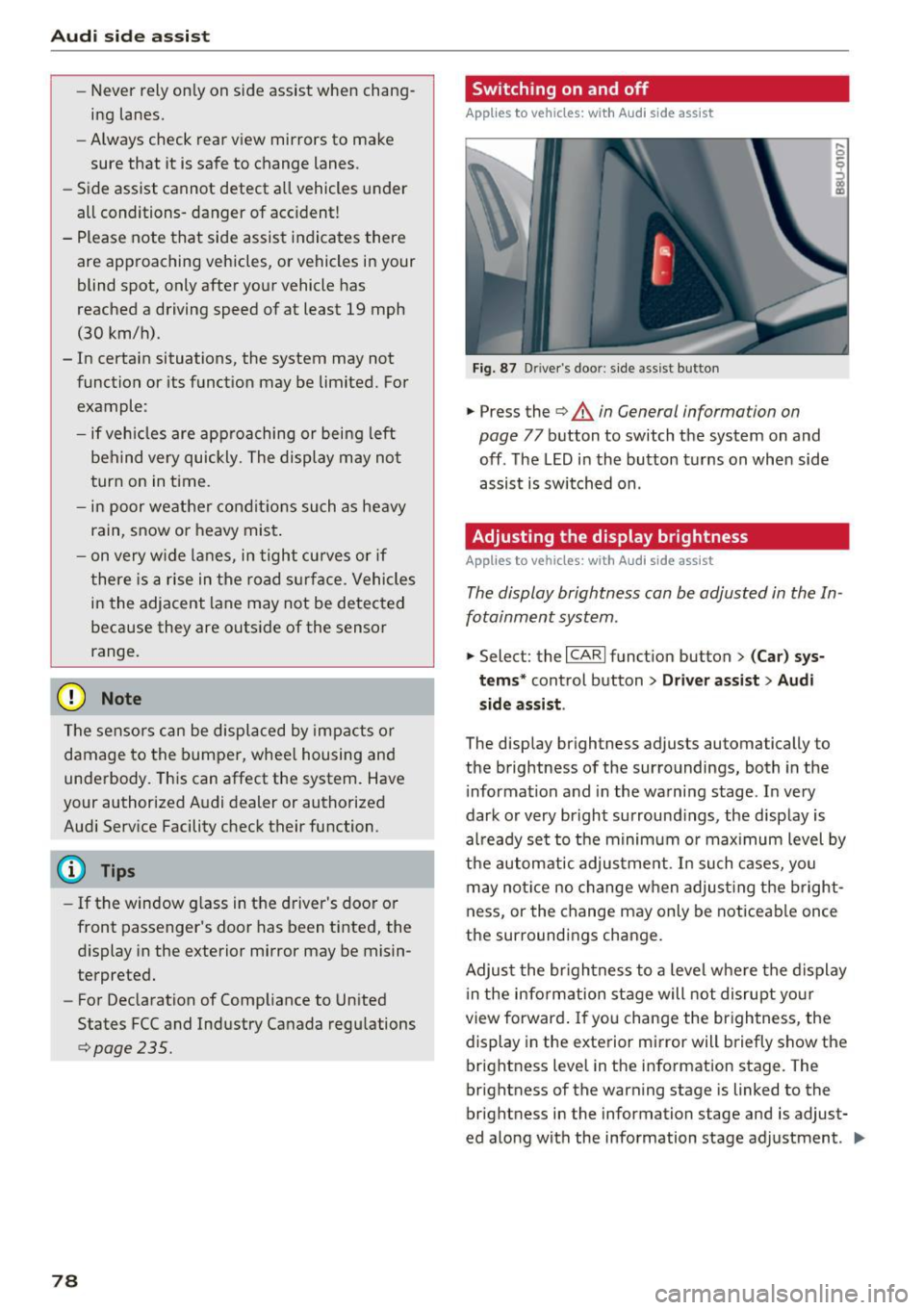
.,. Press the c;, &. in General information on
page
77 button to switch the system on and
off . The LED in the button turns on when side
assist is switched on .
Adjusting the display brightness
Applies to vehicles: wit h Aud i side ass ist
! a,
The display brightness can be adjusted in the In
fotainment system .
.,. Select: the I CARI function button > (Car) sys
tems *
control button > Driver assist > Audi
side assis t.
The display brightness adjusts automatically to
the brightness of the surroundings, both in the
i nformation and in the warning stage . In very
dark or very bright surround ings, the display is
al ready set to the minimum or max imum level by
the automatic adjustment. In such cases, you
may notice no change when adjust ing the bright
ness, or the change may only be noticeable once
the surroundings change.
Adjust the br ightness to a level where the display
i n the information stage will not disrupt your
view forward. If you change the brightness, the
display in the exterior mirror will briefly show the
brightness level in the information stage. The
brightness of the warning stage is linked to the
brightness in the information stage and is adjust
ed along with the information stage adjustment . .,,.
Page 82 of 252
Audi drive select
Audi drive select
Drive settings
Introduction
Applies to vehicles: with Aud i drive select
Drive select makes it possible to experience dif
ferent types of vehicle settings in one vehicle.
The driver can select from three modes:
Comfort,
Auto
and Dynamic using the t:i:.~ button in the
center console or by using the Infotainment sys
tem* to switch between a sporty and a comforta
ble driving mode, for example.
Description
App lies to veh icles: with Aud i drive select
The following systems, among other things , are
influenced by drive select:
Engine and automatic transmission
Depending on the mode, the engine and auto
matic transmission respond more quickly or in a
more balanced manner to accelerator pedal
movements . In the sporty dynamic mode, the
transmission shifts at higher RPMs .
Adaptive dampers*
The adaptive dampers use sensors to record in
formation regarding steering movements, brak
ing and acceleration operations by the driver,
road surface, driving speed, and load. With drive
select you can adjust the adaptive dampers to
sporty (dynamic), comfortable (comfort) or ba l
anced (auto).
Steering
The steering adapts in terms of steering assis
tance . Indirect steering that moves easily as in
comfort mode is especially suited to long dr ives
on a h ighway. In contrast, dynamic mode pro
vides sporty, direct steering.
Cornering light*
The cornering light adapts to driving on curves.
The pivoting action and the lighting are also
adapted to the mode .
80
@ Tips
Selecting the Dynamic mode allows for sporty
gear shifting . The S shift setting is automati
cally engaged.
Selecting the driving mode
Applies to veh icles: with A udi drive se lect
You can select between Comfort, Auto and Dy
namic.
Fig. 88 Center conso le: d rive select button
Fig. 89 Infotainment system: drive select
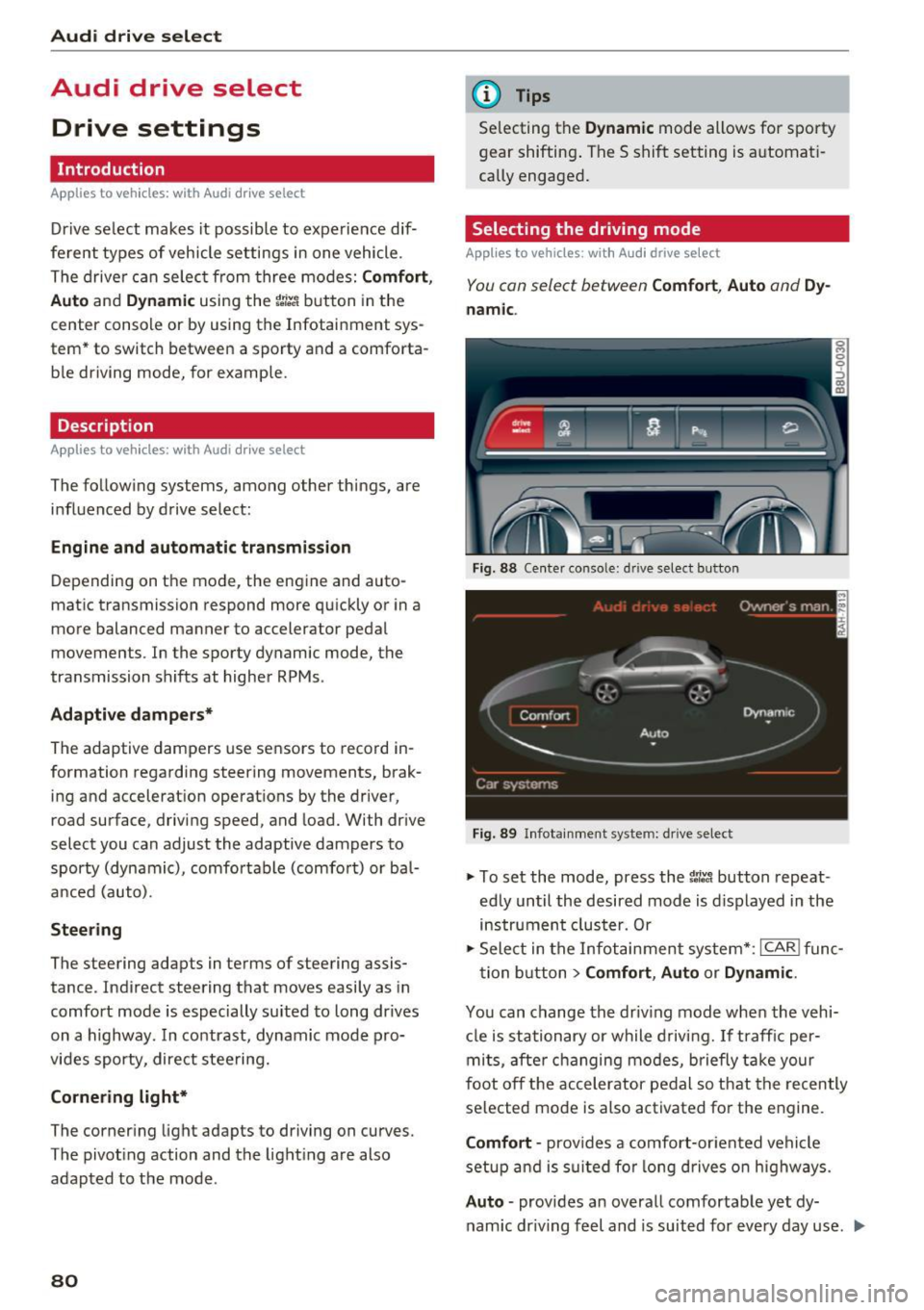
.,. To set the mode, press the 1:i:Jl button repeat
edly until the desired mode is displayed in the
instrument cluster. Or
.,. Select in the Infotainment system* :
ICAR! func-
tion button
> Comfort, Auto or Dynamic .
You can change the driving mode when the vehi-
cle is stationary or while driving. If traffic per-
mits, after changing modes, briefly take your
foot off the accelerator pedal so that the recently
selected mode is also activated for the engine.
Comfort -provides a comfort-oriented vehicle
setup and is suited for long drives on highways.
Auto -provides an overall comfortable yet dy
namic dr iving feel and is suited for every day use . ..,.
Page 85 of 252
.... N
c:i ::J CX)
.... I.Cl U"I
N I.Cl ......
,&_ WARNING
Read and follow all WARNINGS¢ A in Driv
ing tips on page 84.
(D Note
Coasting downhill w ith the transm ission in N
and the engine not running will result in dam
age to the automatic transmission and possi
bly the catalytic converter.
@ Tips
- If you accidentally select N while driving,
take your foot off the accelerator pedal and
wait for the engine to slow down to idle be
fore selecting Dor S.
- If there is a power failure, the selector lever
will not move out of the P position. The
emergency release can be used if this hap
pens
¢ page 86.
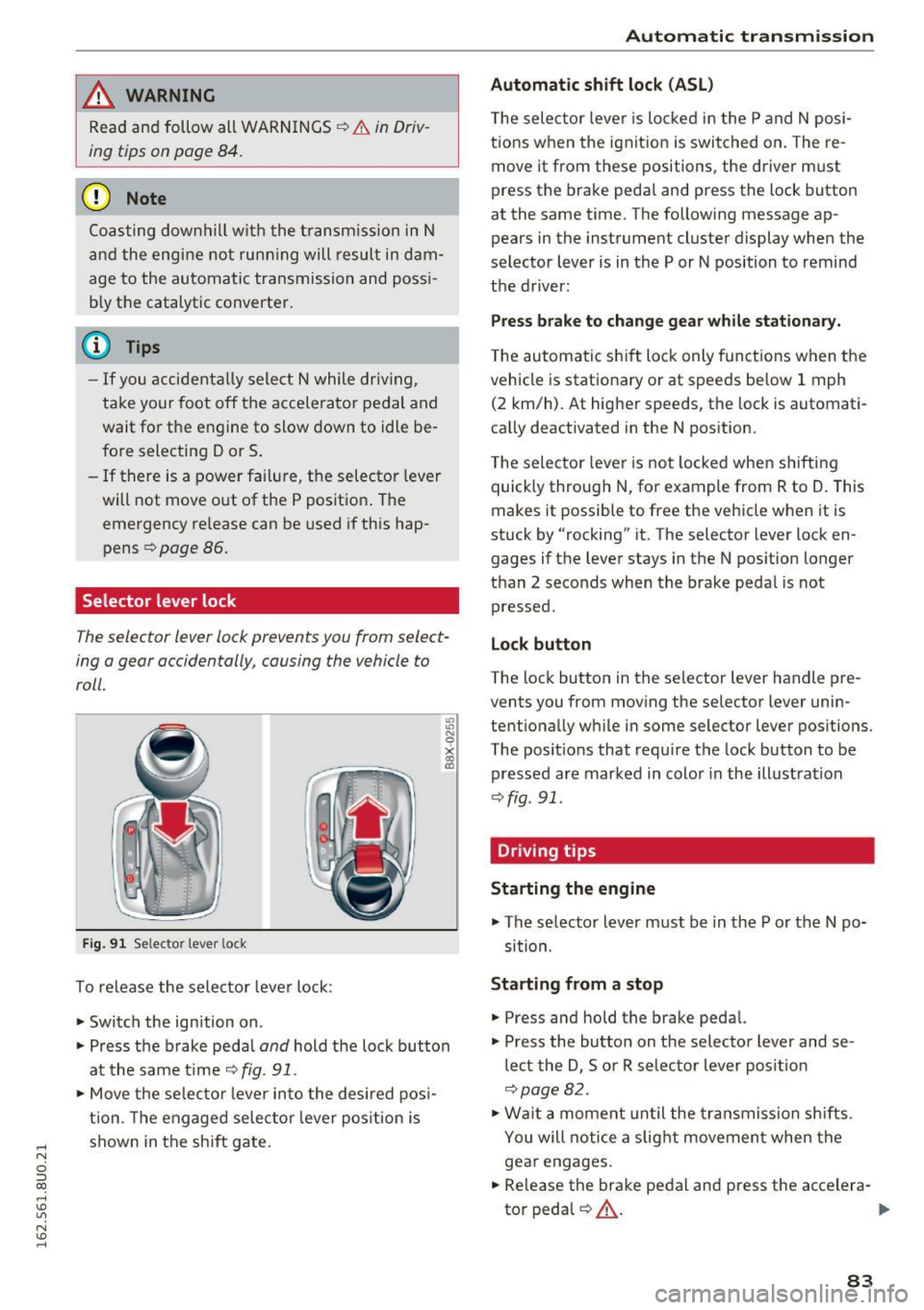
Selector lever lock
The selector lever lock prevents you from select
ing o gear occidentally, causing the vehicle to
roll.
Fig. 91 Selecto r lever loc k
To release the selector lever lock:
• Switch the ign ition on .
• Press the b rake peda l
and hold the lock button
at the same time ¢
fig. 91.
• Move the selector lever into the desired posi
tion. The engaged selecto r lever position is
shown in the shift gate .
-
Automatic transmission
Automatic shift lock (ASL)
The selec tor lever is locked in the P and N posi
tions when the ignit ion is switched on. The re
move it from these positions , the driver m ust
press the brake pedal and press the lock button
at the same time. The following message ap
pears in the instrument cluster display when the
selector lever is in the P or N position to remind
the driver:
Press brake to change gear while stationary.
The automatic shift lock only funct ions when the
vehicle is stat ionary o r at speeds be low 1 mph
(2 km/h). At higher speeds, the lock is automati
cally deactivated in the N position.
The selector lever is not locked when shifting
quick ly through N, for example from R to D. This
makes it possible to free the vehicle when it is
stuck by "rocking" it. The selector lever lock en
gages if the lever stays in the N position longer
than 2 seco nds when the brake pedal is not
pressed.
Lock button
The lock button in the selector lever handle pre
vents you from moving the selector lever unin
tentionally while in some selector lever positions.
The positions that require the lock button to be
pressed are marked in color in the illustration
¢fig . 91.
Driving tips
Starting the engine
• The se lector lever must be in the P or the N po
sit ion.
Starting from a stop
• Press and hold the brake pedal.
• Press the button on the selector lever and se
lect the D , Sor R selector lever posit ion
¢page 82.
• Wait a moment until the transmission shifts.
You will notice a slight movement when the
gear engages.
• Release the brake pedal and press the accelera-
tor pedal
QA - .,..
83
Page 87 of 252
.... N
c:i ::J CX)
.... I.Cl U"I
N I.Cl ......
c> page 177. Otherwise, any increase in en
gine speed may set the vehicle in motion,
even with the parking brake applied.
(D Note
- When stopping on an incline, do not try to
hold the vehicle in place by pressing the ac
celerator pedal whi le a driv ing gear is se
lected. This can cause the automatic trans
mission to overheat and can damage it . Set
the parking brake or press the brake pedal
to prevent the vehicle from ro lling.
- Allow ing the vehicle to roll when the eng ine
i s stopped and the selector lever is in
N po
s ition w ill damage the automatic transm is
s ion because i t is not lubricated under those
ci rc u ms tances.
- The transmiss ion can over heat and be dam
aged under certain driving and traffic co ndi
t ions s uch as frequent starts, creeping for a
l ong time, or stop -and -go traffic. When the
• indicator light turns on, stop the vehicle
at the next opportunity and let the trans
mission cool down
c> page 86.
@ Tips
For safety reasons, the parking brake is re
leased automatically only when the driver 's
safety belt is fastened and the dr iver 's door is
locked.
Hill descent control
Hill descent control assists the driver when dr iv
ing down hills.
Hill descent contro l is activated wh en th e se lec
tor lever is in the D or S position and you p ress
the b rake pedal. The transm ission automat ically
select s a gear that i s suitable for the incline . H ill
descent control tries to maintain the speed ach
ieved at the time of braking, within phys ical and
techn ical limitations . If may st ill be necessary to
adj ust the speed with the b rake pedal.
Hill descent control switches off once the hill lev
e ls out or you press the accelerator pedal.
Aut oma tic tr ansm iss ion
A WARNING
-Hill descent control cannot overcome physical
limitat io ns, so it may not be able to ma intain
a constant speed under all conditions . Always
be ready to app ly the brakes .
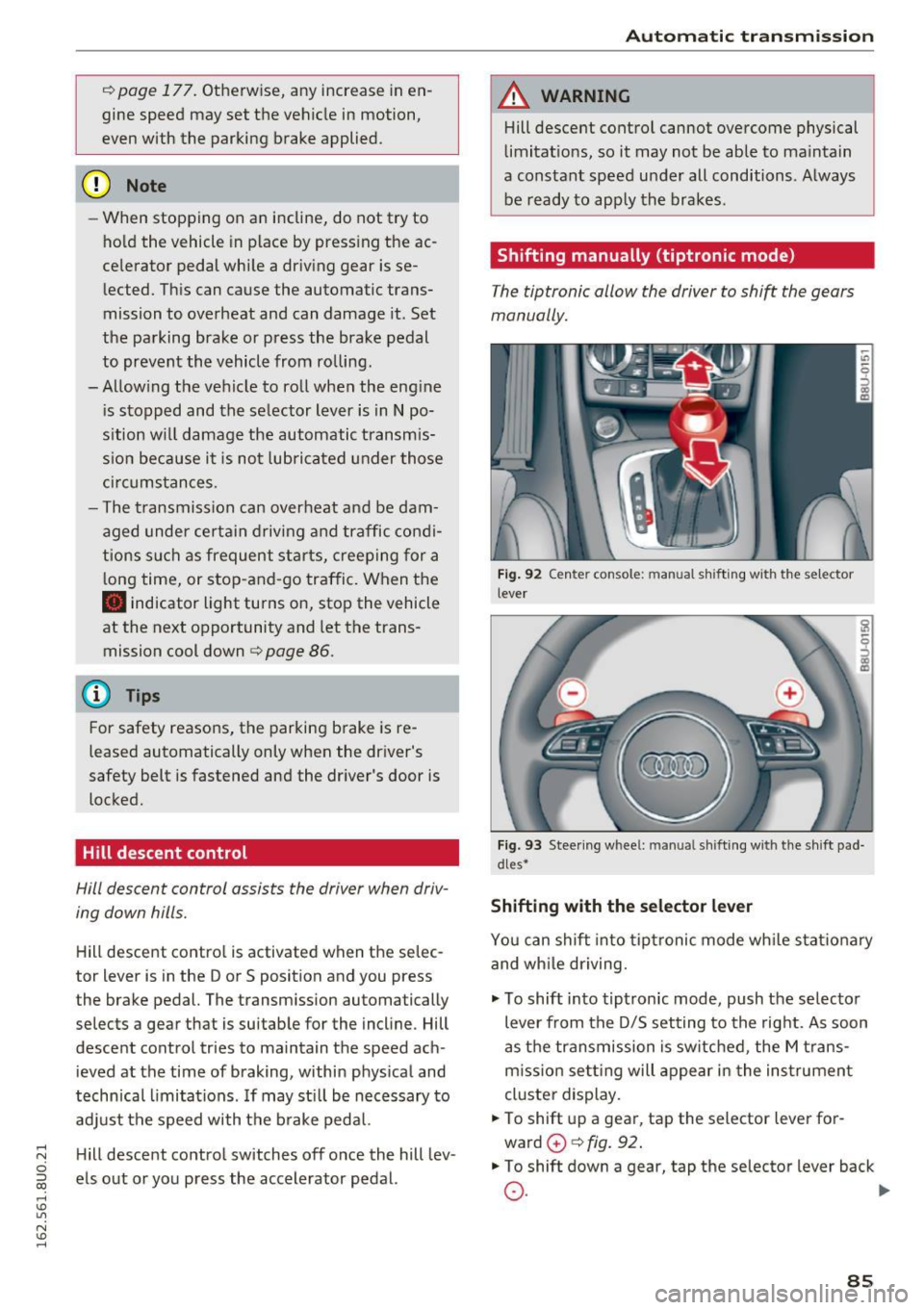
Shifting manually (tiptronic mode)
The tiptronic allow the driver to shi~ the gears
manually.
F ig. 92 Cente r con so le: m anu al shi ft ing w ith t he sel ect or
leve r
Fig . 93 Stee ring w hee l: manual s hift ing w ith the shi ft pad
d les•
Shifting with the selector lever
You can shift into tip tronic mode wh ile stat iona ry
and wh ile driving.
"' To shift into tiptronic mode, push the selecto r
lever from the D/S setting to the right. As soon
as the transmission is switched , the M trans
m iss ion se tting will appear in the ins trument
cluste r display.
"' To shift up a gea r, tap the selector lever for
ward
0 c> fig . 92 .
"'To shift down a gea r, tap the se lector lever back
0 . ~
85