display AUDI Q3 2016 User Guide
[x] Cancel search | Manufacturer: AUDI, Model Year: 2016, Model line: Q3, Model: AUDI Q3 2016Pages: 252, PDF Size: 62.81 MB
Page 28 of 252
Driver information system
On-Board Diagnostics
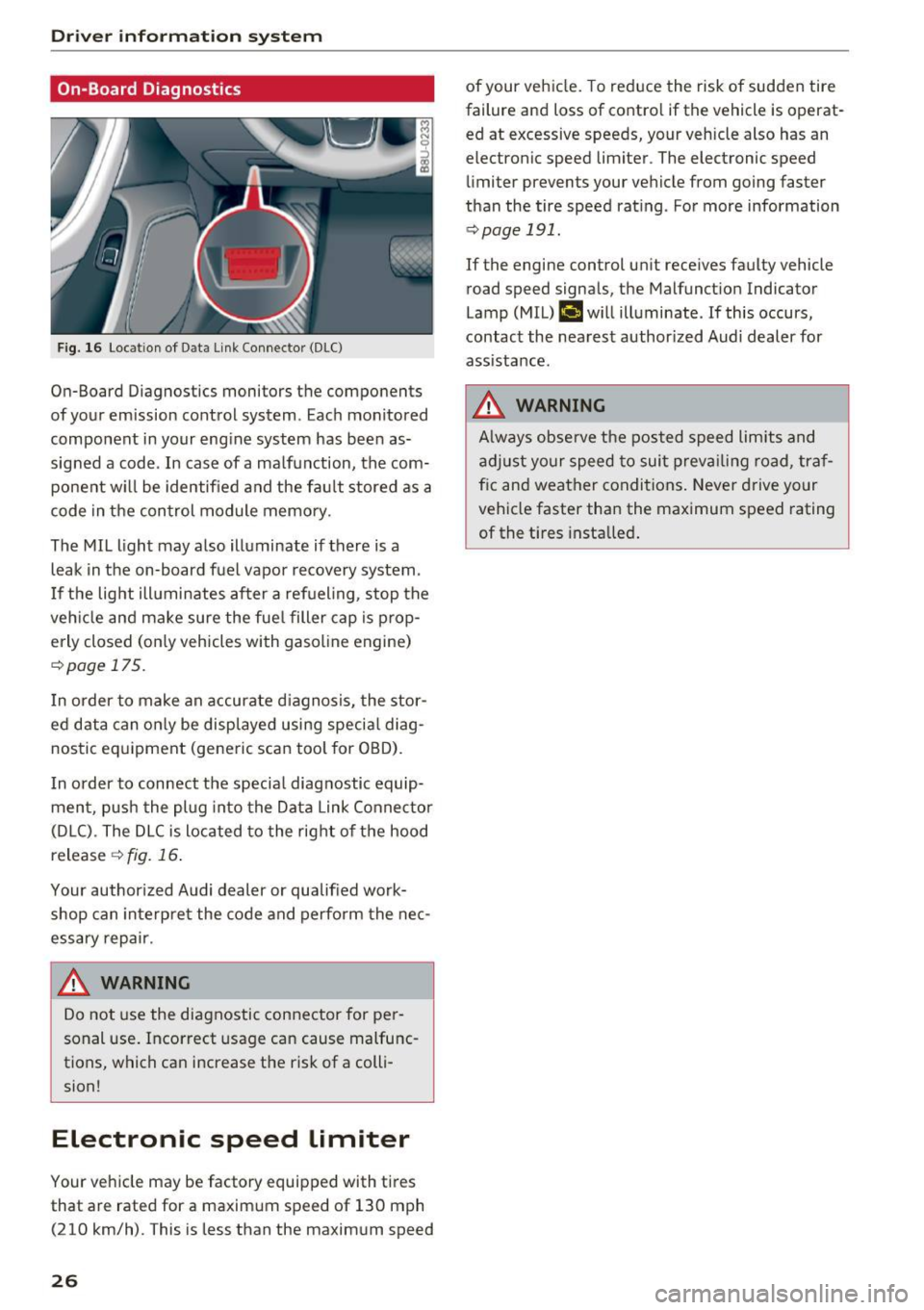
F ig. 16 Locat ion of Data Link Connector (DLC)
On-Board Diagnostics monitors the components
of your emission control system. Eac h monitored
component in your engine system has been as
signed a code. In case of a ma lfunction, the com
ponent w ill be identified and the fault stored as a
code in the control module memory.
The MIL light may also illuminate if there is a
leak in the on-board fuel vapor recovery system.
I f the light ill uminates after a refueling, stop the
veh icle and make sure the fuel filler cap is prop
erly closed (on ly vehicles with gasol ine engine)
r::!> page 17 5.
I n order to make an accurate diagnosis, the stor
ed data can only be displayed using special diag
nostic equipment (generic scan tool for OBD).
I n order to connect the specia l diagnostic equip
ment, push the plug into the Data Link Connector
(D LC). The DLC is located to the right of the hood
release
¢ fig. 16.
Your author ized Audi dealer or qualified work
shop can interpre t the code and perform the nec
essary repair .
.&_ WARNING
-
Do not use the diagnostic connector for pe r
sonal use. Incorrect usage can cause malfunc
tions, which can increase the risk of a colli
sion!
Electronic speed Limiter
Your vehicle may be factory equipped with tires
that are rated for a maximum speed of 130 mph (210 km/h). This is less than the maximum speed
26
of your veh icle. To reduce the risk of sudden tire
failure and loss of contro l if the vehicle is operat
ed at excessive speeds, your vehicle also has an
electronic speed limiter . The electronic speed
limiter prevents your vehicle from going faster
than the tire speed rating . For more information
r::!> page 191.
If the engine control un it receives faulty vehicle
road speed signals, the Malfunct ion Indicator
Lamp (MIL)
(,ij will illuminate. If this occurs,
contact the nearest author ized Audi dealer for
assistance.
.&_ WARNING
A lways observe the posted speed limits and
adjust your speed to suit prevailing road, traf
f ic and weather conditions. Never drive your
vehicle faster than the maximum speed rating
of the t i res installed .
-
Page 30 of 252
Opening and closin g
(D Tips
- In the event of a crash with airbag deploy
ment all locked doors will be automat ica lly
unlocked to give access to the vehicle occu
pants from the outside.
- If the power locking system should mal
funct ion, you can lock the driver's door us
ing the ignit ion key
¢ page 32.
- If the power lock ing system should fail, you
can still open the fuel tank flap in an emer
gency ¢
page 176.
-You are well adv ised not to keep valuables
i nside an unattended vehicle, vis ible or not.
Even a properly locked vehicle cannot pro
v ide the secur ity of a safe .
- If the LED in the upper edge of the driver's
door panel comes on for about 30 seconds
after the vehicle is locked, there is a mal
funct ion in the power lock ing o r the anti
theft warning system. Have the malfunct ion
correc ted by an authorized Audi dea lership
or q ualified repair facility .
Key set
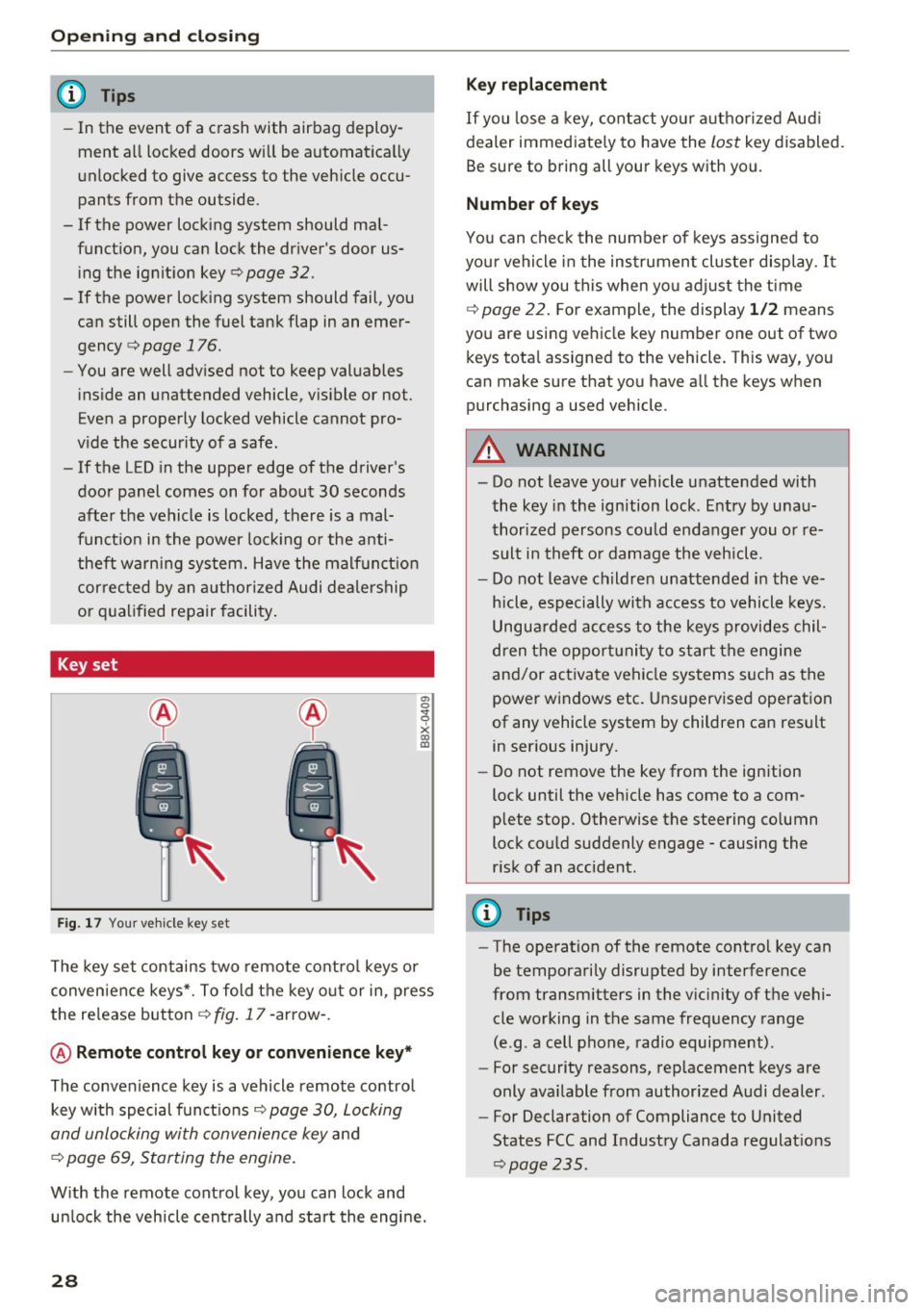
Fig . 17 You r ve hicle key set
a, 0
~
x (X) Cll
The key set contains two remote co ntro l keys or
conven ience keys*. To fold the key o ut or in, press
the re lease button
¢ fig . 17 -arrow -.
@ Remote control key or convenience key *
The convenience key is a vehicle remote contro l
key with special funct ions
Q page 30, Locking
and unlocking with convenience key
and
¢ page 69, Starting the engine .
With the remote control key, yo u can lock and
un lock the vehicle cent rally and start the engine.
28
Key replacement
If you lose a key, contact you r autho rized Aud i
dealer immed iate ly to have the
lost key disabled.
Be sure to bring all your keys w ith you.
Number of keys
You can chec k the numbe r of keys assigned to
you r vehicle in the ins trument cluster display .
It
will show you this when yo u adjust the t ime
¢
page 22. F or example, the display 1 /2 means
you are us ing vehicle key number one out of two
keys tota l assigned to the vehicle. This way, you
can make sure that you have a ll the keys when
purchasing a used vehicle .
.&, WARNING
-Do not leave your vehicle unatte nded with
the key in the ignition lock . E ntry by u nau
thori zed persons cou ld endanger you or re
sult in theft o r damage the vehicle.
- Do not leave childre n unattended i n the ve
h icle, especially with access to vehicle keys.
Ungua rded access to the keys provides chil
dren t he oppor tunity to start the engine
and/or activate vehicle systems s uch as the
power windows etc . Uns upervised ope ration
of any vehicle system by children can result in ser ious injury.
- Do not remove the key from the ign ition
lock until the veh icle has come to a com
plete stop. Otherwise the steering co lumn
lock cou ld suddenly engage -causing the
r isk of an accident.
(D Tips
- The operation of the remote contro l key can
be temporarily disrupted by interference
from transmitters in the v icinity of the vehi
cle working in the same frequency range
(e.g . a cell phone, radio equipment) .
- For security reasons, rep lacement keys are
only ava ilable from authorized Audi dealer .
- For Declaration of Compliance to United
States FCC and Industry Canada regulat ions
~ page 235.
Page 31 of 252
.... N
c:i ::J CX)
.... I.Cl U"I
N I.Cl ......
LED and batteries in the remote control key
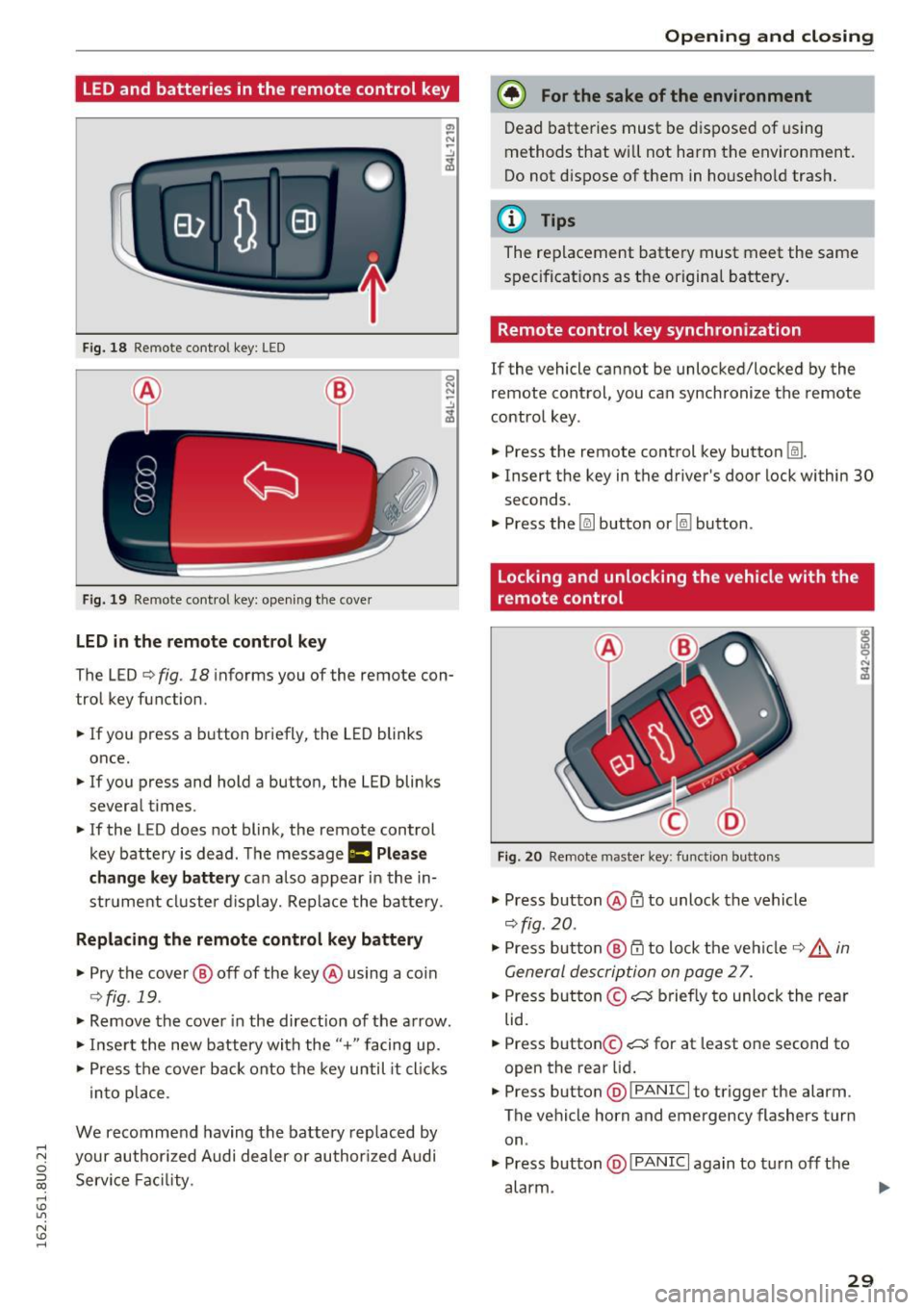
Fig. 18 Re mote contro l key : LE D
Fig. 19 Remote con trol key : open ing the cover
LED in the remote control key
"' -N
-..!J
~
0 N N
-..!J
~
The LED ~ fig. 18 informs you of the remote con
trol key function .
.,. If you press a button briefly, the LED blinks
once .
.,. If you press and hold a button, the LED blinks
several times .
.,. If the LED does not blink , the remote control
key battery is dead. The message
1:1 Please
change key battery
can also appear in the in
strument cluster display. Replace the battery.
Replacing the remote control key battery
.,. Pry the cover ® off of the key@ using a coin
~fig . 19.
.,. Remove the cover in the direction of the arrow.
.,. Inse rt the new battery with the
"+ " facing up .
.,. Press the cover back onto the key until it cl icks
into place .
We recommend having the battery replaced by
your author ized Audi dealer or authorized Audi
Service Facility.
Open ing and closing
@) For the sake of the environment
Dead batteries must be disposed of using
methods that will not harm the environment .
Do not d ispose of them in household trash.
@ Tips
The replacement battery must meet the same
specifications as the origina l battery.
Remote control key synchronization
If the vehicle cannot be unlocked/locked by the
remote control, you can synchronize the remote
control key .
.,. Press the remote control key button
Im .
.,. Insert the key in the driver's door lock within 30
seconds .
.,. Press the [@] button or~ button .
Locking and unlocking the vehicle with the
remote control
Fig. 20 Remote maste r key: function bu ttons
.,. Press button @ffi to unlock the vehicle
r=;,fig . 20 .
.,. Press button @ 0 to lock the vehicle r::;, _&. in
General description on page
27 .
.,. Press button ©~ briefly to unlock the rear
lid .
.,. Press button ©~ for at least one second to
open the rear lid .
.,. Press button @
~ I P-A-N-IC~I to trigger the alarm .
The vehicle horn and emergency flashers turn on .
.,. Press button @!PANICI again to turn off the
alarm .
29
Page 43 of 252
~ To activate the headlight assistant, tap the lev
er forward (!). The indicator light
ii appears
in the instrument cluster disp lay and the head
lights are switched on/off automatically. The
SI indicator light also turns on if the high
beams are switched on .
Switching the high beams on/off manually
If the high beams did not switch on/off automat
ically as expected, you may switch them on or off
manually instead:
~ To switch the high beams on manually, tap the
l ever forward (!). The
SI indicator light turns
on.
~ To switch the high beams off manually, pull the
lever back@. The headlight assistant is deacti
vated .
Operating the headlight flasher
~ Pull the lever into position @to operate the
headlight flasher when the headlight assist is
activated. The headlight ass istant remains ac
tive.
Messages in the instrument cluster display
Headlight assist: System fault!
Drive to an authorized Aud i dea ler or a uthorized
Aud i Serv ice Fac ility immediately to have the
malfunction corrected. You can still switch the
high beams on or off manually.
Headlight assist: Unavailable. No camera view
The camera view is blocked, for example by a
sticker or debris .
The sensor is located between the interior rear
view mirror and the windshield . Therefore, do not
place any st ickers in this area on the windshield .
A WARNING
Headlight assistant is only intended to assist
the driver. The driver is still responsible for
controlling the headlights and switching
them manually depending on light and visibil
ity conditions. It may be necessary to operate
them manually in situations such as:
- In adverse weather conditions such as fog,
heavy ra in, b lowing snow or spraying water.
Lights and Vision
-On roads where oncoming traffic may be
partially obscured, such as expressways.
- When there are road users that do not have
sufficient lighting, such as bicyclers or
veh icles with dirty tail lamps.
- In tight curves and on steep slopes.
- In poorly lit areas.
- With strong reflectors, such as signs .
- If the area of the windshield near the sensor
is fogged over, dirty, icy or covered with a
s ticker.
Adjusting exterior lighting
The functions are selected in the radio or MMI*.
~ Select: !CAR ! function button> (Car) Systems*
control button > Vehicle settings> Exterior
lighting .
Coming home (lights when leaving car}*,
Leaving home (lights when unlocking car)*
The coming home function illumi nates the area
around the vehicle when the ignition is switched
off and the driver's door is opened. Depending on
vehicle eq uipment, the function can be switched
on and off or the length of time the lights remain
on* can be adjusted .
T he
leaving home function illuminates the area
around the vehicle when unlock ing it. Thi s func
tion can be switched on and off.
The
coming home and leaving home functions
only operate when it is dark and the light switch
is i n the AUTO posit ion ~
page 39, fig. 35.
Daytime running lights
USA models:
You can switch the daytime running
l ights
on and off .
Canada models:
The function cannot be turned
off. It is activated automatically each time the ig
nition is switched on .
41
Page 45 of 252
.... N
c:i ::J CX)
.... I.Cl U"I
N I.Cl ......
Instrument illumination
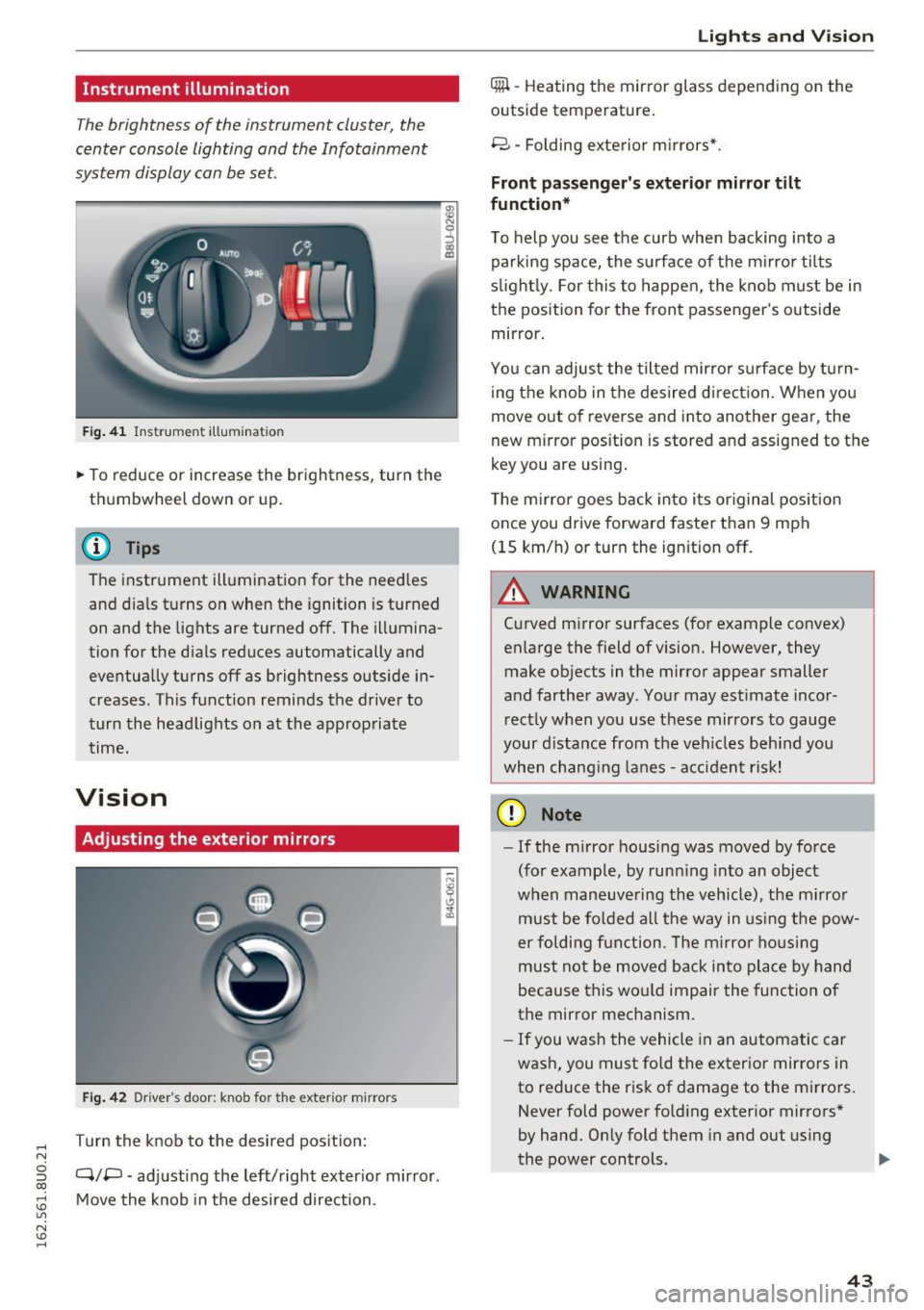
The brightness of the instrument cluster, the
center console lighting and the Infotainment
system display can be set.
F ig . 41 In strum ent illumina tion
• To reduce or increase the brightness, turn the
thumbwheel down or up.
(D Tips
The instrument illumination for the need les
and dia ls turns on when the ignition is turned
on and the lights are turned off. The illumina
tion for the d ials reduces automatically and
eventually turns off as brightness outside in
creases. This function reminds the driver to
turn the headlights on at the approp riate
time.
Vision
Adjusting the exterior mirrors
Fig . 42 D ri ver 's doo r: kn ob for t he ex te ri or m irro rs
T urn the knob to the desired pos it ion:
Q/P -adj usting the left/right exter ior mir ror.
Move the knob in the desired direction .
Lights and Vision
4iil -Heating th e mirror glass depending on the
outside temperature.
8 -Folding exte rior m irrors* .
Front passenger 's exterior mirror tilt
function *
To help you see the curb when backing into a
parking space, the su rface of the mi rro r tilts
s li ght ly. For this to happen, the knob must be in
the position for the front passenger 's outside
mirror.
You can adjust the tilted mirror s urfa ce by turn
i ng the knob in the desired d irect ion. When you
move out of reverse and into another gear, the
new m irror pos ition is stored and assigned to the
key you are using .
The m irror goes back into i ts or iginal pos ition
once you drive forward faster than 9 mph
(15 km/h) or turn the ignition off.
.&_ WARNING
=
C urved mirror surfaces (fo r example convex)
enlarge the field of vision. However, they
make objects in the mirror appear smaller
and farther away . You r may estimate inco r
r ect ly when you use these mirrors to gauge
your d ista nce from the veh icles beh ind you
when chang ing lanes -acciden t risk!
(D Note
- If the m irror housing was moved by force
(for example, by runn ing into an object
when maneuve ring the vehicle), the m irror
must be fo lded a ll the way in us ing the pow-
er folding fun ction . T he m irro r ho us ing
must not be moved back into place by hand
because this wo uld impair the function of
the mirror mechanism.
- If you wash the vehicle in an automatic car
wash, you must fold the exterior mirrors in
to reduce the r isk of damage to the mirro rs.
Never fold power fo ld ing exter ior mirrors *
by hand. Only fold them in and out using
the power controls. ..,.
43
Page 49 of 252
.... N
c:i ::J CX)
.... I.Cl U"I
N I.Cl ......
@ Tips
-Commercial hot waxes applied by automatic
car washes affect the how easi ly the glass
surface can be cleaned.
- You can also use the service position, for ex
ample, if you want to protect the windshield
from icing by using a cover.
- You cannot activate the service position
when the front lid is open.
Replacing rear windshield wiper blade
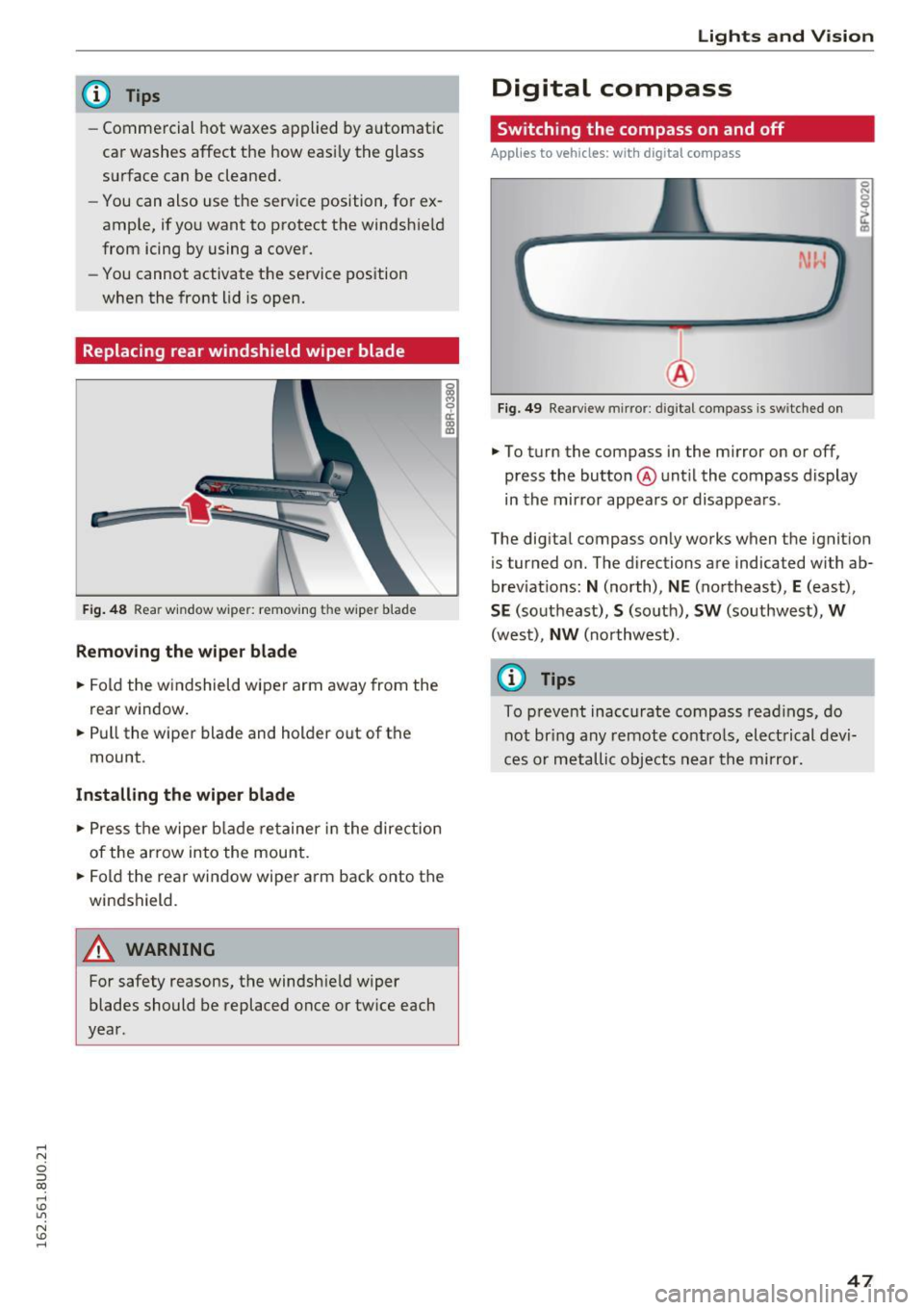
F ig . 48 Rear window wiper: remov ing the wiper blade
Removing the wiper blade
.. Fold the w indshield wiper arm away from the
rea r window .
.. Pull the wiper blade and holder out of the
mount .
Installing the wiper blade
.. Press the wiper blade retainer in the direction
of the arrow into the mount .
.. Fold the rear window wiper arm back onto the
windshield.
A WARNING
~ 9 a::
"' a,
-
For safety reasons, the windshield wiper
blades should be replaced once or tw ice each
year .
Lights and V ision
Digital compass
Switching the compass on and off
Applies to veh icles: w it h dig ita l compass
Fig . 49 Rearview mirror: digi tal compass is sw itched on
.. To turn the compass in the mirror on or off,
press the button @until the compass display
in the mirror appears or disappears .
The digital compass on ly works when the ignition
is tur ned on. The directions are indicated with ab
brev iat ions:
N (north), NE (northeast), E (east),
SE (southeast), S (so uth), SW (southwest), W
(west), NW (northwest).
(0 Tips
To prevent inaccurate compass readings, do
not br ing any remote controls, electrical devi
ces or metallic objects near the mirror.
47
Page 50 of 252
Lights and Vision
Adjusting the magnetic zone
Applies to vehicles: with digital compass
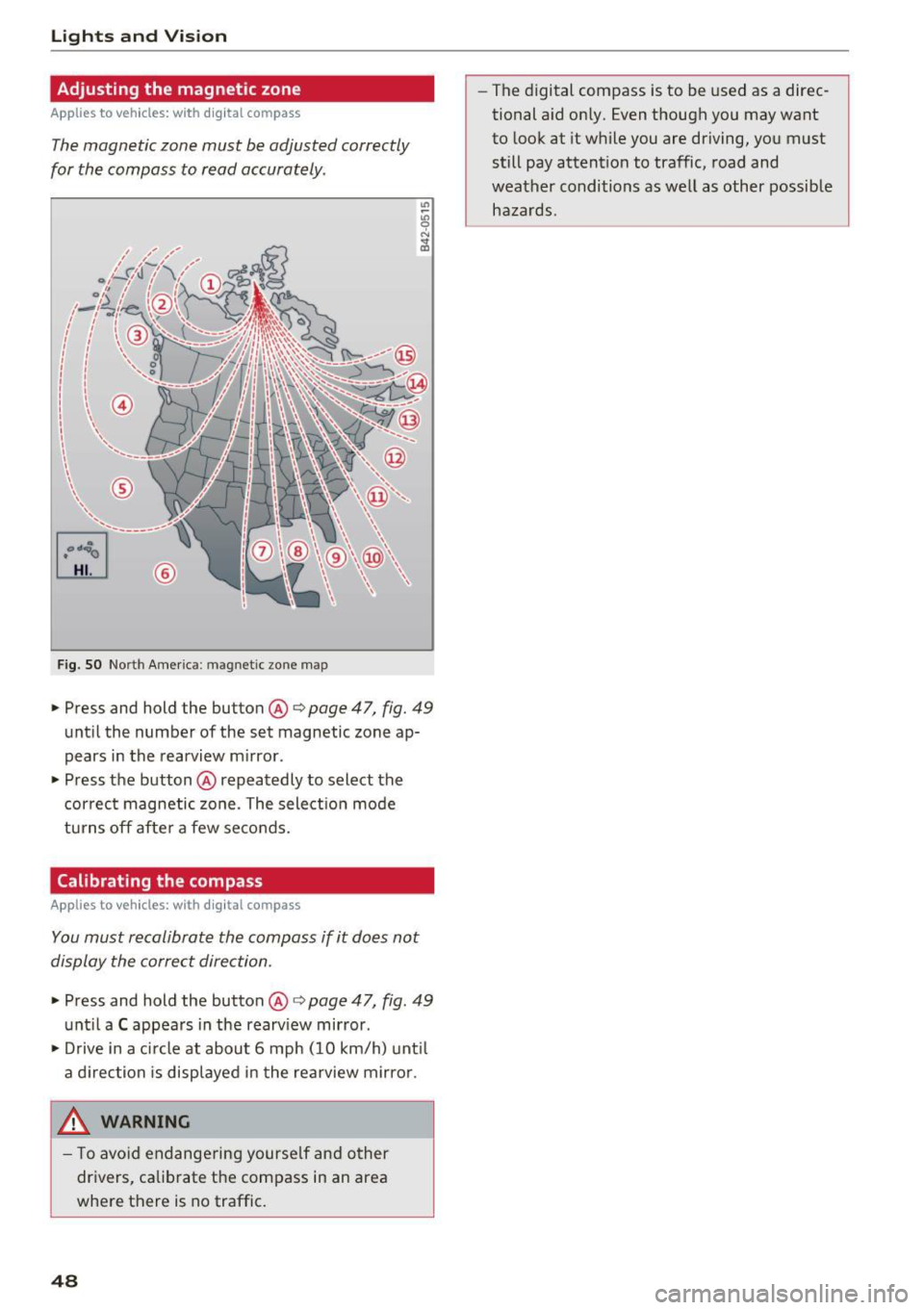
The magnetic zone must be adjusted correctly
for the compass to read accurately .
~
LIU ®
Fig . SO No rt h Amer ica : ma gnetic zo ne m ap
.. Press and hold the button @ q page 47, fig. 49
until the number of the set magnetic zone ap
pears in the rearview m irror .
.. Press the button @ repeatedly to select the
cor rec t magnetic zone . The select ion mode
turns off afte r a few seco nds.
Calibrating the compass
Applies to vehicles: with digital compass
You must recalibrate the compass if it does not
display the correct direction .
.. Press and hold the button @ q page 47, fig. 49
unt il a C appea rs in the rearv iew mirror .
.. Drive in a c ircle at about 6 mph ( 10 km/h) unt il
a d irection is displ ayed in the rea rview mirro r.
,8. WARNING
- T o avo id end ange ring yourse lf an d other
dr ivers, ca librate t he compass in an area
whe re there is no traffic.
48
- The digital compass is to be used as a direc
tional a id on ly. Even though you may want
to look at it while you are driving, you must
still pay attent ion to traffic, road and
weather conditions as well
as other possible
hazards .
Page 57 of 252
.... N
c:i ::J CX)
.... I.Cl U"I
N I.Cl ......
scald ing burns . Spilled hot liquid can also
cause an accident and personal injury .
- Use only soft c ups in the cupholder . Hard
c u ps and g lasses can cause injury in an acci
dent .
- Never use the cup holde r or adapter as an
ashtray -risk of fire.
CD Note
Ma ke sure your bever age container has a lid .
If not, yo ur beverage could spill a nd cause
damage to vehicle equipment or stain the
seat covers.
Cup holders in the door pockets
A cup hold er is located in all four doors.
F ig . 63 Sect io n of doo r trim : cup ho lde r
The cup holder in the door pockets can fit 1 to
1.5 liter bott les .
A WARNING
Spilled h ot l iquid can cause a n accident and
p ersonal i njury.
- Never carry any beverage con taine rs wi th
hot li quids, s uch as ho t coffee or ho t te a in
I
the ve hicle while it is moving. I n case of a n
acciden t, sud den braking or o ther vehi cle
movement, hot liq uid could s pill, causing
sca ld ing burns . Spilled hot liquid can also
cause an accident and perso nal in jury.
- Use only soft c ups in the c upholder . Hard
c u ps and g lasses can ca use inj ury in an acci
dent .
-
Seats and storag e
CD Note
Make su re your beverage contai ner has a lid.
If not, your beve rage co uld sp ill and cause
damage to vehicle eq uipment or sta in the
seat covers.
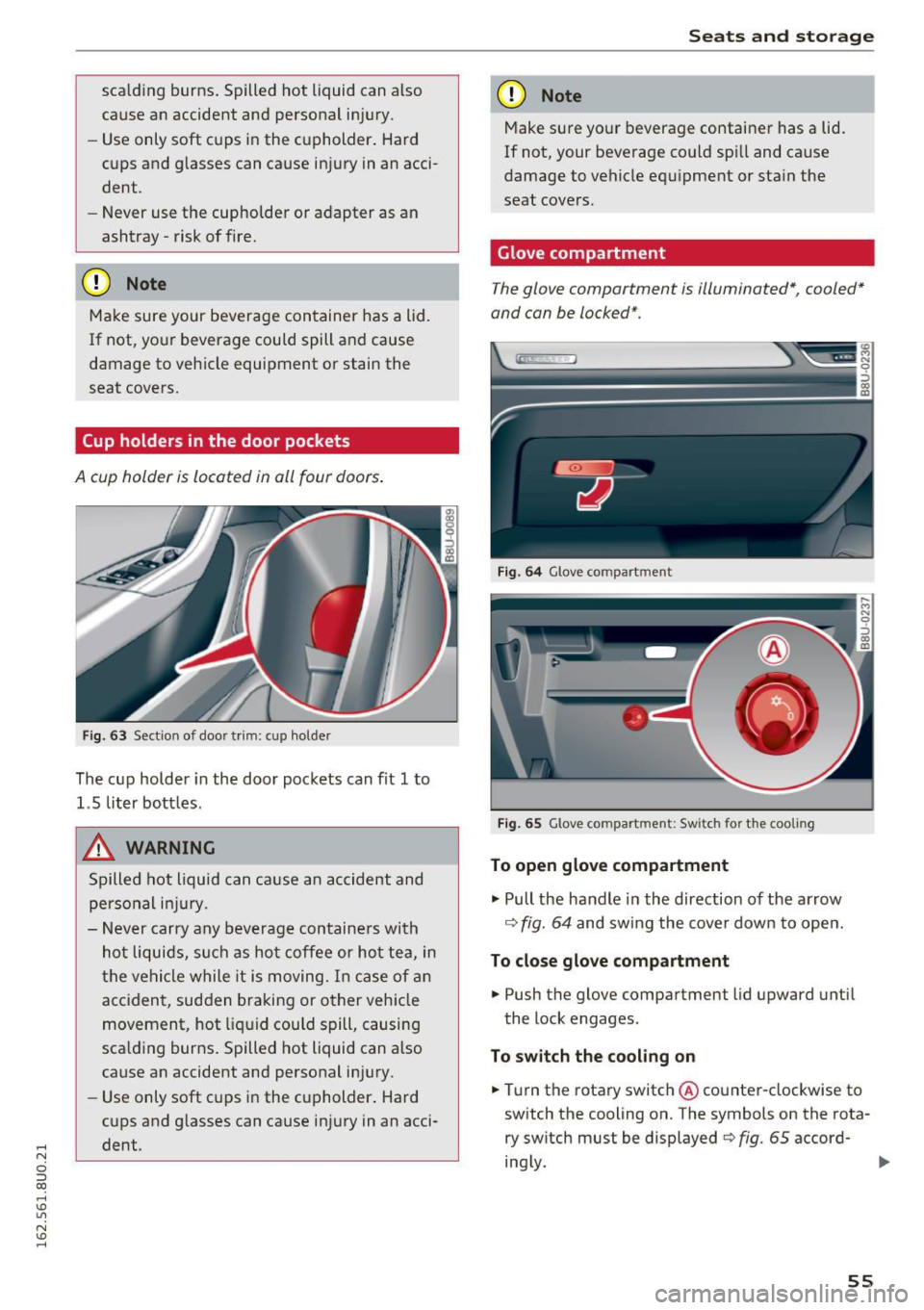
Glove compartment
T he glove compartment is illuminated*, cooled*
and can be locked* .
Fig. 64 Glove co mpart ment
Fig . 65 Glove co mpart ment: Sw itch for t he coo ling
To open glove compartment
"'Pull the handle in the direction of the arrow
¢ fig. 64 and swing the cover dow n to open.
To close glove compartment
"' Push the glove compartment lid upward unti l
the lock engages .
To switch the cooling on
"'Tu rn the rotary switch @ counter-clockwise to
sw itch the cooling on. The symbols on the rota
ry switch must be displayed c> fig . 65 accord-
ing ly.
Iii>
55
Page 67 of 252
Press the buttons to turn the functions on or off.
The LED in a button will light up when the func
tion is sw itched on.
IOF FI Switching the climate control system
on and off
The
I O FF I button switches the climate contro l
system on or off. Airflow from outside is b locked
when the climate control system is switched off .
IAJC! Switching the cooling mode on and off
The air is not cooled and humidity is not removed
when cooling mode is switched off. This can
cause fog on the windows. The cooling mode
switches off automatically when there are cold
outside temperatures .
l= I Switching the recirculation mode on and
off
To switch on the recirculat ion mode, press the
1 ... ,.1 button. The lower LED in the button turns on.
In recirculation mode, the air inside the vehicle is
circulated and filtered . This prevents the unfil
tered air outside the vehicle from entering the
vehicle interior. We recommend switching recir
culation mode on when dr iv ing th rough a tunnel
or when sitting in traffic~ ,&.
The
IAUTOI button or~ button switches recircu
l ation mode off .
To switch on the automatic recirculation mode,
press the
l""> •I button again . The upper LED in the
button turns on . Recirculation mode switches on
automatically when the engine is co ld, if you are
driving in reverse. The ai r quality sensor that is
des igned for diese l and gasoline exha ust auto
matica lly switches the recirculation mode on or
off depending on the leve l of pollutants in the
outside air. Automatic recirculation mode is time
restricted when cooling mode (A/C) is switched
off and frost temperatures are identified.
IAUTO I Switching automatic mode on and off
Automatic mode maintains a constant tempera
ture inside the vehicle. Air temperature, airflow
,....,
"' and air distribution are controlled automatically. ci ::, co ,....,
-I -Adjusting the temperature
T he vehicle inter ior temperature can be adjusted
f or the driver and the front passenger using the
left/right knob. Temperatures can be set be
tween a range of 60 ° F (+ 16 °C) and 84 ° F
(+28 °C). If outside of this range,
LO or HI will
appear in the climate contro l system display . In
both settings, the climate control runs with con
stantly at the maximum cooling or heating level.
The temperature is not regulated.
~ Adjusting air speed
You can adjust the volume of air generated by the blower to your preference . Use the left~ button
to decrease the air speed, and use the right~
button to increase the air speed . To have the air
flow regulated automatically, press the
!AUTOI
button.
[!il l~/~ Adjusting air distribution
You can manually select the vents where the air
will flow. The buttons can be pressed individually
or in comb ination with each other. To have the air
distribution regulated automatically, press the
IAUTOI button.
~ Adjusting seat heating*
Pressing the button switches the seat heating on
at the highest setting (level 3) . T he LEDs indicate
the temperature level. To reduce the tempera
ture, press the button again . T o switch the seat
hea ting off, press the button repeatedly until the
LED tur ns off.
After 10 minutes, the seat heating automatically
switches from level 3 to level 2.
IIIW MAX ! Switching the defroster on and off
The windshield and side windows are defrosted or cleared of condensat ion as quickly as poss ible.
The maximum amount of air flows mainly from
the vents below the windsh ield. Recirculation
mode switches off. The temperatu re should be
set at +72 °F (22 °() or h igher.
The
! AUTOI button switches the defroster off .
65
Page 68 of 252
Warm and cold
IQiil REARI Switching the rear window defogger
on and off
The rear window defogger only operates when
the engine is running and will be automatically
switched off after approximately 10 minutes.
Synchronization
If you press the !AUTOI button longer, yo u can
transfer the driver temperat ure setting to the
front passenger. Synchronization is switched off
as soon as the temperature for the front pas
senger's side is changed.
Air vents
You can open or close the center and rear vents in
the cockpit and the vents in the rear center con
sole using the ridged thumbwheels. The levers
adjust the direction of the airflow from the vents.
Switching the temperature measurement
units
The temperature display can be switched be
tween°( and °F. Press and hold down the
j..., .1
button c:> fig. 76 and turn the knob on the dr iver's
side for 3 seconds -.
A WARNING
-You should not use the recirculation mode
for an extended period since no fresh air is
drawn in. With the air-conditioning switch
ed off, the windows can fog up, which in
creases the risk of an accident.
- Individuals with reduced sensitivity to pain
or temperature could develop burns when
using the seat heating* function. To reduce
the risk of injury, these indiv iduals should
not use seat heating*.
{tD Note
To avoid damaging the seat heating* ele
ments, do not kneel on the seats or place
heavy pressure on one area of the seat.
66