key AUDI Q3 2016 Owner's Manual
[x] Cancel search | Manufacturer: AUDI, Model Year: 2016, Model line: Q3, Model: AUDI Q3 2016Pages: 252, PDF Size: 62.81 MB
Page 70 of 252
Driving
"'T o switch the ignition off, turn the ignition key
to position @.
Starting the engine
"' Press the b rake pedal and put the selector leve r
in to P or N.
"'T urn the key to pos it ion @. The ignition key au
tomatica lly returns to position
(I) . Do not press
the accelerator pedal when doing this.
If the engine does not sta rt immed iate ly, stop
the starting procedure and repeat after 30 sec
onds. To restart the engine, turn the ignition key
back to position @.
A WARNING
- Never allow the engine to run in confined
spaces -danger of asp hyxiation .
-
-Never remove the ignit ion key from the ign i
t ion look while the vehicle is moving . Other
wise , the steering lock cou ld sudden ly en
gage and you would not be able to stee r the
vehicle .
- Always take the key with you whenever you
leave your vehicle . Otherw ise, the engi ne
cou ld be sta rted o r electrical equ ipment
s uch as the power w indows co uld be operat
ed . This can lead to se rious i nju ry.
- Never leave children or pe rsons requiring as
sistance unattended i n the vehicle . The
doo rs c an be lo cked usi ng the remote trans
mit ter, preven ting people from escapin g
from the vehicle on thei r own in the event of
an emergency. Depending on the time of
year, people inside the vehicle can be ex
posed to very hig h or very low tempera
tures.
(D Note
Avoid high engine speed, full throttle, and heavy engine load as long as the engine has
not reached operat ing temperature yet. You
could damage the engi ne.
@ For the sake of the environment
Do not let the engine run while parked to
warm up. Begin dr iving immediately . This re
duces unnecessary emiss ions.
68
(D Tips
- Some noise after start ing the engine is nor
ma l and is no cause for concern.
- If you leave the ve hicle w ith the ignition
switched on, the ign ition wi ll switch off af
ter a certain amount of time. Make sure that
electrical equipment such as the exterior
lights are switched off.
- If it is d ifficult to turn the key to pos ition
(D , turn the steering wheel back and forth
slightly to release the steering wheel lock.
Stopping the engine
App lies to vehicles: with ignition lock
Stopping the engine
"' Bring the vehicle to a full stop .
"'T urn the key to posi tion @.
Engag ing the steering lock
Requi rement: the se lector lever must be in P.
"' Remove the ignition key in position @
c::> page 67, fig. 78 c::> &_ .
"'Tur n the steering whee l until you hear the
steer ing whee l lock .
The locke d steer ing helps prevent vehicle the ft.
A WARNING
-Never turn off the engine before the vehicle
has come to a complete stop. The full func
tion of the brake booster and the power
steer ing is not guaranteed. You must use
more force to turn or brake if necessary. Be
cause you cannot stee r and brake as you
usually would, this cou ld lead to crashes
a nd se rio us in juries.
- For safety reasons, yo u sh ould always park
your veh icle w ith the se lector lever i n P.
Othe rwise, the vehicle could inadve rten tly
roll aw ay.
- The rad iator fa n can cont in u e to run for up
t o 10 minutes even af ter yo u have turned
off the engine an d remove d the igni tion key.
The rad iator fan can also turn on again if the
eng ine coolant heats up because of intense .,._
Page 71 of 252
.... N
c:i ::J CX)
.... I.Cl U"I
N I.Cl ....
sunlight or heat build-up in the engine
compartment.
- Always take the key with you whenever you
leave your vehicle. Otherwise, the engine
could be started or electrical equipment
such as the power windows could be operat
ed . This can lead to serious injury.
- Never leave children or persons requiring as
sistance unattended in the vehicle. The
doors can be locked using the remote trans
mitter, preventing people from escaping
from the vehicle on the ir own in the event of
an emergency. Depend ing on the time of
year, people inside the vehicle can be ex
posed to very high or very low tempera
tures.
CD Note
If the engine has been under heavy load for
an extended per iod of t ime, heat builds up in
the engine compartment after the engine is
switched off -there is a risk of damaging the
engine. For this reason, let the engine run at
idle for approximately two minutes before
shutting it off.
Starting and stopping
the engine (vehicles with
a convenience key)
Starting the engine
A ppl ies to vehicles: with c onve nien ce key
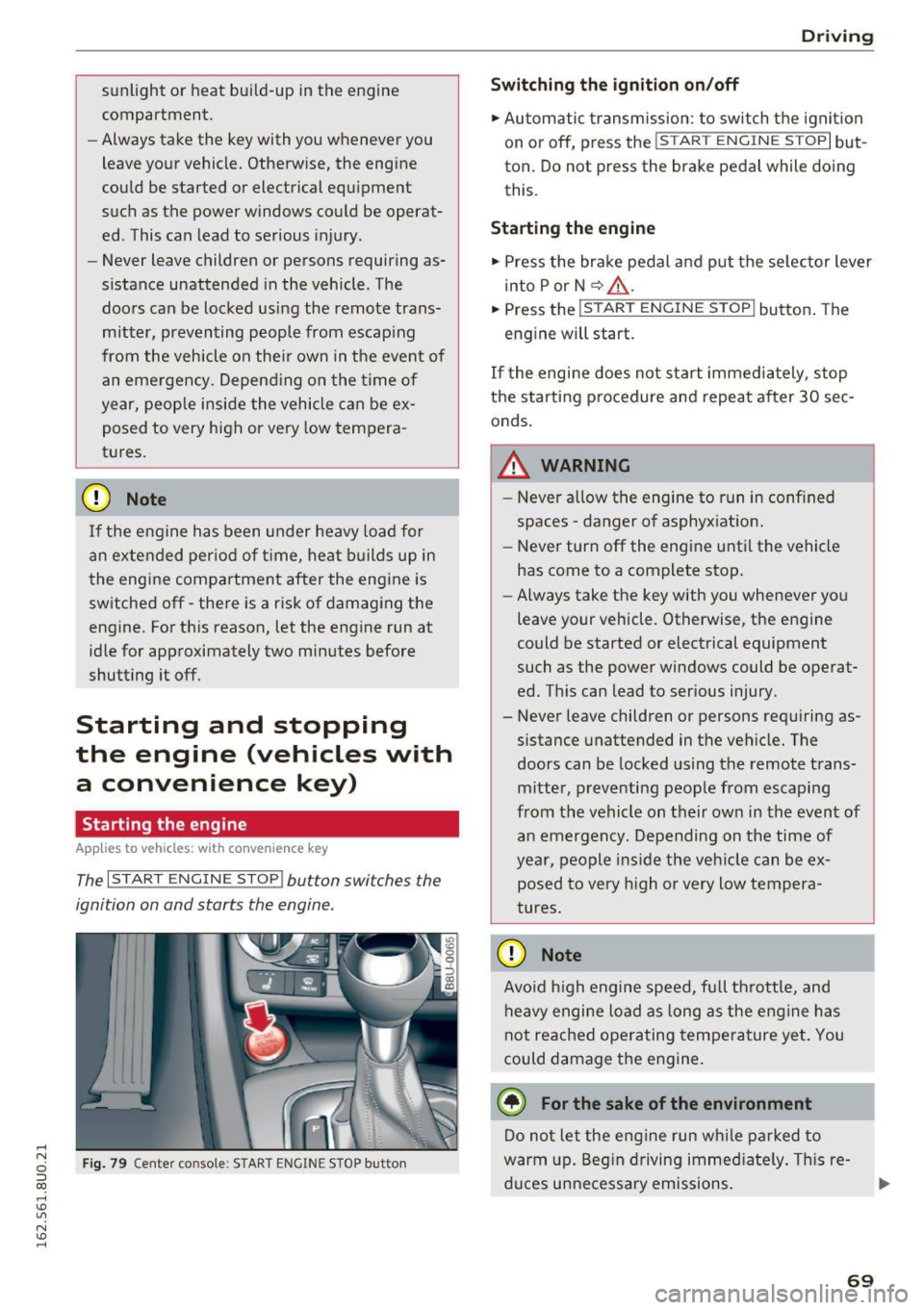
The I START ENGINE STOP! button switches the
ignition on and starts the engine.
Fig. 79 Center console : START ENGINE STOP button
Driving
Swi tching the ign ition on/o ff
.,. Automatic transmission: to switch the ignit ion
on or off, press the
I S T AR T ENGINE S TOPI but
ton. Do not press the brake pedal while doing
this.
Starting the engine
.,. Press the brake pedal and put the se lector lever
into P or N
~ A -
.,. Press the ~, s-T ~A - R- T~ E-N -G =r -N =E - S~ T= o- P-j button . The
engine will start.
If the engi ne does not start immediately , stop
the starting procedure and repeat after 30 sec
onds.
A WARNING
- Never allow the engine to run in confined
spaces -danger of asphyxiation.
- Never turn off the engine unti l the vehicle
has come to a complete stop.
- Always take the key with you whenever you
leave your vehicle. Otherwise, the engine
could be started or electrical equipment
such as the power windows could be operat
ed. This can lead to serious injury.
- Never leave children or persons requiring as
sistance unattended in the vehicle. The
doors can be locked using the remote trans
mitter, preventing people from escaping
from the vehicle on their own in the event of an emergency. Depending on the time of
year, people ins ide the veh icle can be ex
posed to very h igh or very low tempera
tures.
CD Note
Avo id high engine speed, full throttle, and
heavy engine load as long as the eng ine has
not reached operating temperature yet. You
could damage the engine.
@ For the sake of the environment
Do not let the engine run wh ile parked to
warm up. Beg in driving immed iate ly . T hi s re
duces unnecessa ry emissions.
-
69
Page 72 of 252
Driving
@ Tips
-Some noise after starting the engine is nor
mal and is no cause for concern.
- If you leave the vehicle with t he ignit ion
switched on, the ignition will switc h off af
ter a certain amount of time . Make sure that
electr ica l equipment suc h as the exterior
lights are switched off.
Stopping the engine
Appl ies to veh icles: w ith conve nien ce key
• Bring the vehicle to a full stop.
• Select the P or N selector lever position .
• Press the
I S TAR T ENGIN E STO PI button
¢ page 69, fig. 79.
Engaging the steering lock
The steering locks when you turn the engine off
using the
I START ENGINE STOP! button a nd
open the driver's door . The locked steering helps
p revent vehicle theft.
Emergency off function
If it is absolutely necessary, the engine can also
be turned off while driving at speeds lower than
6 mph (10 km/h) . To switch the engine off, press
the
I START ENGINE STOPI button twice in a row
briefly o r press and hold for longer than two sec
onds.
_& WARNING
- Never turn off the engine before the veh icle
has come to a comp lete stop . The full func
tion of the brake booster and the power
steering is not guaranteed. You must use more force to turn or brake if necessary. Be
cause you cannot steer and brake as you
usually would, this could lead to crashes
and serious injuries.
- For safety reasons, you should always park
yo ur vehicle with the selecto r lever in P .
Otherwise, the vehicle could inadvertently
roll away .
- The radiator fan can continue to r un for up
to 10 minutes even after you have turned
off the engine and removed the ignit ion key.
70
The radiator fan can also turn on again if the
engine coolant heats up because of intense
sunlight or heat build-up in the engine com
partment .
- Always take the key with you whenever you
leave your vehicle . Otherwise, the engine
could be started or electrical equipment
such as the power windows could be operat
ed. This can lead to serious injury.
(D Note
If the engine has been under heavy load for
an extended period of time, heat builds up in
the eng ine compartment after the engine is
switched off -there is a risk of damaging the
engine. For this reason, let the engine r un at
idle for approxi mately two minutes before
shutting it off.
Starting the engine when there is a
malfunction
App lies to vehicles: wit h co nvenience key
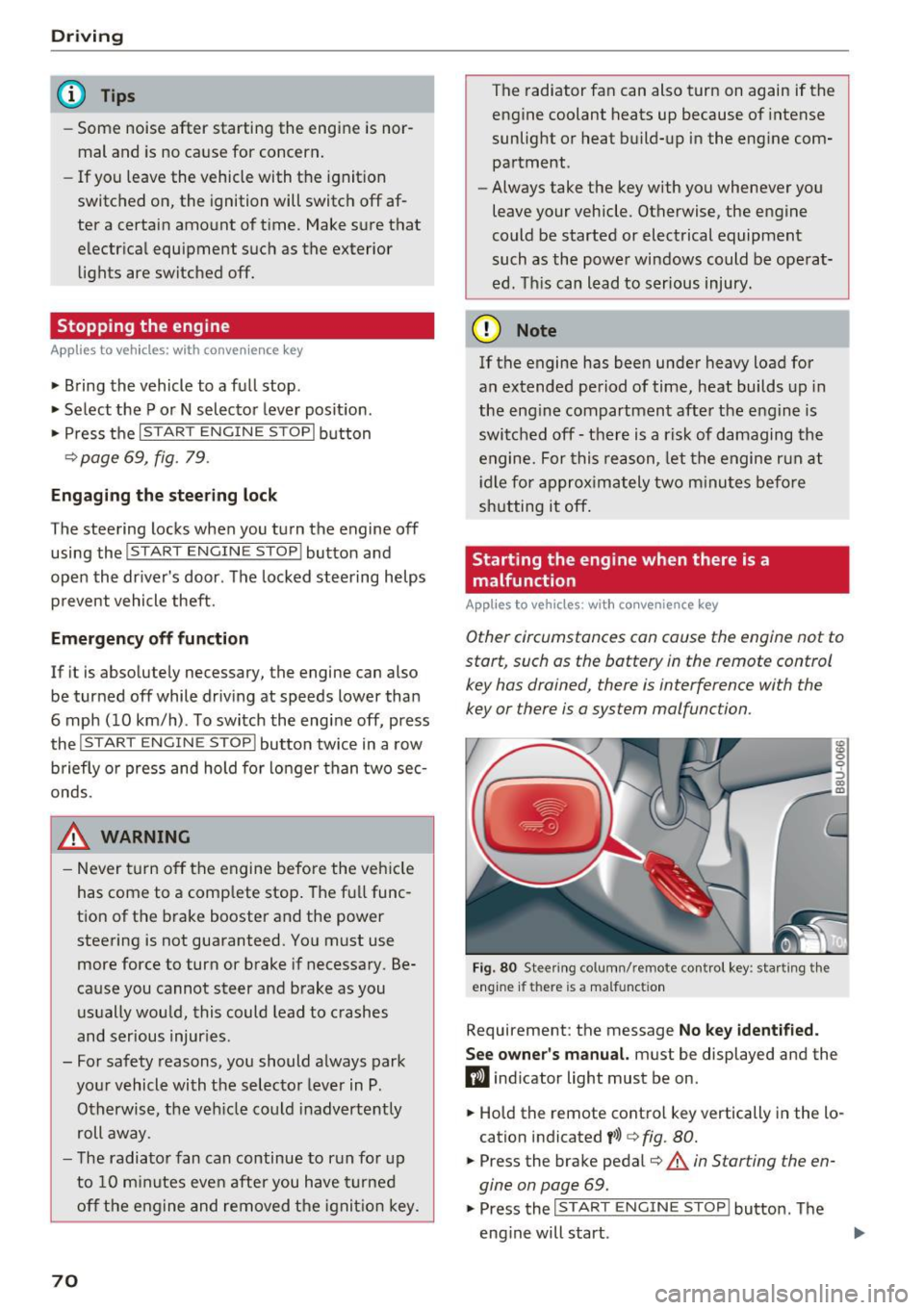
Other circumstances can cause the engine not to
start, such as the battery in the remote control
key has drained , there is interference with the
key or there is a system malfunction .
Fig. 80 Stee ring co lumn/ remo te cont rol key : sta rting t he
engine if th ere is a malfunct ion
Requirement: the message No key identified.
See owner's
manual. must be displayed and the
fl ind icator light must be on .
• Hold the remote control key vertically in the lo
cation indicated
t>>) ¢ fig. 80.
• Press the brake pedal¢.&. in Starting the en
gine on page
69.
• Press the ~IS_T_A_R_T_ E_N_ G_ I_ N_ E ~ s=T ~O ~ P~ I button. The
eng ine will start .
Page 73 of 252
.... N
c:i ::J CX)
.... I.Cl U"I
N I.Cl ......
.. Drive to an authorized A udi dealer or author
ized Audi Service Facility immediately to have
the malfunction corrected.
@ Tips
You can view the message again by pressi ng
the
I START E NGINE STOP! button.
Driver messages
Turn off ignit ion. Battery di scharging
This message appears and a war ning tone sounds
if you open the driver's doo r whe n the ignition is
sw itched on.
Pr ess brake pedal to start engine
This message appears if you do not step on the
brake pedal to start the eng ine on a vehicle with
a n automatic transm ission .
Please engage Nor P.
This message appears when starting or stopping
the eng ine and Nor Pis not engaged. The engine
will not start/stop.
Ill Is key in the vehicle ?
The indicator light turns on and this message ap
pea rs if the conven ience key* was removed from
the veh icle when the eng ine was runn ing. If t he
conven ience key is no longer in the vehicle, you
cannot switch the ignition on or start the engine
once yo u stop it. Yo u also ca nnot lock the vehicle
from the outside.
Shift to P , vehicle can roll away . Doors can only
be locked in P.
This message appea rs fo r safe ty re asons a long
with a warn ing sound if the se lector lever is not
e ng aged in P a fter swi tching the ignition off.
Move the selector lever to the P positio n. Other
wise the vehicle is not protected from rolling and
it cannot be loc ked.
DJ No key identified . See owner's manual.
This message appears if the re is no convenience
key * in side the veh icle or if the system does not
r ecognize the key. The conve nience key may not
be re cognized, for examp le, i f it is cove red by an
D rivi ng
obje ct that disrupts the signa l (such as a br ie f
case), or if the key battery is wea k. E lectronic de
vices such as cell phones can a lso inte rfere with
the signal.
T o still be able to start or stop the engine, re fer
to
¢ page 70.
Electromechanical
parking brake
Operating
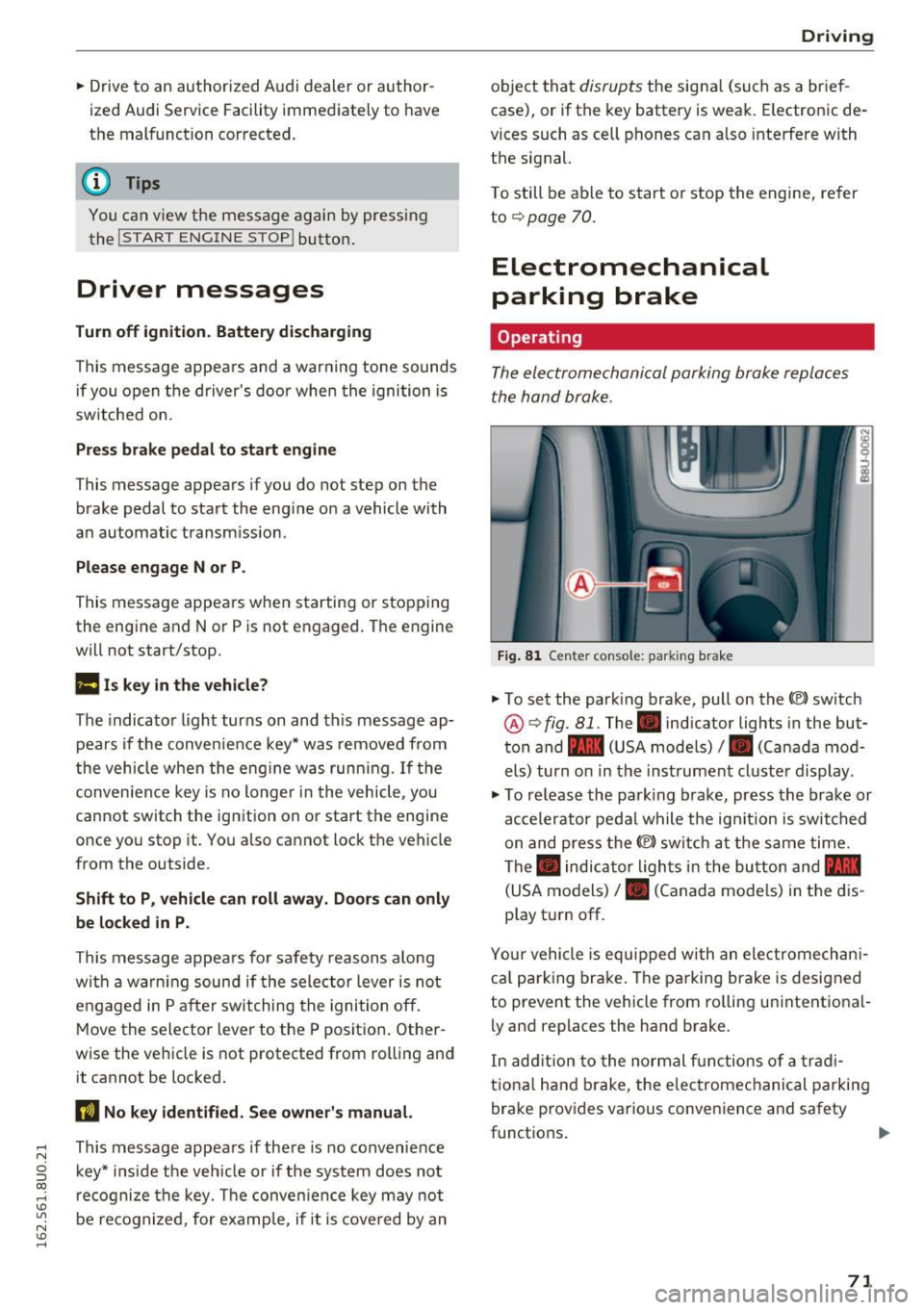
The electromechanical parking brake replaces
the hand brake.
Fi g. 81 Center console: parking brake
.. To set the park ing brake, pull on the(®) switch
@¢ fig. 81. The . indicator lights in the but
ton and - (USA models)/ . (Canada mod
els) turn o n in the ins trument cluste r display.
.,. To re lease the park ing brake, press the brake or
ac celerator pedal w hile the ign it ion is switched
on and press the(®) switch at the s ame time.
The . indicator ligh ts in t he bu tton and -
(USA models)/ . (Canada mode ls) in the dis
play t urn off.
Yo ur vehicle is equipped with an elect romechan i
ca l p a rk ing brake . The pa rking brake is designed
to prevent the vehicle from ro lling un intent ional
ly and replaces the hand brake.
In add ition to the normal f unctions of a tra d i
t iona l h and b rake, t he elec tromec hanical parking
bra ke prov ides various conven ience and safety
functions .
71
Page 74 of 252
Driving
When start ing from a stop
- T he in tegr al hi ll sta rt as sis t helps y ou when
driving by automatically releasing the park ing
brake¢
page 72, Starting from a stop.
- When starting on incl ines, the hill start assist
prevents the vehicle from unintentionally roll
ing back . The braking force
of the parking brake
is only released if sufficient drive power has
been built up at the wheels.
Em erg enc y bra ke f unction
An emergency braking functions ens ures that the
vehicle can be s lowed down even if the
normal
brakes fail¢ page 73, Emergency braking
function.
,&. WARNING
- Do not press the accelerator pedal inadver
tently when the veh icle is stationary and the
engine is running and a gear is selected.
Otherwise t he vehicle w ill start to move im
med iate ly and could result in a c rash.
- If the power supply fa ils, the released park
ing bra ke can no longe r engage. In th is
case, pa rk the veh icle on leve l ground and
sec ure it by placing the selector lever in the
P position. See an author ized Audi dealer or
authorized Aud i Service Faci lity for assis
tance .
(D Tips
-If the parking b rake is set while the ignition
i s sw itched off, the. indicator light in the
b utton and -(USA models) /. (Cana
da models) will turn off after a certain
amount of time.
- Occasiona l noises when the parking brake is
set and re leased are normal and are not a
cause for concern.
- When the vehicle is parked, the parking
brake goes thro ugh a self-test cycle at reg u
l ar intervals. Any no ises assoc iated with this
are normal.
- If there is a power fa ilure, the parking brake
will not set if it is re leased, and it will not
release if it is set¢,&. See an authorized
72
-
Audi dealer or author ized Audi Service Fa
cility for assistance.
Parking
.. Press the brake pedal to stop the veh icle.
.. To set the park ing brake, pull on the© switch.
.. Select the P position .
.. Turn the engine off¢,& .
.. Turn the steering wheel when par king on in
cl ines so that the wheels w ill roll into the cu rb
if the vehicle starts moving.
,&. WARNING
- Always take the veh icle key with yo u when
leaving the vehicle, even for a short period
of time. This applies part icularly when chil
dren remain in the vehicle. Otherwise chil
dren could start the engine, release the
parking brake or operate electrical equip
ment such as power w indows, which in
creases the risk of an accident.
-
- No one should remain in the veh icle w hen it
is locked, especially ch ild ren. Locked doors
make it more difficult for emergency work
ers to get into the veh icle, wh ich puts lives
at risk.
Starting from a stop
The start assist function ensures that the park
ing broke is released automatically upon start
ing.
Stopping and setting the parking brake
.. To set the park ing brake, pull on the(®) switch.
Starting and automat ically r elea sing the
parking brake
.. When you press the acce lerator pedal, the
parking brake is automat ica lly re leased and
your vehicle beg ins to move .
When stopping at a traffic signa l or stopping in
c ity traff ic, the parking brake can be applied . The
vehicle does not have to be held with the brake pedal. The park ing brake elim inates the tendency
to c reep when a se lector lever position is engag-
ed. As soon as yo u press t he accelerator pedal,
1J1>
Page 81 of 252
@ Tips
-Side assist is not active whi le you are ma k
i ng the ad justment .
- Your settings are automatically stored and
ass igned to the remote control key being
u sed.
Driver messages
App lies to vehicles: with Audi side assist
If side ass ist switches off by itself, the LED in the
button turns off and a message will appear in the
i nstr ument cluster d is pl ay :
Audi side assist: Unavailable. Sensor view
The radar senso rs ' vision is affected. Do not cover
the area in front of the sensors with b ike wheels,
sticke rs, dirt or other ob jects . Clean the area in
front of the senso rs, if necessary
c:> page 77,
fig . 86 .
Aud i side assist: Unavailable
Side assist cannot be switched o n tempo rar ily be
cause there is a malfunction (for exam ple, the
battery charge level may be too low).
Audi side assist: Syst em fault!
The system cannot guarantee that it will detect
ve hicles co rrectly and it is switched off. The sen
sors have been d isp laced or are fa ulty. Have the
system checked by an authorized Audi dealer or
author ized Audi Service Facility soon.
Audi side as sist: Unavailable when towing
Side assist sw itches off automatically when a fac
tory-installed trailer hitch is connected to the
e lectrical connector on the trailer. T he re is no
gua rantee the system will sw itch off when using
a retrofi tted tra ile r hitch . Do not use s ide ass ist
when towing a trailer.
Aud i side assist
79
Page 95 of 252
•Backup and align yo ur vehicle so the b lue area
@ borders on the rear end of the vehicle be
hind you or on the parking space line
¢ A in
General information on page
91, c> (D in Gen
eral information on page
91. The blue area rep
resents an extension of the veh icle's outline by
approximately 16
ft. (5 meters) to the rear . T he
long side of the blue area shou ld be on the
cu rb. The entire b lue area must fit in to the
parking space.
• Wi th the veh icle stopped, tu rn the steer ing
whee l to the right as far as it wi ll go.
• Back up into the parking spot. As soon as the
blue curve
c> fig. 106 is near the c urb c> A in
General information on page
91, c> (D in Gen
eral information on page
91. Stop the vehicle.
• With the veh icle stopped, turn the steer ing
wheel to the left as far as it will go .
• Cont inue to back i nto the pa rking space unt il
the vehi cle is par ked pa rallel to the curb
c> A
in General information on page 91, c> (D in
General information on page
91. @ marks the
rea r bumper. Stop the vehicle, at the latest,
when the red orientation line@ borders an ob
ject. Keep an eye on the front of your vehicle whi le doing this.
Par king ne xt to obstacle s
If th ere is an obstacle (such as a wall) next to the
pa rking space, position the vehicle so there is
more space on that side . Position the long side of
the blue s urface so that there is sufficient space
from the obstacle. The surface must not be
touching . Yo u will also need to start tur ning the
steer ing whee l earlier . The blue curve
c> fig. 106
must not touch the obstacle and should have suf
fic ient room.
(D Note
Keep enoug h distance from the curb to avoid
damage to the rims .
(D Tips
The left or right or ie ntation lines and surfaces
w ill be displayed, depending on the turn sig-
na l being used. Parking
sy
stem s
Adjusting the display
and the warning tones
App lies to vehicles : wit h parking syste m plus with rearview
came ra
The display and warning tones can be adjusted in
the Infotainment.
• Select: the I CAR ! funct ion button > (Car) sys
tems *
control b utton > Dr iver assist > Par king
aid .
Display
On* -An optical display is shown for the parking
system p lus, a rearview camera image is shown
for parking system p lus with rearview camera*.
Off -When t he pa rking system is sw itched off,
on ly aud ible signals are g iven.
Warning tones
Front volume -Volume for the front area
Rear volume -Volume for the rear area
Front frequency -Frequency for the front area
Rear frequency -Frequency for the rear a rea
Entertainment volum e -When the parking sys
tem is turned o n, the vo lume of the audio/v ideo
source is lowered .
The newly ad justed va lue is given br iefly from the
cor respond ing s ignal generator .
(D Tips
- The warn ing tones can also be adjusted di
rectly from the visual d isplay or the rearview
came ra image* . S imply press the
Settings
cont rol but ton .
- Changed settings are activated w hen the
park ing system is sw itched on again.
- The settings are automatically stored and
assigned to the remote control key that is in
use.
Error messages
Applies to vehicles: wit h parking system pl us with rearview
ca mera
The re is an error in the system if the LED in the
Pw .A button is blinking and you hear a cont in uo us ll>
93
Page 109 of 252
.... N
c:i ::J ex:, .... I.Cl U"I
N I.Cl ......
A WARNING
Not wearing safety belts or wearing them im
properly increases the risk of serious personal
injury and death . Safety belts can work only
when used correct ly.
-Always fasten your safety belts correctly be fore driving off and make sure all passen
gers are cor rect ly restrained.
- For maximum protection, safety belts must
always be posit ioned properly on the body .
- Never strap more than one person, includ
ing small ch ildren, into any belt .
- Never place a safety belt over a child sitt ing
on your lap.
- Always keep feet in the footwell in front of
the seat wh ile the vehicle is being driven.
- Never let any person ride w ith their feet on
the instrument panel or sticking out the
window or on the seat .
- Never remove a safety belt while the vehicle
is moving . Do ing so will increase your risk of
being injured or k illed.
- Never wear belts twisted.
- Never wear belts over rigid or breakable ob-
jects in or on your clothing, such as eye
glasses, pens, keys, etc., as these may cause
injury.
- Never allow safety belts to become dam
aged by being caught in door or seat hard
ware.
- Do not wear the shoulder part of the belt
under your arm or otherwise out of position .
- Several layers of heavy clothing may inter
fere with correct positioning of belts and re
duce the overall effectiveness of the system.
- Always keep belt buckles free of anything
that may prevent the buckle from latching
securely .
- Never use comfort clips or devices that cre
ate slack in the shoulder be lt . However, spe
cial clips may be requ ired for the proper use
of some child restraint systems.
- Torn or frayed safety belts can tear, and
damaged belt ha rdware can break in an acc i
dent. Inspect belts regularly.
If webbing,
bind ings, buckles, or re tractors are dam-
Safet y bel ts
aged, have belts rep laced by an authorized
Aud i dea ler or qualified workshop.
- Safety belts that have been worn and loaded
in an accident must be replaced with the
correct replacement safety belt by an au
thor ized Audi dealer. Replacement may be
necessary even if damage cannot be clearly
seen. Anchorages that were loaded must al
so be inspected.
- Never remove, mod ify, d isassemble, or try
to repair the safety belts yourse lf.
-Always keep the belts clean . Dirty belts may
not work properly and can impair the func
tion of the inert ia reel~
table Internal
cleaning on page 170.
Safety belts
Fastening safety belts
Safety first -everybody buckle up!
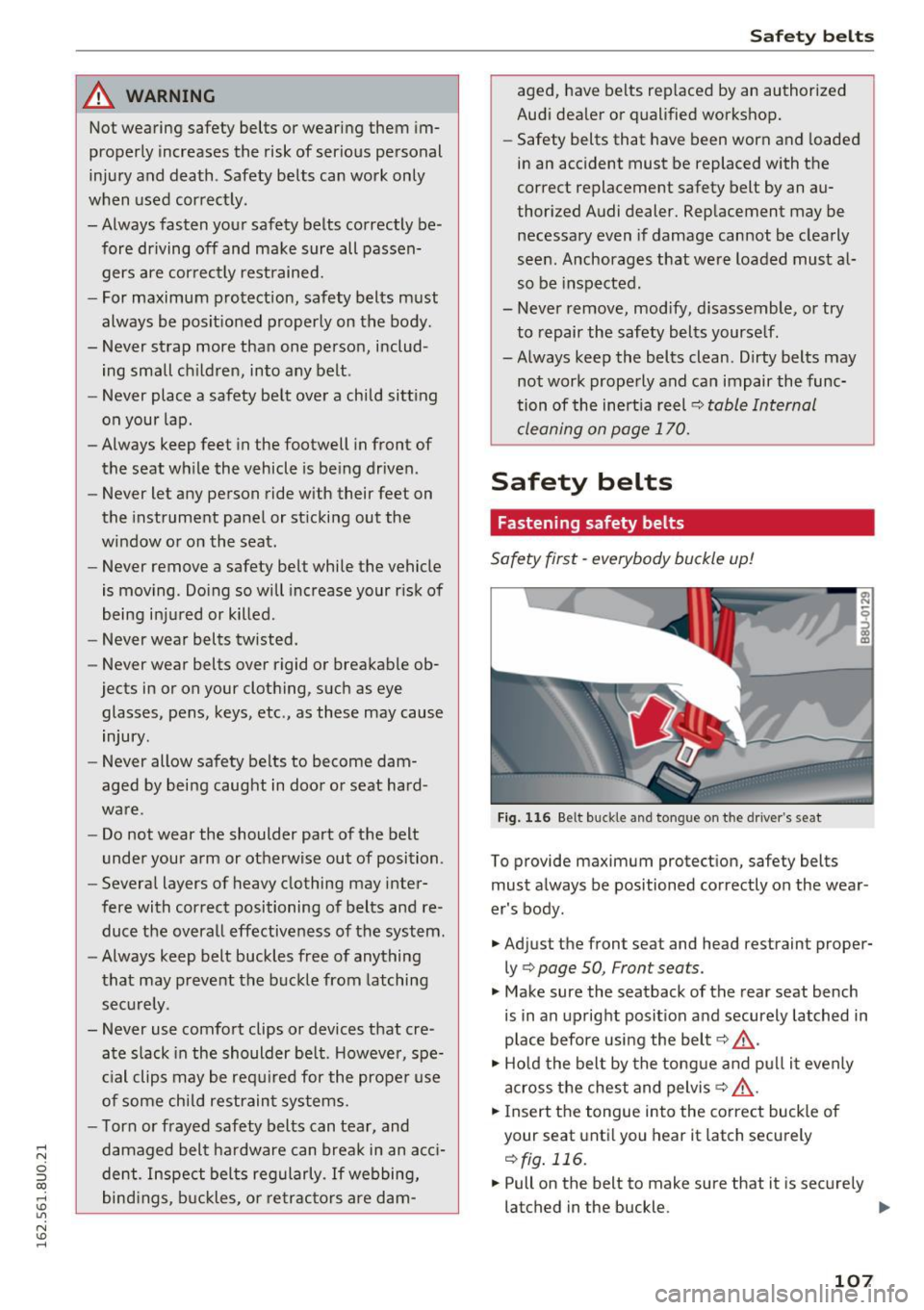
Fig. 116 Belt buckle and tongue on t he driver 's seat
To provide maximum protect ion, safety belts
must always be positioned correctly on the wear
er's body .
.. Adjust the front seat and head restraint proper
ly¢
page SO, Front seats.
.. Make sure the seatback of the rear seat bench
is in an upright posit ion and securely latched in
p lace before using the belt¢ ,&. .
.. Ho ld the belt by the tongue and pu ll it evenly
across the chest and pelvis~,&. .
.. Insert the tongue into the correct buckle of
your seat unti l you hear it latch securely
r:!)fig. 116 .
.. Pull on the belt to make sure that it is securely
latched in the buckle. ..,.
107
Page 110 of 252
Safe ty belts
Autom ati c s afet y belt retr actors
Every safety belt is equ ipped with an automa tic
be lt retractor on the shoulder belt. This feature
locks the belt when the belt is pulled out fast,
during hard braking and in a n accident. The belt
may a lso lock when you drive up or down a steep
hill or through a sharp curve. Dur ing normal driv
ing the belt lets you
move freely.
Safety belt p ret en sion ers
The safety belts are equipped with a belt preten
sioner that helps to t ighten the safety belt and
remove slack when the pretensioner is activated.
The function of the pretensioner is mon itored by
a warning light
r:::') page 16.
Convertib le loc king retracto r
Every safety be lt except the one on the driver
seat is equipped with a convertible locking retrac
tor that
mus t be used when the safety belt is
used to attach a child safety seat. Be sure to read
the impo rtant information about this feature
c:;,page 141.
.&_ WARNING
Imprope rly pos itioned safety be lts can cause
ser ious injury in an accident
¢page 108,
Safety belt position.
- Safety belts offer optimum protection only
when the seatback is upright and belts are
properly positioned on the body.
- Always make sure that the rear seat back
rest to which the center rea r safety belt is
attached is secure ly latched whenever the
rear center safety belt is being used. If the
backrest is not securely latched, the passen
ger will move forward with the backrest dur
ing sudden braking, in a sudden maneuver
and especially in a crash.
- Never attach the safety belt to the buckle for another seat. Attaching the belt to the
wrong buckle will reduce safety belt effec
tiveness and can cause serious persona l in
jury.
- A passenger who is not properly restrained can be seriously in jured by the safety be lt it
self when it moves from the stronger parts
108
of the body into critical areas like the abdo men.
- Always lock the convertible locking retractor
when you are securing a child safety seat in
the vehicle
¢page 143.
Safety belt position
Correct belt position is the key to getting maxi
mum protection from safety belts .
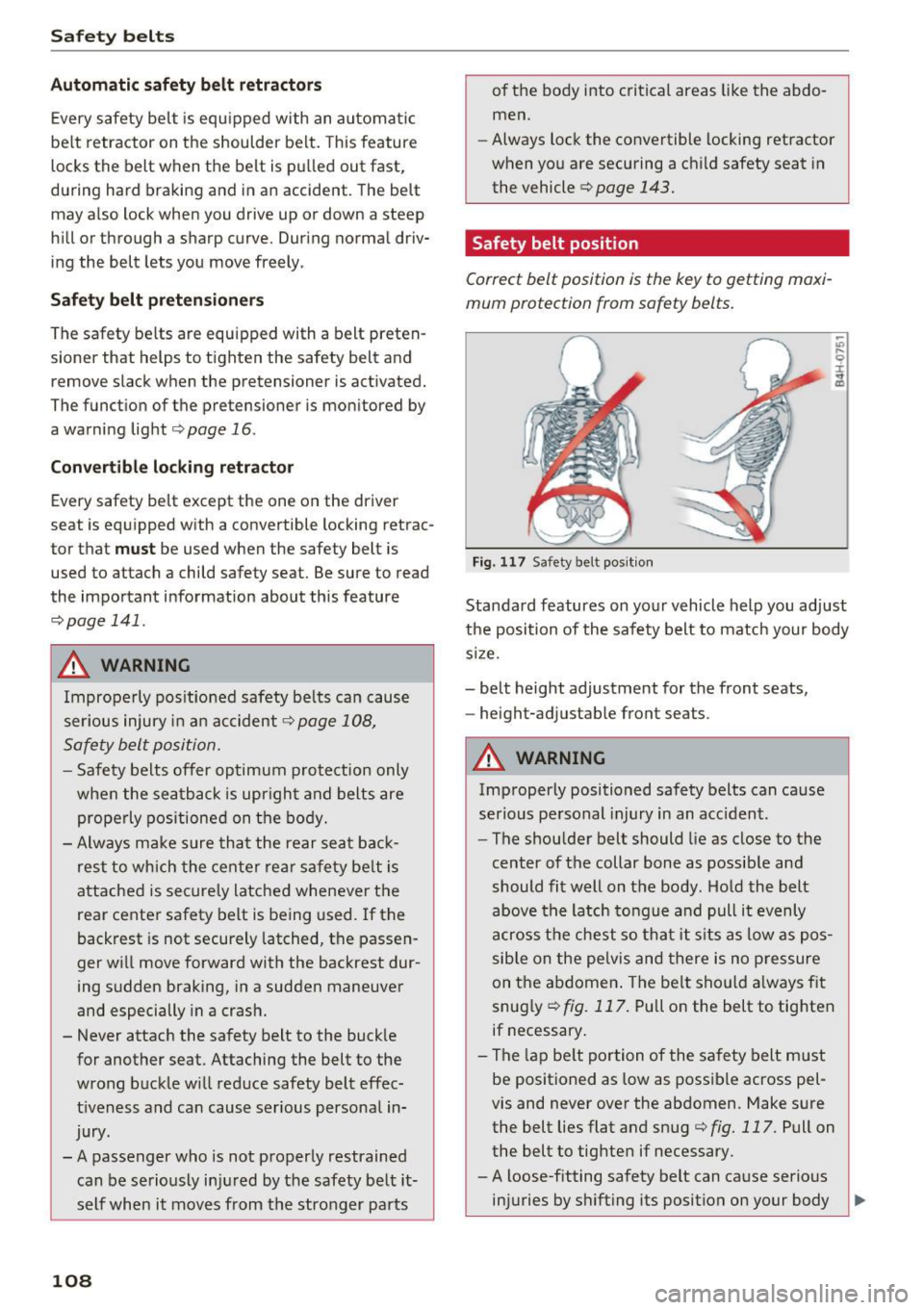
Fig. 117 Safety belt posit ion
-"' .... 9 I ... a,
Standard features on your vehicle help you adjust
the position of the safety belt to match your body
s ize.
- belt height adjustment for the front seats,
- height-adjustab le front seats.
.&_ WARNING
Improperly positioned safety belts can cause
serious pe rsonal injury in an acc ident .
- The shou lder belt should lie as close to the
center of the collar bone as possib le and
should fit well on the body. Hold the belt
above the latch tongue and pull it evenly
across t he chest so that it s its as low as pos
sib le on the pe lvis and there is no p re ssure
on the a bdomen . The belt sho uld a lways f it
snug ly
c:;, fig. 117. Pull on the belt to tig hten
if necessary .
- The lap be lt portion of the safety belt must
be positioned as low as possible across pel
vis and never
over the abdomen. Make sure
the belt lies flat and snug
c:;, fig. 117. Pull on
the belt to tighten if necessary.
- A loose-fitting safety belt can ca use serious
injuries by sh ifting its position on your body ..,_
Page 179 of 252
.... N
c:i ::J CX)
.... I.Cl U"I
N I.Cl ......
Checking and Filling Hood
Opening the hood
The hood is released from the interior.
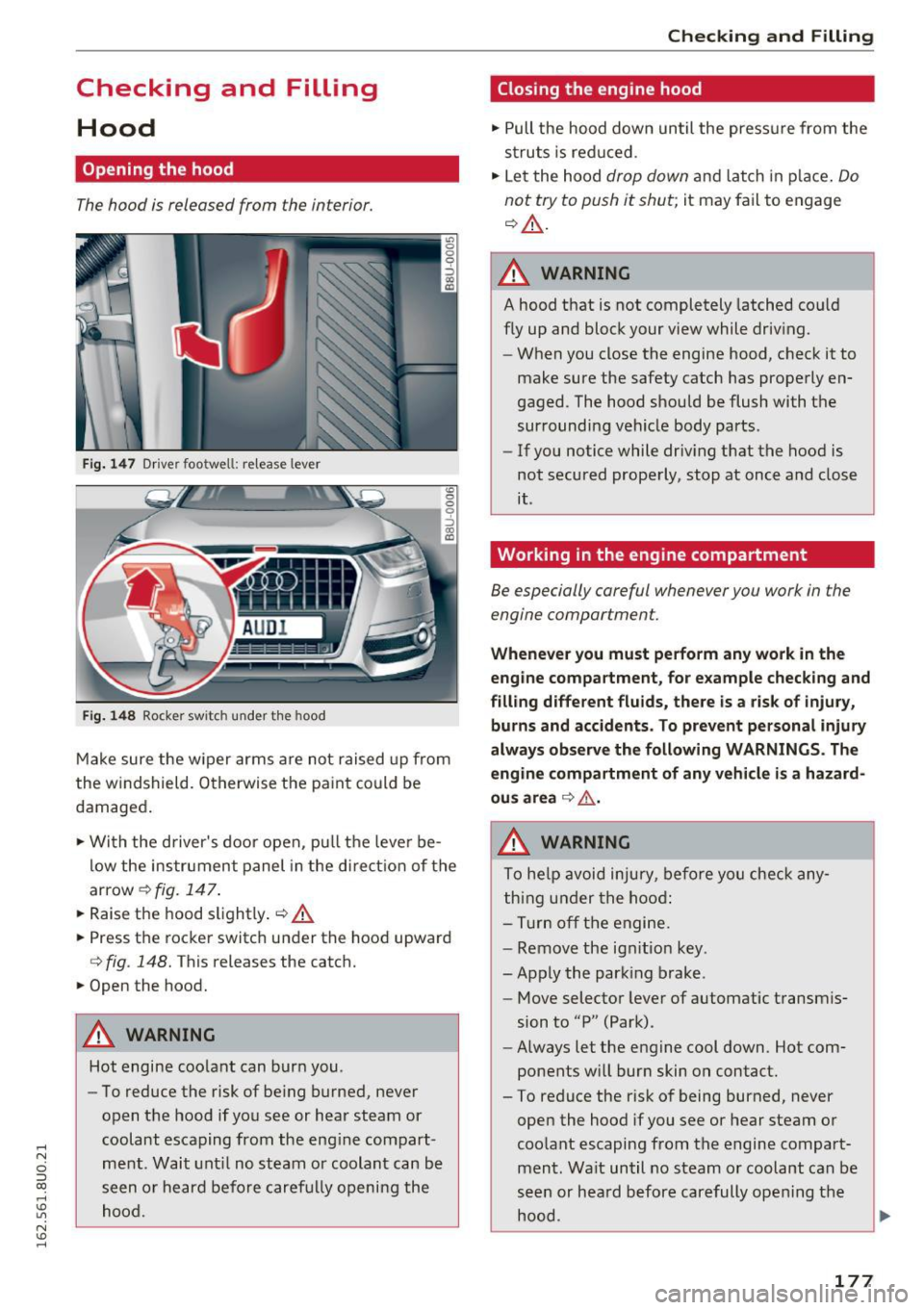
Fig. 147 Driver footwell: release lever
Fig. 14 8 Rocke r switch under t he hood
<0 0 0
0
::,
"' CD
Make sure the w iper arms are not raised up from
the w indshield. O therwise the paint coul d be
damaged .
.,. Wi th the d river's doo r open, p ull th e leve r be
l ow the ins trument panel in the direct io n of the
arrow¢
fig. 1 47.
.,. Raise the hood s lightly . q &.
.,. Press t he roc ker switc h under the hood upward
Q fig. 148. This releases the catch.
.,. Open the hood.
A WARNING
Hot engine coolant can burn you.
- To reduce the risk of be ing burned, never
open t he hood if you see or hear steam or
coolant escaping from the eng ine compart
me nt. Wait unt il no steam or coolant can be
seen o r he ard before caref ully opening the
hood.
Checking and Filling
Closing the engine hood
., Pull the hood down until the press ure from the
s tr uts is red uced .
.,. Le t the hood
drop down and lat ch in p lace . Do
not try to push it shut;
it may fail to engage
q &_ .
A WARNING
A hood that is not completely latched co uld
fly up and block your view while driv ing.
- When you close the engine hood, check it to
make sure the safety catch has prope rly en
gaged. The hood should be flush with th e
sur rounding veh icle body parts.
- If you notice while driv ing that the hood is
not secured prope rly, stop at once and close
it .
Working in the engine compartment
Be especially careful whenever you work in the
engine compartment.
-
Whenever you must pe rform any work in the
eng ine compartment , for e xample check ing and
filling diff erent fluids, there is a ris k of injury,
burns and accidents. To prevent personal injury
always ob serv e the following WARNINGS . Th e
engine compartment of any veh icle is a hazard
ou s area
q .&. .
A WARNING
To he lp avoid injury, before yo u check any
t hing under the hoo d:
- Turn off the engi ne .
- Remove the ign ition key.
- Apply the park ing brake .
- Move selector lever of automatic transmis-
sion to "P" (Park).
- Always let the engine cool down. Hot com
ponents w ill bur n skin on contact.
-
-To reduce the risk of being burned, never
open the hood if you see or hear steam or
coo lant escaping from the engine compart
ment. Wa it until no steam o r coolant can be
seen or hea rd before carefully opening the
hood.
177