wheel AUDI Q3 2016 Owner's Manual
[x] Cancel search | Manufacturer: AUDI, Model Year: 2016, Model line: Q3, Model: AUDI Q3 2016Pages: 252, PDF Size: 62.81 MB
Page 81 of 252
@ Tips
-Side assist is not active whi le you are ma k
i ng the ad justment .
- Your settings are automatically stored and
ass igned to the remote control key being
u sed.
Driver messages
App lies to vehicles: with Audi side assist
If side ass ist switches off by itself, the LED in the
button turns off and a message will appear in the
i nstr ument cluster d is pl ay :
Audi side assist: Unavailable. Sensor view
The radar senso rs ' vision is affected. Do not cover
the area in front of the sensors with b ike wheels,
sticke rs, dirt or other ob jects . Clean the area in
front of the senso rs, if necessary
c:> page 77,
fig . 86 .
Aud i side assist: Unavailable
Side assist cannot be switched o n tempo rar ily be
cause there is a malfunction (for exam ple, the
battery charge level may be too low).
Audi side assist: Syst em fault!
The system cannot guarantee that it will detect
ve hicles co rrectly and it is switched off. The sen
sors have been d isp laced or are fa ulty. Have the
system checked by an authorized Audi dealer or
author ized Audi Service Facility soon.
Audi side as sist: Unavailable when towing
Side assist sw itches off automatically when a fac
tory-installed trailer hitch is connected to the
e lectrical connector on the trailer. T he re is no
gua rantee the system will sw itch off when using
a retrofi tted tra ile r hitch . Do not use s ide ass ist
when towing a trailer.
Aud i side assist
79
Page 86 of 252
Automatic transmissio n
Stopp ing temporarily
.,. Press the b rake peda l to stop the vehicle, fo r
example at a traffic light. Do not press the ac
ce lerator peda l when doing this.
... To prevent the vehicle from rolling when you
start driving, set the parking brake when stop
ping on steep inclines ¢
,&..
.,. The park ing brake w il l release automatically
and the vehicle will start moving once you press
the accelerator pedal.
Stopp ing /park ing
If the selector lever is not in the P posit ion when
you open the driver's door, the vehicle could roll.
The message
S hift to P and turn off ign it ion ,
otherwi se vehicle can roll awa y
appears.
.,. Press and hold the brake pedal
c> ,&. .
.,. Set the parking brake.
.,. To engage the P selector lever posit ion, press
the button on the selector lever and sh ift into
the P position
i:> page 82.
Stopp ing on an incline
.,. Always press the brake peda l to hold the vehi
cle in place and prevent it from "rolling back"
c> ,&. . Do not try to prevent the vehicle from
"ro lling back" when a gear is engaged by in
c reasing the eng ine speed
i:> 0.
Starting on a hill
.,. Set the parking brake.
.,. Se lect the D posit ion .
.,. Press t he accelerator pedal carefully . If you r
safety belt is fastened, the pa rking brake is au
tomat ica lly released a nd your ve hicle beg ins to
move .
Unde r ce rtain c ircumstances, such as driv ing in
the mountains, it may be usef ul to sw itch tempo
rarily to the manua l shift program in o rde r to ad
just the gea rs to the d riving conditions by hand
i:>page 85 .
On inclines, act ivate the park ing brake first and
then move the se lector lever to the P pos it ion
c>page 72. This prevents the lo cking mechanism
from being loaded too heav ily and w ill make i t
easier to move the se lec tor lever out of the P po
sition.
84
A WARNING
- The vehicle can also ro ll when the eng ine is
stopped.
- Unintended vehicle movement can cause se
rious injury.
- Never leave your veh icle with the engine
running while in gear. If you must leave
your veh icle w hen the engine is r unning, ac
tivate t he pa rking brake a nd move the selec
tor lever to P .
- Power is still transmitted to the wheels
when the engine is running at idle . To p re
vent the vehicle from "creeping", yo u m ust
keep your foo t on t he b rake when the en
g in e is ru nning and the selector lever is in D/
Sor R or "tiptronic" mode is se lected .
- Do not press the a cce le ra to r peda l when
changing the se lec to r l ever posi tion while
the vehicle is s ta tionary and the engine is
r u nning .
- Never sh ift into R or P whi le driving.
- Before d riving down a s teep sl ope, redu ce
your spee d and sh ift into a lower gea r w ith
"t i ptronic" .
- Do not ride the brakes or press the bra ke
pedal too of ten o r too long when dr iv ing
down a hi ll. Constant braking ca uses the
brakes to ove rheat and substantially re
duces brak ing performance, increases b rak
ing d istance or causes comp lete failure of
the brake system.
- To prevent the veh icle from rol ling back
when stopp ing on inclines, always hold it in
place with the brake peda l or park ing brake .
- Never hold the vehicle on an incline with a
slipping clutch. The clutch opens automati
cally when it becomes too hot from the
overload. An ind icator lam p. illumina tes
and a dr iver message appears¢
page 86
w hen t he clu tch is overloade d.
- If the e ngine must rema in running, never
have a ny driving posi tion engaged when
checking unde r th e hood. Make s ure these
lec to r l ever has secu rely eng aged an d is
loc ked in P with the parking b rake set
Page 88 of 252
Automatic transmission
Shifting with the shift paddle s*
You can operate the shift padd les in the D, Sor M
selector lever posit ions.
• To sh ift up one gear, tap the
0 shift paddle
¢fig. 93.
• To shift down one gea r, tap the O sh ift paddle.
• If you do not press a shift button within a short
time whi le in the D/S position, the transmission
will return to automatic mode. To keep shifting
using the shift buttons, move the selector lever
to the right out of the D/S position.
The transmission automatically shifts up or down
before critical engine speed is reached.
The transm ission only a llows manual shift ing
when the engine speed is within the permitted
range.
@ Tips
- When you shift into the next lower gear, the
transmission wi ll downshift only when there
is no possibility of over-revving the engine.
- When the kick-down comes on, the trans
mission will shift down to a lower gear, de
pending on vehicle and engine speeds.
- Tiptronic is inoperative when the transmis
sion is in the fai l-safe mode .
Kick-down
Kick-down enables maximum acceleration.
When you press the accelerator peda l down be
yond the resistance point (called kick-down), the
automatic transmission downshifts into a lower
gear, depending on vehicle speed and engine RPM. It shifts up into the next higher gear once
the maximum specified engine RPM is reached.
A WARNING
Please note that the wheels could spin on
slick or slippery roads when kick-down is ac
tive.
Transmission malfunction
• Transmission overheating! Please stop the
vehicle!
86
The transmission is too hot and can become dam
aged. Stop and let the transmission coo l with the
engine running (at idle) in the P se lector lever po
sition. Then the indicator light and the message
turn off, drive to an authorized Audi dealer or au
thorized Audi Service Facility immediately to have
the malfunct ion corrected.
If the indicator light
and the driver message do not turn off, do not
continue driving. See an authorized Audi dea ler
or authorized Audi Service Facility fo r assistance.
Selector lever emergency release
In order to tow a vehicle due to power failure,
the selector lever emergency release must be ac
tivated .
Fig. 94 Selector lever: remov ing t he cover
Fig. 95 Selector lever: emergency release
The emergency release mechanism is located in
the right area under the selector lever shift gate.
Using the emergency release can be complicated .
We recommend contacting an authorized Audi
dealer or authorized Audi Service Facility for as
s istance, if necessary.
A maintenance tool from the vehicle tool kit
must be used to release
¢ page 211 .
Page 90 of 252
Parking systems
Parking systems
General information
Applies to vehicles: with rear parking system/parking system
p lus/rear v iew camera
Depending on your vehicle 's equipment , various
parking aids will help you when parking and ma
neuvering.
The
rear park ing system is an audible parking aid
that warns you of obstacles
behind the vehicle
~ page 88.
The parking system plus assists you when park
ing by audibly and visually indicating objects de
tected
in front of and behind the vehicle
~ page 89.
The rear view camera shows the area behind the
vehicle in the Infotainment display . This display
assists you when you are cross or parallel parking
~ page 90. In addition, you are assisted by the
functions from the park ing system plus
~ page 89.
& WARNING
-Always look for traffic and check the area
around your vehicle by looking at it directly
as well. The parking system cannot replace
the driver's attention. The driver is always
responsible for safety during parking and
for all other maneuvers.
- Please note that some surfaces , such as
clothing, are not detected by the system .
- Sensors and cameras have blind spots in
which people and objects cannot be detect
ed . Be especially cautious of children and
animals.
- The sensors can be displaced by impacts or
damage to the radiator gr ille, bumper,
wheel housing and the underbody . The park
ing systems may become impa ired as a re
sult . Have your authorized Audi dealer or
qualified workshop check their function.
- Make sure the sensors are not covered by
stickers, deposits o r any other obstructions
as
it may impair the sensor function . For in
formation on cleaning, refer to
~ page 168.
88
(D Note
-Some objects are not detected by the sys
tem under certain circumstances:
-Objects such as barrier chains, trailer draw
bars, vertical poles or fences
- Objects above the sensors such as wall ex
tensions
- Objects with specific surfaces or struc
tures such as chain link fences or powder
snow.
- If you continue driving closer to a low-lying
object, it may disappear from the sensor
range. Note that you will no longer be
warned about this obstacle.
(D Tips
-The system may provide a warning even
though there are no obstacles in the cover
age area in some situations, such as:
- certain road surfaces or for long grass.
- external ultrasonic sources e.g. from cleaning vehicles .
- heavy rain, snow or thick vehicle exhaust .
- We recommend that you practice parking in
a traffic-free location or parking lot to be
come familiar with the system . When doing
this, there should be good light and weath
er conditions.
- You can change the volume and pitch of the
signals as well as the display
~ page 93.
- Please refer to the instructions for towing a
trailer ~
page 94 .
-What appears in the infotainment display is
somewhat time-delayed.
Rear parking system
Description
Applies to veh icles : with rear parking system
The rear parking syst em is an audible parking
aid .
There is a sensor in the rear bumpe r cover. If
these detect an obstacle, audible signals warn
you.
Make sure the sensors are not covered by stick -
ers , deposits or any other obstructions as it may ""'
Page 93 of 252
can affect the function of the parking system. For information on cleaning, refer to¢
page 168.
The rearview camera coverage area includes (!)
¢ fig. 101. Only this area is shown in the Info
tainment display. Objects that are outside of this
area @are not displayed.
The accuracy of the orientation lines and blue
surfaces diminishes if the
Dynamic mode is acti
vated
¢ page 80.
~ WARNING
- Always read and follow the applicable warn
ings
¢ &. in General information on
page 88.
- If the position and the installation angle of
the rearview camera was changed, for ex ample, after a collision, do not continue to
use the system for safety reasons. Have it
checked by your authorized Audi dealer or
authorized Audi Service Facility .
- Only use the rearview camera to assist you if
it shows a good, clear picture. For example,
the image may be affected by the sun shin
ing into the lens, dirt on the lens or if there
is a defect.
- Use the rearview camera only if the luggage
compartment lid is completely closed. Make
sure any objects you may have mounted on
the luggage compartment lid do not block
the rearview camera.
- The camera lens enlarges and distorts the
field of vision. The object appears both al
tered and inaccurate on the screen.
- In certain situations, people or objects in
the display appear closer or farther away:
- For objects that do not touch the ground,
such as the bumper of a parked vehicle, a
trailer hitch or the rear of a truck . Do not
use the help lines in this case.
- If driven from a level surface onto an in
cline, or a downward slope.
- If driven toward protruding objects.
- If the vehicle is carrying too much load in
the rear .
Parking systems
(D Note
-Always read and follow the applicable warn
ings
¢ (D in General information on
page 88.
- Th e orange colored orientation lines in the
In fotainment display show the vehicle path
depending on the steering wheel angle. The
front of the vehicle swings out more than
the rear of the vehicle. Maintain plenty of
distance so that your outside mirror or a
corner of your vehicle does not collide with
any obstacles.
Switching on/off
Appl ies to vehicles: with parking system plus with rearview
camera
Switching on
• Shift into reverse, or
• Press the
PwA button in the center console
¢ page 89, fig. 97. A short confirmation tone
sounds and the LED in the button turns on.
Switching between the rearview camera and
optical display
• Press the Graphic control button ®
¢ page 92, fig. 103 to see the optical display.
• Press the
Rear view control button to see the
rearview camera image.
Switching off
• Drive faster than 6 mph (10 km/h), or
• press the
P•lj A button, or
• Switch the ignition off.
@ Tips
The visual display in the left part of the dis
play should help you detect the critical vehicle
areas.
91
Page 94 of 252
Parking systems
Cross parking
Applies to vehicles: with parking system p lus with rearview
camera
This view may be used when parking in a garage
or in a parking space .
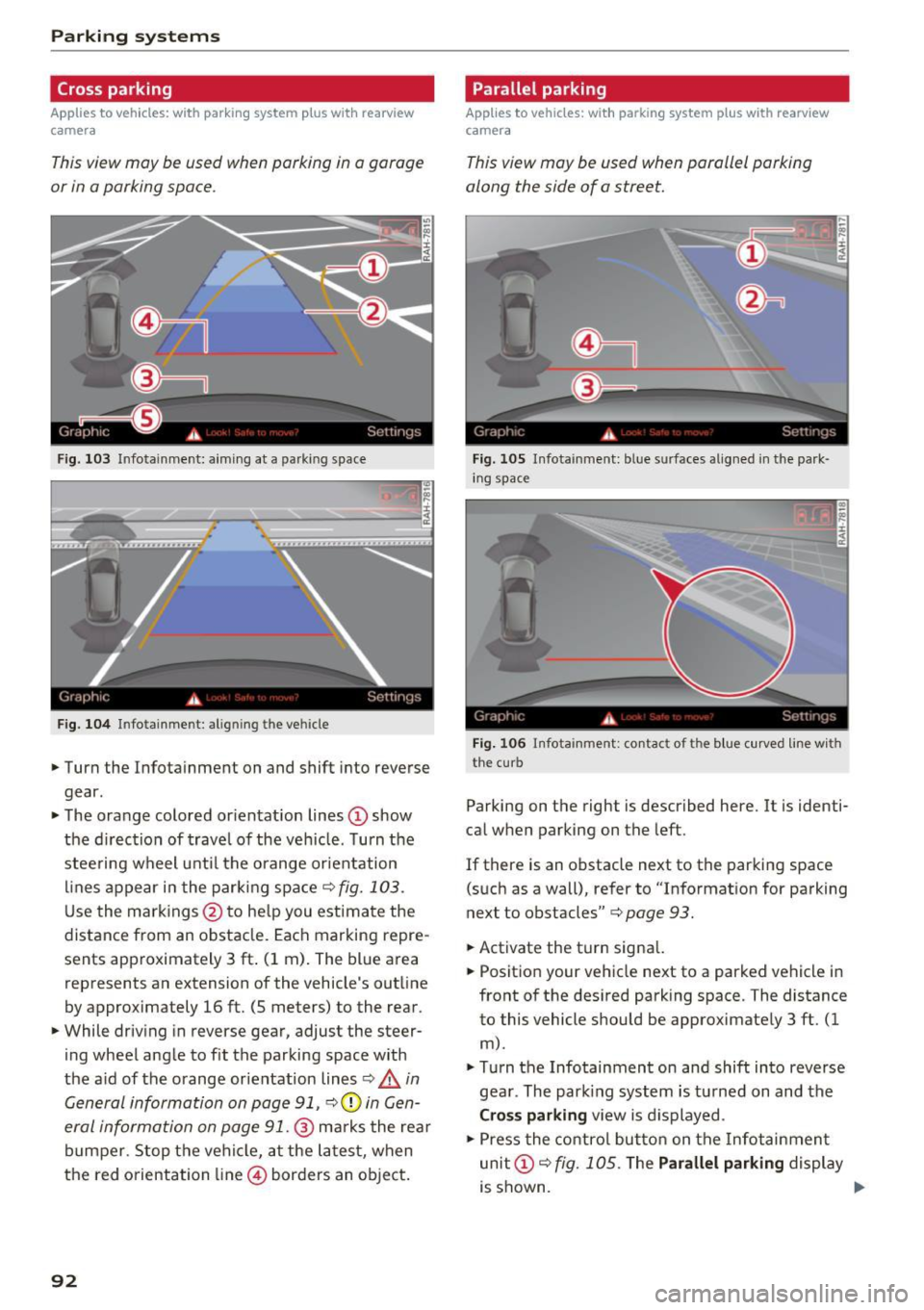
Fig. 103 Infotainment: aiming at a parkin g space
Fig. 104 Infotainment : al ign ing the vehicle
.,. Turn the Infota inment on and shift into reverse
gear.
.,. The orange colored or ientation lines
(D show
the direction of travel of the veh icle. Turn the
stee ring wheel unt il the orange orientation
lines appear in the parking space
9 fig. 103 .
Use the markings @ to help you est imate the
distance from an obstacle. Each marking repre
sents app roximately 3 ft . (1 m) . The blue area
represents an extension of the vehicle's outline
by approximately 16 ft. (5 meters) to the rear.
.,. While driv ing in reverse gear, adjust the steer
ing wheel angle to fit the parking space with
the a id of the orange orientation lines¢.&.
in
General information on page
91 , 90in Gen
eral information on page
91. @ marks the rea r
bumper. Stop the vehicle, at the latest, when
the red orientation line © borders an object.
92
Parallel parking
Applies to vehicles: with parking system plus with rearview
camera
This view may be used when parallel parking
along the side of a street.
Fig. 105 I n fota inment: blue surfaces aligned in the park
ing space
Fig. 106 In fota inment: contact of the blue cur ved line with
the curb
Parking on the right is described here. It is identi
cal when parking on the left.
If there is an obstacle next to the parking space
(such as a wall), refer to "Informat ion for parking
next to obstacles"¢
page 93.
.,. Activate the turn signa l.
.,. Position your vehicle next to a parked vehicle in
front of the des ired park ing space. The distance
to this vehicle s hould be approximate ly 3 ft. (1
m).
.,. Turn the Infotainment on and shift into reverse
gea r. The park ing system is tu rned on and the
Cross parking vie w is displayed .
.,. Press the control button on the In fotainment
unit
(D 9 fig. 1 OS. The Parallel parking display
is shown. ..,.
Page 95 of 252
•Backup and align yo ur vehicle so the b lue area
@ borders on the rear end of the vehicle be
hind you or on the parking space line
¢ A in
General information on page
91, c> (D in Gen
eral information on page
91. The blue area rep
resents an extension of the veh icle's outline by
approximately 16
ft. (5 meters) to the rear . T he
long side of the blue area shou ld be on the
cu rb. The entire b lue area must fit in to the
parking space.
• Wi th the veh icle stopped, tu rn the steer ing
whee l to the right as far as it wi ll go.
• Back up into the parking spot. As soon as the
blue curve
c> fig. 106 is near the c urb c> A in
General information on page
91, c> (D in Gen
eral information on page
91. Stop the vehicle.
• With the veh icle stopped, turn the steer ing
wheel to the left as far as it will go .
• Cont inue to back i nto the pa rking space unt il
the vehi cle is par ked pa rallel to the curb
c> A
in General information on page 91, c> (D in
General information on page
91. @ marks the
rea r bumper. Stop the vehicle, at the latest,
when the red orientation line@ borders an ob
ject. Keep an eye on the front of your vehicle whi le doing this.
Par king ne xt to obstacle s
If th ere is an obstacle (such as a wall) next to the
pa rking space, position the vehicle so there is
more space on that side . Position the long side of
the blue s urface so that there is sufficient space
from the obstacle. The surface must not be
touching . Yo u will also need to start tur ning the
steer ing whee l earlier . The blue curve
c> fig. 106
must not touch the obstacle and should have suf
fic ient room.
(D Note
Keep enoug h distance from the curb to avoid
damage to the rims .
(D Tips
The left or right or ie ntation lines and surfaces
w ill be displayed, depending on the turn sig-
na l being used. Parking
sy
stem s
Adjusting the display
and the warning tones
App lies to vehicles : wit h parking syste m plus with rearview
came ra
The display and warning tones can be adjusted in
the Infotainment.
• Select: the I CAR ! funct ion button > (Car) sys
tems *
control b utton > Dr iver assist > Par king
aid .
Display
On* -An optical display is shown for the parking
system p lus, a rearview camera image is shown
for parking system p lus with rearview camera*.
Off -When t he pa rking system is sw itched off,
on ly aud ible signals are g iven.
Warning tones
Front volume -Volume for the front area
Rear volume -Volume for the rear area
Front frequency -Frequency for the front area
Rear frequency -Frequency for the rear a rea
Entertainment volum e -When the parking sys
tem is turned o n, the vo lume of the audio/v ideo
source is lowered .
The newly ad justed va lue is given br iefly from the
cor respond ing s ignal generator .
(D Tips
- The warn ing tones can also be adjusted di
rectly from the visual d isplay or the rearview
came ra image* . S imply press the
Settings
cont rol but ton .
- Changed settings are activated w hen the
park ing system is sw itched on again.
- The settings are automatically stored and
assigned to the remote control key that is in
use.
Error messages
Applies to vehicles: wit h parking system pl us with rearview
ca mera
The re is an error in the system if the LED in the
Pw .A button is blinking and you hear a cont in uo us ll>
93
Page 98 of 252
Driving safety
• Sit properly in your seat and make sure that
your passengers do the same
c:> page 50, Front
seats .
• Fasten your safety belt and wear it properly . Al
so instruct your passengers to fasten their safe
ty belts properly
c:>page 104.
What impairs driving safety?
Safe driving is directly related to the condition of
the vehicle, the driver as well as the driver 's abili
ty to concentrate on the road without being dis
tracted .
The driver is responsible for the safety of the ve
hicle and all of its occupants. If your ability to
drive is impaired, safety risks for everybody in the
vehicle increase and you also become a hazard to
everyone else on the road
c:> Li').. Therefore :
• Do not let yourself be distracted by passengers
or by using a cellular telephone .
• NEVER drive when your driving ability is im
paired (by medications, alcohol, drugs , etc.).
• Observe all traffic laws, rules of the road and
speed limits and plain common sense.
• ALWAYS adjust your speed to road, traffic and
weather conditions.
• Take frequent breaks on long trips. Do not drive
for more than two hours at a stretch.
• Do NOT drive when you are tired, under pres
sure or when you are stressed.
A WARNING
Impaired driving safety increases the risk of
ser ious personal injury and death whenever a
vehicle is being used.
96
Correct passenger
seating positions
Proper seating position for the driver
The proper driver seating position is important
for safe, relaxed driving.
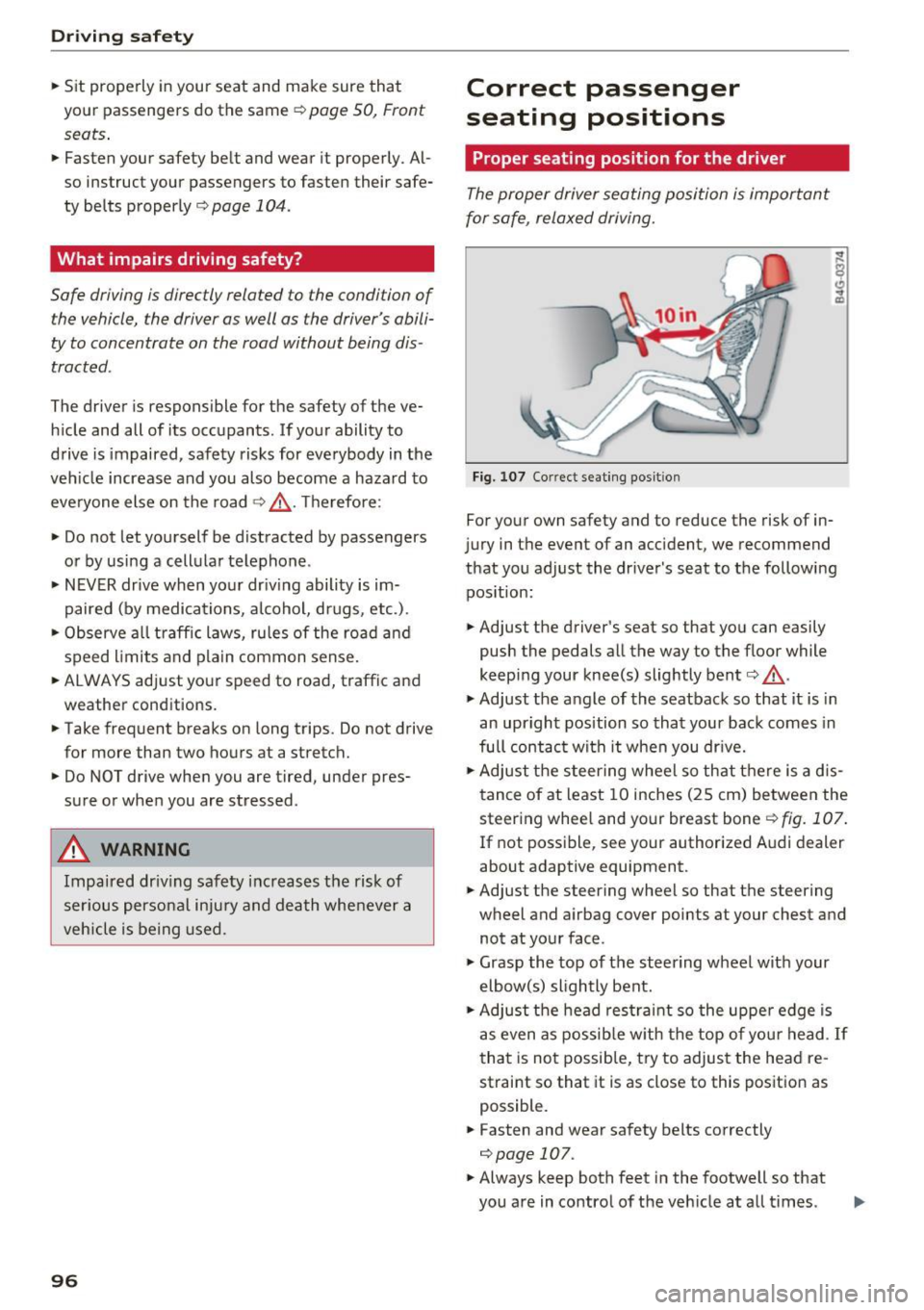
Fig. 107 Correct seating posit ion
For your own safety and to reduce the risk of in
jury in the event of an accident, we recommend
that you adjust the driver's seat to the following position:
• Adjust the driver's seat so that you can easily
push the pedals all the way to the floor while
keeping your knee(s) slightly bent
c:> .&, .
• Adjust the angle of the seatback so that it is in
an upright position so that your back comes in
full contact with it when you drive.
• Adjust the steering wheel so that there is a dis
tance of at least 10 inches (25 cm) between the
steering wheel and your breast boner::!)
fig. 107.
If not possible, see your authorized Audi dealer
about adaptive equipment.
• Adjust the steering wheel so that the steering
wheel and airbag cover points at your chest and
not at your face.
• Grasp the top of the steering wheel with your
elbow(s) slightly bent.
• Adjust the head restraint so the upper edge is
as even as possible with the top of your head .
If
that is not possible, try to adjust the head re
straint so that it is as close to this position as
possible.
• Fasten and wear safety belts correctly
c:>page 107.
• Always keep both feet in the footwell so that
you are in control of the veh icle at all times .
Page 99 of 252
For detailed information on how to adjust the
driver's seat, see
¢ page 50.
A WARNING
Drivers who are unbelted, out of position or
too close to the airbag can be seriously in
jured by an airbag as it unfolds. To help re
duce the risk of serious personal injury:
- Always adjust the driver's seat and the
steering wheel so that there are at least 10 inches (25 cm) between your breastbone
and the steering wheel.
- Always hold the steer ing wheel on the out
side of the steering wheel rim with your
hands at the 9 o'clock and 3 o'clock posi
tions to help reduce the r isk of persona l in
jury if the driver's airbag inflates.
- Never hold the steer ing whee l at the
12 o'clock position or w ith your hands at
other pos it ions inside the steering wheel
rim or on the steering wheel hub. Holding
the steering wheel the wrong way can cause
serious injuries to the hands, arms and head if the driver's airbag deploys.
- Pointing the steering wheel toward your
face decreases the ability of the supplemen
tal driver's airbag to protect you in a colli sion.
- Always sit in an upright position and never lean against or place any part of your body
too close to the area where the airbags are
located .
- Before driving, always adjust the front seats
and head restraints properly and make sure
that all passengers are properly restrained.
- Never adjust the seats while the vehicle is
moving . Your seat may move unexpectedly
and you could lose control of the vehicle .
- Never drive with the backrest reclined or
t il ted far back! The farther the backrests are
tilted back, the greater the risk of injury due
to incorrect positioning of the safety belt
and improper seating position.
- Children must always ride in child safety
seats¢
page 132 . Special precaut ions ap
ply when installing a ch ild safety seat on the
front passenger seat
c:::;, page 112.
Driving safety
Proper seating position for the front
passenger
The proper front passenger seating position is
important for safe, relaxed driving.
For your own safety and to reduce the risk of in
jury in the event of an acc ident, we recommend
that you adjust the seat for the front passenger
to the follow ing position:
"' Adjust the angle of the seatback so that it is in
an upright position and your back comes in full
contact with it whenever the vehicle is moving.
"' Adjust the head restraint so the upper edge is
as even as possible with the top of your head. If
that is not possible, try to adjust the head re
straint so that it is as close to this position as
possible
¢ page 51.
"' Keep both feet flat on the floor in front of the
front passenger seat.
"' Fasten and wear safety belts correctly
c:::;, page 107.
For detailed information on how to adjust the
front passenger's seat, see
c:::;, page 50.
A WARNING
--
Front seat passengers who are unbelted, out
of position or too close to the airbag can be
seriously injured or killed by the airbag as it
unfolds. To help reduce the risk of serious
personal injury:
- Passengers must always sit in an upright po
sition and never lean against or place any
part of their body too close to the area
where the airbags are located.
- Passengers who are unbelted, out of posi
tion or too close to the airbag can be seri
ously injured by an airbag as it unfolds with
great force in the blink of an eye.
- Always make sure that there are at least
10 inches (25 cm) between the front pas
senger's breastbone and the instrument
panel.
- E ach passenger must always sit on a seat of
their own and properly fasten and wear the
safety belt belonging to that seat .
- Before driving, always adjust the front pas
senger seat and head restraint properly.
97
Page 107 of 252
.... N
c:i ::J CX)
.... I.Cl U"I
N I.Cl ......
-Failure to pay attention to the warn ing light
that come on, could lead to persona l injury.
Why use safety belts?
Frontal collisions and the law of physics
Frontal crashes create very strong forces for peo
ple riding in vehicles .
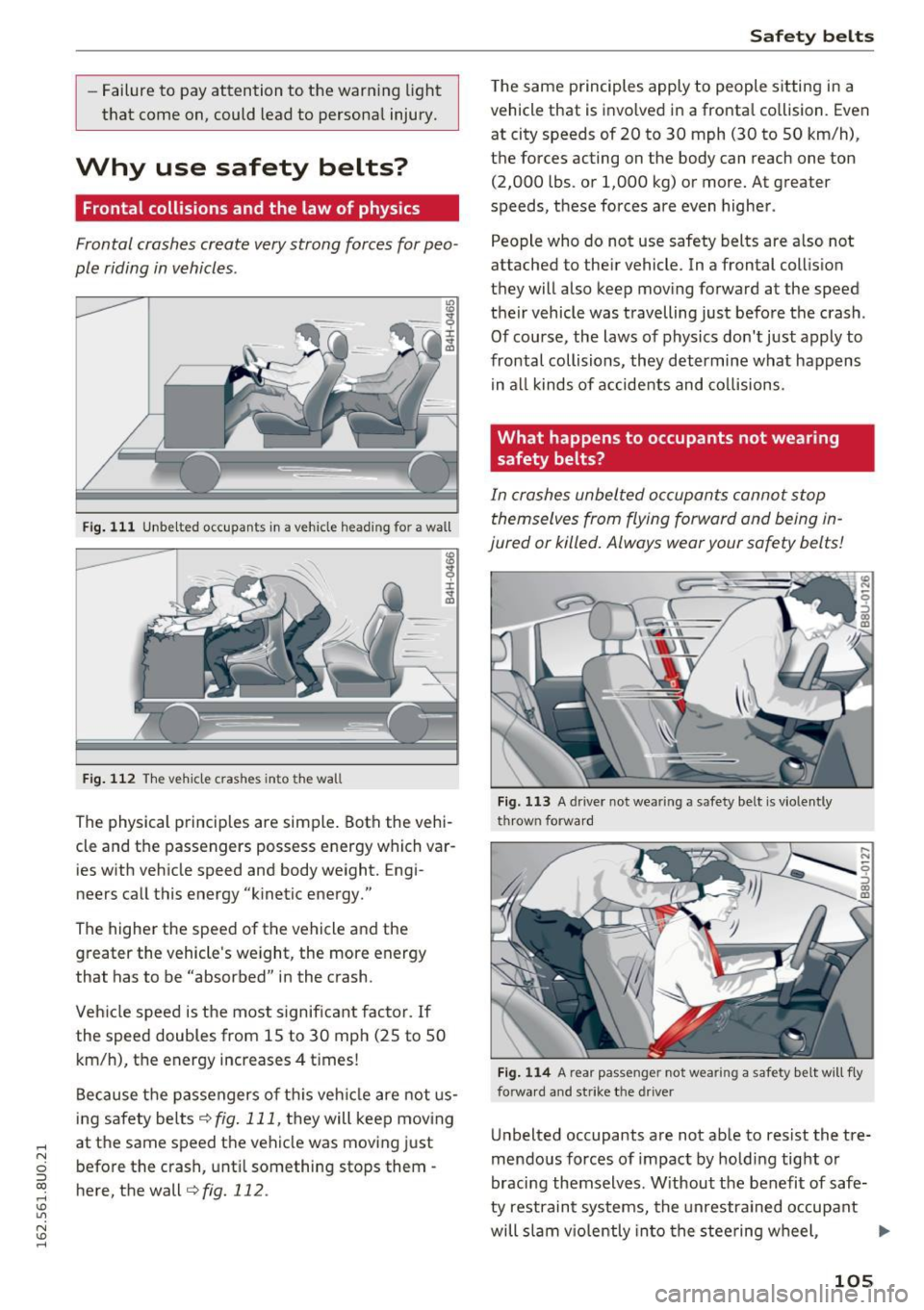
Fig. 111 Unbelted occupants in a vehicle heading for a wall
Fig. 112 The vehicle crashes into the wall
The physical principles are simple. Both the vehi
cle and the passengers possess energy which var ies with vehicle speed and body weight. Engi
neers call this energy "kinetic energy."
The higher the speed of the vehicle and the greater the vehicle's we ight, the more energy
that has to be "absorbed" in the crash.
Veh icle speed is the most significant factor. If
the speed doubles from 15 to 30 mph (25 to 50
km/h), the energy increases 4 t imes!
Because the passengers of this vehicle are not us
ing safety belts
¢fig. 111, they will keep moving
at the same speed the vehicle was moving just
before the crash, until something stops them -
here, the wall¢
fig. 112 .
Safety belts
The same p rinciples apply to people sitting in a
vehicle that is invo lved in a fronta l co llision. Even
at city speeds of 20 to 30 mph (30 to 50 km/h),
the forces acting on the body can reach one ton
(2,000 lbs. or 1,000 kg) or more. At greater
speeds, these forces are even higher.
People who do not use safety belts are a lso not
attached to the ir vehicle. In a frontal collis ion
they will also keep moving forward at the speed
their vehicle was travelling just before the crash .
Of course, the laws of physics don't just apply to
frontal collisions, they determine what happens in all kinds of accidents and collisions .
What happens to occupants not wea ring
safety belts?
In crashes unbelted occupants cannot stop
themselves from flying forward and being in
jured or killed. Always wear your safety belts!
Fig. 113 A driver not wearing a safety belt is violently
th row n forwar d
Fig. 114 A rear passe nger not wearing a safety belt will fly
forward a nd strike the driver
Unbelted occupants are not able to resist the tre
mendous forces of impact by holding tight or
bracing themselves . Without the benefit of safe
ty restraint systems, the unrestrained occupant
will slam viol ently into th e steering wheel, .,.
105