ECO mode AUDI Q3 2017 Owner´s Manual
[x] Cancel search | Manufacturer: AUDI, Model Year: 2017, Model line: Q3, Model: AUDI Q3 2017Pages: 236, PDF Size: 58.93 MB
Page 69 of 236
00
00
......
"' ,-...
"' ...... 0 0 :::,
00
- Please note that the wheels can spin more
and the vehicle can swerve when in ESC off
road mode, especially when the road is s lip
pery or has loose surface material.
- Driv ing stability is reduced in the ESC Off
road mode.
@ For the sake of the environment
Avoid harming the environment and show consideration for nature.
@ Tips
Only drive where it is a llowed and always stay
on the provided roads and paths.
Driving information
Applies to: ve hicles with offroad mode
There is only one right way to drive in difficult
conditions: slowly and with caution!
Observe the follow ing when driving on unpaved
roads:
"' Only drive in terrain that is suitable for the ve
hicle and your d riving ab ility. Never take any
unnecessary risks!
.,. Drive slowly and cautiously!
.,. Pay attention to the ground clearance of your
vehicle! The clearance may vary depending on
the load, ground composition and the environ
ment. The ground clearance is reduced for spe
cial suspension systems, such as sport suspen
s ion. The driver is therefore respons ible for de
c iding whether a vehicle can handle a specific
s ituation .
.,. Activate the ESC offroad mode as needed
¢page 93 .
.,. Use the hill descent assist when driving down
steep hills
¢page 94.
Difficult terrain
When driving in unfami liar a reas and offroad,
d rive slowly and keep on the watch for unexpect
ed obstacles (such as potholes, rocks, tree
stumps, etc.) .
To prevent the veh icle from bottoming out and to
reduce the risk of underbody damage, you shou ld
d rive across uneven ground on only one side of D
riving
the vehicle so that only two of your wheels cross
the uneven area, instead of driving across the
center of the uneven area with all four wheels.
Drive quickly thro ugh sandy o r marshy off-road
sections and do not stop, if at all possible.
Driving through water on roads
Also read the information found on
r::;, page 58.
Automatic transmission
Introduction
The automatic transmission is controlled elec
tronically. The transmission shifts up or down au
tomat ically depending on which dr ive program is
selected .
When a moderate driving style is used, the
transmission selects the most economical dr iving
mode . The transmission upshifts at a lower RPM
and downsh ifts at a higher RPM to improve fuel
efficiency .
The transmission switches to a sporty mode after a kick-down or when the driver uses a sporty
driving style characterized by quick accelerator
peda l movements, heavy acceleration, frequent
changes in speed and t raveli ng at t he maximum
speed.
If desired, the driver can also select the gears
manually (tiptronic mode) r::;, page 71, Manual
shifting (tiptronic mode).
Power is transferred using a torque converter .
67
Page 70 of 236
Driving
Selector lever positions
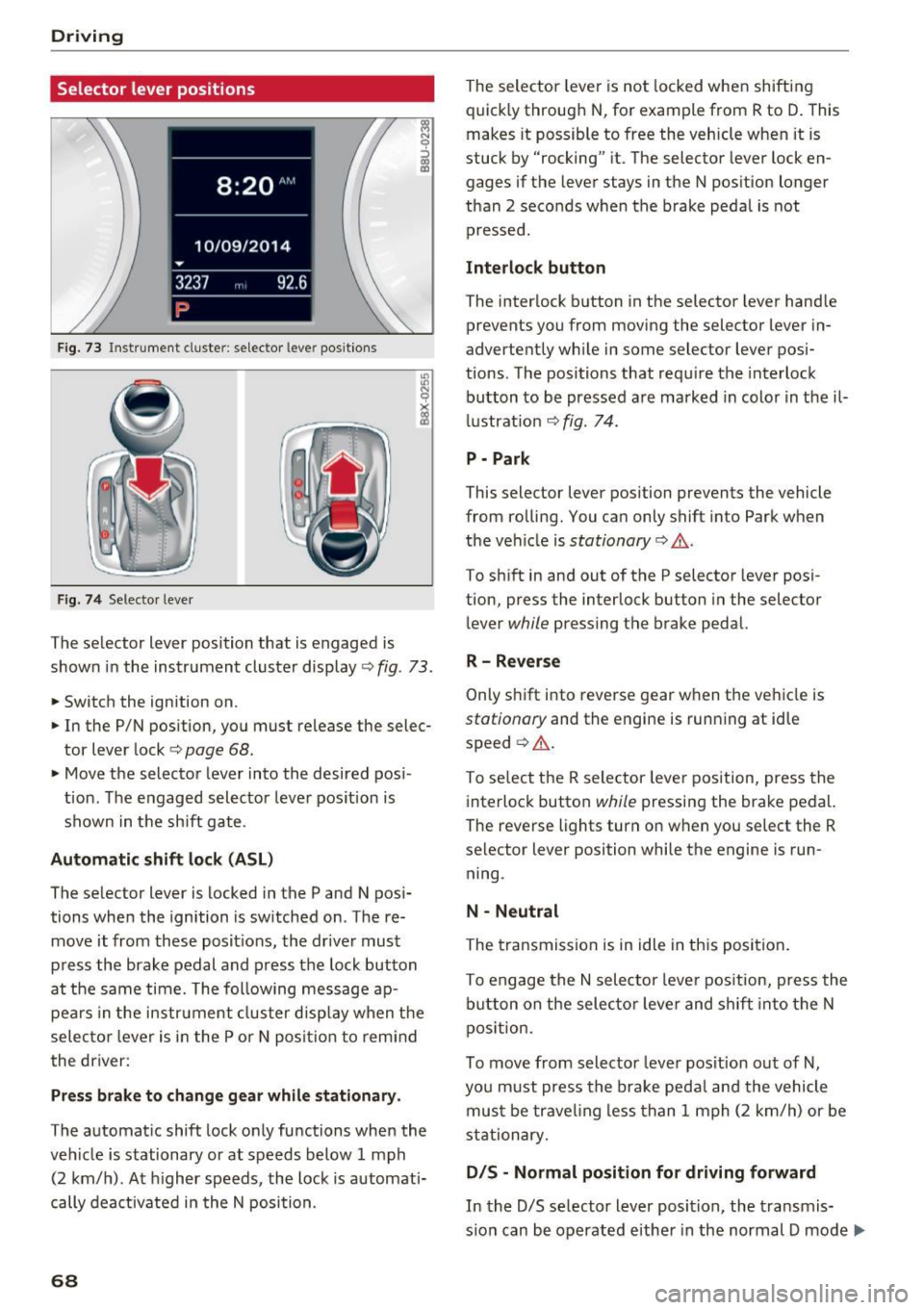
Fig. 73 Instrument cluste r: selector leve r positions
Fig. 74 Selecto r lever
The selector lever position that is engaged is
shown in the instrument cluster display
<=> fig . 73 .
.,. Switch the ignition on .
.. In the P/N position, you must release the selec
tor lever lock
c:> page 68.
• Move the selector leve r into the desired pos i
tion . The engaged selector lever pos ition is
shown in the sh ift gate .
Automatic shift lock (ASL )
The selector lever is locked in the P and N pos i
tions when the ignition is sw itched on . The re
move it from these posit ions, the driver must
press the brake pedal and press the lock button
at the same time. The following message ap pears in the instr ument cluster disp lay when t he
selec to r l ever is in the P or N posi tion to remi nd
the driver:
Pr ess brake to change gear while stationar y.
The automatic shift lock only functions when the
veh icle is stationary or at speeds below 1 mph
(2 km/h). At h igher speeds , the lock is automati
cally dea ctivated i n the N position.
68
The selector leve r is not locked whe n shifting
quick ly through N , for example from R to D. This
makes it possible to free the veh icle when it is
stuck by "rocking" it. The selector lever lock en
gages if the lever stays in the N pos ition longer
than 2 seconds when the brake peda l is not
pressed .
Interlock button
The interlock b utton in the selector lever hand le
prevents you from moving the selector lever in
advertently wh ile in some selector lever posi
tions. The positions that requ ire the interlock
button to be pressed a re marked in colo r in t he il
l ustrat ion <=>
fig. 74.
P - Park
This selector lever position prevents the vehicle
from rolling. You can only shift into Park when
the ve hicle is
stationary c:> A .
To sh ift in and out of the P selector lever posi
tion, press the interlock button in the selector
lever
while pressing the brake pedal.
R -Rever se
Only s hift i nto reve rse gear when the veh icle is
stationary and the engine is running at id le
speed ¢
A.
To se lect the R selector leve r position, press the
interlock button
while pressing the brake pedal.
The reverse lights turn on when you select the R
selector lever position while the engine is run
ning .
N -Neutral
The transmission is in idle in th is posi tion .
To engage the
N sele ctor leve r pos it ion, press the
b utton on the selecto r leve r and shift into the N
pos ition.
To move from selector leve r pos it ion out of
N,
you m ust press the brake peda l and the vehicle
mus t be trave ling less than 1 mph (2 k m/h) or be
stationary.
D IS -Normal position for driving forward
In the D/S se lector lever position, the transmis
s io n can be operated eithe r in the normal D mode ..,_
Page 71 of 236
00
or in the 5 sport mode. The instrument cluster
display shows the selected driving mode.
In the
normal mode D, the transmission auto
matically selects the suitable gear ratio.
It de
pends on engine load, vehicle speed and driving
style.
Select the
sport mode 5 for sporty driving. The
vehicle makes full use of the engine's power.
Shifting may become noticeable when accelerat
ing.
To move from selector lever position N to D, you
must press the brake pedal and the vehicle must
be traveling less than 1 mph (2 km/h) or be sta
tionary ¢&. .
A WARNING
Read and follow all WARNINGS¢&. in Driv
ing tips on page
70.
@ Note
Coasting downhill with the transmission in N
and the engine not running will result in dam
age to the automatic transmission and possi
bly the catalytic converter.
(D Tips
- If you accidentally select N while driving,
take your foot off the accelerator pedal and
wait for the engine to slow down to idle be
fore selecting Dor 5.
- If there is a power failure, the selector lever
will not move out of the P position. The
emergency release can be used if this hap
pens ¢
page 72.
Driving tips
Starting the engine
.. The selector lever must be in the P or the N po
sition.
Starting from a stop
.. Press and hold the brake pedal.
~ .. Press and hold the interlock button in these-
"' ~ lector lever handle, select the desired selector .... 0 0
:::,
00
Driving
lever position such as D ¢ page 68 and release
the lock button.
.. Wait a moment until the transmission shifts.
You will notice a slight movement when the
gear engages.
.. Release the brake pedal and press the accelera
tor pedal ¢_& .
Stopping temporarily
.. Press the brake pedal to stop the vehicle, for
example at a traffic light. Do not press the ac
celerator pedal when doing this.
.. To prevent the vehicle from rolling when you
start driving, set the parking brake when stop
ping on steep inclines¢,& .
.. The parking brake will release automatically
and the vehicle will start moving once you press
the accelerator pedal.
Stopping/parking
If the selector lever is not in the P position when
you open the driver's door, the vehicle could roll.
In vehicles with a convenience key*, the message
Shift to P and turn off ignition, or vehicle can
roll away
appears.
.. Press and hold the brake pedal¢ _&.
.. Set the parking brake .
.. Select the P selector lever position.
Stopping on an incline
.. Always press the brake pedal to hold the vehi
cle in place and prevent it from "rolling back"
¢
&_ . Do not try to prevent the vehicle from
" rolling back" when a gear is engaged by in
creasing the engine speed
¢(D .
Starting on a hill
.. Set the parking brake .
.. Select the D position .
.. Press the accelerator pedal carefully. If your
safety belt is fastened, the parking brake is au
tomatically released and your vehicle begins to
move.
69
Page 72 of 236

Driving
Under certain circumstances, (such as driving in
the mountains or towing a trailer), it may be use
ful to switch temporarily to the manual shift pro gram in order to manually adapt the gear to the
driving conditions
c::> page 71.
On inclines, activate the parking brake first and
then move the selector lever to the P position
c::> page 65. This prevents the locking mechanism
from being loaded too heavily and will make it
easier to move the selector lever out of the P po
sition .
_& WARNING
-The vehicle can also roll when the engine is
stopped.
- Unintended vehicle movement can cause se
rious injury.
- Never leave your vehicle with the engine
running while in gear. If you must leave
your vehicle when the engine is running, ac
tivate the parking brake and move the selec
tor lever to P.
- Power is still transmitted to the wheels
when the engine is running at idle. To pre
vent the vehicle from "creeping", you must
keep your foot on the brake when the en
gine is running and the selector lever is in D/
Sor R or "tiptronic" mode is selected.
- Do not press the accelerator pedal when
changing the selector lever position while
the vehicle is stationary and the engine is running .
- Never shift into R or P while driving.
- Before driving down a steep slope, reduce
your speed and shift into a lower gear with
"tiptron ic".
- Do not ride the brakes or press the brake
pedal too often or too long when driving
down a hill. Constant braking causes the
brakes to overheat and substantially re
duces braking performance, increases brak
ing distance or causes complete failure of
the brake system.
- To prevent the vehicle from rolling back
when stopping on inclines, always hold it in
place with the brake pedal or parking brake.
70
- Never hold the vehicle on an incline with a
slipping clutch. The clutch opens automati
cally when it becomes too hot from the
overload. An indicator lamp . illuminates
and a driver message appears
c::> page 72
when the clutch is overloaded.
- If the engine must remain running, never
have any driving position engaged when
checking under the hood. Make sure these
lector lever has securely engaged and is
locked in P with the parking brake set
c::> page 159. Otherwise, any increase in en
gine speed may set the vehicle in motion,
even with the parking brake applied.
(D Note
- When stopping on an incline, do not try to
hold the vehicle in place by pressing the ac
celerator pedal while a driving gear is se
lected. This can cause the automatic trans
mission to overheat and can damage it. Set
the parking brake or press the brake pedal
to prevent the vehicle from rolling.
- Allowing the vehicle to roll when th@ engine
is stopped while the selector lever is in the
N position will damage the automatic trans
mission, because it is not lubricated under
those circumstances
c::> page 211, Towing
with a tow truck.
- The transmission can overheat and be dam
aged under certain driving and traffic condi
tions such as frequent starts, creeping for a
long time, or stop-and-go traffic. If the.
indicator light turns on, stop the vehicle at
the next opportunity and let the transmis
sion cool down
c::> page 72.
Hill descent control
The hill descent control system assists the driver
when driving down hills.
Hill descent control is activated when the selec
tor lever is in the D or S position and you press
the brake pedal. The transmission automatically
selects a gear that is suitable for the hill. Hill de
scent control tries to maintain the speed ach- ieved at the time of braking, within physical and ..,.
Page 73 of 236
a:,
a:,
...... N r--. N .... 0 0 ::, a:,
technical limitations . If may st ill be necessary to
adjust the speed with the brake pedal.
H ill descent contro l sw itches off once the hill lev
e ls o ut or yo u press the accelerator pedal.
& WARNING
Hi ll descent contro l cannot overcome physical
limitations, so it may not be able to maintain
a constant speed under a ll conditions. Always
be ready to apply the brakes.
Manual shifting (tiptronic mode)
The tiptronic mode allows the driver to shift the
gears manually .
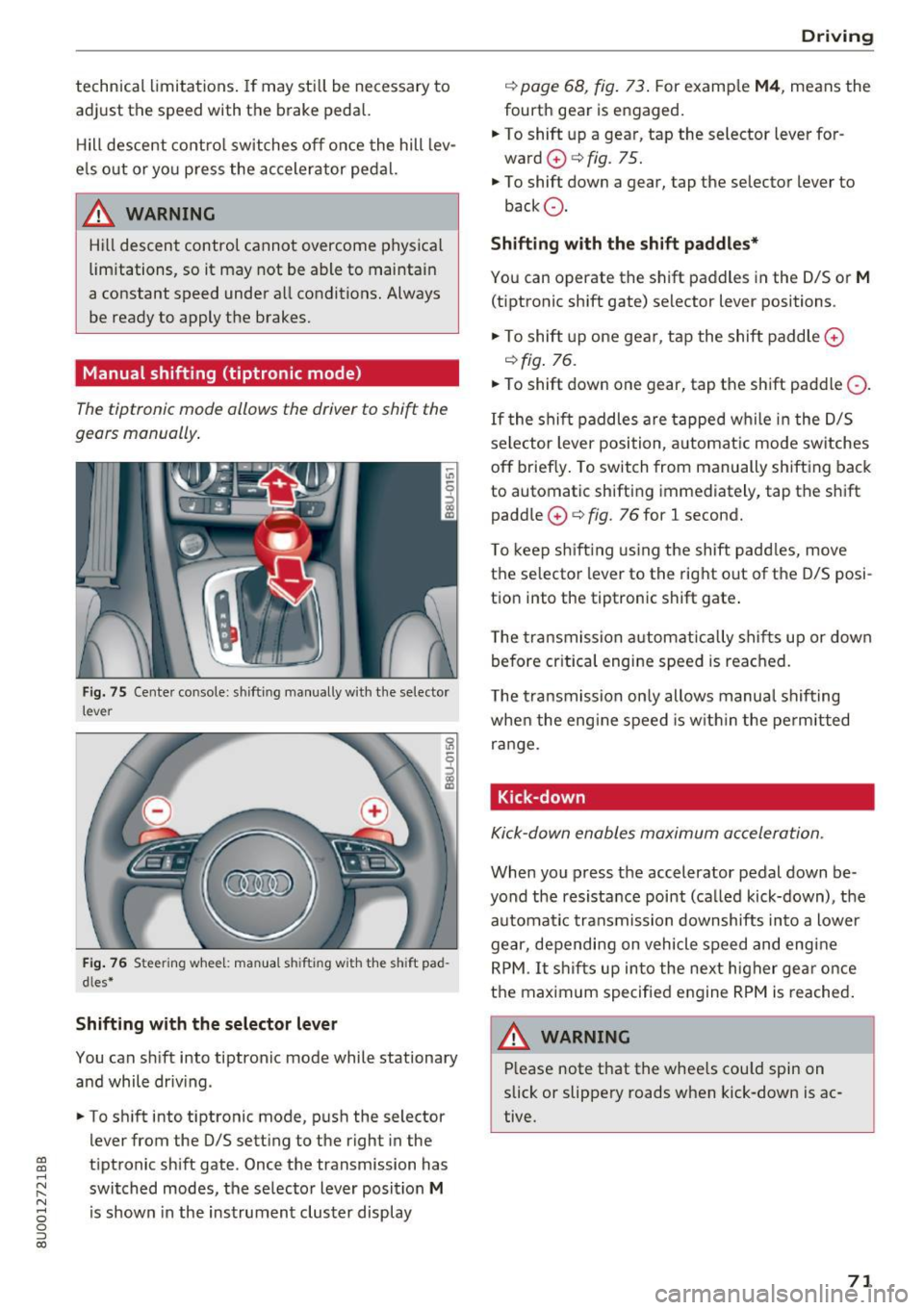
Fig . 75 Cente r console: shifting manually with the selector
lever
F ig. 76 Steering whee l: man ua l sh ifting with the sh ift pad
dles *
Shifting with the selector lever
You can s hift into tiptronic mode while stationary
and while driv ing.
• To sh ift into t iptronic mode, p ush the selector
lever from the 0/5 setting to the right in the
tiptronic sh ift gate. Once the transmission has
switched modes, the se lecto r lever position
M
is shown in the instrument cluster display
D rivi ng
c::> page 68, fig . 73 . For examp le M4 , means the
fourth gear is engaged .
.. To shift up a gear, tap the selector lever for
ward
0 c::> fig. 75.
• To shift down a gear, tap the se lector lever to
back Q.
Shifting with the shift paddles*
Yo u can operate the shift paddles in the 0/5 or M
(tiptronic shift gate) selector lever positions .
• To shift up one gear, t ap the shift paddle
0
c::>fig . 76.
• To shift down one gear, tap the shift paddle Q.
If the shi ft paddles are tapped wh ile in t he D/S
se lector lever position, a utomat ic mode sw itches
off briefly . To switch from manually shifting back
to automatic shifting immediately, tap the shift
paddle
0 c::> fig. 76 for l second.
T o kee p sh ift ing using the shift padd les, move
the selector lever to the rig ht out of the 0/5 posi
t ion into the tiptron ic shift gate .
T he transmission a utomatically shif ts up or down
b efore cr itica l engi ne speed is reached.
T he t ransmission on ly allows manua l shif ting
whe n the eng ine speed is w it hi n the pe rmitted
range.
Kick-down
Kick-down enables maximum ac celeration.
When you press the accelerator pedal down be
yond the resistance point (ca lled kick-down), t he
automa tic transmission downshifts in to a lower
gear, depending on vehicle speed and eng ine
RPM. It s hifts up into the next h igher gear o nce
the maximum specifie d engine RPM is reached .
,&_ WARNING
-= -Please note that the whee ls cou ld spin on
slick or slippery roads when kick-down is ac
tive.
71
Page 74 of 236
Driving Emergency mode
Applies to: ve hicles w ith a utomat ic t ransm iss io ns
In the event of a system malfunction, there is an
emergency program.
If all of the selector lever positions are highligh t
ed with a light background in the instrument
cluster display, there is a system malfunction and
the S tronic transmission is running in the emer
gency program. The vehicle can still be driven in
emergency mode, but only with reduced speed
and not in all gears. In some cases, the vehicle
cannot drive in reverse.
@) Note
If the transmission runs in emergency mode,
drive to an authorized Audi dealer or author
ized Audi Service Facility immediately to have
the malfunction corrected.
Transmission malfunction
A pp lies to: ve hicles w ith a uto mat ic t ra n smi ssio ns
• Transmission overheating! Please stop vehi
cle!
The transmission is too hot and can become dam
aged. Stop and let the transmission cool with the
engine running (at idle) in the P selector lever po
sition. Then the indicator light and the message
tur n off, drive to an authorized Audi dealer or au
thorized Audi Service Facility immediately to have
the malfunction corrected. If the indicator light
and the driver message do not turn off, do not
continue driving . See an authorized Audi dealer
or authorized Audi Service Facil ity for assistance.
72
Selector lever emergency release
App lies to : vehicles wi th automatic transm issions
If the vehicle's power supply fails, the selector
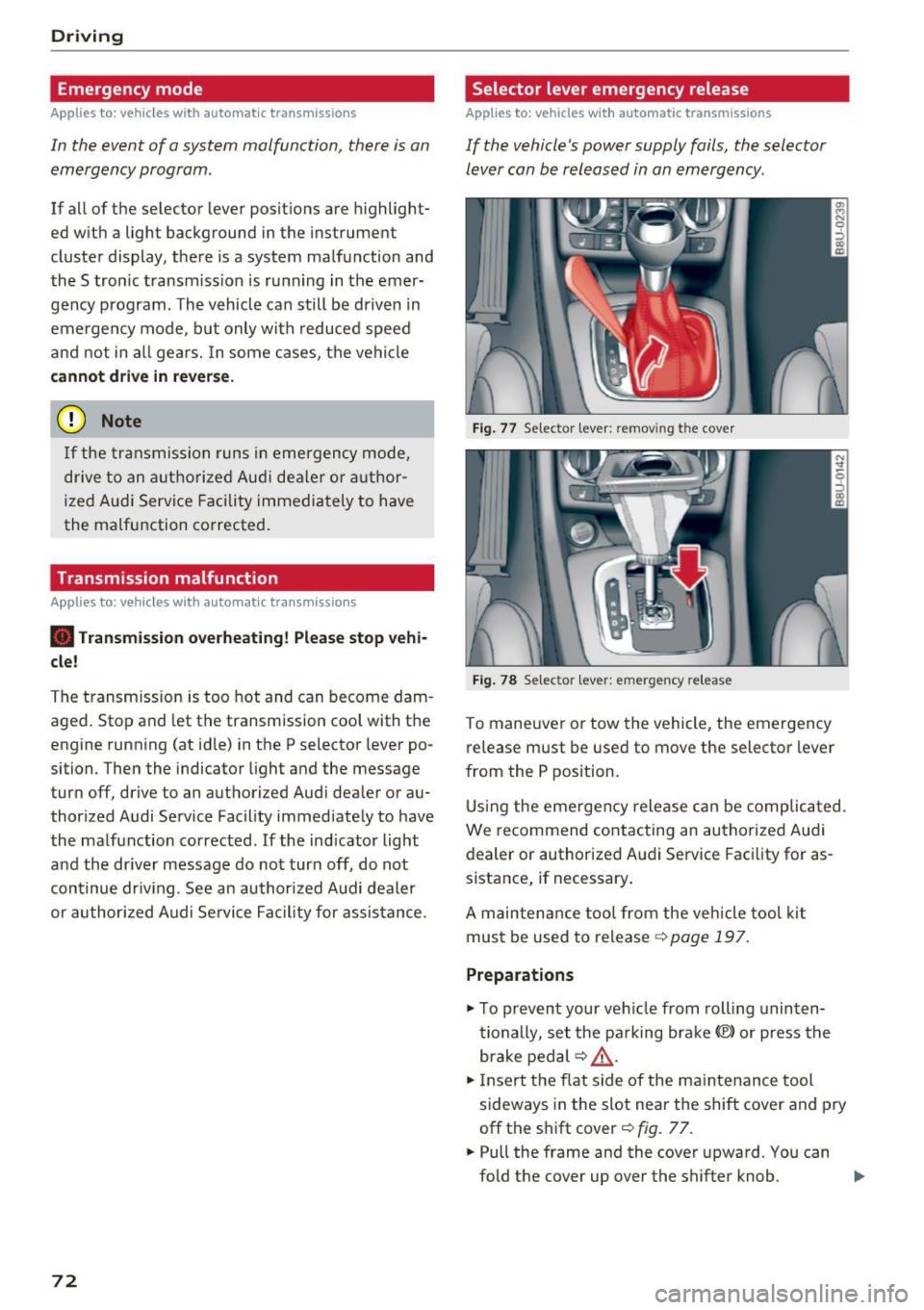
lever can be released in an emergency .
Fig. 77 Selector leve r: remov ing the cove r
Fig. 78 Selector leve r: emerge ncy release
To maneuver or tow the vehicle, the emergency
release must be used to move the selector lever
from the P position.
Using the emergency release can be complicated .
We r ecommend contacting an authorized Audi
dealer or authorized Audi Service Facility for as
sistance, if necessary .
A maintenance tool from the vehicle tool kit
must be used to release ¢
page 197.
Preparations
.,. To prevent your vehicle from rolling uninten
tionally , set the parking brake(®) or press the
brake pedal ¢
LD,. .
.,. Insert the flat side of the maintenance tool
sideways in the slot near the shift cover and pry
off the shift cover¢
fig. 77 .
.. Pull the frame and the cover upward. You can
fold the cover up over the shifter knob . ..,_
Page 80 of 236
Ass is t
Assist
Speed warning system
Applies to: vehicles with speed warning system
The speed warning system helps you to stay be
low o specified maximum speed that con be set,
changed or deleted in the Infotainment system".
The speed warning system warns you if yo u are
exceeding the maximum speed that you have set.
A warning tone will sound as soon as your speed
exceeds the stored value slightly. The
(OJ (USA
models)
I Hll (Canada models) indicator light
and a message appear in the instrument cluster
d isplay at the same time. The
Hll![t] indicator
light and the message t urn off if the speed falls
b a ck below the stored maxim um speed.
Sett ing a threshold is recommended if you would
like to be reminded when yo u reach a certa in
maxim um speed. Situations where yo u may want
to do so i nclude dr iving in a cou ntry w it h a ge ne r
al speed limit or if there is a specified maximum
speed for winter tires .
Setting the warning threshold
Select: !CARI fu nction button > (C ar) Systems *
control b utton > Driver assi st > Sp eed warning .
(0 Tips
Regardless of the speed wa rning sys tem, you
should always monitor yo ur speed using the
speedome ter and ma ke sure you are following
t he legal speed limi t.
78
Cruise control system
Switching on
Applies to: vehicles with cruise control system
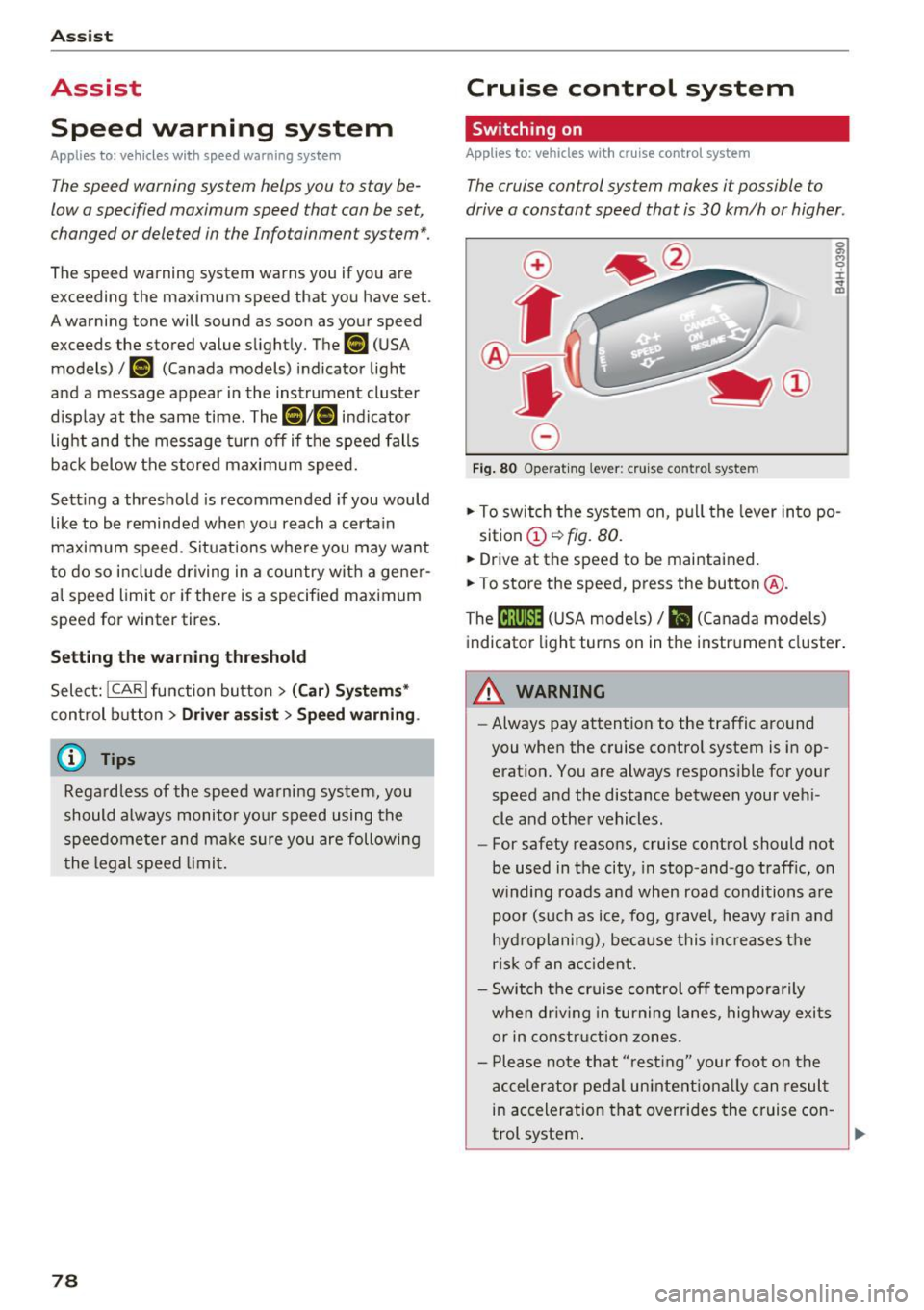
The cruise control system makes it possible to
drive a constant speed that is 30 km/h or higher.
0
f
®l
0
Fig . 80 Operat ing lever: cru ise control system
5:
"' 0 ±
sition
(D ~ fig. 80.
.. Drive at the speed to be maintained.
.. To store the speed, press the button @.
The
(ij;\1)~1~ ( U SA mode ls)/ B (Canada models)
indicato r light turns on in the instr ument cluster .
&_ WARNING
-Always pay attention to the traffic a round
you when the cruise contro l system is in op
erat ion. You are always respons ible for your
speed and the distance between your ve hi
cle and other vehicles.
- For safety reasons , cruise cont rol should not
be used in the city, in stop-and-go traff ic, on
w inding roads and when road condi tions a re
poor (such as ice, fog, g ravel, heavy rai n an d
hy dro planing), because this inc reases t he
r is k of an accident.
- Switch the cr uise control off temporarily
when dr iv ing in turning lanes, highway exi ts
or in constru ction zones.
- P lease note th at "res ting" your foo t on the
a ccelerator pedal un inte ntiona lly can resul t
in ac celeration tha t overrides the c ruise con -
-
trol system . .,.
Page 85 of 236
a:,
a:,
...... N r--. N .-< 0 0 ::, a:,
Audi drive select
Introduction
Applies to: vehicles with Audi drive select
Drive select makes it possible to experience dif
ferent types of vehicle settings in one vehicle.
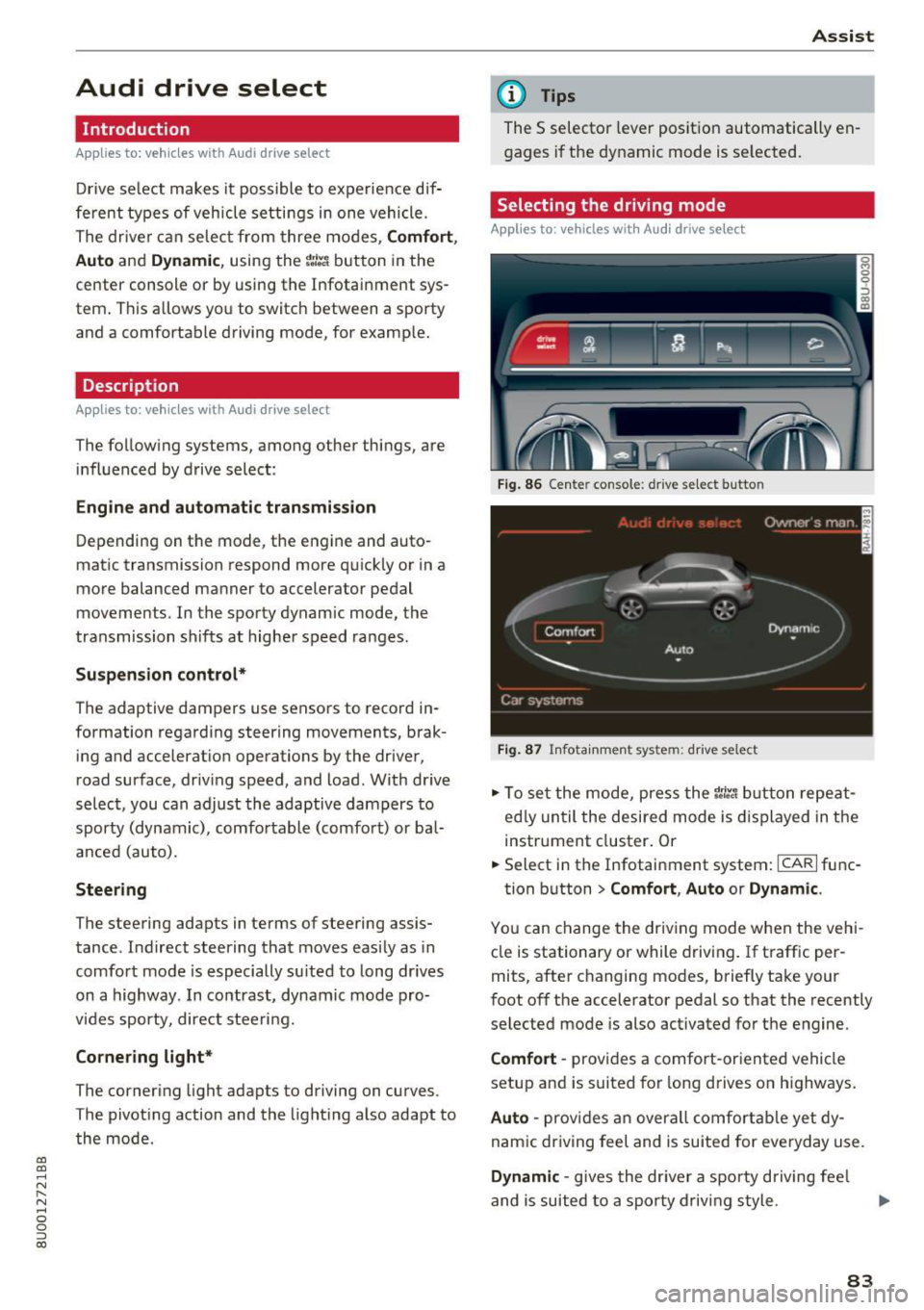
The driver can selec t from three modes,
Comfort,
Auto
and Dynamic , using the ~:/:a button in the
center console or by using the Infotainment sys
tem . This allows yo u to switch between a sporty
and a comfortable driving mode, for example.
Description
App lies to: ve hicles with Audi drive select
The following systems, among other things , are
influenced by drive select:
Engine and automatic transmission
Depending on the mode, the engine and auto
matic transmission respond more quickly or in a
more balanced manner to accelerator pedal
movements. In the sporty dynamic mode, the
transmission shifts at higher speed ranges.
Suspension control*
The adaptive dampers use sensors to record in
formation regarding steering movements, brak ing and accelerat ion operations by the driver,
road surface, driv ing speed, and load . With dr ive
select, you can adjust the adaptive dampers to
sporty (dynamic), comfortable (comfort) or bal
anced (auto).
Steering
The steering adapts in terms of steering assis
tance . Indirect steering that moves easily as in
comfort mode is especially su ited to long drives
on a highway . In contrast, dynamic mode pro
vides sporty, direct steeri ng.
Cornering light*
The cornering light adapts to driving on curves .
The pivoting action and the lighting also adapt to
the mode.
Assist
(D Tips
The 5 selector lever position automatically en
gages if the dynamic mode is se lected.
Selecting the driving mode
Applies to: vehicles wit h Audi drive select
Fig. 86 Cente r console : dr ive se lect button
Fig. 87 Infota inment sys tem: drive select
" To set the mode, press the r:i:., button repeat
ed ly until the desired mode is displayed in the
instrument cluster. Or
" Select in the Infotainment system:
ICARI func-
tion button
> Comfort , Auto or Dynamic .
You can change the driving mode when the vehi
cle is stationary or while driving . If traffic per
mits, after changing modes, briefly take your
foot off the accelerator pedal so that the recently
selected mode is also activated for the engine.
Comfort -provides a comfort-oriented vehicle
setup and is suited for long drives on highways.
Auto -provides an overall comfortable yet dy
namic driving feel and is suited for everyday use .
Dynamic -gives the driver a sporty driving fee l
and is suited to a sporty driving style.
83
Page 93 of 236
00
00
......
"' ,-...
"' ...... 0 0 :::,
00
alarm for a few seconds after switching on the
parking system or when the parking system is al
ready act ivated. If the error is not corrected be
fore you switch off the ignit ion, the LED in the P'J/Ji
button will b link the next t ime you sw itch on the
parking system by s hift ing into reverse .
If a sensor is fau lty, the
J;l4 symbol will appear in
front of/behind the vehicle in the Infotainment d isplay. If a rear sensor is faulty, only obstacles
that are in areas @ and @ are displayed
c::> page 86, fig. 88. If a front se nsor is faulty , only
obstacles that a re in areas © and @are dis
p layed.
Drive to an authorized Aud i dealer or authorized
Aud i Service Facility immediately to have the
malfunct ion corrected .
Trailer hitch
Applies to: vehicles with parking system plus/rearview cam
era and trailer hitch
For vehicles using the trailer socket, the parking
system rear sensors are not activated when you
shift into reverse gear or when you press the P'J/Ji
button . This results in the follow ing restr ictions .
Parking sy stem plus *
There is no distance warning for the rear . The
front sensors remain activated . The visual display
switches to tra iler mode.
Par king sy ste m plus and rea rvie w camera*
There is no d istance warn ing fo r the rear. The
front sensors remain activated. The visual display
sw itches to tra iler mode. The rearview camera
image will not show the orientation lines and the
b lue surfaces.
(D Tips
Trailer h itches that are not installed at the
factory may cause the parking system to ma l
function or they may restrict its function.
Parking system s
91
Page 95 of 236
a:,
a:,
...... N r--. N .... 0 0 ::, a:,
-Press the accelerator pedal carefully when
accelerating on smooth, slippery surfaces
such as ice and snow. The drive wheels can
spin even when these control systems are
installed and this can affect driving stability
and increase the risk of a collision.
(D Tips
- The ABS and ASR only function correctly
when all four wheels have a similar wear
Switching on/off
Intelligent Technology
condition. Different tire sizes can lead to a
reduction in engine power.
- You may hear noises when the systems de
scribed are working .
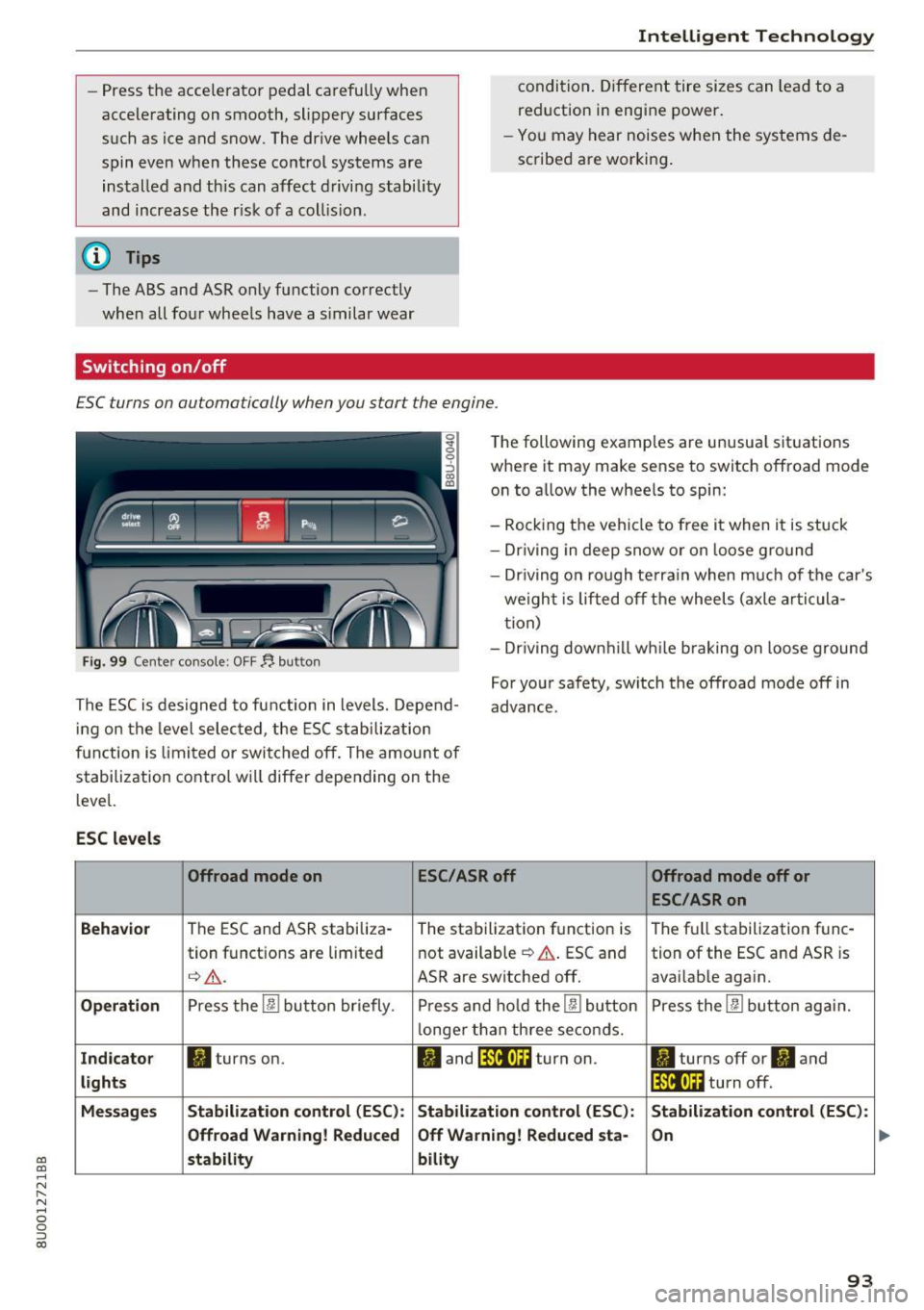
ESC turns on automatically when you start the engine .
Fig. 99 Center console: OFF~ button
The following examples are unusual situations
where it may make sense to switch offroad mode
on to allow the wheels to spin:
- Rocking the vehicle to free it when it is stuck
- Dr iving in deep snow or on loose ground
- Driving on rough terrain when much of the car's
weight is lifted off the wheels (axle articula
tion)
- Dr iving downh ill wh ile braking on loose ground
The ESC is designed to function in levels. Depend
ing on the level selected , the ESC stabilization
function is limited or switched off. The amount of
stabilization control will differ depending on the
level. For your safety, switch the offroad mode off in
advance.
ESC
levels
Offroad mode on ESC/ASRoff Offroad mode off or
ESC/ASRon
Behavior
The ESC and ASR stabiliza- The stabilization function is The full stabilization func-
tion functions are limited not available
~ A. ESC and tion of the ESC and ASR is
q_,& _ ASR are switched off. avai lable again.
Operation Press the 00 button briefly. Press and hold the 00 button Press the 00 button again.
l onger than three seconds.
Indicator II turns on. II and lf'tii•Ui turn on. ltl turns off or II and
lights lfilf•l~i turn off.
Messages Stabilization control (ESC): Stabilization
control (ESC): Stabilization control (ESC):
Offroad Warning! Reduced Off Warning! Reduced
sta-
On
stability bility
93