brake light AUDI Q3 2017 Owner´s Manual
[x] Cancel search | Manufacturer: AUDI, Model Year: 2017, Model line: Q3, Model: AUDI Q3 2017Pages: 236, PDF Size: 58.93 MB
Page 65 of 236
a:,
a:,
...... N r--. N .-< 0 0 ::, a:,
Engaging the steering lock1
)
The steering locks when you tu rn the engine off
using the
! S TART ENGINE ST OP I butto n and
open the driver's door. The locked stee ring he lps
p revent vehicle theft .
Emergency off function *
If it is absolutely necessary, the engine can also
be turned off while driv ing at speeds starting at
4 mph (7 km/h). To switch the engine off, p ress
the
! STA RT ENGINE ST OP I button twice in a row
bri efly or press and hold for long er than two sec
onds.
A WARNING
- Never turn off the engine before the veh icle
has come to a complete stop. The f ull func
ti on of the brake booster and the power
steering is not gua ranteed. You must use
more fo rce to turn or b rake if necessary. Be
c a use you canno t steer and brake as you
usually wou ld, this could lead to c rashes
and serious injuries .
- For safety reasons, you should always par k
yo ur vehicle wi th the selector lever in P .
Otherwise, the vehicle could inadvertently
roll away .
- The radiator fan can continue to run for up
to 10 min utes even afte r you have turned
off the engine and removed the ignition key.
The radiator fan can also tu rn on again if the
engine coolant heats up because of intense
sunlight or heat bui ld -up in the engine com
partment.
- Always take the key with you whenever you
leave your vehicle. Otherw ise, the engine
cou ld be sta rted or electrical equ ipme nt
such as the power w indows cou ld be opera t
ed . T his can lead to se rious inj ury.
(D Note
If the eng ine has been under heavy load for
an extended per iod of t ime, heat builds up in
the engine compa rtme nt after the eng ine is
sw itched off and there is a risk of dam aging
ll Th is fun ctio n is not a vail able in al l countries .
Drivi ng
the engine. For th is reason, let the engine run
at idle for approximate ly two minutes before
shutting it off .
Starting the engine when there is a
malfunction
Applies to: vehicles with convenience key
Other circumstan ce s can cause the engine no t to
s tar t, such as the battery in the remote control
key has drained , there is interference with the
key or there is a system malfunction.
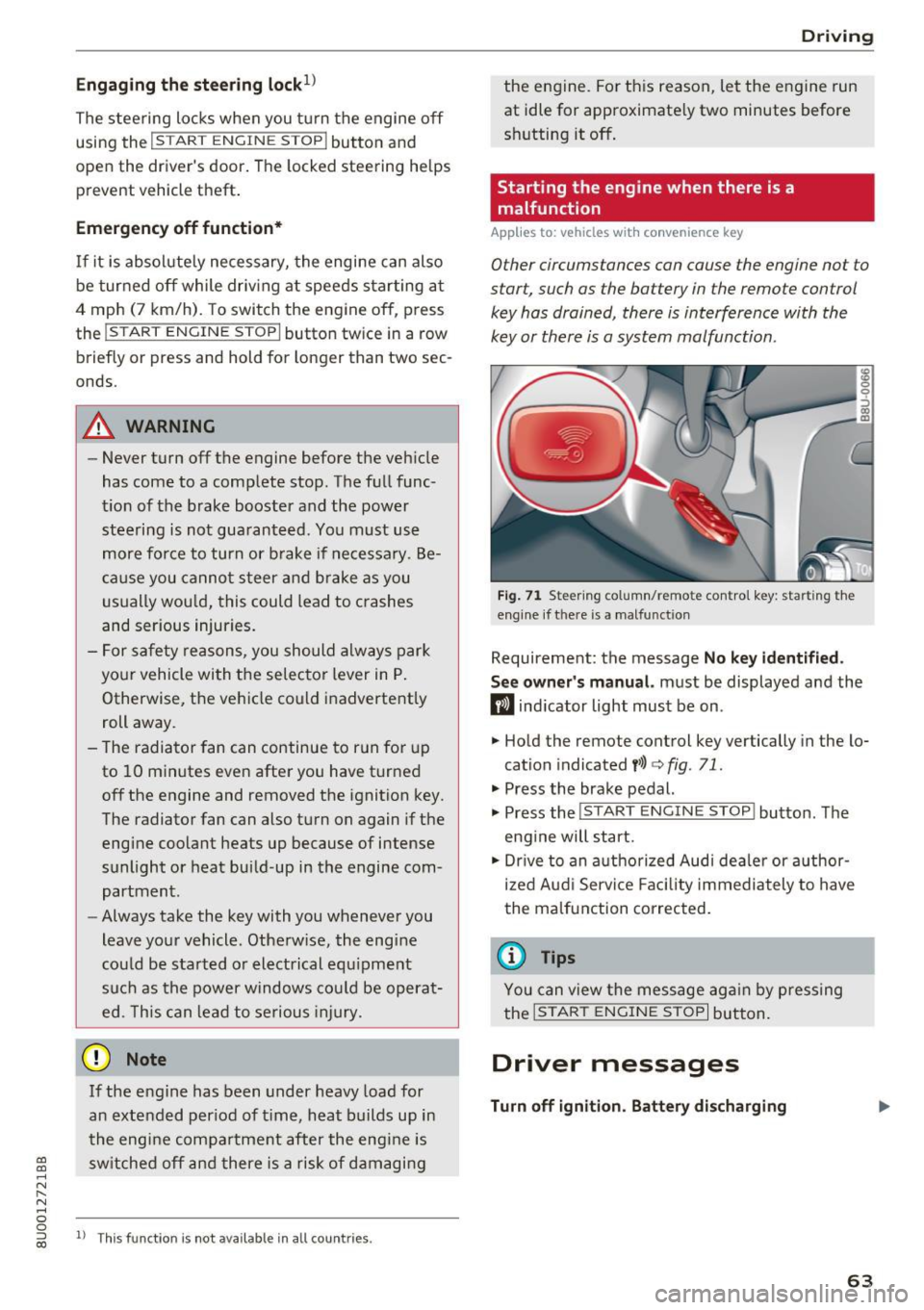
F ig . 7 1 Steer ing co lumn/remo te con trol k ey: star ting the
eng ine if t here is a ma lfun ction
Requirement: the message No key id entified .
S ee owner's manual.
must be displayed and the
m ind icator light must be on .
.,. Hold the remote control key vertically in the lo
cation indicated
y> l) q fig. 71 .
.,. Press the brake pedal.
... Press the
!START E NGINE STOP ! button. The
eng ine will start.
.,. Dr ive to an a uthorized Audi dea ler or a uthor
ized Aud i Servi ce Fa cili ty immediately to have
the malfunct ion correc ted.
(D Tips
You can view the message ag ai n by pressing
the
I START ENGI NE STOP I bu tton.
Driver messages
Turn off ignition . Battery discharging
63
Page 66 of 236
Driving
This message appea rs and a warning tone sounds
if you open the driver's door when the ignition is
sw itched on.
Pr es s brake pedal to start engine
This message appears if you do not step on the
brake pedal to sta rt the eng ine on a vehicle wi th
an automatic transm ission .
Please engage N or P
This message appears when starting or stopping
the engine and Nor Pis not engaged. The engine
will not start/stop .
Ill Key not in veh icl e?
The indica to r li ght tur ns on and this message ap
pears i f the convenience key* was removed from
the vehicle when the engine was running. If the
convenience key is no longer in the v ehicle, you
cannot switch the ignition on or start the engine
once you stop it . You also cannot lock the vehicle
from the outside.
Shift to P , vehicle can roll awa y. Doors can onl y
be locked in P .
This message appea rs for safe ty reasons a long
with a warning sound if the se lector lever is not
engaged in P after switching the ignition off .
Move the selector lever to the P position. Other
wise the vehicle is no t protected from rolling and
it cannot be locked .
II No key identified. See owner' s manual.
This message appe ars if the re is no convenience
key * ins ide the vehicle or if t he system does not
recognize the key . The convenience key may not
be recognized, for example, if it is covered by an
object that
disrupts the signal (such as a brief
case), or if the key batte ry is weak. Electronic de
vices suc h as cell phones can also interfere w it h
the s ignal.
To still be able to start or stop the engine, refer
to
c:::> page 63.
64
Electromechanical
parking brake
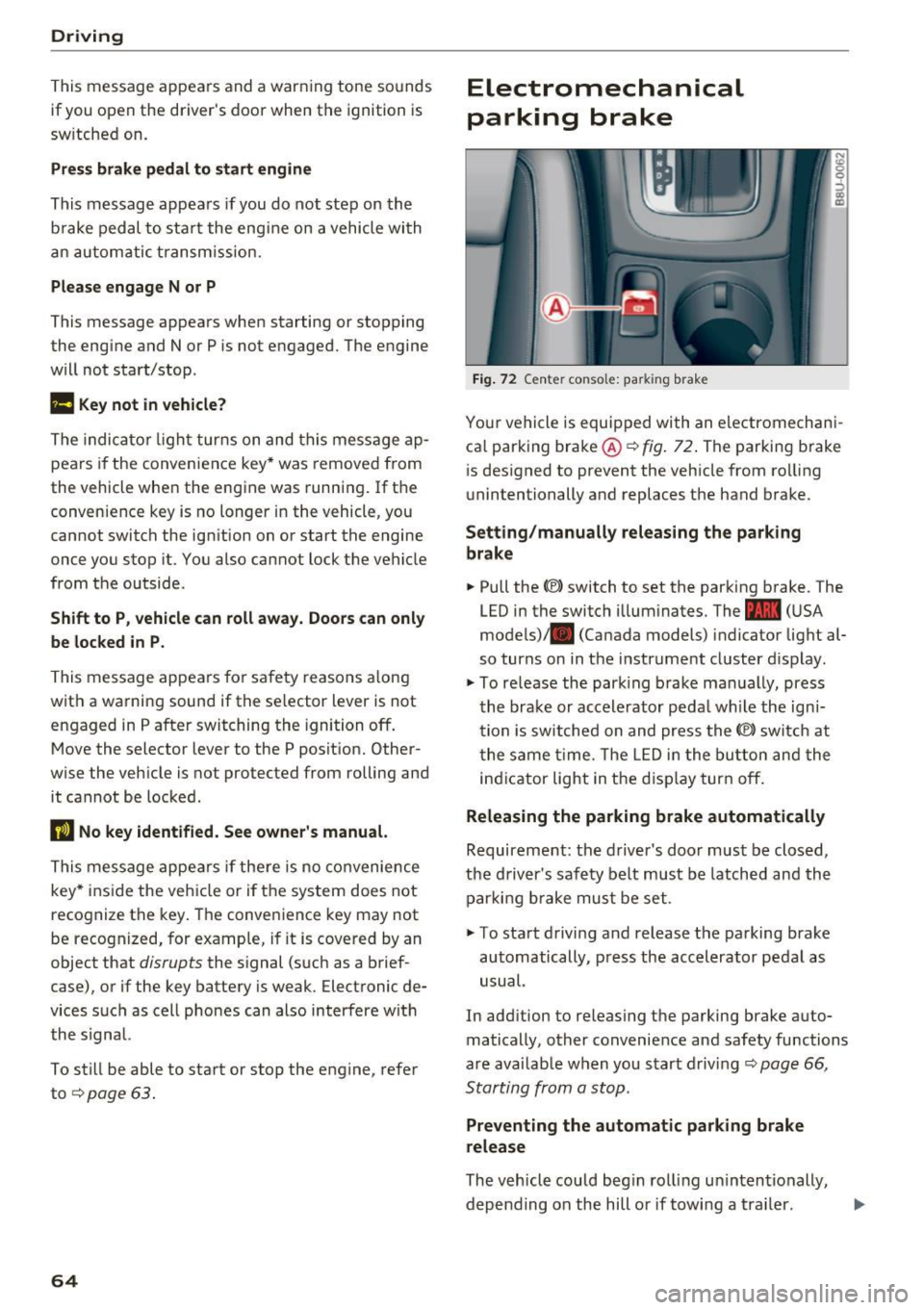
Fig . 7 2 Ce nter co nso le: pa rk in g brake
You r vehicle is equipped with an electromechani
ca l parking bra ke @
c:::> fig . 72. The parking brake
i s des igned to prevent the veh icle from ro lling
unintentionally and replaces the hand brake.
Setting /manually releasing the parking
brake
.. Pull the(®) switch to set the parking b rake . The
LED in the switch illum inates. The -
(U SA
mode ls)/ . (Canada models) indicator light al
so turns on in the instrument cluster d isplay .
.,. To re lease the par king brake ma nually, press
the brake or accele rator peda l w hile the ign i
tion is sw itched on and press the(®) switch at
t he same t ime. The L ED i n the bu tton and the
in dicator light in the d isp lay turn off.
Releasing the parking brake automatically
Requireme nt: the d river 's door must be closed,
the driver's saf ety be lt must be latched and the
par king b rake mus t be set .
.. To sta rt d riving and release the parking brake
automatically , press the accelerator pedal as
usual.
In add ition to releasing the parking brake auto
matically, other convenience and safety functions
a re availab le when you start driving
c:::> page 66 ,
Starting from a stop.
Preventing the automatic parking brake
release
The veh icle could beg in rol ling u ninten tionally,
depending on the hill or if towing a tra iler . .,..
Page 68 of 236
Driving
-If t here is a power fa ilure, the pa rking brake
will not set if it is re leased, and it will not
r elease i f it is set¢.&. . See an authorized
A udi dealer or authorized A udi Service Fa
cility for ass istance.
Starting from a stop
Vario us convenience and safety functions may be
ava ilable when the vehicle begins driving, de
pending on vehicle eq uipment .
Starting on hills with the parking brake set
R eq uir ement: the driver's door must be closed .
.,. To start dr iving co m fo rtab ly when o n a hill, set
t he parking brake and begin dr iv ing as usu al.
The brak ing force of the par king brake does not
release automatically until t he wheels build up
enough dr iv ing force .
Starting on hills with hill hold assist
Hill hold ass ist m akes i t ea sie r to st art on hills.
Re qui remen t: the driver's door must be closed
and the eng ine must be r unning .
.,. To activate hill ho ld assist, press a nd ho ld the
brake pedal for several seconds. The veh icle
must be i n an uph ill direction o f travel.
After releasing the brake peda l, the bra king pow
er is ma intained for a brief moment¢
A to pre
ve nt the vehicle from rolling back when starting.
D ur ing th is ti me, you can eas ily beg in to move
your ve hicle.
.8, WARNING
Appl ies to: ve hicles wit h hil l hol d ass ist
- If you do not begin dr iving immediately or
the engine sta lls after releas ing t he b rake
peda l, yo ur vehicle may begin to roll back
ward. P ress the brake pedal o r set the park
ing bra ke immed iate ly.
- The intelligent tec hno logy of hill hold assist
cannot overcome the lim itations imposed by
natura l phys ical laws . The incr eased comfo rt
of fered by h ill hold ass ist sho uld not cause
yo u to
ta ke safe ty risks.
66
- Hill hold ass ist cannot hold t he ve hicle in
place on a ll hills (for examp le, if the ground
is s lippery or icy).
- To reduce the r is k of an accident, always
make sure the veh icle is situated safely
w hile stationary .
Driving offroad
General information
Applies to: vehicles with offroad mode
The ele ct ronic st abiliz ation con trol ( ES C) f unc
tions we re enh ance d for driving off road. ESC o ff
road mode can be activated in driving sit uat ions
i n which a whee l lock o r a differential lock func
tion is needed ¢
page 93. The h ill descent as
s ist is a lso available , which automatically brakes
the ve hicle and main tains a constant speed as a
r esul t¢
pag e 94.
However , your Aud i is not an offroad vehicle .
Only drive in terrain that is suitable for the vehi
cle and your driving ability. Never take any un necessary risks!
After driving offroad
- After d riving off road, remove branches and
other deb ris from the rad iator g rille, under
body, and wheels. Look especially fo r fo reign
objects (such as stones) that may be st uck in
the t ire t read.
- Clean the vehicle body and u nderbody a nd i n
spect the veh icle for poss ible damage.
- Clean the windows, headlights, tail lights a nd
the license p late if they are dirty .
- Perform a brake test (espec ia lly after driving
throug h water) .
.8, WARNING
-Be especially aware a nd at tentive whe n driv
ing un der diff icu lt con ditions . Vehicl e dam
age a nd injuries may o ccur when driving at
e xc es sively high speed s or with i ncorr ec t
d riving maneuvers.
- Always a djust yo ur sp eed and drivi ng s ty le
to the roa ds, terr ain, tra ffi c and weat he r
condition s. Drive especi ally slowly if t here i s
low visibili ty when o ffroad .
~
Page 70 of 236
Driving
Selector lever positions
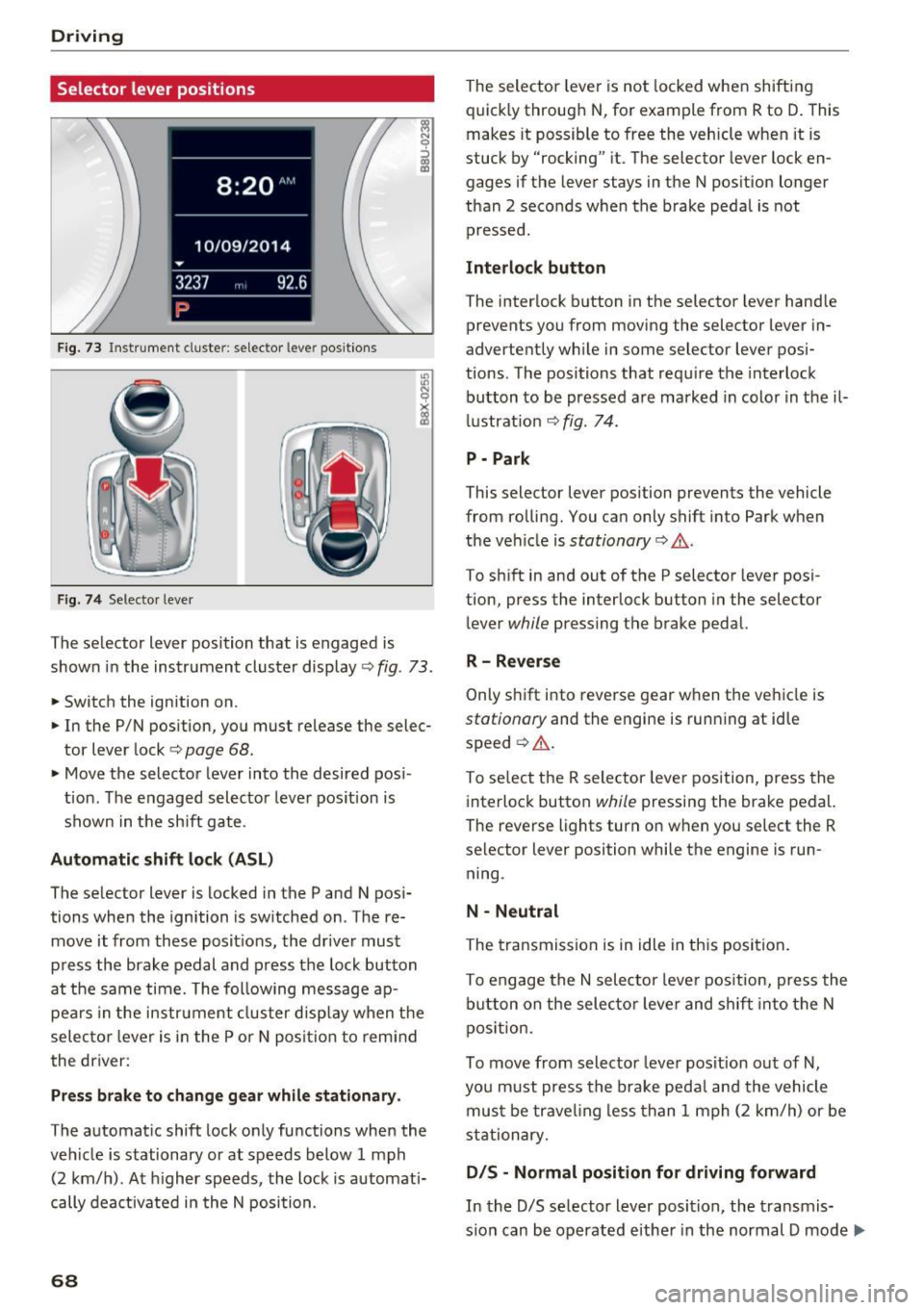
Fig. 73 Instrument cluste r: selector leve r positions
Fig. 74 Selecto r lever
The selector lever position that is engaged is
shown in the instrument cluster display
<=> fig . 73 .
.,. Switch the ignition on .
.. In the P/N position, you must release the selec
tor lever lock
c:> page 68.
• Move the selector leve r into the desired pos i
tion . The engaged selector lever pos ition is
shown in the sh ift gate .
Automatic shift lock (ASL )
The selector lever is locked in the P and N pos i
tions when the ignition is sw itched on . The re
move it from these posit ions, the driver must
press the brake pedal and press the lock button
at the same time. The following message ap pears in the instr ument cluster disp lay when t he
selec to r l ever is in the P or N posi tion to remi nd
the driver:
Pr ess brake to change gear while stationar y.
The automatic shift lock only functions when the
veh icle is stationary or at speeds below 1 mph
(2 km/h). At h igher speeds , the lock is automati
cally dea ctivated i n the N position.
68
The selector leve r is not locked whe n shifting
quick ly through N , for example from R to D. This
makes it possible to free the veh icle when it is
stuck by "rocking" it. The selector lever lock en
gages if the lever stays in the N pos ition longer
than 2 seconds when the brake peda l is not
pressed .
Interlock button
The interlock b utton in the selector lever hand le
prevents you from moving the selector lever in
advertently wh ile in some selector lever posi
tions. The positions that requ ire the interlock
button to be pressed a re marked in colo r in t he il
l ustrat ion <=>
fig. 74.
P - Park
This selector lever position prevents the vehicle
from rolling. You can only shift into Park when
the ve hicle is
stationary c:> A .
To sh ift in and out of the P selector lever posi
tion, press the interlock button in the selector
lever
while pressing the brake pedal.
R -Rever se
Only s hift i nto reve rse gear when the veh icle is
stationary and the engine is running at id le
speed ¢
A.
To se lect the R selector leve r position, press the
interlock button
while pressing the brake pedal.
The reverse lights turn on when you select the R
selector lever position while the engine is run
ning .
N -Neutral
The transmission is in idle in th is posi tion .
To engage the
N sele ctor leve r pos it ion, press the
b utton on the selecto r leve r and shift into the N
pos ition.
To move from selector leve r pos it ion out of
N,
you m ust press the brake peda l and the vehicle
mus t be trave ling less than 1 mph (2 k m/h) or be
stationary.
D IS -Normal position for driving forward
In the D/S se lector lever position, the transmis
s io n can be operated eithe r in the normal D mode ..,_
Page 71 of 236
00
or in the 5 sport mode. The instrument cluster
display shows the selected driving mode.
In the
normal mode D, the transmission auto
matically selects the suitable gear ratio.
It de
pends on engine load, vehicle speed and driving
style.
Select the
sport mode 5 for sporty driving. The
vehicle makes full use of the engine's power.
Shifting may become noticeable when accelerat
ing.
To move from selector lever position N to D, you
must press the brake pedal and the vehicle must
be traveling less than 1 mph (2 km/h) or be sta
tionary ¢&. .
A WARNING
Read and follow all WARNINGS¢&. in Driv
ing tips on page
70.
@ Note
Coasting downhill with the transmission in N
and the engine not running will result in dam
age to the automatic transmission and possi
bly the catalytic converter.
(D Tips
- If you accidentally select N while driving,
take your foot off the accelerator pedal and
wait for the engine to slow down to idle be
fore selecting Dor 5.
- If there is a power failure, the selector lever
will not move out of the P position. The
emergency release can be used if this hap
pens ¢
page 72.
Driving tips
Starting the engine
.. The selector lever must be in the P or the N po
sition.
Starting from a stop
.. Press and hold the brake pedal.
~ .. Press and hold the interlock button in these-
"' ~ lector lever handle, select the desired selector .... 0 0
:::,
00
Driving
lever position such as D ¢ page 68 and release
the lock button.
.. Wait a moment until the transmission shifts.
You will notice a slight movement when the
gear engages.
.. Release the brake pedal and press the accelera
tor pedal ¢_& .
Stopping temporarily
.. Press the brake pedal to stop the vehicle, for
example at a traffic light. Do not press the ac
celerator pedal when doing this.
.. To prevent the vehicle from rolling when you
start driving, set the parking brake when stop
ping on steep inclines¢,& .
.. The parking brake will release automatically
and the vehicle will start moving once you press
the accelerator pedal.
Stopping/parking
If the selector lever is not in the P position when
you open the driver's door, the vehicle could roll.
In vehicles with a convenience key*, the message
Shift to P and turn off ignition, or vehicle can
roll away
appears.
.. Press and hold the brake pedal¢ _&.
.. Set the parking brake .
.. Select the P selector lever position.
Stopping on an incline
.. Always press the brake pedal to hold the vehi
cle in place and prevent it from "rolling back"
¢
&_ . Do not try to prevent the vehicle from
" rolling back" when a gear is engaged by in
creasing the engine speed
¢(D .
Starting on a hill
.. Set the parking brake .
.. Select the D position .
.. Press the accelerator pedal carefully. If your
safety belt is fastened, the parking brake is au
tomatically released and your vehicle begins to
move.
69
Page 72 of 236

Driving
Under certain circumstances, (such as driving in
the mountains or towing a trailer), it may be use
ful to switch temporarily to the manual shift pro gram in order to manually adapt the gear to the
driving conditions
c::> page 71.
On inclines, activate the parking brake first and
then move the selector lever to the P position
c::> page 65. This prevents the locking mechanism
from being loaded too heavily and will make it
easier to move the selector lever out of the P po
sition .
_& WARNING
-The vehicle can also roll when the engine is
stopped.
- Unintended vehicle movement can cause se
rious injury.
- Never leave your vehicle with the engine
running while in gear. If you must leave
your vehicle when the engine is running, ac
tivate the parking brake and move the selec
tor lever to P.
- Power is still transmitted to the wheels
when the engine is running at idle. To pre
vent the vehicle from "creeping", you must
keep your foot on the brake when the en
gine is running and the selector lever is in D/
Sor R or "tiptronic" mode is selected.
- Do not press the accelerator pedal when
changing the selector lever position while
the vehicle is stationary and the engine is running .
- Never shift into R or P while driving.
- Before driving down a steep slope, reduce
your speed and shift into a lower gear with
"tiptron ic".
- Do not ride the brakes or press the brake
pedal too often or too long when driving
down a hill. Constant braking causes the
brakes to overheat and substantially re
duces braking performance, increases brak
ing distance or causes complete failure of
the brake system.
- To prevent the vehicle from rolling back
when stopping on inclines, always hold it in
place with the brake pedal or parking brake.
70
- Never hold the vehicle on an incline with a
slipping clutch. The clutch opens automati
cally when it becomes too hot from the
overload. An indicator lamp . illuminates
and a driver message appears
c::> page 72
when the clutch is overloaded.
- If the engine must remain running, never
have any driving position engaged when
checking under the hood. Make sure these
lector lever has securely engaged and is
locked in P with the parking brake set
c::> page 159. Otherwise, any increase in en
gine speed may set the vehicle in motion,
even with the parking brake applied.
(D Note
- When stopping on an incline, do not try to
hold the vehicle in place by pressing the ac
celerator pedal while a driving gear is se
lected. This can cause the automatic trans
mission to overheat and can damage it. Set
the parking brake or press the brake pedal
to prevent the vehicle from rolling.
- Allowing the vehicle to roll when th@ engine
is stopped while the selector lever is in the
N position will damage the automatic trans
mission, because it is not lubricated under
those circumstances
c::> page 211, Towing
with a tow truck.
- The transmission can overheat and be dam
aged under certain driving and traffic condi
tions such as frequent starts, creeping for a
long time, or stop-and-go traffic. If the.
indicator light turns on, stop the vehicle at
the next opportunity and let the transmis
sion cool down
c::> page 72.
Hill descent control
The hill descent control system assists the driver
when driving down hills.
Hill descent control is activated when the selec
tor lever is in the D or S position and you press
the brake pedal. The transmission automatically
selects a gear that is suitable for the hill. Hill de
scent control tries to maintain the speed ach- ieved at the time of braking, within physical and ..,.
Page 74 of 236
Driving Emergency mode
Applies to: ve hicles w ith a utomat ic t ransm iss io ns
In the event of a system malfunction, there is an
emergency program.
If all of the selector lever positions are highligh t
ed with a light background in the instrument
cluster display, there is a system malfunction and
the S tronic transmission is running in the emer
gency program. The vehicle can still be driven in
emergency mode, but only with reduced speed
and not in all gears. In some cases, the vehicle
cannot drive in reverse.
@) Note
If the transmission runs in emergency mode,
drive to an authorized Audi dealer or author
ized Audi Service Facility immediately to have
the malfunction corrected.
Transmission malfunction
A pp lies to: ve hicles w ith a uto mat ic t ra n smi ssio ns
• Transmission overheating! Please stop vehi
cle!
The transmission is too hot and can become dam
aged. Stop and let the transmission cool with the
engine running (at idle) in the P selector lever po
sition. Then the indicator light and the message
tur n off, drive to an authorized Audi dealer or au
thorized Audi Service Facility immediately to have
the malfunction corrected. If the indicator light
and the driver message do not turn off, do not
continue driving . See an authorized Audi dealer
or authorized Audi Service Facil ity for assistance.
72
Selector lever emergency release
App lies to : vehicles wi th automatic transm issions
If the vehicle's power supply fails, the selector
lever can be released in an emergency .
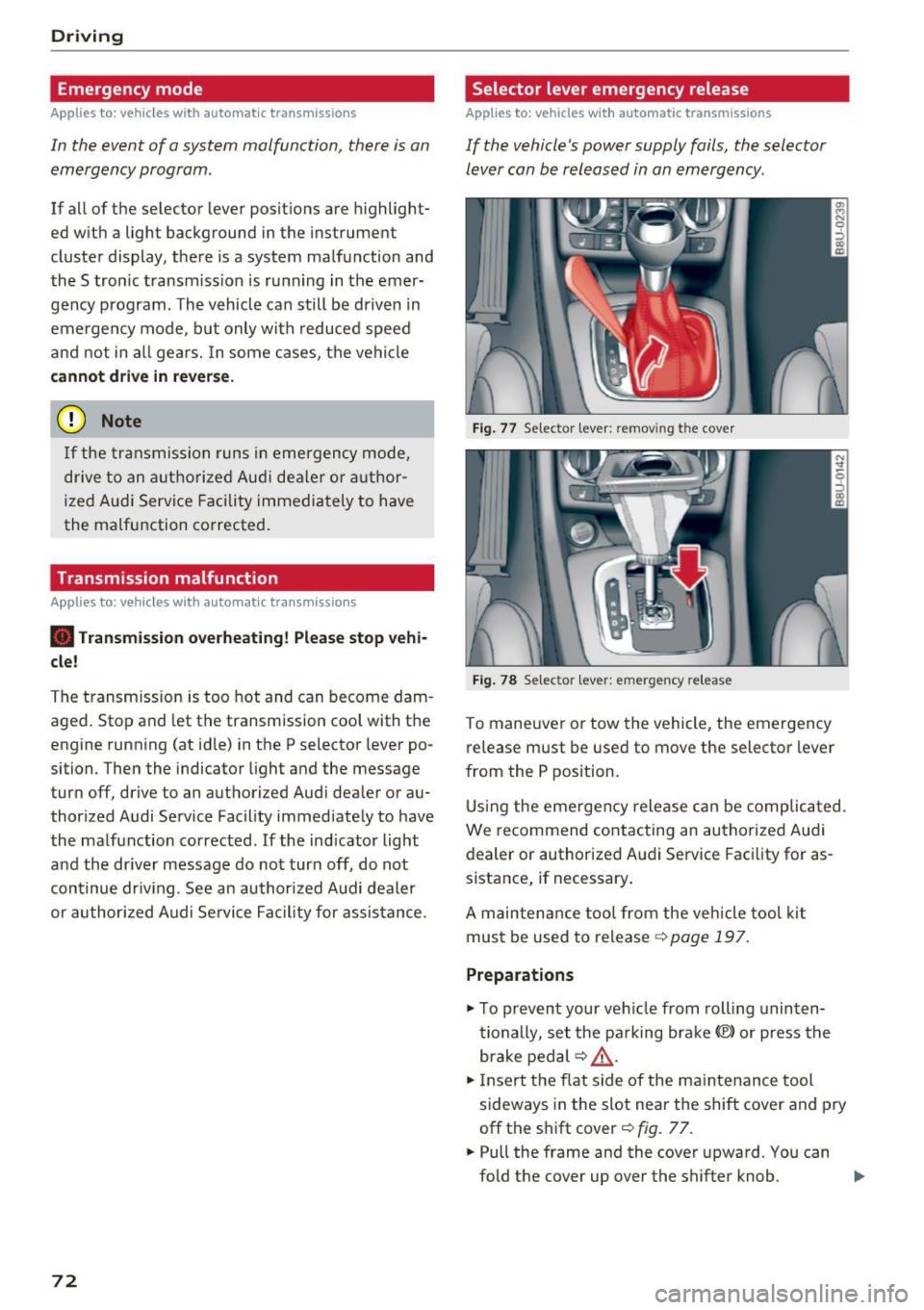
Fig. 77 Selector leve r: remov ing the cove r
Fig. 78 Selector leve r: emerge ncy release
To maneuver or tow the vehicle, the emergency
release must be used to move the selector lever
from the P position.
Using the emergency release can be complicated .
We r ecommend contacting an authorized Audi
dealer or authorized Audi Service Facility for as
sistance, if necessary .
A maintenance tool from the vehicle tool kit
must be used to release ¢
page 197.
Preparations
.,. To prevent your vehicle from rolling uninten
tionally , set the parking brake(®) or press the
brake pedal ¢
LD,. .
.,. Insert the flat side of the maintenance tool
sideways in the slot near the shift cover and pry
off the shift cover¢
fig. 77 .
.. Pull the frame and the cover upward. You can
fold the cover up over the shifter knob . ..,_
Page 76 of 236
Trailer towing
Trailer towing
Driving with a trailer
General information
Your Audi was designed primarily for passenger
transportation.
If you plan to tow a trailer, please remember that
the additional load will affect durability, economy and performance.
Trailer towing not on ly places more stress on the
ve hicle, it also ca lls for more concentration from
the dr iver.
F or this reason, always follow the operating and
driving instructions provided and use common
sense.
Technical requirements
Trailer hitch
Use a weight-carrying hitch conforming to the
gross tra iler weight. The hitch must be suitab le
for your veh icle and tra iler and must be mounted
securely on the vehicle's chassis at a technically
sound
locat ion . Use on ly a trailer hitch with a re
movable ba ll mount . Always che ck with the t rail
er hitch man ufac tur er to make s ure t hat you are
using the co rrect hi tc h.
Do not use a bumper hitch.
The hitch must be installed in such a way that it
does not interfere with the impact -absorbing
bumper system. No mod ificat ions should be
made to the vehicle exhaust and b rake systems .
Fr om t ime to t ime, che ck that all hitch mo unti ng
bol ts rem ain securely f aste ned.
W hen you are not tow ing a tra iler, remove the
tra ile r hitc h ba ll mount . This prevents the hit ch
from caus ing damage s hou ld your veh icle be
s truck from be hind ¢
,&..
Trailer brakes
If you r trailer is equipped with a brak ing system,
check to be su re that it conforms to all regula
tions .
74
The t rai ler hydraulic bra ke system must not be
directly connected to the vehicle's hydraulic
bra ke system ¢&. .
Safety chains
Always use s afety chains be tween you r vehi cle
and t he tra ile r.
Trailer lights
Traile r lights must meet all regula tions . B e s ure
to check w ith your author ized Audi dealer for cor
r ec t wir ing, swi tches, an d relays.
Mirrors
If you are unable to see t he traffic behind you us
i ng t he regular outs ide mirrors, then yo u
must in
stall ex tended mirro rs . It is impo rtant that you
al ways have clear vision to the rear.
.&_ WARNING
- If a tra ile r has e lectr ical brake s ple ase no te
t h at these b ra kes are not activated by the
factory -fit ted contro l unit -risk of accident!
- After removing the traile r h itch, d o no t
s t o re it in your vehicle. In case of sud den
braking, the hitch co uld fly forwar d and in
jure you or yo ur passenge rs.
- Never install a "we igh t distribu tin g" or
"loa d eq ualizing" trailer hitch on your veh i
cle . The vehicle was not designed fo r these
kinds o f trailer hitches. The hitch attach
ment can fail, ca us ing the tra ile r to tear
loose from the vehicle .
- The Gross Vehicle Weight Rating for your
veh icle, found on the safety compliance la
be l on the driver's s ide B-pillar, must never
be exceeded under any circ umstances . Ex
ceed ing the Gross Vehicle We ight Rat ing of
your veh icle is likely to damage yo ur vehicle,
a nd such d amage will no t be covered by
your Limi ted New Vehicle W arra nty . Exceed
ing the Gross Ve hicl e We ight Rating will al
so change the pe rformance and han dling
characte ristics o f yo ur vehicle, which could
cause a crash result ing in se rious injury or
death.
Page 77 of 236

00
00
......
"' ,....
"' ...... 0 0 :::,
00
Operating instructions
6" r-2
~·~
1/2"
1·1/2"
ill
Fig. 79 Perm itted ball pos itio n of th e t rail er hitch
Trailer towing weights
With a
factory-installed or an aftermarket trailer
hitch, the maximum permissible trailer weight is
2,200 lbs (1,000 kg) . The maximum permissible
unbraked trailer weight is 1,650 lbs (750 kg) .
These specifications apply when driving on roads having an incline of less than 12%.
Permissible tongue load
For best vehicle handling under these changed
conditions, adjust the trailer load so that the
tongue load is at the maximum allowable or
slightly lower. You can get an approximation of
the tongue load with a bathroom scale or you can
measure the load at a trucking company or
weighing station.
With a
factory-installed or an aftermarket trailer
hitch, the maximum permissible load on the ball
hitch may not exceed 220 lbs (100 kg) .
It is rec
ommended to use the maximum permissible
load.
Trailer load distribution Be sure the load in the trailer is held securely in
place to prevent it from shifting forward, back
ward or sideways.
Never allow a passenger to ride in a trailer ¢.&.
in Driving instructions on page 76 .
Ball mount
The trailer hitch may only be used with suitable ball mount and ball¢
fig. 79. Installation of the
hitch ball must be carried out in accordance with
the manufacturer's instructions .
Trailer towing
Engine cooling system
Towing a trailer makes the engine work harder. It
is important that the cooling system's perform
ance is up to the additional load. Make sure that
the cooling system has enough fluid.
Tire pressure
When towing a trailer, inflate the tires of your
vehicle to the tire pressure listed under "Full
load" on the tire pressure label
¢page 181. In
flate trailer tires to trailer and tire manufactur
ers' specifications.
Lights
The headlight settings should be checked with
the trailer attached before driving off. Check to
make sure both vehicle and trailer lights are
working properly.
Safety chains
Be sure trailer safety chains are properly connect
ed from the trailer to the hitch on the vehicle .
Leave enough slack in the chains to permit turn
ing corners. When you install safety chains, make
sure they will not drag on the road when you are
driving.
The chains should cross under the trailer tongue
to prevent it from dropping in case of separation
from the hitch.
· Driving instructions
Driving with a trailer always requires extra care
ond consideration.
Weight distribution
Towing a loaded trailer with an empty car results
in a highly unstable distribution of weight. If this
cannot be avoided, drive at very low speeds only
to avoid the risk of losing steering control.
A "balanced " rig is easier to operate and control.
This means that the tow vehicle should be loaded
to the extent possible and permissible, while
keeping the trailer as light as possible under the
circumstances. Whenever possible, transfer
some cargo to the luggage compartment of the
tow vehicle while observing tongue load require-
ments and vehicle loading considerations. .,.
75
Page 78 of 236
Trailer towing
Sp eed
The higher the speed, the more d ifficult it be
comes for the driver to contro l the rig. Do not
dr ive at the maximum permissible speed. Reduce
your speed even more if load, w eather or wind
conditions are unfavorable -particularly when
going downhill.
Red uce vehicle speed
immediatel y if the trai le r
shows the s lightest sign of swaying .
Do not try
to stop the swayin g by ac cele rating.
Observe speed limits . In some areas, speeds for
vehicles towing trailers are lower than for reg ular
ve hicles.
A lways apply b rakes early . When dr iving down
hi ll, shi ft into a lower gear to use the engine
braking effect to slow the vehicle. Use of the
brakes a lone can cause them to overheat and fail.
Coolant temperature
The coolant temperatu re gauge ¢ page 8 must
be observed ca refully . If the needle moves close
to the upper end of the scale, reduce speed im
mediately and/or turn off the air conditioner .
I f t he coolan t temperature warn ing light i n the
instr ument cluster s tarts flashing ., pull off
the road, stop and let the engine
idle for about
two minutes to prevent heat bu ild-up .
A WARNING
Anyone not properly restrained in a moving
vehicle is at a much greater risk in an acci
dent . Never let anyone ride in your car who is
not properly wearing the restraints provided
by Audi .
Trailer towing
information
Important to know
Your veh icle hand les different ly when tow ing a
tra iler because of the additional weight and dif
fe rent weight d istr ibut ion . Safety, performance
and economy w ill great ly depend on how careful
ly you load you r trailer and operate your rig .
76
Before you actually tow your trailer, practice
turning, stopping and backing up in an area away
from traffic . Keep pract icing unt il yo u h ave be
come comp lete ly familiar w ith the way your vehi
cle-tra iler combination behaves and responds.
Backing up is difficult and requires practice .
Backing up w ith a trailer generally req uires steer
i ng action opposite to that when backing up your
vehicle without a trailer.
Maintain a greater distance between your vehicle
and the one in front of you . You will need more
room to stop. To compensate for the trailer, you
will need a larger than normal turning radius.
When passing, remember that you cannot accel erate as fast as you normally wou ld because of
the added load. Make sure you have enough room
to pass. After passing, allow p lenty of room for
your trailer before changing lanes again.
Avo id jerky starts, sharp turns or rapid lane
changes.
(D Tips
- Do not tow a trailer during the break-in peri
od of your veh icle.
- If you tow a trai ler, your Audi may requi re
more frequent maintenance due to the ex
tra load
¢ page 218.
' Parking on a slope
Do not park on a slope with a trailer. If it cannot
be avoided, do so only after doing the following:
When parking:
.,. App ly the foot bra ke .
.,. Have someone place cho cks under bot h the ve
hicle and the trailer wheels .
.,. With choc ks in place, slowly release the brakes
until the wheel chocks absorb the load.
.,. Turn the wheels towards the curb .
.,. App ly the parking brake .
.,. Move the selector lever to P .
When restarting after parking :
.,. App ly the foot brake .
.,. Start the eng ine .
.,. Move the se lector lever to D/S.