infotainment AUDI Q3 2017 Owner´s Manual
[x] Cancel search | Manufacturer: AUDI, Model Year: 2017, Model line: Q3, Model: AUDI Q3 2017Pages: 236, PDF Size: 58.93 MB
Page 88 of 236
Parking system s
Make sure the sensors are not covered by stick
ers, deposits or any other obstructions as it may
impair the sensor function. For informat ion on
cleaning , refer to¢
page 191.
The range at which the sensors begin to measure
is approximate ly:
side 3 ft (0.90 m)
rear center 5.2 ft (1.60 m)
The closer you get to the obsta cle, the sho rter
the interval between the audible signals . A con
tinuous tone sounds when the obstacle is less
than approximately 1 foot (0 .30 meters) away .
Do not continue backing up¢.&
in General infor
mation on page 85,
¢ {!) in General information
on page
85!
If the d istance to an obstacle remains constant,
the volume of the distance warning gradually
drops after about four seconds (this does not ap
ply in the continuous tone range) .
The parking system activates automatically when
the reverse gear is selected. A brief confirmation
tone will sound.
Parking system plus
Description
App lies to : ve hicles with pa rking system plus
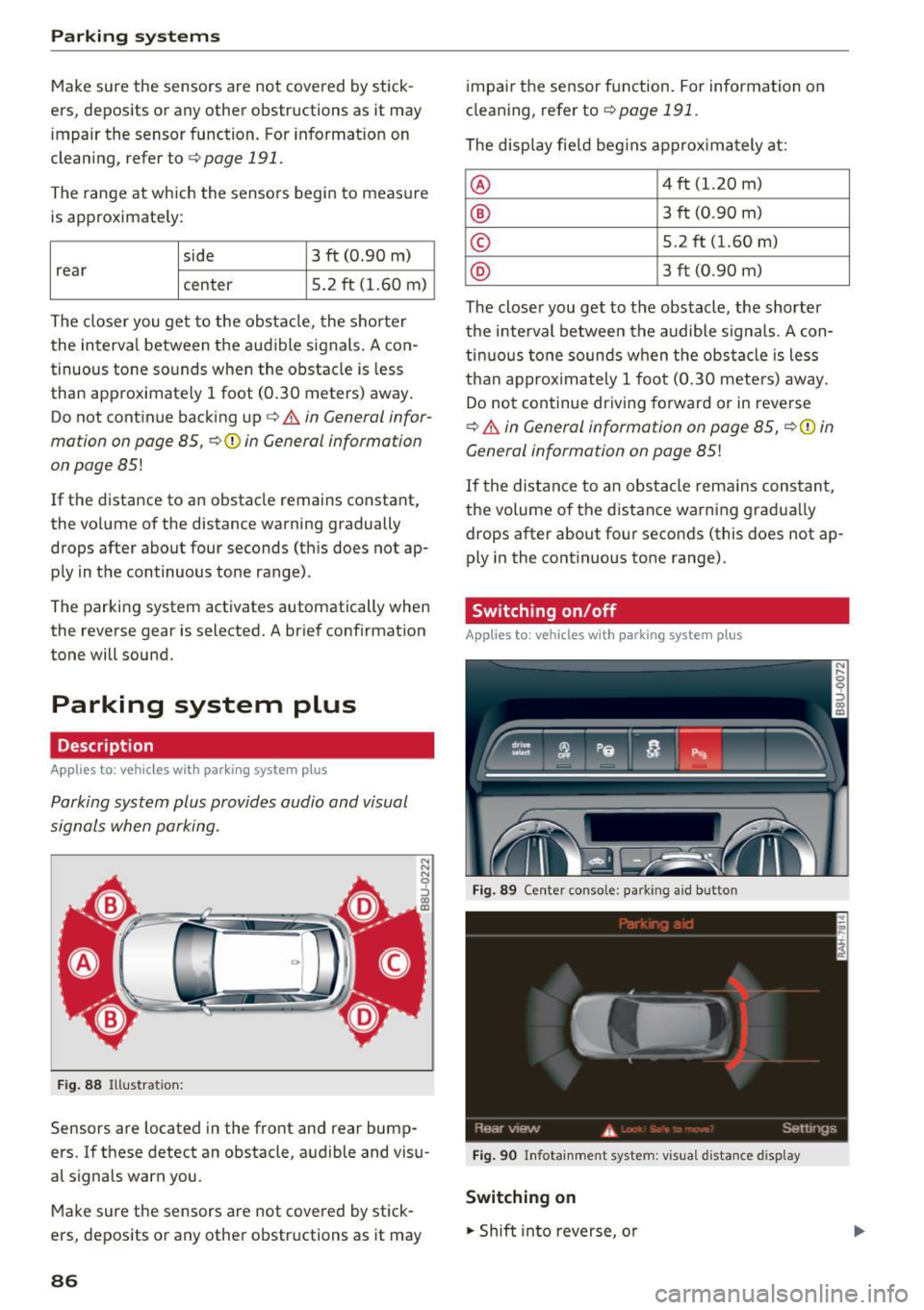
Parking system plus provides audio and visual
signals when parking .
Fig . 88 Illustrat ion:
Sensors are located in the front and rear bump
ers. If these detect an obstacle, audible and visu
al signals warn you.
Make sure the sensors are not covered by stick
ers, deposits or any other obstructions as it may
86
impai r the sensor function. For information on
cleaning, refer to ¢
page 191.
The display field beg ins approx imately at:
® 4 ft (1.20 m)
® 3 ft (0 .90 m)
© 5.2 ft (1.60 m)
@ 3 ft (0 .90 m)
The closer you get to the obstacle, the shorter
the interval between the audible signals . A con
tinuous tone sounds when the obstacle is less
than approx imately 1 foot (0.30 meters) away.
Do not continue driving forward or in reverse
¢.&. in General information on page 85, ¢(i) in
General information on page
85!
If the distance to an obstacle rema ins constant,
the volume of the distance warning gradua lly
drops after about four seconds (this does not ap
ply in the continuous tone range).
Switching on/off
App lies to: vehicles wit h parking system plus
Fig. 89 Center conso le: parkin g a id button
Fig . 90 Infotainment system: visual d istance d isplay
Switching on
.. Shift into reverse, o r
Page 90 of 236
Parking systems
-If the position and the installation angle of
the rearview camera was changed, for ex
ample after a collision, do not continue to
use the system for safety reasons . Have it
checked by an authorized Audi dealer or au
thorized Audi Service Facility.
- Only use the rearview camera to assist you if
it shows a good, clear picture. For example,
the image may be affected by the sun shin
ing into the lens, dirt on the lens, or if there
is a malfunction.
- Use the rearview camera only if the luggage
compartment lid is completely closed. Make
sure any objects you may have mounted on
the luggag e compartment lid do not block
the rearview camera.
- The camera lens enlarges and distorts the
field of vision. The object appears both al
tered and inaccurate on the screen.
- In certain situations, people or objects in the display appear closer or farther away:
- For objects that do not touch the ground,
such as the bumper of a parked vehicle, a
trailer hitch or the rear of a truck . Do not
use the orientation lines in this case.
- If driven from a level surface onto an in
cline, or a downward slope.
- If driven toward protruding objects .
- If the vehicle is carrying too much load in
the rear .
Q) Note
-Always read and follow the applicable warn
ings
¢ (I) in General information on
page 85.
- The orange-colored orientation lines in the
Infotainment display show the vehicle path
based on the steering wheel angle . The
front of the vehicle swings out more than
the rear of the vehicle. Maintain plenty of
distance so that an exterior mirror or a cor
ner of the vehicle does not collide with any
obstacles.
88
· Sw itching on /off
Applies to: vehicles with parking system plus with rearview
camera
Switching on
.. Shift into reverse, or
.. Press the
PwA button in the center console
¢ page 86, fig. 89. A short confirmation tone
sounds and the LED in the button turns on .
Switching between the rearview camera and
optical display
.. Press the Car graphic control button ®
c:> page 89, fig. 95 to see the optical display .
.,. Press the
Rearview control button to see the
rearview camera image.
Switching off
.. Drive faster than 6 mph (10 km/h), or
.,. Press the
PwA button, or
.. Switch the ignition off.
(D Tips
The visual display in the left part of the dis
play should help you detect the critical vehicle
areas .
Page 91 of 236
a:,
a:,
...... N r--. N
'"' 0 0 ::, a:,
Perpendicular parking
Applies to: vehicles with parking system plus wit h rearv iew
camera
This view may be used when parking in a garage
or in a parking space .
Fig. 95 Infotainment system: aiming at a parking space
Fig. 96 Infota inment system : aligning the veh icle
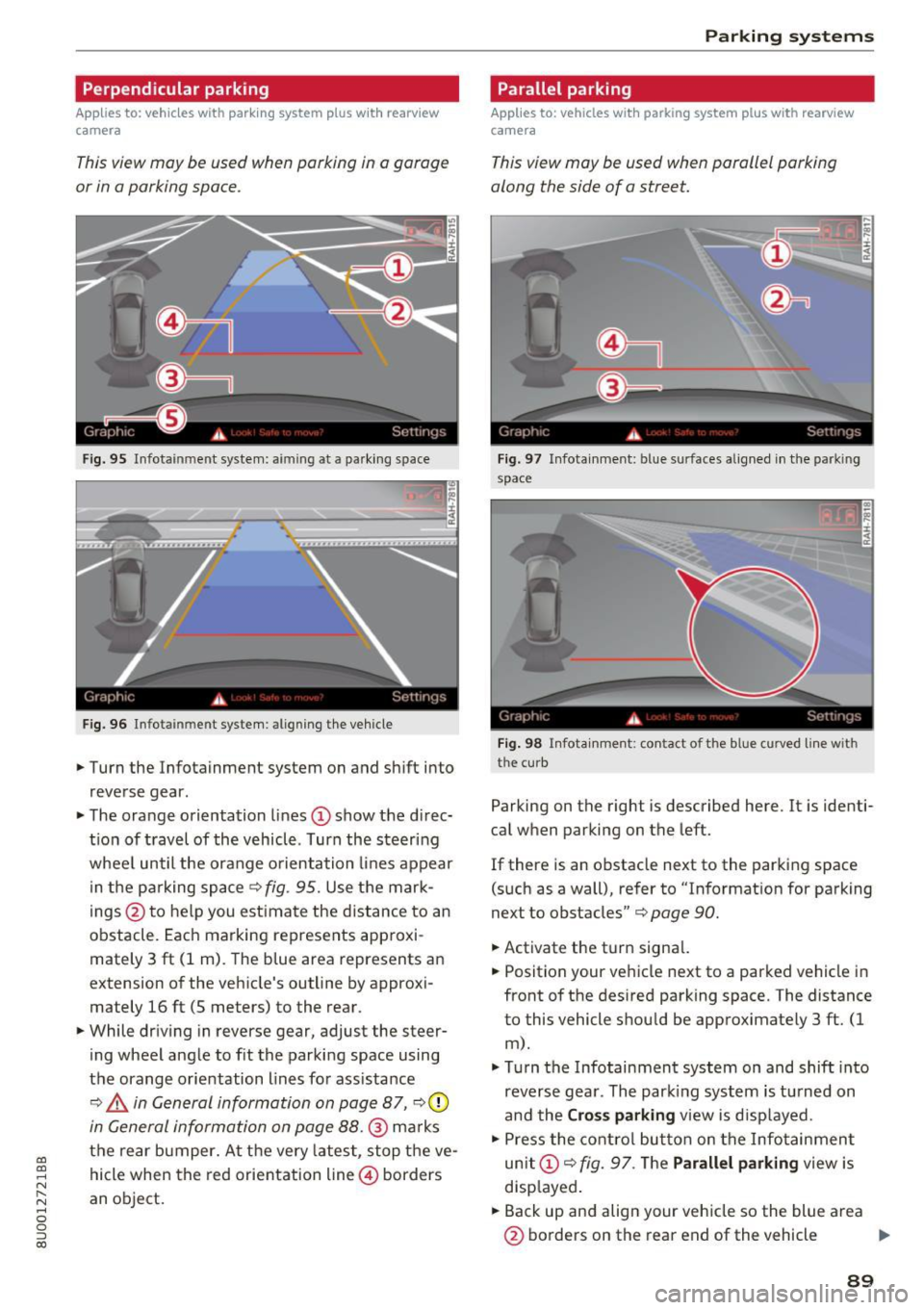
.,. Turn the Infotainment system on and sh ift into
reverse gear.
.,. The orange orientation lines
CD show the di rec·
tio n of travel of the vehicle . Turn the steering
whee l until the orange orientation lines appear
in the parking space
c:> fig. 95. Use the mark
ings @to help you est imate the distance to an
obstacle. Each marking represents approxi
mately 3 ft (1 m). The b lue area represents an
extension of the vehicle's outline by approxi
mately 16 ft (5 meters) to the rear.
.,. While driv ing in reverse gear, adjust the steer
ing wheel angle to f it the parking space using
the orange orientation lines for assistance
¢ ,& in General information on page 87, c:>0
in General information on page 88.@ marks
the rear bumper. At the very latest, stop the ve
hicle when the red orientation line@ borders
an object.
Parking systems
Parallel parking
Applies to: vehicles with parking system pl us with rearview
came ra
This view may be used when parallel parking
along the side of a street.
Fig . 97 Infotainment: blue surfaces aligned in the park ing
space
Fig. 98 Infota inmen t: co ntact of the blue curved li ne w ith
the curb
Parking on the right is described here. It is identi·
cal when parking on the left.
If there is an obstacle next to the parking space
(such as a wall), refer to "Informat ion for parking
next to obstacles"
c:> page 90.
.,. Activate the turn signal.
.,. Position your vehicle next to a parked vehicle in
front of the desired parking space. The distance
to this vehicle shou ld be approximately 3 ft. (1
m).
.,. Turn the Infotainment system on and shift into
reverse gear. The par king system is turned on
and the
Cross parking view is displayed.
.,. Press the control button on the Infotainment
unit
CD ¢ fig. 97. The Parallel parking view is
disp layed .
.,. Back up and align your vehicle so the blue area
@ borders on the rear end of the vehicle .,,.
89
Page 92 of 236
Parking sy stems
behind you o r on the parking space line c:> A in
General information on page 87 ,
c:>(D in Gen
eral information on page 88 .
The blue area rep
resents an extension of the vehicle 's outline by
approximately 16
ft (5 meters) to the rear . The
long side of the b lue area shou ld be on the
curb . T he entire blue area mus t fit into the
parking space .
• With the veh icle stopped, turn the steer ing
whee l to the right as far as it w ill go.
• Back into the par king space until the b lue curve
c:> fig. 98 touches the curb c:> A in General in
formation on page 87,
c:> (D in General infor
mation on page 88.
Stop the vehicle.
• With the veh icle stopped, turn the steer ing
whee l to the left as far as it will go.
• Cont inue to back into the pa rking space unt il
the ve hicle is parked parallel to the curb
c:> A
in General information on page 87, c:> (D in
General information on page 88. @
marks the
re ar bumpe r. At the ve ry latest, stop the vehicle
whe n the re d or ientat ion line @ borders an ob
ject. Keep an eye on the front of your vehicle whi le doing this.
Parking next to obstacles
I f t here is an obstacle (such as a wall) next to the
p ar king sp ace, pos ition the vehicle so there is
mo re spa ce on that side . Position the long s ide of
the blue surface so that there is sufficient space
from the obstacle. The s urface m ust not be
touch ing. Yo u wi ll also need to start turn ing the
steer ing whee l earlier. The blue curve
c:> fig. 98
must not to uch the obstacle and should have suf
ficient room .
(};) Note
Keep enough distance from the curb to re
duce the risk of damage to the rims.
(D Tips
The left or right orientation lines and s urfaces
w ill be displayed, depending on the turn sig
nal being used.
90
Adjusting the display and the warning tones
App lies to: vehicles with parking system plus/rearv iew cam
era
T he display and warning tones can be adjusted in
the Infotainment.
• Select: the I CAR I fu nct ion button > (Car) Sys
tems*
cont rol b utton > Driver assi st > Par king
system .
Display
On* -an optical display is shown for the park ing
system p lus, a rearview camera image is shown
fo r par kin g system p lus with rea rview camera*.
Off -When t he p arking system is sw itche d off,
on ly aud ible signals are g iven.
Signal tones
Front volume -volume for the front area
Rear vo lume -volume for the rear area
Front frequency -frequency for the front area
Rear frequency -frequency for the rear a rea
In -car entertainment fader -when the parking
system is tu rned on, the volume of the a udio/vid
eo source is lowe red .
The newly selected level is demonstrated briefly
by the sound generator .
(D Tips
-The warn ing tones can also be adjusted di
rectly from the vis ual d isp lay or the rearview
camera image* . Simply p ress t he
Settings
co ntrol button .
- Changed settings are activated w hen the
park ing system is switched on again .
- The settings are automatically sto red and
assigned to the remote con trol key that is in
use .
Error messages
Applies to: vehicles with parking system plus/rearv iew cam
era
There is an error in the system if the LED in the
P wJ\. button is blinking and you hear a contin uous .,.
Page 93 of 236
00
00
......
"' ,-...
"' ...... 0 0 :::,
00
alarm for a few seconds after switching on the
parking system or when the parking system is al
ready act ivated. If the error is not corrected be
fore you switch off the ignit ion, the LED in the P'J/Ji
button will b link the next t ime you sw itch on the
parking system by s hift ing into reverse .
If a sensor is fau lty, the
J;l4 symbol will appear in
front of/behind the vehicle in the Infotainment d isplay. If a rear sensor is faulty, only obstacles
that are in areas @ and @ are displayed
c::> page 86, fig. 88. If a front se nsor is faulty , only
obstacles that a re in areas © and @are dis
p layed.
Drive to an authorized Aud i dealer or authorized
Aud i Service Facility immediately to have the
malfunct ion corrected .
Trailer hitch
Applies to: vehicles with parking system plus/rearview cam
era and trailer hitch
For vehicles using the trailer socket, the parking
system rear sensors are not activated when you
shift into reverse gear or when you press the P'J/Ji
button . This results in the follow ing restr ictions .
Parking sy stem plus *
There is no distance warning for the rear . The
front sensors remain activated . The visual display
switches to tra iler mode.
Par king sy ste m plus and rea rvie w camera*
There is no d istance warn ing fo r the rear. The
front sensors remain activated. The visual display
sw itches to tra iler mode. The rearview camera
image will not show the orientation lines and the
b lue surfaces.
(D Tips
Trailer h itches that are not installed at the
factory may cause the parking system to ma l
function or they may restrict its function.
Parking system s
91
Page 208 of 236
Fuses and bulbs
(D Tips
- The following table does not list fuse loca
tions that are not used.
- Some of the equipment listed in the follow
ing tables applies only to certain model ver
sions or certain optional equipment.
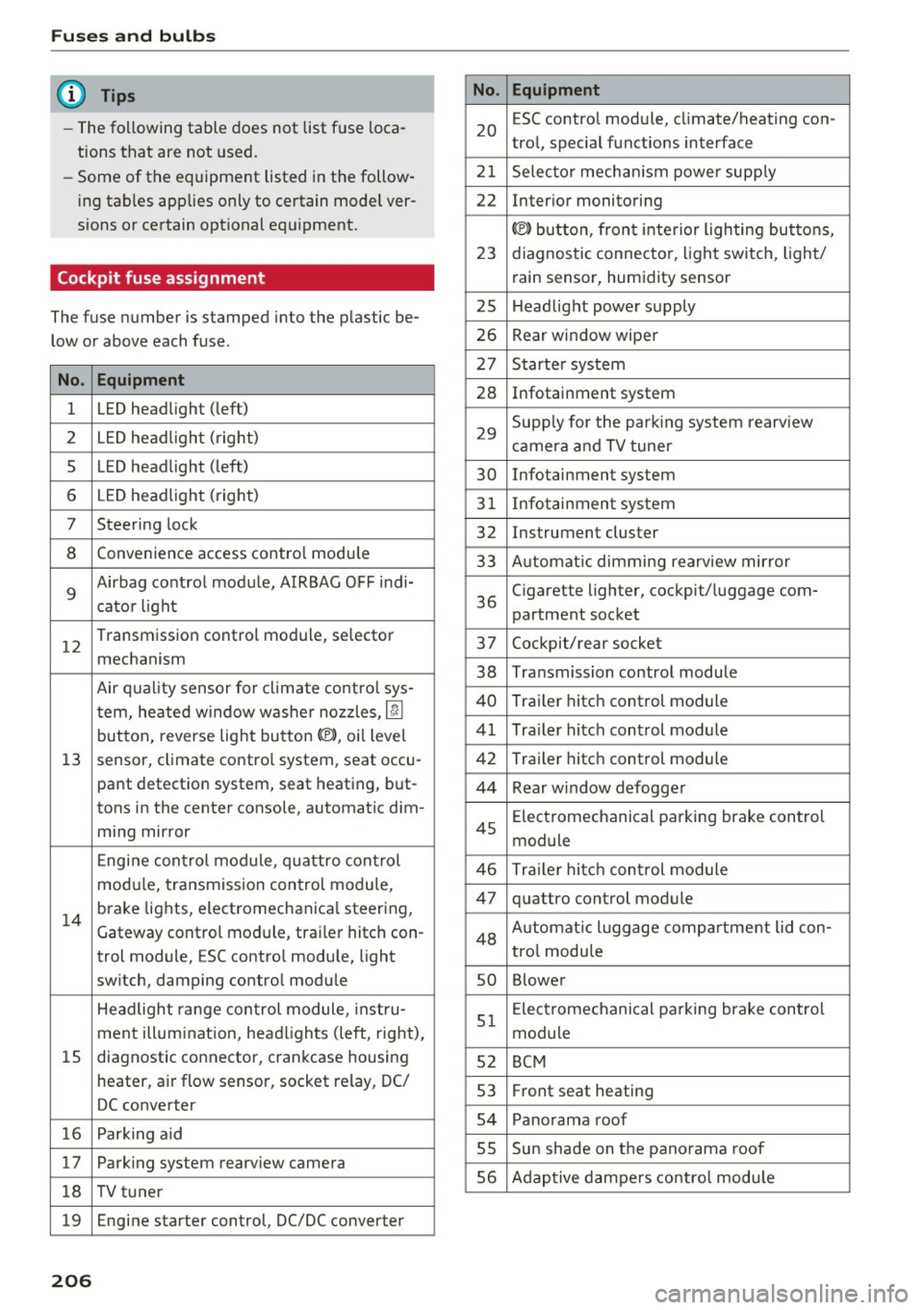
Cockpit fuse assignment
The fuse number is stamped into the plastic be
low or above each fuse.
No. Equipment
1 LED headlight (left)
2 LED headlight ( right)
5 LED headlight (left)
6 LED headlight (right)
7 Steering lock
8 Convenience access contro l module
9
Airbag control module, AIRBAG OFF indi-
cator light
12
Transmission control module, selector
mechanism
Air quality sensor for cl imate control sys-
tern, heated w indow washer nozzles ,
lj]
button, reverse light button<®>, oi l level
13 sensor, climate contro l system, seat occu-
pant detection system, seat heating, but-
tons in the center console, automatic dim-
ming mirror
Engine control module, quattro control
modu le, transmission control module,
14
brake lights, electromechanica l steering,
Gateway control module, trai ler hitch con-
trol module, ESC contro l module, light
switch, damping control module
Headlight range control module , instru-
ment illumination, headlights (left, right),
15 diagnostic connector, crankcase housing
heater, a ir flow sensor, socket relay, DC/
DC converter
16 Park ing aid
17 Parking system rearview camera
18 TV tuner
19 Engine starter control, DC/DC converter
206
No . Equipment
20
ESC contro l module, climate/heating con-
trol, special functions interface
21 Selector mechanism power supply
22 Interior monitoring
© button, front interior lighting buttons,
23 diagnostic connector, light switch, light/
rain sensor, humidity sensor
25 Headlight power supply
26 Rear window wiper
27 Starter system
28 Infotainment system
29
Supply for the parking system rearv iew
camera and TV tuner
30 Infotainment system
31 Infotainment system
32 Instrument cluster
33 A utomat ic dimming rearview mirror
36
Cigarette lighter, cockpit/luggage com-
partment socket
37 Cockpit/rear socket
38 Transmission control module
40 Trailer hitch control module
41 Tra iler hitch control module
42 Trailer hitch control module
44 Rear window defogger
45
Electromechanical parking brake control
module
46 Trailer hitch control module
47 quattro control module
48 Aut omat ic lu ggage compartment lid con-
tro l module
so Blower
51
Electromechanical parking brake control
module
52 BCM
53 Fr ont seat heating
54 Panorama roof
SS Sun shade on the panorama
roof
56 Adaptive dampers control module
Page 217 of 236
a:,
a:,
.... N
" N .... 0 0 ::, a:,
Technical data
Vehicle specifications
XXXXX XX · X · XXXX XXX xx
CD-+ IAH RIG.- IOENT • NII. VOE£ • WIT • Nil. XXXXXX XX XX X XX XXX XXX
IYP/TYP! XXX XXX
xx xxxxxxx xx xx xx
XXX KW XXX
a.;. C1lll /TRANS. lllllE xxxx XXX XXX ®i 11)10Al<8 ./lil1R.k8.
©+ I.AO OIR. / IN NENAllSSl.
XXXX I XXXX XXX I XX PAI NT IIO. / ffT£ml
II. • AIJSlit / OPTIONS
EOA 70 5 4U B 6XM SSG SRW
2 EH JO Z 1LB 1AS l BA
3FC SM U 7Xl
F O A 9G3 OG7 OYH OJF
TL 6 3KA 8EH UlA X 9B OZ7
l XW
803 908 8Z4 020
7T6 CV7 7KO 4X3 2K 2
3 L4 4KC 3YO 413 50 2
lS A 7GB 01A 4GO
XX . X XX X XX X
xxxx
Fig. 173 Vehicl e identifica tion labe l
Vehicle Identification Number (VIN)
The VIN number is located in the following pla
ces :
0
0
a, '? :x: .,. al
-In the Infotainment system: se lect: the !CARI
func tion button > (Car}* systems control but
ton
> Servicing & checks > Vehicle ID number
(VIN).
- under the windshield on the driver's side*
- on the vehicle identification label
Vehicle identification label
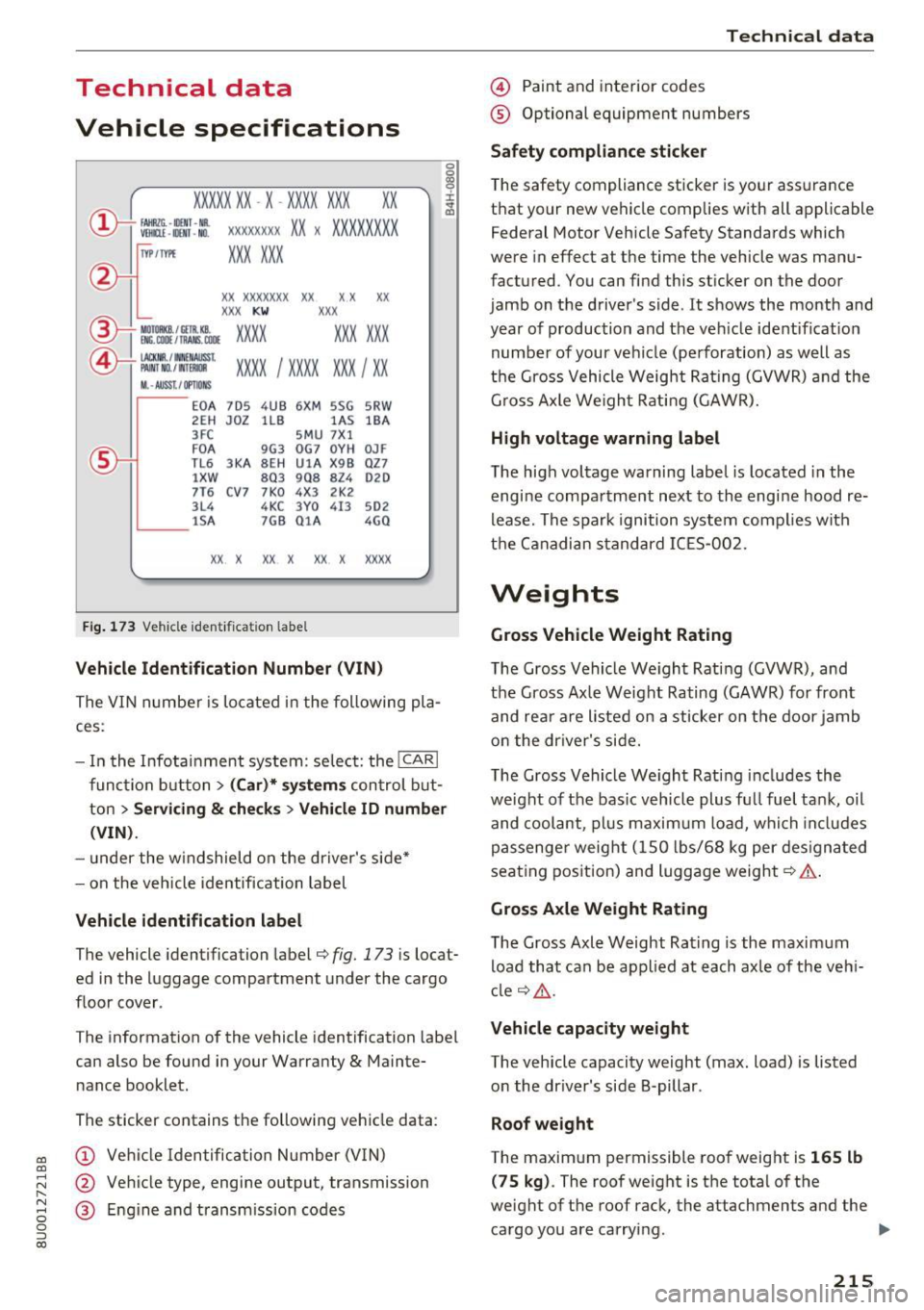
The vehicle identification label¢ fig. 173 is locat
ed in the luggage compartment under the cargo
floor cover .
T he information of the vehicle identification label
can also be found in your Warranty
& Mainte
nance booklet.
The sticker contains the following vehicle data :
@ Vehicl e Identification Number (VIN)
@ Veh icle type, engine output, transmission
@ E ng ine and transm ission codes
Technical data
@ Paint and interior codes
® Optional equipment numbers
Safety compliance sticker
The safety compliance sticker is your assurance
that your new vehicle complies with all applicable
Federal Motor Vehicle Safety Standards which
were in effect at the time the vehicle was manu
factured. You can find this sticker on the door
jamb on the driver's side .
It shows the month and
year of production and the veh icle identificat ion
number of your vehicle (perforation) as well as
the Gross Vehicle Weight Rating (GVWR) and the
Gross Axle We igh t Rating (GAWR).
High voltage warning label
The high voltage warning label is located in the
engine compartment next to the engine hood re
lease. The spark ignition system complies with
the Canadian standard ICES-002.
Weights
Gross Vehicle Weight Rating
The Gross Vehicle We ight Rating (GVWR), and
the Gross Axle Weight Rating (GAWR) for front
and rear are listed on a sticker on the door jamb
o n the driver's side.
The Gross Vehicle We ight Rating includes the
we ight of the bas ic vehicle plus fu ll fuel tank, oil
and coolant, plu s maximum load, which includes
passenge r weight (1S0 lbs/68 kg per designated
seat ing position) and luggage weight¢.& .
Gross Axle Weight Rating
The Gross Axle Weight Rating is the maximum
load that can be applied at each axle of the vehi
cl e ¢ _& .
Vehicle capacity weight
The vehicle capacity weight (max. load) is listed
on the dr iver 's side 8-pillar .
Roof weight
The maximum p ermissible roof we ight is 165 lb
(7 5 kg). The roof weight is the total of the
weight of the roof rack, the attachments and the cargo you are carrying . ..,.
215