instrument cluster AUDI Q3 2017 Owner´s Manual
[x] Cancel search | Manufacturer: AUDI, Model Year: 2017, Model line: Q3, Model: AUDI Q3 2017Pages: 236, PDF Size: 58.93 MB
Page 66 of 236
Driving
This message appea rs and a warning tone sounds
if you open the driver's door when the ignition is
sw itched on.
Pr es s brake pedal to start engine
This message appears if you do not step on the
brake pedal to sta rt the eng ine on a vehicle wi th
an automatic transm ission .
Please engage N or P
This message appears when starting or stopping
the engine and Nor Pis not engaged. The engine
will not start/stop .
Ill Key not in veh icl e?
The indica to r li ght tur ns on and this message ap
pears i f the convenience key* was removed from
the vehicle when the engine was running. If the
convenience key is no longer in the v ehicle, you
cannot switch the ignition on or start the engine
once you stop it . You also cannot lock the vehicle
from the outside.
Shift to P , vehicle can roll awa y. Doors can onl y
be locked in P .
This message appea rs for safe ty reasons a long
with a warning sound if the se lector lever is not
engaged in P after switching the ignition off .
Move the selector lever to the P position. Other
wise the vehicle is no t protected from rolling and
it cannot be locked .
II No key identified. See owner' s manual.
This message appe ars if the re is no convenience
key * ins ide the vehicle or if t he system does not
recognize the key . The convenience key may not
be recognized, for example, if it is covered by an
object that
disrupts the signal (such as a brief
case), or if the key batte ry is weak. Electronic de
vices suc h as cell phones can also interfere w it h
the s ignal.
To still be able to start or stop the engine, refer
to
c:::> page 63.
64
Electromechanical
parking brake
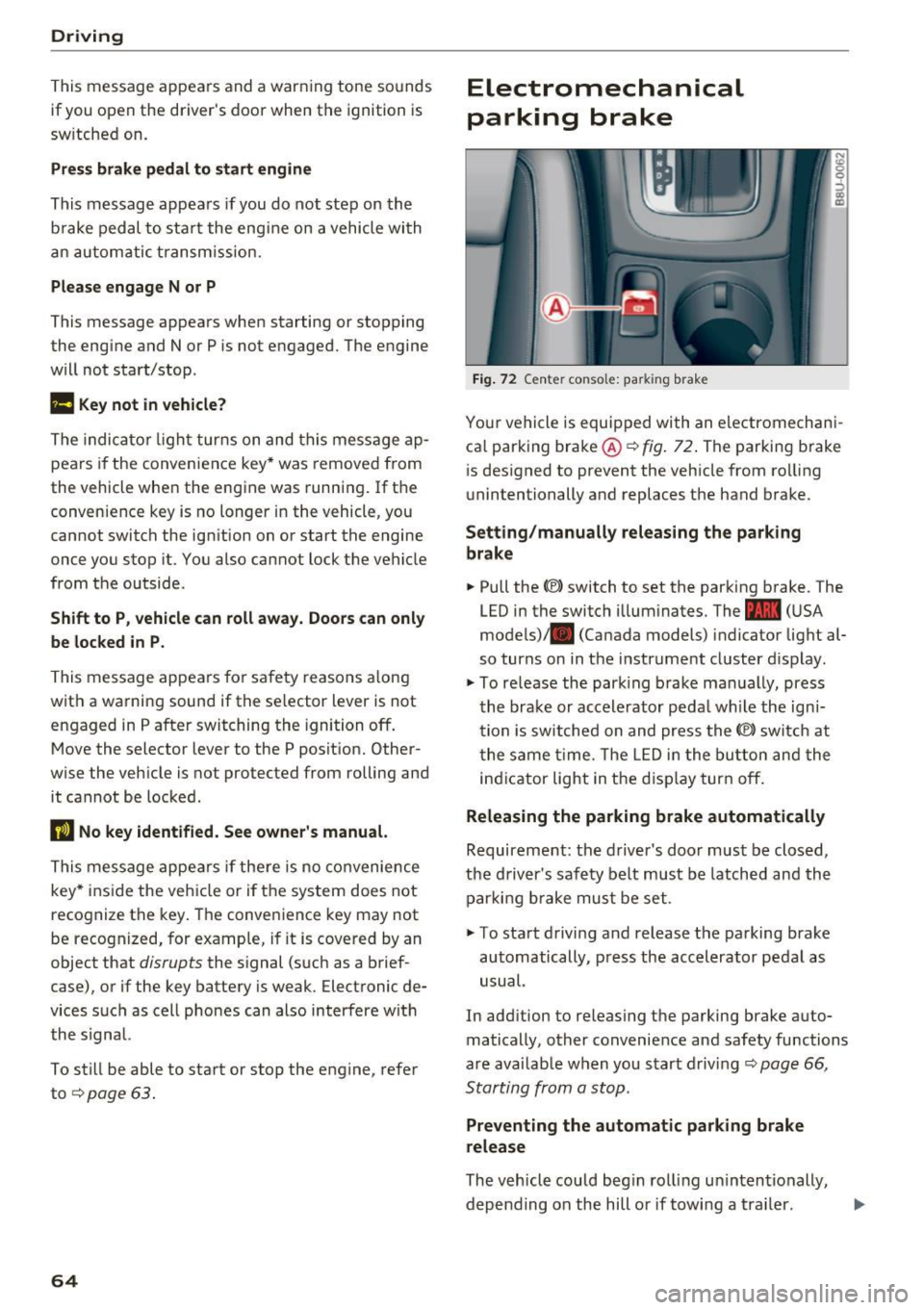
Fig . 7 2 Ce nter co nso le: pa rk in g brake
You r vehicle is equipped with an electromechani
ca l parking bra ke @
c:::> fig . 72. The parking brake
i s des igned to prevent the veh icle from ro lling
unintentionally and replaces the hand brake.
Setting /manually releasing the parking
brake
.. Pull the(®) switch to set the parking b rake . The
LED in the switch illum inates. The -
(U SA
mode ls)/ . (Canada models) indicator light al
so turns on in the instrument cluster d isplay .
.,. To re lease the par king brake ma nually, press
the brake or accele rator peda l w hile the ign i
tion is sw itched on and press the(®) switch at
t he same t ime. The L ED i n the bu tton and the
in dicator light in the d isp lay turn off.
Releasing the parking brake automatically
Requireme nt: the d river 's door must be closed,
the driver's saf ety be lt must be latched and the
par king b rake mus t be set .
.. To sta rt d riving and release the parking brake
automatically , press the accelerator pedal as
usual.
In add ition to releasing the parking brake auto
matically, other convenience and safety functions
a re availab le when you start driving
c:::> page 66 ,
Starting from a stop.
Preventing the automatic parking brake
release
The veh icle could beg in rol ling u ninten tionally,
depending on the hill or if towing a tra iler . .,..
Page 70 of 236
Driving
Selector lever positions
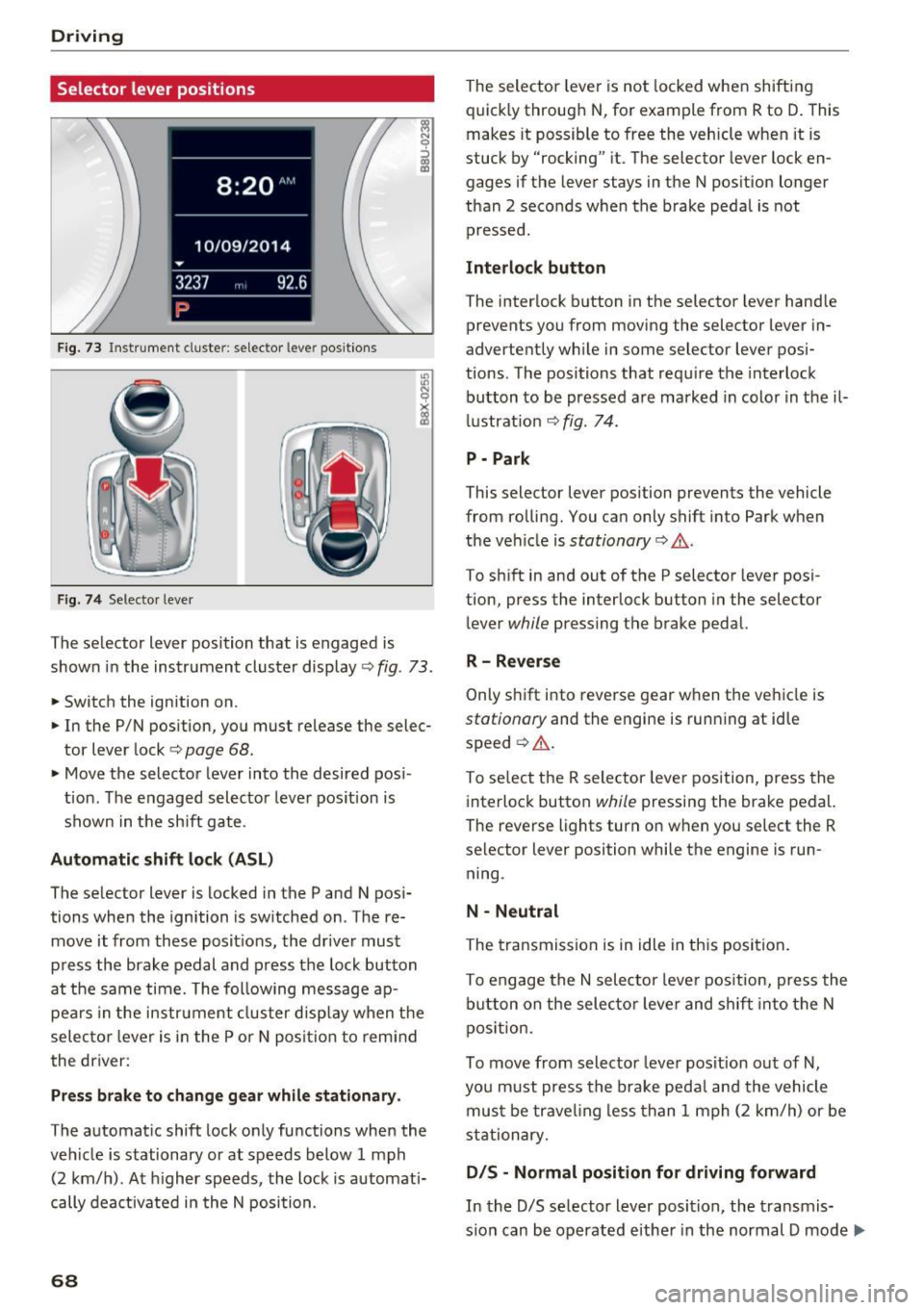
Fig. 73 Instrument cluste r: selector leve r positions
Fig. 74 Selecto r lever
The selector lever position that is engaged is
shown in the instrument cluster display
<=> fig . 73 .
.,. Switch the ignition on .
.. In the P/N position, you must release the selec
tor lever lock
c:> page 68.
• Move the selector leve r into the desired pos i
tion . The engaged selector lever pos ition is
shown in the sh ift gate .
Automatic shift lock (ASL )
The selector lever is locked in the P and N pos i
tions when the ignition is sw itched on . The re
move it from these posit ions, the driver must
press the brake pedal and press the lock button
at the same time. The following message ap pears in the instr ument cluster disp lay when t he
selec to r l ever is in the P or N posi tion to remi nd
the driver:
Pr ess brake to change gear while stationar y.
The automatic shift lock only functions when the
veh icle is stationary or at speeds below 1 mph
(2 km/h). At h igher speeds , the lock is automati
cally dea ctivated i n the N position.
68
The selector leve r is not locked whe n shifting
quick ly through N , for example from R to D. This
makes it possible to free the veh icle when it is
stuck by "rocking" it. The selector lever lock en
gages if the lever stays in the N pos ition longer
than 2 seconds when the brake peda l is not
pressed .
Interlock button
The interlock b utton in the selector lever hand le
prevents you from moving the selector lever in
advertently wh ile in some selector lever posi
tions. The positions that requ ire the interlock
button to be pressed a re marked in colo r in t he il
l ustrat ion <=>
fig. 74.
P - Park
This selector lever position prevents the vehicle
from rolling. You can only shift into Park when
the ve hicle is
stationary c:> A .
To sh ift in and out of the P selector lever posi
tion, press the interlock button in the selector
lever
while pressing the brake pedal.
R -Rever se
Only s hift i nto reve rse gear when the veh icle is
stationary and the engine is running at id le
speed ¢
A.
To se lect the R selector leve r position, press the
interlock button
while pressing the brake pedal.
The reverse lights turn on when you select the R
selector lever position while the engine is run
ning .
N -Neutral
The transmission is in idle in th is posi tion .
To engage the
N sele ctor leve r pos it ion, press the
b utton on the selecto r leve r and shift into the N
pos ition.
To move from selector leve r pos it ion out of
N,
you m ust press the brake peda l and the vehicle
mus t be trave ling less than 1 mph (2 k m/h) or be
stationary.
D IS -Normal position for driving forward
In the D/S se lector lever position, the transmis
s io n can be operated eithe r in the normal D mode ..,_
Page 71 of 236
00
or in the 5 sport mode. The instrument cluster
display shows the selected driving mode.
In the
normal mode D, the transmission auto
matically selects the suitable gear ratio.
It de
pends on engine load, vehicle speed and driving
style.
Select the
sport mode 5 for sporty driving. The
vehicle makes full use of the engine's power.
Shifting may become noticeable when accelerat
ing.
To move from selector lever position N to D, you
must press the brake pedal and the vehicle must
be traveling less than 1 mph (2 km/h) or be sta
tionary ¢&. .
A WARNING
Read and follow all WARNINGS¢&. in Driv
ing tips on page
70.
@ Note
Coasting downhill with the transmission in N
and the engine not running will result in dam
age to the automatic transmission and possi
bly the catalytic converter.
(D Tips
- If you accidentally select N while driving,
take your foot off the accelerator pedal and
wait for the engine to slow down to idle be
fore selecting Dor 5.
- If there is a power failure, the selector lever
will not move out of the P position. The
emergency release can be used if this hap
pens ¢
page 72.
Driving tips
Starting the engine
.. The selector lever must be in the P or the N po
sition.
Starting from a stop
.. Press and hold the brake pedal.
~ .. Press and hold the interlock button in these-
"' ~ lector lever handle, select the desired selector .... 0 0
:::,
00
Driving
lever position such as D ¢ page 68 and release
the lock button.
.. Wait a moment until the transmission shifts.
You will notice a slight movement when the
gear engages.
.. Release the brake pedal and press the accelera
tor pedal ¢_& .
Stopping temporarily
.. Press the brake pedal to stop the vehicle, for
example at a traffic light. Do not press the ac
celerator pedal when doing this.
.. To prevent the vehicle from rolling when you
start driving, set the parking brake when stop
ping on steep inclines¢,& .
.. The parking brake will release automatically
and the vehicle will start moving once you press
the accelerator pedal.
Stopping/parking
If the selector lever is not in the P position when
you open the driver's door, the vehicle could roll.
In vehicles with a convenience key*, the message
Shift to P and turn off ignition, or vehicle can
roll away
appears.
.. Press and hold the brake pedal¢ _&.
.. Set the parking brake .
.. Select the P selector lever position.
Stopping on an incline
.. Always press the brake pedal to hold the vehi
cle in place and prevent it from "rolling back"
¢
&_ . Do not try to prevent the vehicle from
" rolling back" when a gear is engaged by in
creasing the engine speed
¢(D .
Starting on a hill
.. Set the parking brake .
.. Select the D position .
.. Press the accelerator pedal carefully. If your
safety belt is fastened, the parking brake is au
tomatically released and your vehicle begins to
move.
69
Page 73 of 236
a:,
a:,
...... N r--. N .... 0 0 ::, a:,
technical limitations . If may st ill be necessary to
adjust the speed with the brake pedal.
H ill descent contro l sw itches off once the hill lev
e ls o ut or yo u press the accelerator pedal.
& WARNING
Hi ll descent contro l cannot overcome physical
limitations, so it may not be able to maintain
a constant speed under a ll conditions. Always
be ready to apply the brakes.
Manual shifting (tiptronic mode)
The tiptronic mode allows the driver to shift the
gears manually .
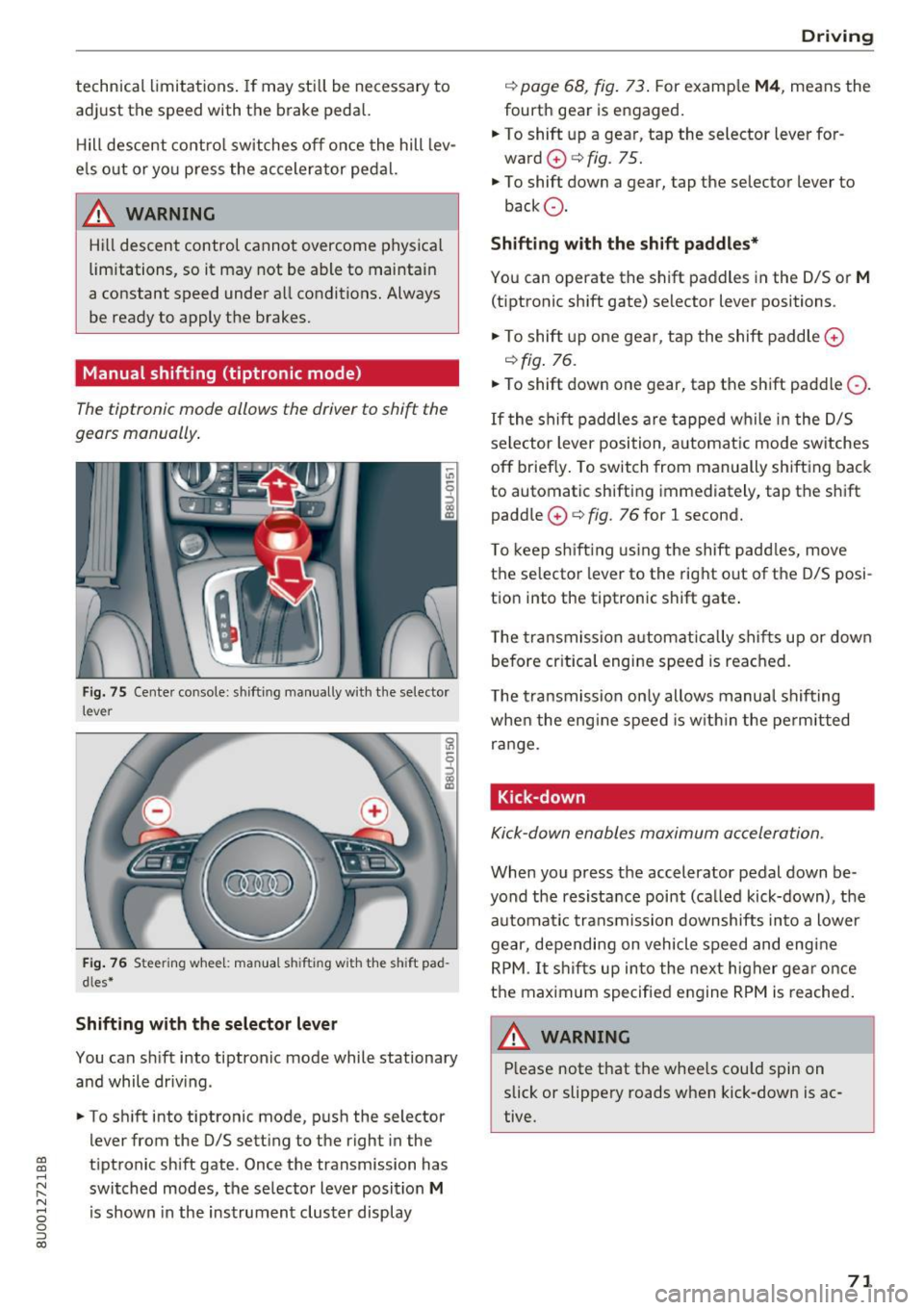
Fig . 75 Cente r console: shifting manually with the selector
lever
F ig. 76 Steering whee l: man ua l sh ifting with the sh ift pad
dles *
Shifting with the selector lever
You can s hift into tiptronic mode while stationary
and while driv ing.
• To sh ift into t iptronic mode, p ush the selector
lever from the 0/5 setting to the right in the
tiptronic sh ift gate. Once the transmission has
switched modes, the se lecto r lever position
M
is shown in the instrument cluster display
D rivi ng
c::> page 68, fig . 73 . For examp le M4 , means the
fourth gear is engaged .
.. To shift up a gear, tap the selector lever for
ward
0 c::> fig. 75.
• To shift down a gear, tap the se lector lever to
back Q.
Shifting with the shift paddles*
Yo u can operate the shift paddles in the 0/5 or M
(tiptronic shift gate) selector lever positions .
• To shift up one gear, t ap the shift paddle
0
c::>fig . 76.
• To shift down one gear, tap the shift paddle Q.
If the shi ft paddles are tapped wh ile in t he D/S
se lector lever position, a utomat ic mode sw itches
off briefly . To switch from manually shifting back
to automatic shifting immediately, tap the shift
paddle
0 c::> fig. 76 for l second.
T o kee p sh ift ing using the shift padd les, move
the selector lever to the rig ht out of the 0/5 posi
t ion into the tiptron ic shift gate .
T he transmission a utomatically shif ts up or down
b efore cr itica l engi ne speed is reached.
T he t ransmission on ly allows manua l shif ting
whe n the eng ine speed is w it hi n the pe rmitted
range.
Kick-down
Kick-down enables maximum ac celeration.
When you press the accelerator pedal down be
yond the resistance point (ca lled kick-down), t he
automa tic transmission downshifts in to a lower
gear, depending on vehicle speed and eng ine
RPM. It s hifts up into the next h igher gear o nce
the maximum specifie d engine RPM is reached .
,&_ WARNING
-= -Please note that the whee ls cou ld spin on
slick or slippery roads when kick-down is ac
tive.
71
Page 74 of 236
Driving Emergency mode
Applies to: ve hicles w ith a utomat ic t ransm iss io ns
In the event of a system malfunction, there is an
emergency program.
If all of the selector lever positions are highligh t
ed with a light background in the instrument
cluster display, there is a system malfunction and
the S tronic transmission is running in the emer
gency program. The vehicle can still be driven in
emergency mode, but only with reduced speed
and not in all gears. In some cases, the vehicle
cannot drive in reverse.
@) Note
If the transmission runs in emergency mode,
drive to an authorized Audi dealer or author
ized Audi Service Facility immediately to have
the malfunction corrected.
Transmission malfunction
A pp lies to: ve hicles w ith a uto mat ic t ra n smi ssio ns
• Transmission overheating! Please stop vehi
cle!
The transmission is too hot and can become dam
aged. Stop and let the transmission cool with the
engine running (at idle) in the P selector lever po
sition. Then the indicator light and the message
tur n off, drive to an authorized Audi dealer or au
thorized Audi Service Facility immediately to have
the malfunction corrected. If the indicator light
and the driver message do not turn off, do not
continue driving . See an authorized Audi dealer
or authorized Audi Service Facil ity for assistance.
72
Selector lever emergency release
App lies to : vehicles wi th automatic transm issions
If the vehicle's power supply fails, the selector
lever can be released in an emergency .
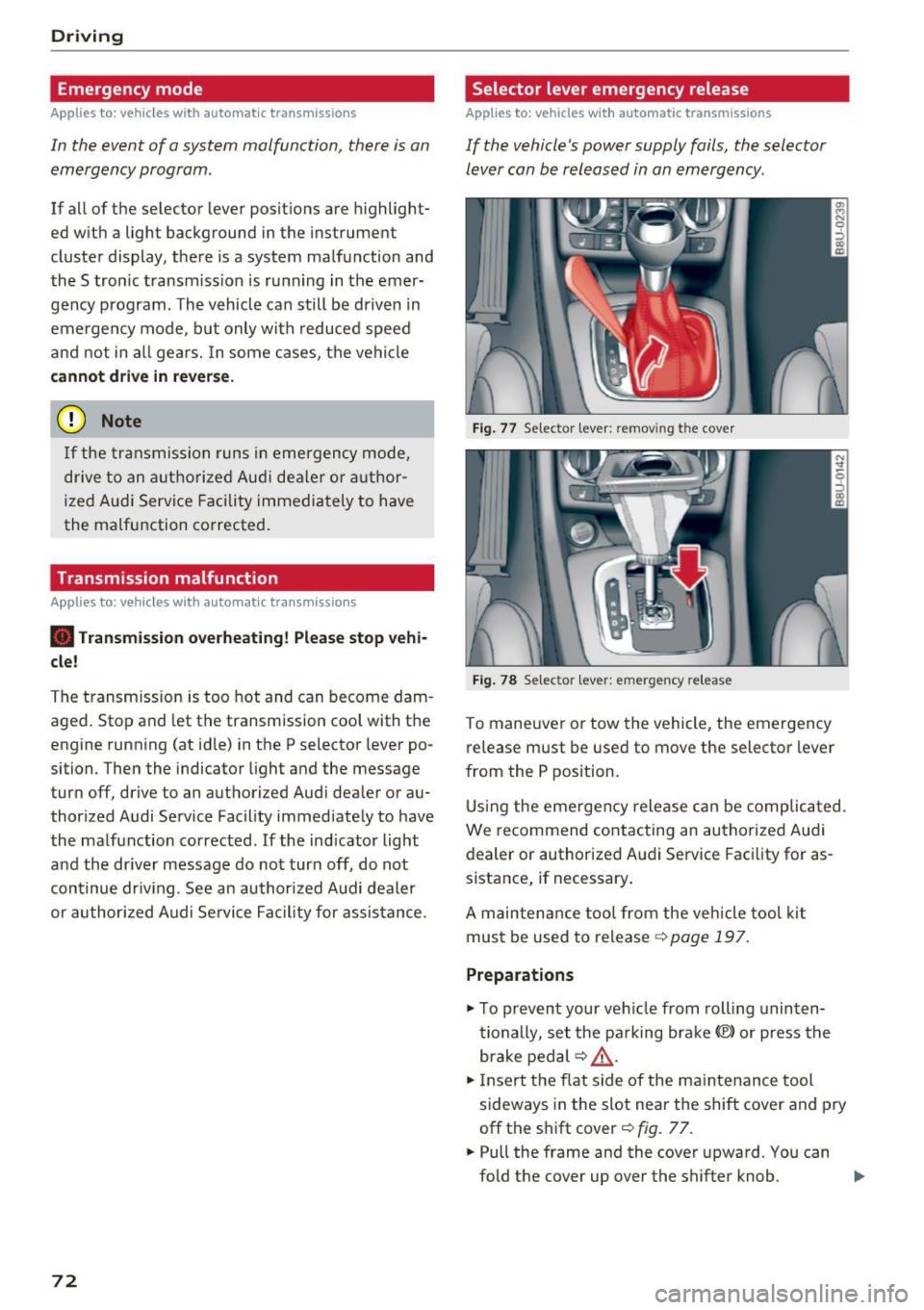
Fig. 77 Selector leve r: remov ing the cove r
Fig. 78 Selector leve r: emerge ncy release
To maneuver or tow the vehicle, the emergency
release must be used to move the selector lever
from the P position.
Using the emergency release can be complicated .
We r ecommend contacting an authorized Audi
dealer or authorized Audi Service Facility for as
sistance, if necessary .
A maintenance tool from the vehicle tool kit
must be used to release ¢
page 197.
Preparations
.,. To prevent your vehicle from rolling uninten
tionally , set the parking brake(®) or press the
brake pedal ¢
LD,. .
.,. Insert the flat side of the maintenance tool
sideways in the slot near the shift cover and pry
off the shift cover¢
fig. 77 .
.. Pull the frame and the cover upward. You can
fold the cover up over the shifter knob . ..,_
Page 80 of 236
Ass is t
Assist
Speed warning system
Applies to: vehicles with speed warning system
The speed warning system helps you to stay be
low o specified maximum speed that con be set,
changed or deleted in the Infotainment system".
The speed warning system warns you if yo u are
exceeding the maximum speed that you have set.
A warning tone will sound as soon as your speed
exceeds the stored value slightly. The
(OJ (USA
models)
I Hll (Canada models) indicator light
and a message appear in the instrument cluster
d isplay at the same time. The
Hll![t] indicator
light and the message t urn off if the speed falls
b a ck below the stored maxim um speed.
Sett ing a threshold is recommended if you would
like to be reminded when yo u reach a certa in
maxim um speed. Situations where yo u may want
to do so i nclude dr iving in a cou ntry w it h a ge ne r
al speed limit or if there is a specified maximum
speed for winter tires .
Setting the warning threshold
Select: !CARI fu nction button > (C ar) Systems *
control b utton > Driver assi st > Sp eed warning .
(0 Tips
Regardless of the speed wa rning sys tem, you
should always monitor yo ur speed using the
speedome ter and ma ke sure you are following
t he legal speed limi t.
78
Cruise control system
Switching on
Applies to: vehicles with cruise control system
The cruise control system makes it possible to
drive a constant speed that is 30 km/h or higher.
0
f
®l
0
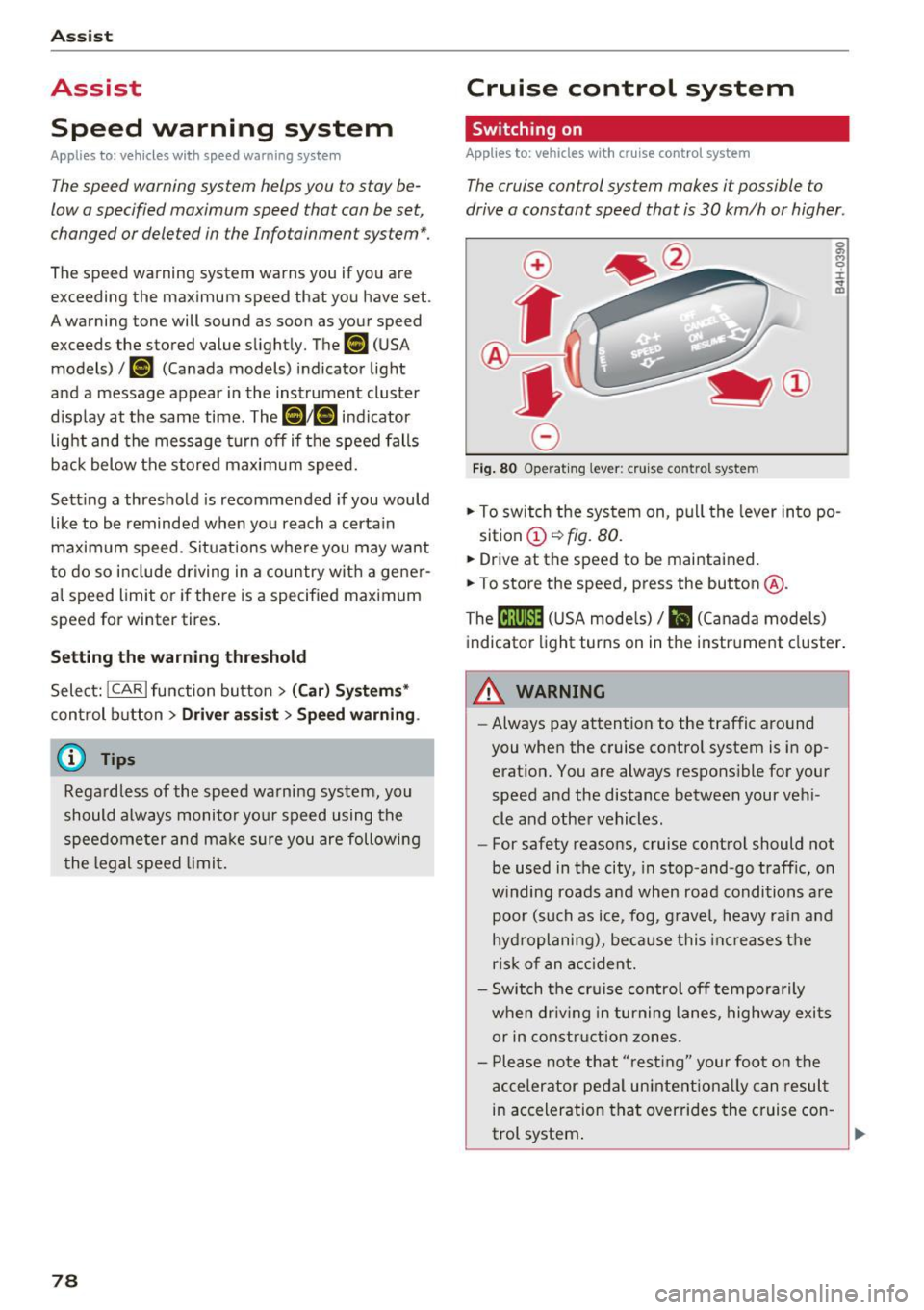
Fig . 80 Operat ing lever: cru ise control system
5:
"' 0 ±
sition
(D ~ fig. 80.
.. Drive at the speed to be maintained.
.. To store the speed, press the button @.
The
(ij;\1)~1~ ( U SA mode ls)/ B (Canada models)
indicato r light turns on in the instr ument cluster .
&_ WARNING
-Always pay attention to the traffic a round
you when the cruise contro l system is in op
erat ion. You are always respons ible for your
speed and the distance between your ve hi
cle and other vehicles.
- For safety reasons , cruise cont rol should not
be used in the city, in stop-and-go traff ic, on
w inding roads and when road condi tions a re
poor (such as ice, fog, g ravel, heavy rai n an d
hy dro planing), because this inc reases t he
r is k of an accident.
- Switch the cr uise control off temporarily
when dr iv ing in turning lanes, highway exi ts
or in constru ction zones.
- P lease note th at "res ting" your foo t on the
a ccelerator pedal un inte ntiona lly can resul t
in ac celeration tha t overrides the c ruise con -
-
trol system . .,.
Page 81 of 236
00
00
......
"' ,....
"' ...... 0 0 :::,
00
@ Tips
The cruise control system cannot maintain
the speed cons istently if you are driving on
steep hills. The vehicle weight ca uses the
speed to increase. Due to th is, shift into a
lower gear in t ime or apply the brakes .
Changing speed
Applies to: vehicles with cruise control system
~ To inc rease or decrease the speed in incre
me nts, push the lever towa rd
0 10 ~ page 78,
fig. 80.
~ T o inc rease o r decrease the speed quickly , hold
the leve r in the
0 10 direction until the de
si red speed is displayed .
Overriding the cruise control system
Applies to: veh icles with cru ise control system
You can a lso press the accelerator pedal down to
increase your speed, for example if you want to
pass someone. The speed you set earlier w ill re
sume as soon as you release the accelerator ped
al.
However, if you are exceeding the stored speed
by a cons iderable amount for a long time, the
cru ise control system will temporar ily switch off .
The
M;ll)~i~ (USA models) 1 B (Canada models) in
d icator light in the instrument cluster turns off
and the sto red speed is maintai ned.
Preselecting the speed
Applies to: vehicles with cruise control system
You can pre-select your desired speed when the
vehicle is stationary.
~ Switch the ign ition on .
~ Pull the lever into position (D c:> page 78,
fig . 80 .
~ To inc rease o r decrease the speed, push the lev-
er toward
0 10 .
~ To store the speed disp layed, release the lever .
This f unct io n ma kes it possib le, for examp le, to
save the speed yo u wan t before dr iving on the
hi ghway. Once on the h ighway, ac tiva te the
cru ise control by pu lling the lever toward
(D .
Switching off
Applies to: vehicles with cruise control system
Temporary deactivation
~ Press the brake pedal, or
Assist
~ Press the lever into position @ (not clicked into
p lace)
c:> page 78, fig. 80, o r
~ Dr ive fo r longer t han five minutes at mo re than
6 mph ( 10 km/h) above the sto red speed .
Switching off completely
~ Press the lever into position @(clicked into
place), o r
~ Switch the ignit ion off.
The speed you stored will be maintained if the
c ruise contro l has been switched off temporarily .
T o resume the stored speed, re lease the bra ke
pedal and pull the lever into pos ition
(D .
Switching the ignition off w ill erase the stored
speed .
,&. WARNING
You should only resume the s to red speed if it
i s no t too high fo r exis ting t raffic conditions.
Otherw ise you can inc rease the risk of an acci
dent .
79
Page 85 of 236
a:,
a:,
...... N r--. N .-< 0 0 ::, a:,
Audi drive select
Introduction
Applies to: vehicles with Audi drive select
Drive select makes it possible to experience dif
ferent types of vehicle settings in one vehicle.
The driver can selec t from three modes,
Comfort,
Auto
and Dynamic , using the ~:/:a button in the
center console or by using the Infotainment sys
tem . This allows yo u to switch between a sporty
and a comfortable driving mode, for example.
Description
App lies to: ve hicles with Audi drive select
The following systems, among other things , are
influenced by drive select:
Engine and automatic transmission
Depending on the mode, the engine and auto
matic transmission respond more quickly or in a
more balanced manner to accelerator pedal
movements. In the sporty dynamic mode, the
transmission shifts at higher speed ranges.
Suspension control*
The adaptive dampers use sensors to record in
formation regarding steering movements, brak ing and accelerat ion operations by the driver,
road surface, driv ing speed, and load . With dr ive
select, you can adjust the adaptive dampers to
sporty (dynamic), comfortable (comfort) or bal
anced (auto).
Steering
The steering adapts in terms of steering assis
tance . Indirect steering that moves easily as in
comfort mode is especially su ited to long drives
on a highway . In contrast, dynamic mode pro
vides sporty, direct steeri ng.
Cornering light*
The cornering light adapts to driving on curves .
The pivoting action and the lighting also adapt to
the mode.
Assist
(D Tips
The 5 selector lever position automatically en
gages if the dynamic mode is se lected.
Selecting the driving mode
Applies to: vehicles wit h Audi drive select
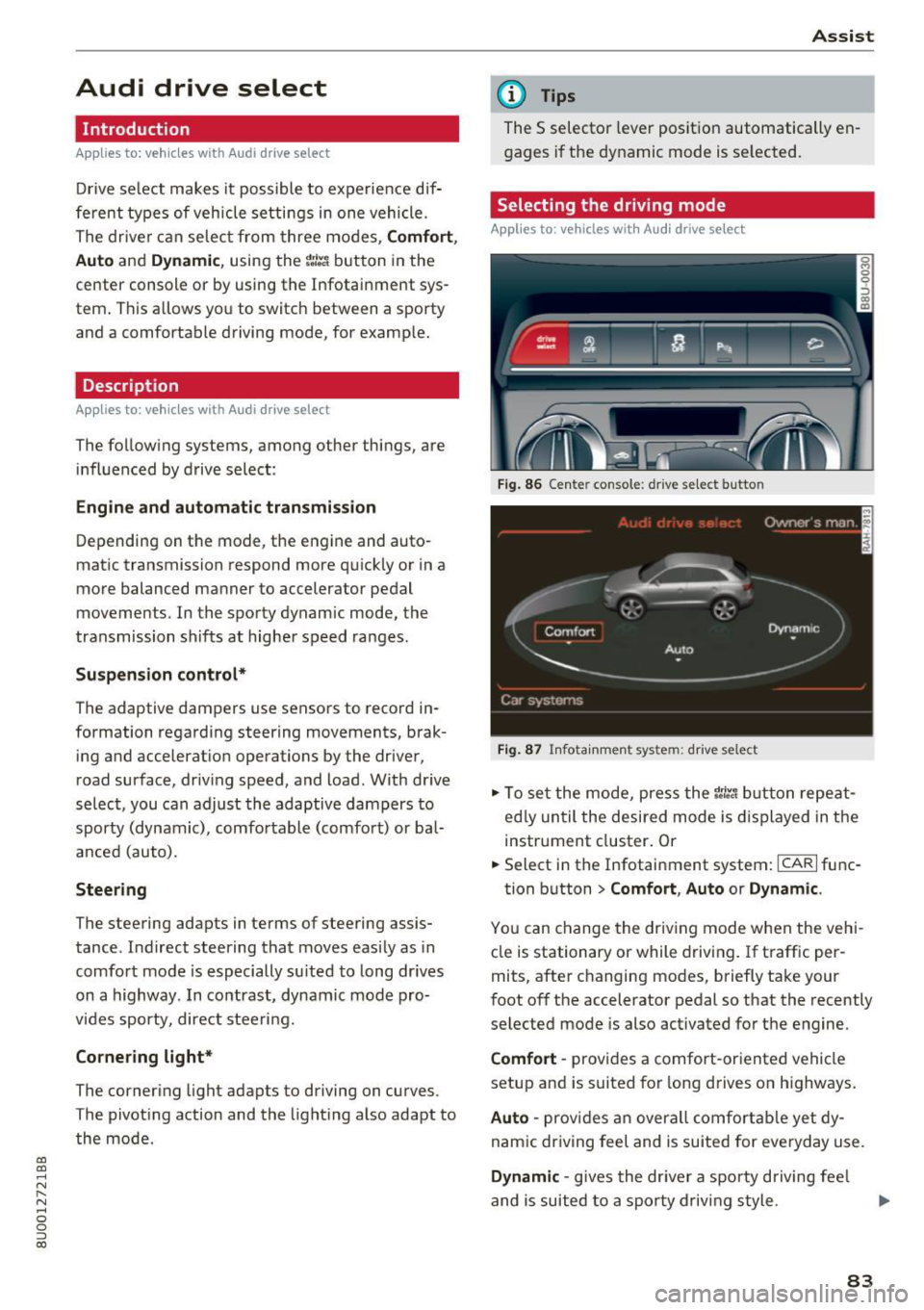
Fig. 86 Cente r console : dr ive se lect button
Fig. 87 Infota inment sys tem: drive select
" To set the mode, press the r:i:., button repeat
ed ly until the desired mode is displayed in the
instrument cluster. Or
" Select in the Infotainment system:
ICARI func-
tion button
> Comfort , Auto or Dynamic .
You can change the driving mode when the vehi
cle is stationary or while driving . If traffic per
mits, after changing modes, briefly take your
foot off the accelerator pedal so that the recently
selected mode is also activated for the engine.
Comfort -provides a comfort-oriented vehicle
setup and is suited for long drives on highways.
Auto -provides an overall comfortable yet dy
namic driving feel and is suited for everyday use .
Dynamic -gives the driver a sporty driving fee l
and is suited to a sporty driving style.
83
Page 96 of 236
Intelligent Technology
_&. WARNING
You should only switch offroad mode on or
switch ESC/ ASR off if your driving abilities
and the traff ic conditions perm it. There is a
r isk of slid ing.
- The stabilization function is limited when
offroad mode is switched on. The driving
wheels co uld spin and the vehicle could
swerve , especially on slick or slippery road
surfaces.
- T here is no vehicle stab ilizat ion when ESC/
ASR are switched off .
Hill descent assist
Applies to: vehicles with hill hold assist
Hill descent assist makes it possible to drive
down a hill at a constant speed.
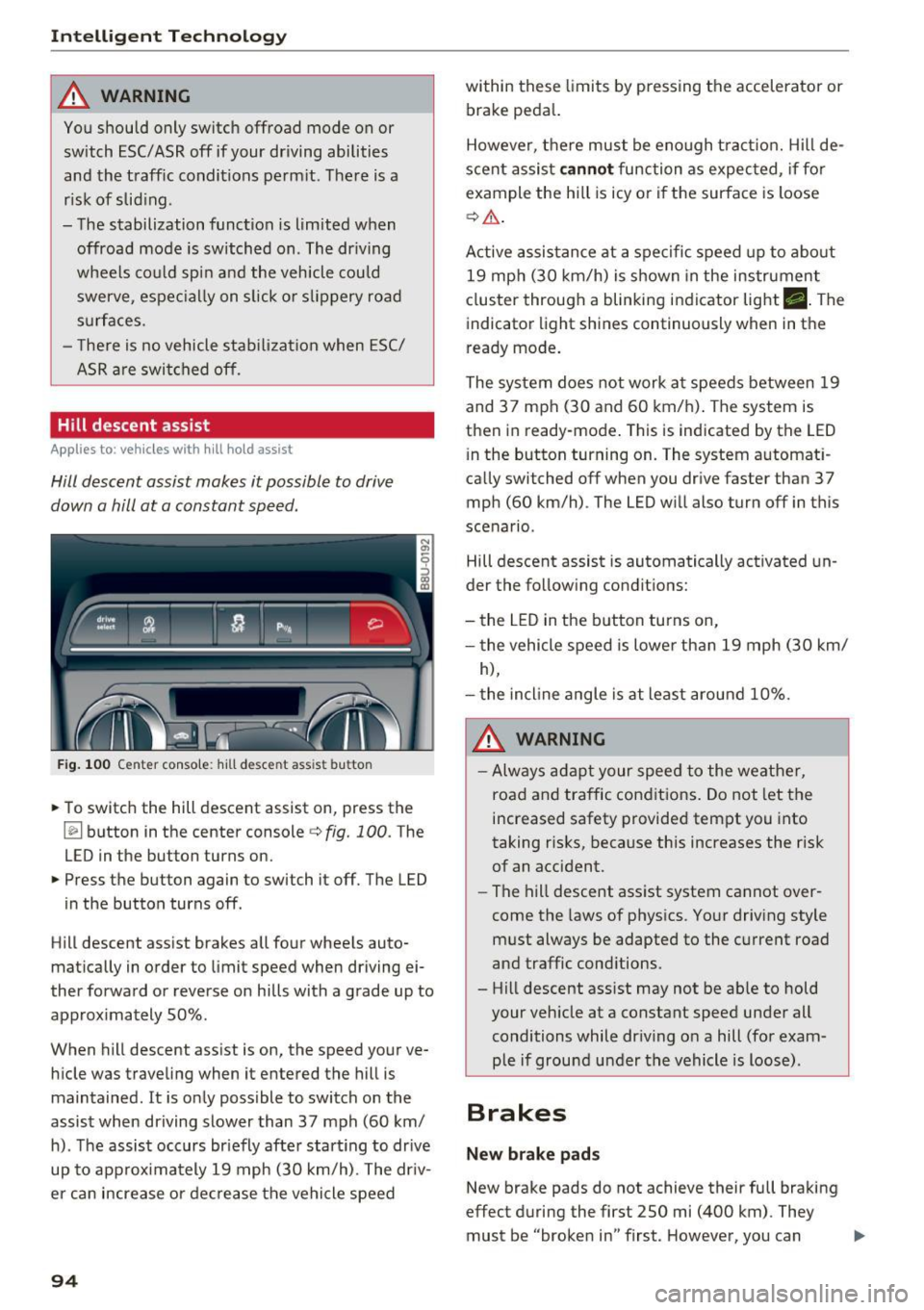
Fig . 100 Center console: hill descent assist button
.,. To switch the hill descent assist on, press the
~ button in the center console c:> fig. 100. The
LED in the button turns on.
.,. Press the button again to switch it off. The LED
in the button turns off.
Hill descent assist brakes all four wheels auto
matically in order to limit speed when driving ei
ther forward or reverse on hills with a grade up to
approx imately 50%.
When hill descent assist is on, the speed your ve hicle was traveling when it entered the hill is
maintained. It is only possible to switch on the
assist when driving slower than 37 mph (60 km/
h). The assist occurs br iefly after start ing to drive
up to approximately 19 mph (30 km/h). The driv
er can increase or decrease the vehicle speed
94
within these limits by pressing the accelerator or
brake peda l.
However, there must be enough tract ion. Hill de
scent assist
cannot function as expec ted, if fo r
example the hill is icy or if the surface is loose
c:>,& .
Active assistance at a specific speed up to about
19 mph (30 km/h) is shown in the instrument
cluster through a blinking indicator light •. The
indicator light shines continuously when in the
ready mode.
The system does not work at speeds between 19
and 37 mph (30 and 60 km/h). The system is
then in ready-mode . This is indicated by the LED
i n the button turning on. The system automat i
ca lly switched off when you drive faster than 37
mph (60 km/h) . The LED will also turn off in this
scenario.
Hill descent assist is automatically activated un
der the following conditions:
- the LED in the button turns on,
- the vehicle speed is lower than 19 mph (30 km/
h),
- the incline angle is at least around 10%.
_&. WARNING
-Always adapt your speed to the weather,
road and traffic conditions. Do not let the
increased safety provided tempt you into
taking risks, because this increases the risk
of an accident .
-
-The hill descent ass ist system cannot over
come the laws of physics. Your driving style
must always be adapted to the current road
and traffic conditions.
- Hill descent ass ist may not be ab le to hold
your vehicle at a constant speed under all
conditions while dr iv ing on a hill (for exam
ple if ground u nder the vehicle is loose).
Brakes
New brake pads
New brake pads do not achieve their full braking
effect during the first 250 mi (400 km). They
must be "broken in" first. However, you can ..,.
Page 111 of 236
00
00
....
"' ,-...
"' .... 0 0 :::,
00
Safety belts
General information
Always wear safety belts!
Wearing safety belts correctly saves lives!
This chapter explains why safety belts are neces
sary, how they work and how to adjust and wear
them correctly.
.. Read all the information that follows and heed
all of the instructions and WARNINGS.
A WARNING
Not wearing safety belts or wearing them im
properly increases the risk of serious personal
injury and death.
- Safety belts are the single most effective
means available to reduce the risk of serious
injury and death in automobile accidents.
For your protection and that of your passen
gers, always correctly wear safety belts
when the vehicle is moving.
- Pregnant women, injured, o r physically im
paired persons must also use safety belts.
Like all vehicle occupants, they are more
likely to be seriously injured if they do not
wear safety belts. The best way to protect a
fetus is to protect the mother -throughout
the entire pregnancy.
Number of seats
Your Audi has a total of five seating positions:
two in the front and three in the rear. Each seat ing position has a safety belt.
A WARNING
Not wearing safety belts or wearing them im
properly increases the risk of serious personal
injury and death.
- Never strap more than one person, includ
ing small children, into any belt.
It is espe
cially dangerous to place a safety belt over a
child sitting on your lap.
- Never let mo re people ride in the vehicle
than there are safety belts available.
Safety belts
-Be sure everyone riding in the vehicle is
properly restrained with a separate safety
belt or child restraint.
Safety belt warning light
Your vehicle has a warning system for the driver
and front seat passenger to remind you about the importance of buckling-up.
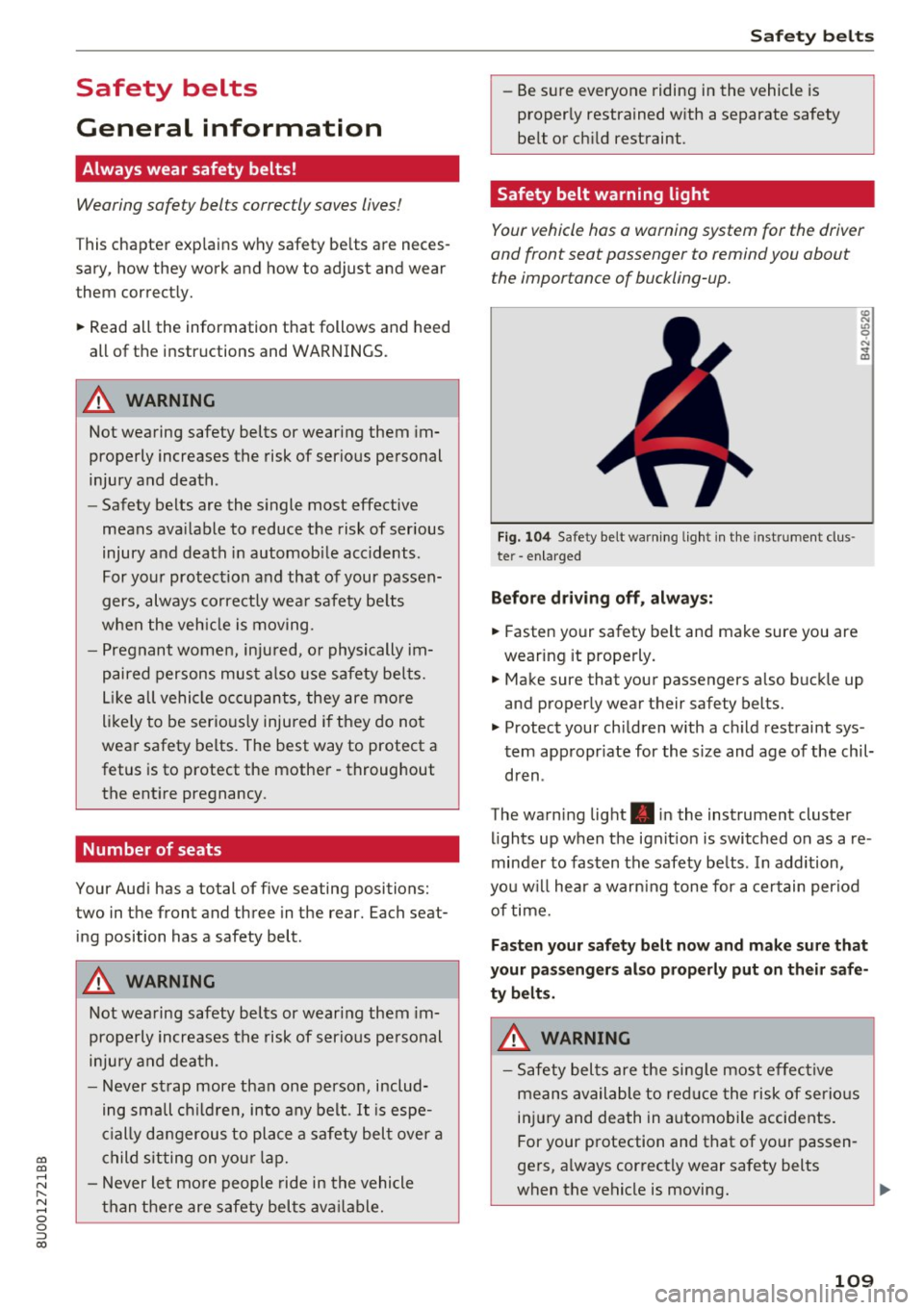
Fi g. 104 Safety belt warn ing light in the instrument clus ·
te r -en larged
Before driving off, always:
.. Fasten your safety belt and make sure you are
wearing it properly.
.,. Make sure that your passengers also buckle up
and properly wear their safety belts.
.,. Protect your children with a child restraint sys
tem appropr iate for the size and age of the chil
dren .
The warning light . in the instrument cluster
lights up when the ignit ion is switched on as a re
minder to fasten the safety belts . In addition,
you w ill hear a warn ing tone for a certain period
of time.
Fasten your safety belt now and make sure that
your passengers also properly put on their safe
ty belts.
A WARNING
- Safety belts are the single most effective
means available to red uce the risk of serious
injury and death in automobile accidents.
For your protection and that of your passen
gers, always correctly wear safety belts
when the vehicle is moving.
109