service AUDI Q3 2018 User Guide
[x] Cancel search | Manufacturer: AUDI, Model Year: 2018, Model line: Q3, Model: AUDI Q3 2018Pages: 230, PDF Size: 57.03 MB
Page 25 of 230
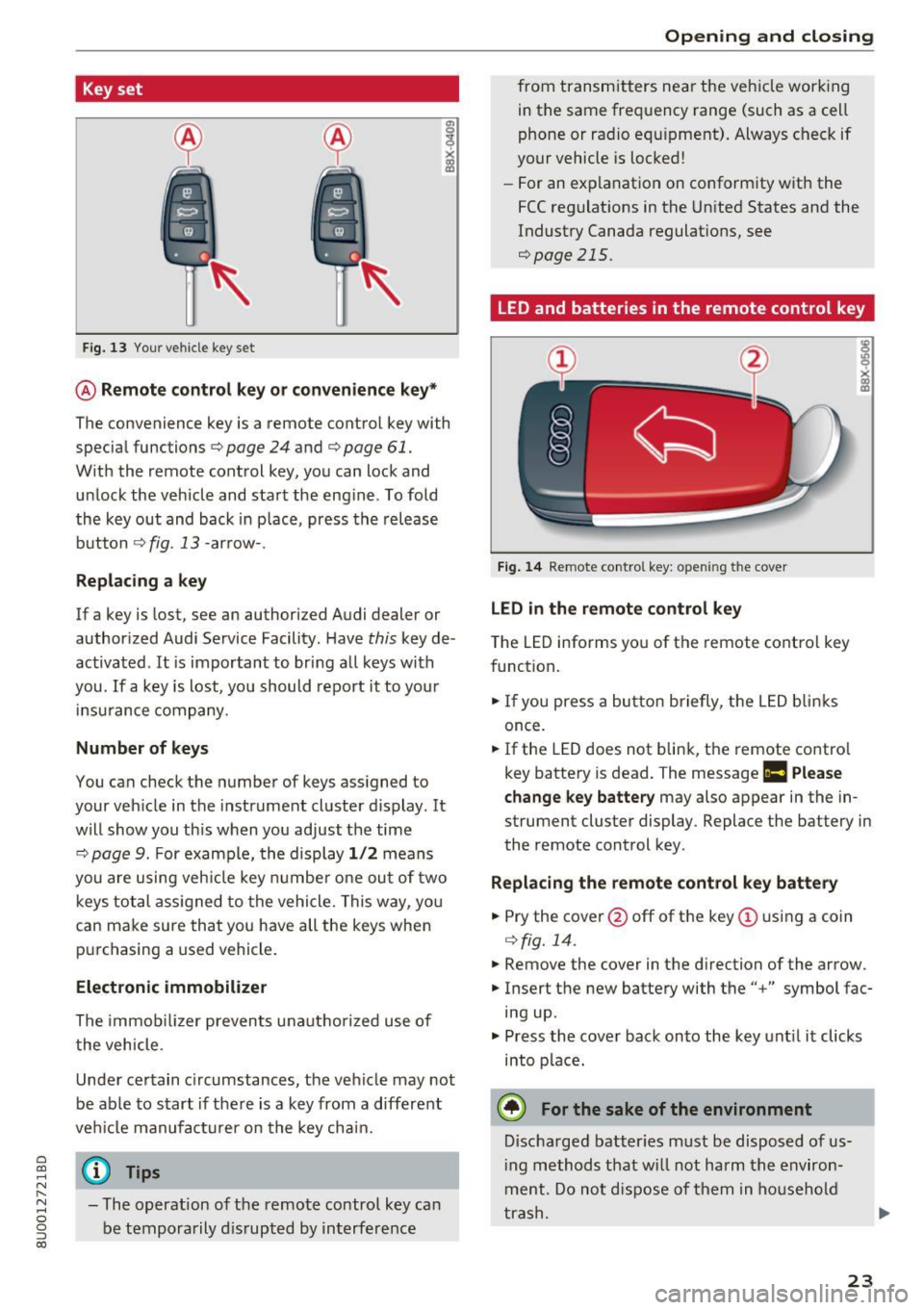
Key set
Fig. 13 Your vehicle key set
@ Remote control key or conven ience key*
The convenience key is a remote control key with
specia l functions ¢
page 24 and¢ page 61.
With the remote cont rol key, you can lock and
u nlock the vehicle and sta rt the eng ine . To fold
the key out and back in p lace, press the release
b utton ¢
fig. 13 -arrow- .
Replacing a key
If a key is lost, see an authorized Audi dealer or
author ized Audi Service Facility. Have
this key de
activated .
It is important to bring a ll keys with
you .
If a key is lost, yo u should report it to you r
in su rance company.
Number of keys
You can check the number of keys ass igned to
your veh icle in the instrument cluste r d isplay. It
will show you th is when you ad just the time
¢
page 9. For examp le, th e display 1/2 m eans
you are u sing veh icle key numbe r one ou t of two
keys tot al ass igned to th e vehicle. This w ay, yo u
can ma ke sure that you have all the keys whe n
pur chasing a used vehicle .
Electronic immobilizer
The immob ilizer prevents unautho riz e d use of
t he vehicle.
Unde r certain c ircumstances , the vehicle may not
be ab le to s tart if the re is a key from a different
ve hicl e manufact urer on the key cha in.
~ @ Tips N r--.
~ - The operation of the remote control key ca n
0 g be temporarily dis rupted by in terfe rence
(X)
Open ing and closing
fro m transmitters ne ar the veh icle wor king
in t he same fre quency range (such as a ce ll
phone or ra dio e quip ment) . Alwa ys c heck if
your vehicle is locked !
- For an ex pla nat io n on co nform ity w it h the
FCC regulat ions in t he Un ite d States and the
Indust ry Canada regulat ions,
see
¢page 215.
LED and batteries in the remote control key
Fig. 14 Re mote contro l key: ope ning the cover
LED in the remote control key
T he LED informs yo u of the remote co ntro l key
f unct ion .
... If you press a bu tton briefly, t he LED blinks
once.
... If the LED does not blin k, t he remote co ntro l
key batte ry is dead. The message
Ill Please
change key battery
may also appear in the in
strument cluster display . Replace the battery in
the remote cont rol key .
Replacing the remote control key battery
... Pry the cover@off of the key(!) usin g a coin
¢ fig. 14.
... Remove the cover in the d irection of the arrow.
... Inse rt the new batte ry with the" +" symbol fac
ing up .
... Press the cove r back onto the ke y unt il it clicks
into p lac e.
@ For the sake of the environment
Discha rg ed batter ies must be disposed o f us
i ng methods t hat w ill not harm t he env iron
m ent. Do no t disp ose of the m in hous ehold
t ra sh.
23
Page 41 of 230
0 co ......
"' ,....
"' ...... 0 0 :::,
00
- The washer fluid nozzles for the windshie ld
washer system are heated at low tempera
tures when the ignition is on.
- When stopping temporarily, such as at a
traffic light, the speed of the windshie ld
wipers automatically reduces by one level.
Cleaning the wiper blades
Clean the wiper blades when you see wiper
streaks. Use a soft cloth and a glass cleaner .
Windshield wiper
.. Place the windshield wiper arms in the service
pos ition ¢
page 39.
"'Fold the windshield wiper arms away from the
windshield .
Rear window wiper
.. Fold the wiper arm away from the rear window .
.&_ WARNING
Dirty windshield wiper blades can impair vi
sion, which increases the risk of an accident.
Replacing windshield wiper blades
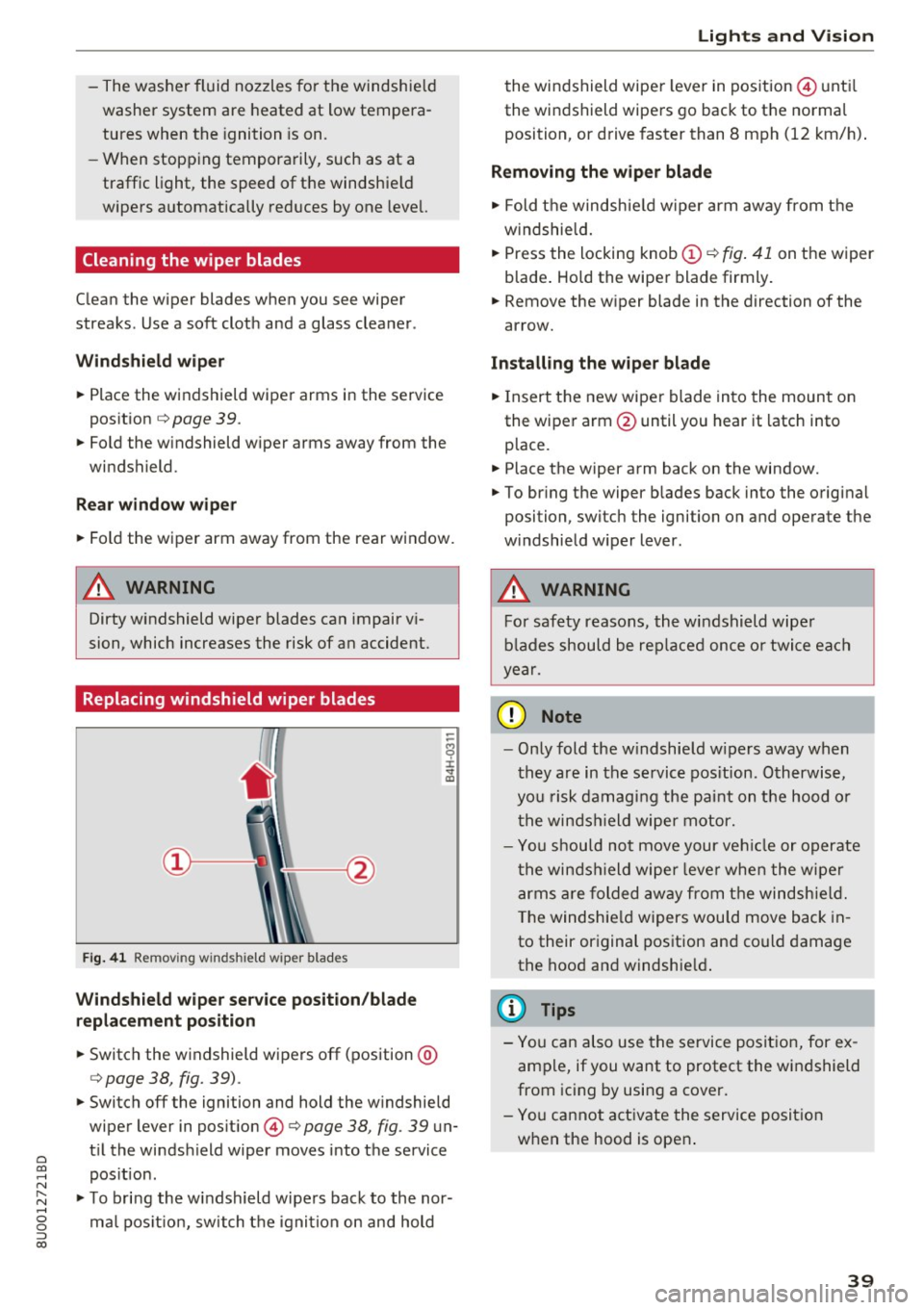
F ig . 41 Remov ing w inds hield w iper blades
Windshield wiper service position/blade
replacement position
.. Switch the windshield wipers off (position @
¢page 38, fig. 39) .
-
"'Switch off the ignition and hold the windshield
wiper lever in position @¢
page 38, fig. 39 un
t il the windsh ield wiper moves into the service
pos ition .
"'T o bring the windshield wipers back to the nor
ma l position, switch the ignition on and hold
Lights and Vision
the windshield wipe r lever in pos ition @until
the windshield wipers go back to the normal
position, or drive faster than 8 mph (12 km/h) .
Removing the wiper blade
"' Fold the windshie ld wiper arm away from the
windshield .
.. Press the locking knob
(D ~ fig . 41 on the wiper
blade . Hold the wiper blade firmly.
.. Remove the w iper blade in the direction of the
arrow.
Installing the wiper blade
"'I nsert the new wiper blade into the mount on
the wiper arm @until you hear it latch into
place.
.. Place the wiper arm back on the window.
"' To bring the wiper blades back into the original
position, switch the ignition on and operate the
w indshield w iper lever .
,&. WARNING
----
For safety reasons, the windshield wipe r
blades should be replaced once or twice each
year.
(D Note
- Only fold the w indshield w ipers away when
they are in the service pos ition . Otherwise,
you risk damaging the paint on the hood or
the windsh ield wiper motor.
- You should not move your veh icle or operate
the windsh ield wiper leve r when the wiper
arms are folded away from the windshie ld.
The windshie ld wipers wou ld move back in
to their original position and could damage
the hood and windshie ld.
(D Tips
-You can also use the service position, for ex
ample, if you want to protect the windshield
from icing by using a cover.
- You cannot activate the service position
when the hood is open .
39
Page 53 of 230
0 co ......
"' ,-...
"' ...... 0 0 :::,
00
Warm and cold
Climate control system
Description
Depending on the vehicle equipment, different
systems could be installed:
- manual climate control system or
- automatic climate control system"
The climate control system circu lates, warms or
cools, and removes humidity from the air in the
vehicle interior. It is the most effective when the windows and panorama glass roof" are closed. If
there is a build-up of heat inside the vehicle, ven
tilation can help to speed up the cooling process .
Pollutant filt er
The pollutant filter removes pollutants such as
dust and pollen from the air.
Key rec ogn ition *
The automatic climate cont ro l system* settings
are stored and assigned to the remote control
key that is in use.
A WARNING
Poor visibility can lead to accidents.
- For safer driving, keep all windows free of
ice, snow and fog .
- Become familiar with the correct use and
function of the climate control system as
quickly as poss ible, espec ially with the de
frosting and defogging functions.
- When the temperature is below freezing,
only use the windshield washer system after
the windsh ield has been warmed by the cli
mate control system. The washer fluid could
Warm and c old
freeze on the windshield and impair visibili
ty.
@ Note
- If you suspect that the climate contro l sys
tem is damaged, switch the system off to
prevent further damage and have it checked
by an authorized Aud i dealer or authorized
Audi Service Facility.
- Repairs to the Audi climate control system
require special technical knowledge and
special tools. See an authorized Audi dea ler
or authorized Aud i Service Fac ility.
@) For the sake of the environment
- To save fuel, turn off the climate control
system cooling mode by pressing the A/C
button. This will also reduce emissions . The
cl imate control system is off when the LED
in the button turns off.
- In vehicles w ith the efficiency program*,
you can find other consumptio n information
and more economy tips
¢ page 20.
(D Tips
- To prevent interference with the heat ing
and cooling output and to prevent the win
dows from fogging over, the air intake in
fro nt of the windshie ld must be free of ice
,
snow or leaves.
- Condensation from the cooling system* can
dr ip and fo rm a pudd le of water under the
vehicle. This is norma l and does not mean
there is a leak .
- The energy management system may tem
porarily switch off certain functions, s uch as
the seat heating* or rear window defogger .
These systems are avai lable aga in as soon
as the energy supply has been restored.
5 1
Page 61 of 230
heat, which could result in overheating or
other damage to the vehicle or other prop
erty.
- Have your vehicle maintained properly and
in accordance with the service recommenda
tions in your Warranty
& Maintenance book
let. Lack of proper maintenance as well as
improper use of the vehicle will impair the
function of the emission control system and
could lead to damage .
- Do not alter or remove any component of
the Em ission Control System unless ap
proved by the manufacturer .
- Do not alter or remove any device, such as
heat shields , switches, ignition wires,
valves, which are designed to protect your
vehicle's Emission Control System and other
important vehicle components .
@ Tips
The consumpt ion estimates as published by
ENVIRONMENTAL PROTECTION AGENCY
(EPA) and Transport Canada may not corre
spond to your actual consumption on the
road, which will vary depending upon vehicle
load and speed, road and weather conditions,
trip length, etc.
Steering
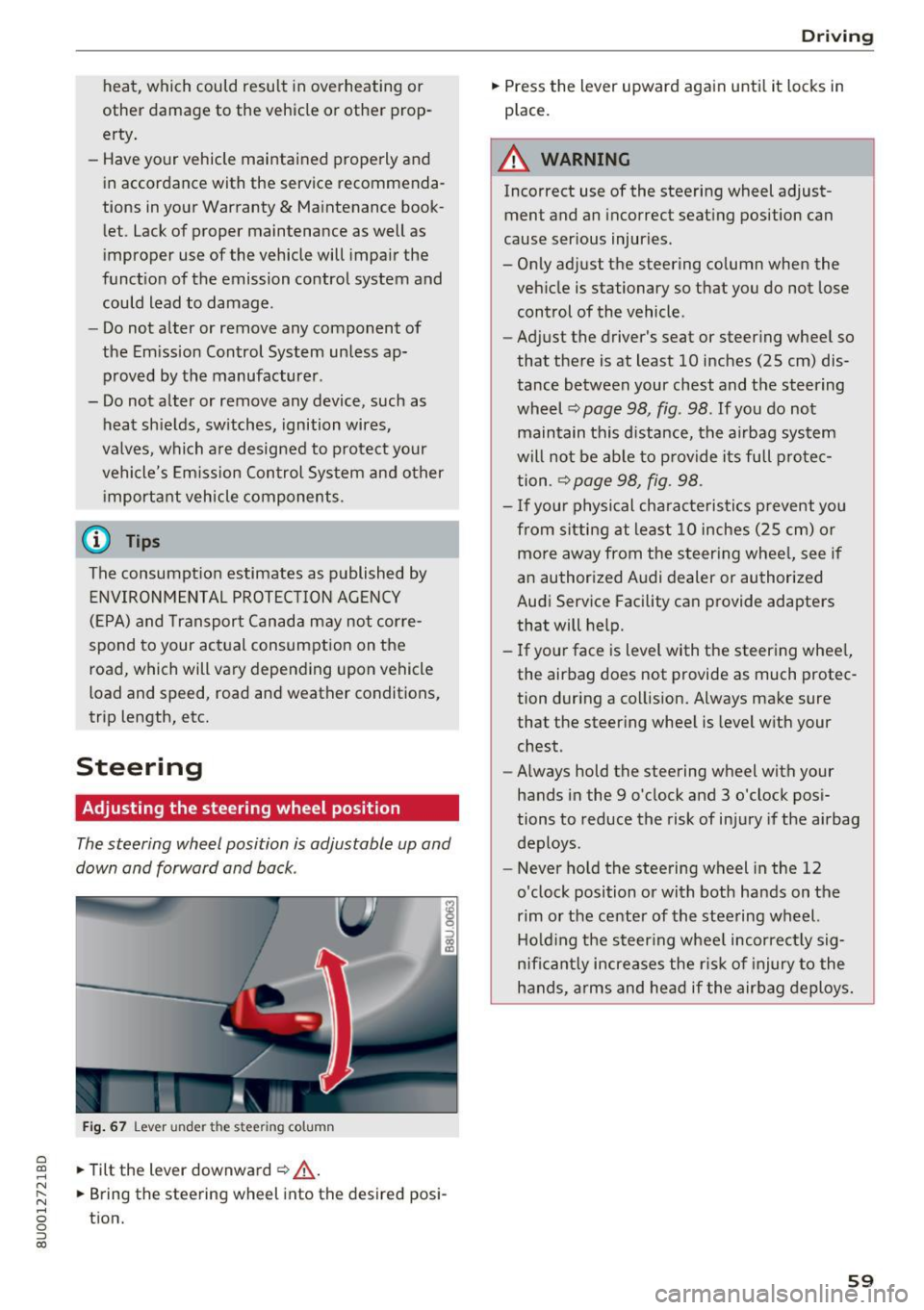
Adjusting the steering wheel position
The steering wheel position is adjustable up and
down and forward and back .
Fig. 67 Lever under the s tee rin g colu mn
~ .,. Tilt the lever downward ¢ .&, . ......
~ .,. Bring the steering wh eel into the d esired posi-N
8 tion. 0 ::, (X)
Driving
.,. Press the lever upward again until it locks in
place .
A WARNING
Incorrect use of the steering wheel adjust
ment and an incorrect seating position can
cause serious injuries.
- Only adjust the steering column when the
vehicle is stationary so that you do not lose control of the vehicle.
-
- Adjust the driver's seat or steering wheel so
that there is at least 10 inches (25 cm) dis
tance between your chest and the steering
wheel ¢
page 98, fig. 98 . If you do not
maintain this d istance, the airbag system
will not be able to provide its full protec
tion .
~ page 98, fig . 98 .
-If your physical characteristics prevent you
from sitting at least 10 inches (25 cm) or
more away from the steering wheel, see if
an authorized Audi dealer or authorized
Audi Service Facility can provide adapters
that will help.
- If your face is level with the steering wheel,
the airbag does not provide as much protec
tion during a collision. Always make sure
that the steering wheel is level with your
chest .
- Always hold the steering wheel with your
hands in the 9 o'clock and 3 o'clock posi
tions to reduce the risk of injury if the airbag
deploys.
- Never hold the steering wheel in the 12
o'clock position or with both hands on the
rim or the center of the steering wheel.
Holding the steering wheel incorrectly sig
n ificantly increases the r isk of injury to the
hands, arms and head if the airbag deploys.
59
Page 65 of 230

a
co
...... N r--. N
'"' 0 0 ::, co
Starting the engine when there is a
malfunction
Applies to: vehicles with conven ience key
Other circumstances can cause the engine not to
start, such as the battery in the remote control key has drained , there is interference with the
key or there is a system malfunction .
Fig . 7 0 Steering co lumn /remote co ntro l key: st arting t he
en gine if there is a malfunc tion
Req uiremen t: the message No k ey identified .
See owne r's manual
must be disp layed and the
II indicator light m ust be on.
.,. Hold the remo te contro l key ve rtic ally in the lo
c ation ind ic a ted
y>l) c::> fig. 70 .
.,. Press the brake peda l.
.,. Press the
I ST AR T ENGINE STOP I button. The
engine will start.
.,. Drive to an authorized Audi dealer or author
iz ed Audi Service Facility immediately to have
the mal function corrected .
@ Tips
You can view the message again by pressing
the
I START ENGINE STOP ! button.
Messages
Turn off ignit io n. Battery discharging
This message appears and a warning tone sounds
if you open the driver's doo r when the ignition is
switched on .
Press brake pedal to start engine
This message appears if you do not step on the
b rake pedal to sta rt the eng ine o n a vehicle wi th
a n autom atic transm ission.
D rivi ng
Plea se engage Nor P.
This message appears when sta rt ing o r stopping
t h e e ngine if t he se lecto r lever is no t in the Nor P
pos ition. The e ngine will not star t/stop.
IS Is key in the vehicle?
The ind icator light turns on and this message ap
pears if the convenience key* was removed from
t h e veh icle when the e ngine was ru nning. If the
convenience key is no longer in the veh icle , you
c annot sw itch the ignition on or sta rt the eng ine
o nce you stop i t. You also canno t loc k the vehicle
from the o utside.
Shift to P, vehicle can roll away . Doors c an only
be lo cked in P .
This message appears for safety reasons if the
selector lever for the au tomatic transm ission is
not in the P position after the ignition is switched
off . M ove the selector leve r to the P posi tion.
Otherwise the ve hicle is not pro tec ted from ro ll
ing and i t cannot be locked .
II No key identified. See owner's manual.
This message appears if there is no conven ience
key* inside the vehicle or if the system does not
recognize the key . The co nvenience key may not
be recognized, for example, if it is covered by an
obje ct tha t
disrup ts the signa l (such as a br ief
c ase), or if the key b attery is we ak. El ectro nic de
vi ces such as cell phones c an also inte rfe re wi th
the signal.
T o still be ab le to start or stop the engine, refer
to
i=:> page 63 .
Electromechanical
parking brake
Fig. 71 Cen te r conso le : pa rk in g b rake
63
Page 66 of 230

Driving
Your vehicle is equipped with an electromechani
cal parking brake @
c> fig. 71. The parking brake
is designed to prevent the vehicle from rolling
un intent ionally and replaces the hand brake .
Setting/manuall y releasing the pa rking
brake
... Pull the(®) switch to set the parking brake . The
LED in the sw itch turns on. The -(USA mod
els) . (Canada models) indicator light also
turns on in the instrument cluster display .
.,. To release the parking brake manually, press
the b rake o r accelerato r pedal whi le the igni
tion is switched on and p ress t he
C®) switch a t
the same time. The L ED in t he b utton and t he
i ndica tor light in the display turn off .
Releasing the parking brake automatically
Requirement: the dr iver's door must be closed,
the dr iver's safety be lt must be latched and the
pa rking brake must be set.
... To start driving and re lease the park ing brake
automat ica lly, press the accele rato r pedal as
us ua l.
In addi tion to releasing the park ing brake auto
mat ically, other convenience and safety funct ions
are available whe n you start driving
c> page 65,
Starting from a stop .
Preventing the automatic parking brake
release
The vehicle could begin rolling unintentionally ,
dependi ng on the h ill or if towing a trailer .
... To preve nt the parking brake from releasing au
tomat ica lly, pull and hold the®) sw itch and
press the accelerator pedal. The park ing b rake
remains set and prevents the veh icle from ro ll
in g backward.
.,. Yo u can re le ase the(®) switch aga in once you
are sure that you are g iv ing eno ugh dr iv ing
force to the wheels by pressing the accele rator
pedal.
Emergency braking function
You can use the emergency bra king f unct ion in an
emergen cy situ ation , or if the stand ard bra ke op
era tion mal func tions or is disabled.
64
... Pull and ho ld the C®) swi tc h.
... As soon as you re lease the
C®> switch or acceler-
ate, the braking stops.
P ulli ng and ho ld ing t he
C®) switch wh ile driving
the veh icle activates the eme rgency braking func
tion . The ve hicle is bra ked at a ll four wheels by
activating the hydraulic b rake system . The bra k
i ng effect is sim ilar to heavy brak ing
c> ,&. .
To reduce the risk of act ivat ing t he emergency
bra kin g by mista ke, a warning tone (buzzer)
sounds when the
C®) sw itch is p ulled . Eme rgency
braking stops as soon as the© switch is released
or the accelerator pedal is pressed.
Park ing
... Press the brake peda l to stop the ve hicle.
... Pull the
C®> switch to set the par king brake .
... Place the selecto r lever in the P position .
... Turn the engine off
c> ,&. .
... Turn the steering w heel when parking on in
clines so that the w heels w ill roll into the curb
if the vehicle starts moving.
8,,. WARNING
- Do not press the a ccele ra to r peda l inadve r
tently if a ge ar i s selected whe n the vehicle
is st ationary an d th e engine is running . Oth
erwise, the vehicle will s tart to move imme
diate ly and this could result i n an accident.
- Eme rgency brak ing s hou ld only be used i n
an emergency, when the norma l bra ke pe dal
has failed or the bra ke peda l is obstructed .
During eme rgency brak ing, your vehicle will
brake s imilar to heavy braking. ESC and the
associated components (ABS, ASR, EDL)
cannot ove rcome the laws of physics .
Around curves a nd whe n road or wea ther
conditions a re bad, a full brake applicat io n
can ca use the veh icle to skid or the rear end
to swerve, w hich incr eases the ris k of an ac
cident.
- I f th e power s upply fail s, you cannot set the
parking br ake if it is released. In this case,
pa rk the vehicle on leve l ground and secure
it by p lacing the selector leve r in the P posi
tion. See an authorized A udi dealer or au -
thorized A udi Service Fac ility for assistance.
IIJ.
Page 67 of 230
-Always take the vehicle key with you when
leaving your vehicle, even i f for a short pe ri
od of time. Th is app lies particu larly when
children rema in i n the vehicle. Otherwise,
children could start the engi ne, release the
par king brake or operate elect rical equip
me nt su ch as powe r windows, which in
cr eases t he risk of an a ccident.
- No one, esp ecially chi ldren, sho uld rema in
in t he ve hicl e w hen it is locked. Locked
doo rs m ake i t more difficul t for emergency
wor ke rs to ge t into the ve hicle, which puts
lives at risk.
(D} Tips
- When stop ping at a traff ic signa l or stop
p ing in c ity tr aff ic, you c an set the p arking
br ake ma nually . The vehi cle does not h ave
to be held with the b rake pedal. The park ing
brake elim inates the tendency to cree p
when a selector lever position is engaged.
As soon as you press the accelerator pedal,
t h e pa rking brake releases automatically
and you r vehicle starts to move
c:> page 65.
- Occasiona l noises when the park ing brake is
set and re leased a re normal and are not a
cause for concer n.
- The park ing brake goes th rough a se lf-test
cycle at regular intervals when t he vehicle is
stoppe d. A ny noises associated w it h this a re
no rma l.
-If there is a power fa ilure, the pa rking brake
will not set if i t is re leased, a nd it w ill not
r ele ase if it is set
c:> .&. . See a n auth oriz ed
A udi dealer or au thorized A ud i Service Fa
cility for assista nee .
Starting from a stop
Various conven ien ce and safety functions may be
ava ila bl e when the vehicle begins driv ing, de
pending on vehicle equipment .
Starting on hills with the parking brake set
0
~ Req uirement: the dr iver's doo r must be closed. ,....
8 .,. To start driving comfortab ly when o n a hill, set
g the parking brake and begin dr iv ing as usual. 00
D riving
The braking force of the parking b rake does not
release a utomatically until the whee ls bui ld up
enoug h driving force .
Starting on hills with hill hold assist
Hill hold assis t makes it easier to s tart on hills.
Requirement: the driver's door must be closed
and the engine must be runn ing .
.,. To act ivate h ill hold assist, press and hold the
brake pedal for severa l seco nds. The vehicle
m ust be in an u phill d irec tion of travel.
After re leas ing the brake pedal, the braking pow
er is maintained for a brief moment¢&. to pre
vent the veh icle from ro lling back when start ing .
During this t ime, you can easily begin to move
you r vehicle .
.8, WARNING
Applies to: veh icles with hill hold assist
-If you do not beg in d riving immed iate ly or
the engi ne stalls after releasing the bra ke
pedal, your veh icle may begin to roll bac k
ward. Press the brake peda l or set the park
ing b rake immediately .
- The intelligent technology of hill hold assist
cannot ove rcome the limitat ions imposed by
natural p hys ica l laws. The i ncreased comfort
offe red by hill ho ld assist should not cause
you to ta ke safety r isks.
- Hill hold ass ist cannot hold the vehicle i n
p lace on a ll hills (for example, if the groun d
is s lippery or icy).
- To reduce the r isk o f an accident, always
make sure th e vehi cle is s ituated safe ly
while s ta tionary.
Driving offroad
General information
Applies to : vehicles with offroad mode
The electronic stab ilizat io n control (ESC) func
tions we re enhanced for d riving offroad . ESC off
road mode can be activated in driving sit uat ions
i n which a whee l lock o r a d ifferential lock func
t io n is needed ¢
page 90. T he hill descent as-
s ist is a lso available, wh ich au tomatically brakes
II),
65
Page 73 of 230
0 co ......
"' ,....
"' ...... 0 0 :::,
00
¢ page 67, fig. 72. For example, M4 means the
fourth gear is engaged.
~ To shift up a gear, tap the selector lever for
ward
0 ¢ fig. 74.
~ To shift down a gear, tap the selector lever to
back Q.
Shifting with the shift paddles*
You can operate the shift paddles in the D/S or M
(tiptronic shift gate) selector lever positions.
~ To shift up one gear, tap the shift paddle 0
¢fig. 75.
~ To shift down one gear, tap the shift paddle Q.
If the shift paddles are tapped while in the D/S
selector lever position, automatic mode switches
off briefly. To switch from manually shifting back
to automatic shifting immediately, tap the shift paddle
0 c:> fig. 75 for 1 second.
To keep shifting using the shift paddles, move
the selector lever to the right out of the D/S posi
tion into the tiptronic shift gate.
Description
The transmission automatically shifts up or down before critical engine speed is reached.
The transmission only allows manual shifting
when the engine speed is within the permitted
range.
Kick-down
Kick-down enables maximum acceleration .
When you press the accelerator pedal down be
yond the resistance point (called kick-down), the
automatic transmission downshifts into a lower
gear, depending on vehicle speed and engine
RPM.
It shifts up into the next higher gear once
the maximum specified engine RPM is reached .
A WARNING ,~
Please note that the wheels could spin on
slick or slippery roads when kick-down is ac
tive.
-
Driving
Emergency mode
Applies to: vehicles with automatic transmissions
In the event of a system malfunction, there is an
emergency program .
If all of the selector lever positions are highlight
ed with a light background in the instrument
cluster display, there is a system malfunction and
the S tronic transmission is running in the emer
gency program . The vehicle can still be driven in
emergency mode, but only with reduced speed
and not in all gears . In some cases, the vehicle
cannot drive in reverse.
([) Note
If the transmission runs in emergency mode,
drive to an authorized Audi dealer or author
ized Audi Service Facility immediately to have
the malfunction corrected.
Transmission malfunction
Applies to: vehicles with automatic transmissions
• Transmission overheating! Please stop vehi
cle!
The transmission is too hot and can become dam
aged. Stop and let the transmission cool with the
engine running (at idle) in the P selector lever po
sition. Then the indicator light and the message
turn off, drive to an authorized Audi dealer or au
thorized Audi Service Facility immediately to have
the malfunction corrected .
If the indicator light
and the driver message do not turn off, do not
continue driving. See an authorized Audi dealer
or authorized Audi Service Facility for assistance.
71
Page 74 of 230
Driving
Selector lever emergency release
Applies to: ve hicles w ith a utomat ic tra nsm iss io ns
If the vehicle's power supply fails, the selector
Lever can be released in an emergency.
F ig. 76 Selector leve r: remov ing th e cover
Fig. 77 Selec tor lever: eme rgency re lease
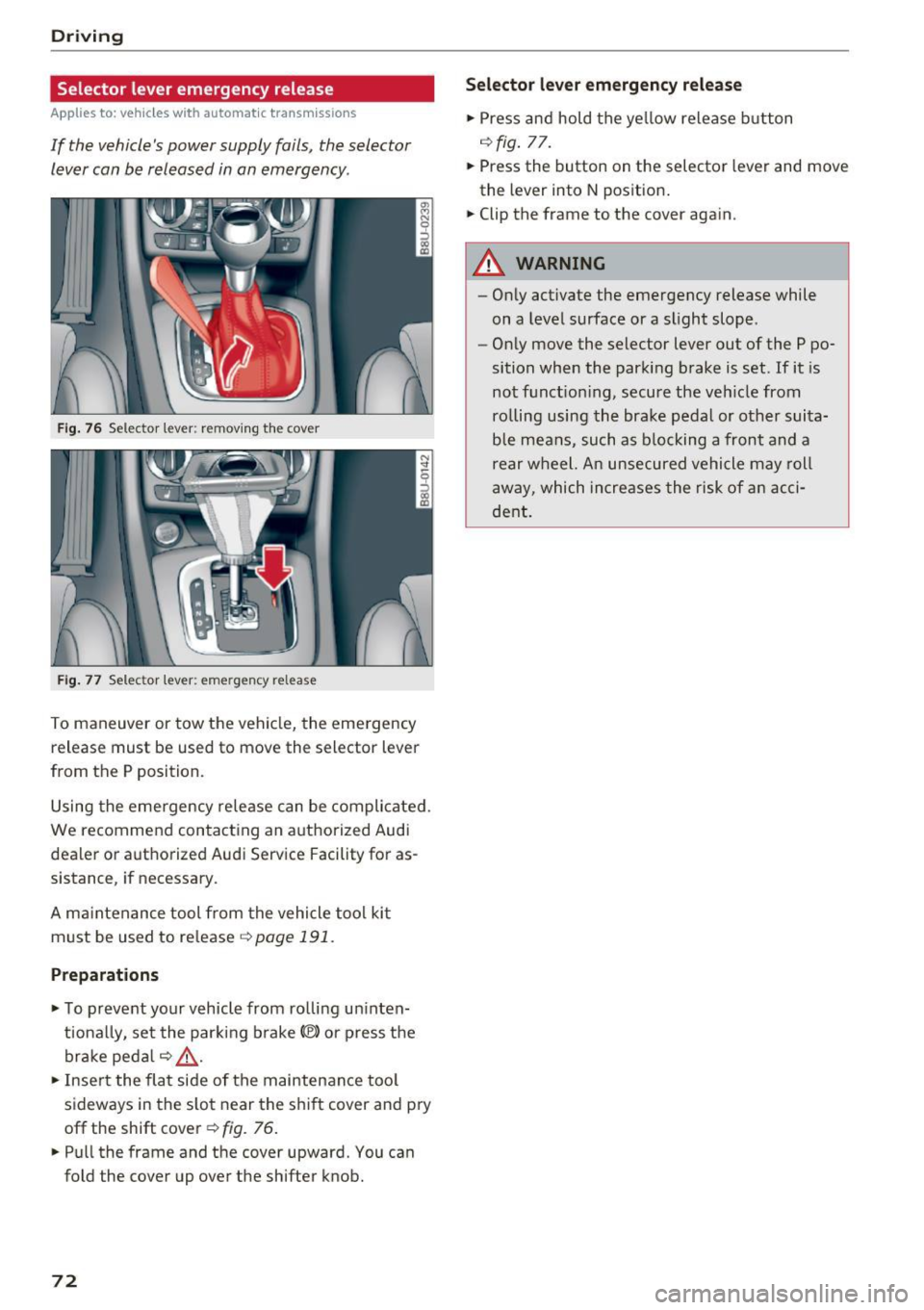
To maneuver or tow the vehi cle, the emergency
release must be used to move the selector lever
from the P position.
Using the emergency rele ase can be compli cated.
We recommend contacting an a uthorized Audi
dealer or authorized Audi Service Facility for as
sistance , if necessary .
A ma intenance tool from the vehicle tool ki t
must be used to re lease ¢
page 191 .
Preparations
.,. To preve nt yo ur vehicle from ro lli ng u ninten
t iona lly, se t the par king b rake(®) or press the
brake peda l r:!.>
,& .
.,. Inse rt the fla t side of the maintenance too l
sideways in the s lot near the s hif t cover and pry
off the shift cover¢ fig. 76 .
.. Pull the frame and the cover upward. You can
fold the cover up over the shifter knob.
72
S ele cto r lev er emergenc y re lease
.,. Press and hold the ye llow release b utton
r:!.> fig. 77.
.,. Press the button on the selector lever and move
the lever into N pos ition .
.,. Clip the frame to the cover again.
A WARNING
- On ly activate the emergency release while
on a level surface or a slight slope .
- Only move the selector lever out of the P po
sition when the parking brake is set. If it is
not f unct io ni ng, secu re the ve hicle from
ro lling using the bra ke pedal or other suita
ble mea ns, such as b locking a front and a
rear w heel. An unsecured vehicle may roll
away, which increases the risk of a n acci
de nt.
Page 76 of 230
Trailer towing
If the tongue we ight is too low, this affects the
trai ler's handling. For driving safety, we recom
mend to always utilize the maximum permitted
tongue we ight, but not exceed it. Yo u can reach
it, for example, by d istributing the cargo in the
tra iler cor rectly .
You can determ ine the tongue we ight, for exam
p le, with a bathroom scale or a public weigh sta
tion .
The permitted tongue weight for your vehicle is 220 lbs (100 kg) .
Load distribution
Poor cargo load and dist ribution can negatively
impact veh icle ha ndling. To have the lowest im
pact as possib le, load the trai ler according to
these criteria :
- Store objec ts p refe rab ly in t he ve hicle lugg age
compartment . The vehicle shou ld always carry
the heaviest possible load and the trai ler
sho uld have the lightest possible load .
- Distribute the load in the tra iler so that the
heavy objects are as close to the axle as possi
ble .
- Secure objects from sliding out of p lace.
- Utilize the max imum perm itted tongue we ight
i f poss ib le .
Tires Set the tire pressure on your vehicle for a "full load"; see the t ire pressu re sticker
r=:;, page 176 .
If necessa ry, also adjust t he tire p ressure on the
tr ail er according to the manufactu rer's re com
mendation.
W inte r ti res s hou ld be mounted on the ve hicle
a nd on the trailer dur ing wi nte r temperatures.
Outside mirrors
If you cannot see the traff ic be hind the tra iler
with the standard exterior mirrors, then you must attach addit ional exte rior m irrors. Adjust
them so you have a s ufficient visibility behind
you .
Exterior lighting
Follow the legal regulat ions regarding the light
i n g eq uipment on your trailer. Contact an author-
74
ized Audi dealer or author ized Audi Service Facili
ty for more information .
Befo re st arting to dr ive , check all lighting eq uip
ment on the hitched trailer.
The head light range cont rol ad justs automat ica l
l y to the light range of the headlights .
Safety chains Make sure the safety chains are correct ly applied
whe n pu lling a trailer . The cha ins should hang
enough so that the trailer can drive around
curves. Howeve r, they must not touch the
ground.
(D Tips
- Use chocks when park ing on inclines if the
t railer is loaded .
- We recommend also having the vehicle in spected between the inspection intervals if
you a re towing a trailer frequently.
- Avoid driv ing with a tra iler dur ing the veh i
cle b reak-in per iod.
Driving with a trailer
Driving with a trailer requires extra caution .
Speed
Adhere to the legal speed limits. Fo llow the legal
regu lations specific to the country.
As the speed increases, the dr iving stab ility o f
the trai ler decreases . Therefore you should not
exceed the maximum lega l speed limit when
there are unfavorable road, weather and/or wind
cond it ions. T his especially applies when driving
downh ill.
You m ust always reduce your speed as soon as
you notice even the slightest swinging motion of
the tra iler . Never try to "stra ighten out" the trai l
er by acce lerating.
The weight d istribution is very poor if the vehicle
i s empty and the trai ler is loaded. However if you
must drive under these circumstances, then dr ive
especially slowly . ..,.