tow AUDI Q3 2018 User Guide
[x] Cancel search | Manufacturer: AUDI, Model Year: 2018, Model line: Q3, Model: AUDI Q3 2018Pages: 230, PDF Size: 57.03 MB
Page 74 of 230
Driving
Selector lever emergency release
Applies to: ve hicles w ith a utomat ic tra nsm iss io ns
If the vehicle's power supply fails, the selector
Lever can be released in an emergency.
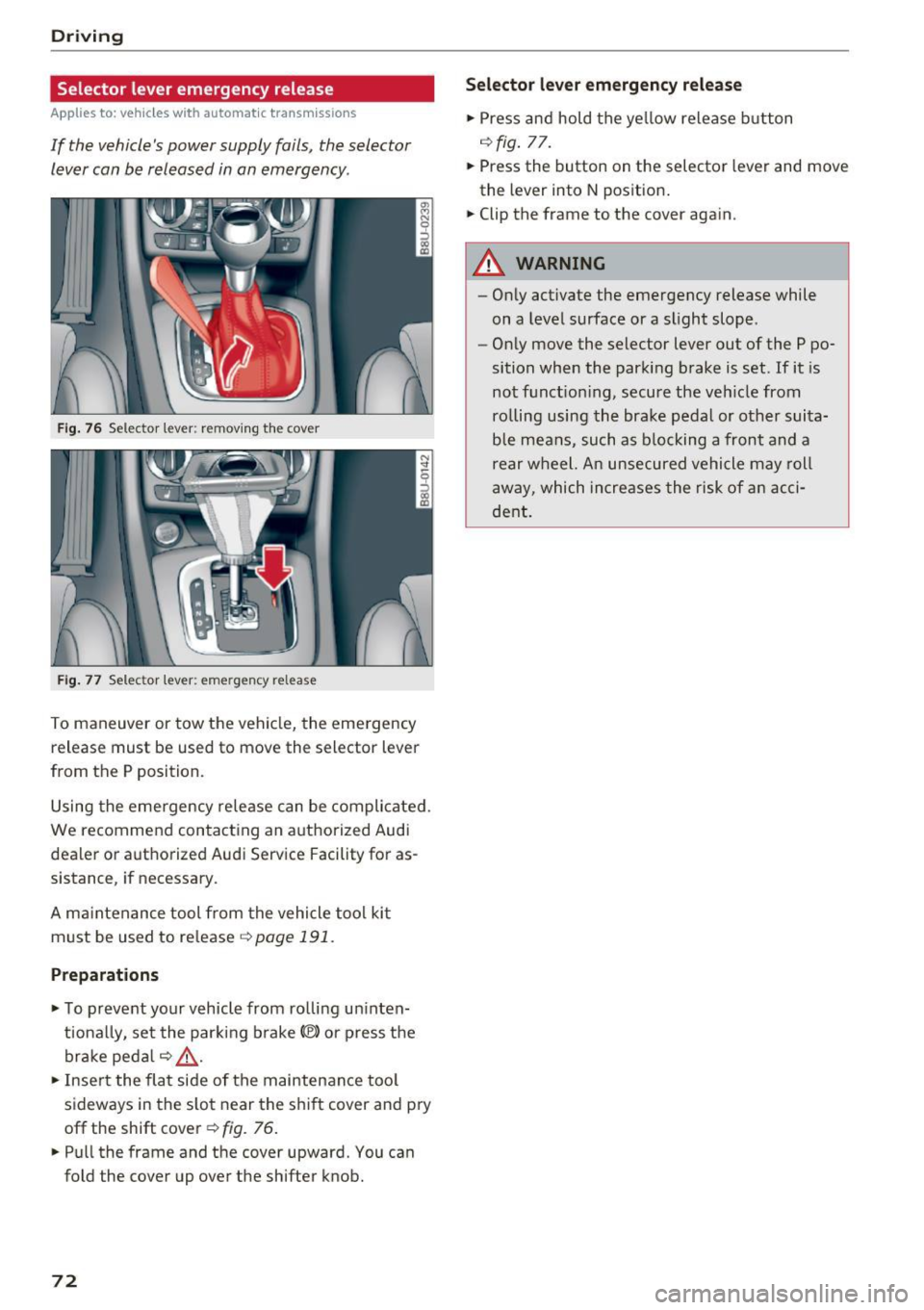
F ig. 76 Selector leve r: remov ing th e cover
Fig. 77 Selec tor lever: eme rgency re lease
To maneuver or tow the vehi cle, the emergency
release must be used to move the selector lever
from the P position.
Using the emergency rele ase can be compli cated.
We recommend contacting an a uthorized Audi
dealer or authorized Audi Service Facility for as
sistance , if necessary .
A ma intenance tool from the vehicle tool ki t
must be used to re lease ¢
page 191 .
Preparations
.,. To preve nt yo ur vehicle from ro lli ng u ninten
t iona lly, se t the par king b rake(®) or press the
brake peda l r:!.>
,& .
.,. Inse rt the fla t side of the maintenance too l
sideways in the s lot near the s hif t cover and pry
off the shift cover¢ fig. 76 .
.. Pull the frame and the cover upward. You can
fold the cover up over the shifter knob.
72
S ele cto r lev er emergenc y re lease
.,. Press and hold the ye llow release b utton
r:!.> fig. 77.
.,. Press the button on the selector lever and move
the lever into N pos ition .
.,. Clip the frame to the cover again.
A WARNING
- On ly activate the emergency release while
on a level surface or a slight slope .
- Only move the selector lever out of the P po
sition when the parking brake is set. If it is
not f unct io ni ng, secu re the ve hicle from
ro lling using the bra ke pedal or other suita
ble mea ns, such as b locking a front and a
rear w heel. An unsecured vehicle may roll
away, which increases the risk of a n acci
de nt.
Page 75 of 230
0 co ......
"' ,-...
"' ...... 0 0 :::,
00
Trailer towing
Driving with a trailer
General information
Your vehicle is primarily intended for transport ing people and luggage . However, if you drive
with a trailer , follow the technical requirements,
the operation and driving tips, and the legal reg
ulations.
Driving with a trailer affects the vehicle's fuel
consumption, performance and wear.
It also re
quires higher concentration from the driver.
A WARNING
Do not transport any people in a trailer due to
the risk of fatal injury.
Technical requirements
Certain requirements must be met when towing
a trailer.
Trailer hitch
Only use a trailer hitch with a removable ball hitch mount and ball hitch. The trailer hitch must
be permitted for the vehicle , the trailer and the
permitted total weight of the trailer being
pulled. Above all, it must be securely and safely
attached to the vehicle trailer.
Never mount a trailer hitch on the bumper. The
trailer hitch must be mounted in a way that does
not impair the function of the bumper. Do not
make any changes to the exhaust system and the
brake system.
Check regularly if the trailer hitch is securely mounted. Always follow the instructions given by
the trailer hitch manufacturer.
Trailer brakes
If the trailer has its own brake system, then fol
low the manufacturer specifications. However,
the brake system on the trailer must never be
connected to the vehicle brake system.
Trailer towing
Engine cooling system
Driving with a trailer means a higher load on the
engine and the cooling system. The cooling sys
tem must be designed for additional load and
contain enough coolant
c::> (D .
A WARNING
-
-Never mount a "weight-distributing" or
"load-balancing" trailer coupler as the trail
er hitch . The vehicle was not designed for
these types of trailer hitches . The trailer
hitch can malfunction and the trailer can
break off from the vehicle.
- If the trailer is equipped with electronic
brakes, these brakes cannot be activated by
a factory-installed control system, which in
creases the risk of an accident.
- To reduce the risk of injury, always remove
the ball hitch mount if no trailer is mount
ed.
(D Note
Longer inclines cannot be driven without a
suitable cooling system, especially if the out
side temperatures are high. otherwise, this
increases the risk of engine damage.
' Operating instructions
Several things must be noted when towing a
trailer.
Towing capacity
The permitted towing capacity for trailers with
out brakes is 1,650 lbs (750 kg).
The permitted towing capacity for trailers with brakes is 2,200 lbs (1,000 kg) .
These values apply to roads with up to 12% in
cline.
Tongue weight
The maximum permitted tongue weight of the
trailer drawbar on the trailer hitch ball head may
not be exceeded. ..,.
73
Page 76 of 230
Trailer towing
If the tongue we ight is too low, this affects the
trai ler's handling. For driving safety, we recom
mend to always utilize the maximum permitted
tongue we ight, but not exceed it. Yo u can reach
it, for example, by d istributing the cargo in the
tra iler cor rectly .
You can determ ine the tongue we ight, for exam
p le, with a bathroom scale or a public weigh sta
tion .
The permitted tongue weight for your vehicle is 220 lbs (100 kg) .
Load distribution
Poor cargo load and dist ribution can negatively
impact veh icle ha ndling. To have the lowest im
pact as possib le, load the trai ler according to
these criteria :
- Store objec ts p refe rab ly in t he ve hicle lugg age
compartment . The vehicle shou ld always carry
the heaviest possible load and the trai ler
sho uld have the lightest possible load .
- Distribute the load in the tra iler so that the
heavy objects are as close to the axle as possi
ble .
- Secure objects from sliding out of p lace.
- Utilize the max imum perm itted tongue we ight
i f poss ib le .
Tires Set the tire pressure on your vehicle for a "full load"; see the t ire pressu re sticker
r=:;, page 176 .
If necessa ry, also adjust t he tire p ressure on the
tr ail er according to the manufactu rer's re com
mendation.
W inte r ti res s hou ld be mounted on the ve hicle
a nd on the trailer dur ing wi nte r temperatures.
Outside mirrors
If you cannot see the traff ic be hind the tra iler
with the standard exterior mirrors, then you must attach addit ional exte rior m irrors. Adjust
them so you have a s ufficient visibility behind
you .
Exterior lighting
Follow the legal regulat ions regarding the light
i n g eq uipment on your trailer. Contact an author-
74
ized Audi dealer or author ized Audi Service Facili
ty for more information .
Befo re st arting to dr ive , check all lighting eq uip
ment on the hitched trailer.
The head light range cont rol ad justs automat ica l
l y to the light range of the headlights .
Safety chains Make sure the safety chains are correct ly applied
whe n pu lling a trailer . The cha ins should hang
enough so that the trailer can drive around
curves. Howeve r, they must not touch the
ground.
(D Tips
- Use chocks when park ing on inclines if the
t railer is loaded .
- We recommend also having the vehicle in spected between the inspection intervals if
you a re towing a trailer frequently.
- Avoid driv ing with a tra iler dur ing the veh i
cle b reak-in per iod.
Driving with a trailer
Driving with a trailer requires extra caution .
Speed
Adhere to the legal speed limits. Fo llow the legal
regu lations specific to the country.
As the speed increases, the dr iving stab ility o f
the trai ler decreases . Therefore you should not
exceed the maximum lega l speed limit when
there are unfavorable road, weather and/or wind
cond it ions. T his especially applies when driving
downh ill.
You m ust always reduce your speed as soon as
you notice even the slightest swinging motion of
the tra iler . Never try to "stra ighten out" the trai l
er by acce lerating.
The weight d istribution is very poor if the vehicle
i s empty and the trai ler is loaded. However if you
must drive under these circumstances, then dr ive
especially slowly . ..,.
Page 77 of 230
0 co ......
"' ,-...
"' ...... 0 0 :::,
00
Bra kes
Brake i n a t imely man ner. Downsh ift before driv
ing downhill so that the engine can assist wit h
braking
~ .&. .
When using a tra ile r with ove rru n b rakes, first
b ra ke gen tly the n qu ickly . T his red uces the risk of
je rking wh ile braking if the trailer wheels loc k up.
Engine coolant temperature
P ay a ttention specifica lly to the coolant tempera
ture d isp lay when t here are high ou tside tempe r
a tures, a nd when dr iv ing on long inclines
~ page 8. Shift to a highe r gear in a t imely m an
n e r.
,&. WARNING -
Constant b raking causes the brakes to ove r
heat and substant ia lly reduces b raking per
formance, increases braking distance or caus es complete fa ilure of the brake system .
Trailer towing
75
Page 79 of 230
0 co ......
"' ,....
"' ...... 0 0 :::,
00
@ Tips
The cruise control system cannot maintain
the speed cons istently if you are driving on
steep hills. The vehicle weight ca uses the
speed to increase. Due to th is, shift into a
lower gear in t ime or apply the brakes .
Changing the speed
Applies to: vehicles with cruise control system
• To inc rease or decrease the speed in incre
me nts, p ush the lever tow ard
010 c> page 76,
fig. 78.
• To in cr ease o r decrease the speed qu ickly , hol d
the leve r in the
010 direction un til the de
si red spee d is displayed .
Overriding the speed
Applies to: vehicles with cru ise control system
You can a lso press the accelerator pedal down to
i ncrease you r speed, for example if you want to
pass someone. The speed you set earlier w ill re
sume as soo n as you release the accelerator ped
al.
However, if you are driving cons iderably faster
than the stored speed for a long period of time,
the cruise cont rol system wi ll temporarily switch
off . Th e
A;[l)~i4 (USA models) !l'I (Canada mod
e ls) indica to r li ght in the inst rument cluste r
turns off and the stored speed is m ain taine d.
Preselecting a speed
Applies to: vehicles with cruise control system
You can pre-select your desired spe ed when the
v e hicle is sta tionary.
.,. Switch the ign ition on .
.. Pull the lever into position ©
c> page 76,
fig. 78 .
.,. To inc rease o r decrease the speed, push the lev -
er towar d
010 .
.. To store the speed disp laye d, re lease the lever .
This f unct io n ma kes it poss ib le, for examp le, to
save the spee d yo u wan t be fo re dr iving on the
hig hway. On ce on t he h ighw ay, activa te the
Assistance systems
cruise contro l system by p ulling the lever towa rd
the position ©-
Switching off
Applies to: vehicles with cruise control system
Deact ivating temporarily
• Press the brake pe dal, or
• Press the lever into position @ (not clicked into
place)
c> page 76, fig . 78, o r
• Dr ive for longer t han five minutes at more than
6 mph (10 km/h) above the sto red speed .
Switching off completely
• Press the lever into position @(clicked into
place), or
• Switch the ignit ion off.
T he speed you stored will be maintained if the
c ruise contro l has been switched o ff temporarily.
To resume the stored speed, re lease the bra ke
pedal and pull the lever into pos ition ©-
Switching t he ignition off w ill erase the stored
speed.
A WARNING ,_
You should only resume the sto red speed if it
i s not too high fo r existing t raff ic conditions.
Ot he rw ise you can inc rease the risk of an acci
dent.
77
Page 80 of 230

Ass is tance sy stems
Audi side assist
Description
Applies to: vehicles with Aud i side ass ist
F ig. 79 Sensor detection range
Fig. 80 D isplay o n th e exterio r mirror
Side assist helps you monitor your blind spot and
traffic behind your vehicle . Within the limits of
the system, it warns you about vehicles that are
coming closer or that are traveling with you with
i n sensor range
(D ¢ fig. 79: if a lane change is
classified as critical, the display @in the exter io r
mirror ¢
fig. 80 turns on.
The display in the left exter ior mirror provides as
sis tance whe n mak ing a lane change to the left,
while the disp lay in the right exterior mirror pro
vides assistance when making a lane cha nge to
the right .
Information stage
As long as you do not activate the turn signal,
side assist
informs you abou t veh icles tha t are
detected and class ified as crit ical. The disp lay in
the mi rror turns on, but is dim .
The display remains dim in t he in fo rmat ion stage
so that your view toward the front is not distur
bed.
78
Warning stage
If you activate the turn signal, side assist warns
you about vehicles that are detected and classi
fied as critica l. The d isp lay in the respective mir
ror blinks bright ly.
If this happens, ch eck traffic
by g lancing in the exter ior mirrors and over your
shou lder
c:> .& in General information on
page
79.
{!) Tips
- You can adjust the brightness on of the dis·
play on the rea rview mirror
c:> page 80 .
-Please refer to the instructions for towing a
trailer located in ¢
page 79.
General information
Applies to : vehicles with Audi side ass ist
®
®
©
F ig. 81 D riving s it u ati ons
Fig. 82 Rea r of t he veh icle: po sit io n of the senso rs
Page 81 of 230

0 co ......
"' ,....
"' ...... 0 0 :::,
00
Side assist functions at speeds above approxi
mately 19 mph (30 km/h).
@ Vehicles that are approaching
I n certain cases, a vehicle will be classified as
cr itica l for a la ne change even if it is still some
what far away . The faste r a vehicle approaches,
the sooner the display in the exterior mirror will
turn on.
@ Vehicles traveling with you
Veh icles traveling with you are indicated in the
exterior mirror if they are classified as critical for
a lane change. All vehicles detected by side assist
are indicated by the time they enter your "blind
spot", at the latest.
© Vehicles you are passing
If you slowly pass a vehicle that side assist has
detected (the difference in speed between the
vehicle and your vehicle is less than
9 mph (lS
km/h)), the display in the exterior mirror turns
on as soon as the vehicle enters your blind spot .
The
display will not tu rn on if you quick ly pass a
vehicle that side assist has detected (the differ
ence in speed is greater than 9 mph (15 km/h)).
Functional limitations
The radar sensors are desig ned to detect the left
and right adjacent lanes when the road lanes are
the normal width . In some situations, the display
in the exterior mirror may turn on even though
there is no vehicle located in the area that is criti
cal for a lane change. For example:
- If the lanes are narrow or if your are driving on
the edge of your lane. If this is the case , the
system may have detected a vehicle in another
lane that is
not adjacent to your current lane.
- If you are driving through a curve . Side assist
may react to a vehicle that is one lane over
from the adjacent lane .
- If side assist reacts to other objects (such as
high or displaced guard rails).
- In poor weather conditions . The side assist
functions are limited.
Do not cover the radar sensors
c!:> fig. 82 with
stickers, deposits, bicycle whee ls or other ob-
Assistance systems
jects, because they will impair the function. Do
not use side assist when towing a trai ler. For in
formation on cleaning, see
c!:> page 185.
A WARNING
=
- Always pay attention to traffic and to the
area around your vehicle. S ide assist cannot
replace a driver's attention. The driver alone
is always respons ible for lane changes and
similar dr iv ing maneuve rs .
- In some situations, the system may not
function or its function may be l imited. For
examp le:
- If vehicles are approaching or being left
behind very quickly. The disp lay may not
turn on in time.
- In poor weather conditions such as heavy
rain, snow or heavy mist.
- On very wide lanes, in tight curves, or if
there is a rise in the road surface. Vehicles i n the adjacent lane may not be detected
because they are outside of the sensor
range.
(D Note
The sensors can be displaced by impacts or
damage to the bumper, wheel housing and
underbody. This can impair the system. Have
an authorized Audi dealer or author ized Audi
Service Facility check their funct ion .
(D Tips
- If the window glass in the dr iver's door or
front passenger's door has been tinted, the display in the exterior mirror may be incor
rect .
- For an explanation on conform ity with the
FCC regulat ions in the United States and the
Industry Canada regulat ions, see
c!:> page 215.
-
79
Page 82 of 230

Assistance systems
Switching on and off
Applies to: vehicles w ith Aud i s ide ass ist
F ig. 83 Driver's door : side ass ist bu tto n
.,. Press the button to switch the system on and
off <=>
& in General information on page 79.
The LED in the button turns on when side assist
is sw itched on.
Adjusting the display brightness
Applies to: ve hicles w ith Aud i side ass is t
The display brightness can be adjusted in the In
fotainment system .
.,. Se lect : the ICARI function button > (Car) Sys
tems *
control button > Driver assist > Audi
side ass ist .
The display brightness adjusts automatically to
the br ightness of the surroundings, both in the
i n formation and in the warning stage. In very
dark or very br ight surroundings, the automat ic
adjustment will set the d isplay to the minimum
or maximum level. In such cases, you may notice
no change when adjusting the brightness, or the
change may only be noticeable once the sur
ro undings change .
Adj ust the brightness to a level where the display
in the information stage will no t disrupt your
view ahead. If you change the brightness, the dis
p la y in the exter ior mirror wi ll briefly show the
brightness level in the information stage . The
brightness of the warning stage is linked to the
brightness in the information stage and is adjust
ed along with the information stage.
80
@ Tips
-Side assist is not active while you are mak
ing the adjustment.
- Your settings are automatically stored and
assigned to the remote control key bei ng
used.
Messages
App lies to : vehicles wi th Audi side ass ist
If side assist sw itches off by itself, the LED in the
button turns off and a message will appear in the
i nstrument cluster display:
Audi side assist: Unavailable . Sensor vision
The radar sensor vision is impaired. Do not cover
the area in front of the sensors with bike whee ls,
stickers, dirt or other objects. Clean the area in
front of the sensors, if necessary
i::> page 78,
fig. 82 .
Audi side assist: Unavailable.
Side assist cannot be switched on at this time be
cause there is a malfunction (for example, the
battery charge level may be too low).
Audi side assist: System fault!
The system cannot gua rantee that it will detect
vehicles correct ly and it has switched off. The
sensors have been moved or are fa ulty . Have the
system checked by an authorized Aud i dealer or
authorized Aud i Serv ice Facility soon .
Audi side assist: Unavailable when towing
Side assist switches off automatically when a fac
tory- installed trailer hitch is connected to the
electrical connector on the trailer. There is no
guarantee the system will switc h off when using
a retrofitted trailer hitch. Do not use side assist
when towing a trailer.
Audi drive select
Introduction
Applies to : vehicles wit h Audi drive se lec t
Drive select makes it possible to experience dif
ferent types of vehicle sett ings in one veh icle.
The driver can select from three modes,
Comfort , ..,.
Page 84 of 230

Parking systems
Parking systems
General information
A ppl ies to: ve hicles w ith a rea r parking sys te m /pa rking sys
tem p lus/rearv iew camera
Depending on your vehicle's equipment, various
parking aids will help you when parking and ma
neuvering.
The
rear park ing system is an audible parking aid
that warns you of obstacles
behind the vehicle
¢ page 83.
The parking system plus assists you when park
ing by audibly and visually indicating objects de
tected
in front of and behind the veh icle
¢ page 83.
The rearview camera shows the area behind the
vehicle in the Infotainment system display . The
lines in the rearview camera image help you to
park or maneuver
¢ page 84.
_& WARNING
-Always look for traff ic and check the area
around your vehicle by looking at it directly
as well . The parking system cannot replace
the driver's attention. The driver is always
responsible when entering or leaving a park
ing space and during similar maneuvers.
- Please note that some surfaces, such as
clothing, are not detected by the system.
- Sensors and cameras have blind spots in
which people and objects cannot be detect
ed. Be especially cautious of small children
and animals.
-
- Always pay attention to the area around the
vehicle -using the rearview mirror, too.
- The sensors can be displaced by impacts or
damage to the radiator grille, bumper,
wheel housing and the underbody . The park
ing system may be impaired as a result.
Have an authorized Audi dealer or author
ized Audi Service Facility check their func
t io n.
- Make sure the sensors are not obstructed by
stickers, deposits or other materia ls. If they
are, the sensor function could be impaired.
82
For additional information on cleaning, see
¢page 185.
(D Note
-Some objects are not detected or displayed
by the system under certain circumstances:
- objects such as barrier chains, trailer draw
bars, vertical poles or fences
- objects above the sensors such as wall ex
tensions
- objects with certain surfaces or structures
such as chain link fences or powder snow
- If you continue driving closer to a low ob
ject, it may disappear from the sensor range. Note that you will no longer be
warned about th is obstacle.
@ Tips
- The system may provide a warning even
though there are no obstacles in the cover
age area in some situations, such as:
- certain road surfaces or when there is tall
grass
- external ultrasonic sources such as from
cleaning vehicles
- in heavy rain, snow, or thick vehicle ex
haust
- We recommend that you practice parking in
a traffic-free location or parking lot to be
come familiar with the system . When doing
this, there should be good light and weath
er conditions.
- The sensors must be kept clean and free of
snow and ice for the parking aid to operate .
For information on cleaning, see
¢page 185.
- You can change the volume and pitch of the
signals as well as the display¢
page 87.
-Please refer to the instructions for towing a
trailer located in
¢page 88.
- What appears in the infotainment display is
somewhat time-delayed.
Page 87 of 230
a
co
...... N r-,. N
'"' 0 0 ::, co
General information
Applies to: vehicles with parking system plus with rearv iew
camera
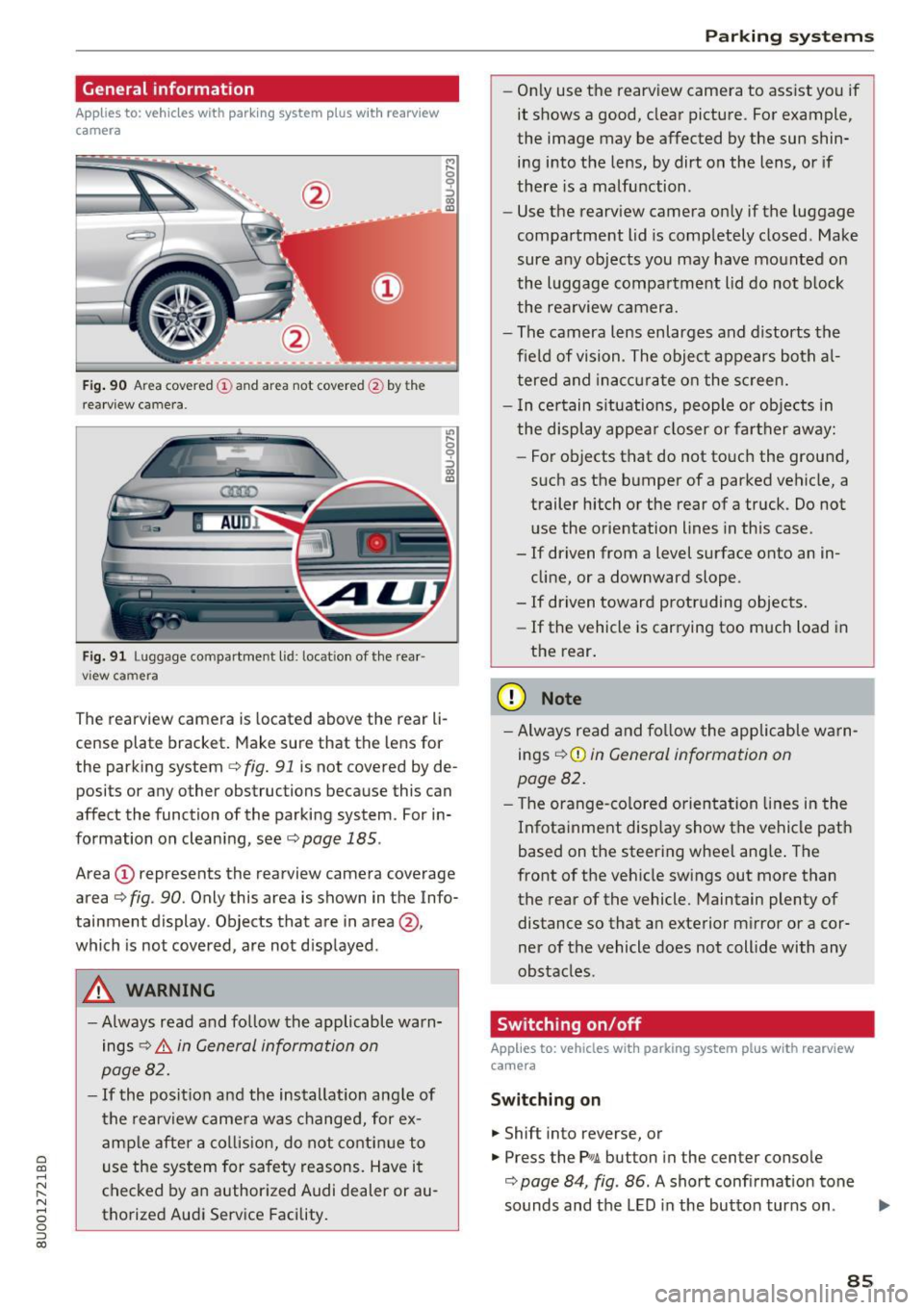
F ig. 90 A rea covered (D an d ar ea not cov ered @ by t he
r ea rvi ew ca mera.
Fig. 91 L u ggage compartment l id : loc ation of the rear ·
vi ew ca mera
,.._ 0
0
::'> co OJ
"' ~ 0
::'> co OJ
The rearview camera is located above the r ear li
c e nse plat e bracket. Mak e sure that the lens for
the park ing system
c> fig. 91 is not covered by de
posi ts or any other obstructions because this can
affect the function of the parking system . For in
formation on clean ing, see
c> page 185 .
Area (D represents the rearview camera coverage
area
c> fig . 90 . Only this area is shown in the Info
tainment display. Objects that are in area@,
which is not covered, are not d isplayed .
A WARNING
-Always read and follow the applicable warn
ings
c> .&. in General information on
page 82.
- If the position and the installat ion ang le of
the rearview came ra was changed, for ex
amp le after a collis ion, do not contin ue to
use the system for safety reasons. Have it
checked by a n author ized Audi dealer or au
thorized Audi Service Facility.
Parking systems
-On ly use the rearv iew camera to ass ist you if
it shows a good, clear picture. For example,
the image may be affected by the sun shin·
ing i nto the lens, by dirt on the lens, or if
there is a malfunction .
- Use the rearv iew camera on ly if the luggage
compa rtment lid is comp letely closed . Make
sure any objects you may have mounted on
the l uggage compar tment lid do not b lock
the rea rview camera.
- The camera lens enlarges and d istorts the
f ield of vision . The object appears both a l
t ered and inac curate on the s creen.
- I n ce rtain s itu ations, people or objects in
the display appea r closer or fa rther away:
- For objects that do not touc h the grou nd,
such as the bumper of a parked vehicle, a
trailer hitch or the rear of a truck . Do not
use the orie ntation lines in this case .
- If driven from a level s urface onto an in
cline, or a downward slope .
- If driven toward protruding objects.
- If the vehicle is carrying too much load in
the rear.
(D Note
-Alw ays read and fo llow the applicable w arn
ings
c> (D in General information on
page 82.
- T he orange-co lored orientation lines in the
Infotainment display show the vehicle path
based on the steering wheel ang le . The
front o f the vehicle swings out more than
the rear of the vehicle. Maintain plenty of distance so that a n exterior m irror or a cor
ner of the vehicle does not coll ide with any
obstacles.
Switching on/off
Applies to: vehicles with parking system plus with rearview
camera
Switching on
... Shift into reverse, or
... Press the Pw.A. but ton in the center console
c> page 84, fig . 86 . A short confirmation tone
sounds and the LED in the butto n tur ns on.
Ill>-
85