airbag AUDI Q3 2018 Owners Manual
[x] Cancel search | Manufacturer: AUDI, Model Year: 2018, Model line: Q3, Model: AUDI Q3 2018Pages: 230, PDF Size: 57.03 MB
Page 5 of 230
0 co ......
"' ,-...
"' ...... 0 0 :::,
00
Safety belts . . . . . . . . . . . . . . . . . . . . . . 106
General information . . . . . . . . . . . . . . . . . 106
Why use safety belts? . . . . . . . . . . . . . . . . 107
Safety belts . . . . . . . . . . . . . . . . . . . . . . . . 109
Belt tensioners . . . . . . . . . . . . . . . . . . . . . . 112
Airbag system . . . . . . . . . . . . . . . . . . . . 114
Important information . . . . . . . . . . . . . . . 114
Front a irbags . . . . . . . . . . . . . . . . . . . . . . . 118
M on itor ing the Advanced Airbag System . 124
Side airbags . . . . . . . . . . . . . . . . . . . . . . . . 128
S ide curtai n airbags . . . . . . . . . . . . . . . . . . 131
Child safety . . . . . . . . . . . . . . . . . . . . . . 134
I mpor tant info rmation . . . . . . . . . . . . . . . 134
C hi ld safety seats . . . . . . . . . . . . . . . . . . . . 14 0
Secur ing c hild safety sea ts . . . . . . . . . . . . 14 4
L ATCH system ( lowe r anchorages and
tethers for chi ldren) . . . . . . . . . . . . . . . . . 14 7
Additional information . . . . . . . . . . . . . . . 151
Maintenance and Care . . . . . . . . . . . 152
Checking and Filling . . . . . . . . . . . . . 152
F ue l ... .. .... ............... .. ..... 152
Refueling . . . . . . . . . . . . . . . . . . . . . . . . . . 153
Cata lytic converter . . . . . . . . . . . . . . . . . . . 155
Eng ine compartment . . . . . . . . . . . . . . . . . 155
E ng ine oil . . . . . . . . . . . . . . . . . . . . . . . . . . 158
Cooling system . . . . . . . . . . . . . . . . . . . . . . 162
B ra ke flu id . . . . . . . . . . . . . . . . . . . . . . . . . 163
B at tery . . . . . . . . . . . . . . . . . . . . . . . . . . . . 163
W indshield was her system . . . . . . . . . . . . 165
Service inte rval display . . . . . . . . . . . . . . . 165
Wheels ..... .. ... ..... ... .. .. .... . 166
Wheels and Tires . . . . . . . . . . . . . . . . . . . . 166
Tire press ure monitoring system 183
Care and cleaning . . . . . . . . . . . . . . . . 185
General information . . . . . . . . . . . . . . . . . 185
Ca r washes . . . . . . . . . . . . . . . . . . . . . . . . . 185
C leaning and care information . . . . . . . . . 186
Placing your veh icle out of service . . . . . . 190
Do It Yourself . . . . . . . . . . . . . . . . . . . . 191
Emergency assistance . . . . . . . . . . . 191
General information . . . . . . . . . . . . . . . . . 191
Equipment . . . . . . . . . . . . . . . . . . . . . . . . . 191
Table of contents
Replacing wheels . . . . . . . . . . . . . . . . . . . . 191
Spare tire . . . . . . . . . . . . . . . . . . . . . . . . . . 197
Fuses and bulbs . . . . . . . . . . . . . . . . . . 199
E lectrica l fuses . . . . . . . . . . . . . . . . . . . . . . 199
B ul bs . . . . . . . . . . . . . . . . . . . . . . . . . . . . . . 201
Emergency situations . . . . . . . . . . . . 203
Genera l . . . . . . . . . . . . . . . . . . . . . . . . . . . . 203
Start ing by p ush ing or tow ing . . . . . . . . . . 203
Start ing with jumper cables . . . . . . . . . . . 203
U se of jumper cables . . . . . . . . . . . . . . . . . 204
Tow ing with a tow t ruck . . . . . . . . . . . . . . 20S
Raising the vehicle . . . . . . . . . . . . . . . . . . . 207
Accessories and Technical Data . 209
Technical data . . . . . . . . . . . . . . . . . . . . 209
Vehicle spec ificat ions . . . . . . . . . . . . . . . . 209
Notes about technical da ta . . . . . . . . . . . . 209
Weights . . . . . . . . . . . . . . . . . . . . . . . . . . . 209
D imens ions. ... .. .. .... .. .... ... .. .. 2 10
Capacities . . . . . . . . . . . . . . . . . . . . . . . . . . 210
Gasoli ne engines . . . . . . . . . . . . . . . . . . . . 211
Consumer Information . . . . . . . . . . 2 12
War ranty coverages . . . . . . . . . . . . . . . . . . 212
Operating you r vehicle outside the U.S.A.
or Canada . . . . . . . . . . . . . . . . . . . . . . . . . . 212
Audi Service Repair Manuals and
Literat ure . . . . . . . . . . . . . . . . . . . . . . . . . . 212
Maintenance ...... .... ........... ... 212
Accessor ies and techn ica l changes . . . . . . 214
De claration of comp liance for
te lecommunications equipmen t and
ele ctroni c sys tems . ... ... ..... ... .. .. 21S
Index . . . . . . . . . . . . . . . . . . . . . . . . . . . . . 2 16
3
Page 9 of 230
0 co ......
"' ,....
"' ...... 0 0 :::,
00
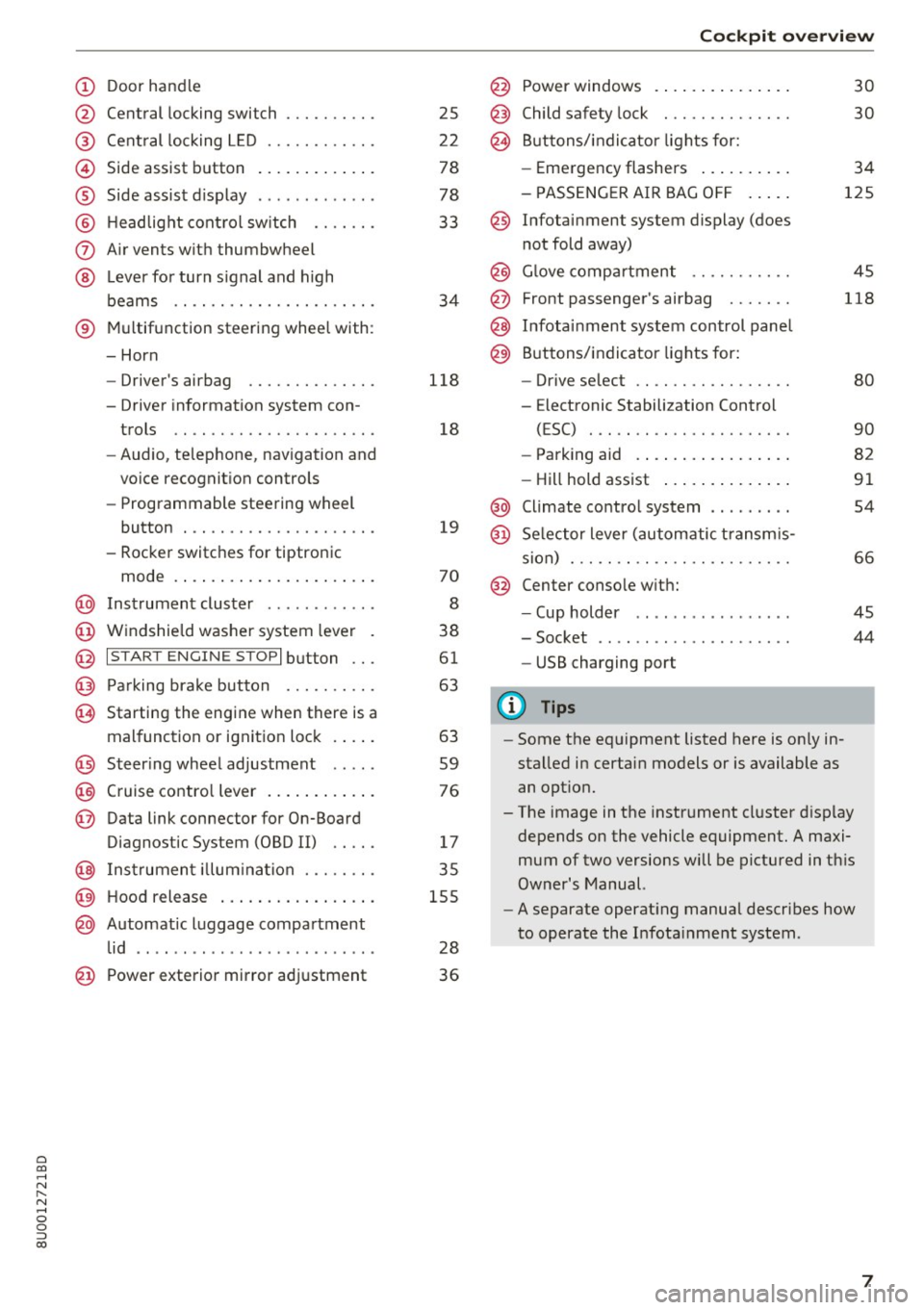
(!) Door handle
@
®
©
®
®
(J)
®
Central locking switch
Cent ral locking L ED ......... .. .
Side assist button
Side assist d isplay
H eadlight cont rol sw itch .... .. .
A ir vents with thumbwheel
L ever for turn s ignal and h igh
beams .. .. .... . .......... .. .
® Multifunction ste ering wheel with :
- Horn
- Driver's airbag ........... .. .
- Driver information system con-
trols .. .. ............... .. .
- Audio , te lephone, nav igation and
vo ice recognit ion controls
- Programmable steering wheel
button . .. .. ........... .. .. .
- Rocker switches for tiptronic
mode . ... .. ... ..... ... .. .. .
@ Instrument cluster ........... .
@ Windshield washer system lever
@ I S TART EN GIN E ST OPI button .. .
@ Pa rking brake button ....... .. .
~ Starting the engine when there is a
malfunction or ignition lock . ... .
@ Steer ing whee l adjustment .... .
@ Cruise contro l lever .... ... .. .. .
@ Data link connector for On-Board
Diagnostic System (OBD II) .. .. .
@ Inst rument illum ination ... .. .. .
@ Hood r ele as e .... ..... ... .. .. .
@ Automat ic luggage compartment
lid .. .. ... ............. ..... .
25
2 2
78
78
33
34
118
18
19
70
8
38
61
63
63
59
76
17
35
155
28
@ Power exterior mirror adjustment 3 6
Cockpit o ve rv iew
@ Power windows . .. .. .. ..... .. .
@ Child safety lock ............. .
@ Buttons/indi cator lights for:
- Eme rgency flashers .. ..... .. .
- PASSENG ER AIR BAG O FF .... .
@ Infotainment system display (does
not fold away)
@ G love compartment .......... .
@ Front passenger's airbag ...... .
@ Infota inment system control panel
@ Buttons/indicator lights for:
- Drive se lect .. .. ............ .
- E lectronic Stabilization Control
( E SC) . .. .. .. .. ....... ..... .
30
30
34
125
45
118
80
90
- Park ing aid . . . . . . . . . . . . . . . . . 82
- Hill hold ass ist . . . . . . . . . . . . . . 91
@ Climate contro l system . . . . . . . . . 54
@ Se lector lever (automatic transm is -
sion) . . . . . . . . . . . . . . . . . . . . . . . . 66
@ Center conso le w ith:
- Cup holder . . . . . . . . . . . . . . . . . 45
- Socket . . . . . . . . . . . . . . . . . . . . . 44
- USB charging port
(D Tips
-Some the eq uipment listed here is on ly in
sta lled in certain models or is available as
an opt ion.
- The image in the instrument cluster d isplay
depends on the vehicle equipment. A maxi
mum of two versions will be pictured in th is
Owner's Manual.
- A separate operat ing manua l describes how
to operate the Infota inment system .
7
Page 24 of 230
Opening and closing
Opening and closing
Central locking
Description
You can lock and unlock the vehicle centrally . You
have the following options:
- Remote control key <=>
page 24,
-Sensors in the door handles" <=> page 24,
-Inner central locking switch <=>page 25, or
- Lock cylinder on the driver's door<=>
page 26.
Turn signals
The turn s ignals flash twice when you unlock the
veh icle and flash once when you lock the vehicle.
If they do not flash, then the ignition may still be
sw itched on, or one of the doors or the luggage
compa rtment lid may be open, fo r example.
Automatic locking (Auto Lock)
The Auto Lock function locks all doors and the
luggage compartment lid once the speed has ex
ceeded approx imately 9 mph (15 km/h).
The vehicle will unlock again if the ignition key* is
removed, the opening function from the central
locking switch is activated, or one of the door
handles is operated .
In the event of a crash with airbag deployment,
the doors will also automatically unlock to allow
access to the vehicle.
Selective door unlocking
The doors and luggage compartment lid wi ll lock
when they close. You can set in the Infotainment
system if
only the driver's door or the entire vehi
cle should unlock when unlocking<=>
page 26,
Setting the central locking system .
Unintentionally locking yourself out
Only lock your vehicle when all of the doors and
the luggage compartment lid are closed and the
remote control key is not in the vehicle. This
helps to prevent you from locking yourself out
accidentally .
The fo llow ing conditions prevent you from lock
ing your remote control key in the vehicle :
22
-If the driver's door is open, the vehicle cannot
be locked by pressing the
!'.II button on the re
mote contro l key or by touching the locking
sensor* on a door .
- If the most recently used convenience key* is in
the luggage compartment, the luggage com
partment lid automatically unlocks again after
closing it<=>
page 2 7. The emergency flashers
blink four t imes.
- If the convenience key* that was last used is de
tected inside the veh icle, then the vehicle will
not be able to lock from the outside .
A WARNING
-Always take the key with you when leaving
your vehicle, even if for a short pe riod of
time. This applies particularly when children
remain in the vehicle. Otherwise, children
could start the engine or operate electrical
equipment (such as power windows), which increases the risk of an accident.
- No one, especially children, should stay in
the vehicle when it is locked from the out
side, because the windows can no longer be
opened from the inside <=>
page 2 7. Locked
doors make it more difficult for emergency
workers to get into the vehicle, which puts
lives at r isk .
A WARNING
Appl ies to: ve hicles with ignition loc k
Do not remove the key from the ignition lock
until the vehicle has come to a complete stop.
Otherwise, the steering lock could engage
suddenly and increase the risk of an accident.
(D Tips
-Do not leave va luables unattended in the ve
hicle. A loc ked vehicle is not a safe!
- The LED in the dr iver's door rail b links when
you lock the vehicle. If the LED lights up for
approximate ly 30 seconds after locking,
there is a malfunction in the centra l locking
system . Have the problem corrected by an
authorized Audi dealer or authorized Aud i
Service Facility.
Page 27 of 230
a
co
...... N r-,. N
"" 0 0 ::, co
.. To open the luggage compartment lid, press
the grip p iece in the luggage compartment lid
¢page 27.
Locking the vehicle
.. Place the selector lever in the P position, or else
the vehicle will not be able to lock .
.. To lock the vehicle, close the door and touch
the sensor on the door handle
once¢ fig. 16,
¢ ,&.. Do not hold the door handle while doing
this.
Unlocking and locking the vehicle can only be
done at the front doors. The remote control key
cannot be more than approximately 4 ft (1.5 m)
away from the door handle . It makes no differ
ence whether the remote control key is in your
jacket pocket, purse or briefcase .
The door cannot be opened for a brief period di rectly after locking it. Th is way you have the op
portunity to check if the doors locked correctly .
You can set in the Infotainment system if
only
the driver's door or the entire vehicle should un lock when unlocking ¢
page 26.
A WARNING
Read and following all warnings¢.& in De
scription on page 22.
(D} Tips
If your vehicle is left standing for a long peri
od of time, note the following:
- The proximity sensor switches off after a
few days to save energy. You then have to
pull once on the door handle to unlock the
vehicle and a second time to open it .
- The energy management system gradually
turns off unnecessary convenience functions
to prevent the vehicle battery from draining
and to maintain the vehicle's ability to start
for as long as possible. You then may no
longer be able to unlock your vehicle with
this convenience function.
Opening and closing
Central locking switch
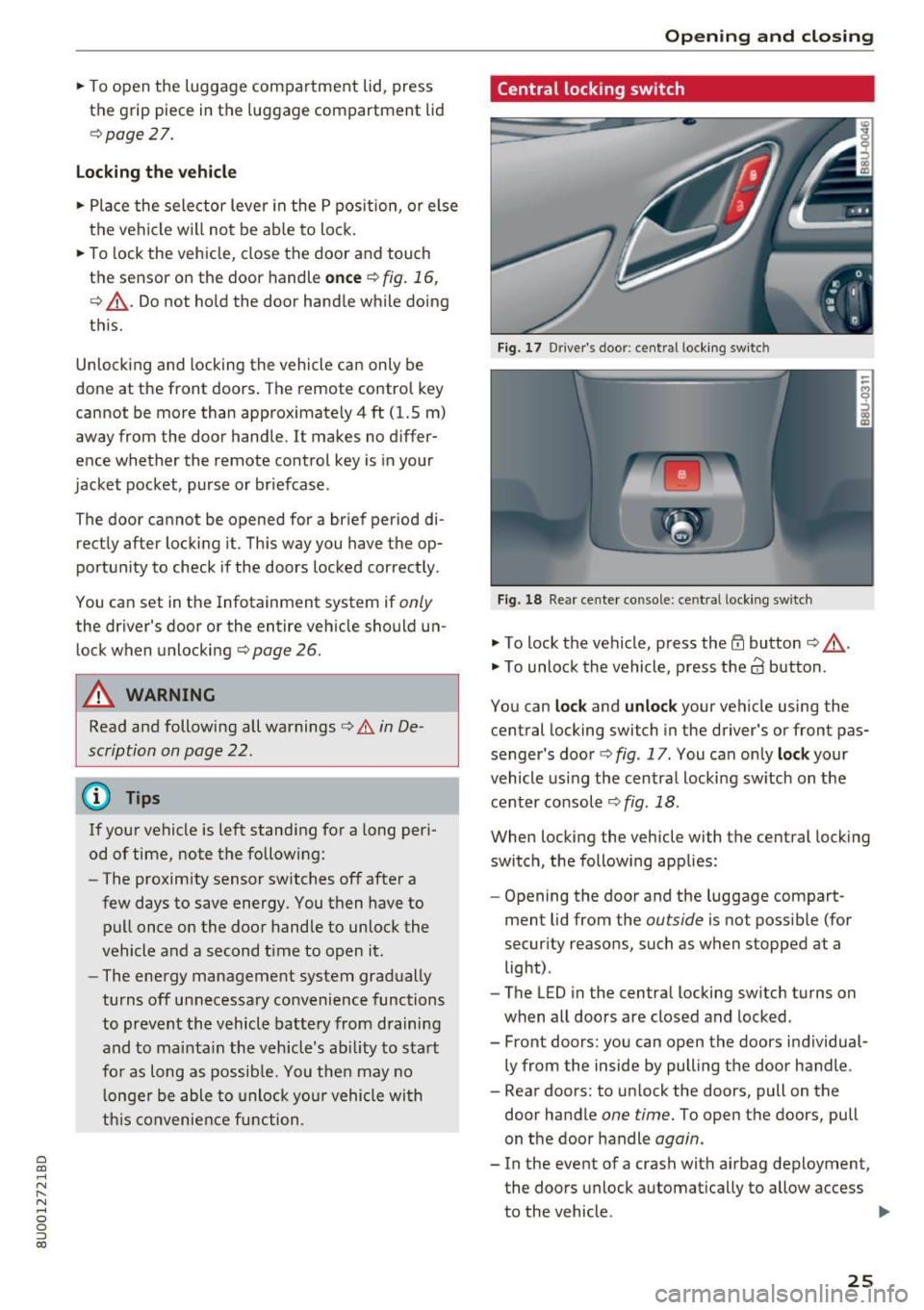
Fig. 17 Driver 's doo r: centr al locking switc h
Fig. 18 Rear center co nsole: ce ntra l locking sw itch
• To lock the vehicle, press the ff! button ¢ ,A.
• To unlock the vehicle, press the al button .
You can
lock and unlock your vehicle using the
central locking switch in the driver's or front pas
senger's door¢
fig. 17 . You can only lock your
vehicle using the central locking switch on the
center console
¢ fig . 18 .
When locking the vehicle with the central locking
switch, the following applies:
- Opening the door and the luggage compart
ment lid from the
outside is not possible (for
security reasons, such as when stopped at a light) .
- The L ED in the central locking switch turns on
when all doors are closed and locked.
- Front doors : you can open the doors individual
ly from the inside by pulling the door handle .
- Rear doors: to unlock the doors, pull on the door handle
one time. To open the doors, pull
on the door handle
again.
- In the event of a crash with airbag deployment, the doors unlock automatically to allow access
to the vehicle .
IJII>
25
Page 44 of 230
Sea ts and stor age
Seats and storage
General information
A WARNING
See c::> page 9 7, Driving safety for important
information, tips, suggestions and warnings
that you should read and follow for your own
safety and the safety of yo ur passengers .
Front seats
Manual seat adjustment
Appl ies to vehicles with manual adiustable seats
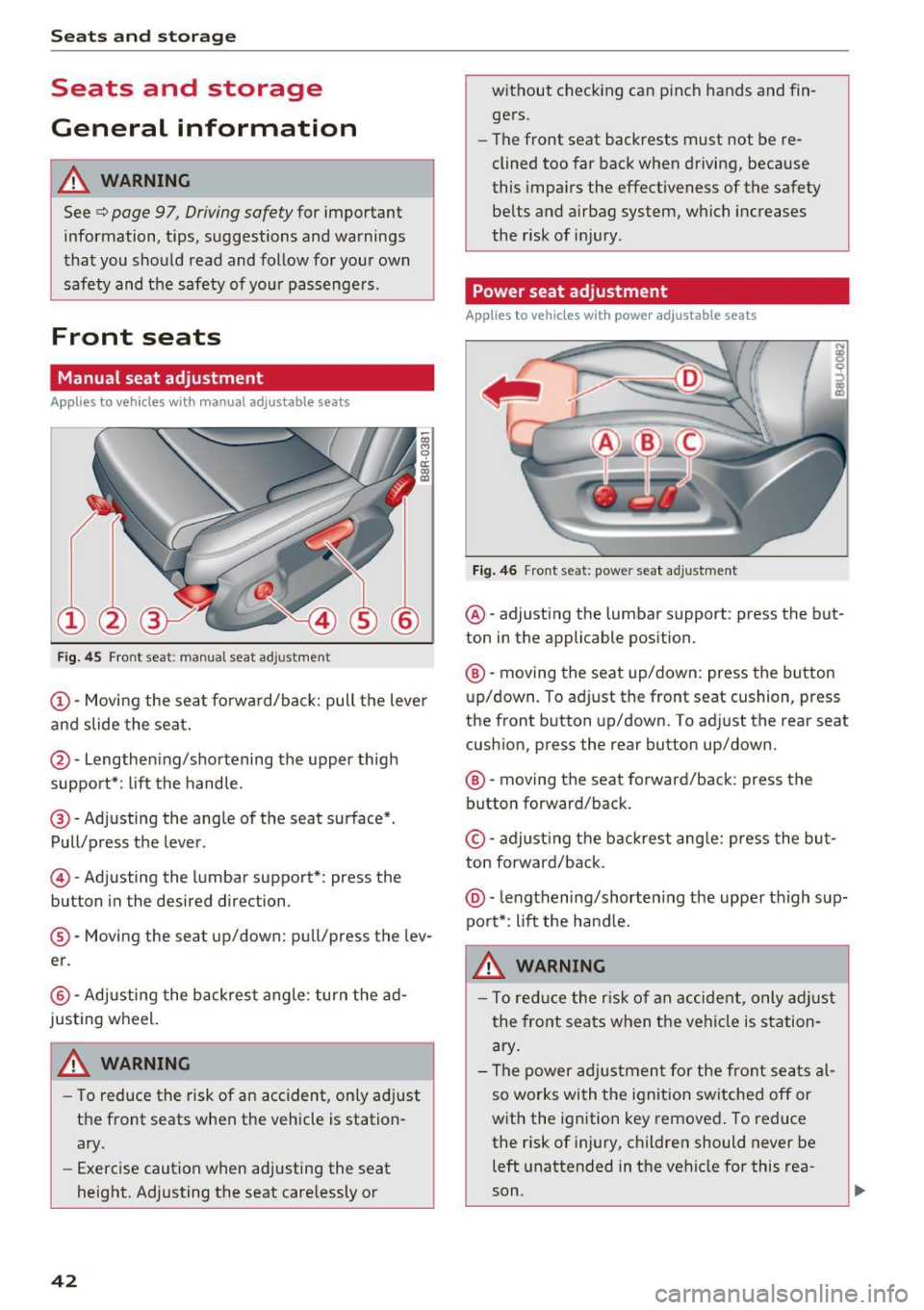
Fig. 45 Front seat: manual seat ad justme nt
@ -Moving the seat fo rward/back: pull the lever
and slide the seat.
@ -Lengthening/shortening the upper thigh
support*: lift the handle.
@ -Adjusting the angle of the seat surface*.
Pull/press the lever.
© -Adjusting the lumbar support*: press the
button in the desired direction .
®-Moving the seat up/down: pull/press the lev
er.
@ -Adjusting the backrest angle : turn the ad
justing wheel.
WARNING
- To reduce the risk of an accident, on ly adjust
the front seats when the vehicle is station
ary.
- Exercise caution when adjusting the seat
height. Adjusting the seat care lessly or
42
w ithout checking can p inch hands and fin
gers.
- The front seat backrests must not be re
clined too far back when driving, because
this impa irs the effectiveness of the safety
belts and airbag system, which increases
the risk of inj ury .
Power seat adjustment
App lies to vehicles w it h power adjustab le seats
Fig . 46 Front seat: power seat adjustment
@ -adjusting the lumbar support : press the but
ton in the applicable position.
® -moving the seat up/down: press the button
up/down. To adjust the front seat cushion, press
the front button up/down. To adjust the rear seat
cushion, press the rear button up/down.
® -moving the seat forward/back : press the
button forward/back.
© -adjust ing the backrest ang le: press the bu t
ton forward/back .
@-leng thening/shorten ing the uppe r thigh sup
port*: li ft the hand le.
A WARNING
- To reduce the r is k of an accident, only adjust
the front seats when t he vehicle is station
ary .
- The power adj ustment for the front seats al
so works wi th the ignit ion sw itched off or
with the ignition key removed . To reduce
the risk of injury, children should never be
left unattended in the vehicle for this rea
son .
Page 45 of 230
a
co
...... N r--. N .-< 0 0 ::, co
-Exercise caution when adjusting the seat
height. Unsupervised or careless seat ad
justment can pinch fingers or hands, which
increases the risk of injury .
- The front seat backrests must not be re
clined too far back when driving, because
this impairs the effectiveness of the safety
belts and airbag system, which increases
the risk of injury.
- To minimize the risk of injury during sudden
braking or a collision, the driver and the
front passenger must not drive or r ide with
the backrest in the reclined position. The
safety belts and airbag system can only pro
vide the greatest protection possible when
the backrests are in the upright position and
the safety belts are worn correctly. The more a backrest is reclined, the greater the
risk of injury due to an incorrect seating po
sition and safety belt position .
Front center armrest
Applie s to vehicles with a front center armrest
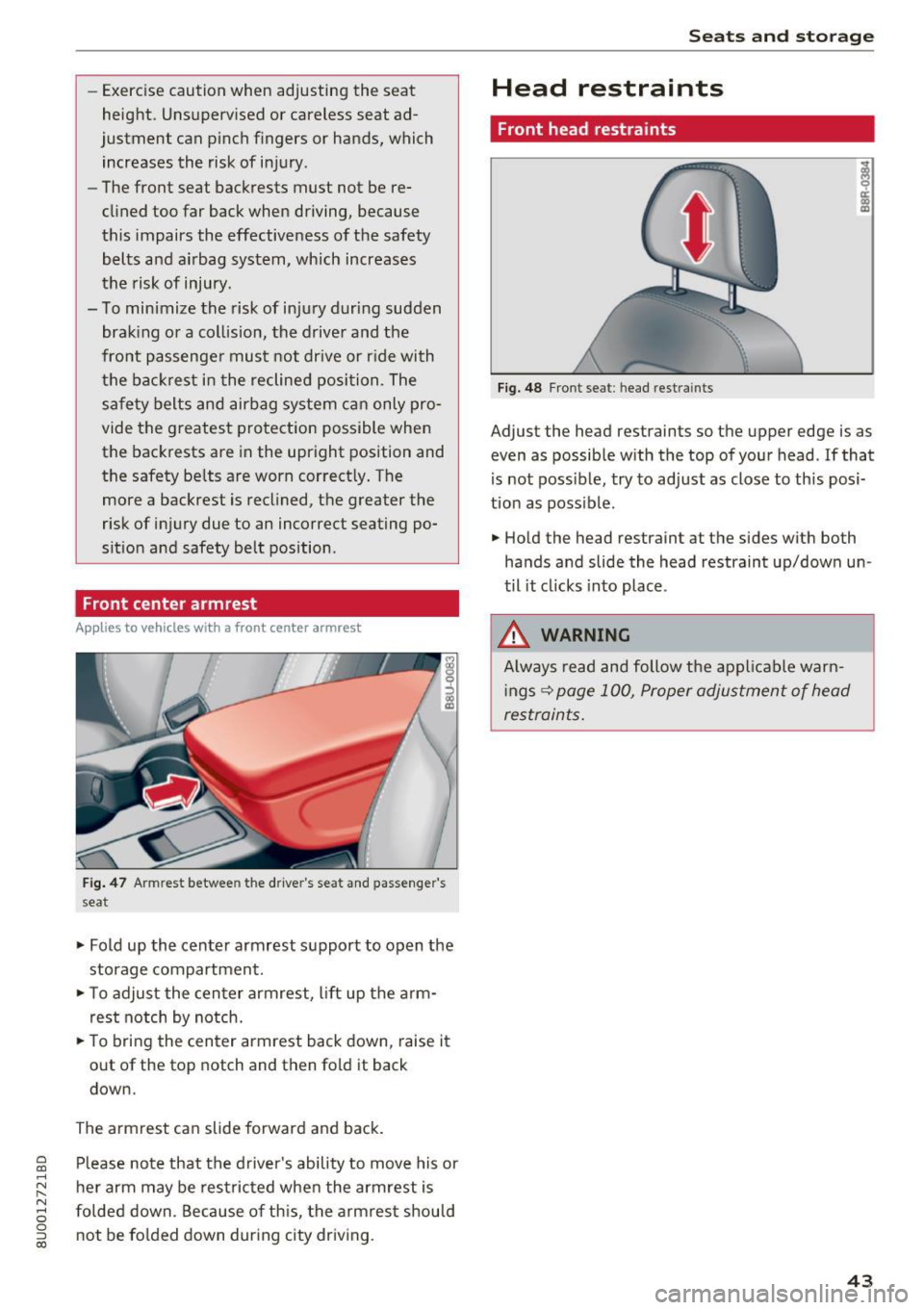
Fig. 47 Armrest between the driver's seat and passenger's
seat
.,. Fold up the center armrest support to open the
storage compartment.
.,. To adjust the center armrest, lift up the arm
rest notch by notch .
.,. To bring the center armrest back down, raise it
out of the top notch and then fold it back
down.
The armrest can slide forward and back. Please note that the driver 's ability to move his or
her arm may be restricted when the armrest is
folded down. Because of this, the armrest should
not be folded down during city driving.
Seats and storage
Head restraints
Front head restraints
Fig. 48 Front seat: head restraints
Adjust the head restraints so the upper edge is as
even as possible with the top of your head . If that
is not possible, try to adjust as close to this posi
tion as poss ible .
.,. Hold the head restraint at the sides with both
hands and slide the head restraint up/down un
til it clicks into place .
_& WARNING
Always read and follow the applicable warn
ings
~ page 100, Proper adjustment of head
restraints.
.
43
Page 48 of 230
Sea ts and stor age
_&. WARNING
Always keep the glove compartment l id
closed while driv ing to reduce the risk of in
jury.
Additional compartment s
You will find a variety of storage compartments
and holde rs at var ious locations in the veh icle.
- In the door trim panels .
- In the center console .
- On the side of the front seats*. The sliding com-
partment can hold a maximum of 3.3 lbs (1.5
kg) and the folding compartment can hold 2.2
lbs (1 kg).
- Nets* on the backrests of the front seats
- Garment hooks next to and above the rear
doors.
- Bag/securing hooks in luggage compartment.
_&. WARNING
- No heavy or hard objects may be placed on
the storage compartment behind the rear
seat backrest. There is a risk of injur ing the
vehicle passengers when brak ing suddenly .
- Make sure that the view to the rear is not
obstructed by hanging garments .
- Hang only lightweight clothing and be sure that there are no heavy or sharp-edged ob
jects in the pockets .
- Do not use coat hangers to hang garments,
because th is could reduce the effectiveness
of the side curtain airbags* .
- Only use the storage compartments in the
door trim panels to store small objects that
will not st ick o ut of the compartment and
impa ir the range of the side a irbags .
(D Note
Objects on the rear shelf that rub against the
rear window can damage the rear window
heating wires .
46
Luggage compartment
General information
_&. WARNING
Read and follow the important safety precau
tions in ¢page
102.
Luggage compartment cover
Applies to: vehicles with luggage compartment cover
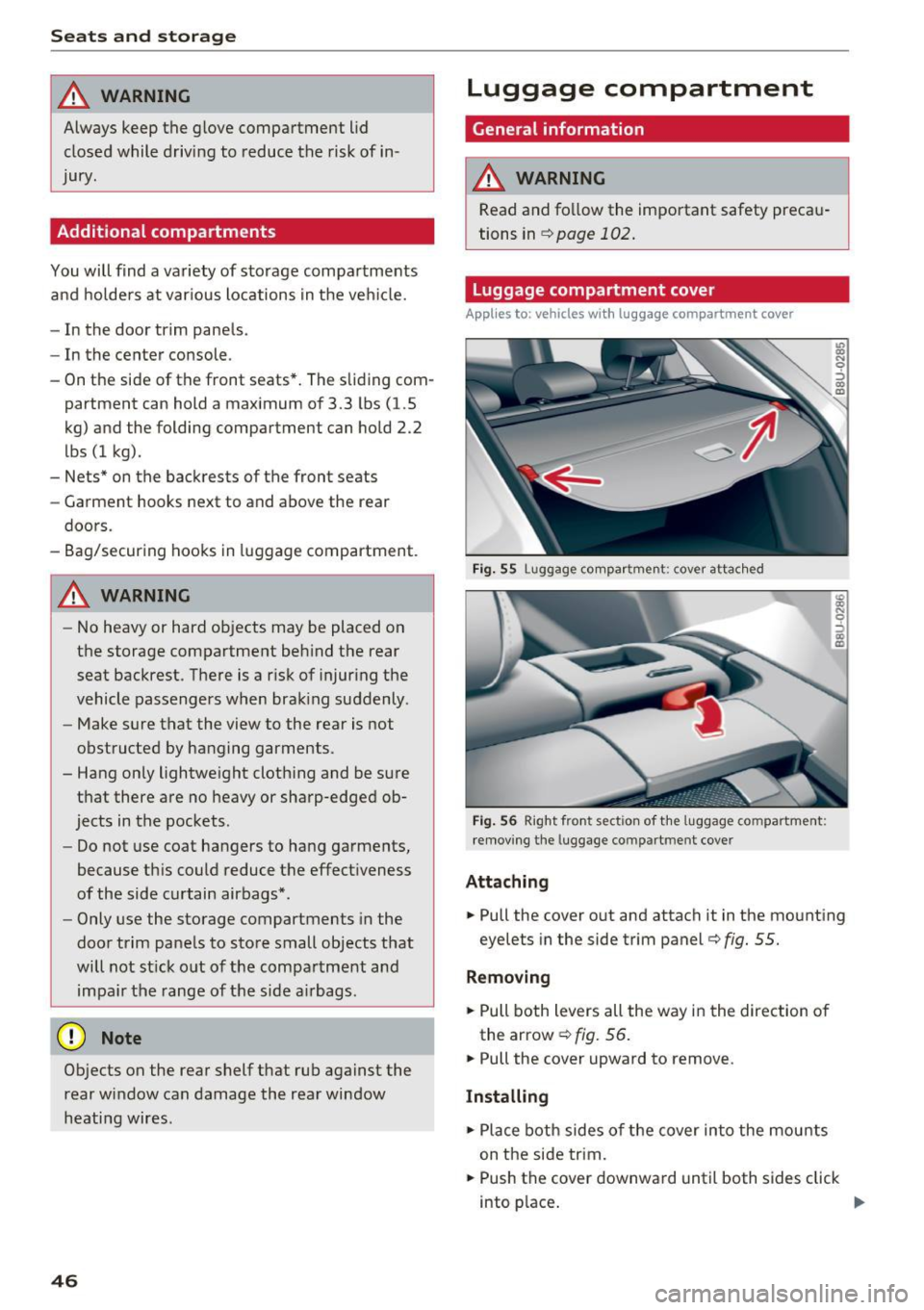
Fig . 55 Lug gage co mpar tmen t: c over attac hed
Fig . 56 Right fron t sec tio n of the luggage co m partment:
remov ing the luggage co mpartm ent cove r
Attaching
-
.. Pull the cover out and attach it in the mounting
eyelets in the side trim panel ¢
fig. 55.
Removing
.. Pull both levers all the way in the direction of
the arrow ¢
fig. 56 .
.. Pull the cover upward to remove .
Installing
.. Place both sides of the cover into the mounts
on the side trim .
.. Push the cover downward until both sides click
into p lace .
Page 61 of 230
heat, which could result in overheating or
other damage to the vehicle or other prop
erty.
- Have your vehicle maintained properly and
in accordance with the service recommenda
tions in your Warranty
& Maintenance book
let. Lack of proper maintenance as well as
improper use of the vehicle will impair the
function of the emission control system and
could lead to damage .
- Do not alter or remove any component of
the Em ission Control System unless ap
proved by the manufacturer .
- Do not alter or remove any device, such as
heat shields , switches, ignition wires,
valves, which are designed to protect your
vehicle's Emission Control System and other
important vehicle components .
@ Tips
The consumpt ion estimates as published by
ENVIRONMENTAL PROTECTION AGENCY
(EPA) and Transport Canada may not corre
spond to your actual consumption on the
road, which will vary depending upon vehicle
load and speed, road and weather conditions,
trip length, etc.
Steering
Adjusting the steering wheel position
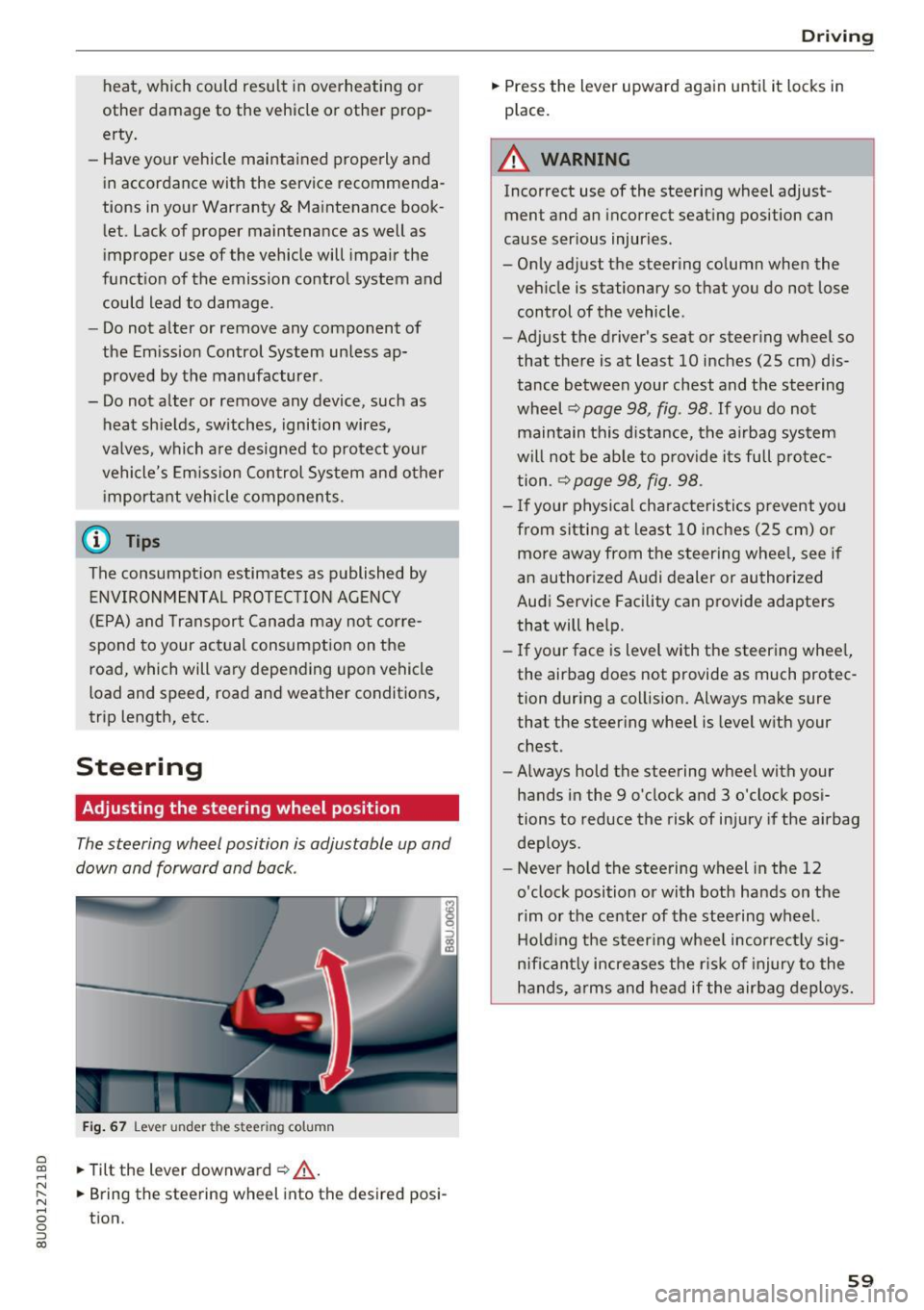
The steering wheel position is adjustable up and
down and forward and back .
Fig. 67 Lever under the s tee rin g colu mn
~ .,. Tilt the lever downward ¢ .&, . ......
~ .,. Bring the steering wh eel into the d esired posi-N
8 tion. 0 ::, (X)
Driving
.,. Press the lever upward again until it locks in
place .
A WARNING
Incorrect use of the steering wheel adjust
ment and an incorrect seating position can
cause serious injuries.
- Only adjust the steering column when the
vehicle is stationary so that you do not lose control of the vehicle.
-
- Adjust the driver's seat or steering wheel so
that there is at least 10 inches (25 cm) dis
tance between your chest and the steering
wheel ¢
page 98, fig. 98 . If you do not
maintain this d istance, the airbag system
will not be able to provide its full protec
tion .
~ page 98, fig . 98 .
-If your physical characteristics prevent you
from sitting at least 10 inches (25 cm) or
more away from the steering wheel, see if
an authorized Audi dealer or authorized
Audi Service Facility can provide adapters
that will help.
- If your face is level with the steering wheel,
the airbag does not provide as much protec
tion during a collision. Always make sure
that the steering wheel is level with your
chest .
- Always hold the steering wheel with your
hands in the 9 o'clock and 3 o'clock posi
tions to reduce the risk of injury if the airbag
deploys.
- Never hold the steering wheel in the 12
o'clock position or with both hands on the
rim or the center of the steering wheel.
Holding the steering wheel incorrectly sig
n ificantly increases the r isk of injury to the
hands, arms and head if the airbag deploys.
59
Page 99 of 230
0 co ......
"' ,....
"' ...... 0 0 :::,
00
Driving safety
Basics
Safe driving habits
Please remember -safety first!
The individual safety features of your vehicle can
work together as a system to help protect you
and your passengers in a wide range of accidents.
T hese features cannot work as a system if they
are not always correctly adjusted and correctly
used.
This chapter contains important information,
tips, instructions and warnings that you need to
read and observe for your own safety, the safety
of your passengers and others . We have summar
ized here what you need to know about safety
belts, airbags, child restraints as well as child
safety. Your safety is for us
priority number 1. Al
ways observe the information and warnings in
this section -for your own safety as well as that
of your passengers.
The information in this section applies to all
model versions of your vehicle. Some of the fea
tures descr ibed in this sections may be standard
equipment on some models, or may be optional
equipment on others. If you are not sure, ask
your authorized Audi dealer.
A WARNING
- Always make sure that you follow the in
structions and heed the WARNINGS in this
Manual. It is in your interest and in the in
terest of your passengers .
-
-Always keep the complete Owner's Litera
ture in your Audi when you lend or sell your
vehicle so that this important information
will always be available to the driver and
passengers.
- Always keep the Owner's literature handy so
that you can find it easily if you have ques
tions.
Driving safety
Important things to do before driving
Safety is everybody's job! Vehicle and occupant
safety always depends on the informed and care
ful driver .
For your safety and the safety of your passen
gers,
before driving always:
.. Make sure that all lights and signals are operat
ing correctly.
.. Make sure that the tire pressure is correct .
.. Make sure that all windows are clean and afford
good visibility to the outside .
.,. Secure all luggage and other items carefully
¢ page 102, ¢page 45.
.,. Make sure that nothing can interfere with the
pedals.
.. Adjust front seat, head restraint and mirrors
correctly for your height.
.. Instruct passengers to adjust the head re
straints according to their height.
.. Make sure to use the right child restraint cor
rectly to protect children
¢ page 134, Child
safety.
.,. Sit properly in your seat and make sure that
your passengers do the same¢
page 42, Front
seats.
.. Fasten your safety belt and wear it properly. Al
so instruct your passengers to fasten their safe
ty belts properly ¢
page 106 .
What impairs driving safety?
Safe driving is directly related to the condition of
the vehicle , the driver as well as the driver's abili
ty to concentrate on the road without being dis
tracted.
The driver is responsible for the safety of the ve
hicle and all of its occupants. If your ability to
drive is impaired, safety risks for everybody in the
vehicle increase and you also become a hazard to
everyone else on the road
¢ _&. . Therefore:
.. Do not let yourself be distracted by passengers
or by using a cellular telephone .
.. NEVER drive when your driving ability is im
paired (by med ications, alcohol, drugs, etc .) .
.. Observe all traffic laws, rules of the road and
speed limits and plain common sense . .,.
97
Page 100 of 230
Driving sa fety
• ALWAYS adjust your speed to road, traffic and
weather conditions.
• Take frequent breaks on long trips. Do not drive
for more than two hours at a stretch.
• Do NOT drive when you are tired, under pres
sure or whe n you are stressed .
A WARNING
Impaired driv ing safety inc reases t he risk of
ser ious persona l inju ry and death whenever a
vehicle is being used.
Correct passenger
seating positions
Proper seating position for the driver
The proper driver seating position is important
for safe, relaxed driving .
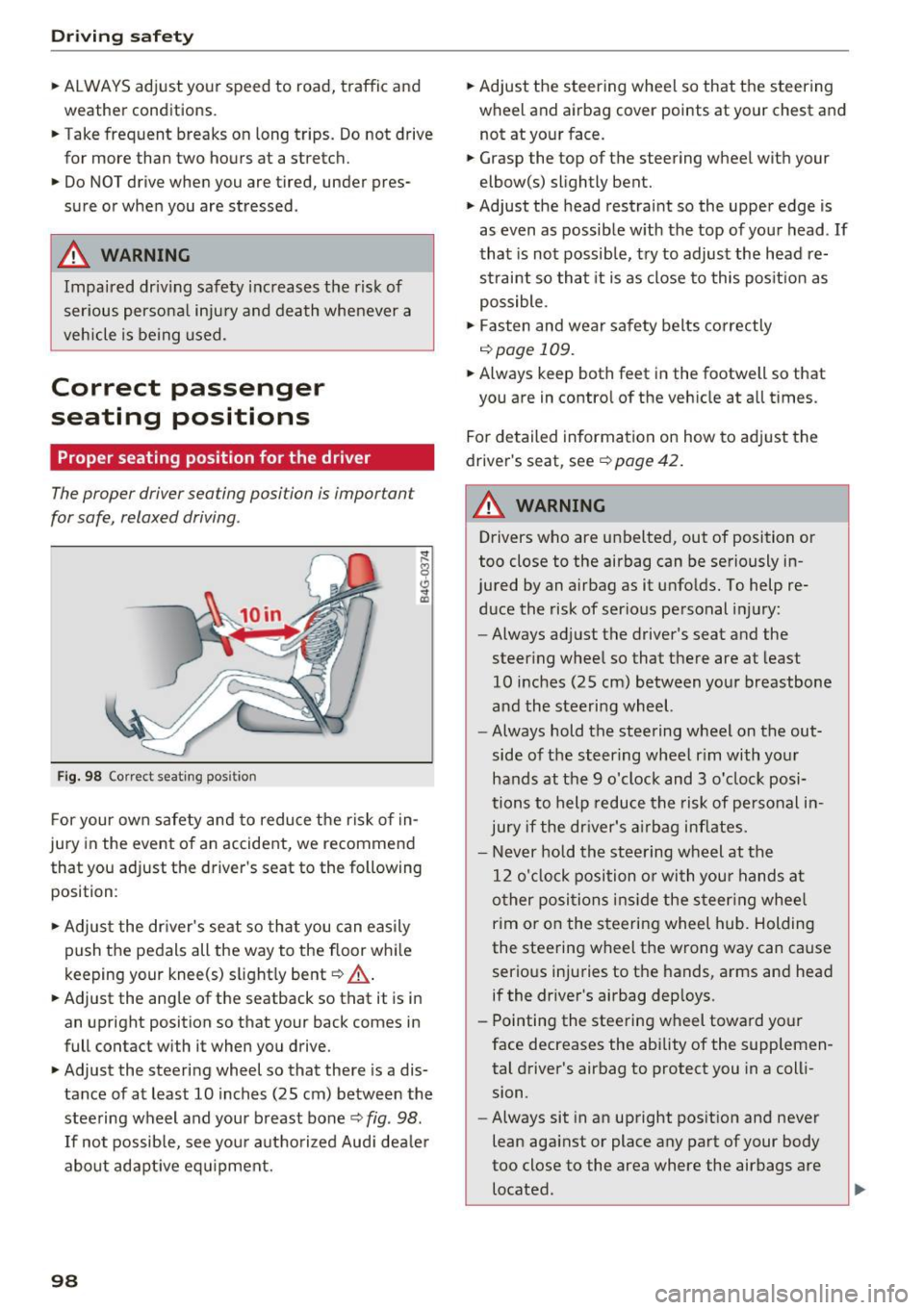
Fig. 9 8 Correct seating pos it io n
For your own safety and to reduce the risk of in
jury in the event of an accident, we recommend
that you adjust the driver 's seat to the following
position :
• Adjus t the dr iver's seat so tha t you can easily
push the pedals all the way to the floor whi le
keeping your knee(s) s light ly bent ~
,A.
• Adjust the angle of the seatback so that it is in
an upright position so that your back comes in
full contact with it when you drive.
• Adjust the steering wheel so that there is a dis
tance of at least 10 inches (25 cm) between the
stee ring wheel and your breast bone~
fig. 98 .
If no t possib le, see you r authorized Aud i dea le r
about adapt ive eq uipment.
98
• Ad just the steering wheel so that the steer ing
wheel and airbag cover points at your chest and
not at yo ur face .
• Grasp the top of the steering wheel with your
elbow(s) slightly bent.
• Adjust the head restraint so the uppe r edge is
as even as possib le w ith the top of your head .
If
that is not possib le, try to adjust the head re
strai nt so that it is as close to this pos it io n as
possible.
• Fasten and wear sa fe ty belts correctly
r=>page 109.
• Always keep both feet in the footwell so that
you are in contro l of the veh icle at all t imes .
Fo r de tailed informa tion on how to ad just the
dr ive r's seat,
see r=!) page 42 .
A WARNING
Drivers who are unbelted, out of position or
too close to the airbag can be seriously in
jured by an airbag as it unfo lds. To help
re
duce the risk of serious personal injury:
- Always ad just the driver 's seat and the
steering whee l so that there are at least
10 inches (25 cm) between yo ur breastbone
and the steering wheel.
- Always hold the steering wheel on the out
side of the steering wheel r im with yo ur
hands at t he 9 o'clock and 3 o'clock posi
tions to help reduce the risk of personal i n
jury if the driver's airbag in flates.
- Never hold the stee ring wheel at the
1 2 o'cl ock position o r wi th you r hands at
o ther posi tion s in side the steer ing whee l
rim o r on the steeri ng wheel hub. Holding
the steering wheel the wrong way can cause serious inju ries to the hands, arms and head
if the drive r's airbag dep loys.
- Pointing the steering wheel towa rd your
face decreases the ability of the supplemen
tal d river 's airbag to protect you in a coll i
sion.
- Always sit in an upright pos ition and never
lean aga inst or place any part of your body
too close to the area where the airbags are
located.
-