tow AUDI Q3 2019 User Guide
[x] Cancel search | Manufacturer: AUDI, Model Year: 2019, Model line: Q3, Model: AUDI Q3 2019Pages: 280, PDF Size: 72.73 MB
Page 59 of 280
83A012721BA
Sitting correctly and safely
Head restraints
General information
B4G-0454
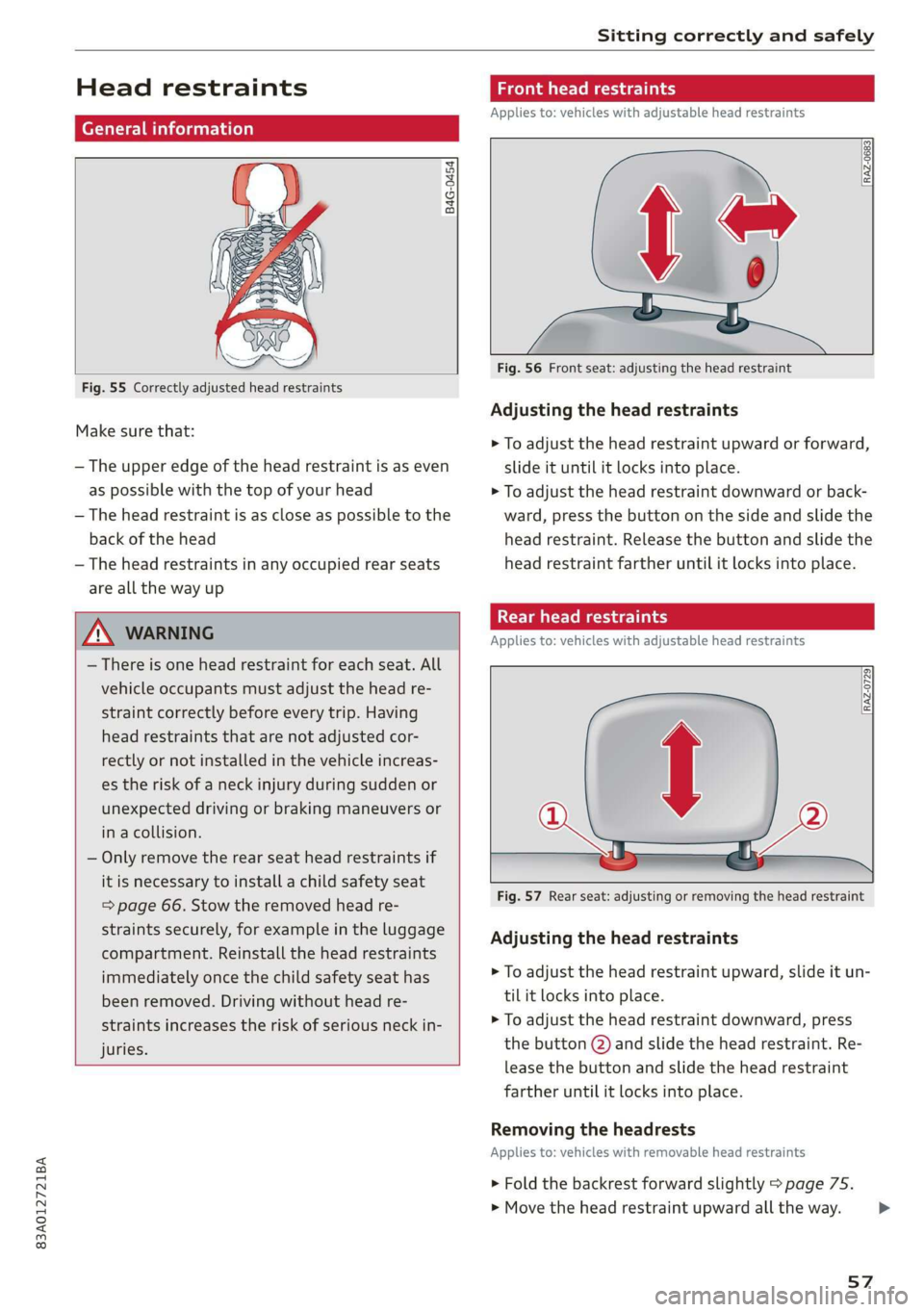
Fig. 55 Correctly adjusted head restraints
Make sure that:
— The upper edge of the head restraint is as even
as possible with the top of your head
— The head restraint is as close as possible to the
back of the head
— The head restraints in any occupied rear seats
are all the way up
ZA WARNING
— There is one head restraint for each seat. All
vehicle occupants must adjust the head re-
straint correctly before every trip. Having
head restraints that are not adjusted cor-
rectly or not installed in the vehicle increas-
es the risk of a neck injury during sudden or
unexpected driving or braking maneuvers or
in a collision.
— Only remove the rear seat head restraints if
it is necessary to install a child safety seat
= page 66. Stow the removed head re-
straints securely, for example in the luggage
compartment. Reinstall the head restraints
immediately once the child safety seat has
been removed. Driving without head re-
straints increases the risk of serious neck in-
juries.
Front head restraints
Applies to: vehicles with adjustable head restraints
[RAZ-0683]
Fig. 56 Front seat: adjusting the head restraint
Adjusting the head restraints
> To adjust the head restraint upward or forward,
slide it until it locks into place.
> To adjust the head restraint downward or back-
ward, press the button on the side and slide the
head restraint. Release the button and slide the
head restraint farther until it locks into place.
Rear head restraints
Applies to: vehicles with adjustable head restraints
Fig. 57 Rear seat: adjusting or removing the head restraint
Adjusting the head restraints
> To adjust the head restraint upward, slide it un-
til it locks into place.
> To adjust the head restraint downward, press
the button @) and slide the head restraint. Re-
lease the button and slide the head restraint
farther until it locks into place.
Removing the headrests
Applies to: vehicles with removable head restraints
> Fold the backrest forward slightly > page 75.
> Move the head restraint upward all the way. >
57
Page 68 of 280
Sitting correctly and safely
injury. Always secure child safety seats on
the rear seats. If special circumstances re-
quire the use of a child safety seat on the
front passenger's seat, always make sure
that PASSENGER AIR BAG OFF &%; re-
mains on while driving. If
PASSENGER AIR BAG OFF #%, does not
turn on, remove the child safety seat and in-
stall it again according to the child safety
seat manufacturer instructions. If
PASSENGER AIR BAG OFF &%; still does
not turn on, the front passenger's seat must
not be used. Drive to an authorized Audi
dealer or authorized Audi Service Facility
and have the airbag system inspected.
— Fluids, electronic devices, or mechanical
damage on the front passenger's seat may
cause the front passenger seat occupant de-
tection to malfunction. The system may
then incorrectly detect if the front passeng-
er's seat is occupied. As a result, it could de-
ploy the front passenger’s airbag incorrectly
or fail to deploy it, which increases the risk
of serious or fatal injury. Make sure that no
wet objects (such as a wet hand towel) and
no fluids come into contact with the front
passenger's seat cushion. If the front pas-
senger's seat becomes wet, dry it immedi-
ately. Make sure no electronic devices (such
as a laptop or a retrofitted seat heater) are
on the front passenger's seat. Do not trans-
port any objects on or under the front pas-
senger's seat.
— Seat covers or protective covers may prevent
the advanced airbag system from correctly
detecting child safety seats or passengers in
the front passenger's seat. You must not use
seat covers or protective covers on the front
passenger's seat that are not specifically ap-
proved for use on Audi seats with an ad-
vanced airbag system.
Child safety seats
General information
When installing and using child safety seats, fol-
low the information in this Owner's Manual, the
applicable state and federal regulations, and the
66
manufacturer instructions for the child safety
seat.
You can also obtain useful and current informa-
tion from the following sources:
U.S. National Highway Traffic Safety Adminis-
tration
http://www.nhtsa.gov
http://www.safercar.gov
National SAFE KIDS Campaign
http://www.safekids.org
SafetyBeltSafe U.S.A.
http://www.carseat.org
Transport Canada Information Centre
http://www.tc.gc.ca/roadsafety
Audi Customer Experience Center
https://www.audiusa.com/help/contact-us
https://www.audi.ca/ca/web/en/models/layer/
contact.html
Z\ WARNING
To reduce the risk of serious or fatal injuries,
children must always be secured in the vehicle
with a child safety seat that is appropriate for
their body size, weight, and age.
— Children ages 12 and under must be trans-
ported using the appropriate child safety
seat. Note differences in regulations be-
tween states and countries.
— Child safety seats secured incorrectly in the
vehicle may cause serious or fatal injuries in
the event of an accident. Always secure the
child safety seat according to the manufac-
turer instructions.
— Children or babies must not under any cir-
cumstances be held on the lap of the driver
or other passengers while driving.
— Do not secure more than one child in a child
safety seat.
— Never allow a child to sit in a child safety
seat unsupervised.
— Never allow children to ride unsecured in the
vehicle or to stand or kneel on the seats
while driving. In the event of an accident, a
child could be propelled through the vehicle.
Page 71 of 280
83A012721BA
Sitting correctly and safely
> Activate the child safety lock > page 38.
» Remove the cover* from both lower LATCH an-
chors.
> If you secure a child safety seat to the rear seat,
secure any unused safety belts that are within
reach of the child > A\ in Securing child safety
seats with a safety belt on page 70.
> Secure the child safety seat according to the
child safety seat manufacturer instructions.
> Pull on the child safety seat to check if both
sides are engaged correctly in the LATCH an-
chors.
> If possible, also secure the child safety seat to
the respective top tether anchor in the vehicle
=> page 69.
_Z\ WARNING
The LATCH anchors in the vehicle are only de-
signed for child safety seats with the LATCH
system. To reduce the risk of serious or fatal
injury, never secure other child restraint sys-
tems, belts, or objects to the anchors.
@ Tips
The LATCH anchors are designed for a total
weight (child and child safety seat combined)
up to 65 lbs (29 kg). If the total weight is
greater than this, the child safety seat must
be secured with the vehicle safety belt.
Additionally securing a child safety seat to
Adat-M ee) edat-lerlale
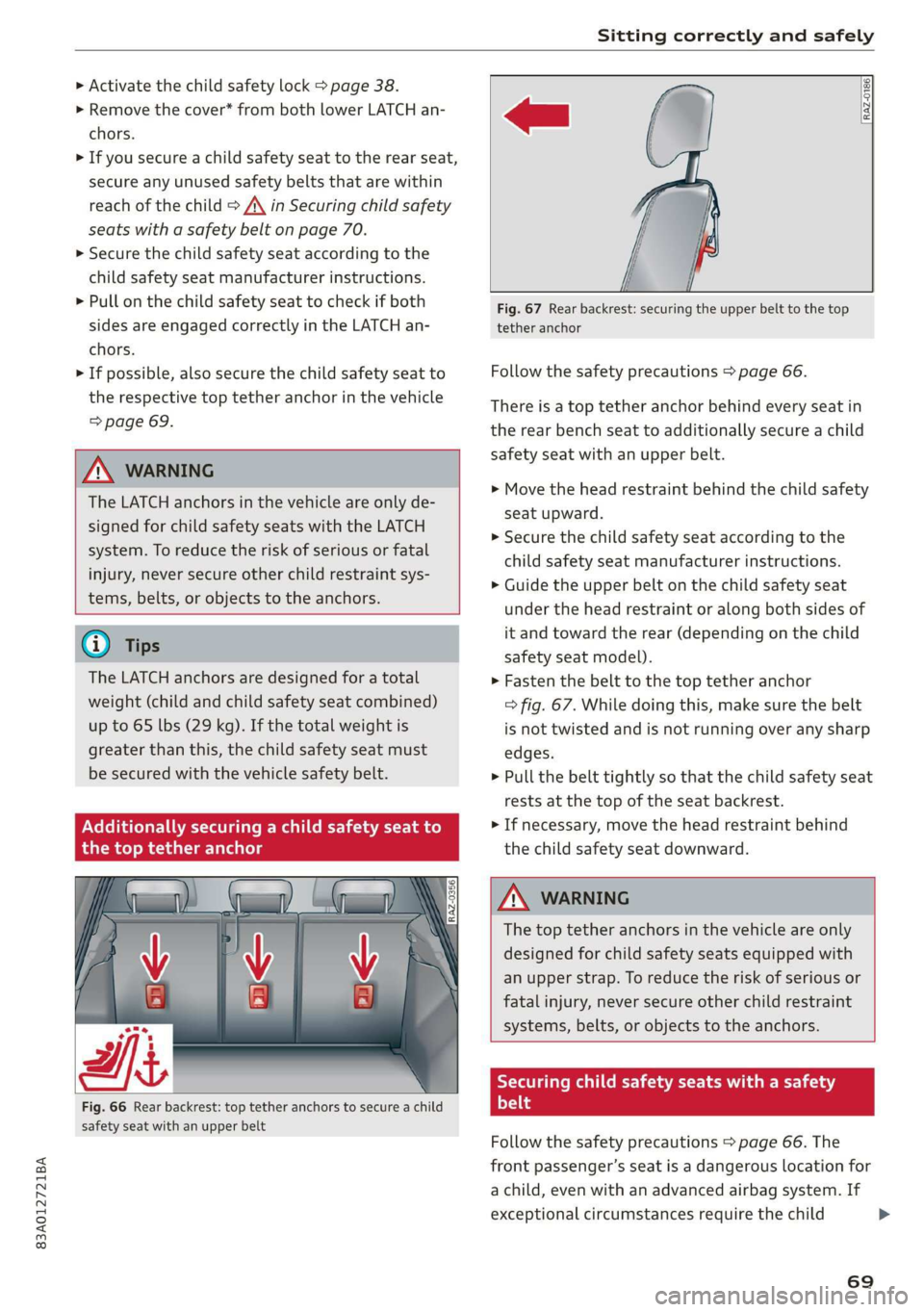
Fig. 66 Rear backrest: top tether anchors to secure a child
safety seat with an upper belt
RAZ-0186.
Fig. 67 Rear backrest: securing the upper belt to the top
tether anchor
Follow the safety precautions > page 66.
There is a top tether anchor behind every seat in
the rear bench seat to additionally secure a child
safety seat with an upper belt.
> Move the head restraint behind the child safety
seat upward.
>» Secure the child safety seat according to the
child safety seat manufacturer instructions.
> Guide the upper belt on the child safety seat
under the head restraint or along both sides of
it and toward the rear (depending on the child
safety seat model).
> Fasten the belt to the top tether anchor
> fig. 67. While doing this, make sure the belt
is not twisted and is not running over any sharp
edges.
> Pull the belt tightly so that the child safety seat
rests at the top of the seat backrest.
> If necessary, move the head restraint behind
the child safety seat downward.
Z\ WARNING
The top tether anchors in the vehicle are only
designed for child safety seats equipped with
an upper strap. To reduce the risk of serious or
fatal injury, never secure other child restraint
systems, belts, or objects to the anchors.
Securing child safety seats with a safety
Prot
Follow the safety precautions > page 66. The
front passenger’s seat is a dangerous location for
a child, even with an advanced airbag system. If
exceptional circumstances require the child
69
Page 74 of 280
Stowing and using
Stowing and using
Power sources
When the ignition is switched on, you may be
able to use the electric power sources for exter-
nal devices, depending on the vehicle equipment.
12 volt sockets
You can connect electrical accessories to the 12
volt sockets. The power usage must not exceed
120 watts.
The 12 volt sockets are labeled with the 12V
symbol. They are located in the front center con-
sole, in the rear*, and in the left floor panel in the
luggage compartment*.
USB ports
Applies to: vehicles with USB port
You can charge mobile devices using the USB
ports. The USB ports are labeled with the «> or
(4 symbol or CHARGE ONLY.
ZX WARNING
— To reduce the risk of fatal injury, store all
connected devices securely when driving so
that they do not move around inside the ve-
hicle when braking or in the event of an acci-
dent.
— Incorrect usage can lead to serious injuries
or burns. To reduce the risk of injuries, never
leave children unattended in the vehicle
with the key.
Cup holders
Applies to: vehicles with cup holders
RAZ-0744,
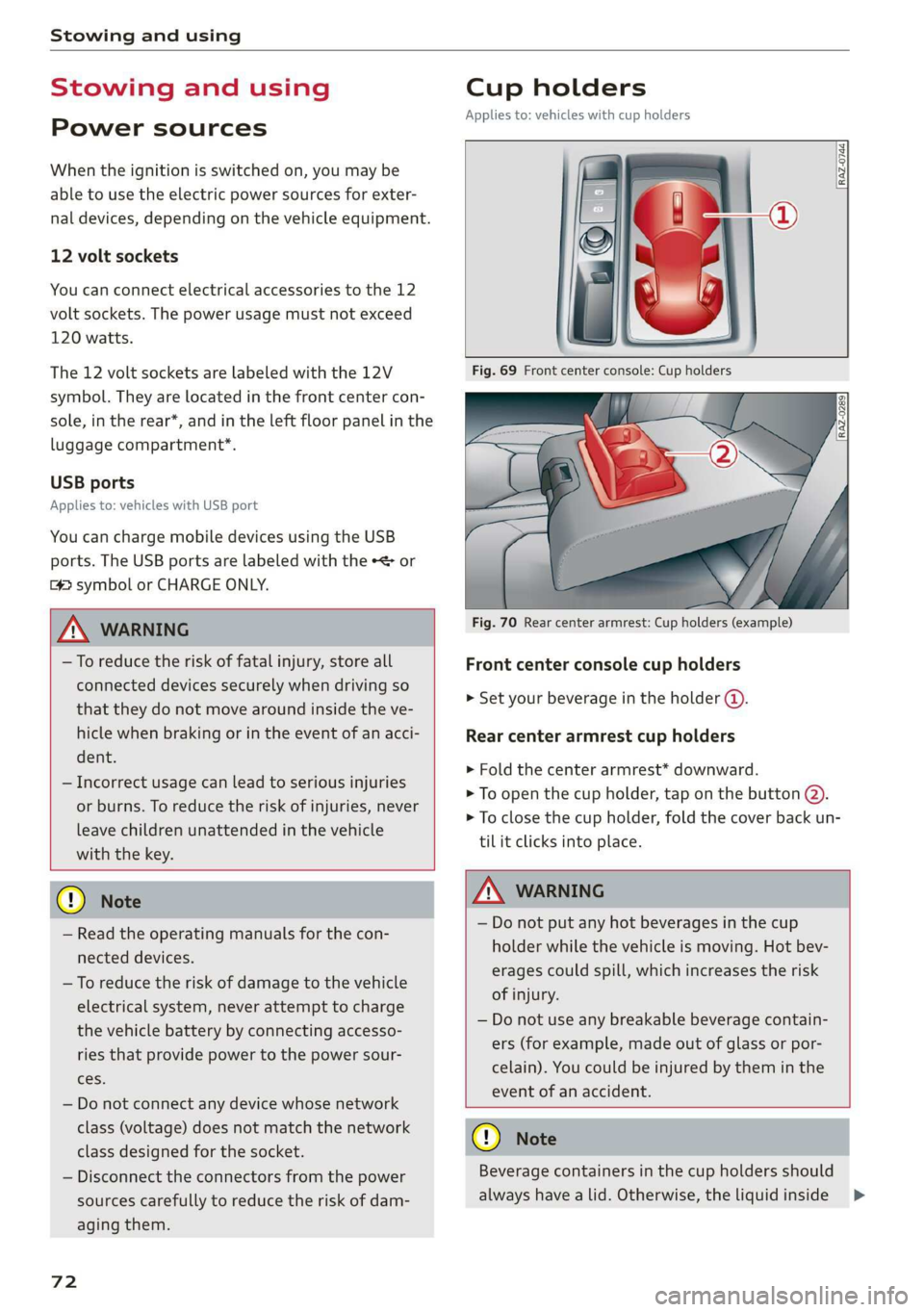
Fig. 70 Rear center armrest: Cup holders (example)
Front center console cup holders
> Set your beverage in the holder ().
Rear center armrest cup holders
> Fold the center armrest* downward.
> To open the cup holder, tap on the button @).
> To close the cup holder, fold the cover back un-
til it clicks into place.
© Note
— Read the operating manuals for the con-
nected devices.
— To reduce the risk of damage to the vehicle
electrical system, never attempt to charge
the vehicle battery by connecting accesso-
ries that provide power to the power sour-
ces.
— Do not connect any device whose network
class (voltage) does not match the network
class designed for the socket.
— Disconnect the connectors from the power
sources carefully to reduce the risk of dam-
aging them.
72
Z\ WARNING
— Do not put any hot beverages in the cup
holder while the vehicle is moving. Hot bev-
erages could spill, which increases the risk
of injury.
— Do not use any breakable beverage contain-
ers (for example, made out of glass or por-
celain). You could be injured by them in the
event of an accident.
CG) Note
Beverage containers in the cup holders should
always
have a lid. Otherwise, the liquid inside
>
Page 75 of 280
83A012721BA
Stowing and using
could spill and cause damage to the vehicle
equipment.
Additional storage
You will find a variety of storage compartments
and holders at various locations in the vehicle.
— Glove compartment: The glove compartment
can be locked* using the vehicle key > page 32.
— Holders for a notepad and a pen in the glove
compartment
— Storage compartment in the cockpit on the
driver's side
— Storage compartments in the door trim panel
— Storage compartment* under the left front seat
— Storage compartment under the front center
armrest*
— Storage compartment* under the right front
seat
— Net* behind the front seats
— Storage compartment* at the end of the rear
center console
— Garment hooks in the rear
— Storage compartments next to the rear bench
seat
— Bag hooks* in the luggage compartment
ZA WARNING
—To reduce the risk of injury, make sure all
storage compartments are always closed
while driving.
— Loose objects can be thrown around the ve-
hicle interior during sudden driving or brak-
ing maneuvers, which increases the risk of
an accident. Store objects securely while
driving.
— Only use the storage compartments in the
door trim panels to store small objects that
will not stick out of the compartment and
impair the range of the side airbags.
— Only lightweight clothing should be hung
from the garment hooks in the vehicle. The
pockets of the clothing must not contain any
heavy, breakable, or sharp-edged objects.
Such objects endanger vehicle occupants
and increase the risk of injury during sudden
driving or braking maneuvers or in an acci-
dent, especially if the airbags deploy.
— Make sure your view toward the rear is not
blocked, for example by hanging clothing or
objects in the vehicle.
G) Tips
Applies to: vehicles with Wi-Fi:Do not place
any metal objects in the storage compart-
ment* on the end of the rear center console,
because they could impair the Wi-Fi antenna
function.
Luggage compartment
General information
All pieces of luggage or objects must be securely
fastened in the luggage compartment. Note the
following to maintain good vehicle handling:
> Distribute the load evenly in the luggage com-
partment.
> Stow heavy luggage as far forward in the lug-
gage compartment as possible.
» Use non-elastic cords attached to the tie-downs
to secure objects.
ZA WARNING
— The luggage compartment cover must al-
ways be securely fastened when in use to re-
duce the risk of an accident.
— The storage compartment must not be used
to transport heavy objects, hard objects, or
animals. Such objects endanger vehicle oc-
cupants and increase the risk of injury dur-
ing sudden driving or braking maneuvers or
in an accident.
— Loose objects can be thrown around the ve-
hicle interior during sudden driving or brak-
ing maneuvers, which increases the risk of
an accident. Always stow objects securely in
the luggage compartment and secure them
at the tie-downs. Use straps suitable for
heavy objects.
—If pieces of luggage or objects are secured
to the tie-downs with unsuitable or dam-
aged straps, this can increase the risk of
73
Page 76 of 280
Stowing and using
injury during braking maneuvers or acci-
dents.
— When transporting heavy objects, the vehi-
cle characteristics will change due to the
shift in the center of gravity, which increases
the risk of an accident. You may need to
adapt your driving style and speed to the
current conditions.
— The cargo net is only strong enough to se-
cure light objects. Heavy objects are not ade-
quately secured. Attempting to secure heavy
objects increases the risk of injury.
— Never exceed the permitted axle and load
and vehicle weight > page 264.
— Never secure a child safety seat to the tie-
downs.
— Never leave your vehicle unattended, espe-
cially if the luggage compartment lid is
open. Children could enter the luggage com-
partment and close the luggage compart-
ment lid from the inside. This creates the
risk of fatal injury, since the children would
be locked in and may not be able to escape
by themselves.
— Do not allow children to play in or on the ve-
hicle. Close and lock the luggage compart-
ment lid as well as all other doors when you
leave
the vehicle.
— Never transport passengers in the luggage
compartment. Every passenger must be cor-
rectly secured with the safety belts in the
vehicle > page 58.
—To reduce the risk of accidents, the luggage
compartment cover should never be unse-
cured
under any circumstances.
— Be careful when releasing the backrest and
folding
it forward. To reduce the risk of be-
ing pinched, pay attention and check when
folding backrests forward.
— The backrest must be securely latched so
objects cannot slide forward out of the lug-
gage compartment during sudden braking.
— The backrest must be latched securely to en-
sure that the safety belt is protecting the
center seating position.
— Always pull forward on the backrest to make
sure it is check if it is correctly locked in
place.
74
@) Note
—To reduce the risk of damage, move the rear
head restraints down > page 57 before fold-
ing the rear backrests forward.
— Objects should be removed from the rear
bench seat to protect the backrest from
damage.
— If you move the front seat back when the
rear seat backrest is folded forward, you
could damage the head restraints on the
rear seat.
— Make sure that the heating grid strips for
the rear window defogger are not damaged
by abrasive objects.
G) Tips
— The tire pressure must be adapted to the
load > page 226.
— You can purchase straps at specialty stores.
eye TE Tel-eetedaal SLA ie
\|_« ma.
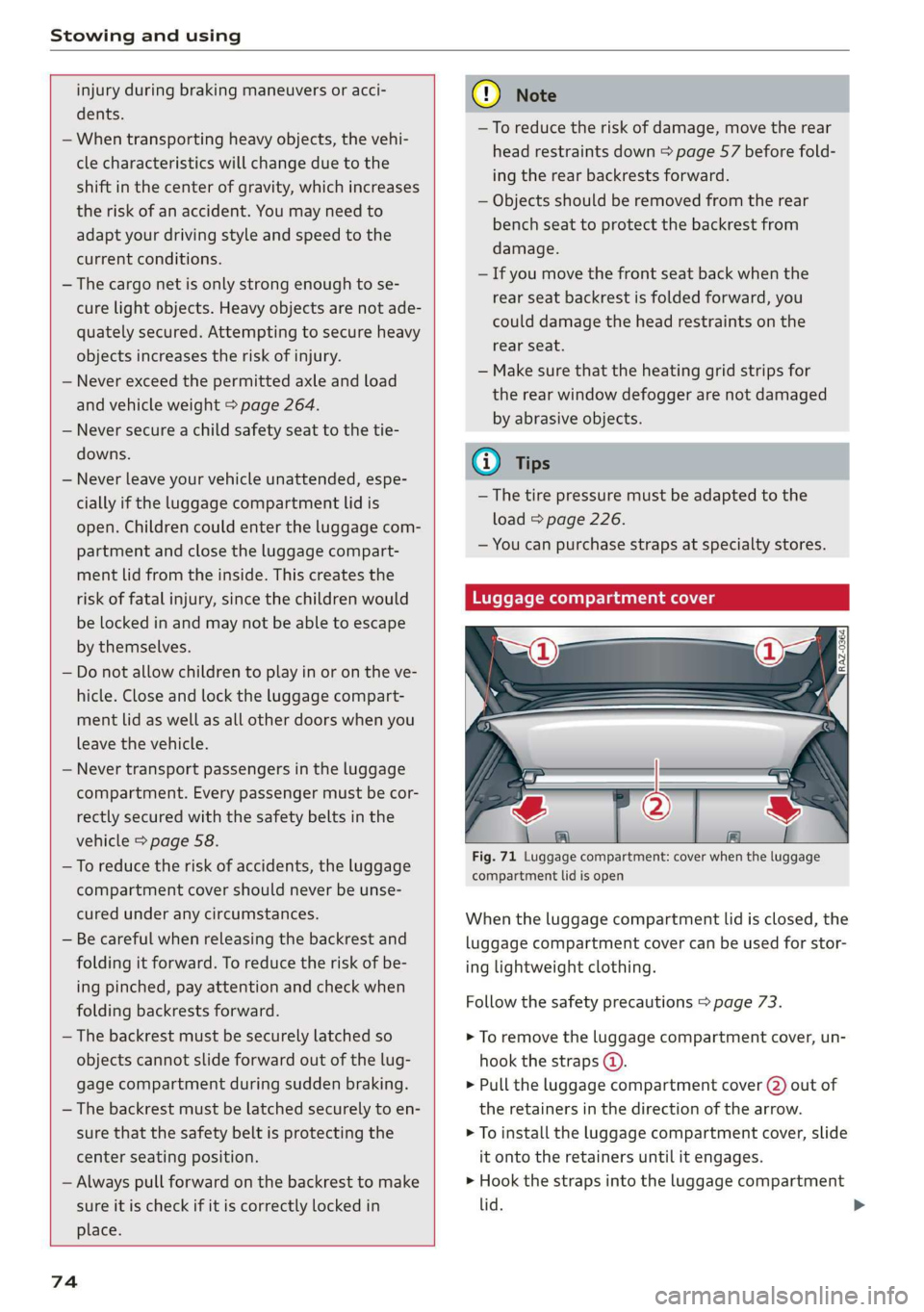
Fig. 71 Luggage compartment: cover when the luggage
compartment lid is open
When the luggage compartment lid is closed, the
luggage compartment cover can be used for stor-
ing lightweight clothing.
Follow the safety precautions > page 73.
> To remove the luggage compartment cover, un-
hook the straps @).
> Pull the luggage compartment cover (2) out of
the retainers in the direction of the arrow.
> To install the luggage compartment cover, slide
it onto the retainers until it engages.
> Hook the straps into the luggage compartment
lid.
Page 77 of 280
83A012721BA
Stowing and using
If necessary, stow the luggage compartment
cover under the double cargo floor
=> page 76. Remove the side inserts to do
this.
Increasing the size of the luggage
compartment
Applies to: vehicles with folding backrests
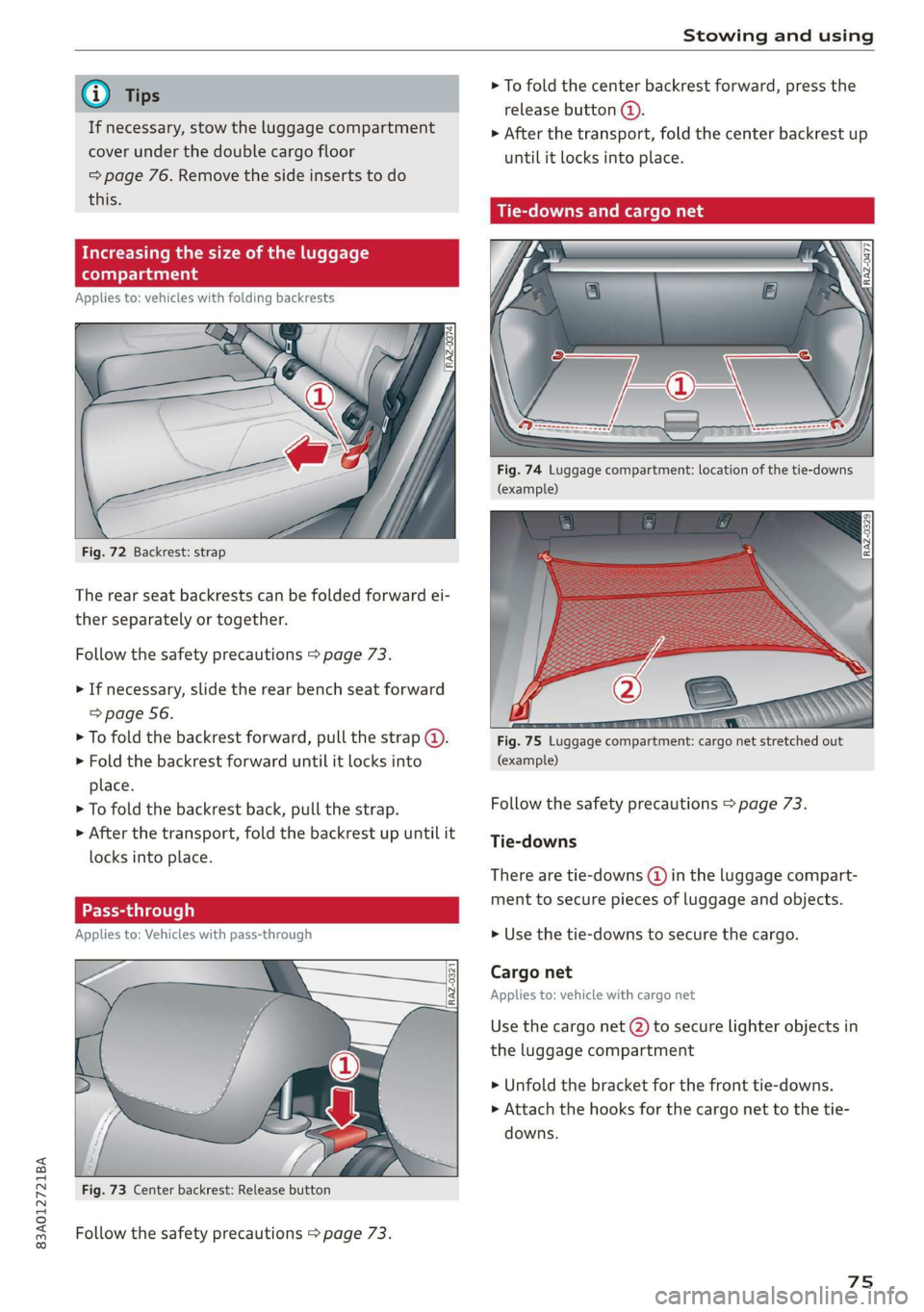
Fig. 72 Backrest: strap
The rear seat backrests can be folded forward ei-
ther separately or together.
Follow the safety precautions > page 73.
> If necessary, slide the rear bench seat forward
=> page 56.
> To fold the backrest forward, pull the strap @.
> Fold the backrest forward until it locks into
place.
> To fold the backrest back, pull the strap.
>» After the transport, fold the backrest up until it
locks into place.
Pass-through
Applies to: Vehicles with pass-through
Fig. 73 Center backrest: Release button
Follow the safety precautions > page 73.
> To fold the center backrest forward, press the
release button (@).
> After the transport, fold the center backrest up
until it locks into place.
Tie-downs and cargo net
Fig. 74 Luggage compartment: location of the tie-downs
(example)
Fig. 75 Luggage compartment: cargo net stretched out
(example)
Follow the safety precautions > page 73.
Tie-downs
There are tie-downs (4) in the luggage compart-
ment to secure pieces of luggage and objects.
> Use the tie-downs to secure the cargo.
Cargo net
Applies to: vehicle with cargo net
Use the cargo net (2) to secure lighter objects in
the luggage compartment
> Unfold the bracket for the front tie-downs.
> Attach the hooks for the cargo net to the tie-
downs.
75
Page 78 of 280
Stowing and using
Double cargo floor mend roof racks and attachments from the Au-
Applies to: vehicles with double cargo floor di Genuine Accessories program.
— Make sure the roof rack is mounted on the vehi-
cle only at the specified locations @).
— Note the permitted axle load, permitted total
Tools or other objects can be transported under
the double cargo floor.
> Lift the cargo floor up using the handle. weight, and permitted roof load of your vehicle
>» Lock the cargo floor at the side mounts. => page 264. The roof load is the total of the
> Remove the side inserts if necessary. weight of the roof rack, the attachments and
the cargo you are carrying. However, you must
Lowering the cargo floor also note the permitted load of the carrier sys-
Applies to: vehicles with adjustable cargo floor tem being used.
— Follow the installation instructions provided
with the roof rack system. If you do not se-
cure the roof rack system and objects on the
roof correctly, they could come loose from
the vehicle and cause an accident.
— The risk of an accident increases when using
a roof rack system, because it changes the
driving characteristics by shifting the center
of gravity and/or the increasing the surface
area exposed to wind. You may need to
adapt your driving style and speed to the
current conditions.
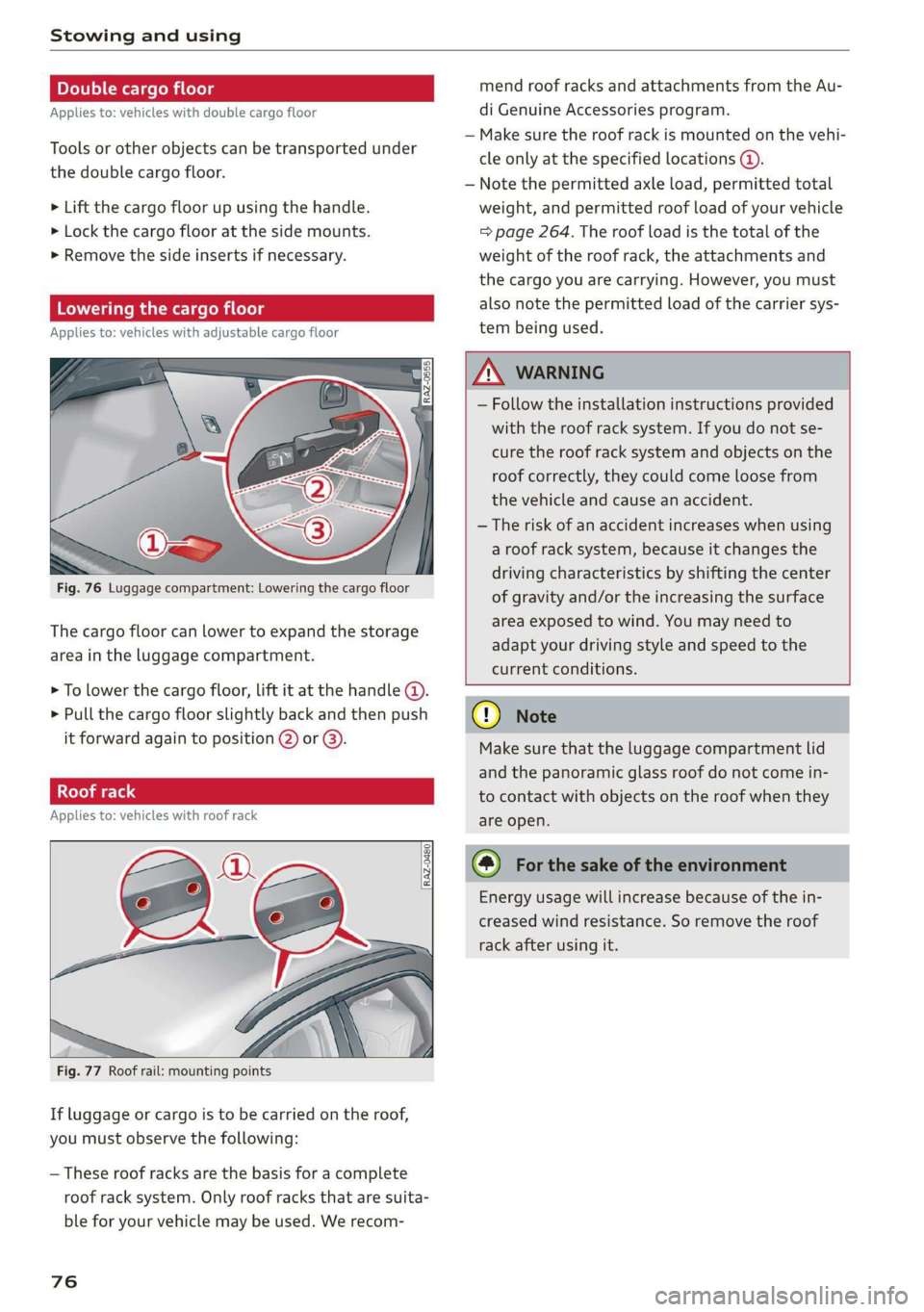
Fig. 76 Luggage compartment: Lowering the cargo floor
The cargo floor can lower to expand the storage
area in the luggage compartment.
> To lower the cargo floor, lift it at the handle (4).
> Pull the cargo floor slightly back and then push © Nte
it forward again to position @) or @). Make sure that the luggage compartment lid
and the panoramic glass roof do not come in-
to contact with objects on the roof when they
Applies to: vehicles with roof rack are open.
Energy usage will increase because of the in-
creased wind resistance. So remove the roof
rack after using it.
Fig. 77 Roof rail: mounting points
If luggage or cargo is to be carried on the roof,
you must observe the following:
— These roof racks are the basis for a complete
roof rack system. Only roof racks that are suita-
ble for your vehicle may be used. We recom-
76
Page 85 of 280
83A012721BA
Driving
— D (Drive): Drive forward
Selecting a gear
Requirement: The ignition must be switched on.
— Bring the vehicle to a full stop and press the
brake pedal.
— Press the release button @ on the selector lev-
er.
—To select a gear, move the selector lever into
the corresponding position.
— The label next to the selector lever for the se-
lected gear will light up.
“N” (Neutral) gear
In the “N” gear, power is not transmitted to the
driving wheels. Use the “N” gear in a car wash
(with conveyor belts), for example.
If you unintentionally select “N” while driving
(faster than 1 mph (2 km/h)), you can also shift
back to “D” without pressing the brake pedal.
For safety reasons, the vehicle cannot be locked
when the transmission is in the "N” gear.
“p” (Park) gear
The vehicle is secured from rolling away by the
parking lock when in the “P” gear.
If you cannot shift out of “P”, for example be-
cause the vehicle has no power, you may need to
use the emergency release for the parking lock
=>page 85.
Selecting a driving program
Various driving programs can be selected when in
the “D” gear. The programs influence when the
transmission shifts and how the accelerator ped-
al responds.
The selected driving program is displayed in the
instrument cluster.
— D (Drive): Normal driving mode
—S (Sport): Sporty driving mode
If you select the Dynamic mode in Audi drive se-
lect*, the “S” driving program will be activated.
When the ignition is switched off, the driving pro-
gram may be reset to “D”.
To switch between the current driving program
and “S”, push the selector lever toward the rear.
Z\ WARNING
— Before starting to drive, check if the desired
gear is displayed next to the selector lever.
— Always secure your vehicle from rolling
away. Press the brake pedal or shift to “P”.
When leaving the vehicle, also set the park-
ing brake.
— Power is still transmitted to the wheels
when the engine is running at idle. To pre-
vent the vehicle from “creeping”, you must
keep your foot on the brake in all selector
lever positions (except "P" and "N") when
the engine is running.
—To reduce the risk of an accident, do not
press the accelerator pedal when changing
gears if the vehicle is stationary and the en-
gine is running.
— Never select the “R" or "P” gears while driv-
ing. Doing so could cause an accident.
— The vehicle can roll even if the ignition is
switched off.
@ Tips
If you shift between “D” and “R” within one
second, you do not need to press the brake
pedal. This makes it possible to “rock” if it is
stuck, for example.
83
Page 86 of 280
Driving
Manual shifting
RAZ-0406
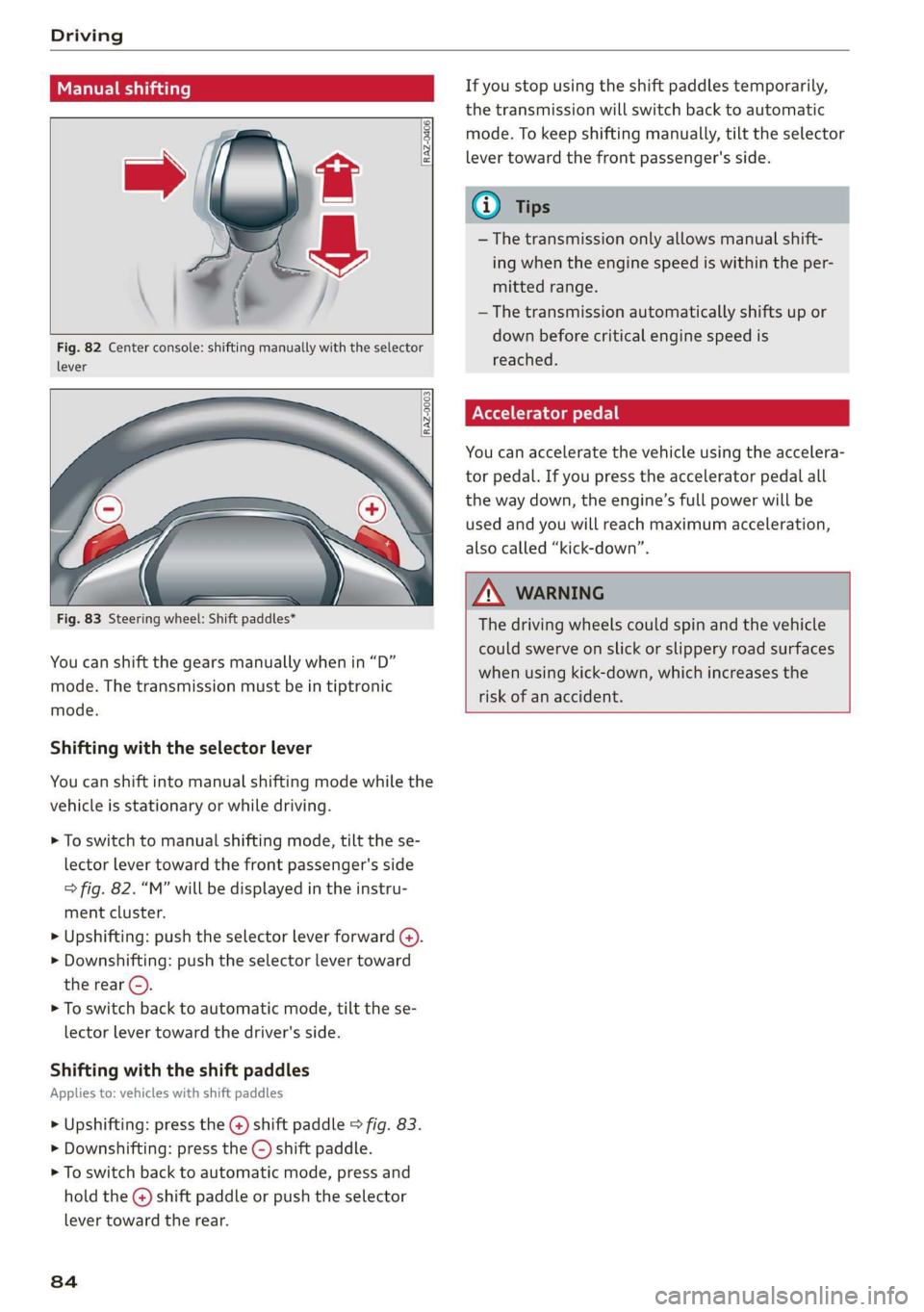
Fig. 82 Center console: shifting manually with the selector
lever
RAZ-0003
—
Fig. 83 Steering wheel: Shift paddles*
You can shift the gears manually when in “D”
mode. The transmission must be in tiptronic
mode.
Shifting with the selector lever
You can shift into manual shifting mode while the
vehicle is stationary or while driving.
> To switch to manual shifting mode, tilt the se-
lector lever toward the front passenger's side
> fig. 82. “M” will be displayed in the instru-
ment cluster.
> Upshifting: push the selector lever forward @).
> Downshifting: push the selector lever toward
the rear ©).
> To switch back to automatic mode, tilt the se-
lector lever toward the driver's side.
Shifting with the shift paddles
Applies to: vehicles with shift paddles
> Upshifting: press the @) shift paddle > fig. 83.
> Downshifting: press the ©) shift paddle.
> To switch back to automatic mode, press and
hold the @) shift paddle or push the selector
lever toward the rear.
84
If you stop using the shift paddles temporarily,
the transmission will switch back to automatic
mode. To keep shifting manually, tilt the selector
lever toward the front passenger's side.
@ Tips
— The transmission only allows manual shift-
ing when the engine speed is within the per-
mitted range.
— The transmission automatically shifts up or
down before critical engine speed is
reached.
Accelerator pedal
You can accelerate the vehicle using the accelera-
tor pedal. If you press the accelerator pedal all
the way down, the engine’s full power will be
used and you will reach maximum acceleration,
also called “kick-down”.
A WARNING
The driving wheels could spin and the vehicle
could swerve on slick or slippery road surfaces
when using kick-down, which increases the
risk of an accident.