warning AUDI Q3 2019 Owner's Manual
[x] Cancel search | Manufacturer: AUDI, Model Year: 2019, Model line: Q3, Model: AUDI Q3 2019Pages: 280, PDF Size: 72.73 MB
Page 45 of 280
83A012721BA
Lights and Vision
Lights and Vision
Exterior lighting
Stare MUL Las eal
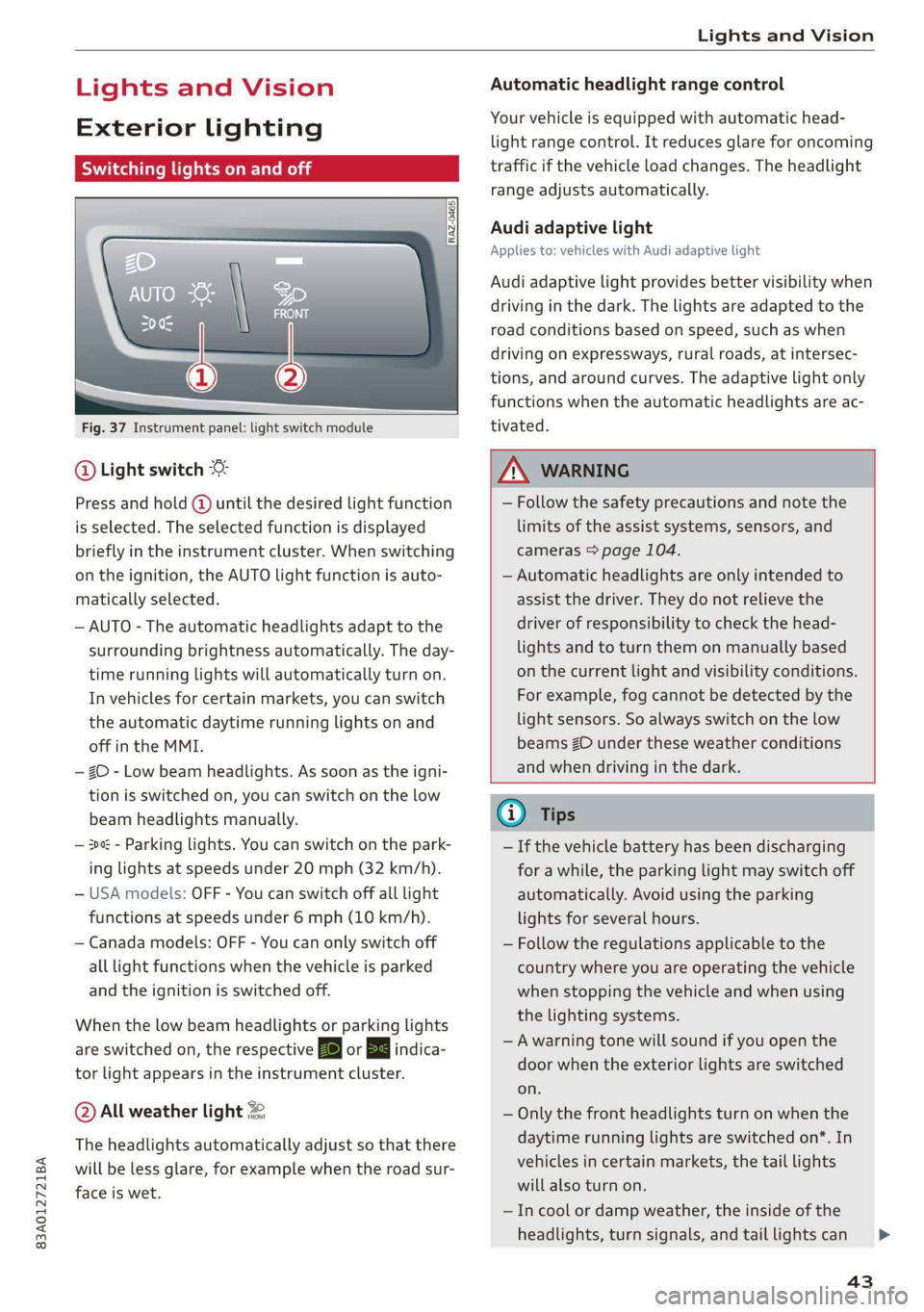
Fig. 37 Instrument panel: light switch module
@ Light switch
Press and hold @ until the desired light function
is selected. The selected function is displayed
briefly in the instrument cluster. When switching
on the ignition, the AUTO light function is auto-
matically selected.
— AUTO - The automatic headlights adapt to the
surrounding brightness automatically. The day-
time running lights will automatically turn on.
In vehicles for certain markets, you can switch
the automatic daytime running lights on and
off in the MMI.
— 20 - Low beam headlights. As soon as the igni-
tion is switched on, you can switch on the low
beam headlights manually.
— 30a - Parking lights. You can switch on the park-
ing lights at speeds under 20 mph (32 km/h).
— USA models: OFF - You can switch off all light
functions at speeds under 6 mph (10 km/h).
— Canada models: OFF - You can only switch off
all light functions when the vehicle is parked
and the ignition is switched off.
When the low beam headlights or parking lights
are switched on, the respective Ba or Ea indica-
tor light appears in the instrument cluster.
@ All weather light 2
The headlights automatically adjust so that there
will be less glare, for example when the road sur-
face is wet.
Automatic headlight range control
Your vehicle is equipped with automatic head-
light range control. It reduces glare for oncoming
traffic if the vehicle load changes. The headlight
range adjusts automatically.
Audi adaptive light
Applies to: vehicles with Audi adaptive light
Audi adaptive light provides better visibility when
driving in the dark. The lights are adapted to the
road conditions based on speed, such as when
driving on expressways, rural roads, at intersec-
tions, and around curves. The adaptive light only
functions when the automatic headlights are ac-
tivated.
Z\ WARNING
— Follow the safety precautions and note the
limits of the assist systems, sensors, and
cameras > page 104.
— Automatic headlights are only intended to
assist the driver. They do not relieve the
driver of responsibility to check the head-
lights and to turn them on manually based
on the current light and visibility conditions.
For example, fog cannot be detected by the
light sensors. So always switch on the low
beams ZO under these weather conditions
and when driving in the dark.
@) Tips
— If the vehicle battery has been discharging
for a while, the parking light may switch off
automatically. Avoid using the parking
lights for several hours.
— Follow the regulations applicable to the
country where you are operating the vehicle
when stopping the vehicle and when using
the lighting systems.
—Awarning tone will sound if you open the
door when the exterior lights are switched
on.
— Only the front headlights turn on when the
daytime running lights are switched on*. In
vehicles in certain markets, the tail lights
will also turn on.
—In cool or damp weather, the inside of the
headlights, turn signals, and tail lights can
43
Page 46 of 280
Lights and Vision
fog over due to the temperature difference
between the inside and outside. They will
clear shortly after switching them on. This
does not affect the service life of the light-
ing.
— When the parking lights are switched on
and the ignition is switched off, the 200: sym-
bol appears in the light switch module.
Turn signal and high beam lever
©
-
!
®
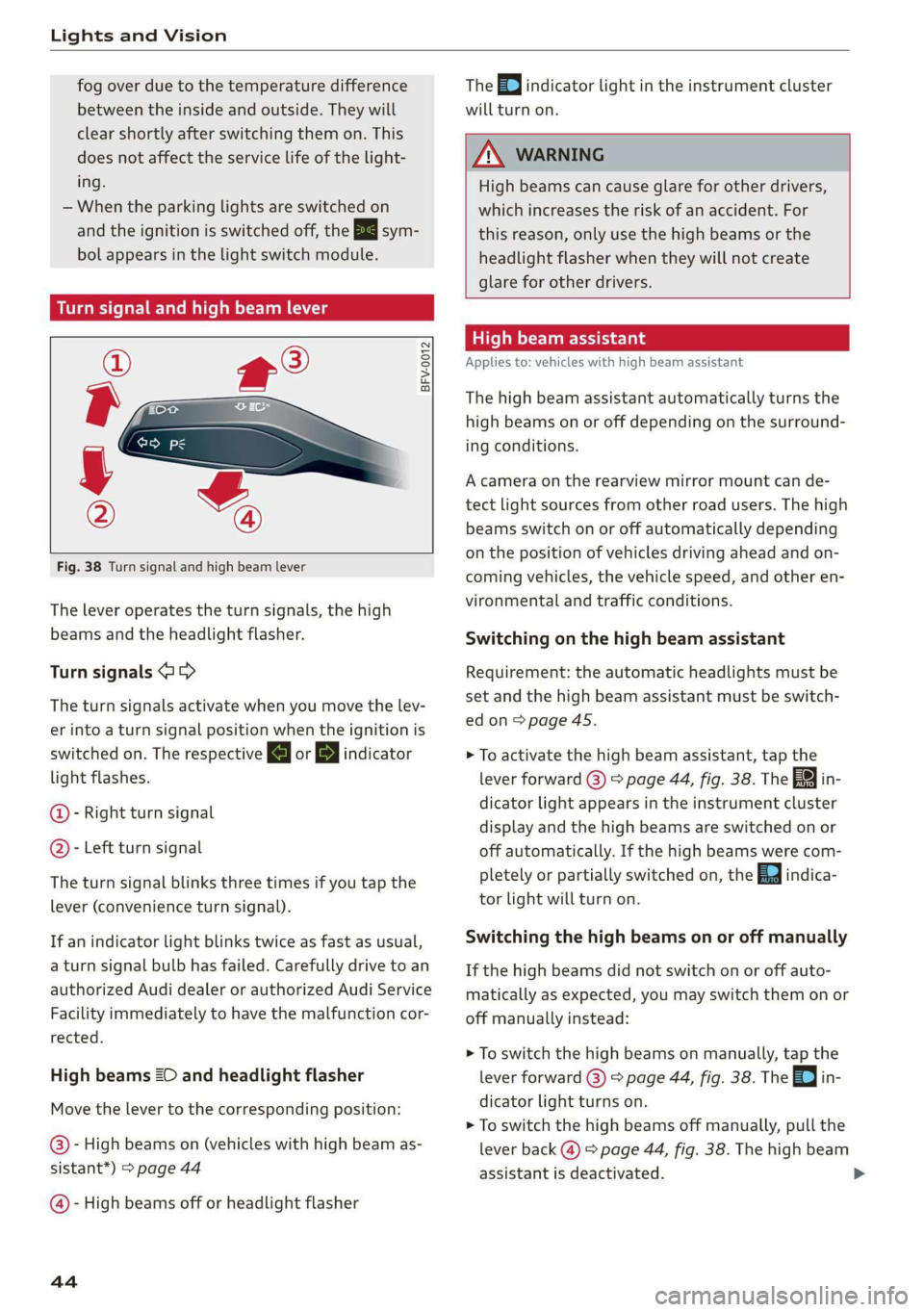
Fig. 38 Turn signal and high beam lever
The lever operates the turn signals, the high
beams and the headlight flasher.
Turn signals @ >
The turn signals activate when you move the lev-
er into a turn signal position when the ignition is
switched on. The respective a or B indicator
light flashes.
@- Right turn signal
@- Left turn signal
The turn signal blinks three times if you tap the
lever
(convenience turn signal).
If an indicator light blinks twice as fast as usual,
a turn signal bulb has failed. Carefully drive to an
authorized Audi dealer or authorized Audi Service
Facility immediately to have the malfunction cor-
rected.
High beams 2D and headlight flasher
Move the lever to the corresponding position:
@)- High beams on (vehicles with high beam as-
sistant*) > page 44
@ - High beams off or headlight flasher
44
The =0) indicator light in the instrument cluster
will turn on.
ZX WARNING
High beams can cause glare for other drivers,
which increases the risk of an accident. For
this reason, only use the high beams or the
headlight flasher when they will not create
glare for other drivers.
teh Meola
Applies to: vehicles with high beam assistant
The high beam assistant automatically turns the
high beams on or off depending on the surround-
ing conditions.
A camera on the rearview mirror mount can de-
tect light sources from other road users. The high
beams switch on or off automatically depending
on the position of vehicles driving ahead and on-
coming vehicles, the vehicle speed, and other en-
vironmental and traffic conditions.
Switching on the high beam assistant
Requirement: the automatic headlights must be
set and the high beam assistant must be switch-
edon>
page 45.
> To activate the high beam assistant, tap the
lever forward (@) > page 44, fig. 38. The 5%
dicator light appears in the instrument cluster
display and the high beams are switched on or
off automatically. If the high beams were com-
pletely or partially switched on, the Ea indica-
tor light will turn on.
in-
Switching the high beams on or off manually
If the high beams did not switch on or off auto-
matically as expected, you may switch them on or
off manually instead:
> To switch the high beams on manually, tap the
lever
forward (3) > page 44, fig. 38. The =| in-
dicator light turns on.
> To switch the high beams off manually, pull the
lever
back @) > page 44, fig. 38. The high beam
assistant is deactivated.
Page 47 of 280
83A012721BA
Lights and Vision
Operating the headlight flasher
> To operate the headlight flashers, pull the lever
back @) > page 44, fig. 38. If the high beam as-
sistant is activated, but the high beams were
not turned off, the high beam assistant remains
activated.
Z\ WARNING
— Follow the safety precautions and note the
limits of the assist systems, sensors, and
cameras = page 104.
— High beam assistant is only intended to as-
sist the driver. The driver is still responsible
for controlling the headlights and may need
to switch them on and off manually depend-
ing on light and visibility conditions.
— High beams can cause glare for other driv-
ers, which increases the risk of an accident.
For this reason, only use the high beams or
the headlight flasher when they will not cre-
ate glare for other drivers.
Adjusting the exterior lighting
You can adjust the exterior lighting separately.
The settings depend on the vehicle equipment.
> Applies to: MMI: Select on the home screen:
VEHICLE > Light & Visibility > Exterior light-
ing.
Automatic headlights
You can adjust the following settings in the Auto-
matic
headlights menu:
Activation time - You can adjust if the headlights
switch on Early, Medium, or Late based on the
sensitivity of the light sensor.
High beam assistant - You can switch the high
beam assistant on and off.
Entry/exit lighting
When it is dark, selecting Entry/exit lighting will
illuminate the area around the vehicle when un-
locking the vehicle and after switching off the ig-
nition and opening the driver's door. The entry/
exit lighting only works when it is dark and the
light switch is in the AUTO light function.
Daytime running lights
USA models: The daytime running lights can be
turned on and off.
Canada models: this function cannot be switched
off. They activate automatically each time the ig-
nition is switched on.
Emergency flashers
[RAZ.0469
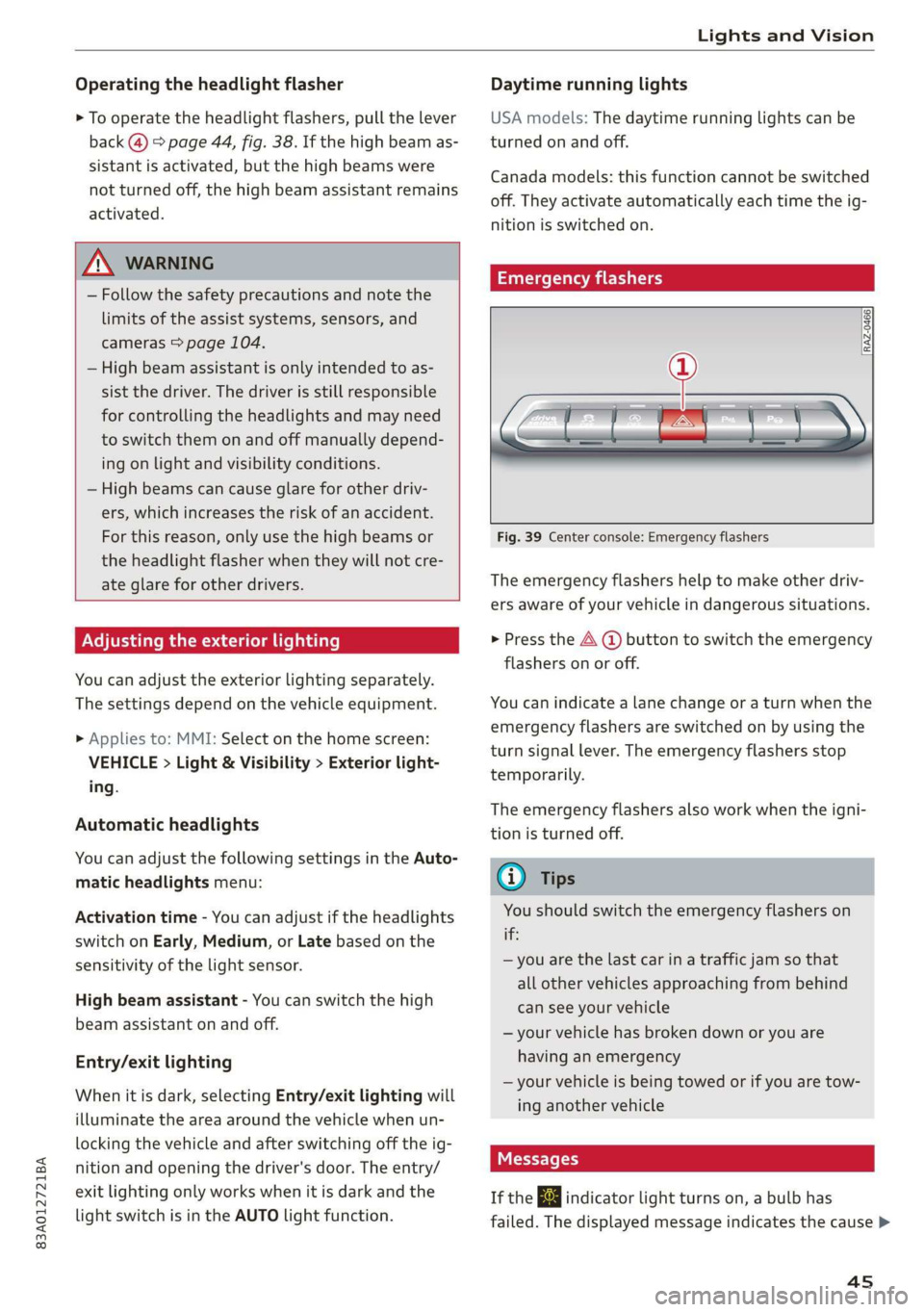
Fig. 39 Center console: Emergency flashers
The emergency flashers help to make other driv-
ers aware of your vehicle in dangerous situations.
» Press the A @ button to switch the emergency
flashers on or off.
You can indicate a lane change or a turn when the
emergency flashers are switched on by using the
turn signal lever. The emergency flashers stop
temporarily.
The emergency flashers also work when the igni-
tion is turned off.
@ Tips
You should switch the emergency flashers on
this
— you are the last car in a traffic jam so that
all other vehicles approaching from behind
can see your vehicle
— your vehicle has broken down or you are
having an emergency
— your vehicle is being towed or if you are tow-
ing another vehicle
If the 2} indicator light turns on, a bulb has
failed. The displayed message indicates the cause >
4s
Page 49 of 280
83A012721BA
Lights and Vision
Possible settings:
— Color
— Brightness
PE LENA ya labeler
You can adjust the instrument and display illumi-
nation separately. The settings depend on the ve-
hicle equipment.
> Applies to: MMI: Select on the home screen:
SETTINGS > Display & brightness.
Possible settings:
— Cockpit dimming
—MMI
— Virtual cockpit
Vision
Adjusting exterior mirrors
RAZ-0150.
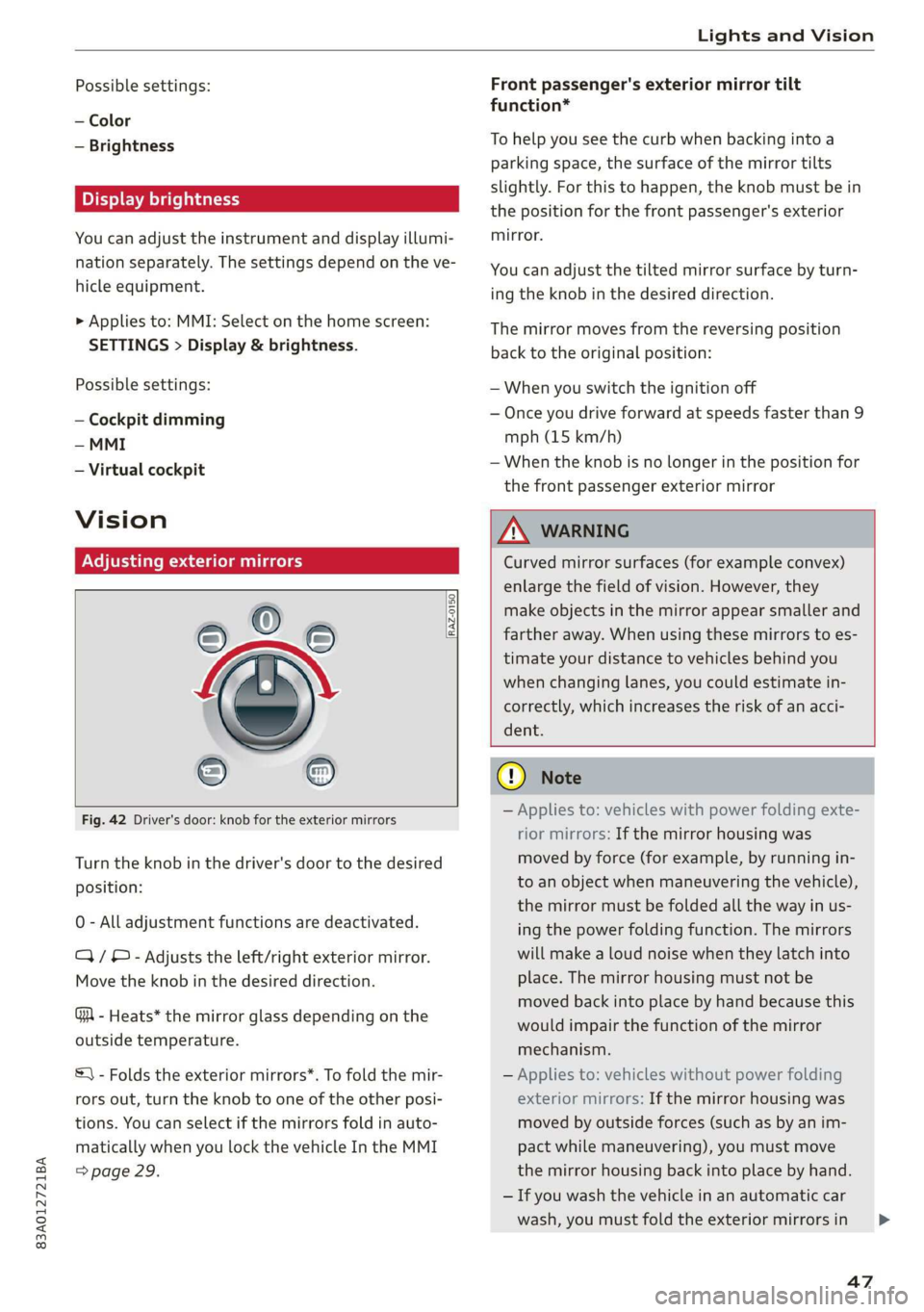
Fig. 42 Driver's door: knob for the exterior mirrors
Turn the knob in the driver's door to the desired
position:
0 - All adjustment functions are deactivated.
Q/ ®- Adjusts the left/right exterior mirror.
Move the knob in the desired direction.
GA - Heats* the mirror glass depending on the
outside temperature.
S) - Folds the exterior mirrors*. To fold the mir-
rors out, turn the knob to one of the other posi-
tions. You can select if the mirrors fold in auto-
matically when you lock the vehicle In the MMI
> page 29.
Front passenger's exterior mirror tilt
function*
To help you see the curb when backing into a
parking space, the surface of the mirror tilts
slightly. For this to happen, the knob must be in
the position for the front passenger's exterior
mirror.
You can adjust the tilted mirror surface by turn-
ing the knob in the desired direction.
The mirror moves from the reversing position
back to the original position:
— When you switch the ignition off
— Once you drive forward at speeds faster than 9
mph (15 km/h)
— When the knob is no longer in the position for
the front passenger exterior mirror
Z\ WARNING
Curved mirror surfaces (for example convex)
enlarge the field of vision. However, they
make objects in the mirror appear smaller and
farther away. When using these mirrors to es-
timate your distance to vehicles behind you
when changing lanes, you could estimate in-
correctly, which increases the risk of an acci-
dent.
@) Note
— Applies to: vehicles with power folding exte-
rior mirrors: If the mirror housing was
moved by force (for example, by running in-
to an object when maneuvering the vehicle),
the mirror must be folded all the way in us-
ing the power folding function. The mirrors
will make a loud noise when they latch into
place. The mirror housing must not be
moved back into place by hand because this
would impair the function of the mirror
mechanism.
— Applies to: vehicles without power folding
exterior mirrors: If the mirror housing was
moved by outside forces (such as by an im-
pact while maneuvering), you must move
the mirror housing back into place by hand.
— If you wash the vehicle in an automatic car
wash, you must fold the exterior mirrors in
47
Page 50 of 280
Lights and Vision
to reduce the risk of damage to the mirrors.
Never fold power folding exterior mirrors*
by hand. Only fold them in and out using
the power controls.
@ Tips
If the power adjusting function malfunctions,
the glass in both mirrors can be adjusted by
pressing on the edge of it by hand.
Dimming the mirrors
Manual dimming rearview mirror
> Pull the lever on the bottom of the mirror back.
Automatic dimming rearview mirror*
> The interior and exterior mirrors* dim automat-
ically when light shines on them, for example
from headlights on a vehicle behind you.
unless this is recommended by medical pro-
fessionals. Seek medical attention immedi-
ately.
ZA WARNING
If the glass on an automatic dimming mirror
breaks, electrolyte can leak out. This liquid
can irritate the skin, eyes and respiratory sys-
tem. If there is contact with the fluid, flush
immediately with plenty of water. Consult a
physician if necessary.
— Repeated or long-term exposure to electro-
lyte fluid can lead to irritation of the air-
ways, especially in people with asthma or
other respiratory conditions. Take deep
breaths immediately after leaving the vehi-
cle or, if this is not possible, open all of the
doors and windows as wide as possible.
— If electrolyte fluid comes into contact with
the eyes, flush them thoroughly with plenty
of clean water for at least 15 minutes and
then seek medical attention.
— If electrolyte fluid comes into contact with
the skin, flush the affected area with clean
water for at least 15 minutes, and then
clean with soap and water and seek medical
attention. Clean affected clothing and shoes
thoroughly before wearing again.
— If the fluid was swallowed and the person is
conscious, flush the mouth with water for at
least 15 minutes. Do not induce vomiting
48
C) Note
If the glass on an automatic dimming mirror
breaks, electrolyte can leak out. This liquid
damages plastic surfaces and paint. Clean
this liquid as quickly as possible, for example
with a wet sponge.
@® Tips
— If the light reaching the rearview mirror is
obstructed, the automatic dimming mirror
will not function correctly,
— The automatic dimming mirrors do not dim
when the interior lighting is turned on or
the reverse gear is selected.
rr) R Ss
a
= zy a
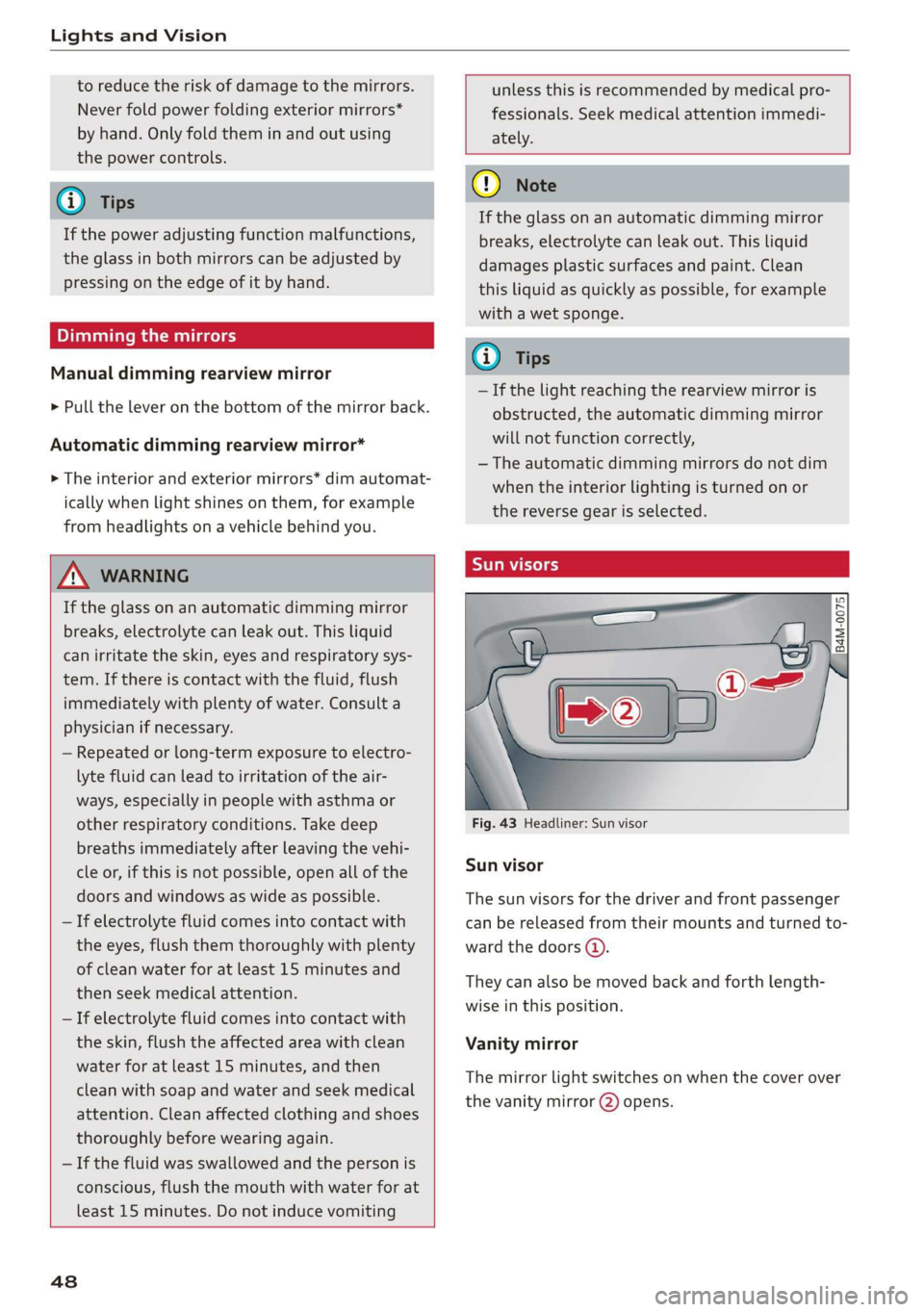
Fig. 43 Headliner: Sun visor
Sun visor
The sun visors for the driver and front passenger
can be released from their mounts and turned to-
ward the doors (a).
They can also be moved back and forth length-
wise in this position.
Vanity mirror
The mirror light switches on when the cover over
the
vanity mirror @) opens.
Page 51 of 280
83A012721BA
Lights and Vision
Windshield wipers
Switching the windshield wipers on
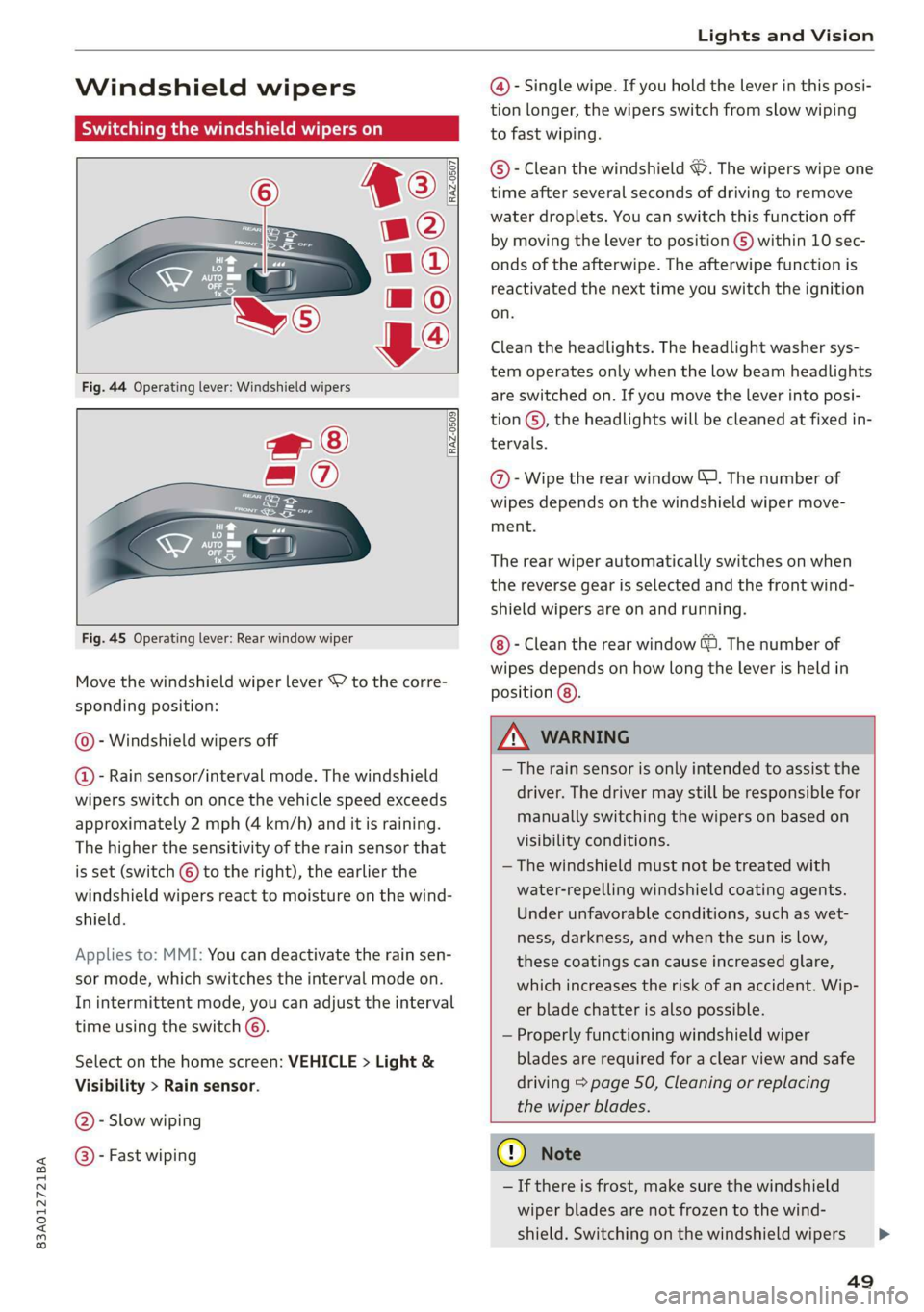
Fig. 44 Operating lever: Windshield wipers
wf ®
= ®
<— E
Ces
[RAZ-0509
Fig. 45 Operating lever: Rear window wiper
Move the windshield wiper lever S7 to the corre-
sponding position:
© - Windshield wipers off
@ - Rain sensor/interval mode. The windshield
wipers switch on once the vehicle speed exceeds
approximately 2 mph (4 km/h) and it is raining.
The higher the sensitivity of the rain sensor that
is set (switch © to the right), the earlier the
windshield wipers react to moisture on the wind-
shield.
Applies to: MMI: You can deactivate the rain sen-
sor mode, which switches the interval mode on.
In intermittent mode, you can adjust the interval
time using the switch ©.
Select on the home screen: VEHICLE > Light &
Visibility > Rain sensor.
@- Slow wiping
@®- Fast wiping
@- Single wipe. If you hold the lever in this posi-
tion longer, the wipers switch from slow wiping
to fast wiping.
©®- Clean the windshield ©. The wipers wipe one
time after several seconds of driving to remove
water droplets. You can switch this function off
by moving the lever to position ©) within 10 sec-
onds of the afterwipe. The afterwipe function is
reactivated the next time you switch the ignition
on.
Clean the headlights. The headlight washer sys-
tem operates only when the low beam headlights
are switched on. If you move the lever into posi-
tion ©, the headlights will be cleaned at fixed in-
tervals.
@- Wipe the rear window J. The number of
wipes depends on the windshield wiper move-
ment.
The rear wiper automatically switches on when
the reverse gear is selected and the front wind-
shield wipers are on and running.
- Clean the rear window &. The number of
wipes depends on how long the lever is held in
position (8).
Z\ WARNING
— The rain sensor is only intended to assist the
driver. The driver may still be responsible for
manually switching the wipers on based on
visibility conditions.
— The windshield must not be treated with
water-repelling windshield coating agents.
Under unfavorable conditions, such as wet-
ness, darkness, and when the sun is low,
these coatings can cause increased glare,
which increases the risk of an accident. Wip-
er blade chatter is also possible.
— Properly functioning windshield wiper
blades are required for a clear view and safe
driving > page 50, Cleaning or replacing
the wiper blades.
G) Note
— If there is frost, make sure the windshield
wiper blades are not frozen to the wind-
shield. Switching on the windshield wipers
49
>
Page 52 of 280
Lights and Vision
when the blades are frozen to the wind-
shield can damage the wiper blades.
— Prior to using a car wash, the windshield
wiper system must be switched off (lever in
position ©). This prevents the wipers from
switching on unintentionally and causing
damage to the windshield wiper system.
G) Tips
— The windshield wipers switch off when the
ignition is switched off. You can activate the
windshield wipers after the ignition is
switched on again by moving the windshield
wiper lever to any position.
— Worn or dirty windshield wiper blades result
in streaking. This can affect the rain sensor
function. Check your windshield wiper
blades regularly.
— The washer fluid nozzles for the windshield
washer system are heated when the ignition
is on if the outside temperature is low.
— When stopping temporarily, such as at a
traffic light, the speed of the windshield
wipers automatically reduces by one level.
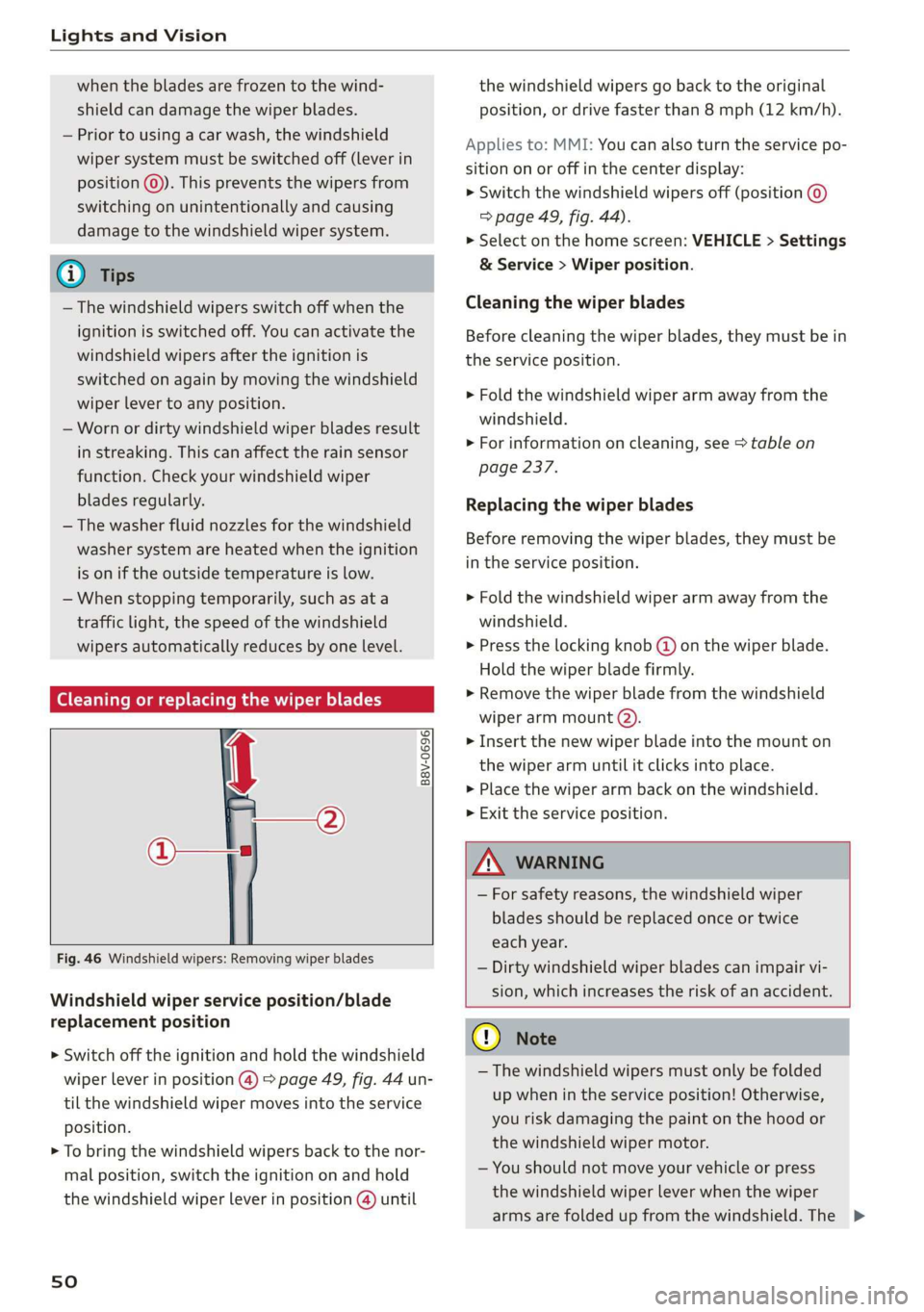
(Goce cu hacker ae or replacing the wiper blades
B8V-0696|
Ae
the windshield wipers go back to the original
position, or drive faster than 8 mph (12 km/h).
Applies to: MMI: You can also turn the service po-
sition on or off in the center display:
> Switch the windshield wipers off (position ©
=> page 49, fig. 44).
> Select on the home screen: VEHICLE > Settings
& Service > Wiper position.
Cleaning the wiper blades
Before cleaning the wiper blades, they must be in
the service position.
> Fold the windshield wiper arm away from the
windshield.
> For information on cleaning, see > table on
page 237.
Replacing the wiper blades
Before removing the wiper blades, they must be
in the service position.
> Fold the windshield wiper arm away from the
windshield.
> Press the locking knob @) on the wiper blade.
Hold the wiper blade firmly.
» Remove the wiper blade from the windshield
wiper arm mount @).
> Insert the new wiper blade into the mount on
the wiper arm until it clicks into place.
> Place the wiper arm back on the windshield.
> Exit the service position.
Fig. 46 Windshield wipers: Removing wiper blades
Windshield wiper service position/blade
replacement position
> Switch off the ignition and hold the windshield
wiper lever in position @) > page 49, fig. 44 un-
til the windshield wiper moves into the service
position.
> To bring the windshield wipers back to the nor-
mal position, switch the ignition on and hold
the windshield wiper lever in position @) until
sO
ZA\ WARNING
— For safety reasons, the windshield wiper
blades should be replaced once or twice
each year.
— Dirty windshield wiper blades can impair vi-
sion, which increases the risk of an accident.
@) Note
— The windshield wipers must only be folded
up when in the service position! Otherwise,
you risk damaging the paint on the hood or
the windshield wiper motor.
— You should not move your vehicle or press
the windshield wiper lever when the wiper
arms are folded up from the windshield. The >
Page 53 of 280
83A012721BA
Lights and Vision
windshield wipers would move back into
their original position and could damage the
hood and windshield.
G) Tips
— You can also use the service position, for ex-
ample, if you want to protect the windshield
from icing by using a cover.
— You cannot activate the service position
when the hood is open.
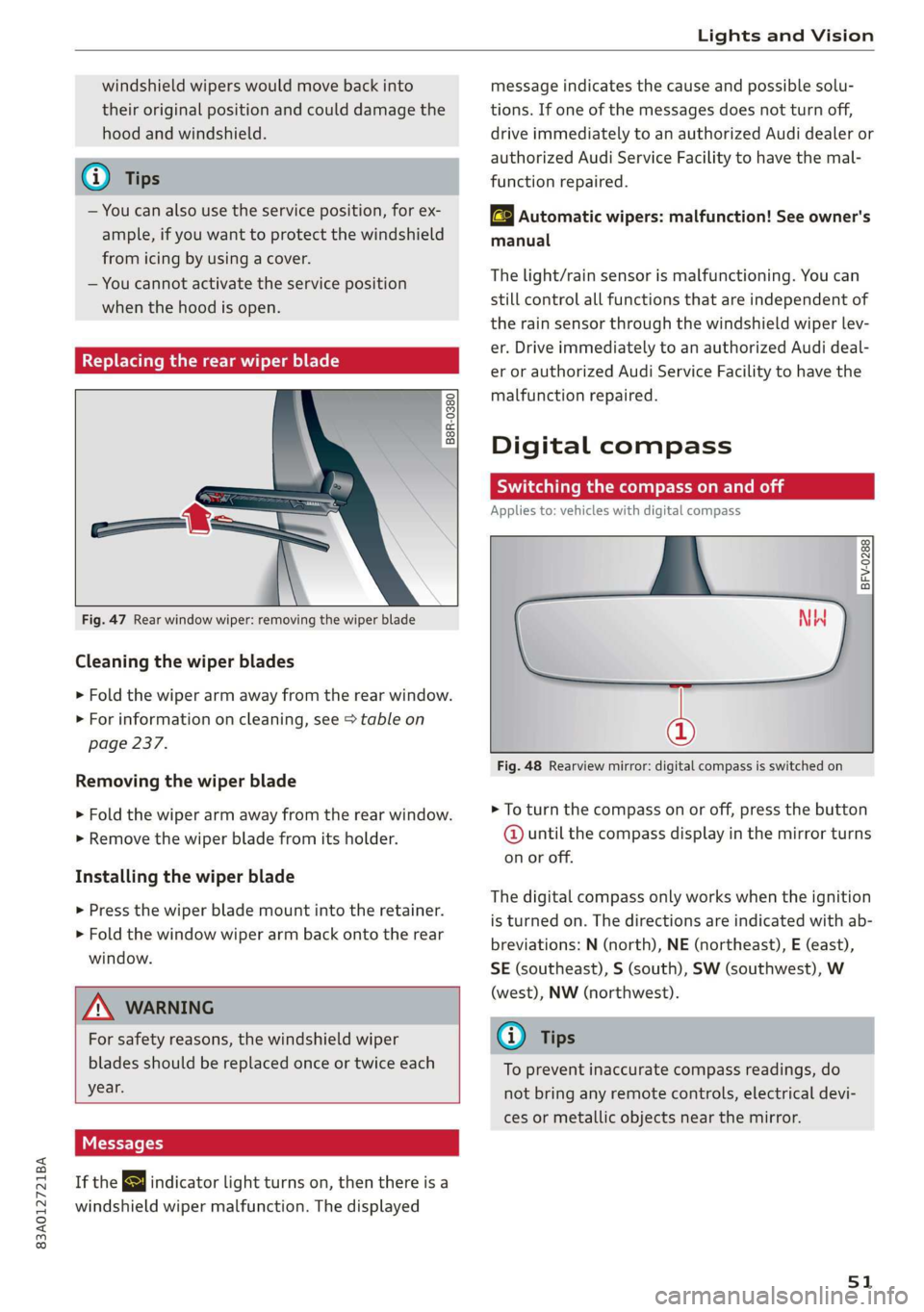
Replacing the rear wiper blade
B8R-0380
Fig. 47 Rear window wiper: removing the wiper blade
Cleaning the wiper blades
> Fold the wiper arm away from the rear window.
> For information on cleaning, see > table on
page 237.
Removing the wiper blade
> Fold the wiper arm away from the rear window.
> Remove the wiper blade from its holder.
Installing the wiper blade
> Press the wiper blade mount into the retainer.
> Fold the window wiper arm back onto the rear
window.
Z\ WARNING
For safety reasons, the windshield wiper
blades should be replaced once or twice each
year.
Messages
If the & indicator light turns on, then there is a
windshield wiper malfunction. The displayed
message indicates the cause and possible solu-
tions. If one of the messages does not turn off,
drive immediately to an authorized Audi dealer or
authorized Audi Service Facility to have the mal-
function repaired.
automatic wipers: malfunction! See owner's
manual
The light/rain sensor is malfunctioning. You can
still control all functions that are independent of
the rain sensor through the windshield wiper lev-
er. Drive immediately to an authorized Audi deal-
er or authorized Audi Service Facility to have the
malfunction repaired.
Digital compass
Switching the compass on and off
Applies to: vehicles with digital compass
BFV-0288
@
Fig. 48 Rearview mirror: digital compass is switched on
> To turn the compass on or off, press the button
@ until the compass display in the mirror turns
on or off.
The digital compass only works when the ignition
is turned on. The directions are indicated with ab-
breviations: N (north), NE (northeast), E (east),
SE (southeast), S (south), SW (southwest), W
(west), NW (northwest).
@) Tips
To prevent inaccurate compass readings, do
not bring any remote controls, electrical devi-
ces or metallic objects near the mirror.
51
Page 55 of 280
83A012721BA
Sitting correctly and safely
Sitting correctly and
safely
Correct passenger
seating position
General information
As the driver, you are responsible for making sure
every passenger is sitting correctly in their seat
and maintaining this seating position while driv-
ing. Make sure that:
— Every passenger in the vehicle has adjusted his
or her seat correctly > page 53
— The steering wheel is adjusted correctly
=> page 56
— The mirrors are adjusted so that there is a suffi-
cient view of the area around the vehicle
=> page 47
— Every passenger in the vehicle has his or her
head restraint adjusted correctly > page 57
— Every passenger in the vehicle has his or her
safety belt fastened correctly > page 58
—The activation status of the front passenger's
airbag is suitable for the passenger in the front
passenger's seat > page 64
— Children are secured in suitable child safety
seats that are secured to appropriate vehicle
seats > page 66. Read and observe the impor-
tant safety information pertaining to the use of
child safety seats on the front passenger's seat
=> A in General information on page 66.
Examples of incorrect seating positions
Safety belts can only provide its optimal protec-
tion when they are routed correctly. Incorrect
seating positions significantly reduce the protec-
tive functions of the safety belts and increase the
risk of injury due to incorrect belt routing.
The following list includes examples of seating
positions that could be dangerous for all vehicle
occupants. This is not a complete list. The pur-
pose is to provide examples to increase your
awareness of the topic. The following points ap-
ply when the vehicle is in motion:
— Never stand inside the vehicle.
— Never stand on the seats.
— Never kneel on the seats.
— Never tilt your backrest too far back.
— Never lean against the instrument panel.
— Never lie down on the rear bench seat.
— Never sit only on the front section of the seat.
— Never sit sideways on the seat.
— Never lean against the window.
— Never place your feet out of the window.
— Never place your feet on the instrument panel.
— Never place your feet on the seat cushion.
— Never ride in the footwell.
— Never sit on the armrests.
— Never drive or ride in a seat without fastening
your safety belt.
— Never ride in the luggage compartment.
ZA WARNING
Incorrect seating positions, failure to wear a
safety belt, or being too close to an airbag in-
crease the risk of serious or fatal injury to ve-
hicle occupants, especially if the airbags de-
ploy and come into contact with occupants
who are not seated correctly. Note the impor-
tant information and warnings in the chapters
for the topics given above.
Gi) Tips
If you or other vehicle passengers have physi-
cal limitations that prevent sitting in a correct
position, modifications to the vehicle may be
necessary. For more information, contact an
authorized Audi dealer or authorized Audi
Service Facility, or call Audi customer support
at 1-800-822-2834.
Front seats
General information
Make sure that:
— You can press the pedals down completely
while your legs are slightly bent
— The distance between your upper body and the
steering wheel or instrument panel is at least
10 inches (25 cm)
— The distance between your knees and the in-
strument panel is at least 4 inches (10 cm)
53
>
Page 56 of 280
Sitting correctly and safely
— Your thighs are lightly supported by the front window, or on the seat surfaces. This also
surface of the seat applies to passengers in the rear seats.
— The backrest is in an upright position and your
back is resting against it C) Note
— You have a sufficient view of the area around Applies to: vehicles with manually adjustable head re-
the vehicle straints
— You have a clear view of the instrument cluster To reduce the risk of damage, be very careful
and indicator lights when adjusting the seat to make sure the
head restraints do not hit the headliner or the
JN WARNING panorama glass roof*.
— If you are too close to the steering wheel or
instrument panel, the airbag system cannot
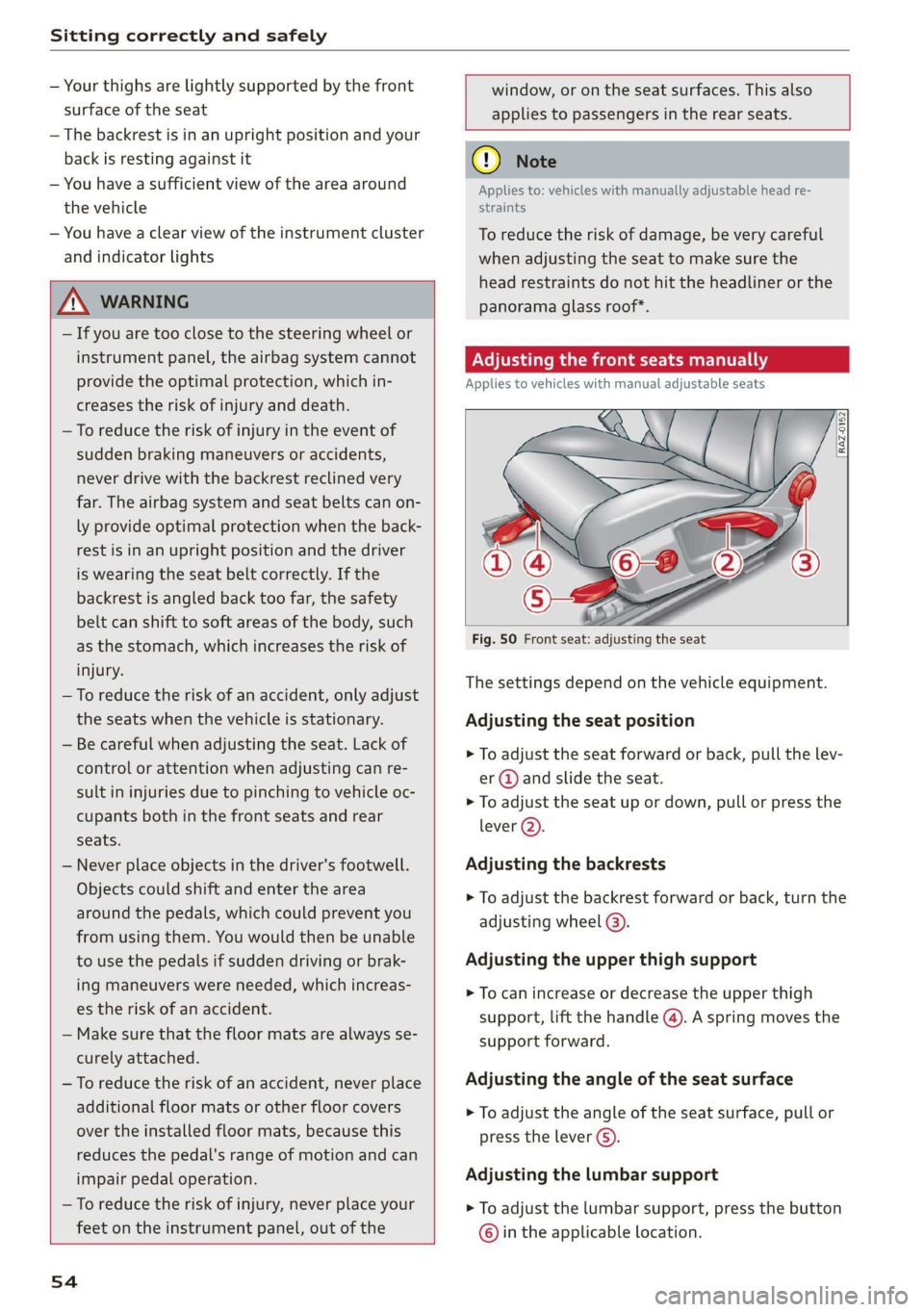
provide the optimal protection, which in- Applies to vehicles with manual adjustable seats
creases the risk of injury and death.
— To reduce the risk of injury in the event of
sudden braking maneuvers or accidents,
never drive with the backrest reclined very
far. The airbag system and seat belts can on-
ly provide optimal protection when the back-
rest is in an upright position and the driver
is wearing the seat belt correctly. If the
backrest is angled back too far, the safety
belt can shift to soft areas of the body, such
as the stomach, which increases the risk of
Fig. 50 Front seat: adjusting the seat
injury. . . .
The sett! d don the vehicl t.
—To reduce the risk of an accident, only adjust i
the seats when the vehicle is stationary. Adjusting the seat position
— Be careful when adjusting the seat. Lack of
control or attention when adjusting can re-
sult in injuries due to pinching to vehicle oc-
> To adjust the seat forward or back, pull the lev-
er @ and slide the seat.
> To adjust the seat up or down, pull or press the
cupants both in the front seats and rear \
ever (2).
seats.
— Never place objects in the driver's footwell. Adjusting the backrests
Objects could shift and enter the area
around the pedals, which could prevent you
from using them. You would then be unable
to use the pedals if sudden driving or brak- Adjusting the upper thigh support
ing maneuvers were needed, which increas-
es the risk of an accident.
— Make sure that the floor mats are always se-
> To adjust the backrest forward or back, turn the
adjusting
wheel @).
> To can increase or decrease the upper thigh
support, lift the handle @). A spring moves the
support forward.
curely attached.
—To reduce the risk of an accident, never place Adjusting the angle of the seat surface
additional floor mats or other floor covers > To adjust the angle of the seat surface, pull or
over the installed floor mats, because this press the lever G).
reduces the pedal's range of motion and can
impair pedal operation. Adjusting the lumbar support
— To reduce the risk of injury, never place your > To adjust the lumbar support, press the button
feet on the instrument panel, out of the © in the applicable location.
54