warning AUDI Q3 2019 Service Manual
[x] Cancel search | Manufacturer: AUDI, Model Year: 2019, Model line: Q3, Model: AUDI Q3 2019Pages: 280, PDF Size: 72.73 MB
Page 70 of 280
Sitting correctly and safely
In exceptional circumstances: transporting
children in the front passenger's seat
If exceptional circumstances require the child
safety seat to be placed on the front passenger's
seat, then the front passenger's airbag must be
deactivated. Please note the important informa-
tion for this > page 64, Advanced airbag system.
If you must secure a forward-facing child safety
seat, move the front passenger's seat as far back
as possible so that it is as far as possible from the
front passenger's airbag. While doing this, make
sure the seat can be adjusted all the way.
Only switch to a larger child safety seat when
absolutely necessary
Switch to a larger child safety seat only when ab-
solutely necessary. Secure your child using a safe-
ty belt without a child safety seat only if all of the
following statements are true:
—The child is large enough to sit upright in the
seat
— The child is able to sit with his or her back rest-
ing completely on the seat backrest
— The child is able to sit with his or her knees
bent over the edge of the seat surface
—The child is able to sit with both of his or her
feet completely touching the floor in the foot-
well
— The lap portion of the safety belt lies flat and
securely over the hip area and never over the
stomach
— The shoulder portion of the safety belt lies flat
and securely over the center of the shoulder
and
the chest, and never under the arm, behind
the back, or over the neck or face.
—The child is able to maintain this seating posi-
tion throughout the entire trip
Read and follow the important information and
warnings regarding the correct use of safety belts
=> page 58.
@ Tips
— Child safety seats can also be secured to
seats with side airbags. In the event of an
accident, children can also be protected by
the side airbags if the child is correctly se-
68
cured in a suitable child safety seat that is
attached correctly.
— The lower LATCH anchors as well as the
safety belt may be required to correctly in-
stall some child safety seats. Using both at
the same time is permitted, provided that
the fastening systems or safety belts do not
impair those in an adjacent seating position.
— All child safety seats are constructed so that
they can be secured using the lap safety belt
in the vehicle.
— Child safety seats with a support base can
only be secured to the outer rear seats and
to the front passenger's seat.
Sate Maal CMT Laat Leo An eC-Te
PV Ce Eliade)
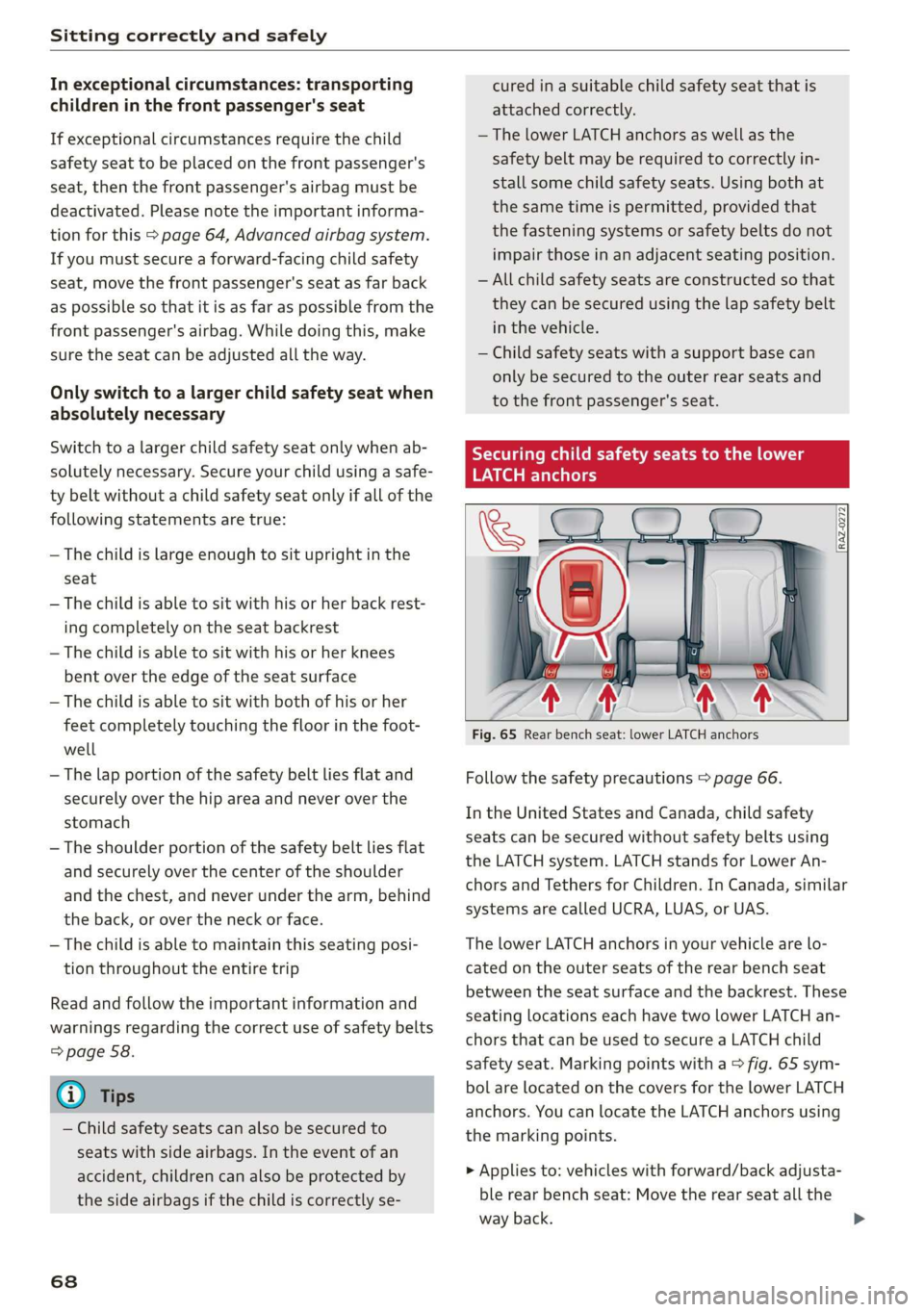
Fig. 65 Rear bench seat: lower LATCH anchors
Follow the safety precautions > page 66.
In the United States and Canada, child safety
seats can be secured without safety belts using
the LATCH system. LATCH stands for Lower An-
chors and Tethers for Children. In Canada, similar
systems are called UCRA, LUAS, or UAS.
The lower LATCH anchors in your vehicle are lo-
cated on the outer seats of the rear bench seat
between the seat surface and the backrest. These
seating locations each have two lower LATCH an-
chors that can be used to secure a LATCH child
safety seat. Marking points with a > fig. 65 sym-
bol are located on the covers for the lower LATCH
anchors. You can locate the LATCH anchors using
the marking points.
> Applies to: vehicles with forward/back adjusta-
ble rear bench seat: Move the rear seat all the
way back.
Page 71 of 280
83A012721BA
Sitting correctly and safely
> Activate the child safety lock > page 38.
» Remove the cover* from both lower LATCH an-
chors.
> If you secure a child safety seat to the rear seat,
secure any unused safety belts that are within
reach of the child > A\ in Securing child safety
seats with a safety belt on page 70.
> Secure the child safety seat according to the
child safety seat manufacturer instructions.
> Pull on the child safety seat to check if both
sides are engaged correctly in the LATCH an-
chors.
> If possible, also secure the child safety seat to
the respective top tether anchor in the vehicle
=> page 69.
_Z\ WARNING
The LATCH anchors in the vehicle are only de-
signed for child safety seats with the LATCH
system. To reduce the risk of serious or fatal
injury, never secure other child restraint sys-
tems, belts, or objects to the anchors.
@ Tips
The LATCH anchors are designed for a total
weight (child and child safety seat combined)
up to 65 lbs (29 kg). If the total weight is
greater than this, the child safety seat must
be secured with the vehicle safety belt.
Additionally securing a child safety seat to
Adat-M ee) edat-lerlale
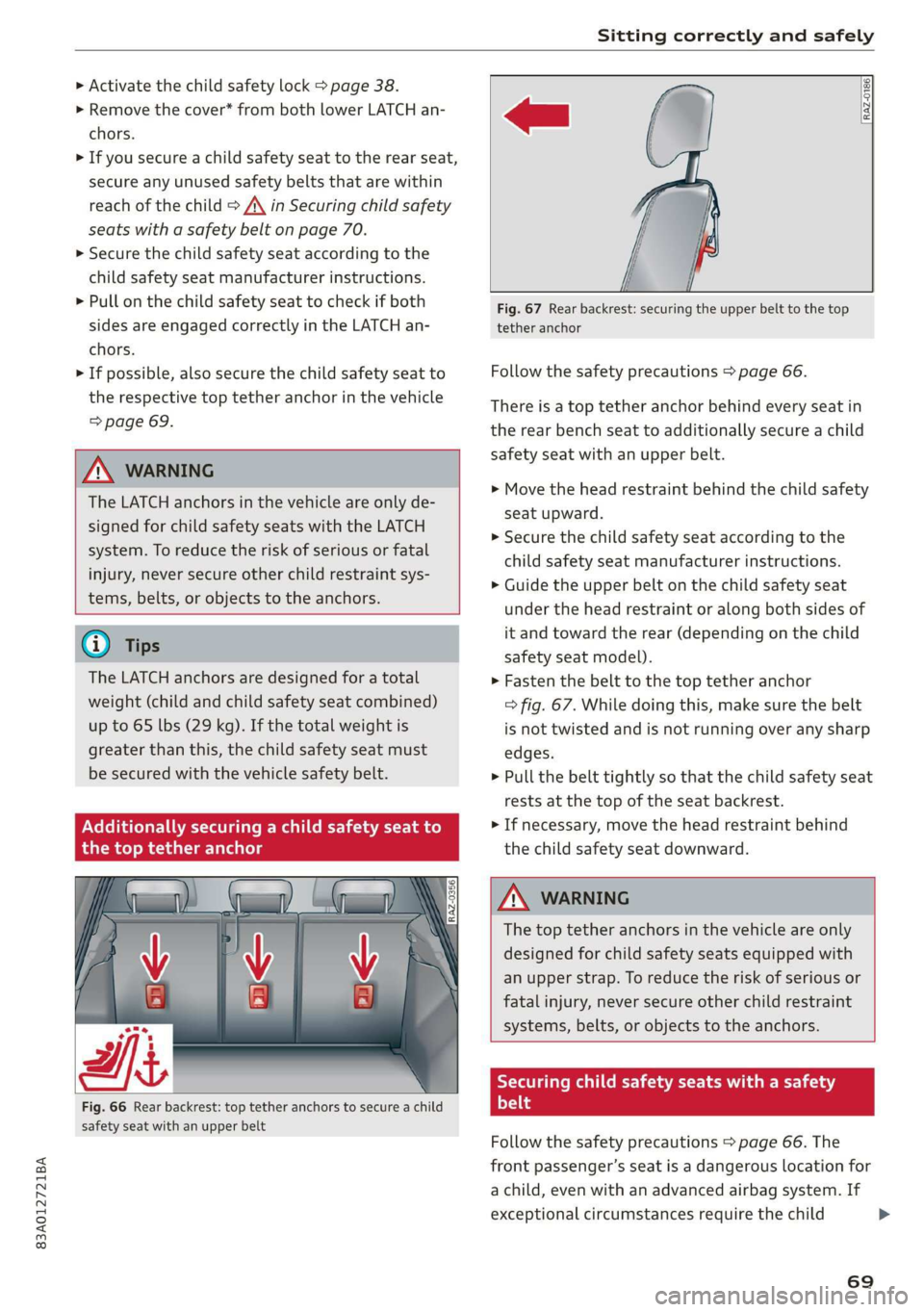
Fig. 66 Rear backrest: top tether anchors to secure a child
safety seat with an upper belt
RAZ-0186.
Fig. 67 Rear backrest: securing the upper belt to the top
tether anchor
Follow the safety precautions > page 66.
There is a top tether anchor behind every seat in
the rear bench seat to additionally secure a child
safety seat with an upper belt.
> Move the head restraint behind the child safety
seat upward.
>» Secure the child safety seat according to the
child safety seat manufacturer instructions.
> Guide the upper belt on the child safety seat
under the head restraint or along both sides of
it and toward the rear (depending on the child
safety seat model).
> Fasten the belt to the top tether anchor
> fig. 67. While doing this, make sure the belt
is not twisted and is not running over any sharp
edges.
> Pull the belt tightly so that the child safety seat
rests at the top of the seat backrest.
> If necessary, move the head restraint behind
the child safety seat downward.
Z\ WARNING
The top tether anchors in the vehicle are only
designed for child safety seats equipped with
an upper strap. To reduce the risk of serious or
fatal injury, never secure other child restraint
systems, belts, or objects to the anchors.
Securing child safety seats with a safety
Prot
Follow the safety precautions > page 66. The
front passenger’s seat is a dangerous location for
a child, even with an advanced airbag system. If
exceptional circumstances require the child
69
Page 72 of 280
Sitting correctly and safely
safety seat to be placed on the front passenger's
seat, then the front passenger's airbag must be
deactivated. Please note the important informa-
tion for this > page 67, Correct positioning for
children and > page 64, Advanced airbag sys-
tem.
Securing child safety seats
> Applies to: vehicles with forward/back adjusta-
ble rear bench seat: Move the rear seat all the
way back.
> Activate the child safety lock > page 38.
> If you secure a child safety seat to the rear seat,
secure any unused safety belts that are within
reach of the child > /\, > page 71.
> If you secure a child safety seat to the front
passenger's seat, adjust the front passenger's
seat to the highest position.
>» Secure the child safety seat according to the
child safety seat manufacturer instructions.
> If necessary, activate the belt retractor lock
=> page 70.
> If the child safety seat is secured on the front
passenger's seat, adjust the front passenger's
seat backrest until it rests flat against the child
safety seat. Also make sure that the upper safe-
ty belt fixture is behind the child safety seat.
> If you secure a child safety seat on the rear
seat, also secure it to the correct top tether an-
chor if possible > page 69.
Activating the belt retractor lock
If you secure a child safety seat using the vehicle
safety belt, you must activate the belt retractor
lock. Follow the child safety seat manufacturer
instructions.
The belt retractor lock prevents the safety belt
from becoming loose while driving, which could
result in the child safety seat no longer being ad-
equately secured.
> Secure the child safety seat according to the
child safety seat manufacturer instructions.
While doing so, pull out the safety belt. Insert
the safety belt into the belt latch that belongs
to that seat until it audibly locks.
> Pull the upper belt out completely and then al-
low it to retract. You will hear a clicking sound
70
while the belt is retracting. It will not be possi-
ble to pull the safety belt out any farther.
> Push the child safety seat into the seat and al-
low the belt to retract more.
> Make sure that the child safety seat cannot
move more than 1 inch (2.5 cm).
Deactivating the belt retractor lock
> Unbuckle the safety belt from the belt latch.
> Remove the child safety seat according to the
manufacturer instructions.
> Allow the safety belt to retract completely. The
belt retractor lock is deactivated.
ZA WARNING
— A safety belt that is not locked by the belt
retractor lock or a locking device cannot se-
cure a child safety seat while driving or in
the event of an accident, which increases the
risk of fatal injury. Always make sure the
belt retractor lock on the safety belt is acti-
vated if the child safety seat manufacturer
instructions require it.
— Due to the risk of fatal injury, never place a
rear-facing child safety seat on the front
passenger's seat when the front passenger's
airbag is switched on.
— For the child safety seat to offer the maxi-
mum protection, it is especially important
to route the vehicle safety belt correctly. Al-
ways follow the instructions from the child
safety seat manufacturer for routing the
safety belt correctly. Incorrectly fastened
safety belts can cause injuries, even during
minor accidents.
Page 73 of 280
83A012721BA
Sitting correctly and safely
SY ae MMe MMM t Le
Pre
RAZ-0537
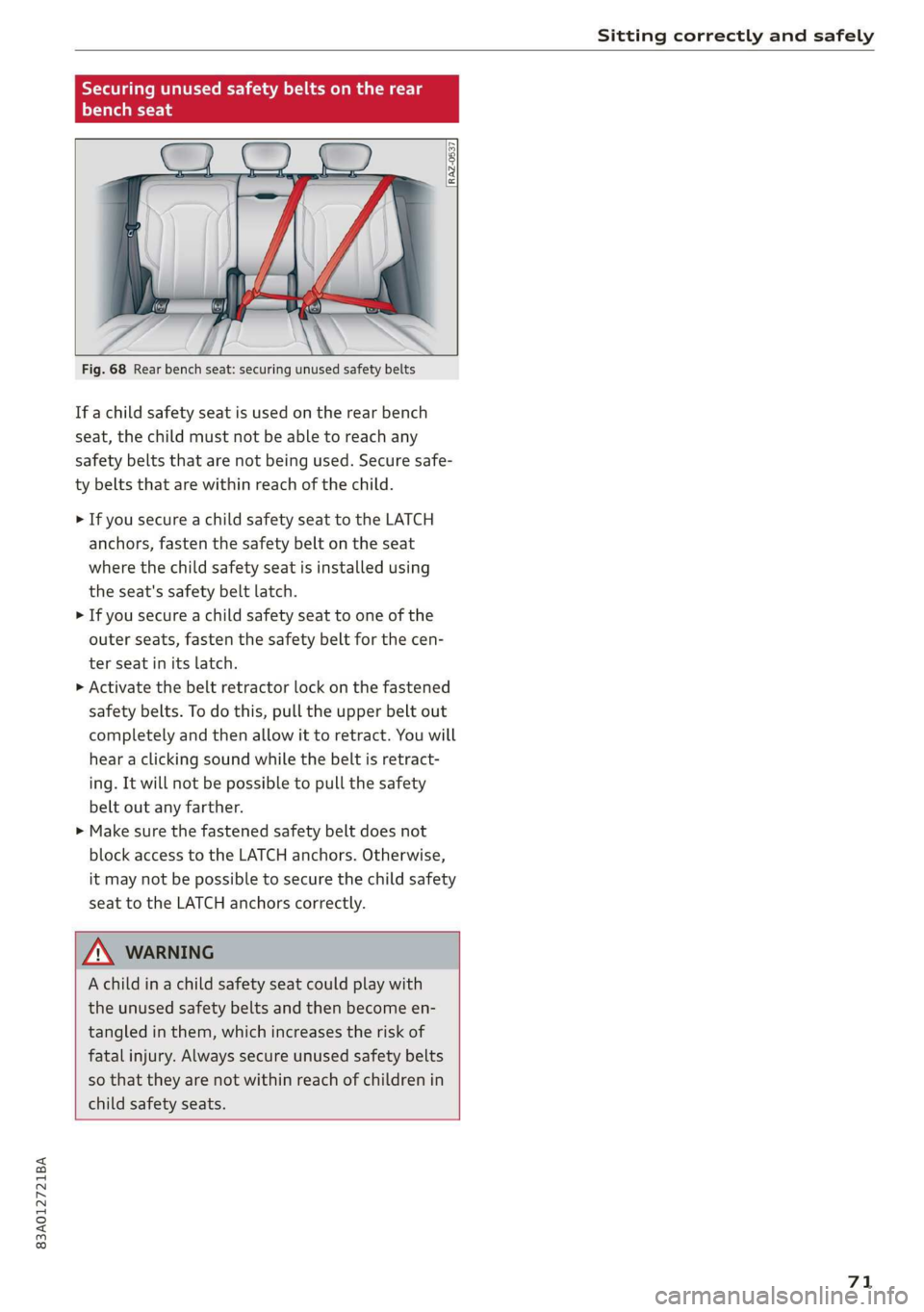
Fig. 68 Rear bench seat: securing unused safety belts
If a child safety seat is used on the rear bench
seat, the child must not be able to reach any
safety belts that are not being used. Secure safe-
ty belts that are within reach of the child.
> If you secure a child safety seat to the LATCH
anchors, fasten the safety belt on the seat
where the child safety seat is installed using
the seat's safety belt latch.
> If you secure a child safety seat to one of the
outer seats, fasten the safety belt for the cen-
ter seat in its latch.
> Activate the belt retractor lock on the fastened
safety belts. To do this, pull the upper belt out
completely and then allow it to retract. You will
hear a clicking sound while the belt is retract-
ing. It will not be possible to pull the safety
belt out any farther.
> Make sure the fastened safety belt does not
block access to the LATCH anchors. Otherwise,
it may not be possible to secure the child safety
seat to the LATCH anchors correctly.
Z\ WARNING
A child ina child safety seat could play with
the unused safety belts and then become en-
tangled in them, which increases the risk of
fatal injury. Always secure unused safety belts
so that they are not within reach of children in
child safety seats.
71
Page 74 of 280
Stowing and using
Stowing and using
Power sources
When the ignition is switched on, you may be
able to use the electric power sources for exter-
nal devices, depending on the vehicle equipment.
12 volt sockets
You can connect electrical accessories to the 12
volt sockets. The power usage must not exceed
120 watts.
The 12 volt sockets are labeled with the 12V
symbol. They are located in the front center con-
sole, in the rear*, and in the left floor panel in the
luggage compartment*.
USB ports
Applies to: vehicles with USB port
You can charge mobile devices using the USB
ports. The USB ports are labeled with the «> or
(4 symbol or CHARGE ONLY.
ZX WARNING
— To reduce the risk of fatal injury, store all
connected devices securely when driving so
that they do not move around inside the ve-
hicle when braking or in the event of an acci-
dent.
— Incorrect usage can lead to serious injuries
or burns. To reduce the risk of injuries, never
leave children unattended in the vehicle
with the key.
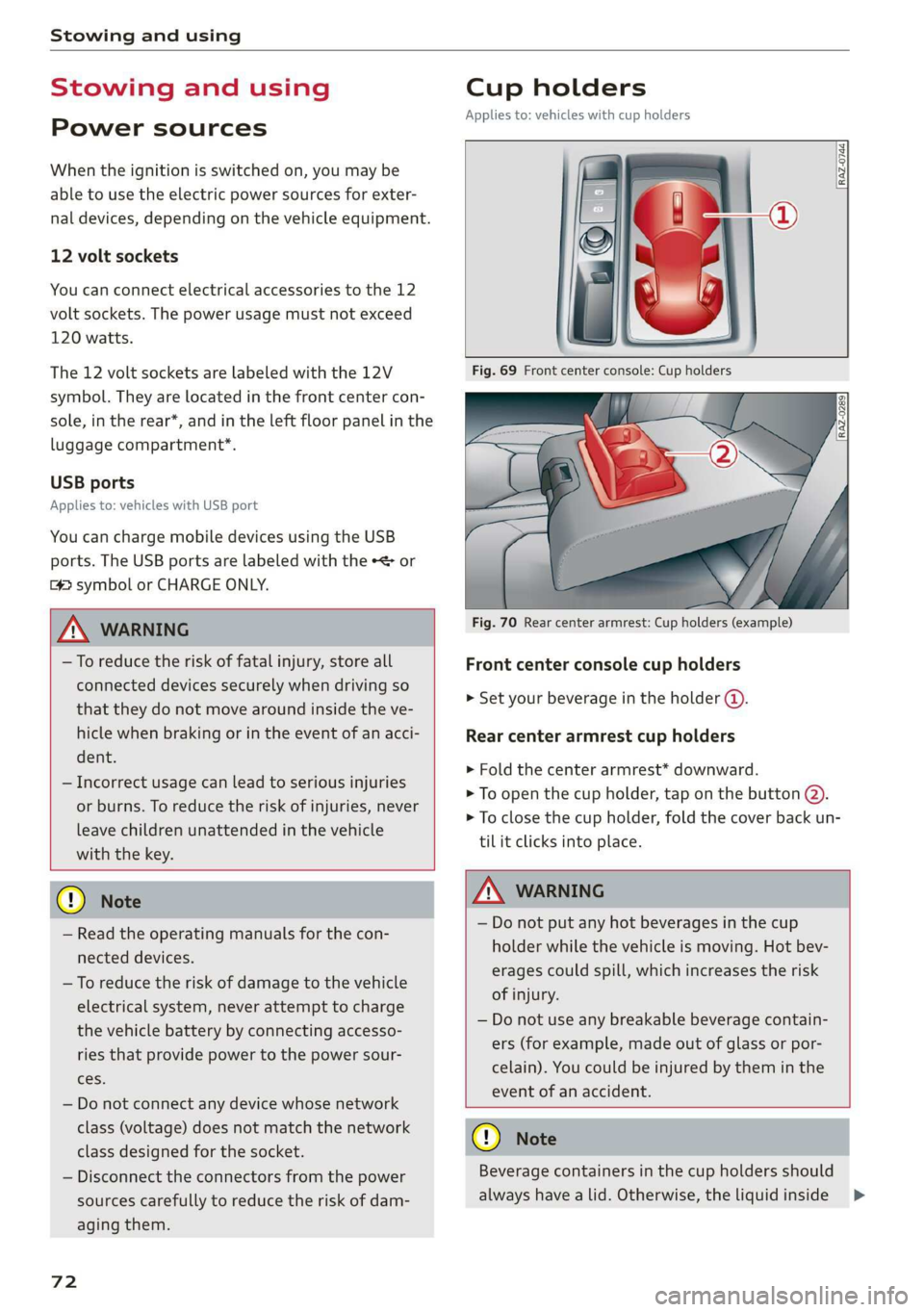
Cup holders
Applies to: vehicles with cup holders
RAZ-0744,
Fig. 70 Rear center armrest: Cup holders (example)
Front center console cup holders
> Set your beverage in the holder ().
Rear center armrest cup holders
> Fold the center armrest* downward.
> To open the cup holder, tap on the button @).
> To close the cup holder, fold the cover back un-
til it clicks into place.
© Note
— Read the operating manuals for the con-
nected devices.
— To reduce the risk of damage to the vehicle
electrical system, never attempt to charge
the vehicle battery by connecting accesso-
ries that provide power to the power sour-
ces.
— Do not connect any device whose network
class (voltage) does not match the network
class designed for the socket.
— Disconnect the connectors from the power
sources carefully to reduce the risk of dam-
aging them.
72
Z\ WARNING
— Do not put any hot beverages in the cup
holder while the vehicle is moving. Hot bev-
erages could spill, which increases the risk
of injury.
— Do not use any breakable beverage contain-
ers (for example, made out of glass or por-
celain). You could be injured by them in the
event of an accident.
CG) Note
Beverage containers in the cup holders should
always
have a lid. Otherwise, the liquid inside
>
Page 75 of 280
83A012721BA
Stowing and using
could spill and cause damage to the vehicle
equipment.
Additional storage
You will find a variety of storage compartments
and holders at various locations in the vehicle.
— Glove compartment: The glove compartment
can be locked* using the vehicle key > page 32.
— Holders for a notepad and a pen in the glove
compartment
— Storage compartment in the cockpit on the
driver's side
— Storage compartments in the door trim panel
— Storage compartment* under the left front seat
— Storage compartment under the front center
armrest*
— Storage compartment* under the right front
seat
— Net* behind the front seats
— Storage compartment* at the end of the rear
center console
— Garment hooks in the rear
— Storage compartments next to the rear bench
seat
— Bag hooks* in the luggage compartment
ZA WARNING
—To reduce the risk of injury, make sure all
storage compartments are always closed
while driving.
— Loose objects can be thrown around the ve-
hicle interior during sudden driving or brak-
ing maneuvers, which increases the risk of
an accident. Store objects securely while
driving.
— Only use the storage compartments in the
door trim panels to store small objects that
will not stick out of the compartment and
impair the range of the side airbags.
— Only lightweight clothing should be hung
from the garment hooks in the vehicle. The
pockets of the clothing must not contain any
heavy, breakable, or sharp-edged objects.
Such objects endanger vehicle occupants
and increase the risk of injury during sudden
driving or braking maneuvers or in an acci-
dent, especially if the airbags deploy.
— Make sure your view toward the rear is not
blocked, for example by hanging clothing or
objects in the vehicle.
G) Tips
Applies to: vehicles with Wi-Fi:Do not place
any metal objects in the storage compart-
ment* on the end of the rear center console,
because they could impair the Wi-Fi antenna
function.
Luggage compartment
General information
All pieces of luggage or objects must be securely
fastened in the luggage compartment. Note the
following to maintain good vehicle handling:
> Distribute the load evenly in the luggage com-
partment.
> Stow heavy luggage as far forward in the lug-
gage compartment as possible.
» Use non-elastic cords attached to the tie-downs
to secure objects.
ZA WARNING
— The luggage compartment cover must al-
ways be securely fastened when in use to re-
duce the risk of an accident.
— The storage compartment must not be used
to transport heavy objects, hard objects, or
animals. Such objects endanger vehicle oc-
cupants and increase the risk of injury dur-
ing sudden driving or braking maneuvers or
in an accident.
— Loose objects can be thrown around the ve-
hicle interior during sudden driving or brak-
ing maneuvers, which increases the risk of
an accident. Always stow objects securely in
the luggage compartment and secure them
at the tie-downs. Use straps suitable for
heavy objects.
—If pieces of luggage or objects are secured
to the tie-downs with unsuitable or dam-
aged straps, this can increase the risk of
73
Page 79 of 280
83A012721BA
Warm and cold
Warm and cold
Climate control system
Your vehicle has a deluxe automatic climate con-
trol system with two zones where the tempera-
ture and air distribution can be adjusted sepa-
rately on the left and right front sides.
The climate control system warms, cools, dehu-
midifies, and filters the incoming air. It is the
most effective when the windows and panoramic
glass roof are closed. If there is a build-up of
heat inside the vehicle, ventilation can help to
speed up the cooling process.
In all heating mode functions except defrost, the
blower only switches to a higher speed once the
engine coolant has reached a certain tempera-
ture.
Pollutant filter
The pollutant filter removes pollutants such as
dust and pollen from the air.
ZA WARNING
— You should not use the recirculation mode
for an extended period of time, because no
fresh air is drawn in and the windows can
fog when cooling mode is switched off. This
increases the risk of an accident.
— Individuals with reduced sensitivity to pain
or temperature could develop burns when
using the seat heating function. To reduce
the risk of injury, these individuals should
not use seat heating.
() Note
To reduce the risk of damage to the seat heat-
ing elements, do not kneel on the seats or
place heavy pressure on one area of the seat.
(@) For the sake of the environment
Energy can be saved by switching off the A/C
mode.
@ Tips
—To prevent interference with the heating
and cooling output and to prevent the win-
dows from fogging over, the air intake in
front of the windshield must be free of ice,
snow, and leaves.
— Condensation from the cooling system can
drip and form a puddle of water under the
vehicle. This is normal and does not mean
there is a leak.
— The energy management system may tem-
porarily switch off certain functions, such as
the seat heating* or rear window defogger.
These systems are available again as soon as
the energy supply has been restored.
— If the front passenger's seat heating is
turned on, it will not turn on again automat-
ically if more than 10 minutes have passed
between switching the ignition off and
switching it on again.
77
Page 83 of 280
83A012721BA
Driving
> The engine will start and the vehicle will then
be ready to drive.
Equipment that uses a lot of electricity is switch-
ed off temporarily when you start the engine. If
the engine does not start immediately, stop the
starting procedure by turning the ignition key to
position © and repeat after 30 seconds.
If it is difficult to turn the key to position @, turn
the steering wheel back and forth slightly to re-
lease the steering lock.
Stopping the engine
> Bring the vehicle to a full stop.
> Turn the key to position @). The engine will
switch off.
Activating the steering lock
Applies to: vehicles with steering lock
The steering lock helps prevent vehicle theft.
> Remove the ignition key.
> Turn the steering wheel until the steering
wheel audibly locks.
Switching the ignition on or off
If you would like to switch the ignition on or off
without starting the engine, follow these steps:
> Switching on: turn the key to position @.
> Switching off: turn the key to position ©.
Z\ WARNING
Never remove the ignition key from the igni-
tion lock while the vehicle is moving. Other-
wise, the steering lock could engage and you
would not be able to steer the vehicle, which
increases the risk of an accident.
General information
more force to steer and brake the vehicle.
The fact that you cannot steer and brake as
usual may increase the risk of accidents and
serious injuries.
— If you leave the vehicle, switch the ignition
off and take the key with you. This applies
particularly when children remain in the ve-
hicle. Otherwise, children could start the ve-
hicle or operate electrical equipment (such
as power windows), which increases the risk
of an accident.
— Always select the “P” selector lever position
when parking the vehicle; otherwise, the ve-
hicle could roll away.
Z\ WARNING
—To reduce the risk of asphyxiation, never al-
low the engine to run in confined spaces.
— Never turn off the engine before the vehicle
has come to a complete stop. Switching it
off before the vehicle has stopped may im-
pair the function of the brake booster and
power steering. You would then need to use
@) Note
— Avoid high engine speed, full throttle, and
heavy engine load if the engine has not
reached operating temperature yet. You
could damage the engine.
— If the engine has been under heavy load for
an extended period of time, heat builds up
in the engine compartment after the engine
is switched off and there is a risk of damag-
ing the engine. For this reason, let the en-
gine run at idle for approximately two mi-
nutes before shutting it off.
G) Tips
— Brief noises are normal when starting and
stopping the vehicle and are no cause for
concern.
—For up to 10 minutes after stopping the en-
gine, the radiator fan may turn on again au-
tomatically or it may continue to run, even if
the ignition is switched off.
— It may not be possible to start the vehicle in
extremely low temperatures.
Messages
BE Engine start system: malfunction! Please
contact Service
There is a malfunction in the engine starting sys-
tem. Drive immediately to an authorized Audi
dealer or authorized Audi Service Facility to have
the malfunction repaired.
81
>
Page 84 of 280
Driving
B Remote control key: key not detected. Is the
key still in the vehicle?
The vehicle key was removed from the vehicle
while the engine is running. If the vehicle key is
no longer in the vehicle, you cannot switch the ig-
nition on or start the engine once you stop it. You
also cannot lock the vehicle from the outside.
Remote control key: hold back of key
against the designated area. See owner's man-
ual
The battery in the vehicle key may be drained or
there may be a malfunction. To start the vehicle,
you must also hold the vehicle key against the lo-
cation shown ?) & page 80, fig. 79.
If the malfunction remains, drive immediately to
an authorized Audi dealer or authorized Audi
Service Facility to have the malfunction correct-
ed.
When driving
Starting to drive, stopping, and parking
Starting from a stop
» Press and hold the brake pedal.
> Start the engine.
> Select a gear.
> Release the parking brake.
> Release the brake pedal. The vehicle may roll.
> Press the accelerator pedal to accelerate.
Stopping and parking
> Bring the vehicle to a full stop and press and
hold the brake pedal.
> Set the parking brake.
> Select the “P” selector lever position to secure
the vehicle from rolling away.
> Switch off the ignition before leaving the vehi-
cle.
> Turn the steering wheel when parking on in-
clines so that the wheels will roll into the curb
if the vehicle starts moving.
On hills, activate the parking brake first and then
shift into the "P" selector lever position. This pre-
vents too much stress from being placed on the
locking mechanism.
82
AN WARNING
—To reduce the risk of an accident, always se-
cure your vehicle from rolling.
— The vehicle can roll even when the engine is
switched off.
— Unintended vehicle movement can lead to
serious injuries.
— Do not inadvertently press the accelerator
pedal when the vehicle is stationary. Other-
wise the risk of an accident increases be-
cause the vehicle will start to move immedi-
ately, even if the parking brake is set.
C) Note
If you have to stop on an incline, always press
the brake pedal to hold the vehicle in place to
reduce the risk of the vehicle rolling back-
ward. Do not try to hold the vehicle in place
by pressing and holding the accelerator pedal.
The transmission can overheat, which increas-
es the risk of damage.
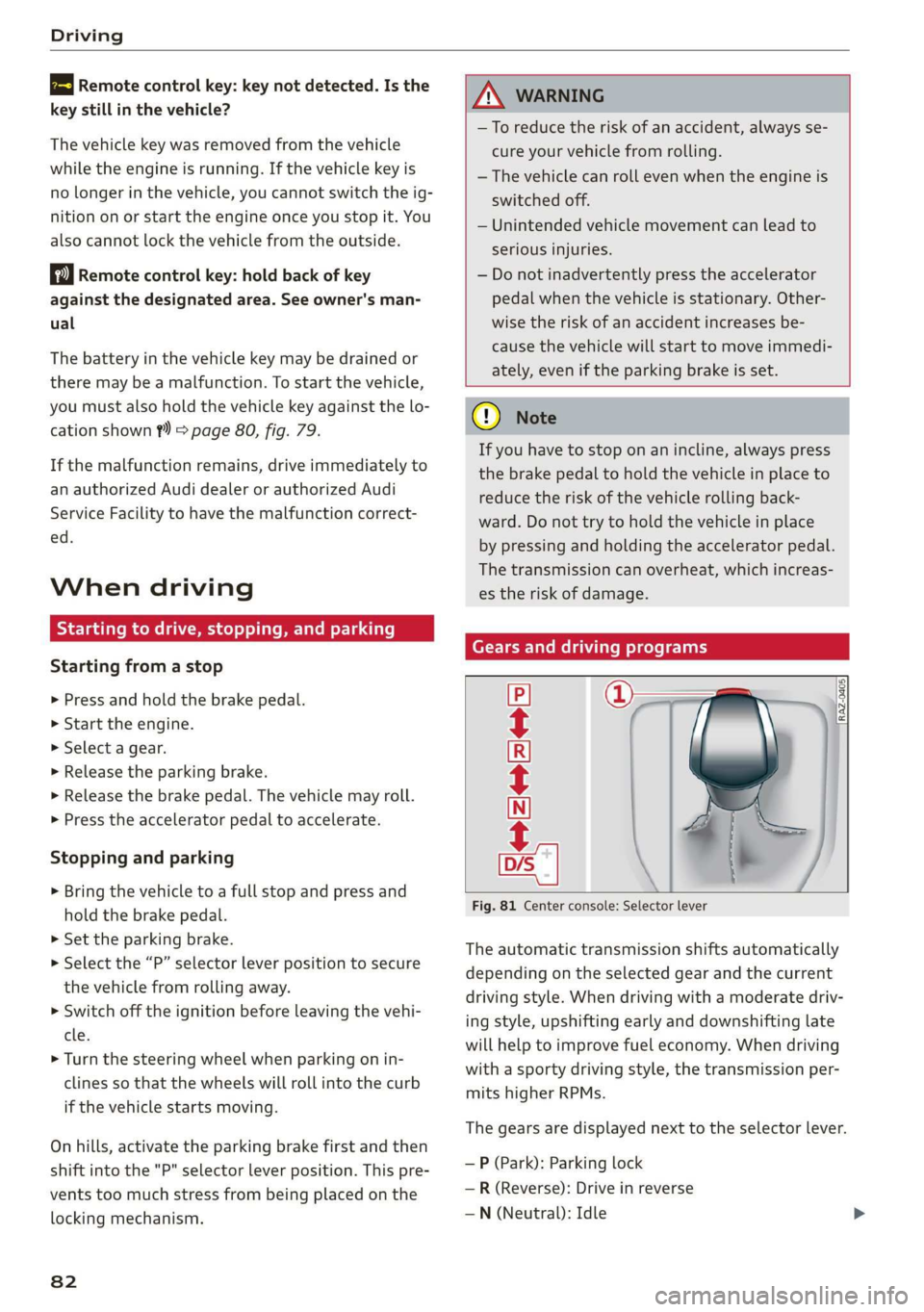
Gears and driving programs
=i
Fig. 81 Center console: Selector lever
CECRSE
The automatic transmission shifts automatically
depending on the selected gear and the current
driving style. When driving with a moderate driv-
ing style, upshifting early and downshifting late
will help to improve fuel economy. When driving
with a sporty driving style, the transmission per-
mits higher RPMs.
The gears are displayed next to the selector lever.
— P (Park): Parking lock
—R (Reverse): Drive in reverse
—N (Neutral): Idle
Page 85 of 280
83A012721BA
Driving
— D (Drive): Drive forward
Selecting a gear
Requirement: The ignition must be switched on.
— Bring the vehicle to a full stop and press the
brake pedal.
— Press the release button @ on the selector lev-
er.
—To select a gear, move the selector lever into
the corresponding position.
— The label next to the selector lever for the se-
lected gear will light up.
“N” (Neutral) gear
In the “N” gear, power is not transmitted to the
driving wheels. Use the “N” gear in a car wash
(with conveyor belts), for example.
If you unintentionally select “N” while driving
(faster than 1 mph (2 km/h)), you can also shift
back to “D” without pressing the brake pedal.
For safety reasons, the vehicle cannot be locked
when the transmission is in the "N” gear.
“p” (Park) gear
The vehicle is secured from rolling away by the
parking lock when in the “P” gear.
If you cannot shift out of “P”, for example be-
cause the vehicle has no power, you may need to
use the emergency release for the parking lock
=>page 85.
Selecting a driving program
Various driving programs can be selected when in
the “D” gear. The programs influence when the
transmission shifts and how the accelerator ped-
al responds.
The selected driving program is displayed in the
instrument cluster.
— D (Drive): Normal driving mode
—S (Sport): Sporty driving mode
If you select the Dynamic mode in Audi drive se-
lect*, the “S” driving program will be activated.
When the ignition is switched off, the driving pro-
gram may be reset to “D”.
To switch between the current driving program
and “S”, push the selector lever toward the rear.
Z\ WARNING
— Before starting to drive, check if the desired
gear is displayed next to the selector lever.
— Always secure your vehicle from rolling
away. Press the brake pedal or shift to “P”.
When leaving the vehicle, also set the park-
ing brake.
— Power is still transmitted to the wheels
when the engine is running at idle. To pre-
vent the vehicle from “creeping”, you must
keep your foot on the brake in all selector
lever positions (except "P" and "N") when
the engine is running.
—To reduce the risk of an accident, do not
press the accelerator pedal when changing
gears if the vehicle is stationary and the en-
gine is running.
— Never select the “R" or "P” gears while driv-
ing. Doing so could cause an accident.
— The vehicle can roll even if the ignition is
switched off.
@ Tips
If you shift between “D” and “R” within one
second, you do not need to press the brake
pedal. This makes it possible to “rock” if it is
stuck, for example.
83