warning AUDI Q3 2019 User Guide
[x] Cancel search | Manufacturer: AUDI, Model Year: 2019, Model line: Q3, Model: AUDI Q3 2019Pages: 280, PDF Size: 72.73 MB
Page 26 of 280
Voice operation
Voice operation
General information
You can operate many functions in the vehicle
easily using voice commands.
Using the voice operation system effectively
> Speak clearly and distinctly at a normal volume.
Speak louder when driving faster.
> Emphasize the words in the commands evenly
and do not leave long pauses.
> Close the doors, the windows, and the sunroof*
to reduce background noise. Make sure that
passengers are not speaking when you are giv-
ing a voice command.
> Do not direct the vents toward the hands-free
microphone, which is in the roof headliner near
the front interior lights.
> Only the driver should speak to the system, be-
cause the handsfree microphone is aimed to-
ward this seating position.
ZA\ WARNING
— Direct your full attention to driving. As the
driver, you have complete responsibility for
safety in traffic. Only use the functions in
such a way that you always maintain com-
plete control over your vehicle in all traffic
situations.
— Do not use voice operation in emergencies
because your voice may change in stressful
situations. The system may take longer to
dial the number or may not be able to dial it
at all. Dial the emergency number manually.
@ Tips
There are no voice guidance* prompts when a
dialog is active.
24
Voice recognition system
Applies to: vehicles with voice recognition system
See
Dat)
Where is a
Connect
Diala
coy
Es
ea
cog
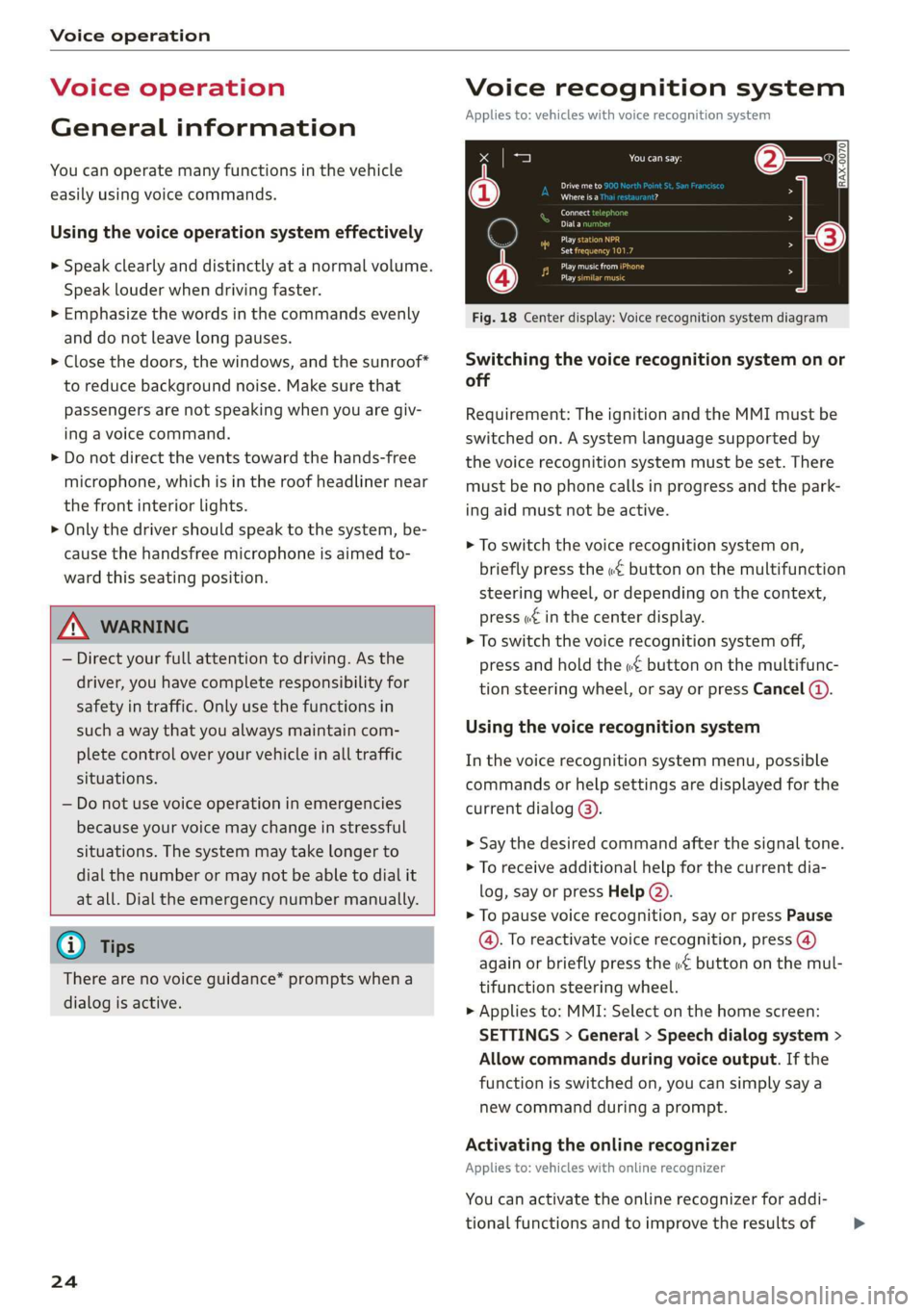
Fig. 18 Center display: Voice recognition system diagram
Switching the voice recognition system on or
off
Requirement: The ignition and the MMI must be
switched on. A system language supported by
the voice recognition system must be set. There
must be no phone calls in progress and the park-
ing aid must not be active.
> To switch the voice recognition system on,
briefly press the «€ button on the multifunction
steering wheel, or depending on the context,
press w£ in the center display.
> To switch the voice recognition system off,
press and hold the « button on the multifunc-
tion steering wheel, or say or press Cancel (a).
Using the voice recognition system
In the voice recognition system menu, possible
commands or help settings are displayed for the
current dialog @).
> Say the desired command after the signal tone.
> To receive additional help for the current dia-
log, say or press Help (2).
> To pause voice recognition, say or press Pause
@. To reactivate voice recognition, press (@)
again or briefly press the «€ button on the mul-
tifunction steering wheel.
> Applies to: MMI: Select on the home screen:
SETTINGS > General > Speech dialog system >
Allow commands during voice output. If the
function is switched on, you can simply say a
new command during a prompt.
Activating the online recognizer
Applies to: vehicles with online recognizer
You can activate the online recognizer for addi-
tional functions and to improve the results of >
Page 30 of 280
Opening and closing
Opening and closing
Central locking
erasure)
ZA WARNING
— If you leave the vehicle, switch the ignition
off and take the key with you. This applies
particularly when children remain in the ve-
hicle. Otherwise, children could start the en-
gine or operate electrical equipment (such
as power windows), which increases the risk
of an accident.
— Applies to: vehicles with anti-theft alarm
system: When the vehicle is locked from the
outside, no one - especially children - should
remain in the vehicle, because the windows
can no longer be opened from the inside
= page 31, Anti-theft alarm system.
Locked doors make it more difficult for
emergency workers to enter the vehicle,
which puts lives at risk.
All doors and the luggage compartment lid can
be centrally unlocked and locked at once. You can
select in the MMI if the entire vehicle or only the
driver's door should unlock when unlocking the
vehicle > page 29. The turn signals flash twice
when you unlock the vehicle and flash once when
you lock the vehicle. If they do not flash when
locking, check if all doors and lids are closed.
Depending on the vehicle equipment, you may
have different options for centrally unlocking and
locking your vehicle.
— Vehicle key > page 33
— Sensors in the front door handles > page 33
— Lock cylinder on the driver's door > page 30
— Central locking switch inside > page 29
Key / vehicle key
The term “key” can refer to the remote control or
convenience key*, or to a mobile device.
The term “vehicle key” refers to the remote con-
trol key or convenience key*. The convenience
238
key* is a remote control key with special func-
tions > page 33 and > page 80.
Automatic locking
If you unlock the vehicle but then do not open
any of the doors, the luggage compartment, or
the hood within a short period time, the vehicle
locks again automatically. This feature prevents
the vehicle from being accidentally left unlocked
for a long period of time.
Automatic locking (Auto Lock)
The Auto Lock function locks all doors and the
luggage compartment lid once the speed has ex-
ceeded approximately 9 mph (15 km/h).
The vehicle will unlock again if the unlock func-
tion in the central locking switch is pressed, one
of the door handles is pulled, the “P” gear is en-
gaged, or the ignition is switched off.
In the event of a crash with airbag deployment,
the doors will also automatically unlock to allow
access to the vehicle.
Unintentionally locking yourself out
Only lock your vehicle when all of the doors and
the luggage compartment lid are closed and
there is no key in the vehicle. This reduces the
risk of locking yourself out accidentally.
The
following features help to reduce the risk of
locking your vehicle key in the vehicle:
— If the driver's door is open, the vehicle cannot
be locked by pressing the & button on the re-
mote control key or by touching the locking
sensor* on one of the front doors.
—If the most recently used convenience key” is
inside the luggage compartment, the luggage
compartment lid will automatically open again
after closing it.
— If the last convenience key* that was used is de-
tected inside the vehicle, the vehicle cannot be
locked from the outside for a brief time > ©.
Z\ WARNING
Follow the safety precautions > page 28. >
Page 32 of 280
Opening and closing
When locking the vehicle with the central locking
switch, the following applies:
— The doors and the luggage compartment lid
cannot be opened from the outside for security
reasons, for example, to reduce the risk of un-
authorized entry while stopped at a light.
— The LED in the central locking switch turns on
when all doors are closed and locked.
— You can open the doors individually from the in-
side by pulling the door handle one time. To
open the rear doors individually, you must pull
the door handle twice.
— In the event of a crash with airbag deployment,
the doors unlock automatically to allow access
to the vehicle.
ZX, WARNING
— Follow the safety precautions > page 28.
— The central locking button works when the
ignition is switched off.
— The central locking switch is inoperative
when the vehicle is locked from the outside.
Messages
2 Driver's door: malfunction! Shift to P before
leaving vehicle. See owner's manual
There is a malfunction in the driver's door. Secure
the vehicle before exiting by selecting the “P” se-
lector lever position. Drive immediately to an au-
thorized Audi dealer or authorized Audi Service
Facility to have the malfunction repaired.
30
Mechanically unlocking and locking the
doors
If the central locking fails, you must unlock or
lock the doors separately.
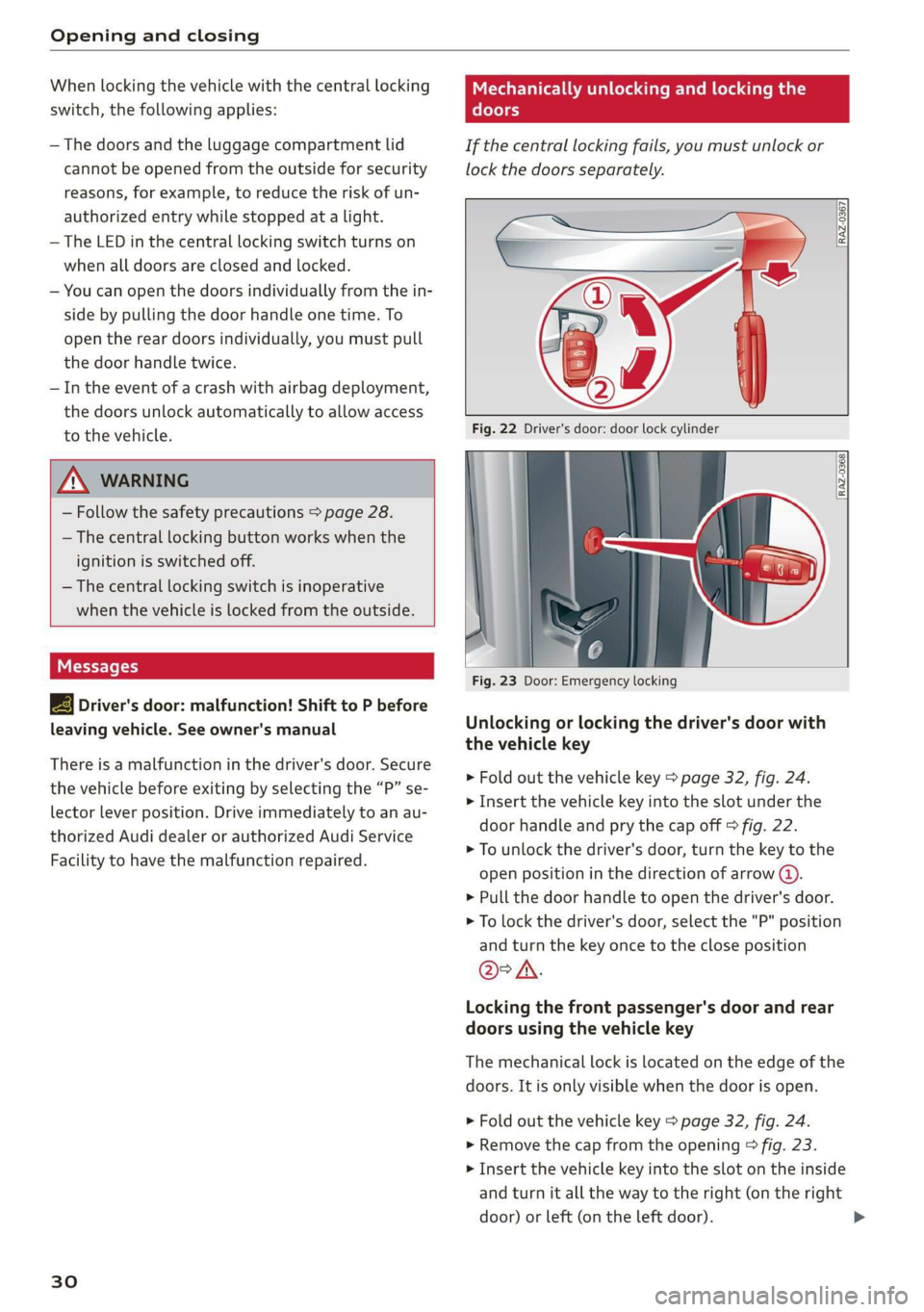
RAZ-0367,
Fig. 22 Driver's door: door lock cylinder
Fig. 23 Door: Emergency locking
Unlocking or locking the driver's door with
the vehicle key
> Fold out the vehicle key > page 32, fig. 24.
> Insert the vehicle key into the slot under the
door handle and pry the cap off > fig. 22.
> To unlock the driver's door, turn the key to the
open position in the direction of arrow @).
> Pull the door handle to open the driver's door.
> To lock the driver's door, select the "P" position
and turn the key once to the close position
@°A.
Locking the front passenger's door and rear
doors using the vehicle key
The mechanical lock is located on the edge of the
doors. It is only visible when the door is open.
> Fold out the vehicle key > page 32, fig. 24.
> Remove the cap from the opening > fig. 23.
> Insert the vehicle key into the slot on the inside
and turn it all the way to the right (on the right
door) or left (on the left door).
Page 33 of 280
83A012721BA
Opening and closing
> Install the cap in the opening and close the
door.
Once the front passenger’s door or rear doors
close, it will no longer be possible to open them
from the outside. The front doors can be opened
from the inside by pulling the door handle one
time. The rear doors can be unlocked from the in-
side by pulling the door handle one time and
then opened by pulling the door handle again. If
the child safety lock in one of the rear doors is ac-
tivated, you must first pull the door handle from
the inside. Then you can open the door from the
outside.
ZA WARNING
Follow the safety precautions > page 28.
Pee
Applies to: vehicles with anti-theft alarm system
If the anti-theft alarm system detects a vehicle
break-in, audio and visual warning signals are
triggered. The anti-theft alarm system is switch-
ed on or off when locking or unlocking your vehi-
cle. If the alarm is triggered, it will shut off auto-
matically after a certain amount of time.
Switching the alarm off manually
> To switch the alarm off, press the G button on
the vehicle key or switch the ignition on.
Depending on the vehicle equipment, the anti-
theft alarm system may have the following fea-
tures:
Break-in security feature
The alarm will sound if there is a break-in at the
doors, hood, and/or luggage compartment lid.
Interior/towing protection monitor
The alarm will be triggered if there are move-
ments detected in the vehicle interior (for exam-
ple, by animals) or if there is a change in the vehi-
cle angle (for example, when the vehicle is being
towed).
You can prevent the alarm from being triggered
by deactivating the interior/towing protection
monitor.
Deactivating the interior/towing protection
monitor
There are the following options for deactivating
the interior/towing protection monitor:
> Press the ff button on the vehicle key a second
time within two seconds. Or
> Applies to: vehicles with convenience key:
Touch the sensor on a front door handle a sec-
ond time within two seconds. Or
> Turn the vehicle key in the door lock to the close
position a second time within two seconds.
If you lock the vehicle, then the interior/towing
protection monitor will stay off until the next
time the vehicle is unlocked.
ZA\ WARNING
No one, especially children, should stay in the
vehicle when it is locked from the outside, be-
cause the windows can no longer be opened
from the inside. Locked doors make it more
difficult for emergency workers to enter the
vehicle, which puts lives at risk.
@) Tips
The interior/towing protection monitoring on-
ly functions correctly when the windows and
the roof* are closed.
31
Page 34 of 280
Opening and closing
Keys
[RAZ-0369
RAZ-0728
Fig. 25 Vehicle key: PANIC button
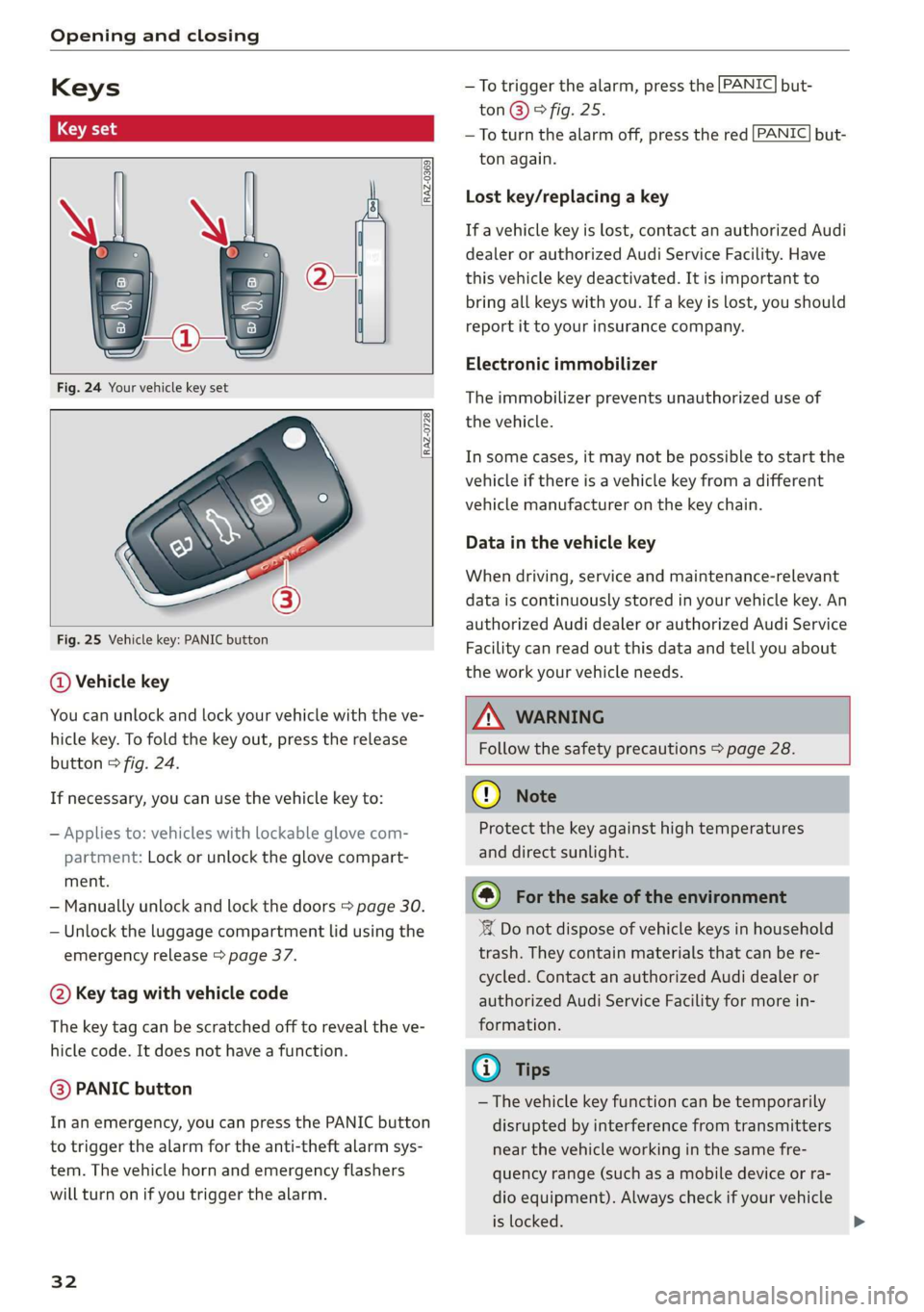
@ Vehicle key
You can unlock and lock your vehicle with the ve-
hicle key. To fold the key out, press the release
button © fig. 24.
If necessary, you can use the vehicle key to:
— Applies to: vehicles with lockable glove com-
partment: Lock or unlock the glove compart-
ment.
— Manually unlock and lock the doors > page 30.
— Unlock the luggage compartment lid using the
emergency release > page 37.
@ Key tag with vehicle code
The key tag can be scratched off to reveal the ve-
hicle code. It does not have a function.
@ PANIC button
In an emergency, you can press the PANIC button
to trigger the alarm for the anti-theft alarm sys-
tem. The vehicle horn and emergency flashers
will turn on if you trigger the alarm.
32
—To trigger the alarm, press the [PANIC] but-
ton@)® fig. 25.
—To turn the alarm off, press the red [PANIC] but-
ton again.
Lost key/replacing a key
If a vehicle key is lost, contact an authorized Audi
dealer or authorized Audi Service Facility. Have
this vehicle key deactivated. It is important to
bring all keys with you. If a key is lost, you should
report it to your insurance company.
Electronic immobilizer
The immobilizer prevents unauthorized use of
the vehicle.
In some cases, it may not be possible to start the
vehicle if there is a vehicle key from a different
vehicle manufacturer on the key chain.
Data in the vehicle key
When driving, service and maintenance-relevant
data is continuously stored in your vehicle key. An
authorized Audi dealer or authorized Audi Service
Facility can read out this data and tell you about
the work your vehicle needs.
Z\ WARNING
Follow the safety precautions > page 28.
@ Note
Protect the key against high temperatures
and direct sunlight.
@) For the sake of the environment
‘ Do not dispose of vehicle keys in household
trash. They contain materials that can be re-
cycled. Contact an authorized Audi dealer or
authorized Audi Service Facility for more in-
formation.
@ Tips
— The vehicle key function can be temporarily
disrupted by interference from transmitters
near the vehicle working in the same fre-
quency range (such as a mobile device or ra-
dio equipment). Always check if your vehicle
is locked.
Page 35 of 280
83A012721BA
Opening and closing
— You can display the number of vehicle keys
programmed to the vehicle: Select on the
home screen: VEHICLE > Settings & service
> Vehicle info.
— For an explanation on conformity with the
FCC regulations in the United States and the
Industry Canada regulations, see
> page 261.
Unlocking and locking the vehicle
RAZ-0025
:
A ,
Fig. 26 Applies to: vehicles with convenience (key)Door han-
dle: sensor* for locking the vehicle
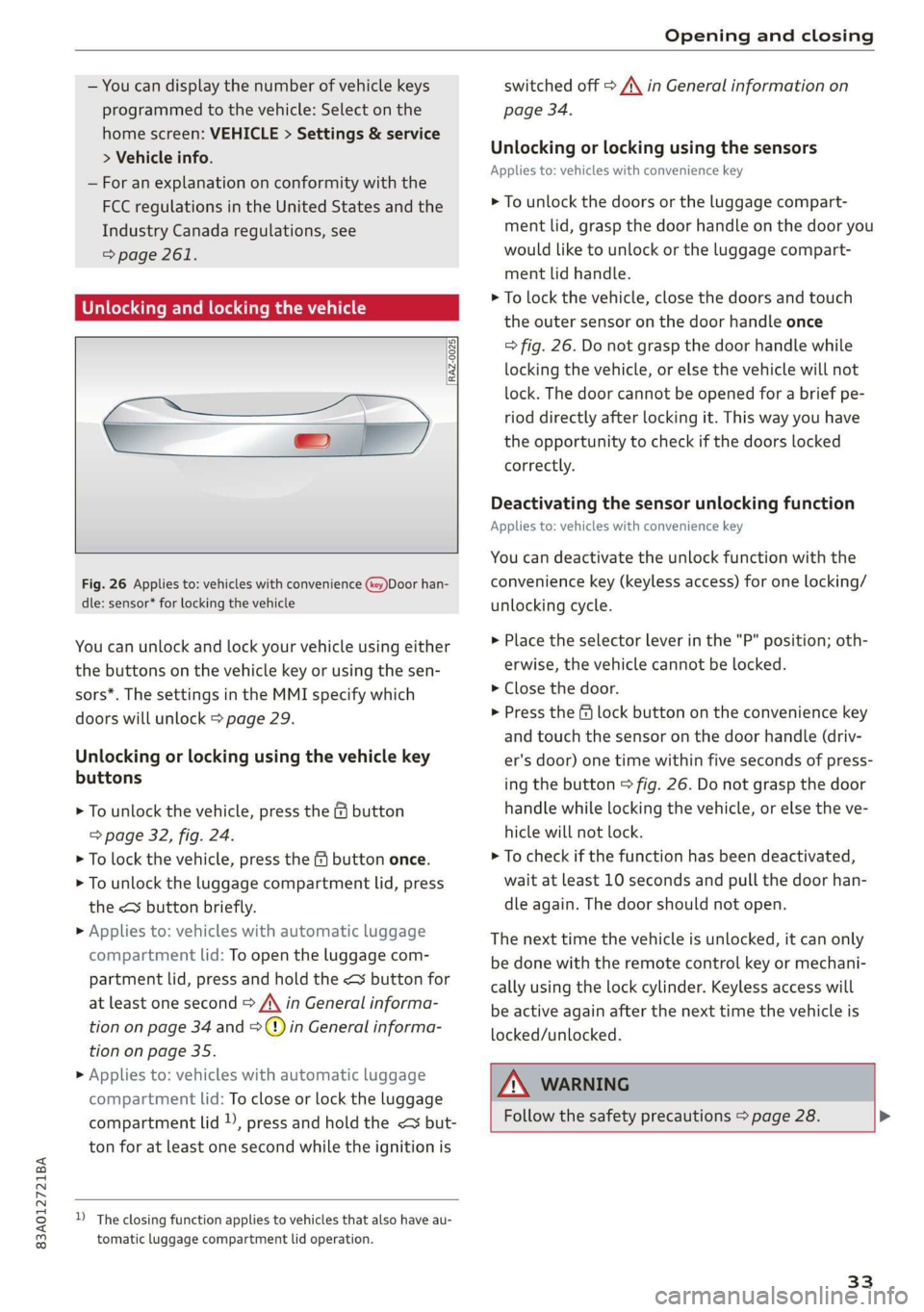
You can unlock and lock your vehicle using either
the buttons on the vehicle key or using the sen-
sors*. The settings in the MMI specify which
doors will unlock > page 29.
Unlocking or locking using the vehicle key
buttons
> To unlock the vehicle, press the G button
=> page 32, fig. 24.
> To lock the vehicle, press the & button once.
> To unlock the luggage compartment lid, press
the < button briefly.
> Applies to: vehicles with automatic luggage
compartment lid: To open the luggage com-
partment lid, press and hold the < button for
at least one second > /\ in General informa-
tion on page 34 and =>) in General informa-
tion on page 35.
> Applies to: vehicles with automatic luggage
compartment lid: To close or lock the luggage
compartment lid )), press and hold the << but-
ton for at least one second while the ignition is
D_ The closing function applies to vehicles that also have au-
tomatic luggage compartment lid operation.
switched off A\ in General information on
page 34.
Unlocking or locking using the sensors
Applies
to: vehicles with convenience key
> To unlock the doors or the luggage compart-
ment lid, grasp the door handle on the door you
would like to unlock or the luggage compart-
ment lid handle.
> To lock the vehicle, close the doors and touch
the outer sensor on the door handle once
=> fig. 26. Do not grasp the door handle while
locking the vehicle, or else the vehicle will not
lock. The door cannot be opened for a brief pe-
riod directly after locking it. This way you have
the opportunity to check if the doors locked
correctly.
Deactivating the sensor unlocking function
Applies to: vehicles with convenience key
You can deactivate the unlock function with the
convenience key (keyless access) for one locking/
unlocking cycle.
> Place the selector lever in the "P" position; oth-
erwise, the vehicle cannot be locked.
> Close the door.
> Press the f lock button on the convenience key
and touch the sensor on the door handle (driv-
er's door) one time within five seconds of press-
ing the button > fig. 26. Do not grasp the door
handle while locking the vehicle, or else the ve-
hicle will not lock.
> To check if the function has been deactivated,
wait at least 10 seconds and pull the door han-
dle again. The door should not open.
The next time the vehicle is unlocked, it can only
be done with the remote control key or mechani-
cally using the lock cylinder. Keyless access will
be active again after the next time the vehicle is
locked/unlocked.
ZA WARNING
Follow the safety precautions > page 28. >
33
Page 36 of 280
Opening and closing
@) Tips
— Only use the vehicle key when you can see
the
vehicle.
— The vehicle can only be locked when the "P”
selector lever position is engaged.
— Do not use the vehicle key to lock and un-
lock when you are inside the vehicle. Other-
wise, you could trigger the anti-theft
alarm*. If this happens, press the @ unlock
button.
@ Tips
Applies to: vehicles with convenience key
— When unlocking or locking the vehicle, the
convenience key cannot be more than ap-
proximately 4 feet (1.5 m) away from the
door handle or luggage compartment.
— Unlocking with the convenience key (keyless
access) can be deactivated > page 33.
— To prevent the vehicle battery from dis-
charging, the energy management gradual-
ly switches off convenience functions that
are not needed. You then may no longer be
able to unlock your vehicle with the sensors.
LED and batteries in the remote control key
B8X-0506
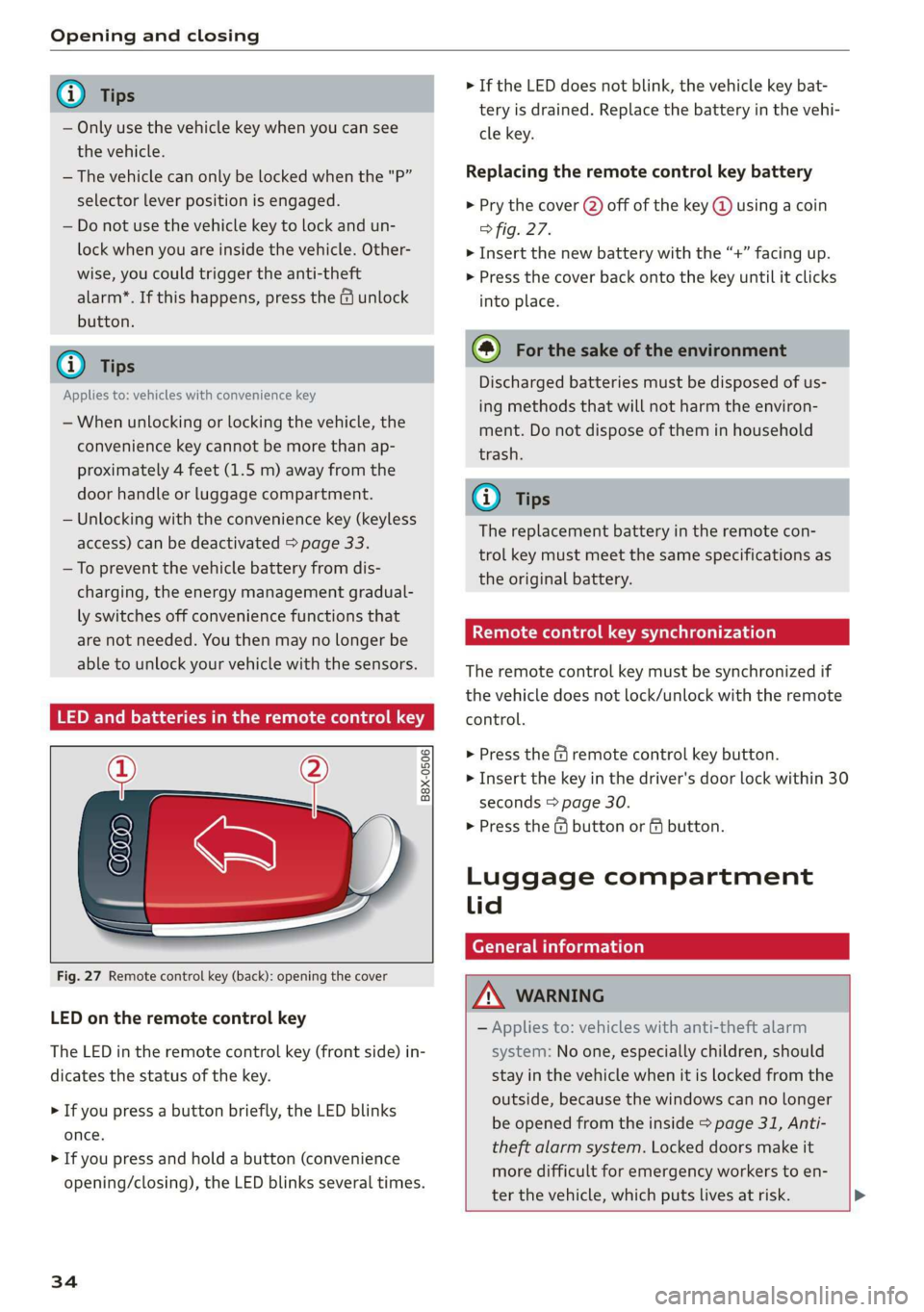
Fig. 27 Remote control key (back): opening the cover
LED on the remote control key
The LED in the remote control key (front side) in-
dicates the status of the key.
> If you press a button briefly, the LED blinks
once.
> If you press and hold a button (convenience
opening/closing), the LED blinks several times.
34
> If the LED does not blink, the vehicle key bat-
tery is drained. Replace the battery in the vehi-
cle key.
Replacing the remote control key battery
> Pry the cover (2) off of the key @ using a coin
fig. 27.
> Insert the new battery with the “+” facing up.
> Press the cover back onto the key until it clicks
into place.
@) For the sake of the environment
Discharged batteries must be disposed of us-
ing
methods that will not harm the environ-
ment. Do not dispose of them in household
trash.
G) Tips
The replacement battery in the remote con-
trol key must meet the same specifications as
the original battery.
etree wate ee Cele)
The remote control key must be synchronized if
the vehicle does not lock/unlock with the remote
control.
> Press the f remote control key button.
> Insert the key in the driver's door lock within 30
seconds > page 30.
> Press the ( button or fj button.
Luggage compartment
lid
General information
ZA WARNING
— Applies to: vehicles with anti-theft alarm
system: No one, especially children, should
stay in the vehicle when it is locked from the
outside, because the windows can no longer
be opened from the inside > page 31, Anti-
theft
alarm system. Locked doors make it
more difficult for emergency workers to en-
ter the vehicle, which puts lives at risk. >
Page 40 of 280
Opening and closing
Child safety lock
The child safety lock prevents the rear doors
from being opened from the inside and the rear
power windows from be operated.
RAZ-0372
B8W-0085
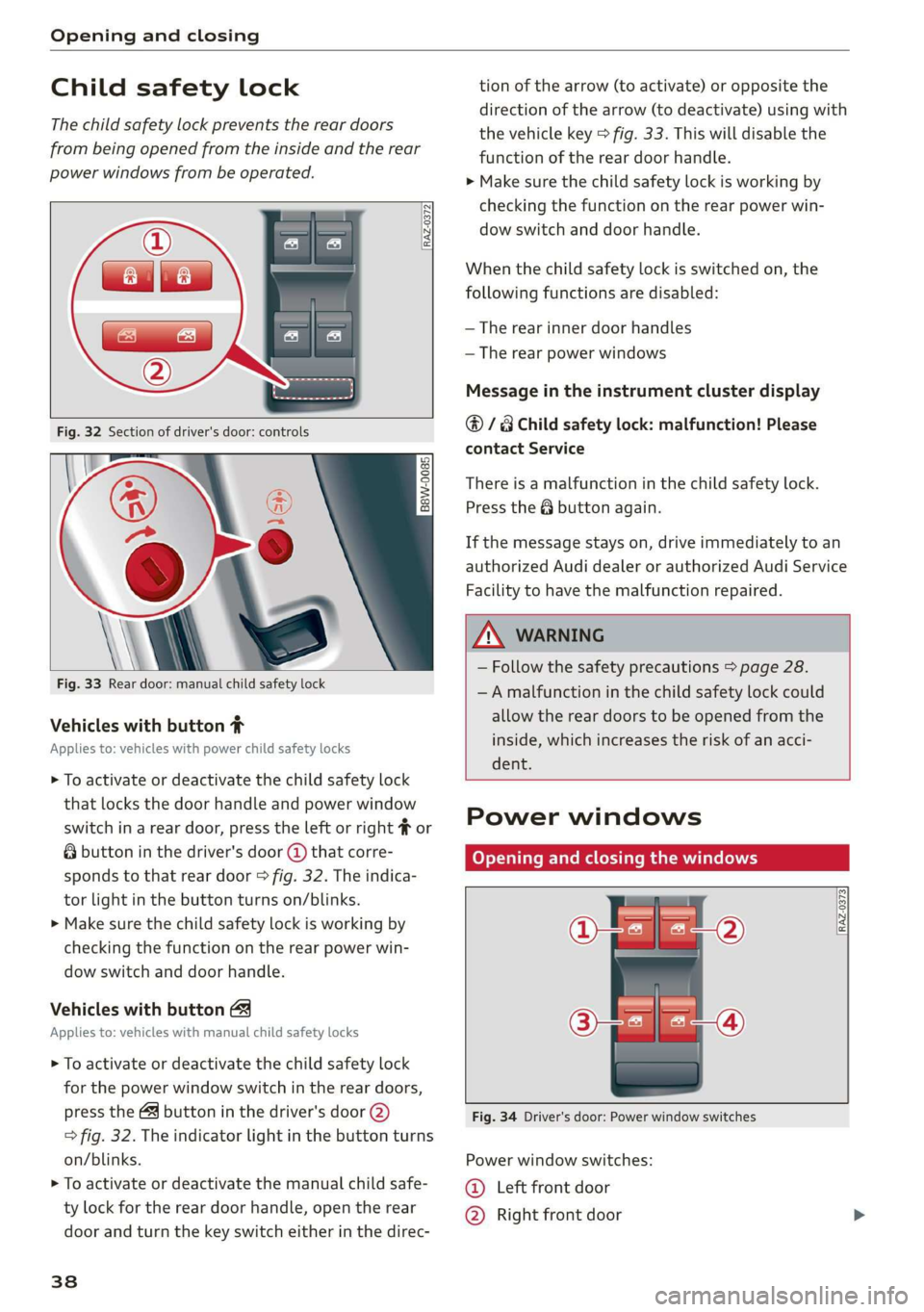
Fig. 33 Rear door: manual child safety lock
Vehicles with button #
Applies to: vehicles with power child safety locks
> To activate or deactivate the child safety lock
that locks the door handle and power window
switch in a rear door, press the left or right # or
& button in the driver's door @ that corre-
sponds to that rear door > fig. 32. The indica-
tor light in the button turns on/blinks.
> Make sure the child safety lock is working by
checking the function on the rear power win-
dow switch and door handle.
Vehicles with button
Applies to: vehicles with manual child safety locks
> To activate or deactivate the child safety lock
for the power window switch in the rear doors,
press the 4 button in the driver's door @)
> fig. 32. The indicator light in the button turns
on/blinks.
> To activate or deactivate the manual child safe-
ty lock for the rear door handle, open the rear
door and turn the key switch either in the direc-
38
tion of the arrow (to activate) or opposite the
direction of the arrow (to deactivate) using with
the vehicle key > fig. 33. This will disable the
function of the rear door handle.
> Make sure the child safety lock is working by
checking the function on the rear power win-
dow switch and door handle.
When the child safety lock is switched on, the
following functions are disabled:
— The rear inner door handles
— The rear power windows
Message in the instrument cluster display
@/8 Child safety lock: malfunction! Please
contact Service
There is a malfunction in the child safety lock.
Press the @ button again.
If the message stays on, drive immediately to an
authorized Audi dealer or authorized Audi Service
Facility to have the malfunction repaired.
ZA WARNING
— Follow the safety precautions > page 28.
—A malfunction in the child safety lock could
allow the rear doors to be opened from the
inside, which increases the risk of an acci-
dent.
Power windows
Opening and closing the windows
[RAZ-0373
Fig. 34 Driver's door: Power window switches
Power window switches:
©@ Left front door
@ Right front door
Page 41 of 280
83A012721BA
Opening and closing
@® Left rear door
@® Right rear door
Opening and closing the windows
The driver can control all power windows. All
power window switches are equipped with a two-
stage function:
> To open or close the window completely, press
the switch down or pull the switch up briefly to
the second level. The operation will stop if the
switch is pressed or pulled again.
> To select a position in between opened and
closed, press or pull the switch to the first level
until the desired window position is reached.
Correcting a malfunction in the one-touch
up/down function
You can reactivate the one-touch up/down func-
tion if it malfunctions.
> Pull the power window switch up until the win-
dow is completely raised.
> Release the switch and pull it up again for at
least one second.
Z\ WARNING
— Follow the safety precautions > page 28.
— Never close the windows carelessly or in an
uncontrolled manner, because this increases
the risk of injury.
@) Tips
You can still open and close the windows for
several minutes after turning the ignition off.
The power window switch is not disabled until
the driver's door or front passenger's door is
opened.
Convenience opening and closing
Applies to: vehicles with convenience key
Convenience opening and closing the
windows and roof*
You can set in the MMI if all windows or the roof*
should open or close all at once > page 29, Set-
ting the central locking system.
> Press and hold the &@ or fj button on the vehicle
key until all windows and the roof* have
reached the desired position > /A\.
> Applies to: vehicles with convenience key:
Touch the sensor* on the door handle until all
of the windows and the roof* are closed. Do not
place your hand in the door handle when doing
this.
When all of the windows and the roof* are
closed, the turn signals will flash once.
ZN WARNING
— Never close the windows or the roof* care-
lessly or in an uncontrolled manner, because
this increases the risk of injury.
— For security reasons, the windows and the
roof* can only be opened and closed with
the vehicle key at a maximum distance of
approximately 6.5 feet (2 m) away from the
vehicle. Always pay attention when using
the f button to close the windows and the
roof* so that no one is pinched. The closing
process will stop immediately when the f
button is released.
Panorama glass roof
CeyeY Tee latnre maa Malel mie Mele arTe(]
Applies to: vehicles with panoramic glass roof and roof sun-
shade
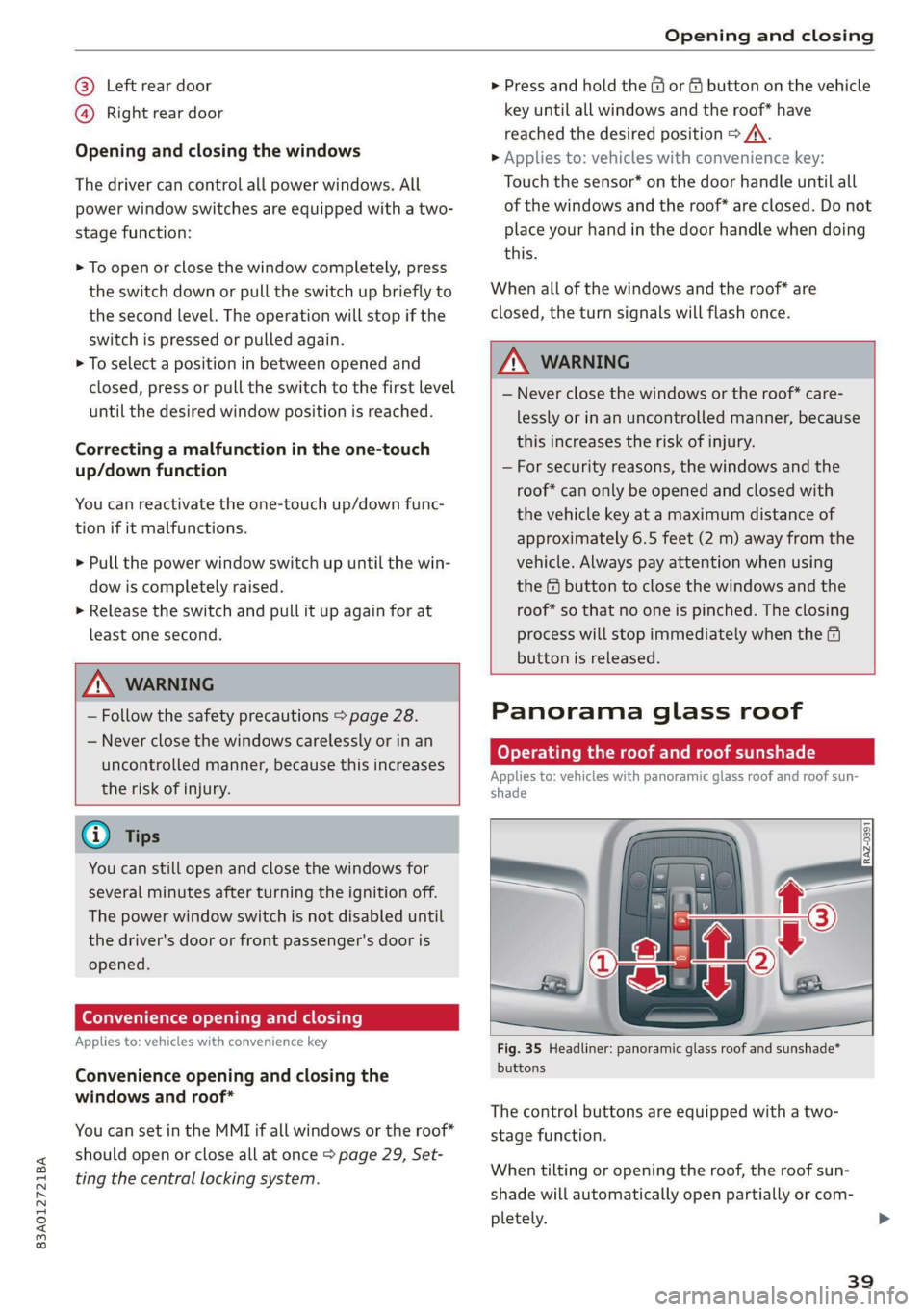
Fig. 35 Headliner: panoramic glass roof and sunshade*
buttons
The control buttons are equipped with a two-
stage function.
When tilting or opening the roof, the roof sun-
shade will automatically open partially or com-
pletely.
39
Page 42 of 280
Opening and closing
Operating the roof sunshade
Requirement: the roof must be closed.
> Opening and closing the sunshade: push the
switch in the headliner @) briefly toward the
rear or forward to the second level.
> Partially opening the sunshade: press the -&&
switch to the first level until the sunshade
reaches the desired position.
Operating the roof
> Tilting the roof: press the 4S switch in the
headliner briefly upward to the second level @).
> Closing the tilted roof: pull the A> switch
downward briefly to the second level.
> Opening the roof: slide the 2> switch back
briefly twice in a row to the second level @).
> Closing the roof: push the &> switch forward
briefly to the second level.
> Opening or closing partially: slide the A>
switch to the first level and hold it there until
the roof reaches the desired position.
Quick opening
You can also open the roof and roof sunshade in
one movement.
> Push the 4S switch back briefly to the second
level @).
Roof emergency closing
If an object is detected when closing, the roof
will open again automatically. In this case, you
can then close it with the power emergency clos-
ing function.
> Within five seconds after the sunroof opens au-
tomatically, pull the applicable button until the
roof is closed.
ZA WARNING
To reduce the risk of injury, always pay atten-
tion when closing the roof. Always switch the
ignition off and take the key with you when
leaving the vehicle.
D_ The possible number of hand-held transmitters depends
on the equipment.
40
Q®) Note
Always close the roof when you leave the vehi-
cle and when there is precipitation to reduce
the risk of damage to the interior equipment,
particularly the electronic equipment.
Gi) Tips
— After switching off the ignition, the roof and
sunshades can still be operated for several
minutes as long as neither of the front
doors are opened.
— It is not possible to open the roof when
temperatures are too low.
Garage door opener
Applies to: vehicles with garage door opener
i) + 3
2 4
go a
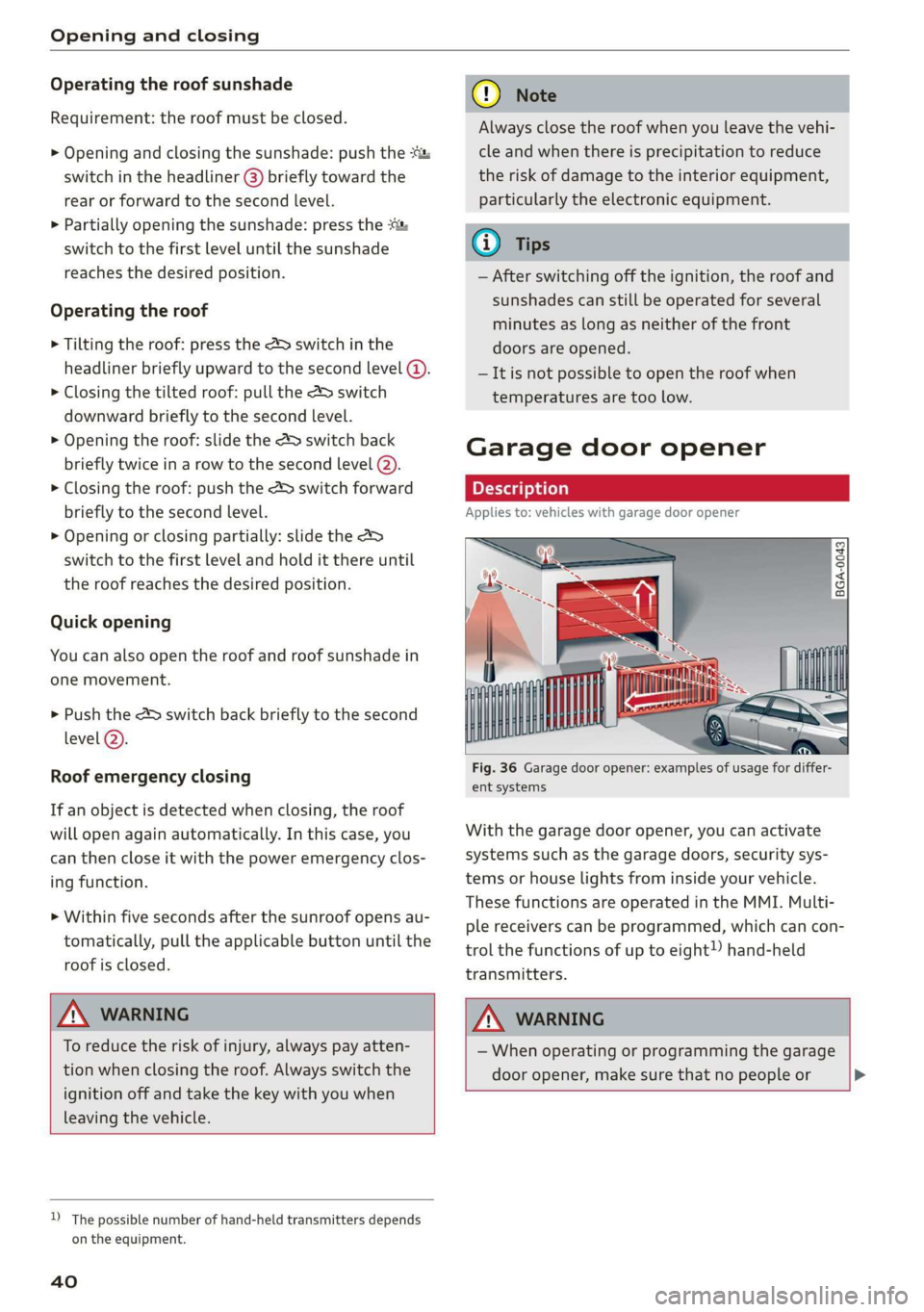
Fig. 36 Garage door opener: examples of usage for differ-
ent systems
With the garage door opener, you can activate
systems such as the garage doors, security sys-
tems or house lights from inside your vehicle.
These functions are operated in the MMI. Multi-
ple receivers can be programmed, which can con-
trol the functions of up to eight!) hand-held
transmitters.
ZA\ WARNING
— When operating or programming the garage
door opener, make sure that no people or >