warning lights AUDI Q3 2019 Owner's Manual
[x] Cancel search | Manufacturer: AUDI, Model Year: 2019, Model line: Q3, Model: AUDI Q3 2019Pages: 280, PDF Size: 72.73 MB
Page 112 of 280
Driver assistance
Driver assistance
Cruise control system
Applies to: vehicles with cruise control system
The cruise control system assists the driver in
maintaining a constant speed above approxi-
mately 15 mph (20 km/h). The system maintains
the desired speed by braking and accelerating.
ZA WARNING
— Always pay attention to the traffic around
you when the cruise control system is in op-
eration. As the driver, you are always respon-
sible for controlling your vehicle speed and
the distance between your vehicle and other
vehicles.
— For safety reasons, cruise control should not
be used in the city, in stop-and-go traffic, on
winding roads and when road conditions are
poor (such as ice, fog, gravel, heavy rain and
hydroplaning), because this increases the
risk of an accident.
— Switch the cruise control off temporarily
when driving in turning lanes, highway exits
or in construction zones.
—To reduce the risk of an accident, you should
only resume the stored speed if it is suitable
for the current traffic conditions.
@) Note
Before driving downhill a long distance ona
steep hill, decrease your speed and select a
lower gear. This makes use of the engine brak-
ing effect and relieves the brakes.
@) Tips
The brake lights turn on when the brakes are
applied automatically.
110
Switching the system on
Applies to: vehicles with cruise control system
BFV-0220
Fig. 91 Operating lever: Switching on the cruise control
system
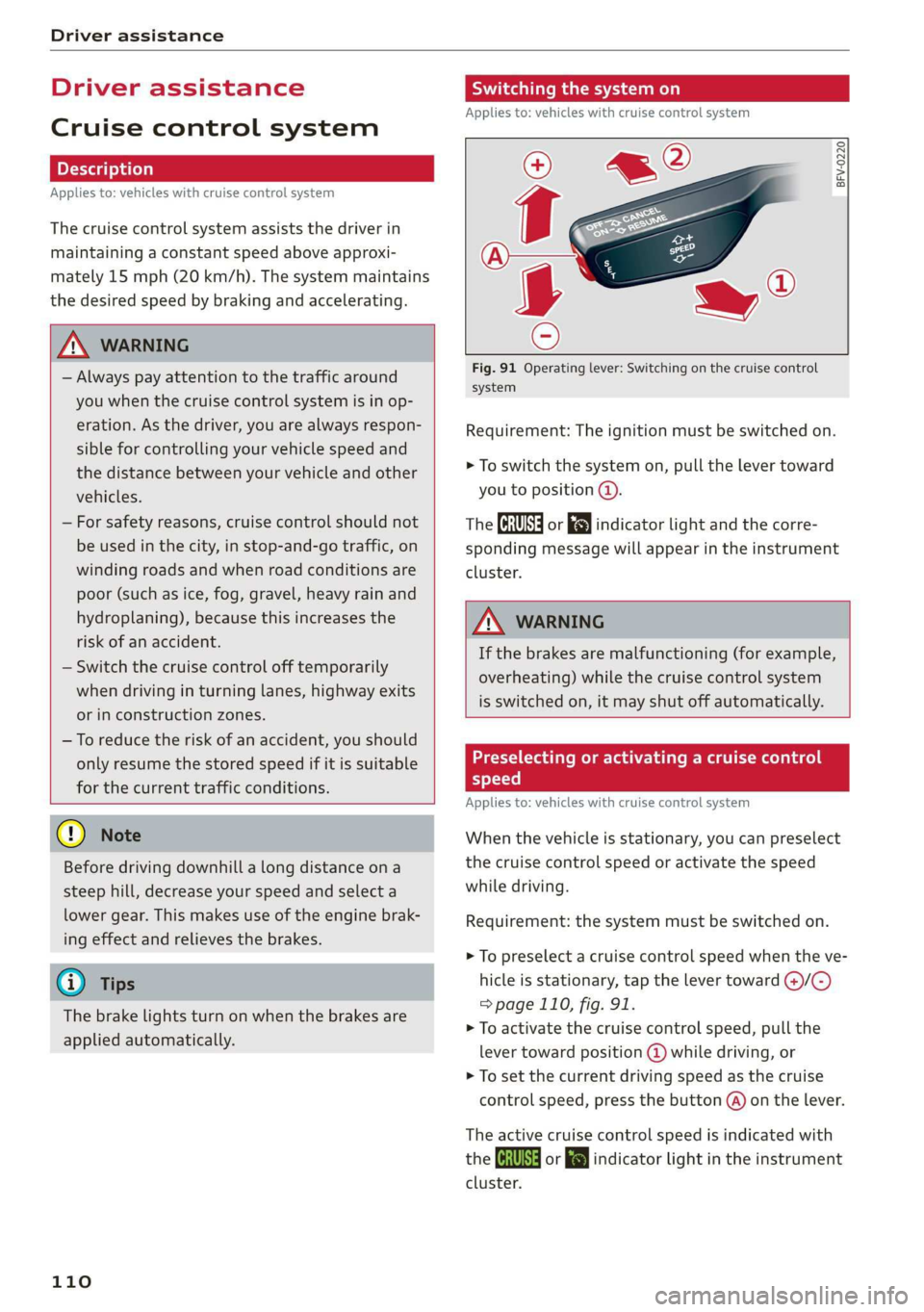
Requirement: The ignition must be switched on.
> To switch the system on, pull the lever toward
you to position @).
The CRUISE] or [J indicator light and the corre-
sponding message will appear in the instrument
cluster.
ZA WARNING
If the brakes are malfunctioning (for example,
overheating) while the cruise control system
is switched on, it may shut off automatically.
Preselecting or activating a cruise control
speed
Applies to: vehicles with cruise control system
When the vehicle is stationary, you can preselect
the cruise control speed or activate the speed
while driving.
Requirement: the system must be switched on.
> To preselect a cruise control speed when the ve-
hicle is stationary, tap the lever toward @)/G)
= page 110, fig. 91.
> To activate the cruise control speed, pull the
lever
toward position @ while driving, or
> To set the current driving speed as the cruise
control speed, press the button @) on the lever.
The active cruise control speed is indicated with
the Gs or indicator light in the instrument
cluster.
Page 115 of 280
83A012721BA
Driver assistance
Display overview
Applies to: vehicles with adaptive cruise assist
RAZ-0205)
5 3
he | S| foc
Fig. 95 Instrument cluster: Driver assistance display
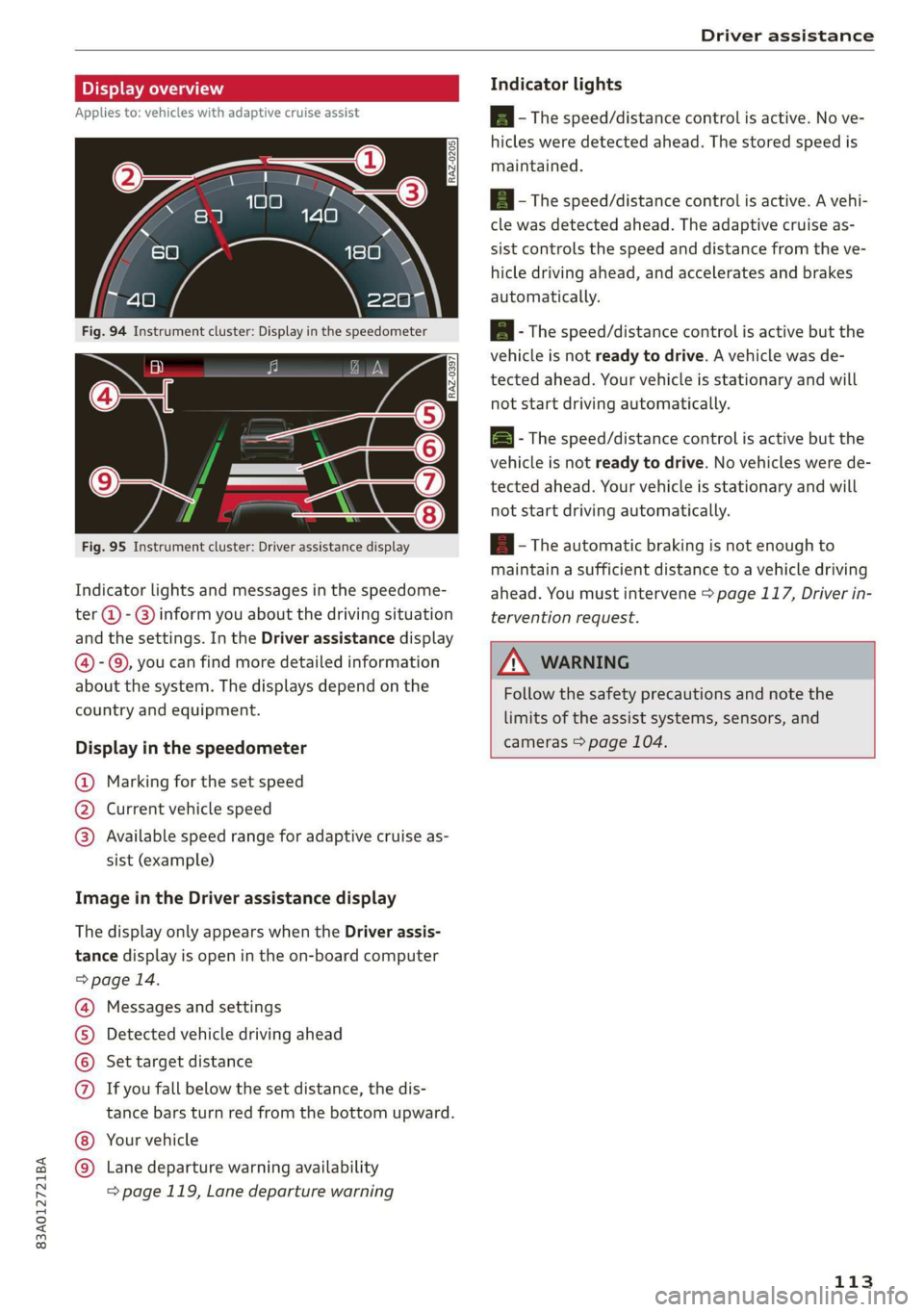
Indicator lights and messages in the speedome-
ter @ -@) inform you about the driving situation
and the settings. In the Driver assistance display
@- ©, you can find more detailed information
about the system. The displays depend on the
country and equipment.
Display in the speedometer
@ Marking for the set speed
@ Current vehicle speed
@® Available speed range for adaptive cruise as-
sist (example)
Image in the Driver assistance display
The display only appears when the Driver assis-
tance display is open in the on-board computer
> page 14.
Messages and settings
Detected vehicle driving ahead
Set target distance
If you fall below the set distance, the dis-
tance bars turn red from the bottom upward.
Your vehicle
©®
CO®
Lane departure warning availability
=> page 119, Lane departure warning
Indicator lights
Ba - The speed/distance control is active. No ve-
hicles were detected ahead. The stored speed is
maintained.
Aa ~The speed/distance control is active. A vehi-
cle was detected ahead. The adaptive cruise as-
sist controls the speed and distance from the ve-
hicle driving ahead, and accelerates and brakes
automatically.
EA - The speed/distance control is active but the
vehicle is not ready to drive. A vehicle was de-
tected ahead. Your vehicle is stationary and will
not start driving automatically.
BS - The speed/distance control is active but the
vehicle is not ready to drive. No vehicles were de-
tected ahead. Your vehicle is stationary and will
not start driving automatically.
A - The automatic braking is not enough to
maintain a sufficient distance to a vehicle driving
ahead. You must intervene > page 117, Driver in-
tervention request.
Z\ WARNING
Follow the safety precautions and note the
limits of the assist systems, sensors, and
cameras > page 104.
113
Page 117 of 280
83A012721BA
Driver assistance
responsible for controlling the vehicle. The
driver is especially responsible for braking,
starting to drive, controlling the speed, and
maintaining the distance to other vehicles.
— Turn on the adaptive cruise assist only if the
surrounding conditions permit it. Always
adapt your driving style to the current visu-
al, weather, road, and traffic conditions.
— Switch the adaptive cruise assist off tempo-
rarily when driving in turning lanes or high-
way exits. This prevents the vehicle from ac-
celerating to the stored speed when in these
situations.
ZA WARNING
If you press the SETI2) button when driving
at speeds below 20 mph (30 km/h), then 20
mph (30 km/h) will be set because that is the
minimum speed that can be set. If no vehicle
is detected ahead of you, the vehicle will ac-
celerate up to that speed.
@ Tips
— Always keep your hands on the steering
wheel. The driver is always responsible for
adhering to the regulations applicable in
the country where the vehicle is being oper-
ated.
— If you switch the ignition or the adaptive
cruise assist off, the stored speed is erased
for safety reasons.
— When the adaptive cruise assist is switched
on, the ESC and the ASR are switched on au-
tomatically.
— The system cannot be switched off if the
road exceeds the maximum possible grade
for safe operation.
— If you signal to pass and the adaptive cruise
assist suggests a passing maneuver, the
adaptive cruise assist will accelerate just be-
fore changing lanes to shorten the distance
to the vehicle driving ahead.
Setting the distance
Applies to: vehicles with adaptive cruise assist
B4M-0234
Fig. 98 Operating lever: Setting the distance
If you adjust the speed, you must also change the
time gap to the vehicle driving ahead. The higher
the speed, the greater the distance that is need-
ed.
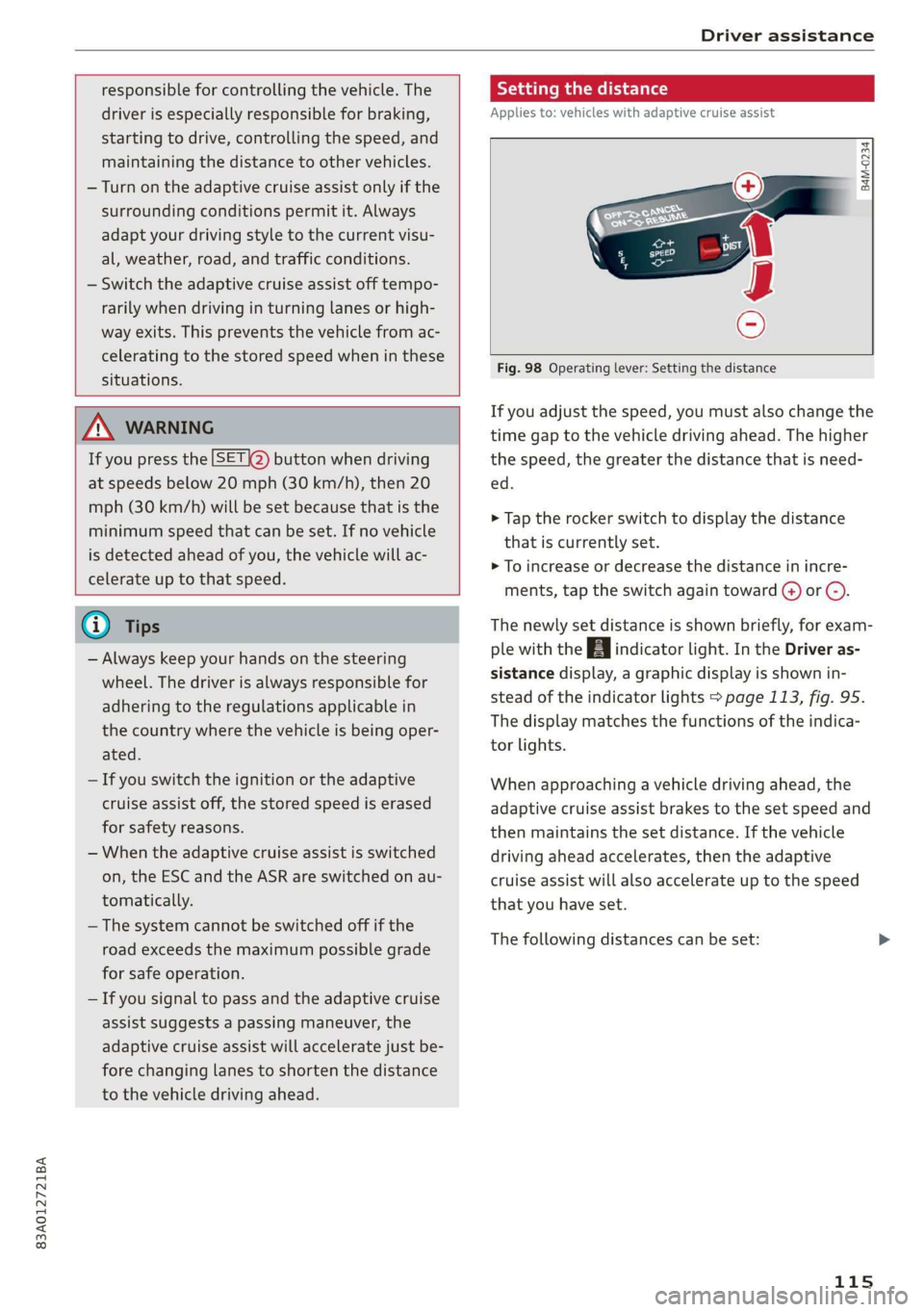
> Tap the rocker switch to display the distance
that is currently set.
>» To increase or decrease the distance in incre-
ments, tap the switch again toward G) or C).
The newly set distance is shown briefly, for exam-
ple with the [eg indicator light. In the Driver as-
sistance display, a graphic display is shown in-
stead of the indicator lights > page 113, fig. 95.
The display matches the functions of the indica-
tor lights.
When approaching a vehicle driving ahead, the
adaptive cruise assist brakes to the set speed and
then maintains the set distance. If the vehicle
driving ahead accelerates, then the adaptive
cruise assist will also accelerate up to the speed
that you have set.
The following distances can be set:
115
Page 122 of 280
Driver assistance
Applies to: vehicles with lane departure warning
B4M-0064
Fig. 104 Turn signal lever: Switches the lane departure
warning on or off
RAZ-0107
Fig. 105 Instrument cluster: Driver assistance display
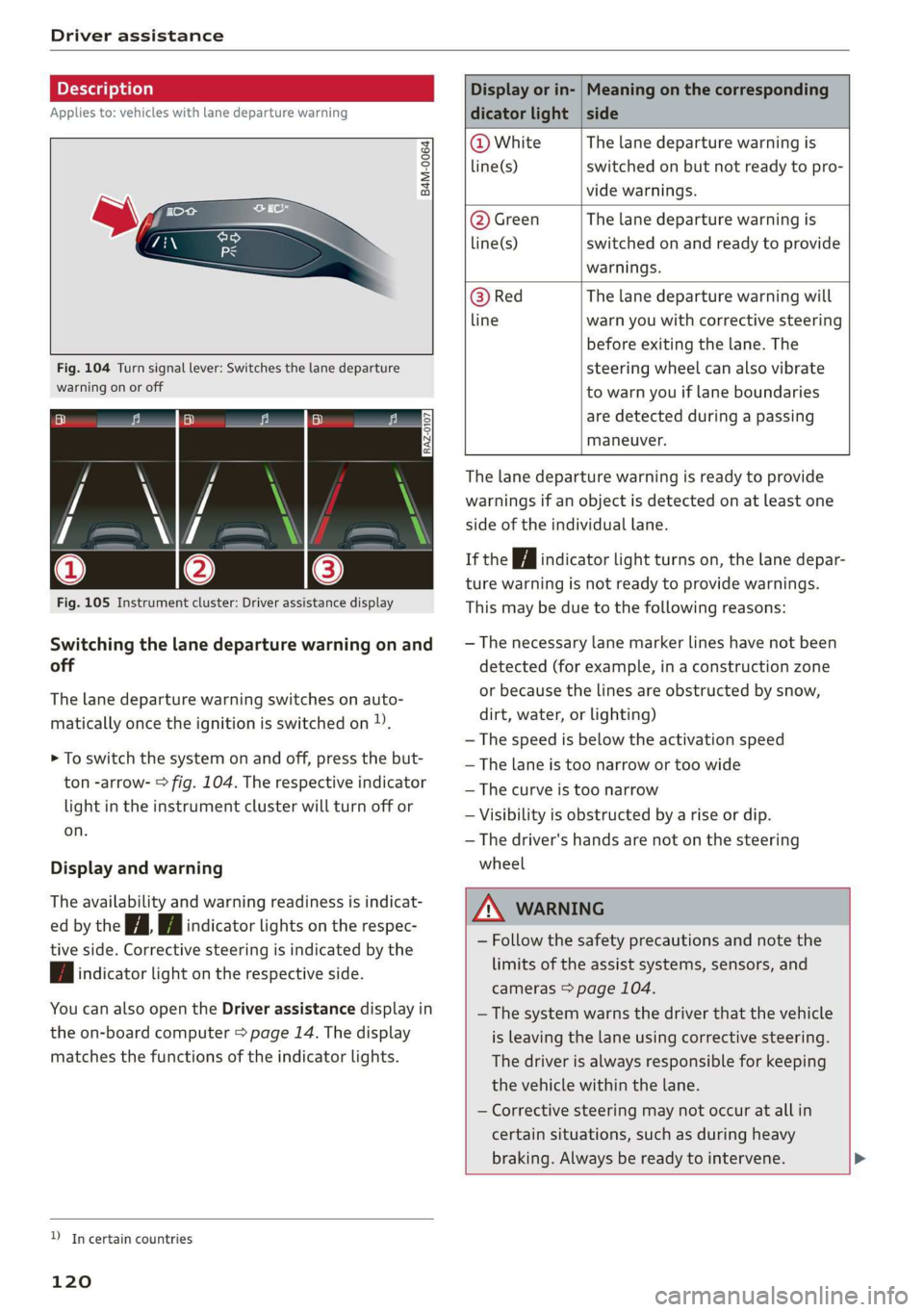
Switching the lane departure warning on and
off
The lane departure warning switches on auto-
matically once the ignition is switched on )).
> To switch the system on and off, press the but-
ton -arrow- > fig. 104. The respective indicator
light in the instrument cluster will turn off or
on.
Display and warning
The availability and warning readiness is indicat-
ed by the iA Hi indicator lights on the respec-
tive side. Corrective steering is indicated by the
fA indicator light on the respective side.
You can also open the Driver assistance display in
the on-board computer > page 14. The display
matches the functions of the indicator lights.
YD In certain countries
120
Display or in- | Meaning on the corresponding
dicator light | side
@ White The lane departure warning is
line(s) switched on but not ready to pro-
vide warnings.
@ Green The lane departure warning is
line(s) switched on and ready to provide
warnings.
@ Red The lane departure warning will
line warn you with corrective steering
before exiting the lane. The
steering wheel can also vibrate
to warn you if lane boundaries
are detected during a passing
maneuver.
The lane departure warning is ready to provide
warnings if an object is detected on at least one
side of the individual lane.
If the Hi indicator light turns on, the lane depar-
ture warning is not ready to provide warnings.
This may be due to the following reasons:
— The necessary lane marker lines have not been
detected (for example, in a construction zone
or because the lines are obstructed by snow,
dirt, water, or lighting)
— The speed is below the activation speed
— The lane is too narrow or too wide
—The curve is too narrow
— Visibility is obstructed by a rise or dip.
— The driver's hands are not on the steering
wheel
ZA WARNING
— Follow the safety precautions and note the
limits of the assist systems, sensors, and
cameras > page 104.
— The system warns the driver that the vehicle
is leaving the lane using corrective steering.
The
driver is always responsible for keeping
the vehicle within the lane.
— Corrective steering may not occur at all in
certain situations, such as during heavy
braking. Always be ready to intervene. >
Page 236 of 280
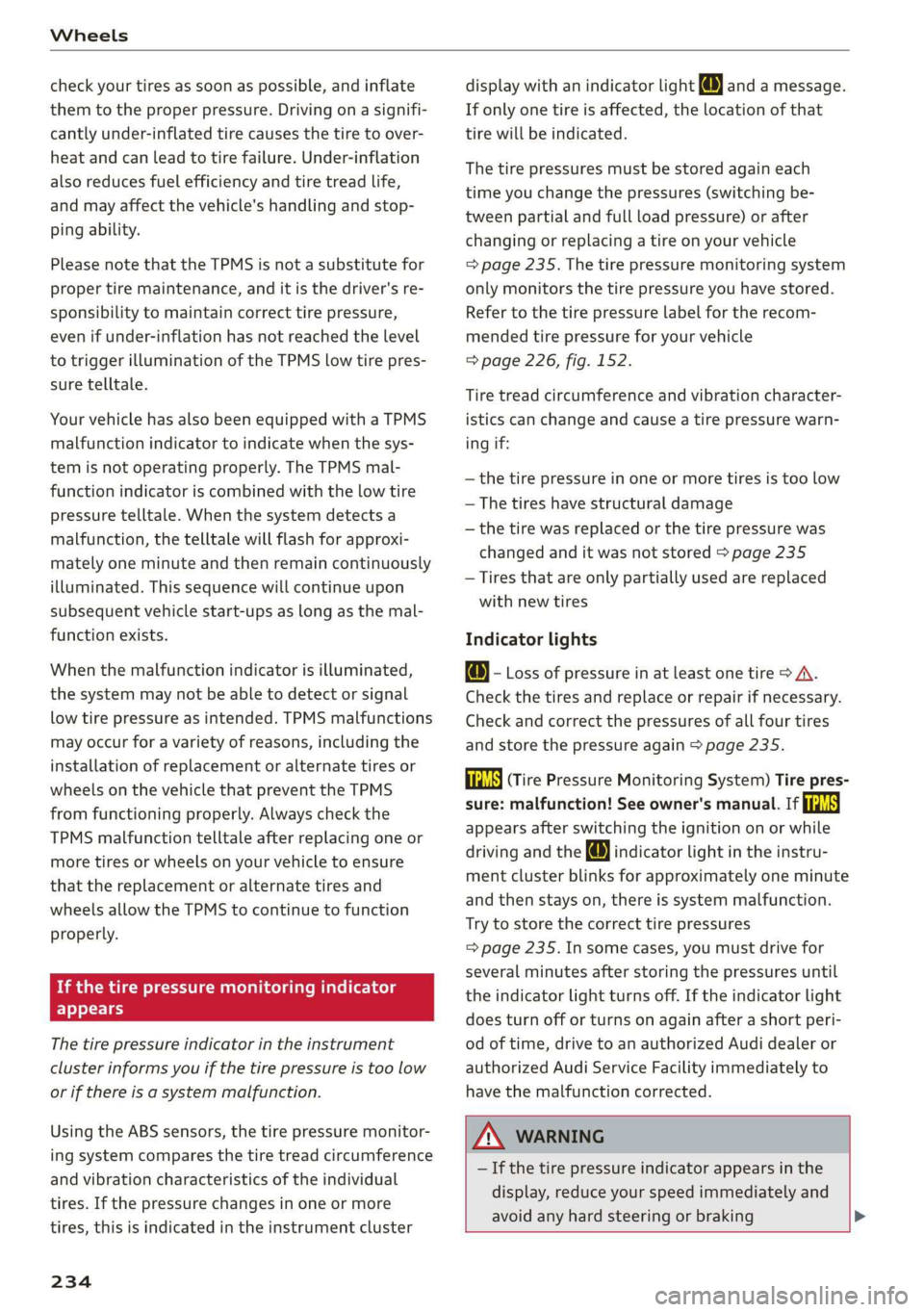
Wheels
check your tires as soon as possible, and inflate
them to the proper pressure. Driving ona signifi-
cantly under-inflated tire causes the tire to over-
heat and can lead to tire failure. Under-inflation
also reduces fuel efficiency and tire tread life,
and may affect the vehicle's handling and stop-
ping
ability.
Please note that the TPMS is not a substitute for
proper tire maintenance, and it is the driver's re-
sponsibility to maintain correct tire pressure,
even if under-inflation has not reached the level
to trigger illumination of the TPMS low tire pres-
sure telltale.
Your vehicle has also been equipped with a TPMS
malfunction indicator to indicate when the sys-
tem is not operating properly. The TPMS mal-
function indicator is combined with the low tire
pressure telltale. When the system detects a
malfunction, the telltale will flash for approxi-
mately one minute and then remain continuously
illuminated. This sequence will continue upon
subsequent vehicle start-ups as long as the mal-
function exists.
When the malfunction indicator is illuminated,
the system may not be able to detect or signal
low tire pressure as intended. TPMS malfunctions
may occur for a variety of reasons, including the
installation of replacement or alternate tires or
wheels on the vehicle that prevent the TPMS
from functioning properly. Always check the
TPMS malfunction telltale after replacing one or
more tires or wheels on your vehicle to ensure
that the replacement or alternate tires and
wheels allow the TPMS to continue to function
properly.
If the tire pressure monitoring indicator
appears
The tire pressure indicator in the instrument
cluster informs you if the tire pressure is too low
or if there is a system malfunction.
Using the ABS sensors, the tire pressure monitor-
ing system compares the tire tread circumference
and vibration characteristics of the individual
tires. If the pressure changes in one or more
tires, this is indicated in the instrument cluster
234
display with an indicator light @ and a message.
If only one tire is affected, the location of that
tire will be indicated.
The tire pressures must be stored again each
time you change the pressures (switching be-
tween partial and full load pressure) or after
changing or replacing a tire on your vehicle
=> page 235. The tire pressure monitoring system
only monitors the tire pressure you have stored.
Refer to the tire pressure label for the recom-
mended tire pressure for your vehicle
=> page 226, fig. 152.
Tire tread circumference and vibration character-
istics can change and cause a tire pressure warn-
ing if:
—the tire pressure in one or more tires is too low
— The tires have structural damage
— the tire was replaced or the tire pressure was
changed and it was not stored > page 235
— Tires that are only partially used are replaced
with new tires
Indicator lights
@ - Loss of pressure in at least one tire > A\.
Check the tires and replace or repair if necessary.
Check and correct the pressures of all four tires
and store the pressure again > page 235.
/TPMS| (Tire Pressure Monitoring System) Tire pres-
sure: malfunction! See owner's manual. If i
appears after switching the ignition on or while
driving and the @ indicator light in the instru-
ment cluster blinks for approximately one minute
and then stays on, there is system malfunction.
Try to store the correct tire pressures
= page 235. In some cases, you must drive for
several minutes after storing the pressures until
the indicator light turns off. If the indicator light
does turn off or turns on again after a short peri-
od of time, drive to an authorized Audi dealer or
authorized Audi Service Facility immediately to
have the malfunction corrected.
ZA\ WARNING
— If the tire pressure indicator appears in the
display, reduce your speed immediately and
avoid any hard steering or braking
Page 241 of 280
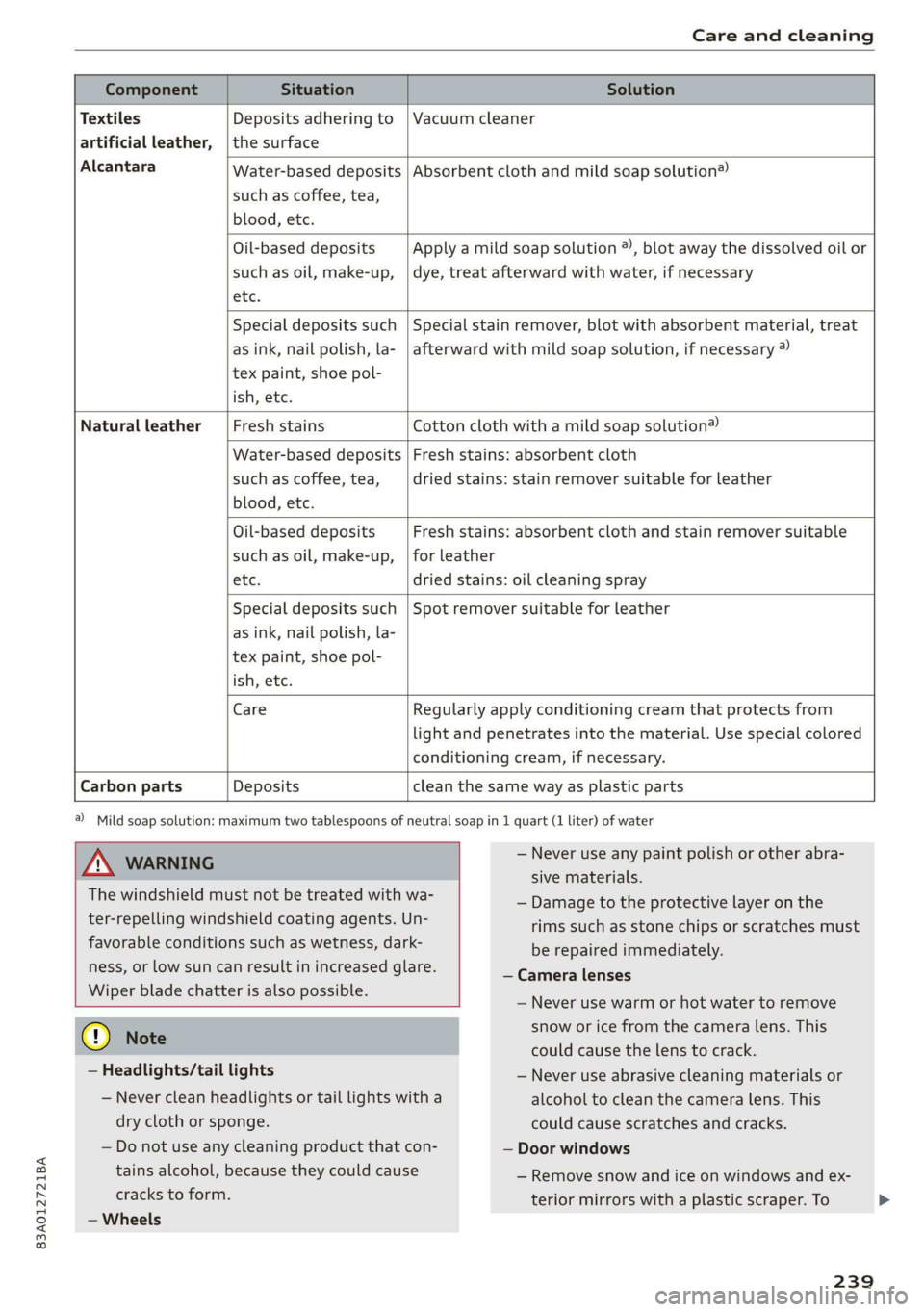
83A012721BA
Care and cleaning
Water-based deposits
such as coffee, tea,
blood, etc.
Component Situation Solution
Textiles
Deposits adhering to | Vacuum cleaner
artificial leather, | the surface
Alcantara Absorbent cloth and mild soap solution®
Oil-based deposits
such as oil, make-up,
etc.
Apply a mild soap solution ®), blot away the dissolved oil or
dye, treat afterward with water, if necessary
Special deposits such
as ink, nail polish, la-
tex paint, shoe pol-
ish, etc.
Special stain remover, blot with absorbent material, treat
afterward with mild soap solution, if necessary ®
Natural leather Fresh stains Cotton cloth with a mild soap solution®
Water-based deposits
such as coffee, tea,
blood, etc.
Fresh stains: absorbent cloth
dried stains: stain remover suitable for leather
Oil-based deposits
such as oil, make-up,
etc.
Fresh stains: absorbent cloth and stain remover suitable
for leather
dried stains: oil cleaning spray
Special deposits such
as ink, nail polish, la-
tex paint, shoe pol-
ish, etc.
Spot remover suitable for leather
Care Regularly apply conditioning cream that protects from
light and penetrates into the material. Use special colored
conditioning cream, if necessary.
Carbon parts Deposits clean the same way as plastic parts
a) Mild soap solution: maximum two tablespoons of neutral soap in 1 quart (1 liter) of water
Z\ WARNING
The windshield must not be treated with wa-
ter-repelling windshield coating agents. Un-
favorable conditions such as wetness, dark-
ness, or low sun can result in increased glare.
Wiper blade chatter is also possible.
— Never use any paint polish or other abra-
sive materials.
— Damage to the protective layer on the
rims such as stone chips or scratches must
be repaired immediately.
— Camera lenses
— Never use warm or hot water to remove
@) Note
— Headlights/tail lights
— Never clean headlights or tail lights with a
dry cloth or sponge.
— Do not use any cleaning product that con-
tains alcohol, because they could cause
cracks to form.
— Wheels
snow or ice from the camera lens. This
could cause the lens to crack.
— Never use abrasive cleaning materials or
alcohol to clean the camera lens. This
could cause scratches and cracks.
— Door windows
— Remove snow and ice on windows and ex-
terior mirrors with a plastic scraper. To
239
Page 249 of 280
83A012721BA
Emergency assistance
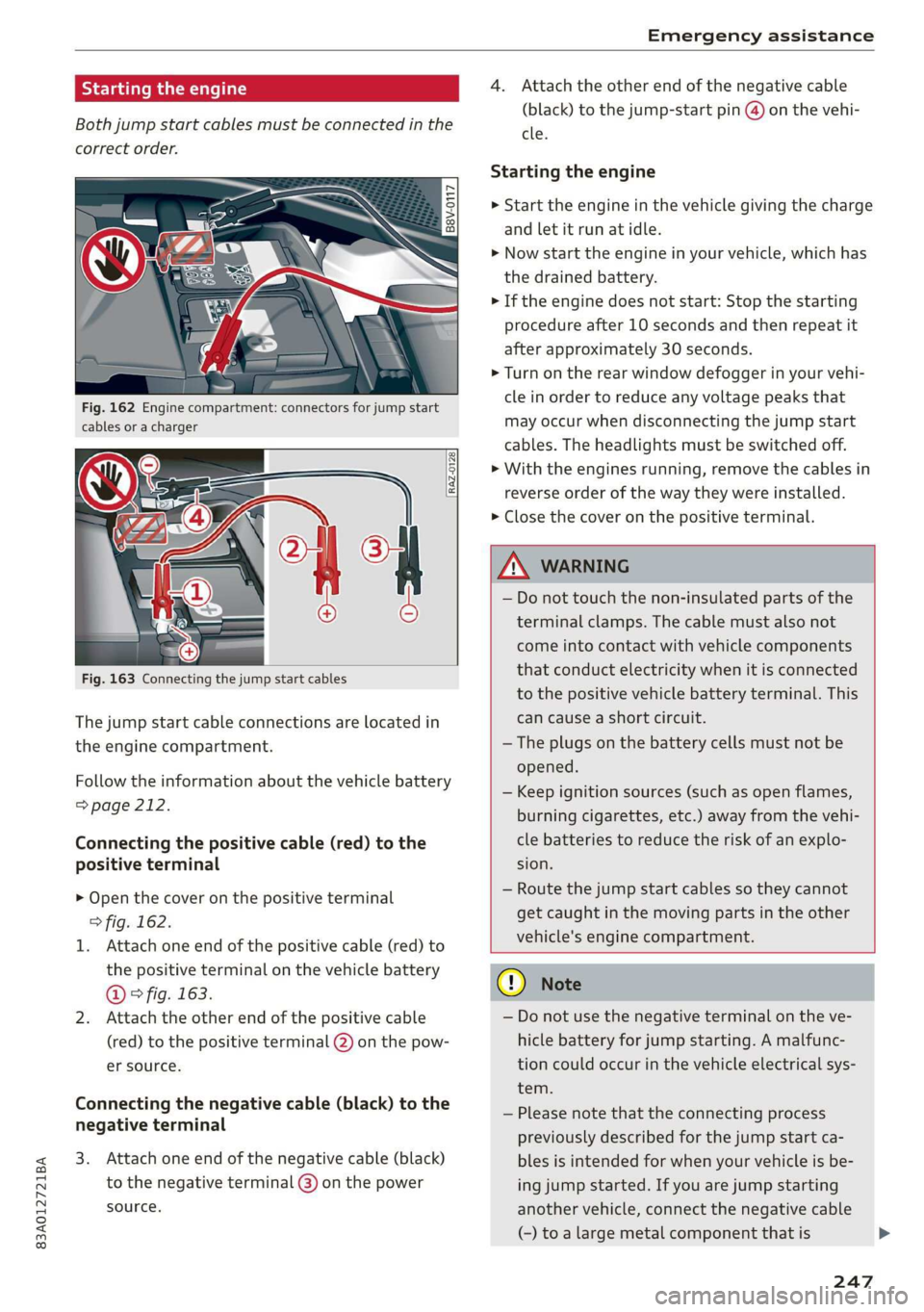
Starting the engine
Both jump start cables must be connected in the
correct order.
S
g = & oO
Fig. 162 Engine compartment: connectors for jump start
cables or a charger
RAZ-0128
Fig. 163 Connecting the jump start cables
The jump start cable connections are located in
the engine compartment.
Follow the information about the vehicle battery
=> page 212.
Connecting the positive cable (red) to the
positive terminal
> Open the cover on the positive terminal
> fig. 162.
1. Attach one end of the positive cable (red) to
the positive terminal on the vehicle battery
@ ° fig. 163.
2. Attach the other end of the positive cable
(red) to the positive terminal @ on the pow-
er source.
Connecting the negative cable (black) to the
negative terminal
3. Attach one end of the negative cable (black)
to the negative terminal @) on the power
source.
4. Attach the other end of the negative cable
(black) to the jump-start pin @ on the vehi-
cle.
Starting the engine
> Start the engine in the vehicle giving the charge
and let it run at idle.
> Now start the engine in your vehicle, which has
the
drained battery.
> If the engine does not start: Stop the starting
procedure after 10 seconds and then repeat it
after approximately 30 seconds.
> Turn on the rear window defogger in your vehi-
cle in order to reduce any voltage peaks that
may occur when disconnecting the jump start
cables. The headlights must be switched off.
> With the engines running, remove the cables in
reverse order of the way they were installed.
> Close the cover on the positive terminal.
ZA WARNING
— Do not touch the non-insulated parts of the
terminal clamps. The cable must also not
come into contact with vehicle components
that conduct electricity when it is connected
to the positive vehicle battery terminal. This
can cause a short circuit.
— The plugs on the battery cells must not be
opened.
— Keep ignition sources (such as open flames,
burning cigarettes, etc.) away from the vehi-
cle batteries to reduce the risk of an explo-
sion.
— Route the jump start cables so they cannot
get caught in the moving parts in the other
vehicle's engine compartment.
q@ Note
— Do not use the negative terminal on the ve-
hicle battery for jump starting. A malfunc-
tion could occur in the vehicle electrical sys-
tem.
— Please note that the connecting process
previously described for the jump start ca-
bles is intended for when your vehicle is be-
ing jump started. If you are jump starting
another vehicle, connect the negative cable
(-) to a large metal component that is
247
Page 267 of 280
83A012721BA
Index
Numbers and
Symbols
2-zone deluxe automatic climate control.... 78
A
ALC cooling MOde ss « « vesiev «sass w © wernin eon 78
Accelerator pedals sais se cai sv aac oe ews 84
also refer to Accelerator pedal........... 84
AGCOSSOFIES « crvcei. 5 cesses « ceeness a & arene ww wnat 260
Active lane assist
refer to Lane departure warning......... 119
Adaptive cruise assist................04. 111
Cleaning the sensors........... 0c been 237
Adaptive dampers ...........-.00ee esau 96
Adaptive speed assist 111
also refer to Adaptive cruise assist....... 111
Adjusting the air distribution............. 78
Adjusting the brightness................. 47
Adjusting the sound.................005 195
Adjusting the temperature..............- 78
Adjusting the vents... 0... .... eee eee ee 79
Adjusting the volume................-005 26
Adjusting the volume (announcements).... 195
Adjusting the welcome sound............ 195
Airbag System « « sae« s sees ¢ v wees ee reese ee 61
Alarm system
refer to Anti-theft alarm system.......... 31
Alignment pin (changing the wheel)....... 242
All-weather lights...............-..20--- 43
Allseason tires. ...........000200200005 231,
All wheel drive
POPEP CO GUAT Oia 5 = yess s 5 meee Heme « 98
AMI
refer to Audi music interface........... 184
Android Auto
refer to Audi smartphone interface...... 193
Anti-freeze
Windshield washer system............. 214
Anti-lock braking system. ...........000-. 98
Anti-Slip Regulation.................0004 99
Anti-theft alarm system ...........-..000- 31
Anti-theft wheel bolts........0........4. 243
Apple CarPlay
refer to Audi smartphone interface...... 193
Aspect ratio (video).............00. 187, 189
ASR
refer to Anti-Slip Regulation............. 98
Audi adaptive light...............-..0000. 43
Audi connect
refer to connect..............00 154,155
Audi drive select. ...... 0. cece eee eee eee 96
Audimusicinterfacesic «scenes a0 oem 0 0 ote 184
AUdiOFMeS ricco cossoe wa concn ow anew wv x asite 185
Audi phone box. esi. ss ecw se eee ye ewe 141
Audi pre sense...........2+--eee eee eee 121
MOSSAGES cwssins so secnsas a a menage We imeuinis wo omen 124
Audi side assist
refer to Side assist............ 0.000005 124
Audi smartphone interface.......... 193, 197
Audi virtual cockpit
refer to Instrument cluster.............. 11
AUTO
Automatic headlights................5. 43
Climate control system.............0005 78
Auto Lock (central locking) ............... 28
Automatic luggage compartment lid.... 36,37
Automatic transmission............-..00- 82
Automatic wipe/wash system............. 49
Average consumption...............0-5. 14
Average speed .... 2... .- cee eee eee 14
B
Bag hooks
Batteny, sscsnn oo saosin 6 a anoxia ov aeiuie © ¥ oxneeRe
Charging
Winter operation...............0 ee eee 212
Blinds
refer to Sunshade (roof)...............-. 39
Block roWte ices « ¢ sawa x 2 ews 2 8 cage ¥ 8 oe 167
BIGWEP's « woven s 2 wome 4 @ noses © yee Ho toeee a 78
Bluetooth
‘Audio player cscs % cress =o reosae ve nese 182
Connecting a mobile device............ 140
Deleting
adevice.................000. 197
DeViC OVETVIOW': esrns 5 & coven s » ease 5 @ exes 196
Disconnecting a device................ 197
Displaying profiles................000. 197
Searching foradevice...............4. 197
Selecting adevice.................00. 197
Specifying a favorite.................. 197
Page 269 of 280
83A012721BA
Connected devices
Device overview......... 2.0.00 cee
Connections
referto Media...........ceeeeeee
Consumer information..............0005
Consumption
ROdUGING « meee < e aeee = oes 6 s See es ree
Consumption (fuel) ..............00eeuee
Contacts
Add destination sxc. x + sexs se ees ye ee
Importing and exporting..............
Memory capacity..................00.
Opening (business card)...............
Updating inthe MMI..................
Convenience keys s wecc es ews se cece ss eevee
Convenience closing.............000008
also refer to Vehicle key..............05
Convenience opening and closing
WindoWs OF TOOT: an « s wean os gem « x eee
Coolant temperature display..............
Cooling mode........ 2... cee eee eee eee
Cooling system
Adding COOlANt wx x « www e > qemm x v samce
Coolant level checking.................
Cornering light................00 eee eae
Cruise control system..............000.
Cup holdersiics i a acess a s essen o esecaue «2 cone es
Current consumption «sce ss wows s swe
Daytime running lights..................
Declaration of compliance...............
Defrosting the windows...............00.
DEF (instrument:cluster) . 0... ee ee
Demo mode
Determining correct load limit...........
DigitalicOMPass:siics 6 x vie so sins 4 w mares ooo
DIMENSIONS:. « wiz ss sen 2 e eee se eeee ees
258
Dimming the exterior mirrors............. 48
Dimming the rearview mirror............. 48
Directory
SOGUINGS. cece
Display
Cl@aning': z x 2s ¢ » ees ¢ e een so wees 2: 238
Displaying tooltips.................0008 18
Disposal... . 0.0.0... cee eee eee eee eee 258
Distance . 6... eee e ete ete aee 14
Distance: Warning sicsse + scores 6 seers + 6 meen 118
Doors
Child safety lock..... 0.0... cee ee eee eee 38
Door contact switch..............00000. 46
Mechanically unlocking and locking....... 30
Driver information system................ 12
Drives
referto Media................... 182,185
Drive select
refer to Audi drive select.............0.. 96
Drive system... 1.2.0.2 0 02 eee eee eee 86
Audi drive Select); 00.6. ceases eseeee cine 96
Drive system (message) ........0. 0s ee eee 88
Driving down hills... 0.0.0.0... 0.000 e eee 93
DrivinG:PrOGrarn:. « «sense + 6 suse 0 4 somece a 9 we 118
Driving through water...............200. 94
Driving?tiimess 5 a serene vo vessiews os coouun 6s een vo 14
Driving tips
Driving through water...............4.. 94
Efficient driving.............-..020-00- 86
Offroad Griving « wean oe wean es cones wenn es 93
Uphill and downhill.................00. 93
Drivingsup:hillse: . & crssice i 6 aon eo eevee @ 8 severe 93
E
E-mail
Message options................00005 149
S@ttinGS
zens ¢ » mens : Seen cs Seen se seme 149
eco mode (climate control system)......... 78
EDL
refer to Electronic Differential Lock....... 98
EDR
Event Data Recorder............0.0040. 255
Electrical system). « «ise sees a cease oe 211
Electromechanical parking brake.......... 90
Electronic Differential Lock.............-. 99
Page 272 of 280
Index
PANIC Button ssicsooe © 2 cocvise © avant ww rumen @ eee 32
Replacing the battery...............0-. 34
Unlocking and locking...............005 33
Vehicle Code ssicve x + swine ee etre oe eas a 2 one 32
Kick#dOWn'. 2 scons e senea oe ae ao ca @ eee 84
L
Lane assist
refer to Lane departure warning......... 119
Lane departure warning................. 119
Cleaning the camera area.............. 237
LATCH (securing child safety seats)......... 68
Leather care/cleaning...............005 239
Legal information
License subscriptions................. 197
Software information................. 197
Software:licensesies . sowie ae iawn ws nsenn a 6 197
Version
information.................. 197
License plate bracket................0.. 260
Lifting points (vehicle jack).............. 243
Light/rain sensor
Headlights...............00 020-0 ee eee 43
Intermittent mode (windshield wipers) .... 49
Light functions
Interior lighting!sc . = ssw = 2 ese sy eee eee 46
Lighting
Exterior. « ic © wesen ae ease a 2 wane vo ore 43
Interior... 0... eee eee 46
Lights 0.0... eee eee eee 43
Listening to music
refertoMedia................005. 182,185
Load... 6.6... eee 264
Locking and unlocking
By remote control............2.2.0005. 33
Using the lock cylinder................. 30
With the convenience key............... 33
Low beam headlights.................... 43
Lowering the cargo floor................. 76
Luggage compartment...............05. 73
COVER ime x x cena % 2 soamere # x wemnER oo en aw Re 74
Double cargo floor..............0..000- 76
Increasing the size............0--.00 ee 75
also refer to Luggage compartment...... 73
Luggage compartment lid
Closing button. ...............000 ee eee 36
Emergency releasing:ss : < waa x x aeax ¢ gaee 37
270
General information 34
Opening and closing 35
Opening and closing with foot motion..... 37
Power opening/closing................. 36
Lumbar'support:s + ses so sews oo owen oo 54,55
M
Maintenance’: « « sews + » sen + e awe + pores a 258
Maintenance intervals................-. 245
Malfunction Indicator Lamp (MIL)........ 202
Manual shifting ................0020 eee 84
Map
Changing the scale ............ee eves 164
Display’ « sncine 2 2 setese a a comes ow anes ve to 166
Operating. ..... 0.0... cece eee eee eee 165
Setting the destination................ 164
Map preview...............0- 00-00 e eee 163
Map update................0 20. e ee eee 170
Oli: 2 gems + 2 wise = pense & ¥ em ee See = 170
SD card/USB connection........0.. 00006 170
Media somes: i sxonns ao eevee ¥ oe orem wae 182,185
Supported formats.................-. 190
Media Cemberin. « . acewus « w snonsue = auarems wo meriite 186
Memory card
SD card reader (MMI).............0... 182
Supported types and formats........... 190
Menu language
refer to Setting the language........... 195
MeSSaQeSixc: « ¢ sews & ¢ ese 2s ees § oe ees es 147
MIrforcompass:s « « ues cs wean: 2 meee + eee 51
Mirrors
Adjusting exterior mirrors............... 47
DUUANTING Ss, « scersiss ow snouts om exons 6 x oxmanm x 48
Vanity mirror... 1.2... eee ee eee 48
MMI Navigation plus
refer to Multi Media Interface........... 18
MMI Radio plus
refer to Multi Media Interface........... 18
Mobile device
referto Telephone..............0.0005 139
Mobile phone network
Connection settings...............00. 152
Mountain passeS....... 00.0. e cece ee eee 93
MouintainirOadsivn. « scins a 6 vimses a 6 nraeiise #6 om 93
Multifunction steering wheel
Buttons......... 0... ee eee eee eee 12, 26