warning lights AUDI Q3 2019 User Guide
[x] Cancel search | Manufacturer: AUDI, Model Year: 2019, Model line: Q3, Model: AUDI Q3 2019Pages: 280, PDF Size: 72.73 MB
Page 51 of 280
83A012721BA
Lights and Vision
Windshield wipers
Switching the windshield wipers on
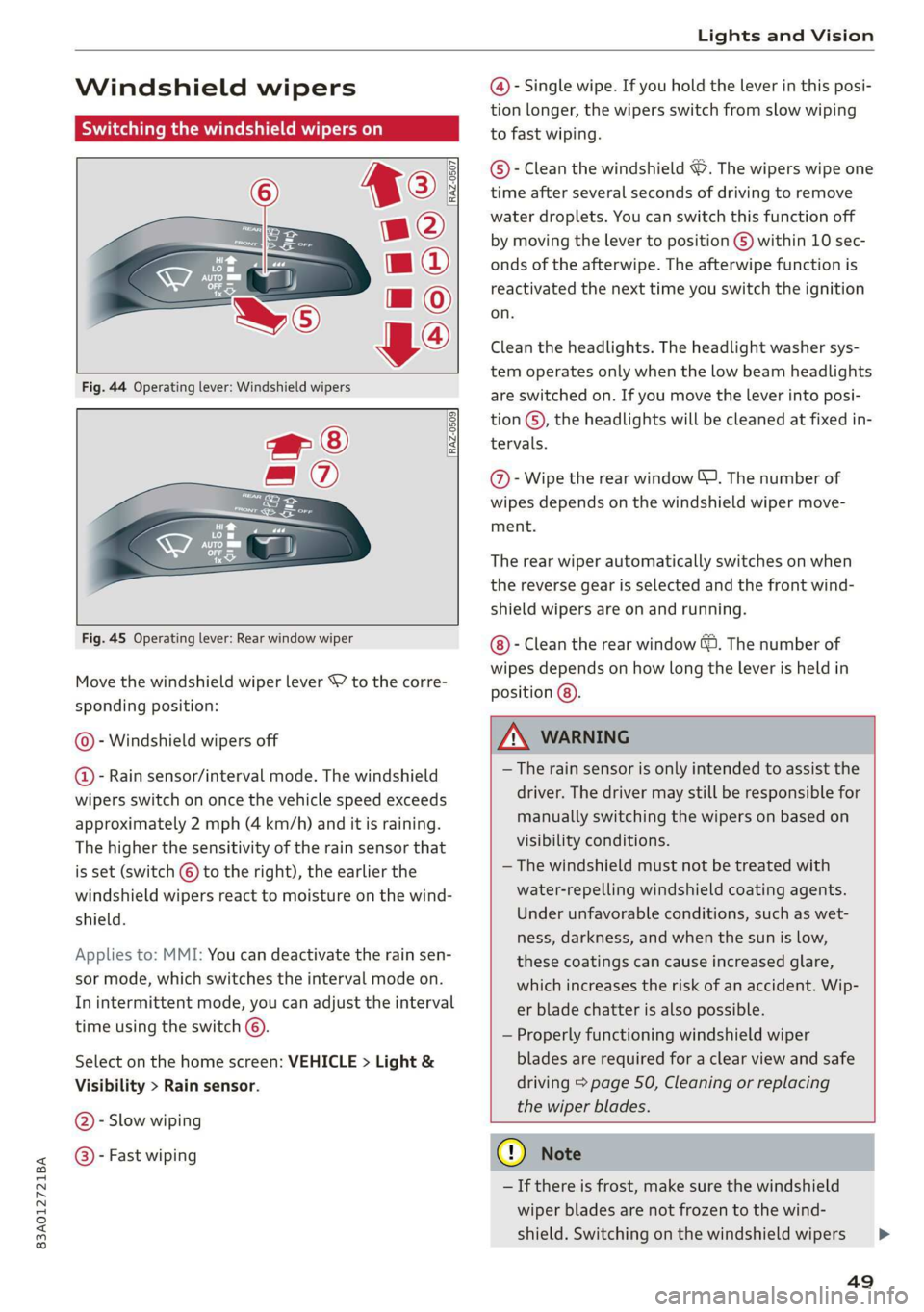
Fig. 44 Operating lever: Windshield wipers
wf ®
= ®
<— E
Ces
[RAZ-0509
Fig. 45 Operating lever: Rear window wiper
Move the windshield wiper lever S7 to the corre-
sponding position:
© - Windshield wipers off
@ - Rain sensor/interval mode. The windshield
wipers switch on once the vehicle speed exceeds
approximately 2 mph (4 km/h) and it is raining.
The higher the sensitivity of the rain sensor that
is set (switch © to the right), the earlier the
windshield wipers react to moisture on the wind-
shield.
Applies to: MMI: You can deactivate the rain sen-
sor mode, which switches the interval mode on.
In intermittent mode, you can adjust the interval
time using the switch ©.
Select on the home screen: VEHICLE > Light &
Visibility > Rain sensor.
@- Slow wiping
@®- Fast wiping
@- Single wipe. If you hold the lever in this posi-
tion longer, the wipers switch from slow wiping
to fast wiping.
©®- Clean the windshield ©. The wipers wipe one
time after several seconds of driving to remove
water droplets. You can switch this function off
by moving the lever to position ©) within 10 sec-
onds of the afterwipe. The afterwipe function is
reactivated the next time you switch the ignition
on.
Clean the headlights. The headlight washer sys-
tem operates only when the low beam headlights
are switched on. If you move the lever into posi-
tion ©, the headlights will be cleaned at fixed in-
tervals.
@- Wipe the rear window J. The number of
wipes depends on the windshield wiper move-
ment.
The rear wiper automatically switches on when
the reverse gear is selected and the front wind-
shield wipers are on and running.
- Clean the rear window &. The number of
wipes depends on how long the lever is held in
position (8).
Z\ WARNING
— The rain sensor is only intended to assist the
driver. The driver may still be responsible for
manually switching the wipers on based on
visibility conditions.
— The windshield must not be treated with
water-repelling windshield coating agents.
Under unfavorable conditions, such as wet-
ness, darkness, and when the sun is low,
these coatings can cause increased glare,
which increases the risk of an accident. Wip-
er blade chatter is also possible.
— Properly functioning windshield wiper
blades are required for a clear view and safe
driving > page 50, Cleaning or replacing
the wiper blades.
G) Note
— If there is frost, make sure the windshield
wiper blades are not frozen to the wind-
shield. Switching on the windshield wipers
49
>
Page 52 of 280
Lights and Vision
when the blades are frozen to the wind-
shield can damage the wiper blades.
— Prior to using a car wash, the windshield
wiper system must be switched off (lever in
position ©). This prevents the wipers from
switching on unintentionally and causing
damage to the windshield wiper system.
G) Tips
— The windshield wipers switch off when the
ignition is switched off. You can activate the
windshield wipers after the ignition is
switched on again by moving the windshield
wiper lever to any position.
— Worn or dirty windshield wiper blades result
in streaking. This can affect the rain sensor
function. Check your windshield wiper
blades regularly.
— The washer fluid nozzles for the windshield
washer system are heated when the ignition
is on if the outside temperature is low.
— When stopping temporarily, such as at a
traffic light, the speed of the windshield
wipers automatically reduces by one level.
(Goce cu hacker ae or replacing the wiper blades
B8V-0696|
Ae
the windshield wipers go back to the original
position, or drive faster than 8 mph (12 km/h).
Applies to: MMI: You can also turn the service po-
sition on or off in the center display:
> Switch the windshield wipers off (position ©
=> page 49, fig. 44).
> Select on the home screen: VEHICLE > Settings
& Service > Wiper position.
Cleaning the wiper blades
Before cleaning the wiper blades, they must be in
the service position.
> Fold the windshield wiper arm away from the
windshield.
> For information on cleaning, see > table on
page 237.
Replacing the wiper blades
Before removing the wiper blades, they must be
in the service position.
> Fold the windshield wiper arm away from the
windshield.
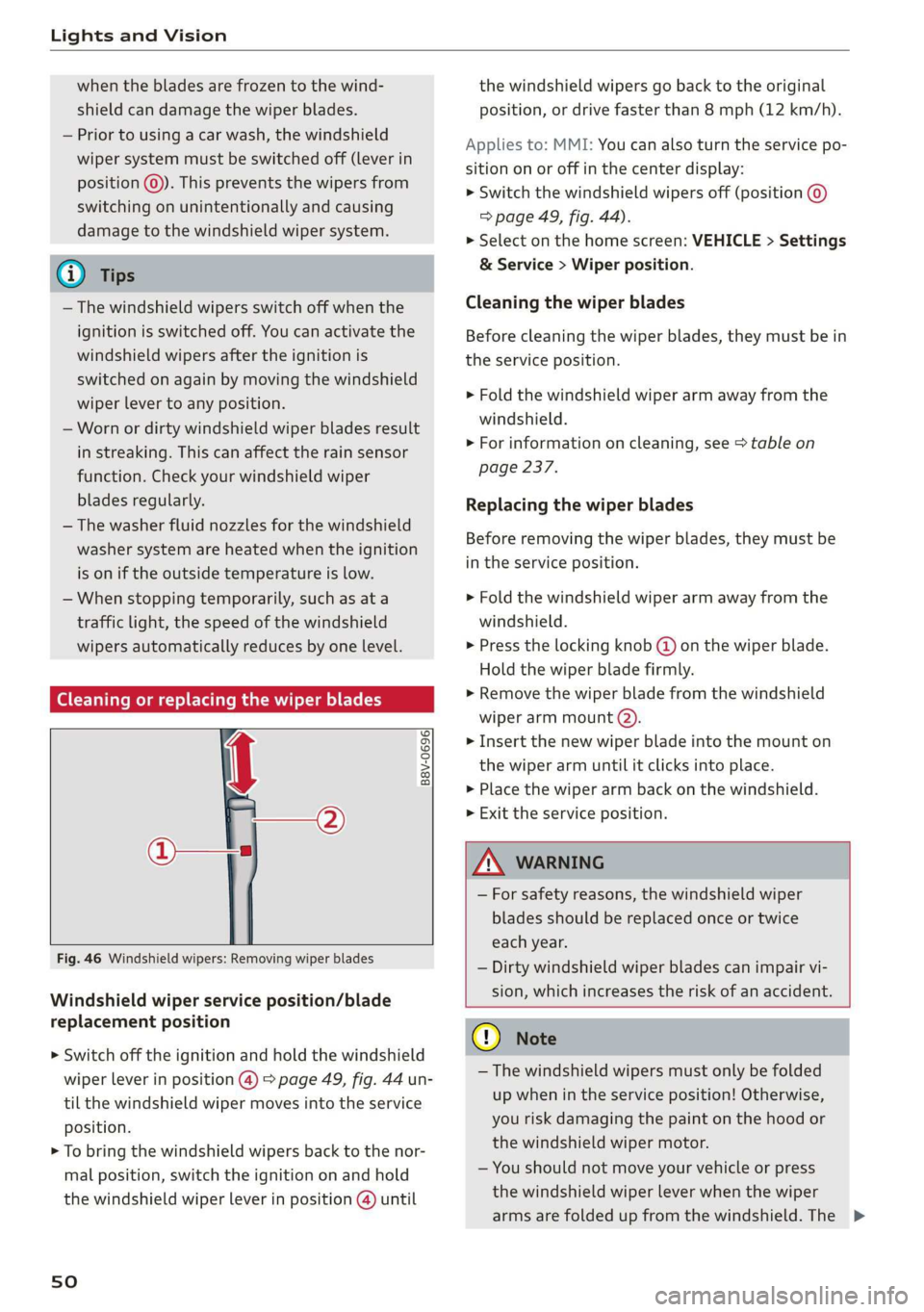
> Press the locking knob @) on the wiper blade.
Hold the wiper blade firmly.
» Remove the wiper blade from the windshield
wiper arm mount @).
> Insert the new wiper blade into the mount on
the wiper arm until it clicks into place.
> Place the wiper arm back on the windshield.
> Exit the service position.
Fig. 46 Windshield wipers: Removing wiper blades
Windshield wiper service position/blade
replacement position
> Switch off the ignition and hold the windshield
wiper lever in position @) > page 49, fig. 44 un-
til the windshield wiper moves into the service
position.
> To bring the windshield wipers back to the nor-
mal position, switch the ignition on and hold
the windshield wiper lever in position @) until
sO
ZA\ WARNING
— For safety reasons, the windshield wiper
blades should be replaced once or twice
each year.
— Dirty windshield wiper blades can impair vi-
sion, which increases the risk of an accident.
@) Note
— The windshield wipers must only be folded
up when in the service position! Otherwise,
you risk damaging the paint on the hood or
the windshield wiper motor.
— You should not move your vehicle or press
the windshield wiper lever when the wiper
arms are folded up from the windshield. The >
Page 53 of 280
83A012721BA
Lights and Vision
windshield wipers would move back into
their original position and could damage the
hood and windshield.
G) Tips
— You can also use the service position, for ex-
ample, if you want to protect the windshield
from icing by using a cover.
— You cannot activate the service position
when the hood is open.
Replacing the rear wiper blade
B8R-0380
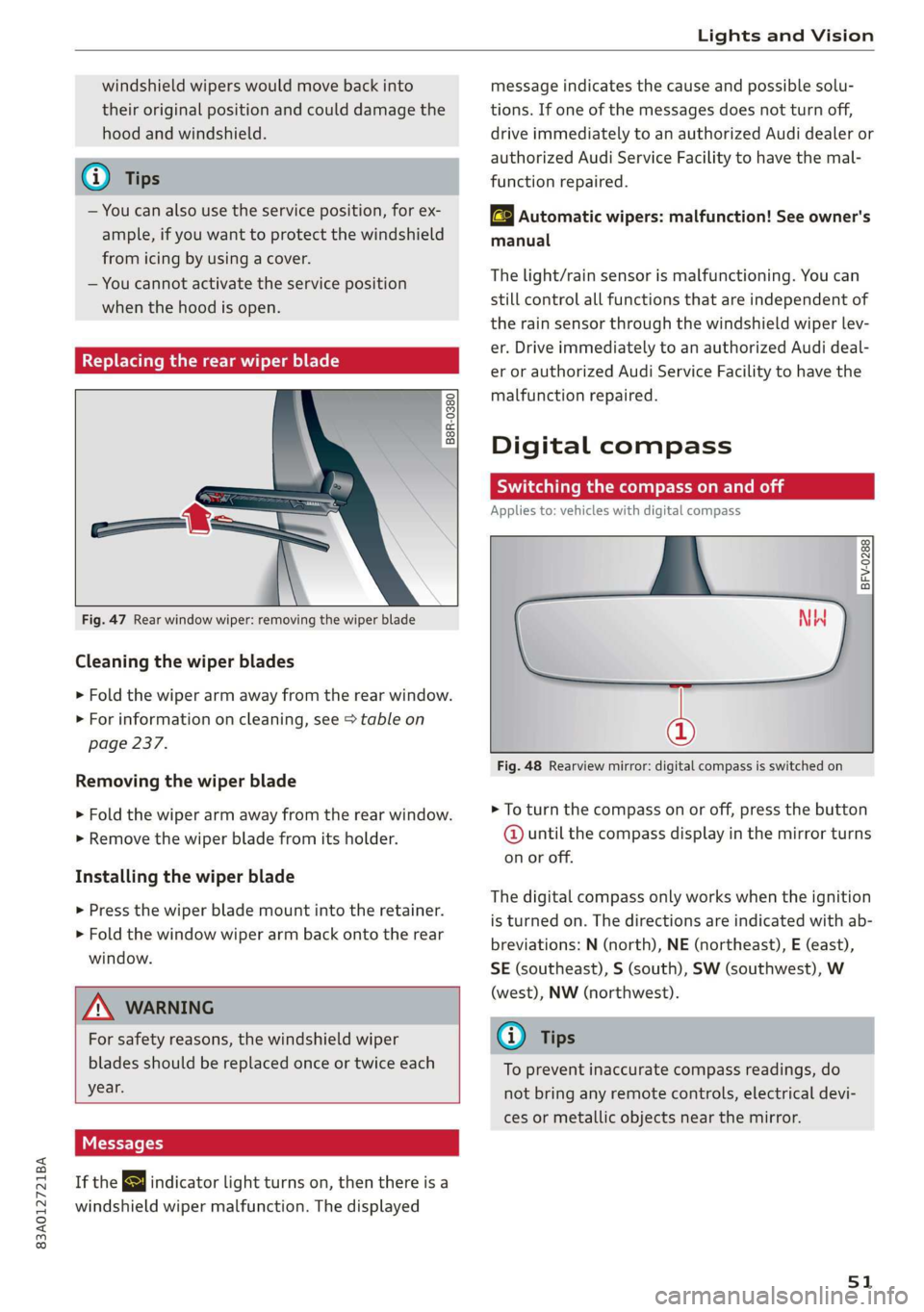
Fig. 47 Rear window wiper: removing the wiper blade
Cleaning the wiper blades
> Fold the wiper arm away from the rear window.
> For information on cleaning, see > table on
page 237.
Removing the wiper blade
> Fold the wiper arm away from the rear window.
> Remove the wiper blade from its holder.
Installing the wiper blade
> Press the wiper blade mount into the retainer.
> Fold the window wiper arm back onto the rear
window.
Z\ WARNING
For safety reasons, the windshield wiper
blades should be replaced once or twice each
year.
Messages
If the & indicator light turns on, then there is a
windshield wiper malfunction. The displayed
message indicates the cause and possible solu-
tions. If one of the messages does not turn off,
drive immediately to an authorized Audi dealer or
authorized Audi Service Facility to have the mal-
function repaired.
automatic wipers: malfunction! See owner's
manual
The light/rain sensor is malfunctioning. You can
still control all functions that are independent of
the rain sensor through the windshield wiper lev-
er. Drive immediately to an authorized Audi deal-
er or authorized Audi Service Facility to have the
malfunction repaired.
Digital compass
Switching the compass on and off
Applies to: vehicles with digital compass
BFV-0288
@
Fig. 48 Rearview mirror: digital compass is switched on
> To turn the compass on or off, press the button
@ until the compass display in the mirror turns
on or off.
The digital compass only works when the ignition
is turned on. The directions are indicated with ab-
breviations: N (north), NE (northeast), E (east),
SE (southeast), S (south), SW (southwest), W
(west), NW (northwest).
@) Tips
To prevent inaccurate compass readings, do
not bring any remote controls, electrical devi-
ces or metallic objects near the mirror.
51
Page 56 of 280
Sitting correctly and safely
— Your thighs are lightly supported by the front window, or on the seat surfaces. This also
surface of the seat applies to passengers in the rear seats.
— The backrest is in an upright position and your
back is resting against it C) Note
— You have a sufficient view of the area around Applies to: vehicles with manually adjustable head re-
the vehicle straints
— You have a clear view of the instrument cluster To reduce the risk of damage, be very careful
and indicator lights when adjusting the seat to make sure the
head restraints do not hit the headliner or the
JN WARNING panorama glass roof*.
— If you are too close to the steering wheel or
instrument panel, the airbag system cannot
provide the optimal protection, which in- Applies to vehicles with manual adjustable seats
creases the risk of injury and death.
— To reduce the risk of injury in the event of
sudden braking maneuvers or accidents,
never drive with the backrest reclined very
far. The airbag system and seat belts can on-
ly provide optimal protection when the back-
rest is in an upright position and the driver
is wearing the seat belt correctly. If the
backrest is angled back too far, the safety
belt can shift to soft areas of the body, such
as the stomach, which increases the risk of
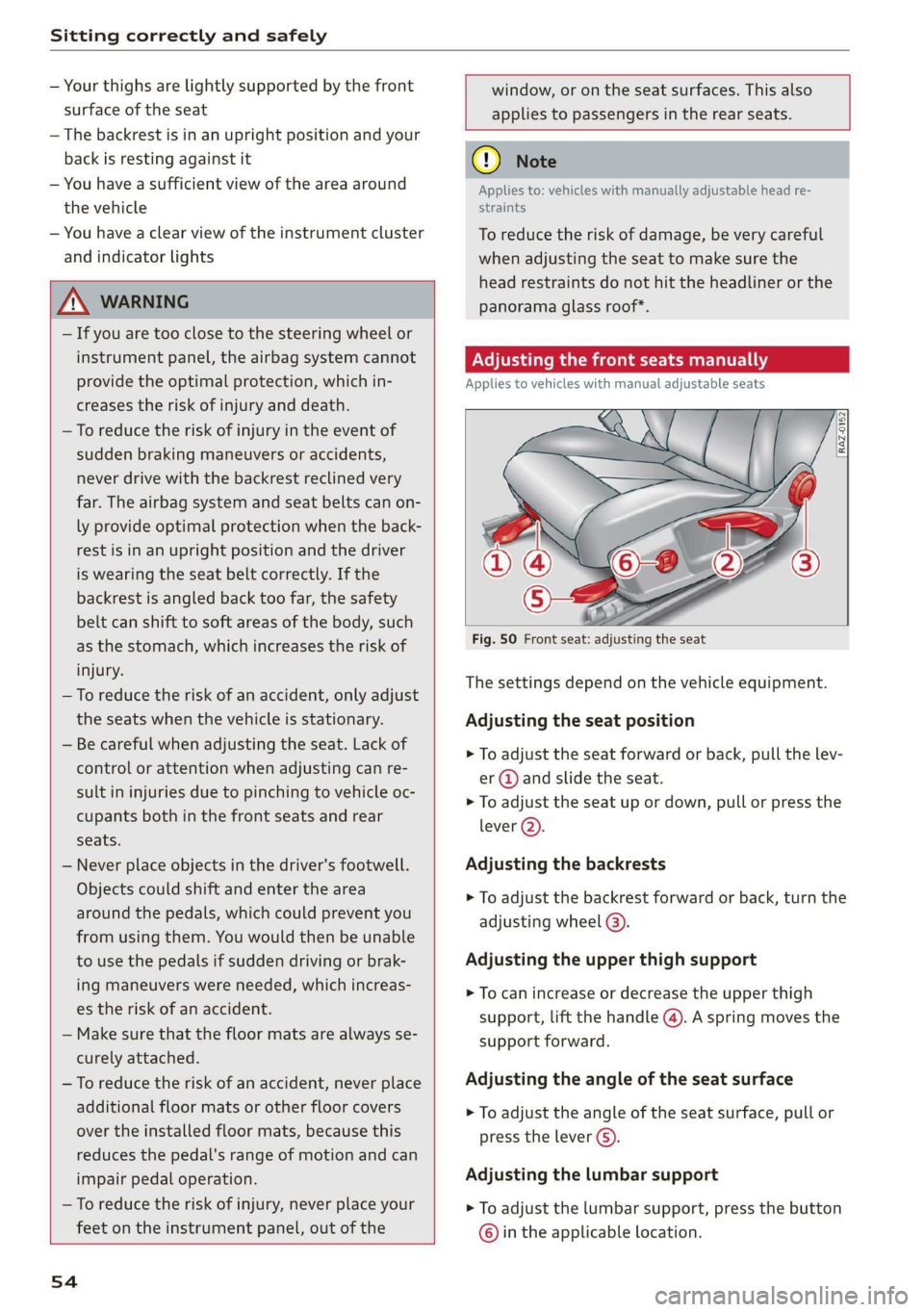
Fig. 50 Front seat: adjusting the seat
injury. . . .
The sett! d don the vehicl t.
—To reduce the risk of an accident, only adjust i
the seats when the vehicle is stationary. Adjusting the seat position
— Be careful when adjusting the seat. Lack of
control or attention when adjusting can re-
sult in injuries due to pinching to vehicle oc-
> To adjust the seat forward or back, pull the lev-
er @ and slide the seat.
> To adjust the seat up or down, pull or press the
cupants both in the front seats and rear \
ever (2).
seats.
— Never place objects in the driver's footwell. Adjusting the backrests
Objects could shift and enter the area
around the pedals, which could prevent you
from using them. You would then be unable
to use the pedals if sudden driving or brak- Adjusting the upper thigh support
ing maneuvers were needed, which increas-
es the risk of an accident.
— Make sure that the floor mats are always se-
> To adjust the backrest forward or back, turn the
adjusting
wheel @).
> To can increase or decrease the upper thigh
support, lift the handle @). A spring moves the
support forward.
curely attached.
—To reduce the risk of an accident, never place Adjusting the angle of the seat surface
additional floor mats or other floor covers > To adjust the angle of the seat surface, pull or
over the installed floor mats, because this press the lever G).
reduces the pedal's range of motion and can
impair pedal operation. Adjusting the lumbar support
— To reduce the risk of injury, never place your > To adjust the lumbar support, press the button
feet on the instrument panel, out of the © in the applicable location.
54
Page 62 of 280
Sitting correctly and safely
rice mTOR eee iti all
B4H-0462
B4H-0270
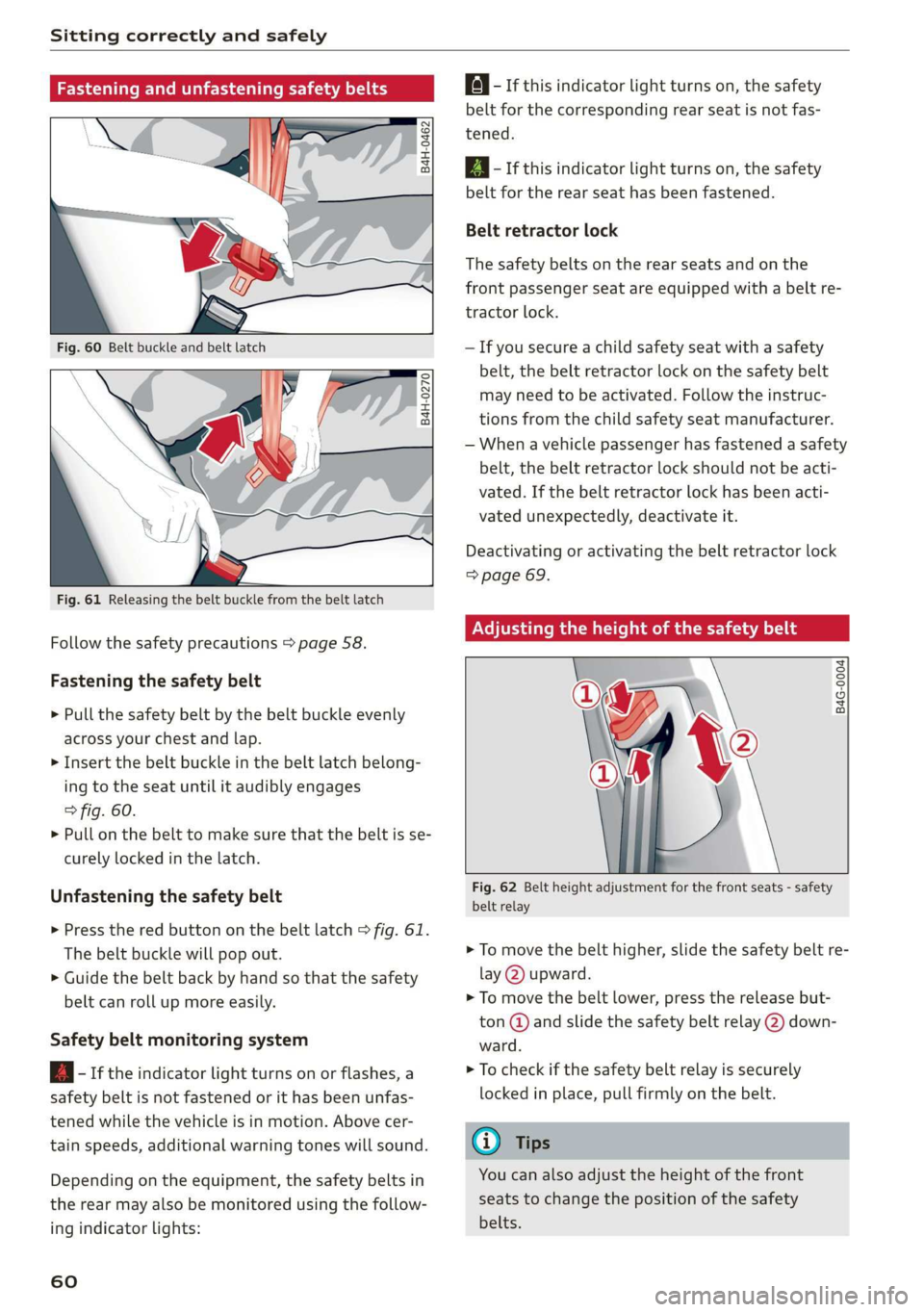
Fig. 61 Releasing the belt buckle from the belt latch
Follow the safety precautions > page 58.
Fastening the safety belt
> Pull the safety belt by the belt buckle evenly
across your chest and lap.
> Insert the belt buckle in the belt latch belong-
ing to the seat until it audibly engages
> fig. 60.
> Pull on the belt to make sure that the belt is se-
curely locked in the latch.
Unfastening the safety belt
> Press the red button on the belt latch > fig. 61.
The belt buckle will pop out.
> Guide the belt back by hand so that the safety
belt can roll up more easily.
Safety belt monitoring system
B - If the indicator light turns on or flashes, a
safety belt is not fastened or it has been unfas-
tened while the vehicle is in motion. Above cer-
tain speeds, additional warning tones will sound.
Depending on the equipment, the safety belts in
the rear may also be monitored using the follow-
ing indicator lights:
60
a} - If this indicator light turns on, the safety
belt for the corresponding rear seat is not fas-
tened.
EQ - If this indicator light turns on, the safety
belt for the rear seat has been fastened.
Belt retractor lock
The safety belts on the rear seats and on the
front passenger seat are equipped with a belt re-
tractor lock.
—If you secure a child safety seat with a safety
belt, the belt retractor lock on the safety belt
may need to be activated. Follow the instruc-
tions from the child safety seat manufacturer.
— When a vehicle passenger has fastened a safety
belt, the belt retractor lock should not be acti-
vated. If the belt retractor lock has been acti-
vated unexpectedly, deactivate it.
Deactivating or activating the belt retractor lock
=> page 69.
Adjusting the height of the safety belt
B4G-0004]
Fig. 62 Belt height adjustment for the front seats - safety
belt relay
> To move the belt higher, slide the safety belt re-
lay @ upward.
> To move the belt lower, press the release but-
ton @ and slide the safety belt relay (2) down-
ward.
> To check if the safety belt relay is securely
locked in place, pull firmly on the belt.
(i) Tips
You can also adjust the height of the front
seats to change the position of the safety
belts.
Page 96 of 280
Driving
If necessary, use the following functions:
— Audi drive select* offroad mode > page 96
— Hill descent assist* > page 94
— Limit ESC > page 99
Z\ WARNING
Only drive in terrain that is suitable for the ve-
hicle and your driving ability.
@ For the sake of the environment
Avoid actions that are damaging to the envi-
ronment. Show respect for the natural envi-
ronment and remain on marked routes.
@) Tips
Clean your vehicle after driving offroad. Dirt
and stones falling off your vehicle can affect
other road users.
Driving through water
If you must drive through water, follow these in-
structions:
— Check the stability of the ground, the current,
and the water depth. If the ground is unstable,
there is a strong current, or there are waves,
the water must only reach up to the lower edge
of the body at the most.
— Deactivate the Start/Stop system*.
— Drive carefully and no faster than at walking
speeds to prevent the front of the vehicle from
creating waves, because they could splash
above the lower edge of the body. Oncoming
vehicles could also create waves.
— Do not stop the vehicle while in the water.
— Drive in reverse.
— Do not turn the engine off.
ZA\ WARNING
After driving through water, press the brake
pedal carefully to dry the brakes so that the
full braking effect will be restored.
@) Note
Vehicle components such as the engine, drive
system, suspension, or electrical system, can
94
be severely damaged by driving through wa-
ter.
G) Tips
If possible, avoid driving through salt water
because it increases the risk of corrosion. Use
fresh water to clean any vehicle components
that come into contact with salt water.
Hill descent assist
Applies to: vehicles with hill hold assist
The “@ button is located above the selector lever
in the center console. It lights up when the sys-
tem is turned on.
Hill descent assist can assist you when driving
down hills by maintaining a constant vehicle
speed by automatically braking all four wheels.
You can adjust the speed using the accelerator
and brake pedals. The regulation depends on the
hill and the vehicle speed.
> Switching on: press “2.
> Switching off: press “2 again.
Active regulation
Regulation begins shortly after you start driving
and is possible at speeds up to approximately 19
mph (30 km/h) and on hills that have an approxi-
mately 10-60% grade. If these conditions are
met, regulation will be activated and the I indi-
cator light will turn on.
Ready mode
If one of the requirements for active regulation is
not met, the system will be in ready mode. The
indicator
light will turn on. Once the require-
ments are met again, the system will be able to
provide active regulation again.
Applies to: vehicles without Audi drive select: If
you exceed approximately 37 mph (60 km/h), the
system will switch off automatically.
Z\ WARNING
— Be ready to apply the brakes at all times
when using the hill hold assist.
— Always adjust the speed to the visibility,
weather, road, and traffic conditions. The >
Page 102 of 280
Driving dynamic
— To completely reactivate the ESC stabilization
function, press the button again. The indicator
light turns off.
Switching off ESC
—To switch off the ESC, press and hold the or
button for more than three seconds. The B
and Ea indicator lights turn on.
— To completely reactivate the ESC stabilization
function, press the button again. The indicator
lights turn off.
ZA WARNING
— When the ESC is switched off or limited,
there will be no vehicle stabilization or it will
be limited. The driving wheels could spin
and the vehicle could swerve, especially on
slick or slippery road surfaces, which in-
creases the risk of an accident.
— Because of the increased risk of an accident,
only drive with the ESC switched off or Limit-
ed when it is necessary. Reactivate the ESC
as soon as possible.
@ Tips
If malfunctions occur in other systems or cer-
tain driver assist systems are active, the ESC
must be switched on by the system. In these
cases, the ESC is automatically switched on
and cannot be limited or switched off with the
button.
I Ss / B & Stabilization control (ESC/
ABS): malfunction! See owner's manual
There is a malfunction in the ABS or EDL. This al-
so causes the ESC to malfunction. The brakes still
function with their normal power, but ABS is not
active.
Drive to an authorized Audi dealer or authorized
Audi Service Facility immediately to have the
malfunction corrected.
100
Page 106 of 280
Assist systems
Assist systems
General information
Safety precautions
ZA WARNING
— As the driver, you are always completely re-
sponsible for all driving tasks. The assist
systems cannot replace the driver's atten-
tion. Give your full attention to driving the
vehicle, and be ready to intervene in the
traffic situation at all times.
— Activate the assist systems only if the sur-
rounding conditions permit it. Always adapt
your driving style to the current visual,
weather, road, and traffic conditions.
— Loose objects can be thrown around the ve-
hicle interior during sudden driving or brak-
ing maneuvers, which increases the risk of
an accident. Store objects securely while
driving.
— For the assist systems to be able to react
correctly, the function of the sensors and
cameras must not be restricted. Note the in-
formation on sensors and cameras
=> page 105 or > page 106.
@ Tips
— Pay attention to applicable local regulations
relating to driving tasks, leaving space for
emergency vehicles, vehicle distance, speed,
parking location, wheel placement, etc. The
driver is always responsible for following
the laws that are applicable in the location
where the vehicle is being operated.
— You can cancel a steering or braking inter-
vention by the system, by braking or accel-
erating noticeably, steering, or deactivating
the respective assist system.
— Always check the assist systems settings be-
fore driving.
104
System limitations
ZA WARNING
— The use of an assist system cannot over-
come the natural laws of physics. A collision
cannot be prevented in certain circumstan-
ces.
— Warnings, messages, or indicator lights may
not be displayed or initiated on time or cor-
rectly, for example, if vehicles are approach-
ing very fast.
— Corrective interventions by the assist sys-
tems, such as steering or braking interven-
tions, may not be sufficient or they may not
occur. Always be ready to intervene.
G) Tips
— Due to the system limitations when detect-
ing the surrounding area, the systems may
warn or intervene unexpectedly or too late
in certain situations. The assist systems may
also interpret a driving maneuver incorrectly
and then warn the driver unexpectedly.
— The systems may not function as expected
in unusual driving situations, such as driving
offroad, on unpaved roads, on loose ground,
on inclines, or on grooves in the road.
— The systems may not function correctly in
unclear traffic situations, such as turning
lanes, exit ramps, construction zones, rises
or dips that obstruct visibility, intersections,
toll stations, or city traffic.
—In trailer mode, some assist systems may be
limited, may not react as usual, or may be
unavailable. Please refer to the instructions
for towing a trailer located in > page 101.
— If accessories have been mounted on the
steering wheel, the ability for the steering
systems to react may be limited.
Page 110 of 280
Driving information
Driving information
Speed warning system
Applies to: vehicles with speed warning system
The speed warning system helps the driver to
stay below a specified maximum speed. A warn-
ing threshold can be set for this purpose.
Once the speed slightly exceeds the stored
threshold, the speed warning system will alert
the driver with an indicator in the instrument
cluster and a warning tone. Once the speed drops
below the stored maximum speed, the indicator
will turn off.
Setting a threshold is recommended if you would
like to be reminded when you reach a certain
maximum speed. Situations where you may want
to do so include driving in a country with a gener-
al speed limit or if there is a specified maximum
speed for winter tires.
G) Tips
Regardless of the speed warning system, you
should always monitor your speed using the
speedometer and make sure you are following
the legal speed limit.
Setting the warning threshold
Applies to: vehicles with speed warning system
» Applies to: MMI: Select on the home screen:
VEHICLE > Driver assistance > Speed warning.
CEE Tel
Applies to: vehicles with speed warning system
cy Manually set XX speed limit warning
threshold exceeded
The stored speed was exceeded.
108
Traffic light information
Applies to: vehicles with traffic light information
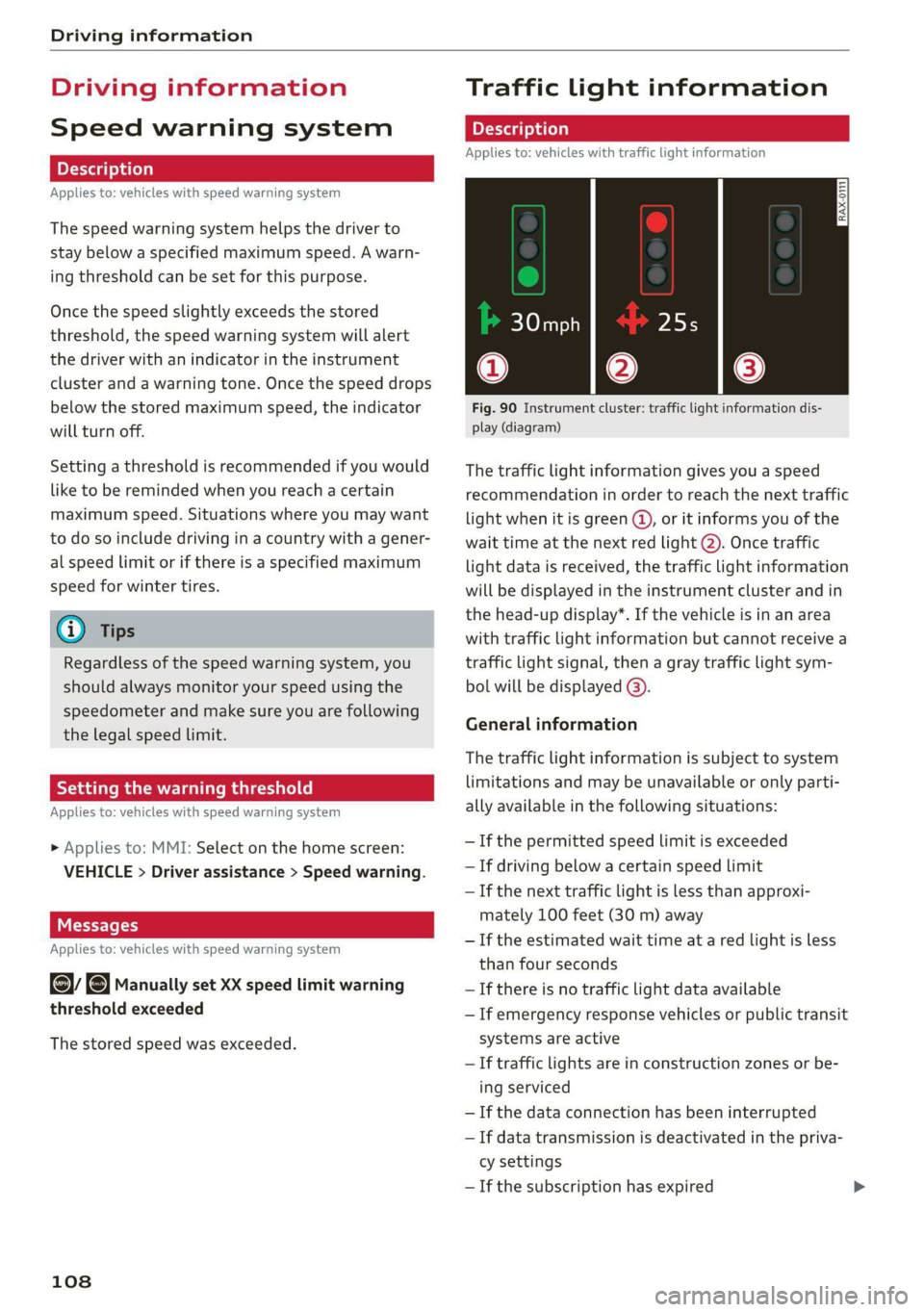
Fig. 90 Instrument cluster: traffic light information dis-
play (diagram)
The traffic light information gives you a speed
recommendation in order to reach the next traffic
light
when it is green ©, or it informs you of the
wait time at the next red light 2). Once traffic
light data is received, the traffic light information
will be displayed in the instrument cluster and in
the head-up display*. If the vehicle is in an area
with traffic light information but cannot receive a
traffic light signal, then a gray traffic light sym-
bol will be displayed @).
General information
The traffic light information is subject to system
limitations and may be unavailable or only parti-
ally available in the following situations:
— Ifthe permitted speed limit is exceeded
— If driving below a certain speed limit
—If the next traffic light is less than approxi-
mately 100 feet (30 m) away
—If the estimated wait time at a red light is less
than four seconds
—If there is no traffic light data available
— If emergency response vehicles or public transit
systems are active
— If traffic lights are in construction zones or be-
ing serviced
— If the data connection has been interrupted
— If data transmission is deactivated in the priva-
cy settings
— If the subscription has expired
Page 111 of 280
83A012721BA
Driving information
If this is the case, the menu item will be grayed-
out or it will not be possible to select it.
Z\ WARNING
— When traffic light information is shown, al-
so always pay attention to the traffic situa-
tion, the distance to other vehicles and the
area around the vehicle. The driver is always
responsible for assessing the traffic situa-
tion.
— Always adapt your speed to the current
weather, road and traffic conditions. The dis-
played information must never cause you to
ignore legal traffic regulations and pose a
safety risk.
— Regardless of the traffic light information,
you should always monitor your speed using
the speedometer and make sure you are ad-
hering to the legal speed limit.
— The traffic light information does not adjust
your vehicle's speed to the speed recom-
mendation shown in the display.
— Follow the safety precautions and note the
limits of the assist systems, sensors, and
cameras > page 104.
@) Tips
— Traffic light information was only available
in select cities at the time this manual was
printed.
— Traffic light information is not available na-
tionwide.
— These functions depend on how up-to-date
the navigation data’ is.
— Outdated map content in the navigation
system can cause information on the display
to be omitted or incorrect.
— Certain traffic lights can automatically ad-
just to the current traffic situation. If this
occurs, the display of traffic light informa-
tion can change suddenly.
— The traffic signs on the road always take pri-
ority over the display. The driver is always
responsible for adhering to the regulations
applicable in the country where the vehicle
is being operated.
— Units of measurement and language set-
tings are displayed based on how they were
set in the MMI system settings > page 195.
Applies to: vehicles with traffic light information
Switching traffic light information on and
off
The system and be switched on and off in the
MMI.
> Applies to: MMI: Select on the home screen:
VEHICLE > Driver assistance > Traffic light in-
formation.
Accessing traffic light information
> Select in the instrument cluster: Vehicle func-
tions tab > Traffic signs.
@) Tips
If another tab or another function is selected
in the instrument cluster, the traffic light in-
formation will appear in the status bar on the
instrument cluster.
WEE Te
Applies to: vehicles with traffic light information
Malfunction! See owner's manual
The system could not be configured, for example
due to a network malfunction. Switch the igni-
tion off and shut down the vehicle to restart the
system. Wait several minutes until the vehicle
has shut down completely and then switch the
ignition back on.
Function currently unavailable. See owner's
manual
There is a temporary system malfunction. Check
if one or more of the following situations applies
and correct the issue if necessary:
— Traffic light information is switched off
— Data transmission is deactivated
— There is no valid license
— Traffic light information is not available in that
area
109